

[转载]Struts迭代器(iterator)遍历List常用的4种例子 - 冯世杰 - 博客园

mikel阅读(1054)

[转载]Struts迭代器(iterator)遍历List常用的4种例子 – 冯世杰 – 博客园.

【摘要】本文主要介绍及演示了Struts迭代器(iterator)遍历List常用的4种例子,基于MyEclipse开发环境,重点关注前后端代码的实现,给出后端java代码、前段struts标签代码,主要有如下4个例子:

1. 遍历List<String>

2. 遍历List<List<String>>
3. 遍历UserEntity
4. 遍历List<UserEntity>

例子的详细代码请参考附件1,给出两个4个例子的运行截图(如下图1):
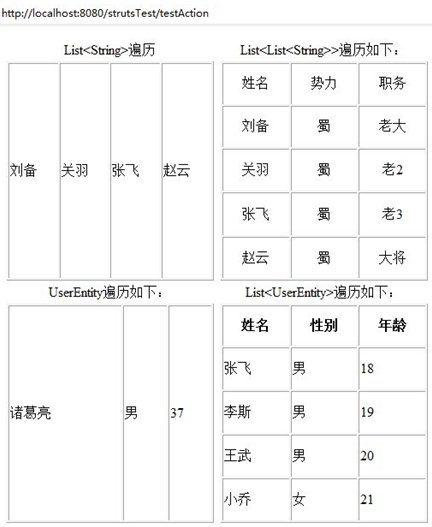
图1:遍历Listd的4个例子运行结果
图1:遍历Listd的4个例子运行结果
关键词:Struts标签,iterator迭代器,List<String>,List<List<String>>

1、遍历List<String>  

(1)后台TestAction.java 部分代码:

复制代码
1         // TODO 给list赋值
2         if (list==null) {
3             list=new ArrayList<String>();
4             list.add("刘备");
5             list.add("关羽");
6             list.add("张飞");
7             list.add("赵云");
8         }
复制代码

(2)前台jsp+s标签部分源代码:

复制代码
 1                     <%--List<String>遍历--%>
 2                     <table width="242" height="256" border="1" cellpadding="1"
 3                         cellspacing="1">
 4                         <caption>
 5                             List&ltString&gt遍历
 6                         </caption>
 7                         <tr>
 8                             <%--
 9                         说明:<s:iterator id="别名" value="后台List变量名">
10                               <s:if test="#别名!=null">
11                             --%>
12                             <s:iterator id="li" value="list">
13                                 <td>
14                                     <s:if test="#li!=null">
15                                         <s:property />
16                                     </s:if>
17                                 </td>
18                             </s:iterator>
19                         </tr>
20                     </table>
复制代码

注:遍历List<String>运行结果参考上图1(左上)

2、遍历List<List<String>>

(1)后台TestAction.java 部分代码:

复制代码
 1         // TODO 给listList赋值(二维列表List)
 2         if (listList==null) {
 3             listList=new ArrayList<List<String>>();
 4             List<String> li=new ArrayList<String>();
 5             li.add("姓名");
 6             li.add("势力");
 7             li.add("职务");
 8             listList.add(li);
 9             /*List为引用类型(以地址方式保存一维List对象),
10             添加不同List到二维列表需再实例化    */        
11             li=new ArrayList<String>();
12             li.add("刘备");
13             li.add("蜀");
14             li.add("老大");
15             listList.add(li);
16             li=new ArrayList<String>();
17             li.add("关羽");
18             li.add("蜀");
19             li.add("老2");
20             listList.add(li);
21             li=new ArrayList<String>();
22             li.add("张飞");
23             li.add("蜀");
24             li.add("老3");
25             listList.add(li);
26             li=new ArrayList<String>();
27             li.add("赵云");
28             li.add("蜀");
29             li.add("大将");
30             listList.add(li);
复制代码

(2)前台jsp+s标签部分源代码:

复制代码
 1     <%--List<List<String>>遍历--%>
 2                     <table width="242" height="256" border="1" cellpadding="1"
 3                         cellspacing="1">
 4                         <caption>
 5                             List&ltList&ltString&gt&gt遍历如下:
 6                         </caption>
 7                         <s:iterator value="#request.listList" status="st">
 8                             <tr>
 9                                 <s:iterator value="#request.listList.get(#st.index)">
10                                     <td valign="middle" align="center">
11                                         <s:property />
12                                     </td>
13                                 </s:iterator>
14                             </tr>
15                         </s:iterator>
16                     </table>
复制代码

注:遍历List<List<String>>运行结果参考上图1(右上)

3、遍历UserEntity

(1)后台TestAction.java 部分代码:

1 // TODO 给UserEntity赋值
2             if (userEntity==null) {
3                 userEntity=new UserEntity("诸葛亮","男",37);
4             }

(2)前台jsp+s标签部分源代码:

复制代码
 1                     <%--UserEntity遍历如下:--%>
 2                     <table width="242" height="256" border="1" cellpadding="1"
 3                         cellspacing="1">
 4                         <caption>
 5                             UserEntity遍历如下:
 6                         </caption>
 7                         <tr>
 8                             <%--<td><s:property value="#变量名.属性名" /></td>--%>
 9                             <td>
10                                 <s:property value="userEntity.name" />
11                             </td>
12                             <td>
13                                 <s:property value="userEntity.sex" />
14                             </td>
15                             <td>
16                                 <s:property value="userEntity.age" />
17                             </td>
18                         </tr>
19                     </table>
复制代码

注:遍历UserEntity运行结果参考上图1(左下)

4、遍历List<UserEntity>

(1)后台TestAction.java 部分代码:

复制代码
 1 // TODO 给List<UserEntity>赋值
 2     if (users==null) {
 3         users=new ArrayList<UserEntity> ();
 4         UserEntity user=new UserEntity("张飞","男",18);
 5         users.add(user);
 6         user=new UserEntity("李斯","男",19);
 7         users.add(user);
 8         user=new UserEntity("王武","男",20);
 9         users.add(user);
10         user=new UserEntity("小乔","女",21);
11         users.add(user);
12     }
复制代码

(2)前台jsp+s标签部分源代码:

复制代码
 1 <%-- List<UserEntity>遍历如下:--%>
 2                     <table width="242" height="256" border="1" cellpadding="1"
 3                         cellspacing="1">
 4                         <caption>
 5                             List&ltUserEntity&gt遍历如下:
 6                         </caption>
 7                         <tr>
 8                             <th>
 9                                 姓名
10                             </th>
11                             <th>
12                                 性别
13                             </th>
14                             <th>
15                                 年龄
16                             </th>
17                         </tr>
18                         <s:iterator id="u" value="users">
19                             <%--
20         <s:iterator  id="別名"  value="要遍历的集合">
21         users:对应后台Action类的List<UserEntity> users;
22         --%>
23                             <tr>
24                                 <%--<td><s:property value="#別名.实体类属性名" /></td>--%>
25                                 <td>
26                                     <s:property value="#u.name" />
27                                 </td>
28                                 <td>
29                                     <s:property value="#u.sex" />
30                                 </td>
31                                 <td>
32                                     <s:property value="#u.age" />
33                                 </td>
34                             </tr>
35                         </s:iterator>
36                     </table>
复制代码

注:遍历List<UserEntity>运行结果参考上图1(右下)

5、用法比较

(1)比较List<String>和UserEntity

它们遍历显示效果类似,但是细心的朋友会发现,它们主要有以下区别:
区别1:List<String>的遍历需要iterator迭代器如<s:iterator id=”别名” value=”后台List变量名”>,且不需要value属性直接用<s:property />获取列表元素;
区别2:UserEntity刚相反,不需要iterator迭代器,但需要value属性<s:property value=”#变量名.属性名” />来获取列表元素。

(2)比较List<List<String>>和List<UserEntity>

它们遍历显示效果也类似,它们也有以下区别:
  区别1:List<List<String>>由于列表没有属性需要借助迭代器的属性status=”st”,
如:

复制代码
<s:iterator value="#request.listList" status="st">
  <tr>
    <s:iterator value="#request.listList.get(#st.index)">
        <td valign="middle" align="center">
          <s:property />
        </td>
</s:iterator>
</tr>
</s:iterator>
复制代码

区别2:List<UserEntity>则简单多,借用迭代器iterator的id、value属性,再用<s:property value=”#別名.实体类属性名” />获取

  如:

复制代码
<s:iterator id="u" value="users">
   <tr>
       <td>
         <s:property value="#u.name" />
       </td>
       <td>
         <s:property value="#u.sex" />
       </td>
       <td>
         <s:property value="#u.age" />
       </td>
   </tr>
</s:iterator>
复制代码

  综合以上的对比分析:遍历方法各有长短,若不是多表联接查询、显示表格的列数已经固定一般用实体类(UserEntity)迭代的方式。相反,显示的数据表格行和列不确定,此时用实体类(UserEntity)迭代的方式很难实现,只能用List<String>或List<List<String>>实现了。

[转载]string中Insert与Format效率对比、String与List中Contains与IndexOf的效率对比 - alert(dong) - 博客园

mikel阅读(1031)

[转载]string中Insert与Format效率对比、String与List中Contains与IndexOf的效率对比 – alert(dong) – 博客园.


总结:

1.这点效率问题对于某些人来说可能无所谓,但是我觉得更重要的是编码习惯的养成问题。

2.能用Contains的地方还是尽量使用Contains(发现我改的代码中有不少同事直接用了”IndexOf(value)”),当然会有特殊的例外场景,这里不罗嗦。
3.关于Insert,我编写了两个扩展方法,如下(方法虽简单,但是给代码带来了更大的优雅性)

复制代码
        public static string InsertLast(this string source, string str)
        {
            return source.Insert(source.Length, str);
        }

        public static string InsertFirst(this string source, string str)
        {
            return source.Insert(0, str);
        }
复制代码


最后本人不是什么资深狼友,将不会提供任何福利图片作别,抱歉!!


分割线:我的个人原创,请认准 http://freedong.cnblogs.com/ (转摘不标原文出处可耻)

[转载]SQLSERVER用无中生有的思想来替代游标 - 桦仔 - 博客园

mikel阅读(1114)

[转载]SQLSERVER用无中生有的思想来替代游标 – 桦仔 – 博客园.

 
我这个SQL语句也需要拼接SQL来达到LZ想要的效果

不过这篇文章的重点不是拼接SQL


重点是怎麽模仿游标

其实这个方法是最原始的方法,之前解决论坛问题的时候用过,想不到这次也能用上

关键代码有以下几句

复制代码
 1 CREATE TABLE #ttt (ID INT IDENTITY(1,1), pay_cost INT )
 2 
 3 SELECT  IDENTITY( INT,1,1 ) AS ID, * INTO    #temptb FROM  t1
 4 
 5 --获取#t1表的总行数
 6 SELECT  @COUNT = COUNT(*) FROM    [#temptb]
 7 WHILE @i <= @COUNT 
 8 SELECT  @pay_level = [pay_level] FROM    [#temptb] WHERE   id = @i
 9 SET @i = @i + 1
10 ----------------------------------
11 SELECT  A.[client], A.[pay_level], B.[pay_cost]
12 FROM    [#temptb] AS A
13 INNER JOIN [#ttt] AS B ON A.[ID] = B.[ID]
14 ORDER BY A.[ID] ASC
复制代码


原表是没有自增id的,我建一个临时表#temptb,临时表有一个自增id,并把原表的数据全部放入临时表

获取临时表的行数,用于循环

每次执行的时候根据 WHERE   id = @i 来逐行逐行获取值,变量@i每次循环都递增1

将获取到的值都插入到#ttt这个临时表里面,然后根据ID的值做两表连接就可以得到LZ的结果

我说的无中生有就是“在原表里增加一个自增id方便循环,既简单又容易理解o(∩_∩)o ”


判断

我这里还用了一句

1 IF 'pay_lv_' + CAST(@pay_level AS VARCHAR(200)) IN ( SELECT   NAME FROM     SYS.[syscolumns] )

用于判断要获取值的pay_lv_列是否存在,如果存在就插入pay_lv_列的值,如果不存在就插入0


总结

其实如果觉得某样东西很难去实现,能不能用一个变通的方法呢?多动脑筋,办法会有的

[转载]web form中自定义HttpHandler仿mvc - ahl5esoft - 博客园

mikel阅读(904)

[转载]web form中自定义HttpHandler仿mvc – ahl5esoft – 博客园.

前言

  在mvc大行其道的今天,仍然有不少公司的项目还是使用web form来实现的(其实mvc也是基于web form的),如果要在项目中引入mvc,不得不新建一个mvc的项目,然后将当前项目的功能一点点的转移过去,实在是很麻烦的一件事情,而且项目的改造 周期也会加长,更别说一边改造一边添加新功能了,那么如果中间出现那么一点点的小差错,那么开发人员和测试人员估计想死的心都有了。

  基于以上的情景,我们可以通过自定义HttpHandler来仿造mvc的模式,大概的实现思路如下:

  1. 给页面提供一个PageBase<TModel>的类来继承,中间类似于mvc中存放Model的容器
  2. 通过类似/mvc/controller/action方式的url对于Controller内Action的调用(之前《C#实现简易ajax调用后台方法》这篇文章有简单介绍过)
  3. 不同的action返回不同的ActionResult(如文本、Json等)
  4. 将自定义的MvcHandler在web.config中进行配置并引用相关的库即可

实现

  首先我们需要自定义一个IHttpHandler来处理我们定义的mvc规则,并对其进行解析,其实原理就是上面提到的文章,只是Controller的Action会跟mvc的相似,返回ActionResult,代码大致如下:

publicabstractclassActionResult{publicabstractvoidExecuteResult(HttpContext context);}publicclassMvcHandler:IHttpHandler,IRequiresSessionState{publicconststring PREFIX ="/mvc/";//其他代码略publicvoidProcessRequest(HttpContext context){string path = context.Request.AppRelativeCurrentExecutionFilePath.Substring(PREFIX.Length);Int32 index = path.LastIndexOf("/");string route = path.Substring(0, index).ToLower();string actionName = path.Substring(index +1);//反射获取Controller和Actionvar controller =null;var action =null;var actionParamters = action.GetParameters();object[] parameters =Array.ConvertAll(actionParamters, p =>{if(p.ParameterType==typeof(HttpPostedFile)){return context.Request.Files[p.Name];}returnConvert.ChangeType(collection[key], type);});var result = action.Invoke(controller, parameters,null)asActionResult;if(result !=null)
            result.ExecuteResult(context);}  

  然后在web.config内的HttpHandlers内添 加<add path=”/mvc/*/*” type=”Infrastructure.MvcHandler” verb=”POST,GET”/>,规则可以任意定制,但是得注意url的格式,如果定义成了*/*/*那么多拦截到全部的请求,那么难度就增加 了。

  接下来是页面,与以往aspx页面不同的是,我们需要在页面上调用到相应的Model,那么对于PageBase<TModel>就需要一个可以get Model的属性,代码如下:

publicclassDynamicPageBase:Page{public T Model{protectedget;set;}}

  但是由于我们在页面内调用Model之前,是要对其赋值的,因此就需要一个接口,代码改造如下:

publicinterfaceIMvcPage{voidSetModel(object model);}publicclassDynamicPageBase:Page,IMvcPage{private T m_Model =default(T);protected T Model{get{return m_Model;}}publicvoidSetModel(object model){if(model !=null)
            m_Model =(T)model;}}

  在页面上,我们就可以使用<%=Model.XXX%>的方式来获取Model内的相关属性了,对于页面的改造大致已经完成了

  那么我们怎么样像mvc那样通过/controller/action的方式来返回html呢,使用过mvc的朋友应该知道,我们的view是要放在一些特定的位置下的,如相应的Controller文件夹内包含着相应的Action aspx页面或razor页面

  因此我们也可以在Web Form的目录下创建一个Views的文件夹,专门用来存放所有对应的Action页面,然后通过对url的解析来获取相应的页面,并将页面转化为html返回给客户端,ViewResult大致代码如下:

string html ="";try{string childPath = context.Request.AppRelativeCurrentExecutionFilePath.Replace(MvcHandler.PREFIX,string.Empty);string virtualPath =string.Format("~/Views/{0}.aspx", childPath);IMvcPage page =PageParser.GetCompiledPageInstance(virtualPath, context.Server.MapPath(virtualPath), context)asIMvcPage;if(page !=null)
        page.SetModel(m_model);using(StringWriter sw =newStringWriter()){
        context.Server.Execute(page, sw,false);
        html = sw.ToString();}}catch(Exception){
    html ="无法访问该视图";}
context.Response.Write(html);

  其他的ActionResult都是根据返回类型的不同而有不同的实现,我就不详细列举出来了。

扩展

  相信留意过老赵博客的朋友都看过《技巧:使用User Control做HTML生成》《方案改进:直接通过User Control生成HTML》这 两篇关于UserControl的文章,那么我们可以参考里面的实现来对页面也添加相似的功能,并整合两种方案,让你的ViewResult可以生成 aspx或ascx的html,我自己实现的规则是在页面不存在的情况下,则查找对应的UserControl是否存在,如果存在则返回 UserControl的html,不存在的话则返回以上的无法访问视图的提示,代码改造大致如下:

//MvcHandler内string pageVirtualPath ="页面虚拟路径";string controlVirtualPath ="用户控件虚拟路径";//aspxif(File.Exists(context.Server.MapPath(pageVirtualPath))){var page = manager.LoadPage(pageVirtualPath)asIMvcPage;if(page !=null)
        page.SetModel(m_model);
    html = manager.RenderView();}//ascxelseif(File.Exists(context.Server.MapPath(controlVirtualPath))){var control = manager.LoadControl(controlVirtualPath);
    html = manager.RenderView();}else{
    html ="无法访问该视图";}publicclassViewManager{//其他代码略publicPageLoadPage(string virtualPath){
        m_page =PageParser.GetCompiledPageInstance(virtualPath, m_context.Server.MapPath(virtualPath), m_context)asPage;
        s_cache.SetViewPropertyValue(m_page, m_context.Request);return m_page;}publicControlLoadControl(string virtualPath){
        m_page =newPage();
        m_control = m_page.LoadControl(virtualPath);
        m_page.Controls.Add(m_control);
        s_cache.SetViewPropertyValue(m_control, m_context.Request);return m_control;}}

  对于MvcHandler而言,我们可以将部分的可变参数抽离出去,然后额外的进行实现,那么仿mvc的代码就可以整理到一个dll中,可以让其他的项目重用了。

  然后就是可以在MvcHandler内再添加一些Filter的功能,抽离出过滤的接口,来对于一些请求的过滤,那么功能上就可以被进一步的扩展了。

结尾

  由于以往在 写文章的时候,都会提供详细的实现源码,但是后来发现这样并不能给其他人自己实现的机会,因此这次就不提供源码了,大部分重点的想法已经在文章中了,大家 可以尝试自己去实现,由于写的文章也不多,如果有阅读上的困难,请告诉我,我会发源码给各位,文章中如有任何错误和遗漏请大家指出,谢谢大家。

[转载]lucene-3.5.0 IKIKAnalyzer3.2.5Stable_bin 中文分词建立索引和检索 - 裴东辉 - 博客园

mikel阅读(1051)

[转载]lucene-3.5.0 IKIKAnalyzer3.2.5Stable_bin 中文分词建立索引和检索 – 裴东辉 – 博客园.

基本环境:

ext_stopword.dic和IKAnalyzer.cfg.xml放到classpath下面

引入jar包:IKAnalyzer3.2.5Stable.jar   lucene-core-3.5.0.jar

基本程序:

1、中文分词建立索引

package testlucene.index;
import java.io.File;
import org.apache.lucene.document.Document;
import org.apache.lucene.document.Field;
import org.apache.lucene.index.IndexWriter;
import org.apache.lucene.index.IndexWriterConfig;
import org.apache.lucene.store.FSDirectory;
import org.apache.lucene.util.Version;
import org.wltea.analyzer.lucene.IKAnalyzer;
import testlucene.util.FileUtil;
//import org.apache.lucene.search.IndexSearcher;
public class TxtFileIndexer {
public static void main(String args[]) throws Exception {
//索引位置
   File indexDir = new File(“E:/eclipse_research/fetchnews/ILucene-3.5.0/src/lucenesource/index”);
   //数据位置
   File dataDir  = new File(“E:/eclipse_research/fetchnews/ILucene-3.5.0/src/lucenesource/data”);
   //使用IKAnalyzer中文分词工具
IndexWriterConfig iwc = new IndexWriterConfig(Version.LUCENE_35,new IKAnalyzer());
FSDirectory directory = FSDirectory.open(indexDir);
IndexWriter indexWriter = new IndexWriter(directory, iwc);
        //接着程序遍历了目录下面的所有文本文档,并为每一个文本文档创建了一个 Document 对象。
        //然后把文本文档的两个属性:路径和内容加入到了两个 Field 对象中,接着在把这两个 Field 对象加入到 Document 对象中
        //最后把这个文档用 IndexWriter 类的 add 方法加入到索引中去。
        //这样我们便完成了索引的创建。接下来我们进入在建立好的索引上进行搜索的部分。
   File[] dataFiles  = dataDir.listFiles();
   String name=””,path=””,content=””;
for(File file:dataFiles){
if(file.isFile() && file.getName().endsWith(“.txt”)){
System.out.println(“Indexing file ” + file.getCanonicalPath());
 
/*Step 1. Prepare the data for indexing. Extract the data. */
name =file.getName();
               path=file.getCanonicalPath();

content=FileUtil.parsefiletostring(file);

 
                /*Step 2. Wrap the data in the Fields and add them to a Document */

Document doc = new Document();doc.add(new Field(“name”,name,Field.Store.YES,Field.Index.NOT_ANALYZED));doc.add(new Field(“path”,path,Field.Store.YES,Field.Index.NOT_ANALYZED));doc.add(new Field(“content”,content,Field.Store.NO,Field.Index.ANALYZED));

 
                /*Step 3: Add this document to Lucene Index.*/

indexWriter.addDocument(doc);

}
}
indexWriter.close();
}
}

 2、中文分词 搜索

package testlucene.search;

import java.io.File;
import org.apache.lucene.document.Document;
import org.apache.lucene.index.IndexReader;
import org.apache.lucene.search.IndexSearcher;
import org.apache.lucene.search.Query;
import org.apache.lucene.search.ScoreDoc;
import org.apache.lucene.search.TopDocs;
import org.apache.lucene.store.FSDirectory;
import org.wltea.analyzer.lucene.IKQueryParser;
import org.wltea.analyzer.lucene.IKSimilarity;
@SuppressWarnings(“resource”)
public class TxtFileSearcher {
public static void main(String[] args) {
try{
//index索引位置生成Reader流
   File indexDir = new File(“E:/eclipse_research/fetchnews/ILucene-3.5.0/src/lucenesource/index”);
   FSDirectory directory = FSDirectory.open(indexDir);
IndexReader reader = IndexReader.open(directory);
//创建Searcher
IndexSearcher indexSearcher = new IndexSearcher(reader);
indexSearcher.setSimilarity(new IKSimilarity());
//查询关键词
String keyWords = “是一个开放源代码的全文检索引擎工具包 “;
//IKAnalyzer中文分词生成查询
Query query = IKQueryParser.parse(“content”, keyWords);
TopDocs topDocs = indexSearcher.search(query, Integer.MAX_VALUE);
System.out.println(topDocs.totalHits);
//对获取到的文档进行解析输出
       ScoreDoc[] scoreDosArray = topDocs.scoreDocs;
       for(ScoreDoc scoredoc: scoreDosArray){
         Document doc = indexSearcher.doc(scoredoc.doc);
         System.out.println(“name: “+doc.getFieldable(“name”).stringValue());
         System.out.println(“path: “+doc.getFieldable(“path”).stringValue());
       }
}catch(Exception e){
e.printStackTrace();
}
}
}

3、工具类

package testlucene.util;

import java.io.BufferedReader;
import java.io.File;
import java.io.FileReader;
import java.io.IOException;
public class FileUtil {
/**
* parse the file to string
* @param file
* @return
*/
public static String parsefiletostring(File file) {
String strresult=””,tmp=””;
BufferedReader br=null;
try{
br=new BufferedReader(new FileReader(file));
while((tmp=br.readLine())!=null){
strresult+=tmp;
}
}catch(Exception e){
e.printStackTrace();
}finally{
if(null!=br){
try {br.close();} catch (IOException e) {e.printStackTrace();}
}
}
System.out.println(strresult);
return strresult;
}
}


[转载]jQuery LigerUI V1.2.2 (包括API和全部源码) 发布 - 谢略 - 博客园

mikel阅读(1159)

[转载]jQuery LigerUI V1.2.2 (包括API和全部源码) 发布 – 谢略 – 博客园.

前言

这次版本主要对树进行了加载性能上面的优化,并解决了部分兼容性的问题,添加了几个功能点。

欢迎使用反馈。

相关链接

API:         http://api.ligerui.com/

演示地址:  http://demo.ligerui.com/

源码下载:  http://git.oschina.net/ligerui/LigerUI/ (源码托管)

      http://pan.baidu.com/share/link?shareid=206890659&uk=2318736180 (V1.2.2)

技术支持: http://www.cnblogs.com/leoxie2011/

更新记录

[需求]优化了加载数据的能力
[需求]增加isExpand(支持灵活地控制展开/收缩状态)
[需求]增加delay(支持延迟加载数据)

表格

[需求]对表格分页条数增加缓存处理
[需求]增加参数toolbarShowInLeft(控制工具条显示在左边还是右边)

表单

[需求]验证部分增加对旧版本的兼容处理

工具条

增加方法removeItem、setEnabled、setDisabled、isEnable

Tab

ListBox

V1.2.1更新记录

核心

[需求]表单、表格编辑器的统一化处理

[BUG]支持JQuery高版本

[BUG]改善layout、dialog在ie下的拖拽操作体验

表单

[需求]表单内置验证支持

[需求]相关表单元素增加参数valueFieldCssClass(隐藏域css样式)

[需求]相关表单元素参数parms支持运行时动态获取

[需求]下拉框组件增加参数alwayShowInTop,增加方法reload、getSelected

[需求]listBox组件增加selectAll方法

[需求]popupEdit增加parms参数

[需求]文本框数值类型默认右对齐

[需求] 表单增加getData setData方法

表格

[需求]优化表格工具条的显示位置,并增加工具条标题的支持

[需求]表格树支持线性数据结构

[需求]表格 列支持auto

[BUG]修复grid不能确定取得更新数据的错误

[BUG]修复grid编辑器位置在显示标题出现错位的情况

[BUG]修改grid排序事件没有起效的问题

[需求]tree增加ajaxType、render(自定义html)、selectable(可选择判断函数)参数

[转载]基于MongoDB打造.Net的分布式Session子系统 - Aaron Dai - 博客园

mikel阅读(943)

[转载]基于MongoDB打造.Net的分布式Session子系统 – Aaron Dai – 博客园.

Taobao有她自己的分布式session框架,.net阵营也不能落后了,在下做了个基于MongoDB的支持最多26台MongoDB的分布式Session框架。

先看看配置文件:

复制代码
<?xml version="1.0" encoding="utf-8" ?>
<MongoDBSession>
  <DbName>SessionDB</DbName>
  <IdentityMap Identity="A">mongodb://localhost</IdentityMap>
  <IdentityMap Identity="B">mongodb://localhost</IdentityMap>
  <IdentityMap Identity="C">mongodb://localhost</IdentityMap>
  <IdentityMap Identity="D">mongodb://localhost</IdentityMap>
  <IdentityMap Identity="E">mongodb://localhost</IdentityMap>
  <IdentityMap Identity="F">mongodb://localhost</IdentityMap>
  <IdentityMap Identity="G">mongodb://localhost</IdentityMap>
  <IdentityMap Identity="H">mongodb://localhost</IdentityMap>
  <IdentityMap Identity="I">mongodb://localhost</IdentityMap>
  <IdentityMap Identity="J">mongodb://localhost</IdentityMap>
  <IdentityMap Identity="K">mongodb://localhost</IdentityMap>
  <IdentityMap Identity="L">mongodb://localhost</IdentityMap>
  <IdentityMap Identity="M">mongodb://localhost</IdentityMap>
  <IdentityMap Identity="N">mongodb://localhost</IdentityMap>
  <IdentityMap Identity="O">mongodb://localhost</IdentityMap>
  <IdentityMap Identity="P">mongodb://localhost</IdentityMap>
  <IdentityMap Identity="Q">mongodb://localhost</IdentityMap>
  <IdentityMap Identity="R">mongodb://localhost</IdentityMap>
  <IdentityMap Identity="S">mongodb://localhost</IdentityMap>
  <IdentityMap Identity="T">mongodb://localhost</IdentityMap>
  <IdentityMap Identity="U">mongodb://localhost</IdentityMap>
  <IdentityMap Identity="V">mongodb://localhost</IdentityMap>
  <IdentityMap Identity="W">mongodb://localhost</IdentityMap>
  <IdentityMap Identity="X">mongodb://localhost</IdentityMap>
  <IdentityMap Identity="Y">mongodb://localhost</IdentityMap>
  <IdentityMap Identity="Z">mongodb://localhost</IdentityMap>
</MongoDBSession>
复制代码

从Identity A一直到Z,默认分成了26个Map,具体的C#应用代码:

复制代码
protected void btnTest_Click(object sender, EventArgs e)
        {
            Session["A"] = DateTime.Now;
            Session["B"] = 1111111111111;
            Session["C"] = "fffffffffffffff";
        }

        protected void btnGetSession_Click(object sender, EventArgs e)
        {
            Response.Write(Session["A"].ToString());
            Response.Write("<br />");
            Response.Write(Session["B"].ToString());
            Response.Write("<br />");
            Response.Write(Session["C"].ToString());
        }
        protected void btnAbandon_Click(object sender, EventArgs e)
        {
            Session.Abandon();
        }
复制代码

呵呵,就是普通的Session用法。

这个要配置web.config:

复制代码
<system.web>
    <sessionState mode="Custom" customProvider="A2DSessionProvider" sessionIDManagerType="A2DFramework.SessionService.MongoDBSessionIDManager">
      <providers>
        <add name="A2DSessionProvider" type="A2DFramework.SessionService.MongoDBSessionStateStore"/>
      </providers>
    </sessionState>
  </system.web>
复制代码

这里会牵扯出2个类:

  1. A2DFramework.SessionService.MongoDBSessionIDManager
  2. A2DFramework.SessionService.MongoDBSessionStateStore

MongoDBSessionIDManager

  • 自定义生成的cookie值(也就是SessionID),在这个sample中,会生成如“E.asadfalkasdfjal”这样的SessionID,其中前缀E代表这个Session的信息会映射到哪台MongoDB上。
  • 关键代码
  • 复制代码
    public class MongoDBSessionIDManager : SessionIDManager
        {
            private Random rnd = new Random();
            private object oLock = new object();
    
            public override string CreateSessionID(System.Web.HttpContext context)
            {
                int index = 0;
                lock(this.oLock)
                {
                    index = rnd.Next(SessionConfiguration.SessionServerIdentities.Length);
                }
                string sessionId = string.Format("{0}.{1}", SessionConfiguration.SessionServerIdentities[index], base.CreateSessionID(context));
                return sessionId;
            }
    
            public override string Encode(string id)
            {
                return DESEncryptor.Encode(id, SessionConfiguration.DESKey);
            }
            public override string Decode(string id)
            {
                return DESEncryptor.Decode(id, SessionConfiguration.DESKey);
            }
    
            public override bool Validate(string id)
            {
                string prefix;
                string realId;
    
                if (!Helper.ParseSessionID(id, out prefix, out realId))
                    return false;
    
                return base.Validate(realId);
            }
        }
    复制代码


MongoDBSessionStateStore

  • 自定义Session过程中最核心的一个类,代码如下(较多):
  • 复制代码
    public sealed class MongoDBSessionStateStore : SessionStateStoreProviderBase
        {
            private SessionStateSection pConfig;
            private string pApplicationName;
    
            public override void Initialize(string name, System.Collections.Specialized.NameValueCollection config)
            {
                base.Initialize(name, config);
    
                pApplicationName =System.Web.Hosting.HostingEnvironment.ApplicationVirtualPath;
                System.Configuration.Configuration cfg = WebConfigurationManager.OpenWebConfiguration(pApplicationName);
                pConfig =(SessionStateSection)cfg.GetSection("system.web/sessionState");
            }
    
            public override SessionStateStoreData CreateNewStoreData(System.Web.HttpContext context, int timeout)
            {
                return new SessionStateStoreData(new SessionStateItemCollection(), SessionStateUtility.GetSessionStaticObjects(context), timeout);
            }
    
            public override void CreateUninitializedItem(System.Web.HttpContext context, string id, int timeout)
            {
                //insert to db
                MongoDBSessionEntity session = new MongoDBSessionEntity();
                session.ApplicationName = this.pApplicationName;
                session.SessionId = id;
                session.Created = DateTime.Now;
                session.Expires = DateTime.Now.AddMinutes(pConfig.Timeout.Minutes);
                session.LockDate = DateTime.Now;
                session.LockId = 0;
                session.Timeout = timeout;
                session.Locked = false;
                session.Flags = (int)SessionStateActions.InitializeItem;
    
                MongoCollection<MongoDBSessionEntity> collection = Helper.GetMongoDBCollection(id);
                collection.Save(session);
            }
    
            public override void Dispose()
            {
            }
    
            public override void EndRequest(System.Web.HttpContext context)
            {
            }
    
            public override SessionStateStoreData GetItem(System.Web.HttpContext context, string id, out bool locked, out TimeSpan lockAge, out object lockId, out SessionStateActions actions)
            {
                return GetSessionStoreItem(false, context, id, out locked, out lockAge, out lockId, out actions);
            }
    
            public override SessionStateStoreData GetItemExclusive(System.Web.HttpContext context, string id, out bool locked, out TimeSpan lockAge, out object lockId, out SessionStateActions actions)
            {
                return GetSessionStoreItem(true, context, id, out locked, out lockAge, out lockId, out actions);
            }
    
            public override void InitializeRequest(System.Web.HttpContext context)
            {
            }
    
            public override void ReleaseItemExclusive(System.Web.HttpContext context, string id, object lockId)
            {
                //update locked=0, expired=, where lockId=?
                MongoCollection<MongoDBSessionEntity> collection = Helper.GetMongoDBCollection(id);
    
                var query = Query.And(  Query.EQ("LockId", int.Parse(lockId.ToString())),
                                        Query.EQ("_id", id), 
                                        Query.EQ("ApplicationName", pApplicationName));
                var update = Update.Set("Locked", false)
                                    .Set("Expires", DateTime.Now.AddMinutes(pConfig.Timeout.Minutes));
    
                collection.Update(query, update);
            }
    
            public override void RemoveItem(System.Web.HttpContext context, string id, object lockId, SessionStateStoreData item)
            {
                //delete where sessionId=? and lockId=? and applicationname=?
                MongoCollection<MongoDBSessionEntity> collection = Helper.GetMongoDBCollection(id);
    
                var query = Query.And(Query.EQ("LockId", int.Parse(lockId.ToString())),
                                        Query.EQ("_id", id),
                                        Query.EQ("ApplicationName", pApplicationName));
                collection.Remove(query);
            }
    
            public override void ResetItemTimeout(System.Web.HttpContext context, string id)
            {
                //update expire date
                MongoCollection<MongoDBSessionEntity> collection = Helper.GetMongoDBCollection(id);
    
                var query = Query.And(Query.EQ("_id", id),
                                        Query.EQ("ApplicationName", pApplicationName));
                var update = Update.Set("Expires", DateTime.Now.AddMinutes(pConfig.Timeout.Minutes));
                collection.Update(query, update);
            }
    
            public override void SetAndReleaseItemExclusive(System.Web.HttpContext context, string id, SessionStateStoreData item, object lockId, bool newItem)
            {
                MongoCollection<MongoDBSessionEntity> collection = Helper.GetMongoDBCollection(id);
                if (newItem)
                {
                    //delete expired items
                    var query = Query.And(Query.EQ("_id", id),
                                        Query.EQ("ApplicationName", pApplicationName),
                                        Query.LT("Expires", DateTime.Now));
    
                    collection.Remove(query);
    
                    //insert new item
                    MongoDBSessionEntity session = new MongoDBSessionEntity();
                    session.ApplicationName = this.pApplicationName;
                    session.SessionId = id;
                    session.Created = DateTime.Now;
                    session.Expires = DateTime.Now.AddMinutes(pConfig.Timeout.Minutes);
                    session.LockDate = DateTime.Now;
                    session.LockId = 0;
                    session.Timeout = item.Timeout;
                    session.Locked = false;
                    session.Flags = (int)SessionStateActions.None;
                    session.SessionItems = Helper.Serialize((SessionStateItemCollection)item.Items);
    
                    collection.Save(session);
                }
                else
                {
                    //update item
                    var query = Query.And(Query.EQ("_id", id),
                                        Query.EQ("ApplicationName", pApplicationName),
                                        Query.EQ("LockId", int.Parse(lockId.ToString())));
                    MongoDBSessionEntity entity= collection.FindOne(query);
                    entity.Expires = DateTime.Now.AddMinutes(item.Timeout);
                    entity.SessionItems = Helper.Serialize((SessionStateItemCollection)item.Items);
                    entity.Locked = false;
                    collection.Save(entity);
                }
            }
    
            public override bool SetItemExpireCallback(SessionStateItemExpireCallback expireCallback)
            {
                return false;
            }
    
            private SessionStateStoreData GetSessionStoreItem(bool lockRecord, System.Web.HttpContext context, 
                                                                string id,
                                                                out bool locked,
                                                                out TimeSpan lockAge,
                                                                out object lockId,
                                                                out SessionStateActions actions)
            {
                SessionStateStoreData item = null;  
                lockAge = TimeSpan.Zero;
                lockId = null;
                locked = false;
                actions = 0;
    
                bool foundRecord = false;
                bool deleteData = false;
    
                MongoCollection<MongoDBSessionEntity> collection = Helper.GetMongoDBCollection(id);
    
                if (lockRecord)
                { 
                    //update db, set locked=1, lockdate=now
                    var query1 = Query.And(Query.EQ("_id", id),
                                        Query.EQ("ApplicationName", pApplicationName),
                                        Query.EQ("Locked", MongoDB.Bson.BsonValue.Create(false)),
                                        Query.GT("Expires", DateTime.UtcNow));
    
                    long count = collection.Find(query1).Count();
                    if (count == 0)
                    {
                        locked = true;
                    }
                    else
                    {
                        var update = Update.Set("Locked", true).Set("LockDate", DateTime.Now);
                        collection.Update(query1, update);
                        locked = false;
                    }
                }
                //get item by id
                var query2 = Query.And(Query.EQ("_id", id),
                                        Query.EQ("ApplicationName", pApplicationName));
                MongoDBSessionEntity entity=collection.FindOne(query2);
                if (entity != null)
                {
                    if (entity.Expires < DateTime.Now)
                    {
                        locked = false;
                        deleteData = true;
                    }
                    else
                    {
                        foundRecord = true;
                    }
                }
    
                //delete item if session expired
                if (deleteData)
                {
                    var query3 = Query.And(Query.EQ("_id", id),
                                        Query.EQ("ApplicationName", pApplicationName));
                    collection.Remove(query3);
                }
    
                if (!foundRecord)
                    locked = false;
    
                if (foundRecord && !locked)
                {
                    if (lockId == null)
                        lockId = 0;
                    lockId = (int)lockId + 1;
    
                    var query4 = Query.And(Query.EQ("_id", id),
                                        Query.EQ("ApplicationName", pApplicationName));
                    var update4 = Update.Set("LockId", (int)lockId)
                                            .Set("Flags", (int)SessionStateActions.None);
                    collection.Update(query4, update4);
    
                    if (actions == SessionStateActions.InitializeItem)
                        item = CreateNewStoreData(context, pConfig.Timeout.Minutes);
                    else
                        item = Helper.Deserialize(context, entity.SessionItems, entity.Timeout);
                }
                return item;
            }
        }
    复制代码


由于很多方法会用到MongoCollection,因此写了个static公用函数,如下:

复制代码
public static MongoCollection<MongoDBSessionEntity> GetMongoDBCollection(string sessionId)
        {
            IPartitionResolver resolver = new MongoDBSessionPartitionResolver();
            string mongoDbConnectionString = resolver.ResolvePartition(sessionId);

            MongoClient client = new MongoClient(mongoDbConnectionString);
            MongoServer srv = client.GetServer();
            MongoDatabase db = srv.GetDatabase(SessionConfiguration.MongoDBName);
            if (!db.CollectionExists(SessionConfiguration.MongoDBCollectionName))
                db.CreateCollection(SessionConfiguration.MongoDBCollectionName);

            MongoCollection<MongoDBSessionEntity> collection = db.GetCollection<MongoDBSessionEntity>(SessionConfiguration.MongoDBCollectionName);

            return collection;
        }
复制代码


运行效果:

点击Set Session后:

点击Get Session后:

点击Abandon后:


源代码已经更新到A2D Framework中了。

[转载]SVN版本管理教程 - 善小书 - 博客园

mikel阅读(974)

[转载]SVN版本管理教程 – 善小书 – 博客园.

SVN版本管理教程

1、     先上SVN for Eclipse的地址

             http://subclipse.tigris.org/update_1.8.x

2、     将项目添加到SVN服务器

             右击项目—> Team —> Share Project….
选择SVN —> Next
 
选择创建新的资源库位置 —> Next
填入地址 —> Next

输入文件夹名  —>Finish

3、     从SVN获取项目

从SVN检出项目
 

Ok 以上就是这么简单,接下来才是本文的重点

——————-是不是这么割———————————————–
 
4、     协作开发
基本流程:
    * 各开发成员建立自己的分支,并在此分支上开发
    * 各开发成员把分支合并到主干上并形成较为稳定
    * 各个成员重新从主干上建立新的分支,在此分支上开发(即回到第一步)
    * 循环往复,直到工程结束

案例:
     *建立项目及其分支

浏览找到分支文件夹并输入分支名 命名规则: 负责人姓名大写_日期_后缀
输入好之后一路Next最后输入相关注释,Finish即可
各个分支负责人从SVN中获取相关的分支项目进行开发,开发完成提交即可

*合并
     合并指的的是将分支开发稳定的代码合并到主干中,所以第一步是将代码切换到主干代码。右击项目—> Team —> 切换

右击项目—> Team —> 合并
我们选择第二项将分支代码合并到主干
选择要合并进主干的分支 Finish
合并成功后提交一下。
 
*解决冲突
     同事修改了同一个文件就会出现冲突,有冲突的话合并的时候就会弹出这个对话框提示解决冲突的方式。我一般使用最后一个解决办法 “启动图形冲突决议编辑器”

冲突编辑器如下
 
在这里手动编辑即可,是覆盖还是附加具体要看代码和分支负责人商量着来
编辑完成即可保存关闭,弹出完成对话框。选择yes
 
有时候合并也会出现以下两种错误,不必紧张Update以下就行了
没有最新更新的版本
版本没有提交
 
OK SVN的版本管理我了解到的就这些,不足之处望补充学习一下。

[转载]Android 自动化测试——Monkey测试 - 泡泡糖 - 博客园

mikel阅读(821)

[转载]Android 自动化测试——Monkey测试 – 泡泡糖 – 博客园.

 Android自带了很多方便的测试工具和方法,包括我们常用的单元测试、 Robotium测试、Monkey测试、MonkeyRunner测试、senevent模拟等。这些方法对于我们编写高质量的APP十分有用。也可以 提前暴露我们程序的隐藏问题。今天给大家讲一下Monkey测试,Monkey测试可以说是我上面提到过的测试方法里面最简单的。

(PS:新建的QQ群,有兴趣可以加入一起讨论:Android群:322599434)


1、Monkey测试简介

  Monkey主要应用在压力和可靠性测试上,运行该命令可以随机地向目标程序发送各种模拟键盘事件流,并且可以自己定义发送的次数,以此观察被测应用程序的稳定性和可靠性,应用起来也比较简单,记住那几个命令就行了。

  • Monkey程序由Android系统自带,使用Java语言写成,在Android文件系统中的存放路径是:/system/framework/monkey.jar
  • Monkey.jar程序是由一个名为“monkey”的Shell脚本来启动执行,shell脚本在Android文件系统中的存放路径是:/system/bin/monkey


2、Monkey的基本用法

$ adb shell monkey [options]

  如果不指定options,Monkey将以无反馈模式启动,并把事件任意发送到安装在目标环境中的全部包。下面是一个常见用法的示例,它启动指定的应用程序,并向其发送100个伪随机事件:

$ adb shell monkey -p package_name -v 100


3、Monkey测试例子

上面就是一个使用Monkey测试Launcher的例子,因为对某个APP进行测试的时候,需要指定APP的包名,我们可以先进入data\data目录下面,看看有哪些APP包。


4、Monkey测试停止条件

Monkey Test执行过程中在下列三种情况下会自动停止:

  • 如果限定了Monkey运行在一个或几个特定的包上,那么它会监测试图转到其它包的操作,并对其进行阻止。
  • 如果应用程序崩溃或接收到任何失控异常,Monkey将停止并报错。
  • 如果应用程序产生了应用程序不响应(application not responding)的错误,Monkey将会停止并报错。


5、Monkey详细参数

  下面是Monkey的详细参数表,图片是从CSDN一位开发者的博客上截取的。

图片来源:http://blog.csdn.net/linghu_java/article/details/6732895


6、结语

   Monkey测试是Android自动化测试里面使用比较简单的方法,可以很大程度检验我们的程序是否稳定,能否经得起压力测试,可以根据实际情况调整测 试的强度和测试重点。这个也是我在开发APP的时候最常用的方法,基本上每个版本发布之前,我都会进行比较高强度的Monkey测试,就像我每次发布 Launcher之前都会进行1W次Monkey测试。系统集成后,再进行整体的压力测试。

  最后说一句,Monkey测试只是一个模拟测试,很多时候跟实际情况时有差别的。所以这个只能是其中一个辅助测试,后面有空再讲解其他的自动化测试方法。


2013-8-16 

Edited by 泡泡糖

参考网址:http://developer.android.com/tools/help/monkey.html

[转载]ASP.NET MVC学习笔记-----ActionInvoker - 浩GE - 博客园

mikel阅读(999)

[转载]ASP.NET MVC学习笔记—–ActionInvoker – 浩GE – 博客园.

还是这张图:

当ControllerFactory生成Controller实例后,这时就需要使用ActionInvoker来选择调用一个合适的 Action执行。ASP.NET MVC提供的基类Controller已经实现了ActionInvoker的功能。但是我们可以实现自定义的ActionInvoker来替代框架中提 供的ActionInvoker。

首先一个ActionInvoker需要实现IActionInvoker接口:

public interface IActionInvoker
{
    bool InvokeAction(ControllerContext controllerContext, string actionName) ;     
}

InvokeAction参数有两个,其中controllerContext包含当前Controller信息和请求信息,而actionName则是用调用的action名。当函数找到一个合适的Action并成功调用时返回true,否则返回false。

那我们要怎样才能使用自定义的ActionInvoker呢,Controller类给我们提供了ActionInvoker属性,所以我们可以通过设置该属性让MVC使用我们的ActionInvoker:

复制代码
    public class HomeController : Controller
    {
        public HomeController() 
        {
            this.ActionInvoker = new MyActionInvoker();
        }

        //....其他代码.....
    }
复制代码

MVC中内置的ActionInvoker

 上面也说了,基类Controller实现了ActionInvoker的功能,它使用的就是MVC内置的ActionInvoker—–ControllerActionInvoker。

 一个方法要被ControllerActionInvoker当作一个Action需要满足以下条件:

  1.该方法的作用域必须为public

  2.该方法不能是静态方法

  3.该方法不能是Controller基类的方法

  4.该方法不能是构造函数

另外:如果方法是一个泛型方法,比且符合以上条件,则会在尝试调用的时候抛出一个异常

默认的,ControllerActionInvoker会将与 actionName相同的方法名的方法作为Action,并调用。但是如果一个Controller中有多个同名的重载的方法时怎么办呢,我们可以使用 ActionNameAttribute特性来设置Action别名:

复制代码
    public class HomeController : Controller
    {      
        [ActionName("Enumerate")]
        public ActionResult List() 
        {
            return View();
        }
    }
复制代码

这样当我们请求/home/enumerate 时,调用的Action就是List,但当我们请求/home/list时,List将不会被调用,在这个例子中将返回404页面。

除了别名,ControllerActionInvoker还使用了action method selection(选择偏好)机制来处理如何选择多个同名的方法,来看下面的代码:

复制代码
        [HttpGet]
        public ViewResult MyAction(int? id)
        {
            return View(id);
        }

        [HttpPost]
        public ViewResult MyAction(Product product)
        {
            return View(product);
        }
复制代码

这个大家应该都很清楚了,当get请求时调用的是MyAction(int? id),而post请求时调用的是MyAction(Product product)。这就是action method selection。

我们可以创建自定义的Action Method选择器,来设定ControllerActionInvoker的选择偏好。

复制代码
    public class ActionMethodSelectorAttribute : Attribute
    {
        public bool IsValidForRequest(ControllerContext controllerContext, MethodInfo methodInfo)
        {
            return controllerContext.HttpContext.Request.IsLocal;
        }
    }
复制代码

选择器需要有IsValidForRequest方法,当方法返回true时,表示符合偏好,会优先调用该方法。

ControllerActionInvoker未找到合适Action时的处理:

在这种情况下将会调用Controller的HandleUnknowAction方法,这个方法将会显示404页面,但是我们可以重写该方法以改变默认行为:

        protected override void HandleUnknownAction(string actionName)
        {
            Response.Write(string.Format("未发现你要找的Action: {0}", actionName));
        }