[转载]Android 使用三种方式获取网页(通过Post,Get进行表单的提交)

mikel阅读(880)

[转载]Android 使用三种方式获取网页(通过Post,Get进行表单的提交) – 彬彬的博客 – 博客园.

在这里把三种获取网页内容的信息进行了综合,在前面已经对通过表单提交上传文件进行了处理,现在把这三种方式进行了综合,放到一块,帮助大家进行一个比较,下面为三种方式 的部分代码:

一共三个函数,都可以直接调用,但是在访问网络的时候,记得要加上访问权限

代码

// 直接获取信息 void DirectInfo() throws IOException { URL url = new URL(SRC); HttpURLConnection httpConn = (HttpURLConnection) url.openConnection(); InputStreamReader inStreamReader = new InputStreamReader(httpConn .getInputStream()); BufferedReader bufReader = new BufferedReader(inStreamReader); String line = ""; String Date = "OK"; while ((line = bufReader.readLine()) != null) { Date += line + "\n"; } edit1.setText(Date); } // get方式获取信息 void getInfo() throws IOException { // 将上面使用的方法直接修改一下即可。 URL url = new URL(SRC+"/default.aspx?NAME=" + URLEncoder.encode("abc", "utf-8")); HttpURLConnection httpconn = (HttpURLConnection) url.openConnection(); InputStreamReader inputReader = new InputStreamReader(httpconn .getInputStream()); BufferedReader bufReader = new BufferedReader(inputReader); String line = ""; String Date = ""; while ((line = bufReader.readLine()) != null) { Date += line; } edit1.setText(Date); } // Post方式获取信息 void postInfo() throws MalformedURLException, IOException { // Post 方法比Get方法需要设置的参数更多 HttpURLConnection httpconn = (HttpURLConnection) new URL(SRC) .openConnection(); // post 方式,输入输出需要设置为true httpconn.setDoInput(true); httpconn.setDoOutput(true); httpconn.setRequestMethod("POST"); // 设置为Post方式,默认为get方式 httpconn.setUseCaches(false); // 不使用缓存 httpconn.setInstanceFollowRedirects(true); // 重定向 httpconn.setRequestProperty("Content-type", "Application/x-www-form-urlencoded"); // 设置连接 的Content-type类型为: // application/x-www-form-urlencoded httpconn.connect(); //连接 DataOutputStream out = new DataOutputStream(httpconn.getOutputStream()); //声明数据写入流 String content = "NAME="+URLEncoder.encode("fly_binbin", "gb2312"); out.writeBytes(content); out.flush(); out.close(); BufferedReader reader = new BufferedReader(new InputStreamReader(httpconn.getInputStream())); String line = ""; String resultDate = ""; while((line=reader.readLine())!=null) { resultDate += line; } edit1.setText(resultDate); }

网址的话,可以自己做一个测试服务器。我这个测试服务器是我自己写的,进行测试用的,用ASP.NET写的,用其它的方法写的结果是一样的。包括使用Web服务结果也是一样的!

[转载]ASP.NET MVC中的扩展点(二)路由(Route)上的扩展

mikel阅读(1003)

[转载]MVC中的扩展点(二)路由上的扩展 – xfrog – 博客园.

一、RouteBase

前面我们知道,UrlRoutingModule通过遍历RouteTable.Routes中的路由对象来获取匹配的RouteData,从而将请求转 发到相应的IHttpHandler处理程序。RouteTable.Routes是一个RouteBase对象集合,可向集合中添加任何 RouteBase的子类。所以,我们可以通过创建一个RouteBase的子类,然后将其添加到RouteTable.Routes集合中,以此实现自 定义路由规则。

RouteBase是一个抽象类,包含两个抽象方法:GetRouteData用于检查请求上下文是否符合路由规则,如果符合返回一个RouteData 对象,若不符合则返回null,UrlRoutingModule在在遍历Routes集合时,将调用此方法,如果方法返回非空,则终止遍历,并将返回的 RouteData保存到请求上下文(RequestContext)中。GetVirtualPath方法用于检查指定的路由信息是否符合本路由规则, 如果符合返回一个VirtualPathData对象,通过该对象可以获取响应的Url,如果不符合则返回null,通常我们通过MVC中的 Html.RouteLink方法来生成Url时,此方法会遍历RoueTable.Routes中的路由对象,依次调用GetVirtualPath方 法,直到方法返回非空。

下面我们将创建一个MyRoute类,该类将阻止IE浏览器方法网站

1、首先,我们创建一个MVC2空应用程序项目,然后创建一个名为Home的控制器,在控制器中创建两个Action:Index表示网站首页,Limit表示一个显示限制信息的页面,如果浏览器为IE则会直接显示此页面类容。

2、创建Index和Limit活动所对应的视图。

显示行号 复制代码 Index.aspx
  1.     <div>
  2.     <h1>欢迎-!</h1>
  3.     </div>

.src_container { background-color: rgb(231, 229, 220); width: 99%; overflow: hidden; margin: 12px 0pt ! important; padding: 0px 3px 3px 0px; }.src_container .titlebar { background-color: rgb(212, 223, 255); border-width: 1px 1px 0pt; border-style: solid solid none; border-color: rgb(79, 129, 189) rgb(79, 129, 189) -moz-use-text-color; padding: 3px 24px; margin: 0pt; width: auto; line-height: 120%; overflow: hidden; text-align: left; font-size: 12px; }.src_container .toolbar { display: inline; font-weight: normal; font-size: 100%; float: right; color: rgb(0, 0, 255); text-align: left; overflow: hidden; }.toolbar span.button { display: inline; font-weight: normal; font-size: 100%; color: rgb(0, 0, 255); text-align: left; overflow: hidden; cursor: pointer; }.src_container div.clientarea { background-color: white; border: 1px solid rgb(79, 129, 189); margin: 0pt; width: auto ! important; height: auto; overflow: auto; text-align: left; font-size: 12px; font-family: “Courier New”,”Consolas”,”Fixedsys”,courier,monospace,serif; }.src_container ol.mainarea { padding: 0pt 0pt 0pt 52px; margin: 0pt; background-color: rgb(247, 247, 255) ! important; }.number_show { padding-left: 52px ! important; list-style: decimal outside none ! important; }.number_show li { list-style: decimal outside none ! important; border-left: 1px dotted rgb(79, 129, 189); }.number_hide { padding-left: 0px ! important; list-style-type: none ! important; }.number_hide li { list-style-type: none ! important; border-left: 0px none; }ol.mainarea li { display: list-item ! important; font-size: 12px ! important; margin: 0pt ! important; line-height: 18px ! important; padding: 0pt 0pt 0pt 0px ! important; background-color: rgb(247, 247, 255) ! important; color: rgb(79, 129, 189); }ol.mainarea li pre { color: black; line-height: 18px; padding: 0pt 0pt 0pt 12px ! important; margin: 0em; background-color: rgb(255, 255, 255) ! important; }.linewrap ol.mainarea li pre { white-space: pre-wrap; word-wrap: break-word; }ol.mainarea li pre.alt { background-color: rgb(247, 247, 255) ! important; }

显示行号 复制代码 Limit.aspx
  1.     <div>
  2.     不允许IE浏览器访问
  3.      <%= Html.RouteLink("MyRoute", new {applay="IE" }) %>
  4.      <%= Html.RouteLink("Route", new { controller = "Home", action = "Index" })%>
  5.     </div>

.src_container { background-color: rgb(231, 229, 220); width: 99%; overflow: hidden; margin: 12px 0pt ! important; padding: 0px 3px 3px 0px; }.src_container .titlebar { background-color: rgb(212, 223, 255); border-width: 1px 1px 0pt; border-style: solid solid none; border-color: rgb(79, 129, 189) rgb(79, 129, 189) -moz-use-text-color; padding: 3px 24px; margin: 0pt; width: auto; line-height: 120%; overflow: hidden; text-align: left; font-size: 12px; }.src_container .toolbar { display: inline; font-weight: normal; font-size: 100%; float: right; color: rgb(0, 0, 255); text-align: left; overflow: hidden; }.toolbar span.button { display: inline; font-weight: normal; font-size: 100%; color: rgb(0, 0, 255); text-align: left; overflow: hidden; cursor: pointer; }.src_container div.clientarea { background-color: white; border: 1px solid rgb(79, 129, 189); margin: 0pt; width: auto ! important; height: auto; overflow: auto; text-align: left; font-size: 12px; font-family: “Courier New”,”Consolas”,”Fixedsys”,courier,monospace,serif; }.src_container ol.mainarea { padding: 0pt 0pt 0pt 52px; margin: 0pt; background-color: rgb(247, 247, 255) ! important; }.number_show { padding-left: 52px ! important; list-style: decimal outside none ! important; }.number_show li { list-style: decimal outside none ! important; border-left: 1px dotted rgb(79, 129, 189); }.number_hide { padding-left: 0px ! important; list-style-type: none ! important; }.number_hide li { list-style-type: none ! important; border-left: 0px none; }ol.mainarea li { display: list-item ! important; font-size: 12px ! important; margin: 0pt ! important; line-height: 18px ! important; padding: 0pt 0pt 0pt 0px ! important; background-color: rgb(247, 247, 255) ! important; color: rgb(79, 129, 189); }ol.mainarea li pre { color: black; line-height: 18px; padding: 0pt 0pt 0pt 12px ! important; margin: 0em; background-color: rgb(255, 255, 255) ! important; }.linewrap ol.mainarea li pre { white-space: pre-wrap; word-wrap: break-word; }ol.mainarea li pre.alt { background-color: rgb(247, 247, 255) ! important; }3、创建一个MyRoute类,让其继承自RouteBase,重写GetRouteData和GetVirtualPath方法:

显示行号 复制代码 MyRoute.cs
  1. public class MyRoute : RouteBase
    
  2. {
    
  3.     public override RouteData GetRouteData(HttpContextBase httpContext)
    
  4.     {
    
  5.         if (httpContext.Request.UserAgent.IndexOf("MSIE")>=0 )
    
  6.         {
    
  7.             RouteData rd = new RouteData(this, new MvcRouteHandler());
    
  8.             rd.Values.Add("controller", "Home");
    
  9.             rd.Values.Add("action", "Limit");
    
  10.             return rd;
    
  11.         }
    
  12.         return null;
    
  13.     }
    
  14.     public override VirtualPathData GetVirtualPath(RequestContext requestContext, RouteValueDictionary values)
    
  15.     {
    
  16.         if (values.ContainsKey("applay") && values["applay"] == "IE")
    
  17.         {
    
  18.             return new VirtualPathData(this, "IE/Index");
    
  19.         }
    
  20.         return null;
    
  21.     }
    
  22. }
    
  23. 
    

.src_container { background-color: rgb(231, 229, 220); width: 99%; overflow: hidden; margin: 12px 0pt ! important; padding: 0px 3px 3px 0px; }.src_container .titlebar { background-color: rgb(212, 223, 255); border-width: 1px 1px 0pt; border-style: solid solid none; border-color: rgb(79, 129, 189) rgb(79, 129, 189) -moz-use-text-color; padding: 3px 24px; margin: 0pt; width: auto; line-height: 120%; overflow: hidden; text-align: left; font-size: 12px; }.src_container .toolbar { display: inline; font-weight: normal; font-size: 100%; float: right; color: rgb(0, 0, 255); text-align: left; overflow: hidden; }.toolbar span.button { display: inline; font-weight: normal; font-size: 100%; color: rgb(0, 0, 255); text-align: left; overflow: hidden; cursor: pointer; }.src_container div.clientarea { background-color: white; border: 1px solid rgb(79, 129, 189); margin: 0pt; width: auto ! important; height: auto; overflow: auto; text-align: left; font-size: 12px; font-family: “Courier New”,”Consolas”,”Fixedsys”,courier,monospace,serif; }.src_container ol.mainarea { padding: 0pt 0pt 0pt 52px; margin: 0pt; background-color: rgb(247, 247, 255) ! important; }.number_show { padding-left: 52px ! important; list-style: decimal outside none ! important; }.number_show li { list-style: decimal outside none ! important; border-left: 1px dotted rgb(79, 129, 189); }.number_hide { padding-left: 0px ! important; list-style-type: none ! important; }.number_hide li { list-style-type: none ! important; border-left: 0px none; }ol.mainarea li { display: list-item ! important; font-size: 12px ! important; margin: 0pt ! important; line-height: 18px ! important; padding: 0pt 0pt 0pt 0px ! important; background-color: rgb(247, 247, 255) ! important; color: rgb(79, 129, 189); }ol.mainarea li pre { color: black; line-height: 18px; padding: 0pt 0pt 0pt 12px ! important; margin: 0em; background-color: rgb(255, 255, 255) ! important; }.linewrap ol.mainarea li pre { white-space: pre-wrap; word-wrap: break-word; }ol.mainarea li pre.alt { background-color: rgb(247, 247, 255) ! important; }4、打开Global.asax.cs文件,找到RegisterRoutes方法,将我们的 MyRoute注册到RouteTable.Routes集合中,注意添Route的顺序很重要,UrlRoutingModule在遍历时是按照添加顺 序进行的,所以未保证MyRoute规则有效,必须将其放到第一个位置。注意MapRoute方法是MVC框架对RouteCollection的扩展, 用于添加一个Route对象到集合中,本质上内部也是调用的Add方法。

显示行号 复制代码 MvcApplication
  1. public static void RegisterRoutes(RouteCollection routes)
    
  2. {
    
  3.     routes.IgnoreRoute("{resource}.axd/{*pathInfo}");
    
  4.     routes.Add("myRoute",new MyRoute());
    
  5.     routes.MapRoute(
    
  6.         "Default", // Route name
    
  7.         "{controller}/{action}/{id}", // URL with parameters
    
  8.         new { controller = "Home", action = "Index", id = UrlParameter.Optional } // Parameter defaults
    
  9.     );
    
  10. }
    

.src_container { background-color: rgb(231, 229, 220); width: 99%; overflow: hidden; margin: 12px 0pt ! important; padding: 0px 3px 3px 0px; }.src_container .titlebar { background-color: rgb(212, 223, 255); border-width: 1px 1px 0pt; border-style: solid solid none; border-color: rgb(79, 129, 189) rgb(79, 129, 189) -moz-use-text-color; padding: 3px 24px; margin: 0pt; width: auto; line-height: 120%; overflow: hidden; text-align: left; font-size: 12px; }.src_container .toolbar { display: inline; font-weight: normal; font-size: 100%; float: right; color: rgb(0, 0, 255); text-align: left; overflow: hidden; }.toolbar span.button { display: inline; font-weight: normal; font-size: 100%; color: rgb(0, 0, 255); text-align: left; overflow: hidden; cursor: pointer; }.src_container div.clientarea { background-color: white; border: 1px solid rgb(79, 129, 189); margin: 0pt; width: auto ! important; height: auto; overflow: auto; text-align: left; font-size: 12px; font-family: “Courier New”,”Consolas”,”Fixedsys”,courier,monospace,serif; }.src_container ol.mainarea { padding: 0pt 0pt 0pt 52px; margin: 0pt; background-color: rgb(247, 247, 255) ! important; }.number_show { padding-left: 52px ! important; list-style: decimal outside none ! important; }.number_show li { list-style: decimal outside none ! important; border-left: 1px dotted rgb(79, 129, 189); }.number_hide { padding-left: 0px ! important; list-style-type: none ! important; }.number_hide li { list-style-type: none ! important; border-left: 0px none; }ol.mainarea li { display: list-item ! important; font-size: 12px ! important; margin: 0pt ! important; line-height: 18px ! important; padding: 0pt 0pt 0pt 0px ! important; background-color: rgb(247, 247, 255) ! important; color: rgb(79, 129, 189); }ol.mainarea li pre { color: black; line-height: 18px; padding: 0pt 0pt 0pt 12px ! important; margin: 0em; background-color: rgb(255, 255, 255) ! important; }.linewrap ol.mainarea li pre { white-space: pre-wrap; word-wrap: break-word; }ol.mainarea li pre.alt { background-color: rgb(247, 247, 255) ! important; }

启动调试,如果是IE浏览器,则会显示“不允许IE浏览器访问”,另外,请注意看MyRoute与Route连接的地址,显然MyRoute的地址是通过MyRoute类产生的,而Route地址是通过Route默认路由对象产生的。

二、IRouteHandler

UrlRoutingModule在获取到合适的RouteData后,将通过其RouteHandler属性来获取实际的IHttpHandler对 象,通过IHttpHandler来处理请求。在MVC中,已经实现了一个RouteHandler,即MvcRouteHandler,在上例中我们的 GetRouteData方法使用的即是MvcRouteHandler。

IRouteHandler接口只有一个方法:GetHttpHandler它返回一个IHttpHandler对象。也就是说最终页面的生成是在 IHttpHandler对象中实现的。对应于MVC,MvcRouteHandler的GetHttpHandler方法返回一个MvcHandler 对象,MvcHandler对象负责调用合适的Controller与Action方法。

下面我们沿用上例,实现一个IERouteHandler,通过这个Handler来处理来自IE浏览器的请求。

1、添加一个IERouteHandler类,继承自IRouteHandler,实现其GetHttpHandler方法,返回一个IEHandler对象。

显示行号 复制代码 IERouteHandler
  1. public class IERouteHandler : IRouteHandler
    
  2. {
    
  3.     #region IRouteHandler Members
    
  4.     public IHttpHandler GetHttpHandler(RequestContext requestContext)
    
  5.     {
    
  6.         return new IEHandler();
    
  7.     }
    
  8.     #endregion
    
  9. 
    
  10. 
    
  11.     private class IEHandler : IHttpHandler
    
  12.     {
    
  13.         #region IHttpHandler Members
    
  14.         public bool IsReusable
    
  15.         {
    
  16.             get { return true; }
    
  17.         }
    
  18.         public void ProcessRequest(HttpContext context)
    
  19.         {
    
  20.             context.Response.Write("不允许IE浏览器访问");
    
  21.         }
    
  22.         #endregion
    
  23.     }
    
  24. }
    

.src_container { background-color: rgb(231, 229, 220); width: 99%; overflow: hidden; margin: 12px 0pt ! important; padding: 0px 3px 3px 0px; }.src_container .titlebar { background-color: rgb(212, 223, 255); border-width: 1px 1px 0pt; border-style: solid solid none; border-color: rgb(79, 129, 189) rgb(79, 129, 189) -moz-use-text-color; padding: 3px 24px; margin: 0pt; width: auto; line-height: 120%; overflow: hidden; text-align: left; font-size: 12px; }.src_container .toolbar { display: inline; font-weight: normal; font-size: 100%; float: right; color: rgb(0, 0, 255); text-align: left; overflow: hidden; }.toolbar span.button { display: inline; font-weight: normal; font-size: 100%; color: rgb(0, 0, 255); text-align: left; overflow: hidden; cursor: pointer; }.src_container div.clientarea { background-color: white; border: 1px solid rgb(79, 129, 189); margin: 0pt; width: auto ! important; height: auto; overflow: auto; text-align: left; font-size: 12px; font-family: “Courier New”,”Consolas”,”Fixedsys”,courier,monospace,serif; }.src_container ol.mainarea { padding: 0pt 0pt 0pt 52px; margin: 0pt; background-color: rgb(247, 247, 255) ! important; }.number_show { padding-left: 52px ! important; list-style: decimal outside none ! important; }.number_show li { list-style: decimal outside none ! important; border-left: 1px dotted rgb(79, 129, 189); }.number_hide { padding-left: 0px ! important; list-style-type: none ! important; }.number_hide li { list-style-type: none ! important; border-left: 0px none; }ol.mainarea li { display: list-item ! important; font-size: 12px ! important; margin: 0pt ! important; line-height: 18px ! important; padding: 0pt 0pt 0pt 0px ! important; background-color: rgb(247, 247, 255) ! important; color: rgb(79, 129, 189); }ol.mainarea li pre { color: black; line-height: 18px; padding: 0pt 0pt 0pt 12px ! important; margin: 0em; background-color: rgb(255, 255, 255) ! important; }.linewrap ol.mainarea li pre { white-space: pre-wrap; word-wrap: break-word; }ol.mainarea li pre.alt { background-color: rgb(247, 247, 255) ! important; }2、修改MyRoute的GetRouteData方法,将之前的MvcRouteHandler修改为IERouteHandler

显示行号 复制代码 MyRoute
  1. public override RouteData GetRouteData(HttpContextBase httpContext)
    
  2. {
    
  3.     if (httpContext.Request.UserAgent.IndexOf("MSIE")>=0 )
    
  4.     {
    
  5.         //RouteData rd = new RouteData(this, new MvcRouteHandler());
    
  6.         //rd.Values.Add("controller", "Home");
    
  7.         //rd.Values.Add("action", "Limit");
    
  8.         RouteData rd = new RouteData(this, new IERouteHandler());
    
  9.         return rd;
    
  10.     }
    
  11.     return null;
    
  12. }
    

.src_container { background-color: rgb(231, 229, 220); width: 99%; overflow: hidden; margin: 12px 0pt ! important; padding: 0px 3px 3px 0px; }.src_container .titlebar { background-color: rgb(212, 223, 255); border-width: 1px 1px 0pt; border-style: solid solid none; border-color: rgb(79, 129, 189) rgb(79, 129, 189) -moz-use-text-color; padding: 3px 24px; margin: 0pt; width: auto; line-height: 120%; overflow: hidden; text-align: left; font-size: 12px; }.src_container .toolbar { display: inline; font-weight: normal; font-size: 100%; float: right; color: rgb(0, 0, 255); text-align: left; overflow: hidden; }.toolbar span.button { display: inline; font-weight: normal; font-size: 100%; color: rgb(0, 0, 255); text-align: left; overflow: hidden; cursor: pointer; }.src_container div.clientarea { background-color: white; border: 1px solid rgb(79, 129, 189); margin: 0pt; width: auto ! important; height: auto; overflow: auto; text-align: left; font-size: 12px; font-family: “Courier New”,”Consolas”,”Fixedsys”,courier,monospace,serif; }.src_container ol.mainarea { padding: 0pt 0pt 0pt 52px; margin: 0pt; background-color: rgb(247, 247, 255) ! important; }.number_show { padding-left: 52px ! important; list-style: decimal outside none ! important; }.number_show li { list-style: decimal outside none ! important; border-left: 1px dotted rgb(79, 129, 189); }.number_hide { padding-left: 0px ! important; list-style-type: none ! important; }.number_hide li { list-style-type: none ! important; border-left: 0px none; }ol.mainarea li { display: list-item ! important; font-size: 12px ! important; margin: 0pt ! important; line-height: 18px ! important; padding: 0pt 0pt 0pt 0px ! important; background-color: rgb(247, 247, 255) ! important; color: rgb(79, 129, 189); }ol.mainarea li pre { color: black; line-height: 18px; padding: 0pt 0pt 0pt 12px ! important; margin: 0em; background-color: rgb(255, 255, 255) ! important; }.linewrap ol.mainarea li pre { white-space: pre-wrap; word-wrap: break-word; }ol.mainarea li pre.alt { background-color: rgb(247, 247, 255) ! important; }

三、IRouteConstraint

IRouteConstraint接口由Route类的Constraints属性使用,用于判断当前的Url是否符合路由的约束条件。Route已经实现了一个HttpMethodConstraint用于限制请求方法,例如:

routes.MapRoute(
    "Default", // Route name
    "{controller}/{action}/{id}", // URL with parameters
    new { controller = "Home", action = "Index", id = UrlParameter.Optional }, // Parameter defaults
    new { method = new HttpMethodConstraint("POST") }
);

.codearea { color: black; background-color: white; line-height: 18px; border: 1px solid rgb(79, 129, 189); margin: 0pt; width: auto ! important; overflow: auto; text-align: left; font-size: 12px; font-family: “Courier New”,”Consolas”,”Fixedsys”,”BitStream Vera Sans Mono”,courier,monospace,serif; }.codearea pre { color: black; line-height: 18px; padding: 0pt 0pt 0pt 12px ! important; margin: 0em; background-color: rgb(255, 255, 255) ! important; }.linewrap pre { white-space: pre-wrap; word-wrap: break-word; }.codearea pre.alt { background-color: rgb(247, 247, 255) ! important; }.codearea .lnum { color: rgb(79, 129, 189); line-height: 18px; }表明此项路由规则必须是POST请求才有效,即就算Url为Home/Index形式,符合Url规则,但是如果请求是通过的GET方法,那此项规则也不 满足,明显,Route的GetRouteData方法中会检查所有的约束条件,如果某项约束条件不满足仍然会返回null。

IRouteConstraint接口有一个Match方法,如果请求上下文符合约束返回true否则返回false。

沿用上例,现在我们通过IRouteConstraint来限制IE浏览器的访问:

1、新建类IERouteConstraint,实现其Match方法:

显示行号 复制代码 IERouteConstraint
  1. public class IERouteConstraint : IRouteConstraint
    
  2. {
    
  3.     #region IRouteConstraint Members
    
  4.     public bool Match(HttpContextBase httpContext, Route route, string parameterName, RouteValueDictionary values, RouteDirection routeDirection)
    
  5.     {
    
  6.         return !(httpContext.Request.UserAgent.Contains("MSIE"));
    
  7.     }
    
  8.     #endregion
    
  9. }
    

.src_container { background-color: rgb(231, 229, 220); width: 99%; overflow: hidden; margin: 12px 0pt ! important; padding: 0px 3px 3px 0px; }.src_container .titlebar { background-color: rgb(212, 223, 255); border-width: 1px 1px 0pt; border-style: solid solid none; border-color: rgb(79, 129, 189) rgb(79, 129, 189) -moz-use-text-color; padding: 3px 24px; margin: 0pt; width: auto; line-height: 120%; overflow: hidden; text-align: left; font-size: 12px; }.src_container .toolbar { display: inline; font-weight: normal; font-size: 100%; float: right; color: rgb(0, 0, 255); text-align: left; overflow: hidden; }.toolbar span.button { display: inline; font-weight: normal; font-size: 100%; color: rgb(0, 0, 255); text-align: left; overflow: hidden; cursor: pointer; }.src_container div.clientarea { background-color: white; border: 1px solid rgb(79, 129, 189); margin: 0pt; width: auto ! important; height: auto; overflow: auto; text-align: left; font-size: 12px; font-family: “Courier New”,”Consolas”,”Fixedsys”,courier,monospace,serif; }.src_container ol.mainarea { padding: 0pt 0pt 0pt 52px; margin: 0pt; background-color: rgb(247, 247, 255) ! important; }.number_show { padding-left: 52px ! important; list-style: decimal outside none ! important; }.number_show li { list-style: decimal outside none ! important; border-left: 1px dotted rgb(79, 129, 189); }.number_hide { padding-left: 0px ! important; list-style-type: none ! important; }.number_hide li { list-style-type: none ! important; border-left: 0px none; }ol.mainarea li { display: list-item ! important; font-size: 12px ! important; margin: 0pt ! important; line-height: 18px ! important; padding: 0pt 0pt 0pt 0px ! important; background-color: rgb(247, 247, 255) ! important; color: rgb(79, 129, 189); }ol.mainarea li pre { color: black; line-height: 18px; padding: 0pt 0pt 0pt 12px ! important; margin: 0em; background-color: rgb(255, 255, 255) ! important; }.linewrap ol.mainarea li pre { white-space: pre-wrap; word-wrap: break-word; }ol.mainarea li pre.alt { background-color: rgb(247, 247, 255) ! important; }2、修改Global.asax.cs的RegisterRoutes方法,屏蔽掉之前加入的MyRoute规则,然后修改默认的MapRoute:

显示行号 复制代码 MvcApplication
  1. public static void RegisterRoutes(RouteCollection routes)
    
  2. {
    
  3.     routes.IgnoreRoute("{resource}.axd/{*pathInfo}");
    
  4.     //  routes.Add("myRoute",new MyRoute());
    
  5.     routes.MapRoute(
    
  6.         "Default", // Route name
    
  7.         "{controller}/{action}/{id}", // URL with parameters
    
  8.         new { controller = "Home", action = "Index", id = UrlParameter.Optional }, // Parameter defaults
    
  9.         new { ie = new IERouteConstraint() }
    
  10.     );
    
  11. }
    

.src_container { background-color: rgb(231, 229, 220); width: 99%; overflow: hidden; margin: 12px 0pt ! important; padding: 0px 3px 3px 0px; }.src_container .titlebar { background-color: rgb(212, 223, 255); border-width: 1px 1px 0pt; border-style: solid solid none; border-color: rgb(79, 129, 189) rgb(79, 129, 189) -moz-use-text-color; padding: 3px 24px; margin: 0pt; width: auto; line-height: 120%; overflow: hidden; text-align: left; font-size: 12px; }.src_container .toolbar { display: inline; font-weight: normal; font-size: 100%; float: right; color: rgb(0, 0, 255); text-align: left; overflow: hidden; }.toolbar span.button { display: inline; font-weight: normal; font-size: 100%; color: rgb(0, 0, 255); text-align: left; overflow: hidden; cursor: pointer; }.src_container div.clientarea { background-color: white; border: 1px solid rgb(79, 129, 189); margin: 0pt; width: auto ! important; height: auto; overflow: auto; text-align: left; font-size: 12px; font-family: “Courier New”,”Consolas”,”Fixedsys”,courier,monospace,serif; }.src_container ol.mainarea { padding: 0pt 0pt 0pt 52px; margin: 0pt; background-color: rgb(247, 247, 255) ! important; }.number_show { padding-left: 52px ! important; list-style: decimal outside none ! important; }.number_show li { list-style: decimal outside none ! important; border-left: 1px dotted rgb(79, 129, 189); }.number_hide { padding-left: 0px ! important; list-style-type: none ! important; }.number_hide li { list-style-type: none ! important; border-left: 0px none; }ol.mainarea li { display: list-item ! important; font-size: 12px ! important; margin: 0pt ! important; line-height: 18px ! important; padding: 0pt 0pt 0pt 0px ! important; background-color: rgb(247, 247, 255) ! important; color: rgb(79, 129, 189); }ol.mainarea li pre { color: black; line-height: 18px; padding: 0pt 0pt 0pt 12px ! important; margin: 0em; background-color: rgb(255, 255, 255) ! important; }.linewrap ol.mainarea li pre { white-space: pre-wrap; word-wrap: break-word; }ol.mainarea li pre.alt { background-color: rgb(247, 247, 255) ! important; }

启动调试,如果是IE浏览器,将显示一个无法找到资源的404错误。

源代码下载

[转载]Android 文件的下载

mikel阅读(912)

[转载]Android 文件的下载 – 彬彬的博客 – 博客园.

上一篇内容,实现了文件的上传,文件的上传其实就是自己组合成Post表单的形式进行Http的Post发送,这一篇要实现的是文件的下载,其实下载文件与打开网页是一样的,打开网页是将内容显示出来,保存文件就是保存到文件中即可。

实现的代码基本如下:

代码

public void downFile(String url, String path, String fileName) throws IOException { if (fileName == null || fileName == "") this.FileName = url.substring(url.lastIndexOf("/") + 1); else this.FileName = fileName; // 取得文件名,如果输入新文件名,则使用新文件名 URL Url = new URL(url); URLConnection conn = Url.openConnection(); conn.connect(); InputStream is = conn.getInputStream(); this.fileSize = conn.getContentLength();// 根据响应获取文件大小 if (this.fileSize <= 0) { // 获取内容长度为0 throw new RuntimeException("无法获知文件大小 "); } if (is == null) { // 没有下载流 sendMsg(Down_ERROR); throw new RuntimeException("无法获取文件"); } FileOutputStream FOS = new FileOutputStream(path + this.FileName); // 创建写入文件内存流,通过此流向目标写文件 byte buf[] = new byte[1024]; downLoadFilePosition = 0; int numread; while ((numread = is.read(buf)) != -1) { FOS.write(buf, 0, numread); downLoadFilePosition += numread } try { is.close(); } catch (Exception ex) { ; } }

通过此代码就可以实现将内容保存到SD卡等设备上,当然要使用网络,必须得有网络的访问权限。这个需要自己添加,在这里不再添加!

上面的代码没有实现进度条功能,如果要实现进度条功能,我现在考虑到的就是使用消息进行发送提示,首先实现一个消息。

代码

private Handler downloadHandler = new Handler() { // 用于接收消息,处理进度条 @Override public void handleMessage(Message msg) { // 接收到的消息,并且对接收到的消息进行处理 if (!Thread.currentThread().isInterrupted()) { switch (msg.what) { case DOWN_START: pb.setMax(fileSize); //设置开始长度 case DOWN_POSITION: pb.setProgress(downLoadFilePosition); // 设置进度 break; case DOWN_COMPLETE: Toast.makeText(DownLoadFileTest.this, "下载完成!", 1).show(); // 完成提示 break; case Down_ERROR: String error = msg.getData().getString("下载出错!"); Toast.makeText(DownLoadFileTest.this, error, 1).show(); break; } } super.handleMessage(msg); } };

这样,在下载的时候只要发送相应的消息,即可有相应的提示!不再细写,希望对你的思路有帮助!在这里仅仅提供一个思路,如果你有更好的想法,欢迎交流!

[转载]Android 文件的上传

mikel阅读(1136)

[转载]Android 文件的上传 – 彬彬的博客 – 博客园.

因为工作需要,暂时没有对GPS(2)完成,今天开始完成了,一个文件上传的内容的实现,Android要实现文件上传,可以利用Socket上 传,也可以模拟Web进行上传,但是如果是使用第一种方式上传,严格的话就得使用TCP,这样容易生成系统死掉,或者是长时间等待,如果是UDP来传,就 容易造成数据丢失,因此在这里选择了Web进行上传,使用Web进行上传是模拟的Http Post上传数据,当然,Post上传数据的类,在网上找了一找,方式虽然很多,但是没有一个感觉是我所使用的,所以参照原理之类的,进行了一下修改,算 是做了一个参考。并且利用这个类完成了文件和表彰的上传服务。

具体代码如下:

文件与表单上传类:

代码

package com.UpLoadFileTest; import java.io.BufferedReader; import java.io.DataOutputStream; import java.io.File; import java.io.FileInputStream; import java.io.IOException; import java.io.InputStreamReader; import java.io.InputStream; import java.net.HttpURLConnection; import java.net.URL; import java.util.Map; public class PostFile { //上传代码,第一个参数,为要使用的URL,第二个参数,为表单内容,第三个参数为要上传的文件,可以上传多个文件,这根据需要页定 public static String post(String actionUrl, Map<String, String> params, Map<String, File> files) throws IOException { String BOUNDARY = java.util.UUID.randomUUID().toString(); String PREFIX = "--", LINEND = "\r\n"; String MULTIPART_FROM_DATA = "multipart/form-data"; String CHARSET = "UTF-8"; URL uri = new URL(actionUrl); HttpURLConnection conn = (HttpURLConnection) uri.openConnection(); conn.setReadTimeout(5 * 1000); conn.setDoInput(true);// 允许输入 conn.setDoOutput(true);// 允许输出 conn.setUseCaches(false); conn.setRequestMethod("POST"); //Post方式 conn.setRequestProperty("connection", "keep-alive"); conn.setRequestProperty("Charsert", "UTF-8"); conn.setRequestProperty("Content-Type", MULTIPART_FROM_DATA + ";boundary=" + BOUNDARY); // 首先组拼文本类型的参数 StringBuilder sb = new StringBuilder(); for (Map.Entry<String, String> entry : params.entrySet()) { sb.append(PREFIX); sb.append(BOUNDARY); sb.append(LINEND); sb.append("Content-Disposition: form-data; name=\"" + entry.getKey() + "\"" + LINEND); sb.append("Content-Type: text/plain; charset=" + CHARSET + LINEND); sb.append("Content-Transfer-Encoding: 8bit" + LINEND); sb.append(LINEND); sb.append(entry.getValue()); sb.append(LINEND); } DataOutputStream outStream = new DataOutputStream(conn .getOutputStream()); outStream.write(sb.toString().getBytes()); // 发送文件数据 if (files != null) for (Map.Entry<String, File> file : files.entrySet()) { StringBuilder sb1 = new StringBuilder(); sb1.append(PREFIX); sb1.append(BOUNDARY); sb1.append(LINEND); sb1 .append("Content-Disposition: form-data; name=\"file\"; filename=\"" + file.getKey() + "\"" + LINEND); sb1.append("Content-Type: application/octet-stream; charset=" + CHARSET + LINEND); sb1.append(LINEND); outStream.write(sb1.toString().getBytes()); InputStream is = new FileInputStream(file.getValue()); byte[] buffer = new byte[1024]; int len = 0; while ((len = is.read(buffer)) != -1) { outStream.write(buffer, 0, len); } is.close(); outStream.write(LINEND.getBytes()); } // 请求结束标志 byte[] end_data = (PREFIX + BOUNDARY + PREFIX + LINEND).getBytes(); outStream.write(end_data); outStream.flush(); // 得到响应码 int res = conn.getResponseCode(); InputStream in = conn.getInputStream(); InputStreamReader isReader = new InputStreamReader(in); BufferedReader bufReader = new BufferedReader(isReader); String line = null; String data = "OK"; while((line = bufReader.readLine())==null) data += line; if (res == 200) { int ch; StringBuilder sb2 = new StringBuilder(); while ((ch = in.read()) != -1) { sb2.append((char) ch); } } outStream.close(); conn.disconnect(); return in.toString(); } }

以上如果要写入(上传)数据,这里使用的是out.write亦可使用out.wrtebyte(content)这样子也可以,省得在这里转换了,交给系统进行转换

这个可以根据个人的需要,加上等待条等等,如果要加上等待条的话,需要使用发送消息的方式进行,这个是我所想到的,其它的方式没有考虑好呢,有兴趣的人可以自己加上去!我在这里不再给增加了,增加的话,将在下载中添加一个下载的进度提示条。

实现内容如下:

代码

Button btn1; EditText view1; EditText text1; String SDPath = "/sdcard/"; /** Called when the activity is first created. */ @Override public void onCreate(Bundle savedInstanceState) { super.onCreate(savedInstanceState); setContentView(R.layout.main); view1 = (EditText) findViewById(R.id.view1); text1 = (EditText) findViewById(R.id.edit1); btn1 = (Button) findViewById(R.id.btn1); btn1.setOnClickListener(new View.OnClickListener() { @Override public void onClick(View v) { // TODO Auto-generated method stub getFile(); try { String name=URLEncoder.encode(text1.getText().toString(),"utf-8"); Map<String, String> params = new HashMap<String, String>(); params.put("NAME", name); Map<String, File> files = new HashMap<String, File>(); files.put(getFile(), new File("/sdcard/"+getFile())); view1.setText(PostFile.post("http://wdsl.recordinfo.tk/default.aspx", params, files)); } catch (Exception e) { // TODO Auto-generated catch block e.printStackTrace(); } } }); } String getFile() { File file = new File(SDPath); File[] files = file.listFiles(new fileFilter()); String filename = ""; for (File file1 : files) { filename = file1.getName(); } Toast.makeText(this, filename, Toast.LENGTH_LONG).show(); return filename; } class fileFilter implements FilenameFilter { @Override public boolean accept(File dir, String filename) { // TODO Auto-generated method stub return filename.endsWith(".gif"); } }

这些只是类里面的内容,并且我只取了SD卡上的一张照片,因此我就在卡上放了一张照片,所以没有进行列表处理,有兴趣的话,可以自己添加上去,因为我主要是实现这一功能,对这一功能进行练习!

要使用SD卡和网络,相应的权限需要加上,因为在前面已经有了,这里将不写赘述。

[转载]Lucene.Net 2.4.0无障碍学习和使用:索引篇

mikel阅读(831)

[转载]Lucene.Net 2.4.0无障碍学习和使用:索引篇 – 努力,天赋,笑容,自信 – 博客园.

项目中可能需要再次用到Lucene.Net,利用空闲时间写了个demo,主要涉及到索引的创建、删除、更新和一个简单查询。在本文示例中,Lucene.Net的版本是2.4.0,某些类和方法与最新版本或者较旧的版本有较多不同,希望您阅读顺利。

一、简单认识索引

Lucene.Net的应用相对比较简单。一段时间以来,我最多只是在项目中写点代码,利用一下它的类库而已,对很多名词术语不是很清晰,甚至理解 可能还有偏差。从我过去的博客你也可以看出,语言表达一直不是个人所长,就算”表达“了也有大面积抄书的嫌疑,所以很多概念性的介绍能省则省(除非特别有 别要说明),希望有心的初学者注意,理清概念和辨别技术名词非常重要,请参考相关文档。

Lucene的索引由1或多个segment(片段)构成,一个segment由多个document构成,一个document又由1个或多个field构成,一个field又由一个或多个term构成。下面这张图可以说明一切:

lucenenetindex

从图中不难看出,Lucene的索引是一个由点到线,由线到面的组成结构,这一点我们可以通过查看Lucene生成的索引文件看出来。

参考图片来源: http://alone2004.spaces.live.com/blog/cns!C2525069080D7BB!675.entry

二、创建、优化、删除和更新索引实践

备注:在解决方案所在文件夹中,有一个测试用的Resource文件夹,内有4个.txt文件。我在本地测试的时候,就使用了Resource下的四个文本文件。

1、索引保存至文件

(1)、创建索引

先初始化一个IndexModifier对象,然后执行创建索引的核心方法:

01 /// <summary>
02 /// 给txt文件创建索引
03 /// </summary>
04 /// <param name="file"></param>
05 /// <param name="modifier"></param>
06 private void IndexFile(FileInfo file, IndexModifier modifier)
07 {
08 try
09 {
10 Document doc = new Document();//创建文档,给文档添加字段,并把文档添加到索引书写器里
11 SetOutput("正在建立索引,文件名:" + file.FullName);
12
13 doc.Add(new Field("id", id.ToString(), Field.Store.YES, Field.Index.TOKENIZED));//存储且索引
14 id++;
15
16 /* filename begin */
17 doc.Add(new Field("filename", file.FullName, Field.Store.YES, Field.Index.TOKENIZED));//存储且索引
18 //doc.Add(new Field("filename", file.FullName, Field.Store.YES, Field.Index.UN_TOKENIZED));
19 //doc.Add(new Field("filename", file.FullName, Field.Store.NO, Field.Index.TOKENIZED));
20 //doc.Add(new Field("filename", file.FullName, Field.Store.NO, Field.Index.UN_TOKENIZED));
21 /* filename end */
22
23 /* contents begin */
24 //doc.Add(new Field("contents", new StreamReader(file.FullName, System.Text.Encoding.Default)));
25
26 string contents = string.Empty;
27 using (TextReader rdr = new StreamReader(file.FullName, System.Text.Encoding.Default))
28 {
29 contents = rdr.ReadToEnd();//将文件内容提取出来
30 doc.Add(new Field("contents", contents, Field.Store.YES, Field.Index.TOKENIZED));//存储且索引
31 //doc.Add(new Field("contents", contents, Field.Store.NO, Field.Index.TOKENIZED));//不存储索引
32 }
33 /* contents end */
34 modifier.AddDocument(doc);
35 }
36
37 catch (FileNotFoundException fnfe)
38 {
39 }
40 }

最后,IndexModifier对象执行Close方法。

几个注意点:

a、IndexModifier类封装了平时经常使用的IndexWriter和IndexReader,而且不用我们额外考虑多线程;

b、StandardAnalyzer是经常使用的一个Analyzer,目前对中文分词支持的也还不错(大名鼎鼎的盘古分词请参考牛人eaglet的这几篇);

c、IndexModifier的Optimize方法的执行可以优化索引文件,但是比较耗时间,根据我的测试,索引文件越大,优化时间线性增加,所以实际的开发中这个方法我们都会按照一定的策略执行;

c、IndexModifier的Close方法必须执行,否则你所做的一切都是无用功。

(2)、按照id删除一条索引

代码相对而言非常简单,直接利用IndexModifier 的DeleteDocuents方法:

1 Directory directory = FSDirectory.GetDirectory(INDEX_STORE_PATH, false);
2 IndexModifier modifier = new IndexModifier(directory, new StandardAnalyzer(), false);
3
4 Term term = new Term("id", id);
5 modifier.DeleteDocuments(term);//删除
6 modifier.Close();
7 directory.Close();

其中,IndexModifier还有一个方法DeleteDocument,它的参数是整数docNum,通常我们也不知道索引文件的内部docNum是多少,所以非常少用它。

(3)、按照id更新一条索引

贴一下主要方法:

01 bool enableCreate = IsEnableCreated();//是否已经创建索引文件
02 Term term = new Term("id", id);
03 Document doc = new Document();
04 doc = new Document();//创建文档,给文档添加字段,并把文档添加到索引书写器里
05 doc.Add(new Field("id", id, Field.Store.YES, Field.Index.TOKENIZED));//存储且索引
06 doc.Add(new Field("filename", filename, Field.Store.YES, Field.Index.TOKENIZED));
07 doc.Add(new Field("contents", filename, Field.Store.YES, Field.Index.TOKENIZED));
08 LuceneIO.Directory directory = LuceneIO.FSDirectory.GetDirectory(INDEX_STORE_PATH, enableCreate);
09 IndexWriter writer = new IndexWriter(directory, new StandardAnalyzer(),IndexWriter.MaxFieldLength.LIMITED);
10 writer.UpdateDocument(term, doc);
11 writer.Optimize();
12 //writer.Commit();
13 writer.Close();
14 directory.Close();

需要注意,这一次,我们使用了IndexWriter对象的UpdateDocument方法,而IndexModifier没有找到现成的UpdateDocument方法。Optimize通常需要执行一下,否则索引文件中会有两个相同id的索引。

2、索引保存至内存

如果1你已经理解了,2其实可以不用细究。在IndexModifier的构造函数里有一个重载:

1 public IndexModifier(Directory directory, Analyzer analyzer, bool create);

下面的示例代码中第一个参数RAMDirectory就是一个Directory,我们可以把它定义成静态,创建索引的时候就完成了保存至内存的效果:

1 private static RAMDirectory ramDir = null;
2 IndexModifier  modifier = new IndexModifier(ramDir, new StandardAnalyzer(), true);

经测试,增删改查原理同1

3、利用Lucene.Net配合数据库查询

平时开发中,对于数据库中的海量数据,频繁读库可能不能满足效率和速度的需求。我们也可以利用Lucene.Net配合数据库快速查询结果。至于如何对数据库利用Lucene.Net创建索引,增删改查和同1中的介绍是一模一样的。比如本文demo中创建索引的实现,取前1000个人对他们的Id和姓名进行索引。在编码之前,我先往Person表中插入了一些数据:

1 INSERT Person(FirstName,LastName,Weight,Height) VALUES('明','姚',200,223)
2 INSERT Person(FirstName,LastName,Weight,Height) VALUES('建联','易',180,213)
3 INSERT Person(FirstName,LastName,Weight,Height) VALUES('德科','诺维斯基',180,211)
4 INSERT Person(FirstName,LastName,Weight,Height) VALUES('德怀特','霍华德',190,218)
5 INSERT Person(FirstName,LastName,Weight,Height) VALUES('约什','霍华德',178,197)
6 INSERT Person(FirstName,LastName,Weight,Height) VALUES('蒂姆','邓肯',183,211)
7 INSERT Person(FirstName,LastName,Weight,Height) VALUES('凯文','加内特',182,215)
8 INSERT Person(FirstName,LastName,Weight,Height) VALUES('德隆','威廉姆斯',166,197)

接着先取出1000个人:

1 string SQL = "SELECT TOP 1000 Id,FirstName,LastName FROM Person(NOLOCK)";
2 IList<Person> listPersons = EntityConvertor.QueryForList<Person>(SQL, strSQLConn, null);

然后建立索引即可:

01 private void IndexDB(IndexModifier modifier,IList<Person> listModels)
02 {
03 SetOutput(string.Format("正在建立数据库索引,共{0}人",listModels.Count));
04 foreach (Person item in listModels)
05 {
06 Document doc = new Document();//创建文档,给文档添加字段,并把文档添加到索引书写器里
07 doc.Add(new Field("id", item.Id.ToString(), Field.Store.YES, Field.Index.TOKENIZED));//存储且索引
08 doc.Add(new Field("fullname", string.Format("{0} {1}",item.FirstName,item.LastName), Field.Store.YES, Field.Index.TOKENIZED));//存储且索引
09 modifier.AddDocument(doc);
10 }
11 }

同样的道理,最后我们也执行这两个方法(Optimize方法不是一定要做的):

1 modifier.Optimize();//优化索引
2 modifier.Close();//关闭索引读写器

三、搜索

本文示例代码中的搜索都是利用Lucene.Net的IndexSearcher默认的比较直接简单的一个搜索方法 Search(Query query, Filter filter, int n),很多重载方法我也没有使用过:

01 /// <summary>
02 /// 根据索引搜索
03 /// </summary>
04 /// <param name="keyword"></param>
05 /// <returns></returns>
06 private TopDocs Search(string keyword,string field)
07 {
08 TopDocs docs = null;
09 int n = 10;//最多返回多少个结果
10 SetOutput(string.Format("正在检索关键字:{0}", keyword));
11 try
12 {
13 QueryParser parser = new QueryParser(field, new StandardAnalyzer());//针对内容查询
14 Query query = parser.Parse(keyword);//搜索内容 contents  (用QueryParser.Parse方法实例化一个查询)
15 Stopwatch watch = new Stopwatch();
16 watch.Start();
17 docs = searcher.Search(query, (Filter)null, n); //获取搜索结果
18 watch.Stop();
19 StringBuffer sb = "索引完成,共用时:" + watch.Elapsed.Hours + "时 " + watch.Elapsed.Minutes + "分 " + watch.Elapsed.Seconds + "秒 " + watch.Elapsed.Milliseconds + "毫秒";
20 SetOutput(sb);
21 }
22 catch (Exception ex)
23 {
24 SetOutput(ex.Message);
25 docs = null;
26 }
27 return docs;
28 }
29
30 /// <summary>
31 /// 显示搜索结果
32 /// </summary>
33 /// <param name="queryResult"></param>
34 private void ShowFileSearchResult(TopDocs queryResult)
35 {
36 if (queryResult == null || queryResult.totalHits == 0)
37 {
38 SetOutput("Sorry,没有搜索到你要的结果。");
39 return;
40 }
41
42 int counter = 1;
43 foreach (ScoreDoc sd in queryResult.scoreDocs)
44 {
45 try
46 {
47 Document doc = searcher.Doc(sd.doc);
48 string id = doc.Get("id");//获取id
49 string fileName = doc.Get("filename");//获取文件名
50 string contents = doc.Get("contents");//获取文件内容
51 string result = string.Format("这是第{0}个搜索结果,Id为{1},文件名为:{2},文件内容为:{3}{4}", counter, id, fileName, Environment.NewLine, contents);
52 SetOutput(result);
53 }
54 catch (Exception ex)
55 {
56 SetOutput(ex.Message);
57 }
58 counter++;
59 }
60 }

下一篇我会补充介绍一下Lucene.Net常用的搜索、排序和分页,今天偷懒一下。

最后,本文demo中的代码算不上优美,可读性还凑合,希望大家下载之后看看吧,我还在幻想万一对新手能有所帮助,或者引来某个误入的高手指点一二,于人于己那就真是善莫大焉了。

demo下载:LuceneNetApp

参考:

http://www.cnblogs.com/birdshover/category/152283.html

http://lucene.apache.org/lucene.net/

http://lucene.apache.org/lucene.net/docs/

[转载]第一个新浪微博应用

mikel阅读(1190)

[转载]第一个新浪微博应用_不同樊响_新浪博客.
我开发的第一个新浪微博应用“蟹爪消息导入”,已经通过新浪审核 了,就像应用页面所说的一样,是因为自己有这样的需求,所以干起来特别卖劲,从开始操起遗忘了N年的PHP和JS,利用闲暇时间完成这个应用,用了不到一 个星期的时间,最开始通过dome入手到熟悉流程开发花2天时间,后来开发就比较顺了,主要是百度加实现。

作者最开始用的微博是饭否,结果饭否莫名其妙关闭了,接着找到的是和饭否最相似的蟹爪,而且支持饭否的导入。

后来新浪微博开测了,作者也开始使用,觉得不错就一直用新浪微博了,不过作者有收集癖好,希望所有的微薄都能集合在一起,正好新浪微博有开放平台,所以就有了这个应用。

如果你也和作者一样有收集癖,正好和作者使用的微薄一样轨迹,不妨试试也把饭否和蟹爪微薄导入到新浪微博。

想要做一个新浪微博应用,首先要到新浪微博开放平台创建账户,可以参照新手指南操作,这里有一个问题,创建应用时需要填写一个“应用地址”,对于没有主机资源的普通开发者来说,这是一个问题。但是如果你使用PHP开放的话,这里推荐SAE(Sina App Engine)

SAE是Sina App Engine(新浪应用引擎)的缩写,SAE是一个分布式web应用开发运行的服务平台,其不仅仅包含创建、部署web应用的简单交互,更涉及一整套大规 模分布式服务的解决方案。用户通过SAE可以方便的创建web应用、定制web应用、开发web应用、部署web应用、切换线上版本、删除应用,大大节省 了开发者的开发成本和运维成本。

SAE注册需要邀请码,否则只能注册体验用户,体验用户只能试用5天,过期后删除账户和所有代码,当然,你可以在5天内开发完代码,申请转正,或者再重新注册体验用户。

在SAE里创建一个应用,然后在代码管理里新建一个版本,这样就可以开始开发了。

第一个新浪微博应用

SAE使用SDK工具进行代码上传了,其实叫SDK工具有些勉强,明明现在只是个上传工具加强版。

第一个新浪微博应用

PHP开发先可以参考这两篇文章:《用于微博开放平台OAuth的lib SaeT上线了》《SaeT lib升级,原SaeT Class改名为SaeTOAuth,新增SaeTClient》。然后下载dome上传测试一下。

Demo使用教程
1. 下载,然后解压,修改config.php中的key
2. 打开index.php,将13行最后一个url改成你网站对应的callback.php的url
3. 上传到PHP空间即可

注意index.php页面回调页面的地址必须正确,特别是注意版本号。否则就会报如下错误:

 Error_code: 400; Error: 40022:Error: source paramter(appkey) is missing? 

如果你是通过http://xiezhua.sinaapp.com访问时,回调页面就应该是http: //xiezhua.sinaapp.com/callback.php;如果你是带版本号http://1.xiezhua.sinaapp.com访问时,回调页面就应该是http://1.xiezhua.sinaapp.com/callback.php。

当初出现这个问题调试了很久,到群里问大多都说是App Key和App Secret不正确,因为从错误描述只能这么猜测。我估计是跨域丢失引起的问题。

Dome调通后,后面实现就比较容易了。

主要碰到下面几个问题:
1.SAE上传文件比较麻烦,我用textarea替换了。
2.新浪微博API不允许频繁调用,估计是为了防止垃圾内容。后来我用了JS的timeout控制每30秒通过AJAX发送一次。
3.IE和FF Ajax兼容时出现乱码问题,通过encodeURI(url)进行控制。

下面是代码实现。

index.php

1 <?php

2 
 3 session_start();
 4 if( isset($_SESSION['last_key']) ) header("Location: weibolist.php");
 5 include_once( 'config.php' );
 6 include_once( 'saet.ex.class.php' );
 7 
 8 
 9 
10 $o = new SaeTOAuth( WB_AKEY , WB_SKEY  );
11 
12 $keys = $o->getRequestToken();
13 $aurl = $o->getAuthorizeURL( $keys['oauth_token'] ,false , 'http://' . $_SERVER['HTTP_APPNAME'] . '.sinaapp.com/callback.php');
14 
15 $_SESSION['keys'] = $keys;
16 
17  header("Location: ".$aurl);
18 ?>
19 <a href="<?=$aurl?>">Use Oauth to login</a> 

callback.php

1 <?php

2 
 3 session_start();
 4 include_once( 'config.php' );
 5 include_once( 'saet.ex.class.php' );
 6 
 7 
 8 $o = new SaeTOAuth( WB_AKEY , WB_SKEY , $_SESSION['keys']['oauth_token'] , $_SESSION['keys']['oauth_token_secret']  );
 9 
10 $last_key = $o->getAccessToken(  $_REQUEST['oauth_verifier'] ) ;
11 
12 
13 $_SESSION['last_key'] = $last_key;
14 
15 header('Location: xiezhua.php');
16 ?> 

xiezhua.php

 1 <meta http-equiv="Content-Type" content="text/html; charset=utf-8" />

2 <style type="text/css">
 3 * {
 4  font-size : 12px;
 5  color: #4682B4;
 6 }
 7 body{background-color:#ddf3f7;}
 8 table{
 9  background-color:#FFF;
10 }
11 .pic
12 {
13 background-color: #71cae0;
14 display: block;
15 padding-top: 4px;
16 padding-right: 4px;
17 padding-bottom: 4px;
18 padding-left: 4px;
19 }
20 .button {
21  width: 400px;
22 }
23 .ok {
24  color: green;
25 }
26 .err {
27  color: red;
28 }
29 </style>
30 <table width="800" border="0" align="center" cellpadding="5" cellspacing="0">
31   <tr>
32     <td colspan="2"><img src="xiezhuaimp00.gif"alt="蟹爪消息导入" /><img src="xiezhuaimp01.gif" alt="蟹爪消息导入" /></td>
33   </tr>
34   <tr>
35     <td width="400" valign="top" hegth="600">
36 
37   <textarea name="xz" id="xz" cols="65" rows="20" ></textarea><br><br>
38 导入的格式是第一行是蟹爪的消息,第二份是消息发布时间,依此类推。??<br><br>
39 好吧,其实不一定是蟹爪的消息,只要符合格式都可以导入。这个你懂的。<br><br>
40   <input class="button" name="sb" text="" value="OK,我明白了,开始导入" type="button" onclick="update()">
41 
42   <p>&nbsp;</p>
43 <script type="text/javascript">
44 var list = new Array();
45 function update()
46 {
47          var text = document.getElementById("xz").value;
48  var xz = text.split("\n");
49   var status = "";
50  for(i=0;i<xz.length;i++){       
51          if(i%2==0){
52                  status += xz[i];                    
53          }else{
54                  status += "  [??¥è?aè?1??a " + xz[i] +"]";                                                 
55                  list[list.length] = status;                      
56                  status = "";                         
57          }           
58  }
59  timeout();
60 }
61 
62 function timeout(){ 
63  document.getElementById("log").innerHTML += insert(list.shift());
64  if(list.length > 0)
65          setTimeout(timeout, 30*1000);
66 }   
67 
68 function isFF(){
69  return navigator.userAgent.indexOf("Firefox")!=-1;
70 }
71 function isIE(){
72  return navigator.appName.indexOf("Microsoft Internet Explorer")!=-1 && document.all;
73 }
74 
75 
76 function insert(status){
77  var xmlHttp;
78          
79   if(isFF())
80   {  
81          xmlHttp = new XMLHttpRequest();
82   }else if(isIE())
83   {
84       xmlHttp = new ActiveXObject('Microsoft.XMLHTTP');
85   }else{
86                  alert("暂不支持其他浏览器,请用IE、FireFox");
87   }
88   
89   var url="update.php?status="+status;
90   url = encodeURI(url);  
91  xmlHttp.open("POST",url,false);
92  xmlHttp.send(null);      
93  return xmlHttp.responseText;      
94 }
95  
96 </script>
97  <div id="log"></div>
98   </td>
99     <td width="400" valign="top">
100     <div>
101     作者最开始用的微博是饭否,结果饭否莫名其妙关闭了,接着找到的是和饭否最相似的蟹爪,而且支持饭否的导入。<br><br>
102     后来新浪微博开测了,作者也开始使用,觉得不错就一直用新浪微博了,不过作者有收集癖好,希望所有的微薄都能集合在一起,正好新浪微博有开放平台,所以就有了这个应用。<br><br>
103 如果你也和作者一样有收集癖,正好和作者使用的微薄一样轨迹,不妨试试也把饭否和蟹爪微薄导入到新浪微博。
104     </div>
105     <p></p>
106     <p><strong>第一步</strong>:登陆你的蟹爪,进入设置菜单,通过消息导出。
107     <p><img class="pic" src="help01.jpg"/></p>
108     <p><strong>第二步</strong>:将下载的文本打开,把内容复制到左边的输入框内(为什么不用上传?因为实现比较麻烦,反正只用一次,作者又太懒了,您就将就一下)。</p>
109     <p><img class="pic" src="help02.jpg"/></p>
110     <p><strong>第三步</strong>:开始导入了,去喝杯茶吧。(为什么要那么长时间?为避免出现“发微博太多了,休息一会吧”的新浪提示,所以现在定的时间是30秒导入一条,新浪至今也没公布发送频率多少算垃圾信息,所以您就耐心点开个网页挂机就好了。)</p>
111     <p><img class="pic" src="help03.jpg"/></p>
112     <p></p>    
113     <p>&nbsp;</p></td>
114   </tr>
115 </table>
116 
117  

update.php

1 <?php

2 
 3 session_start();
 4 include_once( 'config.php' );
 5 include_once( 'saet.ex.class.php' );
 6 
 7 //Statuses/update
 8 header("content-type:text/html; charset=utf-8"); 
 9 $c = new SaeTClient( WB_AKEY , 
10                       WB_SKEY , 
11                       $_SESSION['last_key']['oauth_token'] , 
12                       $_SESSION['last_key']['oauth_token_secret']  );
13 $status = $_GET['status'];
14 //$status = urldecode($status);
15 //$status = iconv('gbk', 'utf-8',$status); 
16 echo ($status);
17 $msg = $c->update($status);
18 if ($msg === false || $msg === null){
19  echo (' <span class="err">发送失败</span><hr/>');
20 }else if (isset($msg['error_code']) && isset($msg['error'])){
21  echo (' <span class="err">发送失败 '.$msg['error_code'].' '.$msg['error']+"</span><hr/>");
22 }else{
23  echo(' <span class="ok">发送成功</span><hr/>');        
24 }
25 //echo($msg['id']." : ".$msg['text']." ".$msg["created_at"]);
26 ?> 

[转载]ASP.NET MVC 源码分析巧用Aggregate和委托构造递归链

mikel阅读(894)

[转载]ASP.NET MVC 源码分析——巧用Aggregate和委托构造递归链 – P_Chou Go deep and Keep learning – 博客园.

系列目录

在研究ASP.NET MVC2中IActionFilterIResultFilter的执行逻辑的时候看到下面四个方法(你可以在ControllerActionInvoker.cs中找到它们)

  • InvokeActionMethodWithFilters
  • InvokeActionMethodFilter
  • InvokeActionResultWithFilters
  • InvokeActionResultFilter

事实上前两个和后两个的实现和逻辑几乎差不多,只不过一组处理IActionFilter,一组处理IResultFilter,这里我只讨论一下前两组。

在阅读本文前,建议您搞清楚.NET的Func<>委托、集合的Aggregate方法、匿名方法等相关知识。

先来看看InvokeActionResultWithFilters,它的含义是执行包含IActionFilter过滤器的Action:

protected virtual ActionExecutedContext InvokeActionMethodWithFilters(ControllerContext controllerContext, IList<IActionFilter> filters, ActionDescriptor actionDescriptor, IDictionary<string, object> parameters) {
    ActionExecutingContext preContext = new ActionExecutingContext(controllerContext, actionDescriptor, parameters);
    Func<ActionExecutedContext> continuation = () =>
        new ActionExecutedContext(controllerContext, actionDescriptor, false /* canceled */, null /* exception */) {
            Result = InvokeActionMethod(controllerContext, actionDescriptor, parameters)
        };

    // need to reverse the filter list because the continuations are built up backward
    Func<ActionExecutedContext> thunk = filters.Reverse().Aggregate(continuation,
        (next, filter) => () => InvokeActionMethodFilter(filter, preContext, next));
    return thunk();
}

我不打算回溯到它的调用点讨论,因此这里需要解释一下这个函数被调用的背景和各个传入参数的意义。在函数调用之前,所有的准备工作已经做好,这些准备工作包括:定位Action;针对这个Action相关的所有IActionFilter和IResultFilter已经反射出来,并保存下来了;通过了IAuthorizationFilter验证;Action参数已经准备妥当。

  • ControllerContext controllerContext:不用多说,整个Controller和Action的执行过程中封装的上下文参数,本文不涉及;
  • IList<IActionFilter> filters:该Action相关的IActionFilter接口集合,本文将讨论到。需要注意的是这个集合里面将包含这个Action所在的Controller自身实现的IActionFilter,所以这个集合里面至少有一个IActionFilter;
  • ActionDescriptor actionDescriptor:封装了该action的描述,通过其Execute来真正执行Action,本文不涉及;
  • IDictionary<string, object> parameters:提供Action所需的参数,本文不涉及。

逐行解读InvokeActionResultWithFilters

ActionExecutingContext preContext = new ActionExecutingContext(controllerContext, actionDescriptor, parameters);

我们知道一个Aciton有不止一个IActionFilter,他们依照某种顺序执行,这里的preContext对象相当于依次接受这些IActionFilter的OnActionExecuting的结果。


Func<ActionExecutedContext> continuation = () =>
    new ActionExecutedContext(controllerContext, actionDescriptor, false /* canceled */, null /* exception */) {
        Result = InvokeActionMethod(controllerContext, actionDescriptor, parameters)
    };

Func<ActionExecutedContext> continuation是个委托,指向返回ActionExecutedContext的函数,后半部分是个匿名方法

() =>
    new ActionExecutedContext(controllerContext, actionDescriptor, false /* canceled */, null /* exception */) {
        Result = InvokeActionMethod(controllerContext, actionDescriptor, parameters)
    };

表示没有传入参数,返回一个ActionExecutedContext并且,其中的Result为真正的action执行后的结果。当continuation()执行时将执行这个匿名方法。

至此,continuation是一个委托对象,功能就是真正执行action。


Func<ActionExecutedContext> thunk = filters.Reverse().Aggregate(continuation,
        (next, filter) => () => InvokeActionMethodFilter(filter, preContext, next));

又是一个Func<ActionExecutedContext>的委托 thunk,其定义为一个聚合(Aggregate)方法的结果(请记住,这里的Aggregate返回的是个委托对象),在聚合前先要反转一下IList<IActionFilter> filters,Aggregate第二个参数的含义是:将filters里面的每一个filter和前一次的聚合操作的结果作为参数,返回一个Func<ActionExecutedContext>的委托对象,它是:

() => InvokeActionMethodFilter(filter, preContext, next)

这个委托对象本身是执行InvokeActionMethodFilter,这个方法需要当前的filter和上一个聚合操作的结果(一个Func<ActionExecutedContext>的委托对象)作为参数。而这整个聚合操作的初始Func<ActionExecutedContext>委托对象是上面实例化的continuation


我实在找不出其他的辞藻能够描述这段代码的含义了,请参考下图

clip_image002[4]

途中左侧橘色表示filters集合中的IActionFilter,红色箭头表示聚合操作,每次聚合操作的结果是个 Func<ActionExecutedContext>委托对象,最终聚合结果赋给thunk。这个聚合对象都将invoke一个叫 InvokeAtionMethodFilter的函数,并且其中一个参数指向了上一个聚合对象的结果(就是代码中的next)。

注意,这里聚合的结果仅仅返回一个委托,其中的方法还没有执行,真正开始执行是这样的:

return thunk();

这将导致最后返回的委托对象所指向的函数被执行。

现在是时候看看InvokeAtionMethodFilter函数到底是怎么执行的了,我只先贴出上半部分:

internal static ActionExecutedContext InvokeActionMethodFilter(IActionFilter filter, ActionExecutingContext preContext, Func<ActionExecutedContext> continuation)
{
	filter.OnActionExecuting(preContext);
	if (preContext.Result != null) {
    	return new ActionExecutedContext(preContext, preContext.ActionDescriptor, true /* canceled */, null /* exception */) {
        		Result = preContext.Result
    	};
	}

	bool wasError = false;
	ActionExecutedContext postContext = null;
	try {
	    postContext = continuation();
	}
	…

首先调用filter的OnActionExecuting,然后判断preContext.Result是否被修改,假设现在为null,那么就表示这个filter通过了!接着在try中执行continuation。还记得continuation是什么吗?是指向上一个Func<ActionExecutedContext>委托对象的引用在这里调用意味着递归调用上一个InvokeActionMethodFilter!如果这个递归链在执行过程中能通过每个filter的层层把关的话,调用到最后将是真正的执行action!

现在知道Aggregate方法实际上构造了一个递归调用链;现在明白为什么上一个聚合对象的结果要命名为next和continuation了: 这是相对于执行时而言当然是“下一个”或者是“继续”的意思啦;我不得不佩服微软的工程师巧妙的用几行代码构造了一个递归链。下面我们来看看下半部分 catch块的代码:

catch (ThreadAbortException) {
    // This type of exception occurs as a result of Response.Redirect(), but we special-case so that
    // the filters don't see this as an error.
    postContext = new ActionExecutedContext(preContext, preContext.ActionDescriptor, false /* canceled */, null /* exception */);
    filter.OnActionExecuted(postContext);
    throw;
}
catch (Exception ex) {
    wasError = true;
    postContext = new ActionExecutedContext(preContext, preContext.ActionDescriptor, false /* canceled */, ex);
    filter.OnActionExecuted(postContext);
    if (!postContext.ExceptionHandled) {
        throw;
    }
}
if (!wasError) {
    filter.OnActionExecuted(postContext);
}
return postContext;
}

这里的catch包含两部分,第一个catch中的注释已经说明了问题。再仔细思考第二个catch块你就会明白在深入理解ASP.NET MVC(8)中提到的:为什么当前action异常会被上一个层次的捕获的原因了,因为这里是个递归调用被包含在try\catch中。

最后谈谈在Aggregate前执行的反转。如果你试着调试这段代码,或者你研究过之前的代码细节,我告诉你在刚进 InvokeActionMethodWithFilters的时候,参数filters的第一个对象是controller自己的filter,你一定 不会感到诧异。试想,如果没有这里的反转,直接聚合的结果将是controller自己的filter最后执行,而MVC的设计就是让 controller自己的filter优先于其他的Attribute。

为了理解这段代码着实花了我不少时间,当我想通的瞬间真是豁然开朗,拍案叫绝!寥寥几笔,便形成了一个优雅干净的递归调用,不仔细看都不能发现递归的痕迹!

劳动果实,转载请注明出处:http://www.cnblogs.com/P_Chou/archive/2010/12/18/asp-net-mvc-src-recursive-using-aggregate-delegate.html

[转载]ASP.NET MVC酷酷的URL Shortener Helper

mikel阅读(1302)

[转载]酷酷的URL Shortener Helper – Creative dream – 博客园.

以前在发QQ微博,遇到长链接时QQ微博都会给处理成很简短的URL,而且链接正常。

URL Shortener Helper 的发布,在MVC 3下也可以轻松实现这种体验了。

开源地址:URL Shortener Helper for WebMatrix

URL Shortener Helper 使用方法

必备条件:需要申请 bit.ly 账号,点击 Sign Up 注册,注册很简单。

1、打开 VS2010,新建ASP.NET MVC 3项目,在 Package Manager Console 输入指令

在 References 中成功添加 Microsoft.Web.Helpers.UrlShortener 和 Microsoft.Web.Helpers.UrlShortener.Bitly

2、在 _ViewStart.cshtml 中加入以下代码,以备所有页面中均可以访问到:

1 @using Microsoft.Web.Helpers.UrlShortener;
2
3 @{
4 Layout = "~/Views/Shared/_Layout.cshtml";
5
6 // 在bit.ly中申请的 UserName 和 ApiKey
7 UrlShortener.Settings.UserName = "upupto";
8 UrlShortener.Settings.ApiKey = "R_2472c7494c14f752d76a6995bea56a19";
9 }

UserName 和 ApiKey 为在 bit.ly 中申请到的,ApiKey在点击用户菜单中Setting页面可以找到。

3、在显示页面中使用 UrlSHortener.Shorten 方法处理URL

1 @{
2 var url = UrlShortener.Shorten("http://www.cnblogs.com/upupto/");
3 }
4 <a href="@url">@url</a>

http://bit.ly/eV14qD 即为处理之后的。

点击这里访问 Clark Sell’s URL Shortener Helper 文章

点击这里观看视频http://bit.ly/gdSsi0

[转载]编辑器篇——FCKeditor自定义上传路径配置

mikel阅读(1063)

[转载][项目过程中所遇到的各种问题记录]编辑器篇——FCKeditor自定义上传路径配置 – kyo-yo – 博客园.

上一篇文章中,我介绍了FCKeditor的一些相关知识以及我在使用过程中碰到的一些问题及解决方案,今天这篇则是主要记录如何通过FCKeditor来分类管理上传的文件。

以下是本文所要介绍的内容:

1、FCKeditor上传文件分析

2、FCKeditor上传文件路径分类配置实现

一、FCKeditor上传文件分析

使用过FCKeditor的朋友肯定都知道,FCKeditor的文件上传的文件都是保存在自定义的目录下,而且保存的目录仅仅按照文件类型进行了划分,只有4个:file、flash、image和media(FCKeditor有内置的管理器可以自由建立文件夹,但是由于并不安全所以这块被我关闭掉了,用户所要做的事情就是上传), 而实际的应用过程中我们不可能将这些同类型的文件放在一个文件夹下,我们需要有特殊的逻辑来存放,比如:新闻相关文件是按照月份来存放、博客资源是按照博 主的用户名来存放等等,这时FCKeditor的基本上就满足不了我这个需求了,所以就需要研究FCKeditor的源码进行简单修改来达到我们的目的。

FCKeditor主要由2部分组成,一部分就是FCKeditor的HTML包,包含了JS、HTML页面主要负责与客户端的交互,而另一部分就是具体的C#程序集FredCK.FCKeditorV2。

其中FCKeditor的上传部分主要也分2个部分:

1、面向客户端UserControl——config.ascx(存放于fckeditor\editor\filemanager\connectors\aspx\下)

2、服务器端负责上传的具体类:FredCK.FCKeditorV2.FileBrowser.Config.cs

先看下FredCK.FCKeditorV2中的类关系图:

pic86

这张类图中有关上传文件的类主要有3个FileWorkerBase、TypeConfig和Config,下面分别来介绍下这3个类:

1、FileWorkerBase,一个抽象类,主要负责文件管理,其中有关文件上传的主要是FileUpload(负责文件上床)和ServerMapFolder(定位服务器上路径地址)这2个方法(具体有关内容可以自行查看源码)。

2、TypeConfig,这个类主要用于辅助FileWorkerBase,为FileWorkerBase提供所需路径。

3、Config,用户控件的具体后台类,负责与前台用户控件交互。

本来我的设想是通过FCKeditor自身的类来实现的,这样只需在实际页面控件上设置相应的属性既可,可惜在实际的研究过程中发现不可行,因为 FCKeditor有关文件管理这块是和其控件类是分开的,文件的上传需要通过FileWorkerBase来实现,所以FCKeditor控件上配置的 属性在FileWorkerBase是无法获取到的,所以还是得从上面所说的3个类来做文章。

二、FCKeditor上传文件路径分类配置实现

现在就要相办法来实现上传文件路径的配置,首先我们可以知道FileWorkerBase.FileUpload这个方法是用来上传文件的,其中:

1 string sServerDir = this.ServerMapFolder(resourceType, currentFolder, isQuickUpload);

这句代码是用来获取保存的路径,知道了这点我们就可以想办法把currentFolder这个变量的值进行更换,改成我们所配置的路径。

这时就需要用户控件Config出场了,因为这个用户控件主要就是暴露给客户端,负责和客户端交互,我们查看下其代码可以发现在其ascx中包含了 一段服务器脚本代码,其中有个方法SetConfig就是用来设置上传文件允许的类型、上传的默认路径的,所以我们只需在这里新增我们的配置。

首先,在FredCK.FCKeditorV2.FileBrowser.Config.cs中新增一个属性:

1 public string UploadPath { get; set; }

这个属性是用来设置存放上传文件的具体个性化路径,与配置的FCKeditor:UserFilesPath不冲突,因为 FCKeditor:UserFilesPath是设置存放所有文件的根路径,如:“~/Upload/”,而UploadPath则是配置基于上传根目 录的个性化路径,如:“News”等,增加好这个属性后就可以在ascx文件中增加具体的配置路径,如:

1 UploadPath = "News/" + DateTime.Now.Year.ToString() + DateTime.Now.Month.ToString();

我这边配置的是一个新闻配置,按照年月分隔。

这步做完并没有结束,还需要做2步操作:

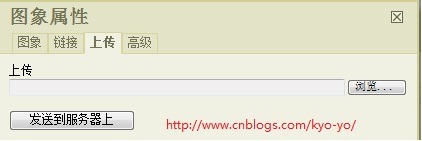
1、关闭文件浏览器,在fckconfig.js文件中将FCKConfig.LinkBrowser、 FCKConfig.ImageBrowser和FCKConfig.FlashBrowser都置为false,这样上传图片只能通过下图中上传选项卡 进行上传(也就是fckeditor代码中的快速上传—QuickUpload),同时无法查看服务器中的文件:

pic87

2、更改路径获取代码,在TypeConfig类中将GetQuickUploadPath方法改为以下代码:

1 internal string GetQuickUploadPath()
2 {
3 string path = this.FileWorker.Config.UploadPath;
4 if (_QuickUploadPath == null && string.IsNullOrEmpty(path) == false)
5 _QuickUploadPath = QuickUploadPath.Replace("%UserFilesPath%",
6 System.IO.Path.Combine(this.FileWorker.Config.UserFilesPath, path));
7
8 return _QuickUploadPath;
9 }

主要将path获取改成了从用户控件Config中获取UploadPath,然后进行组合这样组合出来的路径就是:/Upload/News/201012

这样就完成了fckeditor上传文件路径分类配置了,目的是达到了,不过还有个瑕疵就是如果要新增一种路径则需要网站中新增一个 fckeditor的HTML包,在其中的fckeditor\editor\filemanager\connectors\aspx \config.ascx控件中修改一下UploadPath配置,如果各位还有其他解决办法欢迎分享!

源码下载:点我下载(直接浏览网站根目录下Default.aspx既可)

项目过程中所遇到的各种问题记录

编辑器篇:

FCKeditor相关知识及各种常见使用问题

FCKeditor自定义上传路径配置

[转载]IE中jQuery.fn.text, jQuerey.fn.val 和 dom.innerText, dom.value 的换行与tab问题

mikel阅读(1113)

[转载]IE中jQuery.fn.text, jQuerey.fn.val 和 dom.innerText, dom.value 的换行与tab问题 – 疯子阿飞 – 博客园.

最近使用JQuery的过程中发现关于.text, .val 和dom自身的.innerText, .value 在取值与赋值方面存在的差异.

以及IE7与IE8的pre标签的呈现差异(即white-space:pre).  现与大家分享一下.

在IE中, 对pre标签的文本取值与赋值, 可以使用$(“p”).text(“1\n2”), 亦可使用$(“p”)[0].innerText = “1\n2”;

不知道大家是否知道, 这两种方式的取值与赋值得到的结果, 产生的效果是存在差异的.

换行符

看过JQuery-1.4.4的代码以后发现, 在最新版本的JQuery中, text取值使用的是获得最基础的textNode的nodeValue, 也就是说, text取值和innerText取值的差异在于 nodeValue和innerText的差异:

对网页自身代码的取值 text() 返回的是1个字符char(13) 即 “\r”,  innerText 返回的是2个字符char(13)+char(10) 即 “\r\n”.

这里有一个诡异的问题:

当网页代码中包含一个自然换行时, text()可以取出这个换行符, 但是如果使用 innerText = innerText 赋值以后, 页面呈现没有发生任何变化, 但此时再用text()取值, 将无法得到换行符. 而使用text(text)的方式赋值后, 使用text()则可以得到换行符.

赋值呈现

1. innerText使用\r或者\n都可以产生换行效果, 但在IE8中, 连续的\r和\n会被合并为一个换行效果(这跟正统的对回车符与换行符的理解相符). 但在IE7中, 无论\r与\n如何组合, 都无法产生连续换行的效果.

并且, 使用innerText产生的换行只能单向的, 也就是说, 只能产生换行效果, 这个换行符却无法再次通过JavaScript捕捉到(无论innerText还是text).

2. text在IE8中, 回车符\r和换行符\n产生同等的效果换行效果, 不会被合并, 并且可以被JavaScript捕捉到. 不同的是innerText对独立的\n捕捉到的是\n, 对\r\n捕捉到的是\r\n, 对独立的\r捕捉到的也是\r\n.

这里就会产生一个问题, 标准换行应该是两个字符\r\n, 但是如果使用jQuery将这个字符串呈现在pre中, 则会产生两个换行效果(IE8). 在IE7中, \n会变成一个空格的效果.

制表符(\t)

text方法的赋值和取值在处理制表符的时候都没有问题, 而innerText在赋值的时候则无法进行\t的赋值, 这个赋值的呈现效果将变成一个空格.再次使用innerText取回也会发现那个\t变成了char(32), 而使用text取回这个\t则会诡异得变成char(160)这么一个奇怪的值.

使用text还是innerText

在呈现数据的时候, 究竟使用text还是innerText, 这取决于你数据库中的换行是\r, \n还是\r\n.

值得提醒的是, 在自然提交的表单中, 表单域中的换行符是正统换行, 即每个换行(效果)提交后都是完整的两个字符\r\n.

另外还需要提醒各位的是, 虽然表单域在正常提交的情况下换行是\r\n, 但如果你是通过ajax提交的, 那么换行就变成\n了

因为.val()取值时, 会自动过滤掉\r字符.

是不是看晕乎了, 我自己也很晕乎, 不过动动手, 去测试几个数据就会大概的明了了.