[转载]不使用中间变量交换两个数(Java版)

mikel阅读(1115)

[转载]不使用中间变量交换两个数(Java版) – 真的有外星人吗? – 博客园.

在程序中实现交换两个数的功能并不复杂,但如果不使用中间变量,就需要动一下脑筋。在本文介绍了两个方法(其实原理都是一个)。其基本原理就是数的中和。 也就是说,通过某种运算(二元运算)将a和b两个数变成一个数,并保存在其中一个变量中。然后再通过同样的运算符将a或b中和掉。这样实际上是利用了a或 b本身作为了中间变量。
先看第一个算法。

static class Num
{
int a;
int b;
}
public static void swap1(Num num)
{

num.a = num.a + num.b;
num.b
= num.a num.b;
num.a
= num.a num.b;
}

上 面代码通过“+”运算符将a和b的运算结果赋给了a(这时a是中间变量)。然后再计算b,这时a的值已经是(a+b)了,因此,a再减b就是原来的a。 而这时b已经是原来的a了,因此,再用运算后的a(实际上是a+b)减运算后的b(实际上是原来的a),就是原来的b了,最后将这个b赋值给a。
实际上,我们还可以使用“*”、“/”等符号来实现同样的效果,代码如下:

public static void swap2(Num num)
{
num.a
= num.a * num.b;
num.b
= num.a / num.b;
num.a
= num.a / num.b;
}
public static void swap3(Num num)
{
num.a
= num.a num.b;
num.b
= num.a + num.b;
num.a
= num.b num.a;
}

上面代码在Java中没有什么问题(但使用“/”时,分母和分子不能为0)。就算溢出也会得到正确的结果,但有某些语言中(如C语言),可能会抛出溢出错误,不了避免这种错误。可以加判断,代码如下:

public static void swap4(Num num)
{
// 不同符号
if (num.a * num.b <= 0)
{
num.a
= num.a + num.b;
num.b
= num.a num.b;
num.a
= num.a num.b;
}
else
{

num.a = num.a num.b;
num.b
= num.a + num.b;
num.a
= num.b num.a;
}
}

当然,我们还有更好的方法,就是使用异或运算符,我们知道,任何数与0异或后仍然为它本身,两个相同的数异或后为0。根本这种特性,可以有如下代码。

public static void swap5(Num num)
{
num.a
= num.a ^ num.b;
num.b
= num.a ^ num.b;
num.a
= num.a ^ num.b;
}

[转载]Spring.NET实用技巧3——NHibernate分布式事务(上)

mikel阅读(1141)

[转载]Spring.NET实用技巧3——NHibernate分布式事务(上) – 刘冬的博客 – 博客园.

在使用NHibernate作为持久层框架时,多数据库操作是一个比较难解决的问题。并且很多网友在给我发的eamil中经常谈到此问题。由于NHibernate是一种框架,不能像ADO.NET那样直接用SQL语句操作数据库,在动态改变DbConnection时比较麻烦,而且NHibernate目前并不完全支持多数据库,所以实现多数据库的操作是个棘手的问题。

回想一下,在使用ADO.NET实现多数据库的时候,无非是增加多个DbConnection,以后在每次事务结束后提交事务。所以说多数据库 的实现难点在于实现分布式事务。那么,什么是分布式事务?分布式事务是指事务的参与者、支持事务的服务器、资源服务器以及事务管理器分别位于不同的分布式 系统的不同节点之上。为了实现分布式事务,需要使用下面将介绍的两阶段提交协议。 阶段一:开始向事务涉及到的全部资源发送提交前信息。此时,事务涉及到的资源还有最后一次机会来异常结束事务。如果任意一个资源决定异常结束事务,则整个 事务取消,不会进行资源的更新。否则,事务将正常执行,除非发生灾难性的失败。为了防止会发生灾难性的失败,所有资源的更新都会写入到日志中。这些日志是 永久性的,因此,这些日志会幸免遇难并且在失败之后可以重新对所有资源进行更新。  阶段二:只在阶段一没有异常结束的时候才会发生。此时,所有能被定位和单独控制的资源管理器都将开始执行真正的数据更新。 在分布式事务两阶段提交协议中,有一个主事务管理器负责充当分布式事务协调器的角色。事务协调器负责整个事务并使之与网络中的其他事务管理器协同工作。 为了实现分布式事务,必须使用一种协议在分布式事务的各个参与者之间传递事务上下文信息,IIOP便是这种协议。这就要求不同开发商开发的事务参与者必须 支持一种标准协议,才能实现分布式的事务。

由于Spring.NET框架的出现,便很好的解决了这一点——分布式事务处理(查询此博客)。TxScopePlatformTransactionManagerSystem.Transactions提供的本地/分布式的事务管理器。我们配置TxScopePlatformTransactionManager 则能够实现分布式事务处理。

下面,我建立两个数据库:一个数据库为Customer,用于存放客户资料数据;另一个数据库为Order,用于存放客户的订单数据。当某个客 户增加订单成功时,则更新该客户的订金余额。我们做一个业务判断,该客户的余额不能超过3000,当超过3000时则抛出异常。

实现步骤如下:

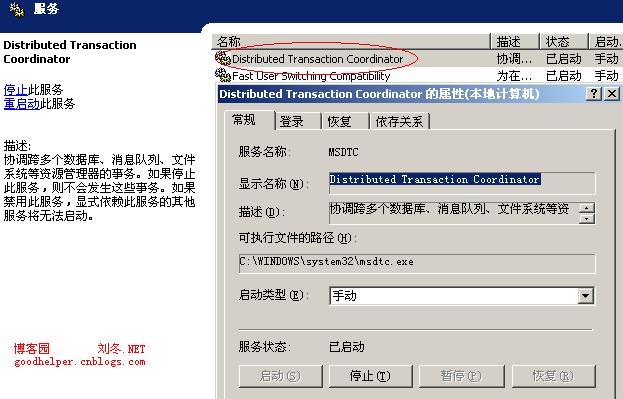
一、启动MSDTC服务。运行->cmd输入->net start msdtc

二、代码实现

1.Domain

①.Customer

public class CustomerInfo
{
public virtual int? ID { get; set; }

public virtual string Name { get; set; }

public virtual decimal Money { get; set; }
}

CustomerInfo.hbm.xml

<?xml version=”1.0″ encoding=”utf-8″ ?>

<hibernate-mapping xmlns=”urn:nhibernate-mapping-2.2″ assembly=”Customer.Domain” namespace=”Customer.Domain”>
<class name=”CustomerInfo” table=”T_Customer” lazy=”true” >

<id name=”ID” column=”id” type=”Int32″ >
<generator class=”native” />
</id>

<property name=”Name” type=”string”>
<column name=”Name” length=”50″/>
</property>

<property name=”Money” type=”decimal”>
<column name=”Money” precision=”16″ scale=”2″/>
</property>

</class>
</hibernate-mapping>

②.Order

OrderInfo

public class OrderInfo
{
public virtual int? ID { get; set; }

public virtual int CustomerId { get; set; }

public virtual DateTime OrderDate { get; set; }

public virtual string Address { get; set; }
}

OrderInfo.hbm.xml

<?xml version=”1.0″ encoding=”utf-8″ ?>

<hibernate-mapping xmlns=”urn:nhibernate-mapping-2.2″ assembly=”Order.Domain” namespace=”Order.Domain”>
<class name=”OrderInfo” table=”T_Order” lazy=”true” >

<id name=”ID” column=”ID” type=”Int32″ >
<generator class=”native” />
</id>

<property name=”CustomerId” type=”int”>
<column name=”CustomerId”/>
</property>

<property name=”OrderDate” type=”DateTime”>
<column name=”OrderDate”/>
</property>

<property name=”Address” type=”string”>
<column name=”Address” length=”200″/>
</property>

</class>
</hibernate-mapping>

2.Dao

①.Customer

CustomerDao

public interface ICustomerDao
{
CustomerInfo Get(
object id);

object Save(CustomerInfo entity);

void Update(CustomerInfo entity);
}

public class CustomerDao : HibernateDaoSupport, ICustomerDao
{
public virtual object Save(CustomerInfo entity)
{
return this.HibernateTemplate.Save(entity);
}

public virtual CustomerInfo Get(object id)
{
return this.HibernateTemplate.Get<CustomerInfo>(id);
}

public void Update(CustomerInfo entity)
{
this.HibernateTemplate.Update(entity);
}
}

CustomerDao.xml

<?xml version=”1.0″ encoding=”utf-8″ ?>
<objects xmlns=”http://www.springframework.net”
xmlns:db
=”http://www.springframework.net/database”>

<object type=”Spring.Objects.Factory.Config.PropertyPlaceholderConfigurer, Spring.Core”>
<property name=”ConfigSections” value=”databaseSettings”/>
</object>

<db:provider id=”Customer.DbProvider” provider=”SQLServer-2.0″
connectionString
=”Server=.;database=Customer;uid=sa;pwd=;”/>

<object id=”Customer.NHibernateSessionFactory” type=”Spring.Data.NHibernate.LocalSessionFactoryObject, Spring.Data.NHibernate21″>
<property name=”DbProvider” ref=”Customer.DbProvider”/>
<property name=”MappingAssemblies”>
<list>
<value>Customer.Domain</value>
</list>
</property>
<property name=”HibernateProperties”>
<dictionary>
<entry key=”hibernate.connection.provider” value=”NHibernate.Connection.DriverConnectionProvider”/>
<!–SQLServer连接–>
<entry key=”dialect” value=”NHibernate.Dialect.MsSQL2000Dialect”/>
<entry key=”hibernate.connection.driver_class” value=”NHibernate.Driver.SQLClientDriver”/>

<entry key=”use_outer_join” value=”true”/>
<entry key=”show_sql” value=”true”/>
<!–自动建表(反向映射)–>
<entry key=”hbm2ddl.auto” value=”update”/>
<!–批量更新–>
<entry key=”adonet.batch_size” value=”0″/>
<!–超时时间–>
<entry key=”command_timeout” value=”60″/>
<!–启用二级缓存–>
<entry key=”cache.use_second_level_cache” value=”false”/>
<!–启动查询缓存–>
<entry key=”cache.use_query_cache” value=”false”/>
<entry key=”query.substitutions” value=”true 1, false 0, yes ‘Y’, no ‘N'”/>
<entry key=”proxyfactory.factory_class” value=”NHibernate.ByteCode.LinFu.ProxyFactoryFactory, NHibernate.ByteCode.LinFu”/>
</dictionary>
</property>
<property name=”ExposeTransactionAwareSessionFactory” value=”true” />
</object>

<object id=”Customer.HibernateTemplate” type=”Spring.Data.NHibernate.Generic.HibernateTemplate”>
<property name=”SessionFactory” ref=”Customer.NHibernateSessionFactory” />
<property name=”TemplateFlushMode” value=”Auto” />
<property name=”CacheQueries” value=”true” />
</object>

<!– Dao –>
<object id=”Customer.CustomerDao” type=”Customer.Dao.Implement.CustomerDao,Customer.Dao”>
<property name=”HibernateTemplate” ref=”Customer.HibernateTemplate”/>
</object>

</objects>

②.Order

OrderDao

public interface IOrderDao
{
object Save(OrderInfo entity);
}

public class OrderDao : HibernateDaoSupport, IOrderDao
{
public virtual object Save(OrderInfo entity)
{
return this.HibernateTemplate.Save(entity);
}
}

Order.xml

<?xml version=”1.0″ encoding=”utf-8″ ?>
<objects xmlns=”http://www.springframework.net”
xmlns:db
=”http://www.springframework.net/database”>

<object type=”Spring.Objects.Factory.Config.PropertyPlaceholderConfigurer, Spring.Core”>
<property name=”ConfigSections” value=”databaseSettings”/>
</object>

<db:provider id=”Order.DbProvider” provider=”SQLServer-2.0″
connectionString
=”Server=.;database=Order;uid=sa;pwd=;”/>

<object id=”Order.NHibernateSessionFactory” type=”Spring.Data.NHibernate.LocalSessionFactoryObject, Spring.Data.NHibernate21″>
<property name=”DbProvider” ref=”Order.DbProvider”/>
<property name=”MappingAssemblies”>
<list>
<value>Order.Domain</value>
</list>
</property>
<property name=”HibernateProperties”>
<dictionary>
<entry key=”hibernate.connection.provider” value=”NHibernate.Connection.DriverConnectionProvider”/>
<!–SqlServer连接–>
<entry key=”dialect” value=”NHibernate.Dialect.MsSql2000Dialect”/>
<entry key=”hibernate.connection.driver_class” value=”NHibernate.Driver.SqlClientDriver”/>

<entry key=”use_outer_join” value=”true”/>
<entry key=”show_sql” value=”true”/>
<!–自动建表(反向映射)–>
<entry key=”hbm2ddl.auto” value=”update”/>
<!–批量更新–>
<entry key=”adonet.batch_size” value=”0″/>
<!–超时时间–>
<entry key=”command_timeout” value=”60″/>
<!–启用二级缓存–>
<entry key=”cache.use_second_level_cache” value=”false”/>
<!–启动查询缓存–>
<entry key=”cache.use_query_cache” value=”false”/>
<entry key=”query.substitutions” value=”true 1, false 0, yes ‘Y’, no ‘N'”/>
<entry key=”proxyfactory.factory_class” value=”NHibernate.ByteCode.LinFu.ProxyFactoryFactory, NHibernate.ByteCode.LinFu”/>
</dictionary>
</property>
<property name=”ExposeTransactionAwareSessionFactory” value=”true” />
</object>

<object id=”Order.HibernateTemplate” type=”Spring.Data.NHibernate.Generic.HibernateTemplate”>
<property name=”SessionFactory” ref=”Order.NHibernateSessionFactory” />
<property name=”TemplateFlushMode” value=”Auto” />
<property name=”CacheQueries” value=”true” />
</object>

<!– Dao –>
<object id=”Order.OrderDao” type=”Order.Dao.Implement.OrderDao,Order.Dao”>
<property name=”HibernateTemplate” ref=”Order.HibernateTemplate”/>
</object>

</objects>

三、Service

OrderManager

public interface IOrderManager
{
void CreateOrder(OrderInfo order, decimal money);

object SaveCustomer(CustomerInfo customer);
}

public class OrderManager : IOrderManager
{
public ICustomerDao CustomerDao { get; set; }

public IOrderDao OrderDao { get; set; }

[Transaction]
public void CreateOrder(OrderInfo order,decimal money)
{
CustomerInfo customer
= CustomerDao.Get(order.CustomerId);
OrderDao.Save(order);

if (customer.Money >= 3000)
{
throw new Exception(订金额度上限);
}

customer.Money += money;
CustomerDao.Update(customer);
}

[Transaction]
public object SaveCustomer(CustomerInfo customer)
{
return CustomerDao.Save(customer);
}
}

Service.xml

<?xml version=”1.0″ encoding=”utf-8″ ?>
<objects xmlns=”http://www.springframework.net”
xmlns:db
=”http://www.springframework.net/database”
xmlns:tx
=”http://www.springframework.net/tx”>

<object id=”transactionManager”
type
=”Spring.Data.Core.TxScopeTransactionManager, Spring.Data”>
</object>

<!– Service –>
<object id=”Service.OrderManager” type=”Service.Implement.OrderManager,Service”>
<property name=”CustomerDao” ref=”Customer.CustomerDao”/>
<property name=”OrderDao” ref=”Order.OrderDao”/>
</object>

<tx:attribute-driven/>

</objects>

四、Test

Test

[TestFixture]
public class ServiceTest
{
private IApplicationContext applicationContext;

[SetUp]
public void Init()
{
log4net.Config.XmlConfigurator.Configure();
applicationContext
= ContextRegistry.GetContext();
}

[Test]
public void InitData()
{
CustomerInfo customer
= new CustomerInfo
{
Name
= 刘冬
};
IOrderManager manager
= (IOrderManager)applicationContext.GetObject(Service.OrderManager);
manager.SaveCustomer(customer);
}

[Test]
public void CreateOrderTest()
{
IOrderManager manager
= (IOrderManager)applicationContext.GetObject(Service.OrderManager);
manager.CreateOrder(
new OrderInfo
{
Address
= 中国北京,
CustomerId
= 1,
OrderDate
= DateTime.Now
},
1000);
}
}

App.config

<?xml version=”1.0″?>
<configuration>
<configSections>

<sectionGroup name=”spring”>
<section name=”context” type=”Spring.Context.Support.ContextHandler, Spring.Core”/>
<section name=”parsers” type=”Spring.Context.Support.NamespaceParsersSectionHandler, Spring.Core”/>
<section name=”objects” type=”Spring.Context.Support.DefaultSectionHandler, Spring.Core”/>
</sectionGroup>

<section name=”log4net” type=”log4net.Config.Log4NetConfigurationSectionHandler, log4net” />
<section name=”databaseSettings” type=”System.Configuration.NameValueSectionHandler” />
</configSections>

<!–log4net配置–>
<log4net Debug=”true”>
<appender name=”LogFileAppender” type=”log4net.Appender.FileAppender”>
<param name=”File” value=”Logs\Log.log” />
<param name=”datePattern” value=”MM-dd HH:mm” />
<param name=”AppendToFile” value=”true” />
<layout type=”log4net.Layout.PatternLayout”>
<param name=”ConversionPattern” value=”%d [%t] %-5p %c [%x] – %m%n” />
</layout>
</appender>
<appender name=”HttpTraceAppender” type=”log4net.Appender.ASPNetTraceAppender”>
<layout type=”log4net.Layout.PatternLayout”>
<param name=”ConversionPattern” value=”%d [%t] %-5p %c [%x] – %m%n” />
</layout>
</appender>
<appender name=”EventLogAppender” type=”log4net.Appender.EventLogAppender”>
<layout type=”log4net.Layout.PatternLayout”>
<param name=”ConversionPattern” value=”%d [%t] %-5p %c [%x] – %m%n” />
</layout>
</appender>
<appender name=”RollingLogFileAppender” type=”log4net.Appender.RollingFileAppender”>
<param name=”File” value=”Logs/Log.log” />
<param name=”AppendToFile” value=”true” />
<param name=”MaxSizeRollBackups” value=”10″ />
<param name=”MaximumFileSize” value=”100K” />
<param name=”RollingStyle” value=”Size” />
<param name=”StaticLogFileName” value=”true” />
<layout type=”log4net.Layout.PatternLayout”>
<param name=”ConversionPattern” value=”%d [%t] %-5p %c [%x] – %m%n” />
</layout>
</appender>
<root>
<level value=”ALL” />
<appender-ref ref=”RollingLogFileAppender” />
</root>
</log4net>

<!–spring配置–>
<spring xmlns=”http://www.springframework.net”>
<parsers>
<parser type=”Spring.Data.Config.DatabaseNamespaceParser, Spring.Data” />
<parser type=”Spring.Transaction.Config.TxNamespaceParser, Spring.Data” />
</parsers>
<context>
<resource uri=”config://spring/objects” />

<!–Dao–>
<resource uri=”assembly://Customer.Dao/Customer.Dao.Config/Dao.xml” />
<resource uri=”assembly://Order.Dao/Order.Dao.Config/Dao.xml” />
<!–Service–>
<resource uri=”assembly://Service/Service.Config/Service.xml” />

</context>
<objects xmlns=”http://www.springframework.net”/>
</spring>

<startup><supportedRuntime version=”v4.0″ sku=”.NETFramework,Version=v4.0″/></startup></configuration>

运行结果如下:

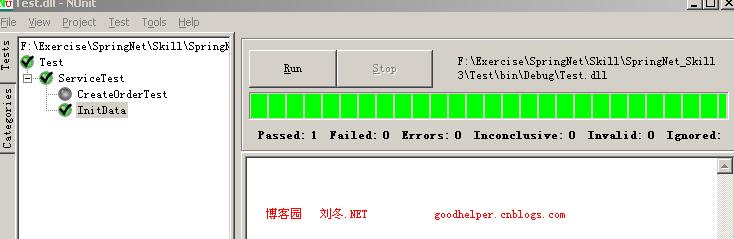
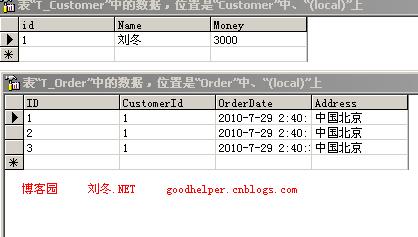
一、初始化数据:

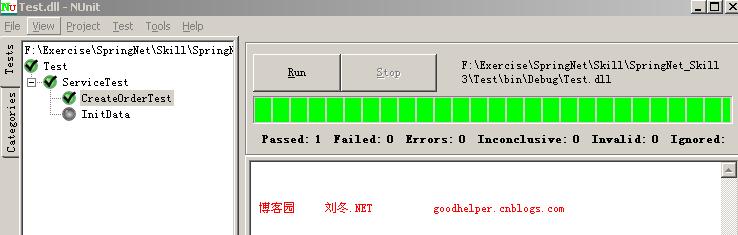
二、建立第一个订单(插入第一次数据),订金小于3000

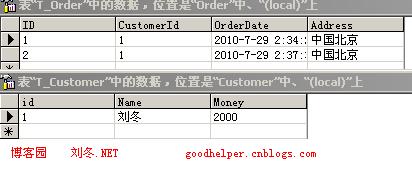
三、建立第一个订单(插入第二次数据),订金小于3000

四、建立第一个订单(插入第三次数据),订金等于3000

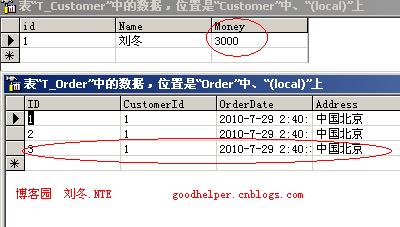
五、建立第一个订单(插入第四次数据),订金超过3000

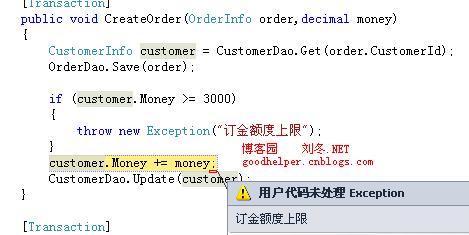
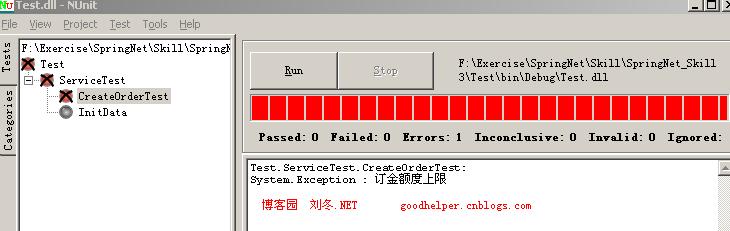
从运行结果上看到,当我们创建第四张订单时,由于订金超过3000后抛出异常,数据实现回滚。这样分布式事务便实现了。

代码下载

出处:http://www.cnblogs.com/GoodHelper/archive/2010/07/29/SpringNetDistributedTransaction1.html

欢迎转载,但需保留版权。

[转载]获取json同时在客户端格式化DateTime

mikel阅读(1042)

[转载]获取json同时在客户端格式化DateTime – 89分 – 博客园.

ASP.NET获取json  datetime 会是一个很纠结的格式 下面是格式好的方法 纯属笔记 希望也大家有帮助

$.ajax({

type: “POST”,
url: “/Notify.mvc/Get”,
data: “”,
contentType: “application/json; charset=utf-8”,
dataType: “json”,
dataFilter: function(data, type) {
return data.replace(/”\\\/(Date\([0-9-]+\))\\\/”/gi, ‘new $1’);
},
success: function(n) {
if (n != “False”) {
$(“#notify”).text(decodeURI(n.NotifyTopic));
}

}
}

);

[转载]将Flash 嵌入WPF 程序

mikel阅读(1024)

[转载]将Flash 嵌入WPF 程序 – {GnieTech} – 博客园.

由于WPF 本身中不支持COM 组件同时也无法加载ActiveX 控件,所以需要借助WinForm 引用ActiveX 控件将Flash 加入其中。首先创建一个WPF 项目(WpfFlash),将Flash 文件(.swf)加入到项目中,并将Copy to Output Directory 设置为”Copy always”。

Copy

在工程中新增一个Windows Forms Control Library 项目(FlashControlLibrary),利用该控件库加载Flash ActiveX。

New Project

Project

在FlashControlLibrary 项目工具栏(Toolbox)中点击鼠标右键,选择”Choose Items…”。在COM Components 标签中选择”Shockwave Flash Object”,点击确定。

AddCom
此时在工具栏中已经可以看到刚添加的Shockwave Flash Object 控件了。将控件拖入设计窗口,调整好控件尺寸使其满足Flash 的尺寸大小,对FlashControlLibrary 项目进行编译,并生成DLL 文件。

Object DLL

返回WpfFlash 项目将上面编译的AxInterop.ShockwaveFlashObjects.dll 加入References,并添加System.Windows.Forms 和WindowsFormsIntegration,便于WinForm 程序在WPF 中交互使用。

AxInterop

AddRef
接下来将通过两种方式将Flash 文件加入到WPF,一种侧重于使用XAML 代码实现,另一种则使用C#。可按各自需要选择其一。

XAML 方法

打开MainWindow.xaml,加入命名空间xmlns:f=”clr-namespace:AxShockwaveFlashObjects; assembly=AxInterop.ShockwaveFlashObjects”。在<Grid>中加入 WindowsFormsHost 用于调用WinForm 程序,并在其中添加AxShockwaveFlash 控件加载Flash 文件。

<Window x:Class="WpfFlash.MainWindow"
        xmlns="http://schemas.microsoft.com/winfx/2006/xaml/presentation"
        xmlns:x="http://schemas.microsoft.com/winfx/2006/xaml"
        xmlns:f="clr-namespace:AxShockwaveFlashObjects;assembly=AxInterop.ShockwaveFlashObjects"
        Title="Crab Shooter" Height="540" Width="655">
    <Grid>
        <WindowsFormsHost>
            <f:AxShockwaveFlash x:Name="flashShow"/>
        </WindowsFormsHost>
    </Grid>
</Window>

打开MainWindow.xaml.cs 将Flash 文件加载到flashShow 控件。

using System;
using System.Windows;

namespace WpfFlash
{
    public partial class MainWindow : Window
    {
        public MainWindow()
        {
            InitializeComponent();
            string flashPath = Environment.CurrentDirectory;
            flashPath += @"\game.swf";
            flashShow.Movie = flashPath;
        }
    }
}

C# 方法

使用C# 实现相同的效果,首先将XAML 代码按如下方式修改,在Window 中加入Loaded 事件。

<Window x:Class="WpfFlash.MainWindow"
        xmlns="http://schemas.microsoft.com/winfx/2006/xaml/presentation"
        xmlns:x="http://schemas.microsoft.com/winfx/2006/xaml"
        Title="Crab Shooter" Loaded="FlashLoaded" Height="540" Width="655">
    <Grid x:Name="mainGrid"/>
</Window>

定义FlashLoaded 方法,主要通过WindowsFormsHost和 AxShockwaveFlash 完成Flash 加载操作。

using System;
using System.Windows;
using System.Windows.Forms.Integration;
using AxShockwaveFlashObjects;

namespace WpfFlash
{
    public partial class MainWindow : Window
    {
        public MainWindow()
        {
            InitializeComponent();
        }

        private void FlashLoaded(object sender, RoutedEventArgs e)
        {
            WindowsFormsHost formHost = new WindowsFormsHost();

            AxShockwaveFlash axShockwaveFlash = new AxShockwaveFlash();

            formHost.Child = axShockwaveFlash;

            mainGrid.Children.Add(formHost);

            string flashPath = Environment.CurrentDirectory;
            flashPath += @"\game.swf";
            
            axShockwaveFlash.Movie = flashPath;
        }
    }
}

效果图

Game

源代码下载

WpfFlash.zip

[转载]Flash 报表之 CandlestickChart & ColumnChart

mikel阅读(1125)

[转载]Flash 报表之 CandlestickChart & ColumnChart – 情缘 – 博客园.

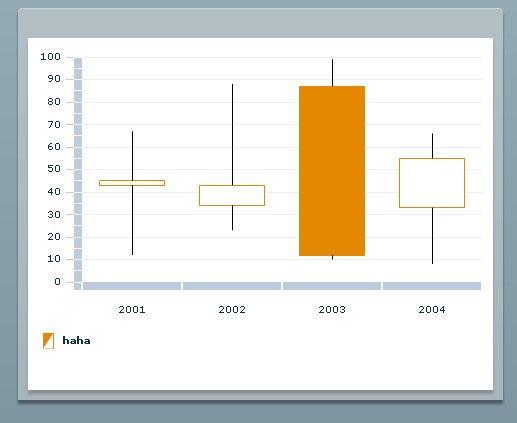
1.CandlestickChart 显示金融数据为一系列的蜡烛图,其体现高低开关的相关数值。每个图像的垂直线上的上顶点和下地点代表了每个数据点的高低数值,填充盒子的上顶和下底分别代表开发和关闭的数值。

2. CandlestickChart 的使用代码

代码

1 <mx:Application xmlns:mx=http://www.adobe.com/2006/mxml layout=absolute>
2 <mx:Script>
3 <![CDATA[
4 import mx.collections.ArrayCollection;
5
6 public var scores:ArrayCollection=new ArrayCollection([
7 {date:2001,open:43,close:45,hight:67,low:12},
8 {date:2002,open:34,close:43,hight:88,low:23},
9 {date:2003,open:87,close:12,hight:99,low:10},
10 {date:2004,open:33,close:55,hight:66,low:8}
11 ]);
12
13 ]]>
14 </mx:Script>
15 <mx:Panel x=98 y=40 width=485 height=392 layout=absolute>
16 <mx:CandlestickChart x=10 y=10 id=myCandleChart height=271 width=445 dataProvider={scores} showDataTips=true>
17 <mx:horizontalAxis>
18 <mx:CategoryAxis dataProvider={scores} categoryField=date/>
19 </mx:horizontalAxis>
20 <mx:series>
21 <mx:CandlestickSeries displayName=haha openField=open closeField=close highField=hight lowField=low/>
22 </mx:series>
23 </mx:CandlestickChart>
24 <mx:Legend dataProvider={myCandleChart} x=10 y=289 width=445/>
25
26 </mx:Panel>
27 </mx:Application>

3. CandlestickChart 的相关属性

closeField 定义关闭的y坐标数值,确定了图像的上顶和下底

highField 定义元素高的y坐标数值,确定图像的中线的上顶

lowField 定义了低的y坐标数值,确定图像中线的下底

openField 定义了元素打开y坐标的数值,确定了图像的上顶和下底

xField 定义图像在x轴坐标的每个数值

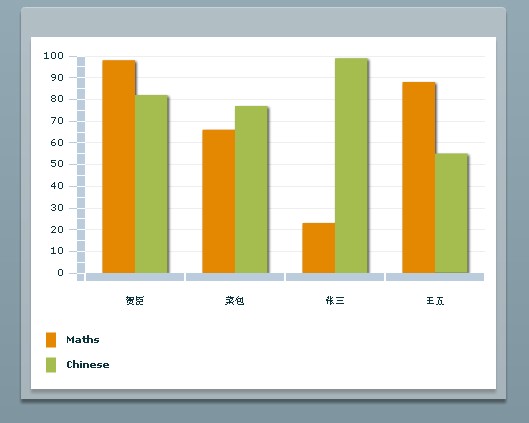
4.ColumnChart 显示一系列圆柱体,其高度有数据值来确定。

5. ColumnChart 使用代码

代码

1 <mx:Application xmlns:mx=http://www.adobe.com/2006/mxml layout=absolute>
2 <mx:Script>
3 <![CDATA[
4 import mx.collections.ArrayCollection;
5
6 public var scores:ArrayCollection=new ArrayCollection([
7 {id:1,name:贺臣,Maths:98,Chinese:82},
8 {id:2,name:菜包,Maths:66,Chinese:77},
9 {id:3,name:张三,Maths:23,Chinese:99},
10 {id:4,name:王五,Maths:88,Chinese:55}
11 ]);
12
13 ]]>
14 </mx:Script>
15 <mx:Panel x=98 y=40 width=485 height=392 layout=absolute>
16 <mx:ColumnChart x=10 y=10 id=myColumnChart showDataTips=true dataProvider={scores} height=263 width=445>
17 <mx:horizontalAxis>
18 <mx:CategoryAxis dataProvider={scores} categoryField=name/>
19 </mx:horizontalAxis>
20 <mx:series>
21 <mx:ColumnSeries xField=name displayName=Maths yField=Maths/>
22 <mx:ColumnSeries xField=name displayName=Chinese yField=Chinese/>
23 </mx:series>
24 </mx:ColumnChart>
25 <mx:Legend dataProvider={myColumnChart} x=10 y=289 width=445/>
26
27 </mx:Panel>
28 </mx:Application>

6. ColumnChart 属性

yField 设定数据源中定义的每个圆柱体顶部高度y 坐标的数据值

xField 设定数据源中定义的每个圆柱体x坐标的位置。

minField 设定圆柱体在y坐标中的最小值

[转载]ASP.NET MVC 2:实体外部元数据扩展

mikel阅读(1066)

[转载]ASP.NET MVC 2:实体外部元数据扩展 – 阿不 – 博客园.

在MVC的Model中,我们可以定义很多与视图相关的元数据,这些元数据对我们开发视图起着相当重要的作用,特别是在数据验证方面。这些元数据一 般情况下我们是不会定义在业务实体(或持久化实体)上面,所以很多情况下,我们会需要开发两种实体:View Model和Business Model。这样就造成,在Action与View的沟通当中,我们需要使用View Model,然后在业务逻辑处理时,我们需要再将View Model映射到Business Model,这将会使我们的开发框架变得繁琐。因为一般情况下,View Model和Business Model在很多情况下,都是很雷同的对象,只是View Model会有很多与视图相关的元数据。在这种情况下,只要我们能把View Model作为Business Model的元数据描述对象(MetadataType)来使用,而不直接参与Action与View的沟通,让这些工作都由Business Model来承担,这样就可以有效的避免很多重复工作。

System.ComponentModel.DataAnnotations内部,提供了MetadataTypeAttribute这个标签,让我们可以为Business Model指定它对应的视图元数据类型。特别是当我们使用LINQ2SQL、EF等框架来生成实体框架时,我们可以以partial类的形式来提供它对应的视图元数据类型:

这样做在大多数情况下是没有问题的。但是仅仅是这样,还不能解决所有问题。一般情况下Business Model和MetadataType是不在同一个Assembly里面,这时候你就无法以partial类的形式来扩展Business Model。所以我们就需要有一套机制来延迟注册Business Model与MetadataType的映射关系。通过MVC源码的分析,我们可以通过扩展 DataAnnotationsModelMetadataProvider的

GetTypeDescriptor方法来解决这个问题。
首先,我们先定义一个Business Model与MetadataType的映射容器:

这个容器非常简单,我们只是定义了一个hashtable来保存它们的映射关系。然后,我们从DataAnnotationsModelMetadataProvider继承一个新的类,重写GetTypeDescriptor方法:

接下来要做的事情就是把CustomDataAnnotationsModelMetadataProvider注册到系统中,用它来代替原来的DataAnnotationsModelMetadataProvider,在Global.asax添加如下代码:

最后需要在映射容器中,添加你希望的映射关系:

通过这样的映射,我们就可以完全解放Business Model对MetadataType的依赖了。

后记: 在调试这个扩展的过程当中,出现了一个相当低级的错误,花了我几个小时的时间。话说提交的数据中有一个名为site的字符串(在Route.Values 里面),同时我在Action的参数中,定义的是一个名为site的复杂类型。程序在运行过程中,始终提示异常:类型无法转换。因为我怀疑是我扩展了 MetadataType引发的问题,所以拼命的在那边调试,始终没有找到原因。最后还原所有的代码,问题依旧,才让我走到正确的方向上,冤枉死我了。

[转载]重温SQL——行转列,列转行

mikel阅读(980)

[转载]重温SQL——行转列,列转行 – 潇湘隐者 – 博客园.

行转列,列转行是我们在开发过程中经常碰到的问题。行转列一般通过CASE WHEN 语句来实现,也可以通过 SQL SERVER 2005 新增的运算符PIVOT来实现。 用传统的方法,比较好理解。层次清晰,而且比较习惯。 但是PIVOT 、UNPIVOT提供的语法比一系列复杂的 SELECT…CASE 语句中所指定的语法更简单、更具可读性。下面我们通过几个简单的例子来介绍一下列转行、行转列问题。

我们首先先通过一个老生常谈的例子,学生成绩表(下面简化了些)来形象了解下行转列

CREATE  TABLE [StudentScores]
(
    [UserName]         NVARCHAR(20),        --学生姓名
    [Subject]          NVARCHAR(30),        --科目
    [Score]            FLOAT,               --成绩
)

INSERT INTO [StudentScores] SELECT 'Nick', '语文', 80

INSERT INTO [StudentScores] SELECT 'Nick', '数学', 90

INSERT INTO [StudentScores] SELECT 'Nick', '英语', 70

INSERT INTO [StudentScores] SELECT 'Nick', '生物', 85

INSERT INTO [StudentScores] SELECT 'Kent', '语文', 80

INSERT INTO [StudentScores] SELECT 'Kent', '数学', 90

INSERT INTO [StudentScores] SELECT 'Kent', '英语', 70

INSERT INTO [StudentScores] SELECT 'Kent', '生物', 85

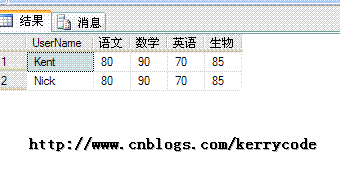
如果我想知道每位学生的每科成绩,而且每个学生的全部成绩排成一行,这样方便我查看、统计,导出数据

SELECT
      UserName,
      MAX(CASE Subject WHEN '语文' THEN Score ELSE 0 END) AS '语文',
      MAX(CASE Subject WHEN '数学' THEN Score ELSE 0 END) AS '数学',
      MAX(CASE Subject WHEN '英语' THEN Score ELSE 0 END) AS '英语',
      MAX(CASE Subject WHEN '生物' THEN Score ELSE 0 END) AS '生物'
FROM dbo.[StudentScores]
GROUP BY UserName

查询结果如图所示,这样我们就能很清楚的了解每位学生所有的成绩了

接下来我们来看看第二个小列子。有一个游戏玩家充值表(仅仅为了说明,举的一个小例子)

CREATE TABLE [Inpours]
(
    [ID]             INT IDENTITY(1,1),
    [UserName]          NVARCHAR(20),  --游戏玩家
    [CreateTime]     DATETIME,      --充值时间
    [PayType]         NVARCHAR(20),  --充值类型
    [Money]             DECIMAL,       --充值金额
    [IsSuccess]         BIT,           --是否成功 1表示成功, 0表示失败
    CONSTRAINT [PK_Inpours_ID] PRIMARY KEY(ID)
)

INSERT INTO Inpours SELECT '张三', '2010-05-01', '支付宝', 50, 1

INSERT INTO Inpours SELECT '张三', '2010-06-14', '支付宝', 50, 1

INSERT INTO Inpours SELECT '张三', '2010-06-14', '手机短信', 100, 1

INSERT INTO Inpours SELECT '李四', '2010-06-14', '手机短信', 100, 1

INSERT INTO Inpours SELECT '李四', '2010-07-14', '支付宝', 100, 1

INSERT INTO Inpours SELECT '王五', '2010-07-14', '工商银行卡', 100, 1

INSERT INTO Inpours SELECT '赵六', '2010-07-14', '建设银行卡', 100, 1

下面来了一个统计数据的需求,要求按日期、支付方式来统计充值金额信息。这也是一个典型的行转列的例子。
我们可以通过下面的脚本来达到目的:

SELECT CONVERT(VARCHAR(10), CreateTime, 120) AS CreateTime,
       CASE PayType WHEN '支付宝'     THEN SUM(Money) ELSE 0 END AS '支付宝',
       CASE PayType WHEN '手机短信'    THEN SUM(Money) ELSE 0 END AS '手机短信',
       CASE PayType WHEN '工商银行卡'  THEN SUM(Money) ELSE 0 END AS '工商银行卡',
       CASE PayType WHEN '建设银行卡'  THEN SUM(Money) ELSE 0 END AS '建设银行卡'
FROM Inpours
GROUP BY CreateTime, PayType

如图所示,我们这样只是得到了这样的输出结果,还需进一步处理,才能得到想要的结果

SELECT
       CreateTime,
       ISNULL(SUM([支付宝]), 0) AS [支付宝],
       ISNULL(SUM([手机短信]), 0) AS [手机短信],
       ISNULL(SUM([工商银行卡]), 0) AS [工商银行卡],
       ISNULL(SUM([建设银行卡]), 0) AS [建设银行卡]
FROM
(
    SELECT CONVERT(VARCHAR(10), CreateTime, 120) AS CreateTime,
           CASE PayType WHEN '支付宝'     THEN SUM(Money) ELSE 0 END AS '支付宝',
           CASE PayType WHEN '手机短信'   THEN SUM(Money) ELSE 0 END AS '手机短信',
           CASE PayType WHEN '工商银行卡' THEN SUM(Money) ELSE 0 END AS '工商银行卡',
           CASE PayType WHEN '建设银行卡' THEN SUM(Money) ELSE 0 END AS '建设银行卡'
    FROM Inpours
    GROUP BY CreateTime, PayType
) T
GROUP BY CreateTime

其实行转列,关键是要理清逻辑,而且对分组(Group by)概念比较清晰。上面两个列子基本上就是行转列的类型了。但是有个问题来了,上面是我为了说明弄的一个简单列子。实际中,可能支付方式特别多,而且逻 辑也复杂很多,可能涉及汇率、手续费等等(曾经做个这样一个),如果支付方式特别多,我们的CASE WHEN 会弄出一大堆,确实比较恼火,而且新增一种支付方式,我们还得修改脚本如果把上面的脚本用动态SQL改写一下,我们就能轻松解决这个问题

DECLARE @cmdText    VARCHAR(8000);
DECLARE @tmpSql        VARCHAR(8000);

SET @cmdText = 'SELECT CONVERT(VARCHAR(10), CreateTime, 120) AS CreateTime,' + CHAR(10);
SELECT @cmdText = @cmdText + ' CASE PayType WHEN ''' + PayType + ''' THEN SUM(Money) ELSE 0 END AS ''' + PayType
                + ''',' + CHAR(10)  FROM (SELECT DISTINCT PayType FROM Inpours ) T

SET @cmdText = LEFT(@cmdText, LEN(@cmdText) -2) --注意这里,如果没有加CHAR(10) 则用LEFT(@cmdText, LEN(@cmdText) -1)

SET @cmdText = @cmdText + ' FROM Inpours     GROUP BY CreateTime, PayType ';

SET @tmpSql ='SELECT CreateTime,' + CHAR(10);
SELECT @tmpSql = @tmpSql + ' ISNULL(SUM(' + PayType  + '), 0) AS ''' + PayType  + ''','  + CHAR(10)
                    FROM  (SELECT DISTINCT PayType FROM Inpours ) T

SET @tmpSql = LEFT(@tmpSql, LEN(@tmpSql) -2) + ' FROM (' + CHAR(10);

SET @cmdText = @tmpSql + @cmdText + ') T GROUP BY CreateTime ';
PRINT @cmdText
EXECUTE (@cmdText);

下面是通过PIVOT来进行行转列的用法,大家可以对比一下,确实要简单、更具可读性(呵呵,习惯的前提下)

SELECT
        CreateTime, [支付宝] , [手机短信],
        [工商银行卡] , [建设银行卡]
FROM
(
    SELECT CONVERT(VARCHAR(10), CreateTime, 120) AS CreateTime,PayType, Money
    FROM Inpours
) P
PIVOT (
            SUM(Money)
            FOR PayType IN
            ([支付宝], [手机短信], [工商银行卡], [建设银行卡])
      ) AS T
ORDER BY CreateTime

有时可能会出现这样的错误:

消息 325,级别 15,状态 1,第 9 行

‘PIVOT’ 附近有语法错误。您可能需要将当前数据库的兼容级别设置为更高的值,以启用此功能。有关存储过程 sp_dbcmptlevel 的信息,请参见帮助。

这个是因为:对升级到 SQL Server 2005 或更高版本的数据库使用 PIVOT 和 UNPIVOT 时,必须将数据库的兼容级别设置为 90 或更高。有关如何设置数据库兼容级别的信息,请参阅 sp_dbcmptlevel (Transact-SQL)。 例如,只需在执行上面脚本前加上 EXEC sp_dbcmptlevel Test, 90; 就OK了, Test 是所在数据库的名称。

下面我们来看看列转行,主要是通过UNION ALL ,MAX来实现。假如有下面这么一个表

CREATE TABLE ProgrectDetail
(
    ProgrectName         NVARCHAR(20), --工程名称
    OverseaSupply        INT,          --海外供应商供给数量
    NativeSupply         INT,          --国内供应商供给数量
    SouthSupply          INT,          --南方供应商供给数量
    NorthSupply          INT           --北方供应商供给数量
)

INSERT INTO ProgrectDetail
SELECT 'A', 100, 200, 50, 50
UNION ALL
SELECT 'B', 200, 300, 150, 150
UNION ALL
SELECT 'C', 159, 400, 20, 320
UNION ALL
SELECT 'D', 250, 30, 15, 15

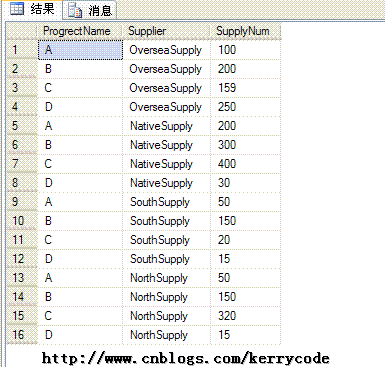
我们可以通过下面的脚本来实现,查询结果如下图所示

SELECT ProgrectName, 'OverseaSupply' AS Supplier,
        MAX(OverseaSupply) AS 'SupplyNum'
FROM ProgrectDetail
GROUP BY ProgrectName
UNION ALL
SELECT ProgrectName, 'NativeSupply' AS Supplier,
        MAX(NativeSupply) AS 'SupplyNum'
FROM ProgrectDetail
GROUP BY ProgrectName
UNION ALL
SELECT ProgrectName, 'SouthSupply' AS Supplier,
        MAX(SouthSupply) AS 'SupplyNum'
FROM ProgrectDetail
GROUP BY ProgrectName
UNION ALL
SELECT ProgrectName, 'NorthSupply' AS Supplier,
        MAX(NorthSupply) AS 'SupplyNum'
FROM ProgrectDetail
GROUP BY ProgrectName

用UNPIVOT 实现如下:

SELECT ProgrectName,Supplier,SupplyNum
FROM 
(
    SELECT ProgrectName, OverseaSupply, NativeSupply,
           SouthSupply, NorthSupply
     FROM ProgrectDetail
)T
UNPIVOT 
(
    SupplyNum FOR Supplier IN
    (OverseaSupply, NativeSupply, SouthSupply, NorthSupply )
) P

[转载]Introducing ASP.NET MVC 3 (Preview 1)

mikel阅读(898)

[转载]Introducing ASP.NET MVC 3 (Preview 1) – ScottGu’s Blog.

This morning we posted the “Preview 1” release of ASP.NET MVC 3.  You can download it here.

We’ve used an iterative development approach from the very beginning of the ASP.NET MVC project, and deliver regular preview drops throughout the development cycle.  Our goal with early preview releases like the one today is to get feedback – both on what you like/dislike, and what you find missing/incomplete.  This feedback is super valuable – and ultimately makes the final product much, much better.

ASP.NET MVC 3

As you probably already surmised, ASP.NET MVC 3 is the next major release of ASP.NET MVC.

ASP.NET MVC 3 is compatible with ASP.NET MVC 2 – which means it will be easy to update projects you are writing with MVC 2 to MVC 3 when it finally releases.  The new features in MVC 3 build on top of the foundational work we’ve already done with the MVC 1 and MVC 2 releases – which means that the skills, knowledge, libraries, and books you’ve acquired are all directly applicable with the MVC 3 release.  MVC 3 adds new features and capabilities – it doesn’t obsolete existing ones.

ASP.NET MVC 3 can be installed side-by-side with ASP.NET MVC 2, and you can install today’s “Preview 1” release on your machine without it impacting existing MVC 2 projects you are working on (they will continue to use MVC 2 unless you explicitly modify the projects to retarget them to MVC 3).  When you install “Preview 1” you will have a new set of ASP.NET MVC 3 project templates show up within Visual Studio 2010’s “New Project” dialog – choosing one of those when you create a new project will cause it to use MVC 3.

Below are details about some of the new features and capabilities in today’s “Preview 1” release.  Unless otherwise noted, all of the features I describe are enabled with the preview build you can download and use today.  More ASP.NET MVC 3 features will come in future preview refreshes as we flesh out the product more and iterate on your feedback.

View Improvements

ASP.NET MVC 3 “Preview 1” includes a bunch of view-specific improvements.

Add->View Dialog

“Preview 1” includes a new “Add->View” dialog that makes it easy for you to choose the syntax you want to use when you create new view template files.  It allows you to select any of of the available view engines you have installed on your machine – giving you the ability to use whichever view templating approach feels most natural to you:

AddView9

There are a bunch of great open source view template engines out there (including Spark, NHaml, NDjango and more) – it is now much easier for them to integrate into Visual Studio.

Today’s “Preview 1” build of ASP.NET MVC 3 comes with two view-engine already pre-enabled within the dialog: ASPX and Razor.

New “Razor” View Engine

Earlier this month I blogged about the new “Razor” view engine we’ve been working on.  Based on the comments in the post, a lot of people are eagerly waiting to use it.  The good news is that you can start using it with today’s “Preview 1” release.

Simple Razor Example

Let’s build a super-simple store site that lists product categories, and allows visitors to click the categories to see a listing of products within them.  You can download a completed version of this sample here.

image

Below is a StoreController class that implements the two action methods (“Index” and “Browse”) needed to build the above scenario:

image

We’ll use the new “Razor” view engine to implement the view templates for our StoreController.

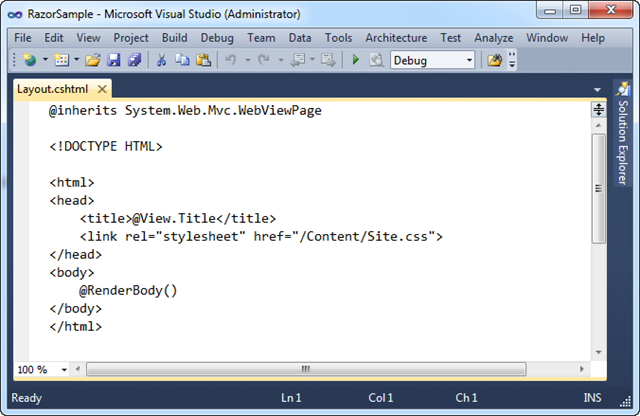
Below is the “Layout.cshtml” layout-page that will define the common layout UI we want across our site.  The “RenderBody()” method indicates where view templates that are based on this master layout file should “fill in” the body content:

image

Below is the view template for the Index action.  It is based on the above layout page, and outputs a <ul> list of category names:

image

The template above is using the standard Html.ActionLink() helper method in ASP.NET MVC to render a hyperlink that links to the “Browse” action method of our StoreController.  All of existing HTML helper methods in ASP.NET MVC work in “Razor” views – this is true both for the HTML helper methods built-into ASP.NET MVC, as well as those built by others (including vendors and the MvcContrib project).

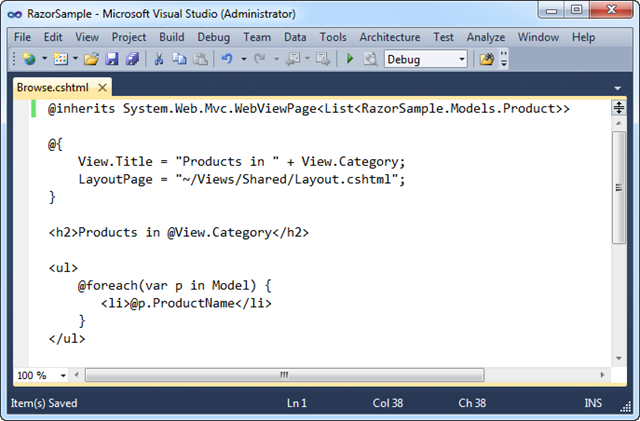
Below is the view template for the Browse action.  It lists the products within a specific category:

image

Notice above how we are using the “Model” property within our foreach statement to access the strongly-typed List of products we passed from our Controller.  We are doing this just like we would within .aspx view templates.  Razor also supports a “View” property which allows us to access un-typed “ViewData” passed to the view template.  “View” is a dynamic property (a new feature of .NET 4) – which gives us a slightly cleaner syntax when accessing ViewData.  Instead of writing ViewData[“Cateogry”] we can now just write View.Category.

Clean and Concise

The code in the screen-shots above contains everything we need to write to implement our Controller + Views.  “Razor” helps make view templates clean and concise, and I think you’ll find it enables a very fluid coding workflow. Read my “Razor” blog post from earlier in the month to learn more about the syntax and understand how it works.  You can download a running version of the above sample here.

Code Intellisense and Colorization

One of the things you might have noticed from the screen-shots above is that “Razor” file colorization and code intellisense is not yet supported in Visual Studio with today’s “Preview 1” release.  We will be enabling full code intellisense and colorization with a future preview refresh.  The VS 2010 editor will support Razor file intellisense for C#/VB code, as well as for HTML/CSS/JavaScript.

Other Improvements in the Future

Three other enhancements we are working to enable in a future preview refresh are:

  • The ability to use a @model statement at the top of a “Razor” file instead of having to explicitly inherit from a base class.  This reduces the code and simplifies it.
  • The ability to specify a default LayoutPage for the site to avoid having to explicitly set it within each view template.  This further reduces the code within the view template, and makes your code more DRY.
  • The ability to unit-test individual “Razor” template files without having to run the application or launch a web-server.

With these first two changes the above Browse template will be able to be written as simply:

image

The above template syntax will be supported in a future preview refresh.  Full colorization and code-intellisense will be provided within the editor.

Controller Improvements

ASP.NET MVC 3 “Preview 1” includes several nice controller-specific enhancements.

Global Filters

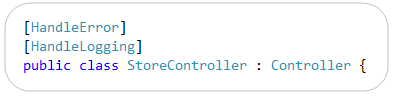
ASP.NET MVC supports the ability to declaratively apply “cross-cutting” logic using a mechanism called “filters”.  You can specify filters on Controllers and Action Methods today using an attribute syntax like so:

image

Developers often want to apply some filter logic across all controllers within an application.  ASP.NET MVC 3 now enables you to specify that a filter should apply globally to all Controllers within an application.  You can now do this by adding it to the GlobalFilters collection.  A RegisterGlobalFilters() method is now included in the default Global.asax class template to provide a convenient place to do this (it is then called by the Application_Start() method):
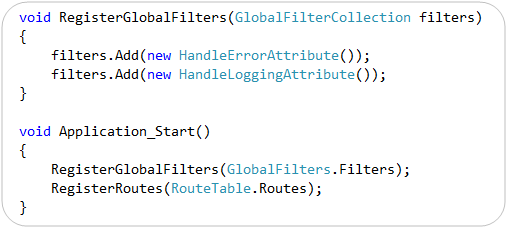
image

The filter resolution logic in MVC 3 is flexible so that you can configure a global filter that only applies conditionally if certain conditions are met (for example: Debugging is enabled, or if a request uses a particular http verb, etc).  Filters can also now be resolved from a Dependency Injection (DI) container – more on that below.

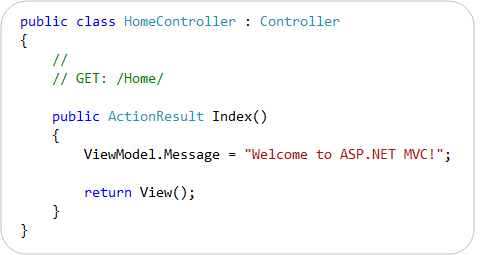
New Dynamic ViewModel Property

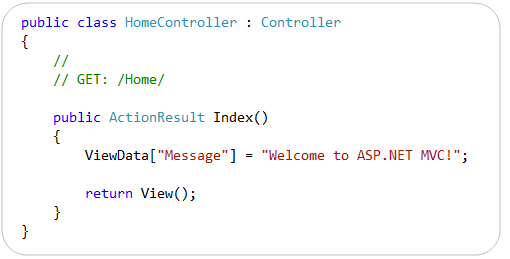
ASP.NET MVC Controllers have supported a “ViewData” property that enables you to pass data to a view template using a late-bound dictionary API.  For example:

image

The “ViewData” API is still supported in ASP.NET MVC 3.  MVC 3 augments it, though, with a new “ViewModel” property on Controller that is of type “dynamic” – and which enables you to use the new dynamic language support within VB and C# to pass ViewData items using a slightly cleaner syntax than the current dictionary API.  Now you can alternatively write the following code to achieve the same result as above:

image

You do not need to define any strongly-typed classes to use the ViewModel property.  Because it is a “dynamic” property you can instead just get/set properties on it and it will resolve them dynamically at runtime.  It internally stores the property name/value pairs within the ViewData dictionary.

New ActionResult Types

ASP.NET MVC 3 “Preview 1” includes several new ActionResult types and corresponding helper methods.

HttpNotFoundResult

The new HttpNotFoundResult class is used to indicate that a resource requested by the current URL was not found. It returns a 404 HTTP status code to the calling client. You can optionally use the new HttpNotFound() helper method on Controller to return an instance of this action result type, as shown in the following example:

image

Permanent Redirects

The HttpRedirectResult class has a new Boolean “Permanent” property that is used to indicate whether a permanent redirect should occur. A permanent redirect uses the HTTP 301 status code.  In conjunction with this change, the Controller class now has three new methods for performing permanent redirects: RedirectPermanent(), RedirectToRoutePermanent(), and RedirectToActionPermanent(). These methods return an instance of HttpRedirectResult with the Permanent property set to true.

HttpStatusCodeResult

The new HttpStatusCodeResult class can be used to set an explicit response status code and description.

JavaScript and AJAX Improvements

ASP.NET MVC 3 includes built-in JSON binding support that enables action methods to receive JSON-encoded data and model-bind it to action method parameters.

To see this feature in action, consider the JQuery client-side JavaScript below.  It defines a “save” event handler that will be invoked when a save button is clicked on the client.  The code within the event handler constructs a client-side JavaScript “product” object with three fields whose values are retrieved from HTML input elements.  It then uses JQuery’s .ajax() method to POST a JSON based request containing the product to a /Store/UpdateProduct URL on the server:

image

ASP.NET MVC 3 now enables you to implement the /Store/UpdateProduct URL on the server using an action method like below:

image

The UpdateProduct() action method above accepts a strongly-typed Product object as a parameter.  ASP.NET MVC 3 can now automatically bind the incoming JSON post values to the .NET Product type on the server – without you having to write any custom binding or marshalling logic.  ASP.NET MVC’s built-in model and input validation features all work as you’d expect with this.

We think this capability will be particularly useful going forward with scenarios involving client templates and data binding (like I’ve previously blogged about here).  Client templates will enable you to format and display a single data item or set of data items by using templates that execute on the client.  ASP.NET MVC 3 will enable you to easily connect client templates with action methods on the server that return and receive JSON data.

Other JavaScript/AJAX Improvements in the Future

Future preview refreshes of ASP.NET MVC 3 will include better support for unobtrusive JavaScript.  ASP.NET MVC 3 will also directly support the jQuery Validation library from within its built-in validation helper methods.

Model Validation Improvements

ASP.NET MVC 2 came with significant model validation improvements.  You can read my previous blog post to learn more about them.

ASP.NET MVC 3 extends this work further, and adds support for several of the new validation features introduced within the System.ComponentModel.DataAnnotations namespace in .NET 4. In particular:

  • MVC 3 supports the new .NET 4 DataAnnotations metadata attributes such as DisplayAttribute.
  • MVC 3 supports the improvements made to the ValidationAttribute class in .NET 4.  The ValidationAttribute class was improved in .NET 4 to support a new IsValid overload that provides more information about the current validation context, such as what object is being validated.  This enables richer scenarios where you can validate the current value based on another property of the model.
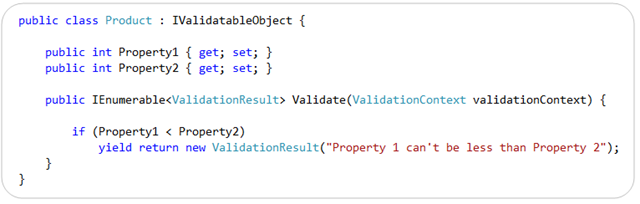
  • MVC 3 supports the new IValidatableObject interface introduced in .NET 4.  The IValidatableObject interface enables you to perform model-level validation, and enables you to provide validation error messages specific to the state of the overall model, or between two properties within the model.

Below is an example of using the IValidatableObject interface built-into .NET 4 to implement a custom validation method on a class.  This method can apply validation rules across multiple properties and yield back multiple validation errors (and optionally include both an error message like below as well as a list of property names that caused the violation):

image

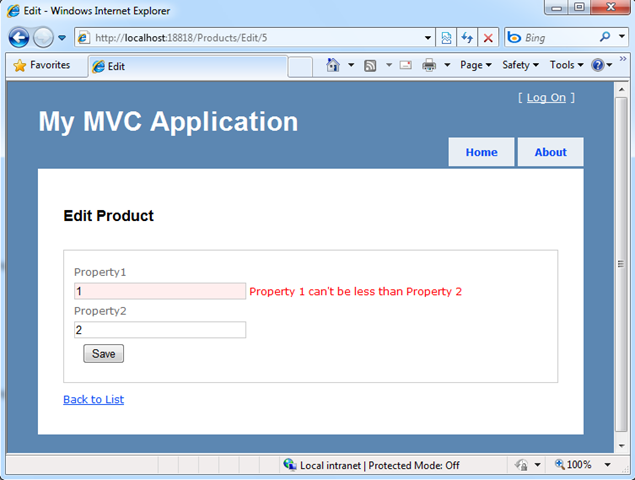
ASP.NET MVC 3 now honors the IValidateObject interface when model binding (in addition to all of the other validation approaches it already supported with MVC 2), and will retrieve validation errors from it and automatically flag/highlight impacted fields within a view using the built-in HTML form helpers:

image

ASP.NET MVC 3 also introduces a new IClientValidatable interface that allows ASP.NET MVC to discover at runtime whether a validator has support for client validation.  This interface has been designed so that it can be integrated with a variety of validation frameworks.  MVC 3 also introduces a new IMetadataAware interface that simplifies how you can contribute to the ModelMetadata creation process.

Dependency Injection Improvements

ASP.NET MVC 3 provides better support for applying Dependency Injection (DI) and integrating with Dependency Injection/IOC containers.

In “Preview 1”, we’ve added support for dependency injection in the following places:

  • Controllers (registering & injecting controller factories, injecting controllers)
  • Views (registering & injecting view engines, injecting dependencies into view pages)
  • Action Filters (locating & injecting filters)

For future previews we are investigating adding dependency injection support for:

  • Model Binders (registering & injecting)
  • Value Providers (registering & injecting)
  • Validation Providers (registering & injecting)
  • Model metadata Providers (registering & injecting)

ASP.NET MVC 3 will support the Common Service Locator library, and any DI container that supports it’s IServiceLocator interface.  This will make it really easy to integrate any DI container that supports the Common Service Locator with ASP.NET MVC.

Note: In Preview 1, we redefined the CSL interface in our codebase, and didn’t include the CSL DLL in our setup. This means that existing implementations of CSL won’t “just work” with “preview 1” – instead they’ll have to recompile their CSL implementations against our interface to make them work. Future preview refreshes will make this CSL library dependency easier, and avoid this extra step.

Brad Wilson is starting a great blog series on ASP.NET MVC 3’s Dependency Injection Support.  Below are links to his first few articles about it:

Click here to download a simple ASP.NET MVC 3 example that demonstrates how to use the popular Ninject Dependency Injection Container with ASP.NET MVC 3.

Downloads and Links

Click here to download ASP.NET MVC 3 Preview 1.  Post feedback/issues about it in the ASP.NET MVC Forum.

Once ASP.NET MVC 3 is installed, you can download and run the simple Razor sample I demonstrated in the blog post above.

Read my previous “Razor” blog post to learn more about how it works and its syntax.  Also read my recent EF4 Code-First and EF4 Code-First Schema Mapping posts to learn more about the database code and clean model layer I built using EF4 Code-First and SQL Express within the above sample.

Summary

We are excited to get today’s ASP.NET MVC 3 “Preview 1” release in people’s hands, and start receiving feedback on it.

Our primary goal with these early preview releases is to get feedback – both on what you like/dislike, and what you find missing/incomplete.  This feedback is super valuable – and ultimately makes the final product much, much better.  If you do install today’s “Preview 1” build, please post your feedback and any bugs/issues you find to the ASP.NET MVC forum at http://forums.asp.net.  The team will be monitoring this forum closely, and will be happy to help with anything you run into.

We will then iterate on the feedback you send us, and further refine ASP.NET MVC 3 in future preview refreshes.

Hope this helps,

Scott

[转载]7月9号的精选好文链接

mikel阅读(1053)

[转载]7月9号的精选好文链接-Scott Guthrie 博客中文版.

[原文发表地址]:July 9th Links: ASP.NET, ASP.NET MVC, jQuery, Silverlight, WPF, VS 2010

[原文发表时间]:2010/7/9, 12:33 AM

这里是上次我的精选好文链接系列。另外我同时在写其他的博客系列,请参看VS 2010和.NET 4系列ASP.NET MVC 2系列

ASP.NET

· 扩展ASP.NET输出缓存(Extending ASP.NET Output Caching):Scott Matchell写了一篇很好的文章,探讨了如何利用ASP.NET 4中可扩展的缓存提供程序API来实现一个更强大的输出缓存机制。另外你也可以通过阅读我的这篇文章来了解ASP.NET 4中对输出缓存的改进。

· 安装和配置Windows Server AppFabric及“高速”内存缓存(Installing and Configuring Windows Server AppFabric and “Velocity” Memory Cache):Scott Hansleman有一篇不错的博客文章描述了安装和配置Windows Server AppFabric的方法。Windows Server AppFabric由微软免费在应用程序服务器中提供。在不到10分钟的时间里,你就可以启用它的“高速”内存缓存,并应用在ASP.NET程序中。

· 防止用户在文本框中拷贝粘贴文本(Preventing Users From Copying Text From and Pasting It Into TextBoxes):Scott Mitchell有一篇很有用的文章,讨论了在ASP.NET表单(Forms)里禁用拷贝粘贴的方法。如果你想要防止用户在注册时无意中复制了错误的电邮地址(本应手动输入两次),这个方法就很有帮助。

· 使用Google地图API创建一个ASP.NET便利店定位程序(Building a Store Locator ASP.NET Application Using Google Maps API):Scott Mitchell写了一系列很赞的文章来探讨如何在ASP.NET程序中集成Google Map API,实现便利店定位服务。有兴趣的话请接着看系列里的续集续续集[i]

· ASP.NET 4在SEO方面的改进(ASP.NET 4 SEO Improvements):Scott Mitchell的一篇酷博,讲解了ASP.NET 4里面在搜索引擎优化(SEO)方面的一些功能改进。另外也可以看看我之前关于这个主题的文章

· 更多关于SQL Compact4的细节知识(More details about SQL Compat Edition 4):Rob在他的一篇博客文章中发表了更多关于新近发布的SQL CE 4.Beta的详细信息,SQL CE既可以独立安装,也可以集成在WebMatrix里。通过SQL CE,你可以将数据库植入在ASP.NET程序中。我发表了一篇文章介绍了它的概况。

ASP.NET MVC

· ASP.NET MVC技术在线研讨会(Online ASP.NET MVC Conference):Eric Hexter分享了7月22号举办的免费的ASP.NET MVC虚拟在线研讨会的一些细节。你可以免费参加,另外也不需要长途跋涉就能出席会议。

· ASP.NET MVC视图守则(Rules for ASP.NET MVC Views):Chris有一篇好文谈论了在ASP.NET MVC程序中创建和使用视图模板的推荐做法。

· ASP.NET MVC 2本地化编程指南(ASP.NET MVC 2 Localization Guide):Adam的这篇酷博描述了使用ASP.NET MVC创建本地化程序的方法。

· 在ASP.NET MVC和AJAX中防止请求伪造攻击的诀窍(Anti-Forgery Request Recipes for ASP.NET MVC and AJAX):Dixon写了一篇绝妙好文,讲解了在ASP.NET MVC中使用AJAX时,预防常见的网站安全问题的诀窍和最佳实践。

· JQuery jgGrid插件(jQuery jgGrid Plugin):Elijah有一个视频和一篇文章讲解了在ASP.NET MVC程序中使用JQuery jgGrid插件实现增删改等功能的方法。

· 在MVC中用ELMAH执行错误处理(Error Handling in MVC with ELMAH):Michael写了一篇好文讲解了如何在ASP.NET MVC中安装和配置流行的ELMAH函数库。ELMAH是一个伟大的开源函数库,你可以用它来捕捉和检查在作业站点上出现的错误。

· 单步跟入ASP.NET MVC源代码(Stepping into ASP.NET MVC Source Code):Gunnar写了一篇好文讲解了如何配置Visual Studio 2010,使调试器能够轻松的单步跟入ASP.NET MVC和.NET源代码的方法。

jQuery

· jQuery本质论(jQuery Essentials):很不错的在线幻灯片,为jQuery提供了极佳的概要和用法介绍。

· VS 2010下的jQuery 代码段(jQuery Code Snippets for VS 2010):来瞧瞧这个很酷(并且免费)的函数库,里面有131个可以应用在VS 2010里面的jQuery代码段。酷毙了!

· MSDN里的7篇jQuery文章(7 jQuery Articles on MSDN):Elijah在里面添加了他为MSDN写的7篇jQuery文章的链接。

Silverlight和WPF

· 使用Silverlight VS 2010工具包和WCF RIA Services创建一个简单的表单程序(Building a Simple Forms Application using the Silverlight Tool for VS 2010 and WCF RIA Services): Mark写了一篇很赞的教程,一步步地讲解了如何使用Silverlight, VS 2010和WCF RIA Services来创建一个简单的表单程序。

· 使用VS 2010中的WPF和Silverlight设计器的秘诀(Tips and Tricks for Working with the WPF and Silverlight Designers in VS 2010):Karl写了一篇文章描述了一些在VS 2010中使用WPF和Silverlight设计器时非常有用的小技巧。

· 在WPF和Silverlight程序里启用绑定生成器的方法(How to Enable the Binding Builder in WPF and Silverlight Applications):Karl的另一篇好文,探讨了如何最大化利用VS 2010中数据源窗口的方法。

· Blend 4和Sketchflow的功能改进(Blend 4 and Sketchflow Improvements):Christian的一篇关于Blend 4和Sketchflow最新功能改进的好文。

· Silverlight 4中关于双向HTTP消息的功能改进(HTTP Duplex Messaging Improvements in Silverlight 4):一篇很好的文章,描述了Silverlight 4提供的功能改进,以允许更好的“服务器端推送”的场景,即服务器端可以不要求Silverlight客户端显式发送请求,主动推送消息给客户端。

Visual Studio 2010

· 代码段设计器(Snippet Designer):一个很酷的Visual Studio 2010扩展程序,可以用来快速创建可重用的代码端。

· StyleCop 4.4候选版:StyleCop 4.4的最新版本已经进入候选发布阶段。StyleCop通过分析C#源代码来强制统一的编码规范。这个新版本支持C# 4.0和VS 2010。

· 对比SQL数据(Comparing SQL Data):Zubair的一篇好文,演示了使用Visual Studio 2010旗舰版对比SQL数据和模式(Schema)的方法。

希望这能对您有所帮助。

[转载]分布式文件快速搜索-技术细节分析(开源/并行)

mikel阅读(1092)

[转载]分布式文件快速搜索-技术细节分析(开源/并行) – 灵感之源 – 博客园.

系列文章

1.分布式文件快速搜索V6.7(多计算机并行/多种算法)

2.分布式文件快速搜索的设计与实现(开源/分布式计算/并行)

3.分布式文件快速搜索-技术细节分析(开源/并行)

前言

在上一篇文章中,对分布式文件快速搜索的设计与实现进行了说明。今天,将对具体的实现细节进行分析。

文件的检索

  1. 文件获取

    一般地,用Directory.GetDirectories()加上SearchOption.AllDirectories来获取某个的目录下 的所有文件(包括任意层子文件)。但在这里会采用自行递归获取,每获取一层目录的文件,都会预先根据SearchTypes条件(如文件大小、文件名、修 改时间、属性等)来碰撞。具体参看WorkV6FindFileRunner.FindLocal方法。

  2. 哈希获取

    在使用SearchTypes条件过滤完成后,使用MD5CryptoServiceProvider来获取MD5哈希值。当然,你可以使用 SHA1CryptoServiceProvider计算哈希值,如果你觉得MD5不可靠,具体参看WorkUtils.HashMD5File。
    实际的哈希获取,会使用缓存。缓存的实现使用快速二进制序列化,原理是判断缓存数据库是否存在一样的文件信息(文件名、大小和修改时间),如果匹配,则返回已经存在的哈希值,否则就获取新的哈希值。具体参看LocalHashStorage。

文件的匹配/比较

文件的匹配有3种方式:完全一致、包含以及全文索引。

  1. 完全一致

    完全一致,直接使用哈希值比较。

  2. 包含

    适用于运行时搜索,判断文本文件中包含的内容。目前直接使用File.ReadAllText(file).IndexOf(keyword, StringComparison.InvariantCultureIgnoreCase)来判断,可能遇到的问题应该是文件太大导致内存溢出。

  3. 全文索引

    可索引文件的全文内容会自动缓存,支持自定义扩展接口IFileContentIndex,目前内置了微软的IFilter实现。具体参看LocalFileContentIndexStorage。

并行计算的处理

实现

因为不是.NET3.5/4,没有PPL,只能模拟并行,来源参看分布式文件快速搜索V6.6(多计算机并行/多种算法)。 原理是使用ThreadPool.QueueUserWorkItem各个任务,使用ManualResetEvent记住每个任务的状态,并用 WaitHandle.WaitAll等待所有任务完成。具体参看ParallelProcessor.ExecuteParallel。

ExecuteParallel
public static void ExecuteParallel(IParallelWorker[] methods)
{
if (methods.Length > 0)
{
// Initialize the reset events to keep track of completed threads
ManualResetEvent[] resetEvents = new ManualResetEvent[methods.Length];

// Launch each method in it’s own thread
for (int i = 0; i < methods.Length; i++)
{
resetEvents[i]
= new ManualResetEvent(false);
ThreadPool.QueueUserWorkItem(
new WaitCallback(delegate(object index)
{
int methodIndex = (int)index;

// Execute the method
methods[methodIndex].Run();

// Tell the calling thread that we’re done
resetEvents[methodIndex].Set();
}), i);
}

// Wait for all threads to execute
WaitHandle.WaitAll(resetEvents);
}
}

线程安全

在多线程的环境中,最常见的问题是线程安全。.NET 2.0中,Dictionary是不安全的,我用网上封装的SynchronizedDictionary,当然,我们还可以使用折腾箱子的 HashTable。在.NET 4.0中,你可以使用ConcurrentDictionary。

除了集合,在访问FileStream等对象的情况,你都必须注意保证线程安全,否则数据会跟实际预想不一致。

任务切分

并行计算最关键是如何切分任务。在上一篇文章中我已经简略地说明,实际的逻辑比较复杂。首先,根据要搜索的文件组和最大任务数进行切分,在每个任务 中,判断文件夹是否为远程文件夹,如果是,则使用分布式搜索,否则本地搜索,具体参看WorkV6FindFileRunner。

在上述所有文件夹搜索任务都完成后,聚合搜索结果,再根据网络/本地切分任务。对于本地文件夹,则判断是否为同一个物理磁盘,如果是,则动态使用并行计算以实现加速。具体参看WorkV6.Find()。

具体参看上一篇文章的流程图、WorkV6FindFileRunner(第一次根据文件大小、名称等过滤)和WorkV6FindResultRunner(根据文件属性过滤后再根据匹配方式搜索)。

分布式的实现

这是本程序的最大特点。分布式的原理就是在各个节点部署一个监听程序,多个节点组合成一个grid,在监听的同时,也可以作为客户端发送请求。

数据的传输

本程序没有使用XML作为数据载体,而是使用了自定义的格式:文件头+数据体(如文件内容等),文件头包括了命令等信息。整个内容可选压缩算法,每个数据包在最后自动添加结束标记,以便在TCP中识别。

协议

分布式文件快速搜索实现了对HTTP和TCP的支持。客户端优先尝试使用HTTP连接,在失败后,再使用TCP连接。每种网络连接,都会使用异步处理,避免堵塞请求。

  1. HTTP

    每个数据包都使用POST方式,在可选压缩后把数据写入Request.GetRequestStream,具体参看 WorkUtils.SendHTTPRequest。在服务器端,使用HttpListener监听,在获得每个 HttpListenerRequest后,调用基类(BaseManager)的ProcessRequest处理 Request.InputStream,具体参看WorkV6HTTPManager

    HttpListener有点诡异,使用fooListener.Prefixes.Add()来定义监听的路径。在调用HttpListener 之前,你需要使用HttpListener.IsSupported判断一下你的操作系统是否支持:必须XP SP2或以上、Win2003、Vista、08、Win7。HttpListener本身不支持SSL,但你可以httpcfg.exe来配置,之前我 参看的是一篇英文的文章,现在一下子找不到,大家就凑合用中文的吧:配置HttpListener侦听SSL连接详解

  2. TCP

    每个具体的操作,会先使用AsynchronousClient进行连接,服务器使用AsynchronousSocketListener进行监听,在Received事件处理客户端发送来的请求,具体参看WorkV6TCPManager。

大数据的传输

在下一个大版本中,将会提供对文件同步的支持。文件传输,有很多现成的软件可以做参考。我的设想是:把文件动态切分成多个小块以减少内存的占用,标记之,成功就记录一个,失败/断开后下次传输,则可以断点续传。当然,一样可选压缩算法,以提高传输性能。

代码下载

点击这里下载:Filio.zip

项目地址

本项目已经在http://filio.codeplex.com/ 开源