[ASP.NET]web.conifg详解

mikel阅读(761)

转载:http://www.cnblogs.com/tiwlin/archive/2009/11/11/1600678.html

web.conifg详解

<?xml version="1.0"?>

<!–注意: 除了手动编辑此文件以外,您还可以使用 Web 管理工具来配置应用程序的设置。可以使用 Visual Studio 中的“网站”->“ASP.NET 配置”选项。

设置和注释的完整列表在 machine.config.comments 中,该文件通常位于 "Windows"Microsoft.Net"Framework"v2.x"Config 中。–>

 <!–Webconfig文件是一个xml文件,configuration是xml文件的根节点,由于xml文件的根节点只能有一个,所以Webconfig的所有配置都是在这个节点内进行的。–>

<configuration>

  <!–指定配置节和命名空间声明。clear:移除对继承的节和节组的所有引用,只允许由当前 section 和 sectionGroup 元素添加的节和节组。remove:移除对继承的节和节组的引用。

 section:定义配置节处理程序与配置元素之间的关联。sectionGroup:定义配置节处理程序与配置节之间的关联。–>

 <configSections>

    <sectionGroup name="system.web.extensions" type="System.Web.Configuration.SystemWebExtensionsSectionGroup, System.Web.Extensions, Version=1.0.61025.0, Culture=neutral, PublicKeyToken=31bf3856ad364e35">

      <sectionGroup name="scripting" type="System.Web.Configuration.ScriptingSectionGroup, System.Web.Extensions, Version=1.0.61025.0, Culture=neutral, PublicKeyToken=31bf3856ad364e35">

        <section name="scriptResourceHandler" type="System.Web.Configuration.ScriptingScriptResourceHandlerSection, System.Web.Extensions, Version=1.0.61025.0, Culture=neutral, PublicKeyToken=31bf3856ad364e35" requirePermission="false" allowDefinition="MachineToApplication"/>

      </sectionGroup>

    </sectionGroup>

    <section name="rewriter" type="Intelligencia.UrlRewriter.Configuration.RewriterConfigurationSectionHandler, Intelligencia.UrlRewriter" />

 </configSections>


 <!–appSettings是应用程序设置,可以定义应用程序的全局常量设置等信息–>

     <appSettings>

 <add key="1" value="1" />

 <add key="gao" value="weipeng" />

 </appSettings>


 <!–连接字符串设置–>

 <connectionStrings>

    <add name="ConnString" connectionString="Data Source=GAO;Initial Catalog=HBWXDate;User ID=sa;password=sa"></add>

    <add name="111" connectionString="11111" />

 </connectionStrings>


 <!–指定应用子配置设置的资源,并锁定配置设置,以防止它们被子配置文件重写。page指定应用包含的配置设置的资源.allowOverride是否允许配置文件的重写,提高配置文件的安全性–>

 <location path="Default.aspx" allowOverride="false">

    <!–控制ASP.NET运行时的行为–>

<system.web>

    <!–identity控制web应用程序的身份验证标识.–>

    <identity impersonate="false" />


    <!–标识特定于页的配置设置(如是否启用会话状态、视图状态,是否检测用户的输入等)。<pages>可以在计算机、站点、应用程序和子目录级别声明.

    这 里的几个属性的意思是默认主页为Index,主题是Default,不检测用户在浏览器输入的内容中是否存在潜在的危险数据(注:该项默认是检测,如果你 使用了不检测,一要对用户的输入进行编码或验证),在从客户端回发页时将检查加密的视图状态,以验证视图状态是否已在客户端被篡改。(注:该项默认是不验 证)禁用ViewState–>

    <pages masterPageFile="Index" theme="Default" buffer="true" enableViewStateMac="true" validateRequest="false" enableViewState="false">

      <!–controls 元素定义标记前缀所在的 register 指令和命名空间的集合–>

      <controls></controls>

      <!–将在程序集预编译期间使用的导入指令的集合–>

      <namespaces></namespaces>

    </pages>


    <!–默 认错误页设置,mode:具有On,Off,RemoteOnly 3种状态。On表示始终显示自定义的信息; Off表示始终显示详细的asp.net错误信息; RemoteOnly表示只对不在本地Web服务器上运行的用户显示自定义信息.defaultRedirect:用于出现错误时重定向的URL地址–>

    <customErrors defaultRedirect="Err.html" mode="RemoteOnly">

      <!–特殊代码编号的错误从定向文件–>

      <error statusCode="403" redirect="NoAccess.htm" />

      <error statusCode="404" redirect="FileNotFound.htm" />

    </customErrors>


    <!–配置调试和跟踪:下面配置的意思是启动调试(默认),捕获跟踪信息,要缓存的跟踪请求个数(15),跟踪结果的排列顺序–>

    <trace enabled="true" localOnly="false" pageOutput="true" requestLimit="15" traceMode="SortByCategory"/>


    <!– 设置 compilation Debug="true" 将调试符号插入已编译的页面中。但由于这会影响性能,因此只在开发过程中将此值设置为 true。设置默认的开发语言C#。batch是否支持批处理–>

    <compilation Debug="true" defaultLanguage="C#" batch="false">

      <assemblies>

        <!–加的程序集引用,每添加一个程序集,就表示你的应用程序已经依赖了一个程序集,你就可以在你的应用程序中使用了–>

        <add assembly="System.Web.Extensions, Version=1.0.61025.0, Culture=neutral, PublicKeyToken=31bf3856ad364e35"/>

        <add assembly="System.Design, Version=2.0.0.0, Culture=neutral, PublicKeyToken=B03F5F7F11D50A3A"/>

        <add assembly="System.Web.Extensions.Design, Version=1.0.61025.0, Culture=neutral, PublicKeyToken=31BF3856AD364E35"/>

        <add assembly="System.Windows.Forms, Version=2.0.0.0, Culture=neutral, PublicKeyToken=B77A5C561934E089"/>

        <add assembly="System.Web, Version=2.0.0.0, Culture=neutral, PublicKeyToken=B03F5F7F11D50A3A"/>

        <add assembly="System, Version=2.0.0.0, Culture=neutral, PublicKeyToken=B77A5C561934E089"/>

        <add assembly="System.Xml, Version=2.0.0.0, Culture=neutral, PublicKeyToken=B77A5C561934E089"/>

        <add assembly="System.Drawing, Version=2.0.0.0, Culture=neutral, PublicKeyToken=B03F5F7F11D50A3A"/>

        <add assembly="System.Data, Version=2.0.0.0, Culture=neutral, PublicKeyToken=B77A5C561934E089"/>

        <add assembly="System.Web.Services, Version=2.0.0.0, Culture=neutral, PublicKeyToken=B03F5F7F11D50A3A"/>

        <add assembly="System.Configuration, Version=2.0.0.0, Culture=neutral, PublicKeyToken=B03F5F7F11D50A3A"/>

      </assemblies>

      <!–定义用于编译自定义资源文件的生成提供程序的集合。–>

      <buildProviders>

        <!—->

        <add extension=".aspx" type="System.Web.Compilation.PageBuildProvider"/>

        <add extension=".ascx" type="System.Web.Compilation.UserControlBuildProvider"/>

        <add extension=".master" type="System.Web.Compilation.MasterPageBuildProvider"/>

        <add extension=".asmx" type="System.Web.Compilation.WebServiceBuildProvider"/>

        <add extension=".ashx" type="System.Web.Compilation.WebHandlerBuildProvider"/>

        <add extension=".soap" type="System.Web.Compilation.WebServiceBuildProvider"/>

        <add extension=".resx" type="System.Web.Compilation.ResXBuildProvider"/>

        <add extension=".resources" type="System.Web.Compilation.ResourcesBuildProvider"/>

        <add extension=".wsdl" type="System.Web.Compilation.WsdlBuildProvider"/>

        <add extension=".xsd" type="System.Web.Compilation.XsdBuildProvider"/>

        <add extension=".rdlc" type="Microsoft.Reporting.RdlBuildProvider, Microsoft.ReportViewer.Common, Version=8.0.0.0, Culture=neutral, PublicKeyToken=b03f5f7f11d50a3a"/>

      </buildProviders>

    </compilation>


      <!–通 过 <authentication> 节可以配置 ASP.NET 使用的 安全身份验证模式,以标识传入的用户。Windows: 使用IIS验证方式,Forms: 使用基于窗体的验证方式,Passport: 采用Passport cookie验证模式,None: 不采用任何验证方式–>

    <authentication mode="Forms">

      <!–Name: 指定完成身份验证的Http cookie的名称.LoginUrl: 如果未通过验证或超时后重定向的页面URL,一般为登录页面,让用户重新登录。Protection: 指定 cookie数据的保护方式. 

      可 设置为:All表示加密数据,并进行有效性验证两种方式,None表示不保护Cookie,Encryption表示对Cookie内容进行加 密,validation表示对Cookie内容进行有效性验证,TimeOut: 指定Cookie的失效时间. 超时后要重新登录。–>

      <forms name=".ASPXUSERDEMO" loginUrl="Login.aspx" protection="All" timeout="30"/>

    </authentication>

    <!–控制对 URL 资源的客户端访问(如允许匿名用户访问)。此元素可以在任何级别(计算机、站点、应用程序、子目录或页)上声明。必需与<authentication> 节配合使用。此处的意思是对匿名用户不进行身份验证。拒绝用户weipeng–>

    <authorization>

      <allow users="*"/>

      <deny users="weipeng"/>

      <allow users="aa" roles="aa" />

    </authorization>

    <!–站点全球化设置,requestEncoding: 它用来检查每一个发来请求的编码.responseEncoding: 用于检查发回的响应内容编码.fileEncoding:用于检查aspx,asax等文件解析的默认编码,默认的编码是utf-8–>

    <globalization requestEncoding="gb2312" responseEncoding="gb2312" fileEncoding="gb2312" />

    <!–会 话状态设置。mode: 分为off,Inproc,StateServer,SQLServer几种状态 mode = InProc 存储在进程中特点:具有最佳的性能,速度最快,但不能跨多台服务器存储共享.mode = "StateServer" 存储在状态服务器中特点:当需要跨服务器维护用户会话信息时,使用此方法。但是信息存储在状态服务器上,一旦状态服务器出现故障,信息将丢失. mode="SQLServer" 存储在SQL server中特点:工作负载会变大,但信息不会丢失

    stateConnectionString :指 定asp.net应用程序存储远程会话状态的服务器名,默认为本机。SQLConnectionString:当用会话状态数据库时,在这里设置连接字符 串。Cookieless:设置为flase时,表示使用cookie会话状态来标识客户.timeout表示会话超时时间。–>

    <sessionState mode="InProc" stateConnectionString="tcpip=127.0.0.1:42424" sqlConnectionString="data source=127.0.0.1;Trusted_Connection=yes" cookieless="false" timeout="20"></sessionState>

    <!–为 ASP.NET 应用程序配置页的视图状态设置。设置要存储在页历史记录中的项数。–>

    <sessionPageState historySize="9"/>   

    <!–配置asp.net http运行库的设置。可以在计算机,站点,应用程序和子目录级别声明

    允许最多的请求个数100,最长允许执行请求时间为80秒,控制用户上传文件的大小,默认是4M。useFullyQualifiedRedirectUrl客户端重定向不需要被自动转换为完全限定格式。–>

    <httpRuntime appRequestQueueLimit="100" executionTimeout="80" maxRequestLength="40960" useFullyQualifiedRedirectUrl="false"/>

    <!–httpModules在一个应用程序内配置 HTTP 模块。–>

    <httpModules>

      <add name="OutputCache" type="System.Web.Caching.OutputCacheModule" />

      <add name="Session" type="System.Web.SessionState.SessionStateModule" />

      <add name="WindowsAuthentication" type="System.Web.Security.WindowsAuthenticationModule" />

      <add name="FormsAuthentication" type="System.Web.Security.FormsAuthenticationModule" />

      <add name="PassportAuthentication" type="System.Web.Security.PassportAuthenticationModule" />

      <add name="RoleManager" type="System.Web.Security.RoleManagerModule" />

      <add name="UrlAuthorization" type="System.Web.Security.UrlAuthorizationModule" />

      <add name="FileAuthorization" type="System.Web.Security.FileAuthorizationModule" />

      <add name="AnonymousIdentification" type="System.Web.Security.AnonymousIdentificationModule" />

      <!–自定义的URL重写,type基本上就是dll名–>

      <add name="UrlRewriter" type="Intelligencia.UrlRewriter.RewriterHttpModule, Intelligencia.UrlRewriter" />

      <add name="Profile" type="System.Web.Profile.ProfileModule" />

    </httpModules> 

    <!–httpHandlers用于根据用户请求的URL和HTTP谓词将用户的请求交给相应的处理程序。可以在配置级别的任何层次配置此节点,也就是说可以针对某个特定目录下指定的特殊文件进行特殊处理。

    add:指定映射到处理程序的谓词/路径。clear:移除当前已配置或已继承的所有处理程序映射。remove:移除映射到处理程序的谓词/路径。remove 指令必须与前一个 add 指令的谓词/路径组合完全匹配。该指令不支持通配符。–>

    <httpHandlers>

      <remove verb="*" path="*.asmx"/>

      <add verb="*" path="*.asmx" validate="false" type="System.Web.Script.Services.ScriptHandlerFactory, System.Web.Extensions, Version=1.0.61025.0, Culture=neutral, PublicKeyToken=31bf3856ad364e35"/>

      <add verb="*" path="*_AppService.axd" validate="false" type="System.Web.Script.Services.ScriptHandlerFactory, System.Web.Extensions, Version=1.0.61025.0, Culture=neutral, PublicKeyToken=31bf3856ad364e35"/>

      <add verb="GET,HEAD" path="ScriptResource.axd" type="System.Web.Handlers.ScriptResourceHandler, System.Web.Extensions, Version=1.0.61025.0, Culture=neutral, PublicKeyToken=31bf3856ad364e35" validate="false"/>

      <add verb="POST,GET" path="ajaxpro/*.ashx" type="AjaxPro.AjaxHandlerFactory, AjaxPro.2"/>

    </httpHandlers>

    <!–为 Web 应用程序使用的 Cookie 配置属性。domain:设置 Cookie 域名。httpOnlyCookies:在 Internet Explorer 6 SP1 中启用 HttpOnlyCookies Cookie 的输出。默认值为 false。requireSSL:获取一个指示是否需要安全套接字层 (SSL) 通信的值.–>

    <httpCookies httpOnlyCookies="false" requireSSL="false"/> 

    <!–控制 ASP.NET Web 服务及其客户端的行为。protocols:指定传输协议,ASP.NET 可使用这些传输协议来解密 HTTP–>

    <webServices>

      <protocols>

        <add/>

      </protocols>

    </webServices>

    <!–为 Web 应用程序配置缓存设置。cache:定义全局应用程序缓存设置。outputCache :指定应用程序范围的输出缓存设置。outputCacheSettings:指定可以应用于应用程序中页的输出缓存设置。 sqlCacheDependency:为 ASP.NET 应用程序配置 SQL 缓存依赖项。–>

    <caching>

      <cache disableMemoryCollection = "false" disableExpiration = "false" privateBytesLimit = "0" percentagePhysicalMemoryUsedLimit = "90" privateBytesPollTime = "00:02:00"/>

      <!–设计需要以这种方式缓存的页时,您需要向该页添加以下指令:<%@ OutputCache CacheProfile="ServerOnly" %>–>

      <outputCacheSettings>

        <outputCacheProfiles>

          <add name="ServerOnly" duration="60" varyByCustom="browser" location="Server" />

        </outputCacheProfiles>

      </outputCacheSettings>

    </caching>

     </system.web>

 </location>

 <!–网 络设置,authenticationModules:指定用于对 Internet 请求进行身份验证的模块。connectionManagement:指定与 Internet 宿主的连接的最大数目。defaultProxy:配置超文本传输协议 (HTTP) 代理服务器。

 mailSettings:配置简单邮件传输协议 (SMTP) 邮件发送选项。requestCaching:控制网络请求的缓存机制。settings:配置 System.Net 的基本网络选项。–>

 <system.net>

 <!–配置SMTP电子邮件设置–>

 <mailSettings>

   <smtp from="weipeng">

    <network host="Gao" password="" userName="" />

   </smtp>

 </mailSettings>

   <!–禁用所有缓存–>

   <requestCaching disableAllCaching="true"></requestCaching>

   <!–指定代理地址,并对本地访问和 contoso.com 跳过代理。–>

   <defaultProxy>

     <proxy usesystemdefault="True" proxyaddress="http://192.168.1.10:3128" bypassonlocal="True"/>

     <bypasslist>

       <add address="[a-z]+".contoso".com" />

     </bypasslist>

   </defaultProxy>

 </system.net>

 <!–该 节替换在 httpHandlers 和 httpModules 节中添加的与 AJAX 相关的 HTTP 处理程序和模块。该节使 IIS 7.0 在集成模式下运行时可使用这些处理程序和模块。在iis7.0 下运行 ASP.NET AJAX 需要 system.webServer

 节。对早期版本的 IIS 来说则不需要此节。 –>

 <system.webServer>

    <validation validateIntegratedModeConfiguration="false"/>

    <modules>

      <add name="ScriptModule" preCondition="integratedMode" type="System.Web.Handlers.ScriptModule, System.Web.Extensions, Version=3.5.0.0, Culture=neutral, PublicKeyToken=31BF3856AD364E35"/>

    </modules>

    <handlers>

      <remove name="WebServiceHandlerFactory-Integrated"/>

      <add name="ScriptHandlerFactory" verb="*" path="*.asmx" preCondition="integratedMode" type="System.Web.Script.Services.ScriptHandlerFactory, System.Web.Extensions, Version=3.5.0.0, Culture=neutral, PublicKeyToken=31BF3856AD364E35"/>

      <add name="ScriptHandlerFactoryAppServices" verb="*" path="*_AppService.axd" preCondition="integratedMode" type="System.Web.Script.Services.ScriptHandlerFactory, System.Web.Extensions, Version=3.5.0.0, Culture=neutral, PublicKeyToken=31BF3856AD364E35"/>

      <add name="ScriptResource" preCondition="integratedMode" verb="GET,HEAD" path="ScriptResource.axd" type="System.Web.Handlers.ScriptResourceHandler, System.Web.Extensions, Version=3.5.0.0, Culture=neutral, PublicKeyToken=31BF3856AD364E35"/>

    </handlers>

 </system.webServer>


 <!–ASP.NET AJAX 中配置 ASP.NET 服务–>

 <system.web.extensions>

    <!–配置 JSON 序列化–>

    <scripting>

      <webServices>

        <jsonSerialization maxJsonLength="5000"/>

      </webServices>

    </scripting>

 </system.web.extensions>

 <!–对WCF的相关配置–>

 <system.serviceModel>

    <services>

      <service name="WCFStudent.WCFStudentText" behaviorConfiguration="ServiceBehavior">

        <!– Service Endpoints –>

        <endpoint address="" binding="wsHttpBinding" contract="WCFStudent.IStuServiceContract">

          <!– 部署时,应删除或替换下列标识元素,以反映在其下运行部署服务的标识。删除之后,WCF 将自动推导相应标识。–>

          <identity>

            <dns value="localhost"/>

          </identity>

        </endpoint>

        <endpoint address="mex" binding="mexHttpBinding" contract="IMetadataExchange"/>

      </service>

    </services>

    <behaviors>

      <serviceBehaviors>

        <behavior name="ServiceBehavior">

          <!– 为避免泄漏元数据信息,请在部署前将以下值设置为 false 并删除上面的元数据终结点 –>

          <serviceMetadata httpGetEnabled="true"/>

          <!– 要接收故障异常详细信息以进行调试,请将以下值设置为 true。在部署前设置为 false 以避免泄漏异常信息–>

          <serviceDebug includeExceptionDetailInFaults="false"/>

        </behavior>

      </serviceBehaviors>

    </behaviors>

 </system.serviceModel>


 <!–URL重定向–>

 <rewriter>

    <rewrite url="~/user/u(.+).aspx" to="~/user/index.aspx?r=$1" />

    <rewrite url="~/ask/q(.+).aspx" to="~/home/ask/content.aspx?id=$1" />

    <rewrite url="~/blog/b(.+).aspx" to="~/home/blog/article.aspx?r=$1" />

    <rewrite url="~/news/n(.+).aspx" to="~/home/news/content.aspx?nid=$1" />

    <rewrite url="~/default.aspx" to="~/home/ram/net.aspx" />

 </rewriter>

</configuration>

[JQuery]JQuery Tips(4)----一些关于提高JQuery性能的Tips

mikel阅读(738)

转载:http://www.cnblogs.com/CareySon/archive/2009/12/18/1627205.html

在选择时,最好以ID选择符作为开头

我想这个很好理解,因为JQuery内部使用document.getElementByID方法进行ID选择,这种方法比其他所有对DOM选择的方法更快,所以以$("#")开头是最好的,比如:

<div id="a">
<div class="b">
<div class="c">
<div class="d"></div>
</div>
</div>
</div>
<script type="text/javascript">
$(".b .c .d")//slow one
$("#a .b .c .d")//fast one
</script>


提供$()的上下文

在使用$()选择页面元素时,提供选择的范围可以减少选择的时间,换句话说,让选择器只在页面的一小片范围内筛选而不是整个页面当然会减少筛选时间,通过在$()函数内提供第二个参数作为上下文可以实现这一点

    <div id="test">
<div class="inner">hi</div>
</div>
<script type="text/javascript">
alert($(".inner", document.getElementById("test")).text());//increase the speed by provide context
alert($(".inner").text());//traverse all the element so that is slower than above
</script>

当然,在JQuery定义(或者js函数)事件内,可以通过this来指代上下文:

    <div id="test">
<div class="inner">hi</div>
</div>
<script type="text/javascript">
$("#test").click(function() {
var text = $(".inner", this).text(); //this means $("#test")
alert(text);//alert hi
});
</script>

当然,上面的例子也可以写成下面两种方式:

    <div id="test">
<div class="inner">hi</div>
</div>
<script type="text/javascript">
alert($("#test .inner").text()); //method 1
alert($("#test").find(".inner").text());//method 2 and it was best one
</script>

其中利用find方法是所有方法中效率最高的


当然,如果你是通过id选择符,也就是$("#..")来选择,不需要提供上下文参数.这对速度没有影响


将经常用的JQuery包装好的元素进行保存

如题,这点比较重要,因为使用$()对页面元素进行选择是需要耗费时间的.而保存为变量进行使用时,可以避免这种浪费,比如:

    <ul>
<li>one</li>
<li>two</li>
<li>three</li>
<li>four</li>
<li>five</li>
</ul>
<script type="text/javascript">
for (i = 0; i < $("ul li").length; i++) {//very bad,select $("ul li") so many times,waste a lot of time
alert($("ul li")[i].innerHTML);//same here,very bad
}
var $li = $("ul li");
for (i = 0; i < $li.length; i++) {//good one,only selct $("ul li") once
alert($li[i].innerHTML); //same here,good
}
</script>

从代码可以看到,避免多次重复选择可以提高性能:-)


尽量少用选择符

jQuery的选择器是面向数组的,所以在条件允许的情况下尽量少用选择器,比如:

<div id="Div0"></div>
<div id="Div1"></div>
<div id="Div2"></div>
<script type="text/javascript">
$("#Div0").slideDown("slow");
$("#Div1").slideDown("slow");
$("#Div2").slideDown("slow");//slow
$("Div0,Div1,Div2").slideDown("slow");//fast
</script>

可以看出,使用选择器并用逗号将被选择的元素分开,并选择多个元素不仅让代码更加简洁,并且通过减少创建jQuery的实例所以在性能上也稍胜一筹!


在循环次数很多时避免使用$().each,而使用for循环

使用$().each方法让在进行循环时,会让编程更加轻松,少量的循环在使用$().each时对性能的影响可以忽略不计,但是当这个数字很大的时候,对性能的影响便开始变得可观了.

这个数字,我查了下资料,据说是1000以下可以使用$().each方法,而这个数字如果继续增加,则应该使用for循环语句。


尽量减少对DOM的操作

在页面中对DOM操作是比较消耗的(比如在页面插入或删除一段文字),把这个改动降至最小是保持性能的最佳实践!比如:

    <ul id="test">
</ul>
<script type="text/javascript">
var $list = $("#test");
for (i = 1; i < 101; i++) {
$list.append("<li>Item" + i + "</li>");
} //very bad,change dom 100 times
var listItem = "";
for (j = 1; j < 101; j++) {
listItem += "<li>Item" + j + "</li>";
}
$list.html(listItem);
//good practice,only modify dom once
</script>

可以看出,第一个例子对DOM修改100次,而第二个只对DOM修改1次,这上面的性能差距是显而易见的。


可以屏蔽jQuery的动画效果

在某些情况下,如果,可以关闭JQuery动画,能对性能进行一定提升,屏蔽的方法是:

    <script type="text/javascript">
jQuery.fx.off = true;
</script>


如果参数可以是JS对象,尽量使用对象

很对JQuery插件,或者JQuery的css和attr方法都接受键/值 或 js键/值对象 对作为参数,传递键值对象可以减少JQuery对象的创建,比如:

<div></div>
<script type="text/javascript">
$("div").css("display", "block");
$("div").css("background-color", "blue")
//slow,because it create more Jquery object
$("div").css({ "display": "block", "background-color": "blue" });
//fast,only create one object
</script>

当然也可以使用连缀的方式:

<div></div>
<script type="text/javascript">
$("div").css("display", "block").css("background-color", "blue");
</script

但是这种方式的性能不如上面那种.需要使用两个方法,并且需要多生成临时对象.


以上都是一些对JQuery性能提升的小Tips

By:CareySon

[Memcached]缓存 - 使用Memcached

mikel阅读(867)

转载:http://www.cnblogs.com/zhoujg/archive/2009/12/17/1626732.html
  最近在考虑OpenExpressApp中的缓存如何实现?目前的一个项目,是一个广域网应用,满足集团和一个子公司应用。由于产品是一个主要 基于数据的应用,操作上仍旧需要类似C/S的操作,希望大数据量的操作,目前基于我在家测试的长城宽带(2M)可以满足应用,但是仍旧满足不了C/S观念 的人,所以还是需要一些缓存的技术,否则很多操作仍旧需要访问服务器也的确不好。考虑到主要是基于两个公司使用,不是传统的Web广域网应用,所以会考虑 在客户端也部署分布式缓存应用。

  目前分布式缓存中,memcached相对来说比较成熟,所以花了半天看了一本memcached的书,进行了一些大概地了解,以便看看是否可 以使用。由于只是初步了解,本篇我将对memcached进行简单的介绍,希望对不熟悉的人也有所帮助,同时也非常希望高人能够多多指教。

memcached是什么

  memcached是一个高性能的分布式基于Name Value Pairs (NVPs) 的缓存系统,不处理数据持久和安全机制。它是一个开源的免费系统,容易部署安装,简单而又不缺强大。

  它由两部分组成:server和client。memcached server做的就是通过一个Key(不能超过250个字符采用object:key:type命名)值来存储和获取数据(1M)。缓存应用时可以部署多个服务器,每个服务器是自治的。client支持多种语言,目前已经存在很多语言的API。  

安装 memcached Server

  memcached适用于多平台和多语言,而我使用的环境是Window和.Net,所以我主要基于这个环境来描述。

  1. 下载:splinedancer上是window版本
  2. 安装为服务:memcached -d install,把memcached安装为服务
  3. 启动服务:memcached -d  start|stop|shutdown|restart
  4. 配置端口:memcached -p,默认端口为11211
  5. 配置内存容量:memcached -m,默认端口为64M

memcached 1.2.0
-p <num>            port number to listen on
-s <file>               unix socket path to listen on (disables network support)
-l <ip_addr>        interface to listen on, default is INDRR_ANY
-d                          run as a daemon
-r                           maximize core file limit
-u <username> assume identity of <username> (only when run as root)
-m <num>          max memory to use for items in megabytes, default is 64 MB
-M                         return error on memory exhausted (rather than removing items)
-c <num>            max simultaneous connections, default is 1024
-k                          lock down all paged memory
-v                          verbose (print errors/warnings while in event loop)
-vv                        very verbose (also print client commands/reponses)
-h                         print this help and exit
-i                          print memcached and libevent license
-b                         run a managed instanced (mnemonic: buckets)
-P <file>             save PID in <file>, only used with -d option
-f <factor>          chunk size growth factor, default 1.25
-n <bytes>         minimum space allocated for key+value+flags, default 48

使用.Net client API

  前面说个memcached支持多种语言的client API,每种语言也可能有多个不同版本,这里讲一下《Using Memached》书中介绍的一个在codeplex上发布的Enyim

  1. 下载:Enyim
  2. 建立项目,引用dll后,配置App.Config文件
    <configuration> <configsections> <sectiongroup name="enyim.com"> <section name="memcached" type="Enyim.Caching.Configuration.MemcachedClientSection,Enyim.Caching"/> </sectiongroup> <enyim.com> <memcached> <servers> <!-- put your own server(s) here--> <add address="127.0.0.1" port="11211"> <add address="127.0.0.1" port="11212">         </servers> <socketpool minpoolsize="10" maxpoolsize="100" connectiontimeout="00:10:00" deadtimeout="00:02:00"/> </memcached> </enyim.com> </configsections> </configuration>
  3. 也可以通过工具MemCacheD Manager进行配置和管理
  4. 使用MemcachedClient
    MemcachedClient mc = new MemcachedClient(); mc.FlushAll(); // Flush the cache for this example mc.Store(StoreMode.Set, "key1" , object1);


 设计的缓存逻辑

  如果只是缓存单对象比较简单,直接在缓存中访问对象:

  1. 如果存在,则直接获取
  2. 如果不存在,则装载并缓存

  考虑到数据的有效性,对于列表缓存稍微复杂些:

  • 如果存在,获取集合,对集合中每个对象:
    • 对象是否在缓存中存在?
      • 存在,直接从缓存获取,更新集合对象
      • 不存在,从缓存中删除集合,进入下一步
  • 不存在,装载集合对象,并缓存集合中的每个对象

对于基于面向对象的应用和基于查询数据的应用,在C/S的客户端以及应用服务器和数据库见的服务端,其缓存机制和设计肯定有自己的方法,我上面的只是一个简单的思路,不知道有谁有这方面的经验,分享一下

资源

官方网站

FAQ

memcached Storage Engine for MySQL

memcachedb

Windows version of memcached

libevent

memcache二进制协议

如何监控memcached

memcached for small project

How to Dramatically Speed Up Your Web Application: An Introduction to memcached

Memcached深度分析

Memcache的使用和协议分析详解

Using memcached: How to scale your website easily

memcached完全剖析–1. memcached的基础

memcached的分布式算法-Consistent Hashing

[工具]开发人员最喜爱的十大免费的Visual Studio插件

mikel阅读(571)

转载请保持文章原出处http://www.colobu.com

1.    AnkhSVN – Subversion SCC Provider

http://ankhsvn.open.collab.net/

AnkhSVN是一个VSSubversion 源代码管理提供者。通过这个插件,你可以方便的在Visual Studio中使用Subversion管理你的项目和代码。这个项目保持着相当的活跃性。在本文发表时最新的版本是2.1.7444。强烈推荐开发者使用,尤其是你将你的项目托管到google code或者sourceforge上,你可以使用这个插件连接你的项目。

2.    MetalScroll

http://code.google.com/p/metalscroll/

MetalScrollRockScroll插件的替代者。它用一个代码缩略图替换代码编辑器的滚动条。

3.    Source Code Outliner Power Toy

http://www.codeplex.com/SourceCodeOutliner

是另外一个方便查看代码大纲的插件。如果使用Eclipse进行Java项目的开发,你可能习惯了Eclipse大纲显示的便捷性。这个插件实现了此特别有用的功能,它可以在一个窗口内显示类的成员信息,方便开发者查看和导航。


4.    GhostDoc

http://submain.com/products/ghostdoc.aspx

GhostDoc是一个免费的文档自动生成插件。它可以根据方法和方法的类型信息和参数自动生成XML注释信息


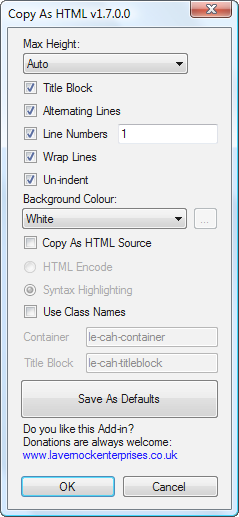
5.    Copy As HTML

http://www.lavernockenterprises.co.uk/downloads/copyashtml/copyashtml.aspx

Copy As HTML一个轻量级的VS插件。你可以利用它在VS中以HTML格式复制你的代码。在复制时它可以保留语法加亮,缩进和背景色,行数等等,方便你复制你的代码到你的博客、文档中。


6.    VsVim

http://blogs.msdn.com/jaredpar/archive/2009/09/09/vim-emulator-editor-extension-released.aspx

你是一个VIM的狂热分子吗?网络不乏这些忠实的信众,如迷春哥狂热的坚持使用vim做自己的开发。这个插件为VS提供了一个VIM模拟器。你可以使用”VIM”编辑你的代码。


7.    VS 2008 File Finder

http://www.huffs.us/blogEngine/page/VS-2008-File-Finder.aspx

在一个包含N个project的解决方案中查找一个文件时,使用这个插件相当有用。它提供一个窗口,可以快速的找到项目中的某个文件。类似EclipseCtrl+Shift+R快捷键。


8.    PowerCommands for Visual Studio 2008

http://code.msdn.microsoft.com/Release/ProjectReleases.aspx?ProjectName=PowerCommands&ReleaseId=559

为VS提供了一堆的命令扩展。


9.    TracExplorer

http://tracexplorer.devjavu.com/

https://groups.google.com/group/tracexplorer?pli=1

tracexplorer是一个Trac客户端。你可以在VS中浏览和管理Trac中的ticket


10.    Clone Detective for Visual Studio

http://clonedetectivevs.codeplex.com/Release/ProjectReleases.aspx?ReleaseId=16114

此插件可以分析项目中的代码,找到那些重复的代码。重复的代码不但冗余,而且一旦修改业务逻辑,多处代码也不好维护一致性。


[性能]中小型web网站架构初探之四:前端SQUID高速WEB缓存服务器的搭建

mikel阅读(945)

转载:http://www.4899.com/blog/article.asp?id=24
SQUID+GZIP+IIS的完美结合!
SQUID如果不能搞定GZIP,那么肯定流量虚高的,所以SQUID高速WEB缓存服务器的关键问题在于搞定GZIP。
以下是实例过程
为了原生支持GZIP,4899网通WEB缓存服务器用了 SQUID3.0 FOR WINDOWS 
下载地址 http://www.acmeconsulting.it/SquidNT.html
1.建立SQUID缓存目录在 d:\newcache 给user用户以完全控制权限
2. 把squid压缩包解压到C盘目录,进入squid/etc目录,复制一分,然后重命名把原文件的.default全去掉
3.开始编辑 squid.conf
a.我们对外用80端口,所以用批量替换 3128 替换为 80
b.搜索 http_port 80 后面加上 vhost 变成

程序代码 程序代码
http_port 80 vhost
icp_port 3130
cache_mem 433M (取内存的1/3+100M)
cache_dir aufs d:/newcache 12000 16 256
maximum_object_size 10240 KB
maximum_object_size_in_memory 6000 KB
memory_pools on
memory_pools_limit 100 MB
cache_swap_high 98%
cache_swap_low 90%
error_directory c:/squid/share/errors/Simplify_Chinese
hosts_file c:/windows/system32/drivers/etc/hosts
cache_peer www.4899.com parent 80 0 no-query originserver no-digest name=cache0
cache_peer 125.46.39.22 parent 8080 0 no-query originserver no-digest name=cache1
cache_peer 4899-img.mfcdn.com parent 8080 0 no-query originserver no-digest name=cache2
cache_peer 4899-flash.mfcdn.com parent 8080 0 no-query originserver no-digest name=cache3
cache_peer_domain cache0 www.4899.com 4899wt.4899.com
cache_peer_domain cache1 125.46.39.22
cache_peer_domain cache2 4899-img.mfcdn.com
cache_peer_domain cache3 4899-flash.mfcdn.com
#配置本机squid允许接受访问的域名,请注意name的对应
acl Safe_ports port 80
acl Safe_ports port 81
acl Safe_ports port 3130
http_access allow all
#允许以上端口的代理

期间找到 http_access deny all #掉他
4.建立缓存目录,修改hosts
通过cmd进入 c:\squid\sbin
squid -z
将建好缓存
squid -i
将squid注册为系统服务,在服务里,找到他,设置自动启动
进入 c:/windows/system32/drivers/etc/ 编辑 hots文件,将 www.4899.com 指向源服务器电信ip
61.152.249.77 www.4899.com
5.启动squid服务,在服务中启动他
6.为了使squid能响应iis的GZIP,要在源服务器做一定修改
a.经典的IIS启用GZIP的教程如下:
复制 C:\Windows\system32\inetsrv\metabase.xml 到另外的备份文件夹中.
在开始菜单中启动 Internet 信息服务(IIS)管理器,右键点击“网站”属性,打开“服务”选项卡,勾选“HTTP 压缩”的两个选项。“临时目录”和“临时目录最大容量”可根据需要自行设置。设置完成后点击确定。
右 键点击“网站”下方的 “Web服务扩展”,添加一个新的Web服务扩展,扩展名填写为“HTTP Compression”或其他,都可以。“要求的文件”添加:c:\windows\system32\inetsrv\gzip.dll ,并勾选“设置扩展状态为允许”,完成后点击确定。
在开始菜单中运行 notepad C:\Windows\system32\inetsrv\metabase.xml ,打开metabase.xml 文件,请在任何改动前再次确认该文件已经备份。
搜 索并找到 metabase.xml 文件中的 <IIsCompressionScheme    片段中的 HcScriptFileExtensions,依照原有文件的格式添加 你希望进行 HTTP 压缩的文件扩展名,静态文件HcFileExtensions可添加 JS,CSS 等; 动态文件 HcScriptFileExtensions 可添加"ASPX""ASMX",如下:
<IIsCompressionScheme Location ="/LM/W3SVC/Filters/Compression/deflate"
    HcCompressionDll="%windir%\system32\inetsrv\gzip.dll"
    HcCreateFlags="0"
    HcDoDynamic
Compression="TRUE"
    HcDoOnDemandCompression="TRUE"
    HcDoStaticCompression="FALSE"
    HcDynamicCompressionLevel="9"
    HcFileExtensions="htm
     html
     js
     css
     txt"
    HcOnDemandCompLevel="10"
    HcPriority="1"
    HcScriptFileExtensions="asp
     aspx
     asmx
     dll
     exe"
>
</IIsCompressionScheme>
<IIsCompressionScheme Location ="/LM/W3SVC/Filters/Compression/gzip"
    HcCompressionDll="%windir%\system32\inetsrv\gzip.dll"
    HcCreateFlags="1"
    HcDoDynamicCompression="TRUE"
    HcDoOnDemandCompression="TRUE"
    HcDoStaticCompression="TRUE"
    HcDynamicCompressionLevel="9"
    HcFileExtensions="htm
     html
     js
     css
     txt"
    HcOnDemandCompLevel="10"
    HcPriority="1"
    HcScriptFileExtensions="asp
     aspx
     asmx
     dll
     exe"
>
</IIsCompressionScheme>
注意“Compression/deflate”和“Compression/gzip”两个片段都需要修改。动态压缩等级,HcDynamicCompressionLevel 建议设置为“9”
如果你的服务器上某一个Web站点不希望启用 IIS 压缩,请运行以下脚本:
cscript. C:\Inetpub\AdminScripts\adsutil.vbs set w3svc/site#/root/DoStaticCompression False
cscript. C:\Inetpub\AdminScripts\adsutil.vbs set w3svc/site#/root/DoDynamicCompression False
如果想增加启用 HTTP 压缩的文件类型,请运行以下脚本:
"" 中为文件扩展名,别忘了把原有的扩展名加上。
静态文件压缩:
CSCRIPT.EXE ADSUTIL.VBS SET W3Svc/Filters/Compression/GZIP/HcFileExtensions "htm" "html" "txt" "doc" "ppt" "xls"
CSCRIPT.EXE ADSUTIL.VBS SET W3Svc/Filters/Compression/DEFLATE/HcFileExtensions "htm" "html" "txt" "doc" "ppt" "xls"
动态文件压缩:
CSCRIPT.EXE ADSUTIL.VBS SET W3Svc/Filters/Compression/GZIP/HcScriptFileExtensions "asp" "aspx" "asmx" "dll" "exe" "php"
CSCRIPT.EXE ADSUTIL.VBS SET W3Svc/Filters/Compression/DEFLATE/HcScriptFileExtensions "asp" "aspx" "asmx" "dll" "exe" "php"
将site#替换为该 Web 站点的 ID。Web 站点的 ID 是什么到“日志记录属性”中看一下日志记录的“日志文件名”前面的路径就知道了。
运行以上脚本前务必备份,运行后再次执行“IISReset”使生效.
现在看一下 HTTP 压缩后的效果吧:
测试 HTTP 压缩效果的工具:
http://www.pipeboost.com/
b.做适当修改,以适应squid缓存需要
在开始菜单中运行 notepad C:\Windows\system32\inetsrv\metabase.xml ,打开metabase.xml 文件,请在任何改动前再次确认该文件已经备份
HcNoCompressionForHttp10="TRUE"
HcNoCompressionForProxies="TRUE"
上面这俩改成FALSE
然 后查找 HcDoDynamicCompression 也要改成 FALSE,这实际上是关闭了动态加速,以4899小游戏网站配置SQUID+GZIP的经 验,HcDoDynamicCompression="TRUE"时,SQUID缓存动态文件会出现问题,关了就好了。

[JQuery]JQuery Tips(3)----关于$()包装集内元素的改变

mikel阅读(780)

转载:http://www.cnblogs.com/CareySon/archive/2009/12/14/1623963.html

JQuery包装集内的元素在一开始的选定后,还可以通过一系列JQuery提供的方法对包装集内的元素进行扩充,修改,筛选,删除

find()方法 VS filter()方法

这两个方法是比较容易搞混的.

filter方法表示的是对当前内部的元素进行筛选,这个接受两种参数,一个返回bool的function,或者是jQuery的选择表达式,包装集内的元素只会小于等于当前包装集内的元素,并且含有的元素属于原来包装集内元素的子集:

<div id="one">the one</div>
<div id="two"><p>the two</p></div>
<div id="three"><p>the three</p></div>
<script type="text/javascript">
alert($("div").filter(":not(:first):not(:last)").html()); //out put<p>the two</p>
alert($("div").filter(function() { return this.id == "two"; }).html());//output <p>the two</p> as well
</script>

而find方法却是在当前元素内(子元素)部进行查找,并返回新的包装集,这意味着包装集可能会增加:

<div id="one">the one</div>
<div id="two"><p>the two</p><p></p><p></p></div>
<div id="three"><p>the three</p></div>
<script type="text/javascript">
alert($("div").find("p").text()); //alert "the twothe three"
alert($("div").find("p").length); //alert 4 instead of original 3
</script>

从上面可以看出新包装集内的元素增加了


parents()方法  VS closest()方法

这两个方法都是由当前元素向上查找所匹配的元素,不同之处如下:

    <div id="wrapper">
<div id="two">
<p id="p1">
the two</p>
</div>
</div>
<script type="text/javascript">
alert($("#p1").parents("div").length); //alert 2 include <div id="two"> and <div id="wrapper">
alert($("#p1").closest("div").length); //alert 1 and only include <div id="two">
alert($("#p1").parents("p").length);  //alert 0 because it does not include current element
alert($("#p1").closest("p").length);  //alert 1 because it contain itself <p id="p1">
</script>

对于parents方法来说,会将当前元素向上的所有匹配元素加入新的包装集并返回,而closest方法只会包含离当前元素最近的元素,所以使用closest方法后当前包装集内的元素只能为1个或者0个

而parents方法并不包括当前包装集内的元素,而closest方法会包含当前包装集内的元素

直系子元素 VS 所有子元素

使用children可以返回直系子元素,而用find加通配符的方法可以返回除了文本节点之外的所有子元素:

    <div id="wrapper">
text node here
<div id="two">
<p id="p1">
the two</p>
</div>
</div>
<script type="text/javascript">
alert($("#wrapper").children().length);//alert 1 because only direct children included
alert($("#wrapper").find("*").length); //alert 2 because all desendants included
alert($("#wrapper").find(">*").length);//alert 1 because only direct children included
</script>

可以看出children方法只会含有当前元素的直系子元素,而使用find(“>*也会产生同样的效果”).若想采纳所有的直系子元素直接在find内传”*”通配符

回到过去的end()方法以及andself()方法

上述所有的方法,以及比如add(),next(),nextAll(),prev()等对包装集内元素进行改变的方法都可以使用end()方法来进行返回:

    <div id="wrapper">
text node here
<div id="two">
<p id="p1">
the two</p>
</div>
</div>
<script type="text/javascript">
alert($("#wrapper").find(">*").end().get(0).id);//alert "wrapper" instead of "two" because of end() method has been used
</script>

end()方法总是和最近的一个和包装集改变的方法相抵消,而抵消其他方法:

    <div id="wrapper">
text node here
<div id="two">
<p id="p1">
the two</p>
</div>
</div>
<script type="text/javascript">
alert($("#wrapper").find("#p1").html("new value").end().get(0).id);//alert wrapper because end method
alert($("#p1").text())//alert new value bacause the html method in previous has not been cancelled
</script>

如果需要在改变包装集内元素的情况下还需要包含原始的包装集内元素,使用andself方法:

    <div id="wrapper">
text node here
<div id="two">
<p id="p1">
the two</p>
</div>
</div>
<script type="text/javascript">
var $a = $("#wrapper").find("#two").andSelf();
alert($a[0].id);//alert two first
alert($a[1].id);//alert wrapper after that
</script>

我们会发现首先alert two,因为two先被选择


————————————-传说中的分隔符—————————

PS:liver writer代码高亮插件我一加中文就是乱码,很郁闷的说-.-!!所以注释都是鸟语了

[JQuery]JQuery Tips(1)----关于$.Ready()

mikel阅读(926)

转载:http://www.cnblogs.com/CareySon/archive/2009/12/12/1622718.html
最近一直在研究JQuery,这个东西还是很博大精深的.下面分享一下我的学习总结.

$(document).Ready()方法 VS OnLoad事件 VS $(window).load()方法

     接触JQuery一般最先学到的是何时启动事件。在曾经很长一段时间里,在页面载入后引发的事件都被加载在”Body”的Onload事件里.

     对于Body的Onload事件和jQuery的Ready方法相比,有很多弊端.比如:

1.加载多个函数的问题

<body onload="a();b();">
</body>

     在Onload事件中只能这样加载,很丑陋…而在jQuery中你可以利用多个JQuery.Ready()方法,它们会按次序依次执行

2.代码和内容不分离

    这个貌似不用说了,让人深恶痛绝-.-!!

3.执行先后顺序不同

    对于Body.Onload事件,是在加载完所有页面内容才会触发,我的意思是所有内容,包括图片,flash等.如果页面的这些内容很多会让用户等待很长时间.

    而对于$(document).ready()方法,这个方法只是在页面所有的DOM加载完毕后就会触发,无疑很大的加快了网页的速度.

    但是对于一些特殊应用,比如图片的放大缩小,图片的剪裁。需要网页所有的内容加载完毕后才执行的呢?我推荐使用$(window).load()方法,这个方法会等到页面所有内容加载完毕后才会触发,并且同时又没有OnLoad事件的弊端.

    <script type="text/javascript">
$(window).load(function() {
alert("hello");
});
$(window).load(function() {
alert("hello again");
});
</script>

    上面的代码会在页面所有内容加载完成后按先后顺序依次执行.

  当然不要忘了与之对应的Unload方法

$(window).unload(function() {
alert("good bye");
});

  上面代码会在页面关闭时引发.

在所有DOM加载之前引发JS代码

这个方法是我在调试的时候最喜欢的,有时候开发的时候也用这种方法

<body>
<script type="text/javascript">
(function() {
alert("hi");
})(jQuery)
</script>
</body>

对,就是利用js闭包的形式将js代码嵌入body,这段代码会自动执行,当然也可以直接嵌入js代码,这种方式要注意顺序问题,如下:

<body>
<div id="test">this is the content</div>
<script type="text/javascript">
alert($("#test").html());//I Can display the content
</script>
</body>
<body>
<script type="text/javascript">
alert($("#test").html());//I Can't display the content
</script>
<div id="test">this is the content</div>
</body>

上面两段代码,第二段代码当中因为只能解释到当前代码之前的DOM,而test并不存在于已经解析的DOM数.所以第二段代码无法正确显示.

[JQuery]JQuery Tips(2)----关于$()包装集你不知道的

mikel阅读(820)

转载:http://www.cnblogs.com/CareySon/archive/2009/12/13/1623151.html

包装集总是面向集合的

     我想这个理解起来很简单,被$()包装的JQuery对象总是以集合的形式出现.就算包装集中只有一个对象.

<div id="a"></div>
<div id="b"></div>
<script type="text/javascript">
$("div").html("hi");
</script>

    上面被选择的两个DIV的内容都会被改变为”hi”

包装集内元素的顺序

     在被JQuery包装的元素中,包装集中所包含的内部顺序是按照HTML流从先向后排列的,而不是选择顺序:

<div id="a">here is a</div>
<div id="b">here is b</div>
<script type="text/javascript">
var Se = $("#b,#a");
alert(Se.get(0).innerHTML);
alert(Se.get(1).innerHTML);
</script>

   上面代码可以看到,虽然是b先被选择,但是在执行alert的时候会先弹出”here is a”继而是“here is b”

JQuery对象和DOM的转化

      首先,是DOM转化成jQuery对象,这个很容易,只需包含在$()里面即可.但有一点注意的是,再被jQuery包装的元素的事件内,this总是指向当前对象:

<div id="a">here is a</div>
<div id="b">here is b</div>
<script type="text/javascript">
$("div").click(function() {
alert(this.id);//this Ö¸Ïòµ±Ç°µÄDOM
});
</script>

     将jQuery包装集中的元素转为DOM对于JQuery来说也是很简单的事,大多数情况都使用JQuery的get方法

<div id="a">here is a</div>
<div id="b">here is b</div>
<script type="text/javascript">
var Jq = $("div");
alert(Jq.get(0).id); //alert "a"
alert(Jq.get()[0].id); //alert "a" as well
alert(Jq[0].id);//alert "a"
</script>

     从面可以看出,通过get方法加索引作为参数,会返回索引值的DOM对象,而不加参数会返回JQuery包装集中的整个数组

     还有一种简便方法是直接在JQuery包装集后面加数组符号,可以把上面的Jq[0]看做Jq.get(0)的简便方式:-)

检查当前JQuery包装集中的元素个数

       在很多时候,需要检查在JQuery包装集中的元素个数,我们可以直接通过包装集的length属性(这个属性在VS当中是不提示的)

div id="a">here is a</div>
<div id="b">here is b</div>
<script type="text/javascript">
var Jq = $("div");
alert($("Div").length);//alert "2"
</script>

      这个属性还可以直接用于检测当前的包装集是否为空

<div id="a">here is a</div>
<div id="b">here is b</div>
<script type="text/javascript">
if ($("div").length) {
alert("Not Empty");
}
if ($("div").get(0)) {
alert("Not Empty");
}
</script>

     上面两个alert都会被执行,第二个方式通过检测当前包装集中第一个元素是否为空来确定包装集为空.

包装集在某些特定情况下也“不总是面向集合”

       刚才不是号称总是面向集合吗,咋又变了?其实的确是面向集合,但在使用JQuery的某些方法进行提取时,就不是这样了,比如下面代码:

<div id="a" >here is a</div>
<div id="b">here is b</div>
<script type="text/javascript">
alert($("div").attr("id"));
</script>

     上面代码只会alert第一个div的id.那在这种情况下咋办呢?对,用JQuery的Each方法,each方法会遍历包装集中的每一个元素:

<div id="a" >here is a</div>
<div id="b">here is b</div>
<script type="text/javascript">
$("div").each(function() {
alert($(this).attr("id"));
});
</script>

     上面代码会执行两个alert:-)

[C#]使用C#获取CPU及硬盘序列号的源代码

mikel阅读(1106)

本文转载自CSDN博客,http://blog.csdn.net/songkexin/archive/2009/12/01/4916602.aspx

首先需添加对System.Management的引用。

view plaincopy to clipboardprint?
using System;   
using System.Runtime.InteropServices;   
using System.Management;   
 
namespace Hardware   
{   
    /// <summary>   
    /// HardwareInfo 的摘要说明。   
    /// </summary>   
    public class HardwareInfo   
    {   
        //取机器名    
        public string GetHostName()   
        {   
            return System.Net.Dns.GetHostName();   
        }   
        //取CPU编号   
        public String GetCpuID()   
        {   
            try   
            {   
                ManagementClass mc = new ManagementClass("Win32_Processor");   
                ManagementObjectCollection moc = mc.GetInstances();   
 
                String strCpuID = null;   
                foreach (ManagementObject mo in moc)   
                {   
                    strCpuID = mo.Properties["ProcessorId"].Value.ToString();   
                    break;   
                }   
                return strCpuID;   
            }   
            catch   
            {   
                return "";   
            }   
 
        }//end method   
 
        //取第一块硬盘编号   
        public String GetHardDiskID()   
        {   
            try   
            {   
                ManagementObjectSearcher searcher = new ManagementObjectSearcher("Select * FROM Win32_PhysicalMedia");   
                String strHardDiskID = null;   
                foreach (ManagementObject mo in searcher.Get())   
                {   
                    strHardDiskID = mo["SerialNumber"].ToString().Trim();   
                    break;   
                }   
                return strHardDiskID;   
            }   
            catch   
            {   
                return "";   
            }   
        }//end    
 
        public enum NCBCONST   
        {   
            NCBNAMSZ = 16,      /* absolute length of a net name         */   
            MAX_LANA = 254,      /* lana's in range 0 to MAX_LANA inclusive   */   
            NCBENUM = 0x37,      /* NCB ENUMERATE LANA NUMBERS            */   
            NRC_GOODRET = 0x00,      /* good return                              */   
            NCBRESET = 0x32,      /* NCB RESET                        */   
            NCBASTAT = 0x33,      /* NCB ADAPTER STATUS                  */   
            NUM_NAMEBUF = 30,      /* Number of NAME's BUFFER               */   
        }   
 
        [StructLayout(LayoutKind.Sequential)]   
        public struct ADAPTER_STATUS   
        {   
            [MarshalAs(UnmanagedType.ByValArray, SizeConst = 6)]   
            public byte[] adapter_address;   
            public byte rev_major;   
            public byte reserved0;   
            public byte adapter_type;   
            public byte rev_minor;   
            public ushort duration;   
            public ushort frmr_recv;   
            public ushort frmr_xmit;   
            public ushort iframe_recv_err;   
            public ushort xmit_aborts;   
            public uint xmit_success;   
            public uint recv_success;   
            public ushort iframe_xmit_err;   
            public ushort recv_buff_unavail;   
            public ushort t1_timeouts;   
            public ushort ti_timeouts;   
            public uint reserved1;   
            public ushort free_ncbs;   
            public ushort max_cfg_ncbs;   
            public ushort max_ncbs;   
            public ushort xmit_buf_unavail;   
            public ushort max_dgram_size;   
            public ushort pending_sess;   
            public ushort max_cfg_sess;   
            public ushort max_sess;   
            public ushort max_sess_pkt_size;   
            public ushort name_count;   
        }   
 
        [StructLayout(LayoutKind.Sequential)]   
        public struct NAME_BUFFER   
        {   
            [MarshalAs(UnmanagedType.ByValArray, SizeConst = (int)NCBCONST.NCBNAMSZ)]   
            public byte[] name;   
            public byte name_num;   
            public byte name_flags;   
        }   
 
        [StructLayout(LayoutKind.Sequential)]   
        public struct NCB   
        {   
            public byte ncb_command;   
            public byte ncb_retcode;   
            public byte ncb_lsn;   
            public byte ncb_num;   
            public IntPtr ncb_buffer;   
            public ushort ncb_length;   
            [MarshalAs(UnmanagedType.ByValArray, SizeConst = (int)NCBCONST.NCBNAMSZ)]   
            public byte[] ncb_callname;   
            [MarshalAs(UnmanagedType.ByValArray, SizeConst = (int)NCBCONST.NCBNAMSZ)]   
            public byte[] ncb_name;   
            public byte ncb_rto;   
            public byte ncb_sto;   
            public IntPtr ncb_post;   
            public byte ncb_lana_num;   
            public byte ncb_cmd_cplt;   
            [MarshalAs(UnmanagedType.ByValArray, SizeConst = 10)]   
            public byte[] ncb_reserve;   
            public IntPtr ncb_event;   
        }   
 
        [StructLayout(LayoutKind.Sequential)]   
        public struct LANA_ENUM   
        {   
            public byte length;   
            [MarshalAs(UnmanagedType.ByValArray, SizeConst = (int)NCBCONST.MAX_LANA)]   
            public byte[] lana;   
        }   
 
        [StructLayout(LayoutKind.Auto)]   
        public struct ASTAT   
        {   
            public ADAPTER_STATUS adapt;   
            [MarshalAs(UnmanagedType.ByValArray, SizeConst = (int)NCBCONST.NUM_NAMEBUF)]   
            public NAME_BUFFER[] NameBuff;   
        }   
        public class Win32API   
        {   
            [DllImport("NETAPI32.DLL")]   
            public static extern char Netbios(ref NCB ncb);   
        }   
 
        public string GetMacAddress()   
        {   
            string addr = "";   
            try   
            {   
                int cb;   
                ASTAT adapter;   
                NCB Ncb = new NCB();   
                char uRetCode;   
                LANA_ENUM lenum;   
 
                Ncb.ncb_command = (byte)NCBCONST.NCBENUM;   
                cb = Marshal.SizeOf(typeof(LANA_ENUM));   
                Ncb.ncb_buffer = Marshal.AllocHGlobal(cb);   
                Ncb.ncb_length = (ushort)cb;   
                uRetCode = Win32API.Netbios(ref Ncb);   
                lenum = (LANA_ENUM)Marshal.PtrToStructure(Ncb.ncb_buffer, typeof(LANA_ENUM));   
                Marshal.FreeHGlobal(Ncb.ncb_buffer);   
                if (uRetCode != (short)NCBCONST.NRC_GOODRET)   
                    return "";   
 
                for (int i = 0; i < lenum.length; i++)   
                {   
                    Ncb.ncb_command = (byte)NCBCONST.NCBRESET;   
                    Ncb.ncb_lana_num = lenum.lana[i];   
                    uRetCode = Win32API.Netbios(ref Ncb);   
                    if (uRetCode != (short)NCBCONST.NRC_GOODRET)   
                        return "";   
 
                    Ncb.ncb_command = (byte)NCBCONST.NCBASTAT;   
                    Ncb.ncb_lana_num = lenum.lana[i];   
                    Ncb.ncb_callname[0] = (byte)'*';   
                    cb = Marshal.SizeOf(typeof(ADAPTER_STATUS)) + Marshal.SizeOf(typeof(NAME_BUFFER)) * (int)NCBCONST.NUM_NAMEBUF;   
                    Ncb.ncb_buffer = Marshal.AllocHGlobal(cb);   
                    Ncb.ncb_length = (ushort)cb;   
                    uRetCode = Win32API.Netbios(ref Ncb);   
                    adapter.adapt = (ADAPTER_STATUS)Marshal.PtrToStructure(Ncb.ncb_buffer, typeof(ADAPTER_STATUS));   
                    Marshal.FreeHGlobal(Ncb.ncb_buffer);   
 
                    if (uRetCode == (short)NCBCONST.NRC_GOODRET)   
                    {   
                        if (i > 0)   
                            addr += ":";   
                        addr = string.Format("{0,2:X}{1,2:X}{2,2:X}{3,2:X}{4,2:X}{5,2:X}",   
                         adapter.adapt.adapter_address[0],   
                         adapter.adapt.adapter_address[1],   
                         adapter.adapt.adapter_address[2],   
                         adapter.adapt.adapter_address[3],   
                         adapter.adapt.adapter_address[4],   
                         adapter.adapt.adapter_address[5]);   
                    }   
                }   
            }   
            catch   
            { }   
            return addr.Replace(' ', '0');   
        }   
    }   
}  
using System;
using System.Runtime.InteropServices;
using System.Management;

namespace Hardware
{
    /// <summary>
    /// HardwareInfo 的摘要说明。
    /// </summary>
    public class HardwareInfo
    {
        //取机器名 
        public string GetHostName()
        {
            return System.Net.Dns.GetHostName();
        }
        //取CPU编号
        public String GetCpuID()
        {
            try
            {
                ManagementClass mc = new ManagementClass("Win32_Processor");
                ManagementObjectCollection moc = mc.GetInstances();

                String strCpuID = null;
                foreach (ManagementObject mo in moc)
                {
                    strCpuID = mo.Properties["ProcessorId"].Value.ToString();
                    break;
                }
                return strCpuID;
            }
            catch
            {
                return "";
            }

        }//end method

        //取第一块硬盘编号
        public String GetHardDiskID()
        {
            try
            {
                ManagementObjectSearcher searcher = new ManagementObjectSearcher("Select * FROM Win32_PhysicalMedia");
                String strHardDiskID = null;
                foreach (ManagementObject mo in searcher.Get())
                {
                    strHardDiskID = mo["SerialNumber"].ToString().Trim();
                    break;
                }
                return strHardDiskID;
            }
            catch
            {
                return "";
            }
        }//end 

        public enum NCBCONST
        {
            NCBNAMSZ = 16,      /* absolute length of a net name         */
            MAX_LANA = 254,      /* lana's in range 0 to MAX_LANA inclusive   */
            NCBENUM = 0x37,      /* NCB ENUMERATE LANA NUMBERS            */
            NRC_GOODRET = 0x00,      /* good return                              */
            NCBRESET = 0x32,      /* NCB RESET                        */
            NCBASTAT = 0x33,      /* NCB ADAPTER STATUS                  */
            NUM_NAMEBUF = 30,      /* Number of NAME's BUFFER               */
        }

        [StructLayout(LayoutKind.Sequential)]
        public struct ADAPTER_STATUS
        {
            [MarshalAs(UnmanagedType.ByValArray, SizeConst = 6)]
            public byte[] adapter_address;
            public byte rev_major;
            public byte reserved0;
            public byte adapter_type;
            public byte rev_minor;
            public ushort duration;
            public ushort frmr_recv;
            public ushort frmr_xmit;
            public ushort iframe_recv_err;
            public ushort xmit_aborts;
            public uint xmit_success;
            public uint recv_success;
            public ushort iframe_xmit_err;
            public ushort recv_buff_unavail;
            public ushort t1_timeouts;
            public ushort ti_timeouts;
            public uint reserved1;
            public ushort free_ncbs;
            public ushort max_cfg_ncbs;
            public ushort max_ncbs;
            public ushort xmit_buf_unavail;
            public ushort max_dgram_size;
            public ushort pending_sess;
            public ushort max_cfg_sess;
            public ushort max_sess;
            public ushort max_sess_pkt_size;
            public ushort name_count;
        }

        [StructLayout(LayoutKind.Sequential)]
        public struct NAME_BUFFER
        {
            [MarshalAs(UnmanagedType.ByValArray, SizeConst = (int)NCBCONST.NCBNAMSZ)]
            public byte[] name;
            public byte name_num;
            public byte name_flags;
        }

        [StructLayout(LayoutKind.Sequential)]
        public struct NCB
        {
            public byte ncb_command;
            public byte ncb_retcode;
            public byte ncb_lsn;
            public byte ncb_num;
            public IntPtr ncb_buffer;
            public ushort ncb_length;
            [MarshalAs(UnmanagedType.ByValArray, SizeConst = (int)NCBCONST.NCBNAMSZ)]
            public byte[] ncb_callname;
            [MarshalAs(UnmanagedType.ByValArray, SizeConst = (int)NCBCONST.NCBNAMSZ)]
            public byte[] ncb_name;
            public byte ncb_rto;
            public byte ncb_sto;
            public IntPtr ncb_post;
            public byte ncb_lana_num;
            public byte ncb_cmd_cplt;
            [MarshalAs(UnmanagedType.ByValArray, SizeConst = 10)]
            public byte[] ncb_reserve;
            public IntPtr ncb_event;
        }

        [StructLayout(LayoutKind.Sequential)]
        public struct LANA_ENUM
        {
            public byte length;
            [MarshalAs(UnmanagedType.ByValArray, SizeConst = (int)NCBCONST.MAX_LANA)]
            public byte[] lana;
        }

        [StructLayout(LayoutKind.Auto)]
        public struct ASTAT
        {
            public ADAPTER_STATUS adapt;
            [MarshalAs(UnmanagedType.ByValArray, SizeConst = (int)NCBCONST.NUM_NAMEBUF)]
            public NAME_BUFFER[] NameBuff;
        }
        public class Win32API
        {
            [DllImport("NETAPI32.DLL")]
            public static extern char Netbios(ref NCB ncb);
        }

        public string GetMacAddress()
        {
            string addr = "";
            try
            {
                int cb;
                ASTAT adapter;
                NCB Ncb = new NCB();
                char uRetCode;
                LANA_ENUM lenum;

                Ncb.ncb_command = (byte)NCBCONST.NCBENUM;
                cb = Marshal.SizeOf(typeof(LANA_ENUM));
                Ncb.ncb_buffer = Marshal.AllocHGlobal(cb);
                Ncb.ncb_length = (ushort)cb;
                uRetCode = Win32API.Netbios(ref Ncb);
                lenum = (LANA_ENUM)Marshal.PtrToStructure(Ncb.ncb_buffer, typeof(LANA_ENUM));
                Marshal.FreeHGlobal(Ncb.ncb_buffer);
                if (uRetCode != (short)NCBCONST.NRC_GOODRET)
                    return "";

                for (int i = 0; i < lenum.length; i++)
                {
                    Ncb.ncb_command = (byte)NCBCONST.NCBRESET;
                    Ncb.ncb_lana_num = lenum.lana[i];
                    uRetCode = Win32API.Netbios(ref Ncb);
                    if (uRetCode != (short)NCBCONST.NRC_GOODRET)
                        return "";

                    Ncb.ncb_command = (byte)NCBCONST.NCBASTAT;
                    Ncb.ncb_lana_num = lenum.lana[i];
                    Ncb.ncb_callname[0] = (byte)'*';
                    cb = Marshal.SizeOf(typeof(ADAPTER_STATUS)) + Marshal.SizeOf(typeof(NAME_BUFFER)) * (int)NCBCONST.NUM_NAMEBUF;
                    Ncb.ncb_buffer = Marshal.AllocHGlobal(cb);
                    Ncb.ncb_length = (ushort)cb;
                    uRetCode = Win32API.Netbios(ref Ncb);
                    adapter.adapt = (ADAPTER_STATUS)Marshal.PtrToStructure(Ncb.ncb_buffer, typeof(ADAPTER_STATUS));
                    Marshal.FreeHGlobal(Ncb.ncb_buffer);

                    if (uRetCode == (short)NCBCONST.NRC_GOODRET)
                    {
                        if (i > 0)
                            addr += ":";
                        addr = string.Format("{0,2:X}{1,2:X}{2,2:X}{3,2:X}{4,2:X}{5,2:X}",
                         adapter.adapt.adapter_address[0],
                         adapter.adapt.adapter_address[1],
                         adapter.adapt.adapter_address[2],
                         adapter.adapt.adapter_address[3],
                         adapter.adapt.adapter_address[4],
                         adapter.adapt.adapter_address[5]);
                    }
                }
            }
            catch
            { }
            return addr.Replace(' ', '0');
        }
    }
}
 

使用方法举例:

view plaincopy to clipboardprint?
//获取硬盘序列号   
Hardware.HardwareInfo hardwareInfo = new Hardware.HardwareInfo();   
string hardDiskID = hardwareInfo.GetHardDiskID();   
System.Console.WriteLine(hardDiskID);   
 
//获取CPU序列号   
string cpuID = hardwareInfo.GetCpuID();   
System.Console.WriteLine(cpuID);   
// 获取硬盘序列号Hardware.HardwareInfo hardwareInfo = new Hardware.HardwareInfo();string hardDiskID = hardwareInfo.GetHardDiskID();System.Console.WriteLine(hardDiskID);//获取 CPU序列号string cpuID = hardwareInfo.GetCpuID();System.Console.WriteLine(cpuID); 

[Comet]数十行F#打造简易Comet聊天服务

mikel阅读(1036)

转载:http://www.cnblogs.com/JeffreyZhao/archive/2009/12/11/fsharp-comet-prototype.html

普通的Web应用程序,都是靠大量HTTP短连接维持的。如实现一个聊天服务时,客户端会不断轮询服务器端索要新消息。这种做法的优势在于简单有效,因此广为目前的聊天服务所采用。不过Comet技术与之不同,简单地说,Comet便 是指服务器推(Server-Push)技术。它的实现方式是(这里只讨论基于浏览器的Web平台)在浏览器与服务器之间建立一个长连接,待获得消息之后 立即返回。否则持续等待,直至超时。客户端得到消息或超时之后,又会立即建立另一个长连接。Comet技术的最大优势,自然就是很高的即使性。

如 果要在ASP.NET平台上实现Comet技术,那么自然需要在服务器端使用异步请求处理。如果是普通处理方式的话,每个请求都会占用一个工作线程,要知 道Comet是“长连接”,因此不需要多少客户端便会占用大量的线程,这对资源消耗是巨大的。如果是异步请求的话,虽然客户端和服务器端之间一直保持着连 接,但是客户端在等待消息的时候是不占用线程的,直到“超时”或“消息到达”时才继续执行。

以前也有人实现过基于ASP.NET的Comet服务原型,不过是使用C#的。而现在我们用F#来实现这个功能。您会发现F#对于此类异步场景有其独特的优势。

F#常用的工作单元是“模块”,其中定义了大量函数或字段。例如我们要打造一个聊天服务的话,我便定义了一个Chat模块:

#light
module internal Comet.Chating.Chat
open System
open System.Collections.Concurrent
type ChatMsg = {
From: string;
Text: string;
}
let private agentCache = new ConcurrentDictionary<string, MailboxProcessor<ChatMsg>>()
let private agentFactory = new Func<string, MailboxProcessor<ChatMsg>>(fun _ ->
MailboxProcessor.Start(fun o -> async { o |> ignore }))
let private GetAgent name = agentCache.GetOrAdd(name, agentFactory)

在这里我构建了一个名为ChatMsg的Record类型,一个ChatMsg对象便是一条消息。然后,我使用一个名为agentCache的 ConcurrentDictionary对象来保存每个用户所对应的聊天队列——MailboxProcessor。它是F#核心库中内置的,用于实现 消息传递式并发的组件,非常轻量级,因此我为每个用户分配一个也只使用很少的资源。GetAgent函数的作用是根据用户的名称获取对应的 MailboxProcessor对象,自不必多说。

Chat模块中还定义了send和receive两个公开方法,如下:

let send fromName toName msg =
let agent = GetAgent toName
{ From = fromName; Text = msg; } |> agent.Post
let receive name =
let rec receive' (agent: MailboxProcessor<ChatMsg>) messages =
async {
let! msg = agent.TryReceive 0
match msg with
| None -> return messages
| Some s -> return! receive' agent (s :: messages)
}
let agent = GetAgent name
async {
let! messages = receive' agent List.empty
if (not messages.IsEmpty) then return messages
else
let! msg = agent.TryReceive 3000
match msg with
| None -> return []
| Some s -> return [s]
}

send方法接受3个参数,没有返回值,它的实现只是简单地构造一个ChatMsg对象,并塞入对应的MailboxProcessor。不过 receive方法是这里最关键的部分(没有之一)。receive函数的作用是接受并返回MailboxProcessor中已有的对象,或者等待3秒 钟后超时——这么说其实不太妥当,因为receive方法其实只是构造了一个“做这件事情”的Async Workflow,而还没有真正执行它。至于它是如何执行的,我们稍候再谈。

receive函数的逻辑是这样的:首先我们构造一个辅助函数receive’来“尝试获取”队列中已有的所有消息。receive’是一个递归函 数,每次获取一个,并递归获取剩余的消息。agent.TryReceive函数接受0,表示查询队列,并立即返回一个 Option<ChatMsg>结果,如果这个结果为None,则表示队列已为空。于是在receive这个主函数中,便先使用 receive’函数获取已有消息,如果存在则立即返回,否则便接收3秒钟内获得的第一个消息,如果3秒结束还没有收到则返回None。

在receive和receive’函数中都使用了let!获取agent.TryReceive函数的结果。let!是F#中构造Workflow的关键字,它起到了“语法糖”的作用。例如,以下的Async Workflow:

async {
let req = WebRequest.Create("http://moma.org/")
let! resp = req.GetResponseAsync()
let stream = resp.GetResponseStream()
let reader = new StreamReader(stream)
let! html = reader.ReadToEndAsync()
html
}

事实上在“解糖”后就变成了:

async.Delay(fun () ->
async.Let(WebRequest.Create("http://moma.org/"), (fun req ->
async.Bind(req.GetResponseAsync(), (fun resp ->
async.Let(resp.GetResponseStream(), (fun stream ->
async.Let(new StreamReader(stream), (fun reader ->
async.Bind(reader.ReadToEndAsync(), (fun html ->
async.Return(html))))))))))

let!关键字则会转化为Bind函数调用,Bind调用有两个参数,第一个参数为Async<’a>类型,它便负责一个“回调”,待 回调后才执行一个匿名函数——也就是Bind函数的第二个参数。可见,let!关键字的一个重要作用,便是将流程的“控制权”转交给“系统”,待合适的时 候再继续执行下去。这便是关键,因为这样的话,在接受一个消息的时候,这等待的3秒钟是不占用任何线程的,也就是真正的纯异步。但是如果观察代码——难道 不是纯粹的顺序型写法吗?

这就是F#的神奇之处。

ASP.NET处理时需要Handler,于是在Send阶段便是简单的IHttpHandler:

#light
namespace Comet.Chating
open Comet
open System
open System.Web
type SendHandler() =
interface IHttpHandler with
member h.IsReusable = false
member h.ProcessRequest(context) =
let fromName = context.Request.Form.Item("from");
let toName = context.Request.Form.Item("to")
let msg = context.Request.Form.Item("msg")
Chat.send fromName toName msg
context.Response.Write "sent"

而Receive阶段则是个异步的IHttpAsyncHandler:

#light
namespace Comet.Chating
open Comet
open System
open System.Collections.Generic
open System.Web
open System.Web.Script.Serialization
type ReceiveHandler() =
let mutable m_context = null
let mutable m_endReceive = null
interface IHttpAsyncHandler with
member h.IsReusable = false
member h.ProcessRequest(context) = failwith "not supported"
member h.BeginProcessRequest(c, cb, state) =
m_context <- c
let name = c.Request.QueryString.Item("name")
let receive = Chat.receive name
let beginReceive, e, _ = Async.AsBeginEnd receive
m_endReceive <- new Func<_, _>(e)
beginWork (cb, state)
member h.EndProcessRequest(ar) =
let convert (m: Chat.ChatMsg) =
let o = new Dictionary<_, _>();
o.Add("from", m.From)
o.Add("text", m.Text)
o
let result = m_endReceive.Invoke ar
let serializer = new JavaScriptSerializer()
result
|> List.map convert
|> serializer.Serialize
|> m_context.Response.Write

这里的关键是Async.AsBeginEnd函数,它将Chat.receive函数生成的Async Workflow转化成一组标准APM形式的begin/end对,然后我们只要把BeginProcessRequest和 EndProcessReqeust的职责直接交给即可。剩下的,便是一些序列化成JSON的工作了。

于是我们可以新建一个Web项目,引用F#工程,在Web.config里配置两个Handler,再准备一个Chat.aspx页面即可。您可以在文末的链接中查看该页面的代码,也可以在这里试用其效果。作为演示页面,您其实只能“自己给自己”发送消息,其主要目的是查看其响应时间而已。例如,以下便是使用效果一例:

2 - receiving...
3026 - received nothing (3024ms)
3026 - receiving...
6055 - received nothing (3028ms)
6055 - receiving...
7256 - sending 123654...
7268 - received: 123654 (1213ms)
7268 - receiving...
10281 - received nothing (3013ms)
10281 - receiving...
13298 - received nothing (3017ms)
13298 - receiving...
13679 - sending 123456...
13698 - received: 123456 (400ms)
13698 - receiving...
16716 - received nothing (3018ms)
16716 - receiving...
18256 - sending hello world...
18265 - received: hello world (1549ms)
18266 - receiving...
21281 - received nothing (3015ms)
21281 - receiving...

可见,如果没有收到消息,那么receive操作会在3秒钟后返回。当send一条消息后,先前的receive操作便会立即获得消息了,即无需等待3秒便可提前返回。这便是Comet的效果。

至于性能,我写了一个客户端小程序,用于模拟大量用户同时聊天,每个用户每隔1秒便给另外5个用户发送一条消息,然后查看这条消息收到时产生多少的 延迟。经过本机测试(2.4GHz双核,2G内存),当超过2K个在线用户时(即2000个长连接)延迟便超过了1秒——到20K还差不多。这个性能其实 并不理想。不过,我这个测试也很一般。因为测试环境相当马虎,大量程序(如N个VS)基本上已经完全用满了所有的物理内存,测试客户端和服务器也是同一台 机器,甚至代码也是Debug编译的……而根据监视,测试用的客户端小程序CPU占用超过50%,而服务器进程对应的w3wp.exe的CPU占用却小于 10%。因此,我们可以这样推断,其实服务器端的性能并没有用足,也有可能是MailboxProcessor的调度方式不甚理想。至于具体是什么原因, 我还在调查之中。

最后我想说的是,这个Comet实现只是一个原型,我最想说明的问题其实是F#在异步编程中的优势。目前我写的一些程序,例如一些网络爬虫,都已经 使用F#进行开发了,因为它的Async Workflow实在是过于好用,为我省了太多力气。同时我还想证明,“语言特性”并非不重要,它对于编程的简化也是至关重要的。在我看来,“类库”也 好,“框架”也罢都是可以补充的,但是语言特性是个无法突破的“限制”。例如,异步编程对于F#来说简化了不少,这是因为我们可以使用顺序的方式编写异步 程序。在C#中略有不足,但还有yield可以起到相当作用,因此我们可以使用CCR和AsyncEnumerator简化异步操作。但如果您使用的是Java这种劣质语言……因此,放弃Java,使用Scala吧。

值得一提的是,Async Workflow并不是F#的语言特性,F#的语言特性是Workflow,而Async Workflow其实只是实现了一个Workflow Builder,也就是那个async { … },以此来简化异步编程而已。PDC 09上关于F#对异步编程的支持也有相应的介绍

本文代码