 Mikel
Mikel
新一篇: 应用Lucene.net建立全文索引引擎
新一篇: lucene.net开发教程与总结
旧一篇: 用Lucene.net建立自己的网站搜索
新一篇: 应用Lucene.net建立全文索引引擎

部分信息翻译自 Apache Lucene FAQ,请注意标题中 "(翻译)" 字样。
IndexWriter.SetUseCompoundFile(true) 有什么用?
在创建索引库时,会合并多个 Segments 文件到一个 .cfs 中。此方式有助于减少索引文件数量,减少同时打开的文件数量。
可以使用 CompoundFileReader 查看 .cfs 文件内容。
IOException "Too many open files" (翻译)
原因:
某些操作系统会限制同时打开的文件数量。
解决方法:
1. 使用 IndexWriter's setUseCompoundFile(true) 创建复合文件,减少索引文件数量。
2. 不要将 IndexWriter's mergeFactor 的值设置过大。尽管这能加快索引速度,但会增加同时打开的文件数量。
3. 如果在搜索时发生该错误,那么你最好调用 IndexWriter.Optimize() 优化你的索引库。
4. 确认你仅创建了一个 IndexSearcher 实例,并且在所有的搜索线程中共用。(原文:"Make sure you only open one IndexSearcher, and share it among all of the threads that are doing searches — this is safe, and it will minimize the number of files that are open concurently. " 晕~~~,究竟要怎么做? )
为什么搜索不到结果?(翻译)
可能原因:
1. 搜索字段没有被索引。
2. 索引库中的字段没有分词存储,无法和搜索词语进行局部匹配。
3. 搜索字段不存在。
4. 搜索字段名错误,注意字段名称区分大小写。建议对字段名进行常量定义。
5. 要搜索的词语是忽略词(StopWords)。
6. 索引(IndexWriter)和搜索(IndexSearcher)所使用的 Analyzer 不同。
7. 你所使用的 Analyzer 区分大小写。比如它使用了 LowerCaseFilter,而你输入的查询词和目标大小写不同。
8. 你索引的文档(Document)太大。Lucene 为避免造成内存不足(OutOfMemory),缺省仅索引前10000个词语(Term)。可以使用 IndexWriter.setMaxFieldLength() 调整。
9. 确认在搜索前,目标文档已经被添加到索引库。
10. 如果你使用了 QueryParser,它可能并没有按照你所设想的去分析 BooleanQuerySyntax。
如果还不行,那么:
1. 使用 Query.ToString() 查看究竟搜索了些什么。
2. 使用 Luke 看看你的索引库究竟有什么。
TooManyClauses Exception (翻译)
使 用 RangeQuery, PrefixQuery, WildcardQuery, FuzzyQuery 等类型时可能会引发该异常。比如我们使用 "ca*" 来搜索 "car" 和 "cars",由于搜索结果文档(Document)所包含的 Term 超出 Lucene 默认数量限制 (默认1024),则会引发 TooManyClauses 异常。解决方法:
1. 使用 Filter 替换引发异常的 Query,比如使用 RangeFilter 替换 RangeQuery 搜索 DateField 就不会引发 TooManyClauses 异常。你可以使用 ConstantScoreQuery 像 Query 那样执行 Filter。第一次使用 Filters 时速度要比 Queries 慢一点,但我们可以使用 CachingWrapperFilter 进行缓存。
2. 使用 BooleanQuery.setMaxClauseCount() 加大 Terms 数量,当然这会增加内存占用。使用 BooleanQuery.setMaxClauseCount(int.MaxValue) 会避开任何限制。
3. 还有一个解决方法是通过缩小字段数据精度来达到减少索引中 Terms 数量的目的。例如仅保存 DateField 中的 "yyyymmddHHMM"(可以使用 Lucene 1.9 版本中的 DateTools)。
通配符
Lucene 支持英文 "?" 和 "*" 通配符,但不能放在单词首位。
QueryParser 是线程安全的吗?
不是。
MaxDoc() 和 DocCount()、NumDocs() 有什么不同?
MaxDocs() 表示索引库中最大的 Document ID 号,由于中间的某些 Document 可能被删除,因此不能使用 MaxDocs() 来表示 Document 数量。IndexWriter.DocCount()、IndexReader.NumDocs()、 IndexSearcher.Reader.NumDocs() 都表示索引库中 Document 数量。
为什么同时进行搜索和更新会引发 FileNotFoundException 异常?(翻译)
可能原因:
1. 某个搜索或更新对象禁用了锁。
2. 搜索和更新使用了不同的 lockDir。
3. 索引库被存放在 NFS (or Samba) 文件系统上。
尽管搜索是只读操作,但 IndexSeacher 为了获取索引文件列表,也必须打开时锁定索引库。如果锁没有正确设置,那么它将取回一个错误的文件列表(此时 IndexWriter 可能正在添加或优化索引),从而导致该异常发生。
索引文件有大小限制吗?(翻译)
某些 32 位操作系统限制每个文件不能大于 2GB。
解决方法:
1. 使用 IndexWriter.setMaxMergeDocs() 减小 MaxMergeDocs 数值。
2. 使用多个索引库。
什么是 Segments ?(翻译)
索引库中每个索引文件都是由多个 Segments 组成。当你添加一个 Document 到索引库,那么就可能会创建一个新的 Segment。你可以使用 Optimize() 来压缩索引库以减少 Segments 数量。
write.lock 有什么用?哪些类会用到它?(翻译)
write.lock 用来协调索引库的并发修改处理。
当 IndexWriter 打开索引库,或者 IndexReader 删除文档时都将创建该锁。
commit.lock 文件有什么用?哪些类会用到它?(翻译)
commit.lock 在调整索引库 segments 文件内容时使用。 IndexReader 和 IndexWriter 都会使用到它。
"Lock obtain timed out." 错误。在哪删除锁文件?(翻译)
一 般存放在系统临时目录(System.IO.Path.GetTempPath()),也可以在 app.config/web.config 中手工设置。可以手工进行删除,或者使用 "IndexReader.isLocked"、"IndexReader.unlock" 进行自动判断和删除操作。
FSDirectory.cs
app.config / web.config
如何更新已经索引的文档? (翻译)
你只能先删除,然后添加更新后的文档。
使用 IndexWriter.addIndexes(IndexReader[]) 和 IndexWriter.addIndexes(Directory[]) 合并索引库有什么不同? (翻译)
使用 Directory[] 参数所需的文件句柄和内存较小,索引文件仅需打开一次,而使用 IndexReader[] 参数则需要打开所有的索引库。
EXECUTE sp_makewebtask @outputfile = 'D:"alcatel"20030902"check.htm',
@query = 'Select * FROM Eiems_temporarydata..property', @templatefile = 'D:"alcatel"20030902"check.TPL',——check.tpl文件为模板文件
@dbname = 'Eiems_temporarydata', @rowcnt = 0, @whentype = 9 ,@lastupdated = 1
GO
******************************check.TPL*******************************
<HTML>
<HEAD>
<TITLE>pelease check it when you finish!</TITLE>
<style type="text/css">
body{font-size:9pt}
TH{FONT-SIZE: 12pt}
TD{ font-size: 12pt }
–>
</style>
<BODY text="#ffffff" BGCOLOR="#FFF5EE">
<center>
<H1><font color="000000">check it!</font></H1>
<HR>
<P>
<H2>
<TABLE BORDER="1" cellpadding="0" cellspacing="0"bgcolor="#436EEE">
<TR> <TH><B>Size</B></TH>
<TH><B>Date</B></TH>
<TH><B>Name</B></TH>
<TH><B>Exist</B></TH>
<TH><B>Remark</B></TH>
<TH><B>result</B></TH>
</TR>
<%begindetail%>
<TR> <TD> <%insert_data_here%> </TD>
<TD ALIGN=RIGHT><%insert_data_here%></TD>
<TD ALIGN=RIGHT><%insert_data_here%></TD>
<TD ALIGN=RIGHT><%insert_data_here%></TD>
<TD ALIGN=RIGHT><%insert_data_here%></TD>
<TD ALIGN=RIGHT><%insert_data_here%></TD>
</TR>
<%enddetail%>
</TABLE>
</center>
</H2>
</BODY>
</HTML>
using System;
using System.Collections.Generic;
using System.Linq;
using System.Text;
using Lucene.Net.Index;
using Lucene.Net.Store;
using Lucene.Net.Analysis;
using Lucene.Net.Analysis.Standard;
using Lucene.Net.Search;
using Lucene.Net.Analysis.Cn;
using Lucene.Net.Documents;
using Lucene.Net.QueryParsers;
using System.IO;
namespace Search
{
class Program
{
static void Main(string[] args)
{
//
StandardAnalyzer analyzer=new StandardAnalyzer();
//建立一个内存目录
//Lucene.Net.Store.RAMDirectory ramDir = new Lucene.Net.Store.RAMDirectory();
Lucene.Net.Store.Directory ramDir = FSDirectory.GetDirectory("../index/", true);
//建立一个索引书写器
IndexWriter ramWriter = new IndexWriter(ramDir,analyzer , true);
//ramWriter.SetMaxFieldLength(25000);
////要索引的词,这就相当于一个个的要索引的文件
//string[] words = { "中华人民共和国", "人民共和国", "人民", "共和国" };
////循环数组,创建文档,给文档添加字段,并把文档添加到索引书写器里
//Document doc = null;
//for (int i = 0; i < words.Length; i++)
//{
// doc = new Document();
// doc.Add(new Field("contents", words[i], Field.Store.YES, Field.Index.TOKENIZED));
// ramWriter.AddDocument(doc);
//}
IndexDirectory(ramWriter, new System.IO.FileInfo("../tmp/"));
//索引优化
ramWriter.Optimize();
//TokenStream st = analyzer.TokenStream("contents", new StringReader());
//关闭索引读写器,一定要关哦,按理说应该把上面的代码用try括主,在finally里关闭索引书写器
ramWriter.Close();
//构建一个索引搜索器
IndexSearcher searcher = new IndexSearcher(ramDir);
//用QueryParser.Parse方法实例化一个查询
//Query query = QueryParser.Parse("中华人民", "contents", new ChineseAnalyzer());
QueryParser parser=new QueryParser("contents",analyzer);
Query query = parser.Parse("唐");
//获取搜索结果
Hits hits = searcher.Search(query);
//判断是否有搜索到的结果,当然你也可以遍历结果集并输出
if (hits.Length() != 0)
Console.WriteLine("有");
else
Console.WriteLine("没有");
for (int i = 0; i < hits.Length(); i++)
{
Document doc = hits.Doc(i);
Console.Write(doc.Get("contents"));
//String[] str = hits.Doc(i).GetValues("contents");
//for (int j = 0; j < str.Length; j++)
//{
// Console.Write(str[j]);
//}
//TextReader reader=doc.GetField("contents").ReaderValue();
//Console.WriteLine(reader.ReadLine());
}
searcher.Close();
ramDir.Close();
Console.Read();
}
/// <summary>
/// 生成指定文件或目录的索引
/// </summary>
/// <param name="writer"></param>
/// <param name="file"></param>
public static void IndexDirectory(IndexWriter writer, FileInfo file)
{
//文件路径是否存在
if (System.IO.Directory.Exists(file.FullName))
{
//获得文件列表
String[] files = System.IO.Directory.GetFileSystemEntries(file.FullName);
// an IO error could occur
//文件不存在
if (files != null)
{
//遍历目录文件
for (int i = 0; i < files.Length; i++)
{
IndexDirectory(writer, new FileInfo(files[i])); //这里是一个递归
}
}
}
else if (file.Extension == ".htm")//文件扩展名符合直接创建索引
{
IndexFile(file, writer);
}
}
/// <summary>
/// 创建文件的索引
/// </summary>
/// <param name="file">文件路径</param>
/// <param name="writer">索引编写器</param>
private static void IndexFile(FileInfo file, IndexWriter writer)
{
Console.Out.WriteLine("adding " + file);
try
{
//创建新文档
Document doc = new Document();
//添加Field
doc.Add(new Field("filename", file.FullName,Field.Store.YES,Field.Index.TOKENIZED));
//读取文件内容
string values;
using(StreamReader reader=new StreamReader(file.FullName,Encoding.UTF8))
{
values = reader.ReadToEnd();
}
//创建Field
doc.Add(new Field("contents",values,Field.Store.YES,Field.Index.TOKENIZED));
//写入索引
writer.AddDocument(doc);
}
catch (FileNotFoundException fnfe)
{
}
}
}
}
1. 2.0 以前的版本
2. 2.0 版本
用几个内部类的组合来区分Field的具体类型。
² COMPRESS: 压缩保存。用于长文本或二进制数据
² YES :保存
² NO :不保存
² NO :不 建索引
² TOKENIZED :分词, 建索引
² UN_TOKENIZED :不分词, 建索引
² NO_NORMS :不分词, 建索引。但是Field的值不像通常那样被保存,而是只取一个byte,这样节约存储空间
² NO : 不保存term vectors
² YES : 保存term vectors。
² WITH_POSITIONS : 保存term vectors。(保存值和token位置信息)
² WITH_OFFSETS : 保存term vectors。(保存值和Token的offset)WITH_POSITIONS_OFFSETS:保存term vectors。(保存值和token位置信息和Token的offset)
One of my customers wanted to make their site searchable. They have a lot of content in different places (physical files, other websites, database, etc.). Trying to search all of these places real time would be a nightmare…and incredibly slow! So instead, I decided to build a web spider that caches the website content to a local drive on the web server and indexes the content into a Lucene index. The searches are now incredibly fast (under 1/2 sec), have relevancy scores and are merged. Some of the code was example code found at DotLucene (http://www.dotlucene.net/download/)…most of it is original.
This application shows you how to use Lucene to create a custom advanced search engine. There is way too much code to go over every part so I'm only discussing the important parts.
Download code
Admin page – Allows user to index/re-index websites, delete indexed websites and index physical hard drive folders.
"http://www.brianpautsch.com" is indexed in less than 5 seconds.

"C:\_Websites\" is indexed in less than 5 seconds.

Lines 138-153: AddWebPage method: The spider calls this method for each link found. This method strips off any bookmarks, verifies the file extension is in our list of valid extensions and ensures the site is within our base URL. If all of these tests pass, an instance of WebPageState is created (URL loaded in constructor), a unique ID is assigned and the page is put in the queue of pages that need to be visited and indexed/cached.
Lines 171-214 : Process method: This method makes a WebRequest to the URL, checks the status code, stores the HTML and sets the process success flags.
Lines 261-269 : HandleLinks method: This method uses a regular expression to find all URL links on the page.
Lines 272-285: AddWebPageToIndex method: Once all of the information for the page is gathered this method is called to add the information to the index. Note that some fields are added as "UnIndexed", "Text", etc. Here's a little explanation on each:
Field.Keyword – The data is stored and indexed but not tokenized – (Last modified date, filename)
Field.Text – The data is stored, indexed, and tokenized – Searchable small text (Title)
Field.UnStored – The data is not stored but it is indexed and tokenized. (File content)
Field.UnIndexed – The data is stored but not indexed or tokenized. (URL)
Index/Cache Storage
As new websites are indexed, they are stored in separate folders under the "…\LuceneWeb\WebUI\cache\" and "…\LuceneWeb\WebUI\index\" folders. The current version only allows for one index of the hard drive and it's stored in the "…\LuceneWeb\WebUI\index\folders\" folder. This logic could be easily changed to have multiple indices of the hard drive.

Search page – Allows user to select an index and search it.
"http://www.gotdotnet.com" is searched for "microsoft" – 158 results found in .26 seconds.

"C:\_Websites\" is searched for "search" – 10 results found in .63 seconds.

Lines 145-217 : PerformSearch method – This is the main method for this class (code-behind). It starts off by determining the index location and creating an empty datatable of results. A basic query is performed (no special filtering, i.e. datetime, buckets) and returns a "Hits" object. A QueryHighlighter object is created and as each result is extracted the contents are highlighted. Finally, the datarow is saved to the datatable and later bound to the repeater.
Getting Lucene to work on your ASP.NET website isn't hard but there are a few tricks that help. We decided to use the Lucene.Net 2.1.0 release because it made updating the Lucene index easier via a new method on the IndexWriter object called UpdateDocument. This method deletes the specified document and then adds the new copy into the index. You can't download the Lucene.net 2.1.0 binary. Instead you will need to download the source via their subversion repository and then compile it.
Don't worry this is an easy step. Using your subversion client – I recommend TortiseSvn get the source by doing a checkout from this url: https://svn.apache.org/repos/asf/incubator/lucene.net/tags/Lucene.Net_2_1_0/
Next go into the directory: Lucene.Net_2_1_0\src\Lucene.Net You should find a Visual Studio solution file that matches your Visual Studio version. If you are using Visual Studio 2005 be sure to load Lucene.Net-2.1.0-VS2005.sln
Hit compile. The resulting Lucene.Net.dll in the bin/release folder is the dll you will need to reference in your Visual Studio project that will contain the Lucene code.
Lucene creates a file based index that it uses to quickly return search results. We had to find a way to index all the pages in our system so that Lucene would have a way to search all of our content. In our case this includes all the articles, forum posts and of course house plans on the website. To make this happen we query our database, get back urls to all of our content and then send a webspider out to pull down the content from our site. That content is then parsed and fed to Lucene.
We developed three classes to make this all work. Most of the code is taken from examples or other kind souls who shared code. The first class, GeneralSearch.cs creates the index and provides the mechanism for searching it. The second class, HtmlDocument consists of code taken from Searcharoo a web spidering project written in C#. The HtmlDocument class handles parsing the html for us. Special thanks to Searcharoo for that code. I didn't want to write it. The last class is also borrowed from Searcharoo. It is called HtmlDownloader.cs and its task is to download pages from the site and then create a HtmlDocument from them.
using System;
using System.Collections.Generic;
using System.Data;
using Core.Utils.Html;
using Lucene.Net.Analysis;
using Lucene.Net.Analysis.Standard;
using Lucene.Net.Documents;
using Lucene.Net.Index;
using Lucene.Net.QueryParsers;
using Lucene.Net.Search;
namespace Core.Search
{
/// <summary>
/// Wrapper for Lucene to perform a general search
/// see:
/// http://www.codeproject.com/KB/aspnet/DotLuceneSearch.aspx
/// for more help about the methods used in this class
/// </summary>
public class GeneralSearch
{
private IndexWriter _Writer = null;
private string _IndexDirectory;
private List<string> _Errors = new List<string>();
private int _TotalResults = 0;
private int _Start = 1;
private int _End = 10;
/// <summary>
/// General constructor method.
/// </summary>
/// <param name="indexDirectory">The directory where the index
/// is located.</param>
public GeneralSearch(string indexDirectory)
{
_IndexDirectory = indexDirectory;
}
/// <summary>
/// List of errors that occured during indexing
/// </summary>
public List<string> Errors
{
get { return _Errors; }
set { _Errors = value; }
}
/// <summary>
/// Total number of hits return by the search
/// </summary>
public int TotalResults
{
get { return _TotalResults; }
set { _TotalResults = value; }
}
/// <summary>
/// The number of the record where the results begin.
/// </summary>
public int Start
{
get { return _Start; }
set { _Start = value; }
}
/// <summary>
/// The number of the record where the results end.
/// </summary>
public int End
{
get { return _End; }
set { _End = value; }
}
/// <summary>
/// Returns a table with matching results or null
/// if the index does not exist.  This method will page the
/// results.
/// </summary>
/// <param name="searchText">terms to search for</param>
/// <param name="currentPage">The current results page</param>
/// <param name="hitsPerPage">The number of hits to return for each results page</param>
/// <returns>A datatable containing the number of results specified for the given page.</returns>
public DataTable DoSearch(string searchText, int hitsPerPage, int currentPage)
{
if(!IndexReader.IndexExists(_IndexDirectory))
{
return null;
}
string field = IndexedFields.Contents;
IndexReader reader = IndexReader.Open(_IndexDirectory);
IndexSearcher searcher = new IndexSearcher(reader);
Analyzer analyzer = new StandardAnalyzer();
QueryParser parser = new QueryParser(field, analyzer);
Query query = parser.Parse(searchText);
Hits hits = searcher.Search(query);
DataTable dt = new DataTable();
dt.Columns.Add(IndexedFields.Url, typeof(string));
dt.Columns.Add(IndexedFields.Title, typeof(string));
//dt.Columns.Add(IndexedFields.Summary, typeof(string));
dt.Columns.Add(IndexedFields.Contents, typeof(string));
dt.Columns.Add(IndexedFields.Image, typeof(string));
if(currentPage <= 0)
{
currentPage = 1;
}
Start = (currentPage-1) * hitsPerPage;
End = System.Math.Min(hits.Length(), Start + hitsPerPage);
TotalResults = hits.Length();
for (int i = Start; i < End; i++)
{
// get the document from index
Document doc = hits.Doc(i);
DataRow row = dt.NewRow();
row[IndexedFields.Url] = doc.Get(IndexedFields.Url);
//row[IndexedFields.Summary] = doc.Get(IndexedFields.Summary);
row[IndexedFields.Contents] = doc.Get(IndexedFields.Contents);
row[IndexedFields.Title] = doc.Get(IndexedFields.Title);
row[IndexedFields.Image] = doc.Get(IndexedFields.Image);
dt.Rows.Add(row);
}
reader.Close();
return dt;
}
/// <summary>
/// Opens the index for writing
/// </summary>
public void OpenWriter()
{
bool create = false;
if (!IndexReader.IndexExists(_IndexDirectory))
{
create = true;
}
_Writer = new IndexWriter(_IndexDirectory, new StandardAnalyzer(), create);
_Writer.SetUseCompoundFile(true);
_Writer.SetMaxFieldLength(1000000);
}
/// <summary>
/// Closes and optimizes the index
/// </summary>
public void CloseWriter()
{
_Writer.Optimize();
_Writer.Close();
}
/// <summary>
/// Loads, parses and indexes an HTML file at a given url.
/// </summary>
/// <param name="url"></param>
public void AddWebPage(string url)
{
HtmlDocument html = HtmlDownloader.Download(url);
if (null != html)
{
// make a new, empty document
Document doc = new Document();
// Store the url
doc.Add(new Field(IndexedFields.Url, url, Field.Store.YES, Field.Index.UN_TOKENIZED));
// create a uid that will let us maintain the index incrementally
doc.Add(new Field(IndexedFields.Uid, url, Field.Store.NO, Field.Index.UN_TOKENIZED));
// Add the tag-stripped contents as a Reader-valued Text field so it will
// get tokenized and indexed.
doc.Add(new Field(IndexedFields.Contents, html.WordsOnly, Field.Store.YES, Field.Index.TOKENIZED));
// Add the summary as a field that is stored and returned with
// hit documents for display.
//doc.Add(new Field(IndexedFields.Summary, html.Description, Field.Store.YES, Field.Index.NO));
// Add the title as a field that it can be searched and that is stored.
doc.Add(new Field(IndexedFields.Title, html.Title, Field.Store.YES, Field.Index.TOKENIZED));
Term t = new Term(IndexedFields.Uid, url);
_Writer.UpdateDocument(t, doc);
}
else
{
Errors.Add("Could not index " + url);
}
}
/// <summary>
/// Use this method to add a single page to the index.
/// </summary>
/// <remarks>
/// If you are adding multiple pages use the AddPage method instead as it only opens and closes the index once.
/// </remarks>
/// <param name="url">The url for the given document.  The document will not be requested from
/// this url.  Instead it will be used as a key to access the document within the index and
/// will be returned when the index is searched so that the document can be referenced by the
/// client.</param>
/// <param name="documentText">The contents of the document that is to be added to the index.</param>
/// <param name="title">The title of the document to add to the index.</param>
public void AddSinglePage(string url, string documentText, string title, string image)
{
OpenWriter();
AddPage(url, documentText, title, image);
CloseWriter();
}
/// <summary>
/// Indexes the text of the given document, but does not request the document from the specified url.
/// </summary>
/// <remarks>
/// Use this method to add a document to the index when you know it's contents and url.  This prevents
/// a http download which can take longer.
/// </remarks>
/// <param name="url">The url for the given document.  The document will not be requested from
/// this url.  Instead it will be used as a key to access the document within the index and
/// will be returned when the index is searched so that the document can be referenced by the
/// client.</param>
/// <param name="documentText">The contents of the document that is to be added to the index.</param>
/// <param name="title">The title of the document to add to the index.</param>
/// <param name="image">Image to include with search results</param>
public void AddPage(string url, string documentText, string title, string image)
{
// make a new, empty document
Document doc = new Document();
// Store the url
doc.Add(new Field(IndexedFields.Url, url, Field.Store.YES, Field.Index.UN_TOKENIZED));
// create a uid that will let us maintain the index incrementally
doc.Add(new Field(IndexedFields.Uid, url, Field.Store.NO, Field.Index.UN_TOKENIZED));
// Add the tag-stripped contents as a Reader-valued Text field so it will
// get tokenized and indexed.
doc.Add(new Field(IndexedFields.Contents, documentText, Field.Store.YES, Field.Index.TOKENIZED));
// Add the summary as a field that is stored and returned with
// hit documents for display.
//doc.Add(new Field(IndexedFields.Summary, documentDescription, Field.Store.YES, Field.Index.NO));
// Add the title as a field that it can be searched and that is stored.
doc.Add(new Field(IndexedFields.Title, title, Field.Store.YES, Field.Index.TOKENIZED));
// Add the title as a field that it can be searched and that is stored.
doc.Add(new Field(IndexedFields.Image, image, Field.Store.YES, Field.Index.TOKENIZED));
Term t = new Term(IndexedFields.Uid, url);
try
{
_Writer.UpdateDocument(t, doc);
}
catch(Exception ex)
{
Errors.Add(ex.Message);
}
}
/// <summary>
/// A list of fields available in the index
/// </summary>
public static class IndexedFields
{
public const string Url = "url";
public const string Uid = "uid";
public const string Contents = "contents";
//public const string Summary = "summary";
public const string Title = "title";
public const string Image = "image";
}
}
}
using System; using System.Collections; using System.Text.RegularExpressions; namespace Core.Utils.Html { /// <summary> /// This code was taken from: /// http://www.searcharoo.net/SearcharooV5/ /// /// Storage for parsed HTML data returned by ParsedHtmlData(); /// </summary> /// <remarks> /// Arbitrary class to encapsulate just the properties we need /// to index Html pages (Title, Meta tags, Keywords, etc). /// A 'generic' search engine would probably have a 'generic' /// document class, so maybe a future version of Searcharoo /// will too... /// </remarks> public class HtmlDocument { #region Private fields: _Uri, _ContentType, _RobotIndexOK, _RobotFollowOK private int _SummaryCharacters = 350; private string _IgnoreRegionTagNoIndex = ""; private string _All = String.Empty; private Uri _Uri; private String _ContentType; private string _Extension; private bool _RobotIndexOK = true; private bool _RobotFollowOK = true; private string _WordsOnly = string.Empty; /// <summary>MimeType so we know whether to try and parse the contents, eg. "text/html", "text/plain", etc</summary> private string _MimeType = String.Empty; /// <summary>Html <title> tag</summary> private String _Title = String.Empty; /// <summary>Html <meta http-equiv='description'> tag</summary> private string _Description = String.Empty; /// <summary>Length as reported by the server in the Http headers</summary> private long _Length; #endregion public ArrayList LocalLinks; public ArrayList ExternalLinks; #region Public Properties: Uri, RobotIndexOK /// <summary> /// http://www.ietf.org/rfc/rfc2396.txt /// </summary> public Uri Uri { get { return _Uri; } set { _Uri = value; } } /// <summary> /// Whether a robot should index the text /// found on this page, or just ignore it /// </summary> /// <remarks> /// Set when page META tags are parsed - no 'set' property /// More info: /// http://www.robotstxt.org/ /// </remarks> public bool RobotIndexOK { get { return _RobotIndexOK; } } /// <summary> /// Whether a robot should follow any links /// found on this page, or just ignore them /// </summary> /// <remarks> /// Set when page META tags are parsed - no 'set' property /// More info: /// http://www.robotstxt.org/ /// </remarks> public bool RobotFollowOK { get { return _RobotFollowOK; } } public string Title { get { return _Title; } set { _Title = value; } } /// <summary> /// Whether to ignore sections of HTML wrapped in a special comment tag /// </summary> public bool IgnoreRegions { get { return _IgnoreRegionTagNoIndex.Length > 0; } } public string ContentType { get { return _ContentType; } set { _ContentType = value.ToString(); string[] contentTypeArray = _ContentType.Split(';'); // Set MimeType if it's blank if (_MimeType == String.Empty && contentTypeArray.Length >= 1) { _MimeType = contentTypeArray[0]; } // Set Encoding if it's blank if (Encoding == String.Empty && contentTypeArray.Length >= 2) { int charsetpos = contentTypeArray[1].IndexOf("charset"); if (charsetpos > 0) { Encoding = contentTypeArray[1].Substring(charsetpos + 8, contentTypeArray[1].Length - charsetpos - 8); } } } } public string MimeType { get { return _MimeType; } set { _MimeType = value; } } public string Extension { get { return _Extension; } set { _Extension = value; } } #endregion #region Public fields: Encoding, Keywords, All /// <summary>Encoding eg. "utf-8", "Shift_JIS", "iso-8859-1", "gb2312", etc</summary> public string Encoding = String.Empty; /// <summary>Html <meta http-equiv='keywords'> tag</summary> public string Keywords = String.Empty; /// <summary> /// Raw content of page, as downloaded from the server /// Html stripped to make up the 'wordsonly' /// </summary> public string Html { get { return _All; } set { _All = value; _WordsOnly = StripHtml(_All); } } public string WordsOnly { get { return this.Keywords + this._Description + this._WordsOnly; } } public virtual long Length { get { return _Length; } set { _Length = value; } } public string Description { get { // ### If no META DESC, grab start of file text ### if (String.Empty == this._Description) { if (_WordsOnly.Length > _SummaryCharacters) { _Description = _WordsOnly.Substring(0, _SummaryCharacters); } else { _Description = WordsOnly; } _Description = Regex.Replace(_Description, @"\s+", " ").Trim(); } // http://authors.aspalliance.com/stevesmith/articles/removewhitespace.asp return _Description; } set { _Description = Regex.Replace(value, @"\s+", " ").Trim(); } } #endregion #region Public Methods: SetRobotDirective, ToString() /// <summary> /// Pass in a ROBOTS meta tag found while parsing, /// and set HtmlDocument property/ies appropriately /// </summary> /// <remarks> /// More info: /// * Robots Exclusion Protocol * /// - for META tags /// http://www.robotstxt.org/wc/meta-user.html /// - for ROBOTS.TXT in the siteroot /// http://www.robotstxt.org/wc/norobots.html /// </remarks> public void SetRobotDirective(string robotMetaContent) { robotMetaContent = robotMetaContent.ToLower(); if (robotMetaContent.IndexOf("none") >= 0) { // 'none' means you can't Index or Follow! _RobotIndexOK = false; _RobotFollowOK = false; } else { if (robotMetaContent.IndexOf("noindex") >= 0) { _RobotIndexOK = false; } if (robotMetaContent.IndexOf("nofollow") >= 0) { _RobotFollowOK = false; } } } /// <summary> /// For debugging - output all links found in the page /// </summary> public override string ToString() { string linkstring = ""; foreach (object link in LocalLinks) { linkstring += Convert.ToString(link) + "\r\n"; } return Title + "\r\n" + Description + "\r\n----------------\r\n" + linkstring + "\r\n----------------\r\n" + Html + "\r\n======================\r\n"; } #endregion /// <summary> /// /// </summary> /// <remarks> /// "Original" link search Regex used by the code was from here /// http://www.dotnetjunkies.com/Tutorial/1B219C93-7702-4ADF-9106-DFFDF90914CF.dcik /// but it was not sophisticated enough to match all tag permutations /// /// whereas the Regex on this blog will parse ALL attributes from within tags... /// IMPORTANT when they're out of order, spaced out or over multiple lines /// http://blogs.worldnomads.com.au/matthewb/archive/2003/10/24/158.aspx /// http://blogs.worldnomads.com.au/matthewb/archive/2004/04/06/215.aspx /// /// http://www.experts-exchange.com/Programming/Programming_Languages/C_Sharp/Q_20848043.html /// </remarks> public void Parse() { string htmlData = this.Html; // htmlData will be munged //xenomouse http://www.codeproject.com/aspnet/Spideroo.asp?msg=1271902#xx1271902xx if (string.IsNullOrEmpty(this.Title)) { // title may have been set previously... non-HTML file type (this will be refactored out, later) this.Title = Regex.Match(htmlData, @"(?<=<title[^\>]*>).*?(?=</title>)", RegexOptions.IgnoreCase | RegexOptions.ExplicitCapture).Value; } string metaKey = String.Empty, metaValue = String.Empty; foreach (Match metamatch in Regex.Matches(htmlData , @"<meta\s*(?:(?:\b(\w|-)+\b\s*(?:=\s*(?:""[^""]*""|'[^']*'|[^""'<> ]+)\s*)?)*)/?\s*>" , RegexOptions.IgnoreCase | RegexOptions.ExplicitCapture)) { metaKey = String.Empty; metaValue = String.Empty; // Loop through the attribute/value pairs inside the tag foreach (Match submetamatch in Regex.Matches(metamatch.Value.ToString() , @"(?<name>\b(\w|-)+\b)\s*=\s*(""(?<value>[^""]*)""|'(?<value>[^']*)'|(?<value>[^""'<> ]+)\s*)+" , RegexOptions.IgnoreCase | RegexOptions.ExplicitCapture)) { if ("http-equiv" == submetamatch.Groups[1].ToString().ToLower()) { metaKey = submetamatch.Groups[2].ToString(); } if (("name" == submetamatch.Groups[1].ToString().ToLower()) && (metaKey == String.Empty)) { // if it's already set, HTTP-EQUIV takes precedence metaKey = submetamatch.Groups[2].ToString(); } if ("content" == submetamatch.Groups[1].ToString().ToLower()) { metaValue = submetamatch.Groups[2].ToString(); } } switch (metaKey.ToLower()) { case "description": this.Description = metaValue; break; case "keywords": case "keyword": this.Keywords = metaValue; break; case "robots": case "robot": this.SetRobotDirective(metaValue); break; } // ProgressEvent(this, new ProgressEventArgs(4, metaKey + " = " + metaValue)); } string link = String.Empty; ArrayList linkLocal = new ArrayList(); ArrayList linkExternal = new ArrayList(); // http://msdn.microsoft.com/library/en-us/script56/html/js56jsgrpregexpsyntax.asp // original Regex, just found <a href=""> links; and was "broken" by spaces, out-of-order, etc // @"(?<=<a\s+href="").*?(?=""\s*/?>)" // Looks for the src attribute of: // <A> anchor tags // <AREA> imagemap links // <FRAME> frameset links // <IFRAME> floating frames foreach (Match match in Regex.Matches(htmlData , @"(?<anchor><\s*(a|area|frame|iframe)\s*(?:(?:\b\w+\b\s*(?:=\s*(?:""[^""]*""|'[^']*'|[^""'<> ]+)\s*)?)*)?\s*>)" , RegexOptions.IgnoreCase | RegexOptions.ExplicitCapture)) { // Parse ALL attributes from within tags... IMPORTANT when they're out of order!! // in addition to the 'href' attribute, there might also be 'alt', 'class', 'style', 'area', etc... // there might also be 'spaces' between the attributes and they may be ", ', or unquoted link = String.Empty; // ProgressEvent(this, new ProgressEventArgs(4, "Match:" + System.Web.HttpUtility.HtmlEncode(match.Value) + "")); foreach (Match submatch in Regex.Matches(match.Value.ToString() , @"(?<name>\b\w+\b)\s*=\s*(""(?<value>[^""]*)""|'(?<value>[^']*)'|(?<value>[^""'<> \s]+)\s*)+" , RegexOptions.IgnoreCase | RegexOptions.ExplicitCapture)) { // we're only interested in the href attribute (although in future maybe index the 'alt'/'title'?) // ProgressEvent(this, new ProgressEventArgs(4, "Submatch: " + submatch.Groups[1].ToString() + "=" + submatch.Groups[2].ToString() + "")); if ("href" == submatch.Groups[1].ToString().ToLower()) { link = submatch.Groups[2].ToString(); if (link != "#") break; // break if this isn't just a placeholder href="#", which implies maybe an onclick attribute exists } if ("onclick" == submatch.Groups[1].ToString().ToLower()) { // maybe try to parse some javascript in here string jscript = submatch.Groups[2].ToString(); // some code here to extract a filename/link to follow from the onclick="_____" // say it was onclick="window.location='top.htm'" int firstApos = jscript.IndexOf("'"); int secondApos = jscript.IndexOf("'", firstApos + 1); if (secondApos > firstApos) { link = jscript.Substring(firstApos + 1, secondApos - firstApos - 1); break; // break if we found something, ignoring any later href="" which may exist _after_ the onclick in the <a> element } } } // strip off internal links, so we don't index same page over again if (link.IndexOf("#") > -1) { link = link.Substring(0, link.IndexOf("#")); } if (link.IndexOf("javascript:") == -1 && link.IndexOf("mailto:") == -1 && !link.StartsWith("#") && link != String.Empty) { if ((link.Length > 8) && (link.StartsWith("http://") || link.StartsWith("https://") || link.StartsWith("file://") || link.StartsWith("//") || link.StartsWith(@"\\"))) { linkExternal.Add(link); // ProgressEvent(this, new ProgressEventArgs(4, "External link: " + link)); } else if (link.StartsWith("?")) { // it's possible to have /?query which sends the querystring to the // 'default' page in a directory linkLocal.Add(this.Uri.AbsolutePath + link); // ProgressEvent(this, new ProgressEventArgs(4, "? Internal default page link: " + link)); } else { linkLocal.Add(link); // ProgressEvent(this, new ProgressEventArgs(4, "I Internal link: " + link)); } } // add each link to a collection } // foreach this.LocalLinks = linkLocal; this.ExternalLinks = linkExternal; } // Parse /// <summary> /// Stripping HTML /// http://www.4guysfromrolla.com/webtech/042501-1.shtml /// </summary> /// <remarks> /// Using regex to find tags without a trailing slash /// http://concepts.waetech.com/unclosed_tags/index.cfm /// /// http://msdn.microsoft.com/library/en-us/script56/html/js56jsgrpregexpsyntax.asp /// /// Replace html comment tags /// http://www.faqts.com/knowledge_base/view.phtml/aid/21761/fid/53 /// </remarks> protected string StripHtml(string Html) { //Strips the <script> tags from the Html string scriptregex = @"<scr" + @"ipt[^>.]*>[\s\S]*?</sc" + @"ript>"; System.Text.RegularExpressions.Regex scripts = new System.Text.RegularExpressions.Regex(scriptregex, RegexOptions.IgnoreCase | RegexOptions.Multiline | RegexOptions.ExplicitCapture); string scriptless = scripts.Replace(Html, " "); //Strips the <style> tags from the Html string styleregex = @"<style[^>.]*>[\s\S]*?</style>"; System.Text.RegularExpressions.Regex styles = new System.Text.RegularExpressions.Regex(styleregex, RegexOptions.IgnoreCase | RegexOptions.Multiline | RegexOptions.ExplicitCapture); string styleless = styles.Replace(scriptless, " "); //Strips the <NOSEARCH> tags from the Html (where NOSEARCH is set in the web.config/Preferences class) //TODO: NOTE: this only applies to INDEXING the text - links are parsed before now, so they aren't "excluded" by the region!! (yet) string ignoreless = string.Empty; if (IgnoreRegions) { string noSearchStartTag = "<!--" + _IgnoreRegionTagNoIndex + "-->"; string noSearchEndTag = "<!--/" + _IgnoreRegionTagNoIndex + "-->"; string ignoreregex = noSearchStartTag + @"[\s\S]*?" + noSearchEndTag; System.Text.RegularExpressions.Regex ignores = new System.Text.RegularExpressions.Regex(ignoreregex, RegexOptions.IgnoreCase | RegexOptions.Multiline | RegexOptions.ExplicitCapture); ignoreless = ignores.Replace(styleless, " "); } else { ignoreless = styleless; } //Strips the <!--comment--> tags from the Html //string commentregex = @"<!\-\-.*?\-\->"; // alternate suggestion from antonello franzil string commentregex = @"<!(?:--[\s\S]*?--\s*)?>"; System.Text.RegularExpressions.Regex comments = new System.Text.RegularExpressions.Regex(commentregex, RegexOptions.IgnoreCase | RegexOptions.Multiline | RegexOptions.ExplicitCapture); string commentless = comments.Replace(ignoreless, " "); //Strips the HTML tags from the Html System.Text.RegularExpressions.Regex objRegExp = new System.Text.RegularExpressions.Regex("<(.|\n)+?>", RegexOptions.IgnoreCase); //Replace all HTML tag matches with the empty string string output = objRegExp.Replace(commentless, " "); //Replace all _remaining_ < and > with < and > output = output.Replace("<", "<"); output = output.Replace(">", ">"); objRegExp = null; return output; } } }
using System;
namespace Core.Utils.Html
{
public static class HtmlDownloader
{
private static string _UserAgent = "Mozilla/6.0 (MSIE 6.0; Windows NT 5.1; ThePlanCollection.com; robot)";
private static int _RequestTimeout = 5;
private static System.Net.CookieContainer _CookieContainer = new System.Net.CookieContainer();
/// <summary>
/// Attempts to download the Uri into the current document.
/// </summary>
/// <remarks>
/// http://www.123aspx.com/redir.aspx?res=28320
/// </remarks>
public static HtmlDocument Download(string url)
{
Uri uri = new Uri(url);
HtmlDocument doc = null;
// Open the requested URL
System.Net.HttpWebRequest req = (System.Net.HttpWebRequest)System.Net.WebRequest.Create(uri.AbsoluteUri);
req.AllowAutoRedirect = true;
req.MaximumAutomaticRedirections = 3;
req.UserAgent = _UserAgent; //"Mozilla/6.0 (MSIE 6.0; Windows NT 5.1; Searcharoo.NET)";
req.KeepAlive = true;
req.Timeout = _RequestTimeout * 1000; //prefRequestTimeout
// SIMONJONES http://codeproject.com/aspnet/spideroo.asp?msg=1421158#xx1421158xx
req.CookieContainer = new System.Net.CookieContainer();
req.CookieContainer.Add(_CookieContainer.GetCookies(uri));
// Get the stream from the returned web response
System.Net.HttpWebResponse webresponse = null;
try
{
webresponse = (System.Net.HttpWebResponse)req.GetResponse();
}
catch(Exception ex)
{
webresponse = null;
Console.Write("request for url failed: {0} {1}", url, ex.Message);
}
if (webresponse != null)
{
webresponse.Cookies = req.CookieContainer.GetCookies(req.RequestUri);
// handle cookies (need to do this incase we have any session cookies)
foreach (System.Net.Cookie retCookie in webresponse.Cookies)
{
bool cookieFound = false;
foreach (System.Net.Cookie oldCookie in _CookieContainer.GetCookies(uri))
{
if (retCookie.Name.Equals(oldCookie.Name))
{
oldCookie.Value = retCookie.Value;
cookieFound = true;
}
}
if (!cookieFound)
{
_CookieContainer.Add(retCookie);
}
}
doc = new HtmlDocument();
doc.MimeType = ParseMimeType(webresponse.ContentType.ToString()).ToLower();
doc.ContentType = ParseEncoding(webresponse.ToString()).ToLower();
doc.Extension = ParseExtension(uri.AbsoluteUri);
string enc = "utf-8"; // default
if (webresponse.ContentEncoding != String.Empty)
{
// Use the HttpHeader Content-Type in preference to the one set in META
doc.Encoding = webresponse.ContentEncoding;
}
else if (doc.Encoding == String.Empty)
{
doc.Encoding = enc; // default
}
//http://www.c-sharpcorner.com/Code/2003/Dec/ReadingWebPageSources.asp
System.IO.StreamReader stream = new System.IO.StreamReader
(webresponse.GetResponseStream(), System.Text.Encoding.GetEncoding(doc.Encoding));
doc.Uri = webresponse.ResponseUri; // we *may* have been redirected... and we want the *final* URL
doc.Length = webresponse.ContentLength;
doc.Html = stream.ReadToEnd();
stream.Close();
doc.Parse();
webresponse.Close();
}
return doc;
}
#region Private Methods: ParseExtension, ParseMimeType, ParseEncoding
private static string ParseExtension(string filename)
{
return System.IO.Path.GetExtension(filename).ToLower();
}
private static string ParseMimeType(string contentType)
{
string mimeType = string.Empty;
string[] contentTypeArray = contentType.Split(';');
// Set MimeType if it's blank
if (mimeType == String.Empty && contentTypeArray.Length >= 1)
{
mimeType = contentTypeArray[0];
}
return mimeType;
}
private static string ParseEncoding(string contentType)
{
string encoding = string.Empty;
string[] contentTypeArray = contentType.Split(';');
// Set Encoding if it's blank
if (encoding == String.Empty && contentTypeArray.Length >= 2)
{
int charsetpos = contentTypeArray[1].IndexOf("charset");
if (charsetpos > 0)
{
encoding = contentTypeArray[1].Substring(charsetpos + 8, contentTypeArray[1].Length - charsetpos - 8);
}
}
return encoding;
}
#endregion
}
}
http://www.flashmagazine.com/tutorials/detail/setting_up_subversion_with_adobe_flex_3/
— =============================================
— Author: zoser
— Create date: 2009-01-14
— Description: SQL存储过程实现C#split的功能
— =============================================
alter PROCEDURE pro_SQLSplit
— Add the parameters for the stored procedure here
@SoureSql varchar(4000),—-源字符串
@SeprateStr varchar(10) —–分隔符
AS
BEGIN
declare @i int
declare @tmp float
set @tmp=0
set @SoureSql=rtrim(ltrim(@SoureSql))
set @i=charindex(@SeprateStr,@SoureSql)
while @i>1
begin
set @tmp = @tmp + convert(float,(left(@SoureSql,@i-1)))
set @SoureSql = substring(@SoureSql,@i+1,(len(@SoureSql)-@i))
set @i = charindex(@SeprateStr,@SoureSql)
end
select @tmp
END
GO
=============
—by: project—MedInformation—–
在上一篇文章《Flex与.NET互操作(二):基于WebService的数据访问(上) 》中介绍了通过<mx:WebService>标签来访问Webservice。实际上我们也可以通过编程的方式动态的访问WebService,Flex SDK为我们提供了WebService类。
使用WebService类来访问WebService其实也就是将<mx:WebService>标签的属性通过类对象的 属性形式来表示,相比之下使用WebService类比使用<mx:WebService>标签要灵活。下面我们来看看编程方式怎么连接和调 用远程方法:
直接通过类对象的loadWSDL()方法调用远程WebService,动态为类对象指定相关的处理函数,然后和标签一样调用远程WebService方法既可。
如上便完成了使用WebService类通过编程的方式访问远程WebService方法的调用。
下面来看看WebService返回DataTable等负责类型,在Flex客户端该怎么解析。首先定义WebService方法如下:
同样在Flex客户端通过WebService来访问就可以了,下面是使用<mx:WebServive>标签访问(这里需要注意,<mx:operation>标签的name必须与服务端的WebService方法同名):
提供好了WebService,客户端也连接上了WebService,现在只差调用WebService提供的远程方法了。如下:
将WebService的返回值绑定在Flex的DataGrid组件,mxml的相关代码如下:
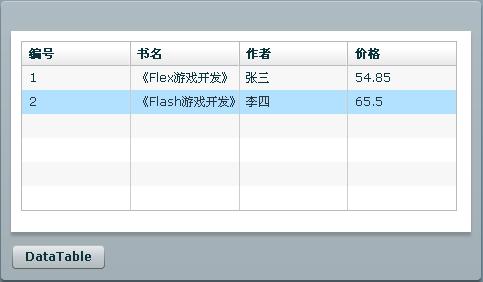
通过DataGrid的dataProvider属性绑定DataGrid组件的数据源,除了直接通过"{}"绑定表达式帮定外我们也可 以在调用远程方法成功的处理函数里给DataGrid指定数据源,见上面代码中注释的代码部 分。{this.myService.GetDataTable.lastResult.Tables.Books.Rows}表示将远程 WebService方法GetDataTable()的返回结果(DataTable)的所有行作为数据源与DataGrid组件进绑定,其中 Books为数据源DataTable的name,详细见前面WebService方法的定义出。程序运行结果如下图:
DataSet,DataTable相比泛型集合来说,性能上有很大的差距,复杂的序列化和反序列化过程也很负责,自从.net 2.0推出泛型到现在,我一直就比较喜欢用泛型来传递大数据。OK,下面我将介绍下在Flex中怎么去处理WebService方法返回的泛型集合数据。 我们有如下WebService方法定义:
相比DataSet,DataTable类型,使用List<>返回数据我个人认为更方面容易处理。我们直接在WebService的调试环境下测试返回List<>的WebService方法可以看到如下结果:
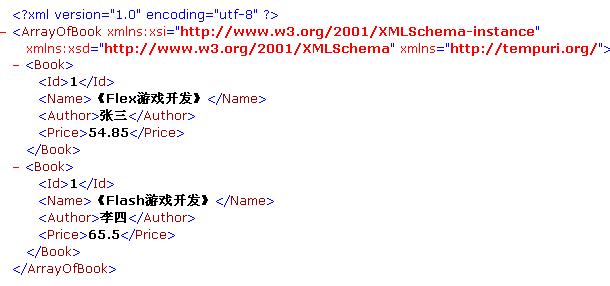
这就是以泛型结合(List<>)的形式返回的数据形式,相比DataTable的返回结果更为简洁,明了。话说到此,我们 在Flex下该怎么去获取这个返回值和处理这个值呢?其实这里已经很清楚的展现了我们可以通过什么方式去处理,仔细看上图会发 现"ArrayOfBook"????这是什么东西?莫非是在客户端可以通过数组的形式得到这个返回值。为了进一步搞清楚这里面的的点点滴滴,我们需要深 入到内部去了解下返回值的具体构造,通过Flex Builder的调试环境可以得到如下信息:
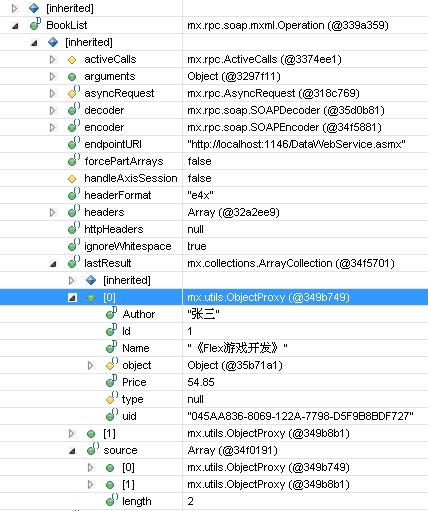
看清楚了吗?BookList方法的lastResult结构集下有两个对象,点开节点可知正是我们通过 List<Book>返回的两个Book对象,而lastResult的类型 是:mx.collections.ArrayCollection,这不真是ActionScript中的数组集合吗?好的,既然这样,在Flex客户 端便可以直接通过lastResult得到WebService返回的泛型集合数据了。如下代码块:
对应的mxml代码如下(运行结果和上面返回DataTable类型一样):
关于WebService的数据访问就介绍到这里,由于个人能力有限,文中有不足之处还望大家指正。如果有什么好的建议也可以提出,大家相互讨论,学习,共同进步!!