[MVC]ASP.NET MVC Preview 3 流程分析 - 4.Router

mikel阅读(822)

我们先了解一下 System.Web.Routing 中的几个类型。

  • UrlRoutingModule : IHttpModule : 入口点。订阅 HttpApplication 相关事件,修改 HttpContext.Handler (IHttpHandler),使得 MvcHandler 得以执行。
  • Route : RouteBase : 路径转向规则,包括路径匹配表达式(Url)、参数默认值(Defaults)、请求处理程序(RouteHandler) 等。
  • RouteCollection : Collection<RouteBase> : 存储所有的 Route 规则的集合,提供依据上下文获取动态路由数据的方法。
  • RouteTable : 持有全局 RouteCollection 实例引用的一个辅助类。
  • RouteData : 依据当前上下文进行解析的动态请求路由信息,包括从请求参数或路由规则中提取的 Controller Name、Action Name、Action Method Parameter 等。
  • IRouteHandler : Route 中请求处理程序的包装接口。

要使用 Routing,除了在配置文件中添加 UrlRoutingModule 外,我们还得在 Global.asax.cs 中注册相应的路由规则(Route)。

public class GlobalApplication : System.Web.HttpApplication
{
  public static void RegisterRoutes(RouteCollection routes)
  {
    routes.IgnoreRoute("{resource}.axd/{*pathInfo}");
    routes.MapRoute(
      "Test",
      "Home/Test/{x}/{y}",
      new { controller = "Home", action = "Test", x = 100, y = 200 }
    );
    routes.MapRoute(
      "Default", // Route name
      "{controller}/{action}/{id}", // URL with parameters
      new { controller = "Home", action = "Index", id = "" } // Parameter defaults
    );
  }
  protected void Application_Start()
  {
    RegisterRoutes(RouteTable.Routes);
  }
}

System.Web.Mvc 额外提供了几个扩展方法来简化我们注册 Route 规则。

public static class RouteCollectionExtensions
{
  public static void IgnoreRoute(this RouteCollection routes, string url)
  {
    routes.IgnoreRoute(url, null);
  }
  public static void IgnoreRoute(this RouteCollection routes, string url, object constraints)
  {
    // … 省略部分代码 …
    Route route = new Route(url, new StopRoutingHandler())
    {
      Constraints = new RouteValueDictionary(constraints)
    };
    routes.Add(route);
  }
  public static void MapRoute(this RouteCollection routes, string name, string url)
  {
    routes.MapRoute(name, url, null, null);
  }
  public static void MapRoute(this RouteCollection routes, string name, string url, object defaults)
  {
    routes.MapRoute(name, url, defaults, null);
  }
  public static void MapRoute(this RouteCollection routes, string name, string url, object defaults, object constraints)
  {
    // … 省略部分代码 …
    Route route = new Route(url, new MvcRouteHandler())
    {
      Defaults = new RouteValueDictionary(defaults),
      Constraints = new RouteValueDictionary(constraints)
    };
    if (string.IsNullOrEmpty(name))
    {
      routes.Add(route);
    }
    else
    {
      routes.Add(name, route);
    }
  }
}

有一点需要注意,System.Web.Routing 通过循环查找的方式来匹配路由规则,因为我们要按以下顺序注册路由规则。
(1) 忽略规则 (IgnoreRoute)。
(2) 具体匹配规则。
(3) 通用匹配规则。
RouteTable.Routes 实际上指向一个应用程序域中唯一的 RouteCollection 实例。

public class RouteTable
{
  // Fields
  private static RouteCollection _instance = new RouteCollection();
  // Properties
  public static RouteCollection Routes
  {
    get { return _instance; }
  }
}

RouteCollection 除了保存所有路由规则 (Route) 外,还有几个重要的方法。

public class RouteCollection : Collection<RouteBase>
{
  // Methods
  public void Add(string name, RouteBase item);
  public RouteData GetRouteData(HttpContextBase httpContext);
  public VirtualPathData GetVirtualPath(RequestContext requestContext, RouteValueDictionary values);
  public VirtualPathData GetVirtualPath(RequestContext requestContext, string name, RouteValueDictionary values);
  // Properties
  public RouteBase this[string name] { get; }
  public bool RouteExistingFiles { get; set; }
}

GetRouteData() 通过当前请求上下文,找出最合适的路由规则(Route),并生成当前执行环境所需的动态路由数据(RouteData)。

public class RouteCollection : Collection<RouteBase>
{
  public RouteData GetRouteData(HttpContextBase httpContext)
  {
    // … 省略部分代码 …
    using (this.GetReadLock())
    {
      foreach (RouteBase base2 in this)
      {
        RouteData routeData = base2.GetRouteData(httpContext);
        if (routeData != null)
        {
          return routeData;
        }
      }
    }
    return null;
  }
}

循环调用搜索规则的 GetRouteData 方法来获取动态路由数据,这就是上面我们提到要注意路由规则注册顺序的原因。

public class Route : RouteBase
{
  public override RouteData GetRouteData(HttpContextBase httpContext)
  {
    string virtualPath = httpContext.Request.AppRelativeCurrentExecutionFilePath.Substring(2) +
      httpContext.Request.PathInfo;
    RouteValueDictionary values = this._parsedRoute.Match(virtualPath, this.Defaults);
    if (values == null)
    {
      return null;
    }
    RouteData data = new RouteData(this, this.RouteHandler);
    if (!this.ProcessConstraints(httpContext, values, RouteDirection.IncomingRequest))
    {
      return null;
    }
    foreach (KeyValuePair<string, object> pair in values)
    {
      data.Values.Add(pair.Key, pair.Value);
    }
    if (this.DataTokens != null)
    {
      foreach (KeyValuePair<string, object> pair2 in this.DataTokens)
      {
        data.DataTokens[pair2.Key] = pair2.Value;
      }
    
      return data;
    }
  }
}

Route.GetRouteData() 首先调用 ParsedRoute.Match() 来检查路径是否匹配,接下来使用 ProcessConstraints() 检查相应的约束规则,如果这些检查都得以通过,则生成最终的动态路由数据。RouteCollection.GetRouteData() 在获取该结果后终止循环。
IRouteHandler 的作用是返回一个特定 IHttpHandler,比如 MvcHandler,当然也可以是 "System.Web.UI.Page : IHttpHandler"。

public interface IRouteHandler
{
  IHttpHandler GetHttpHandler(RequestContext requestContext);
}
public class MvcRouteHandler : IRouteHandler
{
  protected virtual IHttpHandler GetHttpHandler(RequestContext requestContext)
  {
    return new MvcHandler(requestContext);
  }
  IHttpHandler IRouteHandler.GetHttpHandler(RequestContext requestContext)
  {
    return this.GetHttpHandler(requestContext);
  }
}

UrlRoutingModule 的执行顺序,可参考《ASP.NET MVC Preview 2 – 流程分析 (1)》
Route 的相关语法规则,可参考《ASP.NET MVC Preview 3 Release 》(ScottGu 中文版)。

[MVC]ASP.NET MVC Preview 3 流程分析 - 3.View

mikel阅读(932)

P3 改用一堆继承自 ActionResult 的对象来完成视图显示,这是该版本的最大变化。
1. ViewResult
当 我们在 Action Method 中调用 View 生成 ViewResult 的时候,应该注意两个细节,那就是生成默认的 ViewData 字典和 WebFormViewEngine 视图显示引擎。上一节的分析中我们已经知道 ActionFilter.OnActionExecuting 在 Action Method 之前执行,那么我们完全可以定义一个自己的视图引擎,比如用 NVelocity 来代替 WebForm。(可参考《ASP.NET MVC Preview 2 – 流程分析 (3) 》《ASP.NET MVC Preview 2 – NVelocityViewEngine 》)

public abstract class Controller : IActionFilter, IController, IDisposable
{
  public ViewDataDictionary ViewData
  {
    get
    {
      if (_viewData == null)
      {
        _viewData = new ViewDataDictionary();
      }
      return _viewData;
    }
  }
  public IViewEngine ViewEngine
  {
    get
    {
      if (_viewEngine == null)
      {
        _viewEngine = new WebFormViewEngine();
      }
      return _viewEngine;
    }
    set
    {
      // … 省略部分代码 …
      _viewEngine = value;
    }
  }
  protected internal virtual ViewResult View(string viewName, string masterName, object model)
  {
    if (model != null)
    {
      ViewData.Model = model;
    }
    return new ViewResult()
    {
      ViewName = viewName,
      MasterName = masterName,
      ViewData = ViewData,
      ViewEngine = ViewEngine,
      TempData = TempData
    };
  }
}

在 Controller.InvokeAction() 的最后会间接通过 InvokeActionResult() 来调用 ViewResult.ExecuteResult,从而实现对视图引擎的触发 (可参考上一章)。

public class ViewResult : ActionResult
{
  public override void ExecuteResult(ControllerContext context)
  {
    // … 省略部分代码 …
    string viewName = (!String.IsNullOrEmpty(ViewName)) ?
      ViewName : context.RouteData.GetRequiredString("action");
    ViewContext viewContext = new ViewContext(context, viewName, MasterName, ViewData, TempData);
    ViewEngine.RenderView(viewContext);
  }
}

创建视图上下文,并调用 WebFormViewEngine.RenderView()。

public class WebFormViewEngine : IViewEngine
{
  protected virtual void RenderView(ViewContext viewContext)
  {
    // … 省略部分代码 …
    string viewPath = ViewLocator.GetViewLocation(viewContext, viewContext.ViewName);
    // … 省略部分代码 …
    object viewInstance = BuildManager.CreateInstanceFromVirtualPath(viewPath, typeof(object));
    // … 省略部分代码 …
    ViewPage viewPage = viewInstance as ViewPage;
    if (viewPage != null)
    {
      if (!String.IsNullOrEmpty(viewContext.MasterName))
      {
        string masterLocation = ViewLocator.GetMasterLocation(viewContext, viewContext.MasterName);
        
        // … 省略部分代码 …
        // We don't set the page's MasterPageFile directly since it will get
        // overwritten by a statically-defined value. In ViewPage we wait until
        // the PreInit phase until we set the new value.
        viewPage.MasterLocation = masterLocation;
      }
      viewPage.ViewData = viewContext.ViewData;
      viewPage.RenderView(viewContext);
    }
    else
    {
      ViewUserControl viewUserControl = viewInstance as ViewUserControl;
      if (viewUserControl != null)
      {
        // … 省略部分代码 …
        viewUserControl.ViewData = viewContext.ViewData;
        viewUserControl.RenderView(viewContext);
      }
      else
      {
        // … 省略部分代码 …
      }
    }
  }
}

这部分的变化并不大,有关细节可参考 《ASP.NET MVC Preview 2 – 流程分析 (3)》,这里就不在啰嗦了。
2. RedirectResult / RedirectToRouteResult
其实很简单,重建 RouteValueDictionary,然后在 RedirectToRouteResult.ExecuteResult() 中使用 HttpContext.Response.Redirect() 进行跳转。

public abstract class Controller : IActionFilter, IController, IDisposable
{
  protected internal virtual RedirectToRouteResult RedirectToAction(actionName, controllerName, values)
  {
    // … 省略部分代码 …
    RouteValueDictionary newDict = (values != null) ?
      new RouteValueDictionary(values) : new RouteValueDictionary();
    newDict["action"] = actionName;
    if (!String.IsNullOrEmpty(controllerName))
    {
      newDict["controller"] = controllerName;
    }
    return new RedirectToRouteResult(newDict);
  }
  protected internal virtual RedirectToRouteResult RedirectToRoute(routeName, values)
  {
    RouteValueDictionary newDict = (values != null) ?
      new RouteValueDictionary(values) : new RouteValueDictionary();
    return new RedirectToRouteResult(routeName, newDict);
  }
}
public class RedirectToRouteResult : ActionResult
{
  public RedirectToRouteResult(string routeName, RouteValueDictionary values)
  {
    RouteName = routeName ?? String.Empty;
    Values = values ?? new RouteValueDictionary();
  }
  public override void ExecuteResult(ControllerContext context)
  {
    // … 省略部分代码 …
    VirtualPathData vpd = Routes.GetVirtualPath(context, RouteName, Values);
    // … 省略部分代码 …
    string target = vpd.VirtualPath;
    context.HttpContext.Response.Redirect(target);
  }
}

尽管这种跳转会导致 Controller 实例被重新生成,但我们依然可以使用 TempData 传递相关的数据给下一个 Action。(有关 TempData 传递数据的原理,可阅读《ASP.NET MVC Preview 2 – RedirectToAction》)
下面是一个跳转的演示

public class HomeController : Controller
{
  public ActionResult Index()
  {
    TempData["s"] = "Haha…";
    //return RedirectToRoute(new { controller = "Test", action = "Test" });
    return RedirectToAction("About");
  }
  public ActionResult About()
  {
    ViewData["Title"] = TempData["s"].ToString();
    return View();
  }
}
public class TestController : Controller
{
  public ActionResult Test()
  {
    return Content(TempData["s"].ToString());
  }
}

在使用 Controller.RedirectToRoute 时有个参数叫 routeName,其实它就是 Global.asax.cs 中调用 MapRoute 时的定义。

routes.MapRoute(
  "Default",  // Route name
  "{controller}/{action}/{id}",  // URL with parameters
  new { controller = "Home", action = "Index", id = "" } // Parameter defaults
);

3. JsonResult
有了这个,写 Ajax 操作就简单多了。

public class HomeController : Controller
{
  protected internal virtual JsonResult Json(object data, string contentType, Encoding contentEncoding)
  {
    return new JsonResult
    {
      Data = data,
      ContentType = contentType,
      ContentEncoding = contentEncoding
    };
  }
}
public class JsonResult : ActionResult
{
  public override void ExecuteResult(ControllerContext context)
  {
    // … 省略部分代码 …
    HttpResponseBase response = context.HttpContext.Response;
    if (!String.IsNullOrEmpty(ContentType))
    {
      response.ContentType = ContentType;
    }
    else
    {
      response.ContentType = "application/json";
    }
    if (ContentEncoding != null)
    {
      response.ContentEncoding = ContentEncoding;
    }
    if (Data != null)
    {
      JavaScriptSerializer serializer = new JavaScriptSerializer();
      response.Write(serializer.Serialize(Data));
    }
  }
}

写个例子看看。

public class HomeController : Controller
{
  public ActionResult Index()
  {
    return Json(new { Name = "Rose", Sex = "Male", Age = 31 });
  }
}

看看返回的 Http 结果。

HTTP/1.1 200 OK
Server: ASP.NET Development Server/9.0.0.0
Date: Sat, 14 Jun 2008 11:24:46 GMT
X-AspNet-Version: 2.0.50727
Cache-Control: private
Content-Type: application/json; charset=utf-8
Content-Length: 37
Connection: Close
{"Name":"Rose","Sex":"Male","Age":31}

4. ContentResult
这个纯粹就是代码缩写了,将 "Response.Write(…)" 简写成 "Content(…)"。 [lol]

public class ContentResult : ActionResult
{
  public override void ExecuteResult(ControllerContext context)
  {
    // … 省略部分代码 …
    HttpResponseBase response = context.HttpContext.Response;
    if (!String.IsNullOrEmpty(ContentType))
    {
      response.ContentType = ContentType;
    }
    if (ContentEncoding != null)
    {
      response.ContentEncoding = ContentEncoding;
    }
    if (Content != null)
    {
      response.Write(Content);
    }
  }
}

5. EmptyResult
这个最好,没啥可说,没啥可做。

public class EmptyResult : ActionResult
{
  public override void ExecuteResult(ControllerContext context)
  {
  }
}

唯一要关注的是,ControllerActionInvoker.InvokeActionMethod 会将 Action return null 转为为 EmptyResult。

public class ControllerActionInvoker
{
  protected virtual ActionResult InvokeActionMethod(methodInfo, parameters)
  {
    // … 省略部分代码 …
    object returnValue = methodInfo.Invoke(controller, parametersArray);
    if (returnValue == null)
    {
      return new EmptyResult();
    }
    
    // … 省略部分代码 …
  }
}

[MVC]ASP.NET MVC Preview 3 流程分析 - 2.Controller

mikel阅读(945)

接着上一章留下的线索,我们开始分析 Controller 的执行过程。
1. Controller.Execute

public abstract class Controller : IActionFilter, IController, IDisposable
{
  protected internal virtual void Execute(ControllerContext controllerContext)
  {
    // … 省略部分代码 …
    ControllerContext = controllerContext;
    TempData = new TempDataDictionary(controllerContext.HttpContext);
    string actionName = RouteData.GetRequiredString("action");
    ControllerActionInvoker invoker = ActionInvoker ?? new ControllerActionInvoker(controllerContext);
    
    if (!invoker.InvokeAction(actionName, new Dictionary<string, object>()))
    {
      HandleUnknownAction(actionName);
    }
  }
}

熟 悉的面孔 —— TempData。和 ViewData 的目标不同,TempData 主要用于 Controller 内部的数据传递。从 Router 字典中取出 Action 的名字,并创建一个专门的 Invoker 来完成整个执行工作,包括过滤器(ActionFilterAttribute)、Action Method,以及视图显示(IViewDataContainer)。MVC 给了我们一个选择,我们可以继承并创建一个自定义的 Invoker 去改变一些内在的规则 (在 Controller.ctor 中对 ActionInvoker 赋值)。
2. ControllerActionInvoker.InvokeAction
如 果你看书很仔细的话,难道你对上面 Execute 方法里面的 "invoker.InvokeAction(actionName, new Dictionary<string, object>())" 语句不感到奇怪吗?一个没有任何引用的空 Dictionary,这似乎不合乎情理。传递参数?返回某些值?注意看下面的分析。

public class ControllerActionInvoker
{
  public virtual bool InvokeAction(string actionName, IDictionary<string, object> values)
  {
    // … 省略部分代码 …
    MethodInfo methodInfo = FindActionMethod(actionName, values);
    if (methodInfo != null)
    {
      IDictionary<string, object> parameters = GetParameterValues(methodInfo, values);
      IList<IActionFilter> filters = GetAllActionFilters(methodInfo);
      ActionExecutedContext postContext = InvokeActionMethodWithFilters(methodInfo, parameters, filters);
      InvokeActionResultWithFilters(postContext.Result, filters);
      // notify controller of completion
      return true;
    }
    // notify controller that no method matched
    return false;
  }

FindActionMethod 方法利用反射返回 Action 方法的信息,注意 NonActionAttribute、Controller_ActionCannotBeGeneric。很显然这个作者有非常好的编码习惯,代码注 释非常清晰有用,值得学习。可以有和 Action 签名相同的重载方法,但必须加上 NonActionAttribute 特性。同时 Action 不能是泛型方法。

protected virtual MethodInfo FindActionMethod(string actionName, IDictionary<string, object> values)
{
  // … 省略部分代码 …
  // We have to loop through all the methods to make sure there isn't
  // a conflict. If we stop the loop the first time we find a match
  // we might miss some error cases.
  MemberInfo[] memberInfos = ControllerContext.Controller.GetType().GetMember(
    actionName, MemberTypes.Method,
    BindingFlags.IgnoreCase | BindingFlags.InvokeMethod | BindingFlags.Instance | BindingFlags.Public);
  MethodInfo foundMatch = null;
  foreach (MethodInfo methodInfo in memberInfos)
  {
    // (1) Action methods must not have the non-action attribute in their inheritance chain,
    // and (2) special methods like constructors, property accessors, and event accessors cannot
    // be action methods, and (3) methods originally defined on Object (like ToString()) or
    // Controller (like Dispose()) cannot be action methods.
    if (!methodInfo.IsDefined(typeof(NonActionAttribute), true) &&
      !methodInfo.IsSpecialName &&
      !methodInfo.GetBaseDefinition().DeclaringType.IsAssignableFrom(typeof(Controller)))
    {
      if (foundMatch != null)
      {
        throw new InvalidOperationException(String.Format(
          CultureInfo.CurrentUICulture, MvcResources.Controller_MoreThanOneAction,
          actionName, ControllerContext.Controller.GetType()));
      }
      
      foundMatch = methodInfo;
    }
  }
  if (foundMatch != null)
  {
    if (foundMatch.ContainsGenericParameters)
    {
      throw new InvalidOperationException(String.Format(
        CultureInfo.CurrentUICulture, MvcResources.Controller_ActionCannotBeGeneric,
        foundMatch.Name));
    }
  }
  return foundMatch;
}

GetParameterValues 方法的作用是从环境上下文中获取 Action 方法执行所需的参数 (Argument)。比如 Action 的方法签名是 "public ActionResult Test(int x, int y)",那么 GetParameterValues 则必须返回一个类似 "{{x, 123}, {y, 456 }}" 这样的参数字典,在反射调用 Test 时,传递过去。

protected virtual IDictionary<string, object> GetParameterValues(methodInfo, values)
{
  // … 省略部分代码 …
  var parameterDict = new Dictionary<string, object>(StringComparer.OrdinalIgnoreCase);
  foreach (ParameterInfo parameterInfo in methodInfo.GetParameters())
  {
    if (parameterInfo.IsOut || parameterInfo.ParameterType.IsByRef)
    {
      throw new InvalidOperationException(String.Format(CultureInfo.CurrentUICulture,
        MvcResources.Controller_ReferenceParametersNotSupported,
        parameterInfo.Name,
        'methodInfo.Name));
    }
    parameterDict[parameterInfo.Name] = GetParameterValue(parameterInfo, values);
  }
  return parameterDict;
}

循环提取所有的 ParameterInfo,不过这里有了另外一个限制,那就是方法参数不能使用 ref / out 关键字。GetParameterValue 方法应该是获取具体参数值,一路传递过来的那个空字典被丢了进去。

protected virtual object GetParameterValue(parameterInfo, values)
{
  // … 省略部分代码 …
  Type parameterType = parameterInfo.ParameterType;
  string parameterName = parameterInfo.Name;
  string actionName = parameterInfo.Member.Name;
  bool valueRequired = !TypeHelpers.TypeAllowsNullValue(parameterType);
  // Try to get a value for the parameter. We use this order of precedence:
  // 1. Explicitly-provided extra parameters in the call to InvokeAction()
  // 2. Values from the RouteData (could be from the typed-in URL or from the route's default values)
  // 3. Request values (query string, form post data, cookie)
  object parameterValue = null;
  if (!(values != null && values.TryGetValue(parameterName, out parameterValue)))
  {
    if (!(ControllerContext.RouteData != null &&
      ControllerContext.RouteData.Values.TryGetValue(parameterName, out parameterValue)))
    {
      if (ControllerContext.HttpContext != null && ControllerContext.HttpContext.Request != null)
      {
        parameterValue = ControllerContext.HttpContext.Request[parameterName];
      }
    }
  }
  
  // … 省略部分代码 …
  try
  {
    return ConvertParameterType(parameterValue, parameterType, parameterName, actionName);
  }
  catch (Exception ex)
  {
    // … 省略部分代码 …
  }
  return null;
}

再次夸一下作者,那几行注释说明了一切。对于 Action 方法参数的获取,有三种优先级不同的方式:
1. 从调用 InvokeAction 传递进来的参数字典中提取。(就是那个莫名其妙的字典,这意味着自定义 Invoker 有机会对请求参数做出调整)
2. 从 RouteData 中查找,这有两种可能:第一是 URL 请求中已有的参数;其次就是 routes.MapRoute 定义的缺省值。
3. 如果上述两个方法都没有找到参数值,那只好从 Request 中提取了。(某些时候,MapRoute 的定义并不完整,尤其是 {Controller}/{Action} 这种通用规则)
在准备好 Action 的相关数据后,InvokeAction 调用 GetAllActionFilters 获取所有的过滤器。

protected virtual IList<IActionFilter> GetAllActionFilters(MethodInfo methodInfo)
{
  // … 省略部分代码 …
  // use a stack since we're building the member chain backward
  Stack<MemberInfo> memberChain = new Stack<MemberInfo>();
  // first, push the most derived action method, then its base method, and so forth
  memberChain.Push(methodInfo);
  
  MethodInfo baseMethod = methodInfo.GetBaseDefinition();
  Type curType = methodInfo.DeclaringType.BaseType;
  while (true)
  {
    MemberInfo[] memberInfos = curType.GetMember(methodInfo.Name, MemberTypes.Method,
      BindingFlags.IgnoreCase | BindingFlags.InvokeMethod | BindingFlags.Instance | BindingFlags.Public);
    MethodInfo foundMatch = null;
    foreach (MethodInfo possibleMatch in memberInfos)
    {
      if (possibleMatch.GetBaseDefinition() == baseMethod)
      {
        foundMatch = possibleMatch;
        break;
      }
    }
    if (foundMatch == null)
    {
      // we've passed the declaring type of the base method
      break;
    }
    if (foundMatch.DeclaringType == curType)
    {
      // only push if there's no jump in the inheritance chain
      memberChain.Push(foundMatch);
    }
    curType = curType.BaseType;
  }
  // second, push the current controller type, then its base type, and so forth
  curType = ControllerContext.Controller.GetType();
  while (curType != null)
  {
    memberChain.Push(curType);
    curType = curType.BaseType;
  }
  // now build the actual filter list up from the beginning. add the current controller
  // if it implements IActionFilter, then process the memberInfo stack.
  List<IActionFilter> filterList = new List<IActionFilter>();
  IActionFilter controllerFilter = ControllerContext.Controller as IActionFilter;
  if (controllerFilter != null)
  {
    filterList.Add(controllerFilter);
  }
  foreach (MemberInfo memberInfo in memberChain)
  {
    filterList.AddRange(GetActionFiltersForMember(memberInfo));
  }
  return filterList;
}

这个方法看上去有点复杂。
1. 创建一个后进先出的栈。
2. 将 Action 压进去。
3. 循环向上查找所有级别的 Base Type,并将 Base Action Method 压到栈里。
4. 接下来将当前 Controller Type 以及其所有 Base Type 先后压到栈里。
5. 创建一个列表用于存储实际的 IActionFilter 集合。
6. 将当前 Controller 添加到列表,别忘了默认情况下控制器本身也实现了 IActionFilter。
7. 使用循环依次从栈中弹出 Base Type、Base Action Method 以及 Current Action Method,并调用 GetActionFiltersForMember 获取其所有 ActionFilterAttribute 定义。
8. 返回一个过滤器列表。(由于是后进先出的栈,因此列表内部顺序是:Current Controller、Base Type Filter、Base Action Method Filter、Current Action Method Filter)
注意 ActionFilterAttribute 是可以应用的 Class 上的,也就是说对所有的 Action 方法都有效。现在你该理解上面获取基类型的原因了吧。

[AttributeUsage(AttributeTargets.Class | AttributeTargets.Method, …)]
public abstract class ActionFilterAttribute : Attribute, IActionFilter { … }

当然,我们还是要看看 GetActionFiltersForMember。

protected virtual IList<IActionFilter> GetActionFiltersForMember(MemberInfo memberInfo)
{
  // … 省略部分代码 …
  List<IActionFilter> unorderedFilters = new List<IActionFilter>();
  SortedList<int, IActionFilter> orderedFilters = new SortedList<int, IActionFilter>();
  ActionFilterAttribute[] attrs = (ActionFilterAttribute[])memberInfo.GetCustomAttributes(
    typeof(ActionFilterAttribute), false /* inherit */);
  foreach (ActionFilterAttribute filter in attrs)
  {
    // filters are allowed to have the same order only if the order is -1. in that case,
    // they are processed before explicitly ordered filters but in no particular order in
    // relation to one another.
    if (filter.Order >= 0)
    {
      if (orderedFilters.ContainsKey(filter.Order))
      {
        MethodBase methodInfo = memberInfo as MethodBase;
        // … 省略抛出异常代码 …
      }
      orderedFilters.Add(filter.Order, filter);
    }
    else
    {
      unorderedFilters.Add(filter);
    }
  }
  // now append the ordered list to the unordered list to create the final list
  unorderedFilters.AddRange(orderedFilters.Values);
  return unorderedFilters;
}

这 个方法很简单,用反射查找 ActinFilterAttribute。唯一需要注意的是 order 这个排序属性,返回的列表是按此属性排序过的。ActionFilterAttribute.Order 默认等于 -1,也就说不修改这个排序属性的话,会按照其定义顺序返回。另外还有一个需要注意的地方,如果 ActionFilterAttribute.Order > 0,那么多个 Filter.Order 不能相同,否则会抛出类似下面这样的异常。

The action method 'Test' on controller 'Learn.MVC.Controllers.HomeController' has two filter attributes with filter order 1. If a filter specifies an order of 0 or greater, no other filter on that action method may specify that same order.

回到正题,InvokeAction 获得全部 Filter 后,InvokeActionMethodWithFilters 被调用。

protected virtual ActionExecutedContext InvokeActionMethodWithFilters(methodInfo, parameters, filters)
{
  // … 省略部分代码 …
  ActionExecutingContext preContext = new ActionExecutingContext(ControllerContext,
    methodInfo, parameters);
  
  Func<ActionExecutedContext> continuation = () =>
    new ActionExecutedContext(ControllerContext, methodInfo, null /* exception */)
    {
      Result = InvokeActionMethod(methodInfo, parameters)
    };
  // need to reverse the filter list because the continuations are built up backward
  Func<ActionExecutedContext> thunk = filters.Reverse().Aggregate(continuation,
    (next, filter) => () => InvokeActionMethodFilter(filter, preContext, next));
  
  return thunk();
}

将 Action Method 用委托进行包装,反转过滤器列表进行集合累计调用。Aggregate + InvokeActionMethodFilter 通过递归调用完成 Filter OnActionExecuting -> Current Action Execute -> Filter OnActionExecuted 这样一个执行过程。下面是调用结果示例。

CurrentController.OnActionExecuting
BaseClassFilter.OnActionExecuting
CurrentClassFilter.OnActionExecuting
BaseActionFilter.OnActionExecuting
CurrentActionFilter.OnActionExecuting
InvokeActionMethod -> Action
CurrentActionFilter.OnActionExecuted
BaseActionFilter.OnActionExecuted
CurrentClassFilter.OnActionExecuted
BaseClassFilter.OnActionExecuted
CurrentController.OnActionExecuted

InvokeAction 紧接着会通过调用 InvokeActionResultWithFilters 完成对 Filter.OnResultExecuting 和 OnResultExecuted 的调用,这是 P2 所没有的。
InvokeActionResultWithFilters 和 InvokeActionMethodWithFilters 过程差不多,都是递归调用。需要特别注意的是 InvokeActionResult 代替了 InvokeActionMethod。(注意:尽管 BaseController 本身也是一个 ActionFilterAttribute,但并不会被调用)

protected virtual ResultExecutedContext InvokeActionResultWithFilters(ActionResult actionResult, IList<IActionFilter> filters)
{
  // … 省略部分代码 …
  ResultExecutingContext preContext = new ResultExecutingContext(ControllerContext, actionResult);
  Func<ResultExecutedContext> continuation = delegate
  {
    InvokeActionResult(actionResult);
    return new ResultExecutedContext(ControllerContext, preContext.Result, null /* exception */);
  };
  // need to reverse the filter list because the continuations are built up backward
  Func<ResultExecutedContext> thunk = filters.Reverse().Aggregate(continuation,
    (next, filter) => () => InvokeActionResultFilter(filter, preContext, next));
  return thunk();
}

执行结果顺序演示:

CurrentController.OnResultExecuting
BaseClassFilter.OnResultExecuting
CurrentClassFilter.OnResultExecuting
BaseActionFilter.OnResultExecuting
CurrentActionFilter.OnResultExecuting
InvokeActionResult -> ActionResult.ExecuteResult() -> IViewEngine.RenderView()
CurrentActionFilter.OnResultExecuted
BaseActionFilter.OnResultExecuted
CurrentClassFilter.OnResultExecuted
BaseClassFilter.OnResultExecuted
CurrentController.OnResultExecuted

我们看看 InvokeActionResult 做了些什么。

protected virtual void InvokeActionResult(ActionResult actionResult)
{
  // … 省略部分代码 …
  actionResult.ExecuteResult(ControllerContext);
}

调 用 ActionResult.ExecuteResult 方法?有什么作用呢?如果你已经看过 P3 的帮助文件的话,你应该知道 Action Method 可以通过 Controller.View()、Controller.Json()、Controller.RedirectToRouteResult() 方法返回如下几种 ActionResult。

public class ViewResult : ActionResult {}
public class JsonResult : ActionResult {}
public class RedirectToRouteResult : ActionResult {}

先不管后面两种,看看 ViewResult.ExecuteResult() 会做什么?

public class ViewResult : ActionResult
{
  public override void ExecuteResult(ControllerContext context)
  {
    // … 省略部分代码 …
    string viewName = (!String.IsNullOrEmpty(ViewName)) ?
      ViewName : context.RouteData.GetRequiredString("action");
    ViewContext viewContext = new ViewContext(context, viewName, MasterName, ViewData, TempData);
    ViewEngine.RenderView(viewContext);
  }

HoHo~~~~ 终于看到了视图显示的曙光了,不过这属于下一篇的内容。
———————–
ControllerActionInvoker.InvokeAction()、Controller.Execute() 执行至此结束。
执行流程图

uploads/200806/13_000050_small.png

查看大图

[C#]System.Web.Routing入门及进阶

mikel阅读(1122)

System.Web.Routing已经作为一个程序集包含在.net3.5sp1中发布了。虽然我们并没有在3.5sp1中发现ASP.NET Mvc的踪迹,但是亦以感觉到它离我们不远了。

System.Web.Routing用于在ASP.NETWeb应用程序中进行URLRouting


所谓UrlRouting就是将一个地址映射为另一个地址,比如我访问/chsword/2008/08/27.html其实是访问了 /chsword/article.aspx?y=2008&m=08&d=27这个地址,URLRouting使我们的URL看起来非 常漂亮。


本文将分2部分介绍UrlRouting的使用分别为入门篇与进阶篇。

文章的前提:

1.         安装Visual Studio 2008 sp1或其它IDE的等同版本。

2.         建立一个Asp.net Web ApplicationAsp.net Web应用程序)

3.         引用System.Web.Routing程序集。

UrlRouting的实现原理

如果你不是追求理论的人,仅仅是务实主义,可以直接从准备工作读起。

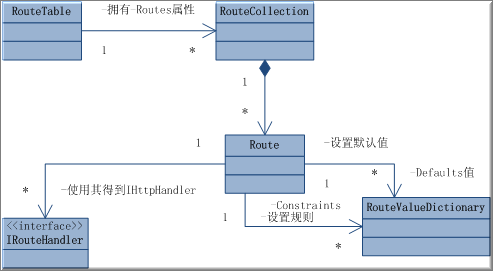
为了方便大家理解我绘制了一个UML图,其中通过RouteTableRoutes这个属性可以获取一个RouteCollectionSingleton模式,虽然在其中并没有判断值不存在时才初始化的Singleton的标志性行为,但是它是在Application_Start事件中进行初始化的,并且直到应用程序进程终结,所以是Singleton模式的。


而通过以下方式将Route添加到RouteTable.Routes

RouteTable.Routes.Add(new Route());

以上代码仅为表示其流程,这个代码是不能正确执行的,因为Route没有提供无参构造函数。

Route初始化时则是利用RouteValueDictionary来加入默认值及规则到Route

另外Route还有一个IRouteHandler的实现对象,IRouteHandler的实现对象提供了一个GetHttpHandler方法来获取用于处理URLIHttpHandler


这么说还是停留在抽象层次的,下面我们以一些简单例子来带你驭起UrlRouting

准备工作

由于须要一个处理UrlIHttpHandler所以我们先定义一个实现了IHttpHandler接口的类。

就叫它MyPage,由于我们要与IRouteHandler交互,所以除了实现IHttpHandler的方法之外还要声明一个RequestContext类型的属性

public class MyPage:IHttpHandler {
        
public RequestContext RequestContext { getprivate set; }
        
public MyPage(RequestContext context)
        {
            
this.RequestContext = context;
        }
        
#region IHttpHandler 成员
        
public virtual void ProcessRequest(HttpContext context){}
        
public bool IsReusable {
            
get { return false; }
        }
        
#endregion
    }

这样我们就拥有了一个自己的IHttpHandler

下面我们实现一个IRouteHandler

    public class MyRouteHandler : IRouteHandler {
        
#region IRouteHandler 成员
        
public IHttpHandler GetHttpHandler(RequestContext requestContext) {
            
return new MyPage(requestContext);
        }
        
#endregion
    }

这里实现了IRouteHandlerGetHttpHandler方法,使之返回刚才我们实现的MyPage

这样我们前期的2个工作就做完了,我们可以来实现UrlRouting了。

实现第一个UrlRouting

其实UrlRouting在定义完上两个规则后就很简单了。

Golbal.asax(没有可以新建一个)的Application_Start事件中写如下代码


protected void Application_Start(object sender, EventArgs e) {
            RegisterRoutes(RouteTable.Routes);
        }
        
public static void RegisterRoutes(RouteCollection routes) {
            routes.Add(
new Route("{page}.aspx",new MyRouteHandler()));
        }

这样我们就定义了第一个UrlRouting规则就是对xxxx.aspx这类的Url进行Routing


但是我们仅仅是定义了处理了什么样的Url,却没定义如何处理。

我们应该在刚刚定义的MyPageProcessRequest方法中定义如何处理。

我们将ProcessRequest方法实现如下:


public virtual void ProcessRequest(HttpContext context){
context.Server.Execute(        RequestContext.RouteData.Values[
"page"].ToString().Replace("_","/")+".aspx"
            );
}

很显然这里的RequestContext.RouteData.Values["page"]就是取到刚才的规则{page}.aspx中的page的值即,如果我访问index.aspxRequestContext.RouteData.Values["page"]就是index

我这里的定义是将”_”替换为”/”所以就是将list_index.aspx这样的URL转到list/index.aspx这样的网页上。

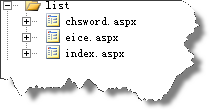
我们建立一些测试用的网页如下图所示:


在这些网页里随意写些可以分辨网页的文字。

则访问list_chsword.aspx时自动Routing到了list/chsword.aspx上了

总结一下UrlRouting与以下有关:

1.         Application_Start中定义的规则

2.         自己实现的IHttpHandler


上面介绍的是最简单的一种定义方式。当然我们可以建立更复杂的规则。其中就包括设定规则的默认值以及设定规则的正则表达式。

UrlRouting高级应用

预计效果:

当我访问/a/b.aspx时就会转到Default.aspx?category=a&action=b在页面上显示
category:a
action:b
亦如果我访问/chsword/xxxx.aspx就会转到Default.aspx?category
=chsword&action=xxxx就会显示
category:chsword

action:xxxx


如果访问/chsword/就会转到 Default.aspx?category=chsword&action=index就会显示

 category:chsword

action:index


 首先我建立一个Route

routes.Add(
                
"Default",
                
new Route("{category}/{action}.aspx",
                          
new RouteValueDictionary(
                              
new
                                  {
                                      file 
= "Default",
                                      category 
= "home",
                                      action 
= "index"
                                  }), 
new MyRouteHandler()
                    )
                );

当然IHttpHandler的处理方式也要有所改变

为了方便查看我使用了下方法:


    context.Server.Execute(string.Format("/{0}.aspx?category={1}&action={2}",
              RequestContext.RouteData.Values.ContainsKey(
"file")
                
? RequestContext.RouteData.Values["file"].ToString()
                : 
"default",
              RequestContext.RouteData.Values.ContainsKey(
"category")
                
? RequestContext.RouteData.Values["category"].ToString()
                : 
"",
              RequestContext.RouteData.Values.ContainsKey(
"action")
                
? RequestContext.RouteData.Values["action"].ToString()
                : 
"")
                );


即/a/b.aspx是映射到Default.aspx?category=a&action=b

在Default.aspx中写如下代码:

 category:<%=Request.Params["category"%><br />
   action:
<%=Request.Params["action"%>


以显示传入的参数。

如果在IIS中设置Index.aspx时就算输入/a/也会访问到/a/index.aspx,即默认的会按RouteValueDictionary中设置的值自动补全

UrlRouting使用正则表达式规则

UrlRouting在定义的时候也可以按正则的规则来进行定义。


            routes.Add(
                
"zz",
                
new Route("{category}/{action}.chs",
                    
new RouteValueDictionary(
                        
new {
                            file 
= "Default",
                            category 
= "home",
                            action 
= "1"
                        }),
                        
new RouteValueDictionary(
                        
new {
                            action 
= "[\\d]+"
                        }),
                    
new MyRouteHandler()
                    )
            );


以上代码规定了action只能是数字则访问/a/1.chs可以正常访问。

而访问/a/b.chs则会显示未找到资源。


当然这是里可以使用更高级的正则表达式。

UrlRouting的技巧

排除UrlRouting的方法:

System.Web.Routing默认提供了一个IRouteHandlerStopRoutingHandler Class,经过它处理的URL不会被做任何处理

通常使用方法如下:

routes.Add(new Route("{resource}.axd/{*pathInfo}", new StopRoutingHandler()));


RouteHandler工厂:

其实IRouteHandler可以实现一个RouteHandler的简单工厂。

    public class RouteHandlerFactory : IRouteHandler
    {
        
string Name { getset; }
        
public RouteHandlerFactory(string name){this.Name = name;}
        
#region IRouteHandler 成员
        
public IHttpHandler GetHttpHandler(RequestContext requestContext) {
            
if (this.Name == "mypage")
                
return new MyPage(requestContext);
            
if(this.Name="mypage1")
                
return new MyPage1(requestContext);
        }
        
#endregion
    }


 规定HTTP verbs,这里要使用System.Web.Routing中的HttpMethodConstraint


void Application_Start(object sender, EventArgs e) {
    RegisterRoutes(RouteTable.Routes);
}
public static void RegisterRoutes(RouteCollection routes){
    
string[] allowedMethods = { "GET""POST" };
    HttpMethodConstraint methodConstraints 
= new HttpMethodConstraint(allowedMethods);
    Route reportRoute 
= new Route("{locale}/{year}"new ReportRouteHandler());
    reportRoute.Constraints 
= new RouteValueDictionary { { "httpMethod", methodConstraints } };
    routes.Add(reportRoute);
}


Demo程序代码下载:

 http://files.cnblogs.com/chsword/WebApplication3.rar

[MVC]ASP.NET MVC Preview 3 流程分析 - 1. MvcHandler

mikel阅读(978)

1. 这次的旅程将从 MvcRouteHandler 开始。(有源码,分析起来就是方便~~~~ 调整一下,直接在源码设断点)

System.Web.Mvc.DLL!System.Web.Mvc.MvcRouteHandler.System.Web.Routing.IRouteHandler.GetHttpHandler(…
System.Web.Routing.DLL!System.Web.Routing.UrlRoutingModule.PostResolveRequestCache(…
System.Web.Routing.DLL!System.Web.Routing.UrlRoutingModule.OnApplicationPostResolveRequestCache(…
System.Web.dll!System.Web.HttpApplication…..System.Web.HttpApplication.IExecutionStep.Execute(…
System.Web.dll!System.Web.HttpApplication.ExecuteStep(System.Web.HttpApplication.IExecutionStep step…
System.Web.dll!System.Web.HttpApplication.ApplicationStepManager.ResumeSteps(…
System.Web.dll!System.Web.HttpApplication.System.Web.IHttpAsyncHandler.BeginProcessRequest(…
System.Web.dll!System.Web.HttpRuntime.ProcessRequestInternal(System.Web.HttpWorkerRequest wr…
System.Web.dll!System.Web.HttpRuntime.ProcessRequestNoDemand(…
System.Web.dll!System.Web.HttpRuntime.ProcessRequest(…


上面是起始调用堆栈,我们会发现 UrlRoutingModule 通过调用 MvcRouteHandler.GetHttpHandler() 引发本次追逃行动。

public class MvcRouteHandler : IRouteHandler
{
  protected virtual IHttpHandler GetHttpHandler(RequestContext requestContext)
  {
    return new MvcHandler(requestContext);
  }


生成一个 MvcHandler 对象,同时将请求上下文传递过去。接下来的事情自然交给这个 IHttpHandler 了。
2. MvcHandler.ProcessRequest 被系统调用。

public class MvcHandler : IHttpHandler, IRequiresSessionState
{
  void IHttpHandler.ProcessRequest(HttpContext httpContext)
  {
    ProcessRequest(httpContext);
  }
  protected virtual void ProcessRequest(HttpContext httpContext)
  {
    HttpContextBase iHttpContext = new HttpContextWrapper(httpContext);
    ProcessRequest(iHttpContext);
  }


创建一个新的上下文包装器 —— HttpContextWrapper,这里面有大量的属性和方法方便我们获取相关环境及请求上下文信息。

public class HttpContextWrapper : HttpContextBase
{
  public HttpContextWrapper(HttpContext httpContext);
  public override Exception[] AllErrors { get; }
  public override HttpApplicationStateBase Application { get; }
  public override HttpApplication ApplicationInstance { get; set; }
  public override Cache Cache { get; }
  public override IHttpHandler CurrentHandler { get; }
  public override RequestNotification CurrentNotification { get; }
  public override Exception Error { get; }
  public override IHttpHandler Handler { get; set; }
  public override bool IsCustomErrorEnabled { get; }
  public override bool IsDebuggingEnabled { get; }
  public override bool IsPostNotification { get; }
  public override IDictionary Items { get; }
  public override IHttpHandler PreviousHandler { get; }
  public override ProfileBase Profile { get; }
  public override HttpRequestBase Request { get; }
  public override HttpResponseBase Response { get; }
  public override HttpServerUtilityBase Server { get; }
  public override HttpSessionStateBase Session { get; }
  public override bool SkipAuthorization { get; set; }
  public override DateTime Timestamp { get; }
  public override TraceContext Trace { get; }
  public override IPrincipal User { get; set; }
  public override void AddError(Exception errorInfo);
  public override void ClearError();
  // … 省略部分代码 …
}


回到 MvcHandler 的执行流程。

protected internal virtual void ProcessRequest(HttpContextBase httpContext)
{
  // Get the controller type
  string controllerName = RequestContext.RouteData.GetRequiredString("controller");
  // Instantiate the controller and call Execute
  IControllerFactory factory = ControllerBuilder.GetControllerFactory();
  IController controller = factory.CreateController(RequestContext, controllerName);
  // … 省略部分代码 …
  try
  {
    ControllerContext controllerContext = new ControllerContext(RequestContext, controller);
    controller.Execute(controllerContext);
  }
  finally
  {
    factory.DisposeController(controller);
  }
}


从上下文的 Route 字典里查找 Controller 的类型名称(Type Name),然后交由 ControllerFactory 创建控制器对象实例。控制器的执行(Execute)和清理(DisposeController)我们放到下一篇,现在的任务是看看 ControllerBuilder 都做了些什么?

public class MvcHandler : IHttpHandler, IRequiresSessionState
{
  internal ControllerBuilder ControllerBuilder
  {
    get
    {
      if (_controllerBuilder == null)
      {
        _controllerBuilder = ControllerBuilder.Current;
      }
      return _controllerBuilder;
    }
    set
    {
      _controllerBuilder = value;
    }
  }
}


有个默认实例,进去看看。

public class ControllerBuilder
{
  private static ControllerBuilder _instance = new ControllerBuilder();
  private Func<IControllerFactory> _factoryThunk;
  public ControllerBuilder()
  {
    SetControllerFactory(new DefaultControllerFactory());
 }
  public static ControllerBuilder Current
  {
    get { return _instance; }
  }


很简单,不是吗?在构造方法里面我们看到了 Factory。

public void SetControllerFactory(IControllerFactory controllerFactory)
{
  if (controllerFactory == null)
  {
    throw new ArgumentNullException("controllerFactory");
  }
  _factoryThunk = () => controllerFactory;
}


创建 _factoryThunk 委托,返回构造方法中创建的 DefaultControllerFactory 对象。还有另外一个 SetControllerFactory 重载方法,基本意思差不多,只不过反射 Type 来创建 IControllerFactory 实例而已。
MvcHandler.ProcessRequest() 里面的调用的 GetControllerFactory() 方法又干了些什么呢?

public IControllerFactory GetControllerFactory()
{
  IControllerFactory controllerFactoryInstance = _factoryThunk();
  return controllerFactoryInstance;
}


我晕~~~~ 其实拐来拐去还是返回构造里面那个 DefaultControllerFactory 实例。
接下来 MvcHandler.ProcessRequest() 里面会调用 "factory.CreateController(RequestContext, controllerName)" 来创建控制器。这次去 DefaultControllerFactory 它们家溜达溜达。
内部对控制器相关信息做了缓存以提高系统效率。

public class DefaultControllerFactory : IControllerFactory
{
  protected internal virtual IController CreateController(…)
  {
    // … 省略部分代码 …
    RequestContext = requestContext;
    Type controllerType = GetControllerType(controllerName);
    IController controller = GetControllerInstance(controllerType);
    return controller;
 }
  protected internal virtual Type GetControllerType(string controllerName)
  {
    // … 省略部分代码 …
    // 检查缓存标记,利用反射将未缓存的相关控制器类型添加到缓存
    if (!ControllerTypeCache.Initialized)
    {
      // … 省略部分代码 …
    }
    // Once the master list of controllers has been created we can quickly index into it
    Type controllerType;
    // 用控制器名称从缓存中提取控制器类型,为空则抛出异常。
    if (ControllerTypeCache.TryGetControllerType(controllerName, out controllerType))
    {
      if (controllerType == null)
      {
        // A null value indicates a conflict for this key (i.e. more than one match)
        throw new InvalidOperationException(
          String.Format(
            CultureInfo.CurrentUICulture,
            MvcResources.DefaultControllerFactory_DuplicateControllers,
            controllerName));
      }
      return controllerType;
    }
    return null;
  }
  protected internal virtual IController GetControllerInstance(Type controllerType)
  {
    // … 省略部分代码 …
    try
    {
      return Activator.CreateInstance(controllerType) as IController;
    }
    catch (Exception ex)
    {
      // … 省略部分代码 …
    }
  }


整个过程很简单,利用传递进来的控制器类型名称参数,反射查找相应的类型(Type)信息,然后交由 Activator.CreateInstance 创建控制器对象实例。
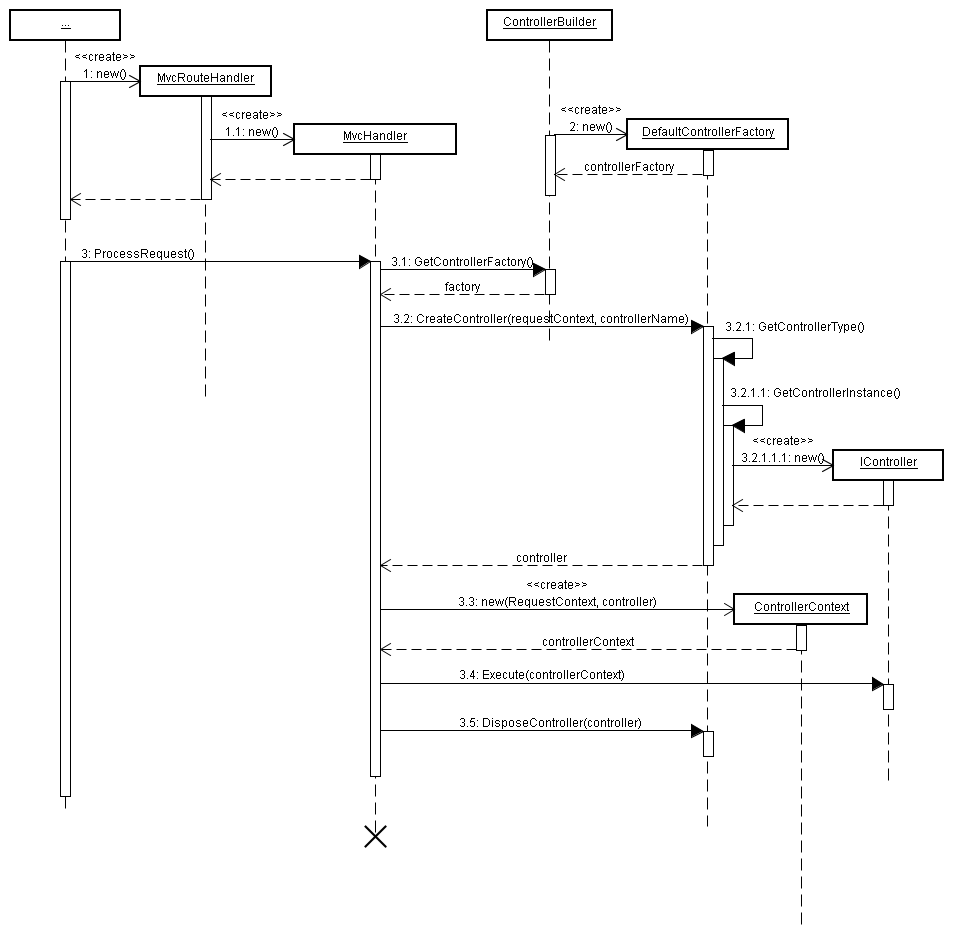
流程分析图


点击看大图

[C#]C#强化系列文章八:HttpModule,HttpHandler

mikel阅读(953)

这三个对象我们在开发ASP.NET程序时经常会用到,似乎很熟悉,但有时候又不太确定。本文通过一个简单的例子来直观的比较一下这三个对象的使用。
HttpModule:Http模块,可以在页面处理前后、应用程序初始化、出错等时候加入自己的事件处理程序
HttpHandler:Http处理程序,处理页面请求
HttpHandlerFactory:用来创建Http处理程序,创建的同时可以附加自己的事件处理程序

例子很简单,就是在每个页面的头部加入一个版权声明。
一、HttpModule
这个对象我们经常用来进行统一的权限判断、日志等处理。
例子代码:

    public class MyModule : IHttpModule
    
{
        
public void Init(HttpApplication application)
        
{
            application.BeginRequest 
+= new EventHandler(application_BeginRequest);
        }


void application_BeginRequest(object sender, EventArgs e)
        
{
            ((HttpApplication)sender).Response.Write(
"Copyright @Gspring<br/>");
        }


public void Dispose()
        
{
        }

    }

web.config中配置:

      <httpModules>
        
<add name="test" type="HttpHandle.MyModule, HttpHandle"/>
      
</httpModules>

在Init方法中可以注册很多application的事件,我们的例子就是在开始请求的时候加入自己的代码,将版权声明加到页面的头部

二、HttpHandler

这个对象经常用来加入特殊的后缀所对应的处理程序,比如可以限制.doc的文件只能给某个权限的人访问。
ASP.NET中的Page类就是一个IHttpHandler的实现
例子代码:

    public class MyHandler : IHttpHandler
    
{
        
public void ProcessRequest(HttpContext ctx)
        
{
            ctx.Response.Write(
"Copyright @Gspring<br/>");
        }

        
public bool IsReusable
        
{
            
get return true; }
        }

    }

web.config中配置:

      <httpHandlers>
      
<add verb="*" path="*.aspx" type="HttpHandle.MyHandler, HttpHandle"/>
      
</httpHandlers>

这个对象主要就是ProcessRequest方法,在这个方法中输出版权信息,但同时也有一个问题:原来的页面不会被处理,也就是说页面中只有版权声明了。那么所有的aspx页面都不能正常运行了

三、HttpHandlerFactory

这个对象也可以用来加入特殊的后缀所对应的处理程序,它的功能比HttpHandler要更加强大,在系统的web.config中就是通过注册HttpHandlerFactory来实现aspx页面的访问的:

      <add path="*.aspx" verb="*" type="System.Web.UI.PageHandlerFactory" validate="true"/>

HttpHandlerFactory是HttpHandler的工厂,通过它来生成不同的HttpHandler对象。
例子代码:

    public class MyHandlerFactory : IHttpHandlerFactory
    
{
        
public IHttpHandler GetHandler(HttpContext context, string requestType, string url, string pathTranslated)
        
{
            PageHandlerFactory factory 
= (PageHandlerFactory)Activator.CreateInstance(typeof(PageHandlerFactory), true);
            IHttpHandler handler 
= factory.GetHandler(context, requestType, url, pathTranslated);

            
//执行一些其它操作
            Execute(handler);

            
return handler;
        }


private void Execute(IHttpHandler handler)
        
{
            
if (handler is Page)
            
{
                
//可以直接对Page对象进行操作
                ((Page)handler).PreLoad += new EventHandler(MyHandlerFactory_PreLoad);
            }

        }


void MyHandlerFactory_PreLoad(object sender, EventArgs e)
        
{
            ((Page)sender).Response.Write(
"Copyright @Gspring<br/>");
        }


public void ReleaseHandler(IHttpHandler handler)
        
{
        }

    }

web.config中配置:

      <httpHandlers>
      
<add verb="*" path="*.aspx" type="HttpHandle.MyHandlerFactory, HttpHandle"/>
      
</httpHandlers>

在例子中我们通过调用系统默认的PageHandlerFactory类进行常规处理,然后在处理过程中加入自己的代码,可以在Page对象上附加自己的事件处理程序。

附一个小的恶作剧:
我们可以开发好aspx页面,然后把web应用程序发布后把所有的aspx文件的后缀都改为spring,再在web.config中加入配置:

      <httpHandlers>
      
<add verb="*" path="*.spring" type="HttpHandle.MyHandlerFactory, HttpHandle"/>
      
</httpHandlers>
      
<compilation>
        
<buildProviders>
          
<add extension=".spring" type="System.Web.Compilation.PageBuildProvider"/>
        
</buildProviders>
      
</compilation>

buildProviders是用来指定spring后缀的编译程序,我们把它设置成和aspx一致就可以了。如果在IIS中发布的话还需要在应用程序配置中加入spring的后缀映射。
然后我们就可以通过 http://../…/*.spring来访问我们的网站

[C#]Asp.Net页面执行流程分析

mikel阅读(1016)

在我的上一篇文章中说到了HttpModule、HttpHandle的简单使用,我们可以利用它们在页面请求的过程中加入自己的事件处理程序。那么在一个aspx页面请求时后台到底做了什么?当然ASP.NET做了很多事情,过程也比较复杂,本文主要分析一下大体的流程。总体流程如下:
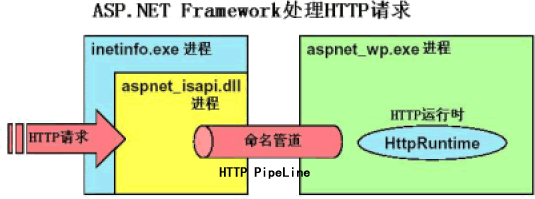
请求一个页面时首先被WWW服务截获(inetinfo.exe进程),这个进程首先判断页面的后缀,然后根据IIS中的配置来决定调用哪个扩展程序,比 如aspx的页面就会调用c:\windows\microsoft.net\framework\v2.0.50727 \aspnet_isapi.dll,aspnet_isapi.dll将请求发送给w3wp.exe进程(我们在调试IIS中网站时就是把VS2005 附加到这个进程上的)。
接下来w3wp.exe进程就会调用.net类库进行具体处理:
ISAPIRuntime–>HttpRuntime–>HttpApplicationFactory–>HttpApplication–>HttpModule–HttpHandlerFactory–>HttpHandler 这也是本文主要分析的地方。
下面只是列出主要流程,如果喜欢钻研的同学可以用Reflector去查看
一:ISAPIRuntime

       bool uSEOOP = iWRType == 1;
        wr 
= ISAPIWorkerRequest.CreateWorkerRequest(ecb, uSEOOP);
        wr.Initialize();
        
string appPathTranslated = wr.GetAppPathTranslated();
        
string appDomainAppPathInternal = HttpRuntime.AppDomainAppPathInternal;
        
if ((appDomainAppPathInternal == null|| StringUtil.EqualsIgnoreCase(appPathTranslated, appDomainAppPathInternal))
        
{
            HttpRuntime.ProcessRequestNoDemand(wr);
            
return 0;
        }

        HttpRuntime.ShutdownAppDomain(ApplicationShutdownReason.PhysicalApplicationPathChanged, SR.GetString(
"Hosting_Phys_Path_Changed"new object[] { appDomainAppPathInternal, appPathTranslated }));
        
return 1;

它的主要作用是调用一些非托管代码生成HttpWorkerRequest对象,该对象包含当前请求的所有信息,然后传递给HttpRuntime,这里生成的HttpWorkerRequest对象可以直接在我们的页面中调用的,通过它取得原始的请求信息:

            IServiceProvider provider = (IServiceProvider)HttpContext.Current;
            HttpWorkerRequest wr 
= (HttpWorkerRequest)provider.GetService(typeof(HttpWorkerRequest));

二:HttpRuntime
最主要的就是private void ProcessRequestInternal(HttpWorkerRequest wr)方法:

        context = new HttpContext(wr, false);
        
        IHttpHandler applicationInstance 
= HttpApplicationFactory.GetApplicationInstance(context);
        
  IHttpAsyncHandler handler2 
= (IHttpAsyncHandler) applicationInstance;
  context.AsyncAppHandler 
= handler2;
  handler2.BeginProcessRequest(context, 
this._handlerCompletionCallback, context);
        

1、根据HttpWorkerRequest对象生成HttpContext,HttpContext应该大家都很熟悉的,它包含request、response等属性,在页面中经常会用到的;
2、调用HttpApplicationFactory来生成IHttpHandler(这里生成的是一个默认的HttpApplication对象,HttpApplication也是IHttpHandler接口的一个实现)
3、调用HttpApplication对象执行请求

三:HttpApplicationFactory
正如2.2中所提到的,这里主要是生成一个HttpApplication对象:

 internal static string GetApplicationFile()
 
{
     
return Path.Combine(HttpRuntime.AppDomainAppPathInternal, "global.asax");
 }

首先会查看是否存在global.asax文件,如果有的话就用它来生成HttpApplication对象,从这里我们可以看到global.asax的文件名是在ASP.NET的框架中写死的,不能修改的。如果这个文件不存在就使用默认的对象。
创建好HttpApplication之后对它进行初始化:

    application = (HttpApplication) HttpRuntime.CreateNonPublicInstance(this._theApplicationType);
 
using (ApplicationImpersonationContext context2 = new ApplicationImpersonationContext())
 
{
     application.InitInternal(context, 
this._state, this._eventHandlerMethods);
 }


 四、HttpApplication
这个是比较复杂也比较重要的一个对象
首先是执行初始化操作,比较重要的一步就是进行HttpModule的初始化:

        private void InitModules()
        
{
            
this._moduleCollection = RuntimeConfig.GetAppConfig().HttpModules.CreateModules();
            
this.InitModulesCommon();
        }

它会读取web.config中所有HttpModule的配置
在HookupEventHandlersForApplicationAndModules方法中绑定Module的事件处理程序
接着进行事件实际绑定:

 if (HttpRuntime.UseIntegratedPipeline)
 
{
     
this._stepManager = new PipelineStepManager(this);
 }

 
else
 
{
     
this._stepManager = new ApplicationStepManager(this);
 }

 
this._stepManager.BuildSteps(this._resumeStepsWaitCallback);

在ApplicationStepManager的BuildSteps方法中可以看到事件的绑定执行顺序:

app.CreateEventExecutionSteps(HttpApplication.EventBeginRequest, steps);
 app.CreateEventExecutionSteps(HttpApplication.EventAuthenticateRequest, steps);
 app.CreateEventExecutionSteps(HttpApplication.EventDefaultAuthentication, steps);
 app.CreateEventExecutionSteps(HttpApplication.EventPostAuthenticateRequest, steps);
 app.CreateEventExecutionSteps(HttpApplication.EventAuthorizeRequest, steps);
 app.CreateEventExecutionSteps(HttpApplication.EventPostAuthorizeRequest, steps);
 app.CreateEventExecutionSteps(HttpApplication.EventResolveRequestCache, steps);
 app.CreateEventExecutionSteps(HttpApplication.EventPostResolveRequestCache, steps);
 steps.Add(new HttpApplication.MapHandlerExecutionStep(app));
 app.CreateEventExecutionSteps(HttpApplication.EventPostMapRequestHandler, steps);
 app.CreateEventExecutionSteps(HttpApplication.EventAcquireRequestState, steps);
 app.CreateEventExecutionSteps(HttpApplication.EventPostAcquireRequestState, steps);
 app.CreateEventExecutionSteps(HttpApplication.EventPreRequestHandlerExecute, steps);
 steps.Add(new HttpApplication.CallHandlerExecutionStep(app));

 app.CreateEventExecutionSteps(HttpApplication.EventPostRequestHandlerExecute, steps);
 app.CreateEventExecutionSteps(HttpApplication.EventReleaseRequestState, steps);
 app.CreateEventExecutionSteps(HttpApplication.EventPostReleaseRequestState, steps);
 steps.Add(
new HttpApplication.CallFilterExecutionStep(app));
 app.CreateEventExecutionSteps(HttpApplication.EventUpdateRequestCache, steps);
 app.CreateEventExecutionSteps(HttpApplication.EventPostUpdateRequestCache, steps);
 
this._endRequestStepIndex = steps.Count;
 app.CreateEventExecutionSteps(HttpApplication.EventEndRequest, steps);
 steps.Add(
new HttpApplication.NoopExecutionStep());

注意上面红色标注的 MapHandlerExecutionStep(读取所有的HttpHandler配置)、CallHandlerExecutionStep就是对 Handle程序进行处理的,也就是说在web.config中配置的HttpHandler都是在这里进行处理的,执行顺序如上所示
 
然后就是调用2.3中的方法执行请求:

Code

在ResumeSteps中就是执行事件处理程序。 

五、HttpModule

在系统web.config中默认的配置有:

Code

基本使用方法可以参见我的上一篇文章

六、HttpHandlerFactory、HttpHandler

这两个对象在web.config中的配置方法是相同的,默认配置有:

Code

要注意的是相同的后缀名配置多次的话,后面的配置会把前面的覆盖。
这里我们重点看一下aspx的配置:System.Web.UI.PageHandlerFactory
这是一个HttpHandlerFactory对象,根据不同的Page生成不同的HttpHandler对象(我们自己的Page页面都是一个IHttpHandler):

    Page page = BuildManager.CreateInstanceFromVirtualPath(virtualPath, typeof(Page), context, truetrueas Page;
    
if (page == null)
    
{
        
return null;
    }

    page.TemplateControlVirtualPath 
= virtualPath;
    
return page;

这里会调用web.config中的buildProviders配置编译页面:

Code

这样就可以进入我们的Page执行了,大的执行顺序可以参见第四部分的描述,它也就是一个HttpHandler.

[C#]ASP.NET底层机制

mikel阅读(1089)

1.ASP时代的HTTP请求处理过程

在IIS的应用程序映射中,IIS会将对asp和asa文件的请求转交给asp.dll这个ISAPI来处理

Inetinfo.exe进程,即www服务进程
解释型处理,每次请求都会重新解释一次,不适用于大流量请求
2.ASP.NET的HTTP请求处理过程

3.在HttpRuntime中请求处理过程
HttpRequest请求:
进入HttpRumtime——通过HttpApplicationFactory,建立HttpApplication实例——进入HttpModule——通过HttpHandlerFactory,建立HttpHandler实例
    *这个HttpApplication实例在HttpModule的Init方法中会用到
4.HttpModule工作原理
负责监听HttpRequest,同时对HttpRequest增添或者过滤掉一部分内容。
HttpModule实现了接口IHttpModule,我们可以自定义实现该接口的类,从而取代HttpModule。
ASP.NET默认的HttpModule如下:

        System.Web.SessionState.SessionStateModule;
        System.Web.Security.WindowsAuthenticationModule;
        System.Web.Security.FormsAuthenticationModule;
        System.Web.Security.PassportAuthenticationModule;
        System.Web.Security.UrlAuthorizationModule;
        System.Web.Security.FileAuthorizationModule;

IHttpModule接口分析:

public interface IHttpModule
{
    
// 销毁不再被HttpModule使用的资源
    void Dispose();

    
//初始化一个Module,为捕获HttpRequest做准备
    void Init(HttpApplication context);
}

编写自己的HttpModule:

//注意要在这个类库中添加System.Web引用
using System;
using System.Web;

namespace ClassLibraryModule
{
    
public class MyHttpModule : IHttpModule
    
{
        
public void Init(HttpApplication context)
        
{
            context.BeginRequest 
+= new EventHandler(this.Application_BeginRequest);
            context.EndRequest 
+= new EventHandler(this.Application_EndRequest);
        }


public void Dispose() { }


//自己要处理私事的两个方法
        public void Application_BeginRequest(Object sender, EventArgs e)
        
{
            HttpApplication application 
= (HttpApplication)sender;

            HttpContext context 
= application.Context;
            HttpResponse response 
= application.Response;
            HttpRequest request 
= application.Request;

            response.Write(
"来自Application_BeginRequest");
        }


public void Application_EndRequest(Object sender, EventArgs e)
        
{
            HttpApplication application 
= (HttpApplication)sender;

            HttpContext context 
= application.Context;
            HttpResponse response 
= application.Response;
            HttpRequest request 
= application.Request;

            response.Write(
"来自Application_EndRequest");
        }

    }

}

在Web项目中添加这个类库的引用,同时在Web.config的system.web标签中添加:

        <httpModules>
            
<add name="Test" type="ClassLibraryModule.MyHttpModule,ClassLibraryModule"></add>
        
</httpModules>

name可以随意指定,没有影响。
type有两个参数,第一个表示具体哪个类,第二个表示是哪个dll

不需要在Web项目添加对类库的引用,只是复制一份到bin目录下即可

于是该站点下的每个页面都会Response.Write两句话——这适合做广告,只要替换成JavaScript即可
5.HttpModule内部事件机制
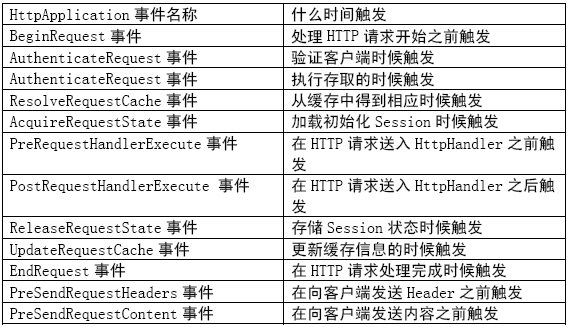
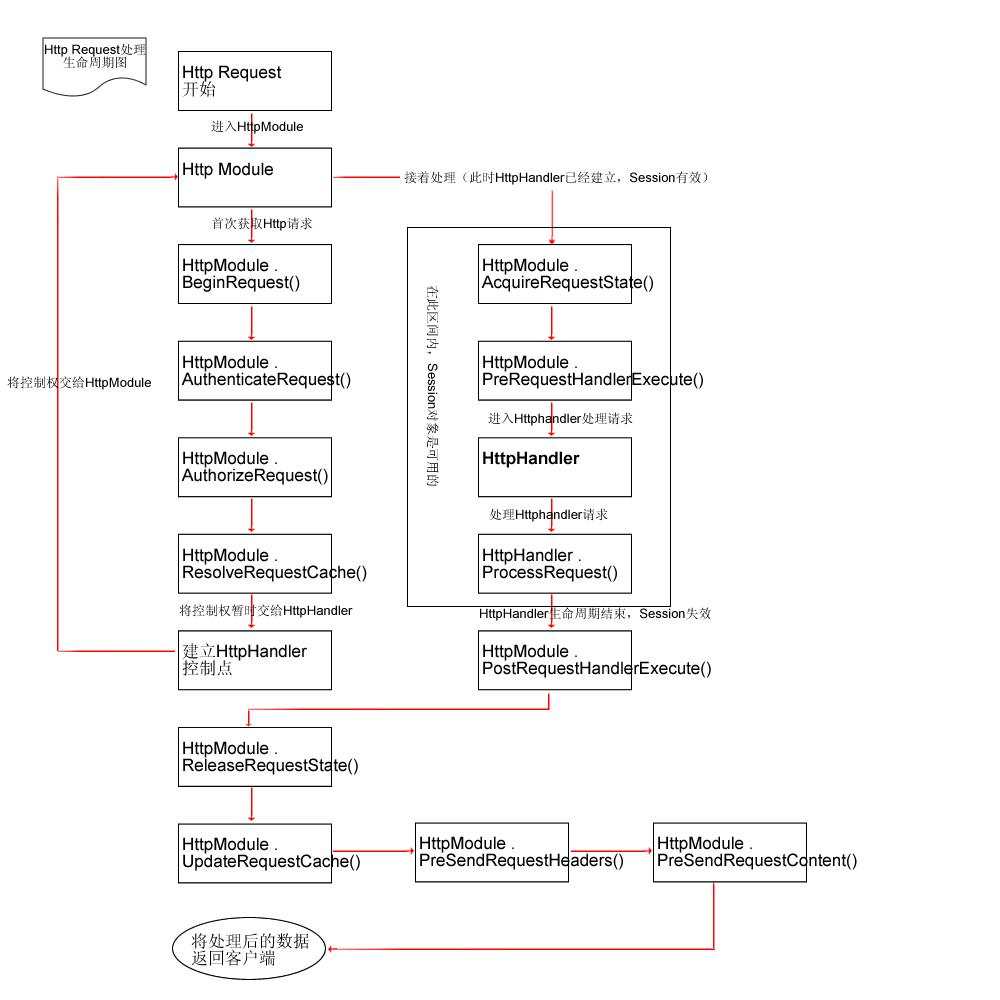
HttpApplication实例有很多事件,BenginRequest和EndRequest分别是HttpModule容器最开始的和最后的事件

注意,EndRequest之后还会触发PreSendRequestHeaders事件和PreSendRequestContent事件,这不是在HttpModule外的两个事件,表示HttpModule结束,即将开始向Client发送数据。
HttpModule容器与HttpHandler容器的交互:
    HttpModule容器会将HttpRequest传递到HttpHandler容器,这个时间点是ResolveRequestCache事件。
    HttpModule容器会建立HttpHandler实例作为入口——Session从此生效
    触发AcquireRequestState事件以及PreRequestHandlerExecute事件,
    HttpModule容器便将对HttpRequest的控制权转让给HttpHandler容器。
    HttpHandler容器处理HttpRequest——使用自身的ProcessRequest方法,将对其控制权又还给HttpModule容器——之后Session失效

可以同时加载两个HttpModule,

        <httpModules>
            
<add name="Test1" type="ClassLibraryModule.MyHttpModule1,ClassLibraryModule1"></add>
            
<add name="Test2" type="ClassLibraryModule.MyHttpModule2,ClassLibraryModule2"></add>
        
</httpModules>

这时,根据add标签的先后,依次执行:
    Test1.BeginRequest
    Test2.BeginRequest
    …..
    Test1.EndRequest
    Test2.EndRequest
利用HttpModule实现当满足一定条件时终止此次HttpRequest:
在BeginRequest事件中,使用HttpApplication.CompleteRequest()方法

        public void Application_BeginRequest(Object sender, EventArgs e)
        
{
            HttpApplication application 
= (HttpApplication)sender;
            HttpContext context 
= application.Context;

            application.CompleteRequest();

            context.Response.StatusCode 
= 500;
            context.Response.StatusDescription 
= "Internal Server Error";
        }

在BeginRquest中终止,但是仍然会调用EndRequest事件,以及PreSendRequestHeaders事件和PreSendRequestContent事件——应该说直接跳转到EndRequest事件,而不会调用这期间的事件
如果有两个HttpModule,在第一个Module的BeginRequest中终止,仅仅不会调用第二个Module的BeginRequest, 但仍然会调用两个EndRequest事件,以及PreSendRequestHeaders事件和PreSendRequestContent事件。
以上两句话,可以用下图来表示:

1.IHttpHandler接口
    定义了实现一个HttpRequest的处理所必须实现的一些系统约定方法。

    public interface IHttpHandler
    
{
        
//其他Request是否可以使用IHttpHandler
        bool IsReusable get; }

        
//处理HttpRequest
        void ProcessRequest(HttpContext context);
    }

NET为ASP.NET提供了很多系统默认HttpHandler类,用来适应不同类型的HttpRequest
    比如aspx,在machine.config中是这样定义的:    
        <add verb="*" path="*.aspx" type="System.Web.UI.PageHandlerFactory"/>
            说明遇到aspx的Request,ASP.Net会将其交给System.Web.UI.PageHandlerFactory的HttpHandler类来处理
如果自己定义了新的HttpHandler,而且在Web.config中指定,则系统只会使用这个新的HttpHandler,而不再使用原先指定的
2.HttpHandler实现了IHttpHandler接口
    一个aspx页面在HttpHandler容器中的ProcessRequest方法才被系统真正的处理解析——即交给PageHandlerFactory处理,该工厂负责提供一个HttpHandler容器,由其处理HttpRequest
3.如果要在HttpHandler容器中使用Session,必须要实现IRequiresSessionState接口——这只是一个空接口,一个标记

using System;
using System.Web;
using System.Web.SessionState;

namespace MyNamespace
{
    
public class MyHandler:IHttpHandler,IRequiresSessionState
    
{
        
public MyHandler() {}

        
public bool IsReusable
        
{
            
get
            
{
                
return true;
            }

        }


public void ProcessRequest(HttpContext context)
        
{
            HttpResponse response 
= context.Response;
            HttpRequest request 
= context.Request;

            HttpSessionState Session 
= context.Session;
            Session[
"test"= "hi";

            response.Write(
"<b>Hello world!</b>");
            response.Write(Session[
"test"]);
        }

    }

}

同时,还要在Web.config中加上声明:

   <httpHandlers>
        
<add verb="*" path="*" type="MyNamespace.MyHandler,MyNamespace"></add>
   
</httpHandlers>

4.IHttpHandlerFactory
    待续。。。

[C#]C#多线程学习(一) 多线程的相关概念

mikel阅读(1019)

什么是进程?

当一个程序开始运行时,它就是一个进程,进程包括运行中的程序和程序所使用到的内存和系统资源。 而一个进程又是由多个线程所组成的。

什么是线程?

线程是程序中的一个执行流,每个线程都有自己的专有寄存器(栈指针、程序计数器等),但代码区是共享的,即不同的线程可以执行同样的函数。

什么是多线程?

多线程是指程序中包含多个执行流,即在一个程序中可以同时运行多个不同的线程来执行不同的任务,也就是说允许单个程序创建多个并行执行的线程来完成各自的任务。

多线程的好处:

可以提高CPU的利用率。在多线程程序中,一个线程必须等待的时候,CPU可以运行其它的线程而不是等待,这样就大大提高了程序的效率。

多线程的不利方面:

线程也是程序,所以线程需要占用内存,线程越多占用内存也越多; 多线程需要协调和管理,所以需要CPU时间跟踪线程; 线程之间对共享资源的访问会相互影响,必须解决竞用共享资源的问题; 线程太多会导致控制太复杂,最终可能造成很多Bug;

接下来将对C#编程中的多线程机制进行探讨。为了省去创建GUI那些繁琐的步骤,更清晰地逼近线程的本质,接下来的所有程序都是控制台程序,程序最后的Console.ReadLine()是为了使程序中途停下来,以便看清楚执行过程中的输出。

任何程序在执行时,至少有一个主线程。

一个直观印象的线程示例:

using System;
using System.Threading;
namespace ThreadTest
{
  class RunIt
  {
    [STAThread]
    static void Main(string[] args)
    {
      Thread.CurrentThread.Name="System Thread";//给当前线程起名为"System Thread"
            Console.WriteLine(Thread.CurrentThread.Name+"'Status:"+Thread.CurrentThread.ThreadState);
      Console.ReadLine();
    }
  }
}

输出如下:

System Thread's Status:Running

在这里,我们通过Thread类的静态属性CurrentThread获取了当前执行的线程,对其Name属性赋值“System Thread”,最后还输出了它的当前状态(ThreadState)。

所谓静态属性,就是这个类所有对象所公有的属性,不管你创建了多少个这个类的实例,但是类的静态属性在内存中只有一个。很容易理解CurrentThread为什么是静态的——虽然有多个线程同时存在,但是在某一个时刻,CPU只能执行其中一个。

在程序的头部,我们使用了如下命名空间:

using System;

using System.Threading;

在.net framework class library中,所有与多线程机制应用相关的类都是放在System.Threading命名空间中的。如果你想在你的应用程序中使用多线程,就必须包含这个类。

我们通过其中提供的Thread类来创建和控制线程,ThreadPool类用于管理线程池等。 (此外还提供解决了线程执行安排,死锁,线程间通讯等实际问题的机制。)

Thread类有几个至关重要的方法,描述如下:

Start():启动线程;

Sleep(int):静态方法,暂停当前线程指定的毫秒数;

Abort():通常使用该方法来终止一个线程;

Suspend():该方法并不终止未完成的线程,它仅仅挂起线程,以后还可恢复;

Resume():恢复被Suspend()方法挂起的线程的执行。

[C#]What else is burried down in the depth’s of Go

mikel阅读(1119)

What else is burried down in the depth’s of Google’s amazing JavaScript?

So the new GTalk interface in GMail is pretty rad. Congrats to Dan and the rest of the team that made it “go”.

The talk feature is cool not just from a UI perspective as the code is also chock full of little gems. I’m kind of a dork about low-latency data transport to the browser. HTTP wasn’t meant to be used this way…so of course I’m interested! Ever since Joyce got me involved in the rewrite of mod_pubsub I’ve had my eye on the various ways that servers can push data to browsers and the kinds of technology that will prevent a server that’s doing this from melting down (hellooooooooo Twisted). Using just what’s available to the browser, it’s possible to have the server push data encapsulated in <script> blocks and rely on a progressive rendering behavior that every modern browser implements to dispatch events in near real-time (compared to full page refresh or polling delay). There are a mountain of browser quirks that of course play into this process. The least desirable of these to the user are the “phantom click” and the “throbber of doom” that afflict IE users.

When a page (or an iframe it hosts) is loading content, your browser usually shows some sort of “I’m working” indicator. In the bottom “taskbar” there is usually some sort of progress meter. In the upper right (on IE) the “throbber” will continue to animate until the work is done. Of course in the scenario I’m describing the sent page is never done. The whole point is that the server keeps the connection open. Combine this with the IE behavior of producing a “click” like sound when an iframe is navigated to a different URL, and you’ve got a pretty poor user experience.

But couldn’t you do something with XMLHTTP? Short answer: yes, but not as portably and it won’t get you around IE’s 2-connection limit either so there’s not much of a win. For the long answer, see my talk at ETech or wait for me to post the slides. At the end of the day, the hidden <iframe> hack scales best and is the most portable. Especially if you can lick the UX problems.

Which Google has.

How? By cleverly abusing another safe-for-scripting ActiveX control in IE. Here’s the basic structure of the hack:

  // we were served from child.example.com but
// have already set document.domain to example.com
var currentDomain = "http://exmaple.com/";
var dataStreamUrl = currentDomain+"path/to/server.cgi";
var transferDoc = new ActiveXObject("htmlfile"); // !?!
// make sure it's really scriptable
transferDoc.open();
transferDoc.write("<html>");
transferDoc.write("<script>document.domain='"+currentDomain+"';</script>");
transferDoc.write("</html>");
transferDoc.close();
// set the iframe up to call the server for data
var ifrDiv = transferDoc.createElement("div");
transferDoc.appendChild(ifrDiv);
// start communicating
ifrDiv.innerHTML = "<iframe src='"+dataStreamUrl+"'></iframe>";

This is the kind of fundamental technique that is critical to making the next generation of interactive experiences a reality. Server tools like mod_pubsub and LivePage (and perhaps even JMS buses) are starting to come into their own and the benefits of event-driven IO are starting to become well understood by server-side devs. It’s only a matter of time before server-push data hits an inflection point in the same way that background single-request/single-response data transfer did with Ajax. Dojo will, of course, have infrastructure to support this kind of thing when the borader developer community is ready (most if it is already in place).

From long and painful experience and amazingly deep respect, I take my hat off and bow to whoever it was on the GMail/GTalk team that figured this out. It’s a hell of a hack. It’s no wonder that Google has been able to attract and develop the best DHTML hackers in the world.

Update: so just to be *very* clear, I worked on the rewrite of the mod_pubsub *client*. The server rewrite was handled by some folks who are much smarter than I am.