[Flash]Flash3D编程探秘三

mikel阅读(923)

作者:Yang Zhou
感谢:Crystal

介绍

对学习Flash中的3D编程感兴趣?You come to the right place!在文章中,我将陆续的介绍在Flash中使用Actionsript进行3D编程一些理论和实例。这是一篇初级到中级难度的学习资料,如果你 具有一些基本的数学和几何知识,那对你来说不会太难。虽然例子中运用了非常简单的程序构架和实现方法,但是我还是期望你已经有大量的 Actionscirpt和Flash经验,这样你在使用以及理解Actionscript语言的时候不会有太大的障碍。如果3D这个课题对你来说是比较 新的东西,或者你在阅读中发现很多地方不清楚,那么我建议你参考我写过的另外几篇3D的基础知识的文章。

文章中含有大量的代码和一些算法的实现,并且附带源文件。你会发现我写的代码里有大量的注释,如果有什么不明白的话你可以参考一下注释。你可以完全拷贝我写的代码去使用,但是请务必注明出处。


点此下载本节源文件


在前面的两节中,你在空间的位置是一成不变的。我们一直是让舞台上的物体来回移动,并没有用到摄像机这个概念,在有些时候我们只需要让物体运动。但是随着你对3D的深入,你会发现那些并不足够


当我们讨论3D空间的时候,摄像机理论上代表3D中的一个点,我们从这个点去观看这个空间。为什么要使用摄像机呢?因为我们希望能够透过一个镜头看 到其他所有舞台上的物体,其实程序里摄像机只不过是一组数值来表示你的摄像机在3D空间的参数(比如位置)。想象一下你在广阔的撒哈拉沙漠里越野,又或者 你的朋友小P走向在你的身旁。你的朋友小P慢慢走向你并最终到达离你很近的位置,几下来你们可以交谈了。但是,如果小P站在原地不动,而是你走向他的身 旁,那么对于地面来说,小P是不动的,而你(摄像机)是移动的。在这里你的眼睛就充当了我们的摄像机。看看下面的两个动画文件,再对比一下。左边是小P走 向你,右边是你走向小P。

移动物体和移动摄像机


你会发现对于你的眼睛来说,你可以并不走动,只要把小P和周围一切的物体都移动到你的面前,也会达到同样的效果。但是哪一种可行呢?下面我们做两个动画来说明如何在我们的3D使用摄像机。动画效果如下,左面的是移动我们的小P,右边是移动我们的摄像机。

对比移动小P和移动你的摄像机


制作步骤:

1. 和以前一样,定义原点,设置焦距,创建舞台。

// origin is the center of the view point in 3d space
// everything scale around this point
// these lines of code will shift 3d space origin to the center
var origin = new Object();
origin.x 
= stage.stageWidth/2;
origin.y 
= stage.stageHeight/270;
// focal length of viewer's camera
var focal_length = 400;

2. 下面我们定义一个摄像机物体,它具有3D空间的x,y,z,并且我们给它一个移动方向和初始的在z方向的移动速度。

// setup camera
var camera = new Object();
camera.x 
= 0;
camera.y 
= 0;
camera.z 
= 0;
camera.direction 
= 1;
camera.speed_z 
= 6;

3. 创建一个小球在舞台上。

// create a sphere
// go to library, right click on Sphere, choose linkage
// and check Export for Actionscript
for (var i = 0; i < 1; i++)
{
    var sphere 
= new Sphere();
    sphere.x_3d 
= 30;
    sphere.y_3d 
= 80;
    sphere.z_3d 
= 600;
    
// add all the spherees to the scene object
    scene.addChild(sphere);
}

4. 接下来我们开始写运动的循环函数。每一次执行函数一开始我们要把摄像机的位置在z方向移动一定的量。如果摄像机离小球很近了的话,那么让摄像机回来。

// move the spherees back and forth
function run(e:Event)
{
    
// here we offset the camera position by its moving speed times the direction
    camera.z += camera.speed_z*camera.direction;
    
    
if (camera.z > 600)                    // if the camera is too close to the ball
    {
        camera.z 
= 600;
        camera.direction 
= 1;           // move camera backward
    }
    
else if (camera.z < 0)                // if the camera is too close to the screen
    {
        camera.z 
= 0;
        camera.direction 
= 1;
    }
    
// loop through all the objects on the scene
    for (var i = 0; i < scene.numChildren; i++)
    {
        
// calculate the scale what the object should be
        var scale = focal_length/(focal_length+scene.getChildAt(i).z_3dcamera.z);
        scene.getChildAt(i).x 
= (scene.getChildAt(i).x_3dcamera.x)*scale;
        scene.getChildAt(i).y 
= (scene.getChildAt(i).y_3dcamera.x)*scale;
        
// properly scale the object to look 3d
        scene.getChildAt(i).scaleX = scene.getChildAt(i).scaleY = scale;
    }
}

5. 计算出小球离摄像机的x距离,y距离和z距离,然后得出小球的缩放比率。最后把小球缩放并移动到相应的位置。That's it! 不要忘记添加循环函数执行事件。

this.addEventListener(Event.ENTER_FRAME, run);

注意:

你需要考虑让摄像机的z的指不能小于-1乘焦距,如果z小于这个值,那么公式scale = focal_length/(focal_length+z)得出的缩放比率会是负数,那么物体就会开始向后运动。

一个简单的赛车小游戏制作

下面我们运用摄像机的概念来制作一个简单的赛车小游戏,游戏里你可以使用上下左右键控制小车,COOL。那么我们开始。

简单赛车游戏,键盘上下左右方向键控制


1. 定义原点,设置焦距,创建舞台。

// origin is the center of the view point in 3d space
// everything scale around this point
// these lines of code will shift 3d space origin to the center
var origin = new Object();
origin.x 
= stage.stageWidth/2;
origin.y 
= stage.stageHeight/2;
// now create a scene object to hold all the spheres
var scene = new Sprite();
this.addChild(scene);
scene.x 
= origin.x;
scene.y 
= origin.y;
// focal length of viewer's camera
var focal_length = 400;

2. 下面我们定义一个摄像机物体,它具有3D空间的x,y,z,并且我们给它初始的在z方向的移动速度。

// setup camera
var camera = new Object();
camera.x 
= 0;
camera.y 
= 40;                   // make the camera off the ground a little bit
camera.z = 0;
camera.speed_z 
= 0;            // your driving speed

3. 创建两个个场景,一个用来盛放所有的小车,另外一个盛放放有的路边轮胎。然后把它们添加到舞台上。

var tires = new Sprite();                // this sprite holds all the tires
var cars = new Sprite();                // this sprite holds all the cars
var txt_speed = new TextField();    // your dashboard
txt_speed.x = 20;
txt_speed.y 
= 20;
// now add them to the screen
scene.addChild(tires);
scene.addChild(cars);
this.addChild(txt_speed);

4. 定义一些小车的运动状态的变量。

// now here are the variables determine the car's moving state
var move_left = false;
var move_right 
= false;
var speed_up 
= false;
var brake 
= false;


5. 那么接下来我们创建40个轮胎并且把前20个放在路的左边,后20个放在路的右边,这样我们给赛道画出一个轮廓。

// now create 40 tires, 20 on the left and 10 on the right
for (var i = 0; i < 40; i++)
{
    var tire 
= new Tire();
    
if (i < 20)
    {
        tire.x_3d 
= 400;
        tire.z_3d 
= i*500;
    }
    
else
    {
        tire.x_3d 
= 400;
        tire.z_3d 
= (i20)*500;
    }
    tire.y_3d 
= 40;
    tires.addChild(tire);
}

6. 创建8个小车,给它们相应的xyz位置(注意要赛车放在赛道上,设置它们的x范围在-230到230之间),给他们不同的起始z位置和速度,最后把它们添加到舞台上。

// create 8 opponent cars
for (var j = 0; j < 8; j++)
{
    var car 
= new Car();
    car.x_3d 
= Math.random()*(230230)+230;        // give them random x position
    car.y_3d = 30;
    car.z_3d 
= 800+(8j)*400;                              // give them speed
    car.speed_z = (8j)*15;
    cars.addChild(car);
}

7. 接下来我们要写一个函数,每一次我们执行这个函数,首先把赛车在z方向移动一定量(赛车相对地面是运动的),然后计算比率,把赛车移动到相应的位置并且缩 放。我把它命名updateCar,还是运用摄像机的理论。分别计算出摄像机与小车的xyz距离,然后把小车缩放和移动。注意小车如果离摄像机太远或者被 甩到摄像机的后面的话,我们可以让它不在屏幕上显示。

// for each of the running cycle, these two functions are called
function updateCar(car)
{
    var x 
= car.x_3dcamera.x;             // calculate the x distance between your camera and car
    var y = car.y_3dcamera.y;            // same we can y distance
    var z = car.z_3dcamera.z;            // and z distance
    
    
if (z < 0 || z > 10000)                   // if car is too far or left behind
        car.visible = false;                    // then do not draw it
    else
        car.visible 
= true;
        
    car.z_3d 
+= car.speed_z;             // move the car
    z = car.z_3dcamera.z;                // recaculate the z distance
    
    var scale 
= focal_length/(focal_length+z);        // caculate the scale what the car should be
    car.x = x*scale;
    car.y 
= y*scale;
    car.scaleX 
= car.scaleY = scale;    // scale it to a proper size
}

8. 轮胎的更新函数updateTire和赛车的更新函数类似,不同的是,轮胎相对地面是静止的,所以这里我们不改变它们的xyz值。只有在轮胎已经到了摄像机后面(轮胎的z小于摄像机的z),我们把这个轮胎重新定位到摄像机前非常远的地方。

function updateTire(tire)
{
    var x 
= tire.x_3dcamera.x;
    var y 
= tire.y_3dcamera.y;
    var z 
= tire.z_3dcamera.z;
    
    
if (z < 0)
    {
        tire.z_3d 
+= 10000;               // if the tire is left behind, then offset it 
        z = tire.z_3dcamera.z;            
    }
    
    var scale 
= focal_length/(focal_length+z);
    tire.x 
= x*scale;
    tire.y 
= y*scale;
    tire.scaleX 
= tire.scaleY = scale;
}

9. 下一步,run函数执行首先把我们的摄像头沿z方向移动,然后调用我们前面写的updateCar和updateTire函数,刷新所有赛车和轮胎的位置和大小。

// here is the function loop
function run(e:Event)
{
    camera.z 
+= camera.speed_z;                            // first move your camera
    
    
for (var i = 0; i < cars.numChildren; i++)              // update all the cars
    {
        updateCar(cars.getChildAt(i));
    }
    
for (var j = 0; j < tires.numChildren; j++)             // and the tires on the side
    {
        updateTire(tires.getChildAt(j));
    }
    
    txt_speed.text 
= int(camera.speed_z) + " MPH";   // show your speed
    txt_speed.setTextFormat(new TextFormat("Verdana"160x444444true));
}

10. 下面是键盘响应事件函数,我写了很多的注释在程序里,你应该很快就能看懂,就不打算详细解说了。功能是当按下左键你的赛车左移;按下上键,赛车开始加速(当然极速是需要你来定义的了)等等。

// keyboard functions
function key_down(e:KeyboardEvent):void
{
    
if (e.keyCode == 37)            // left key
        move_left = true;
    
if (e.keyCode == 39)            // right key
        move_right = true;
    
if (e.keyCode == 38)            // up key
        speed_up = true;
    
if (e.keyCode == 40)            // down key
        brake = true;
}
function key_up(e:KeyboardEvent):
void
{
    
if (e.keyCode == 37)
        move_left 
= false;
    
if (e.keyCode == 39)
        move_right 
= false;
    
if (e.keyCode == 38)
        speed_up 
= false;
    
if (e.keyCode == 40)
        brake 
= false;
}
function keyboard_response(e:Event):
void
{
    
if (move_left)            
    {
        
// move the camera to the left, remember here the fast you go, the fast your steer
        camera.x -= camera.speed_z/6;
        
if (camera.x < 300) camera.x = 300;     // limit your car so it won't go off the road
    }
    
if (move_right)
    {
        camera.x 
+= camera.speed_z/6;
        
if (camera.x > 300) camera.x = 300;        // limit your car so it won't go off the road
    }
    
if (speed_up)
    {
        camera.speed_z 
+= .2;                         // accelerate
        
// limit the car speed in a range
        if (camera.speed_z < 0) camera.speed_z = 0;            
        
else if (camera.speed_z > 120) camera.speed_z = 120;
    }
    
else
    {
        camera.speed_z 
*= .99;                      // if you don't hit the throttle, it will stop soon
    }
    
if (brake)
    {
        camera.speed_z 
-= .3;                       // slow down
        if (camera.speed_z < 0) camera.speed_z = 0;
    }
}

11. 最后,添加循环函数执行和键盘响应事件。如果没问题的话,现在发布运行。成功了!

// now initialize all the necessary event listeners and we are done
this.addEventListener(Event.ENTER_FRAME, run);
this.addEventListener(Event.ENTER_FRAME, keyboard_response);
stage.addEventListener(KeyboardEvent.KEY_DOWN, key_down);
stage.addEventListener(KeyboardEvent.KEY_UP, key_up);
stage.stageFocusRect 
= false;
stage.focus 
= scene;


注意:

当你在循环一个数组中所有对象时,你可能会遇到想要删除一个对象的情况(可能你需要把这个对象从这个数组删除,然后添加到另外一个数组中),那么在 这个删除的过程中你要非常的小心,因为数组在你执行删除操作后的长度会改变,那么你如果循环使用数组长度作为max的话,会造成掠过对现在在原删除对象所 在位置的对象的操作。

一种解决办法就是在循环之前定义一个变量然后再执行for循环。

var length = objects.numChildren;

目前为止,我们一直在讨论3D场景的设置。后面我会陆续的介绍如何使用代码实现3D物体的绘制,不过我想在那之前我们还是多看几个3D场景的例子加深你的印象。那么,请不要失去耐心,最终你所关心的内容这里一定会有介绍的。

点此下载本节源文件

作者:Yang Zhou
出处:http://yangzhou1030.cnblogs.com
感谢:Yunqing
本文版权归作者和博客园共有,转载未经作者同意必须保留此段声明。请在文章页面明显位置给出原文连接,作者保留追究法律责任的权利。

[UI] 改进电子商务网站易用性的10个方法

mikel阅读(1087)

    今天消费者网络购物的支出越来越多,可是太多的网站并没有考虑到他们网站和订购流程的易用性,最终导致用户很快就放弃了他们的订购。 这里有10种可以提高你的电子商务网站易用性的方法,可以帮助你最大可能的提高网站的转化率,将用户的"购物篮里的商品"转换为订单。

    1.  用email来标识用户(登陆名) 

       你曾经在网上购物中,用过多少不同的用户名作为账号? 又用过多少不同的emai作为账号?  我敢打赌, 你不仅不同的Email用的很少 ,而且你会发现Email比用户名,更容易记忆。 大多数情况下,用email标识用户比用户名更好。 因为Email容易记忆,更标准,这意味着你不必担心去记忆哪些乱七八糟的字符。他们永远是独一无二的,永远不会像用户名那样出现重名。


    2. 将下订单的过程划分成几个大步骤(让用户一次处理一个任务---海带博客

      订购流程通常非常复杂,比较典型的场景可能包括: 用户输入一个配送地址, 选择配送方式, 选择输入支付方式, 最后确认自己的订单。 试图让用户在一个步骤里做完这些事会有问题, 因为用户要输入太多的信息了!

    将这些步骤分解,让用户每次能处理一个步骤, 确保每个步骤需要思考和输入的信息相对较少。

     举个例子,亚马逊(Amazon.com)将订购流程分解成以下步骤:


    3.  告诉用户他们在哪儿,将要去那儿?

    (注: 关于网络用户迷失的位置感描述,请参考<Don't make me think>一书---海带博客

     在你的旅行中, 如果你不知道自己已经走了多远, 或者不知道自己还要走多远, 这难道不是一件糟糕的事情吗? 对用户来说, 当他们试图在线买点什么东西,如果他们不知道最终完成订购还需要多少步骤,他们会倍感挫折。 这就是为什么在订购过程中,告诉用户他在什么位置,而且还需要多少步骤, 是多么重要!

The four steps of the Dixon's ordering process: Delivery, Payment, Submit order, Confirmation

    举个例子, Dixons14 显示当前预订步骤,下一步要去的步骤。 作为一种选择,你可以只是在预订步骤中简单的设定步骤号码就可以了,比如: 输入配送地址(步骤1).


    4.不要让下订单过程不必要的复杂

    令人惊奇的是, 有太多的电子商务网站把他们的订单流程搞的无比复杂,超过他们实际需要的。据个例子, 用户经常被要求按照月份输入他们的信用卡或者借记卡的有效日期(注: 这里意思是必须输入英文的日期,Jan, Feb, March之类的---海带博客),而不是简单的01,02,03等等。 这就强制用户将他们卡片上显示的数字转换成单词,却无法直接输入数字。

    作为产品设计人员,对每个订购步骤都要仔细考虑,以使其更简单。 举个例子,预订过程中,所有的输入框都必须用户输入吗?(注: 如果不是必须的,请尽量简化。---海带博客) 。通过不断简化流线化订单流程,你可以将用户订购过程中的体验问题降低到最少。


    5. 告知用户通常会产生的疑问的答案

      在整个订购流程中,告诉用户通常会遇到的问题和疑问的解决办法是非常重要的。 举个例子,用户通常需要知道他的配送地址最多可允许多长 ?或者当用户需要输入生日的时候,告诉他为什么要收集他的生日信息等等。

    仔细走一遍预订流程并在每个步骤问问你自己: 用户可能会有什么疑问? 在屏幕上给予用户提示,并且提供一个超链接到详细的帮助。

Explanation that Marks & Spencers require users' contact numbers because they may need to contact them

    举个例子,Markts& Spencers 向用户解释了他们为什么需要输入联系人电话。

    6. 高亮必填项


    再也没有比填写完一个订单后,却因为没有填写必填项,不得不返回重新填写更令人恼火的事情了。在填写一个订单中, 必须非常清楚标识出哪些项目是必填的,哪些是可选的。 其实很简单,只需要在必填项前加一个“*”。

Use of the * to denote required fields

    dabs.com 这点做的非常好,可以参考。

    7. 让订购流程可变通。

    通过让流程可变通, 用户不仅会感到更多的控制, 而且也不太可能遇到关键性的问题。 据个例子, 一些电子商务网站,当用户输入地址的时候,自动帮助用户查找邮编。这对于哪些非正式的或者新的地址可能会有问题, 因为这种情况下不会为用户返回邮编。 这就意味着,用户不可能简单直接输入地址就可下订单(我自己就碰到好几次这种情况了)。

    一个好的例子,CD WOW! 已经将可变通放在了他们的订购流程中, 他们允许用户不用注册直接下订单。这就意味着那些对注册感到不适的用户,仍然可以下订单。


    8. 让用户感到放心,安全(注:电子商务产品设计的目标就是容易,安全---海带博客

     很多消费者在线购买东西时,仍然不是100%放心。 他们常常担心提交了信用卡账号,却收不到货。因此努力去缓解用户的担忧,让用户感到放心是非常重要的。仔细考虑用户在订购过程中的每一步可能碰到的疑虑,并对这些疑虑进行说明。

    例如Tesco 在他们的订购流程的支付步骤,向用户解释在Tesco购物是安全的。


Tesco's safe shopping guarantee mentions their secure server that encrypts credit card information

    9. 让用户下订单前再次确认

    订购的最后一个步骤通常会让用户确认他们的订单。 用户可以看到订单的清单,包括他们需要支付多少钱,什么时候货送到。他们也可以取消或者提交此订单。最好不要拷贝亚马逊的"Amazon's "1-click" ordering system", 因为这样会让用户在没有检查和确认订单细节情况下,直接提交订单。比如配送地址和送货的费用等等。(注:处理配送地址错误的订单,或者因为配送费用导致退货的问题处理,成本非常高。---海带博客)

    在订单提交后,应该显示订单的最终确认信息, 以便让用户知道他的订单是否成功。 订单最终确认信息应该包括:

        * The expected delivery date   期望的送货时间
        * The order number  订单号
        * How to track the order online (if this is possible)  如何在线跟踪订单状态(如果可能)

    10. 订单成功后,发一个确认邮件。

    一旦用户成功提交订单, 需要立刻给用户发送一个确认邮件。 依据Jakob Nielsen's Alertbox, December 8, 2003, 一个确认邮件应该:

    简明扼要

    告诉用户他们想要的, 比如: 订单号。

    应该象公司客服代表一样。

    记住,在线解决问题比致电客服中心成本低得多。在线提示用户,比如告诉用户配送地址应该多长等等,将会大幅度减少客户服务的电话数量。 


结论:

本文概述了改进电子商务网站的10个方法, 遵循这些原则不仅让你的电子商务网站更加可用,而且最终也更成功。 当然,通过这些原则,你只能走这么远,这就是为什么进行可用性测试是每个电子商务网站重要部分的原因。 遵循可用性原则并让真实用户进行可用性测试,你会发现你的电子商务网站不仅仅可用,而且更加有效。

[架构]实战剖析三层架构3:不要说BLL没有用

mikel阅读(1002)

    在本系列的第一篇中,笨熊已经介绍过BLL层的功用,也说明了为什么许多人觉得这一层可有可无。但看近期博客园的文章,还有不少朋友对BLL的存在仍有疑问。正好今天碰到的这个问题颇具代表性,写出来让这些朋友对BLL在业务系统中的功用有个具体的感觉。
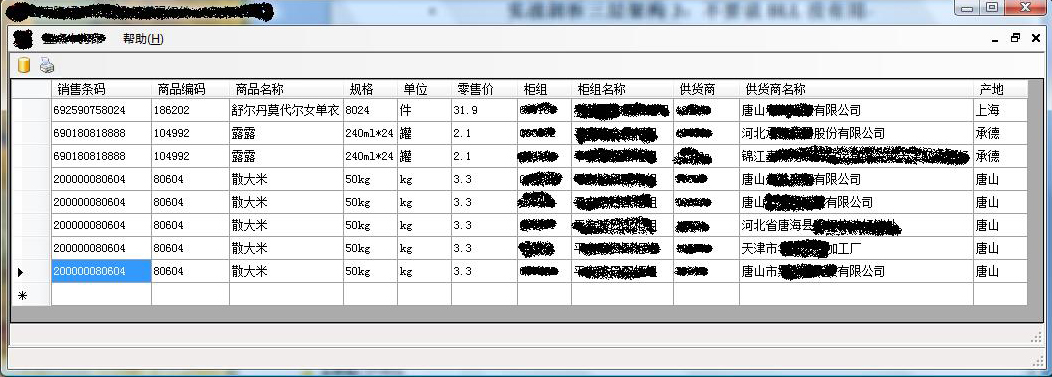
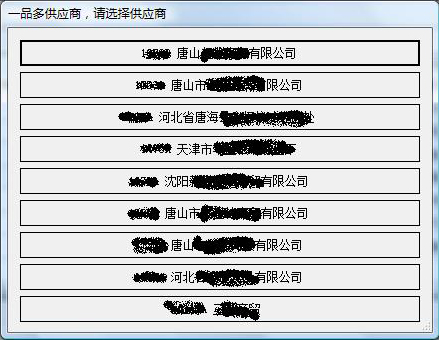
    先简要介绍一下要做的功能,在程序中,用户输入商品的商品编码,系统从数据库中提取显示此商品的详细信息(图1)。如果一个商品有多个供应商,则弹出提示框供用户选择某一供应商(图2)。

    图1

    图2

功能上来说很简单,先定义一个实体类:

Code

  然后数据层负责提取数据:  

Code

    逻辑层没什么用,直接调用DAL的方法得到数据并返回。

    表现层(这里是WinForm窗体)调用逻辑层方法得到数据,并判断数据条目,如果是一条,则直接显示;如果是多条,则弹出提示框让用户选择,选好后再显示(代码略)。


    编写好后运行,代码没有问题,但是在批量测试时发现了几种特殊情况。

    1、一些商品没有提供条码(如蔬菜、水果等散装商品),因此需要根据商品编号生成条码。

    2、一些商品除了本身的条码外,在商品的包装箱上还有条码(比如啤酒、露露、牛奶等,瓶上的条码和箱上的条码是不一样的。因此买一箱时只需扫描包装箱上的条码即可,而不用拆箱扫描里面的商品)。

    3、一些商品只有外包装箱上有条码,商品本身却没有条码,但在销售时还需要拆开来按单个商品销售,这时也要根据商品编码生成条形码。

    考虑这三种情况,那么从数据库中查询时,返回的结果有以下几种(按条码、条码类型、编码、名称、供应商显示,其它列略。条码类型列,A表示条码为商品本身条码,B表示条码为包装箱条码)。

    (1)一般情况(结果返回1 – n条数据)

    692590758024,A,186202,舒尔但莫代尔女单衣,唐山XX有限公司

    (2)商品本身没有条码(结果返回1 – n条数据)

    NULL,NULL,80604,散大米,唐山XX有限公司

    NULL,NULL,80604,散大米,天津市XX加工厂

    (3)商品本身有条码,包装箱还有条码(结果返回n条数据)

    690180818886,A,104992,露露,河北XX股份有限公司

    690180818882,B,104991,露露,河北XX股份有限公司

    690180818886,A,104991,露露,锦江XX有限公司

    690180818882,B,104991,露露,锦江XX有限公司

    (4)商品本身无条码,包装箱有条码(结果返回1 – n条数据)

    692590751824,B,101974,双汇王中王,唐山XX有限公司

    692590751824,B,101974,双汇王中王,河北XX有限公司

    这样汇总整理一下,对于重数据库中查询返回的结果,要做如下处理:首先判断条码是否为空,如果空则生成条码。确认条码不为空后,判断条码类型中是否全是B。如果有A有B,则进行筛选,保留类型为A的条目。如果全是B,则将结果中的条码全部用自动生成条码替换。


    确定了处理过程以后,决定需要将此过程放在何处。首先考虑的是数据层,如果能直接提取出所需结果那是最好的,但是有几点原因决定了不能放在数据层:

    (1)数据层的这个方法提供的数据具有通用性,逻辑层中不光一个方法对其进行调用,更改了返回结果会造成逻辑层的其它方法无法使用此结果。

    (2) 这个方法的查询语句非常简单,如果增加了此过程,则SQL语句的编写难度会加大,而且很难用1条语句处理这几种情况,必须实现的话,则此方法的SQL查询 语句需要改为3句,还要提前执行一条SQL判断语句来决定使用那个SQL查询语句。成倍增加了编写难度与执行时间。

    所以数据层不是进行处理的好地方。 

    再 看看表示层,如果放在了表示层,则需要在主窗口(图1)进行判断,对数据进行处理,这样将逻辑处理代码与显示代码混合在一起,不但乱,而且加大了编码量, 因为每个逻辑分值里面都要编写相应的显示代码。所以放在表示层也不是个好主意(呵呵,一开始感觉简单,真的想不建逻辑层直接合并在表示层中着)。

    因此,最适合放置此处理过程的地方,就是业务逻辑层了。而且此处的工作就是业务逻辑的处理,即使没有上述问题,也应该放与此层。

Code


[C#].net的提供者模型

mikel阅读(867)

使用提供者模型的好处:使用提供者模型的系统将具有很好的弹性和可扩充性。

例如你可以使用SQL server数据或者是Oracle数据库做为你的数据源,并且只需要改变一下web.config文件。


下面以一个公司的人员信息的存储进行讲解。现在我们用来存储人员信息(personInfo)的数据库是

SQL server2005,考虑到以后会使用其他数据库(例如mySQL,oracle),我们打算用提供者模型方式进行 系统设计。

1:web.config的配置,增加如下自定义配置节

<Company personInfoProviderName="sqlProvider">
 
<PersonInfoProviders>
    
<add name="sqlProvider" type="Company.SqlPersonInfoProvider"/>
 
</PersonInfoProviders>
</Company>

 2: 如果以后改用其他方式进行数据存储,可以这样修改

<Company personInfoProviderName="mysqlProvider">
 
<PersonInfoProviders>
  
<add name="sqlProvider" type="Company.SqlPersonInfoProvider"/>
  
<add name="mysqlProvider" type="Company.MysqlPersonInfoProvider"/>
 
</PersonInfoProviders >
</Company>

3:还没有完,你还得在web.config里增加如下代码

<configSections>
  
<section name="Company" type="Company.CompanyProvidersSection,Company"/>
</configSections>

 以上代码必须紧跟在<configuration>的下面,否则会出错。

 4:好了,这才开始我们的C#代码,他们所在的命名空间是Company.

首先新建三个类:PersonInfoProvider,SqlPersonInfoProvider,MysqlPersonInfoProvider。

 PersonInfoProvider是个abstract类,它继承ProviderBase,它的作用是提供抽象的方法让

SqlPersonInfoProvider和MysqlPersonInfoProvider来实现。

例如你要增加或删除人员,那么你首先要在PersonInfoProvider里增加两个抽象的方法:

public abstract void DeletePerson();

public abstract void AddPerson();

这只是第一步,第二步你还得在SqlPersonInfoProvider里进行具体的实现。

 5:你还要在新建一个类:CompanyProvidersSection,这个类的属性主要是和web.config的属性相互对应,

然后通过这个类来或得我们的提供者到底是谁。


 1public class CompanyProviderSection
 2{
 3  [ConfigurationProperty("personInfoProviderName")]
 4  public string PersonInfoProviderName()
 5 {
 6   get{return (string)this["personInfoProviderName"];}
 7 }

 8 
 9 [ConfigurationProperty("PersonInfoProviders")]
10 public ProviderSettingsCollection PersonInfoProviders
11 {
12   get{return (ProviderSettingsCollection)this["PersonInfoProviders"];}
13 }

14
15}


6:好,写到这里,但最重要的还没写,就是如何或得并且使用提供者。我们现在需要添加人员信息。


class UseProvider
    {
        
private static PersonInfoProvider _provider;
        
private static CompanyProvidersSection _providerSection;
        
private static bool _isInitialized = false;
        
private static PersonInfoProvider Provider
        {
            
return _provider;
        }
        
        
public static void AddPerson()
       {
            Provider.AddPerson();
       }  
        
private static void Initialize()
        {
            
if(!_isInitialized)
            {
                _providerSection 
= (CompanyProvidersSection)ConfigurationManager.Getsection("Compnay");
                _provider 
= (PersonInfoProvider)ProviderHelper.InstantiateProvider(_providerSection.PersonInfoProviders[_providerSection.PersonInfoProviderName]);
                _isInitiallized 
= true;
            }
        }
    }


[MSQL]利用typeperf工具收集SQL Server性能数据

mikel阅读(658)

一.利用TypePerf.exe命令行工具把Windows操作系统的性能计数器数据记录到数据库中


可以在作业中建立以下脚本

1.启用xp_cmdshell

默认情况下,SQL server2005安装完后,xp_cmdshell是禁用的(可能是安全考虑),如果要使用它,可按以下步骤


允许配置高级选项

EXEC sp_configure 'show advanced options', 1

GO

重新配置

RECONFIGURE

GO

启用xp_cmdshell

EXEC sp_configure 'xp_cmdshell', 1

GO

重新配置

RECONFIGURE

GO


2.定时开启,开始记录性能计数器日志

实现的功能:将“MyCounters.txt”文件中列出的计数器,按照每秒钟的时间间隔,记录到SQL数据库中,"SQL:SystemLog!TestSystemLog"ODBC数据源建立的系统DSN

EXEC xp_cmdshell 'typeperf -cf c:\MyCounters.txt -si 5 -f SQL -o SQL:SystemLog!TestSystemLog'


–"MyCounters.txt"可以利用下面的命令在CMD命令窗口中执行后生成

TYPEPERF qx "Processor" >>c:\MyCounters.txt


3. 定时关闭

结束typeperf.exe的进程

EXEC xp_cmdshell 'tskill typeperf'


4.关闭xp_cmdshell

用完后,要记得将xp_cmdshell禁用(出于安全考虑)

允许配置高级选项

EXEC sp_configure 'show advanced options', 1

GO

重新配置

RECONFIGURE

GO

禁用xp_cmdshell

EXEC sp_configure 'xp_cmdshell', 0

GO

重新配置

RECONFIGURE

GO


5.利用数据库中记录的日志分析性能数据


二.带来的好处:

1.  可以根据计划定时抓取服务器性能数据包括CPU、内存和磁盘利用率以及SQL Server特定数据。为数据库服务器的性能分析提供帮助。


2.  可以根据数据库中记录的日志结合Reporting Service绘制性能分析的报表。


3.  可以定制作业实现自动化


三.带来的影响:

1.  会增加服务器的负载,在测试时观察了一下这个命令的开销,基本上启动后8M左右的内存运行,开销比较小


另外:如果考虑实施的话,可以新建一个数据库(专门用于监控服务器性能等的表),便于维护和管理

[MVC]ASP.NET MVC中文文档

mikel阅读(870)

喜欢MVC的轻快优雅,所以把官方的翻译一下,分几次发上来:

ASP.NET Model-View-Controller Applications

介绍

Model-View-Controller (MVC) 模式分类了一个 MVC Web application的各个组件. 这种分离让你对每个独立的部分有了更多的控制,这能让你更容易的开发、修改、测试他们。
下面的主题描述了 ASP.NET MVC framework 和如何创建一个MVC applications. 以及如何创建 MVC 单元测试项目,可以让你使用测试驱动的开发技术 (TDD) 来开发 MVC applications.另外, 还告诉你如何通过使用controller-actionframework-helper方法来渲染views. 也解释了如何用action filters来限制对 action 方法的访问, 处理错误,缓存action方法的输出, 以及如何通过优先级来控制filters程序是在action 方法运行之前还是之后来执行.

ASP.NET MVC 概览

Introduction

Model-View-Controller (MVC) 架构模式将一个应用程序分离成主要的三个组件: the model, the view, and the controller. ASP.NET MVC 框架提供了一种ASP.NET Web Forms模式的替换,让你可以创建给予MVC Web应用. ASP.NET MVC 框架是一个轻量级的, 高可测试性的显示框架,并集成了现有的ASP.NET 特性, 比如 master pages membership-based 权限. MVC framework 定义在System.Web.Mvc 命名空间,以System.Web 空间为基础和支撑.
MVC
是一个许多开发人员都熟悉的开发模式.一些类型的Web应用将会受益于MVC framework. 一些将继续使用传统的基于Web Forms postbacks ASP.NET application 模式. 另外一些将同时使用两种类型,他们互相并不排斥.
MVC framework
包含下边的这些组件:


Models. Model 对象程序中实现逻辑和数据域的地方. 通常, model 对象检索和存储 model 状态到数据库. 例如,一个产品对象需要从数据库中检索信息,对它进行操作, 并把信息更新会数据库中的Products.

在小型项目中, model通常是一个概念上的分离,而不是在物理上存在. 例如, 如果一个程序仅仅是读取dataset 和发送数据到 view, 这个程序没有一个物理上的 model 层以及相关的类. 在这种情况下, dataset 就取代了model 对象的角色。

Views. Views 是用来显示程序的用户界面的部分(UI). 典型的, UI是从model 数据中创建的. 比方说一个Products表的编辑视图显示text boxes, drop-down lists, and check boxes,是基于Products对象的当前状态的.

Controllers. Controllers 是用来处理用户交互,与model 协同工作,决定选择哪个View来渲染UI的组件. MVC程序中, view只负责显示信息; controller 负责处理、响应用户输入、交互. 比如, controller 处理query-string 的值, 并传递这些值到model, 以用来查询数据库。

MVC 模式可以帮助你创建关注分离的应用(输入逻辑, 商务逻辑, UI逻辑), 这些元素之间是松耦合的. 这个模式指定了每种逻辑应该放在应用程序的什么位置. UI逻辑属于view. Input逻辑属于controller. 商业逻辑属于model. 这种分离能帮助你管理程序中的复杂性, 因为它允许你在某个时间点只关注实现的一个方面. 比如, 你可以焦点在view而不用依赖逻辑层.
在管理复杂性上, MVC模式比Web Forms更易测试. 比如, Web Forms,单个类被同时用来显示输出和响应用户输入. 编写Web Forms自动测试是复杂的,因为测试一个独立的页面, 你必须实例化page,所有的子控件,和依赖的其他类. 因为这么多类都要实例化来运行这个页面, 很难为程序中独立的部分写出排他的测试用例来. Web Forms写测试用例要比MVC难得多. 此外, 测试Web Forms需要一个Web server. MVC 框架解耦了各个组件而且强烈依赖接口, 这样就可以测试独立的一个组件而把框架的其他部分隔离开来.
MVC
中三个组件的松耦合也促进了平行开发. 例如,一个开发人员开发view, 第二个开发人员可以开发controller的逻辑, 第三个开发人员可以关注model中的商业逻辑。

决定什么时候来创建一个 MVC Application

你需要仔细考虑实现一个Web application到底是用ASP.NET MVC还是Web Forms. MVC并不能替代Web Forms; 你可以同时使用. (如果你已有一个基于Web Forms的程序,他们能像往常一样运行良好.)
在你决定使用MVC或者Web Forms,请衡量各自的优点。

基于MVCWeb程序的优点

ASP.NET MVC提供了以下优点:

通过分离一个程序为model, the view, controller,将更容易管理其复杂性.

它不使用view state 和服务端表单. 这对于想完全控制程序行为的开发人员来说MVC更加理想.

它使用前置控制模式通过单个的控制器来处理Web请求. 这让你可以设计一个程序来支持丰富的路由功能. 更多信息, 请看 Front Controller MSDN 网站.

对测试驱动的开发提供更好的支持 (TDD).

它支持大团队开发,并给那些需要高度控制程序行为的开发者提供了更多的支持.

基于Web Forms Web程序的优点

Web Forms提供以下优点:

它支持事件模型在HTTP协议下保持状态信息, line-of-business Web程序开发从中受益. Web Forms提供了一系列的事件来支持成千上百的服务端控件.

他使用Page Controller 模式来添加功能到单独的页面. 更多信息, Page Controller MSDN网站.

它使用view state和服务端表单, 让状态管理更容易.

在小型开发团队中他工作良好,而且设计人员可以以利用大量的组件来进行快速的开发.

通常, 用它开发程序更简单, 因为组件高度集成而且比起MVC通常代码量更少.

ASP.NET MVC的特性

ASP.NET MVC提供以下特性:

分离的程序任务(输入逻辑, 商务逻辑, UI逻辑), 可测试得, 测试驱动的开发 (TDD). MVC中所有的核心契约都是基于接口的而且能使用模拟对象进行测试, 这些模拟对象可以模仿实际对象的行为. 你可以对controllers进行单元测试并不需要启动ASP.NET进程, 这让单元测试更快更富弹性. 你可以使用任何兼容.NET的测试框架.

是一个可扩展的插件化的框架. ASP.NET MVC的组件被设计成很容易替换和自定义的. 你可以插入你自己的视图引擎, URL路由策略, action-method参数序列化, 和其他组件. ASP.NET MVC也支持依赖注入 (DI)反转控制(IOC)容器模式. DI允许你注入对象到类, 而不必自己创建它的实例. IOC指出如果一个对象需要另一个对象, 第一个对象可获得第二个对象通过外部来源,比如一个配置文件.这让测试更容易.

更强大的URL映射组件让你的程序拥有可理解的可查询的URLs. URLs不包含文件扩展名, 且设计成URL 命名模式在搜索引擎中得到优化 (SEO) 表象化状态转变(REST)的地址.

支持ASP.NET中已存在的页标记 (.aspx文件), 用户控件 (.ascx 文件), 模板页 (.master 文件). 你可以使用已有的ASP.NET的特征, 比如嵌套模板页, in-line 表达式 (<%= %>), 声明的服务端控件, 模板, 数据绑定, 定位, 等等.

支持已有的ASP.NET特征. ASP.NET MVC forms验证 Windows 授权, URL 授权, membership,  角色, 输出缓存, session profile 状态管理, 健康监视, 配置系统, provider架构.

[MVC]Kigg框架

mikel阅读(965)

Kigg – Building a Digg Clone with ASP.NET MVC Part – 1

Published: 20 Feb 2008
By: Kazi Manzur Rashid
Download Sample Code

Learn how to develop a Digg-like application with ASP.NET MVC, LINQ to SQL and ASP.NET AJAX.

Introduction

For the last few days, I have been trying to get my hands dirty with the new ASP.NET MVC framework. I saw many discussions on some of the advanced topics like IoC Container/DI, View Engine, Controller factory and so on, but I could not find a simple application to harness the power of the new ASP.NET MVC framework. Certainly, knowing these things is an added benefit but it is not mandatory to develop applications with the ASP.NET MVC Framework. In this article – from the DotNetSlackers team – I will present a basic version of Digg / DotNetKicks kind of application developed with the ASP.NET MVC framework. You will find the whole application running at the following link:

[Live Demo]

Note: The article and code are based on the first preview release of the ASP.NET 3.5 Extensions. We will be updating it as per the new release.

Prerequisites

A brief Introduction to the ASP.NET MVC Framework by Scott Guthrie:

An excellent Screencast by Scott Hanselman.

Overview

The MVC (Model-View-Controller) is a popular pattern to develop UI-centric applications based on a simple concept: divide the implementation into three logical components:

  • Model,
  • View,
  • Controller.

The ASP.NET MVC Framework is an implementation of the MVC pattern, and has built-in support for developing web applications. Let's take a quick look at these three components.

Figure 1: The MVC Framework

images/mvc.jpg

  • Model: Refers to the domain logic of your application. Usually the state of the Model is persisted in the database. Consider it as the middle tier in a typical n-Tier application, which consist of the business logic and domain objects.
  • View: Is typically the User Interface, which is used to show the Model data and take input from the User.
  • Controller: Is responsible for handling the user interaction. This is the Ultimate Driver of the whole ASP.NET MVC Framework. Depending upon the User gesture it decides which action to perform on the model; it also builds the view data and finally decides which View to render.

The ASP.NET MVC Framework is an alternate and better way to develop web applications, comparing to the regular web form model. It provides us with:

  • Clean Separation of Concerns, where each component is serving only one purpose. Thus it also gives us the opportunity to integrate TDD (Test-Driven Development) in the development workflow and unit test each component without considering the others, as most of the framework components are interface-based. This allows us to mock them out.
  • The whole framework is very much extensible and pluggable. It is really easy to replace or customize each part without affecting the others.
  • Pretty/SEO (Search Engine Optimization) URLs. Full controls of how URLs are constructed. No need to do URL Rewriting anymore.
  • True stateless model of the web. We no longer have to deal with postbacks and ViewState.
  • Full control of the generated HTML. This means no more naming containers.
  • Utilize the existing knowledge of ASP.NET like Providers, Caching, Configuration and so on.

Request Flow

In regular ASP.NET web form applications, URLs are usually mapped to physical disk files. When a URL is requested, the code of the associated file gets executed, which generates the HTML. However, in the ASP.NET MVC Framework the URLs are tied with the Controllers rather than the disk file. The component that is responsible to map the URL with the Controller is the Routing Handler. When the application starts, it is required to register the URL Routing Rules, which the Routing Handler uses to map the controller when the request arrives. Let's take a quick view of how a request is carried in different layers of the ASP.NET MVC Framework:

Figure 2: The Request Flow

images/request.jpg

  • The user requests a URL.
  • The ASP.NET MVC Framework evaluates the requested URL against the registered Routing Rules and finds a matching Controller. The Framework forwards the request to the matching Controller.
  • The Controller calls the Model to build ViewData. It can call the model multiple times depending upon the ViewData that it is building.
  • The Model, as mentioned earlier, is the middle tier, which might involve data access components, workflow activities, external web service dependencies etc. The Model returns the requested data to Controller.
  • The Controller selects a View and passes the data to the View which it previously got from the Model. The View Renders the data and returns the generated HTML to the User.

Default Conventions

There are few default conventions that we have to know before moving forward.

First, when matching the Controller for the incoming request, the framework uses a pattern UrlPathController to match the Controller. For example, if the request is for http://www.example.com/Home, it will match the HomeController for that request. Once the request reaches the Controller, the Controller executes a specified action from the URL sub-path, or it executes the default action if the action is missing in the URL. The default action for a Controller is specified when the URL Routing Rules are declared in the application start event handler. The actions are declared in the Controller class as methods. For example, if the request is for http://www.example.com/Home/Index, it will automatically execute the Index method of the HomeController; and if the URL contains more sub-paths, it will pass each sub-path as a parameter value of that method.

Next, when creating an ASP.NET MVC Project in Visual Studio, it automatically creates Controllers, Models and Views folders. It is recommended to create the Controllers, Models and Views in the corresponding folders. However, if you are developing a large application you can choose to implement the Model in one or more different projects, but the Controllers and Views must be present in the MVC Project. For each Controller, there should be a folder under the Views with the same name. For example, if we have a Controller named HomeController, there should be folder named Home under the Views folder. If a single view is used by more than one Controller, it should be placed under the Shared folder of the Views. The shared folder can also contain shared User Controls, Stylesheets, JavaScript files and so on.

Philosophy and Functionalities of Kigg

Let us discuss the philosophy of Digg/DotNetKicks kinds of applications before moving to the implementation part. Both of these applications are completely community driven. Members find an interesting Internet resource, they submit it to the application and it appears instantly in the upcoming story queue. Other members can vote it, and once it reaches a certain number of votes, it appears in the front page.

The application will be able to:

  • List all the published Stories.
  • List the Stories by Category.
  • List the Upcoming Stories.
  • List Stories by Tag.
  • List Stories Posted By an Individual User.
  • Search Stories.
  • View the Details of a Story.
  • Allow user to Submit Story (Requires Login)
  • Allow user to Kigg (Vote) Story (Requires Login)
  • Allow user to post comment on a Story (Requires Login)
  • Allow the Users to Login.
  • Allow the users to Signup
  • Allow the User to reset lost password.

Controllers and Actions Defined

  • The functionalities of Kigg are Story and User related. Therefore, we can categorize these functionalities into two Controllers:
  • StoryController: Handles all Story Listing, Searching, Submitting, Kigging etc.
  • UserController: Handles Authentication, Signup, Forgot Password etc.

When evaluating the Controller Actions, a good technique is to give the action a name similar to its functionality. The following code shows the action methods of the StoryController:

  1. public class StoryController  
  2. {  
  3.     //List published stories for all category or for a specific category  
  4.     [ControllerAction]  
  5.     public void Category(string name, int? page)  
  6.     {  
  7.     }  
  8.   
  9.     //List all upcoming stories regardless the category  
  10.     [ControllerAction]  
  11.     public void Upcoming(int? page)  
  12.     {  
  13.     }  
  14.   
  15.     //List Stories for a specific tag  
  16.     [ControllerAction]  
  17.     public void Tag(string name, int? page)  
  18.     {  
  19.     }  
  20.   
  21.     //List Stories Posted by a Specific User  
  22.     [ControllerAction]  
  23.     public void PostedBy(string name, int? page)  
  24.     {  
  25.     }  
  26.   
  27.     //Search the Stories  
  28.     [ControllerAction]  
  29.     public void Search(string q, int? page)  
  30.     {  
  31.     }  
  32.   
  33.     //View the details of a specific story  
  34.     [ControllerAction]  
  35.     public void Detail(int id)  
  36.     {  
  37.     }  
  38.   
  39.     //Submit a Story  
  40.     [ControllerAction]  
  41.     public void Submit(string storyUrl, string storyTitle, int storyCategoryId,   
  42.                        string storyDescription, string storyTags)  
  43.     {  
  44.     }  
  45.   
  46.     //Kigg the Story  
  47.     [ControllerAction]  
  48.     public void Kigg(int storyId)  
  49.     {  
  50.     }  
  51.   
  52.     //Post a Comment  
  53.     [ControllerAction]  
  54.     public void Comment(int storyId, string commentContent)  
  55.     {  
  56.     }  
  57. }  

And the following code snippet shows the action methods of UserController:

  1. public class UserController  
  2. {  
  3.     // Login  
  4.     [ControllerAction]  
  5.     public void Login(string userName, string password, bool rememberMe)  
  6.     {  
  7.     }  
  8.   
  9.     //Logout  
  10.     [ControllerAction]  
  11.     public void Logout()  
  12.     {  
  13.     }  
  14.   
  15.     // Reset the current password and mail back the new password  
  16.     [ControllerAction]  
  17.     public void SendPassword(string email)  
  18.     {  
  19.     }  
  20.   
  21.     //User Registration  
  22.     [ControllerAction]  
  23.     public void Signup(string userName, string password, string email)  
  24.     {  
  25.     }  
  26. }  

Note that the Action methods are declared as public and Marked with the ControllerAction attribute. In future versions of ASP.NET MVC the attribute will no longer be needed. Publicly declared method will automatically become the action methods.

Routing Rules Defined

Once the signatures of the Controllers are defined, it is time to declare the URL Routing Rules that will map the URLs to these Controllers' action methods. As mentioned earlier, the Routing Rules must be registered in the application start event handler, in the Global.asax file. When defining the Routing Rules, one thing you have to remember is keeping the most specific rule at the top. It is similar to the try/catch block rule of exception handling, where we put the more general exception at the bottom and specific exceptions at the top. If you open the Global.asax file of this application, you will find that we have explicitly created two methods to register these rules and call these methods in the application start event. The reasons behind creating these methods – instead of registering them in the application start event – are that we do not want to clutter our rules with both newer and older versions of IIS. When hosting an MVC application in IIS7 the URLs are extension-less, which is really cool, but in older versions of IIS the URLs are served with a .mvc extension. So to support both older and newer versions of IIS we need to add the same URL, one with the extension for the older version and another without extension for the newer version of IIS. Here, we are checking the web.config for the hosting IIS version and registering only the rules for that version. Another benefit of having explicit methods for registering the rules is Unit Testing, which we will check in a few moments. The following code shows the Routing Rules Declarations:

  1. protected void Application_Start(object sender, EventArgs e)  
  2. {  
  3.     RegisterRoutes(RouteTable.Routes);  
  4. } public static void RegisterRoutes(RouteCollection routes)  
  5. {  
  6.     int iisVersion = Convert.ToInt32(ConfigurationManager.AppSettings["IISVersion"]);  
  7.   
  8.     if (iisVersion >= 7)  
  9.     {  
  10.         RegisterRoutesForNewIIS(routes);  
  11.     }  
  12.     else  
  13.     {  
  14.         RegisterRoutesForOldIIS(routes);  
  15.     }  
  16. }   
  17. private static void RegisterRoutesForNewIIS(ICollection<Route> routes)  
  18. {  
  19.     var defaults = new  
  20.     {  
  21.         controller = "Story",  
  22.         action = "Category",  
  23.         name = (string)null,  
  24.         page = (int?)null  
  25.     };  
  26.   
  27.     routes.Add(  
  28.                     new Route  
  29.                     {  
  30.                         Url = "User/Login",  
  31.                         RouteHandler = typeof(MvcRouteHandler),  
  32.                         Defaults = new  
  33.                         {  
  34.                             controller = "User",  
  35.                             action = "Login"  
  36.                         }  
  37.                     }  
  38.                 );  
  39.   
  40.     routes.Add(  
  41.                     new Route  
  42.                     {  
  43.                         Url = "User/Logout",  
  44.                         RouteHandler = typeof(MvcRouteHandler),  
  45.                         Defaults = new  
  46.                         {  
  47.                             controller = "User",  
  48.                             action = "Logout"  
  49.                         }  
  50.                     }  
  51.                 );  
  52.   
  53.     routes.Add(  
  54.                     new Route  
  55.                     {  
  56.                         Url = "User/Signup",  
  57.                         RouteHandler = typeof(MvcRouteHandler),  
  58.                         Defaults = new  
  59.                         {  
  60.                             controller = "User",  
  61.                             action = "Signup"  
  62.                         }  
  63.                     }  
  64.                 );  
  65.   
  66.     routes.Add(  
  67.                     new Route  
  68.                     {  
  69.                         Url = "User/SendPassword",  
  70.                         RouteHandler = typeof(MvcRouteHandler),  
  71.                         Defaults = new  
  72.                         {  
  73.                             controller = "User",  
  74.                             action = "SendPassword"  
  75.                         }  
  76.                     }  
  77.                 );  
  78.   
  79.     routes.Add(  
  80.                     new Route  
  81.                     {  
  82.                         Url = "Story/Detail/[id]",  
  83.                         RouteHandler = typeof(MvcRouteHandler),  
  84.                         Defaults = new  
  85.                         {  
  86.                             controller = "Story",  
  87.                             action = "Detail"  
  88.                         }  
  89.                     }  
  90.                 );  
  91.   
  92.     routes.Add(  
  93.                     new Route  
  94.                     {  
  95.                         Url = "Story/Upcoming/[page]",  
  96.                         RouteHandler = typeof(MvcRouteHandler),  
  97.                         Defaults = new  
  98.                         {  
  99.                             controller = "Story",  
  100.                             action = "Upcoming"  
  101.                         }  
  102.                     }  
  103.                 );  
  104.   
  105.     routes.Add(  
  106.                     new Route  
  107.                     {  
  108.                         Url = "Story/Search/[q]/[page]",  
  109.                         RouteHandler = typeof(MvcRouteHandler),  
  110.                         Defaults = new  
  111.                         {  
  112.                             controller = "Story",  
  113.                             action = "Search"  
  114.                         }  
  115.                     }  
  116.                 );  
  117.   
  118.     routes.Add(  
  119.                     new Route  
  120.                     {  
  121.                         Url = "Story/Category/[page]",  
  122.                         RouteHandler = typeof(MvcRouteHandler),  
  123.                         Defaults = defaults  
  124.                     }  
  125.                 );  
  126.   
  127.     routes.Add(  
  128.                     new Route  
  129.                     {  
  130.                         Url = "Story/[action]/[name]/[page]",  
  131.                         RouteHandler = typeof(MvcRouteHandler),  
  132.                         Defaults = defaults  
  133.                     }  
  134.                 );  
  135.   
  136.     routes.Add(  
  137.                     new Route  
  138.   
  139.                     {  
  140.                         Url = "[controller]/[action]/[id]",  
  141.                         RouteHandler = typeof(MvcRouteHandler),  
  142.                         Defaults = defaults  
  143.                     }  
  144.                 );  
  145.   
  146.     routes.Add(  
  147.                     new Route  
  148.                     {  
  149.                         Url = "Default.aspx",  
  150.                         RouteHandler = typeof(MvcRouteHandler),  
  151.                         Defaults = defaults  
  152.                     }  
  153.                 );  
  154. }  

As you can see, we are registering the most specific rules like User/Login, User/Signup, Story/Detail, Story/Category first and least specific rules like Story/[action], [controller]/[action] later. When mentioning the variables in the URL format we are using [] to denote the variable. There are two fixed variable names in the MVC framework: [controller] and [action]. The others are simply the parameter names of the controller action methods. The last rule, which maps to default.aspx to the all category is required to handle the /.

Test the Routing Rules

Once the Routing Rules and Controller signatures are defined, it's time to test the Rules, which will give us a clear idea on whether the Rules are good enough to map the controller's action and if the correct parameter values are passed for a given URL. The following table shows the test bed of Routing rules that we like to test:

Table 1: Tests

Functionality Url Format Controller Action
Login User/Login UserController Login
SendPassword User/SendPassword UserController SendPassword
Signup User/Signup UserController Signup
Logout User/Logout UserController Logout
List All Published Story Story/Category
Story/Category/[page]
StoryController Category
List Published Stories for a specific Category Story/Category/[categoryName]
Story/Category/[categoryName]/[page]
StoryController Category
List Upcoming Stories Story/Upcoming
Story/Upcoming/[page]
StoryController Upcoming
List Stories for a specific Tag Story/Tag/[tagName]
Story/Tag/[tagName]/[page]
StoryController Tag
List Stories Posted By an User Story/PostedBy/[userName]
Story/PostedBy/[userName]/[page]
StoryController PostedBy
Search Stories Story/Search?q=query
Story/Search/[q]/[page]
StoryController Search
View Details of a Story Story/Detail/[storyID] StoryController Detail
Submit a Story Story/Submit StoryController Submit
Vote a Story Story/Kigg StoryController Kigg
Post a Comment Story/Comment StoryController Comment

You will find Route.cs in the test projects folder, which is used to test the Routes. We have included both VSTSTest and NUnit implementations of all the Unit Tests. For Mocking, we have used Rhino Mocks. The tests are done based upon the code that Phil Haack blogged few weeks ago in the post Testing Routes In ASP.NET MVC.

Here are few code snippets of the Routing Rule Test:

  1. [TestInitialize]  
  2. public void Init()  
  3. {  
  4.     routes = new RouteCollection();  
  5.     Global.RegisterRoutes(routes);  
  6.   
  7.     mocks = new MockRepository();  
  8. }  
  9.   
  10. [TestMethod]  
  11. public void VerifyDefault()  
  12. {  
  13.     IHttpContext httpContext;  
  14.   
  15.     using (mocks.Record())  
  16.     {  
  17.         httpContext = GetHttpContext(mocks, "~/Default.aspx");  
  18.     }  
  19.   
  20.     using (mocks.Playback())  
  21.     {  
  22.         RouteData routeData = routes.GetRouteData(httpContext);  
  23.   
  24.         Assert.IsNotNull(routeData);  
  25.         Assert.AreEqual("Story", routeData.Values["Controller"]);  
  26.         Assert.AreEqual("Category", routeData.Values["action"]);  
  27.     }  
  28. }  
  29.   
  30. [TestMethod]  
  31. public void VerifyAllCategory()  
  32. {  
  33.     IHttpContext httpContext;  
  34.   
  35.     using (mocks.Record())  
  36.     {  
  37.         httpContext = GetHttpContext(mocks, "~/Story/Category/20");  
  38.     }  
  39.   
  40.     using (mocks.Playback())  
  41.     {  
  42.         RouteData routeData = routes.GetRouteData(httpContext);  
  43.   
  44.         Assert.IsNotNull(routeData);  
  45.         Assert.AreEqual("Story", routeData.Values["Controller"]);  
  46.         Assert.AreEqual("Category", routeData.Values["action"]);  
  47.         Assert.IsNull(routeData.Values["name"]);  
  48.         Assert.AreEqual("20", routeData.Values["page"]);  
  49.     }  
  50. }  

Implementing the UserController

Earlier, we defined the signature of the UserController. Now it's time to add the actual implementation. The UserController uses the ASP.NET Membership provider for login, signup and similar operations. The only difference between this controller and the others is that all the methods of this controller returns JSON data instead of a regular HTML view. The controller methods are called from the client side using the ASP.NET AJAX Framework. The following code shows the Login method of this controller:

  1. [ControllerAction]  
  2. public void Login(string userName, string password, bool rememberMe)  
  3. {  
  4.     using (new CodeBenchmark())  
  5.     {  
  6.         JsonResult result = new JsonResult();  
  7.   
  8.         if (string.IsNullOrEmpty(userName))  
  9.         {  
  10.             result.errorMessage = "User name cannot be blank.";  
  11.         }  
  12.         else if (string.IsNullOrEmpty(password))  
  13.         {  
  14.             result.errorMessage = "Password cannot be blank.";  
  15.         }  
  16.         else if (!UserManager.ValidateUser(userName, password))  
  17.         {  
  18.             result.errorMessage = "Invalid login credentials.";  
  19.         }  
  20.         else  
  21.         {  
  22.             //The following check is required for TDD   
  23.             if (HttpContext != null)  
  24.             {  
  25.                 FormsAuthentication.SetAuthCookie(userName, rememberMe);  
  26.             }  
  27.   
  28.             result.isSuccessful = true;  
  29.         }  
  30.   
  31.         RenderView("Json", result);  
  32.     }  
  33. }  

As you can see, we are creating a JsonResult object at the beginning of the method. JsonResult is a simple class which has only two properties: isSuccessful and errorMessage, which denotes if the controller action was successful. If the operation is not successful, it populates the errorMessage with the proper reason. In the end, we are passing the result as view data of the shared view called "Json". Since this is a shared view and it will be used by both UserController and StoryController, we have placed it in the Shared folder under the Views. I am excluding the other methods of this controller as they work almost the same as this. One important thing I would like to mention is that instead of using the static Membership class directly in the code, we are passing the abstract membership provider in the constructor of this controller. The reason behind this is that we can pass a Mock Membership Provider in our Unit Test, which we will check next. And in the other constructor, we are passing the default membership provider, which is configured in the web.config.

Testing the UserController

For testing the Controller, we are also following the same test specific subclass pattern that Phil Haack blogged few weeks ago in the post Writing Unit Tests For Controller Actions. As mentioned in the previous section, we will pass a Mock Membership Provider to test the controller. We will expect that the proper method of the membership provider is called and that the controller is passing correct data to the view. The following code snippet shows how the Login is performed for a successful attempt and how it fails when an empty user name is provided.

  1. [TestInitialize]  
  2. public void Init()  
  3. {  
  4.     mocks = new MockRepository();  
  5.     userManager = mocks.PartialMock<MembershipProvider>();  
  6.     controller = new UserControllerForTest(userManager);  
  7. }  
  8.   
  9. [TestMethod]  
  10. public void ShouldLogin()  
  11. {  
  12.     using(mocks.Record())  
  13.     {  
  14.         Expect.Call(userManager.ValidateUser(DefaultUserName, DefaultPassword)).IgnoreArguments().Return(true);  
  15.     }  
  16.   
  17.     using(mocks.Playback())  
  18.     {  
  19.   
  20.         controller.Login(DefaultUserName, DefaultPassword, true);  
  21.     }  
  22.   
  23.     Assert.AreEqual(controller.SelectedView, "Json");  
  24.     Assert.IsInstanceOfType(controller.SelectedViewData, typeof(JsonResult));  
  25.     Assert.IsTrue(((JsonResult)controller.SelectedViewData).isSuccessful);  
  26.     Assert.IsNull(((JsonResult)controller.SelectedViewData).errorMessage);  
  27. }  
  28.   
  29. [TestMethod]  
  30. public void ShoudNotLoginForEmptyUserName()  
  31. {  
  32.     controller.Login(string.Empty, DefaultPassword, false);  
  33.   
  34.     Assert.AreEqual(controller.SelectedView, "Json");  
  35.     Assert.IsInstanceOfType(controller.SelectedViewData, typeof(JsonResult));  
  36.     Assert.IsFalse(((JsonResult)controller.SelectedViewData).isSuccessful);  
  37.     Assert.AreEqual(((JsonResult)controller.SelectedViewData).errorMessage, "User name cannot be blank.");  
  38. }  

Summary

My initial intention was to provide all the details in a single article, but as you can see, the article has already evolved too much to fit in a single part.

In this part, we took a brief overview of the ASP.NET MVC Framework and learned how to assign functionality to controllers, how to define the routing rules and test them against URLs. We have also seen how to create a Controller that returns JSON data instead of regular HTML, and tested the controller. In the next part, we will talk more about the Controller, which renders regular HTML view, using master pages and user controls to create the view, passing strongly typed view data to the view and finally creating the Model. Stay tuned.

About Kazi Manzur Rashid

Kazi Manzur Rashid, Nickname Amit is a Diehard fan of Microsoft Technology. He started programming with Visual Basic 5.0 back in 1996. Since then he has developed many diversified solutions in his professional career, which spans from Anti-Spyware Tool to Personalized Start Page. Currently He is wor…

View complete profile

[Google]Google阅读器新功能:帮你整理数据

mikel阅读(697)

随时了解多个RSS更新是很困难的,它太花费时间和精力,不过Google近日推出了一种新的方法来整理这些数据,包括你订阅的博客何时发表了新帖子以及你什么时候阅读了它们。

  通过简单的柱状图Google阅读器将一些统计数据明了地展示出来,蓝色数据条表示了文章的发表时间,红色数据条代表了你已阅读的文章。你可以查看周数据也可以查看月数据,结果一定令你很满意。

  该系统目前还不能在多组网站间工作,只能统计单个博客的更新,点击“显示详细信息”,会有一个下拉窗口显示该文章的部分内容以及阅读次数。相信在不久的将来它就可以实现在多个群组间工作,到那时我们的阅读就更加方便了。

Google阅读器新功能:帮你整理资料

[网站]PlentyOfFish架构学习

mikel阅读(883)

这个叫PlentyOfFish网站,  它只有一个员工,每天只干两小时活,但是却被估值$1000000000

PlentyOfFish在山姆大叔家里算是一个很火的online dating网站,网站取名字来自这句话:There is plenty of fish in the sea. 对应的中文意思是天涯何处无芳草 Fish的意境虽然差了一点,但是却更加形象地表达了遍地撒网,中心钓鱼的泡妞的法则。 PlentyOfFish每个月有4500多万的访问用户,每天3000多万点击率。这个流量实际上并不夸张,平均算下来大概也就是500-600 request/s,峰值可能会更加高一点。在国内,我们可以发现douban.com就和它有的一拼,流量可能也差不了多少了。但是网站价值差多少倍偶就不知道了。通过和一般的互联网公司比较,大家可能认为这么流量也不小的公司怎么也要上百人左右,但它的确是只有一个干活的,这人就是Markus Frind。还有个非正式的好像是他女朋友,有时候帮他回回用户来信。当网站每个月能够收入4000块钱时候这个家伙就辞掉了全职工作,开始学着做SEO和竞价排名等等了。当我第一次访问这个网站的时候,第一感觉就是这也太土了把。但是或许正是因为它的土,它的默默无闻,使得没有人愿意去抄袭,去hack它。但有点我们得承认,Markus在网站内容和广告方面的确处理的很好,的确有不少值得我们学习的地方。

PlentyOfFish作为一个交友网站,我们或许并没有发现它有什么特殊的地方,也没有发现让人想尖叫的feature,但或许真是细节往往决定成败。它的成功的关键因素可能就是在基本功能方面能很符合用户的需要,在UE方面做的也比较贴心,同时也让用户能够坦然接受这个免费网站的UI的丑陋和服务的不稳定性,而更为愿意通过这个平台来发布一些内容,share一些个人图片,通过这个网站来找靓妞或者帅哥dating了。 PlentyOfFish允许它的用户上传很多照片,据统计已达到了6TB,然后允许每个用户可以对其它用户的照片进行打分,这中间的交互过程可能是给了用户带来很多自我表达的机会,使得他们开始沉迷于这个网站。PlentyOfFish在用户资料真实性方面做了很多工作,提供了各种举报和打假功能,估计站长每天就是在删除这些捣乱用户了。然而它的流行并不能阻止我们对那个1后面加很多0的估值的疑问?它凭什么值那么多美元?PlentyOfFish并没有收取任何注册用户的费用,而是宣称100% Free。那他到底怎么挣钱的呢?难道他有什么绝佳的盈利模式idea?实际上和我们很多人一样,就是仅仅靠网站打点广告,收点广告费。而我们加上阿里妈妈广告条,每个月只能给自己增加点零花钱,但是他现在一年可以从google Adsense混到1000万美元还多。TMD,眼红,口水直流…..而且这个数据应该已经过时了。一个站长能把一个网站推到如此规模,我不知道这个星球上还有没有一个可以和他比肩的人。有的话你让他站出来,偶马上跪拜在地……师傅,教我J……

Markus,他和我一样,不是我和他,呵呵,只会使用.Net,所以想做个网站,也只好从用ASP.NET开始了。正是这个网站的简单想法,使得一个具有传奇意义的互联网产品诞生了。至于Markus当时怎么bootstrap这个网站,以及怎么一步一步做大,我就不得而知了。PlentyOfFish的后台采用的技术和产品可能和我们大部分使用.Net的网站一样,下面我们就来一起简单分析一下它的后台架构。

·         Web框架和服务器:  ASP.NET+IIS+ Windows x64 Server 2003

·         Web Server 2 个做负载均衡的web servers , 基本配置是 2 Quad Core Intel    Xeon X5355 @ 2.66Ghz), 8 G RAM (使用了大约800 MBs), 2 hard drives


·         DB Server:  3SQL Server,采用master-slave架构,两台负责read操作,master那台负责写操作。这个和myspace早期的后台数据库架构是一样,看来这种架构很流行嘛。

·         Internet connection 1Gbps 使用了大概200Mbps

·         CDN: 使用了Akamai的服务,每天要传输1.7亿张图片

·         图片规模:6TB左右,数亿张图片

·         资源状态:Everything is dynamic. Nothing is static。没有使用ASP.NET内部cache机制,资源很快就Expire了。

·         压缩: 所有的request数据都使用了gzip压缩,大概耗费了30%CPU,但是降低了带宽成本。欧美的带宽不便宜。

·         Load Balance 使用了ServerIron ,而不是NLB(windows负载均衡解决方案) ServerIron NLB便宜而且简单很多。

·         Performance Monitor: Windows Task Manager,够牛

·         I/O操作: 因为内容很难cache,所以花了很多功夫在db performance tuning上。

·         MemoryCPU: 把最近常使用的图片直接放在内存中,所以内存会那么大;CPU配置也挺好,gzip是相当耗费CPU计算的。

Markus说他碰到问题基本上是IO操作方面的瓶颈,很少是被.Net block住。MarkusSessionFarm,以及数据库反范式等很多方面都有很不错的经验,很值得我们学习和借鉴,更多的细节大家可以参考后面的链接的几篇文章。

Markus最近也有了新的计划,他做了一些让POF进一步发展的计划:

·         盈利模式发生一些改变,不仅仅依靠google ads。希望从所有用户身上榨取更多的美元出来。

·         打算打造一个营销团队

·         观察竞争对手然后加入新的功能

·         考虑使用Amazon S3存储来达到地域分布式load balanced。就像建立多个data centers一样。主要可能是S3价格相当便宜。


作者:shawnliu

出处:http://www.cnblogs.com/liushouzhao


参考文章

PlentyOfFish Architecture

PlentyOfFish 网站架构学习

About PlentyofFish

[网站]PlentyOfFish网站架构学习

mikel阅读(712)

采取 Windows 技术路线的 Web 2.0 站点并不多,除了 MySpace ,另外就是这个 PlentyOfFish。这个站点提供 "Online Dating” 服务。一个令人津津乐道的、惊人的数据是这个只有一个人(创建人Markus Frind)的站点价值 10 亿,估计要让很多人眼热,更何况 Markus Frind 每天只用两个小时打理网站–可操作性很强嘛。

之所以选择 Windows .NET 的技术路线是因为 Markus Frind 不懂 LAMP 那一套东西,会啥用啥。就这样,也能支撑 超过 3000 万的日点击率(从这个数字也能看出来人类对自然天性的渴望是多迫切)。Todd Hoff 收集了很多关于 PlentyOfFish 架构的细节。记录一下感兴趣的部分。

带宽与CPU

PlentyOfFish 比较特殊的一个地方是 几乎不需要 Cache,因为数据变化过快,很快就过期。我不知道这是因为 ASP.NET 的特点带来的架构特点,还是业务就是这个样子的。至于图片,则是通过 CDN 支撑的。对于动态出站(outbound)的数据进行压缩,这耗费了 30% 的 CPU 能力,但节省了带宽资源。我最近才知道,欧美的带宽开销也不便宜。

负载均衡

微软 Windows 网络负载均衡(Network Load Balancing) 的一个缺陷是不能保持 Session 状态(我没有用过这玩意儿,不能确认),价格也不便宜,而且复杂;网络负载均衡对 Windows 架构的站点又是必须–IIS 的总连接数是有限制的。PlentyOfFish 用的是 ServerIron (Conf Refer),ServerIron 使用简单,而且功能比 NLB 更丰富。

数据库

一共三台 SQL Server,一台作为主库,另外两台只读数据库支撑查询。数据库性能监控用的是“Windows 任务管理器"。因为 Cache没啥用,所以要花大力气优化 DB。每个页面上调用 DB 次数越少越好,越简单越好,这是常识,不过不是每个人都体会那么深而已。

微软好不容易找到了一个宣传案例,所以在 Channel 9 上有一个 PlentyOfFish 的访谈

PlentyOfFish 取自天涯何处无芳草(Plenty of fish in the sea)的意思,还挺有文化的。从这一点上看,比国内那些拉皮条的网站好一些。