Note: This is an unedited contribution. If this article is inappropriate, needs attention or copies someone else's work without reference then please Report This Article
However, to integrate FCKeditor in ASP.NET MVC environment, we have to follow some tricky steps. Here I will show how to integrate using core JavaScript as well as using JQuery.
Unzip the package and put in your project content directory. I liked to make a directory "JavaScript" under "Content" directory and put "unzipped fckeditor" here. I have also put fckeditorapi.js in "Javascript" folder. You can get more information on FCKeditor API here
Include the following to replace textarea (named 'content') by FCKeditor. Here I have included InsertContent(), ShowContent() and ClearContent() methods to perform some extra actions.
<script type="text/javascript">
window.onload = function()
{
var oFCKeditor = new FCKeditor( 'content' ) ;
oFCKeditor.BasePath = "/Content/Javascript/fckeditor/" ;
oFCKeditor.Height = 300;
oFCKeditor.ReplaceTextarea() ;
}
function InsertContent()
{
var oEditor = FCKeditorAPI.GetInstance('content') ;
var sample = document.getElementById("sample").value;
oEditor.InsertHtml(sample);
}
function ShowContent()
{
var oEditor = FCKeditorAPI.GetInstance('content') ;
alert(oEditor.GetHTML());
}
function ClearContent()
{
var oEditor = FCKeditorAPI.GetInstance('content');
oEditor.SetHTML("");
}
</script>
Include the following to replace textarea (named 'content') by FCKeditor. Here I have included InsertContent(), ShowContent() and ClearContent() methods to perform some extra actions.
<script type="text/javascript">
$(document).ready(function(){
$.fck.config = {path: '/Content/Javascript/fckeditor/', height: 300 };
$('textarea#content').fck();
});
function InsertContent()
{
var sample = document.getElementById("sample").value;
$.fck.insertHtml('fck1', sample);
}
function ShowContent()
{
alert($.fck.content('fck1', ''));
}
function ClearContent()
{
$.fck.clearHtml('fck1');
}
</script>
In jquery.FCKEditor.js file, I have included two functions. Function insertHtml() inserts html content into fckeditor and clearHtml() clears the content.
// insert Html Content
insertHtml: function(i, v) {
try{
var x = FCKeditorAPI.GetInstance(i);
if(v) x.InsertHtml(v);
elsereturn'';
}
catch(e) { return''; };
},
// clear Html Content
clearHtml: function(i) {
try{
var x = FCKeditorAPI.GetInstance(i);
x.SetHTML('');
}
catch(e) { return''; };
},
Step 5
Now build the application and run. Click the "FCK Editor By JQuery" link and get the result. Enjoy It!
 Mikel
Mikel
 Code
Code

 下载:
下载: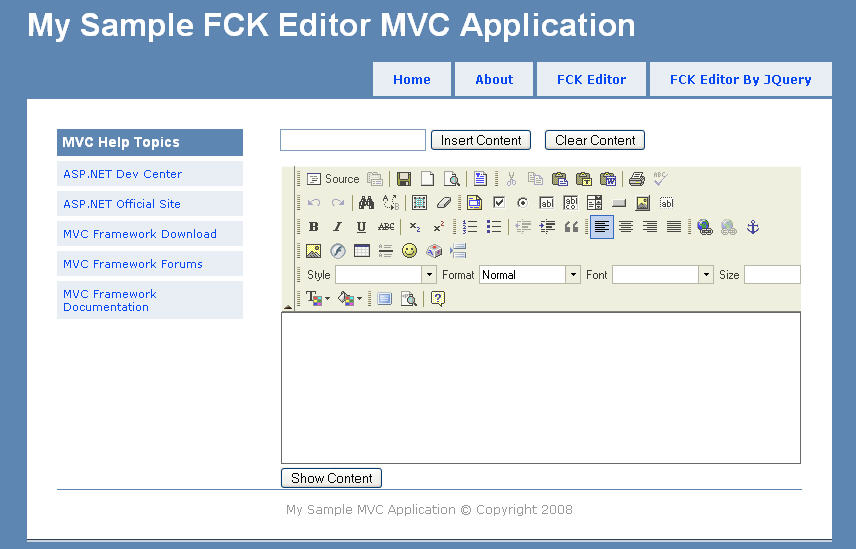
 Bangladesh
 Common/Skins

 RemoteImageRubberBtn:
  }
}