 Mikel
Mikel最近研究JQuery,今天搞清楚了ajax要怎么实现,使用方法意外的简单。有兴趣的可以看我上次提到的手册,我这里演示一个简单的保存表单的例子。
提交表单的方法:
$.post(’JQuery.php?request=ajax’,$.getForms(’form1′),function (msg) {
alert(msg)
});
仅使用这么一句话就可以实现表单数据的静态提交了。 第一个参数是服务端的URL,第二个参数是表单的POST数据,第三个参数是执行成功后调用的方法.
$.getForms这个方法是自定义的,就是把表单中所有输入框值变成一个GET参数字符串形式.这个方法是我从xajax中 参考修改来的,本来jQuery.com上也有这样的插件但是当有name=aa[]这种形式的input时会出错,只能自己弄一个了。方法在 Forms.js文件中,这个文件中还有个$F函数从jQuery.com上得到的,是用jQuery实现了prototype.js中的同样功能,就是 取表单元素的值。
服务端就没什么特别的:
if ($_GET[’request’]==’ajax’) {
var_export($_POST);exit;
}
我们输出提交的信息作为测试,自己的应用自己处理就是了。
ajax始终用utf8编码传输的所以,如果你的项目不是utf8必须进行编码转换:
if ($_GET[’request’]==’ajax’) {
$_POST = charsetIconv($_POST);
}
function charsetIconv($vars) {
if (is_array($vars)) {
$result = array();
foreach ($vars as $key => $value) {
$result[$key] = charsetIconv($value);
}
} else {
$result = iconv(’utf-8′,’gbk’, $vars);
}
return $result;
}
这里是我在服务端编码的处理方式。
原来都在使用xajax现在准备完成使用 jQuery来替代,不仅有非常的JS扩展功能使用也很灵活。
DEMO地址 DEMO下载

[JQuery]JQuerey的ThickBox插件
ThickBox 是基于 JQuery 用 JavaScript 编写的网页UI对话窗口小部件. 它可以用来展示单一图片, 若干图片, 内嵌的内容, iframed的内容, 或以 AJAX 的混合 modal 提供的内容.
查看实例演示
特性:
- ThickBox 是用超轻量级的 JQuery 库 编写的. 压缩过 JQuery 库只15k, 未压缩过的有39k.
- ThickBox 的 JavaScript 代码和 CSS 文件只占12k. 所以压缩过的 jQuery 代码和 ThickBox 总共只有27k.
- ThickBox 能重新调整大于浏览器窗口的图片.
- ThickBox 的多功能性包括(图片,iframed 的内容,内嵌的内容,AJAX 的内容).
- 展示单一图片(single image)
- 展示图片集(multiple images)
- 展示内嵌内容(inline content)
- 展示被iFrame的内容(iframed content)
- 展示AJAX内容(AJAX content)
- 其他:教程本身还自带了一个很酷的JS跳转脚本
- ThickBox 能隐藏 Windows IE 6 里的元素.
- ThickBox 能在使用者滚动页面或改变浏览器窗口大小的同时始终保持居中. 点击图片, 覆盖层, 或关闭链接能移除 ThickBox.
ThickBox 的创作者决定动画 应该因人而异, 所以 ThickBox 不再使用 动画 了. 这是特性吗? 哦, 有人说是呀.
如何实现 ThickBox :
1. ThickBox 要求使用 jQuery JavaScript 库; 正因如此, 你需要外调 jquery.js 文件在你的网页的 head 元素内, 接着还要外调 thickbox.js 文件 (注意: jquery.js 必须放在调用资源的第一位). 例子如下:
<script type="text/javascript" src="path-to-file/jquery.js"></script> <script type="text/javascript" src="path-to-file/thickbox.js"></script>
一旦你外调了 .js 文件, 打开 thickbox.js 并寻找加载图片的名字 (loadingAnimation.gif). 找到后, 根据它在你服务器上的位置确定更改它的路径.
2. 在你的网页中外调 ThickBox CSS 文件. 例子如下:
<link rel="stylesheet" href="path-to-file/thickbox.css" type="text/css" media="screen" />
或
<style type="text/css" media="all">@import "path-to-file/thickbox.css";</style>
或, 打开 thickbox.css 文件并复制粘贴样式到你现有的样式表中.
3. 观看例子, 学习
支持的和经测试过的浏览器:
Windows IE 6.0, Windows FF 1.5.0.5, Windows Opera 9.0, Macintosh Safari 1.3.2 & 2.0.3, Macintosh FF 1.5
MIT 许可
http://www.opensource.org/licenses/mit-license.php
打包下载代码及教程
[JQuery]JQuery的FckEditor插件
What does it do?
- This plugin makes it easy to install FCKEditors on your page the JQuery way.
- It integrates FCKEditors with the jQuery Form Plugin and enables the contents of FCKEditor to be submitted via ajax.
- Also works with the Validation Plugin
Try it yourself
Download
All you really need is FKCEditor (DUH!), jQuery (of course) and the jQuery FCKEditor Plugin.
But if you want to submit your form via Ajax, then you need to get the jQuery Form Plugin by Malsup.
Usage
- Method 1: replacing ALL textareas in a page with THE SAME settings
<textarea name="fck1" cols="50" rows="6"></textarea> <textarea name="fck2" cols="50" rows="6"></textarea> <textarea name="fck3" cols="50" rows="6"></textarea> <script> $(function(){ $('textarea').fck({path: '/path/to/fck/directory/'}); }); </script> - Method 2: replacing SOME textareas in a page with THE SAME settings
In this example, only textarea fck3 will not be converted into a FCKEditor.
<textarea name="fck1" class="fck" cols="50" rows="6"></textarea>
<textarea name="fck2" class="fck" cols="50" rows="6"></textarea>
<textarea name="fck3" cols="50" rows="6"></textarea>
<script> $(function(){ $('textarea.fck').fck({path: '/path/to/fck/directory/'}); }); </script>
- Method 3: replacing SOME textareas in a page with DIFFERENT SETTINGS (see demo)
<textarea name="fck1" cols="50" rows="6"></textarea>
<textarea name="fck2" cols="50" rows="6"></textarea>
<textarea name="fck3" cols="50" rows="6"></textarea>
<script>
$(function(){
$.fck.config = {path: '/path/to/fck/directory/', height:300 };
$('textarea#fck1').fck(/* default settings */);
$('textarea#fck2').fck({ toolbar:'MyCustomerToolbar' });
$('textarea#fck3').fck({ toolbar:'MyCustomerToolbar', height:200 });
});
</script>
Important pointers…
-
This is a working idea that hasn't yet been fully tested.
Tested and works on Firefox 2, Opera, Safari (Win), IE7 and IE6 (all in WinXP SP2). - The same principle can be applied to TinyMCE, Codepress and any other rich-text editors.
Any input regarding other rich-text editors is welcome. - The plugin will intercept known methods and install itself against related plugins (currently only the jQuery Form Plugin).
Any input regarding integrating this plugin with other JQuery plugins is welcome.
[JQuery]JQuery爱好者
[MVC]使用Forms Authentication实现用户注册、登录 (三)用户实体替换
IPrincipal和IIdentity
通过查阅文档,我们可以看到HttpContext.User属性的类型是IPrincipal接口。然而我们知道,接口通常是不能直接访问的,其背后必定隐藏了一个实现了该接口的对象。那么这个实际对象的类型是什么呢?
让我们在前面示例的MasterPage的Page_Init方法上加一个断点,再次运行程序,可以得到HttpContext.User属性的真正类型是System.Security.Principal.GenericPrincipal。
查看IPrincipal接口的定义,可以看到它只有一个公开属性——Identity,其类型是这里要提到的另外一个重要接口IIdentity。通过上面的断点跟踪,我们还能知道对于GenericPrincipal而言,其Identity属性的实际类型是GenericIdentity,也是位于System.Security.Principal命名空间中。
由此,我们引出了.NET Framework中关于Principal(实体)的整个类型系统。所有这些类型都位于mscorlib.dll程序集中,由此也可以看出,这套模型隶属于整个系统的基石。
实现自己的IPrincipal
要想用自己的实体对象替换HttpContext.User,就必须让自己的实体对象实现IPrincipal接口;通常还必须伴随着实现IIdentity接口。
目前系统中有的是一个数据实体对象。一般而言,实现IPrincipal接口有一下两种方式——
l 编写单独的类型实现IPrincipal接口,并在其中包含数据实体对象;
l 修改数据实体对象使其实现IPrincipal接口。
对于这两种方式而言,其Identity属性可以通过以下三种方式实现——
l 使用.NET Framework提供的GenericIdentity;
l 创建自定义的类,实现Identity接口;
l 修改数据实体对象或自定义的实体类,让它们同时实现IPrincipal和IIdentity接口。
对于简单的应用程序而言,通常可以修改数据实体对象,使其同时实现IPrincipal和IIdentity接口。而就复杂的分层架构应用程序,则建议在逻辑层创建分别实现了IPrincipal和IIdentity接口的对象。本文的示例 明显属于前一种情况,因此我们考虑修改作为数据实体类的UserObject类,让其实现两个接口。以下是修改完毕的UserObject类:
public class UserObject : IPrincipal, IIdentity
{
/// <summary>
/// 用户名。
/// </summary>
public string Name;
/// <summary>
/// 密码散列值。
/// </summary>
public string PasswordHash;
/// <summary>
/// 密码salt值。
/// </summary>
public string PasswordSalt;
#region IIdentity Members
public string AuthenticationType
{
get
{
return "Froms";
}
}
public bool IsAuthenticated
{
get
{
return true;
}
}
string IIdentity.Name
{
get
{
return this.Name;
}
}
#endregion
#region IPrincipal Members
public IIdentity Identity
{
get
{
return this;
}
}
public bool IsInRole(string role)
{
return false;
}
#endregion
}
首先我们来看一下对IIdentity接口的实现。该接口要求三个属性——AuthenticationType、IsAuthenticated和Name。AuthenticationType表示该用户标识所使用的验证类型,这里返回的是“Forms”;IsAuthenticated属性表示当前用户是否已经通过验证(即是否已登录。在这个例子里,我们只针对已登录用户进行实体替换,所以这个属性总是返回true。通常,实际的Web应用程序编写时还有一种习惯,就是为未登录用户(称之为匿名用户)也提供一个用户实体对象,此时就需要为IsAuthenticated提供逻辑,判断用户是否已通过验证了。最后IIdentity接口还要求对象提供一个Name属性,在这里,由于已经存在了Name字段,因此才用“显示接口实现”来提供Name属性,返回对象自身的Name字段即可。
接下来我们看一下IPrincipal接口的实现。该接口要求提供一个Identity属性和一个IsInRole方法。由于UserObject类本身已经实现了IIdentity接口,因此在Identity属性中直接reutren this即可。因为我们这个示例不涉及用户分组(角色)方面的技术,因此IsInRole方法总是返回false。
用户实体替换
用户实体替换即使用我们自己编写的类型的实例来替换HttpContext.User属性。实体替换应该发生在HttpApplication的PostAuthenticateRequest事件发生时,因为此时ASP.NET已经从客户端得到了用户凭证Cookie并进行了解密和校验。
我们既可以编写一个HttpModule来处理PostAuthenticateRequest事件,也可以在Global..asax文件中添加时间处理器。这里为了简单,我们选择在Global.asax中添加如下事件处理器:
void Application_PostAuthenticateRequest(object sender, EventArgs e)
{
HttpApplication app = (HttpApplication)sender;
if(app.Context.User.Identity.Name != "") // 仅在已登录时替换
{
UserObject user = DataAccess.GetUserByName(app.Context.User.Identity.Name);
app.Context.User = user;
Thread.CurrentPrincipal = user;
}
}
在这里我们首先进行了判断,如果用户已登录,才进行实体替换。当然你也可以选择未未登录用户也提供一个匿名用户实体。
接下来,我们通过本来已经存放在HttpContext.User.Identity中的用户标识得到了数据实体对象,然后分别将其赋予HttpContext.User和Thread.CurrentPrincipal。
至此,我们的示例代码就完工了。没有提到的是,完成了这一步之后,你就可以通过类似下面的代码在任何可以访问到HttpContext的地方获取用户实体了:
UserObject user = HttpContext.Current.User as UserObject;
if(user != null)
{
// 可以使用user
}
else
{
// 用户未登录
}
需要注意,由于在这里我们仅对已登录用户进行了用户实体替换,所以代码使用as进行类型转换并结合if语句进行判断是必需的。
小结
好吧,这一部分说的是用户实体替换。
[MVC]ASP.NET MVC Preview 4 分析 - 2. Filter
过滤器 (Filter) 是 MVC 的一个重要特征,它提供了非常灵活的扩展和解耦机制。P4 版的过滤器总算像那么回事了,同时做了更深度的划分,使得开发人员可以控制更多的细节和流程。
1. IActionFilter
主要用来干预 Action 的执行,我们可以通过上下文对象修改请求参数或者取消 Action 的执行。
public interface IActionFilter
{
void OnActionExecuting(ActionExecutingContext filterContext);
void OnActionExecuted(ActionExecutedContext filterContext);
}
{
void OnActionExecuting(ActionExecutingContext filterContext);
void OnActionExecuted(ActionExecutedContext filterContext);
}
默认实现是 ActionFilterAttribute,这也是我们开发自定义过滤器通常所用的基类。
public abstract class ActionFilterAttribute : FilterAttribute, IActionFilter, IResultFilter
{
public virtual void OnActionExecuting(ActionExecutingContext filterContext)
{
}
public virtual void OnActionExecuted(ActionExecutedContext filterContext)
{
}
// …
}
{
public virtual void OnActionExecuting(ActionExecutingContext filterContext)
{
}
public virtual void OnActionExecuted(ActionExecutedContext filterContext)
{
}
// …
}
ActionExecutingContext 有个很重要的属性 Cancel,通过它我们可以取消 Action 和后续 Filter 的执行。
public class ActionExecutingContext : ControllerContext
{
// Methods
public ActionExecutingContext(ControllerContext controllerContext, MethodInfo actionMethod,
IDictionary<string, object> actionParameters);
// Properties
public MethodInfo ActionMethod { get; private set; }
public IDictionary<string, object> ActionParameters { get; private set; }
public bool Cancel { get; set; }
public ActionResult Result { get; set; }
}
public class ActionExecutedContext : ControllerContext
{
// Methods
public ActionExecutedContext(ControllerContext controllerContext, MethodInfo actionMethod,
bool canceled, Exception exception);
// Properties
public MethodInfo ActionMethod { get; private set; }
public bool Canceled { get; private set; }
public Exception Exception { get; private set; }
public bool ExceptionHandled { get; set; }
public ActionResult Result { get; set; }
}
{
// Methods
public ActionExecutingContext(ControllerContext controllerContext, MethodInfo actionMethod,
IDictionary<string, object> actionParameters);
// Properties
public MethodInfo ActionMethod { get; private set; }
public IDictionary<string, object> ActionParameters { get; private set; }
public bool Cancel { get; set; }
public ActionResult Result { get; set; }
}
public class ActionExecutedContext : ControllerContext
{
// Methods
public ActionExecutedContext(ControllerContext controllerContext, MethodInfo actionMethod,
bool canceled, Exception exception);
// Properties
public MethodInfo ActionMethod { get; private set; }
public bool Canceled { get; private set; }
public Exception Exception { get; private set; }
public bool ExceptionHandled { get; set; }
public ActionResult Result { get; set; }
}
举例说明一下。
public class TestController : Controller
{
[Filter1(Order = 1)]
[Filter2(Order = 2)]
[Filter3(Order = 3)]
public ActionResult Index()
{
}
}
{
[Filter1(Order = 1)]
[Filter2(Order = 2)]
[Filter3(Order = 3)]
public ActionResult Index()
{
}
}
当我们在 Filter2.OnActionExecuting 中执行取消操作时,那么实际输出效果应该就是下面这样子。
class Filter2 : Filter1
{
public override void OnActionExecuting(ActionExecutingContext filterContext)
{
filterContext.Cancel = true;
}
}
{
public override void OnActionExecuting(ActionExecutingContext filterContext)
{
filterContext.Cancel = true;
}
}
输出:
TestController.OnActionExecuting
Filter1.OnActionExecuting
Filter2.OnActionExecuting
Filter1.OnActionExecuted
TestController.OnActionExecuted
我 们发现 Action 和排在后面的 Filter3 没有被调用,同时 Filter2 的 OnActionExecuted 也没有被执行。由于 Filter.Order 最小值是 -1,而 Controller.Order = -1,因此默认情况下 Controller Filter 总是被调用执行。
2. IResultFilter
可以利用该类型过滤器修改输出结果,诸如视图引擎和输出数据等等。
public interface IResultFilter
{
void OnResultExecuting(ResultExecutingContext filterContext);
void OnResultExecuted(ResultExecutedContext filterContext);
}
{
void OnResultExecuting(ResultExecutingContext filterContext);
void OnResultExecuted(ResultExecutedContext filterContext);
}
其默认实现同样是 ActionFilterAttribute。
public abstract class ActionFilterAttribute : FilterAttribute, IActionFilter, IResultFilter
{
// …
public virtual void OnResultExecuting(ResultExecutingContext filterContext)
{
}
public virtual void OnResultExecuted(ResultExecutedContext filterContext)
{
}
}
{
// …
public virtual void OnResultExecuting(ResultExecutingContext filterContext)
{
}
public virtual void OnResultExecuted(ResultExecutedContext filterContext)
{
}
}
在 ResultExecutingContext 中也有个 Cancel 属性,通过它我们可以阻止 View 输出和后续 Filter 执行。
public class ResultExecutingContext : ControllerContext
{
// Methods
public ResultExecutingContext(ControllerContext controllerContext, ActionResult result);
// Properties
public bool Cancel { get; set; }
public ActionResult Result { get; set; }
}
public class ResultExecutedContext : ControllerContext
{
// Methods
public ResultExecutedContext(ControllerContext controllerContext, ActionResult result,
bool canceled, Exception exception);
// Properties
public bool Canceled { get; private set; }
public Exception Exception { get; private set; }
public bool ExceptionHandled { get; set; }
public ActionResult Result { get; private set; }
}
{
// Methods
public ResultExecutingContext(ControllerContext controllerContext, ActionResult result);
// Properties
public bool Cancel { get; set; }
public ActionResult Result { get; set; }
}
public class ResultExecutedContext : ControllerContext
{
// Methods
public ResultExecutedContext(ControllerContext controllerContext, ActionResult result,
bool canceled, Exception exception);
// Properties
public bool Canceled { get; private set; }
public Exception Exception { get; private set; }
public bool ExceptionHandled { get; set; }
public ActionResult Result { get; private set; }
}
同样在上文例子中的 Filter2.OnResultExecuting 中设置取消操作。
class Filter2 : Filter1
{
public override void OnResultExecuting(ResultExecutingContext filterContext)
{
filterContext.Cancel = true;
}
}
{
public override void OnResultExecuting(ResultExecutingContext filterContext)
{
filterContext.Cancel = true;
}
}
输出:
TestController.OnResultExecuting
Filter1.OnResultExecuting
Filter2.OnResultExecuting
Filter1.OnResultExecuted
TestController.OnResultExecuted
Action 返回的 View(ActionResult) 以及 Filter3、Filter2.OnResultExecuted 都没有被执行。
3. IAuthorizationFilter
这是新增的过滤器类型,它拥有最先执行的特权,用来实现登录验证操作。
public interface IAuthorizationFilter
{
void OnAuthorization(AuthorizationContext filterContext);
}
{
void OnAuthorization(AuthorizationContext filterContext);
}
默认实现是 AuthorizeAttribute。
public sealed class AuthorizeAttribute : FilterAttribute, IAuthorizationFilter
{
// Methods
public AuthorizeAttribute();
public void OnAuthorization(AuthorizationContext filterContext);
// Properties
public string Roles { get; set; }
public string Users { get; set; }
}
{
// Methods
public AuthorizeAttribute();
public void OnAuthorization(AuthorizationContext filterContext);
// Properties
public string Roles { get; set; }
public string Users { get; set; }
}
AuthorizeAttribute 通过对 HttpContext.User 进行一系列的判断操作,然后输出一个新增的 ActionResult —— HttpUnauthorizedResult,这算是其中最有价值的代码了。
public class HttpUnauthorizedResult : ActionResult
{
public override void ExecuteResult(ControllerContext context)
{
// …
// 401 is the HTTP status code for unauthorized access – setting this
// will cause the active authentication module to execute its default
// unauthorized handler
context.HttpContext.Response.StatusCode = 401;
}
}
{
public override void ExecuteResult(ControllerContext context)
{
// …
// 401 is the HTTP status code for unauthorized access – setting this
// will cause the active authentication module to execute its default
// unauthorized handler
context.HttpContext.Response.StatusCode = 401;
}
}
上下文对象中也有个 Cancel,通过它可以告诉 ActionInvoker 停止后面的调用操作,跳转到登录页。
public class AuthorizationContext : ControllerContext
{
// Methods
public AuthorizationContext(ControllerContext controllerContext, MethodInfo actionMethod);
// Properties
public MethodInfo ActionMethod { get; private set; }
public bool Cancel { get; set; }
public ActionResult Result { get; set; }
}
{
// Methods
public AuthorizationContext(ControllerContext controllerContext, MethodInfo actionMethod);
// Properties
public MethodInfo ActionMethod { get; private set; }
public bool Cancel { get; set; }
public ActionResult Result { get; set; }
}
详情可参考下面这些代码。
public sealed class AuthorizeAttribute : FilterAttribute, IAuthorizationFilter
{
public void OnAuthorization(AuthorizationContext filterContext)
{
// …
IPrincipal user = filterContext.HttpContext.User;
if (!user.Identity.IsAuthenticated)
{
filterContext.Cancel = true;
filterContext.Result = new HttpUnauthorizedResult();
return;
}
if (!String.IsNullOrEmpty(Users))
{
IEnumerable<string> validNames = SplitString(Users);
bool wasMatch = validNames.Any(name => String.Equals(name, user.Identity.Name,
StringComparison.OrdinalIgnoreCase));
if (!wasMatch)
{
filterContext.Cancel = true;
filterContext.Result = new HttpUnauthorizedResult();
return;
}
}
if (!String.IsNullOrEmpty(Roles))
{
IEnumerable<string> validRoles = SplitString(Roles);
bool wasMatch = validRoles.Any(role => user.IsInRole(role));
if (!wasMatch)
{
filterContext.Cancel = true;
filterContext.Result = new HttpUnauthorizedResult();
}
}
}
}
public class ControllerActionInvoker
{
public virtual bool InvokeAction(string actionName, IDictionary<string, object> values)
{
// …
AuthorizationContext authContext = InvokeAuthorizationFilters(methodInfo,
filterInfo.AuthorizationFilters);
if (authContext.Cancel)
{
// not authorized, so don't execute the action method or its filters
InvokeActionResult(authContext.Result ?? EmptyResult.Instance);
}
// …
}
protected virtual AuthorizationContext InvokeAuthorizationFilters(…)
{
// …
AuthorizationContext context = new AuthorizationContext(ControllerContext, methodInfo);
foreach (IAuthorizationFilter filter in filters)
{
filter.OnAuthorization(context);
// short-circuit evaluation
if (context.Cancel)
{
break;
}
}
return context;
}
}
{
public void OnAuthorization(AuthorizationContext filterContext)
{
// …
IPrincipal user = filterContext.HttpContext.User;
if (!user.Identity.IsAuthenticated)
{
filterContext.Cancel = true;
filterContext.Result = new HttpUnauthorizedResult();
return;
}
if (!String.IsNullOrEmpty(Users))
{
IEnumerable<string> validNames = SplitString(Users);
bool wasMatch = validNames.Any(name => String.Equals(name, user.Identity.Name,
StringComparison.OrdinalIgnoreCase));
if (!wasMatch)
{
filterContext.Cancel = true;
filterContext.Result = new HttpUnauthorizedResult();
return;
}
}
if (!String.IsNullOrEmpty(Roles))
{
IEnumerable<string> validRoles = SplitString(Roles);
bool wasMatch = validRoles.Any(role => user.IsInRole(role));
if (!wasMatch)
{
filterContext.Cancel = true;
filterContext.Result = new HttpUnauthorizedResult();
}
}
}
}
public class ControllerActionInvoker
{
public virtual bool InvokeAction(string actionName, IDictionary<string, object> values)
{
// …
AuthorizationContext authContext = InvokeAuthorizationFilters(methodInfo,
filterInfo.AuthorizationFilters);
if (authContext.Cancel)
{
// not authorized, so don't execute the action method or its filters
InvokeActionResult(authContext.Result ?? EmptyResult.Instance);
}
// …
}
protected virtual AuthorizationContext InvokeAuthorizationFilters(…)
{
// …
AuthorizationContext context = new AuthorizationContext(ControllerContext, methodInfo);
foreach (IAuthorizationFilter filter in filters)
{
filter.OnAuthorization(context);
// short-circuit evaluation
if (context.Cancel)
{
break;
}
}
return context;
}
}
ControllerActionInvoker 通过 InvokeAuthorizationFilters() 调用 AuthorizeAttribute,然后依次判断登录和角色信息。如果条件不符,则设置取消操作并返回一个 HttpUnauthorizedResult,这个 ActionResult 被 InvokeAciton 所激活,因此才有了 "context.HttpContext.Response.StatusCode = 401" 跳转。
4. IExceptionFilter
用于捕获 Filter 和 Action 执行异常,以便实现自定义错误页面。
public interface IExceptionFilter
{
void OnException(ExceptionContext filterContext);
}
{
void OnException(ExceptionContext filterContext);
}
默认实现是 HandleErrorAttribute。
public sealed class HandleErrorAttribute : FilterAttribute, IExceptionFilter
{
// Methods
public HandleErrorAttribute();
void OnException(ExceptionContext filterContext);
// Properties
public Type ExceptionType { get; set; }
public string View { get; set; }
}
{
// Methods
public HandleErrorAttribute();
void OnException(ExceptionContext filterContext);
// Properties
public Type ExceptionType { get; set; }
public string View { get; set; }
}
从上下文中我们可以获取具体的异常信息,可以使用 ExceptionHandled 来阻止后续 HandleErrorAttribute 执行,还可以设置一个 ActionResult 来显示错误页面。
public class ExceptionContext : ControllerContext
{
// Methods
public ExceptionContext(ControllerContext controllerContext, Exception exception);
// Properties
public Exception Exception { get; private set; }
public bool ExceptionHandled { get; set; }
public ActionResult Result { get; set; }
}
public sealed class HandleErrorAttribute : FilterAttribute, IExceptionFilter
{
public void OnException(ExceptionContext filterContext)
{
// …
if (controller == null || filterContext.ExceptionHandled)
{
return;
}
// …
HandleErrorInfo model = new HandleErrorInfo(filterContext.Exception, controllerName, actionName);
filterContext.Result = new ViewResult()
{
TempData = controller.TempData,
ViewData = new ViewDataDictionary<HandleErrorInfo>(model),
ViewEngine = controller.ViewEngine,
ViewName = View,
};
filterContext.ExceptionHandled = true;
filterContext.HttpContext.Response.Clear();
filterContext.HttpContext.Response.StatusCode = 500;
}
}
{
// Methods
public ExceptionContext(ControllerContext controllerContext, Exception exception);
// Properties
public Exception Exception { get; private set; }
public bool ExceptionHandled { get; set; }
public ActionResult Result { get; set; }
}
public sealed class HandleErrorAttribute : FilterAttribute, IExceptionFilter
{
public void OnException(ExceptionContext filterContext)
{
// …
if (controller == null || filterContext.ExceptionHandled)
{
return;
}
// …
HandleErrorInfo model = new HandleErrorInfo(filterContext.Exception, controllerName, actionName);
filterContext.Result = new ViewResult()
{
TempData = controller.TempData,
ViewData = new ViewDataDictionary<HandleErrorInfo>(model),
ViewEngine = controller.ViewEngine,
ViewName = View,
};
filterContext.ExceptionHandled = true;
filterContext.HttpContext.Response.Clear();
filterContext.HttpContext.Response.StatusCode = 500;
}
}
ControllerActionInvoker 使用 try…catch 来捕获执行异常,并通过 InvokeExceptionFilters 完成 OnException 调用。
public class ControllerActionInvoker
{
public virtual bool InvokeAction(string actionName, IDictionary<string, object> values)
{
// …
try
{
// …
}
catch (Exception ex)
{
// something blew up, so execute the exception filters
ExceptionContext exceptionContext = InvokeExceptionFilters(ex, filterInfo.ExceptionFilters);
if (!exceptionContext.ExceptionHandled)
{
throw;
}
InvokeActionResult(exceptionContext.Result);
}
// …
}
protected virtual ExceptionContext InvokeExceptionFilters(exception, filters)
{
// …
ExceptionContext context = new ExceptionContext(ControllerContext, exception);
foreach (IExceptionFilter filter in filters)
{
filter.OnException(context);
}
return context;
}
}
{
public virtual bool InvokeAction(string actionName, IDictionary<string, object> values)
{
// …
try
{
// …
}
catch (Exception ex)
{
// something blew up, so execute the exception filters
ExceptionContext exceptionContext = InvokeExceptionFilters(ex, filterInfo.ExceptionFilters);
if (!exceptionContext.ExceptionHandled)
{
throw;
}
InvokeActionResult(exceptionContext.Result);
}
// …
}
protected virtual ExceptionContext InvokeExceptionFilters(exception, filters)
{
// …
ExceptionContext context = new ExceptionContext(ControllerContext, exception);
foreach (IExceptionFilter filter in filters)
{
filter.OnException(context);
}
return context;
}
}
附: Controller 实现了上述所有的过滤器类型。
public abstract class Controller :
IActionFilter,
IAuthorizationFilter,
IController,
IDisposable,
IExceptionFilter,
IResultFilter
{
}
IActionFilter,
IAuthorizationFilter,
IController,
IDisposable,
IExceptionFilter,
IResultFilter
{
}
—————–
本文仅分析一些调用细节,有关使用方法可参考 《ASP.NET MVC Preview 4 Release (Part 1) 》 (中文版)。
[MVC]Asp.net Mvc Framework 七 (Filter及其执行顺序)
应用于Action的Filter
在ASP.NETMvc中当你有以下及类似以下需求时你可以使用Filter功能
判断登录与否或用户权限,决策输出缓存,防盗链,防蜘蛛,本地化设置,实现动态Action
filter是一种声明式编程方式,在ASP.NET MVC中它只能应用在Action上
Filter要继承于ActionFilterAttribute抽象类,并可以覆写void OnActionExecuting(FilterExecutingContext)和
void OnActionExecuted(FilterExecutedContext)这两个方法
OnActionExecuting是Action执行前的操作,OnActionExecuted则是Action执行后的操作
下面我给大家一个示例,来看看它的的执行顺序
首先我们先建立 一个Filter,名字叫做TestFilter
 using System.Web.Mvc;namespace MvcApplication2.Controllers
 {
{

 public class TestFilter : ActionFilterAttribute
 {
{ public override void OnActionExecuting(FilterExecutingContext filterContext) { filterContext.HttpContext.Session["temp"] += "OnActionExecuting<br/>";
 } public override void OnActionExecuted(FilterExecutedContext filterContext) { filterContext.HttpContext.Session["temp"] += "OnActionExecuted<br/>"; } }
 }
}在这里我们在Session["temp"]上标记执行的顺序
我们在Controller中的Action中写以下代码
[TestFilter] public void Index() {this.HttpContext.Session["temp"] += "Action<br/>"; RenderView("Index"); }在这个Action执行的时候,我们也为Session["temp"]打上了标记.
最后是View的内容
很简单我们只写
<%=Session["temp"] %>这样我们就可以执行这个页面了
在第一次执行完成后,页面显示
OnActionExecuting
Action
Action
这证明是先执行了OnActionExecuting然后执行了Action,我们再刷新一下页面
则得到
OnActionExecutingActionOnActionExecutedOnActionExecutingAction这是因为OnActionExecuted是在第一次页面 显示后才执行,所以要到第二次访问页面时才能看到
Controller的Filter
Monorail中的Filter是可以使用在Controller中的,这给编程者带来了很多方便,那么在ASP.NET MVC中可不可以使用Controller级的Filter呢.不言自喻.
实现方法如下Controller本身也有OnActionExecuting与OnActionExecuted方法 ,将之重写即可,见代码
namespace MvcApplication2.Controllers{ using System.Web.Mvc; public class EiceController : Controller { public void Index() { this.HttpContext.Session["temp"] += "Action<br/>"; RenderView("Index"); } public void Index2() { RenderView("Index"); } protected override void OnActionExecuting(FilterExecutingContext filterContext) { filterContext.HttpContext.Session["temp"] += "OnActionExecuting<br/>"; } protected override void OnActionExecuted(FilterExecutedContext filterContext) { filterContext.HttpContext.Session["temp"] += "OnActionExecuted<br/>"; } }}这里要注意一点,这两个方法 一定要protected
要是想多个Controller使用这个Filter怎么办?继承呗.
Filter的具体生存周期
这是官方站的一数据.
-
来自controller虚方法 的OnActionExecuting .
-
应用于当前Controller的Filter中的OnActionExecuting:
先执行基类的,后执派生类的
-
执行应用于Action的Filter的OnActionExecuting顺序:
先执行基类的,后执派生类的 -
Action 方法
-
应用于Action的Filter的OnActionExecuted 的执行顺序
先执行派生类的,后执行基类的
-
应用于当前Controller的Filter中的OnActionExecuted方法
先执行派生类的,后执行基类的
-
Controller中的虚方法 OnActionExecuted
示例可见http://quickstarts.asp.net/3-5-extensions/mvc/ActionFiltering.aspx
Asp.net Mvc Framework 系列
[MVC]ASP.NET MVC Tip #31: 给 Master Pages 和 User Co
原文地址:ASP.NET MVC Tip #31 – Passing Data to Master Pages and User Controls
原文作者:swalther
本文译者:QLeelulu
摘要:
在 这个Tip中,我会讨论给MasterPages和UserControls传递数据的4种策略。我会讲解通过code-behind类、通过使用 ActionFilter、通过调用局部方法、和通过使用抽象的Controller基类来传递数据。我推荐使用最后一种方法。
在这个Tip中,我推荐一种传递数据到MasterPages和UserControls的方法。但在提出我的建议前,我会先讲解一下这个问题的几种解决方法。
The Problem
想 象一下你要使用ASP.NET MVC框架来开发一个movie database application。你决定要在该应用的每一个页面上都显示一个电影分类的列表,这样,用户就可以方便的导航到他喜欢的分类。一旦你想该电影分类列表 显示在每一个页面,很自然的就会想到在MasterPage中显示这个列表。
你也决定在某些页面上显示一些热门的电影列表,但不是显示在所有的页面上。这个热门的电影列表是从数据库中随机的取出来的。你决定要通过用户控件来实现:就叫 FeaturedMovies control (见图 1).
图 1 – The Movie Database Application

问题就出现在这里。你需要在程序中给每一个页面的母版页传递电影分类列表数据。你需要给程序中的某些特定的页面的热门电影用户控件传递热门电影列表数据。你怎么实现这个呢?
Using a Code-Behind Class
最 通常的做法,但是是错误的,就是在code-behind class 中为你的MasterPage和FeaturedMovies用户控件取数据来解决这个问题。Listing 1 中的MasterPage显示code-behind class中的叫做Categories属性的电影分类列表。
Listing 1 – Site.Master
<%@ Master Language="C#" AutoEventWireup="true" CodeBehind="Site.master.cs" Inherits="Solution1.Views.Shared.Site" %> <%@ Import Namespace="Solution1.Models" %> <!DOCTYPE html PUBLIC "-//W3C//DTD XHTML 1.0 Strict//EN" "http://www.w3.org/TR/xhtml1/DTD/xhtml1-strict.dtd"> <html xmlns="http://www.w3.org/1999/xhtml"> <head runat="server"> <meta http-equiv="Content-Type" content="text/html; charset=iso-8859-1" /> <title>Movies</title> <link href="http://www.cnblogs.com/Content/Site.css" rel="stylesheet" type="text/css" /> </head> <body> <div class="page"> <div id="header"> <h1>Movie Database Application</h1> </div> <div id="main"> <div class="leftColumn"> <ul> <% foreach (MovieCategory c in this.Categories) { %> <li> <%= Html.ActionLink(c.Name, "Category", new {id=c.Id} )%></li> <% } %> </ul> </div> <div class="rightColumn"> <asp:ContentPlaceHolder ID="MainContent" runat="server" /> </div> <br style="clear:both" /> <div id="footer"> Movie Database Application © Copyright 2008 </div> </div> </div> </body> </html>
这个MasterPage的code-behind class在Listing 2 中。注意在Listing 2 中是直接通过LINQ2SQL来取数据的。
Listing 2 – Site.Master.cs
using System.Collections.Generic;
using System.Linq;
using Solution1.Models;
namespace Solution1.Views.Shared
{
public partial class Site : System.Web.Mvc.ViewMasterPage
{
protected IEnumerable<MovieCategory> Categories
{
get
{
var dataContext = new MovieDataContext();
return from c in dataContext.MovieCategories select c;
}
}
}
}
你同样可以为FeaturedMovies 用户控件来取数据。在FeaturedMovies code-behind class 从数据库中取热门电影的列表数据。
那么,为什么这错了呢?这当然好像一个简单的解决办法。它正常工作了,为什么还要抱怨?
这个解决方案的问题是MasterPage的code-behind class 中的代码是不可测试的。你不可以很方便的为Site类写单元测试,因为Site类是继承自ViewMasterPage类,而 ViewMasterPage类继承自Page类。The Page class relies on the HTTP Context object and all hope of isolating your code so that it can be tested goes away.
在开发ASP.NET MVC应用的时候,你应该尽量避免在你的程序中在code-behind class 中处理逻辑,尝试将所有的东西都放回到Controllers中。Controllers被设计为可测试的。
Using an Action Filter
所以让我们以另一种途径来解决这个传递数据给MasterPage或者view的问题。在这一节,我们创建一个ActionFilter来修改传递 给view的ViewData。这个方法你可以通过给controller添加一个或者多个action filter来修改由controller传递给view的ViewData。
这个ActionFilter,命名为[Partial] ,如Listing 3所示。
Listing 3 – ActionFilters\PartialAttribute.cs
using System;
using System.Reflection;
using System.Web.Mvc;
namespace Solution2.ActionFilters
{
public class PartialAttribute : ActionFilterAttribute
{
private string _partialClassName;
public PartialAttribute(string partialClassName)
{
_partialClassName = partialClassName;
}
public override void OnActionExecuting(ActionExecutingContext filterContext)
{
var viewData = (filterContext.Controller as Controller).ViewData;
ExecutePartial(_partialClassName, viewData);
}
private void ExecutePartial(string partialName, ViewDataDictionary viewData)
{
// Get partial type
var partialType = Type.GetType(partialName, true, true);
var partial = Activator.CreateInstance(partialType);
// Execute all public methods
var methods = partialType.GetMethods();
foreach (MethodInfo method in methods)
{
var pams = method.GetParameters();
if (pams.Length > 0 && pams[0].ParameterType == typeof(ViewDataDictionary))
method.Invoke(partial, new object[] { viewData });
}
}
}
}
当你添加[Partial] 到一个controller action的时候,这个ation filter会附加一些数据到view data中去。例如,有可以使用[Partial] 特性来添加电影分类列表的数据到view data中去以便在master page中显示。你也可以使用[Partial] 特性来添加热门电影列表到view data 中以使在FeaturedMovie 用户控件中得到该数据。
[Partial] 特性通过一个类名,实例化这个类,然后执行类里面所有的public方法(每一个方法都包含一个ViewDataDictionary参数), Listing 4 中的controller说明了你可以怎样使用[Partial] action filter来为不同的controller返回不同的ViewData。
Listing 4 – HomeController.cs
using System.Linq;
using System.Web.Mvc;
using Solution2.ActionFilters;
using Solution2.Models;
namespace Solution2.Controllers
{
[Partial("Solution2.Partials.Master")]
public class HomeController : Controller
{
[Partial("Solution2.Partials.Featured")]
public ActionResult Index()
{
return View();
}
public ActionResult Category(int id)
{
var dataContext = new MovieDataContext();
var movies = from m in dataContext.Movies where m.CategoryId == id select m;
return View("Category", movies);
}
}
}
注意到HomeController它本身是添加了[Partial] action filter的。由于[Partial] action filter应用到类上,在HomeController里面的每一个action执行的时候这个action filter都会执行的。在类级别上应用[Partial] 特性来为master page提供view data。
类级别上的[Partial]特性添加电影分类列表到view data中。[Partial]执行Solution2.Partials.Master 类中的方法,如Listing 5 所示。
Listing 5 – Master.cs
using System.Linq;
using System.Web.Mvc;
using Solution2.Models;
namespace Solution2.Partials
{
public class Master
{
public void AddViewData(ViewDataDictionary viewData)
{
var dataContext = new MovieDataContext();
var categories = from c in dataContext.MovieCategories select c;
viewData["master"] = categories;
}
}
}
AddViewData() 方法将categories 添加到key为"master"的view data dictionary中。master page从view data 中取出categories 并显示。
[Partial] 也可以添加到特定的action上,例如Listing 4 中的Index()方法。
然而这种从controller中传递数据给母版页和用户控件的解决方案错在哪里呢?这种方法的优于前面一种方法的地方在于他将获取数据的逻辑放回到controller中来处理了。ViewData在controller action 调用的时候会被修改。
无论怎样,这个解决方案还是挺不错的。通过使用[Partial] 特性,你可以为view data dictionary 添加更多的数据。例如,如果你决定你要添加一个新的用户控件到某一个页面,而这个新的用户控件需要一个不同的数据集,你可以很简单的添加一个新的 [Partial] 特性到正确的controller action上来添加新的数据到view data dictionary中去。
遗憾的是,只是一点点的遗憾,这个解决方案不是很容易进行单元测试。当你在一个单元测试里面执行action方法的时候ActionFilter并不会执行。所以,我们需要寻找一个不同的策略来解决这个问题。
Calling Partial Methods Directly
让我们进入到这个问题的第三个解决方案中。在这一节中,我们尝试通过直接在controller中来获取数据然后传递给母版页和用户控件来解决这个问题。在Listing 6 中是我们修改后的HomeController的代码。
Listing 6 – HomeController.cs (with partials logic)
using System;
using System.Collections.Generic;
using System.Linq;
using System.Web;
using System.Web.Mvc;
using Solution3.Models;
using Solution3.Partials;
namespace Solution3.Controllers
{
public class HomeController : Controller
{
public HomeController()
{
Master.AddViewData(this.ViewData);
}
public ActionResult Index()
{
Featured.AddViewData(this.ViewData);
return View();
}
public ActionResult Category(int id)
{
var dataContext = new MovieDataContext();
var movies = from m in dataContext.Movies where m.CategoryId == id select m;
return View("Category", movies);
}
}
}
注意到Listing 6 中的HomeController有一个构造函数。在构造函数中调Master.AddViewData() 来改变controller action中返回的view data。这个方法要在母版页中显示的view data。
Index()方法也改变了。在Index()方法里面,调用了Featured.AddViewData() 方法。这个方法为FeaturedMovies 用户控件添加必需的view data。由于FeaturedMovies 用户控件只在Index视图中呈现,而不在Categorys视图中呈现,所以不在构造函数中调用Featured.AddViewData() 方法。
这个解决方案的优点是非常容易进行单元测试。当你调用Index()方法,view data同时被Master和Featured的部分方法改变了。也就是说,你可以容易的测试你传递给母版页和用户控件的view data是否是正确的。
那么,这个解决方案错在哪里了呢?添加view data的所有逻辑都已经放到controller类中来处理了。这个解决方案已经比前面的两个方案要好很多了。这个解决方法的唯一的问题是它违背了单一责任原则。
根据单一责任原则,代码应该只有一个单一的理由去改变(code should have only a single reason to change)。然而,我们有很多原因要去改变Listing 8 中的Index()方法。如果我们也决定添加一个新的用户控件到Index视图中,而这个新的用户控件显示一个新的数据集,然后我们就需要去修改 Index() action了。
单一责任制原则背后的目的是你永远不要去改变已经在运作中的代码。改变代码通常意味着为你的应用带入一个bug。我们需要寻找一些途径来添加新的view data而不用修改我们的controller action。
Using Abstract Base Classes
这里是我对于这个问题的最后一个解决方案:我们将使用抽象的基类来改变从controller action返回来的view data。我现在要警告你这个是复杂的。我们需要创建好几个类。然而,每一个类都是单一职责的。每一个类都只是负责一种类型的view data 而已(见图2)。
Figure 2 – Class Hierarchy
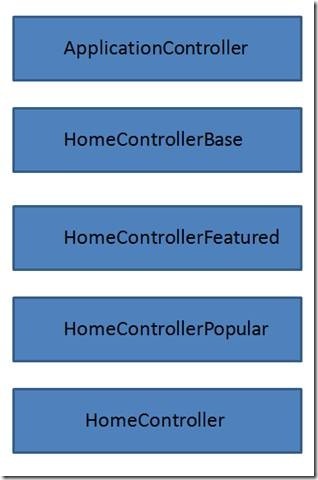
我们将创建一个抽象基类,命名为ApplicationController ,改变view data divtionary来为我们的母版页添加所需的所有的view data(见Listing 7)。这个ApplicationController 在我们的程序中作为每一个controller的基类,而不单单是HomeController。
Listing 7 – ApplicationController
using System.Web.Mvc;
using Solution4.Partials;
namespace Solution4.Controllers
{
public abstract class ApplicationController : Controller
{
public ApplicationController()
{
Master.AddViewData(this.ViewData);
}
}
}
下一步,我们将要创建一个命名为HomeControllerBase 的抽象基类(见Listing 8).这个类包含了通常出现在HomeController的所有的应用逻辑。我们将会重写action方法来为特定的用户控件添加需要的view data。
Listing 8 – HomeControllerBase.cs
using System.Linq;
using System.Web.Mvc;
using Solution4.Models;
namespace Solution4.Controllers.Home
{
public abstract class HomeControllerBase : ApplicationController
{
public virtual ActionResult Index()
{
return View("Index");
}
public virtual ActionResult Category(int id)
{
var dataContext = new MovieDataContext();
var movies = from m in dataContext.Movies where m.CategoryId == id select m;
return View("Category", movies);
}
}
}
对于每一个用户控件,我们将会需要创建一个额外的抽象类。对于FeaturedMovies 用户控件,我们将会创建一个HomeControllerFeatured 类(见Listing 9)。对于PopularMovies 用户控件,我们将会创建一个HomeControllerPopular 类(见Listing 10)。
Listing 9 – HomeControllerFeatured.cs
using System.Web.Mvc;
namespace Solution4.Controllers.Home
{
public abstract class HomeControllerFeatured : HomeControllerBase
{
public override ActionResult Index()
{
var result = (ViewResult)base.Index();
Partials.Featured.AddViewData(result.ViewData);
return result;
}
}
}
Listing 10 – HomeControllerPopular.cs
using System.Web.Mvc;
namespace Solution4.Controllers.Home
{
public abstract class HomeControllerPopular : HomeControllerFeatured
{
public override System.Web.Mvc.ActionResult Category(int id)
{
var result = (ViewResult)base.Category(id);
Partials.Popular.AddViewData(result.ViewData);
return result;
}
}
}
最后,我们需要添加这个层次关系的最上面一个类。我们将会创建一个HomeController 类。这个类简单的继承自上面的其中一个基类(见Listing 11)。他本身并不包含应用逻辑。
HomeController 类这个层次关系中的唯一一个不是抽象类的。由于它不是抽象类,他的controller actions 可以被全世界调用(its controller actions can be invoked by the world)。
Listing 11 – HomeController.cs
namespace Solution4.Controllers.Home
{
public class HomeController : HomeControllerPopular
{
}
}
现在,你或许会受不了这么多的类。然而,这个解决方案的优点是我们已经很干净的分离了建造view data 的逻辑。每一个抽象类都具有单一的责任。我们的代码不再脆弱。
Summary
我并完全信服我自己的Tip。我仍然在尝试这通过使用action filter 来为我的master pages 和 user controls 添加view data。描述的最后一个解决,使用抽象基类,好像需要大量工作。我很好奇于这个问题的其他的解决方案。
[MVC]ASP.NET MVC unit Test
ASP.NET MVC Framework – Part 2: Testing
Published: 27 Mar 2008
By:
Download Sample Code
In this article Simone will cover one of the main reasons for adopting the ASP.NET MVC framework: testability.
Introduction
In the first part of this series we introduced the MVC pattern and how Microsoft implemented it in the ASP.NET MVC framework. In this part we will cover one of the most important aspects of the framework: unit testing.
In the last article we saw how the MVC pattern allows a better separation of concerns and decreases the coupling between presentation logic and infrastructure code: these 2 features make it easier than before testing an ASP.NET web application.
Before looking at how to test a Controller Action let's have a brief overview of what unit testing is and why it matters.
Note: This article is based on the version of ASP.NET MVC released during the MIX08 conference at the beginning of March '08. Things may change in the future. It is also different from the version used for my previous article, so the code I showed may not work with the current code drop..
Unit testing: What it is and why it's important to do
Hundreds of books and thousands of articles have been written on this topic, but I'll try to summarize here the main concepts behind using unit testing.
From Wikipedia: "Unit testing is a procedure used to validate that individual units of source code are working properly. A unit is the smallest part of an application. […] In object-oriented programming the smallest unit is a method."
This short definition includes two important concepts:
- Each test must be independent from the others
- Each test should isolate a single part of the program and show that this individual part is correct
Why should we want to unit test an application? Mainly because it's an automated way to make sure it is always behaving the way it is supposed to behave. This way we can make changes to the code and refactor pieces of the application without the fear of breaking something somewhere else in the application. This is particularly useful with Agile development procedures.
One of the main concepts was that we should be able to isolate each single part of the program: this seems an easy concept in theory but can be difficult to apply. Usually a method in the Business Logic layer instantiates a class that lives in the Data Access layer. This in turn uses a data access provider to get the real data out of the database. And last, the web form that sits on top of everything uses the Business Logic passing the inputs collected from the user on the site.
Without taking the appropriate precautions, while testing the methods in the Business Logic we will test the Data Access layer and the data access provider as well. And this is against one of the main concepts of unit testing: isolation. Why is this that bad? Because if the Business Logic test failed we would not know whether the problem was really in the Business Logic, or in the procedure that retrieved the data from the DB, or maybe it was the DBA that erroneously deleted a stored procedure from the database.
The reason why we cannot isolate the part to be tested is that our Business Logic object is "dependent" on certain other objects in the Data Access layer. If we looked at how the application is designed we would see that the BL "knows" the DA through his real name at compile time (they are tightly coupled). The solution to the problem is to design the application so that the two components are loosely coupled: the BL "knows" the DA only through the interface it implements and the real dependency is defined only at runtime. This allows us to use a SQL Data Access provider in the real application and to use a fake Data Access provider that always returns the same results in our tests.
How ASP.NET MVC facilitates testing
We just saw that to easily test an application it's needed that all its components can be "faked" out, and this is achieved when the component is not just a class, but implements a well known interface or extent some kind of abstract base class.
In the first article of this series I said that the "classic" approach to developing web applications with .NET, the WebForm approach, is not easily testable: it's because the main class of ASP.NET, System.Web.UI.Page, has dependencies to HttpContext, HttpResponse, HttpRequest, HttpCookie and all the other objects coming from the fact that the Page is being executed inside a web server. And all these classes are "just" concrete classes, and cannot be replaced by fake implementations for the purpose of testing the web applications outside the context of the web server.
To address this issue, the ASP.NET MVC framework introduces a series of "abstractions" in order to remove all the direct references to the HTTP runtime. If you look at the API you will see that methods accept things like HttpContextBase, HttpRequestBase and so on. This way all the classes representing the HTTP runtime environment can be replaced by fake implementations that always return pre-baked responses instead of interacting with the web server.
From version P2 all these abstractions are located in a separate assembly called System.Web.Abstractions.dll.
But enough with theoretical talking, let's see how to test an MVC application.
Creating a test project
In the first article of the series we created a sample ASP.NET MVC web application using a project template provided with the ASP.NET 3.5 extensions: ASP.NET MVC Web Application. In version P2 they removed the ASP.NET MVC Web Application and Test project template and introduced a wizard that pops up and asks you whether you want to create a test project and which testing framework you want to use. It only supports Visual Studio Unit Test, but other testing framework can be added as well.
Let's create our test project in the File> New> Project, and selecting the ASP.NET MVC Web Application project. Notice that the description says Preview 2: if you don't see this then you are probably still running the first release. In this case you have to download and install the new version first.
Figure 1: New Project Dialog

After you select the ASP.NET MVC application, a new dialog window comes out.
Figure 2: Create Test Project dialog

Let's select Yes, generate a unit test project and choose Visual Studio Unit Test.
At this point the project template will create a solution with two projects, the first with the same sample application that we created in the first article, the second with a sample testing project, with an empty fixture for the HomeController.
Inside this class we will write tests to prove the correctness of the Controller Actions. We are going to write a test to verify that the Index action of the HomeController really asks for the view named "Index" to be rendered, and that the About action will redirect to the Index action. This is the code of the controller we are going to test:
Listing 1: Controller to be tested
- public class HomeController : Controller
- {
- public void Index() {
- /* Call the Model here */
- RenderView("Index");
- }
- public void About() {
- /* Call the Model here */
- RedirectToAction("Index");
- }
- }
There are a few possible approaches for testing a controller action:
- using the Extract and override call pattern (also called Test-Specific Subclass)
- replacing all the external dependencies with mocked objects
Extract and Override Call
This testing pattern comes from a practice used when testing legacy code that doesn't come with mockable interfaces or base classes. ASP.NET MVC is not "legacy" code and comes with mockable dependencies, but, as we will see later, the amount of code you have to write to mock everything is a bit more that one would expect, so for shorter tests I prefer this approach.
The concept behind this approach is that you extract the method that is using the dependency that you want to remove and then you override it with an implementation specific for the test you are writing.
In the application code we make calls to the RenderView and RedirectToAction methods. These ones have dependencies to a few other objects both in the ASP.NET MVC framework (IViewEngine, RouteData and ControllerContext) and in the HTTP runtime (HttpResponse and HttpContext) because in the real application they have to render a view and redirect to another URL. But for the purpose of this test we only need to store the name of the view we are going to render and invoke the method specified as the action we want to redirect to.
Listing 2: Test Specific Sub-Class
- internal class HomeControllerForTest : HomeController
- {
- public string SelectedViewName { get; private set; }
- protected override void RenderView(string viewName,
- string masterName, object viewData)
- {
- SelectedViewName = viewName;
- }
- protected override void RedirectToAction(
- System.Web.Routing.RouteValueDictionary values)
- {
- string action = (string)values["action"];
- GetType().GetMethod(action).Invoke(this, null);
- }
- }
With this test-specific class in place now we can test the controller class:
Listing 3: Testing using the test-specific sub-class
- [TestMethod]
- public void AboutOverride()
- {
- HomeControllerForTest controller = new HomeControllerForTest();
- controller.About();
- Assert.AreEqual("Index", controller.SelectedViewName,
- "Should have redirected to Index");
- }
- [TestMethod]
- public void IndexOverride()
- {
- HomeControllerForTest controller = new HomeControllerForTest();
- controller.Index();
- Assert.AreEqual("Index", controller.SelectedViewName,
- "Should have selected Index");
- }
As you can see the code is pretty straightforward:
- Instantiate the test specific class
- Call the method we want to test
- Assert that the Index view has been rendered
This approach works but can leave a bad taste in the mouths of some people, since here you are testing something that is different from what you are putting in the working application. Furthermore it's a trick used when testing legacy code not written with testability in mind while ASP.NET MVC is a new library written to be easily testable. A better and more elegant approach is the one that involves mocking dependencies.
Mock Objects
As we said earlier, everything that interacts with a controller is referenced through its interface so we can make our own implementation of the ViewEngine in order to test that the view that the controller wants to render is the one we are expecting.
Listing 4: FakeViewEngine
- public class FakeViewEngine : IViewEngine
- {
- public ViewContext ViewContext { get; private set; }
- public void RenderView(ViewContext viewContext)
- {
- ViewContext = viewContext;
- }
- }
The only method that is specified inside the IViewEngine interface is RenderView. A real View Engine should select the view to be rendered based on the ViewContext passed, but for the purpose of this test we just need to store the ViewContext so that we can check that the ViewName is the one we are expecting.
But there is another step to be taken: even if we are not dealing with HttpContext and ControllerContext directly in our code, the framework needs this information in order to populate the ViewContext that is passed to the View Engine. So we have to mock them out.
I'll not discuss about what a mock object is in detail but here is a short definition: mock objects are objects that mimic the behavior of real objects and can also do some assertions on how methods are called. In the references you'll find some links to other articles on mocking, as well as on unit testing.
Let's have a look at how to test the Index controller action using mock objects. There are a few mocking framework around: I'm going to use RhinoMocks, but the same concepts apply to all of them.
Listing 5: Testing the Index action with RhinoMocks
- [TestMethod]
- public void IndexMock()
- {
- HomeController controller = new HomeController();
- var fakeViewEngine = new FakeViewEngine();
- controller.ViewEngine = fakeViewEngine;
- MockRepository mocks = new MockRepository();
- using (mocks.Record())
- {
- mocks.SetFakeControllerContext(controller);
- }
- using (mocks.Playback())
- {
- controller.Index();
- Assert.AreEqual("Index", fakeViewEngine.ViewContext.ViewName,
- "Should have selected Index");
- }
- }
First we created an instance of our controller class and set the view engine to use the FakeViewEngine we defined earlier.
Then RhinoMocks comes in:
- We start setting expectations (
mocks.Record). - We create a fake controller Context (We'll talk about this in a moment).
Then we put the mock repository in playback mode, we call the method we want to test and we assert that the ViewName that has been passed to the View Engine is the one we were expecting.
The SetFakeControllerContext method is a helper method that creates a fake HttpContext using RhinoMocks and then populates a controller context with all the other information needed by the framework code.
Listing 6: SetFakeControllerContext helper method
- public static void SetFakeControllerContext(this MockRepository mocks,
- Controller controller)
- {
- var httpContext = mocks.FakeHttpContext();
- ControllerContext context = new ControllerContext(new RequestContext(httpContext,
- new RouteData()), controller);
- controller.ControllerContext = context;
- }
This method, as well as other helper methods, is contained in the MvcMockHelpers class created by the ASP.NET MVC team.
In the code available for download there is a complete solution that includes a working sample of what we discussed here, and the testing method for the About action as well. The RedirectToAction method is still too coupled with the HTTP Runtime and in my opinion it still requires too much mocking. This is probably going to change in the next release so I prefer not writing the code here in the article. If you are curious have a look at the code.
Conclusions
In this article we introduced the problems related to unit testing and we saw how the ASP.NET MVC framework facilitates unit testing. We also saw how to test Controller Actions both using the Extract and Override Call approach and using Mock objects.
In the next article we will see how to pass data from the controller to the view and vice versa.
References
- ASP.NET MVC download site: http://asp.net/mvc/
- Unit Testing page on Wikipedia: http://en.wikipedia.org/wiki/Unit_testing
- Mock Object page on Wikipedia: http://en.wikipedia.org/wiki/Mock_object
- RhinoMocks: http://www.ayende.com/projects/rhino-mocks.aspx
- MvcMockHelpers class: http://www.hanselman.com/blog/ASPNETMVCSessionAtMix08TDDAndMvcMockHelpers.aspx
[MVC]ASP.NET MVC controller actions unit Test
This is how ASP.NET MVC controller actions should be unit tested
I'm upgrading my partywithpalermo.com website for the MVP Summit party, and I'm retrofitting my tests to use the March CTP of the MVC Framework. I have the following action that I need to unit test:
public class MainController : ControllerBase
{
private readonly IAttendeesRepository _repository;
public MainController(IAttendeesRepository repository, IViewEngine viewEngine)
{
_repository = repository;
ViewEngine = viewEngine;
}
public void Register(string name, string website, string comment)
{
var attendee = new Attendee(name, website, comment);
_repository.SaveNewAttendee(attendee);
RenderView("confirm", attendee);
}
}
Note the explicit dependencies on IAttendeeRepository and IViewEngine. That means that I'll be interacting with those two dependencies in this controller. Here is my unit test (this passes, by the way):
[Test]
public void ShouldSaveAttendee()
{
var repository = new FakeRepository();
var mockViewEngine = new MockViewEngine();
var controller = new MainController(repository, mockViewEngine);
controller.ControllerContext = new ControllerContext(new RequestContext(new HttpContextStub(), new RouteData()), controller);
controller.Register("Jeffrey.',", "http://www.jeffreypalermo.com?=&@%20", "this comment!?,'.");
Attendee attendee = repository.SavedAttendee;
Assert.That(attendee.Name, Is.EqualTo("Jeffrey.',"));
Assert.That(attendee.Website, Is.EqualTo("http://www.jeffreypalermo.com?=&@%20"));
Assert.That(attendee.Comment, Is.EqualTo("this comment!?,'."));
Assert.That(mockViewEngine.ActualViewContext.ViewName, Is.EqualTo("confirm"));
Assert.That(mockViewEngine.ActualViewContext.ViewData, Is.EqualTo(attendee));
}
private class HttpContextStub : HttpContextBase
{
}
This is a pretty straightforward unit test except for the line before calling the Register() method. I have to use setter-injection to set a stubbed ControllerContext. If I don't, the Register() method will bomb with an exception when the ViewContext is created, and the code tries to get an HttpContextBase off of the ControllerContext. It'll throw a NullReferenceException. My code doesn't really care about the ControllerContext or what is in it, but because of how the code is structured, I must use setter injection to break this dependency. Note that testability is next up on the list of things to do for the MVC Framework team.
Preview2 (March CTP) was all about getting the routing engine out into its own assembly so that it can be used separate from MVC controllers. Also, the MVC Framework is "binnable". You can xcopy deploy it. There is plenty of time to fix these things, and the team is working on it. You can also be sure that I'll keep raising the issue because I've been test-driving code for three years, and it's instinct now to see what is easy and frictionless and separate it from code that is harder to test than it should be. Overall, pretty good for a CTP.
The following is what I would like to write. The following is how I would like my test to look. Notice just the absence of the ControllerContext line.
[TestFixture]
public class MainControllerTester
{
[Test]
public void ShouldSaveAttendee()
{
var repository = new FakeRepository();
var mockViewEngine = new MockViewEngine();
var controller = new MainController(repository, mockViewEngine);
controller.Register("Jeffrey", "http://www.jeffreypalermo.com", "this comment");
Attendee attendee = repository.SavedAttendee;
Assert.That(attendee.Name, Is.EqualTo("Jeffrey"));
Assert.That(attendee.Website, Is.EqualTo("http://www.jeffreypalermo.com"));
Assert.That(attendee.Comment, Is.EqualTo("this comment"));
Assert.That(mockViewEngine.ActualViewContext.ViewName, Is.EqualTo("confirm"));
Assert.That(mockViewEngine.ActualViewContext.ViewData, Is.EqualTo(attendee));
}
private class MockViewEngine : IViewEngine
{
public ViewContext ActualViewContext;
public void RenderView(ViewContext viewContext)
{
ActualViewContext = viewContext;
}
}
private class FakeRepository : IAttendeesRepository
{
public Attendee SavedAttendee;
public IEnumerable<Attendee> GetAttendees()
{
throw new NotImplementedException();
}
public void SaveNewAttendee(Attendee attendee)
{
SavedAttendee = attendee;
}
}
}
Note that my unit test is concerned with explicit dependencies and doesn't know or care that I'm making use of a PROTECTED method named "RenderView" inside my action. That detail doesn't matter because the interaction with the IViewEngine is what is important.
I also understand that I could use the Legacy code pattern of "Extract and Override Call" (Feathers, p348). Microsoft has already provided the extracted method, RenderView. I can override the call to break the dependency, but that pattern is meant to be used as a dependency-breaking technique with legacy code. If you haven't read Michael Feathers' book, Working Effectively with Legacy Code, you should order it right now. It talks about all kinds of dependency-breaking techniques in order to write unit tests on existing code. My goal in providing feedback to the MVC Framework team (and I provide feedback, believe me) is to have this framework be something that I would want to use. There is plenty of time to make the necessary changes, and the team is working hard.
I revised this post a bit after chatting on the phone with Scott Guthrie this evening. We'll see some testability improvements in the next drop, and the team is aiming to make drops around every 6 weeks or so.
Note: I'm playing around with using "var" for locals. Not sure if I like it yet. We'll see. No need to comment on the "vars". Comment on controllers, actions, and unit tests.