[教程]ASP.Net MVC中操作Cookie

mikel阅读(982)

网站免不了要保存用户状态,ASP.NET MVC 框架的Controller提供了对Cookie的操作
代码如下:

HttpCookie cookies = new HttpCookie("UserName", user.UserName);
//设置为永久Cookie 去掉则为临时cookie 用户关闭后自动清除,类似session
cookies.Expires = DateTime.Parse("03/24/2009");
this.Response.SetCookie(cookies);
RenderView("UserPanel", user);

页面Page_onload

Response.Write("Cookie:" + Request.Cookies["UserName"].Value);

[教程]神经网络教程

mikel阅读(757)

如果您有疑问,可以先参考 FAQ
如果您未找到满意的答案,可以在下面留言:)
首先向大家道歉,很长时间没有来更新文章了。最近杂事太多,不好意思。

1 介绍

上一篇文章中,我们已经看到了一个简单的关于ANN实际应用程序,这篇文章中,我将简单地介绍一下ANN的最最基础的知识以及上一篇文章中的程序原理的说明。

2 ANN的最最基础的知识

ANN算法起源于生物体的神经系统,相信大家对生物神经系统的工作方式都非常了解,这里我也就不详细介绍了,不过,为了后续说明的方便,给大家上一个截图:


图1

根据生物神经系统的工作过程,我们可以大概理解以下这个图所要表达的含义:


图2

大家可以想象这样一种情形:寒冷的冬天,我们伸手到火炉边烤火,慢慢地,你觉得自己快要睡着了,这个时候,突然发现自己伸在火炉边的手特别烫得疼, 然后马上将手缩回去。这就是一个神经网络的工作实例,火对手产生的温度就是图2的输入层(Input),而缩手或不缩手就是图2的输出层 (Output)。但是缩手只有在手的温度达到一定的程度才发生的,比如说40度。

用图2来表示上面所说的情形:

X1 = 火对手产生的温度

w1 =火对手产生的温度的权值(对火对手产生的温度的放大或是缩小,我们让这个值为1)

激活函数(Active Function)= 如果 x1 * w1 > 40 激活(缩手),否则抑制(不缩手)

这是单输入的情况,如果有多个输入,则输出为 f(x1 * w1 + x2 * w2 + x3 * w3 …)

其中,f(x)为激活函数。

下面,我们来看2个多输入的神经网络结构图:

AND运算


其中f(x) =

If (x >= 2) return 1;

Else return 0;

阀值为2

我们可以利用这个结构图来检验一下是否正确:

X1 = 0, x2 = 0, x = x1*w1 + x2*w2 = 0 f(x) = 0;正确

X1 = 0, x2 = 1, x = x1*w1 + x2*w2 = 1 f(x) = 0;正确

X1 = 1, x2 = 0, x = x1*w1 + x2*w2 = 1 f(x) = 0;正确

X1 = 1, x2 = 1, x = x1*w1 + x2*w2 = 2 f(x) = 0;正确

OR运算


其中f(x) =

If (x >= 1) return 1;

Else return 0;

阀值为1

我们可以利用这个结构图来检验一下是否正确:

X1 = 0, x2 = 0, x = x1*w1 + x2*w2 = 0 f(x) = 0;正确

X1 = 0, x2 = 1, x = x1*w1 + x2*w2 = 1 f(x) = 1;正确

X1 = 1, x2 = 0, x = x1*w1 + x2*w2 = 1 f(x) = 1;正确

X1 = 1, x2 = 1, x = x1*w1 + x2*w2 = 2 f(x) = 1;正确

上面2个实例,就是我上篇文章中所需要建立的一个神经网络模型。

但是我们如何确定w1,w2和阀值呢?

这就需要通过神经网络来学习,从而确定w1,w2和阀值。

2 学习

拿计算AND运算的模型来说,需要2个输入1个输出是肯定的。关键就是如何确定2个输入的权值和激活函数的阀值。

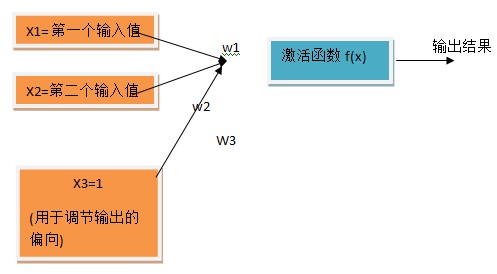
为了计算激活函数的阀值,我们可以增加一个输入层,变成这个样子


这样,我们只需让激活函数f(x)=

If (x >= 1) return 1;

Else return 0;

即可。至于阀值究竟是多少,可以让w3的值去确定。这样,原先的问题就转化成了求解w1, w2 ,w3的大小的问题了。

接下来,我们制定这样的学习规律:

W(i) =     W(i)    + (正确值-实际计算的值)*x(i).

通过一定次数的训练,我们就可以让    (正确值-实际计算的值)变得相当下,这样最后的结果也就稳定了,同时求出了我们需要的w1, w2 ,w3的近似值。

3实际执行过程

  • 得到训练集合(合理的输入和期望的输出(如:输入x1=1,x2=1输出1))
  • 随机给w1, w2,w3赋值
  • 执行一定次数的训练

4 预告
在下一篇文章中,我将介绍和一个多层的神经网络,用于计算XOR(异或)操作。

5 总结
在本文中,咱们介绍了神经网络的简单最最基本的原理和上一篇文章的实例原理。

[教程]log4net教程

mikel阅读(852)

一.概述

使用可靠地第三方类库,比自己重新编写好得多。Log4net是由Apache开发的.Net.日志类库。并且已经很稳定。网址是:。本文基于1.2.10版。
作为Apache的著名开源项目,它有.Net,Java,C++等多个版本.
但是一般来说它只适合作调试是的单行日志,大量的那种.不太适合作正规的,带有调用堆栈的详细日志.

二.第一次使用log4net

1.添加引用:Log4net.dll和using log4net;
2.在需要作日志的类中加入变量
private ILog log = LogManager.GetLogger(typeof(类名));
3.在程序的启动方法中加入这条语句
XmlConfigurator.Configure(new System.IO.FileInfo("配置文件名"));
4.将配置文件写在启动项目的/bin/Debug目录下.
5.配置文件的缺省内容如下所示:

<log4net>
 
<appender name="A1" type="log4net.Appender.ConsoleAppender">
  
<layout type="log4net.Layout.PatternLayout">
   
<conversionPattern value="%-4timestamp %level %logger – %message%newline" />
  
</layout>
 
</appender>
 
 
<root>
  
<level value="Debug" />
  
<appender-ref ref="A1" />
 
</root>
</log4net>

这个配置文件将日志输出到控制台上.
6.在需要将调试信息写入日志的地方,可以使用类似下面的语句:
log.Debug(String.Format("background at={0} last={1}", 变量一, 变量二));

三.功能设定

1.log4将日志功能划分为如下几个层次:
logger:日志信息的来源,缺省为root.可以设定为命名空间加类名的形式.
appender:日志的输出媒介,可以是控制台或者文件.
layout:日志的输出格式.常用的是log4net.Layout.PatternLayout.
Filter:把某些行日志从输出中过滤掉.

2.如果希望只在某个特定类中输出调试信息的话,可以加入特定的logger:

 <root>
  
<level value="Info" />
  
<appender-ref ref="A1" />
 
</root>
 
<logger name="StringGrid.CanvasView">
  
<level value="Debug" />
  
<appender-ref ref="A1" />
 
</logger>

3.如果想将日志写入文件,可以在配置文件中加入如下内容:

 <appender name="RollingFile" type="log4net.Appender.RollingFileAppender">
  
<file value="example.log" />
  
<appendToFile value="true" />
  
<maximumFileSize value="100KB" />
  
<maxSizeRollBackups value="2" />
  
<layout type="log4net.Layout.PatternLayout">
   
<conversionPattern value="%level %thread %logger – %message%newline" />
  
</layout>
 
</appender>

4.也可以让一个源输出到多个记录中:

 <root>
  
<level value="Info" />
  
<appender-ref ref="A1" />
  
<appender-ref ref="RollingFile" />
 
</root>

5.如果想将日志写入windows的EventLog,可以使用EventLogAppender.

[代码]Asp.net MVC HtmlHelper类应用实例

mikel阅读(788)

尽管MVC framework已经出来几个月了,不过这方面的资料却很少,大部分都是抄来抄去,特别是更细节的对于MVC封装的HtmlHlper类的介绍更是少之又少,有也只是简单的例子,没有涉及到数据库层的实例,实际应用中往往数据都是从数据库中读取出来的,因此,没办法只能啃源码啦,不容易啊,下面是我应用过程中整理的组件绑定数据组件的代码,随着应用会陆续增加。
Html.Select 应用实例:
Conroller

namespace Tang.Controllers
{
public class ChannelController : Controller
{
public void Index()
{
RenderView("Index");
}
public void Manage()
{
RenderView("Index");
}
public void Up&#100;ate()
{
//RenderView();
}
public void New()
{
//读取数据库
SysConst sysConst = SysConst.Instance();
//返回数据集给页面
ViewData["ds"]=sysConst.ChannelSet;
RenderView("Cr&#101;ate");
}
}
}

页面:

<%@ Page Title="" Language="C#" MasterPageFile="~/Views/Shared/Admin.Master" AutoEventWireup="true" CodeBehind="Cr&#101;ate.aspx.cs" Inherits="Tang.Views.Channel.Cr&#101;ate" %>
<%@ Import Namespace="Tang.Models.Communion" %>
<%@ Import Namespace="Tang.Controllers" %>
<asp:Content ID="Content1" ContentPlaceHolderID="head" runat="server">
<style type="text/css">
#description {
height: 136px;
width: 494px;
}
</style>
</asp:Content>
<asp:Content ID="Content2" ContentPlaceHolderID="ContentPlaceHolder1" runat="server">
<%
string &#91;&#93; states =new string&#91;&#93;{"开放", "关闭","删除"};
//读取数据集,给sel&#101;ct组件赋初值
System.Data.DataSet ds = (System.Data.DataSet)ViewData&#91;"ds"&#93;;
//设置默认选择值
ArrayList sel&#101;ctvalues = new ArrayList();
sel&#101;ctvalues.Add(1);
%>
<form id="Sel&#101;ct" method="post" action="<%=Url.Action(new{}); %>">
<div>
<label>上级频道:</label><%=Html.Sel&#101;ct("parentChannelId", ds, "ChannelName", "Identifier",sel&#101;ctvalues)%>
<label>频道名称:</label><%=Html.TextBox("Channel.ChannelName") %>
<label>频道状态:</label><%=Html.Sel&#101;ct("state", states)%>
<lable>描述:</lable>
<%=Html.TextArea("Channel.Description",null) %>
<div><%=Html.SubmitButton("保存") %></div>
</div>
</form>
</asp:Content>

转载老外的例子:

<%
//Sample Data
string &#91;&#93; songs=new string&#91;&#93;{"Robot Rock (Daft Punk)","Stairway to Heaven (Zeppeling)",
"New Slang (Shins)"};
string &#91;&#93; movies=new string&#91;&#93;{"Tron","Big Trouble In Little China",
"Say Anything"};
string &#91;&#93; zodiac =new string&#91;&#93;{"Aries", "Taurus","Gemini","Cancer","Leo",
"Virgo","Libra","Scorpio","Sag","Capricorn","Aquarius","Haack"};
%>
Sign:
<%=Html.Sel&#101;ct("myZodiac",zodiac) %>
Sign (sel&#101;ct Haacked):
<%=Html.Sel&#101;ct("myZodiac",zodiac,"Haacked") %>
Favorite Movie:
<%=Html.CheckBoxList("favMovie",movies).ToFormattedList("<li>{0}</li>") %>
Favorite Movie, List :
<%=Html.ListBox("favMovie",movies,new string&#91;&#93;{"Say Anything"}) %>
Favorite Movie, List, Long, Mult (sel&#101;ct "Say Anything" and "Tron")i:
<%=Html.ListBox("favMovie",movies,20,true,new string&#91;&#93;{"Say Anything", "Tron"}) %>
Favorite Songs (Sel&#101;ct Shins):
<%=Html.CheckBoxList("favSongs",songs,new string&#91;&#93;{"New Slang (Shins)"})
.ToFormattedList("<li>{0}</li>") %>
Favorite Songs:
<%=Html.CheckBoxList("favSongs", songs).ToFormattedList("<li>{0}</li>")%>
Favorite Songs, Radio:
<%=Html.RadioButtonList("favSongs", songs,"Robot Rock (Daft Punk)")
.ToFormattedList("<li>{0}</li>")%>

[文字]封装简化了开发同时也扼杀了我们的创意

mikel阅读(706)

最近一直在.net的开发资料中查阅,大部分都是在讲控件的应用,似乎.net除了组件以外的应用什么都没有内容,拖拽组件的确让我简化了开发应用的过程,但是无形中让这些人变得很懒,我指的是思维上的懒惰,因为我曾经用过Delphi快速开发项目,完全的组件拖拽,添加事件代码,然后就等着它在我们不知其所以然的情况下运行,尽管一切都那么理所当然的正确,可底层的原理是我们不所知的,于是开始懒得思考,懒得设计,反正一切都封装好了,拿过来用就ok了,于是一直停留在拖拽、设置属性、事件代码的层次,而苦苦无法晋升到设计的层次,java不同,它就像个博学的智者,给你一个理念思想,然后告诉你可以为你提供怎样的支持,剩下的就仁者见仁智者见智,你甚至可以完全的实现一个framework而仅仅使用java的核心类库,这是创造,不过.net毕竟是做了件好事,让程序开发不必那么复杂,让开发的门槛降低,不过我更加担心门槛降低所引领入门的那些人今后如何继续发展,不由得又是矛盾的问题出现了!算了,就像黑客帝国中有人愿意活在虚拟的世界中尽管他知道周围的一切都是虚幻的,而有些人却喜欢活在真实中一样。那就让上帝的归上帝,凯撒的归凯撒吧!

[教程]加快Flex应用运行速度的5种方法

mikel阅读(804)

作者 Jon Rose译者 张龙 发布于 2008年5月31日 下午9时5分

社区
Java
主题
RIA,
Web 2.0,
富客户端/桌面
标签
Adobe,
Flex,
Adobe集成运行时/AIR,
Flash

Jun Heider在O’Reilly的InsideRIA站点上发表了一篇精彩的文章,该文章就如何加快Flex应用的启动速度提出了很多建议,以帮助用户减少看见讨厌的“Loading”对话框的出现时间。他深入探讨了问题的不同方面,并对每种技术的优势和劣势进行了评判。

  1. 从外部加载媒体(Media)
    Heider提到了一个常用的Flex最佳实践——限制嵌入到应用/SWF文件中的媒体的数量,如图像、影片及mp3等资源都可以从外部的SWF文件加载。
  2. Flex框架可以直接将图片、mp3及字体等资源编译到SWF中。当你想让最终用户获得全部资源时,这种方式确实能派上用场,但是这会导致你的应用长时间停留在“Loading”阶段。 

  3. 在嵌入式字体中限制字符集
    Heider建议在嵌入式字体中限制字符集以降低SWF文件的总下载时间:
  4. 当你在Flex中嵌入一种字体时,你就会获得该字体的全部字符的支持。尽管这可能是你想要的,但你确信你需要全部字符么?例如,在一个只面向英文的应用中,你确信你真的想花时间下载中文字符数据么?

  5. 缓存框架
  6.         Heider回顾了Flex 3 support for runtime-shared-libraries (RSL)这篇文章:

    从Flex 3开始,你可以将Adobe签名的框架——RSLs缓存到Flash Player的cache中。这有两个好处。首先,缓存在Flash Player cache中的签名的框架RSLs可由所有配置好的Flex应用共享。换句话说,如果某人的应用已经下载了500k的签名的框架RSL,并且该RSL仍旧 在Flash Player cache中,那么你的应用就可以使用缓存下来的RSL。其次,即使某人清空了其浏览器缓存,对Flash Player cache也没有任何影响。

  7. 考虑模块化
  8. Heider谈到了将Flex应用划分成模块的好处:

    减少字体加载时间的另一种方式就是将你的Flex应用划分成模块。使用模块的一个好处在于当加载和卸载模块时你能完全操控它。


    之 所以要划分成模块的最后一个原因是他们更快,而且我能即时加载它们。换句话说,在启动时唯一需要加载的模块就是 Step1.swf模块。因此,在使用模块的情况下,最终用户节省了启动时间,但是当他从一个模块切换到另一个模块时却需要花更多时间,因为每个模块都需 要以JIT形式加载。在我的应用中,只有当用户首次在steps 1-5之间切换时需要花更多时间。

  9. 推迟实例化
  10.         Heider围绕着Flex组件的“creationPolicy”属性及何时实例化应用的不同部分给出了很多建议。

    如果你想减少从数据下载到用户真正可以使用的总时间,当务之急就是推迟实例化。这项技术背后的理念就是直到应用真正使用的时候才在内存中创建对象。

    尽管推迟实例化技术会在应用的整个使用过程中导致少许——通常不那么明显——的延迟,但与长时间的启动延迟相比,它还是可接受的。推迟实例化的另一个好处在于内存使用的优化。

Heider还谈到了一个“实验性”的条款——“使用流”,这是他在讨论Dirk Eismann的帖子(Building monolithic Flex SWFs that still startup quickly.”)时谈及的。Eismann提出一项技术以利用Flash Player中的多个frames以在部分应用中达到流的目的。查看所有的帖子以更多地了解该技术及关于加快Flex启动速度的建议。

查看英文原文:Top 5 Ways to Reduce Flex Application Startup Time

[教程]ASP.Net MVC中HtmlHelper类的应用

mikel阅读(741)

发现MVC没有沿用ASP.NET的自带控件,而是完全利用HtmlHelper类封装了Html常用组件,这样让ASP.NET的什么生命周期、运行时状态、等等都无效了,google了一下,发现个老外的教程
正在研究ing….,不过感觉MVC我可以不用了,我怎么越来越讨厌封装,动不动dotnet就给你封装这个封装那个,感觉完全就是在被别人做好的东西来搭建程序,完全没有创意可言,痛苦
好了,继续研究ing….
老外的地址:
http://blog.wekeroad.com/2007/12/05/aspnet-mvc-preview-using-the-mvc-ui-helpers/

[应用]WorkDay应用Flex实现ERP

mikel阅读(2101)

Workday takes ERP software
into the RIA space

by Julie Campagna

Articles this issue

When you think of RIA (rich Internet applications), you might think of Flash, Flex, Web 2.0, and the hipster of the web: all those social networking sites and applications like Facebook or Buzzword. The last thing that probably comes to mind is the stodgy corporate world of ERP (enterprise resource planning) software. Workday, Inc. is changing that.

Dave Duffield, cofounder and former chairman of PeopleSoft, founded Workday in 2005. This time around, Dave decided to do a whole new take on ERP software. The first big change was the delivery model: Software as a Service (SaaS) instead of traditional in-house installations. The next big change is the departure from relational databases for an in-memory system. Lastly, the traditional user interface is replaced by a richer, more immersive web application.

This article covers only the last aspect, the UI. After learning why Workday went with an RIA platform starting with Ajax, then moving to Flex, you'll learn about Workday's unique style of generating their UI. While some ERP vendors have over 100,000+ screens making up their UI, Workday has none. They merely build Flex components and dynamically create screens on the fly. Lastly, you'll find out how this proven innovator in the ERP realm supports today's corporate warriors outside their RIA application.

Why RIA?

Michael Bonadio, manager of the Workday UI team, said, "There are three things that are important to us: 1. Keep it simple and intuitive. 2. Work the way our customers work. 3. Keep it cool. It was these three things that drove us to RIA technologies." The richness of Ajax and Flex applications is what helps Workday achieve its mission: to provide a productive and pleasing user experience while differentiating the Workday product line in the marketplace.

Workay's application

Workday's application

"We started out with an Ajax front end. However, as we started to move towards larger and larger data sets, we found that it was difficult with Ajax. That's when we began to investigate Flex. After our first few experiments, we knew Flex was for us and we never looked back," Michael added. The Flex framework is a collection of classes, widgets, and effects. Flex provides two main benefits for Workday: portability and extensibility.

When you're a SaaS vendor, portability is important. You have to be able to support many different systems with countless configurations. There could be a Windows machine running Internet Explorer or a Mac running Safari; you just don't know. Workday's Ajax version of their application only ran on Internet Explorer 6.0. Granted, this was by design and not a limitation of the Ajax technology itself. Had they continued with Ajax for the next version, they would have chosen a library (or created their own) that would have supported multiple platforms. During the exploration phase for version 2, the desire for performance and a quick path to richness once again pointed to Flex. The beauty of the Flex version is that it utilizes Adobe Flash Player, the world's most pervasive software platform. The portability of Flex code meant that Workday went from supporting one version of one browser on one OS to supporting numerous platforms of various configurations — with no extra effort.

Extensibility is the other big factor of Flex that Workday found attractive. The Flex framework is an extension of the Flash platform. The key to the Flex platform is components. The components in Flex either inherit properties from another or are created by grouping a few components into one. Components, it turns out, fit perfectly into how Workday creates their application. Unlike traditional ERP applications, Workday does not have one hard-coded screen or form.

How do they do it?

How does an ERP system not have screens or forms? By definition, this is a system that presents forms to users for logging their vacation time, purchasing office supplies, or managing their company's employee base. With all the possible configurations and tasks, it's easy to see how ERP systems can have over 100,000 screens and forms. Keeping track and managing all those screens would be a nightmare. It is for that exact reason that Workday decided not to hard-code any of the UI for its screens.

Workday's system basically has three parts. There's the back end that keeps all the data and logic, called the OMS. Next, there is a UI server that makes requests to the OMS for data and then transforms the responses from the OMS into a homegrown description language. Lastly, there's the Flex application that interprets this meta-language and creates the screens on the fly. An easy way to think of the Workday application is that of a Flex virtual machine. The UI server gives the data and general layout in XML, then Workday's Flex app puts them both together to create a screen.

Workday's Navigator Tool

Workday's navigator tool

This is why component building works so well for Workday. While traditional Flex applications have hard-coded pages and forms made up of Flex components, Workday's doesn't. The only thing Workday's Flex developers build are more widgets for the virtual machine to process. The beauty of this is that a form can change over time, but the basic widgets that make up the form stay the same. Therefore, the UI developers don't get bogged down with form change requests. Whereas many Flex developers have to spend their time closing tickets that say things like, "Move name field down 3 pixels" or "Swap layout of Form A to match layout of Form B," Workday's developers don't have to bother with such trifles. Instead, they're left to innovate the advanced widgets that make up the future of ERP software.

Workday's Prompt Widget

Workday's prompt widget

Working outside the UI

Today's working professionals have many tools on their belts (sometimes literally). Aside of the standard desktop, you have laptops, BlackBerry devices, Apple iPhones, and more. People want to be connected 24/7 to their business. Workday is more than willing to help them stay connected.

The application already supports RSS feeds for staying updated on changes to your data. You subscribe to the feeds just as you would a blog or podcast; when the data changes, your feed gets updated. Many of the reports inside the Workday application support web services (REST or SOAP). This allows the customers to create and utilize mashup technologies. Whether it's posting jobs and having people apply inside of Facebook or creating a Google Map with all the branch offices mapped out, web services allow the users to make use of their data that in the past was stuck behind company (fire)walls.

Workday's Internal Search Interface

Workday's internal search interface

Workday is investigating ways to support business intelligence and analytics from within their application. With the data being separated from the screens, manipulating that data is easy. Providing functionality such as drill-down capabilities on totals is one such example. In the past, other systems made users run a new report to see what numbers were behind that total. In Workday's system, the user merely has to click the number and instantly receive a breakdown so he or she can make better judgments faster and easier.

Conclusion

As you can see, RIA is no longer just an abstract term in the software industry. It truly is a new programming paradigm. If corporations have embraced this new way of working, then it's safe to say this is not a fad. Consumers have been enjoying the benefits the RIA technologies for quite some time outside of work. It was only a matter of time before they started to demand that richness in their corporate lives as well.

The amazing thing about this next generation of applications is the desire to change the paradigm. Whether it be through hosting customer applications, creating in-memory systems, or bringing richness to the experience, these companies are on a never-ending quest for constant innovation. "While our UI is one of the most advanced ones in the ERP space, we at Workday still see room for improvement," concluded Bonadio. "We're just getting started."