
网页WEB打印控件制作 – SDP开发平台 – 博客园
- C#
- 2016-06-07
- 442热度
- 0评论
来源: 网页WEB打印控件制作 - SDP开发平台 - 博客园
在WEB系统中,打印的确是比较烦人的问题,如果我们能制作一个属于自己的自定义的打印插件,那么我们在后续自定义打印的时候能随心所欲的控制打印,这样 的效果对于程序员来说是非常开心的一件事件,本文将自己开发编写的C# 制作的HTML打印插件分享出来,让有同样需求的朋友提供一个参考;此插件是基于Microsoft .NET Framework 2.0 开发的,缺点是每台客户端在安装插件时,必须要安装Microsoft .NET Framework 2.0 ;本插件能实现 页眉、页脚、表头、标题、表尾的分页打印;支持纸张类型、自动补充空行等功能;由于技术有限,肯定有很多不足的地方,请批评指正!
由于本打印插件是基于我们开发平台的报表基础来开发设计的,所以打印控件的原理:通过JS将页面表格数据生成固定格式的XML字符串(图片通过 64base图片格式)传送给打印插件,有打印插件自主绘图生成打印页面。E_Print插件可以在WEB或WinForm中使用:
打印插件完整源码:E_Print.rar (包含插件源码、打包程序、winform调试DEMO)
下面贴出源码:(在源码中有详细的注释说明)
1、PrintControl 打印插件类


1 using System;
2 using System.Collections.Generic;
3 using System.ComponentModel;
4 using System.Drawing;
5 using System.Data;
6 using System.Text;
7 using System.Windows.Forms;
8 using System.Runtime.InteropServices;
9 using System.Drawing.Printing;
10 using System.Xml;
11 using System.Security;
12 using System.Drawing.Drawing2D;
13 using System.Drawing.Text;
14 using System.Text.RegularExpressions;
15
16 namespace E_Print
17 {
18 /// <summary>
19 /// 打印控件
20 /// 实现IObjectSafety接口
21 /// 网页上所有所使用到的GUID 通过Guid工具生成的唯一编码
22 /// 74D1ED1D-B1A7-4039-A060-6F544FBE99EC 编码以后不允许修改
23 /// </summary>
24 [Guid("74D1ED1D-B1A7-4039-A060-6F544FBE99EC"), ProgId("EReportPrint"), ComVisible(true)]
25 public partial class PrintControl : UserControl, IObjectSafety
26 {
27 #region 私有变量
28
29 #region 通用参数
30
31 /// <summary>
32 /// 缩放比例
33 /// </summary>
34 private float Zoom = 1;
35
36 /// <summary>
37 /// 网页高度 像素 px
38 /// </summary>
39 private float HtmlHeight = 0;
40
41 /// <summary>
42 /// 网页宽度 像素 px
43 /// </summary>
44 private float HtmlWidth = 0;
45
46 /// <summary>
47 /// 报表区域矩形
48 /// </summary>
49 private RectangleF TableRect = new RectangleF();
50
51 /// <summary>
52 /// 报表绘制实例
53 /// </summary>
54 private ReportDraw RptDraw = new ReportDraw();
55
56 #endregion
57
58 #region 页边距
59
60 /// <summary>
61 /// 左边距
62 /// 毫米 mm(一位小数)
63 /// </summary>
64 private float _marginLeft = 9.9f;
65
66 /// <summary>
67 /// 右边距
68 /// </summary>
69 private float _marginRight = 9.9f;
70
71 /// <summary>
72 /// 上边距
73 /// </summary>
74 private float _marginTop = 9.9f;
75
76 /// <summary>
77 /// 下边距
78 /// </summary>
79 private float _marginBottom = 9.9f;
80
81 #endregion
82
83 #region 版型方向
84
85 /// <summary>
86 /// 版型方向 Landscape: true 横向;false 纵向
87 /// </summary>
88 private bool _landscape = false;
89
90 #endregion
91
92 #region 纸型大小
93
94 /// <summary>
95 /// 纸张类型
96 /// </summary>
97 private string _paperName = "A4";
98
99 /// <summary>
100 /// 纸张宽度
101 /// </summary>
102 private int _paperWidth = 210; // 毫米
103
104 /// <summary>
105 /// 纸张高度
106 /// </summary>
107 private int _paperHeight = 297; // 毫米
108
109 #endregion
110
111 #region 打印参数
112
113 /// <summary>
114 /// 自适应纸张大小方法
115 /// null: 无
116 /// row: 横向
117 /// col: 纵向
118 /// </summary>
119 private string _zoomType = "null";
120
121 /// <summary>
122 /// 是否每页打印标题
123 /// </summary>
124 private bool _isTblTitleAllPage = false;
125
126 /// <summary>
127 /// 是否每页打印表头
128 /// </summary>
129 private bool _isTblHeadAllPage = false;
130
131 /// <summary>
132 /// 是否每页打印表尾
133 /// </summary>
134 private bool _isTblFootAllPage = false;
135
136 /// <summary>
137 /// 最后一页自动补行
138 /// </summary>
139 private bool _isAutoFillRow = false;
140
141 /// <summary>
142 /// 字符溢出是否换行缩小处理方式
143 /// </summary>
144 private bool _isOverFlow = false;
145
146 /// <summary>
147 /// 打印数据
148 /// </summary>
149 private string _dataXml = "";
150
151 #endregion
152
153 #region 页眉参数
154
155 /// <summary>
156 /// 页眉--绘制页眉
157 /// </summary>
158 private bool _headDraw = false;
159
160 /// <summary>
161 /// 页眉--高度 毫米
162 /// 默认 10 刚好
163 /// </summary>
164 private float _headHeight = 10.0f;
165
166 /// <summary>
167 /// 页眉--左侧文字
168 /// </summary>
169 private string _headLeft = "";
170
171 /// <summary>
172 /// 页眉--中间文字
173 /// </summary>
174 private string _headCenter = "";
175
176 /// <summary>
177 /// 页眉--右侧文字
178 /// </summary>
179 private string _headRight = "";
180
181 /// <summary>
182 /// 页眉--字体名称
183 /// </summary>
184 private string _headFontName = "宋体";
185
186 /// <summary>
187 /// 页眉--字体大小
188 /// </summary>
189 private string _headFontSize = "9pt";
190
191 /// <summary>
192 /// 页眉--字体颜色
193 /// </summary>
194 private string _headFontColor = "Black";
195
196 /// <summary>
197 /// 页眉--字体--粗体
198 /// </summary>
199 private bool _headFontBold = false;
200
201 /// <summary>
202 /// 页眉--字体--斜体
203 /// </summary>
204 private bool _headFontItalic = false;
205
206 /// <summary>
207 /// 页眉--字体--删除线
208 /// </summary>
209 private bool _headFontStrikeout = false;
210
211 /// <summary>
212 /// 页眉--字体--下划线
213 /// </summary>
214 private bool _headFontUnderline = false;
215
216 /// <summary>
217 /// 页眉--绘制分隔线
218 /// </summary>
219 private bool _headLineDraw = false;
220
221 /// <summary>
222 /// 页眉--分隔线宽度
223 /// </summary>
224 private float _headLineWidth = 1.0f;
225
226 /// <summary>
227 /// 页眉--分隔线线型
228 /// </summary>
229 private string _headLineDash = "solid";
230
231 /// <summary>
232 /// 页眉--分隔线颜色
233 /// </summary>
234 private string _headLineColor = "Black";
235
236 #endregion
237
238 #region 页脚参数
239
240 /// <summary>
241 /// 页脚--绘制页脚
242 /// </summary>
243 private bool _footDraw = false;
244
245 /// <summary>
246 /// 页脚--高度 毫米
247 /// </summary>
248 private float _footHeight = 10.0f;
249
250 /// <summary>
251 /// 页脚--左侧文字
252 /// </summary>
253 private string _footLeft = "";
254
255 /// <summary>
256 /// 页脚--中间文字
257 /// </summary>
258 private string _footCenter = "";
259
260 /// <summary>
261 /// 页脚--右侧文字
262 /// </summary>
263 private string _footRight = "";
264
265 /// <summary>
266 /// 页脚--字体名称
267 /// </summary>
268 private string _footFontName = "宋体";
269
270 /// <summary>
271 /// 页脚--字体大小
272 /// </summary>
273 private string _footFontSize = "9pt";
274
275 /// <summary>
276 /// 页脚--字体颜色
277 /// </summary>
278 private string _footFontColor = "Black";
279
280 /// <summary>
281 /// 页脚--字体--粗体
282 /// </summary>
283 private bool _footFontBold = false;
284
285 /// <summary>
286 /// 页脚--字体--斜体
287 /// </summary>
288 private bool _footFontItalic = false;
289
290 /// <summary>
291 /// 页脚--字体--删除线
292 /// </summary>
293 private bool _footFontStrikeout = false;
294
295 /// <summary>
296 /// 页脚--字体--下划线
297 /// </summary>
298 private bool _footFontUnderline = false;
299
300 /// <summary>
301 /// 页脚--绘制分隔线
302 /// </summary>
303 private bool _footLineDraw = false;
304
305 /// <summary>
306 /// 页脚--分隔线宽度
307 /// </summary>
308 private float _footLineWidth = 1.0f;
309
310 /// <summary>
311 /// 页脚--分隔线线型
312 /// </summary>
313 private string _footLineDash = "solid";
314
315 /// <summary>
316 /// 页脚--分隔线颜色
317 /// </summary>
318 private string _footLineColor = "Black";
319
320 #endregion
321
322 #endregion
323
324 #region 构造方法
325
326 /// <summary>
327 /// 打印控件构造函数
328 /// </summary>
329 public PrintControl()
330 {
331 InitializeComponent();
332 Init_PageSetting();
333 }
334
335 #endregion
336
337 #region 接口实现
338
339 private const string _IID_IDispatch = "{00020400-0000-0000-C000-000000000046}";
340 private const string _IID_IDispatchEx = "{a6ef9860-c720-11d0-9337-00a0c90dcaa9}";
341 private const string _IID_IPersistStorage = "{0000010A-0000-0000-C000-000000000046}";
342 private const string _IID_IPersistStream = "{00000109-0000-0000-C000-000000000046}";
343 private const string _IID_IPersistPropertyBag = "{37D84F60-42CB-11CE-8135-00AA004BB851}";
344
345 private const int INTERFACESAFE_FOR_UNTRUSTED_CALLER = 0x00000001;
346 private const int INTERFACESAFE_FOR_UNTRUSTED_DATA = 0x00000002;
347 private const int S_OK = 0;
348 private const int E_FAIL = unchecked((int)0x80004005);
349 private const int E_NOINTERFACE = unchecked((int)0x80004002);
350
351 private bool _fSafeForScripting = true;
352 private bool _fSafeForInitializing = true;
353
354 public int GetInterfaceSafetyOptions(ref Guid riid, ref int pdwSupportedOptions, ref int pdwEnabledOptions)
355 {
356 int Rslt = E_FAIL;
357
358 string strGUID = riid.ToString("B");
359 pdwSupportedOptions = INTERFACESAFE_FOR_UNTRUSTED_CALLER | INTERFACESAFE_FOR_UNTRUSTED_DATA;
360 switch (strGUID)
361 {
362 case _IID_IDispatch:
363 case _IID_IDispatchEx:
364 Rslt = S_OK;
365 pdwEnabledOptions = 0;
366 if (_fSafeForScripting == true)
367 pdwEnabledOptions = INTERFACESAFE_FOR_UNTRUSTED_CALLER;
368 break;
369 case _IID_IPersistStorage:
370 case _IID_IPersistStream:
371 case _IID_IPersistPropertyBag:
372 Rslt = S_OK;
373 pdwEnabledOptions = 0;
374 if (_fSafeForInitializing == true)
375 pdwEnabledOptions = INTERFACESAFE_FOR_UNTRUSTED_DATA;
376 break;
377 default:
378 Rslt = E_NOINTERFACE;
379 break;
380 }
381
382 return Rslt;
383 }
384
385 public int SetInterfaceSafetyOptions(ref Guid riid, int dwOptionSetMask, int dwEnabledOptions)
386 {
387 int Rslt = E_FAIL;
388 string strGUID = riid.ToString("B");
389 switch (strGUID)
390 {
391 case _IID_IDispatch:
392 case _IID_IDispatchEx:
393 if (((dwEnabledOptions & dwOptionSetMask) == INTERFACESAFE_FOR_UNTRUSTED_CALLER) && (_fSafeForScripting == true))
394 Rslt = S_OK;
395 break;
396 case _IID_IPersistStorage:
397 case _IID_IPersistStream:
398 case _IID_IPersistPropertyBag:
399 if (((dwEnabledOptions & dwOptionSetMask) == INTERFACESAFE_FOR_UNTRUSTED_DATA) && (_fSafeForInitializing == true))
400 Rslt = S_OK;
401 break;
402 default:
403 Rslt = E_NOINTERFACE;
404 break;
405 }
406
407 return Rslt;
408 }
409
410 #endregion
411
412 #region 属性方法
413
414 #region 页边距
415
416 /// <summary>
417 /// 获取--设置--左边距
418 /// 计量单位 毫米(mm)
419 /// </summary>
420 public float MARGINLEFT
421 {
422 get { return _marginLeft; }
423 set { _marginLeft = value; }
424 }
425
426 /// <summary>
427 /// 获取--设置--右边距
428 /// 计量单位 毫米(mm)
429 /// </summary>
430 public float MARGINRIGHT
431 {
432 get { return _marginRight; }
433 set { _marginRight = value; }
434 }
435
436 /// <summary>
437 /// 获取--设置--上边距
438 /// 计量单位 毫米(mm)
439 /// </summary>
440 public float MARGINTOP
441 {
442 get { return _marginTop; }
443 set { _marginTop = value; }
444 }
445
446 /// <summary>
447 /// 获取--设置--下边距
448 /// 计量单位 毫米(mm)
449 /// </summary>
450 public float MARGINBOTTOM
451 {
452 get { return _marginBottom; }
453 set { _marginBottom = value; }
454 }
455
456 #endregion
457
458 #region 版型方向
459
460 /// <summary>
461 /// 获取--设置--版型方向
462 /// Landscape: true 横向; false 纵向
463 /// </summary>
464 public bool LANDSCAPE
465 {
466 get { return _landscape; }
467 set { _landscape = value; }
468 }
469
470 #endregion
471
472 #region 纸张属性
473
474 /// <summary>
475 /// 获取--设置--纸张类型
476 /// </summary>
477 public string PAPERNAME
478 {
479 get { return _paperName; }
480 set { _paperName = value; }
481 }
482
483 /// <summary>
484 /// 获取--设置--纸张高度
485 /// 计量单位 毫米(mm)
486 /// </summary>
487 public int PAPERHEIGHT
488 {
489 get { return _paperHeight; }
490 set { _paperHeight = value; }
491 }
492
493 /// <summary>
494 /// 获取--设置--纸张宽度
495 /// 计量单位 毫米(mm)
496 /// </summary>
497 public int PAPERWIDTH
498 {
499 get { return _paperWidth; }
500 set { _paperWidth = value; }
501 }
502
503 #endregion
504
505 #region 页眉参数
506
507 /// <summary>
508 /// 获取--设置--页眉是否绘制
509 /// </summary>
510 public bool HEADDRAW
511 {
512 get { return _headDraw; }
513 set { _headDraw = value; }
514 }
515
516 /// <summary>
517 /// 获取--设置--页眉高度
518 /// 单位:毫米整数类型
519 /// </summary>
520 public float HEADHEIGHT
521 {
522 get { return _headHeight; }
523 set { _headHeight = value; }
524 }
525
526 /// <summary>
527 /// 获取--设置--页眉左侧文字
528 /// </summary>
529 public string HEADLEFT
530 {
531 get { return _headLeft; }
532 set { _headLeft = value; }
533 }
534
535 /// <summary>
536 /// 获取--设置--页眉中间文字
537 /// </summary>
538 public string HEADCENTER
539 {
540 get { return _headCenter; }
541 set { _headCenter = value; }
542 }
543
544 /// <summary>
545 /// 获取--设置--页眉右侧文字
546 /// </summary>
547 public string HEADRIGHT
548 {
549 get { return _headRight; }
550 set { _headRight = value; }
551 }
552
553 /// <summary>
554 /// 获取--设置--页眉字体名称
555 /// </summary>
556 public string HEADFONTNAME
557 {
558 get { return _headFontName; }
559 set { _headFontName = value; }
560 }
561
562 /// <summary>
563 /// 获取--设置--页眉字体大小
564 /// </summary>
565 public string HEADFONTSIZE
566 {
567 get { return _headFontSize; }
568 set { _headFontSize = value; }
569 }
570
571 /// <summary>
572 /// 获取--设置--页眉字体颜色
573 /// </summary>
574 public string HEADFONTCOLOR
575 {
576 get { return _headFontColor; }
577 set { _headFontColor = value; }
578 }
579
580 /// <summary>
581 /// 获取--设置--页眉字体--粗体
582 /// </summary>
583 public bool HEADFONTBOLD
584 {
585 get { return _headFontBold; }
586 set { _headFontBold = value; }
587 }
588
589 /// <summary>
590 /// 获取--设置--页眉字体--斜体
591 /// </summary>
592 public bool HEADFONTITALIC
593 {
594 get { return _headFontItalic; }
595 set { _headFontItalic = value; }
596 }
597
598 /// <summary>
599 /// 获取--设置--页眉字体--删除线
600 /// </summary>
601 public bool HEADFONTSTRIKEOUT
602 {
603 get { return _headFontStrikeout; }
604 set { _headFontStrikeout = value; }
605 }
606
607 /// <summary>
608 /// 获取--设置--页眉字体--下划线
609 /// </summary>
610 public bool HEADFONTUNDERLINE
611 {
612 get { return _headFontUnderline; }
613 set { _headFontUnderline = value; }
614 }
615
616 /// <summary>
617 /// 获取--设置--是否绘制分割线
618 /// </summary>
619 public bool HEADLINEDRAW
620 {
621 get { return _headLineDraw; }
622 set { _headLineDraw = value; }
623 }
624
625 /// <summary>
626 /// 获取--设置--页眉分隔线宽度
627 /// </summary>
628 public float HEADLINEWIDTH
629 {
630 get { return _headLineWidth; }
631 set { _headLineWidth = value; }
632 }
633
634 /// <summary>
635 /// 获取--设置--页眉分隔线线型
636 /// </summary>
637 public string HEADLINEDASH
638 {
639 get { return _headLineDash; }
640 set { _headLineDash = value; }
641 }
642
643 /// <summary>
644 /// 获取--设置--页眉分隔线颜色
645 /// </summary>
646 public string HEADLINECOLOR
647 {
648 get { return _headLineColor; }
649 set { _headLineColor = value; }
650 }
651
652 #endregion
653
654 #region 页脚参数
655
656 /// <summary>
657 /// 获取--设置--页脚是否绘制
658 /// </summary>
659 public bool FOOTDRAW
660 {
661 get { return _footDraw; }
662 set { _footDraw = value; }
663 }
664
665 /// <summary>
666 /// 获取--设置--页脚高度
667 /// 单位:毫米整数类型
668 /// </summary>
669 public float FOOTHEIGHT
670 {
671 get { return _footHeight; }
672 set { _footHeight = value; }
673 }
674
675 /// <summary>
676 /// 获取--设置--页脚左侧文字
677 /// </summary>
678 public string FOOTLEFT
679 {
680 get { return _footLeft; }
681 set { _footLeft = value; }
682 }
683
684 /// <summary>
685 /// 获取--设置--页脚中间文字
686 /// </summary>
687 public string FOOTCENTER
688 {
689 get { return _footCenter; }
690 set { _footCenter = value; }
691 }
692
693 /// <summary>
694 /// 获取--设置--页脚右侧文字
695 /// </summary>
696 public string FOOTRIGHT
697 {
698 get { return _footRight; }
699 set { _footRight = value; }
700 }
701
702 /// <summary>
703 /// 获取--设置--页脚字体名称
704 /// </summary>
705 public string FOOTFONTNAME
706 {
707 get { return _footFontName; }
708 set { _footFontName = value; }
709 }
710
711 /// <summary>
712 /// 获取--设置--页脚字体大小
713 /// </summary>
714 public string FOOTFONTSIZE
715 {
716 get { return _footFontSize; }
717 set { _footFontSize = value; }
718 }
719
720 /// <summary>
721 /// 获取--设置--页脚字体颜色
722 /// </summary>
723 public string FOOTFONTCOLOR
724 {
725 get { return _footFontColor; }
726 set { _footFontColor = value; }
727 }
728
729 /// <summary>
730 /// 获取--设置--页脚字体--粗体
731 /// </summary>
732 public bool FOOTFONTBOLD
733 {
734 get { return _footFontBold; }
735 set { _footFontBold = value; }
736 }
737
738 /// <summary>
739 /// 获取--设置--页脚字体--斜体
740 /// </summary>
741 public bool FOOTFONTITALIC
742 {
743 get { return _footFontItalic; }
744 set { _footFontItalic = value; }
745 }
746
747 /// <summary>
748 /// 获取--设置--页脚字体--删除线
749 /// </summary>
750 public bool FOOTFONTSTRIKEOUT
751 {
752 get { return _footFontStrikeout; }
753 set { _footFontStrikeout = value; }
754 }
755
756 /// <summary>
757 /// 获取--设置--页脚字体--下划线
758 /// </summary>
759 public bool FOOTFONTUNDERLINE
760 {
761 get { return _footFontUnderline; }
762 set { _footFontUnderline = value; }
763 }
764
765 /// <summary>
766 /// 获取--设置--是否绘制分割线
767 /// </summary>
768 public bool FOOTLINEDRAW
769 {
770 get { return _footLineDraw; }
771 set { _footLineDraw = value; }
772 }
773
774 /// <summary>
775 /// 获取--设置--页脚分隔线宽度
776 /// </summary>
777 public float FOOTLINEWIDTH
778 {
779 get { return _footLineWidth; }
780 set { _footLineWidth = value; }
781 }
782
783 /// <summary>
784 /// 获取--设置--页脚分隔线线型
785 /// </summary>
786 public string FOOTLINEDASH
787 {
788 get { return _footLineDash; }
789 set { _footLineDash = value; }
790 }
791
792 /// <summary>
793 /// 获取--设置--页脚分隔线颜色
794 /// </summary>
795 public string FOOTLINECOLOR
796 {
797 get { return _footLineColor; }
798 set { _footLineColor = value; }
799 }
800
801 #endregion
802
803 #region 打印参数
804
805 /// <summary>
806 /// 获取--设置--打印数据
807 /// 前台传入的XML格式的打印数据
808 /// </summary>
809 public string DATAXML
810 {
811 get { return _dataXml; }
812 set { _dataXml = value; }
813 }
814
815 /// <summary>
816 /// 获取--设置--是否每页打印标题
817 /// </summary>
818 public bool ISTBLTITLEALLPAGE
819 {
820 get { return _isTblTitleAllPage; }
821 set { _isTblTitleAllPage = value; }
822 }
823
824 /// <summary>
825 /// 获取--设置--是否每页打印表头
826 /// </summary>
827 public bool ISTBLHEADALLPAGE
828 {
829 get { return _isTblHeadAllPage; }
830 set { _isTblHeadAllPage = value; }
831 }
832
833 /// <summary>
834 /// 获取--设置--是否每页打印表尾
835 /// </summary>
836 public bool ISTBLFOOTALLPAGE
837 {
838 get { return _isTblFootAllPage; }
839 set { _isTblFootAllPage = value; }
840 }
841
842 /// <summary>
843 /// 获取--设置--末页自动补行
844 /// </summary>
845 public bool ISAUTOFILLROW
846 {
847 get { return _isAutoFillRow; }
848 set { _isAutoFillRow = value; }
849 }
850
851 /// <summary>
852 /// 获取--设置--缩放方向
853 /// 参数:以下三种;默认null
854 /// null: 无
855 /// row: 横向
856 /// col: 纵向
857 /// </summary>
858 public string ZOOMTYPE
859 {
860 get { return _zoomType; }
861 set { _zoomType = value; }
862 }
863
864 /// <summary>
865 /// 获取--设置--字符溢出是否缩小换行处理方式
866 /// </summary>
867 public bool ISOVERFLOW
868 {
869 get { return _isOverFlow; }
870 set { _isOverFlow = value; }
871 }
872
873 #endregion
874
875 #region 加载参数
876
877 /// <summary>
878 /// 加载打印参数
879 /// </summary>
880 public void INITPRINTPARAM()
881 {
882 Init_PageSetting();
883 }
884
885 #endregion
886
887 #endregion
888
889 #region 加载事件
890
891 /// <summary>
892 /// 初始化--页面设置参数
893 /// </summary>
894 private void Init_PageSetting()
895 {
896 this.E_PrintDocument.DefaultPageSettings.Margins.Left = (int)Math.Round(MARGINLEFT * 10); // 左边距
897 this.E_PrintDocument.DefaultPageSettings.Margins.Right = (int)Math.Round(MARGINRIGHT * 10); // 右边距
898 this.E_PrintDocument.DefaultPageSettings.Margins.Top = (int)Math.Round(MARGINTOP * 10); // 上边距
899 this.E_PrintDocument.DefaultPageSettings.Margins.Bottom = (int)Math.Round(MARGINBOTTOM * 10); // 下边距
900
901 this.E_PrintDocument.PrinterSettings.Copies = 1; // 打印份数
902 this.E_PrintDocument.DefaultPageSettings.Landscape = this.LANDSCAPE; // 版型方向
903 PaperSize size = GetPaperSize(PAPERNAME); // 纸张类型
904 if (size != null)
905 this.E_PrintDocument.DefaultPageSettings.PaperSize = size;
906 else
907 this.E_PrintDocument.DefaultPageSettings.PaperSize = new PaperSize(this.PAPERNAME, (int)Math.Round(this.PAPERWIDTH / 25.4 * 100), (int)Math.Round(this.PAPERHEIGHT / 25.4 * 100));
908 }
909
910 /// <summary>
911 /// 获取--纸张类型
912 /// </summary>
913 /// <param name="paperName">纸张类型名称</param>
914 /// <returns></returns>
915 private PaperSize GetPaperSize(string paperName)
916 {
917 PaperSize paper = null;
918 foreach (PaperSize ps in this.E_PrintDocument.PrinterSettings.PaperSizes)
919 {
920 if (ps.PaperName.ToLower() == paperName.ToLower()) // 检查打印机是否有指定的纸张类型
921 {
922 paper = ps;
923 break;
924 }
925 }
926 return paper;
927 }
928
929 #endregion
930
931 #region 打印事件
932
933 /// <summary>
934 /// 直接打印
935 /// 此处加入了再次调用打印设置界面,因为用户可能需要选择那种打印机
936 /// </summary>
937 /// <returns></returns>
938 public string PRINT()
939 {
940 // 直接打印时,直接调用printDocument的Print()方法
941 // 因为用户可能在打印之前还要再更改打印设置所以需再次显示打印设置对话框
942 if (this.E_PrintDialog.ShowDialog() == DialogResult.OK)
943 {
944 try
945 {
946 this.Init_Printer();
947 this.E_PrintDocument.Print();
948 }
949 catch (Exception ex)
950 {
951 this.E_PrintDocument.PrintController.OnEndPrint(this.E_PrintDocument, new PrintEventArgs());
952 return ex.Message.ToString();
953 }
954 }
955 return "";
956 }
957
958 /// <summary>
959 /// 打印预览
960 /// 将打印的数据进行预览
961 /// </summary>
962 public string PREVIEW()
963 {
964 try
965 {
966 this.Init_Printer();
967 this.E_PrintPreviewDialog.ShowDialog();
968 }
969 catch (Exception ex)
970 {
971 return ex.Message.ToString();
972 }
973
974 return "";
975 }
976
977 /// <summary>
978 /// 页面设置
979 /// 设置打印的页面的纸张大小、纸型、页面边距
980 /// </summary>
981 public void PAGESTE()
982 {
983 // 页面设置对话框中使用的是公制长度计量单位 (厘米)
984 // 在.net中采用的是英制的计量单位 (英寸)
985 // 1英寸约等于2.54厘米,1厘米=10毫米
986 // 所以在下面中需要加入转换信息 将对话框中设置的页边距进行转换保存
987 // 设置传入的纸张信息
988 if (this.E_PageSetupDialog.ShowDialog() == DialogResult.OK) // 弹出页面设置对话框
989 {
990 if (System.Globalization.RegionInfo.CurrentRegion.IsMetric) // 转换页边距计量单位
991 this.E_PageSetupDialog.PageSettings.Margins = PrinterUnitConvert.Convert(this.E_PageSetupDialog.PageSettings.Margins, PrinterUnit.Display, PrinterUnit.TenthsOfAMillimeter);
992 this.E_PrintDocument.DefaultPageSettings = this.E_PageSetupDialog.PageSettings; // 更新页面设置参数值
993
994 // 更新参数
995 this.LANDSCAPE = this.E_PrintDocument.DefaultPageSettings.Landscape; // 版型方向
996 this.PAPERNAME = this.E_PrintDocument.DefaultPageSettings.PaperSize.PaperName; // 纸张类型
997 PaperSize tmPSize = this.E_PrintDocument.DefaultPageSettings.PaperSize; // 纸张尺寸
998 this.PAPERWIDTH = (int)Math.Round(tmPSize.Width * 25.4 / 100); // 纸张宽度
999 this.PAPERHEIGHT = (int)Math.Round(tmPSize.Height * 25.4 / 100); // 纸张高度
1000 this.MARGINLEFT = (float)Math.Round(this.E_PrintDocument.DefaultPageSettings.Margins.Left / 10f, 1); // 左边距
1001 this.MARGINRIGHT = (float)Math.Round(this.E_PrintDocument.DefaultPageSettings.Margins.Right / 10f, 1); // 右边距
1002 this.MARGINTOP = (float)Math.Round(this.E_PrintDocument.DefaultPageSettings.Margins.Top / 10f, 1); // 上边距
1003 this.MARGINBOTTOM = (float)Math.Round(this.E_PrintDocument.DefaultPageSettings.Margins.Bottom / 10f, 1); // 下边距
1004 }
1005 }
1006
1007 /// <summary>
1008 /// 打印设置
1009 /// 设置打印机的信息(选择打印机、设置打印份数等信息)
1010 /// </summary>
1011 public void PRINTSET()
1012 {
1013 this.E_PrintDialog.ShowDialog();
1014 }
1015
1016 #endregion
1017
1018 #region 绘制对象
1019
1020 /// <summary>
1021 /// 打印及打印前初始化数据
1022 /// </summary>
1023 private void Init_Printer()
1024 {
1025 HtmlHeight = 0; // 网页报表高度
1026 HtmlWidth = 0; // 网页报表宽度
1027 CalcTableRect(); // 计算区域矩形
1028 RptDraw = new ReportDraw(); // 报表绘制实例
1029 RptDraw.IsAllPrintTitle = this._isTblTitleAllPage; // 每页打印标题
1030 RptDraw.IsAllPrintHead = this._isTblHeadAllPage; // 每页打印表头
1031 RptDraw.IsAllPrintFoot = this._isTblFootAllPage; // 每页打印表尾
1032 RptDraw.IsAutoFillRow = this._isAutoFillRow; // 末页自动补行
1033 RptDraw.IsOverFlow = this._isOverFlow; // 字符溢出缩小
1034 RptDraw.ReptRect = TableRect; // 赋值报表矩形
1035 if (!ParseXML()) return; // 解析报表数据
1036 CalcReportZoom(); // 计算缩小比例
1037 CalcZoomAllSize(); // 按比计算尺寸
1038 RptDraw.Zoom = this.Zoom; // 赋值缩小比例
1039 RptDraw.CalcPaging(); // 计算打印分页
1040 }
1041
1042 /// <summary>
1043 /// PrintDocument 对象打印绘制事件
1044 /// </summary>
1045 /// <param name="sender"></param>
1046 /// <param name="e"></param>
1047 private void E_PrintDoc_PrintPage(object sender, PrintPageEventArgs e)
1048 {
1049 Graphics g = e.Graphics;
1050 g.Clear(Color.White);
1051 DrawHeader(g);
1052 DrawFooter(g);
1053 if (RptDraw.DrawReport(g))
1054 e.HasMorePages = true;
1055 else
1056 e.HasMorePages = false;
1057
1058 }
1059
1060 /// <summary>
1061 /// 绘制页眉
1062 /// </summary>
1063 /// <param name="g">绘图对象</param>
1064 private void DrawHeader(Graphics g)
1065 {
1066 // 是否绘制
1067 if (_headDraw)
1068 {
1069 // 页眉实例
1070 PageHeader pgHeader = new PageHeader();
1071
1072 // 页眉矩形
1073 RectangleF pgHeaderRect = new RectangleF(TableRect.X, // X 坐标
1074 TableRect.Y - mmToPixel(_headHeight), // Y 坐标
1075 TableRect.Width, // W 宽度
1076 mmToPixel(_headHeight) // H 高度
1077 );
1078
1079 // 页眉赋值
1080 pgHeader.HeadRect = pgHeaderRect;
1081 pgHeader.StrLeft = ReplacePageNum(_headLeft); // 左侧文本
1082 pgHeader.StrCenter = ReplacePageNum(_headCenter); // 中间文本
1083 pgHeader.StrRight = ReplacePageNum(_headRight); // 右侧文本
1084 FontStyle fontStyle = FontStyle.Regular; // 字体样式
1085 if (_headFontBold) fontStyle |= FontStyle.Bold;
1086 if (_headFontItalic) fontStyle |= FontStyle.Italic;
1087 if (_headFontStrikeout) fontStyle |= FontStyle.Strikeout;
1088 if (_headFontUnderline) fontStyle |= FontStyle.Underline;
1089
1090 pgHeader.StrFont = new Font(_headFontName, (float)Convert.ToDouble(_headFontSize.ToLower().Replace("px", "").Replace("pt", "")), fontStyle, GraphicsUnit.Point);
1091 pgHeader.StrColor = (Color)PrintTool.StrToColor(_headFontColor);
1092 if (_headLineDraw) // 绘制分割线
1093 {
1094 pgHeader.LineDraw = _headLineDraw;
1095 pgHeader.LineWidth = _headLineWidth;
1096 pgHeader.LineColor = (Color)PrintTool.StrToColor(_headLineColor);
1097 pgHeader.LineDash = PrintTool.GetDashStyle(_headLineDash);
1098 }
1099
1100 // 页眉绘制
1101 pgHeader.Draw(g);
1102 }
1103 }
1104
1105 /// <summary>
1106 /// 绘制页脚
1107 /// </summary>
1108 /// <param name="g">绘图对象</param>
1109 private void DrawFooter(Graphics g)
1110 {
1111 // 是否绘制
1112 if (_footDraw)
1113 {
1114 // 页脚实例
1115 PageFooter pgFooter = new PageFooter();
1116
1117 // 页脚矩形
1118 RectangleF pgFooterRect = new RectangleF(TableRect.X, // X 坐标
1119 TableRect.Y + TableRect.Height, // Y 坐标
1120 TableRect.Width, // W 宽度
1121 mmToPixel(_footHeight) // H 高度
1122 );
1123 // 页脚赋值
1124 pgFooter.FootRect = pgFooterRect;
1125 pgFooter.StrLeft = ReplacePageNum(_footLeft); // 左侧文本
1126 pgFooter.StrCenter = ReplacePageNum(_footCenter); // 中间文本
1127 pgFooter.StrRight = ReplacePageNum(_footRight); // 右侧文本
1128 FontStyle fontStyle = FontStyle.Regular; // 字体样式
1129 if (_footFontBold) fontStyle |= FontStyle.Bold;
1130 if (_footFontItalic) fontStyle |= FontStyle.Italic;
1131 if (_footFontStrikeout) fontStyle |= FontStyle.Strikeout;
1132 if (_footFontUnderline) fontStyle |= FontStyle.Underline;
1133
1134 pgFooter.StrFont = new Font(_footFontName, (float)Convert.ToDouble(_footFontSize.ToLower().Replace("px", "").Replace("pt", "")), fontStyle, GraphicsUnit.Point);
1135 pgFooter.StrColor = (Color)PrintTool.StrToColor(_footFontColor);
1136 if (_footLineDraw) // 绘制分割线
1137 {
1138 pgFooter.LineDraw = _footLineDraw;
1139 pgFooter.LineWidth = _footLineWidth;
1140 pgFooter.LineColor = (Color)PrintTool.StrToColor(_footLineColor);
1141 pgFooter.LineDash = PrintTool.GetDashStyle(_footLineDash);
1142 }
1143
1144 // 页脚绘制
1145 pgFooter.Draw(g);
1146 }
1147 }
1148
1149 #endregion
1150
1151 #region 辅助方法
1152
1153 /// <summary>
1154 /// 毫米 TO 像素
1155 /// </summary>
1156 /// <param name="mmValue">毫米值</param>
1157 /// <returns></returns>
1158 public static float mmToPixel(float mmValue) //mmValue是毫米,1厘米=10毫米
1159 {
1160 return (mmValue / 25.4f * 100f);
1161 }
1162
1163 /// <summary>
1164 /// 替换 当前页码、总共页数两个变量
1165 /// </summary>
1166 /// <param name="str"></param>
1167 /// <returns></returns>
1168 private string ReplacePageNum(string str)
1169 {
1170 string retStr = "";
1171 if (str == null || str.Trim() == "")
1172 return retStr;
1173 retStr = str;
1174 int t = 0;
1175 while (t >= 0)
1176 {
1177 t = retStr.IndexOf("[curpage]", StringComparison.OrdinalIgnoreCase);
1178 if (t >= 0)
1179 {
1180 retStr = retStr.Substring(0, t) + RptDraw.CurPageNum.ToString() + retStr.Substring(t + "[curpage]".Length);
1181 }
1182 }
1183
1184 t = 0;
1185 while (t >= 0)
1186 {
1187 t = retStr.IndexOf("[allpage]", StringComparison.OrdinalIgnoreCase);
1188 if (t >= 0)
1189 {
1190 retStr = retStr.Substring(0, t) + RptDraw.AllPageNum.ToString() + retStr.Substring(t + "[allpage]".Length);
1191 }
1192 }
1193 return retStr;
1194 }
1195
1196 /// <summary>
1197 /// 解析XML文件
1198 /// </summary>
1199 /// <returns>返回成功与否</returns>
1200 private bool ParseXML()
1201 {
1202 if (this.DATAXML == null || this.DATAXML.Trim() == "") return false;
1203 XmlDataDocument xmlDoc = new XmlDataDocument();
1204 try
1205 {
1206 xmlDoc.LoadXml(this.DATAXML);
1207 XmlNode rootNode = xmlDoc.DocumentElement;
1208 if (rootNode.ChildNodes.Count == 0) return false;
1209 if (rootNode.ChildNodes[0].Name.ToLower() != "table") return false;
1210
1211 XmlNode tableNode = rootNode.ChildNodes[0]; // 表格节点
1212 HtmlHeight = float.Parse(tableNode.Attributes["height"].Value);
1213 HtmlWidth = float.Parse(tableNode.Attributes["width"].Value);
1214
1215 int tmRowIndex = 0;
1216 foreach (XmlNode trNode in tableNode.ChildNodes)
1217 {
1218 if (trNode.Name.ToLower() != "tr") continue;
1219
1220 // 解析表格行
1221 Row tmRow = new Row();
1222 tmRow.RowIndex = tmRowIndex;
1223 tmRow.RowHeight = float.Parse(trNode.Attributes["height"].Value);
1224 tmRow.RowType = trNode.Attributes["rowtype"].Value.ToLower();
1225
1226 // 解析单元格
1227 foreach (XmlNode tdNode in trNode.ChildNodes)
1228 {
1229 Cell tmCell = new Cell();
1230
1231 #region 合并\坐标\矩形
1232
1233 tmCell.RowSpan = Convert.ToInt32(tdNode.Attributes["rowspan"].Value);
1234 tmCell.ColSpan = Convert.ToInt32(tdNode.Attributes["colspan"].Value);
1235 tmCell.RowIndex = Convert.ToInt32(tdNode.Attributes["r"].Value);
1236 tmCell.ColIndex = Convert.ToInt32(tdNode.Attributes["c"].Value);
1237 tmCell.RectX = float.Parse(tdNode.Attributes["x"].Value);
1238 tmCell.RectY = float.Parse(tdNode.Attributes["y"].Value);
1239 tmCell.RectW = float.Parse(tdNode.Attributes["w"].Value);
1240 tmCell.RectH = float.Parse(tdNode.Attributes["h"].Value);
1241
1242 #endregion
1243
1244 #region 设置单元格字体
1245
1246 FontStyle tmStyle = new FontStyle();
1247 tmStyle = FontStyle.Regular;
1248 if (tdNode.Attributes["italic"].Value.ToString() == "1") tmStyle |= FontStyle.Italic;
1249 if (tdNode.Attributes["bold"].Value.ToString() == "1") tmStyle |= FontStyle.Bold;
1250 if (tdNode.Attributes["strikeout"].Value.ToString() == "1") tmStyle |= FontStyle.Strikeout;
1251 if (tdNode.Attributes["underline"].Value.ToString() == "1") tmStyle |= FontStyle.Underline;
1252 tmCell.CellFont = new Font(tdNode.Attributes["fontname"].Value, float.Parse(tdNode.Attributes["fontsize"].Value.Replace("pt", "").Replace("px", "")), tmStyle, GraphicsUnit.Point);
1253 tmCell.FontColor = (Color)PrintTool.StrToColor(tdNode.Attributes["fontcolor"].Value);
1254 tmCell.BackColor = (Color)PrintTool.StrToColor(tdNode.Attributes["backcolor"].Value);
1255
1256 StringFormat tmFormat = new StringFormat();
1257 switch (tdNode.Attributes["align"].Value.ToLower()) // 水平对齐方式
1258 {
1259 case "center":
1260 tmFormat.Alignment = StringAlignment.Center;
1261 break;
1262 case "right":
1263 tmFormat.Alignment = StringAlignment.Far;
1264 break;
1265 default:
1266 tmFormat.Alignment = StringAlignment.Near;
1267 break;
1268 }
1269 switch (tdNode.Attributes["valign"].Value.ToLower()) // 垂直对齐方式
1270 {
1271 case "middle":
1272 tmFormat.LineAlignment = StringAlignment.Center;
1273 break;
1274 case "bottom":
1275 tmFormat.LineAlignment = StringAlignment.Far;
1276 break;
1277 default:
1278 tmFormat.LineAlignment = StringAlignment.Near;
1279 break;
1280 }
1281 tmCell.strFormat = tmFormat;
1282
1283 #endregion
1284
1285 #region 内嵌图片-属性
1286
1287 tmCell.IsImage = tdNode.Attributes["isimage"].Value.ToString() == "1" ? true : false;
1288 if (tmCell.IsImage)
1289 tmCell.ImageUrl = tdNode.Attributes["imageurl"].Value;
1290 #endregion
1291
1292 #region 单元格边框属性
1293
1294 // 左边框线
1295 string tmVal = tdNode.Attributes["leftwidth"].Value;
1296 if (tmVal.IndexOf("px") >= 0)
1297 {
1298 tmCell.LeftBorder = new BorderLine(
1299 float.Parse(tmVal.Replace("px", "")),
1300 (Color)PrintTool.StrToColor(tdNode.Attributes["leftcolor"].Value),
1301 PrintTool.GetDashStyle(tdNode.Attributes["leftdash"].Value)
1302 );
1303 }
1304
1305 // 上边框线
1306 tmVal = tdNode.Attributes["topwidth"].Value;
1307 if (tmVal.IndexOf("px") >= 0)
1308 {
1309 tmCell.TopBorder = new BorderLine(
1310 float.Parse(tmVal.Replace("px", "")),
1311 (Color)PrintTool.StrToColor(tdNode.Attributes["topcolor"].Value),
1312 PrintTool.GetDashStyle(tdNode.Attributes["topdash"].Value)
1313 );
1314
1315 }
1316
1317 // 右边框线
1318 tmVal = tdNode.Attributes["rightwidth"].Value;
1319 if (tmVal.IndexOf("px") >= 0)
1320 {
1321 tmCell.RightBorder = new BorderLine(
1322 float.Parse(tmVal.Replace("px", "")),
1323 (Color)PrintTool.StrToColor(tdNode.Attributes["rightcolor"].Value),
1324 PrintTool.GetDashStyle(tdNode.Attributes["rightdash"].Value)
1325 );
1326 }
1327
1328 // 下边框线
1329 tmVal = tdNode.Attributes["bottomwidth"].Value;
1330 if (tmVal.IndexOf("px") >= 0)
1331 {
1332 tmCell.BottomBorder = new BorderLine(
1333 float.Parse(tmVal.Replace("px", "")),
1334 (Color)PrintTool.StrToColor(tdNode.Attributes["bottomcolor"].Value),
1335 PrintTool.GetDashStyle(tdNode.Attributes["bottomdash"].Value)
1336 );
1337 }
1338
1339 #endregion
1340
1341 #region 单据格数据数值
1342
1343 tmCell.Value = tdNode.InnerText;
1344
1345 #endregion
1346
1347 // 加入对应的行内
1348 tmRow.RowCells.Add(tmCell);
1349 }
1350
1351 RptDraw.RowsList.Add(tmRow);
1352
1353 tmRowIndex++;
1354 }
1355 }
1356 catch
1357 {
1358 return false;
1359 }
1360 finally
1361 {
1362 xmlDoc = null;
1363 }
1364
1365 return true;
1366 }
1367
1368 /// <summary>
1369 /// 计算报表区域矩形
1370 /// 真实的绘制报表的区域
1371 /// </summary>
1372 private void CalcTableRect()
1373 {
1374 // 重新初始化实例
1375 TableRect = new RectangleF();
1376
1377 // 左顶点 X坐标
1378 TableRect.X = mmToPixel(_marginLeft);
1379
1380 // 左顶点 Y坐标
1381 TableRect.Y = mmToPixel(_marginTop);
1382 if (_headDraw) // 需要绘制页眉
1383 TableRect.Y += mmToPixel(_headHeight);
1384
1385 // 报表矩形宽度高度
1386 if (this.LANDSCAPE) // 版型方向 横向
1387 {
1388 // 颠倒 宽高
1389 TableRect.Width = mmToPixel((float)_paperHeight - _marginLeft - _marginRight);
1390 TableRect.Height = mmToPixel((float)_paperWidth - _marginTop - _marginBottom);
1391 }
1392 else // 版型方向 纵向
1393 {
1394 TableRect.Width = mmToPixel((float)_paperWidth - _marginLeft - _marginRight);
1395 TableRect.Height = mmToPixel((float)_paperHeight - _marginTop - _marginBottom);
1396 }
1397
1398 // 报表矩形高度缩减
1399 if (_headDraw) // 需要绘制页眉
1400 TableRect.Height -= mmToPixel(_headHeight);
1401 if (_footDraw) // 需要绘制页脚
1402 TableRect.Height -= mmToPixel(_footHeight);
1403 }
1404
1405 /// <summary>
1406 /// 计算缩放比例
1407 /// </summary>
1408 private void CalcReportZoom()
1409 {
1410 if (this.ZOOMTYPE.ToLower() == "row")
1411 {
1412 if (Convert.ToInt32(TableRect.Width) >= HtmlWidth)
1413 this.Zoom = 1;
1414 else
1415 this.Zoom = TableRect.Width / HtmlWidth;
1416 }
1417 else if (this.ZOOMTYPE.ToLower() == "col")
1418 {
1419 if (Convert.ToInt32(TableRect.Height) >= HtmlHeight)
1420 this.Zoom = 1;
1421 else
1422 this.Zoom = TableRect.Height / HtmlHeight;
1423 }
1424 else
1425 {
1426 this.Zoom = 1;
1427 }
1428 }
1429
1430 /// <summary>
1431 /// 转换所有的尺寸
1432 /// 根据缩放比例
1433 /// </summary>
1434 private void CalcZoomAllSize()
1435 {
1436 if (this.Zoom != 1)
1437 {
1438 // 转换HTML 高度宽度
1439 HtmlWidth = HtmlWidth * Zoom;
1440 HtmlHeight = HtmlHeight * Zoom;
1441
1442 // 转换所有行号
1443 foreach (Row zRow in this.RptDraw.RowsList)
1444 {
1445 // 行高缩小
1446 zRow.RowHeight = zRow.RowHeight * Zoom;
1447
1448 // 转换所有单元格
1449 foreach (Cell zCell in zRow.RowCells)
1450 {
1451 zCell.RectX = zCell.RectX * Zoom;
1452 zCell.RectY = zCell.RectY * Zoom;
1453 zCell.RectW = zCell.RectW * Zoom;
1454 zCell.RectH = zCell.RectH * Zoom;
1455
1456 zCell.TopBorder.LineWidth = zCell.TopBorder.LineWidth * Zoom;
1457 zCell.BottomBorder.LineWidth = zCell.BottomBorder.LineWidth * Zoom;
1458 zCell.LeftBorder.LineWidth = zCell.LeftBorder.LineWidth * Zoom;
1459 zCell.RightBorder.LineWidth = zCell.RightBorder.LineWidth * Zoom;
1460
1461 // 字体相应缩小
1462 zCell.CellFont = new Font(zCell.CellFont.Name, zCell.CellFont.Size * Zoom, zCell.CellFont.Style, GraphicsUnit.Point);
1463
1464 }
1465 }
1466 }
1467 }
1468
1469 #endregion
1470
1471 }
1472 }
2、ReportDraw 打印绘制类

1 using System;
2 using System.Collections.Generic;
3 using System.Drawing;
4 using System.Drawing.Drawing2D;
5 using System.IO;
6
7 namespace E_Print
8 {
9 /// <summary>
10 /// 报表绘制
11 /// </summary>
12 public class ReportDraw
13 {
14 #region 私有成员
15
16 /// <summary>
17 /// 当前页码
18 /// </summary>
19 private int _curPageNum;
20
21 /// <summary>
22 /// 总共页数
23 /// </summary>
24 private int _allPageNum;
25
26 /// <summary>
27 /// 表格矩形
28 /// </summary>
29 private RectangleF _reptRect;
30
31 /// <summary>
32 /// 报表全部行集
33 /// </summary>
34 private List<Row> _rowsList;
35
36 /// <summary>
37 /// 分页页面数组
38 /// </summary>
39 private List<PagingItem> _pageList;
40
41 /// <summary>
42 /// 是否每页打印标题
43 /// </summary>
44 private bool _isAllPrintTitle;
45
46 /// <summary>
47 /// 是否每页打印表头
48 /// </summary>
49 private bool _isAllPrintHead;
50
51 /// <summary>
52 /// 是否每页打印表尾
53 /// </summary>
54 private bool _isAllPrintFoot;
55
56 /// <summary>
57 /// 是否末页自动补行
58 /// </summary>
59 private bool _isAutoFillRow;
60
61 /// <summary>
62 /// 缩小比例
63 /// </summary>
64 private float _zoom;
65
66 /// <summary>
67 /// 字符溢出处理方式
68 /// </summary>
69 private bool _isOverFlow;
70
71 /// <summary>
72 /// 每页打印的标题+表头的高度
73 /// </summary>
74 private float _headPix;
75
76 /// <summary>
77 /// 每页打印的表尾高度
78 /// </summary>
79 private float _footPix;
80
81 #endregion
82
83 #region 构造方法
84
85 /// <summary>
86 /// 构造函数
87 /// </summary>
88 public ReportDraw()
89 {
90 _curPageNum = 1;
91 _allPageNum = 1;
92 _reptRect = new RectangleF();
93 _rowsList = new List<Row>();
94 _pageList = new List<PagingItem>();
95
96 _isAllPrintTitle = false;
97 _isAllPrintHead = false;
98 _isAllPrintFoot = false;
99 _isAutoFillRow = false;
100
101 _zoom = 1;
102 _isOverFlow = false;
103 _headPix = 0;
104 _footPix = 0;
105 }
106
107 /// <summary>
108 /// 构造函数
109 /// </summary>
110 /// <param name="printTitle">每页打印标题</param>
111 /// <param name="printHead">每页打印表头</param>
112 /// <param name="printFoot">每页打印表位</param>
113 /// <param name="fillRows">自动补全空行</param>
114 /// <param name="tableRect">报表尺寸矩形</param>
115 /// <param name="overFlow">字符溢出处理</param>
116 public ReportDraw(bool printTitle, bool printHead, bool printFoot, bool fillRows, RectangleF tableRect, bool overFlow)
117 {
118
119 _reptRect = tableRect;
120 _isAllPrintTitle = printTitle;
121 _isAllPrintHead = printHead;
122 _isAllPrintFoot = printFoot;
123 _isAutoFillRow = fillRows;
124 _isOverFlow = overFlow;
125
126 _curPageNum = 1;
127 _allPageNum = 1;
128 _zoom = 1;
129 _rowsList = new List<Row>();
130 _pageList = new List<PagingItem>();
131
132 _headPix = 0;
133 _footPix = 0;
134 }
135
136 #endregion
137
138 #region 属性方法
139
140 /// <summary>
141 /// 获取--设置--当前页码
142 /// </summary>
143 public int CurPageNum
144 {
145 get { return _curPageNum; }
146 set { _curPageNum = value; }
147 }
148
149 /// <summary>
150 /// 获取--设置--总共页数
151 /// </summary>
152 public int AllPageNum
153 {
154 get { return _allPageNum; }
155 set { _allPageNum = value; }
156 }
157
158 /// <summary>
159 /// 获取--设置--表格矩形
160 /// </summary>
161 public RectangleF ReptRect
162 {
163 get { return _reptRect; }
164 set { _reptRect = value; }
165 }
166
167 /// <summary>
168 /// 获取--设置--报表全部行集
169 /// </summary>
170 public List<Row> RowsList
171 {
172 get { return _rowsList; }
173 set { _rowsList = value; }
174 }
175
176 /// <summary>
177 /// 获取--设置--分页页面数组
178 /// </summary>
179 public List<PagingItem> PageList
180 {
181 get { return _pageList; }
182 set { _pageList = value; }
183 }
184
185 /// <summary>
186 /// 获取--设置--是否每页打印标题
187 /// </summary>
188 public bool IsAllPrintTitle
189 {
190 get { return _isAllPrintTitle; }
191 set { _isAllPrintTitle = value; }
192 }
193
194 /// <summary>
195 /// 获取--设置--是否每页打印表头
196 /// </summary>
197 public bool IsAllPrintHead
198 {
199 get { return _isAllPrintHead; }
200 set { _isAllPrintHead = value; }
201 }
202
203 /// <summary>
204 /// 获取--设置--是否每页打印表尾
205 /// </summary>
206 public bool IsAllPrintFoot
207 {
208 get { return _isAllPrintFoot; }
209 set { _isAllPrintFoot = value; }
210 }
211
212 /// <summary>
213 /// 获取--设置--末页是否自动补行
214 /// </summary>
215 public bool IsAutoFillRow
216 {
217 get { return _isAutoFillRow; }
218 set { _isAutoFillRow = value; }
219 }
220
221 /// <summary>
222 /// 获取--设置--缩小比例
223 /// </summary>
224 public float Zoom
225 {
226 get { return _zoom; }
227 set { _zoom = value; }
228 }
229
230 /// <summary>
231 /// 获取--设置--字符溢出处理方式
232 /// </summary>
233 public bool IsOverFlow
234 {
235 get { return _isOverFlow; }
236 set { _isOverFlow = value; }
237 }
238
239 /// <summary>
240 /// 获取--设置--每页打印的标题+表头高度
241 /// </summary>
242 public float HeadPix
243 {
244 get { return _headPix; }
245 set { _headPix = value; }
246 }
247
248 /// <summary>
249 /// 获取--设置--每页打印的表尾高度
250 /// </summary>
251 public float FootPix
252 {
253 get { return _footPix; }
254 set { _footPix = value; }
255 }
256
257 #endregion
258
259 #region 计算分页
260
261 /// <summary>
262 /// 计算分页
263 /// </summary>
264 public void CalcPaging()
265 {
266 // 分页实例
267 PagingCalc insCalc = new PagingCalc();
268 insCalc.TableRect = this.ReptRect;
269 insCalc.RowsList = this.RowsList;
270 insCalc.IsAllPrintTitle = this.IsAllPrintTitle;
271 insCalc.IsAllPrintHead = this.IsAllPrintHead;
272 insCalc.IsAllPrintFoot = this.IsAllPrintFoot;
273
274 // 分页计算
275 _pageList = insCalc.CalcPages();
276 this._allPageNum = _pageList.Count;
277 this._curPageNum = 1;
278
279 this._headPix = insCalc.MyHeadPix;
280 this._footPix = insCalc.MyFootPix;
281 }
282
283 #endregion
284
285 #region 绘制方法
286
287 /// <summary>
288 /// 绘制报表
289 /// </summary>
290 /// <param name="g"></param>
291 /// <returns>返回是否结束</returns>
292 public bool DrawReport(Graphics g)
293 {
294 bool isMorePage = false;
295 float offsetX = _reptRect.X; // X 偏移量
296 float offsetY = _reptRect.Y; // Y 偏移量
297
298 bool isCanFillRow = false; // 是否需要补行
299 bool isFillFlag = false; // 是否已经补过
300 int isFillRowNum = 0; // 需要补充几行
301
302 PagingItem nowPage = GetPageItem(CurPageNum); // 当前页
303 if (nowPage != null)
304 {
305 #region 判定高度不足是否自动补行
306
307 // 判定补行条件 报表设置了末页不足自动补行、同时 为最后一页
308 if (_isAutoFillRow == true && CurPageNum == AllPageNum)
309 {
310 // 判定页面高度 与 数据高度
311 float N_PageHeith = ReptRect.Height; // 当前页面高度
312 float N_DataHeith = GetThisPageDataRowsHeight(); // 当前数据高度
313
314 // 补行行高21
315 while ((N_DataHeith + (isFillRowNum + 1) * 21 * Zoom) < N_PageHeith)
316 {
317 isFillRowNum++;
318 }
319
320 if (isFillRowNum > 0)
321 isCanFillRow = true;
322 }
323
324 #endregion
325
326 #region 首先绘制上一页补充单元格
327
328 if (CurPageNum > 1)
329 {
330 PagingItem prePage = GetPageItem(CurPageNum - 1); // 上一页
331 if (prePage != null)
332 {
333 foreach (PagingMakeUp tmMk in prePage.MakeupList)
334 {
335 // 绘制补充单元格(上页中未绘制完成的单元格)
336 DrawTD(g, tmMk.MakeupCell, offsetX, offsetY, true, tmMk.MakeupHeight, false);
337 }
338 }
339 }
340
341 #endregion
342
343 #region 其次绘制当前页面的单元格
344
345 // 其次绘制当前页的单元格
346 for (int ii = 0; ii < nowPage.IndexList.Count; ii++)
347 {
348 // 先绘制 TD CELL 单元格
349 Row rowTR = GetRow(nowPage.IndexList[ii]);
350
351 #region 执行补行
352
353 if (isCanFillRow == true && rowTR.RowType.ToLower().Trim() == "f") // 需要补行 行标志为F 表尾前进行补充空行
354 {
355 Row fillRow = new Row();
356 if (ii == 0)
357 fillRow = rowTR;
358 else
359 fillRow = GetRow(nowPage.IndexList[ii - 1]);
360 if (fillRow != null) // 绘制自动补充的空行单元格
361 {
362 // 开始补充空行
363 for (int fi = 1; fi <= isFillRowNum; fi++)
364 {
365 bool bcFlag = true;
366 // 绘制单元格
367 foreach (Cell fillTdCell in fillRow.RowCells)
368 {
369 if (bcFlag)
370 {
371 // 绘制边框线(合并单元格的情况才用到)
372 if (fillTdCell.RectX > 0)
373 {
374 DrawLine(g, offsetX, offsetY, offsetX, offsetY + 21.0F * Zoom); // 最左边竖线
375 DrawLine(g, offsetX, offsetY + 21.0F * Zoom, offsetX + fillTdCell.RectX, offsetY + 21.0F * Zoom);
376 }
377 bcFlag = false;
378 }
379 DrawTD(g, fillTdCell, offsetX, offsetY, false, 0, true);
380 }
381
382 // 再将偏移量+行号 补充的行高全部为21px
383 offsetY += 21 * Zoom;
384 }
385 }
386
387 isFillFlag = true;
388 }
389
390 #endregion
391
392 #region 正常绘制
393
394 foreach (Cell td in rowTR.RowCells)
395 {
396 DrawTD(g, td, offsetX, offsetY, false, 0, false);
397 }
398
399 // 再将偏移量+行号
400 offsetY += rowTR.RowHeight;
401
402 #endregion
403 }
404
405 // 判定是否补过;没有补充过,则在最后进行补充空行
406 if ((isCanFillRow == true) && (isFillFlag == false) && (nowPage.IndexList.Count > 0))
407 {
408 Row fillRow = GetRow(nowPage.IndexList[nowPage.IndexList.Count - 1]);
409 if (fillRow != null) // 绘制自动补充的空行单元格
410 {
411
412 // 开始补充空行
413 for (int fi = 1; fi <= isFillRowNum; fi++)
414 {
415 bool newFlag = true;
416 foreach (Cell fillTdCell in fillRow.RowCells)
417 {
418 if (newFlag)
419 {
420 // 绘制边框线(合并单元格的情况才用到)
421 if (fillTdCell.RectX > 0)
422 {
423 DrawLine(g, offsetX, offsetY, offsetX, offsetY + 21.0F * Zoom); // 最左边竖线
424 DrawLine(g, offsetX, offsetY + 21.0F * Zoom, offsetX + fillTdCell.RectX, offsetY + 21.0F * Zoom);
425 }
426 newFlag = false;
427 }
428 DrawTD(g, fillTdCell, offsetX, offsetY, false, 0, true);
429 }
430 offsetY += 21 * Zoom; // 再将偏移量+行号 补充的行高全部为21px
431 }
432 }
433 }
434
435 #endregion
436
437 if (CurPageNum < AllPageNum)
438 {
439 isMorePage = true; // 还有下页
440 CurPageNum++; // 页码增加
441 }
442 }
443 return isMorePage;
444 }
445
446 /// <summary>
447 /// 绘制单元格
448 /// </summary>
449 /// <param name="g">绘图对象</param>
450 /// <param name="tdCell">单元格</param>
451 /// <param name="setX">X偏移量</param>
452 /// <param name="setY">Y坐标值</param>
453 /// <param name="isMakeup">是否补充单元格</param>
454 /// <param name="mkH">补充单元格高度</param>
455 /// <param name="fillCell">自动补行的单元格</param>
456 private void DrawTD(Graphics g, Cell tdCell, float setX, float setY, bool isMakeup, float mkH, bool fillCell)
457 {
458 #region 参数变量
459
460 Pen pen;
461 Brush brush;
462
463 // 获取单元格绘制坐标矩形信息
464 float tdX = tdCell.RectX + setX;
465 float tdY = setY;
466 float tdW = tdCell.RectW;
467 float tdH = 0;
468
469 if (fillCell)
470 {
471 tdH = 21 * Zoom; // 自动补行的单元格的高度固定为21px
472 }
473 else
474 {
475 if (isMakeup) // 补充单元格
476 {
477 tdH = mkH;
478 tdY = tdY + HeadPix; // 如果是补充单元格,则此单元格的Y坐标:如果每页打印标题或表头,则Y坐标 需要下移 HeadPix
479 }
480 else // 实际单元格
481 {
482 tdH = tdCell.RectH;
483 }
484 if (tdCell.RowSpan > 1) // 判定单元格高度是否超过底线
485 {
486 tdH = Calc_CellOverHeight(tdCell, tdY, tdH);
487 }
488 }
489
490 #endregion
491
492 #region 绘制背景
493
494 // 填充颜色
495 brush = new SolidBrush(tdCell.BackColor);
496 g.FillRectangle(brush, tdX + 1.0f * Zoom, tdY + 1.0f * Zoom, tdW - 2.0f * Zoom, tdH - 2.0f * Zoom);
497
498 #endregion
499
500 #region 绘制边框
501
502 // 左边框线
503 if (tdCell.LeftBorder.LineWidth > 0)
504 {
505 pen = new Pen(tdCell.LeftBorder.LineColor);
506 pen.DashStyle = tdCell.LeftBorder.LineDash;
507 pen.Width = tdCell.LeftBorder.LineWidth;
508 g.DrawLine(pen, tdX, tdY, tdX, tdY + tdH);
509 }
510
511 // 上边框线
512 if (tdCell.TopBorder.LineWidth > 0)
513 {
514 pen = new Pen(tdCell.TopBorder.LineColor);
515 pen.DashStyle = tdCell.TopBorder.LineDash;
516 pen.Width = tdCell.TopBorder.LineWidth;
517 g.DrawLine(pen, tdX, tdY, tdX + tdW, tdY);
518 }
519
520 // 右边框线
521 if (tdCell.RightBorder.LineWidth > 0)
522 {
523 pen = new Pen(tdCell.RightBorder.LineColor);
524 pen.DashStyle = tdCell.RightBorder.LineDash;
525 pen.Width = tdCell.RightBorder.LineWidth;
526 g.DrawLine(pen, tdX + tdW, tdY, tdX + tdW, tdY + tdH);
527 }
528
529 // 下边框线
530 if (tdCell.BottomBorder.LineWidth > 0)
531 {
532 pen = new Pen(tdCell.BottomBorder.LineColor);
533 pen.DashStyle = tdCell.BottomBorder.LineDash;
534 pen.Width = tdCell.BottomBorder.LineWidth;
535 g.DrawLine(pen, tdX, tdY + tdH, tdX + tdW, tdY + tdH);
536 }
537
538 #endregion
539
540 #region 绘制文字
541
542 if (!fillCell)
543 {
544 RectangleF rect = new RectangleF(tdX, tdY, tdW, tdH);
545 if (tdCell.IsImage)
546 {
547 this.DrawImg(g, rect, tdCell.ImageUrl);
548 }
549 else
550 {
551 brush = new SolidBrush(tdCell.FontColor);
552 this.DrawStr(g, rect, brush, tdCell.CellFont, tdCell.strFormat, tdCell.Value);
553 }
554 }
555
556 #endregion
557 }
558
559 /// <summary>
560 /// 绘制字符串
561 /// 溢出时,换行缩小字符
562 /// 字体缩小到的最小值不得小于
563 /// </summary>
564 /// <param name="g">绘图对象</param>
565 /// <param name="strRect">文本区域</param>
566 /// <param name="strBrush">文本笔画</param>
567 /// <param name="strFont">文本字体</param>
568 /// <param name="strFormat">文本格式</param>
569 /// <param name="strValue">文本字符</param>
570 /// <returns></returns>
571 private void DrawStr(Graphics g, RectangleF strRect, Brush strBrush, Font strFont, StringFormat strFormat, string strValue)
572 {
573 // 报表设置:字符溢出不做处理
574 if (!this.IsOverFlow)
575 {
576 g.DrawString(strValue, strFont, strBrush, strRect, strFormat);
577 }
578 else // 需要处理
579 {
580 // 测量字体的宽度和高度 会发现误差很大,如果一个一个的测量,误差就实在太大,所以这里就用简单的方式来进行处理
581 SizeF sf = g.MeasureString(strValue, strFont); // 此种方式测量误差很大,如果
582 if (strRect.Width > sf.Width)
583 {
584 g.DrawString(strValue, strFont, strBrush, strRect, strFormat);
585 }
586 else
587 {
588 // 计算换行后字符的全部高度是否满足
589 int maxLines = 0; // 计算当前字符当前字体最大打印的行数
590 maxLines = (int)Math.Ceiling((double)sf.Width / (double)strRect.Width);
591 if (strRect.Height >= maxLines * sf.Height)
592 {
593 g.DrawString(strValue, strFont, strBrush, strRect, strFormat);
594 }
595 else
596 {
597 float tmScale = strRect.Height / (maxLines * sf.Height);
598 Font tmNewFont = new Font(strFont.Name, strFont.Size * tmScale, strFont.Style, GraphicsUnit.Point);
599 g.DrawString(strValue, tmNewFont, strBrush, strRect, strFormat);
600 }
601 }
602 }
603
604 }
605
606 /// <summary>
607 /// 绘制图片
608 /// 将Base64图片流字符串转换成图片并进行绘制
609 /// </summary>
610 /// <param name="g"></param>
611 /// <param name="strRect"></param>
612 /// <param name="base64Img"></param>
613 private void DrawImg(Graphics g, RectangleF strRect, string base64Img)
614 {
615 if (base64Img.Trim() == "") return;
616 string imgStr = base64Img.Replace("data:image/gif;base64,", "").Trim();
617 if (imgStr == "") return;
618
619 // 生成图片
620 try
621 {
622 MemoryStream stream = new MemoryStream(Convert.FromBase64String(imgStr));
623 Bitmap picImg = new Bitmap(stream);
624
625 RectangleF imgRectF = new RectangleF(0f, 0f, (float)picImg.Width, (float)picImg.Height); // 原始图片矩形
626 RectangleF newRectF = new RectangleF(strRect.X + 1f, strRect.Y + 1f, (float)strRect.Width - 2f, (float)strRect.Height - 2f); // 绘制图片矩形
627 g.DrawImage(picImg, newRectF, imgRectF, GraphicsUnit.Pixel); // 绘制缩放图片
628 stream.Close();
629 }
630 catch
631 {
632 return;
633 }
634 }
635
636 /// <summary>
637 /// 绘制线条
638 /// </summary>
639 /// <param name="g">绘图对象</param>
640 /// <param name="start_X">开始X</param>
641 /// <param name="start_Y">开始Y</param>
642 /// <param name="end_X">结束X</param>
643 /// <param name="end_Y">结束Y</param>
644 private void DrawLine(Graphics g, float start_X, float start_Y, float end_X, float end_Y)
645 {
646 Pen linePen = new Pen(Color.Black, 1.0f);
647 linePen.DashStyle = DashStyle.Solid;
648 g.DrawLine(linePen, start_X, start_Y, end_X, end_Y);
649 }
650
651 private float ChangeUnit(float vSize)
652 {
653 return (vSize * 72f / 96f * 72f / 75f);
654 }
655
656 /// <summary>
657 /// 获取行对象
658 /// </summary>
659 /// <param name="rowIndex"></param>
660 /// <returns></returns>
661 private Row GetRow(int rowIndex)
662 {
663 foreach (Row retRow in _rowsList)
664 {
665 if (retRow.RowIndex == rowIndex)
666 return retRow;
667 }
668 return null;
669 }
670
671 /// <summary>
672 /// 获取分页页面
673 /// </summary>
674 /// <param name="pNo">页码</param>
675 /// <returns></returns>
676 private PagingItem GetPageItem(int pNo)
677 {
678 foreach (PagingItem retPItem in PageList)
679 {
680 if (retPItem.PageNum == pNo)
681 return retPItem;
682 }
683
684 return null;
685 }
686
687 /// <summary>
688 /// 计算绘制高度
689 /// 判定并且计算单元格高度是否超过当前页面所有行高度的底线
690 /// </summary>
691 /// <param name="mCell">单元格</param>
692 /// <param name="mY">Y 轴坐标值</param>
693 /// <param name="mH">H 当前高度</param>
694 /// <returns></returns>
695 private float Calc_CellOverHeight(Cell mCell, float mY, float mH)
696 {
697 float returnHeight = 0; // 返回高度
698 float tm_AllTrHeight = GetThisPageDataRowsHeight(); // 当前页面内所有数据行的高度
699 float tm_RealY = 0; // 相对最大Y值
700 float tm_AbsY = 0; // 实际最大Y值
701 float tm_OverPlus = 0; // 单元格剩余高度
702 tm_RealY = mY + mH; // 实际最大Y值
703 if (IsAllPrintFoot) // 每页打印表尾
704 tm_AbsY = ReptRect.Y + (tm_AllTrHeight - FootPix); // 需要减去表尾高度
705 else
706 tm_AbsY = tm_AllTrHeight + ReptRect.Y;
707
708 if (tm_RealY > tm_AbsY)
709 {
710 returnHeight = tm_AbsY - mY; // 当前页面实际最大高度-单元格的当前Y坐标值 = 返回单元格在本页内需要绘制的高度
711 tm_OverPlus = mH - returnHeight; // 当前高度-单元格当前页面需要绘制的高度=下页需要绘制的补充高度
712
713 // 将当前单元格添加到后页需要补充绘制数组中去
714 PagingItem nPageItem = GetPageItem(CurPageNum);
715 PagingMakeUp nMakeUp = new PagingMakeUp();
716 nMakeUp.MakeupCell = mCell;
717 nMakeUp.MakeupHeight = tm_OverPlus;
718 nPageItem.MakeupList.Add(nMakeUp);
719 }
720 else
721 {
722 returnHeight = mH;
723 }
724
725 return returnHeight;
726 }
727
728 /// <summary>
729 /// 获取本页内所有数据行的高度
730 /// </summary>
731 /// <returns></returns>
732 private float GetThisPageDataRowsHeight()
733 {
734 float retHeight = 0;
735 PagingItem oThisPage = GetPageItem(CurPageNum); // 当前页
736
737 foreach (int oRowIndex in oThisPage.IndexList)
738 {
739 Row oThisRow = GetRow(oRowIndex);
740 retHeight += oThisRow.RowHeight;
741 }
742
743 return retHeight;
744 }
745
746 /// <summary>
747 /// 获取页内某一项所属行的高度
748 /// </summary>
749 /// <param name="itemPage">页面对象</param>
750 /// <param name="itemIndex">本页行数组中的某一项的序号</param>
751 /// <returns></returns>
752 private float GetThisPageOneRowHeight(PagingItem itemPage, int itemIndex)
753 {
754 float retHeight = 0;
755 if (itemIndex < itemPage.IndexList.Count && itemIndex >= 0)
756 {
757 Row oThisRow = GetRow(itemPage.IndexList[itemIndex]);
758 retHeight = oThisRow.RowHeight;
759 }
760 return retHeight;
761 }
762
763 #endregion
764
765 }
766 }
3、PagingCalc 分页计算类

1 using System;
2 using System.Collections.Generic;
3 using System.Text;
4 using System.Drawing;
5
6 namespace E_Print
7 {
8 /// <summary>
9 /// 分页计算
10 /// </summary>
11 public class PagingCalc
12 {
13 #region 私有变量
14
15 /// <summary>
16 /// 表格区域
17 /// </summary>
18 private RectangleF _tableRect;
19
20 /// <summary>
21 /// 报表行集
22 /// </summary>
23 private List<Row> _rowsList;
24
25 /// <summary>
26 /// 是否每页打印标题
27 /// </summary>
28 private bool _isAllPrintTitle;
29
30 /// <summary>
31 /// 是否每页打印表头
32 /// </summary>
33 private bool _isAllPrintHead;
34
35 /// <summary>
36 /// 是否每页打印表尾
37 /// </summary>
38 private bool _isAllPrintFoot;
39
40 /// <summary>
41 /// 标题行集
42 /// </summary>
43 private List<Row> TitleList;
44
45 /// <summary>
46 /// 表头前行集
47 /// </summary>
48 private List<Row> HForeList;
49
50 /// <summary>
51 /// 表头行集
52 /// </summary>
53 private List<Row> HeadList;
54
55 /// <summary>
56 /// 数据行集
57 /// </summary>
58 private List<Row> DataList;
59
60 /// <summary>
61 /// 表尾行集
62 /// </summary>
63 private List<Row> FootList;
64
65 /// <summary>
66 /// 每页打印标题+表头高度
67 /// </summary>
68 private float _myHeadPix;
69
70 /// <summary>
71 /// 每页打印表尾高度
72 /// </summary>
73 private float _myFootPix;
74
75 #endregion
76
77 #region 构造方法
78
79 /// <summary>
80 /// 构造函数
81 /// </summary>
82 public PagingCalc()
83 {
84 _tableRect = new RectangleF();
85 _rowsList = new List<Row>();
86
87 _isAllPrintTitle = false;
88 _isAllPrintHead = false;
89 _isAllPrintFoot = false;
90
91 TitleList = new List<Row>();
92 HForeList = new List<Row>();
93 HeadList = new List<Row>();
94 DataList = new List<Row>();
95 FootList = new List<Row>();
96
97 _myHeadPix = 0;
98 _myFootPix = 0;
99 }
100
101 #endregion
102
103 #region 属性方法
104
105 /// <summary>
106 /// 获取--设置--表格区域
107 /// </summary>
108 public RectangleF TableRect
109 {
110 get { return _tableRect; }
111 set { _tableRect = value; }
112 }
113
114 /// <summary>
115 /// 获取--设置--表格行集
116 /// </summary>
117 public List<Row> RowsList
118 {
119 get { return _rowsList; }
120 set { _rowsList = value; }
121 }
122
123 /// <summary>
124 /// 获取--设置--是否每页打印标题
125 /// </summary>
126 public bool IsAllPrintTitle
127 {
128 get { return _isAllPrintTitle; }
129 set { _isAllPrintTitle = value; }
130 }
131
132 /// <summary>
133 /// 获取--设置--是否每页打印表头
134 /// </summary>
135 public bool IsAllPrintHead
136 {
137 get { return _isAllPrintHead; }
138 set { _isAllPrintHead = value; }
139 }
140
141 /// <summary>
142 /// 获取--设置--是否每页打印表尾
143 /// </summary>
144 public bool IsAllPrintFoot
145 {
146 get { return _isAllPrintFoot; }
147 set { _isAllPrintFoot = value; }
148 }
149
150 /// <summary>
151 /// 获取--设置--每页打印标题+表头高度
152 /// </summary>
153 public float MyHeadPix
154 {
155 get { return _myHeadPix; }
156 set { _myHeadPix = value; }
157 }
158
159 /// <summary>
160 /// 获取--设置--每页打印表尾巴高度
161 /// </summary>
162 public float MyFootPix
163 {
164 get { return _myFootPix; }
165 set { _myFootPix = value; }
166 }
167
168 #endregion
169
170 #region 计算方法
171
172 /// <summary>
173 /// 分页计算
174 /// </summary>
175 /// <returns></returns>
176 public List<PagingItem> CalcPages()
177 {
178 List<PagingItem> retPages = new List<PagingItem>();
179
180 // 无需分页
181 if (Get_TableAllHeight() <= TableRect.Height)
182 {
183 PagingItem tmItem0 = new PagingItem();
184 tmItem0.PageNum = 1;
185 for (int y = 0; y < RowsList.Count; y++)
186 {
187 tmItem0.IndexList.Add(y);
188 }
189 retPages.Add(tmItem0);
190 }
191 else // 需要分页
192 {
193 // 有设置了 每页打印标题、表头、表位 其中的任意一个
194 if (Get_IsCusSet_THDF()) // 则执行每页相对分页
195 {
196 Paging_Relative(0, ref retPages);
197
198 // 计算每页打印头尾高度
199 MyHeadPix = 0;
200 if (IsAllPrintTitle)
201 {
202 MyHeadPix += Get_TableTileHeight();
203 }
204
205 if (IsAllPrintHead)
206 {
207 MyHeadPix += Get_TableHeadHeight();
208 }
209
210 if (IsAllPrintFoot)
211 {
212 MyFootPix = Get_TableFootHeight();
213 }
214 }
215 else // 执行直接数据分页
216 {
217 Paging_Direct(0, ref retPages);
218 }
219 }
220
221 return retPages;
222 }
223
224 /// <summary>
225 /// 直接分页
226 /// </summary>
227 /// <param name="startR">开始行号</param>
228 /// <param name="pages">页面数组</param>
229 private void Paging_Direct(int startR, ref List<PagingItem> pages)
230 {
231 float p_Height = TableRect.Height;
232 PagingItem p_Item = new PagingItem();
233 p_Item.PageNum = pages.Count + 1;
234 for (int t = startR; t < RowsList.Count; t++)
235 {
236 // 检查行内单元格是否不允许分页两种情况:条形码,图片
237 if (Paging_CheckCell(RowsList[t], p_Height))
238 {
239 startR = t;
240 pages.Add(p_Item);
241 Paging_Direct(startR, ref pages);
242 break;
243 }
244 else
245 {
246 p_Height -= RowsList[t].RowHeight;
247 if (p_Height <= 0)
248 {
249 startR = t;
250 pages.Add(p_Item);
251 Paging_Direct(startR, ref pages);
252 break;
253 }
254 else
255 {
256 p_Item.IndexList.Add(t);
257 if (t == RowsList.Count - 1)
258 {
259 pages.Add(p_Item);
260 }
261 }
262 }
263 }
264 }
265
266 /// <summary>
267 /// 相对分页
268 /// </summary>
269 /// <param name="startR">开始序号</param>
270 /// <param name="pages">页面数组</param>
271 private void Paging_Relative(int startR, ref List<PagingItem> pages)
272 {
273 SplitReportArea(); // 拆分表行
274 float p_Height = TableRect.Height; // 页面总高
275 PagingItem p_Item = new PagingItem(); // 分页页面
276 p_Item.PageNum = pages.Count + 1; // 分页页码
277 bool runNext = false; // 继续分页
278
279 #region 每页打印标题
280
281 // 每页打印标题
282 if (IsAllPrintTitle)
283 {
284 p_Height -= Get_TableTileHeight();
285 foreach (Row p_Row in TitleList)
286 p_Item.IndexList.Add(p_Row.RowIndex);
287 }
288 else
289 {
290 if (p_Item.PageNum == 1) // 第一页特殊处理
291 {
292 p_Height -= Get_TableTileHeight();
293 foreach (Row p_Row in TitleList)
294 p_Item.IndexList.Add(p_Row.RowIndex);
295 }
296 }
297
298 #endregion
299
300 #region 每页打印表头
301
302 // 每页打印表头
303 if (IsAllPrintHead)
304 {
305 if (p_Item.PageNum == 1) // 第一页特殊处理
306 {
307 // 计算表头前的行高
308 p_Height -= Get_TableHForHeight();
309 foreach (Row p_Row in HForeList)
310 p_Item.IndexList.Add(p_Row.RowIndex);
311 }
312
313 // 计算表头行的高度
314 p_Height -= Get_TableHeadHeight();
315 foreach (Row p_Row in HeadList)
316 p_Item.IndexList.Add(p_Row.RowIndex);
317 }
318 else
319 {
320 if (p_Item.PageNum == 1) // 第一页特殊处理
321 {
322 // 计算表头前的行高
323 p_Height -= Get_TableHForHeight();
324 foreach (Row p_Row in HForeList)
325 p_Item.IndexList.Add(p_Row.RowIndex);
326
327 // 计算表头行的高度
328 p_Height -= Get_TableHeadHeight();
329 foreach (Row p_Row in HeadList)
330 p_Item.IndexList.Add(p_Row.RowIndex);
331 }
332 }
333
334 #endregion
335
336 #region 每页数据区域
337
338 // 每页数据划分
339 if (IsAllPrintFoot)
340 {
341 p_Height -= Get_TableFootHeight(); // 表格高度 先减去表尾的高度
342 }
343 for (int t = startR; t < DataList.Count; t++)
344 {
345 // 检查行内单元格是否不允许分页两种情况:条形码,图片
346 if (Paging_CheckCell(DataList[t], p_Height)) // 此情况下,单元格不能分割,并且高度超过页面剩余高度,所以要启动新的一页
347 {
348 startR = t;
349 runNext = true;
350 break;
351 }
352 else
353 {
354 p_Height -= DataList[t].RowHeight;
355 if (p_Height <= 0)
356 {
357 startR = t;
358 runNext = true;
359 break;
360 }
361 else
362 {
363 p_Item.IndexList.Add(DataList[t].RowIndex);
364 }
365 }
366 }
367
368 #endregion
369
370 #region 每页打印表尾
371
372 // 每页打印表尾
373 if (IsAllPrintFoot)
374 {
375 foreach (Row p_Row in FootList)
376 p_Item.IndexList.Add(p_Row.RowIndex);
377 }
378
379 #endregion
380
381 #region 添加分页页面
382
383 pages.Add(p_Item);
384 if (runNext)
385 {
386 Paging_Relative(startR, ref pages);
387 }
388
389 #endregion
390 }
391
392 /// <summary>
393 /// 检查行内单元格如果是图片
394 /// 并且合并行数大于1
395 /// </summary>
396 /// <param name="cRow"></param>
397 /// <param name="cHeight"></param>
398 /// <returns></returns>
399 private bool Paging_CheckCell(Row cRow, float cHeight)
400 {
401 foreach (Cell cCell in cRow.RowCells)
402 {
403 if (cCell.IsImage == true)
404 {
405 if (cCell.RectH > cHeight)
406 return true;
407 }
408 }
409 return false;
410 }
411
412 #endregion
413
414 #region 辅助方法
415
416 /// <summary>
417 /// 获取--报表全部高度
418 /// </summary>
419 /// <returns></returns>
420 private float Get_TableAllHeight()
421 {
422 float retHight = 0;
423 for (int k = 0; k < RowsList.Count; k++)
424 {
425 Row t_Row = RowsList[k];
426 retHight += t_Row.RowHeight;
427 }
428 return retHight;
429 }
430
431 /// <summary>
432 /// 获取是否设置了标题、表头、表尾 中的任意一个
433 /// </summary>
434 /// <returns></returns>
435 private bool Get_IsCusSet_THDF()
436 {
437 string tmType = "";
438 foreach (Row cusRow in this.RowsList)
439 {
440 tmType = cusRow.RowType.ToLower().Trim();
441 if (tmType == "t" || tmType == "h" || tmType == "f")
442 return true;
443 }
444
445 return false;
446 }
447
448 /// <summary>
449 /// 获取--报表标题高度
450 /// </summary>
451 /// <returns></returns>
452 private float Get_TableTileHeight()
453 {
454 float retHight = 0;
455 for (int k = 0; k < TitleList.Count; k++)
456 retHight += TitleList[k].RowHeight;
457
458 return retHight;
459 }
460
461 /// <summary>
462 /// 获取--报表表头前高度
463 /// </summary>
464 /// <returns></returns>
465 private float Get_TableHForHeight()
466 {
467 float retHight = 0;
468 for (int k = 0; k < HForeList.Count; k++)
469 retHight += HForeList[k].RowHeight;
470
471 return retHight;
472 }
473
474 /// <summary>
475 /// 获取--报表表头高度
476 /// </summary>
477 /// <returns></returns>
478 private float Get_TableHeadHeight()
479 {
480 float retHight = 0;
481 for (int k = 0; k < HeadList.Count; k++)
482 retHight += HeadList[k].RowHeight;
483 return retHight;
484 }
485
486 /// <summary>
487 /// 获取--报表表尾高度
488 /// </summary>
489 /// <returns></returns>
490 private float Get_TableFootHeight()
491 {
492 float retHight = 0;
493 for (int k = 0; k < FootList.Count; k++)
494 retHight += FootList[k].RowHeight;
495 return retHight;
496 }
497
498 /// <summary>
499 /// 拆分报表区域
500 /// </summary>
501 public void SplitReportArea()
502 {
503 TitleList = new List<Row>();
504 HForeList = new List<Row>();
505 HeadList = new List<Row>();
506 DataList = new List<Row>();
507 FootList = new List<Row>();
508
509 for (int m = 0; m < RowsList.Count; m++)
510 {
511 Row mmRow = RowsList[m];
512 switch (mmRow.RowType.ToLower())
513 {
514 case "t": // 标题
515 TitleList.Add(mmRow);
516 break;
517 case "h": // 表头
518 HeadList.Add(mmRow);
519 break;
520 case "f": // 表尾
521 FootList.Add(mmRow);
522 break;
523 case "d": // 数据
524 default:
525 DataList.Add(mmRow);
526 break;
527 }
528 }
529
530
531 // 设置表头前行集
532 if (TitleList.Count == 0 && HeadList.Count > 0)
533 {
534 List<Row> tmpList = new List<Row>();
535 for (int n = 0; n < DataList.Count; n++)
536 {
537 if (DataList[n].RowIndex < HeadList[0].RowIndex)
538 {
539 HForeList.Add(DataList[n]);
540 tmpList.Add(DataList[n]);
541 }
542 }
543
544 for (int n = 0; n < tmpList.Count; n++)
545 {
546 DataList.Remove(tmpList[n]);
547 }
548
549 tmpList.Clear();
550 }
551
552 // 重设表尾 不是每页打印表尾情况下,那么表位就去掉
553 if (!IsAllPrintFoot)
554 {
555 foreach (Row tRow in FootList)
556 DataList.Add(tRow);
557 FootList.Clear();
558 }
559 }
560
561 #endregion
562 }
563 }
4、PagingMakeUp 分页补充绘制类

 1 using System;
 2 using System.Collections.Generic;
 3 using System.Text;
 4
 5 namespace E_Print
 6 {
 7     /// <summary>
 8     /// 下页需要补充绘制
 9     /// </summary>
10     public class PagingMakeUp
11     {
12         /// <summary>
13         /// 补充单元格
14         /// </summary>
15         private Cell _makeupCell;
16
17         /// <summary>
18         /// 补充高度
19         /// </summary>
20         private float _makeupHeight;
21
22         /// <summary>
23         /// 构造函数
24         /// </summary>
25         public PagingMakeUp()
26         {
27             _makeupCell = new Cell();
28             _makeupHeight = 0;
29         }
30
31         /// <summary>
32         /// 获取--设置--补充单元格
33         /// </summary>
34         public Cell MakeupCell
35         {
36             get { return _makeupCell; }
37             set { _makeupCell = value; }
38         }
39
40         /// <summary>
41         /// 获取--设置--补充高度
42         /// </summary>
43         public float MakeupHeight
44         {
45             get { return _makeupHeight; }
46             set { _makeupHeight = value; }
47         }
48
49     }
50 }
5、IObjectSafety 抽象接口类

 1 using System;
 2 using System.Collections.Generic;
 3 using System.Text;
 4 using System.Runtime.InteropServices;
 5
 6 namespace E_Print
 7 {
 8     /// <summary>
 9     /// 接口抽象基类
10     /// </summary>
11     [ComImport, GuidAttribute("CB5BDC81-93C1-11CF-8F20-00805F2CD064")]
12     [InterfaceTypeAttribute(ComInterfaceType.InterfaceIsIUnknown)]
13     public interface IObjectSafety
14     {
15         [PreserveSig]
16         int GetInterfaceSafetyOptions(ref Guid riid, [MarshalAs(UnmanagedType.U4)] ref int pdwSupportedOptions, [MarshalAs(UnmanagedType.U4)] ref int pdwEnabledOptions);
17
18         [PreserveSig()]
19         int SetInterfaceSafetyOptions(ref Guid riid, [MarshalAs(UnmanagedType.U4)] int dwOptionSetMask, [MarshalAs(UnmanagedType.U4)] int dwEnabledOptions);
20     }
21 }
6、预览效果
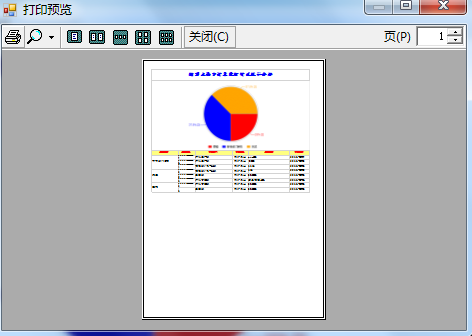
7、我们可以通过源码中的 EPrintTest.exe 打印Winform 实例 ,来执行示范,
通过WEB前端js 生成打印的TABLE的 RptData.xml格式 数据,在WINForm中直接使用
如果在网页中,通过JS 直接传给打印控件就OK