[转载]Use External Interface of Flash 8 in Python and C# Applications Open Source Flash

mikel阅读(1237)

[转载]Use External Interface of Flash 8 in Python and C# Applications Open Source Flash.

A discussion about the External Interface of Flash8 has been post in this thread. And here we demonstrate how to use External Interface of Flash8 in Python and C# applications, we talk about how to serialize/deserialize the data passed through External Interface from/to Python and C#, and how to wrap these things up.

Data Structure in Xml

Data exchange through the External Interface is in a Xml-Rpc alike structure, so we need to write something serializer/deserializer to handle it, in this case, I use a separate class to handle this in Python and C#. For the detail, you should check the source code by yourself.

And the Wrapper

For easy use, We need a wrapper class around the Flash ax control, which help us registering callback functions for Flash side and calling Flash side functions. Check the source.

The Echo Sample

We supply a echo sample in both Python and C# files, which demonstrate the usage of the wrapper and the data conversion between Flash and the host.

JSCRIPT.NET:

/* 
* Jarrad Hope - May 2006 player.js 
* Enjoy! 
* jsc.exe /target:winexe player.js 
*/ 

import System; 
import System.Windows.Forms; 
import System.ComponentModel; 
import System.Drawing; 
import System.IO; 
import AxShockwaveFlashObjects; 

public class swfWindow extends Form {    
   private var mrSwf : AxShockwaveFlashObjects.AxShockwaveFlash; 

   function swfWindow() { 
   var startupSize = new System.Drawing.Size(800, 600); 
   // Swf Setup 
   this.mrSwf = new AxShockwaveFlash(); 
   this.mrSwf.BeginInit(); 
   this.mrSwf.Location = new Point(0,0); 
   this.mrSwf.Name = "mrSwf"; 
   this.mrSwf.TabIndex = 0; 
   this.Controls.Add(this.mrSwf); 
   this.mrSwf.Size = startupSize; 
   this.mrSwf.EndInit() 
   // Window Setup 
   this.mrSwf.Movie=Path.Combine(Directory.GetCurrentDirectory(),"test.swf"); 
   this.FormBorderStyle = 1; //Fixed Size 
   this.ClientSize = startupSize; 

   //ExternalInterface EXE->SWF 
   var recCall = this.mrSwf.CallFunction("<invoke name=\"callSwf\" returntype=\"xml\"><arguments><string>Ping!</string></arguments></invoke>"); 
   MessageBox.Show(recCall); 

   } 

} 

var window : swfWindow = new swfWindow(); 
window.ShowDialog();

Python:

class TestEIFrame(wx.Frame):
    def __init__(self):
        wx.Frame.__init__(self,None,-1,
                          title='Test External Interface Between Python And Flash 8 - Echo',
                          size=(408,270))
        self.p=wx.Panel(self,-1)
        self.t=wx.TextCtrl(self.p,-1,pos=(200,0),size=(200,200),value='External Interface Echo',
                           style=wx.TE_MULTILINE)
        self.b=wx.Button(self.p,-1,pos=(200,205),size=(200,30),label='Press to Call Flash!')
        wx.EVT_BUTTON(self.b,self.b.GetId(),self.OnButton)
        self.asf=AxShockwaveFlashEx(self.p,-1,size=(200,240))
        self.asf.Scale='noScale'
        self.asf.Menu=False
        self.asf.RegisterCallback('echo',self.echo)
        self.asf.Movie=os.path.join(os.getcwd(),'eiecho.swf')
        return
    def echo(self,data):
        self.t.SetValue('Argument Received from Flash:\n\n')
        self.t.AppendText(str(data))
        return data
    def OnButton(self,evt):
        data={'a':705,
              'b':random.random(),
              'c':u'Hello World \u6587\u5b57 - Python',
              'd':[3,9,27],
              'e':None,
              'f':{'x':2.0,'y':4.5},
              'g':"",
              }
        self.t.SetValue('Argument Sended to Flash:\n\n')
        self.t.AppendText(str(data))
        data=self.asf.FlashSide.echo(data)
        self.t.AppendText('\n\nReturn Value from Flash:\n\n')
        self.t.AppendText(str(data))
        return

C#:

public class MainForm : System.Windows.Forms.Form
{
	private System.Windows.Forms.Button button1;
	private System.Windows.Forms.TextBox textBox1;
	private EIFlash.AxShockwaveFlashEx axShockwaveFlashEx1;
	public MainForm()
	{
		InitializeComponent();
		axShockwaveFlashEx1.Movie=System.IO.Path.Combine(System.IO.Directory.GetCurrentDirectory(),"eiecho.swf");
		axShockwaveFlashEx1.RegisterCallback("echo",new DgEcho(Echo));
	}

	[STAThread]
	public static void Main(string[] args)
	{
		Application.Run(new MainForm());
	}

	#region Windows Forms Designer generated code
	private void InitializeComponent() {
		...
	}
	#endregion
	void InvokeFlashEcho(object sender, System.EventArgs e)
	{
		Hashtable echodata=new Hashtable();
		echodata.Add("a",100);
		System.Random r=new System.Random();
		echodata.Add("b",r.NextDouble());
		echodata.Add("c","Hello World 文字 - C#");
		echodata.Add("d",new int[]{2,4,8});
		echodata.Add("e",null);
		echodata.Add("f",false);
		Hashtable g=new Hashtable();
		g.Add("x",2.5);
		g.Add("y",7.525);
		echodata.Add("g",g);
		textBox1.Text="Argument Sended to Flash:\r\n\r\n";
		textBox1.Text+=Repr(echodata);
		object o=axShockwaveFlashEx1.CallFlashEx("echo",echodata);
		textBox1.Text+="\r\n\r\nReturn Value from Flash:\r\n\r\n";
		textBox1.Text+=Repr(o);
	}

	string Repr(object o)
	{
		if(o==null){
			return "<null>";
		}
		Type t=o.GetType();
		if(t==typeof(bool)){
			return "<bool:"+o.ToString()+">";
		}
		if(o is IList){
			IList a=(IList)o;
			string[] ss=new string[a.Count];
			for(int i=0;i<a.Count;i++){
				ss[i]=Repr(a[i]);
			}
			return "<"+t+"["+String.Join(", ",ss)+"]>";
		}
		if(o is IDictionary){
			IDictionary d=(IDictionary)o;
			string[] ss=new string[d.Count];
			int i=0;
			foreach(object k in d.Keys){
				ss[i++]=k.ToString()+": "+Repr(d[k]);
			}
			return "<"+t+"{"+String.Join(", ",ss)+"}>";
		}
		return o.ToString();
	}

	object Echo(object data)
	{
		textBox1.Text="Argument Received from Flash:\r\n\r\n"+Repr(data);
		return data;
	}
	delegate object DgEcho(object data);
}

Files Associated to this Tutorial

[转载]Moving a Subversion Repository to Another Server

mikel阅读(930)

[转载]Moving a Subversion Repository to Another Server.

Moving a subversion repository from one server to another, while still preserving all your version history may seam like a daunting task, but fortunately it’s not too difficult.

I recently had to move a subversion (svn) repository to another server. The repository was on a Windows server and had to be moved to a Linux server.

Step 1: Backup your old Repository

The first thing you need when moving from one server to another is a dump of your subversion repository. Hopefully you are already creating dump’s with a backup script, but if not here’s how you can create a subversion dump file:

svnadmin dump /path/to/repository > repo_name.svn_dump

The dump file contains all the revisions you have ever made to your svn repository, so it will probably be quite large (it even includes files you may have deleted in a previous revision).

Step 2: Create the new Repository

Now, simply transfer the dump file on to your new subversion server, and create an empty repository:

svnadmin create /path/to/repository

Step 3: Import your old repository into the new one

Next import your dump file:

svnadmin load /path/to/repository < repo_name.svn_dump

You may want to force subversion to use the same UUID for the new repository as the old repository. To do this add --force-uuid to your svnadmin load command. In my case I wanted to do this. If you have already loaded your repository, there is a way to set the UUID at a later date, check the docs.

That’s it, you now have a replica of your old repository on your new server.

FAQ’s

What if someone committed a new revision to the old server during installation?

You can easily import the new revision, by creating an incremental dump on the old server:

svnadmin dump --incremental -r 1234 /path/to/repository > rev1234.svn_dump

Now to import that revision on your new server:

svnadmin load /path/to/repository < rev1234.svn_dump

Can’t I just use a hotcopy to restore the repository?

It depends, hotcopies created with svnadmin hotcopy must be moved to a server with identical setup. You should have the same version of subversion installed on both servers, same operating system, etc.

Subversion dumps are designed to work with different versions of subversion, and are just more flexible. Hotcopies are handy to have, but I recommend creating both hotcopies and dumps as part of your backup plan.

[转载]发现并解决ASP.NET内存耗尽(OOM),让服务器"永不重启"

mikel阅读(1281)

[转载]发现并解决ASP.NET内存耗尽(OOM),让服务器”永不重启” – koumi-blogs – 博客园.

========下面的一堆文字为了说明一件事情—.NET程序,内存溢出,如何控制.主要是堆HEAP大小如何控制以及优化.以减轻GC突发性负担及这个时候服务器当机的可能*.
对 于大型程序,完全依赖GC是不现实的,对于高负载服务器,往往我们80%的堆都由自己的析构函数接管,并辅助以自行设计的bufferpool接管堆释放 工作以达到HEAP可控的目的,减少CPU突发性负荷(CPU尖峰).虽然不像C那样可以控制的那么完全,但是多多少少对OOM的发生起到抑制作用,深入 下去可以完全避免OOM……好了IF性能和内存开销没什么追求的 THEN 就不必看了,,,,

ELSE

GO

=====================
1.下个windbg,去baidu google一下即可..
2.sos.dll 这个框架自带,只所以提下,是让大家有搜索的关键字用.
3.泄露,对于.net程序,主要是堆泄露,对于大型服务器程序,需要严格排查OOM(内存泄露)的问题,节约服务器GC开销,内存开销,cpu开销,提高支撑
4.配置环境变量 添加系统变量 _NT_DebugGER_EXTENSION_PATH   C:\WINDOWS\Microsoft.NET\Framework\v2.0.50727  这个是为了能够找到sos.dll
5.实战
启动windbg,开启调试窗口,加载用于.NET调试所使用的sos.dll
.load sos
回车之后无任何显示表示无任何错误,这个时候就可以运行调试命令了.
需要说明的是.打头的是windbg自带命令,!打头的命令是sos.dll调试命令.

显示GC堆占用情况命令  !dumpheap -stat
大概会显示这些:对象表,对象数量,每个对象内存占用情况…等,如下:
———————
0:000> !dumpheap -stat
Statistics:
MT             Count       TotalSize Class Name
7a787cc4           1              12 System.IO.FileSystemWatcher+FSWAsyncResult
7a75904c           1              12 System.Diagnostics.OrdinalCaseInsensitiveComparer
7a7575cc           1              12 System.CodeDom.Compiler.CodeDomConfigurationHandler
7a7571a8           1              12 System.Net.DefaultCertPolicy
7a75661c           1              12 System.Diagnostics.TraceListenerCollection
7a755834           1              12 System.Diagnostics.PerformanceCounterCategoryType
………………
68a66a88     227,559      12,743,304 System.Web.UI.WebControls.Literal
68a2f7fc     399,272      14,373,792 System.Web.UI.ControlCollection
68a92e2c     768,731      33,824,164 System.Web.UI.Control+OccasionalFields
68a884a0     641,952      38,517,120 System.Web.UI.LiteralControl
79124228     879,515      43,394,976 System.Object[]
790fa3e0   1,431,594     122,806,484 System.String

Total 10,389,625 objects, Total size: 463,313,540
———————-

1,431,594 个 System.String对象 占用 122 MBytes

使用!dumpobj 可以查看System.String对象构成情况

0:000> !dumpheap -type System.Web.UI.LiteralControl
Address       MT Size Gen
023ea0a8 68a884a0   60   2 System.Web.UI.LiteralControl
023ea0e4 68a884a0   60   2 System.Web.UI.LiteralControl
023ea374 68a884a0   60   2 System.Web.UI.LiteralControl
023ea460 68a884a0   60   2 System.Web.UI.LiteralControl
023ea510 68a884a0   60   2 System.Web.UI.LiteralControl
023eab3c 68a884a0   60   2 System.Web.UI.LiteralControl
……..CONTINUED……..
023fe31c 68a884a0   60   2 System.Web.UI.LiteralControl
023fe414 68a884a0   60   2 System.Web.UI.LiteralControl
023fe4c4 68a884a0   60   2 System.Web.UI.LiteralControl
023fe500 68a884a0   60   2 System.Web.UI.LiteralControl

哦 基本上都是LiteralControl

随便抓个控件的地址来分析!do命令

0:000> !do 023ea0a8
Name: System.Web.UI.LiteralControl
MethodTable: 68a884a0
EEClass: 68a88428
Size: 60(0x3c) bytes
GC Generation: 2
(C:\WINDOWS\assembly\GAC_32\System.Web\2.0.0.0__b03f5f7f11d50a3a\System.Web.dll)
Fields:
MT    Field Offset                   Type   VT     Attr    Value Name
790fa3e0  4001fe0      4          System.String    0 instance 00000000 _id
790fa3e0  4001fe1      8          System.String    0 instance 00000000 _cachedUniqueID
68a2af44  4001fe2      c   …em.Web.UI.Control    0 instance 023e8864 _parent
68a91070  4001fe3     2c           System.Int32    0 instance        0 _controlState
68a85ea0  4001fe4     10   …m.Web.UI.StateBag    0 instance 00000000 _viewState
68a2af44  4001fe5     14   …em.Web.UI.Control    0 instance 023e8864 _namingContainer
68a273d0  4001fe6     18     System.Web.UI.Page    0 instance 01df4514 _page
68a92e2c  4001fe7     1c   …+OccasionalFields    0 instance 00000000 _occasionalFields
68a2b378  4001fe8     20   …I.TemplateControl    0 instance 00000000 _templateControl
68a14528  4001fe9     24   …m.Web.VirtualPath    0 instance 00000000 _templateSourceVirtualDirectory
68a8bb48  4001fea     28   …rs.ControlAdapter    0 instance 00000000 _adapter
68a3a8f8  4001feb     30   …SimpleBitVector32    1 instance 023ea0d8 flags
790f9c18  4001fda    c70          System.Object    0   shared   static EventDataBinding
>> Domain:Value 000f0d00:NotInit 0011a720:01df0028 <<
790f9c18  4001fdb    c74          System.Object    0   shared   static EventInit
>> Domain:Value 000f0d00:NotInit 0011a720:01df0034 <<
790f9c18  4001fdc    c78          System.Object    0   shared   static EventLoad
>> Domain:Value 000f0d00:NotInit 0011a720:01df0040 <<
790f9c18  4001fdd    c7c          System.Object    0   shared   static EventUnload
>> Domain:Value 000f0d00:NotInit 0011a720:01df004c <<
790f9c18  4001fde    c80          System.Object    0   shared   static EventPreRender
>> Domain:Value 000f0d00:NotInit 0011a720:01df0058 <<
790f9c18  4001fdf    c84          System.Object    0   shared   static EventDisposed
>> Domain:Value 000f0d00:NotInit 0011a720:01df0064 <<
79124228  4001fec    c88        System.Object[]    0   shared   static automaticIDs
>> Domain:Value 000f0d00:NotInit 0011a720:01df0070 <<
790fa3e0  4002211     34          System.String    0 instance 02238664 _text

这里如果发现某个值过大,就可以继续深入使用!do + 地址 来进入查看,以便找到OOM的根源..试试

0:000> !do 02238664
Name: System.String
MethodTable: 790fa3e0
EEClass: 790fa340
Size: 158(0x9e) bytes
GC Generation: 2
(C:\WINDOWS\assembly\GAC_32\mscorlib\2.0.0.0__b77a5c561934e089\mscorlib.dll)
String:
Fields:
MT Field Offset Type VT Attr Value Name
790fed1c 4000096 4 System.Int32 0 instance 71 m_arrayLength
790fed1c 4000097 8 System.Int32 0 instance 70 m_stringLength
790fbefc 4000098 c System.Char 0 instance 3c m_firstChar
790fa3e0 4000099 10 System.String 0 shared static Empty
>> Domain:Value 000f0d00:790d6584 0011a720:790d6584 <<
79124670 400009a 14 System.Char[] 0 shared static WhitespaceChars
>> Domain:Value 000f0d00:01d413b8 0011a720:01d44f80 <<

可以看到32位地址为02238664的是用于表格的结束标志存储.

使用!objsize进一步命令查看对象内的的对象构成,精确到class名,自己可以试试了…还有很多命令可以查看Gen的回收情况,对于长 时间未释放的unmanaged资源也可以列表出来,这个时候可以do进去,查看内部结构,找到属于哪段代码之后,再返回自己的.cs代码进行逻辑调 整….这样的话,性能就很可观了.同时可以尽量使用好CPU,而不必让不必要的CPU时间牺牲框架和底层的代码胶合层上面..永远要记住CPU时间是 用户的,不是你的!这样,对内存了解的多一些,你的程序就能跑的更快一点,持久运行的时间就更长一些…

通常,ASP.NET或者socket服务器运行的时候,对内存的要求是比较高的,如果内存的性能我们不能去把握,真的很难再生产环境中超越LAMP体系架构.
我的观点是,内存—能节约,尽量节约吧,能高效利用,尽量高效利用!所以写这篇帖子,非常非常肤浅的介绍了下,前后也就写了20分钟,因为要睡觉了…

—-[成都]CCCP苏联程序员

对了可以去买本”windows调试技术”来看 http://bbs.dbgtech.net/forumdisplay.php?fid=16 可以先了解下.

技术交流群欢迎您的加入!QQ群:29123371

[转载]WebUI自动化测试工具--Molybdenum

mikel阅读(1034)

[转载]WebUI自动化测试工具–Molybdenum – linux,shell,db,php,c/c++,运维,架构 – 博客园.

Molybdenum是一个自动化的测试工具,我们可以用它来进行功能测试。我们可以在firefox的附加组件里添加它。

Molybdenum使用简单,安装简单,即使没有编程语言基础,也可以使用该软件,可以生成测试报告。很多资料都是英文的,我还没有搜到一篇中文介绍Molybdenum的文章。还有一个比较好的工具Selenium IDE,这里暂不做介绍,它们各有优缺点。

安装过程如下:

打开firefox浏览器->工具->附加组件->获取附加组件->在搜索框输入“Molybdenum”,点击放大镜,即可搜到,点击安装即可。

使用:

打开ff浏览器,输入要测试的网址,在这里暂且测试百度吧,打开Molybdenum工具,

图形界面如下:

我们在浏览器里输入搜索内容,Molybdenum就会自动记录在浏览器里的内容

[转载]WEB前端开发规范文档

mikel阅读(803)

[转载]WEB前端开发规范文档 – Mr.Think的博客@MrThink.net… – 博客园.

为新项目写的一份规范文档, 分享给大家. 我想前端开发过程中, 无论是团队开发, 还是单兵做站, 有一份开发文档做规范, 对开发工作都是很有益的. 本文档由本人编写, 部分意见来源于网络, 以此感谢, 片面及有误的地方, 希望大家指正. 另, 本文档部分规范是为我所在项目组所写, 使用时请根据实际项目需求修改.
以下为[WEB前端开发规范文档]正文点此查看WEB版本

规范目的

为提高团队协作效率, 便于后台人员添加功能及前端后期优化维护, 输出高质量的文档, 特制订此文档. 本规范文档一经确认, 前端开发人员必须按本文档规范进行前台页面开发. 本文档如有不对或者不合适的地方请及时提出, 经讨论决定后方可更改.

基本准则

符合web标准, 语义化html, 结构表现行为分离, 兼容性优良. 页面性能方面, 代码要求简洁明了有序, 尽可能的减小服务器负载, 保证最快的解析速度.

文件规范

1. html, css, js, images文件均归档至<系统开发规范>约定的目录中;

2. html文件命名: 英文命名, 后缀.htm. 同时将对应界面稿放于同目录中, 若界面稿命名为中文, 请重命名与html文件同名, 以方便后端添加功能时查找对应页面;

3. css文件命名: 英文命名, 后缀.css. 共用base.css, 首页index.css, 其他页面依实际模块需求命名.;

4. Js文件命名: 英文命名, 后缀.js. 共用common.js, 其他依实际模块需求命名.

html书写规范

1. 文档类型声明及编码: 统一为html5声明类型<!DOCTYPE html>; 编码统一为<meta charset=”utf-8″ />, 书写时利用IDE实现层次分明的缩进;

2. 非特殊情况下样式文件必须外链至<head>…</head>之间;非特殊情况下JavaScript文件必须外链至页面底部;

3. 引入样式文件或JavaScript文件时, 须略去默认类型声明, 写法如下:

<link rel=”stylesheet” href=”…” />

<style>…</style>

<script src=”…”></script>

4. 引入JS库文件, 文件名须包含库名称及版本号及是否为压缩版, 比如JQuery-1.4.1.min.js; 引入插件, 文件名格式为库名称+插件名称, 比如JQuery.cookie.js;

5. 所有编码均遵循xhtml标准, 标签 & 属性 & 属性命名 必须由小写字母及下划线数字组成, 且所有标签必须闭合, 包括br (<br />), hr(<hr />)等; 属性值必须用双引号包括;

6. 充分利用无兼容性问题的html自身标签, 比如span, em, strong, optgroup, label,等等; 需要为 html元素添加自定义属性的时候, 首先要考虑下有没有默认的已有的合适标签去设置, 如果没有, 可以使用须以”data-”为前缀来添加自定义属 性,避免使用”data:”等其他命名方式;

7. 语义化html, 如 标题根据重要性用h*(同一页面只能有一个h1), 段落标记用p, 列表用ul, 内联元素中不可嵌套块级元素;

8. 尽可能减少div嵌套, 如<div class=”box”& amp;gt;<div class=”welcome”>欢迎访问XXX, 您的用户名是<div class=”name”& gt;用户名</div></div></div>完全可以用以下代码替 代: <div class=”box”&gt;<p>欢迎访问XXX, 您的用户名是<span>用户名& lt;/span></p></div>;

9. 书写链接地址时, 必须避免重定向,例如:href=”http://itaolun.com/”, 即须在URL地址后面加上“/”;

10. 在页面中尽量避免使用style属性,即style=”…”;

11. 必须为含有描述性表单元素(input, textarea)添加label, 如<p> 姓名: <input type=”text” id=”name” name=”name” /></p>须写成:< p><label for=”name”>姓名: </label>< input type=”text” id=”name” /></p>

12. 能以背景形式呈现的图片, 尽量写入css样式中;

13. 重要图片必须加上alt属性; 给重要的元素和截断的元素加上title;

14. 给区块代码及重要功能(比如循环)加上注释, 方便后台添加功能;

15. 特殊符号使用: 尽可能使用代码替代: 比如 <(<) & >(&gt;) & 空格( ) & »(») 等等;

16. 书写页面过程中, 请考虑向后扩展性;

17. class & id 参见 css书写规范.

css书写规范

1. 编码统一为utf-8;

2. 协作开发及分工: i会根据各个模块, 同时根据页面相似程序, 事先写好大体框架文件, 分配给前端人员实现内部结构&表 现&行为; 共用css文件base.css由i书写, 协作开发过程中, 每个页面请务必都要引入, 此文件包含reset及头部底部样 式, 此文件不可随意修改;

3. class与id的使用: id是唯一的并是父级的, class是可以重复的并是子级的, 所以id仅使用在大的模块上, class可用在重复使用率高及子级中; id原则上都是由我分发框架文件时命名的, 为JavaScript预留钩子的除外;

4. 为JavaScript预留钩子的命名, 请以 js_ 起始, 比如: js_hide, js_show;

5. class与id命名: 大的框架命名比如header/footer/wrapper/left/right之类的在2中由i统一命名.其 他样式名称由 小写英文 & 数字 & _ 来组合命名, 如i_comment, fontred, width200; 避免使用中 文拼音, 尽量使用简易的单词组合; 总之, 命名要语义化, 简明化.

6. 规避class与id命名(此条重要, 若有不明白请及时与i沟通):

a, 通过从属写法规避, 示例见d;

b, 取父级元素id/class命名部分命名, 示例见d;

c, 重复使用率高的命名, 请以自己代号加下划线起始, 比如i_clear;

d, a,b两条, 适用于在2中已建好框架的页面, 如, 要在2中已建好框架的页面代码<div id=”mainnav”></div>中加入新的div元素,

按a命名法则: <div id=”mainnav”><div class=”firstnav”>…</div></div>,

样式写法:  #mainnav  .firstnav{…….}

按b命名法则: <div id=”mainnav”><div class=”main_firstnav”>…</div></div>,

样式写法:  .main_firstnav{…….}

7. css属性书写顺序, 建议遵循 布局定位属性–>自身属性–>文本属性–>其他属性. 此条可根据自身习惯书写, 但尽量保证同类属性写在一起. 属性列举: 布局定位属性主要包括: margin & padding & float(包括clear) & position(相应的 top,right,bottom,left) & display & visibility & overflow等; 自身属性主要包括: width  &  height  &  background  &  border; 文本属性主要包括: font & color & text-align & text-decoration & text-indent等;其他属性包括: list-style(列表样式) & vertical-vlign & cursor & z-index(层叠顺序)  & zoom等. 我所列出的这些属性只是最常用到的, 并不代表全部;

8. 书写代码前, 考虑并提高样式重复使用率;

9. 充分利用html自身属性及样式继承原理减少代码量, 比如:

<ul class=”list”><li>这儿是标题列表<span>2010-09-15</span></ul>

定义

ul.list li{position:relative}  ul.list li span{position:absolute; right:0}

即可实现日期居右显示

10. 样式表中中文字体名, 请务必转码成unicode码, 以避免编码错误时乱码;

11. 背景图片请尽可能使用sprite技术, 减小http请求, 考虑到多人协作开发, sprite按模块制作;

12. 使用table标签时(尽量避免使用table标签), 请不要用width/ height/cellspacing/cellpadding等table属性直接定义表现, 应尽可能的利用table自身私有属性分离结构与表现, 如thead,tr,th,td,tbody,tfoot,colgroup,scope; (cellspaing及cellpadding的css控制方法: table{border:0;margin:0;border-collapse:collapse;} table th, table td{padding:0;} , base.css文件中我会初始化表格样式)

13. 杜绝使用<meta http-equiv=”X-UA-Compatible” content=”IE=7″ /> 兼容ie8;

14. 用png图片做图片时, 要求图片格式为png-8格式,若png-8实在影响图片质量或其中有半透明效果, 请为ie6单独定义背景:

_background:none;_filter:progid:DXImageTransform.Microsoft.AlphaImageLoader(sizingMethod=crop, src=’img/bg.png’);

15. 避免兼容性属性的使用, 比如text-shadow || css3的相关属性;

16. 减少使用影响性能的属性, 比如position:absolute || float ;

17. 必须为大区块样式添加注释, 小区块适量注释;

18. 代码缩进与格式: 建议单行书写, 可根据自身习惯, 后期优化i会统一处理;

JavaScript书写规范

1. 文件编码统一为utf-8, 书写过程过, 每行代码结束必须有分号; 原则上所有功能均根据XXX项目需求原生开发, 以避免网上down下来的代码造成的代码污染(沉冗代码 || 与现有代码冲突 || …);

2. 库引入: 原则上仅引入jQuery库, 若需引入第三方库, 须与团队其他人员讨论决定;

3. 变量命名: 驼峰式命名. 原生JavaScript变量要求是纯英文字母, 首字母须小写, 如iTaoLun;

jQuery变量要求首字符为’_’, 其他与原生JavaScript 规则相同, 如: _iTaoLun;

另, 要求变量集中声明, 避免全局变量.

4. 类命名: 首字母大写, 驼峰式命名. 如 ITaoLun;

5. 函数命名: 首字母小写驼峰式命名. 如iTaoLun();

6. 命名语义化, 尽可能利用英文单词或其缩写;

7. 尽量避免使用存在兼容性及消耗资源的方法或属性, 比如eval() & innerText;

8. 后期优化中, JavaScript非注释类中文字符须转换成unicode编码使用, 以避免编码错误时乱码显示;

9. 代码结构明了, 加适量注释. 提高函数重用率;

10. 注重与html分离, 减小reflow, 注重性能.

图片规范

1. 所有页面元素类图片均放入img文件夹, 测试用图片放于img/demoimg文件夹;

2. 图片格式仅限于gif || png || jpg;

3. 命名全部用小写英文字母 || 数字 || _ 的组合,其中不得包含汉字 || 空格 || 特殊字符;尽量用易懂的词汇, 便于团队其他 成员理解; 另, 命名分头尾两部分, 用下划线隔开, 比如ad_left01.gif || btn_submit.gif;

4. 在保证视觉效果的情况下选择最小的图片格式与图片质量, 以减少加载时间;

5. 尽量避免使用半透明的png图片(若使用, 请参考css规范相关说明);

6. 运用css sprite技术集中小的背景图或图标, 减小页面http请求, 但注意, 请务必在对应的sprite psd源图中划参考线, 并保存至img目录下.

注释规范

1. html注释: 注释格式 <!–这儿是注释–>, ’–’只能在注释的始末位置,不可置入注释文字区域;

2. css注释: 注释格式 /*这儿是注释*/;

3. JavaScript注释, 单行注释使用’//这儿是单行注释’ ,多行注释使用 /* 这儿有多行注释 */;

开发及测试工具约定

建议使用Aptana || Dw || Vim , 亦可根据自己喜好选择, 但须遵循如下原则:

1. 不可利用IDE的视图模式’画’代码;

2. 不可利用IDE生成相关功能代码, 比如Dw内置的一些功能js;

3. 编码必须格式化, 比如缩进;

测试工具: 前期开发仅测试FireFox & IE6 & IE7 & IE8 , 后期优化时加入Opera & Chrome;

建议测试顺序: FireFox–>IE7–>IE8–>IE6–>Opera–>Chrome, 建议安装firebug及IE Tab Plus插件.

其他规范

1. 开发过程中严格按分工完成页面, 以提高css复用率, 避免重复开发;

2. 减小沉冗代码, 书写所有人都可以看的懂的代码. 简洁易懂是一种美德. 为用户着想, 为服务器着想.

原文发布于Mr.Think的博客: http://mrthink.net/frontend-specification-bymrthink/ 转载请注明出处.

[转载]SQL Server数据库表锁定原理以及如何解除表的锁定--示例演示

mikel阅读(1210)

[转载]SQL Server数据库表锁定原理以及如何解除表的锁定–示例演示 – 我爱菊花 – 博客园.

有几个朋友留言建议结合例子来演示一下, 上篇已经说过锁的几种类型, 可以利用系统动态视图sys.dm_tran_locks查看到,重要的栏位如下:

resource_type 被锁的资源类型(Database, FILE, Object,PAGE,KEY,EXTENT,RID,APPLICATION,METADATA,HOBT,APPOCATION_UNIT)
request_mode 锁的类型(共享锁,更新锁,排它锁, 架构锁等)
resource_description 资源描述
request_session_id Request session ID

一: 下面以AdventureWorks2008为示例数据库做简要的说明,过滤掉一般的数据库的共享锁, 作为示例必须要看到锁, 所以用WITH(HOLDLOCK)来保持锁.

1. Shared locks (S) 共享锁

USE AdventureWorks2008

BEGIN TRAN
select * from Sales.SalesOrderHeader WITH(HOLDLOCK)
where SalesOrderID='43662' 

SELECT resource_type, request_mode, resource_description,request_session_id, DB_NAME(resource_database_id)as resource_database
FROM   sys.dm_tran_locks
WHERE  resource_type <> 'DATABASE'

--ROLLBACK TRAN
.csharpcode, .csharpcode pre { font-size: small; color: black; font-family: consolas,”Courier New”,courier,monospace; background-color: rgb(255, 255, 255); }.csharpcode pre { margin: 0em; }.csharpcode .rem { color: rgb(0, 128, 0); }.csharpcode .kwrd { color: rgb(0, 0, 255); }.csharpcode .str { color: rgb(0, 96, 128); }.csharpcode .op { color: rgb(0, 0, 192); }.csharpcode .preproc { color: rgb(204, 102, 51); }.csharpcode .asp { background-color: rgb(255, 255, 0); }.csharpcode .html { color: rgb(128, 0, 0); }.csharpcode .attr { color: rgb(255, 0, 0); }.csharpcode .alt { background-color: rgb(244, 244, 244); width: 100%; margin: 0em; }.csharpcode .lnum { color: rgb(96, 96, 96); }

在事务回滚之前, 查看锁的类型:

捕获

其他session对Table只读, 不能更新, 在开一个新的session测试:

select * from Sales.SalesOrderHeader  where SalesOrderID='43662'

go
update Sales.SalesOrderHeader set OrderDate=GETDATE() where SalesOrderID='43662'

.csharpcode, .csharpcode pre { font-size: small; color: black; font-family: consolas,”Courier New”,courier,monospace; background-color: rgb(255, 255, 255); }.csharpcode pre { margin: 0em; }.csharpcode .rem { color: rgb(0, 128, 0); }.csharpcode .kwrd { color: rgb(0, 0, 255); }.csharpcode .str { color: rgb(0, 96, 128); }.csharpcode .op { color: rgb(0, 0, 192); }.csharpcode .preproc { color: rgb(204, 102, 51); }.csharpcode .asp { background-color: rgb(255, 255, 0); }.csharpcode .html { color: rgb(128, 0, 0); }.csharpcode .attr { color: rgb(255, 0, 0); }.csharpcode .alt { background-color: rgb(244, 244, 244); width: 100%; margin: 0em; }.csharpcode .lnum { color: rgb(96, 96, 96); }

select可以正常执行, update语句一直处于等待状态, 等待上面的session释放锁.

2. Update locks (U): 更新锁是共享锁和独占锁的组合.用UPDLOCK保持更新锁

USE AdventureWorks2008

BEGIN TRAN
select * from Sales.SalesOrderHeader WITH(UPDLOCK)
where SalesOrderID='43662' 

SELECT resource_type, request_mode, resource_description,request_session_id,DB_NAME(resource_database_id)as resource_database
FROM   sys.dm_tran_locks
WHERE  resource_type <> 'DATABASE'

ROLLBACK TRAN

.csharpcode, .csharpcode pre { font-size: small; color: black; font-family: consolas,”Courier New”,courier,monospace; background-color: rgb(255, 255, 255); }.csharpcode pre { margin: 0em; }.csharpcode .rem { color: rgb(0, 128, 0); }.csharpcode .kwrd { color: rgb(0, 0, 255); }.csharpcode .str { color: rgb(0, 96, 128); }.csharpcode .op { color: rgb(0, 0, 192); }.csharpcode .preproc { color: rgb(204, 102, 51); }.csharpcode .asp { background-color: rgb(255, 255, 0); }.csharpcode .html { color: rgb(128, 0, 0); }.csharpcode .attr { color: rgb(255, 0, 0); }.csharpcode .alt { background-color: rgb(244, 244, 244); width: 100%; margin: 0em; }.csharpcode .lnum { color: rgb(96, 96, 96); }

查看到锁的信息:

捕获

3.Exclusive locks (X): 独占锁是为了锁定数据被一个session修改的数据, 而不能够被另外的session修改. 只能指定NOLOCK来读取.

USE AdventureWorks2008

BEGIN TRAN

update Sales.SalesOrderHeader set ShipDate=GETDATE() where SalesOrderID='43662'

SELECT resource_type, request_mode, resource_description,request_session_id,DB_NAME(resource_database_id)as resource_database--,*
FROM   sys.dm_tran_locks
WHERE  resource_type <> 'DATABASE'

ROLLBACK TRAN

.csharpcode, .csharpcode pre { font-size: small; color: black; font-family: consolas,”Courier New”,courier,monospace; background-color: rgb(255, 255, 255); }.csharpcode pre { margin: 0em; }.csharpcode .rem { color: rgb(0, 128, 0); }.csharpcode .kwrd { color: rgb(0, 0, 255); }.csharpcode .str { color: rgb(0, 96, 128); }.csharpcode .op { color: rgb(0, 0, 192); }.csharpcode .preproc { color: rgb(204, 102, 51); }.csharpcode .asp { background-color: rgb(255, 255, 0); }.csharpcode .html { color: rgb(128, 0, 0); }.csharpcode .attr { color: rgb(255, 0, 0); }.csharpcode .alt { background-color: rgb(244, 244, 244); width: 100%; margin: 0em; }.csharpcode .lnum { color: rgb(96, 96, 96); }

查看锁:

捕获

4.Intent locks (I): 意向锁用于建立锁的层次结构. 意向锁包含三种类型:意向共享 (IS)、意向排他 (IX) 和意向排他共享 (SIX)。

数据库引擎使用意向锁来保护共享锁(S 锁)或排他锁(X 锁)放置在锁层次结构的底层资源上。 意向锁之所以命名为意向锁,是因为在较低级别锁前可获取它们,因此会通知意向将锁放置在较低级别上。

意向锁有两种用途:

  • 防止其他事务以会使较低级别的锁无效的方式修改较高级别资源。
  • 提高数据库引擎在较高的粒度级别检测锁冲突的效率。

5. Schema locks (Sch): 架构锁

  • Schema stability lock(Sch-S): 保持架构稳定性,用在生成执行计划时,不会阻止对数据的访问.
  • Schema modification lock (Sch-M):用在DDL操作时.当架构正在被改变时, 阻止对对象数据的访问.
USE AdventureWorks2008

BEGIN TRAN
CREATE TABLE MyTable (ID INT, NAME VARCHAR(20),COUNTRY VARCHAR(15))

SELECT resource_type, request_mode, resource_description
FROM   sys.dm_tran_locks
WHERE  resource_type <> 'DATABASE' order by request_mode

ROLLBACK TRAN

捕获

6. Bulk Update locks (BU)

数据库引擎在将数据大容量复制到表中时使用了大容量更新 (BU) 锁, 并指定了 TABLOCK 提示或使用 sp_tableoption 设置了 table lock on bulk load 表选项. 大容量更新锁(BU 锁)允许多个线程将数据并发地大容量加载到同一表, 同时防止其他不进行大容量加载数据的进程访问该表.

7. Key – Range locks

在使用可序列化事务隔离级别时, 对于 Transact-SQL 语句读取的记录集, 键范围锁可以隐式保护该记录集中包含的行范围. 键范围锁可防止幻读. 通过保护行之间键的范围, 它还防止对事务访问的记录集进行幻像插入或删除.

二: 死锁与死锁解除

1. 死锁

使用或管理数据库都不可避免的涉及到死锁. 一旦发生死锁, 数据相互等待对方资源的释放,会阻止对数据的访问, 严重会造成DB挂掉. 当资源被锁定, 无法被访问时, 可以终止访问DB的那个session来达到解锁的目的(即 Kill掉造成锁的那个进程).

在两个或多个任务中,如果每个任务锁定了其他任务试图锁定的资源,此时会造成这些任务永久阻塞,从而出现死锁。 例如:

  • 事务 A 获取了行 1 的共享锁。
  • 事务 B 获取了行 2 的共享锁。
  • 现在,事务 A 请求行 2 的排他锁,但在事务 B 完成并释放其对行 2 持有的共享锁之前被阻塞。
  • 现在,事务 B 请求行 1 的排他锁,但在事务 A 完成并释放其对行 1 持有的共享锁之前被阻塞。

事务 B 完成之后事务 A 才能完成,但是事务 B 由事务 A 阻塞。该条件也称为循环依赖关系: 事务 A 依赖于事务 B,事务 B 通过对事务 A 的依赖关系关闭循环。

除非某个外部进程断开死锁,否则死锁中的两个事务都将无限期等待下去。 Microsoft SQL Server 数据库引擎死锁监视器定期检查陷入死锁的任务。 如果监视器检测到循环依赖关系,将选择其中一个任务作为牺牲品,然后终止其事务并提示错误。 这样,其他任务就可以完成其事务。 对于事务以错误终止的应用程序,它还可以重试该事务,但通常要等到与它一起陷入死锁的其他事务完成后执行。

2. 死锁检测

2.1 SQL Server 数据库引擎自动检测 SQL Server 中的死锁循环。数据库引擎选择一个会话作为死锁牺牲品,然后终止当前事务(出现错误)来打断死锁。

2.2 查看DMV: sys.dm_tran_locks

2.3 SQL Server Profiler能够直观的显示死锁的图形事件.

image

三: 锁兼容性

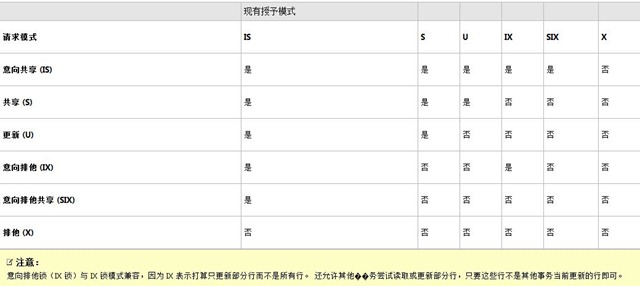
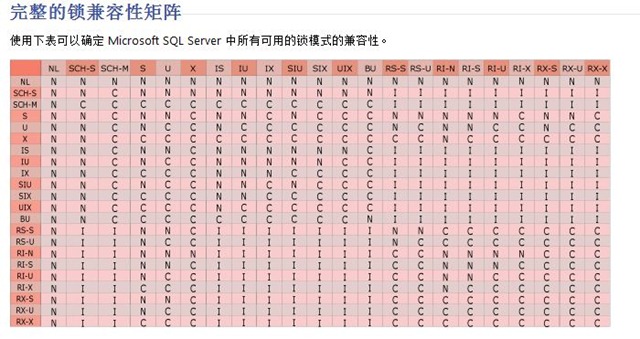
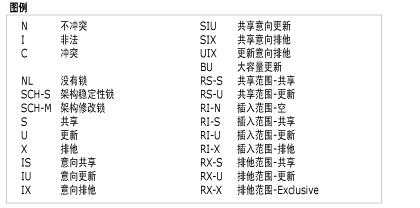
锁兼容性控制多个事务能否同时获取同一资源上的锁。 如果资源已被另一事务锁定,则仅当请求锁的模式与现有锁的模式相兼容时,才会授予新的锁请求。 如果请求锁的模式与现有锁的模式不兼容,则请求新锁的事务将等待释放现有锁或等待锁超时间隔过期。 例如,没有与排他锁兼容的锁模式。 如果具有排他锁(X 锁),则在释放排他锁(X 锁)之前,其他事务均无法获取该资源的任何类型(共享、更新或排他)的锁。 另一种情况是,如果共享锁(S 锁)已应用到资源,则即使第一个事务尚未完成,其他事务也可以获取该项的共享锁或更新锁(U 锁)。 但是,在释放共享锁之前,其他事务无法获取排他锁。

1

2

3

四: 总结

锁的原理比较抽象,对用户来说是透明的,不用过多的关注. 应用程序一般不直接请求锁. 锁由数据库引擎的一个部件(称为“锁管理器”)在内部管理. 当数据库引擎实例处理Transact-SQL 语句时, 数据库引擎查询处理器会决定将要访问哪些资源. 查询处理器根据访问类型和事务隔离级别设置来确定保护每一资源所需的锁的类型. 然后, 查询处理器将向锁管理器请求适当的锁. 如果与其他事务所持有的锁不会发生冲突, 锁管理器将授予该锁.

—————————————————– 本人博客地址:http://www.cnblogs.com/changbluesky 请多多支持,谢谢!———

[转载]C#调用dephi的dll之详解

mikel阅读(1155)

[转载]C#调用dephi的dll之详解 – Moveing life – 博客园.

C#调用dephi的dll用DllImport来调用的
一般是用非托管的
具体形式如下:[DllImport(“WZFSE.dll”, CharSet = CharSet.Ansi, CallingConvention = CallingConvention.StdCall)]
下面紧接着他的申明函数
public static extern void InitDll(IntPtr handle, bool methodAddress);
申明一个函数就要引用下他的dll
IntPtr这个类型可以申明为其他语言的句柄,指针等。
若要实现其他语言类似C++的函数指针形式 这时我们考虑用C#的委托来实现

将dephi的窗体签入到自己的C#系统里 还有一点比较重要,我们是调用dephi的窗体,此时显示在我们C#窗体中会有dephi的窗体

这时我们怎么办呢  怎么去除dephi中的窗体呢  这时我们就需要用API函数了 API函数在dephi有 C#中也有
在C#中是这么引用的 [DllImport(“user32.dll”, CharSet = CharSet.Ansi, CallingConvention = CallingConvention.StdCall)]
public static extern void MoveWindow(IntPtr handler, int x, int y, int width, int height, bool repaint);

下面插入一个类 这里面包含了怎么引用dephi的dll 以及怎么申明

代码

其中API中的SetWindowLong这个方法是可以实现去除窗体的标题栏的  具体调用SetWindowLong(common.p, GWL_EXSTYLE, GetWindowLong(handle, GWL_EXSTYLE) & (~WS_CAPTION));

但一般完整利用API函数的调用是这样的

代码

1 decallback de1 = new decallback(iscallback);//利用委托
2 BaseCommon.ComplianceCommon.CompliancePlatDLL.InitDll(this.Handle, de1(this.Handle));//初始化
3 common.p = BaseCommon.ComplianceCommon.CompliancePlatDLL.wzLoadModule(DoRiskSetup, “”, 0);//取得句柄
4 if (common.p != (IntPtr)0)//判断该句柄不是弹出窗体时
5 {
6 //去除dephi窗体的标题栏
7 BaseCommon.ComplianceCommon.CompliancePlatDLL.SetParent(common.p, panel1.Handle);
8 BaseCommon.ComplianceCommon.CompliancePlatDLL.SetWindowLong(common.p, BaseCommon.ComplianceCommon.CompliancePlatDLL.GWL_EXSTYLE, BaseCommon.ComplianceCommon.CompliancePlatDLL.GetWindowLong(common.p, BaseCommon.ComplianceCommon.CompliancePlatDLL.GWL_EXSTYLE) & (~BaseCommon.ComplianceCommon.CompliancePlatDLL.WS_CAPTION));
9 BaseCommon.ComplianceCommon.CompliancePlatDLL.MoveWindow(common.p, 0, 0, panel1.ClientSize.Width, panel1.ClientSize.Height, false);
10 }

注:上面的dll的名称只是个例子 具体还要看你要引用哪个dll  API中的函数在C#中是这样引用的

表达能力有限 希望对你们有帮助··具体不懂可邮箱联系: elivn@vip.qq.com

[转载]C#中的委托,匿名方法和Lambda表达式

mikel阅读(4646)

[转载]C#中的委托,匿名方法和Lambda表达式 – 倪大虾 – 博客园.

简介

在.NET中,委托,匿名方法和Lambda表达式很容易发生混淆。我想下面的代码能证实这点。下面哪一个First会被编译?哪一个会返回我 们需要的结果?即Customer.ID=5.答案是6个First不仅被编译,并都获得正确答案,且他们的结果一样。如果你对此感到困惑,那么请继续看 这篇文章。

01 class Customer
02 {
03 public int ID { get; set; }
04 public static bool Test(Customer x)
05 {
06 return x.ID == 5;
07 }
08 }
09 ...
10 List<Customer> custs = new List<Customer>();
11 custs.Add(new Customer() { ID = 1 });
12 custs.Add(new Customer() { ID = 5 });
13
14 custs.First(new Func<Customer, bool>(delegate(Customer x) { return x.ID == 5; }));
15 custs.First(new Func<Customer, bool>((Customer x) => x.ID == 5));
16 custs.First(delegate(Customer x) { return x.ID == 5; });
17 custs.First((Customer x) => x.ID == 5);
18 custs.First(x => x.ID == 5);
19 custs.First(Customer.Test);

什么是委托?

现在你定义一个处理用户订单的购物车ShoppingCart类。管理层决定根据数量,价格等给客人折扣。做为其中的一部分,他们已经实现了处 理订单时你要考虑一方面。不用考虑过多,你简单声明一个变量来保存有“吸引力的折扣”(magicDisCount),然后实现逻辑。

01 class Program {
02 static void Main(string[] args)  {
03 new ShoppingCart().Process();
04 }
05 }
06 class ShoppingCart {
07 public void Process() {
08 int magicDiscount = 5;
09 // ...
10 }
11 }

第二天,异想天开的管理层决定根据购买时间调整折扣。这个很简单,但需要你改动一点代码。

1 class ShoppingCart {
2 public void Process() {
3 int magicDiscount = 5;
4 if (DateTime.Now.Hour < 12) {
5 magicDiscount = 10;
6 }
7 }
8 }

接下来一段时间里,管理层又反复添加更多的折扣逻辑。这时你就会在心理抱怨“受够了”。那么我该怎么做才能把这些无聊的逻辑从我的代码中剥离出 去,让该处理的人去处理呢?这时你要做的是移交或者委派给相应职能的别人。幸运的是,.NET为此提供了一种叫做“委托”的机制。

委托

如果你有C/C++编程背景,描述委托最好的方法是“函数指针”。对所有人来说,可以认为把委托传递给方法与把值或对象传递给方法一样。比如下面三行代码就表现出一样的基本原则:你在传递数据给Process处理而不是你自己使用。

1 // 给方法Process传递一个整形值
2 Process( 5 );
3 // 给方法Process传递一个ArrayList的引用
4 Process( new ArrayList() );
5 // 给方法Process传递一个方法的引用
6 Process( discountDelegate );

DiscountDelegate是什么?我如何创建?Process方法如何使用?首先如同声明一个类一样,声明一个委托类型。

1 delegate int DiscountDelegate();
  这句话的意思是我们有一个叫DiscountDelegate的委托类型,我们可以像使用类,结构体等一样使用它。它不需要数据参数,但返回一个整数值。像类一样,我们必须创建一个它的实例它才有意义。记住,创建一个委托实例实质上是创建一个方法的引用。创建实例时关键是要明白DiscountDelegate没有任何构造器,它有一个隐式的构造函数来构造一个与它相同签名的方法(没有传入参数,返回一个整数)。那你怎么给这个构造函数一个方法呢?.NET向你提供了一个向它名字一样简单的方法,你所做的只是忽略圆括号。

1 DiscountDelegate discount = new DiscountDelegate(class.method);
  在深入之前,先回到开始的例子,整理一个代码。我们会添加一个Calculator类来帮助我们处理折扣逻辑,并给我们的委托提供一些方法。
01 delegate int DiscountDelegate();
02  
03 class Program {
04     static void Main(string[] args) {
05         Calculator calc = new Calculator();
06         DiscountDelegate discount = null;
07         if (DateTime.Now.Hour < 12) {
08             discount = new DiscountDelegate(calc.Morning);
09         }
10         else if (DateTime.Now.Hour < 20) {
11             discount = new DiscountDelegate(calc.Afternoon);
12         }
13         else {
14             discount = new DiscountDelegate(calc.Night);
15         }
16         new ShoppingCart().Process(discount);
17     }
18
19 class Calculator {
20     public int Morning() {
21         return 5;
22     }
23     public int Afternoon() {
24         return 10;
25     }
26     public int Night() {
27         return 15;
28     }
29
30 class ShoppingCart {
31     public void Process(DiscountDelegate discount) {
32         int magicDiscount = discount();
33         // ...
34     }
35 }

  正如你所见,在Calculator类中,我们为每个逻辑分支创建了一个方法。在Main方法中,我们创建一个Calculator实例和一个DiscountDelegate实例,并按照我们所期望的把它们整合在一起。

  太棒了,我们不用担心Process方法中的逻辑了,我们只需要简单得回调我们定义的委托。记住!我们不关心委托是如何创建的(或什么时间),我们就像调用其他方法一样调用它。如你所见,另一种理解委托的方法是,它延迟执行一个方法。Calculator方法在过去某个时间本选择,但不会执行,直到我们调用discount()的时候。现在看看我们的解决方案,这里仍然存在一些丑陋的代码。在Calculator类中,我们可以用一个不同的方法来返回替代每个有返回值得方法吗?答案是肯定的,让我们把这些乱糟糟的代码合并起来。

01 delegate int DiscountDelegate();
02  
03 class Program {
04     static void Main(string[] args) {
05         new ShoppingCart().Process(new DiscountDelegate(Calculator.Calculate));
06     }
07
08 class Calculator {
09     public static int Calculate() {
10         int discount = 0;
11         if (DateTime.Now.Hour < 12) {
12             discount = 5;
13         }
14         else if (DateTime.Now.Hour < 20) {
15             discount = 10;
16         }
17         else {
18             discount = 15;
19         }
20         return discount;
21     }
22
23 class ShoppingCart {
24     public void Process(DiscountDelegate discount) {
25         int magicDiscount = discount();
26          // ...
27     }
28 }
  这样子看起来更好点。你会注意到我们用一个静态的Calculate方法替换了所有原来的方法,在Main方法中也不用费心维护一个指向DiscountDelegate的引用。现在你明白了所有关于委托的东西了吗?在2004年.NET1.1中可以这么说,但是很不幸的是,这种框架自那以后更加成熟了。

灯光,镜头,开始 或者我们需要Func!

  微软在.NET 2.0中引入了泛型,并提供了一个泛型委托:Action<T>。老实说,我认为它远不够用。后来在.NET 3.5中,它为我们提供了一些我们不想定义的通用委托。他们扩展了Action,并添加了Func,二者唯一区别在于Func型方法有一个返回值而Action型方法没有。   这意味着我们不需要声明自己的DiscountDelegate,可以用Func<int>替代。为说明这些观点是如何工作的,我们来假设管理层又一次改变了我们的逻辑,我们需要提供一些特殊的折扣。很简单,我们将给Calculate方法传入一个bool型值。   现在我们的委托签名变成Func<bool,int>。注意Calculate方法现在包含一个bool型参数,我们用一个bool值调用discount()。
01 class Program {
02     static void Main(string[] args) {
03         new ShoppingCart().Process(new Func<bool, int>(Calculator.Calculate));
04     }
05 }
06  
07 class Calculator {
08     public static int Calculate(bool special) {
09         int discount = 0;
10         if (DateTime.Now.Hour < 12) {
11             discount = 5;
12         }
13         else if (DateTime.Now.Hour < 20) {
14             discount = 10;
15         }
16         else if (special) {
17             discount = 20;
18         }
19         else {
20             discount = 15;
21         }
22         return discount;
23     }
24 }
25  
26 class ShoppingCart {
27     public void Process(Func<bool,int> discount) {
28         int magicDiscount = discount(false);
29         int magicDiscount2 = discount(true);
30     }
31 }
  好像还算不错,我们又省了一行代码,这样算结束了吗?当然没有,我们甚至能省掉类型判断。只要我们传递的方法有严格签名的委托,.NET允许我们完全忽略掉显式创建Func<bool,int>。
1 //因为Process期望的方法有一个bool型输入参数和返回一个int值,所以下面这句话是正确的
2 new ShoppingCart().Process(Calculator.Calculate);
  至此,首先通过忽略自定义委托,我们省略了代码;然后排出了明确的创建Func委托。我们能继续压缩代码行吗?到此我们才完成此文的一半,答案显然是“能”。
 匿名方法

  匿名方法能够让你声明一个方法体而不需要给它指定一个名字。在接下来的场景里,它们以一个“普通的”方法存在;但是在你的代码中没有任何方法显式调用它。匿名方法只能在使用委托的时候创建,事实上,它们通过delegate关键字创建。

1 class Program {
2     static void Main(string[] args)     {
3         new ShoppingCart().Process(
4             new Func<bool, int>(delegate(bool x) { return x ? 10 : 5; }
5         ));
6     }
7 }
  正如你所见,我们完全删除了Calculator类的需求。你可以在打括号中添加任何其他方法中的逻辑。如果你在看它如何执行时有困难,那就把delegate(bool x)做为一个方法签名,而不是一个关键字。设想这段代码在一个类里,delegate(bool x){return 5;}是一个完整的合法方法声明(我们确实有一个返回值),恰好delegate是一个保留字,在这里,它让这个方法匿名。   至此,我确信现在你知道这里我们甚至能压缩更多的代码。顺利成章的,我们能忽略显式声明Func委托的需要;.NET让我们使用delegate关键字更方便。
1 class Program {
2     static void Main(string[] args) {
3         new ShoppingCart().Process(
4           delegate(bool x) { return x ? 10 : 5; }
5         );
6     }
7 }
  当把.NET方法做为委托参数时或处理时间时,就能看到匿名方法的真正用处。之前,你会为你所关注的所有可能行为创建了一个方法,现在你仅需以内联的方式创建它们,并可以避免污染你的命名空间。
1 // 创建一个匿名比对方法
2 custs.Sort(delegate(Customer c1, Customer c2) {
3     return Comparer<int>.Default.Compare(c1.ID, c2.ID);
4 });
5  
6 //  创建一个匿名事件
7 button1.Click += delegate(object o, EventArgs e) { MessageBox.Show("Click!"); };
Lambda 表达式   MSDN中写道:“Lambda 表达式”是一个匿名函数,它可以包含表达式和语句,并且可用于创建委托或表达式树类型。你应当明白“用户创建委托”部分,但什么是“表达式”呢?老实说,表达式和表达式树不在此为讨论范围内。现在我们唯一需要明白的是,表达式是.NET程序运行时表示数据或对象的代码(C#代码)。引用Jon Skeet的话:“表达式树是一种表达逻辑,这样其他的代码可以查询的方法。当一个lambda表达式转换成一个表达式树,编译器不会发出了lambda表达式的白细胞介素,它会发出白细胞介素这将会建立一个表达式树表示相同的逻辑。”   我们需要关注的是Lambda表达式替换匿名方法,和其他的特性。回顾我们最后例子,我们已经在一行代码里压缩了处理整个折扣算法的逻辑。
1 class Program {
2     static void Main(string[] args) {
3         new ShoppingCart().Process(
4             delegate(bool x) { return x ? 10 : 5; }
5         );
6     }
7 }
  你相信我们能让这个更短吗?Lambda表达式用'=>'运算符表明什么参数传递给表达式。编译器进一步处理,允许我们忽略类型并自动替我们推断这些类型。如果你有2个或更多个参数,你需要用圆括号:(x,y)=>。如果只有一个,你设置不需要这样:x=>。
1 static void Main(string[] args) {
2     Func<bool, int> del = x => x ? 10 : 5;
3     new ShoppingCart().Process(del);
4 }
5 // 更短啦...
6 static void Main(string[] args) {
7     new ShoppingCart().Process(x => x ? 10 : 5);
8 }
  就是这样子。x被推断为bool型,并且有返回值,因为Process接收一个Func<bool,int>。如果我们想实现像之前那样的完整代码块,我们只需要加上大括号。
01 static void Main(string[] args) {
02     new ShoppingCart().Process(  x => {
03         int discount = 0;
04         if (DateTime.Now.Hour < 12) {
05             discount = 5;
06         }
07         else if (DateTime.Now.Hour < 20) {
08             discount = 10;
09         }
10         else if(x)  {
11             discount = 20;
12         }
13         else {
14              discount = 15;
15         }
16         return discount;
17     });
18 }
写在最后   使用与不使用大括号有一个重要的不同。当你用时,你创建一个“语句Lambda”,反之,它是"表达Lambda"。语句Lambda能执行多条语句(因此需要大括号),但不能创建表达树。你可能只在使用IQueryable接口是遇到这个问题。下面的例子说明这个问题。
01 List<string> list = new List<string>();
02 IQueryable<string> query = list.AsQueryable();
03 list.Add("one");
04 list.Add("two");
05 list.Add("three");
06  
07 string foo = list.First(x => x.EndsWith("o"));
08 string bar = query.First(x => x.EndsWith("o"));
09 // foo and bar are now both 'two' as expected
10 foo = list.First(x => { return x.EndsWith("e"); }); //no error
11 bar = query.First(x => { return x.EndsWith("e"); }); //error
12 bar = query.First((Func<string,bool>)(x => { return x.EndsWith("e"); })); //no error
  倒数第二行在编译时失败。这是因为IQueryable.First期望得到一个表达式作为参数,然而List<T>.First期望得到一个委托。你可以按照最后一行强制转换Lambda到一个委托(使用First的方法重载)。   这里很难结束讨论,但是我觉得必须停止。Lambda大体上分为两类:一类创建匿名方法和委托;另一类创建表达式。表达式自成一体,并不是.NET开发者的必备知识(无疑在LINQ中已有实现)。   备注:   此文为CodeProject上的同名文章<C# Delegates,Anonymous Methods, and Lambda Expressions>,个人觉得非常好,所以就翻一下给不想看英文的同学。由于能力有限,翻译的不好,望大家多多包涵。

[转载]Flex数据访问:WebService(二)使用参数 - 无风 - 博客园

mikel阅读(1049)

[转载]Flex数据访问:WebService(二)使用参数 – 无风 – 博客园.

上一篇介 绍Flex的WebService的使用,可以调用多种类型的数据,都是直接调用,没有使用参数,本篇学习使用参数调用 WebService,WebService的参数类型可以是:简单类型(如数值,字串串等),简单实体模型(只有属性),比较复杂的实体模型(内陷其他 实体),以及集合,XML等。

Flex在调用不同后台实现的Web Method方式只是在构造参数有些区别,调用方式是一样的,以下简单介绍Flex调用.NET的Web Method使用不同参数。

定义Web Method用到的类:

 1:      [Serializable]
 2:      public class Employee
 3:      {
 4:          public int id { get; set; }
 5:          public string name { get; set; }
 6:          public int age { get; set; }
 7:      }
 8:  
 9:      [Serializable]
10:      public class Dept
11:      {
12:          public int DeptID{ get; set; }
13:          public string DeptName { get; set; }
14:          public Employee[] Employees { get; set; }
15:      }
16:  
.codearea { color: black; background-color: white; line-height: 18px; border: 1px solid rgb(79, 129, 189); margin: 0pt; width: auto ! important; overflow: auto; text-align: left; font-size: 12px; font-family: “Courier New”,”Consolas”,”Fixedsys”,”BitStream Vera Sans Mono”,courier,monospace,serif; }.codearea pre { color: black; line-height: 18px; padding: 0pt 0pt 0pt 12px ! important; margin: 0em; background-color: rgb(255, 255, 255) ! important; }.linewrap pre { white-space: pre-wrap; word-wrap: break-word; }.codearea pre.alt { background-color: rgb(247, 247, 255) ! important; }.codearea .lnum { color: rgb(79, 129, 189); line-height: 18px; }一、简单类型参数

Web Method定义:

 1:          [WebMethod]
 2:          public Employee GetEmployee(int id)
 3:          {
 4:              return new Employee
 5:              {
 6:                  id = id,
 7:                  name = "Employee"+id,
 8:                  age = 25
 9:              };
10:          }
11:  

.codearea { color: black; background-color: white; line-height: 18px; border: 1px solid rgb(79, 129, 189); margin: 0pt; width: auto ! important; overflow: auto; text-align: left; font-size: 12px; font-family: “Courier New”,”Consolas”,”Fixedsys”,”BitStream Vera Sans Mono”,courier,monospace,serif; }.codearea pre { color: black; line-height: 18px; padding: 0pt 0pt 0pt 12px ! important; margin: 0em; background-color: rgb(255, 255, 255) ! important; }.linewrap pre { white-space: pre-wrap; word-wrap: break-word; }.codearea pre.alt { background-color: rgb(247, 247, 255) ! important; }.codearea .lnum { color: rgb(79, 129, 189); line-height: 18px; }Flex可以直接定义operation的时候定义requests:

 1:  <?xml version="1.0" encoding="utf-8"?>
 2:  <mx:Application xmlns:mx="http://www.adobe.com/2006/mxml" layout="absolute">
 3:      <mx:Script>
 4:          <![CDATA[
 5:              import mx.rpc.soap.mxml.Operation;
 6:              import mx.collections.ArrayCollection;
 7:              import mx.rpc.events.FaultEvent;
 8:              import mx.rpc.events.ResultEvent;
 9:              import mx.controls.Alert;
10:              private function onResult(event:ResultEvent):void
11:              {
12:                  var msg:String="ID:"+event.result.id+"\n"+
13:                          "Name:"+event.result.name+"\n"+
14:                          "Age:"+event.result.age;
15:                  Alert.show(msg);
16:              }
17:  
18:              private function onFault(event:FaultEvent):void
19:              {
20:                 Alert.show("Error:"+event.message);
21:              }
22:  
23:              private function GetEmployee():void
24:              {
25:                  MyService.GetEmployee.send();
26:              }
27:          ]]>
28:      </mx:Script>
29:      
30:      <mx:Button label="GetEmployee" click="GetEmployee()"/>
31:      
32:      <mx:WebService id="MyService" wsdl="http://localhost:4081/Flex.asmx?WSDL" useProxy="false"
33:       result="onResult(event)" fault="onFault(event)">
34:          <mx:operation name="GetEmployee">
35:              <mx:request xmlns="">
36:                  <id>1</id>
37:              </mx:request>
38:          </mx:operation>
39:      </mx:WebService>
40:  </mx:Application>

.codearea { color: black; background-color: white; line-height: 18px; border: 1px solid rgb(79, 129, 189); margin: 0pt; width: auto ! important; overflow: auto; text-align: left; font-size: 12px; font-family: “Courier New”,”Consolas”,”Fixedsys”,”BitStream Vera Sans Mono”,courier,monospace,serif; }.codearea pre { color: black; line-height: 18px; padding: 0pt 0pt 0pt 12px ! important; margin: 0em; background-color: rgb(255, 255, 255) ! important; }.linewrap pre { white-space: pre-wrap; word-wrap: break-word; }.codearea pre.alt { background-color: rgb(247, 247, 255) ! important; }.codearea .lnum { color: rgb(79, 129, 189); line-height: 18px; }运行结果:

image

二、简单对象

Web Method定义,模拟添加对象:

1:  [WebMethod]
2:  public int AddEmployee(Employee employee)
3:  {
4:      return 1;
5:  }
6:  

.codearea { color: black; background-color: white; line-height: 18px; border: 1px solid rgb(79, 129, 189); margin: 0pt; width: auto ! important; overflow: auto; text-align: left; font-size: 12px; font-family: “Courier New”,”Consolas”,”Fixedsys”,”BitStream Vera Sans Mono”,courier,monospace,serif; }.codearea pre { color: black; line-height: 18px; padding: 0pt 0pt 0pt 12px ! important; margin: 0em; background-color: rgb(255, 255, 255) ! important; }.linewrap pre { white-space: pre-wrap; word-wrap: break-word; }.codearea pre.alt { background-color: rgb(247, 247, 255) ! important; }.codearea .lnum { color: rgb(79, 129, 189); line-height: 18px; }Flex前端代码,参数名跟Web Method的参数名一样:

 1:  <?xml version="1.0" encoding="utf-8"?>
 2:  <mx:Application xmlns:mx="http://www.adobe.com/2006/mxml" layout="absolute">
 3:      <mx:Script>
 4:          <![CDATA[
 5:              import mx.rpc.soap.mxml.Operation;
 6:              import mx.collections.ArrayCollection;
 7:              import mx.rpc.events.FaultEvent;
 8:              import mx.rpc.events.ResultEvent;
 9:              import mx.controls.Alert;
10:              private function onResult(event:ResultEvent):void
11:              {
12:                  Alert.show(event.result.toString());
13:              }
14:  
15:              private function onFault(event:FaultEvent):void
16:              {
17:                 Alert.show("Error:"+event.message);
18:              }
19:  
20:              private function AddEmployee():void
21:              {
22:                  var emp:Object=new Object();
23:                  emp.id=0;
24:                  emp.name="user1";
25:                  emp.age=20;
26:  
27:                  MyService.AddEmployee(emp);
28:              }
29:          ]]>
30:      </mx:Script>
31:      
32:      <mx:Button label="AddEmployee" click="AddEmployee()"/>
33:      
34:      <mx:WebService id="MyService" wsdl="http://localhost:4081/Flex.asmx?WSDL" useProxy="false"
35:       result="onResult(event)" fault="onFault(event)">
36:          <mx:operation name="AddEmployee">
37:          </mx:operation>
38:      </mx:WebService>
39:  </mx:Application>

.codearea { color: black; background-color: white; line-height: 18px; border: 1px solid rgb(79, 129, 189); margin: 0pt; width: auto ! important; overflow: auto; text-align: left; font-size: 12px; font-family: “Courier New”,”Consolas”,”Fixedsys”,”BitStream Vera Sans Mono”,courier,monospace,serif; }.codearea pre { color: black; line-height: 18px; padding: 0pt 0pt 0pt 12px ! important; margin: 0em; background-color: rgb(255, 255, 255) ! important; }.linewrap pre { white-space: pre-wrap; word-wrap: break-word; }.codearea pre.alt { background-color: rgb(247, 247, 255) ! important; }.codearea .lnum { color: rgb(79, 129, 189); line-height: 18px; }运行结果:

image

跟踪Web Method的employee参数:

image

三、对象数组

Web Method定义,添加多个对象:

1:  [WebMethod]
2:  public int AddEmployees(Employee[] list)
3:  {
4:      return list.Length;
5:  }
6:  

.codearea { color: black; background-color: white; line-height: 18px; border: 1px solid rgb(79, 129, 189); margin: 0pt; width: auto ! important; overflow: auto; text-align: left; font-size: 12px; font-family: “Courier New”,”Consolas”,”Fixedsys”,”BitStream Vera Sans Mono”,courier,monospace,serif; }.codearea pre { color: black; line-height: 18px; padding: 0pt 0pt 0pt 12px ! important; margin: 0em; background-color: rgb(255, 255, 255) ! important; }.linewrap pre { white-space: pre-wrap; word-wrap: break-word; }.codearea pre.alt { background-color: rgb(247, 247, 255) ! important; }.codearea .lnum { color: rgb(79, 129, 189); line-height: 18px; }Flex前端代码:

 1:  <?xml version="1.0" encoding="utf-8"?>
 2:  <mx:Application xmlns:mx="http://www.adobe.com/2006/mxml" layout="absolute">
 3:      <mx:Script>
 4:          <![CDATA[
 5:              import mx.rpc.soap.mxml.Operation;
 6:              import mx.collections.ArrayCollection;
 7:              import mx.rpc.events.FaultEvent;
 8:              import mx.rpc.events.ResultEvent;
 9:              import mx.controls.Alert;
10:              private function onResult(event:ResultEvent):void
11:              {
12:                  Alert.show(event.result.toString());
13:              }
14:  
15:              private function onFault(event:FaultEvent):void
16:              {
17:                 Alert.show("Error:"+event.message);
18:              }
19:  
20:              private function AddEmployee():void
21:              {
22:                  var empArr:Array=new Array();
23:                  empArr.push({id:0,name:"user1",age:22});
24:                  empArr.push({id:0,name:"user2",age:23});
25:                  empArr.push({id:0,name:"user3",age:25});
26:  
27:                  MyService.AddEmployees(empArr);
28:              }
29:          ]]>
30:      </mx:Script>
31:      
32:      <mx:Button label="AddEmployee" click="AddEmployee()"/>
33:      
34:      <mx:WebService id="MyService" wsdl="http://localhost:4081/Flex.asmx?WSDL" useProxy="false"
35:       result="onResult(event)" fault="onFault(event)">
36:          <mx:operation name="AddEmployees">
37:          </mx:operation>
38:      </mx:WebService>
39:  </mx:Application>

.codearea { color: black; background-color: white; line-height: 18px; border: 1px solid rgb(79, 129, 189); margin: 0pt; width: auto ! important; overflow: auto; text-align: left; font-size: 12px; font-family: “Courier New”,”Consolas”,”Fixedsys”,”BitStream Vera Sans Mono”,courier,monospace,serif; }.codearea pre { color: black; line-height: 18px; padding: 0pt 0pt 0pt 12px ! important; margin: 0em; background-color: rgb(255, 255, 255) ! important; }.linewrap pre { white-space: pre-wrap; word-wrap: break-word; }.codearea pre.alt { background-color: rgb(247, 247, 255) ! important; }.codearea .lnum { color: rgb(79, 129, 189); line-height: 18px; }运行结果:

image

四、复杂对象

Web Method定义:

1:  [WebMethod]
2:  public int AddDept(Dept dept)
3:  {
4:      return 1;
5:  }
6:  

.codearea { color: black; background-color: white; line-height: 18px; border: 1px solid rgb(79, 129, 189); margin: 0pt; width: auto ! important; overflow: auto; text-align: left; font-size: 12px; font-family: “Courier New”,”Consolas”,”Fixedsys”,”BitStream Vera Sans Mono”,courier,monospace,serif; }.codearea pre { color: black; line-height: 18px; padding: 0pt 0pt 0pt 12px ! important; margin: 0em; background-color: rgb(255, 255, 255) ! important; }.linewrap pre { white-space: pre-wrap; word-wrap: break-word; }.codearea pre.alt { background-color: rgb(247, 247, 255) ! important; }.codearea .lnum { color: rgb(79, 129, 189); line-height: 18px; }Flex前端代码:

 1:  <?xml version="1.0" encoding="utf-8"?>
 2:  <mx:Application xmlns:mx="http://www.adobe.com/2006/mxml" layout="absolute">
 3:      <mx:Script>
 4:          <![CDATA[
 5:              import mx.rpc.soap.mxml.Operation;
 6:              import mx.collections.ArrayCollection;
 7:              import mx.rpc.events.FaultEvent;
 8:              import mx.rpc.events.ResultEvent;
 9:              import mx.controls.Alert;
10:              private function onResult(event:ResultEvent):void
11:              {
12:                  Alert.show(event.result.toString());
13:              }
14:  
15:              private function onFault(event:FaultEvent):void
16:              {
17:                 Alert.show("Error:+event.message);
18:              }
19:  
20:              private function AddDept():void
21:              {
22:                  var empArr:Array=new Array();
23:                  empArr.push({id:0,name:"user1",age:22});
24:                  empArr.push({id:0,name:"user2",age:23});
25:                  empArr.push({id:0,name:"user3",age:25});
26:  
27:                  var dept:Object=new Object();
28:                  dept.DeptID=1;
29:                  dept.DeptName="dept1";
30:                  dept.Employees=empArr;
31:  
32:                  MyService.AddDept(dept);
33:              }
34:          ]]>
35:      </mx:Script>
36:      
37:      <mx:Button label="AddDept" click="AddDept()"/>
38:      
39:      <mx:WebService id="MyService" wsdl="http://localhost:4081/Flex.asmx?WSDL" useProxy="false"
40:       result="onResult(event)" fault="onFault(event)">
41:          <mx:operation name="AddDept">
42:          </mx:operation>
43:      </mx:WebService>
44:  </mx:Application>

.codearea { color: black; background-color: white; line-height: 18px; border: 1px solid rgb(79, 129, 189); margin: 0pt; width: auto ! important; overflow: auto; text-align: left; font-size: 12px; font-family: “Courier New”,”Consolas”,”Fixedsys”,”BitStream Vera Sans Mono”,courier,monospace,serif; }.codearea pre { color: black; line-height: 18px; padding: 0pt 0pt 0pt 12px ! important; margin: 0em; background-color: rgb(255, 255, 255) ! important; }.linewrap pre { white-space: pre-wrap; word-wrap: break-word; }.codearea pre.alt { background-color: rgb(247, 247, 255) ! important; }.codearea .lnum { color: rgb(79, 129, 189); line-height: 18px; }运行结果:

image

[转载].NET中的设计模式——一步步发现装饰模式

mikel阅读(1212)

[转载].NET中的设计模式——一步步发现装饰模式 – 倪大虾 – 博客园.

前言

过去我的一个朋友常说,学习任何编程语言最困难的部分是运行“Hello World”,之后一切都很容易。多年以后,我才意识到他说的很对。学习设计模式的基本目标是要用它,尤其是帮助那些有扎实的OOP基础,而对设计模式很 困惑的人在设计中应用它。我不会为不同设计模式写很全面的参考,但我希望这些文章能让你入门。设计模式与特定的语言无关。虽然我用C#写了很多示例,但我 尽量避免一些C#特有的结构,因此它面向大部分人,尤其是使用C++的人。

装饰器模式允许我们动态为对象添加行为。下面我们先介绍一个场景,然后寻找替代方法。这会帮助我们认清该模式的真实用途,尤其在灵活性这方面。

思考过程

今天我们参考的不是一个实际的场景,有时可能会很奇怪,但它会帮助我们弄清这个模式及相关概念。我们的目标是添加将不同来源的信息存储到磁盘文件上的功能。所以,第一步我们定义一个接口,并实现它。IMessageWriterIMessageReader接口分别用于写入和读取信息,他们的实现如下:

01 interface IMessageWriter {
02 string Message { set; }
03 void WriteMessage(string filePath);
04 }
05 class MessageWriter : IMessageWriter {
06 private string message;
07 public string Message { set{message =value;} }
08 public virtual void WriteMessage(string filePath) {
09 File.WriteAllText(filePath, message);
10 }
11 }
12 interface IMessageReader {
13 string ReadMessage(string filePath);
14 }
15 class MessageReader : IMessageReader {
16 public virtual string ReadMessage(string filePath) {
17 if (File.Exists(filePath))
18 return File.ReadAllText(filePath);
19 return null;
20 }
21 }

信息作为Message属性存储,MessageWriter的方法WriteMessage把它写到指定的文件。同样,MessageReader的方法ReadMessage从指定的文件读取,并以字符串的形式返回。现在假设客户提出了新需求。

  1. 对某些信息在读和写文件之前,我们需要验证用户;
  2. 对某些信息我们希望加密后保存,来防止别人读取,并且我们需要以64位编码保存加密信息;
  3. 对某些信息,我们都需要这些功能;

很奇怪吧,呵呵,首先我们不用装饰器分析不同的解决方案,这会使我们对这个简单的设计模式认识更加清晰。

传统解决方案

你决定在原来行为上使用继承。你从MessageWriter继承EncryptedMessageWriter来实现加密行为。

1 class EncryptedMessageWriter : MessageWriter {
2 public override void WriteMessage(string filePath) {
3 //加密消息
4 //转换到64位编码
5 Message = "base64StringYouGotFromAboveCode";//存储信息
6 base.WriteMessage(filePath);
7 }
8 }

同样,你从EncrytedMessageWriter继承SecureMessageWriter来实现用户验证。

01 class SecureMessageWriter : EncryptedMessageWriter {
02 public override void WriteMessage(string filePath) {
03 if (ValidateUser())
04 base.WriteMessage(filePath);
05 else
06 Console.WriteLine("No message saved,user validation failed.");
07 }
08 private bool ValidateUser() {
09 //验证用户,失败返回false
10 return true;
11 }
12 }

现在我们能写入加密的信息,或经过用户验证后的加密信息。那么如果需要写入一些只需要用户验证而不需要加密的简单文本信息时,我们该怎么办?你可以在EncryptedMessageWriter中 写入一些丑陋的判断,在不需要加密的时候跳过加密。假设遇到此类情况你还这么做,那么那些操作换个顺序呢,例如我们想先加密后验证,如果验证失败,则除 64位编码加密消息外在做点别的。很显然,上面的组织结构无法处理这种情况。谁能阻止用户提出更多的需求,像消息需要数据签名,大消息需要压缩或不需要加 密,对于某些信息,写到磁盘后,你必须在消息队列中输入文件路径和时间戳以便其他程序读取,甚至写到数据库中,等等等等?!显然不能。

让我们只关注验证,忽略其他细节,评估一下你面对情况的复杂性和严重性。目前,我们在加密消息时实现了用户验证。现在我们需要满足其他相同的功能,如:CompressedMessageWriter,DigitallySignedMessageWriter等。你唯一能做的是实现SecureCompressedMessageWriter,SecureDigitallySignedMessageWriter等。同样对其他大量的组合,像压缩加密信息,简单信息压缩等等。天哪,你真的坠入“子类地狱”了。

第二个解决方案是写一个非常大的MessageReader,处理所有提到的需求功能。随着时间流逝,它变得越来越复杂,越来越难以维护——非常不推荐这样。

第三个解决方案可能是上面两种方案的合并,这可能是治标不治本。

引入装饰器模式

这恰恰是装饰器模式解决的问题。如果你仔细观察上面采用继承的解决方案,你会认识到问题的根源是继承带来的静态关联。这些关联被嵌入到类之间,并且不能在运行时改变。装饰器用包含替换关联,而包含是一种非常灵活且在运行时能被更新的对象关联。

首先让我们看看装饰器模式究竟是什么。下面是装饰器模式的类图。

四个参与者:

  1. Component:定义一个对象接口,可以动态的给对象添加职责. 在我们的例子中是IMessageWriterIMessageReader
  2. ConcreteComponent: 定一个实现Component接口的对象。这个对象会被装饰,但它不会包含任何装饰者的信息,而装饰者不会访问它的实现。在我们例子中是MessageWriterMessageReader
  3. Decorator: 包含一个Component对象的引用,定义一个与Component一致的接口。所以它包含一个指向基本行为的引用,并且实现了相同的接口,因此能被Component自己访问。客户端代码期望Component能不需要关心装饰者之间的差别处理它们。
  4. ConcreteDecorator: 它向Component添加职责。从Decorator继承来的类可以统一添加新方法的形式添加一些额外的功能。

到目前为止,我们已有两部分,分别是Component:基本行为,即在我们例子中是IMessageWriter和用于读的IMessageReader;和ConcreteComponent,即我们实现的读写行为:MessageWriterMessageReader

下面是我们实现的SecureMessageWriterEncryptedMessageWriter

01 class SecureMessageWriter : IMessageWriter {
02 private string message;
03 //被装饰者
04 private IMessageWriter messageWriter;
05 public SecureMessageWriter(IMessageWriter msgWriter) {
06 this.messageWriter = msgWriter;
07 }
08 public string Message {
09 set { message = value; }
10 }
11 public void WriteMessage(string filePath) {
12 if (this.ValidateUser()) {//添加新的行为
13 //正如你所见,在调用被装饰者的标准方法前我们添加了验证行为
14 messageWriter.Message = this.message;
15 messageWriter.WriteMessage(filePath);
16 }
17 else
18 Console.WriteLine("");
19 }
20 private bool ValidateUser() {
21 //验证用户代码
22 return true;
23 }
24 }
25 class EncryptedMessageWriter : IMessageWriter {
26 private string message;
27 //被装饰者
28 private IMessageWriter msgWriter;
29 public EncryptedMessageWriter(IMessageWriter msgWriter) {
30 this.msgWriter = msgWriter;
31 }
32 public string Message {
33 set { message = value; }
34 }
35 public void WriteMessage(string filePath) {
36 this.msgWriter.Message = "encrytedMsgInBase64";//加密信息
37 //被装饰得行为
38 this.msgWriter.WriteMessage(filePath);
39 }
40 private string GetPassword() {
41 Console.WriteLine("Please provide security password");
42 return Console.ReadLine();
43 }
44 }

这里有问题吗?????

我刚刚说这个模式有四个参与者,我已向你展示了Component(IMessageReaderIMessageWriter),ConcreteComponent(MessageReader,MessageWriter)和ConcreteDecorator(SecureMessageWriterEncryptedMessageWriter)。但Decorator那里去了?在我们的例子中,我们仅仅添加了已存在的行为,没有引进新的行为。我们没有改变其他结构。在这种情况下,我们忽略了实现Decorator,并沿用主要层次结构。这里我不在展示读有关的类,它们仅仅是反向处理。

我们学到了什么

现在如果我需要一个经过用户验证的简单信息写操作,我会这么做:

1 IMessageWriter msgWriter = new SecureMessageWriter(new MessageWriter());

我用SecureMessageWriter装饰了MessageWriter,它现在在写信息到磁盘前会先验证用户。如果同时需要验证用户和加密信息,我会这么做:

1 IMessageWriter msgWriter = new SecureMessageWriter(new EncryptionMessageWriter(new MessageWriter()));
  1. 装饰器使我们在大多数情况下避免构造复杂基类,撰写大量的代码。
  2. 装饰器允许我们以不同的顺序进行不同的组合,这在别的方法来说不太容易。
  3. 相比为不同的行为与合并实现不同的基类,我们可以按需实现单独的需求行为。

回到现实

这一部分我们会看到装饰器模式在实际中应用的例子。

同步包

善于使用.ET中旧集合类,如QueueArrayList等的人可能还记得许多类提供的(集合)同步函数。它把集合实例自己作为参数传入,并返回一个同步集合。尽管集合类自己并不同步,但这个方法返回的实际上是从集合类自己继承过来的一个装饰器。例如,在下面代码中当我们调用Syncrhonized(a1)时,我们会收到一个从ArrayList继承来的SyncArrayList的实例。

1 ArrayList al = new ArrayList();
2 al = ArrayList.Synchronized(al);

SyncArrayList存储通过属性_list传递的ArrayList,并且按照同样的方法重载不同的实例方法。

1 public override int Add(object value) {
2 lock (this._root){
3 return this._list.Add(value);
4 }
5 }

注意事项

按照此法创建同步包时,要注意叫做“自死锁”现象,这意味着一个占有锁的线程进入另一格方法(或者递归),然后又试图获取同一个对象的 锁。在Windows中,如果你使用.NET实施监控,或者内核级命名,或者无名互斥,全部都有重入机制(即递归)。所以你不会遇到此类问题,但是在其他 环境(如Linux)中编程时,默认互斥类型是快速互斥(一种非递归互斥),你的代码就可能成为“自死锁”的受害者。假如使用消息,即使在Windows 上,它一样没有自我意识,如果你不注意,就会给你带来这个问题。当然,对于一个简单信号,比如n=1,在第二次访问时,你一样会遇到“自死锁”。

同理,你可以为你的集合类实现一个只读包。不像我们到现在所看到的,与其说他们是向类上添加功能,倒不如说去掉一些。例如在重载方法 Add()中可能抛出操作不支持的异常。.NET提供了ReadOnlyCollection<T>,它用于包装泛型列表。Java则提供了 只读包,如UnmodifiableCollection,UnmodifiableSet等等。
Java中,你可以按照下面方式为很多集合类型获取同步包。

1 List list = Collections.synchronizedList(new ArrayList());

Java和.NET中的IO

Java的java.io包和.NET的Stream类都使用了该模式。我不会就它们的实现谈论很多细节。.NET中,Stream是一个抽象类,提供了基本的行为(如Component),从抽象类Stream继承来的类FileStream,MemoryStreamConcreteCompents,类BufferedStream,CrytoStream等是ConcreteDecorators。你能清楚地认识到它们同样忽略了Decorator

同样,在Java中,BufferedReaderFilterReaderReader的装饰者。而BufferedReader进一步被LineNumberReader装饰。FilterReaderPushbackReader装饰。

收获了什么

装饰器模式允许我们在实现中提供扩展点。你可能注意到,在实现装饰者时,我从来没有涉及到Component类。因此,即使它并不拥有类,一样能通过动态添加行为类装饰它,甚至是递归的方式。这些额外的行为可能在几处行为之前或之后添加,或者这种行为可能被阻止。装饰者能在类中提供新方法,甚至新属性。但装饰器同样有一些问题。

  1. 使用装饰器的程序员必须明白它们的意图,否则他最终可能会使用一些毫无意义的组合或序列。比如在我们的场景中,如果程序员按照这种方式定义序列:信息先被压缩,然后加密,最后验证,它将毫无意义。在现实场景中,有些组合或次序可能是灾难性的。
  2. 测试一个装饰类需要提供一个模拟的被装饰类。因为我们还没有涉及到测试,所以这里就不说了。
  3. 该模式在基本行为上添加一些职责。虽然给装饰者添加新的属性或方法完全合法,但这种方法导致基础类处理问题的灵活性,因为你需要用到具体的实例。

写在最后

此文为CodeProject上同名文章<Decorator Pattern(A Layman to Laymen)>的意译和修改,文中部分内容与原文有出入。文章通过循序渐进的方式逐步暴露问题(各种继承,子类,代码像麻花一样挤在一起),然后用装饰模式解决(把每种需求单独构建成组件,然后像搭积木一样完成工作),最后联系实际说明装饰模式的真正含义,使得整篇文章有理有据,内容清晰易懂,相信对学习什么模式的人有很大帮助。限于个人能力,文中难免有错误的地方,还请大家多多指教(特别是斜体部分:()。

本文参考:《设计模式可复用面向对象软件的基础》
《.NET与设计模式》
《MSDN》