[转载]WCSF vs ASP.NET MVC

mikel阅读(1043)

[转载]WCSF vs ASP.NET MVC – tonyqus.cn – 博客园.

前段时间有个兄弟问我wcsf的问题,说实话,第一次听到这玩意,我一开始还以为他说wcf呢,寒。网上一搜,哦~~原来这是practice and pattern team的大作,于是用了两周的时间研究了一把,发觉这套东西的确很强,由于那个兄弟是要为自己的公司选架构,所以我就趁此机会分析了下他们的异同和优缺 点。

WCSF是啥?

WCSF全称Web Client Software Factory, 貌似08年就已经很成熟了,最近还出了vs2010版,可惜我机器上vs2010死活装不上去,老报2908和1935(已在microsoft connect上提交bug,希望vs team会瞧一眼),所以只能看基于vs2008的wcsf,其实vs2005 wcsf也是支持的。尽管这套框架很成熟,但似乎国内很少有人讨论,即使是国外的blog也只有少数几个作者在写教程,不知道是推广没做好还是啥原因。

详见http://msdn.microsoft.com/en-us/library/ff648752.aspx

ASP.NET MVC是啥?

ASP.NET MVC是微软最新推出的web编程框架,从名字就可以看出MVC模式是这个框架的重点。这是微软重点推的开发框架,目前已经出了2.0版。

详见http://www.asp.net/mvc

以下是功能对照表(如有不全或欠妥的请在回复中补充,谢谢)

WCSF ASP.NET MVC
开发模式 MVP MVC
开发指导文档 (官方)
开发指导文档 (民间)
测试指导文档(官方)
测试指导文档(民间)
开发平台支持 vs2005, vs2008, vs2010 vs2008 sp1, vs2010
使用ASP.NET web controls 不能
模块化加载 支持
Web视图引擎 好多
模板引擎
页面流程控制
内嵌MockObject
支持master page 支持 支持
安全认证支持 EnterpriseLibrary.Security ASP.NET安全机制
内嵌EnterpriseLibrary
页面响应机制 ASP.NET postback url routing
代码与UI分离 较强
业务层单元测试 支持,并有详细指导文档 支持
UI层(Controller, Presenter)单元测试 支持 支持,有详细文档
前台(JavaScript)单元测试 无,需自己开发 无,需自己开发
JavaScript 无自带库,但可根据需要嵌入 JQuery, asp.net ajax framework

下面有些stackoverflow的讨论帖,大家可以参考

http://stackoverflow.com/questions/53479/asp-net-mvc-vs-web-client-software-factory-wcsf

http://stackoverflow.com/questions/170799/is-net-wcsf-the-way-to-go

http://stackoverflow.com/questions/1729810/wcsf-reading-materials

说到架构选择,我们就不得不提几个必须考虑的问题:

1. 雇佣成本

这个是做任何事必须要考虑的问题,对于公司来说降低成本是非常重要的(虽然大公司有很多钱可以烧,也有闲人可以养),HR和老板应该会对这个很感兴 趣。从目前来看,WCSF由于国内使用的人较少,其雇佣成本会略高于ASP.NET MVC,并且使用WCSF的人对于架构的理解可能要比ASP.NET MVC更加深入些,毕竟ASP.NET MVC的架构远比WCSF简单,当然这也间接说明ASP.NET MVC架构的透明度做得比WCSF要好,能够让一些初级程序员不需要知道具体实现就可以使用它。

2. 培训成本

从目前的文档情况来看,wcsf的文档(包括民间blog)远少于ASP.NET mvc,再加上WCSF把很多东西都包括了进去,所以其培训成本将远高于ASP.NET MVC。另外,由于微软重点推广ASP.NET MVC,似乎只要是用ASP.NET的人基本都知道ASP.NET MVC,或多或少会有些概念。另外由于ASP.NET MVC支持多种web视图引擎,从一定意义上讲,这会降低一定的培训成本,因为不排除有些程序员曾经使用过其他平台上的视图引擎,转过来会很方便。

2. 性能

但从这两个架构来说,并不存在很明显的性能差别,这主要还是取决于使用的人。在使用WCSF的时候,必须注意ViewState的使用,一旦 ViewState泛滥,将直接导致页面过大,而引起性能下降。另外,wcsf使用了Object Builder,所以必须考虑其构建对象的性能,并对一些对象做适当的缓存处理,以减少反射带来的性能影响(据说WCSF新版本使用了 DynamicMethod,这东西的性能我测过,确实能比反射快很多)。ASP.NET MVC由于架构相对简单,也没有ViewState,就目前来看不会有性能问题,当然最终的性能还是取决于开发的代码质量。

3. 可扩展性

WCSF在可扩展性方面更胜一筹,因为它为你提供了很多选择,比如说模块化加载、页面流程控制、Guidance Automation,以及Enterprise Library本身提供的各种扩展功能,并且这些功能在WCSF的文档中已经有了很明确的指示,谁该用哪些功能,例如架构师应该用Guidance Automation Tookit和Guidance Automation Extension,而开发人员应该使用Automation Package,并且这些东西能与VS完美融合,这样也可以在无形中限制初中级开发人员的行为,而不是让他们“为所欲为”。ASP.NET MVC尽管也提供了例如Area、模板引擎,但其文档并没有明确指出架构师应该负责哪些部分,并且也没有和VS融合,只能通过文档来约束开发人员的行为和 代码。

4. 可测试性

从白盒测试角度看,这两个东西的可测试性基本相当。ASP.NET MVC由于MVC模式本身的优势,基于Controller、Model和HtmlHelper的单元测试很容易写,基本没有什么限制,只是View的测 试就相对比较困难。而WCSF由于采用了MVP模式,尽管提升了UI和代码分离的程度,但是做Presenter的事件测试稍微麻烦一点,但总体不影响单 元测试的进行。

5. 后期维护成本

(这个就目前我对这两样东西的了解,还很难做出比较合理的分析,也没有具体实践的项目,如果有兄弟有较好的分析方法可以写在回复中。)

6. 移植成本

如果公司以前采用的是ASP进行编码,转换成WCSF和ASP.NET MVC的成本基本相当,说白了都是重新写。如果公司以前有过分层设计,且假设有服务层、业务逻辑层、数据层三层,那么业务逻辑层和数据层基本可以不动,但 是服务层会有所变化,主要要适应新的调用方式,以及实现接口。相对而言,由于ASP.NET MVC没有实现太多的东西,相对WCSF而言,从以前的代码移植到ASP.NET MVC反而相对容易些,这和之前提到的培训成本也是有关系的,尽管我们要自己搭一些架构,比如身份认证、权限控制、流程控制等。当然有人会指责这有“重新 发明轮子”的嫌疑。

以上有说的不对的地方还请各位多包涵,并指出,谢谢。

[转载]Flash 生成验证码

mikel阅读(1126)

[转载]Flash 生成验证码_胡说八道_百度空间.

Flash ActionScript3.0如何生成随机验证码,依据生成验证码的一般原理,先生成一个四位的随机数字或字母(当然也可以六位甚至其它), 然后对每一个字母设置不同的字体,并适当的倾斜,然后生成一张半透明之类状的燥声图片和原文字融合便生成了验证码的图片,原程序如下:

package
{
import fl.motion.Color;
import flash.display.Bitmap;
import flash.display.BitmapData;
import flash.display.Graphics;
import flash.display.Sprite;
import flash.text.TextField;
import flash.text.TextFormat;
/**
* …
* @author Samson wen & Addis
*/
public class Main extends Sprite
{
private var num:int;
private var vStr:String = “0123456789”
private var color:Array;
private var font:Array;
private var vColor:Array;
private var w:int;
private var h:int;
private var r:int = 15;

public function Main()
{
init();
num = 4;
var s:Sprite = makeFont();
addChild(s);
var b:Bitmap = makeV(w, h);
b.alpha = 0.6;
addChild(b);
}
private function init():void
{
//生成字体颜色数组
color = new Array();
color.push(0x000000);
color.push(0x000066);
color.push(0x330000);
color.push(0x00002F);
//生成字体数组
font = new Array();
font.push(“黑体”);
font.push(“Comic Sans MS”);
font.push(“Arial”);
font.push(“Symbol”);
//生成燥声点的颜色数组
vColor = new Array();
vColor.push(0xFF99FF);
vColor.push(0xFFCCFF);
vColor.push(0xFFCC99);
vColor.push(0x9999FF);
}

//生成随机点燥声
private function makeV(w:int, h:int):Bitmap
{
var bit:BitmapData = new BitmapData(w, h);
var color:int;
var px:int;
var py:int;
var c:int;
for (var i:int = 0; i < 1000; i++)
{
py = Math.random() * h;
px = Math.random() * w;
c = vColor[int(Math.random() * (vColor.length – 1))];
bit.setPixel(px, py, c);
}
return new Bitmap(bit);
}

//生成验证码文字
private function makeFont():Sprite
{
var t:Array = new Array();
var temp:TextField;
var str:String;
var format:TextFormat;
var l:int = 0;
var sprite:Sprite = new Sprite();
for (var i:int = 0; i < num; i++)
{
temp = new TextField();
temp.text = vStr.charAt(int(Math.random() * (vStr.length – 1)));
temp.textColor = 0x000000;
format = new TextFormat();
format.color = color[int(Math.random() * ( color.length – 1 ))];
format.font = font[int(Math.random() * ( font.length – 1 ))];
format.size = 15;
temp.setTextFormat(format);
temp.x = l;
temp.y = setRandom( -5, 5) + 7;
l += temp.textWidth + 5;
temp.selectable = false;
sprite.addChild(temp);
}
w = l + 5;
h = temp.textHeight + 10;
return sprite;
}

private function setRandom(b:Number,e:Number):Number
{
var result:Number;
result = Math.random() * (e – b);
result += b;
return result;
}
}
}

[原创]Flash调用ASP.NET 验证码显示代码

mikel阅读(1063)

最近出现不少垃圾注册信息,传统的网页验证码一直没有效果,于是想到用flash调用ASP.NET的验证码进行显示,于是在Flash中编写了如下代码调用验证码信息:

import flash.display.Sprite;
import flash.display.Bitmap;
import flash.display.BitmapData;

//验证码地址
var url:String="http://192.168.1.54/user/GetValidateCode?sd="+Math.random();
//创建加载器绑定事件处理函数
var request:URLRequest=new URLRequest(url);
var loader:URLLoader=new URLLoader();
loader.dataFormat=URLLoaderDataFormat.BINARY;//二进制数据
loader.addEventListener(Event.OPEN,openHandler);
loader.addEventListener(IOErrorEvent.IO_ERROR,errorHandler);
loader.addEventListener(Event.COMPLETE,completeHandler);
//加载页面
loader.load(request);

//OPEN函数
function openHandler(event:Event):void {
code.text="加载中....";
}

function errorHandler(event:Event):void {
code.text="错误";
}

function completeHandler(event:Event):void {
code.text="加载成功:"+loader.data;
var _loader:Loader=new Loader();
var content:ByteArray=event.target.data as ByteArray;

_loader.loadBytes(content);
_loader.contentLoaderInfo.addEventListener(Event.COMPLETE, onBytesLoaded);

}
function onBytesLoaded(e:Event):void {
width=400;
height=80;
var bitMap:Bitmap=e.target.content as Bitmap;
addChild(bitMap);
}

[转载]超简单使用MemCached

mikel阅读(971)

[转载]超简单使用MemCached – 老陈的博客 – 博客园.

阅读本文的前提是,你已经安装或者使用了MemCached,或具有相关的基本知识。

今天要介绍的是Simple-Spring-Memcached,它封装了对MemCached的调用,使MemCached的客户端开发变得超乎寻常的简单,只要一行代码就行:

@ReadThroughAssignCache(assignedKey = “VETS”, expiration = 300, namespace = “NELZ”)

是不是很神奇?这行代码指定了MemCached的key,过期时间和命名空间。假设你的MemCached服务器IP是:196.168.10.101,端口是:12000,那么在数据调用的配置文件中只要加上下面配置代码就可以了:

1 <import resource="classpath:simplesm-context.xml" /> 2 3 4 5 <bean id="memcachedConnectionBean" class="net.nelz.simplesm.config.MemcachedConnectionBean"> 6 7 <property name="consistentHashing" value="true" /> 8 9 <property name="nodeList" value="196.168.10.101:12000" /> 10 11 </bean>

从simplesm-context.xml的内容中,可以看出它所封装的类和方法:

1 <bean id="memcachedClientFactory" class="net.nelz.simplesm.config.MemcachedClientFactory" > 2 3 <property name="bean" ref="memcachedConnectionBean" /> 4 5 </bean> 6 7 8 9 <bean id="memcachedClient" factory-bean="memcachedClientFactory" factory-method="createMemcachedClient" /> 10 11 12 13 <bean id="methodStore" class="net.nelz.simplesm.aop.CacheKeyMethodStoreImpl" /> 14 15 16 17 <bean id="net.nelz.simplesm.DefaultKeyProvider" class="net.nelz.simplesm.impl.DefaultKeyProvider"> 18 19 <property name="methodStore" ref="methodStore" /> 20 21 </bean> 22 23 24 25 <bean id="readThroughSingleCache" class="net.nelz.simplesm.aop.ReadThroughSingleCacheAdvice"> 26 27 <property name="cache" ref="memcachedClient" /> 28 29 <property name="methodStore" ref="methodStore" /> 30 31 <property name="defaultKeyProvider" ref="net.nelz.simplesm.DefaultKeyProvider" /> 32 33 </bean> 34 35 <bean id="readThroughMultiCache" class="net.nelz.simplesm.aop.ReadThroughMultiCacheAdvice"> 36 37 <property name="cache" ref="memcachedClient" /> 38 39 <property name="methodStore" ref="methodStore" /> 40 41 <property name="defaultKeyProvider" ref="net.nelz.simplesm.DefaultKeyProvider" /> 42 43 </bean> 44 45 <bean id="readThroughAssignCache" class="net.nelz.simplesm.aop.ReadThroughAssignCacheAdvice"> 46 47 <property name="cache" ref="memcachedClient" /> 48 49 <property name="methodStore" ref="methodStore" /> 50 51 <property name="defaultKeyProvider" ref="net.nelz.simplesm.DefaultKeyProvider" /> 52 53 </bean> 54 55 <bean id="updateSingleCache" class="net.nelz.simplesm.aop.UpdateSingleCacheAdvice"> 56 57 <property name="cache" ref="memcachedClient" /> 58 59 <property name="methodStore" ref="methodStore" /> 60 61 <property name="defaultKeyProvider" ref="net.nelz.simplesm.DefaultKeyProvider" /> 62 63 </bean> 64 65 <bean id="updateMultiCache" class="net.nelz.simplesm.aop.UpdateMultiCacheAdvice"> 66 67 <property name="cache" ref="memcachedClient" /> 68 69 <property name="methodStore" ref="methodStore" /> 70 71 <property name="defaultKeyProvider" ref="net.nelz.simplesm.DefaultKeyProvider" /> 72 73 </bean> 74 75 <bean id="updateAssignCache" class="net.nelz.simplesm.aop.UpdateAssignCacheAdvice"> 76 77 <property name="cache" ref="memcachedClient" /> 78 79 <property name="methodStore" ref="methodStore" /> 80 81 <property name="defaultKeyProvider" ref="net.nelz.simplesm.DefaultKeyProvider" /> 82 83 </bean> 84 85 <bean id="invalidateSingleCache" class="net.nelz.simplesm.aop.InvalidateSingleCacheAdvice"> 86 87 <property name="cache" ref="memcachedClient" /> 88 89 <property name="methodStore" ref="methodStore" /> 90 91 <property name="defaultKeyProvider" ref="net.nelz.simplesm.DefaultKeyProvider" /> 92 93 </bean> 94 95 <bean id="invalidateMultiCache" class="net.nelz.simplesm.aop.InvalidateMultiCacheAdvice"> 96 97 <property name="cache" ref="memcachedClient" /> 98 99 <property name="methodStore" ref="methodStore" /> 100 101 <property name="defaultKeyProvider" ref="net.nelz.simplesm.DefaultKeyProvider" /> 102 103 </bean> 104 105 <bean id="invalidateAssignCache" class="net.nelz.simplesm.aop.InvalidateAssignCacheAdvice"> 106 107 <property name="cache" ref="memcachedClient" /> 108 109 <property name="methodStore" ref="methodStore" /> 110 111 <property name="defaultKeyProvider" ref="net.nelz.simplesm.DefaultKeyProvider" /> 112 113 </bean> 114 115  

Simple-Spring-Memcached还提供了一个例子,在spring的petStore例子中加入了几行代码,就实现了对MemCached的调用:

1 import net.nelz.simplesm.annotations.ReadThroughAssignCache; 2 3  import net.nelz.simplesm.annotations.ReadThroughSingleCache; 4 5 @ReadThroughAssignCache(assignedKey = "VETS", expiration = 300, namespace = "NELZ") 6 7 public Collection<Vet> getVets() { 8 9 System.out.println("\n ! ! !Gonna wait a bit: " + new Date() + "\n"); 10 11 try { 12 13 Thread.sleep(4000); 14 15 } catch (Exception ex) {} 16 17 return sessionFactory.getCurrentSession().createQuery("from Vet vet order by vet.lastName, vet.firstName").list(); 18 19 } 20 21  

为了加强测试的效果,在第一次读取数据时,故意停顿了一下(sleep)。

夜深了,大家也应该sleep了吧:)

[转载]Using ReCaptcha with Asp.Net MVC

mikel阅读(961)

[转载]Using ReCaptcha with Asp.Net MVC – Derik Whittaker – Devlicio.us – Just the Tasty Bits.

For all the debate regarding if Captcha’s are a good thing or a bad thing one thing is certain (in my book).  If you do not have some way to stop spam-bots your site will become overridden with junk in a hurry.

In an effort to reduce the amount of spam comments I am getting over at Dimecasts.net I finally got off my lazy ass and worked on implementing a Captcha.  The solution I ended up going with was reCaptcha.  I found that their setup was very easy to use and worked right out of the box.  However, there was not a lot of information on the net on how to use reCaptcha within an MVC site, only ASP.NET Webforms.  So I thought I would share my experiences and explain how I implemented reCaptcha on Dimecasts.

Step 1 – Signup for and download the reCaptcha dll from their site

Step 2 – Add reference to the Recaptcha.dll to your project

Step 3 – Create an Action Filter to handle the Captcha validation

  1. public class CaptchaValidatorAttribute : ActionFilterAttribute
  2. {
  3. private const string CHALLENGE_FIELD_KEY = “recaptcha_challenge_field”;
  4. private const string RESPONSE_FIELD_KEY = “recaptcha_response_field”;
  5. public override void OnActionExecuting(ActionExecutingContext filterContext)
  6. {
  7. var captchaChallengeValue = filterContext.HttpContext.Request.Form[CHALLENGE_FIELD_KEY];
  8. var captchaResponseValue = filterContext.HttpContext.Request.Form[RESPONSE_FIELD_KEY];
  9. var captchaValidtor = new Recaptcha.RecaptchaValidator
  10. {
  11. PrivateKey = — PUT PRIVATE KEY HERE –,
  12. RemoteIP = filterContext.HttpContext.Request.UserHostAddress,
  13. Challenge = captchaChallengeValue,
  14. Response = captchaResponseValue
  15. };
  16. var recaptchaResponse = captchaValidtor.Validate();
  17. // this will push the result value into a parameter in our Action
  18. filterContext.ActionParameters[“captchaValid”] = recaptchaResponse.IsValid;
  19. base.OnActionExecuting(filterContext);
  20. }
  21. }

Step 4 – Implement the Controller Action that will handle the form submission and Captcha validation

  1. [CaptchaValidator]
  2. [AcceptVerbs( HttpVerbs.Post )]
  3. public ActionResult CreateComment( Int32 id, bool captchaValid )
  4. {
  5. .. Do something here
  6. }

Step 5 – Create a Html Helper to build and render the Captcha control

  1. public static string GenerateCaptcha( this HtmlHelper helper )
  2. {
  3. var captchaControl = new Recaptcha.RecaptchaControl
  4. {
  5. ID = “recaptcha”,
  6. Theme = “blackglass”,
  7. PublicKey = — Put Public Key Here –,
  8. PrivateKey = — Put Private Key Here —
  9. };
  10. var htmlWriter = new HtmlTextWriter( new StringWriter() );
  11. captchaControl.RenderControl(htmlWriter);
  12. return htmlWriter.InnerWriter.ToString();
  13. }

Step 6 – Implement the logic in your view to actually render the Captcha control

  1. <:%= Html.GenerateCaptcha() %>:

Step 7 – Oh wait, there is no step 7.  You are done.

There you go, that is all that is needed to setup reCaptcha for use in a MVC application

Till next time,

[转载]Jquery实现回车键Enter切换焦点

mikel阅读(1038)

[转载]Jquery实现回车键Enter切换焦点 – 灵动生活 – 博客园.

系统默认情况下,使用Tab按键切换页面元素的焦点,有没有想过回车键Enter也可以实现这种功能,并且具有良好的用户体验。接下来我们使用JQuery实现回车键Enter切换焦点,此代码在常用浏览器IE7, IE8, Firefox 3, Chrome 2 Safari 4测试通过。

使用的开发工具是微软VS2010+JQuery框架。

实现步骤如下

1、 首先引用jQuery类库

<script src=”Scripts/jQuery-1.4.1.min.js” type=”text/JavaScript”></script>

2、 JavaScript代码

<script type=”text/JavaScript”>

$(function () {

$(‘input:text:first’).focus();

var $inp = $(‘input:text’);

$inp.bind(‘keydown’, function (e) {

var key = e.which;

if (key == 13) {

e.preventDefault();

var nxtIdx = $inp.index(this) + 1;

$(“:input:text:eq(“ + nxtIdx + “)”).focus();

}

});

});

</script>

分析:

$(‘input:text:first’).focus();

页面初始化时,焦点定位第一个文本框内

var $inp = $(‘input:text’);

取的type=文本框的元素集合
$inp.bind(‘keydown’, function (e) {}
给文本框集合绑定‘keydown’事件

var key = e.which;

取的当前按下的键值 比如Enter的键值=13

e.preventDefault();

可以阻止它的默认行为的发生而发生其他的事情,在这里我们组织PostBack发生,而是切换焦点。另外一个相近的方法是stopPropagation,它起到阻止js事件冒泡的作用。

事件代理用到了两个JavaSciprt事件中常被忽略的特性:事件冒泡以及目元素。元素上的事件被触发候,比如了一,同的事件将会在那元素的所有祖先元素中被触发程被称为事件冒泡;这个事件原始元素始一直冒泡到DOM的最上任何一事件来说,其目元素都是原始元素,在我这个例子中也就是按。目元素在我的事件象中以性的形式出。使用事件代理的可以把事件理器添加到一元素上,等待事件从它的子元素里冒泡上且可以很方便地判这个事件是从哪个元素始的。

var nxtIdx = $inp.index(this) + 1;

取的元素集合inp中的下一个元素索引

$(“:input:text:eq(“ + nxtIdx + “)”).focus();

定位焦点到集合的下一个元素

3.HTML代码

<div>

<asp:TextBox ID=”txt1″ runat=”server” /><br />

<asp:TextBox ID=”txt2″ runat=”server” /><br />

<asp:TextBox ID=”txt3″ runat=”server” /><br />

<asp:TextBox ID=”txt4″ runat=”server” /><br />

</div>

分析:页面上存放四个文本框

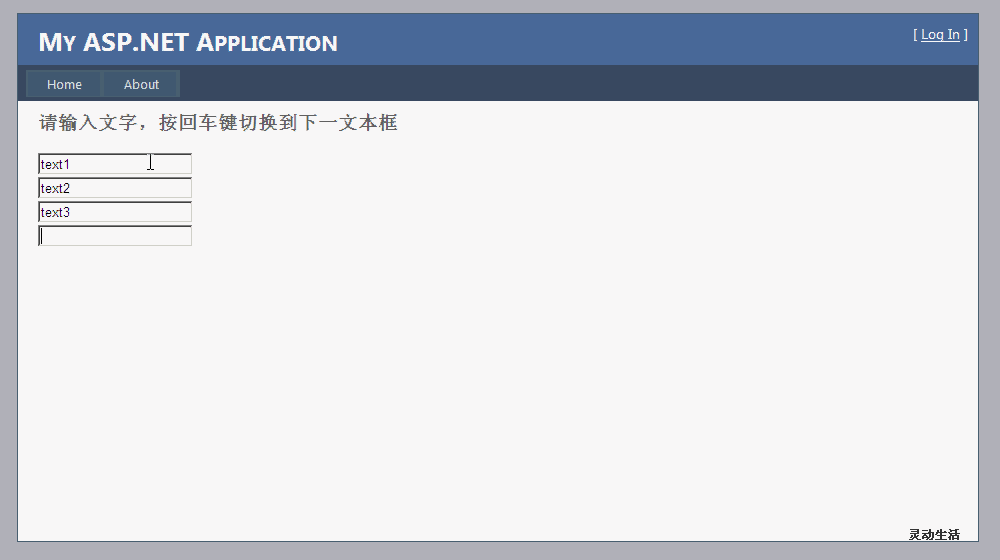
3、 运行程序

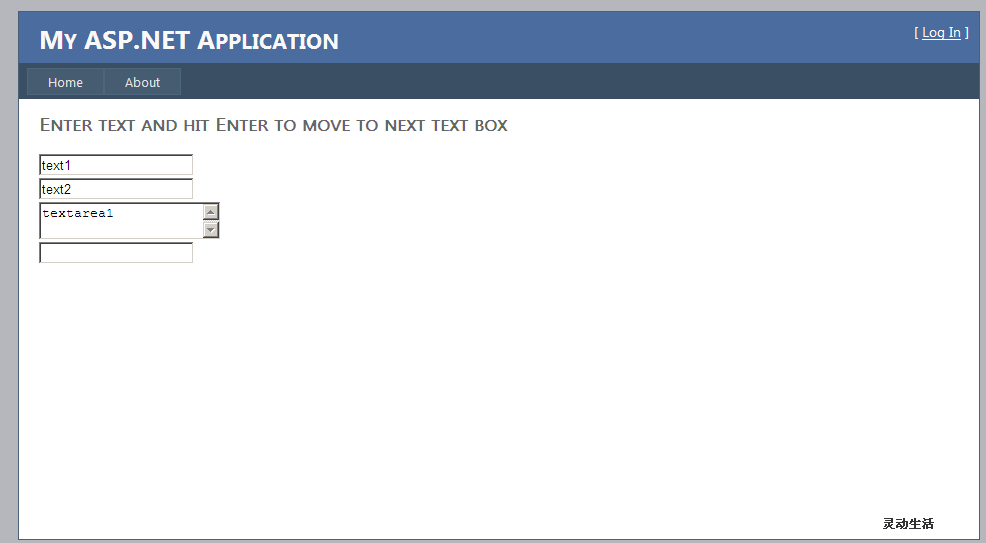
那页面中如果有TextArea 元素,我们如何使用Enter切换焦点呢,办法是有的,如下充分运用了Jquery的一些特性。

4、 HTML代码

<div>

<asp:TextBox ID=”tb1″ runat=”server” class=”cls” /><br />

<asp:TextBox ID=”tb2″ runat=”server” class=”cls” /><br />

<asp:TextBox ID=”tb3″ TextMode=”MultiLine” runat=”server” class=”cls” /><br />

<asp:TextBox ID=”tb4″ runat=”server” class=”cls” /><br />

</div>

分析:

页面中所以的TextBox 引用Class=”cls”,便于后期的对页面元素的Jquery查询。

5、 Javascript代码

<script type=”text/javascript”>

$(function () {

$(‘input:text:first’).focus();

var $inp = $(‘.cls’);

$inp.bind(‘keydown’, function (e) {

var key = e.which;

if (key == 13) {

e.preventDefault();

var nxtIdx = $inp.index(this) + 1;

$(“.cls:eq(“ + nxtIdx + “)”).focus();

}

});

});

</script>

分析:

var $inp = $(‘.cls’);

取的样式为cls的所有元素 赋值给变量inp

6、 运行效果

[转载]ASP.NET MVC Action Filters以及自定义OutputCache ActionFilterAttribute事件发生次序

mikel阅读(832)

[转载][ASP.NET MVC] Action Filters以及自定义OutputCache ActionFilterAttribute事件发生次序 – JasenKin – 博客园.

理解 Action Filters

Action filter 是能够应用于 controller action –或整个controller的一个特性,它们的基类为System.Web.Mvc.FilterAttribute 。它限定了action执行的方式。ASP.NET MVC框架包含数个action filters。

  • HandleError – 这个action 过滤器处理controller action执行时出现的错误。
  • OutputCache – 这个action 过滤器将 controller action的输出缓存一段制定的时间 .
  • Authorize – 这个action 过滤器使你能够限制特定的用户或角色的访问.

使用Action Filter

action filter是一个特性. 你能够应用大部分的action filters 在单个的controller action 或者整个controller上.

例如下面的Data controller有一个返回当前时间的Index()方法.这个action拥有OutputCache action filter. 这个过滤器导致由action返回的值能够缓存10秒钟.

VaryByParam 属性使用的设置不建议通过设置“*”的值来使用所有参数进行区分。这可能会导致缓存溢出。

public class DataController : Controller
{
//
// GET: /Data/
[OutputCache(Duration = 20,VaryByParam =“”)]
public string Index()
{
return DateTime.Now.ToString();
}
}

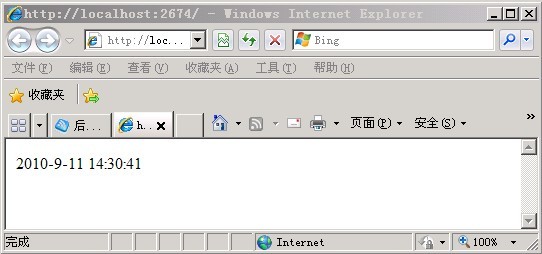
如果你重复调用Index() action(不断刷新当前页面), 那么你将看到当前的内容在Duration = 20秒内是不变的.

一个单一的action filter –  OutputCache action filter – 被应用于Index() 方法. 同样,你可以应用多个action filters 在同一个action上.

不同类型的Filters

ASP.NET MVC框架支持多种不同类型的过滤器:

  1. Authorization filters – 实现IAuthorizationFilter 特性.
  2. Action filters – 实现IActionFilter 特性.
  3. Result filters – 实现IResultFilter 特性.
  4. Exception filters –实现IExceptionFilter 特性.

Filters 按照上面列出的顺序执行。例如, authorization filters 总是在action filters之前执行,exception filters在所有其他类型的filter之后执行.

ActionFilterAttribute 基类

为了使你能够更加容易的实现自定义的action filter, ASP.NET MVC框架包含一个ActionFilterAttribute 基类. 这个类实现了IActionFilterIResultFilter 接口,并且继承了Filter 类。

ActionFilterAttribute 基类拥有以下可以重载的方法:

  • OnActionExecuting在action method调用前发生。
  • OnActionExecuted在action method调用后发生, 但是在result执行前发生 (在 view 呈现前)
  • OnResultExecuting在result执行前发生(在view 呈现前)
  • OnResultExecuted 在result执行后发生(在view 呈现后)

创建一个ASP.NET MVC OutputCache ActionFilterAttribute

使用ASP.NET MVC 框架, 简单的指定OutputCache 指令并不能达到理想的效果. 幸好, ActionFilterAttribute让你能够在 controller action执行的前后运行代码.

让我们使用类似的方法来创建OutputCache ActionFilterAttribute

[OutputCache(Duration = 60, VaryByParam = *, CachePolicy = CachePolicy.Server)]
public ActionResult Index()
{
//
}

我们将使用命名为CachePolicy的枚举类型来指定OutputCache 特性应怎样以及在哪里进行缓存:

public enum CachePolicy
{
NoCache
= 0,
Client
= 1,
Server
= 2,
ClientAndServer
= 3
}

1.实现client-side缓存

事实上,这是很容易的。在view呈现前,我们将增加一些HTTP头到响应流。网页浏览器将获得这些头部,并且通过使用正确的缓存设置来回应请求。如果我们设置duration为60,浏览器将首页缓存一分钟。

using System.Web.Mvc;

namespace MVCActionFilters.Web.Models
{
public class OutputCache:System.Web.Mvc.ActionFilterAttribute
{
public int Duration { get; set; }
public CachePolicy CachePolicy { get; set; }

public override void OnActionExecuted(ActionExecutedContext filterContext)
{
if (CachePolicy == CachePolicy.Client || CachePolicy == CachePolicy.ClientAndServer)
{
if (Duration <= 0) return;

//用于设置特定于缓存的 HTTP 标头以及用于控制 ASP.NET 页输出缓存
HttpCachePolicyBase cache = filterContext.HttpContext.Response.Cache;
TimeSpan cacheDuration
= TimeSpan.FromSeconds(Duration);

cache.SetCacheability(HttpCacheability.Public);
cache.SetExpires(DateTime.Now.Add(cacheDuration));
cache.SetMaxAge(cacheDuration);
cache.AppendCacheExtension(must-revalidate, proxy-revalidate);
}
}
}
}

2. 实现server-side缓存

Server-side 缓存有一点难度. 首要的,在输出缓存系统中,我们将不得不准备HTTP 响应为可读的。为了这样做,我们首先保存当前的HTTP context到类的一个变量中. 然后, 我们创建一个新的httpcontext ,通过它将数据写入StringWriter,同时允许读操作可以发生:

existingContext = System.Web.HttpContext.Current;//保存当前的HTTP context到类的一个变量中
writer
= new StringWriter();
HttpResponse response
= new HttpResponse(writer);
HttpContext context
= new HttpContext(existingContext.Request, response)
{
User
= existingContext.User
};
System.Web.HttpContext.Current
= context;
public override void OnResultExecuting(ResultExecutingContext filterContext)
{
if (CachePolicy == CachePolicy.Server || CachePolicy == CachePolicy.ClientAndServer)
{
//获取缓存实例
cache = filterContext.HttpContext.Cache;

// 获取缓存数据
object cachedData = cache.Get(GenerateKey(filterContext));
if (cachedData != null)
{
// 返回缓存数据
cacheHit = true;
filterContext.HttpContext.Response.Write(cachedData);
filterContext.Cancel
= true;
}
else
{
//重新设置缓存数据
existingContext = System.Web.HttpContext.Current;
writer
= new StringWriter();
HttpResponse response
= new HttpResponse(writer);
HttpContext context
= new HttpContext(existingContext.Request, response)
{
User
= existingContext.User
};
foreach (var key in existingContext.Items.Keys)
{
context.Items[key]
= existingContext.Items[key];
}
System.Web.HttpContext.Current
= context;
}
}
}

利用该代码,我们能从高速缓存中检索现有项,并设置了HTTP响应能够被读取。在视图呈现之后,将数据存储在高速缓存中:

public override void OnResultExecuted(ResultExecutedContext filterContext)
{
// 服务器端缓存?
if (CachePolicy == CachePolicy.Server || CachePolicy == CachePolicy.ClientAndServer)
{
if (!cacheHit)
{
// 存储原有的context
System.Web.HttpContext.Current = existingContext;

// 返回呈现的数据
existingContext.Response.Write(writer.ToString());

//增加数据到缓存
cache.Add(
GenerateKey(filterContext),
writer.ToString(),
null,
DateTime.Now.AddSeconds(Duration),
Cache.NoSlidingExpiration,
CacheItemPriority.Normal,
null);
}
}
}

你现在注意到添加了一个VaryByParam到 OutputCache ActionFilterAttribute。当缓存server-side时,我可以通过传入的参数来改变缓存存储。这个GenerateKey方法会 产生一个依赖于controller,action和VaryByParam的键。

private string GenerateKey(ControllerContext filterContext)
{
StringBuilder cacheKey
= new StringBuilder();

// Controller + action
cacheKey.Append(filterContext.Controller.GetType().FullName);
if (filterContext.RouteData.Values.ContainsKey(action))
{
cacheKey.Append(
_);
cacheKey.Append(filterContext.RouteData.Values[
action].ToString());
}

// Variation by parameters
List<string> varyByParam = VaryByParam.Split(;).ToList();

if (!string.IsNullOrEmpty(VaryByParam))
{
foreach (KeyValuePair<string, object> pair in filterContext.RouteData.Values)
{
if (VaryByParam == * || varyByParam.Contains(pair.Key))
{
cacheKey.Append(
_);
cacheKey.Append(pair.Key);
cacheKey.Append(
=);
cacheKey.Append(pair.Value.ToString());
}
}
}
return cacheKey.ToString();
}

现在你可以增加 OutputCache attribute 到应用程序的任何一个controller 与controller action中 。

[MVCActionFilters.Web.Common.OutputCache(Duration = 20, VaryByParam = *,CachePolicy=Common.CachePolicy.Client)]
public string Cache()
{
return DateTime.Now.ToString();
}

设置CachePolicy为Common.CachePolicy.Client时,将直接在客户端缓存中读取数据。

总结

需注意事件的发生时间段

  • OnActionExecuting在action method调用前发生。
  • OnActionExecuted在action method调用后发生, 但是在result执行前发生 (在 view 呈现前)
  • OnResultExecuting在result执行前发生(在view 呈现前)
  • OnResultExecuted 在result执行后发生(在view 呈现后)
  • 源代码下载: MVCActionFilters.rar

    [转载]面向连接的Socket Server的简单实现

    mikel阅读(966)

    [转载]面向连接的Socket Server的简单实现 – 觉先 – 博客园.

    一、基本原理

    有时候我们需要实现一个公共的模块,需要对多个其他的模块提供服务,最常用的方式就是实现一个Socket Server,接受客户的请求,并返回给客户结果。

    这经常涉及到如果管理多个连接及如何多线程的提供服务的问题,常用的方式就是连接池和线程池,基本流程如下:

    SocketServer

    首先服务器端有一个监听线程,不断监听来自客户端的连接。

    当一个客户端连接到监听线程后,便建立了一个新的连接。

    监听线程将新建立的连接放入连接池进行管理,然后继续监听新来的连接。

    线程池中有多个服务线程,每个线程都监听一个任务队列,一个建立的连接对应一个服务任务,当服务线程发现有新的任务的时候,便用此连接向客户端提供服务。

    一个Socket Server所能够提供的连接数可配置,如果超过配置的个数则拒绝新的连接。

    当服务线程完成服务的时候,客户端关闭连接,服务线程关闭连接,空闲并等待处理新的任务。

    连接池的监控线程清除其中关闭的连接对象,从而可以建立新的连接。

    二、对Socket的封装

    Socket的调用主要包含以下的步骤:

    clip_image001

    调用比较复杂,我们首先区分两类Socket,一类是Listening Socket,一类是Connected Socket.

    Listening Socket由MySocketServer负责,一旦accept,则生成一个Connected Socket,又MySocket负责。

    MySocket主要实现的方法如下:

    int MySocket::write(const char * buf, int length)
    {
    int ret = 0;
    int left = length;
    int index = 0;
    while(left > 0)
    {
    ret = send(m_socket, buf + index, left, 0);
    if(ret == 0)
    break;
    else if(ret == -1)
    {
    break;
    }
    left -= ret;
    index += ret;
    }
    if(left > 0)
    return -1;
    return 0;
    }
    int MySocket::read(char * buf, int length)
    {
    int ret = 0;
    int left = length;
    int index = 0;
    while(left > 0)
    {
    ret = recv(m_socket, buf + index, left, 0);
    if(ret == 0)
    break;
    else if(ret == -1)
    return -1;
    left -= ret;
    index += ret;
    }

    return index;
    }

    int MySocket::status()
    {
    int status;
    int ret;
    fd_set checkset;
    struct timeval timeout;

    FD_ZERO(&checkset);
    FD_SET(m_socket, &checkset);

    timeout.tv_sec = 10;
    timeout.tv_usec = 0;

    status = select((int)m_socket + 1, &checkset, 0, 0, &timeout);
    if(status < 0)
    ret = -1;
    else if(status == 0)
    ret = 0;
    else
    ret = 0;
    return ret;
    }

    int MySocket::close()
    {
    struct linger lin;
    lin.l_onoff = 1;
    lin.l_linger = 0;
    setsockopt(m_socket, SOL_SOCKET, SO_LINGER, (const char *)&lin, sizeof(lin));
    ::close(m_socket);
    return 0;
    }

    MySocketServer的主要方法实现如下:

    int MySocketServer::init(int port)
    {
    if((m_socket = socket(AF_INET, SOCK_STREAM, 0)) == -1)
    {
    return -1;
    }

    struct sockaddr_in serverAddr;
    memset(&serverAddr, 0, sizeof(struct sockaddr_in));
    serverAddr.sin_addr.s_addr = htonl(INADDR_ANY);
    serverAddr.sin_family = AF_INET;
    serverAddr.sin_port = htons(port);

    if(bind(m_socket, (struct sockaddr *)&serverAddr, sizeof(serverAddr)) == -1)
    {
    ::close(m_socket);
    return -1;
    }

    if(listen(m_socket, SOMAXCONN) == -1)
    {
    ::close(m_socket);
    return -1;
    }

    struct linger lin;
    lin.l_onoff = 1;
    lin.l_linger = 0;

    setsockopt(m_socket, SOL_SOCKET, SO_LINGER, (const char *)&lin, sizeof(lin));
    m_port = port;
    m_inited = true;
    return 0;
    }

    MySocket * MySocketServer::accept()
    {
    int sock;
    struct sockaddr_in clientAddr;
    socklen_t clientAddrSize = sizeof(clientAddr);
    if((sock = ::accept(m_socket, (struct sockaddr *)&clientAddr, &clientAddrSize)) == -1)
    {
    return NULL;
    }
    MySocket* socket = new MySocket(sock);
    return socket;
    }
    MySocket * MySocketServer::accept(int timeout)
    {
    struct timeval timeout;
    timeout.tv_sec = timeout;
    timeout.tv_usec = 0;

    fd_set checkset;
    FD_ZERO(&checkset);
    FD_SET(m_socket, &checkset);

    int status = (int)select((int)(m_socket + 1), &checkset, NULL, NULL, &timeout);
    if(status < 0)
    return NULL;
    else if(status == 0)
    return NULL;

    if(FD_ISSET(m_socket, &checkset))
    {
    return accept();
    }
    }

    三、线程池的实现

    一个线程池一般有一个任务队列,启动的各个线程从任务队列中竞争任务,得到的线程则进行处理:list<MyTask *>  m_taskQueue;

    任务队列由锁保护,使得线程安全:pthread_mutex_t m_queueMutex

    任务队列需要条件变量来支持生产者消费者模式:pthread_cond_t m_cond

    如果任务列表为空,则线程等待,等待中的线程个数为:m_numWaitThreads

    需要一个列表来维护线程池中的线程:vector<MyThread *> m_threads

    每个线程需要一个线程运行函数:

    void * __thread_new_proc(void *p)
    {
    ((MyThread *)p)->run();
    return 0;
    }

    每个线程由MyThread类负责,主要函数如下:

    int MyThread::start()
    {

    pthread_attr_t  attr;
    pthread_attr_init(&attr);
    pthread_attr_setschedpolicy(&attr, SCHED_FIFO);

    int ret = pthread_create(&m_thread, &attr, thread_func, args);
    pthread_attr_destroy(&attr);

    if(ret != 0)
    return –1;

    }

    int MyThread::stop()
    {

    int ret = pthread_kill(m_thread, SIGINT);

    if(ret != 0)
    return –1;
    }

    int MyThread::join()

    {

    int ret = pthread_join(m_thread, NULL);

    if(ret != 0)

    return –1;

    }

    void MyThread::run()

    {

    while (false == m_bStop)

    {

    MyTask *pTask = m_threadPool->getNextTask();

    if (NULL != pTask)

    {

    pTask->process();

    }

    }

    }

    线程池由MyThreadPool负责,主要函数如下:

    int MyThreadPool::init()
    {

    pthread_condattr_t cond_attr;
    pthread_condattr_init(&cond_attr);
    pthread_condattr_setpshared(&cond_attr, PTHREAD_PROCESS_SHARED);
    int ret =  pthread_cond_init(&m_cond, &cond_attr);
    pthread_condattr_destroy(&cond_attr);

    if (ret_val != 0)
    return –1;

    pthread_mutexattr_t attr;
    pthread_mutexattr_init(&attr);
    pthread_mutexattr_setpshared(&attr, PTHREAD_PROCESS_SHARED);
    ret = pthread_mutex_init(&m_queueMutex, &attr);
    pthread_mutexattr_destroy(&attr);

    if (ret_val != 0)
    return –1;

    for (int i = 0; i< m_poolSize; ++i)
    {
    MyThread *thread = new MyThread(i+1, this);
    m_threads.push_back(thread);
    }

    return 0;
    }

    int MyThreadPool::start()
    {
    int ret;
    for (int i = 0; i< m_poolSize; ++i)
    {
    ret = m_threads[i]->start();
    if (ret != 0)
    break;
    }

    ret = pthread_cond_broadcast(&m_cond);

    if(ret != 0)
    return –1;
    return 0;
    }

    void MyThreadPool::addTask(MyTask *ptask)
    {
    if (NULL == ptask)
    return;

    pthread_mutex_lock(&m_queueMutex);

    m_taskQueue.push_back(ptask);

    if (m_waitingThreadCount > 0)
    pthread_cond_signal(&m_cond);

    pthread_mutex_unlock(&m_queueMutex);
    }

    MyTask * MyThreadPool::getNextTask()
    {
    MyTask *pTask = NULL;

    pthread_mutex_lock(&m_queueMutex);

    while (m_taskQueue.begin() == m_taskQueue.end())
    {
    ++m_waitingThreadCount;

    pthread_cond_wait(&n_cond, &m_queueMutex);

    –m_waitingThreadCount;
    }

    pTask = m_taskQueue.front();

    m_taskQueue.pop_front();

    pthread_mutex_unlock(&m_queueMutex);

    return pTask;
    }

    其中每一个任务的执行由MyTask负责,其主要方法如下:

    void MyTask::process()

    {

    //用read从客户端读取指令

    //对指令进行处理

    //用write向客户端写入结果

    }

    四、连接池的实现

    每个连接池保存一个链表保存已经建立的连接:list<MyConnection *> * m_connections

    当然这个链表也需要锁来进行多线程保护:pthread_mutex_t m_connectionMutex;

    此处一个MyConnection也是一个MyTask,由一个线程来负责。

    线程池也作为连接池的成员变量:MyThreadPool * m_threadPool

    连接池由类MyConnectionPool负责,其主要函数如下:

    void MyConnectionPool::addConnection(MyConnection * pConn)
    {

    pthread_mutex_lock(&m_connectionMutex);

    m_connections->push_back(pConn);

    pthread_mutex_unlock(&m_connectionMutex);

    m_threadPool->addTask(pConn);
    }

    MyConnectionPool也要启动一个背后的线程,来管理这些连接,移除结束的连接和错误的连接。

    void MyConnectionPool::managePool()
    {

    pthread_mutex_lock(&m_connectionMutex);

    for (list<MyConnection *>::iterator itr = m_connections->begin(); itr!=m_connections->end(); )
    {
    MyConnection *conn = *itr;
    if (conn->isFinish())
    {
    delete conn;
    conn = NULL;
    list<MyConnection *>::iterator pos = itr++;
    m_connections->erase(pos);
    }
    else if (conn->isError())
    {

    //处理错误的连接
    ++itr;
    }
    else
    {
    ++itr;
    }
    }

    pthread_mutex_unlock(&m_connectionMutex);

    }

    五、监听线程的实现

    监听线程需要有一个MySocketServer来监听客户端的连接,每当形成一个新的连接,查看是否超过设置的最大连接数,如果超过则关闭连接,如果未超过设置的最大连接数,则形成一个新的MyConnection,将其加入连接池和线程池。

    MySocketServer *pServer = new MySocketServer(port);

    MyConnectionPool *pPool = new MyConnectionPool();

    while (!stopFlag)

    {

    MySocket * sock = pServer->acceptConnection(5);

    if(sock != null)

    {

    if(m_connections.size > maxConnectionSize)

    {

    sock.close();

    }

    MyTask *pTask = new MyConnection();

    pPool->addConnection(pTask);

    }

    }

    [转载]在ASP.NET MVC项目中如何显示图片

    mikel阅读(1017)

    [转载]在MVC项目中如何显示图片 – 陈希章@中国 – 博客园.

    首先,有好一阵没有怎么写博客文章了.实在也是很多事情,确实没有停下来过.

    这两天在讲解MVC方面的知识和项目实践,其中有一个小的细节,是有关于图片显示方面的,记录下来供大家参考

    在MVC项目中,要显示一个图片,尤其是该图片是存放在数据库的话,还是可以继续使用原先Web Forms的那种ashx的方式。但也可以考虑下面的方式

    1.创建一个ImageResult

    using System;
    using System.Collections.Generic;
    using System.Linq;
    using System.Text;
    using System.Web.Mvc;
    using System.Drawing;
    using System.Drawing.Imaging;
    using System.Web;
    
    namespace Extensions
    {
        public class ImageResult : ActionResult
        {
            public ImageResult() { }
            public Image Image { get; set; }
            public ImageFormat ImageFormat { get; set; }
            public override void ExecuteResult(ControllerContext context)
            {
                // verify properties 
                if (Image == null)
                {
                    throw new ArgumentNullException("Image");
                }
                if (ImageFormat == null)
                {
                    throw new ArgumentNullException("ImageFormat");
                }
                // output 
                context.HttpContext.Response.Clear();
                if (ImageFormat.Equals(ImageFormat.Bmp)) context.HttpContext.Response.ContentType = "image/bmp";
                if (ImageFormat.Equals(ImageFormat.Gif)) context.HttpContext.Response.ContentType = "image/gif";
                if (ImageFormat.Equals(ImageFormat.Icon)) context.HttpContext.Response.ContentType = "image/vnd.microsoft.icon";
                if (ImageFormat.Equals(ImageFormat.Jpeg)) context.HttpContext.Response.ContentType = "image/jpeg";
                if (ImageFormat.Equals(ImageFormat.Png)) context.HttpContext.Response.ContentType = "image/png";
                if (ImageFormat.Equals(ImageFormat.Tiff)) context.HttpContext.Response.ContentType = "image/tiff";
                if (ImageFormat.Equals(ImageFormat.Wmf)) context.HttpContext.Response.ContentType = "image/wmf";
                Image.Save(context.HttpContext.Response.OutputStream, ImageFormat);
            }
        }
    
    }

    .csharpcode, .csharpcode pre { font-size: small; color: black; font-family: consolas,”Courier New”,courier,monospace; background-color: rgb(255, 255, 255); }.csharpcode pre { margin: 0em; }.csharpcode .rem { color: rgb(0, 128, 0); }.csharpcode .kwrd { color: rgb(0, 0, 255); }.csharpcode .str { color: rgb(0, 96, 128); }.csharpcode .op { color: rgb(0, 0, 192); }.csharpcode .preproc { color: rgb(204, 102, 51); }.csharpcode .asp { background-color: rgb(255, 255, 0); }.csharpcode .html { color: rgb(128, 0, 0); }.csharpcode .attr { color: rgb(255, 0, 0); }.csharpcode .alt { background-color: rgb(244, 244, 244); width: 100%; margin: 0em; }.csharpcode .lnum { color: rgb(96, 96, 96); }

    2,创建一个Action

            private string connection =ConfigurationManager.ConnectionStrings["northwind"].ConnectionString;
    
            public ActionResult Image(int id)
            {
                var db = new NorthwindDataContext(connection);
                var found = db.Employees.FirstOrDefault(e => e.EmployeeID == id);
    
                if (found != null)
                {
                    var buffer = found.Photo.ToArray();
                    ImageConverter converter = new ImageConverter();
                    var image = (Image)converter.ConvertFrom(buffer);
                    return new Extensions.ImageResult()
                    {
                        Image = image,
                        ImageFormat = System.Drawing.Imaging.ImageFormat.Jpeg
                    };
    
                }
                else
                {
                    ViewData["message"] = "员工不存在";
                    return View("Error");
                }
    
            }
    .csharpcode, .csharpcode pre { font-size: small; color: black; font-family: consolas,”Courier New”,courier,monospace; background-color: rgb(255, 255, 255); }.csharpcode pre { margin: 0em; }.csharpcode .rem { color: rgb(0, 128, 0); }.csharpcode .kwrd { color: rgb(0, 0, 255); }.csharpcode .str { color: rgb(0, 96, 128); }.csharpcode .op { color: rgb(0, 0, 192); }.csharpcode .preproc { color: rgb(204, 102, 51); }.csharpcode .asp { background-color: rgb(255, 255, 0); }.csharpcode .html { color: rgb(128, 0, 0); }.csharpcode .attr { color: rgb(255, 0, 0); }.csharpcode .alt { background-color: rgb(244, 244, 244); width: 100%; margin: 0em; }.csharpcode .lnum { color: rgb(96, 96, 96); }

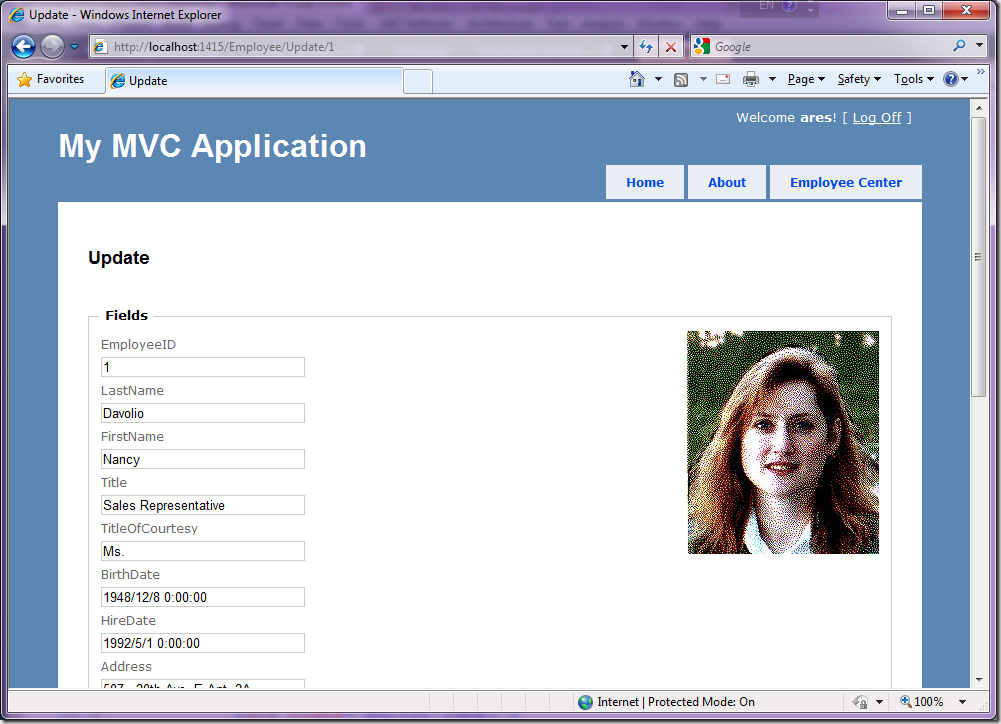
    3.在页面(View)中调用

    <%@ Page Title="" Language="C#" MasterPageFile="~/Views/Shared/Site.Master" Inherits="System.Web.Mvc.ViewPage<Models.Employee>" %>
    
    <asp:Content ID="Content1" ContentPlaceHolderID="TitleContent" runat="server">
        Update
    </asp:Content>
    
    <asp:Content ID="Content2" ContentPlaceHolderID="MainContent" runat="server">
    
        <h2>Update</h2>
    
        <% using (Html.BeginForm()) {%>
            <%: Html.ValidationSummary(true) %>
    
            <fieldset>
                <legend>Fields</legend>
                <div style="float:right">
    
                    <img src="/Employee/Image/<%:Model.EmployeeID %>" alt="" />
                </div>
                <div class="editor-label">
                    <%: Html.LabelFor(model => model.EmployeeID) %>
                </div>
                <div class="editor-field">
                    <%: Html.TextBoxFor(model => model.EmployeeID) %>
                    <%: Html.ValidationMessageFor(model => model.EmployeeID) %>
                </div>
    
                <div class="editor-label">
                    <%: Html.LabelFor(model => model.LastName) %>
                </div>
                <div class="editor-field">
                    <%: Html.TextBoxFor(model => model.LastName) %>
                    <%: Html.ValidationMessageFor(model => model.LastName) %>
                </div>
    
                <div class="editor-label">
                    <%: Html.LabelFor(model => model.FirstName) %>
                </div>
                <div class="editor-field">
                    <%: Html.TextBoxFor(model => model.FirstName) %>
                    <%: Html.ValidationMessageFor(model => model.FirstName) %>
                </div>
    
                <div class="editor-label">
                    <%: Html.LabelFor(model => model.Title) %>
                </div>
                <div class="editor-field">
                    <%: Html.TextBoxFor(model => model.Title) %>
                    <%: Html.ValidationMessageFor(model => model.Title) %>
                </div>
    
                <div class="editor-label">
                    <%: Html.LabelFor(model => model.TitleOfCourtesy) %>
                </div>
                <div class="editor-field">
                    <%: Html.TextBoxFor(model => model.TitleOfCourtesy) %>
                    <%: Html.ValidationMessageFor(model => model.TitleOfCourtesy) %>
                </div>
    
                <div class="editor-label">
                    <%: Html.LabelFor(model => model.BirthDate) %>
                </div>
                <div class="editor-field">
                    <%: Html.TextBoxFor(model => model.BirthDate, String.Format("{0:g}", Model.BirthDate)) %>
                    <%: Html.ValidationMessageFor(model => model.BirthDate) %>
                </div>
    
                <div class="editor-label">
                    <%: Html.LabelFor(model => model.HireDate) %>
                </div>
                <div class="editor-field">
                    <%: Html.TextBoxFor(model => model.HireDate, String.Format("{0:g}", Model.HireDate)) %>
                    <%: Html.ValidationMessageFor(model => model.HireDate) %>
                </div>
    
                <div class="editor-label">
                    <%: Html.LabelFor(model => model.Address) %>
                </div>
                <div class="editor-field">
                    <%: Html.TextBoxFor(model => model.Address) %>
                    <%: Html.ValidationMessageFor(model => model.Address) %>
                </div>
    
                <div class="editor-label">
                    <%: Html.LabelFor(model => model.City) %>
                </div>
                <div class="editor-field">
                    <%: Html.TextBoxFor(model => model.City) %>
                    <%: Html.ValidationMessageFor(model => model.City) %>
                </div>
    
                <div class="editor-label">
                    <%: Html.LabelFor(model => model.Region) %>
                </div>
                <div class="editor-field">
                    <%: Html.TextBoxFor(model => model.Region) %>
                    <%: Html.ValidationMessageFor(model => model.Region) %>
                </div>
    
                <div class="editor-label">
                    <%: Html.LabelFor(model => model.PostalCode) %>
                </div>
                <div class="editor-field">
                    <%: Html.TextBoxFor(model => model.PostalCode) %>
                    <%: Html.ValidationMessageFor(model => model.PostalCode) %>
                </div>
    
                <div class="editor-label">
                    <%: Html.LabelFor(model => model.Country) %>
                </div>
                <div class="editor-field">
                    <%: Html.TextBoxFor(model => model.Country) %>
                    <%: Html.ValidationMessageFor(model => model.Country) %>
                </div>
    
                <div class="editor-label">
                    <%: Html.LabelFor(model => model.HomePhone) %>
                </div>
                <div class="editor-field">
                    <%: Html.TextBoxFor(model => model.HomePhone) %>
                    <%: Html.ValidationMessageFor(model => model.HomePhone) %>
                </div>
    
                <div class="editor-label">
                    <%: Html.LabelFor(model => model.Extension) %>
                </div>
                <div class="editor-field">
                    <%: Html.TextBoxFor(model => model.Extension) %>
                    <%: Html.ValidationMessageFor(model => model.Extension) %>
                </div>
    
                <div class="editor-label">
                    <%: Html.LabelFor(model => model.Notes) %>
                </div>
                <div class="editor-field">
                    <%: Html.TextBoxFor(model => model.Notes) %>
                    <%: Html.ValidationMessageFor(model => model.Notes) %>
                </div>
    
                <div class="editor-label">
                    <%: Html.LabelFor(model => model.ReportsTo) %>
                </div>
                <div class="editor-field">
                    <%: Html.TextBoxFor(model => model.ReportsTo) %>
                    <%: Html.ValidationMessageFor(model => model.ReportsTo) %>
                </div>
    
                <div class="editor-label">
                    <%: Html.LabelFor(model => model.PhotoPath) %>
                </div>
                <div class="editor-field">
                    <%: Html.TextBoxFor(model => model.PhotoPath) %>
                    <%: Html.ValidationMessageFor(model => model.PhotoPath) %>
                </div>
    
                <p>
                    <input type="submit" value="Save" />
                </p>
            </fieldset>
    
        <% } %>
    
        <div>
            <%: Html.ActionLink("Back to List", "Index") %>
        </div>
    
    </asp:Content>
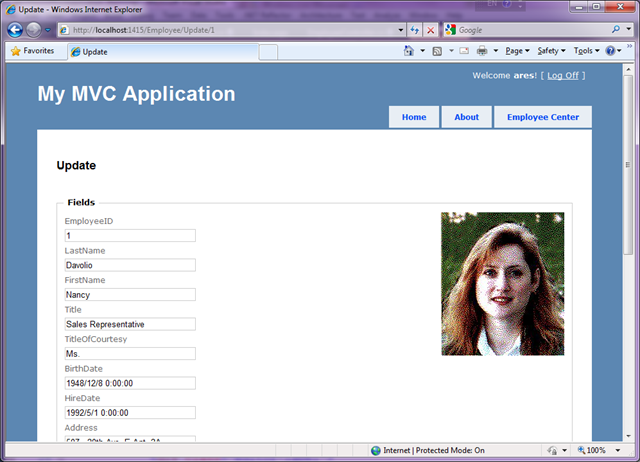
    最后的结果如下,大家可以参考参考

    .csharpcode, .csharpcode pre { font-size: small; color: black; font-family: consolas,”Courier New”,courier,monospace; background-color: rgb(255, 255, 255); }.csharpcode pre { margin: 0em; }.csharpcode .rem { color: rgb(0, 128, 0); }.csharpcode .kwrd { color: rgb(0, 0, 255); }.csharpcode .str { color: rgb(0, 96, 128); }.csharpcode .op { color: rgb(0, 0, 192); }.csharpcode .preproc { color: rgb(204, 102, 51); }.csharpcode .asp { background-color: rgb(255, 255, 0); }.csharpcode .html { color: rgb(128, 0, 0); }.csharpcode .attr { color: rgb(255, 0, 0); }.csharpcode .alt { background-color: rgb(244, 244, 244); width: 100%; margin: 0em; }.csharpcode .lnum { color: rgb(96, 96, 96); }image

    [转载]浅谈JSON 数据源格式

    mikel阅读(1185)

    [转载]浅谈JSON 数据源格式 – xugang – 博客园.

    JSON 在很多场合下作为数据格式比XML 要更加方便。

    JSON 的数据由对象、数组和元素等格式组成。每种格式都可以包含合法的JavaScript 数据类型。

    JavaScript 中,可以通过eval( ) 方法将字符串直接转化为JSON 格式。

    JSON 数据源格式如下:

    示例一:

    {
    tablename:表名,
    rows:[{列1:值1},{列2:值2}.....{列n:值n}]
    }

    示例二:

    var person = {
    createPerson: function(_name,_age)
    {
    this.name = _name;
    this.age = _age;
    },
    getAge: return this.age
    };

    示例三:通过eval( ) 方法将字符串直接转化为JSON 并获得元素的值。

    <script type=text/javascript>
    <!
    window.onload = function(){
    var json_text = { ‘book’:{‘name’:’JAVA编程’,’author’:[‘Liu’,’Xu’]},’num’:222};
    //使用eval()将字符串转换为对象
    var json_obj = eval((+ json_text +));
    //访问 book-name
    document.write(json_obj.book.name);
    //访问 book-author-Xu
    document.write(json_obj.book.author[1]);
    }
    //–>
    </script>

    附:JQuery 中提供了 $.getJSON( ) 方法,可以很快捷地访问到服务器端返回的JSON 数据。