[转载]spring依赖注入

mikel阅读(1201)

[转载]spring依赖注入 – C’est la vie – 博客园.

使用构造器注入

使用属性setter方法注入

使用Field注入(用于注解方式)

注入依赖对象可以采用手工装配或自动装配,在实际应用中建议使用手工装配,因为自动装配会产生未知情况,开发人员无法预见最终的装配结果。

1.手工装配依赖对象

手工装配依赖对象,在这种方式中又有两种编程方式

*  在xml配置文件中,通过在bean节点下配置

*  在java代码中使用@Autowired或@Resource注解方式进行装配

依赖注入–手工装配–XML方式

通过setter方法注入依赖

<bean>元素的< property >子元素指明了使用它们的set方法来注入。可以注入任何东西,从基本类型到集合类,甚至是应用系统的bean。

通过setter方法注入依赖

*   简单bean配置

配置bean的简单属性,基本数据类型和String。

<beanid=”personService” class=”com.test.bean.impl.PersonServiceImpl”>

<!– 基本类型,string类型 –>

<propertyname=”age”value=”20″></property>

<propertyname=”name” value=”张无忌”></property>

</bean>

通过setter方法注入依赖

*引用其它bean

<beanid=”person”class=”com.test.bean.Person” />

<beanid=”personService”

class=”com.test.bean.impl.PersonServiceImpl”>

<!– 引用类型 –>

<propertyname=”person” ref=”person” />

</bean>

* 内部bean

<beanid=”personService”class=”com.test.bean.impl.PersonServiceImpl”>

<!– 内部bean注入 –>

<propertyname=”personClass”>

<beanclass=”com.test.bean.PersonClass” />

</propert>

</bean>

这种方式的缺点是你无法在其它地方重用这个personClass实例,原因是它是专门为personService而用。

*装配集合

若bean的属性是集合类型,按如下处理:

A、装配List和数组:

<!– 装配list –>

<propertyname=”lists”>

<list>

<value>list1</value>

<value>list2</value>

<refbean=”person”/>

</list>

</property>

<!–装配数组 –>

<property name=”obj”>

<list>

<value>obj1</value>

<value>obj2</value>

<refbean=”person”/>

</list>

</property>

B、 装配set:

<!–装配set –>

<property name=”sets”>

<set>

<value>set1</value>

<value>set2</value>

<refbean=”person”/>

</set>

</property>

set使用方法和list一样,不同的是对象被装配到set中,而list是装配到List或数组中装配。

*装配集合

C、装配map:

<!– 装配map–>

<propertyname=”maps”>

<map>

<entrykey=”01″>

<value>map01</value>

</entry>

<entrykey=”02″>

<value>map02</value>

</entry>

</map>

</property>

map中的<entry>的数值和<list>以及<set>的一样,可以使任何有效的属性元素,需要注意的是key值必须是String的。

D、装配Properties:

<!–装配Properties  –>

<property name=”props”>

<props>

<prop key=”01″>prop1</prop>

<prop key=”02″>prop2</prop>

</props>

</property>

E、设置null:

<!–装配null –>

<property name=”listnull”>

<null/>

</property>

通过参数的顺序:

<constructor-argindex=”0″>

<value>张三</value>

</constructor-arg>

<constructor-argindex=”1″>

<value>56</value>

</constructor-arg>

通过构造函数注入依赖

<!–通过参数的类型 –>

<constructor-argtype=”java.lang.Integer”>

<value>56</value>

</constructor-arg>

<constructor-argtype=”java.lang.String”>

<value>张三</value>

</constructor-arg>

依赖注入–手工装配—注解方式

在java代码中使用@Autowired或@Resource注解方式进行装配的前提条件是。

1、引入context命名空间 需要在xml配置文件中配置以下信息:

<beansxmlns=”http://www.springframework.org/schema/beans”

xmlns:xsi=”http://www.w3.org/2001/XMLSchema-instance”

xmlns:context=”http://www.springframework.org/schema/context”

xsi:schemaLocation=”http://www.springframework.org/schema/beans

http://www.springframework.org/schema/beans/spring-beans-2.5.xsd

http://www.springframework.org/schema/context

http://www.springframework.org/schema/context/spring-context-2.5.xsd”>

<context:annotation-config/>

</beans>

2、在配置文件中添加context:annotation-config标签

<context:annotation-config/>

这个配置隐式注册了多个对注释进行解析处理的处理器

AutowiredAnnotationBeanPostProcessor,CommonAnnotationBeanPostProcessor,

PersistenceAnnotationBeanPostProcessor,RequiredAnnotationBeanPostProcessor

注: @Resource注解在spring安装目录的lib\j2ee\common-annotations.jar

在java代码中使用@Autowired或@Resource注解方式进行装配,这两个注解的区别是:@Autowired 默认按类型装配,

@Resource默认按名称装配,当找不到与名称匹配的bean才会按类型装配。

@Autowired

privatePersonDao  personDao;//用于字段上

@Autowired

publicvoid setPersonDao(PersonDaopersonDao) { //用于属性的set方法上

this.personDao = personDao;

}

@Autowired注解是按类型装配依赖对象,默认情况下它要求依赖对象必须存在,如果允许null值,可以设置它required属性为false。

@Autowired(required=false)

privatePersonDao  personDao;//用于字段上

@Autowired(request=false)

public voidsetPersonDao(PersonDaopersonDao) {  //用于属性的set方法上

this.personDao = personDao;

}

如果我们想使用按名称装配,可以结合@Qualifier注解一起使用。如下:

@Autowired@Qualifier(“personDao”)

privatePersonDao  personDao;//用于字段上

@Autowired

publicvoidsetPersonDao(@Qualifier(“personDao”) PersonDao personDao) {//用于属性的set方法上

this.personDao= personDao;

}

@Qualifier注解也能够被指定为构造器的参数或者方法的参数:

@Resource注解和@Autowired一样,也可以标注在字段或属性的setter方法上.

@Resource注解默认按名称装配。

名称可以通过@Resource的name属性指定,如果没有指定name属性,

当注解标注在字段上,即默认取字段的名称作为bean名称寻找依赖对象

当注解标注在属性的setter方法上,即默认取属性名作为bean名称寻找依赖对象。

@Resource(name=”personDao”)

privatePersonDaopersonDao;//用于字段上

@Resource(name=”personDao”)

publicvoidsetPersonDao(PersonDao personDao) {//用于属性的set方法上

this.personDao = personDao;

}

后一种相当于xml配置文件中的

<propertyname=“personDao”ref=”personDao” />

注意:如果没有指定name属性,并且按照默认的名称找不到依赖对象时, @Resource注解会回退到按类型装配。但一旦指定了name属性,就只能按名称装配了。

2.自动装配依赖对象

对于自动装配,大家了解一下就可以了,实在不推荐大家使用。例子:

<beanid=“foo”class=“…Foo” autowire=“autowire type”>

autowire属性取值如下

*  byType:按类型装配,可以根据属性的类型,在容器中寻找跟该类型匹配的bean。如果发现多个,那么将会抛出异常。如果没有找到,即属性值为null。

* byName:按名称装配,可以根据属性的名称,在容器中寻找跟该属性名相同的bean,如果没有找到,即属性值为null。

*constructor与byType的方式类似,不同之处在于它应用于构造器参数。如果在容器中没有找到与构造器参数类型一致的bean,那么将会抛出异常。

*autodetect :首先尝试使用constructor来自动装配,然后使用byType方式。不确定性的处理与constructor方式和byType方式一致。

通过在classpath自动扫描方式把组件纳入spring容器中管理

前面的例子我们都是使用XML的bean定义来配置组件。在一个稍大的项目中,通常会有上百个组件,如果这些组件采用xml的bean定义来配置,显然会增加配置文件的体积,查找及维护起来也不太方便。

spring2.5为我们引入了组件自动扫描机制,它可以在类路径底下寻找标注了@Component、@Service、@Controller、 @Repository注解的类,并把这些类纳入进spring容器中管理。它的作用和在xml文件中使用bean节点配置组件是一样的。

要使用自动扫描机制,我们需要打开以下配置信息:

1、引入context命名空间 需要在xml配置文件中配置以下信息:

<beansxmlns=”http://www.springframework.org/schema/beans”

xmlns:xsi=”http://www.w3.org/2001/XMLSchema-instance”

xmlns:context=”http://www.springframework.org/schema/context”

xsi:schemaLocation=”http://www.springframework.org/schema/beans

http://www.springframework.org/schema/beans/spring-beans-2.5.xsd

http://www.springframework.org/schema/context

http://www.springframework.org/schema/context/spring-context-2.5.xsd”>

<context:component-scanbase-package=”cn.itcast”/>

</beans>

2、在配置文件中添加context:component-scan标签

<context:component-scanbase-package=”cn.itcast”/>

其中base-package为需要扫描的包(含子包)。

注:

1、在使用组件扫描元素时,AutowiredAnnotationBeanPostProcessor和 CommonAnnotationBeanPostProcessor会隐式地被包括进来。 也就是说,连个组件都会被自动检测并织入 – 所有这一切都不需要在XML中提供任何bean配置元数据。

2、功能介绍

@Service用于标注业务层组件、

@Controller用于标注控制层组件(如struts中的action)、

@Repository用于标注数据访问组件,即DAO组件。

而@Component泛指组件,当组件不好归类的时候,我们可以使用这个注解进行标注。

//Dao层

importorg.springframework.stereotype.Repository;

importcom.test.dao.PersonDao;

@Repository(“personDao”)

publicclassPersonDaoBean implements PersonDao {

}

//业务层

importjavax.annotation.Resource;

importorg.springframework.stereotype.Service;

importcom.test.dao.PersonDao;

importcom.test.service.PersonService;

@Service(“personService”)

publicclassPersonServiceBean implements PersonService {

@Resource(name=”personDao”)

privatePersonDao personDao;

}

[转载]软件架构师之AOP

mikel阅读(981)

[转载]软件架构师之AOP – 倪大虾 – 博客园.

如果要做为一名合格的软件架构师,AOP是必须知道的一门技术。那么AOP是什么呢,这就是今天所讨论的内容(也是本人最近一阵子的学习总结,希望大家多多指点)。

AOP,全称Aspect Oriented Programming,中文名称叫面向方面编程,也叫面向切面编程

在实际项目开发过程中,我们往往会注意到有一些模块/功能,如权限,缓存等,需要存在于软件的各个业务模块中,而这些模块/功能又与业务模块没有任何关系,甚至在设计业务模块时我们完全不用考虑这些模块/功能的存在,但是在开发过程中才发现这些模块/功能会给我们带来无尽的烦恼。因为传统的OOP方法考虑问题的出发点往往是要解决问题的本身和延伸,所以遇到此类情况时传统的OOP方法就很难解决。然而对业务模块和此类模块稍作分析,我们就会发现,其实它们本质是相同的,只是解决的问题不同,对一个软件的关注点不同,如下图所示:  

结合自己的经验,由图可知,日志,安全,事务等一类的模块在一个软件项目中的位置,AOP要解决的就是此类问题。 AOP的目标便是对这些“横切关注点”和业务模块解耦,从而提升软件的稳定性,扩展性。

AOP通常包含以下主要概念:

  1. 方面(Aspect):一个关注点的模块化,这个关注点实现可能另外横切多个对象。事务管理是J2EE应用中横切关注点中一个很好的例子。
  2. 连接点(Joinpoint):程序执行过程中明确的点,如方法的调 用或特定的异常被抛出。
  3. 通知(Advice):在特定的连接点AOP框架执行的动作。各种类型的通知包括“around”、“before”和“throws”通知。通知类型将在下面讨论。许多AOP框架都是以拦截器做通知模型,维护一个“围绕”连接点的拦截器链。
  4. 切入点(Pointcut):指定一个通知将被引发的一系列连接点 的集合。AOP框架必须允许开发者指定切入点:例如,使用正则表达式。
  5. 引入(Introduction):添加方法或字段到通知化类。
  6. 接口(IsModified),来简化缓存。
  7. 目标对象(Target object):包含连接点的对象。也被用来 引用通知化或代理化对象。
  8. AOP代理: AOP框架创建的对象,包含通知。
  9. 织入(Weaving):组装方面创建通知化对象。这可以在编译时完成(例如使用AspectJ编译器),也可以在运行时完成。Spring和其他一些纯 Java AOP框架, 使用运行时织入。

AOP通知类型包括:

  1. Around通知: 包围一个连接点的通知,如方法调用。这是最强大的通知。Aroud通知在方法调用前后完成自定义的行为。它们负责选择继续执行连接点或直接返回它们自己的返回值或抛出异常来短路执行。
  2. Before通知: 在一个连接点之前执行的通知,但这个通知 不能阻止流程继续执行到连接点(除非它抛出一个异常)。
  3. Throws通知: 在方法抛出异常时执行的通知。
  4. After returning通知: 在连接点正常完成后执行的通知, 例如,如果一个方法正常返回,没有抛出异常。
  5. Around通知是最通用的通知类型。大部分基于拦截器的AOP框架如Nanning和JBoss4只提供 Around通知。

通常AOP的关注点有以下几方面:

  1. 权限(Authentication)
  2. 缓存(Cache)
  3. 内容传递(Context passing)
  4. 错误处理(Error handling)
  5. 懒加载(Lazy loading)
  6. 调试(Debug)
  7. 日志(Log)
  8. 跟踪,优化,校准(tracing, profiling and monitoring)
  9. 性能优化(Performance optimization)
  10. 持久化(Persistence)
  11. 资源池(Resource pooling)
  12. 同步(Synchronization)
  13. 事务(Transactions)

了解了AOP的应用场景,下面以权限为例,比较一下传统方法与AOP方法各自的实现,说明AOP技术的应用。

传统方法:

1 BusinessA ClassicsPermission() {
2 if (tag == "Pass") {
3 return new BusinessA();
4 }
5 throw new Exception("你没有权限操作BusinessA.");
6 }

这种是常见的OO做法,它带来以下一些问题:

1、业务逻辑冗余:权限校验过程并不是业务逻辑执行的一部分,这个工作是属于系统的,但是,在这种情况下,我们不得不把系统的权限校验过程和业务逻辑执行过程掺杂在一起,造成混乱。

2、代码冗余:使用这种方法,我们必须所有的业务逻辑代码中包含权限验证代码,使得同样校验的代码充斥在整个软件中,造成代码冗余。

3、紧耦合:使用这种方法,在业务或权限任何一方发生改变时都有可能影响到其他部分,造成耦合。下面所有的问题都是因此而来。

4、不易扩展:依次类推,如果要添加其他横向模块,将导致代码冗余,耦合泛滥,到最后甚至不可收拾;

5、不灵活:使用这种方法,任何一个横向变化都有可能导致代码的修改;

然而,我们利用AOP就可以很方便的解决上述问题,如下

1 [PermissionValidate]
2 class BusinessA { }

上面是AOP的实现方法,可以看到,业务与权限几乎没有关系,上面出现的冗余,耦合问题迎刃而解。

通过上面描述可知,AOP方法解决的是横向问题,那么它是如何实现的呢?答案是代理。代理对于客户,业务都是透明的,只是在其中加入的控制,而这些控制可以根据需求灵活的改变而不影响客户与业务。代理的基本原理如下图:  

由图可知,AOP关注的是aProxy,它将横向业务及变化放在客户与业务的中间,而不影响二者。

综上所述,AOP是一种解决软件中横向问题(公共模块)的思想,为软件架构师解决此类问题提供了一种行之有效的方法。

注:文中部分内容为本人学习时收集整理而来。

[转载]Session共享的解决方案

mikel阅读(1132)

[转载]Session共享的解决方案 – 心海巨澜 – 博客园.

Session共享的解决方案

1、客户端SessionID值唯一;

对于不同的域名:主域名、子域名、跨站点域名或跨服务器域名,用户在打开页面时会产生不同的SessionID,

为了使这些站点在用户登录时只登录一次,那我们就要解决SessionID的问题,必须使SessionID在这些共享Session的站点中只产 生一次。而SessionID是存储在客户端的cookie之中键值为ASP.NET_SessionId的一个字符串(也可以存储在URL中,这里不作 使介绍),为此只须使各站点存储的SP.NET_SessionId唯一即可。

因每个客户端在打开时会产生一个SessionID,为此我们要做的就是重置SessionID。我们可以在继承HttpModule,在结束请求时重写SessionID。

代码如下

public class MakeSessionIDOneOnly : IHttpModule { private string m_RootDomain = string.Empty; #region IHttpModule Members public void Dispose() { } public void Init(HttpApplication context) { m_RootDomain = ConfigurationManager.AppSettings["RootDomain"]; Type stateServerSessionProvider = typeof(HttpSessionState).Assembly.GetType("System.Web.SessionState.OutOfProcSessionStateStore"); FieldInfo uriField = stateServerSessionProvider.GetField("s_uribase", BindingFlags.Static | BindingFlags.NonPublic); if (uriField == null) throw new ArgumentException("UriField was not found"); uriField.SetValue(null, m_RootDomain); context.EndRequest += new System.EventHandler(context_EndRequest); } void context_EndRequest(object sender, System.EventArgs e) { HttpApplication app = sender as HttpApplication; for (int i = 0; i < app.Context.Response.Cookies.Count; i++) { if (app.Context.Response.Cookies[i].Name == "ASP.NET_SessionId") { app.Context.Response.Cookies[i].Domain = m_RootDomain; } } } #endregion }

为使用以上代码,须配置下面节点项。

<httpModules>

<add name=”节点名称” type=”类名全称, 程序集”/>

</httpModules>

2、Session值的共享;

配置sessionState置节点,使用StateServer或SQLServer来实现Session共享。

为实现跨服务器共享,必须在Web.config配置:

<machineKey decryptionKey=”FD69B2EB9A11E3063518F1932E314E4AA1577BF0B824F369″ validationKey=”5F32295C31223A362286DD5777916FCD0FD2A8EF882783FD3E29AB1FCDFE931F8FA45A8E468B7A40269E50A748778CBB8DB2262D44A86BBCEA96DCA46CBC05C3″ validation=”SHA1″ decryption=”Auto”/>

并且,不同服务器上站点配置必须用相同的Web.config,各站点目录配置也要相同。

2.1、使用StateServer:

存储Session的服务器必须开启StateServer:ASP.NET状态服务。只有机器重起的情况下才导致Session丢失。

<sessionState cookieless=”false” timeout=”50″ mode=”StateServer” stateConnectionString=”tcpip=IpAddress:42424″/>

若StateServer在本机存储,则IpAddress为:127.0.0.1;若StateServer为远程服务器,则为IpAddress为远程服务器IP地址,并且修改注册表项如下:

Windows Registry Editor Version 5.00

[HKEY_LOCAL_MACHINE\SYSTEM\CurrentControlSet\Services\aspnet_state\Parameters]

“Port”=dword:0000a5b8

“AllowRemoteConnection”=dword:00000001

2.2、使用SQLServer

必须开启SQLServer代理服务,此服务负责清除过期的Session,若没有开服务,则Session不会过期。

使用SQLServer在机器重启后Session不会丢失。

Web.config配置:

<sessionState mode=”SQLServer” sqlConnectionString=”server=DBIpAddress; uid=myid; pwd=mypwd;”/>

数据库配置:

使用aspnet_regsql.exe工具

ASP.NET 2.0版本后微软提供了aspnet_regsql.exe工具可以方便的配置Session数据库.该工具位于 Web 服务器上的”系统根目录\Microsoft.NET\Framework\版本号”文件夹中.

使用举例:

aspnet_regsql.exe -S . -U sa -P 123456 -ssadd -sstype p

-S参数:

表示数据库实例名称. 可以用”.”表示本机.

-U和-P参数:

表示用户名和密码.

-E参数:

可以再-U –P 与 -E中选择一组. –E表示以当前系统用户通过windows身份验证登录数据库, -U -P则是使用SqlServer用户登录数据库.

-ssadd / –ssremove 参数:

-ssadd表示是添加Session数据库, -ssremove表示移除Session数据库.

sstype 参数说明:

t 将会话数据存储到 SQL Server tempdb 数据库中。这是默认设置。如果将会话数据存储到 tempdb 数据库中,则在重新启动 SQL Server 时将丢失会话数据。
p 将会话数据存储到 ASPState 数据库中,而不是存储到 tempdb 数据库中。
c 将会话数据存储到自定义数据库中。如果指定 c 选项,则还必须使用 -d 选项包括自定义数据库的名称。

sessionState参数说明:

属性 说明
allowCustomSqlDatabase 可选的 Boolean 属性。

指定会话状态 SQL 数据库是否可以是自定义数据库(而不是 ASP.NET 默认数据库)。如果为 false,则不能指定初始目录或数据库作为 sqlConnectionString 属性的值。默认会话状态 SQL 数据库为 ASPState 数据库。有关更多信息,请参见会话状态模式。

此属性是 .NET Framework 2.0 版中的新属性。

默认值为 false。

cookieless 可选的 HttpCookieMode 属性。

指定对于 Web 应用程序使用 Cookie 的方式。

cookieless 属性可以为下列可能值之一。默认值为 UseCookies。

说明
AutoDetect ASP.NET 确定请求浏览器或请求设备是否支持 Cookie。如果请求浏览器或请求设备支持 Cookie,则 AutoDetect 使用 Cookie 来保留用户数据;否则,将在查询字符串中使用一个标识符。如果浏览器或设备支持 Cookie,但当前禁用了 Cookie,则请求功能仍会使用 Cookie。
UseCookies 无论浏览器或设备是否支持 Cookie,都使用 Cookie 来保留用户数据。
UseDeviceProfile ASP.NET 根据 HttpBrowserCapabilities 设置来确定是否使用 Cookie。如果 HttpBrowserCapabilities 设置指示浏览器或设备支持 Cookie,将使用 Cookie;否则,将在查询字符串中使用一个标识符。
UseUri 无论浏览器或设备是否支持 Cookie,调用功能都使用查询字符串来存储标识符。

cookieName 可选的 String 属性。

指定存储会话标识符的 Cookie 的名称。

此属性是 .NET Framework 2.0 版中的新属性。

默认值为 “ASP.NET_SessionId”。

customProvider 可选的 String 属性。

指定用于存储和检索会话状态数据的自定义会话状态提供程序的名称。该提供程序在 providers 元素中指定。仅当会话状态模式设置为 Custom 值时,才使用该提供程序。有关更多信息,请参见会话状态模式。

此属性是 .NET Framework 2.0 版中的新属性。

默认值为空字符串 (“”)。

mode 可选的 SessionStateMode 属性。

指定存储会话状态值的位置。有关更多信息,请参见会话状态模式。

mode 属性可以为下列可能值之一。默认值为 InProc。

说明
Custom 会话状态将使用自定义数据存储区来存储会话状态信息。
InProc 会话处于正在处理 ASP.NET 辅助进程的状态。
Off 会话状态被禁用。
SQLServer 会话状态将使用进程外 SQL Server 数据库来存储状态信息。
StateServer 会话状态将使用进程外 ASP.NET 状态服务来存储状态信息。

partitionResolverType 可选的 String 属性。

指定在哪里存储会话状态。如果 partitionResolverType 属性中指定了值,则忽略 sqlConnectionString 和 stateConnectionString 属性。PartitionResolverType 属性返回的连接字符串将用于每个请求,为请求的其余部分连接到适当的服务器位置。如果连接字符串无效,ASP.NET 将引发一个异常,该异常与当配置的服务器连接字符串无效时引发的异常相同。该属性用于在 SQL 或状态服务器模式下在多个后端节点上划分会话状态数据。

此属性是 .NET Framework 2.0 版中的新属性。

默认值为空字符串。

regenerateExpiredSessionId 可选的 Boolean 属性。

指定当客户端指定了过期的会话 ID 时是否重新发出会话 ID。默认情况下,当启用了 regenerateExpiredSessionId 时,仅为 cookieless 模式重新发出会话 ID。有关更多信息,请参见 IsCookieless。

此属性是 .NET Framework 2.0 版中的新属性。

默认值为 true。

sqlCommandTimeout 可选的 TimeSpan 属性。

指定使用 SQL Server 会话状态模式的 SQL 命令的持续时间超时(秒)。持续时间超时是 SQL 命令可以处于空闲状态的时间(秒),超过此时间之后,该命令将被取消。

此属性是 .NET Framework 2.0 版中的新属性。

默认值为 0:00:30(30 秒)。

sqlConnectionString 可选的 String 属性。

为运行 SQL Server 的计算机指定连接字符串。该属性在 mode 属性设置为 SQLServer 值时是必需的。有关更多信息,请参见会话状态模式。

注意
若要在使用 SQLServer 模式时提高您的应用程序的安全性,请使用受保护的配置来加密配置的 sessionState 节,以帮助保护 sqlConnectionString 值。

默认值为 “data source=127.0.0.1;Integrated Security=SSPI”。

stateConnectionString 可选的 String 属性。

指定远程存储会话状态的服务器名称或地址以及端口。端口值必须为 42424。当 mode 为 StateServer 值时,该属性是必需的。确保运行 ASP.NET 状态服务的服务器是存储会话状态信息的远程服务器。该服务随 ASP.NET 一起安装,默认情况下为 %SystemRoot%\Microsoft.NET\Framework\VersionNumber\aspnet_state.exe。有关更多 信息,请参见会话状态模式。

注意
若要在使用 StateServer 模式时提高您的应用程序的安全性,请使用受保护的配置来加密配置的 <sessionState> 节,以帮助保护 stateConnectionString 值。

默认值为 “tcpip=127.0.0.1:42424″。

stateNetworkTimeout 可选的 TimeSpan 属性。

指定 Web 服务器与状态服务器之间的 TCP/IP 网络连接可以处于空闲状态的时间(秒),超过此时间后,请求将被取消。该属性在 mode 属性设置为 StateServer 值时使用。

默认值为 10 秒。

timeout 可选的 TimeSpan 属性。

指定在放弃一个会话前该会话可以处于空闲状态的分钟数。对于进程内和状态服务器模式,timeout 属性不能设置为大于 525,601 分钟(1 年)的值。

会话 timeout 配置设置仅适用于 ASP.NET 页。更改会话 timeout 值不会影响 ASP 页的会话超时时间。同样,更改 ASP 页的会话超时时间不会影响 ASP.NET 页的会话超时时间。

默认值为 20 分钟。

useHostingIdentity 可选的 Boolean 属性。

指定会话状态将恢复为宿主标识还是使用客户端模拟。

如果为 true,ASP.NET 将使用下列进程凭据之一来连接会话状态存储区:

宿主进程;对于 Microsoft Internet 信息服务 [IIS] 5 和 5.1 版为 ASPNET,对于 Microsoft Windows Server 2003 则为 NETWORK SERVICE。

应用程序模拟标识,当使用了以下配置时使用此凭据:

<identity impersonate=”true” userName=”user” password=”pwd” />

如果为 false,ASP.NET 将使用目前与当前请求的操作系统线程关联的凭据来连接会话状态存储区。对于客户端模拟,ASP.NET 将使用与浏览器协商的安全凭据来连接会话状态存储区。如果为 false,ASP.NET 在连接会话状态存储区时不会恢复为进程标识或应用程序模拟标识。有关更多信息,请参见 ASP.NET 模拟。

此属性是 .NET Framework 2.0 版中的新属性。

默认值为 true。

注意
在 .NET Framework 1.1 版中,如果 mode 属性设置为 SQLServer,并且客户端模拟有效,则 ASP.NET 使用来自 ASP.NET 客户端模拟的客户端凭据连接到运行 SQL Server 的计算机。

继承的属性 可选的属性。

由所有节元素继承的属性。

[转载]MVC模式参数传递的探究

mikel阅读(1165)

[转载]MVC模式参数传递的探究 – 丁丁3 – 博客园.

最近公司一直在用MVC模式写程序,所以最近一直再查MVC的资料,目前在研究MVC的参数传递方法,因此有了此文。
MVC模式既可以通过Model传递参数,也可以用ViewData来保存数据,两种方式的组合传递参数就是一种新的模式了。
使用这种组合传参的新模式可以非常快的实现,但美中不足的是输入错误会导致错误,不能在编译时发现错误原因,而且ViewData必须要用as来转换。
从Controller传递数据到View视图模板
MVC模式一个典型的特征是严格的功能隔离。Model模型、Controller控制器和View视图各自定义了作用和职责,且相互之间以定义好的方式进行沟通。这有助于提升测试性和代码重用。
当Controller决定呈现HTML响应给客户端是,它负责显式传递给View模板所有需要的数据。View模板从不执行任何数据查询或应用程序逻辑 – 仅仅负责呈现Model或Controller传递过来的数据。

当需要从Controller传递不止一个Model对象时,就要用到ViewData字典或ViewModel模式。例如,当我们需要Controller在View呈现Dinner对象和支持的Countries列表的时候,采用如下两种方式来实现。

使用ViewData 字典

Controller基类公开了一个ViewData 字典属性,用来从Controllers传递额外的数据给Views视图。
Controller中代码

1 [Authorize]
2 public ActionResult Edit(int id)
3 {
4 Dinner dinner = dinnerRepository.GetDinner(id);
5 ViewData["Countries"] = new SelectList(PhoneValidator.Countries, dinner.Country);
6 return View(dinner);
7 }

上面代码中SelectList构造函数的第一个参数显示国家列表,第二个参数指定当前选中的国家。
View中代码

1 <%= Html.DropDownList("Country", ViewData["Countries"] as SelectList)%>


上面代码中第一个参数表示输出的HTML表单元素名称,第二个参数是通过ViewData传递的模型类。
使用ViewModel模式:
ViewData的优点:非常快,容易实现
ViewData的缺点:输入错误会导致错误;不能在编译期发现错误原因;在View视图模板中使用强类型时,ViewData要用as来转换。
ViewModel模式:
1.针对特定的View视图创建强类型的类
2.公开View模板需要的动态参数值或内容
3.Controller类填充和传递这些类给View模板去用
4.优点:类型安全、编译期检查和编辑器的智能提示

示例代码:

01 public class DinnerFormViewModel
02 {
03 public Dinner Dinner {get; private set;}
04 public SelectList Countries{get; private set;}
05 public DinnerFormViewModel(Dinner dinner)
06 {
07 Dinner = dinner;
08 Countries = new SelectList(PhoneValidator.Countries,dinner.Country);
09 }
10 }

在Controller类中

1 [Authorize]
2 public ActionResult Edit(int id)
3 {
4 Dinner dinner = dinnerRepository.GetDinner(id);
5 return View(new DinnerFormViewModel(dinner));
6 }

在View视图模板中
头部Inherits = “System.Web.Mvc.ViewPage<NerdDinner.Models.Dinner>”改为
Inherits = “System.Web.Mvc.ViewPage<NerdDinner.Controllers.DinnerFormViewModel>”
绑定列表即为<% = Html.DropDownList(“Country”.Model.Countries) %>

下面我们需要更新视图中的代码。对于表单中的HTML元素的名称不需要更新,仍旧保持为Title、Country等等,我们需要更新HTML辅助方法,使用DinnerFormViewModel类来获取属性值。
01 <p>
02 <label for="Title">Dinner Title:</label>
03 <%= Html.TextBox("Title", Model.Dinner.Title) %>
04 <%= Html.ValidationMessage("Title", "*") %>
05 </p>
06 <p>
07 <label for="Country">Country:</label>
08 <%= Html.DropDownList("Country", Model.Countries) %>
09 <%= Html.ValidationMessage("Country", "*") %>
10 </p>
同样地,我们也需要更新Edit Post方法,在产生错误时,使用DinnerFormViewModel类传递给视图模板:
01 //
02 // POST: /Dinners/Edit/5
03 [
04 AcceptVerbs(HttpVerbs.Post)]
05 public ActionResult Edit(int id, FormCollection collection) {
06 Dinner dinner = dinnerRepository.GetDinner(id);
07 try {
08 UpdateModel(dinner);
09 dinnerRepository.Save();
10 return RedirectToAction("Details", new { id=dinner.DinnerID });
11 }
12 catch {
13 ModelState.AddModelErrors(dinner.GetRuleViolations());
14 return View(new DinnerFormViewModel(dinner));
15 }
16 }
我们也更新Create() Action方法,重用相同的DinnerFormViewModel类,在View中实现Country下拉列表框。下面是HTTP-GET的实现代码:
1 //
2 // GET: /Dinners/Create
3 public ActionResult Create() {
4 Dinner dinner = new Dinner() {
5 EventDate = DateTime.Now.AddDays(7)
6 };
7 return View(new DinnerFormViewModel(dinner));
8 }
下面是HTTP-POST Create方法的实现代码:
01 //
02 // POST: /Dinners/Create
03 [AcceptVerbs(HttpVerbs.Post)]
04 public ActionResult Create(Dinner dinner) {
05 if (ModelState.IsValid) {
06 try {
07 dinner.HostedBy = "SomeUser";
08 dinnerRepository.Add(dinner);
09 dinnerRepository.Save();
10 return RedirectToAction("Details", new { id=dinner.DinnerID });
11 }
12 catch {
13 ModelState.AddModelErrors(dinner.GetRuleViolations());
14 }
15 }
16 return View(new DinnerFormViewModel(dinner));
17 }

定制ViewModel类(Custom-shaped ViewModel Classes
在上面的实现方案中,DinnerFormViewModel类直接公开了2个公有属性:Dinner 模型对象和SelectList模型属性。这一方法适合于View模板中HTML用户界面元素和业务Model对象比较接近的场景。
如果不符合这一情况,可以考虑创建定制的ViewModel类,根据视图的使 用情况创建优化的对象模型 – 该对象模型可能完全不同于底层的业务模型对象(Domain Model Object)。例如,该ViewModel类有可能公开不同的属性或者从多个Model对象中汇总的属性。
定制的ViewModel类不仅可用来从Controller传递数据到 View去呈现,而且可用来处理从表单提交回来给Controller的action方法的数据。针对后一种情况,你可以让Action方法根据表单提交 回来的数据更新ViewModel对象,接着使用ViewModel实例来映射或者获取时间的业务模型对象(Domain Model Object)。
定制ViewModel类提供了很好的灵活性,在任何时候,你发现View模 板中的呈现代码或Action方法中表单提交代码越来越开始复杂时,你可以考虑使用定制的ViewModel了。通常,这意味着业务模型对象和View视 图中的用户界面元素不一致,一个中介的定制ViewModel类就可以发挥作用了。

MVC模式还有很多妙用,以后还会写更多有关MVC的文章。

[转载]JSON资料汇总

mikel阅读(1314)

[转载]JSON资料汇总 – 肖品 – 博客园.

JSON(JavaScript Object Notation) 是一种轻量级的数据交换格式。易于人阅读和编写。同时也易于机器解析和生成。它基于JavaScript Programming Language, Standard ECMA-262 3rd Edition – December 1999的一个子集。 JSON采用完全独立于语言的文本格式,但是也使用了类似于C语言家族的习惯(包括C, C++, C#, Java, JavaScript, Perl, Python等)。这些特性使JSON成为理想的数据交换语言。

JSON建构于两种结构:

  • 名称/对的集合(A collection of name/value pairs)。不同的语言中,它被理解为对象(object,纪录(record),结构(struct),字典(dictionary),哈希表(hash table),有键列表(keyed list),或者关联数组 (associative array)。
  • 值的有序列表(An ordered list of values)。在大部分语言中,它被理解为数组(array)。

这些都是常见的数据结构。事实上大部分现代计算机语言都以某种形式支持它们。这使得一种数据格式在同样基于这些结构的编程语言之间交换成为可能。

JSON具有以下这些形式:

对象是一个无序的“‘名称/集合。一个对象以“{”(左括号)开始,“}”(右括号)结束。每个名称后跟一个“:”(冒号);“‘名称/之间使用“,”(逗号)分隔。

数组是值(value)的有序集合。一个数组以“[”(左中括号)开始,“]”(右中括号)结束。值之间使用“,”(逗号)分隔。

值(value)可以是双引号括起来的字符串(string)、数值(number)truefalse null、对象(object)或者数组(array)。这些结构可以嵌套。

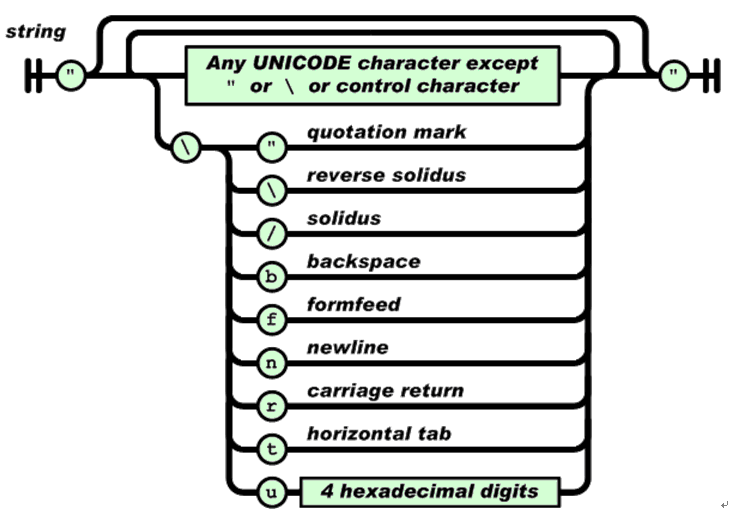
字符串(string)是由双引号包围的任意数量Unicode字符的集合,使用反斜线转义。一个字符(character)即一个单独的字符串(character string)。

字符串(string)与C或者Java的字符串非常相似。

数值(number)也与C或者Java的数值非常相似。除去未曾使用的八进制与十六进制格式。除去一些编码细节。

空白可以加入到任何符号之间。

以下是相关学习资料:

官方介绍:
http://www.json.org/json-zh.html

微软介绍:
http://msdn.microsoft.com/zh-cn/library/bb299886.aspx

IBM介绍:
http://www.ibm.com/developerworks/cn/web/wa-ajaxintro/

实例说明:

JSON 基础

简单地说,JSON 可以将 JavaScript 对象中表示的一组数据转换为字符串,然后就可以在函数之间轻松地传递这个字符串,或者在异步应用程序中将字符串从 Web 客户机传递给服务器端程序。这个字符串看起来有点儿古怪(稍后会看到几个示例),但是 JavaScript 很容易解释它,而且 JSON 可以表示比名称/值对更复杂的结构。例如,可以表示数组和复杂的对象,而不仅仅是键和值的简单列表。

简单 JSON 示例

按照最简单的形式,可以用下面这样的 JSON 表示名称/值对:

{ “firstName”: “Brett” }
这个示例非常基本,而且实际上比等效的纯文本名称/值对占用更多的空间:

firstName=Brett
但是,当将多个名称/值对串在一起时,JSON 就会体现出它的价值了。首先,可以创建包含多个名称/值对的记录,比如:

{ “firstName”: “Brett”, “lastName”:”McLaughlin”, “email”: “brett@newInstance.com” }
从语法方面来看,这与名称/值对相比并没有很大的优势,但是在这种情况下 JSON 更容易使用,而且可读性更好。例如,它明确地表示以上三个值都是同一记录的一部分;花括号使这些值有了某种联系。

值的数组

当需要表示一组值时,JSON 不但能够提高可读性,而且可以减少复杂性。例如,假设您希望表示一个人名列表。在 XML 中,需要许多开始标记和结束标记;如果使用典型的名称/值对(就像在本系列前面文章中看到的那种名称/值对),那么必须建立一种专有的数据格式,或者将键 名称修改为 person1-firstName 这样的形式。

如果使用 JSON,就只需将多个带花括号的记录分组在一起:

{ “people”: [
{ “firstName”: “Brett”, “lastName”:”McLaughlin”, “email”: “brett@newInstance.com” },
{ “firstName”: “Jason”, “lastName”:”Hunter”, “email”: “jason@servlets.com” },
{ “firstName”: “Elliotte”, “lastName”:”Harold”, “email”: “elharo@macfaq.com” }
]}
这不难理解。在这个示例中,只有一个名为 people 的变量,值是包含三个条目的数组,每个条目是一个人的记录,其中包含名、姓和电子邮件地址。上面的示例演示如何用括号将记录组合成一个值。当然,可以使用相同的语法表示多个值(每个值包含多个记录):

{ “programmers”: [
{ “firstName”: “Brett”, “lastName”:”McLaughlin”, “email”: “brett@newInstance.com” },
{ “firstName”: “Jason”, “lastName”:”Hunter”, “email”: “jason@servlets.com” },
{ “firstName”: “Elliotte”, “lastName”:”Harold”, “email”: “elharo@macfaq.com” }
],
“authors”: [
{ “firstName”: “Isaac”, “lastName”: “Asimov”, “genre”: “science fiction” },
{ “firstName”: “Tad”, “lastName”: “Williams”, “genre”: “fantasy” },
{ “firstName”: “Frank”, “lastName”: “Peretti”, “genre”: “christian fiction” }
],
“musicians”: [
{ “firstName”: “Eric”, “lastName”: “Clapton”, “instrument”: “guitar” },
{ “firstName”: “Sergei”, “lastName”: “Rachmaninoff”, “instrument”: “piano” }
]
}
这里最值得注意的是,能够表示多个值,每个值进而包含多个值。但是还应该注意,在不同的主条目(programmers、authors 和 musicians)之间,记录中实际的名称/值对可以不一样。JSON 是完全动态的,允许在 JSON 结构的中间改变表示数据的方式。

在处理 JSON 格式的数据时,没有需要遵守的预定义的约束。所以,在同样的数据结构中,可以改变表示数据的方式,甚至可以以不同方式表示同一事物。

在 JavaScript 中使用 JSON

掌握了 JSON 格式之后,在 JavaScript 中使用它就很简单了。JSON 是 JavaScript 原生格式,这意味着在 JavaScript 中处理 JSON 数据不需要任何特殊的 API 或工具包。

将 JSON 数据赋值给变量

例如,可以创建一个新的 JavaScript 变量,然后将 JSON 格式的数据字符串直接赋值给它:

var people =
{ “programmers”: [
{ “firstName”: “Brett”, “lastName”:”McLaughlin”, “email”: “brett@newInstance.com” },
{ “firstName”: “Jason”, “lastName”:”Hunter”, “email”: “jason@servlets.com” },
{ “firstName”: “Elliotte”, “lastName”:”Harold”, “email”: “elharo@macfaq.com” }
],
“authors”: [
{ “firstName”: “Isaac”, “lastName”: “Asimov”, “genre”: “science fiction” },
{ “firstName”: “Tad”, “lastName”: “Williams”, “genre”: “fantasy” },
{ “firstName”: “Frank”, “lastName”: “Peretti”, “genre”: “christian fiction” }
],
“musicians”: [
{ “firstName”: “Eric”, “lastName”: “Clapton”, “instrument”: “guitar” },
{ “firstName”: “Sergei”, “lastName”: “Rachmaninoff”, “instrument”: “piano” }
]
}
这非常简单;现在 people 包含前面看到的 JSON 格式的数据。但是,这还不够,因为访问数据的方式似乎还不明显。

访问数据

尽管看起来不明显,但是上面的长字符串实际上只是一个数组;将这个数组放进 JavaScript 变量之后,就可以很轻松地访问它。实际上,只需用点号表示法来表示数组元素。所以,要想访问 programmers 列表的第一个条目的姓氏,只需在 JavaScript 中使用下面这样的代码:

people.programmers[0].lastName;
注意,数组索引是从零开始的。所以,这行代码首先访问 people 变量中的数据;然后移动到称为 programmers 的条目,再移动到第一个记录([0]);最后,访问 lastName 键的值。结果是字符串值 “McLaughlin”。

下面是使用同一变量的几个示例。

people.authors[1].genre   // Value is “fantasy”

people.musicians[3].lastName // Undefined. This refers to the fourth entry,
and there isn’t one

people.programmers.[2].firstName // Value is “Elliotte”
利用这样的语法,可以处理任何 JSON 格式的数据,而不需要使用任何额外的 JavaScript 工具包或 API。

修改 JSON 数据

正如可以用点号和括号访问数据,也可以按照同样的方式轻松地修改数据:

people.musicians[1].lastName = “Rachmaninov”;
在将字符串转换为 JavaScript 对象之后,就可以像这样修改变量中的数据。

转换回字符串

当然,如果不能轻松地将对象转换回本文提到的文本格式,那么所有数据修改都没有太大的价值。在 JavaScript 中这种转换也很简单:

String newJSONtext = people.toJSONString();
这样就行了!现在就获得了一个可以在任何地方使用的文本字符串,例如,可以将它用作 Ajax 应用程序中的请求字符串。

更重要的是,可以将任何 JavaScript 对象转换为 JSON 文本。并非只能处理原来用 JSON 字符串赋值的变量。为了对名为 myObject 的对象进行转换,只需执行相同形式的命令:

String myObjectInJSON = myObject.toJSONString();
这就是 JSON 与本系列讨论的其他数据格式之间最大的差异。如果使用 JSON,只需调用一个简单的函数,就可以获得经过格式化的数据,可以直接使用了。对于其他数据格式,需要在原始数据和格式化数据之间进行转换。即使使用 Document Object Model 这样的 API(提供了将自己的数据结构转换为文本的函数),也需要学习这个 API 并使用 API 的对象,而不是使用原生的 JavaScript 对象和语法。

最终结论是,如果要处理大量 JavaScript 对象,那么 JSON 几乎肯定是一个好选择,这样就可以轻松地将数据转换为可以在请求中发送给服务器端程序的格式。

[转载]MSSQL分页:一个高效的二分法TOP MAX/TOP MIN分页存储过程

mikel阅读(1351)

[转载]MSSQL分页:一个高效的二分法TOP MAX/TOP MIN分页存储过程 – 熊哥 www.relaxlife.net – 博客园.

CREATE PROCEDURE [dbo].[getPagerTopMAX] (
@tblName nvarchar(2000), –要显示的表或多个表的连接,如:”myTable”
@ID nvarchar(150), –主表的主键,如:”id”
@page int = 1, –要显示那一页的记录
@pageSize int = 10, –每页显示的记录个数
@fldName nvarchar(500) = *, –要显示的字段列表,如:”id, cdsinger, cdsingertype, area, cdsingerreadme”
@fldSort nvarchar(200) = @ID, –排序字段列表或条件
@Sort bit = 1, –排序方法,0为升序,1为降序(如果是多字段排列Sort指代最后一个排序字段的排列顺序(最后一个排序字段不加排序标记)–程序传参如:’ SortA Asc,SortB Desc,SortC ‘)
@strCondition nvarchar(1000) = null, –查询条件,不需where,如:”and a=1 and b=2″
@Dist bit = 0, –是否添加查询字段的 DISTINCT 默认0不添加/1添加
@Counts int = 1 output, –查询到的记录数
@pageCount int = 1 output –查询结果分页后的总页数
) AS begin
SET NOCOUNT ON
Declare @SQLTmp nvarchar(3000) –存放动态生成的SQL语句
Declare @strTmp nvarchar(3000) –存放取得查询结果总数的查询语句
Declare @strID nvarchar(3000) –存放取得查询开头或结尾ID的查询语句

Declare @strSortType nvarchar(10) –数据排序规则A
Declare @strFSortType nvarchar(10) –数据排序规则B

Declare @SQLSelect nvarchar(50) –对含有DISTINCT的查询进行SQL构造
Declare @SqlCounts nvarchar(50) –对含有DISTINCT的总数查询进行SQL构造

if @Dist = 0
begin
set @SqlSelect = select
set @SqlCounts = Count(*)
end
else
begin
set @SqlSelect = select distinct
set @SqlCounts = Count(DISTINCT +@ID+)
end

if @Sort=0
begin
set @strFSortType= ASC
set @strSortType= DESC
end
else
begin
set @strFSortType= DESC
set @strSortType= ASC
end

——生成查询语句——–

此处@strTmp为取得查询结果数量的语句
if @strCondition is null or @strCondition= 没有设置显示条件
begin
set @sqlTmp = @fldName + From + @tblName
set @strTmp = @SqlSelect+ @Counts=+@SqlCounts+ FROM +@tblName
set @strID = From + @tblName
end
else
begin
set @sqlTmp = + @fldName + From + @tblName + where (1>0) + @strCondition
set @strTmp = @SqlSelect+ @Counts=+@SqlCounts+ FROM +@tblName + where (1>0) + @strCondition
set @strID = From + @tblName + where (1>0) + @strCondition
end

–取得查询结果总数量—–
exec sp_executesql @strTmp,N@Counts int out ,@Counts out
declare @tmpCounts int
if @Counts = 0
set @tmpCounts = 1
else
set @tmpCounts = @Counts

取得分页总数
set @pageCount=(@tmpCounts+@pageSize1)/@pageSize

/**//**当前页大于总页数 取最后一页**/
if @page>@pageCount
set @page=@pageCount

/*—–数据分页2分处理——-*/
declare @pageIndex int 总数/页大小
declare @lastcount int 总数%页大小

set @pageIndex = @tmpCounts/@pageSize
set @lastcount = @tmpCounts%@pageSize
if @lastcount > 0
set @pageIndex = @pageIndex + 1
else
set @lastcount = @pagesize

//***显示分页
if @strCondition is null or @strCondition= 没有设置显示条件
begin
if @pageIndex<2 or @page<=@pageIndex / 2 + @pageIndex % 2 前半部分数据处理
begin
if @page=1
set @strTmp=@SqlSelect+ top + CAST(@pageSize as VARCHAR(20))+ + @fldName+ from +@tblName
+ order by + @fldSort + + @strFSortType
else
begin
set @strTmp=@SqlSelect+ top + CAST(@pageSize as VARCHAR(20))+ + @fldName+ from +@tblName
+ where +@ID+ <(select min(+ @ID +) from (+ @SqlSelect+ top + CAST(@pageSize*(@page1) as Varchar(20)) + + @ID + from +@tblName
+ order by + @fldSort + + @strFSortType+) AS TBMinID)
+ order by + @fldSort + + @strFSortType
end
end
else
begin
set @page = @pageIndex@page+1 后半部分数据处理
if @page <= 1 最后一页数据显示
set @strTmp=@SqlSelect+ * from (+@SqlSelect+ top + CAST(@lastcount as VARCHAR(20))+ + @fldName+ from +@tblName
+ order by + @fldSort + + @strSortType+) AS TempTB+ order by + @fldSort + + @strFSortType
else
set @strTmp=@SqlSelect+ * from (+@SqlSelect+ top + CAST(@pageSize as VARCHAR(20))+ + @fldName+ from +@tblName
+ where +@ID+ >(select max(+ @ID +) from(+ @SqlSelect+ top + CAST(@pageSize*(@page2)+@lastcount as Varchar(20)) + + @ID + from +@tblName
+ order by + @fldSort + + @strSortType+) AS TBMaxID)
+ order by + @fldSort + + @strSortType+) AS TempTB+ order by + @fldSort + + @strFSortType
end
end

else 有查询条件
begin
if @pageIndex<2 or @page<=@pageIndex / 2 + @pageIndex % 2 前半部分数据处理
begin
if @page=1
set @strTmp=@SqlSelect+ top + CAST(@pageSize as VARCHAR(20))+ + @fldName+ from +@tblName
+ where 1=1 + @strCondition + order by + @fldSort + + @strFSortType
else
begin
set @strTmp=@SqlSelect+ top + CAST(@pageSize as VARCHAR(20))+ + @fldName+ from +@tblName
+ where +@ID+ <(select min(+ @ID +) from (+ @SqlSelect+ top + CAST(@pageSize*(@page1) as Varchar(20)) + + @ID + from +@tblName
+ where (1=1) + @strCondition + order by + @fldSort + + @strFSortType+) AS TBMinID)
+ + @strCondition + order by + @fldSort + + @strFSortType
end
end
else
begin
set @page = @pageIndex@page+1 后半部分数据处理
if @page <= 1 最后一页数据显示
set @strTmp=@SqlSelect+ * from (+@SqlSelect+ top + CAST(@lastcount as VARCHAR(20))+ + @fldName+ from +@tblName
+ where (1=1) + @strCondition + order by + @fldSort + + @strSortType+) AS TempTB+ order by + @fldSort + + @strFSortType
else
set @strTmp=@SqlSelect+ * from (+@SqlSelect+ top + CAST(@pageSize as VARCHAR(20))+ + @fldName+ from +@tblName
+ where +@ID+ >(select max(+ @ID +) from(+ @SqlSelect+ top + CAST(@pageSize*(@page2)+@lastcount as Varchar(20)) + + @ID + from +@tblName
+ where (1=1) + @strCondition + order by + @fldSort + + @strSortType+) AS TBMaxID)
+ + @strCondition+ order by + @fldSort + + @strSortType+) AS TempTB+ order by + @fldSort + + @strFSortType
end
end

—-返回查询结果—–
print @strTmp
exec (@strTmp)

SET NOCOUNT OFF

end

[转载]发型试戴原理简析

mikel阅读(1289)

[转载]发型试戴原理简析 – xiaotie – 博客园.

RIA 使技术变得有趣起来,比如CAD,Matlab等工具,未来非常适合直接以RIA方式在线运行。技术转型后,给自己的技术方向定的很窄,RIA这一块也只 关注在线图形图像应用,如在线试戴、试穿、试用、试装修等功能。试发系统已经做了好几套了,当然主要还是借鉴国外的系统taazthehairstyles,下面简析一下发型试戴的原理。

发型试戴的两个核心问题:

(1)如何让千奇百怪的发型自动戴在千奇百怪的模特头上,戴在正确的位置上?

(2)戴上之后,用户如何调整发型?不仅仅限于放大,缩小,上下左右挪动,而是“自由”变形。

====

问题1的解决方案:

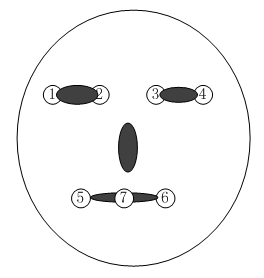
这是taaz的解决方案。假定一个标准的模特S,脸上有6个坐标点,见图:

image

根据5,6两点,可以求出它的中点7:

image

由点1,4,7构成一个三角形S(1,4,7)。

用户上传自己的头像U,也需要指定1-6点的坐标,由此也可以算出7点的坐标。U(1,4,7)构成另一个三角形。算出 S(1,4,7)=>U(1,4,7) 的仿射变换ASU。ASU确定了标准模特和用户上传模特的仿射变换。

关于仿射变换,这里有一篇文章给了很直观的解释

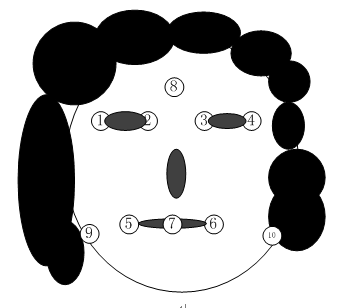
对于发型,由于有人脸大,有人脸小,有人脸宽,有人脸窄,因此使用的是另一个定位三角形:

image

使用上图中的8,9,10三点进行定位。对于标准模特S,可以测量得出它的8,9,10三点构成的三角形 S(8,9,10)。对于每个发型H,我们也指定一下以上三点,构成三角形H(8,9,10)。

计算H(8,9,10)=> S(8,9,10)的仿射变换AHS。AHS实现了发型图像到标准模特脸上的仿射变换。

如此一来,对于一个发型H,做两次仿射变换——ASU(AHS(H)),即可将发型戴于用户自己的头像U上。这个映射可以让发型正确“找到”自己的位置。

====

问题2的解决方案:

如果想更精细的调整发型试戴的效果,可在发型位置增加一些控制点,使用TPS样条实现变形效果,taaz是这样做的。TPS样条见我的博文 《TPS(薄板样条) 2D 插值》,这里贴张图:

TPS更详细的描述及算法见F.L. Bookstein, “Principal Warps: Thin-Plate Splines and the Decomposition of Deformations,”

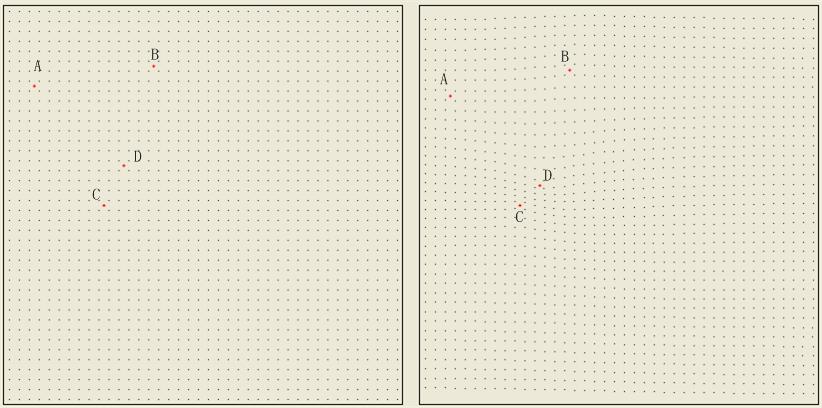
也可以使用局部变形算法(见:《图像变形算法:实现Photoshop液化工具箱中向前变形工具》),我是这样干的:

image image image

对比来说,TPS更好用一些,局部变形做细微调整的能力更强一点。

[转载]ASP.NET MVC Best Practices (Part 1)

mikel阅读(957)

[转载]ASP.NET MVC Best Practices (Part 1) – Kazi Manzur Rashid’s Blog.

In this post, I will share some of the best practices/guideline in developing ASP.NET MVC applications which I have learned in the hard way. I will not tell you to use DI or Unit Test instead I will assume you are already doing it and you prefer craftsmanship over anything.

1. Create Extension methods of UrlHelper to generate your url from Route

Avoid passing the controller, action or route name as string, create extension methods of UrlHelper which encapsulates it, for example:

01 public static class UrlHelperExtension
02 {
03 public static string Home(this UrlHelper helper)
04 {
05 return helper.Content("~/");
06 }
07
08 public static string SignUp(this UrlHelper helper)
09 {
10 return helper.RouteUrl("Signup");
11 }
12
13 public static string Dashboard(this UrlHelper helper)
14 {
15 return Dashboard(helper, StoryListTab.Unread);
16 }
17
18 public static string Dashboard(this UrlHelper helper, StoryListTab tab)
19 {
20 return Dashboard(helper, tab, OrderBy.CreatedAtDescending, 1);
21 }
22
23 public static string Dashboard(this UrlHelper helper, StoryListTab tab, OrderBy orderBy, int page)
24 {
25 return helper.RouteUrl("Dashboard", new { tab = tab.ToString(), orderBy = orderBy.ToString(), page });
26 }
27
28 public static string Update(this UrlHelper helper)
29 {
30 return helper.RouteUrl("Update");
31 }
32
33 public static string Submit(this UrlHelper helper)
34 {
35 return helper.RouteUrl("Submit");
36 }
37 }

Now, You can use the following in your view:

1 <a href="<%= Url.Dashboard() %>">Dashboard</a>
2 <a href="<%= Url.Profile() %>">Profile</a>

Instead of:

1 <%= Html.ActionLink("Dashboard", "Dashboard", "Story") %>
2 <a href="<%= Url.RouteUrl("Profile")%>">Profile</a>

And in Controller I can use:

1 return Redirect(Url.Dashboard(StoryListTab.Favorite, OrderBy.CreatedAtAscending, 1))

Instead of:

1 return RedirectToAction("Dashboard", "Story", new { tab = StoryListTab.Favorite, orderBy = OrderBy.CreatedAtAscending, page = 1 });

Of course you can use the strongly typed version which takes the controller, method and the parameters of the future assembly or create your own to avoid the future refactoring pain, but remember it is not officially supported and might change in the future. You can also use the above with the strongly typed version, certainly “adding another layer of indirection” (Scott Ha favorite quote) has some benefits. Another benefit when writing Unit Test you will only deal with the RedirectResult rather than RediretResult and RedirectToRouteResult.

2. Create Extension Method of UrlHelper to map your JavaScript, Stylesheet and Image Folder

By default ASP.NET MVC creates Content, Scripts folder for these things, which I do not like, Instead I like the following folder structure so that I can only set static file caching  on the Assets folder in IIS instead of going to multiple folders:

Assets
+images
+scripts
+stylesheets

No matter what the structure is, create some extension method of UrlHelper to map these folders, so that you can easily refer it in your view and later on if you need to change the structure, you do not have to do massive find/replace. I would also recommend to create extension methods for those assets which are often refereed in your views. For example:

01 public static string Image(this UrlHelper helper, string fileName)
02 {
03 return helper.Content("~/assets/images/{0}".FormatWith(fileName));
04 }
05
06 public static string Stylesheet(this UrlHelper helper, string fileName)
07 {
08 return helper.Content("~/assets/stylesheets/{0}".FormatWith(fileName));
09 }
10
11 public static string NoIcon(this UrlHelper helper)
12 {
13 return Image(helper, "noIcon.png");
14 }

And when referring the assets you can use:

1 <link href="<%= Url.Stylesheet("site.css")%>" rel="stylesheet" type="text/css"/>

Instead of the default:

1 <link href="../../Content/Site.css" rel="stylesheet" type="text/css" />

3. Use Bootstrapper in Global.asax

I have already covered it in the past, basically if you are doing a lot things in Application_Start of global.asax e.g. Registering Routes, Registering Controller Factory, Model Binders, View Engine, starting application specific background services, create individual task for specific part, then do use Bootstrapper to execute those. This make your code lot more clean and testable. This will be also helpful when developing a portal kind of app in ASP.NET mvc where each module can have some startup initialization without affecting others. But if you are developing a small app where the above things will never be an issue you can surly go ahead with the default global.asax.

4. Do not make any hard dependency on the DI Container, use Common Service Locator

Do not clutter your code with any specific DI reference, instead use the Common Service Locator, it is an abstraction over the underlying DI and it has the support for all of the popular DI containers, so that you can replace the underlying DI without modifying your application code as each DI Container has some unique features over the others. Tim Barcz recently wrote a excellent post on this subject, how much obsessed we are with our favorite DI Container but I am not sure why he did not mention about it. The Common Service Locator has the support for most of the regular scenarios, but for specific case for example injecting dependency in already instantiated object which as per my knowledge StructureMap, Ninject and Unity supports you can call the static ServiceLocator.Current.GetInstance in the constructor instead of calling the underlying DI. And for those who do know, Common Service Locator is a joint effort of the DI Containers creators initiated by Jeremy D Miller.

Creating Controller Factory with Common Service Locator is very easy:

1 public class CommonServiceLocatorControllerFactory : DefaultControllerFactory
2 {
3 protected override IController GetControllerInstance(Type controllerType)
4 {
5 return (controllerType == null) ? base.GetControllerInstance(controllerType) : ServiceLocator.Current.GetInstance(controllerType) as IController;
6 }
7 }

I hope the MVCContrib guys will follow the same instead of creating separate Controller Factory for each Container.

5. Decorate your Action Methods with Proper AcceptVerbs Attribute

ASP.NET MVC is much more vulnerable comparing to Web Forms. Make sure the action methods that modifies the data only accepts HttpVerbs.Post. If security is too much concern use the ValidateAntiForgeryToken or you can use Captcha. Derik Whittaker has an excellent post as well as a screen cast on how to integrate reCaptcha with ASP.NET MVC application, which I highly recommend. (Side Note: Do not miss a single episode of DimeCasts.net, I have learnt a lot form those short screen casts). My rule of thumb is use HttpVerbs.Post for all data modification actions and HttpVerbs.Get for data reading operations.

6. Decorate your most frequent Action Methods with OutputCache Attribute

Use OutputCache attribute when you are returning the less frequent updated data, prime candidate may be your home page, feed etc etc. You can use it for both Html and Json data types. When using it, only specify the Cache Profile name, do not not specify any other thing, use the web.config output cache section to fine tune it. For example:

1 [AcceptVerbs(HttpVerbs.Get), OutputCache(CacheProfile = "Dashboard")]
2 public ActionResult Dashboard(string userName, StoryListTab tab, OrderBy orderBy, int? page)
3 {
4 }

And in web.config:

01 <system.web>
02 <caching>
03 <outputCacheSettings>
04 <outputCacheProfiles>
05 <clear/>
06 <!-- 15 Seconds -->
07 <add
08 name="Dashboard"
09 duration="15"
10 varyByParam="*"
11 location="Client"
12 />
13 </outputCacheProfiles>
14 </outputCacheSettings>
15 </caching>
16 </system.web>

7. Keep your controller free from HttpContext and its tail

Make sure your controller does not have to refer the HttpContext and its tail. it will make your life easier when unit testing your Controller. If you need to access anything from HttpContext like User, QueryString, Cookie etc use custom action filter or create some interface and wrapper and pass it in the constructor. For example, for the following Route:

1 _routes.MapRoute("Dashboard", "Dashboard/{tab}/{orderBy}/{page}", new { controller = "Story", action = "Dashboard", tab = StoryListTab.Unread.ToString(), orderBy = OrderBy.CreatedAtDescending.ToString(), page = 1 });

But the controller action methods is declared as:

1 [AcceptVerbs(HttpVerbs.Get), OutputCache(CacheProfile = "Dashboard"), UserNameFilter]
2 public ActionResult Dashboard(string userName, StoryListTab tab, OrderBy orderBy, int? page)
3 {
4 }

The UserNameFilter is responsible for passing the UserName:

01 public class UserNameFilter : ActionFilterAttribute
02 {
03 public override void OnActionExecuting(ActionExecutingContext filterContext)
04 {
05 const string Key = "userName";
06
07 if (filterContext.ActionParameters.ContainsKey(Key))
08 {
09 if (filterContext.HttpContext.User.Identity.IsAuthenticated)
10 {
11 filterContext.ActionParameters[Key] = filterContext.HttpContext.User.Identity.Name;
12 }
13 }
14
15 base.OnActionExecuting(filterContext);
16 }
17 }

[Update: Make sure you have decorate either the Action or the Controller with Authorize attribute, check the comments]

8. Use Action Filter to Convert to compatible Action Methods parameters

Use Action Filter to convert incoming values to your controller action method parameters, again consider the Dashboard method, we are accepting tab and orderBy as Enum.

1 [AcceptVerbs(HttpVerbs.Get), OutputCache(CacheProfile = "Dashboard"), StoryListFilter]
2 public ActionResult Dashboard(string userName, StoryListTab tab, OrderBy orderBy, int? page)
3 {
4 }

The StoryListFilter will be responsible to convert it to proper data type from route values/querystrings.

01 public class StoryListFilter : ActionFilterAttribute
02 {
03 public override void OnActionExecuting(ActionExecutingContext filterContext)
04 {
05 const string TabKey = "tab";
06 const string OrderByKey = "orderBy";
07
08 NameValueCollection queryString = filterContext.HttpContext.Request.QueryString;
09
10 StoryListTab tab = string.IsNullOrEmpty(queryString[TabKey]) ?
11 filterContext.RouteData.Values[TabKey].ToString().ToEnum(StoryListTab.Unread) :
12 queryString[TabKey].ToEnum(StoryListTab.Unread);
13
14 filterContext.ActionParameters[TabKey] = tab;
15
16 OrderBy orderBy = string.IsNullOrEmpty(queryString[OrderByKey]) ?
17 filterContext.RouteData.Values[OrderByKey].ToString().ToEnum(OrderBy.CreatedAtDescending) :
18 queryString[OrderByKey].ToEnum(OrderBy.CreatedAtDescending);
19
20 filterContext.ActionParameters[OrderByKey] = orderBy;
21
22 base.OnActionExecuting(filterContext);
23 }
24 }

You can also use the custom Model Binder for the same purpose. In that case you will have to create two custom Model Binders for each Enum instead of one action filter. Another issue with the Model Binder is once it is registered for a type it will always come into action, but action filter can be selectively applied.

9. Action Filter Location

If you need the same action filter to all of your controller action methods,  put it in the controller rather than each action method. If you want to apply the same action filter to all of your controller create a base controller and inherit from that base controller, for example the story controller should be only used when user is logged in and we need to pass the current user name in its methods, also the StoryController should compress the data when returning:

1 [Authorize, UserNameFilter]
2 public class StoryController : BaseController
3 {
4 }
5
6 [CompressFilter]
7 public class BaseController : Controller
8 {
9 }

But if the inheritance hierarchy is going more than 2 /3 level deep, find another way to apply the filters. The latest Oxite code has some excellent technique applying filters dynamically which I highly recommend to check.

10. Use UpdateModel Carefully

I do not want to repeat what Justin Etheredge has mentioned in his post, be careful and do not fall into that trap.

11.Controller will not contain any Domain logic

Controller should be only responsible for:

  • Validating Input
  • Calling Model to prepare the view
  • Return the view or redirect to another action

If you are doing any other thing you are doing it in a wrong place, it is rather the Model responsibility which you are doing in Controller. If you follow this rule your action method will not be more than 20 – 25 lines of code. Ian Cooper has an excellent post Skinny Controller Fat Model, do read it.

12. Avoid ViewData, use ViewData.Model

Depending upon the dictionary key will not only make your code hard to refactor, also you will have to write the casting code in your view. It is completely okay even you end up per class for each action method of your controller.  If you think, creating these kind of classes is a tedious job, you can use the ViewDataExtensions of the MVCContrib project, it has some nice extension for returning strongly typed objects, though you still have to depend upon the string key if you have more than one data type in ViewData Dictionary.

13. Use PRG Pattern for Data Modification

Tim Barcz, Matt Hawley, Stephen Walther and even The Gu has blogged this over here, here, here and here. One of the issue with this pattern is when a validation fails or any  exception occurs you have to copy the ModelState into TempData. If you are doing it manually, please stop it, you can do this automatically with Action Filters, like the following:

01 [AcceptVerbs(HttpVerbs.Get), OutputCache(CacheProfile = "Dashboard"), StoryListFilter, ImportModelStateFromTempData]
02 public ActionResult Dashboard(string userName, StoryListTab tab, OrderBy orderBy, int? page)
03 {
04 //Other Codes
05 return View();
06 }
07
08 [AcceptVerbs(HttpVerbs.Post), ExportModelStateToTempData]
09 public ActionResult Submit(string userName, string url)
10 {
11 if (ValidateSubmit(url))
12 {
13 try
14 {
15 _storyService.Submit(userName, url);
16 }
17 catch (Exception e)
18 {
19 ModelState.AddModelError(ModelStateException, e);
20 }
21 }
22
23 return Redirect(Url.Dashboard());
24 }

And the Action Filers

01 public abstract class ModelStateTempDataTransfer : ActionFilterAttribute
02 {
03 protected static readonly string Key = typeof(ModelStateTempDataTransfer).FullName;
04 }
05
06 public class ExportModelStateToTempData : ModelStateTempDataTransfer
07 {
08 public override void OnActionExecuted(ActionExecutedContext filterContext)
09 {
10 //Only export when ModelState is not valid
11 if (!filterContext.Controller.ViewData.ModelState.IsValid)
12 {
13 //Export if we are redirecting
14 if ((filterContext.Result is RedirectResult) || (filterContext.Result is RedirectToRouteResult))
15 {
16 filterContext.Controller.TempData[Key] = filterContext.Controller.ViewData.ModelState;
17 }
18 }
19
20 base.OnActionExecuted(filterContext);
21 }
22 }
23
24 public class ImportModelStateFromTempData : ModelStateTempDataTransfer
25 {
26 public override void OnActionExecuted(ActionExecutedContext filterContext)
27 {
28 ModelStateDictionary modelState = filterContext.Controller.TempData[Key] as ModelStateDictionary;
29
30 if (modelState != null)
31 {
32 //Only Import if we are viewing
33 if (filterContext.Result is ViewResult)
34 {
35 filterContext.Controller.ViewData.ModelState.Merge(modelState);
36 }
37 else
38 {
39 //Otherwise remove it.
40 filterContext.Controller.TempData.Remove(Key);
41 }
42 }
43
44 base.OnActionExecuted(filterContext);
45 }
46 }

The MVCContrib project also has this feature but they are doing it in a single class which I do not like, I would like to have more control which method to export and which to import.

14. Create Layer Super Type for your ViewModel and Use Action Filter to populate common parts.

Create a layer super type for your view model classes and use action filter to populate common things into it . For example the tiny little application that I am developing I need to know the User Name and whether the User is authenticated.

01 public class ViewModel
02 {
03 public bool IsUserAuthenticated
04 {
05 get;
06 set;
07 }
08
09 public string UserName
10 {
11 get;
12 set;
13 }
14 }

and the action filter:

01 public class ViewModelUserFilter : ActionFilterAttribute
02 {
03 public override void OnActionExecuted(ActionExecutedContext filterContext)
04 {
05 ViewModel model;
06
07 if (filterContext.Controller.ViewData.Model == null)
08 {
09 model = new ViewModel();
10 filterContext.Controller.ViewData.Model = model;
11 }
12 else
13 {
14 model = filterContext.Controller.ViewData.Model as ViewModel;
15 }
16
17 if (model != null)
18 {
19 model.IsUserAuthenticated = filterContext.HttpContext.User.Identity.IsAuthenticated;
20
21 if (model.IsUserAuthenticated)
22 {
23 model.UserName = filterContext.HttpContext.User.Identity.Name;
24 }
25 }
26
27 base.OnActionExecuted(filterContext);
28 }
29 }

As you can see that it not replacing the model, if it is previously set in the controller, rather it populates the common part if it finds it compatible. Other benefit is, the views that only depends the layer super type you can simply return View() instead of creating the model.

That’s it for today, I will post rest of the items tomorrow.

Stay tuned.

[转载]ASP.NET MVC Best Practices (Part 2)

mikel阅读(826)

[转载]ASP.NET MVC Best Practices (Part 2) – Kazi Manzur Rashid’s Blog.

ASP.NET MVC Best Practices (Part 2)

This is the second part of the series and may be the last, till I find some thing new. My plan was to start with routing, controller, controller to model, controller to view and last of all the view, but some how I missed one important thing in routing, so I will begin with that in this post.

15. Routing consideration

If you are developing a pure ASP.NET MVC application, turn off existing file check of routes, it will eliminate unnecessary file system check. Once you do it there are few more things you have to consider. Remember when you are hosting application in IIS7 integrated mode, your ASP.NET application will intercept all kind of request, no matter what the file extension is. So you have to add few more things in the ignore list which your ASP.NET MVC application will not process. This might include static files like html, htm, text file specially robots.txt, favicon.ico, script, image and css etc. This is one of the reason, why I do not like the default directory structure (Contents and Scripts folder) mentioned in my #2 in the previous post. The following is somewhat my standard template for defining routes when hosting in IIS7:

01 _routes.Clear();
02
03 // Turns off the unnecessary file exists check
04 _routes.RouteExistingFiles = true;
05
06 // Ignore text, html, files.
07 _routes.IgnoreRoute("{file}.txt");
08 _routes.IgnoreRoute("{file}.htm");
09 _routes.IgnoreRoute("{file}.html");
10
11 // Ignore axd files such as assest, image, sitemap etc
12 _routes.IgnoreRoute("{resource}.axd/{*pathInfo}");
13
14 // Ignore the assets directory which contains images, js, css & html
15 _routes.IgnoreRoute("assets/{*pathInfo}");
16
17 // Ignore the error directory which contains error pages
18 _routes.IgnoreRoute("ErrorPages/{*pathInfo}");
19
20 //Exclude favicon (google toolbar request gif file as fav icon which is weird)
21 _routes.IgnoreRoute("{*favicon}", new { favicon = @"(.*/)?favicon.([iI][cC][oO]|[gG][iI][fF])(/.*)?" });
22
23 //Actual routes of my application

Next, few of my personal preference rather than guideline, by default ASP.NET MVC generates url like {controller}/{action} which is okay when you are developing multi-module application,  for a small application, I usually prefer the action name without the controller name, so instead of www.yourdomain.com/Story/Dashboard, www.yourdomain.com/Membership/SignIn it will generate www.yourdomain.com/Dashboard, www.yourdomain.com/Signin. So I add few more routes:

01 _routes.MapRoute("SignUp", "SignUp", new { controller = "Membership", action = "SignUp" });
02 _routes.MapRoute("SignIn", "SignIn", new { controller = "Membership", action = "SignIn" });
03 _routes.MapRoute("ForgotPassword", "ForgotPassword", new { controller = "Membership", action = "ForgotPassword" });
04 _routes.MapRoute("SignOut", "SignOut", new { controller = "Membership", action = "SignOut" });
05 _routes.MapRoute("Profile", "Profile", new { controller = "Membership", action = "Profile" });
06 _routes.MapRoute("ChangePassword", "ChangePassword", new { controller = "Membership", action = "ChangePassword" });
07
08 _routes.MapRoute("Dashboard", "Dashboard/{tab}/{orderBy}/{page}", new { controller = "Story", action = "Dashboard", tab = StoryListTab.Unread.ToString(), orderBy = OrderBy.CreatedAtDescending.ToString(), page = 1 });
09 _routes.MapRoute("Update", "Update", new { controller = "Story", action = "Update" });
10 _routes.MapRoute("Submit", "Submit", new { controller = "Story", action = "Submit" });
11
12 _routes.MapRoute("Home", "{controller}/{action}/{id}", new { controller = "Home", action = "Index", id = string.Empty });

16. Create new ActionResult if required

ASP.NET MVC has quite a number of ActionResult for different purposes, but still we might need new ActionResult. For example xml, rss, atom etc. In those cases, I would suggest instead of using the generic ContentResult, create new ActionResult. The MVCContrib has an XmlResult which you can use for returning xml but no support for feed. Yes it is obviously tricky to convert an unknown object into rss/atom, in those cases you can create model specific ActionResult. For example:

01 public class AtomResult : ActionResult
02 {
03 public AtomResult(string siteTitle, string feedTitle, IEnumerable<IStory> stories)
04 {
05 SiteTitle = siteTitle;
06 FeedTitle = feedTitle;
07 Stories = stories;
08 }
09
10 public string SiteTitle
11 {
12 get;
13 private set;
14 }
15
16 public string FeedTitle
17 {
18 get;
19 private set;
20 }
21
22 public IEnumerable<IStory> Stories
23 {
24 get;
25 private set;
26 }
27
28 public override void ExecuteResult(ControllerContext context)
29 {
30 string xml = Build(context);
31
32 HttpResponseBase response = context.HttpContext.Response;
33 response.ContentType = "application/atom+xml";
34 response.Write(xml);
35 }
36 }

And in Controller:

1 [AcceptVerbs(HttpVerbs.Get), OutputCache(CacheProfile = "Atom")]
2 public ActionResult Shared()
3 {
4 IEnumerable<stories> stories = GetSharedStories();
5
6 return new AtomResult("My Site", "My shared stories in atom", stories);
7 }

17. Split your View into multiple ViewUserControl

Split your view into multiple ViewUserControl when it is getting bigger, it really does not matter whether the same UserControl is reused in another page, it makes the very view much more readable. Consider the following view:

01 <asp:Content ID="Content1" ContentPlaceHolderID="TitleContent" runat="server">
02 My Secret App : Dashboard
03 </asp:Content>
04 <asp:Content ID="Content2" ContentPlaceHolderID="MainContent" runat="server">
05 <div id="heading"></div>
06 <div class="columns">
07 <div id="main" class="column">
08 <div id="storyListTabs" class="ui-tabs ui-widget ui-widget-content ui-corner-all">
09 <% Html.RenderPartial("TabHeader", Model);%>
10 <div id="tabContent" class="ui-tabs-panel ui-widget-content ui-corner-bottom">
11 <div id="storyList">
12 <% Html.RenderPartial("SortBar", Model);%>
13 <div class="clear"></div>
14 <% Html.RenderPartial("NoLinkMessage", Model);%>
15 <form id="update" action="<%= Url.Update()%>" method="post">
16 <% Html.RenderPartial("List", Model);%>
17 <% Html.RenderPartial("ActionBar", Model);%>
18 <% Html.RenderPartial("Pager", Model);%>
19 </form>
20 </div>
21 </div>
22 </div>
23 <%Html.RenderPartial("Submit", new StorySubmitViewModel());%>
24 </div>
25 <div id="sideBar" class="column"></div>
26 </div>
27 </asp:Content>

18. HtmlHelper extension

First, read this great post of Rob Conery and I completely agree, you should create helper methods for each condition and I would also suggest to create helper methods for reusable UI elements like the ASP.NET MVC team did, but I have a different suggestion about the placing of these methods that we are currently practicing.

Application Developer

Do only create extension methods of HtmlHelper if you are using it in more than one view. Otherwise create a view specific helper and create an extension method of the HtmlHelper which returns the view specific helper. for example:

01 public class DashboardHtmlHelper
02 {
03 private readonly HtmlHelper _htmlHelper;
04
05 public DashboardHtmlHelper(HtmlHelper htmlHelper)
06 {
07 _htmlHelper = htmlHelper;
08 }
09
10 public string DoThis()
11 {
12 //Your Code
13 }
14
15 public string DoThat()
16 {
17 //Your Code
18 }
19 }
20
21 public static class HtmlHelperExtension
22 {
23 public static DashboardHtmlHelper Dashboard(this HtmlHelper htmlHelper)
24 {
25 return new DashboardHtmlHelper(htmlHelper);
26 }
27 }

Now, you will able to use it in the view like:

1 <%= Html.Dashboard().DoThis() %>

UI Component Developer

If you are developing some family of UI components that will be reusable across different ASP.NET MVC application, create a helper with your component family name like the above, if you are a commercial vendor maybe your company name then add those methods in that helper. Otherwise there is a very good chance of method name collision.

The same is also applied if you are extending the IViewDataContainer like the MVCContrib.org.

19. Encode

Whatever you receive from the User always use Html.Encode(“User Input”) for textNode and Html.AttributeEncode(“User Input”) for html element attribute.

20. Do not put your JavaScript codes in your View

Do not intermix your JavaScript with the html, create separate js files and put your java script in those files. Some time, you might need to pass your view data in your java script codes, in those cases only put your initialization in the view. For example, consider you are developing Web 2.0 style app where you want to pass ajax method url, and some other model data  in the java script codes, in those cases you can use some thing like the following:

The View:

1 <div id="sideBar" class="column"></div>
2 <script type="text/JavaScript">
3 $(document).ready(function(){
4 Story.init('<%= Model.UrlFormat %>', '<%= Url.NoIcon() %>', <%= Model.PageCount %>, <%= Model.StoryPerPage %>, <%= Model.CurrentPage %>, '<%= Model.SelectedTab %>', '<%= Model.SelectedOrderBy %>');
5 });
6 </script>
7 </div>
8 </asp:Content>

And JavaScript:

01 var Story =
02 {
03 _urlFormat: '',
04 _noIconUrl: '',
05 _pageCount: 0,
06 _storyPerPage: 0,
07 _currentPage: 0,
08 _currentTab: '',
09 _currentOrderBy: '',
10
11 init: function(urlFormat, noIconUrl, pageCount, storyPerPage, currentPage, currentTab, currentOrderBy)
12 {
13 Story._urlFormat = urlFormat;
14 Story._noIconUrl = noIconUrl;
15 Story._pageCount = pageCount;
16 Story._storyPerPage = storyPerPage;
17 Story._currentPage = currentPage;
18 Story._currentTab = currentTab;
19 Story._currentOrderBy = currentOrderBy;
20
21 //More Codes
22 }
23 }

And those who are not familiar with the above  JavaScript code, it is an example of creating static class in JavaScript. And one more thing before I forgot to mention, never hard code your ajax method url in your javascript file, no  matter Rob Conery or Phil Haack does it in their demo. It is simply a bad practice and demolish the elegance of ASP.NET Routing.

21. Use jQuery and jQuery UI

Use JQuery and jQuery UI, nothing can beats it and use Google CDN to load these libraries.

1 <link type="text/css" href="http://ajax.googleapis.com/ajax/libs/jqueryui/1.7.1/themes/{YOUR Prefered Theme}/JQuery-ui.css" rel="stylesheet"/>
2 <script type="text/javascript" src="http://ajax.googleapis.com/ajax/libs/jquery/1.3.2/jquery.min.js"></script>
3 <script type="text/javascript" src="http://ajax.googleapis.com/ajax/libs/jqueryui/1.7.1/jquery-ui.js"></script>

Or much better:

1 <link type="text/css" href="http://ajax.googleapis.com/ajax/libs/jqueryui/1.7.1/themes/{YOUR Prefered Theme}/jQuery-ui.css" rel="stylesheet"/>
2 <script type="text/javascript" src="http://www.google.com/jsapi"></script>
3 <script type="text/javascript">
4 google.load("jQuery", "1.3.2");
5 google.load("jQueryui", "1.7.1");
6 </script>

And that’s it for the time being.

At the end, I just want congratulate the ASP.NET MVC Team for developing such an excellent framework and specially the way they took the feedback from the community and I look forward to develop few more killer apps in this framework.

[原创]ASP.NET MVC IgnoreRoute使用实例

mikel阅读(1709)

最近做ASP.NET MVC项目时,发现有些页面的图片链接被MVC Route解析成Cotnroller进行处理,提示错误:

The controller for path ‘/Content/images/xxx.gif’ could not be found or it does not implement the IController interface.
参数名: controllerType

于是修改了Global.asax.cs中的代码:

public static void RegisterRoutes(RouteCollection routes)
{
routes.IgnoreRoute(“{resource}.axd/{*pathInfo}”);
routes.IgnoreRoute(“{*allgif}”, new { alljs = @”.*\.gif(/.*)?” });//加入了路由解析规则,让ASP.NET默认的解析机制进行解析,跳过ASP.NET MVC的Cotroller解析器避免出现上述错误

routes.MapRoute(
“Default”,                                              // Route name
“{controller}/{action}/{id}”,                           // URL with parameters
new { controller = “Home”, action = “Index”, id = “” }  // Parameter defaults
);

}

备注:IgnoreRoute 写法:

routes.IgnoreRoute(“{*过滤规则名称}”, new { 过滤规则名称 = @”正则表达式” });

实例:routes.IgnoreRoute(“{*allgif}”, new { alljs = @”.*\.gif(/.*)?” });
具体IgnoreRoute的使用规则可以阅读下面两篇文章:

ASP.NET MVC Best Practices (Part 2) /

Routing MSDN文档说明:
http://msdn.microsoft.com/en-us/library/system.web.routing.aspx
http://msdn.microsoft.com/en-us/library/system.web.routing.routecollection.aspx

其他:  http://www.asp.net/learn/mvc/tutorial-23-cs.aspx