[MVC]Asp.net MVC 示例项目"Suteki.Shop"分析之---数据验证

mikel阅读(761)

Asp.net MVC 示例项目"Suteki.Shop"分析之—数据验证

     在Suteki.Shop,实现了自己的数据校验机制,可以说其设计思路还是很有借鉴价值的。而使用
这种机制也很容易在Model中对相应的实体对象(属性)添加校验操作方法。下面就来介绍一下其实
现方式。

     首先,看一下这样类图:
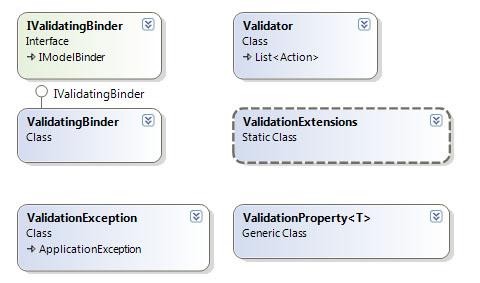
     在Suteki.Shop定义一个“IValidatingBinder”接口,其派生自IModelBinder:  

public interface IValidatingBinder : IModelBinder 
{
    
void UpdateFrom(object target, NameValueCollection values);
    
void UpdateFrom(object target, NameValueCollection values, string objectPrefix);
    
void UpdateFrom(object target, NameValueCollection values, ModelStateDictionary modelStateDictionary);
    
void UpdateFrom(object target, NameValueCollection values, ModelStateDictionary modelStateDictionary, string objectPrefix);
}


     其接口中定义了一个重载方法UpdateFrom,其要实现的功能与MVC中UpdateFrom一样,就是自动读取
我们在form中定义的有些元素及其中所包含的内容。  

     实现IValidatingBinder接口的类叫做:ValidatingBinder,下面是其核心代码说明。
   
     首先是BindModel(ControllerContext controllerContext, ModelBindingContext bindingContext)
该方法是在IModelBinder接口中定义的,是其核心功能,用于将客户端数据转成我们希望Model类型。
       

/// <summary>
/// IModelBinder.BindModel
/// </summary>
/// <param name="controllerContext"></param>
/// <param name="bindingContext"></param>
/// <returns></returns>
public object BindModel(ControllerContext controllerContext, ModelBindingContext bindingContext)
{
    
if (bindingContext == null)
    {
        
throw new ArgumentNullException("bindingContext");
    }
    
if (IsBasicType(bindingContext.ModelType))
    {
        
return new DefaultModelBinder().BindModel(controllerContext, bindingContext);
    }
    var instance 
= Activator.CreateInstance(bindingContext.ModelType);
    var request 
= controllerContext.HttpContext.Request;
    var form 
= request.RequestType == "POST" ? request.Form : request.QueryString;
    UpdateFrom(instance, form);
    
return instance;
}


      上面代码第二个if 用于判断bindingContext的Model类型是否是系统类型,比如decimal,string等。
如果是则使用MVC自带的DefaultModelBinder来进行处理。否则就使用该类自己的UpdateFrom方法,从而
实现对当前form中的数据与Model中相应类型的信息绑定,并返相应的 Model 实例(instance)。下面
是其核心代码:


public virtual void UpdateFrom(BindingContext bindingContext)
{
    
foreach (var property in bindingContext.Target.GetType().GetProperties())
    {
        
try
        {
            
foreach (var binder in propertyBinders)
            {
                binder.Bind(property, bindingContext);
            }
        }
        
catch (Exception exception)
        {
            
if (exception.InnerException is FormatException ||
                exception.InnerException 
is IndexOutOfRangeException)
            {
    
string key = BuildKeyForModelState(property, bindingContext.ObjectPrefix);
                bindingContext.AddModelError(key, bindingContext.AttemptedValue, 
"Invalid value for {0}".With(property.Name));
    bindingContext.ModelStateDictionary.SetModelValue(key, 
new ValueProviderResult(bindingContext.AttemptedValue, bindingContext.AttemptedValue, CultureInfo.CurrentCulture));
            }
            
else if (exception is ValidationException)
            {
    
string key = BuildKeyForModelState(property, bindingContext.ObjectPrefix);
                bindingContext.AddModelError(key, bindingContext.AttemptedValue, exception.Message);
    bindingContext.ModelStateDictionary.SetModelValue(key, 
new ValueProviderResult(bindingContext.AttemptedValue, bindingContext.AttemptedValue, CultureInfo.CurrentCulture));
            }
            
else if (exception.InnerException is ValidationException)
            {
    
string key = BuildKeyForModelState(property, bindingContext.ObjectPrefix);
                bindingContext.AddModelError(key, bindingContext.AttemptedValue, exception.InnerException.Message);
    bindingContext.ModelStateDictionary.SetModelValue(key, 
new ValueProviderResult(bindingContext.AttemptedValue, bindingContext.AttemptedValue, CultureInfo.CurrentCulture));
            }
            
else
            {
                
throw;
            }
        }
    }
    
if (!bindingContext.ModelStateDictionary.IsValid)
    {
        
throw new ValidationException("Bind Failed. See ModelStateDictionary for errors");
    }
}

     上面代码中的TRY部分就是其数据绑定的代码,而其Catch部分实现了在数据绑定过程中出现的
错误异常(主要是数据验证等,会在后面提到)收集到ModelState(ModelStateDictionary)中
便于后续处理。而这里Suteki.Shop还定义了自己的验证异常类“ValidationException”(位于:
Suteki.Common\Validation\ValidationException.cs,因为代码很简单,就不多做解释了。

    有了ValidatingBinder之后,下面就来看一下Suteki.Shop是如何使用它的。这里以一个业务
流程—“编辑用户”来进行说明。
 
    下面就是UserController(Suteki.Shop\Controllers\UserController.cs) 中的Edit操作:

[AcceptVerbs(HttpVerbs.Post), UnitOfWork]
public ActionResult Edit([DataBind] User user, string password)
{
 
if(! string.IsNullOrEmpty(password))
 {
  user.Password 
= userService.HashPassword(password);
 }
    ..    
}

     在该Action中,我们看到其定义并使用了DataBind这个ModelBinder进行绑定处理,所以我们要
先看一下DataBinder(注:它是Suteki.Shop中关于数据绑定的“ModelBinder的基类)中倒底做了
些什么,下面是其实现代码:
   

public class DataBinder : IModelBinder, IAcceptsAttribute
{
public virtual object BindModel(ControllerContext controllerContext, ModelBindingContext bindingContext)
 {
  
object entity;
  
if(declaringAttribute == null || declaringAttribute.Fetch)
  {
   entity 
= FetchEntity(bindingContext, controllerContext);
  }
  
else 
  {
   entity 
= Activator.CreateInstance(bindingContext.ModelType);
  }
  
  
try
  {
   validatingBinder.UpdateFrom(entity, controllerContext.HttpContext.Request.Form, bindingContext.ModelState, bindingContext.ModelName);
  }
  
catch(ValidationException ex) 
  {}
  
return entity;
 } 
 
}


      其BindModel方法中“获取当前要编辑的用户数据操作”就是通过下面这一行完成的:      

FetchEntity(bindingContext, controllerContext)

      
     而try中的代码validatingBinder.UpdateFrom()就是对上面所说的“ValidatingBinder”中的
“UpdateFrom”调用。通过UpdateFrom之后就会将绑定时出现的错误异常进行收集。

     有了这种绑定,可以说设置上完成了,而如何将验证规则绑定到相应的Model对象上呢?
   
     为了实现这个功能,Suteki.Shop提供了一个叫做ValidationProperty的泛型类,它提供了对于
数字,是否为空, IsDecimal,最大值,最小值,IsEmail等验证功能。并以扩展方法的行式提供出
来,相应代码如下:     

Code

    
     使用它就可以很方便的对Model中的相关属性添加验证规则了。以User为例,其验证规则添加
内容如下(Suteki.Shop\Models\User.cs):

public void Validate()
{
   Validator validator 
= new Validator
   {
       () 
=> Email.Label("Email").IsRequired().IsEmail(),
       () 
=> Password.Label("Password").IsRequired(),
   };
    validator.Validate();
}

    
    在规则添加完成后,就把对获取到的信息进行验证了,下面是验证的实现方法:

public class Validator : List<Action>
{
    
public void Validate()
    {
        var errors 
= new List<ValidationException>();
        
foreach (Action validation in this)
        {
            
try
            {
                validation();
            }
            
catch (ValidationException validationException)
            {
                 errors.Add(validationException);
            }
        }
        
if (errors.Count > 0)
        {
            
//backwards compatibility
            string error = string.Join("", errors.Select(x => x.Message + "<br />").ToArray());
            
throw new ValidationException(error, errors);
        }
    }
}


      代码比较简单,大家看一下就可以了。
   
      到这里,主要的代码就介绍完了,下面再后到UserController中看看Action是如何调用验证方法
并发验证错误信息复制到ModelState中的,接着看一下编辑用户信息这个Action:

[AcceptVerbs(HttpVerbs.Post), UnitOfWork]
public ActionResult Edit([DataBind] User user, string password)
{
    
if(! string.IsNullOrEmpty(password))
    {
       user.Password 
= userService.HashPassword(password);
    }
    
try
    {
        user.Validate();
    }
    
catch (ValidationException validationException)
    {
        validationException.CopyToModelState(ModelState, 
"user");
        
return View("Edit", EditViewData.WithUser(user));
    }
    
return View("Edit", EditViewData.WithUser(user).WithMessage("Changes have been saved")); 
}


      大家看到了吧,Try中的user.Validate()就是启动验证的功能,而在Catch中使用CopyToModelState
方法将错误信息Copy到当前Controller中的ModelState中,如下:

public void CopyToModelState(ModelStateDictionary dictionary, string prefix)
{
    
foreach(var error in errors)
    {
        
string key = string.IsNullOrEmpty(prefix) ? error.propertyKey : prefix + "." + error.propertyKey;
       dictionary.AddModelError(key, error.Message);
    }


     这样在前台View中,通过Html.ValidationSummary()方法来显示验证结果,现在我们看一下最终的
运行效果:

    以“输入错误的Email地址”为例:


    好了,今天的内容就先到这里了。
   
    原文链接:http://www.cnblogs.com/daizhj/archive/2009/05/08/1452735.html

    作者: daizhj,代震军,LaoD

    Tags: mvc,Suteki.Shop

    网址: http://daizhj.cnblogs.com/   
   

[MVC]ASP.NET MVC下读取XML生成动态表单的例子

mikel阅读(889)

问题的提出:在MVC下动态表单怎么生成?

好的,我们来看下面的例子:

接着上次的MVCMembership来讲

我们首先添加一个目录XML。然后添加View:

1.checkXml.aspx 用来检查我们输入的XML格式(利用XSD检查)

2.New.aspx 用来新增XML表单的

3.Show.aspx 用来显示XML表单的

4.ShowResult.aspx 用来显示XML表单提交的结果的

一、数据库结构

要用到动态的表单,这里我们利用SQLServer2005的XML类型来保存,建表的SQL如下:

use Test
/*==============================================================*/
/* DBMS name:      Microsoft SQL Server 2005                    */
/* Created on:     2009/5/8 7:56:50                             */
/*==============================================================*/
if exists (select 1
from  sysindexes
where  id    = object_id('XMLFORM')
and   name  = 'IDX_XML'
and   indid > 0
and   indid < 255)
drop index XMLFORM.IDX_XML
go
if exists (select 1
from  sysindexes
where  id    = object_id('XMLFORM')
and   name  = 'IDX_ID'
and   indid > 0
and   indid < 255)
drop index XMLFORM.IDX_ID
go
if exists (select 1
from  sysobjects
where  id = object_id('XMLFORM')
and   type = 'U')
drop table XMLFORM
go
/*==============================================================*/
/* Table: XMLFORM                                               */
/*==============================================================*/
create table XMLFORM (
ID                   int                  identity,
FORMXML              xml                  not null,
constraint PK_XMLFORM primary key (ID)
)
go
declare @CurrentUser sysname
select @CurrentUser = user_name()
execute sp_addextendedproperty 'MS_Description',
'XMLFORM',
'user', @CurrentUser, 'table', 'XMLFORM'
go
/*==============================================================*/
/* Index: IDX_ID                                                */
/*==============================================================*/
create unique index IDX_ID on XMLFORM (
ID ASC
)
go
/*==============================================================*/
/* Index: IDX_XML                                               */
/*==============================================================*/
create PRIMARY XML INDEX IDX_XML on XMLFORM (
FORMXML
)
go

好了我们建了一个名为XMLForm的表,其中ID自增,FORMXML为我们需要的XML表单的内容

二、编写XML的Controller

XMLController.cs

主要的action

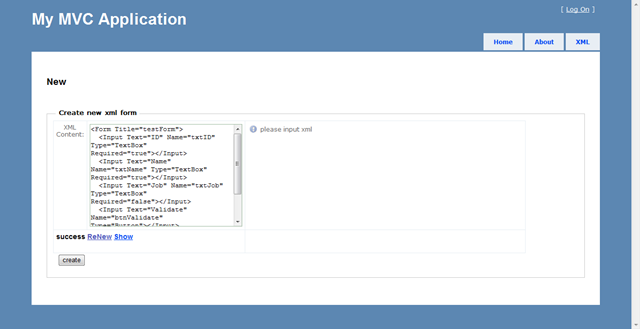
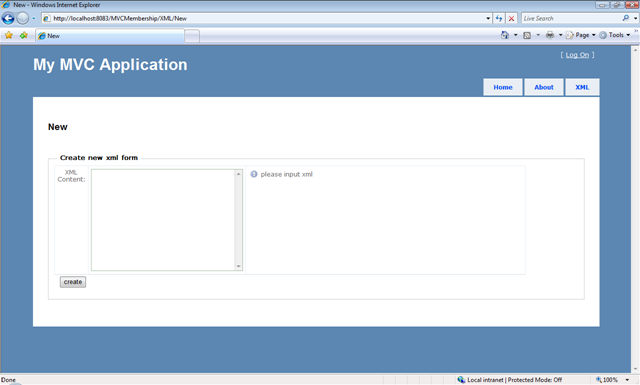
1.New

image

 image image image

 [AcceptVerbs(HttpVerbs.Post), ValidateInput(false)]
public ActionResult New(string xmlContent)
{
System.Threading.Thread.Sleep(2000);    //模拟提交等待
xmlContent = Server.UrlDecode(xmlContent);
if (!string.IsNullOrEmpty(xmlContent))
{
//if (!CheckXML(xmlContent, out strError)) //服务器端检测,如果用了ajax检测,就没必要了
//{
//    ModelState.AddModelError("_FORM",strError);  
//    return View();
//}
XMLFormDataContext db = new XMLFormDataContext();
TransactionOptions opt = new TransactionOptions();
ViewData["xmlContent"] = xmlContent;
opt.IsolationLevel = IsolationLevel.Serializable;
using (TransactionScope tran = new TransactionScope(TransactionScopeOption.RequiresNew, opt))
{
XMLFORM f = new XMLFORM();
try
{
f.FORMXML = XElement.Parse(xmlContent);
db.XMLFORMs.InsertOnSubmit(f);
db.SubmitChanges();
var id = db.XMLFORMs.Max(p => p.ID);
ViewData["result"] = "success";
ViewData["id"] = (int)id;
tran.Complete();
return View();
}
catch
{
ViewData["result"] = "failure";
ModelState.AddModelError("_FORM", "envalid xml format");
return View();
}
}
}
else
return View();
}
XML:
<Form Title="testForm">
<Input Text="ID" Name="txtID" Type="TextBox" Required="true"></Input>
<Input Text="Name" Name="txtName" Type="TextBox" Required="true"></Input>
<Input Text="Job" Name="txtJob" Type="TextBox" Required="false"></Input>
<Input Text="Validate" Name="btnValidate" Type="Button"></Input>
<Input Text="Commit" Name="btnComit" Type="Button"></Input>
</Form>
注意:我们使用了事务,所以不要忘了最后要提交。我就是忘了,找了3天错误   

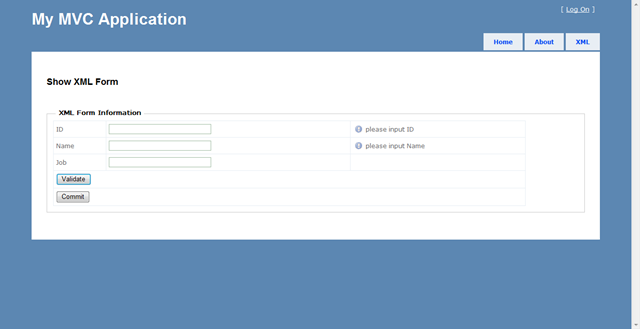
2.Show

image

[AcceptVerbs(HttpVerbs.Get)]
public ActionResult Show(int? ID)
{
int nId = 0;
XElement doc = null;
if (int.TryParse(Request["id"], out nId))
{
try
{
XMLFormDataContext db = new XMLFormDataContext();
var q = from f in db.XMLFORMs
where f.ID == nId
select f.FORMXML
;
if (q.Count() > 0)
{
foreach (var qq in q)
{
doc = qq;
}
ViewData["xml"] = doc;
}
else
{
ModelState.AddModelError("_FORM", "Not Exists");
}
ViewData["id"] = nId;
}
catch (Exception e)
{
ModelState.AddModelError("_FORM", e.Message);
}
}
else
{
ModelState.AddModelError("_FORM", "Miss ID");
}
return View();
}

注意这里Show.asp的写法.不能用<input/>直接输出控件字符串,而要

   Response.Write(Html.TextBox(i.Attribute("Name").Value, "", new { @class = "InputNormal" }));
否则提交后得不到form的值
代码如下:
  <%using (Html.BeginForm())
{ %>
<%=Html.ValidationSummary()%>
<h2>
Show XML Form</h2>
<div id="divResult"></div>
<fieldset>
<legend>XML Form Information</legend>
<table cellpadding="0" cellspacing="0" width="90%">
<%
XElement xml=(XElement)ViewData["xml"];
StringBuilder sbScript = new StringBuilder();
sbScript.AppendLine("<Script language='javascript'>");
sbScript.AppendLine("function checkControls() {");
var input = from p in xml.Elements()
where p.Name == "Input" && p.Attribute("Type").Value != "Button"
select p;
foreach (var i in input)
{
Response.Write("<tr>");
if (bool.Parse(i.Attribute("Required").Value))
{
sbScript.AppendLine(string.Format(
@"$('#{0}').formValidator({{onshow:'please input {1}',onfocus:'{1} required',oncorrect: 'OK' }})",
i.Attribute("Name").Value,
i.Attribute("Text").Value)
);
sbScript.AppendLine(
string.Format(".inputValidator({{ min: 1, empty: {{ leftempty: true, rightempty: true}}, onerror: '{1} required' }});",
i.Attribute("Name").Value,
i.Attribute("Text").Value
));
}
Response.Write(string.Format("<td>{0}</td>", i.Attribute("Text").Value));
Response.Write("<td>");
Response.Write(Html.TextBox(i.Attribute("Name").Value, "", new { @class = "InputNormal" }));
Response.Write("</td>");
Response.Write(string.Format("<td><div id='{0}Tip'></div></td>",i.Attribute("Name").Value));
Response.Write("</tr>");
}
sbScript.AppendLine("}</script>");
Response.Write(sbScript);
input = from p in xml.Elements()
where p.Name == "Input" && p.Attribute("Type").Value == "Button"
select p;
foreach (var b in input)
{
Response.Write("<tr>");
switch (b.Attribute("Text").Value.ToLower())
{
case "commit":
Response.Write(string.Format("<td colspan=3><input id='{0}' type='submit' value='{1}' /></td>", b.Attribute("Name").Value, b.Attribute("Text").Value));
break;
case "validate":
Response.Write(string.Format("<td colspan=3><input id='{0}' type='button' value='{1}' onclick='return jQuery.formValidator.pageIsValid();' /></td>", b.Attribute("Name").Value, b.Attribute("Text").Value));
break;
}
Response.Write("</tr>");
}
%>
</table>
</fieldset>
<%} %>

XML内容的检测

我们可以利用XSD来检查。

代码如下

  #region 检查xml
[AcceptVerbs(HttpVerbs.Post), ValidateInput(false)]
public ActionResult checkXML(string xmlContent)
{
string strOut = string.Empty;
int nResult = (CheckXML(xmlContent, out strOut) == true) ? 1 : 0;
Dictionary<string, string> dicResult = new Dictionary<string, string>();
dicResult.Add("State", nResult.ToString());
dicResult.Add("Message", strOut);
return Json(dicResult);
}
private bool CheckXML(string xmlContent)
{
bool bResult = true;
if (!string.IsNullOrEmpty(xmlContent))
{
//利用XmlSchemaSet(XSD)检查XML
XmlSchemaSet validator = new XmlSchemaSet();
validator.Add("", XmlReader.Create(Server.MapPath(Url.Content("~/Models/xmlTest.xsd")))); //Url.Content必须,否则找不到文件
XDocument doc = null;
try
{
doc = XDocument.Parse(xmlContent);
doc.Validate(validator, (sender, e) =>
{
bResult = false;
});
}
catch
{
bResult = false;
}
}
else
bResult = false;
return bResult;
}
private bool CheckXML(string xmlContent, out string outString)
{
bool bResult = true;
string strError = string.Empty;
if (!string.IsNullOrEmpty(xmlContent))
{
//利用XmlSchemaSet(XSD)检查XML
XmlSchemaSet validator = new XmlSchemaSet();
validator.Add("", XmlReader.Create(Server.MapPath(Url.Content("~/Models/xmlTest.xsd")))); //Url.Content必须,否则找不到文件
XDocument doc = null;
try
{
doc = XDocument.Parse(xmlContent);
doc.Validate(validator, (sender, e) =>
{
strError = e.Message;
bResult = false;
});
}
catch (XmlException e)
{
strError = e.Message;
bResult = false;
}
}
else
bResult = false;
if (!bResult)
outString = strError;
else
outString = "OK";
return bResult;
}
#endregion

这里我们返回json数据,来ajax检查

        $(document).ready(function() {
$("form").submit(function() {
if (jQuery.formValidator.pageIsValid())
$.blockUI({ message: '<h1 class="loading">Please Wait...</h1>' });
});
if ($("#xmlContent").val() != "")
$("#xmlContent").val(decodeURI($("#xmlContent").val()));
$.formValidator.initConfig();
$("#xmlContent").formValidator({ onshow: "please input xml", onfocus: "xml required", oncorrect: "OK" })
.inputValidator({ min: 1, empty: { leftempty: true, rightempty: true }, onerror: "xml required" })
.ajaxValidator({
type: "post",
url: "checkXML",
datatype: "json",
success: function(responseData) {
if (responseData.State == "1") {
return true;
}
else {
return false;
}
},
buttons: $("#submit"),
error: function() { alert("server busy,try later..."); },
onerror: "XML Format error or same content",
onwait: "XML checking,please wait..."
});
});
function CheckForm() {
result = jQuery.formValidator.pageIsValid();
if (result) {
$("#xmlContent").val(encodeURI($("#xmlContent").val()));
}
return result;
}

注意我们利用了encodeURI,decodeURI进行编码,来避免A potentially dangerous Request.QueryString value was detected from the client问题

3.最后编写ShowResult

        [AcceptVerbs(HttpVerbs.Post)]
public ActionResult ShowResult()
{
StringBuilder sbResult = new StringBuilder();
foreach(string key in Request.Form.Keys)
{
sbResult.AppendLine(string.Format("{0}={1}", key, Request.Form[key]));
}
return Json(sbResult.ToString());
}
很简单的直接输出form的内容,你也可以进行你自己的处理,用ajax来避免再次刷新
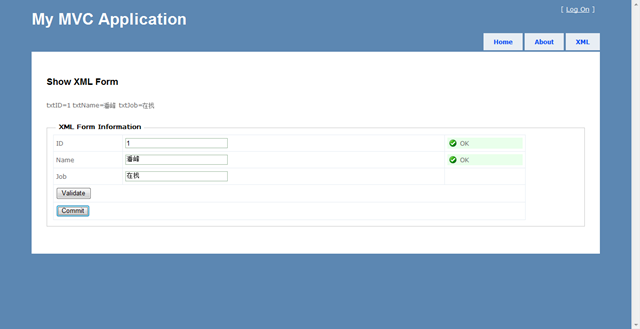
最后结果
image image 
代码演示和下载 我的个人网站

[Flash]通过Flash实现ASP.NET多文件上传

mikel阅读(751)

转载:http://www.cnblogs.com/beniao/archive/2009/05/15/1457679.html
通过Flash实现ASP.NET多文件上传

      关 于多文件上传,以前我一直使用JQuery去动态创建文件选择组件,然后POST到服务器去。最近一段时间一直在Flash身边打滚,Flash对于多文 件上传有很好的支持,于是我写了一个Flash的多文件上传组件,然后将其封装为ASP.NET控件,当我们在开发ASP.NET程序的时候可以像使用普 通控件一样,从工具箱里拉到界面上就可以使用。

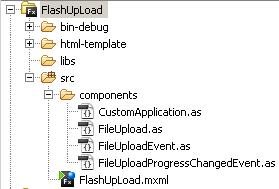
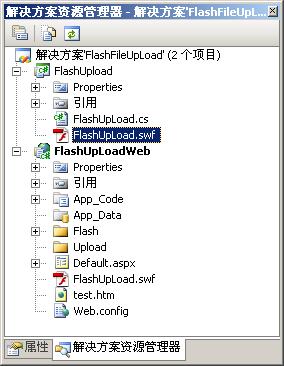
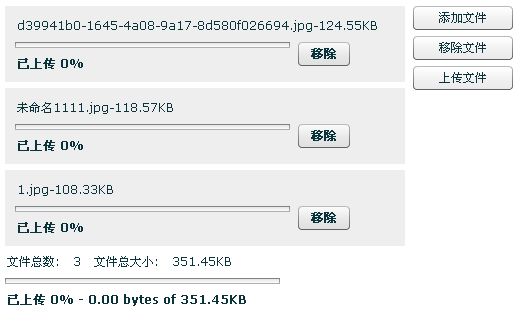
      Flash我采用Flex开发的,实现了选择文件和统计文件大小的功能,选择了多个文件时会动态的创建Flex组件显示到界面上,并且可以移除所选择的文件。以下是Flex项目结构图:                        


      Flex是完全基于事件驱动的开发模型,通过自定义一个Flex的Application来实现文件的多选和文件数量以及上传文件大小 的统计等功能。如上图的FileUpload就是自定义的一个组件,扩展自VBox实现了动态创建组件和处理事件。详细参考下面代码:

自定义Application代码


自定义组件


自定义组件事件


      在Flex的App程序里就使用上面自定义的Application组件来进行设计,详细如下代码块:

<?xml version="1.0" encoding="utf-8"?>
<custom:CustomApplication xmlns:mx="http://www.adobe.com/2006/mxml" xmlns:local="*" 
    xmlns:custom
="components.*" layout="horizontal"
         backgroundAlpha
="0"  fontSize="12">
    
<mx:Style>
        .button {fontWeight:normal;}
    
</mx:Style>
    
<mx:HBox>
        
<mx:VBox width="400" id="fileContainer">
            
<mx:VBox id="fileUploadBox" maxHeight="250" width="100%" label="Files to Upload" >
            
</mx:VBox>
            
<mx:HBox id="uploadStats" width="100%" visible="false">
                
<mx:Text text="文件总数:" /><mx:Text id="totalFiles" />
                
<mx:Text text="文件总大小:" /><mx:Text id="totalSize" />
            
</mx:HBox>
            
<mx:ProgressBar id="totalProgressBar" width="275" mode="manual" visible="false" />
        
</mx:VBox>
        
        
<mx:VBox>
            
<mx:Button id="browseButton" label="添加文件" width="100" styleName="button"/>
            
<mx:Button id="clearButton" label="移除文件" visible="false" width="100" styleName="button"/>
            
<mx:Button id="uploadButton" label="上传文件" visible="false" width="100" styleName="button"/>
            
<mx:Button id="cancelButton" label="取消上传" visible="false" width="100" styleName="button"/>
            
<mx:Text id="mytext" />
        
</mx:VBox>
    
</mx:HBox>
</custom:CustomApplication>

       完成了多文件选择功能的Flash开发,现在就是想法将其生成的.swf封装到dll成为ASP.NET的服务器端控件,实现这一步很非常 简单,将生成的.swf作为资源嵌入到ASP.NET的dll文件里就OK。然后自己定义一个类继承于Control,进行相应方法的重写就达到了目的, 这里我们就需要重写Render()方法,在方法里通过调用资源的方法从.dll里读取出嵌入里面的.swf文件资源,然后向客户端输出嵌入flash文 件(.swf)的编码就完成了。

自定义ASP.NET控件代码


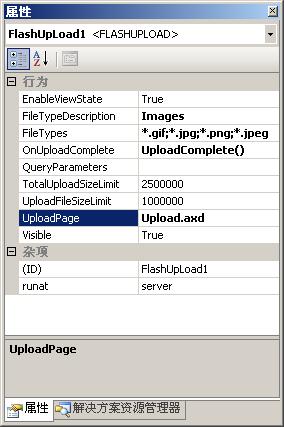
     控件中定义了多个属性,方便可视化设置控件的属性值,其中最为主要的属性为:UploadPage,该属性的作用就是指定通过那一个处理 程序来处理上传文件的请求,实现请求中上传文件的保存功能。在示例程序里,我自定义了一个HttpHandler来处理上传文件的请求,实现 IHttpHandler接口。程序代码如下:

namespace FlashUpLoadWeb
{
    
/// <summary>
    
/// 上传文件处理程序
    
/// </summary>
    public class UploadHandler : IHttpHandler, IRequiresSessionState
    {
        
#region IHttpHandler 成员
        
public bool IsReusable
        {
            
get { return true; }
        }
        
public void ProcessRequest(HttpContext context)
        {
            
//文件上传存储路径
            string uploadPath = context.Server.MapPath(context.Request.ApplicationPath + "/Upload");
            
for (int i = 0; i < context.Request.Files.Count; i++)
            {
                HttpPostedFile uploadFile 
= context.Request.Files[i];
                
if (uploadFile.ContentLength > 0)
                {
                    uploadFile.SaveAs(Path.Combine(uploadPath, uploadFile.FileName));
                }
            }
            HttpContext.Current.Response.Write(
" ");
        }
        
#endregion
    }
}


      定义好了请求处理程序,这时只需要通过配置文件简单的配置就可以设置控件的处理程序页地址了,如下:

<httpHandlers>
    
<remove verb="POST,GET" path="Upload.axd"/>
    
<add verb="POST,GET" path="Upload.axd" type="FlashUpLoadWeb.UploadHandler"/>
</httpHandlers>


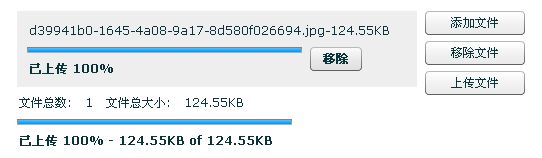
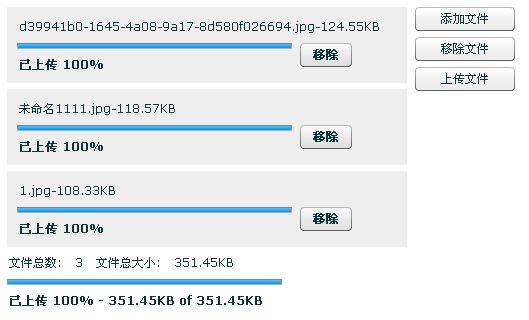
      另外一个属性就是OnUploadComplete,通过它指定当文件上传完毕后调用客户端的那一个JavaScript提交更新页面状态,详细请查看示例代码。最终效果图下图:


      控件还有许多需要完善的地方,比如请求处理程序那一块,上传文件的时候对文件的选择进行判断,不允许重复选择,判断选择队列中的文件在服务器上是否已经存在等等。有兴趣的朋友可以下去改善这些功能!源代码下载


版权说明

  本文属原创文章,欢迎转载,其版权归作者和博客园共有。  

  作      者:Beniao

 文章出处:http://beniao.cnblogs.com/  或  http://www.cnblogs.com/

[MVC]Asp.net MVC 示例项目"Suteki.Shop"分析之---Filter

mikel阅读(695)

    在Suteki.Shop中对于Filter的使用上提供了两种方式,一种是从FilterAttribute
(抽象类属性)以及接口 IActionFilterIResultFilter中继承并实现。另一种是我们经
常提到的从ActionFilterAttribute 上继承方式来实现自己的ActionFilter。首先看一下
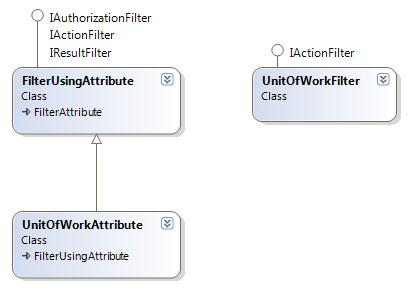
第一种,同时它也是该项目中被Action广泛使用的方式, 下面是类图:


     当然图中最核心的当属FilterUsingAttribute,它同时继承了 FilterAttribute类和
IAuthorizationFilter, IActionFilter, IResultFilter这三个接口,所以其所实现的功能
与MVC中所定义的ActionFilterAttribute如出一辙。同时,下面是其核心代码:
    

public class FilterUsingAttribute : FilterAttribute, IAuthorizationFilter, IActionFilter, IResultFilter
{
        
private readonly Type filterType;
        
private object instantiatedFilter;
        
public FilterUsingAttribute(Type filterType)
        {
            
if(!IsFilterType(filterType))
            {
                
throw new InvalidOperationException("Type '{0}' is not valid within the FilterUsing 
                   attribute as it is not a filter type.".With(filterType.Name));
            }
            
this.filterType = filterType;
        }
        
private bool IsFilterType(Type type)
        {
            
return typeof(IAuthorizationFilter).IsAssignableFrom(type) 
                   
|| typeof(IActionFilter).IsAssignableFrom(type) 
                   
|| typeof(IResultFilter).IsAssignableFrom(type);
        }
        
public Type FilterType
        {
            
get { return filterType; }
        }
        
private T GetFilter<T>() where T : class
        {
            
if(instantiatedFilter == null)
            {
                instantiatedFilter 
= ServiceLocator.Current.GetInstance(filterType); 
            }
            
return instantiatedFilter as T;
        }
        
private void ExecuteFilterWhenItIs<TFilter>(Action<TFilter> action) where TFilter :class 
        {
            var filter 
= GetFilter<TFilter>();
            
if(filter != null)
            {
                action(filter);
            }
        }
        
public void OnAuthorization(AuthorizationContext filterContext)
        {
            ExecuteFilterWhenItIs
<IAuthorizationFilter>(f => f.OnAuthorization(filterContext));
        }
        
public void OnActionExecuting(ActionExecutingContext filterContext)
        {
            ExecuteFilterWhenItIs
<IActionFilter>(f => f.OnActionExecuting(filterContext));
        }
     
        
public void OnActionExecuted(ActionExecutedContext filterContext)
        {
            ExecuteFilterWhenItIs
<IActionFilter>(f => f.OnActionExecuted(filterContext));
        }
        
public void OnResultExecuting(ResultExecutingContext filterContext)
        {
            ExecuteFilterWhenItIs
<IResultFilter>(f => f.OnResultExecuting(filterContext));
        }
        
public void OnResultExecuted(ResultExecutedContext filterContext)
        {
            ExecuteFilterWhenItIs
<IResultFilter>(f => f.OnResultExecuted(filterContext));
        }
}

 
     在上面的OnAction..和OnResult..事件中,都调用了ExecuteFilterWhenItIs这个泛型方法,
而该方法的作用是对泛型约束中使用到的相应IActionFilter进行操作,而获取相应的Filter实例
的工作就交给了GetFilter<T>()方法,因为该方法使用IOC方式将filterType以服务组件的方式进
行创建,所以我们会看到在ContainerBuilder(Suteki.Shop\ContainerBuilder.cs)中有如下代
码,注意最后一行:  

container.Register(
    Component.For
<IUnitOfWorkManager>().ImplementedBy<LinqToSQLUnitOfWorkManager>().LifeStyle.Transient,
    Component.For
<IFormsAuthentication>().ImplementedBy<FormsAuthenticationWrapper>(),
    Component.For
<IServiceLocator>().Instance(new WindsorServiceLocator(container)),

    
     看来其最终会使用Castle框架所提供的IOC功能。
   
     其实理解上面代码并不难,就是Suteki.Shop以自己实现的FilterUsingAttribute代替了MVC
自己的 ActionFilterAttribute, (当然它做的并不彻底,大家会在接下来的内容中看到)。当然有
了FilterUsingAttribute之后,Suteki.Shop并没有直接就去在Action中直接使用它,而是以它派
生出了几个Filter属性:
     UnitOfWorkAttribute:项目中大部分Action使用
     AuthenticateAttribute:用户信息认证
     LoadUsingAttribute
    
     其中UnitOfWorkAttribute和AuthenticateAttribute被用的最多,下面就分别加以介绍说明。
   
     首先是UnitOfWorkAttribute,其构造方法声明中将UnitOfWorkFilter作为其基类方法的构
造类型,如下:

public class UnitOfWorkAttribute : FilterUsingAttribute
{
        
public UnitOfWorkAttribute() : base(typeof (UnitOfWorkFilter))
        {
        }
}
public class UnitOfWorkFilter : IActionFilter
{
        
private readonly IDataContextProvider provider;
        
public UnitOfWorkFilter(IDataContextProvider provider)
        {
            
this.provider = provider;
        }
        
public void OnActionExecuting(ActionExecutingContext filterContext)
        {
        }
        
public void OnActionExecuted(ActionExecutedContext filterContext)
        {
            var context 
= provider.DataContext;
            
if (filterContext.Controller.ViewData.ModelState.IsValid)
            {
                context.SubmitChanges();
            }
        }
}


     其要实现的功能主要是对用户所做的数据操作进行判断,如果没有发生异常:
ModelState.IsValid为True时,则提交所做的修改到数据库中。

     接下来再看一个AuthenticateAttribute,前面说过,其所实现的功能就是对当前
用户身份进行验证,其核心代码如下,因为内容比较简单,大家一看便知。
   

public class AuthenticateAttribute : FilterUsingAttribute
{
        
public AuthenticateAttribute() : base(typeof(AuthenticateFilter))
        {
            Order 
= 0;
        }
}
public class AuthenticateFilter : IAuthorizationFilter
{
        
private IRepository<User> userRepository;
        
private IFormsAuthentication formsAuth;
        
public AuthenticateFilter(IRepository<User> userRepository, IFormsAuthentication formsAuth)
        {
            
this.userRepository = userRepository;
            
this.formsAuth = formsAuth;
        }
        
public void OnAuthorization(AuthorizationContext filterContext)
        {
            var context 
= filterContext.HttpContext;
            
if(context.User != null && context.User.Identity.IsAuthenticated)
            {
                var email 
= context.User.Identity.Name;
                var user 
= userRepository.GetAll().WhereEmailIs(email);
                
if (user == null
                {
                    formsAuth.SignOut();
                }
                
else 
                {
                    AuthenticateAs(context, user);
                    
return;
                }
            }
            AuthenticateAs(context, User.Guest);
        }
        
private void AuthenticateAs(HttpContextBase context, User user)
        {
            Thread.CurrentPrincipal 
= context.User = user;                
        }

     当然在本文开篇说过,Suteki.Shop也使用了我们经常用到的方式,即从ActionFilterAttribute
继承实现自己的ActionFilter,比如说CopyMessageFromTempDataToViewData(Suteki.Shop
\Filters\CopyMessageFromTempDataToViewData.cs),从字面可以看出,其要实现的功能就
是把临时数据复制到ViewData中,以便于前台视图显示,下面是其类图:


     其实现代码如下:

public class CopyMessageFromTempDataToViewData : ActionFilterAttribute
{
        
public override void OnActionExecuted(ActionExecutedContext filterContext) 
        {
                var result 
= filterContext.Result as ViewResult;
                
if(result != null && filterContext.Controller.TempData.ContainsKey("message"))
                {
                    var model 
= result.ViewData.Model as ShopViewData;
                    
if(model != null && string.IsNullOrEmpty(model.Message))
                    {
                        model.Message 
= filterContext.Controller.TempData["message"as string;
                    }
                }
        }
}


     其实看到这里,我感觉Suteki.Shop对于ActionFilter的使用还有待商榷,必定 MVC中的 Filter
是一种耗时的操作,对于程序的运行速度和执行效率来说都是一个考验。这其实也能部分解释为什么我
在本地运行Suteki.Shop时速度会比较慢。

     这里不妨开句玩笑,Suteki.Shop开发者似乎得到ActionFilter强迫症,因为我感觉一个项目中
个Action绑定的Filter最好别超过2个,否则必然会影响程序运行效率,尽管Suteki.Shop基本上控
在了2个左右,但其还是运行速度偏慢。当然这里我并没有做到具体的测试,只是部分猜测,不过有兴
趣的朋友不妨测试一下,看看结果如何,相信会见分晓。

     好了,今天的内容就先到这里了。
       
     原文链接:http://www.cnblogs.com/daizhj/archive/2009/05/14/1453885.html

     作者: daizhj,代震军,LaoD

     Tags: mvc,Suteki.Shop

     网址: http://daizhj.cnblogs.com/

[C#]浅拷贝和深拷贝(shallow copy VS deep copy )

mikel阅读(815)

转载:http://www.cnblogs.com/Roping/archive/2009/05/13/1455880.html

引言

       C#中有两种类型变量,一种 是值类型变量,一种是引用类型变量,对于值类型变量,深拷贝和前拷贝都是通过赋值操作符号(=)实现,其效果一致,将对象中的值类型的字段拷贝到新的对象中.这个很容易理解。 本文重点讨论引用类型变量的拷贝机制和实现。

       C#中引用类型对象的copy操作有两种:
  • 浅拷贝(影子克隆/shallow copy):只复制对象的值类型字段,对象的引用类型,仍属于原来的引用.
  • 深拷贝(深度克隆):不仅复制对象的值类型字段,同时也复制原对象中的对象.就是说完全是新对象产生的.

    浅拷贝和深拷贝之间的区别:浅拷贝是指将对象中的数值类型的字段拷贝到新的对象中,而对象中的引用型字段则指复制它的一个引用到目标对象。
    注意:string类型有点特殊,对于浅拷贝,类值类型对象进行处理。

浅拷贝的实现

  1. 使用Object类MemberwiseClone实现

    MemberwiseClone:创建当前 Object 的浅表副本。
    MemberwiseClone 方法创建一个浅表副本,方法是创建一个新对象,然后将当前对象的非静态字段复制到该新对象。如果字段是值类型的,则对该字段执行逐位复制。如果字段是引用类型,则复制引用但不复制引用的对象;因此,原始对象及其复本引用同一对象。

    代码实现如下:

     public class Person
        {
            
    public int Age { getset; }
            
    public string Address { getset; }
            
    public Name Name { getset; }
            
    public object Clone()
            {
               
    return   this.MemberwiseClone();    
            }
            
        }
        
    public class Name
        {
            
    public Name(string frisName,string lastName)
            {
                FristName 
    = frisName;
                LastName 
    = lastName;
            }
            
    public string FristName { getset; }
            
    public string LastName { getset; }
        }


  2. 赋值操作(=)VS使用Object类MemberwiseClone实现
    对于引用类型的变量,我们有种误解,认为赋值操作就是浅拷贝一种,其实不然,两者有区别。

    1. 浅拷贝(shallow copy)对于引用类型对象中的值类型字段进行了逐位复制。赋值运算符只是把源对象的引用赋值给目的对象,两者引用同一个对象。
    2. 浅拷贝后的对象的值类型字段更改不会反映到源对象,而赋值运算后的对象的值类型字段更改会反映到源对象

    代码实现如下:

        public class Person
        {
            
    public int Age { getset; }
            
    public string Address { getset; }
            
    public Name Name { getset; }
        }
        
    public class Name
        {
            
    public Name(string frisName,string lastName)
            {
                FristName 
    = frisName;
                LastName 
    = lastName;
            }
            
    public string FristName { getset; }
            
    public string LastName { getset; }
        }


深拷贝实现

      相对于浅拷贝,是指依照源对象为原型,创建一个新对象,将当前对象的所有字段进行执行逐位复制并支持递归,不管是是值类型还是引用类型,不管是静态字段还是非静态字段。
      在C#中,我们们有三种方法实现深拷贝
  1. 实现ICloneable接口,自定义拷贝功能。

    ICloneable 接口,支持克隆,即用与现有实例相同的值创建类的新实例。
    ICloneable 接口包含一个成员 Clone,它用于支持除 MemberwiseClone 所提供的克隆之外的克隆。Clone 既可作为深层副本实现,也可作为浅表副本实现。在深层副本中,所有的对象都是重复的;而在浅表副本中,只有顶级对象是重复的,并且顶级以下的对象包含引 用。 结果克隆必须与原始实例具有相同的类型或是原始实例的兼容类型。

    代码实现如下:


     public class Person:ICloneable
        {
            
    public int Age { getset; }
            
    public string Address { getset; }
            
    public Name Name { getset; }
            
    public object Clone()
            {
                Person tem 
    = new Person();
                tem.Address 
    = this.Address;
                tem.Age 
    = this.Age;
                tem.Name 
    = new Name(this.Name.FristName, this.Name.LastName);
                
    return tem;
            }
        }
        
    public class Name
        {
            
    public Name(string frisName, string lastName)
            {
                FristName 
    = frisName;
                LastName 
    = lastName;
            }
            
    public string FristName { getset; }
            
    public string LastName { getset; }
        }


    大家可以看到,Person类继承了接口ICloneable并手动实现了其Clone方法,这是个简单的类,试想一下,如果你的类有成千上万个引用类型成员(当然太夸张,几十个还是有的),这是不是份很恐怖的劳力活?

  2. 序列化/反序列化类实现
    不知道你有没有注意到DataSet对象,对于他提供的两个方法:

    DataSet.Clone 方法,复制 DataSet 的结构,包括所有 DataTable 架构、关系和约束。不要复制任何数据。
    新 DataSet,其架构与当前 DataSet 的架构相同,但是不包含任何数据。注意 如果已创建这些类的子类,则复本也将属于相同的子类。

    DataSet.Copy 方法复制该 DataSet 的结构和数据.
    新的 DataSet,具有与该 DataSet 相同的结构(表架构、关系和约束)和数据。注意如果已创建这些类的子类,则副本也将属于相同的子类。

    好像既不是浅拷贝,又不是深拷贝,是不是很失望?但是两个结合起来不是我们要的深拷贝吗?看看DataSet的实现,注意序列化接口:ISerializable

    序列化是将对象或对象图形转换为线性字节序列,以存储或传输到另一个位置的过程。反序列化是接受存储的信息并利用它重新创建对象的过程。
    通过 ISerializable 接口,类可以执行其自己的序列化行为。

    转换为线性字节序列后并利用其重新创建对象的过程是不是和我们的深拷贝的语意“逐位复制”很相像?

    代码实现如下:

      [Serializable]
        
    public class Person : ICloneable
        {
            
    public int Age { getset; }
            
    public string Address { getset; }
            
    public Name Name { getset; }
            
    public object Clone()
            {
                
    using (MemoryStream ms = new MemoryStream(1000))
                {
                    
    object CloneObject;
                    BinaryFormatter bf 
    = new BinaryFormatter(nullnew StreamingContext(StreamingContextStates.Clone));
                    bf.Serialize(ms, 
    this);
                    ms.Seek(
    0, SeekOrigin.Begin);
                    
    // 反序列化至另一个对象(即创建了一个原对象的深表副本)
                    CloneObject = bf.Deserialize(ms);
                    
    // 关闭流 
                    ms.Close();
                    
    return CloneObject;
                }
            }
        }
        [Serializable]
        
    public class Name
        {
            
    public Name(string frisName, string lastName)
            {
                FristName 
    = frisName;
                LastName 
    = lastName;
            }
            
    public string FristName { getset; }
            
    public string LastName { getset; }
        }
    }


    注意:通过序列化和反序列化实现深拷贝,其和其字段类型必须标记为可序列化类型,既添加特性(Attribute)[Serializable]。

  3. 通过反射实现
    通 过序列化/反序列化方式我们能比较流畅的实现深拷贝,但是涉及到IO操作,托管的的环境中,IO操作比较消耗资源。 能不能有更优雅的解决方案。CreateInstance,对,利用反射特性。这个方法大家可以参考这篇博客:http://rubenhak.com /?p=70 文章反射类的Attribute,利用Activator.CreateInstance New一个类出来(有点像DataSet.Clone先获得架构),然后利用PropertyInfo的SetValue和GetValue方法,遍历的 方式进行值填充。

    代码实现如下:

    public class Person
    {
        
    private List<Person> _friends = new List<Person>();
        
    public string Firstname { getset; }
        
    public string Lastname { getset; }
        [Cloneable(CloneableState.Exclude)]
        [Cloneable(CloneableState.Include, 
    "Friends")]
        
    public List<Person> Friends { get { return _friends; } }
        [Cloneable(CloneableState.Exclude)]
        
    public PersonManager Manager { getset; }
    }


C#为什么要设计深拷贝和浅拷贝?

这个我也一直也找不到一个合适的答案,希望有人来讨论下!

代码下载

声明: 本文作者:宗哥,宗子城
本文版权归作者所有,欢迎转载,但未经作者同意必须保留此段声明。 …

[工具]Java项目转化为C#项目

mikel阅读(864)

把java 项目转化为C#项目。

狂搞java 墙角,

前提:

1,下载 Eclipse  或 MyEclipse .其实两个都一样。(我用的版本是 Myeclpse 6.5)

2,安装 Eclipse SVN插件。

好了,我们开始了。

1,先从https://source.db4o.com/db4o/trunk/sharpen 作用SVN检出里边的代码,记住,要把下面的项目作为4个项目分别检出。

2,Export 这4个项目为 “Deployable plug-ins and fragments”,导出的位置为 Eclipse 的根目录,如果是Myeclipse 也是导出到 Eclpse 根目录 。

3,对了, 这4个项目要跟你的项目放在同一个工作区里,后面会用到的。(放在其它的位置我没有试过)。

4,在你将要进行转化的项目里写上加上下面的两个文件

文件1:

sharpen.properties

# eclipse workspace
    dir.workspace=C\:/Documents and Settings/Administrator/\u684C\u9762/paoding
    # java executable
    file.jvm.jdk1.5=D\:/Java/jdk1.5.0/bin/java.exe
    # Eclipse home directory
    eclipse.home=D\:/Java/MyEclipse 6.5/eclipse
    # Eclipse startup jar
    eclipse.startup.jar=${eclipse.home}/plugins/org.eclipse.equinox.launcher_1.0.0.v20070606.jar
    # Sandcastle can be used to convert javadoc to .NET xml comments
    # dir.lib.sandcastle=e:/sandcastle/
    # sharpen compile directory
    dir.dist.classes.sharp=dist/sharpen
    # Eclipse plugins home
    plugins.home=${eclipse.home}/plugins

#上面的路径要改成你的系统中的相应的位置

文件2:

Sharpen-Common.Xml

<project name="sharpen common">
 <property file="sharpen.properties" />

 <macrodef name="reset-dir">
  <attribute name="dir" />
  <sequential>
   <delete dir="@{dir}" />
   <mkdir dir="@{dir}" />
  </sequential>
 </macrodef>

 <macrodef name="sharpen">
  <attribute name="workspace" />
  <attribute name="resource" />

  <element name="args" optional="yes" />

  <sequential>
   <exec executable="${file.jvm.jdk1.5}" failonerror="true"
    timeout="1800000">
    <arg value="-Xms256m" />
    <arg value="-Xmx512m" />
    <arg value="-cp" />
    <arg value="${eclipse.startup.jar}" />
    <arg value="org.eclipse.core.launcher.Main" />
    <arg value="-data" />
    <arg file="@{workspace}" />
    <arg value="-application" />
    <arg value="sharpen.core.application" />
    <arg value="-header" />
    <arg file="config/copyright_comment.txt" />
    <arg value="@{resource}" />

    <args />

   </exec>
  </sequential>
 </macrodef>

 <target name="install-sharpen-plugin">

  <property name="sharpen.core.dir" location="../sharpen.core" />
  <reset-dir dir="${dir.dist.classes.sharp}" />

  <echo>${eclipse.home}/plugins</echo>
  <javac fork="true" Debug="true" target="1.5" source="1.5"
   destdir="${dir.dist.classes.sharp}" srcdir="${sharpen.core.dir}/src"
   encoding="UTF-8">
   <classpath>
    <fileset dir="${eclipse.home}/plugins">
     <include name="org.eclipse.osgi_*/osgi.jar" />
     <include
      name="org.eclipse.core.resources_*/resources.jar" />
     <include
      name="org.eclipse.core.runtime_*/runtime.jar" />
     <include name="org.eclipse.jdt.core_*/jdtcore.jar" />
     <!– redundant entries: in newer eclipse installs those reside in jars –>
     <include name="org.eclipse.osgi_*.jar" />
     <include name="org.eclipse.core.resources_*.jar" />
     <include name="org.eclipse.core.runtime_*.jar" />
     <include name="org.eclipse.jdt.core_*.jar" />
     <include name="org.eclipse.jdt.launching_*.jar" />
     <include name="org.eclipse.equinox.*.jar" />
     <include name="org.eclipse.core.jobs_*.jar" />
    </fileset>
   </classpath>
  </javac>

  <property name="plugin.dir"
   value="${plugins.home}/sharpen.core_1.0.0" />
  <reset-dir dir="${plugin.dir}" />
  <jar destfile="${plugin.dir}/sharpen.jar"
   basedir="${dir.dist.classes.sharp}" />
  <copy todir="${plugin.dir}"
   file="${sharpen.core.dir}/plugin.xml" />

 </target>

</project>


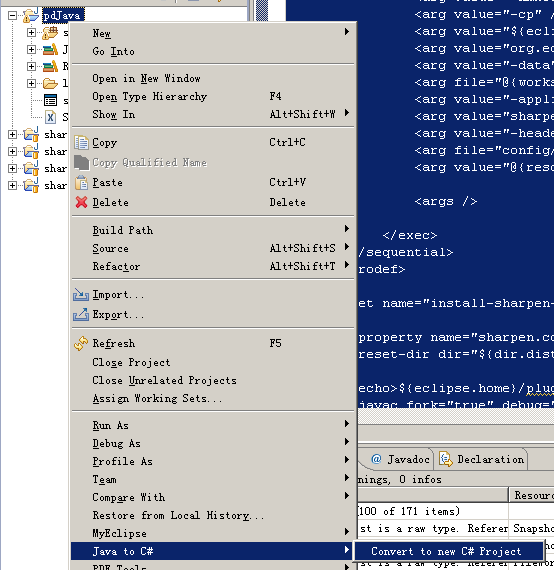
下面加两个图说明一下问题吧。

项目结构:


生成时选项:


其它的也没什么说的了。


参考: http://developer.db4o.com/Resources/view.aspx/Reference/Sharpen/How_To_Setup_Sharpen#

[Flash]Flash与Silverlight终极大比拼

mikel阅读(804)

自 Silverlight 1.0 发布以来,Web 开发与设计者们关于该选择 Flash 和 Silverlight的争论便开始了,在成熟的 Flash 面前,Silverlight 面临着如何赢得市场的难题。然而 Silverlight中包含了一些开发设计者们一直希望 Flash 能拥有的功能,诸如SEO,本文对 Flash 和 Silverlight的技术细节进行了详尽的对比。

动画功能

Flash 使用基于帧的动画模式,在逐帧动画模式中,我们为每个帧创建对象并生成动画序列。比如你想让一个对象在3秒内穿过屏幕,计算一下3秒一共有多少帧,然后计 算每帧需要的矩阵。不过 Flash 在实际播放中并不会真实地按设定的帧率播放,除非你在动画中插入一条空白的音轨。

Silverlight 基于 WPF 动画模式,WPF 是基于时间线,而不是帧的,你定义好起始于结束状态,WPF 帮你计算中间该怎么做,不必象 Flash 那样同矩阵打交道,也不必计算在不同帧对象的位置。

文件尺寸

Flash 使用压缩格式,文字和图片内嵌在整个文件中,因此 Flash 的文件尺寸非常小巧。

Silverlight 使用 XAML 作为描述语言,未经过压缩,因此 Silverlight 的文件尺寸通常要大一些。

脚本

Flash 使用 ActionScript, ActionScript 面向对象,对用户界面设计有全面的控制,还可以同其它后端语言,如 PHP, ASP, Ruby On Rails 进行集成交流,拥有一个强大的开发库。

Silverlight 的脚本可以选择多种开发语言,Visual C#.Net and Visual Basic.Net,也包括客户端语言 JavaScriptC# 和 VB.net 可以用来编写托管代码,并可以全面使用 .net 框架库。

视频和音频

Flash 支持多种音频格式,最新的音频解码器质量非常高,而带宽占用也非常出色。它的视频解码器,Sorenson 的专用 H.263 是 H.263 的变种,压缩也接近,但去掉了一些功能。

Silverlight 使用的是行业标准 VC-1 视频解码,并支持 WMV 和 WMA,Windows Movie Maker 可以很容易产生这两种格式,同时微软还提供免费的 WMV, WMA 编码器。

声音处理

ActionScript 提供了一套声音类库,可以用来在动画中生成或控制声音,你可以在动画播放期间从资源库加入声音,同时 Flash 还有一些方法在整个动画中控制声音。

Silverlight 没有底层声音控制 API,甚至无法播放一个 WAV 文件,因为 .NET 在音频播放上很薄弱。

可访问性

对那些有视觉或听觉缺陷的人,Flash 提供了丰富的可访问性功能,视频字幕可以帮助听觉障碍者,而那些视觉障碍者需要通过键盘控制声音的播放,人们可以使用键盘快捷键控制视频播放。


Silverlight 3 首次提供对全部系统配色的支持,那些视力不佳的人可以调整到高对比度配色方案,在可访问性方面 Silverligth 比 Flash 差很多。

平台兼容性

Flash 支持 Windows Vista/XP/2000, Windows Server 2003/2008, Mac OS 10.1/10.5(PowerPC), Mac OS 10.1/10.5 (Intel), Linux 5, openSUSE 11, Ubuntu 7.10or later and Solaris 10.
Silverlight 只支持 Windows Vista/XP/2000,Windows Server 2003/2008, Windows Mobile 6, Mac OS 10.1/10.5 (PowerPC)and Mac OS 10.1/10.5 (Intel)。由于不支持 Linux 和 Solaris,因此这些平台的用户无法体验Silverlight 。(不过 .NET 在 Linux 平台的第三方开源项目,MONO 框架中的 MoonLight 支持 Linux -译者)

文字展示与SEO

Flash 中的文字是基于图形的,Flash 播放器无法理解 TTF,因此我们无法从 Flash动画中分离出文字。通常,Flash 对 SEO 是不友好的,但 Adobe 已经做出一些努力让 Flash中的文字可以索引,而搜索引擎也开始尝试索引 Flash 了。目前,Google 是唯一支持 Flash 索引的搜索引擎,他们同 Adobe合作,设计相应的可以理解 Flash 内容的 Google 爬虫。 Yahoo 正在进展中,鉴于微软的 Silverlight 是 Flash的竞争者,他们不大可能在 MSN 中索引 Flash。
Silverlight 是基于 XAML 的,Silverlight 中的文字内容是独立存放的,可以被任何搜索引擎索引,因此对搜索引擎更友好。

支持的图片格式

Flash 支持几乎所有图片格式。Silverlight 只支持 PNG 与 JPEG,其它格式提供有限的支持。

网络编程

Flash 使用 XMLSocket 和服务器进行沟通。

Silverlight 通过 System.Net.Sockets 命名空间,对网络编程提供全面支持,Silverlight 可以通过 4502 到 4534 端口异步传输数据,也支持跨域通讯。

摄像头的支持

Flash 支持网络摄像头和麦克风,使用 ActionScript 可以很容易操控摄像头或麦克风。Silverlight 不支持摄像头和麦克风。

部署

Flash 的部署只包含一个独立的 SWF 文件,这个文件已经包含了所有图片,文字,动画。Silverlight 的部署要复杂一些,所有独立的部件都要单独部署,典型的 Silverlight 请求一般包含以下内容:

  • XML 文件,
  • DLL 文件(如果有),
  • Silverlight.js,
  • 其它JavaScript 文件,
  • 资源文件 (图片,视频,音频)
  • Windows 可执行文件

    Flash 动画可以编译成独立的 Windows 可执行程序,在桌面播放。

    Silverligth 不支持。

    流媒体服务

    Flash 不支持流媒体服务(虽然 FLV 控制了几乎所有视频网站,但那是另一回事-译者)。
    微软基于 Windows Live 的 Silverlight 流媒体服务可以让设计和开发者分发富媒体,结合微软的 Expression Studio,开发与设计者们可以创建交互式 Web 程序。

    结论

    富Internet 应用的技术选择向来存在很多争议,在 Silverlight 和 Flash 中选择,完全要看你的需求,如果你的用户包括Linux 和 Solaris 平台的,Flash 是不二之选,如果希望你的网站可以被索引,Silverlight 更好一些。
    另外需要指出的 是,安装了 Silverligth 插件的用户尚在少数,而绝大多数用户的浏览器中都安装了 Flash 插件,另外,SWF,FLA, FLV 几乎成了开发标准格式,而 Silverligth 还是100%私有格式(然而 Silverlight已经是明文了,还谈什么开放不开放 – 译者)。

    本文国际来源:Flash vs. Silverlight: What Suits Your Needs Best?
    中文翻译来源:COMSHARP CMS 官方网站

    [Java]WEB4J:另类的Java Web应用框架

    mikel阅读(1128)

    WEB4J是个极度简化、特色十足、一站式的Java Web框架。WEB4J框架的创建者John O'Hanley说到:WEB4J在提升Java开发生产力的同时又消除了各种痛苦,因为其非常精简且能显著地加快应用开发的速度。

    根据其站点上的说明,WEB4J具有如下特性:

    • 拥抱约定优于配置(类似于Rails)
    • 数据为王,而不是代码
    • 不会强迫开发者穿新鞋走老路
    • 不依赖于JavaScript、客户化的XML和注解以及对象关系映射
    • 不会对你所编写的类施加线程安全的约束
    • 可以用普通的HTML编写表单

    WEB4J最吸引人的一个地方就是它可以将SQL放到纯文本文件中且游离于代码之外,之后就可以在代码中通过特殊的对象引用这些SQL,这样DAO类就变得非常紧凑了。

    WEB4J个头很小,一共才88个类,而Rails中却有346个类、Struts中有720个类、Spring中有2400多个类。John说WEB4J的学习要比其他框架容易的多。

    其站点对WEB4J的薄弱之处也毫不掩饰:

    • 没有用户界面widgets库
    • 未提供对AJAX、Web Services及依赖注入的内置支持
    • 支持JSP/JSTL,但却没有像Velocity那样的标记库
    • 对之前版本的兼容性还有些问题

    去年YouTube上有个挺逗的视频谈到了WEB4J框架。该视频说的是有两个程序员发现了WEB4J框架后就用其进行开发,从而摆脱了传统的J2EE项目所遇到的诸多痛苦。

    WEB4J是开源的,基于BSD协议,同时在其分发包中含有一个示例项目。

    查看英文原文:WEB4J: Contrarian Web App Development for Java

    [Json]Json.Net

    mikel阅读(859)

    转载:http://www.rainsts.net/article.asp?id=817
    JSON 应用愈发广泛,相对 XML 而言,JSON 格式的数据量更小,更利于传输和存储。在 Ajax、Data Service、Silverlight 等框架中都有大量应用。但 .NET Framework 对 JSON 的支持还很弱,由于无法使用动态类型,因此 JavaScriptSerializer().DeserializeObject() 只是简单地将 "未知类型" 的目标反序列化为一个泛型词典(Dictionary),看上去像个半成品。
    CodePlex Json.NET 是另外一种选择,作者特意提供了一个 JsonConvert.DeserializeAnonymousType(),使得我们可以用一个匿名对象实例来指定反序列化类型。

    var o = new
    {
      a = 1,
      b = "Hello, World!",
      c = new[] { 1, 2, 3 },
      d = new Dictionary<string, int> { { "x", 1 }, { "y", 2 } }
    };
    var json = JsonConvert.SerializeObject(o);
    var anonymous = new { a = 0, b = String.Empty, c = new int[0], d = new Dictionary<string, int>() };
    var o2 = JsonConvert.DeserializeAnonymousType(json, anonymous);
    Console.WriteLine(o2.b);
    Console.WriteLine(o2.c[1]);
    var o3 = JsonConvert.DeserializeAnonymousType(json, new { c = new int[0], d = new Dictionary<string, int>() });
    Console.WriteLine(o3.d["y"]);

    DeserializeAnonymousType 只是借助这个匿名对象参数(anonymous) 反射类型而已,也就是说它和反序列化结果并非同一个对象。正如 o3 那样,我们也可以只提取局部信息。
    实际上,我们也可以直接反序列化为 JObject,然后通过索引器直接访问。JObject、JProperty 等都继承自 JToken,它重载了基元类型转换操作符,我们可以直接得到实际结果。

    var o = new
    {
      a = 1,
      b = "Hello, World!",
      c = new[] { 1, 2, 3 },
      d = new Dictionary<string, int> { { "x", 1 }, { "y", 2 } }
    };
    var json = JsonConvert.SerializeObject(o);
    var o2 = JsonConvert.DeserializeObject(json) as JObject;
    Console.WriteLine((int)o2["a"]);
    Console.WriteLine((string)o2["b"]);
    Console.WriteLine(o2["c"].Values().Count());
    Console.WriteLine((int)o2["d"]["y"]);

    Json.NET 同样支持强类型特性标注和反序列化,同时还提供了几个常用的格式转换器。

    [JsonObject]
    class MyClass
    {
      [JsonProperty]
      public int a { get; set; }
      [JsonProperty]
      public string b { get; set; }
      [JsonProperty]
      public int[] c { get; set; }
      [JsonProperty]
      public Dictionary<string, int> d { get; set; }
      [JsonIgnore]
      public float e { get; set; }
      [JsonProperty]
      [JsonConverter(typeof(IsoDateTimeConverter))]
      public DateTime f { get; set; }
    }
    class Program
    {
      static void Main(string[] args)
      {
        var o = new MyClass
        {
          a = 1,
          b = "Hello, World!",
          c = new[] { 1, 2, 3 },
          d = new Dictionary<string, int> { { "x", 1 }, { "y", 2 } },
          f = DateTime.Now
        };
        var json = JsonConvert.SerializeObject(o);
        var o2 = JsonConvert.DeserializeObject<MyClass>(json);
      }
    }

    LINQ to JSON 看上去有点像 LINQ to XML,使用非常简单,有关详情可参考帮助文件。

    [MVC]Asp.net MVC 示例项目"Suteki.Shop"分析之---Controller

    mikel阅读(781)

    转载http://www.cnblogs.com/daizhj/archive/2009/05/12/1451955.html   

     在上文中,介绍了如何安装和使用Suteki,今天我们通过源码来看一下Suteki是如何使用
    Controller。

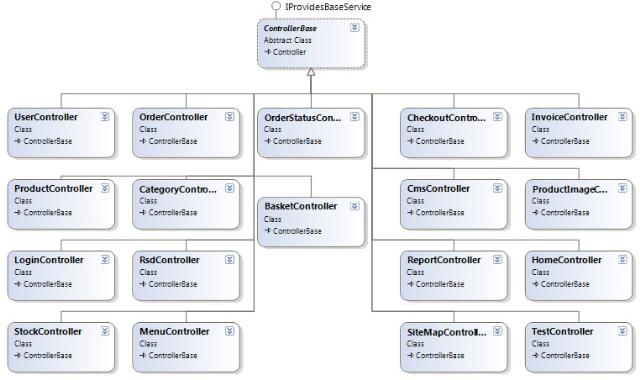
         在Suteki中,其使用Abstract的方式来定义一个ControllerBase,以此作为所有Controller
    的基类,下面是其Controller的类设计图:


          在该基类中定义了一些Controller中常用到的方法,比如为当前视图添加MetaDescription,
    Title等:   

    [Rescue("Default"), Authenticate, CopyMessageFromTempDataToViewData]
    public abstract class ControllerBase : Controller, IProvidesBaseService
    {
            
    private IBaseControllerService baseControllerService;
            
    /// <summary>
            
    /// Supplies services and configuration to all controllers
            
    /// </summary>
            public IBaseControllerService BaseControllerService
            {
                
    get { return baseControllerService; }
                
    set 
                { 
                    baseControllerService 
    = value;
                    ViewData[
    "Title"= "{0}{1}".With(
                        baseControllerService.ShopName,
                        GetControllerName());
                    ViewData[
    "MetaDescription"= "\"{0}\"".With(baseControllerService.MetaDescription);
                }
            }
            
    public ILogger Logger { getset; }
            
    public virtual string GetControllerName()
            {
                
    return " – {0}".With(GetType().Name.Replace("Controller"""));
            }
            
    public virtual void AppendTitle(string text)
            {
                ViewData[
    "Title"= "{0} – {1}".With(ViewData["Title"], text);
            }
            
    public virtual void AppendMetaDescription(string text)
            {
                ViewData[
    "MetaDescription"= text;
            }
         
    public string Message
         {
       
    get { return TempData["message"as string; }
       
    set { TempData["message"= value; }
         }
      
    protected override void OnException(ExceptionContext filterContext) {
       Response.Clear();
       
    base.OnException(filterContext);
      }
    }


          当然,细心的朋友发现了该抽象类中还包括一个IBaseControllerService接口实例。
    该接口的主要定义了一些网店系统信息,如店铺名称,版权信息,Email信息等,如下:

    public interface IBaseControllerService
    {
        IRepository
    <Category> CategoryRepository { get; }
        
    string GoogleTrackingCode { getset; }
        
    string ShopName { getset; }
        
    string EmailAddress { getset; }
        
    string SiteUrl { get; }
        
    string MetaDescription { getset; }
        
    string Copyright { getset; }
        
    string PhoneNumber { getset; }
        
    string SiteCss { getset; }
    }


          而作为唯一一个实现了该接口的子类“BaseControllerService”定义如下:  

    public class BaseControllerService : IBaseControllerService
    {
            
    public IRepository<Category> CategoryRepository { getprivate set; }
            
    public string GoogleTrackingCode { getset; }
            
    public string MetaDescription { getset; }
            
    private string shopName;
            
    private string emailAddress;
            
    private string copyright;
            
    private string phoneNumber;
            
    private string siteCss;
            ..
    }

        
          而初始化BaseControllerService实例并将配置文件中的信息绑定到该类实例中的操作交给了Windsor,
    该组件在Castle中用于实现IOC操作,其配置文件位于项目Suteki.Shop\Configuration\Windsor.config.
    下面是其配置结点内容:

    <component
      id
    ="IBaseControllerService:test.jumpthegun.co.uk"
      service
    ="Suteki.Shop.Services.IBaseControllerService, Suteki.Shop"
      type
    ="Suteki.Shop.Services.BaseControllerService, Suteki.Shop"
      lifestyle
    ="transient">
      
    <parameters>
        
    <ShopName>Suteki Shop</ShopName>
        
    <EmailAddress>info@sutekishop.co.uk</EmailAddress>
        
    <GoogleTrackingCode>UA16436774</GoogleTrackingCode>
        
    <MetaDescription>Suteki Shop is a new self service eCommerce solution. Search engine optimised and fully customisable</MetaDescription>
        
    <SiteCss>Site.css</SiteCss>
      
    </parameters>
    </component>

        
         这类就完成了把网店的系统信息绑定到Controller中的操作,而Controller就会在其基类中将相关的
    信息绑定到ViewData中,如下: 

     ViewData["Title"= "{0}{1}".With(baseControllerService.ShopName, GetControllerName());
     ViewData[
    "MetaDescription"= "\"{0}\"".With(baseControllerService.MetaDescription);


         到这里,其实大家应该发现这种对Controller的处理与我们以前所使用的PageBase方式相似,就是将
    项目中所有的Page都继承自PageBase,然后在相应的Page中引用PageBase中定义的属性和方法。

         有了ControllerBase,我们看一下在相应的子Controller中是如何使用的,这里有一个例子,
    ProductController(位于Suteki.Shop\Controllers\ProductController.cs): 
       

    public class ProductController : ControllerBase
    {


    public ActionResult Item(string urlName)
     {
      
    return RenderItemView(urlName);
     }
        ..
        
     ActionResult RenderItemView(
    string urlName)
     {
      var product 
    = productRepository.GetAll().WithUrlName(urlName);
      AppendTitle(product.Name);
      AppendMetaDescription(product.Description);
      
    return View("Item", ShopView.Data.WithProduct(product));
     } 
     
    }


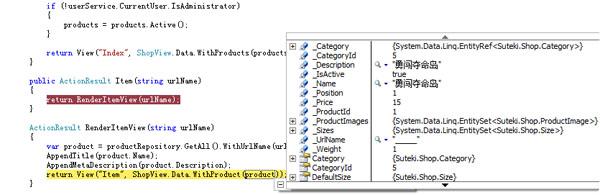
          该Controller中的Action:"Item"调用了RenderItemView()就是使用了基类中的AppendTitle,
    AppendMetaDescription。下面是其运行时的截图:


          除了上面所说的这种ControllerBase方式,Suteki.Shop还使用了Controller<T>方式来实现对
    一些公用Action的操作,比如列表,编辑,添加记录,调整记录上下位置等。而这块实现代码被放
    置在了Suteki.Common\ScaffoldController.cs和OrderableScaffoldController.cs文件中,其中
    ScaffoldController为父类,其中包括列表,编辑,添加Action等。


    public class ScaffoldController<T> : Controller where T : classnew()
    {
        
    public IRepository<T> Repository { getset; }
        
    public IRepositoryResolver repositoryResolver { getset; }
        
    public IValidatingBinder ValidatingBinder { getset; }
        
    public IHttpContextService httpContextService { getset; }
        
    public virtual ActionResult Index(int? page)
        {
            
    return RenderIndexView(page);
        }
        
    protected virtual ActionResult RenderIndexView(int? page)
        {
            var items 
    = Repository.GetAll().AsPagination(page ?? 1);
            
    return View("Index", ScaffoldView.Data<T>().With(items));
        }
        
    public virtual ActionResult New()
        {
            var item 
    = new T();
            
    return View("Edit", BuildEditViewData().With(item));
        }
     
     [AcceptVerbs(HttpVerbs.Post)]
     
    public ActionResult New([DataBind(Fetch = false)] T item)
     {
      
    if(ModelState.IsValid)
      {
       Repository.InsertOnSubmit(item);
       TempData[
    "message"= "Item successfully added."
       
    return RedirectToAction("Index");
      }
      
    return View("Edit", BuildEditViewData().With(item));
     }
        [NonAction]
        
    public virtual ScaffoldViewData<T> BuildEditViewData()
        {
            var viewData 
    = ScaffoldView.Data<T>();
            AppendLookupLists(viewData);
            
    return viewData;
        }
        
    public virtual ActionResult Edit(int id)
        {
            T item 
    = Repository.GetById(id);
            
    return View("Edit", BuildEditViewData().With(item));
        }
     [AcceptVerbs(HttpVerbs.Post)]
     
    public virtual ActionResult Edit([DataBind] T item)
     {
      
    if(ModelState.IsValid)
      {
       TempData[
    "message"= "Item successfully updated.";
       
    return RedirectToAction("Index");
      }
      
    return View("Edit", BuildEditViewData().With(item));
     }
        
    public virtual ActionResult Delete(int id, int? page)
        {
            T item 
    = Repository.GetById(id);
            Repository.DeleteOnSubmit(item);
            
    //Repository.SubmitChanges();

            
    return RedirectToAction("Index"new {page});
        }
        
    /// <summary>
        
    /// Appends any lookup lists T might need for editing
        
    /// </summary>
        
    /// <param name="viewData"></param>
        [NonAction]
        
    public virtual void AppendLookupLists(ScaffoldViewData<T> viewData)
        {
            
    // find any properties that are attributed as a linq entity
            foreach (var property in typeof(T).GetProperties())
            {
                
    if (property.PropertyType.IsLinqEntity())
                {
                    AppendLookupList(viewData, property);
                }
            }
        }
        
    private void AppendLookupList(ScaffoldViewData<T> viewData, PropertyInfo property)
        {
            var repository 
    = repositoryResolver.GetRepository(property.PropertyType);
            
    // get the items
            object items = repository.GetAll();
            
    // add the items to the viewData
            viewData.WithLookupList(property.PropertyType, items);
        }
    }


         大家请注意ScaffoldController类中的几个公共属性:   

        public IRepository<T> Repository { getset; }
        
    public IRepositoryResolver repositoryResolver { getset; }
        
    public IValidatingBinder ValidatingBinder { getset; }
        
    public IHttpContextService httpContextService { getset; }


          其中Repository是一些对数据CRUD的操作对象,下面是Repository中的一些接口成员方法:

    public interface IRepository<T> where T : class
    {
        T GetById(
    int id);
        IQueryable
    <T> GetAll();
        
    void InsertOnSubmit(T entity);
        
    void DeleteOnSubmit(T entity);
        [Obsolete(
    "Units of Work should be managed externally to the Repository.")]
        
    void SubmitChanges();
    }


          这样就可以在ScaffoldController使用统一的接口函数调用相应子类中的实现方法了。   

          而ScaffoldController的子类OrderableScaffoldController则实现了对数据集合中的某行元素
    上下移动的操作:
       

    public class OrderableScaffoldController<T> : ScaffoldController<T> where T : class, IOrderable, new()
    {
        
    public IOrderableService<T> OrderableService { getset; }
        
    protected override ActionResult RenderIndexView(int? page)
        {
            var items 
    = Repository.GetAll().InOrder().AsPagination(page ?? 1);
            
    return View("Index", ScaffoldView.Data<T>().With(items));
        }
        
    public override ActionResult New()
        {
            T item 
    = new T
            {
                Position 
    = OrderableService.NextPosition
            };
            
    return View("Edit", (object)BuildEditViewData().With(item));
        }
       [UnitOfWork]
        
    public virtual ActionResult MoveUp(int id, int? page)
        {
            OrderableService.MoveItemAtPosition(id).UpOne();
      
    return RedirectToAction("Index");
        }
        [UnitOfWork]
        
    public virtual ActionResult MoveDown(int id, int? page)
        {
            OrderableService.MoveItemAtPosition(id).DownOne();
      
    return RedirectToAction("Index");
        }
    }


         注:IOrderableService的实现相对复杂一些,具体内容详见Suteki.Common\Services\OrderableService.cs.
         
         按说有了这些功能之后,只要在相应的子类中直接继承使用就可以了,但在Suteki.Shop项目中
    作者又对OrderableScaffoldController进行了一个“继承式”扩展,提供了与前面所说的那个“
    ControllerBase"相似的方法定义,如下:

    [Authenticate, CopyMessageFromTempDataToViewData]
    public abstract class ShopScaffoldController<T> : OrderableScaffoldController<T>, IProvidesBaseService where T : class, IOrderable, new()
    {
        
    private IBaseControllerService baseControllerService;
        
    /// <summary>
        
    /// Supplies services and configuration to all controllers
        
    /// </summary>
        public IBaseControllerService BaseControllerService
        {
            
    get { return baseControllerService; }
            
    set
            {
                baseControllerService 
    = value;
                ViewData[
    "Title"= "{0}{1}".With(
                    baseControllerService.ShopName,
                    GetControllerName());
            }
        }
        
    public virtual string GetControllerName()
        {
            
    return " – {0}".With(GetType().Name.Replace("Controller"""));
        }
    }


         而ShopScaffoldController这个抽象类有三个子类,如下图:


          因为这三个Controller的功能需求相似,而相应的Action实现也在基类“ScaffoldController”
    中实现,所以相应的类代码基本上就没有什么了。只不过在这几个子类中都被绑定了UnitOfWork过滤
    器(UnitOfWorkFilter),其代码如下Suteki.Common\Filters\UnitOfWorkAttribute.cs

    public class UnitOfWorkAttribute : FilterUsingAttribute
    {
     
    public UnitOfWorkAttribute() : base(typeof (UnitOfWorkFilter))
     { }
    }
    public class UnitOfWorkFilter : IActionFilter
    {
     
    private readonly IDataContextProvider provider;
     
    public UnitOfWorkFilter(IDataContextProvider provider)
     {
      
    this.provider = provider;
     }
     
    public void OnActionExecuting(ActionExecutingContext filterContext)
     {}
     
    public void OnActionExecuted(ActionExecutedContext filterContext)
     {
      var context 
    = provider.DataContext;
      
    if (filterContext.Controller.ViewData.ModelState.IsValid)
      {
       context.SubmitChanges();
      }
     }
    }

        
          其核心功能就是在对用户提交的数据进行有效验证后调用DataContext的SubmitChanges()方法
    (注:该逻辑被放在了OnActionExecuted方法中实现)来保存修改,这种做法在以往的MVC示例子没有
    看到过,呵呵,不过这种做法还有待研究。


          好了,今天的内容就先到这里了,在下一篇中,将来讨论一下该项目中对MVC框架中Filter的用
    法。

          原文链接: http://www.cnblogs.com/daizhj/archive/2009/05/07/1451955.html

          作者: daizhj,代震军,LaoD

          Tags: mvc

          网址: http://daizhj.cnblogs.com/