[Lucene]Lucene.Net 2.3.1开发介绍 —— 三、索引(七)

mikel阅读(715)

5、IndexWriter

索引这部分最后讲的是IndexWriter。如果说前面提到的都是数据的结构,那么IndexWriter就是业务的封装。无论述Document,Field还是看不见的Segment,Term都是对数据存储逻辑的抽象,IndexWriter包装了操作的过程。

当然,这里不会讨论IndexWriter的每个细节,这里主要介绍IndexWriter的常用法和实际使用中遇到的部署问题。

5.1 IndexWriter的常用方法

 IndexWriter的用法很简单,前文有例子。在《接触Lucene.Net 》一文中代码2.1.1就是最简单的用法。可以看到IndexWriter的构造函数很重要,AddDocument方法也很重要,有这两个方法,就可以 建立索引了。其它的方法都是对建立索引的过程或者结果进行了优化,或者是提供了一些索引中或者索引后的数据。比如,常用的Optimize方法,就是对索 引进行优化,使得搜索能够效率更高。还有一些常用的方法(按字母排序):

(1)、AddIndexes方法是合并不同部分索引的,这个方法很有用,比如,用5个线程在5个目录下建立索引,然后用这个方法把5个索引合并为一个,这样就能提高索引的效率;
(2)、Close方法是最后使用的方法,除了能够去除对文件的锁定外,还能起到Flush方法的作用。这个方法非常重要,在IndexWriter实例建立后,无论出现什么样的问题,哪怕程序崩溃,都一定要显式调用该方法。要不然索引会处于锁定状态,无法解除;
(3)、DeleteDocuments是用来删除索引的,这里只能指定Term删除,使用价值不是太高;

(4)、Flush方法是把缓冲数据写入的一个方法,在不想关闭索引但是要清空缓冲区的时候使用;

(5)、Optimize方法是优化索引的方法,如果索引数据很大,则调用这个方法会耗费很长时间。另外就是,如果索引文件这个时候被读取,并不能达到删除废弃文件的目的。

(6)、SetMaxBufferedDocs方法是规定缓冲区能够缓冲Document的个数,因为写硬盘要比写内存慢很多,这个值设置得越大,暂时存储到内存的Document就会越多;

(7)、SetMaxFieldLength方法设置Field的最大长度;

(8)、UpdateDocument用来更新索引,但是实际上并不是真正的更新,而是先删除,再添加,如果不进行优化,那么至少会增加两个文件,一个记录了增加的一个记录了删除的。

5.2 索引的部署

索引的部署根据索引的大小而趋向复杂,我认为至少是平方增长。复杂度增长的原因在于,索引大小的增长,将会引入更多需要考虑的因素。比如,索引的重建,索引优化时间,多索引部署等,而分布式部署基本上是目前最复杂的部署方案。

一般来说,应该一个索引存储,只应该由一个IndexWriter来控制。一个存储不应该超过2G,即使是2G,每次索引更新都需要10分钟左右来优化索引。至于如何分配索引,要根据实际情况来决定,而且要考虑诸如程序崩溃等情况。

在Java版的搜索引擎解决方案中有很多可以借鉴的地方,比如,对于数据索引,Compass的索引方式可以参考;对于抓取式的搜索引 擎,Nutch可以参考;分布式解决方案可以参考Hadoop。如何实现像Compass一样,添加、删除、更新都能及时反映到索引当中,站内搜索引擎一 般都会面临这样的问题。Lucene.Net已经为我们提供了实现的方法,至于实现的逻辑需要你去思考。


6、索引小节

本篇文章是索引部分的完结篇。从第一篇到这里第七篇,主要介绍了两个东西,一个是Lucene.Net的逻辑存储,另外一个就是如何操作逻辑存储。 在逻辑存储上讲得比较详细,特别是关于权重部分,而操作则只简单提一下。因为,逻辑存储有助于理解Lucene.Net索引的流程,而操作则只是相当于 CPU的指令,业务逻辑需要自己去实现。相信看了以上七篇文章,有助于对Lucene.Net索引的理解,当然,这里只讲了表面上的东西,更加深入地理解 Lucene需要从更加底层的Directory入手。索引部分就暂时写到这里了,后面将进入搜索问题的探讨。

[Flex]Flex与.NET互操作(五):使用FileReference+HttpHandler实

mikel阅读(580)

 在Flex的应用开发中,同ASP.NET,JSP,PHP等应用一样,都会有上传/下载文件的应用需求,Flex的SDK也为我们提供了专门的类FileRefUdderence实现文件上传/下载 。Flex只是作为一个客户端,要实现上传或下载必须得为其提供一个服务端来接受上传或下载的请求,本文以ASP.NET中的HttpHandler作为文件上传的服务端来完成上传功能。

     OK,我们从Flex客户端开始,看看客户端是通过什么方式想服务端发起请求。Flex客户端要完成文件上传下载都是通过FileRefUdderence来实现,首先得定义一个该类型对象实例:

1 [Bindable]
2 private var stateText:String = "请选择一个文件上传";
3 //通过调用file对象的方法来完成上传和下载功能
4 private var file:FileReference = new FileReference();


     上传文件通常涉及到的有选择文件、上传文件以及上传完成这些最基本的处理过程。OK,下面我们就以这三个过程为例来看看Flex是怎么来完成文件的上传功能。首先为这三个功能点分别添加监听事件处理函数,在程序加载时调用:

1 internal function initApp():void
2 {
3     file.addEventListener(Event.Select,onSelected);
4     file.addEventListener(Event.COMPLETE,onCompleted);
5     file.addEventListener(ProgressEvent.PROGRESS,onProgress);
6 }


     另外我们也可以不用上面这中定义一个函数在程序加载时调用进行初始化操作,应用程序(mxml)的初始化操作又 creationComplete方法完成,另外还有一个比它先执行的方法createChildren(),我们可以直接在mxml下重写该方法来实现 应用程序的初始化,如下:

1 /**
2  * createChildren 比 creationComplete 事件更早发生
3  * */
4 protected override function createChildren():void
5 {
6     file.addEventListener(Event.Select,onSelected);
7     file.addEventListener(Event.COMPLETE,onCompleted);
8     file.addEventListener(ProgressEvent.PROGRESS,onProgress);
9 }


     这三个事件处理函数的详细定义如下(其中的stateText为String的变量,用于显示文件上传状态提示):

 1 internal function onSelected(evt:Event):void
 2 {
 3     stateText = "选择了文件" + file.name;
 4 }
 5 
 6 internal function onCompleted(evt:Event):void
 7 {
 8     stateText = "上传完毕!";
 9 }
10 
11 internal function onProgress(evt:ProgressEvent):void
12 {
13     stateText = "已上传 " + Math.round(100 * evt.bytesLoaded / evt.bytesTotal) + "%";
14 }


     到这里客户端就只差一步了,那就是完成发起上传请求的方法,实际上就是通过URLRequest对象创建一个与服务端的连接,然后直接调用FielReference类的upload()方法就可完成该功能,详细如下代码定义:

 1 /**
 2  * 调用FileReference的实例方法upload()实现文件上传
 3  * */
 4 internal function onUpLoad():void
 5 {
 6     if(file.size > 0)
 7     {
 8         stateText = "正在上传文件:" + file.name;
 9     }
10     var request:URLRequest = new URLRequest();
11     request.url="http://localhost/Web/UpLoadHandler.ashx";
12     file.upload(request);
13 }


     写好了upload方法,现在就是调用他了,通过按扭的click事件直接调用就可以,另外调用file.browse()方法则实现选择文件的功能,如下mxml代码描述:

1 <mx:TextInput x="10" y="57" id="txtFile" text="{stateText}" width="229"/>
2 <mx:Button x="247" y="57" label="选择" fontWeight="normal" click="{file.browse()}"/>
3 <mx:Button x="29" y="111" label="上传文件" width="111" fontWeight="normal" click="onUpLoad()"/>


     如上便完成了上传文件的Flex客户端开发,通过file.upload()方法,将把选择的文件通过二进制的形式发送到指定的服务端, 并自动传递一个叫“fileName”的参数,服务端通过fileName便可以接收到客户端请求上传的文件。最后我们来看看服务端的 UpLoadHandler.ashx的详细定义:

 1 public class UpLoadHandler : IHttpHandler
 2 {
 3     //文件上传目录
 4     private string uploadFolder = "UpLoad";
 5 
 6     public void ProcessRequest(HttpContext context)
 7     {
 8         context.Response.ContentType = "text/plain";
 9 
10         HttpFileCollection files = context.Request.Files;
11         if (files.Count > 0)
12         {
13             string path = context.Server.MapPath(uploadFolder);
14             HttpPostedFile file = files[0];
15 
16             if (file != null && file.ContentLength > 0)
17             {
18                 string savePath = path + "/" + context.Request.Form["fileName"];
19                 file.SaveAs(savePath);
20             }
21         }
22         else
23         {
24             context.Response.Write("参数错误");
25             context.Response.End();
26         }
27     }
28 
29     public bool IsReusable
30     {
31         get
32         {
33             return false;
34         }
35     }
36 }


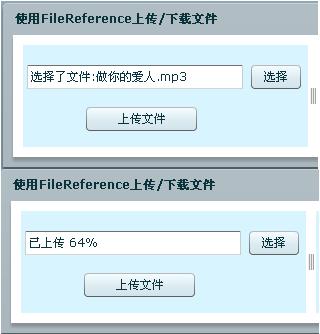
     如上一系列的步骤便可完成上传文件的功能,下面便是上传文件示例程序运行截图:     


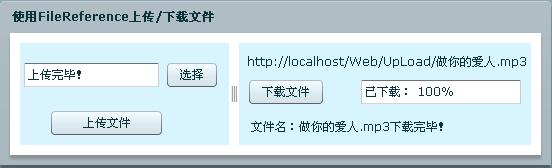
     实现了文件上传下面来看看怎么实现文件下载, 以上面上传示例中上传的mp3为例,下面我们来看看怎么从服务器(http://localhost/Web/UpLoad/做你的爱人.mp3)上完成文件(做你的爱人.mp3)的下载。

     要实现文件下载对服务器端只要保证被下载文件存在就OK,同上传文件一样需要实例化一个FielReference对象的实例,并为其添加相应的事件处理函数:

1 private var fileDown:FileReference = new FileReference();


 1 /**
 2  * createChildren 比 creationComplete 事件更早发生
 3  * */
 4 protected override function createChildren():void
 5 {
 6     super.createChildren();
 7     file.addEventListener(Event.Select,onSelected);
 8     file.addEventListener(Event.COMPLETE,onCompleted);
 9     file.addEventListener(ProgressEvent.PROGRESS,onProgress);
10     //实现文件下载
11     fileDown.addEventListener(Event.COMPLETE,onDownCompleted);
12     fileDown.addEventListener(ProgressEvent.PROGRESS,onDownProgress);
13 }


     如上为实现下载文件的实例fileDown注册了成功下载文件后事件处理函数和下载过程处理函数,下面是两个方法的详细定义:

 1 internal function onDownCompleted(evt:Event):void
 2 {
 3     var fileRef:FileReference = evt.currentTarget as FileReference;
 4     resultLabel.text = "文件名:" + fileRef.name + "下载完毕!";
 5 }
 6 
 7 internal function onDownProgress(evt:ProgressEvent):void
 8 {
 9     downState.text = "已下载: " + Math.round(100 * evt.bytesLoaded / evt.bytesTotal) + "%";
10 }


     完成了对象事件的开发,最后便上惩罚下载请求了,直接调用FileReference类所提供的download()方法既可:

1 /**
2  * 调用FileReference类的实例方法download()实现文件下载
3  * */
4 internal function onDownLoad():void
5 {
6     var request:URLRequest = new URLRequest();
7     request.url="http://localhost:1146/UpLoad/做你的爱人.mp3";
8     fileDown.download(request);
9 }


     程序执行到download()方法的时候会自动弹出选择保存文件对话框,根据实际情况选择好保存路径就OK。下面是实现上传和下载的完整代码:

实现上传和下载的完整代码


     程序运行截图:


版权说明

  本文属原创文章,欢迎转载,其版权归作者和博客园共有。  

  作      者:Beniao

 文章出处:http://beniao.cnblogs.com/  或  http://www.cnblogs.com/


[MVC]在IIS上部署ASPNETMVC Beta网站

mikel阅读(799)

IIS上部署ASPNETMVC Beta网站

IIS上部署ASPNETMVC Beta网站,实际上和在IIS上部署其他类型的网站并没有太大的区别。个人觉得唯一比较有意思的是在配置IIS时,我们可以配置各种自定义的ISAPI扩展名(也在MVC应用配置的,通常在Global.asax中)

第一步:安装MVC

当然,首先要下载MVC Beta下载链接

安装的前提是.NET Framework 3.5,如果已经装有.NET Framework 3.5,直接下一步下一步安装就可以了。

第二步:安装IIS

安装IIS通常需要系统盘。

安装步骤如下:控制面板——>添加删除程序——>添加删除Windows程序——>如果是XP,直接勾选上IIS就可以了,如果是SERVER 2003,通常是在Application Server(中文大概是应用程序服务一类吧)选项中。——>点下一步安装就是了。

第三步:配置IIS

在整个部署的过程中,配置IIS最为麻烦。不同的网站往往会有不同的配置,下面是一个配置的例子:

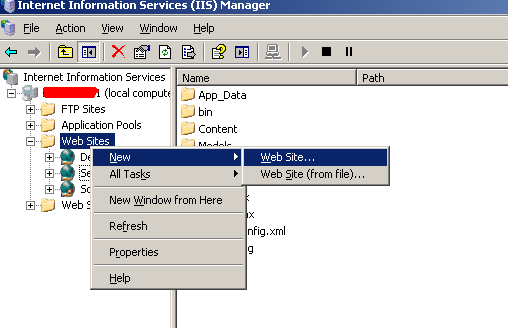
1.       IIS上新建Web站点,打开IIS后,如下图选择新建站点。之后按向导可配置站点描述,站点目录,是否允许匿名访问,以及读写权限的配置。 


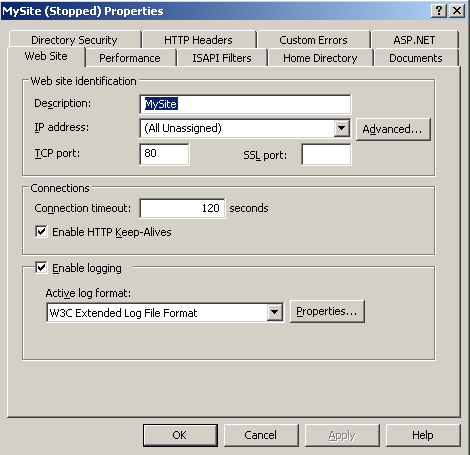
2.       配置站点端口和连接时限。其中端口号默认是80,如果有其它站点也是80,得改变其中一个端口号,避免冲突;或者可以把其他站点停掉(如果其他的暂时不用的话)。 


3.       配置目录和读写权限  

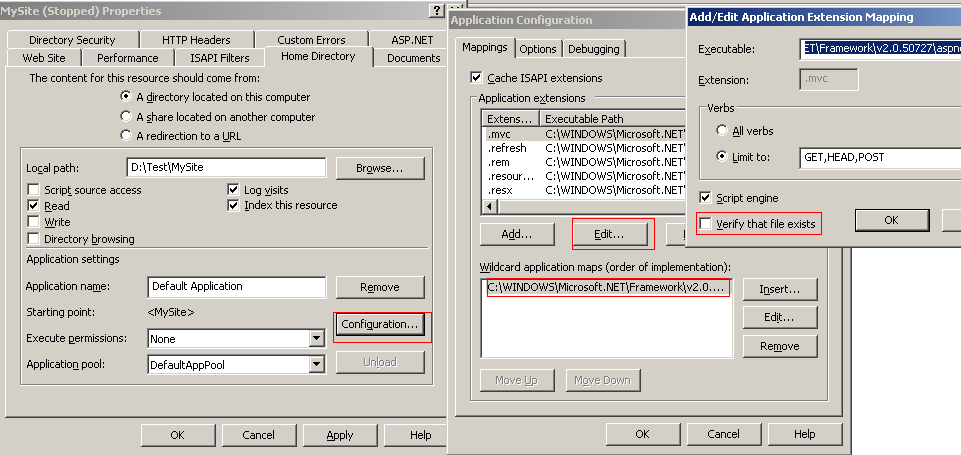
       点击Configuration,会弹出中间的那个对话框。可以把不用的扩展名选项删掉(更加安全)。点击靠上的那个Edit选项,把在Verify that file exists的勾选去掉,在Wildcard 下面添加ISAPI路径,通常是:C:"WINDOWS"Microsoft.NET"Framework"v2.0.50727"aspnet_isapi.dll

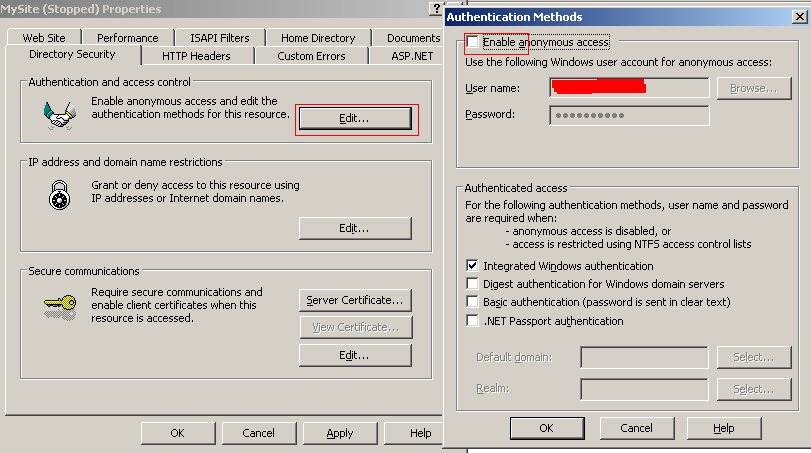
4.       禁止匿名访问


[C#]谈谈VS中的模板

mikel阅读(1261)

基本上,我们每次在VS中新建一个项目(Project)或项(Item)的时候,都用到了它的模板。这些模板给我们提供了一个好的开始。如果你曾 经历过从ASP.NET Web Application到AJAX Web Application的升级,就会对此有所体会;如果你是一个开源爱好者,需要在项目中应用大量的开源组件,那么每次的添加引用和配置也会让人厌烦。模 板给我们节省了很多时间,并能使同类型的项目/项保持一致。

在VS中我们可以很方便地导出项目/项模板,可以参考下面两篇文章:

在VS2005中创建项目模板来提高开发效率

制作Visual Studio项目模板

本文将介绍模板的更多内容。

什么是项目/项模板

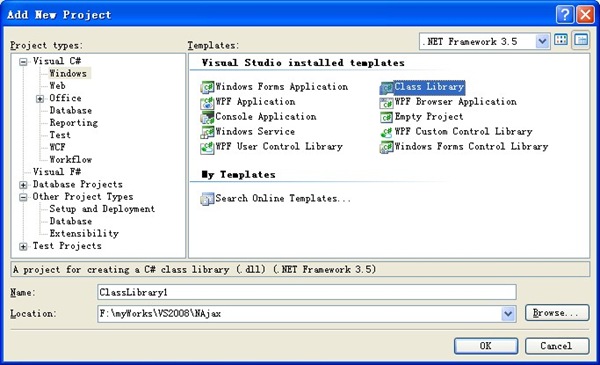
项目模板包含了创建特定类型的项目所需的必要文件(包括引用)。VS本身就提供了很多内置的项目模板,如Console Application, Class Library和ASP.NET Web Application等等。大部分项目模板基于一种特定的语言,如C#、F#等,同时针对特定的领域,如Windows、Web和Test等等,它们正 是以此进行分类组织:

add-new-proj

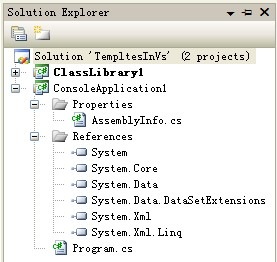
这里,创建一个控制台应用程序,

create-a-console-application

基本的引用已经添加完毕,并且有了一个Program.cs文件,接下来就可以在Main函数编写代码了。

项模板用于创建逻辑上的单个文件(有时可能是创建了多个文件,比如Web Form模板,不过它们在逻辑上仍被看作单个文件)。这个过程就不再赘述了。

项目/项模板简析

现在该了解一下这些模板是如何实现的了。前面提到,VS内置了很多模板,那就看看它们是怎么做的。

先来看项目模板,内置的项目模板位于[VS2008 Path]\Common7\IDE\ProjectTemplates,这里可以看到几个以语言名称命名的文件夹,进入CSharp,则是 Windows、Web、Test等文件夹,这是前面提到的模板组织方式。继续下去,打开Windows\1033文件夹,可以看多几个zip文件包。从 文件名可以想到,VS当中看到的模板就是这里的一个zip包。

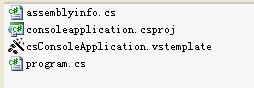
事实正是如此。解压缩ConsoleApplication.zip文件,这里有四个文件:

contents-of-console-template

.cs和.csproj文件就是创建项目后得到的文件,那vstemplate文件呢?它是模板的组织者,没有它,zip包就只是几个零散的文件而已。这个文件称为模板清单(Template Manifest),它实际上就是一个XML文件。

项模板的情况与此类似,它们位于[VS2008 Path]\Common7\IDE\ItemTemplates。

模板清单(Template Manifest)

清单文件是XML文件,它的Schema文件是[VS2008 Path]\XML\Schemas\1033\vstemplate.xsd,通过xsd文件我们可以了解清单文件的结构。

它的根节点是<VSTemplate>,该节点有两个Attribute:

  • Type:指定模板类型(项目模板还是项模板),取值可以是Project、ProjectGroup或Item;
  • Version:模板所用于的.NET Framework版本号。

该节点在Class文件的模板中是这样的:

<VSTemplate Version="3.0.0" Type="Item" xmlns="http://schemas.microsoft.com/developer/vstemplate/2005">
</VSTemplate>

<VSTemplate>节点可以有四种子节点:

  • <TemplateData>:必选项,包含了模板的基本信息,如名称、图标、默认名称等。
  • <TemplateContent>:必选项,指定了模板所包含的文件。
  • <WizardData>:可选项,包含了传给自定义向导的XML数据。
  • <WizardExtension>:可选项,包含了一些自定义模板向导的信息。

由于这些节点包含的信息比较多,这里只好偷懒了,它们在MSDN的链接分别是:

另外还可以看看Visual Studio Templates主页项目模板和项模板之间的区别

有了上面这些知识,就可以对清单文件有全面的认识了,下面来看看如何创建模板。

创建模板

项目模板和项模板的创建有所不同,但是都有两种方式:自动方式和手工方式。使用自动方式,跟随VS的向导创建模板,而使用手工方式,则需要编写一些代码,尤其是前面提到的清单文件。一般情况下,自动方式更为简单、快捷,而手工方式则更为强大和灵活。

手工方式创建模板

其过程包含三个步骤:

  • 创建模板所包含的文件;
  • 创建清单文件,编写代码对模板进行配置;
  • 部署。

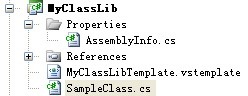
首先创建一个类库项目,它的结构如下所示:

myclasslib-arch

接下来在MyClassLibTemplate.vstemplate文件内对模板进行配置:

XML Code – 第一个模板清单文件
<VSTemplate Version="2.0.0" Type="Project" xmlns="http://schemas.microsoft.com/developer/vstemplate/2005">
    
<TemplateData>
        
<Name>My ClassLib Template</Name>
        
<Description>A simple class library template</Description>
        
<ProjectType>CSharp</ProjectType>
        
<ProjectSubType></ProjectSubType>
        
<SortOrder>1000</SortOrder>
        
<CreateNewFolder>true</CreateNewFolder>
        
<DefaultName>MyClassLibProj</DefaultName>
        
<ProvideDefaultName>true</ProvideDefaultName>
        
<LocationField>Enabled</LocationField>
        
<EnableLocationBrowseButton>true</EnableLocationBrowseButton>
        
<Icon>ufo.ico</Icon>
    
</TemplateData>
    
<TemplateContent>
        
<Project TargetFileName="MyClassLib.csproj" File="MyClassLib.csproj"
                 ReplaceParameters
="true">
            
<ProjectItem TargetFileName="SampleClass.cs" ReplaceParameters="true" >
                SampleClass.cs
            
</ProjectItem>
            
<Folder Name="Properties" TargetFolderName="Properties">
                
<ProjectItem ReplaceParameters="true" TargetFileName="AssemblyInfo.cs">
                    AssemblyInfo.cs
                
</ProjectItem>
            
</Folder>
        
</Project>
    </TemplateContent>
</VSTemplate>

最后是部署。将所有这些文件放在一起(如果有文件夹,要保持它的层次结构),打包为zip文件。将文件拷贝到下面两个路径之一:

  • 如果是项目模板,拷到[My Documents Path]\Visual Studio 2008\Templates\ProjectTemplates;
  • 如果是项模板,拷到[My Documents Path]\Visual Studio 2008\Templates\ItemTemplates。

由于刚才创建的模板是项目模板,所以放在第一个路径下。然后打开VS 2008,新建一个项目,在My Templates下可以看到我们自定义的模板:

add-a-custom-project

关于以自动(向导)方式创建模板,可以参考本文开头提到的两篇文章。

自定义模板

前面的例子很简单,甚至是过于简单了。在真实的开发中,可能需要向模板传递一些参数。

首先,需要在文件中插入占位符,如$Author$,Author就是参数的名称。看下面的例子:

C# Code – 设置模板参数占位符
namespace ClassLibrary1
{
    
// Company: $Company$
    
// Created By: $Author$
    public class SampleClass
    {
    }
}

接下来需要在模板清单文件中定义这些参数和它们的值,向<TemplateContent>节点中添加<CustomParameters>节点:

XML Code – 设置参数值
<CustomParameters>
    
<CustomParameter Name="$Company$" Value="my company" />
    
<CustomParameter Name="$Author$" Value="Anders Cui" />
</CustomParameters>

好了,现在重新部署这个模板,添加一个新项目,得到的文件是:

C# Code – 使用参数之后
namespace ClassLibrary1
{
    
// Company: my company
    
// Created By: Anders Cui
    public class SampleClass
    {
    }
}

需要注意的是,相关ProjectItem的ReplaceParameters特性值要为“true”。现在,如果模板中有10个文件用到了$Author$,就能节省不少时间了,不过我还是不满足,能不能在运行时获取用户的输入呢?看看下一节关于向导的内容。

自定义模板向导

VS模板的一个增强特性就是自定义向导,这些向导可以在用户由模板创建项目/项的时候运行。向导的好处在于可以:

  • 收集用户的输入信息;
  • 向模板添加参数值;
  • 向项目添加其它文件;

使用模板向导,可以访问DTE对象(Development Tools Extensibility,是Visual Studio自动化对象模型中的主对象),从而可以方便地操作项目。创建模板向导的基本步骤为:

  • 创建一个程序集,它要实现IWizard接口;
  • 将该程序集注册到GAC(Global Assembly Cache);
  • 更新模板清单文件,使用该程序集。

这里将继续使用上面的例子,不过这次要从用户界面收集参数值,而不是把它们放在模板清单中。

先来实现IWizard接口,该接口有6个方法,这些方法会在项目模板生命周期的特定时刻执行,其中的部分方法仅适用于项模板,它们的详情请参考:IWizard成员

当Visual Studio开始创建项目时,它立即调用RunStarted方法,因此该方法是收集用户输入信息的良好位置。它有四个参数:

  • Object 参数,可强制转换为根 _DTE 对象,以使您能够自定义项目。
  • Dictionary 参数,它包含模板中所有预定义参数的集合。
  • WizardRunKind 参数,它包含有关所使用的模板种类的信息。
  • Object 数组,它包含通过 Visual Studio 传递给向导的一组参数。

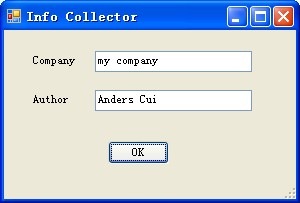
在本例中,将来自用户的输入添加到Dictionary参数中。好了,现在可以开始编码了,新建一个类库项目,名称为CustomTemplateWizard,新建一个Windows Form,用来接受用户输入,界面大体如下:

其代码为:

C# Code – 接受用户输入的窗体

下面的类WizardImpl实现了IWizard接口:

C# Code – 实现IWizard接口的类WizardImpl

然后,编译项目,为项目添加强命名,接着注册到GAC(Global Assembly Cache)。

接下来要修改模板清单文件,来使用新出炉的程序集,这要在</TemplateContent>之后添加:

XML Code – 添加对程序集的引用

这些都完成后,跟前面一样,打包、部署,然后打开VS,新建一个项目,此时出现一个对话框,在这里输入信息:

info-collector2

点击确定,生成的文件中可以看到参数已被替换:

replacedfile

初学者工具包(Starter Kits)

初学者工具包是一种特殊的项目模板,用于与其他开发人员分享示例代码和代码资源,可以看作是加强版的项目模板。初学者工具包往往包含了项目模板的所有内容,还可能包含额外的文档内容。

小结

本文首先简单介绍了项目/项模板的概念,然后介绍了模板及其清单文件的结构,在此基础上演示了如何手工创建并部署模板。最后讨论了两种更为灵活和强大的方式:向模板传递参数以及自定义模板向导,后者借助于DTE对象可以完成很复杂的功能。

参考

《Professional Visual Studio® 2008 Extensibility》

MSDN

作者:Anders Cui
出处:http://anderslly.cnblogs.com
本文版权归作者和博客园共有,欢迎转载,但未经作者同意必须保留此段声明,且在文章页面明显位置给出原文连接,否则保留追究法律责任的权利。

[Flex]Flex与.NET互操作(六):Flex和.NET协同开发利器FluorineFx

mikel阅读(771)

   在本系列前面几篇文章中分别介绍了通过WebService、HTTPService、URLLoader以及FielReference等 组件或类来完成Flex与.NET服务端的通信的相关知识点。通过这些方式来完成与服务端的通信是非常方便和简单的,但有他的缺点就是通信数据量较小,如 要传输大量的数据或是实现不同对象的序列化传输,它们则满足不了我们的需求,需要寻找另外一种通信协议,另一种高效的传输协议来代替SOAP协议传输的方 案,那便是AMF(ActionScript Message Format)协议。

     开源项目FluorineFx就是专门针对.NET平台与Flex通信提供的AMF协议通信网关,我们可以通过FluorineFx很方便的完成与.NET的通信。

     FluorineFx官方提供了安装包的下载和在线文档,可以帮助我们有效的利用FluorineFx来开发。 

     FluroineFx官方网站http://www.fluorinefx.com/    

     FluroineFx下载地址:http://www.fluorinefx.com/download.html

     FluroineFx在线文档:http://www.fluorinefx.com/docs/fluorine/index.html


     OK,下面我们来看看使用FluroineFx通信的.NET和Flex配置。开发环境选择如下:

     .NET:Microsoft Visual Studio 2008 + .NET Framework 3.5

     Flex:Adobe Flex Builder CS3 + Flex SDK 3.2

     FluroineFx:FluorineFx v1.0.0.15 (点击可下载)


 一、.NET服务端的开发

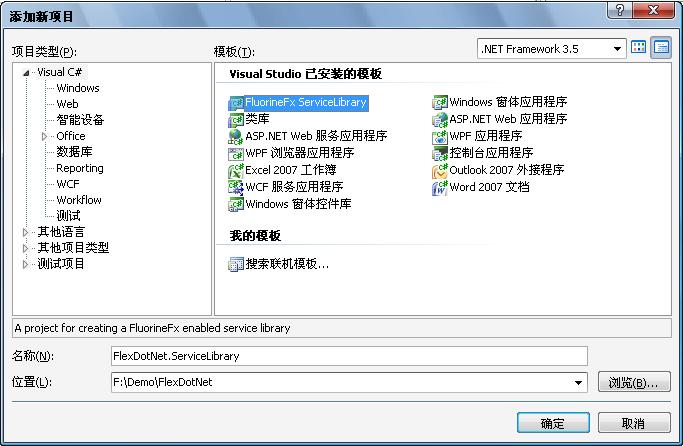
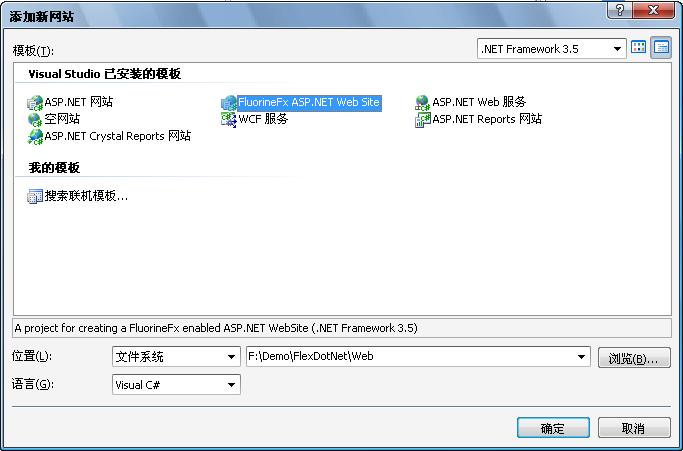
     通过Microsoft Visual Studio 2008 创建创建解决方案,并添加FluroineFx服务器库,如下图示:

     FluorineFx服务库添加成功后会发现,项目模板会自动为我们创建一个Sample类和一个Echo方法,如下:

 1 namespace FlexDotNet.ServiceLibrary
 2 {
 3     /// <summary>
 4     /// Fluorine sample service.
 5     /// </summary>
 6     [RemotingService("Fluorine sample service")]
 7     public class Sample
 8     {
 9         public Sample()
10         {
11         }
12 
13         public string Echo(string text)
14         {
15             return "Gateway echo: " + text;
16         }
17     }
18 }


     接着添加FluorineFx 网站到解决方案,添加成功后网站会自动引用FluorineFx服务库的dll。如下图:

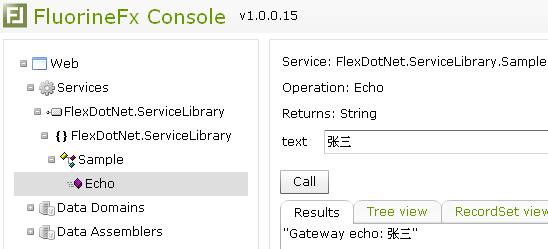
     到这里我们可以简单的测试FluorineFx的.NET服务端是否成功创建。通过在浏览器中查看FluroineFx网站中的Console.aspx或是将网站设置为启动项目并设置Console.aspx为启始页运行网站都可以,程序便会运行到FluorineFx的控制台,展开左边项目的Services节点便会看到上面模板为我们创建的类和方法,点击方法节点在右边就可以进行简单的测试了,如下图示:


     OK,到这里.NET的服务器端就开发完成了,这里我们需要记住几点,在接下来的Flex开发中需要根据这些参数来进行配置。

     FluorineFx的.NET网站目录:F:\Demo\FlexDotNet\Web

     FluorineFx的.NET网站虚拟目录:/Web

     FluorineFx的.NET网站URL:http://localhost:2836/Web

     接受Flex客户端请求的URL:http://localhost:2836/Web/Gateway.aspx

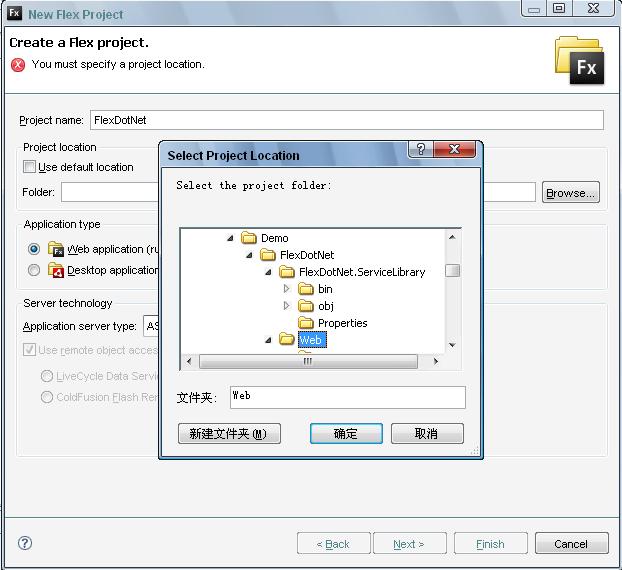
     有了上面这些东西配置Flex就简单了,首先创建Flex项目,并将项目路径指向前建立的FluorineFx网站的根路径:

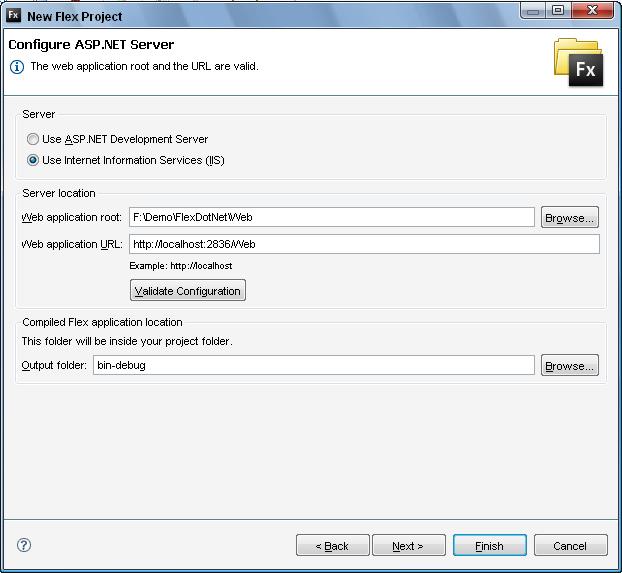
     如上图,将Application type设置为:Web application,Application Server type设置为:ASP.NET,然后“Next”。进入下一个创建项目向导界面,将Server设置为:"Use Internet Information Services (IIS)",Web Application root同样指向FluorineFx网站的根路径,Web Appliation URL则设置为上面我们获取到的路径便OK,详细见下图:

     按照上面步骤配置好后通过点击“Validate Configuration”进行配置验证,如过验证结果是: The web application root and the URL are valid.则代表配置正确,可以直接点下一步只到完成项目的创建。

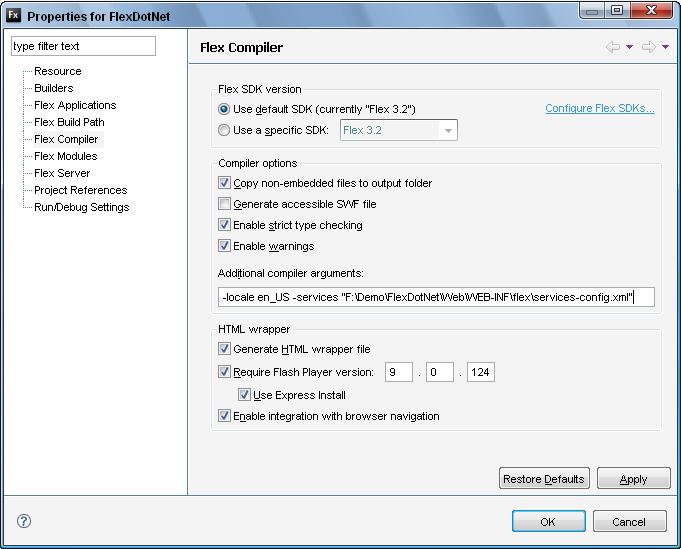
     Flex项目创建完毕,下面在通过一些相应的配置就可以通过FluorineFx和.NET通信了。开发项目属性设置面板,设置其Flex Compiler为下图所示(-services的配置也可以设置为相对路径):

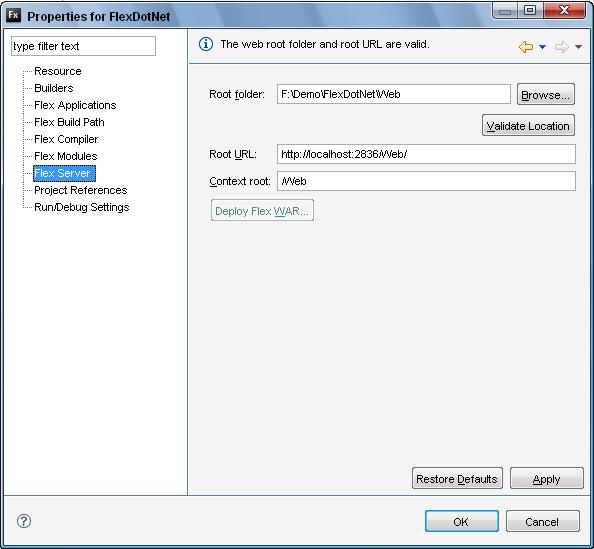
     设置Flex Server为如下配置,可以点“Validate Location”验证设置的正确性:

     最后设置输出路径就完成了Flex端的配置了:


     到这里Flex端的配置就全部完成,下面我们通过FluorineFx库模板为我们生成的Sample为例来测试下该环境是否可以通过,在Flex的mxml文件下通过<mx:RemoteObject>标签来访问远程对象,详细如下:

1 <mx:RemoteObject id="service" destination="fluorine"
2     source="FlexDotNet.ServiceLibrary.Sample">
3         <mx:method name="Echo" result="onResult(event)">
4         </mx:method>
5 </mx:RemoteObject>


     这里需要注意的是destination需要设置为与remoting-config.xml中的destination的id一 致,source则配置为远程对象的全路径(名称空间+类),通过<mx:method>标签配置远程对象下的方法并设置其成功调用后的结果 处理函数,下面便可通过id去调用远程方法了。

 1 <mx:Script>
 2     <![CDATA[
 3         import mx.rpc.events.ResultEvent;
 4         internal function onClick():void
 5         {
 6             service.Echo(txtInput.text);
 7         }
 8         
 9         internal function onResult(evt:ResultEvent):void
10         {
11             txtResult.text = evt.result.toString();
12         }
13     ]]>
14 </mx:Script>


下面是完整的Flex客户端mxml的代码定义:

完整的示例代码


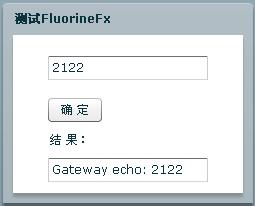
本文示例截图:


版权说明

  本文属原创文章,欢迎转载,其版权归作者和博客园共有。  

  作      者:Beniao

 文章出处:http://beniao.cnblogs.com/  或  http://www.cnblogs.com/


[杂记]告诉你喝水的14个惊人真相收藏

mikel阅读(824)

如今,重视喝水的人,越来越多了;但真正会喝的人,却为数不多。
不挑时间地喝、不计较内容地喝、不动脑筋地喝……都只能证明你只是喝水,却不一定是喝对了水。
在这个爱惜身体成为一种流行的年代,曾经被认为最简单的喝水,也不得不成了一 门高深的学问。
1、清晨慎补水

许 多女人把起床后饮水视为每日的功课,图它润肠通便,降低血粘度,让整个人看上去水灵灵的。可是早晨怎样补水才更健康呢?其实,没有一定之规,早餐补水也要 因人而异。消瘦,肤白,体质寒凉的人,早晨不适合饮用低于体温的牛奶,果汁或冷水,可以换作温热的汤、粥。 鲜榨果汁不适合早晨空空的肠胃,即使是在夏季也要配合早餐一起饮用。 早晨补水忌盐,煲的浓浓的肉汤、咸咸的馄饨汤都不适合晨,只会加重早晨身体的饥渴。。
2、餐前补水最养胃
吃 饭前还要补水吗?那不是会冲淡胃液影响消化吗?西餐有餐前开胃的步骤,其道理在于利用汤菜来调动食欲,润滑食道,为进餐做好准备。那么,饭前补水也就有着 同样的意义,进固体食物前,先小饮半杯(约100毫升),可以是室温的果汁、酸奶,也可以是温热的冰糖菊花水或淡淡的茶水,或者是一小碗浓浓的开胃汤,都 是很好的养胃之法。
3、多喝看不见的水

有的人看上去一天到晚都不喝水,那是因为由食 物中摄取的水分已经足够应付所需。食物也含水,比如米饭,其中含水量达到60%,而粥呢,就更是含水丰富了。翻开食物成分表不难看出,蔬菜水果的含水量一 般超过70%,即便一天只吃500克果蔬,也能获得300~400毫升水分(有两怀呦)。加之日常饮食讲究的就是干稀搭配,所以从三餐食物中获得 1500~2000毫升的水分并不困难。不如充分利用三餐进食的机会来补水吧,多选果蔬和不咸的汤粥,补水效果都不错。
4、记住利水食物
所 谓利水食物是指能增加身体水分排泄的食物,如西瓜、咖啡、茶等含有利尿成分,能促进肾脏尿液的形成;还有粗粮、蔬菜水果等含有膳食纤维,能在肠道结合大量 水分,增加粪便的重量;辛辣刺激的成分能促进体表毛细血管的舒张,让人大汗淋漓、体表水分流失。补也好、利也好,都是达到身体水分平衡的手段。
5、畅饮与美容无关
身 体缺少水分,皮肤看上去会干燥没有光泽;饮水过少还容易发生便干,甚至便秘,皮肤很容易生小痘痘。虽说如此,单单补充水分对肤质和肤色的影响毕竟有限,不 过现在很多添加维生素的饮料打出了美容牌,比如一种含乳饮料里面含有维生素B6,其产品声称“能令皮肤润滑细嫩”,而现在含有这种“美容维生素”的饮料还 真不少。正统的营养学专著中并没有提到它的美容作用,好在摄入多些一没有危险,二还可以预防冠心病的发生,也算有益无害吧。
6、水里的“杀机”
经过煮沸的自来水可能含有具有致癌性的高氯化合物,如经较长时间放置(隔夜)水质会发生老化。 现在各种家用水处理机也纷纷登场,类似曾风靡一时的矿泉壶,这样的设备存在后续维护的问题,就如同饮水机,可能成为饮用水二次污染的源头。
7、喝运动饮料的学问
剧 烈运动前后不能补白水,也不能补高浓度的果汁,而应补运动饮料。运动饮料中应该含有少量糖分、钠盐、钾、镁、钙和多种水溶性维生素,以补充运动中身体所失 及所需。饮白水会造成血液稀释,排汗量剧增,进一步加重脱水。果汁中过高的糖浓度使果汁由胃排空的时间延长,造成运动中胃部不适。运动饮料中特殊设计的无 机盐和糖的浓度会避免这些不良反应。运动饮料的温度也讲究,过高不利于降低体温散热,过凉会造成胃肠道痉挛,一般应口感清凉,温度在10左右。
8、警惕酸味饮料
各 种果汁饮料多采用柠檬酸作味剂,柠檬酸食用过多,大量的有机酸骤然进入人体,当摄入量超过机体对酸的处理能力时,就会使体内的PH值不平衡,导致酸血症的 产生,使人疲乏,困倦。特别是在盛夏,由于天气炎热,出汗较多,人体会损失大量的电解质,如钾、钠、氯等碱性成分,大量的酸味饮料更容易令体液呈酸性。因 此,在夏季不宜过多饮用添加有机酸的酸味饮料。
9、甜饮料的陷阱
如果口渴的时候首先 想到的是饮料,可是相当危险的。可乐、雪碧、芬达的含糖量是11%,超过了西瓜、苹果、柑橘等很多种水果,一听350毫升的可乐所含的能量等同于一片面 包、一个玉米或250克水果。各种果汁的含糖量与此相当,甚至还要更高于它。脉动、她/他、激活等看上去像水的维生素饮料也含有3%的糖分,如果喝上一大 瓶(600毫升吧),对体重的影响相当可观。也的确听说过有人因为暴饮甜饮料而罹患糖尿病的不幸遭遇呢。
10、淡盐水的坏处

淡 盐水是指相当于生理浓度的盐水,每百毫升中含 1克左右的盐分,它在日常生活中有几种用途:一、大汗之后补充身体丢失的水分和钠;二、腹泻之后补充由肠道丢失的水分和盐,维持电解质的平衡;三、淡盐水 漱口能清除口腔内的细菌,减轻口咽部炎症造成的红肿。但是,淡盐水不适合心脏功能不好,有高血压的人饮用,特别是在早晨,当血液粘稠度最高时,饮用淡盐水 会加重口干,促进血压升高。
11、识破“花样”水
纯净水,经多重过滤去除了各种微生 物、杂质和有益的矿物质,突出的是饮用的安全性,它是一种软水,许多人认为它不够营养,长期饮用不利健康,可是这种观点未被证实。矿泉水,是种自然资源, 由地层深处开采出来,含有丰富的稀有矿物质,略呈碱性,应该更有利于健康,但是不排除有机物污染的可能。矿物质水,在纯净水中按照人体浓度比例添加矿物质 浓缩液配制而成的人工矿泉水,标志着饮用水科技的新高度。
12、爱运动更要会补水
运动补水要掌握以下原则:
1)不能渴时才补。因为感到口渴时,丢失的水分已达体重的2% 。
2).运动前、中、后都要补水。运动前2小时补250-500毫升;运动前即刻补150-250毫升;运动中每15~20分钟补120-240毫升;运动后按运动中体重的丢失量,体重每下降1千克需补1升。
13、勤补水不明智
身 体处于稳定状态的时候,每天正常补水1000~2000亳升,让小便保持清亮充沛就可以了。但是如果自觉或不自觉地大量饮水,这其中就有问题了。首先,说 明你的身体可能处于脱水状态,身处高温环境,大量排汗或大量进食盐分都可能千百万这种情况,那么补水是必要的;其次,如果存在高血糖、垂体或肾脏功能异常 的情况;或者处于感昌、发烧等感染性疾病中;又或者有泌尿系统炎症,甚至是一名高尿酸血症患者,那也可以主动大量饮水。而一个健康人在不感觉口渴的情况下 饮水超过2000毫升/天就实在没有必要了,那只不过是一再考验自身的肾脏功能罢了。
14、维生素C饮料多喝无益
新 上市的饮料中很多都含有维生素C,维生素C的益处自不必说,为了预防缺乏,每天人体需要补充60~100毫克。“酷儿”的维生素C含量为3~30毫克 /100毫升,“脉动”为25~50毫克/100毫升,“她”是15毫克/100毫升,也就是说,饮用此类饮料一瓶获得的维生素C就能满足每天的需要量。 那么,如果你饮用2瓶、3瓶,甚至更多呢?会不会发生维生素C中毒的情况呢?好在维生素C的安全范围广,但是千万不要以为它是多多益善的,过量摄入能引起 泌尿系统结石,渗透性腹泻以及大剂量维生素C依赖症。人们都希望自己青春永葆,容颜焕发,美容成为一种时尚。“饮水美容”价廉易行,深受人们欢迎。
人一刻离不开水,一旦缺水,不仅影响新陈代谢,还会使皮肤失去光泽而显得干燥衰老。
多喝开水,能发汗和增加皮脂分泌,使皮肤得以润滑。
清 早起床后不要急于舞剑弄棍,跳舞做操,应该先喝一杯开水。因为经过一夜睡眠、尿液和不显性失水会丢失水分,使血液粘稠度增高,循环阻力增大,心脑供血不 足,使人面容憔悴。清水一杯可以迅速被吸收,稀释粘稠的血液,改善脏器代谢,促进血液循环,使皮肤保持鲜亮光泽,具有自然美的魅力。这就是早已为生物学家 提倡的、“内洗涤法”。
饮用矿泉水,美容效果更好。矿泉水含有钙、镁、钠等多种矿物质及二氧化碳,能健脾胃,增食欲,使皮肤变得白嫩柔润,容颜焕发如玉。
常喝绿茶、薄荷茶、菊花茶也能得到美容的效果。茶叶有抑制亚硝基化合物的致癌功能,还有防治心血管病、清肝明目、养血解毒、固齿杀菌等作用。多喝茶水能加快体液循环,及时清除皮肤排泄物,使皮肤清洁湿润。
饮水美容要求少量多饮。每天饮水五六次,每次以一两杯为宜。饮用过量会加重心脏、肾脏的负担,使新陈代谢发生紊乱,从而削弱皮肤的抵抗力。
用 水美容除了“内洗涤法”,还有“外洗涤法”,那就是游泳与沐浴。游泳时由于水对皮肤的冲击,加速了血液循环,有益于面部、胸部健美,尤其是有益于丰乳。在 各种游泳姿势中,以“蝶泳”和自由式健美最佳。以这两种姿势游泳最有利于胸肌的坚韧和发达。沐浴也能收到面部、胸部健美的良好效果。国外流行一种对丰乳有 益的“水功法”。即在沐浴时让莲蓬头的水喷射胸部,以预防胸肌松弛。实践证明:经常以带有轻度压力的水流给乳房以磨擦,对增进胸部健美能起到甚为有效的作 用。
此外,在不便饮水和游泳沐浴的情况下,用湿毛巾多敷一下面庞,对面部美容也有一定的效果。
水,随处都有。用水美容健身,简便易行。愿君多饮水,容颜美

[ORM]关系数据库与面向对象的映射讨论

mikel阅读(783)

在博客园看到下面的文章尽管还是老生常谈,喊了这么多年的ORM,最终还是无果,框架也出了不少最后还是在讨论这个问题,下面是引用的原文:


引言

面向对象的三个特征: 封装(encapsulation), 继承(inheritance), 多态(polymorphic), 其中继承是我们三个特征中最重要的应该就是继承了.

我们在程序中可以很自然, 很方便的表达继承的关系. 但是针对这样的继承关系, 我们如何设计数据库呢?通常我们有三种方式:

1. 一个继承树映射到一个表(one inheritance tree mapping to one table)

这种方式是将拥有共同父类的所有的类都看做成一张表(包括父类), 然后所有的类的所有的属性取并集, 组成数据表的所有列.

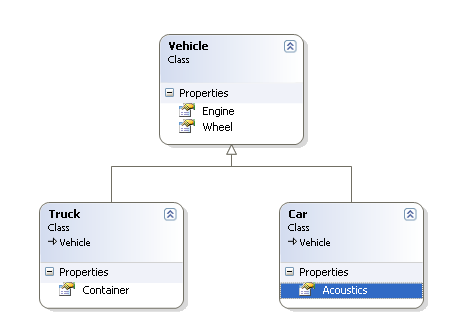
image

如上图类的结构图, Vehicle是父类, 拥有两个属性Engine和wheel, 而子类Truck有属性Container, 子类Car有属性Acoustics.

数据表被映射成

类属性 数据表字段
Engine Engine
Wheel Wheel
Container Contianer
Acoustics Acoustics

优点: 结构简单, 在数据表操作层可以很方便的实现针对这三个对象的数据库的insert, update, delete.

缺点: 这样的设计数据表, 会有大量的数据冗余.


2. 一个继承路径映射一个表(one inheritance path mapping to one table)

按照这种方式: 创建两张表, 分别是Truck和Car.

Truck 数据表

类属性 数据表字段
Engine Engine
Wheel Wheel
Container Container

Car 数据表

类属性 数据表字段
Engine Engine
Wheel Wheel
Acoustics Acoustics

优点: 没有数据冗余.

缺点: 当需要查询Vehicle的时候, 就需要在Truck和Car两个表里面进行查询. 当有越多类继承Vehicle的时候, 查询的效率就越低.


3. 一个类映射到一个表(one class mapping to one table)

按照这种方式: 创建三张表, 分别是Vehicle, Truck和Car.

Vechile 数据表

类属性 数据表字段
ID(Primary Key)
Engine Engine
Wheel Wheel

Truck 数据表

类属性 数据表字段
ID(Foreign Key)
Container Container

Car 数据表

类属性 数据表字段
ID(Foreign Key)
Acoustics Acoustics

优点: 为每个类创建表, 子表和父表通过ID进行关联, 数据冗余小.

缺点: 当继承体系的非常复杂的时候, 一些SQL语句会非常复杂, 效率也会非常低下.


其实在上面三种方式中, 我们使用最多的最常见的应该算是第三种, 但是有些情况下, 我们也需要考虑下其他数据表的创建方式.

毕竟模式是在一些特定的场合下, 才能充分体现它的价值. 我们在开发的过程中, 在类的设计方面愿意花费很多人力物力, 但是数据库的设计


这是我的回复:

其实关系数据库结构和对象之间可以利用中间层进行映射
第三种方法,的查询复杂度可以利用视图来降低
其实这三种方法用哪一种都无所谓,完全可以利用中间视图将数据库关系和对象隔离开,让关系的归关系,对象的归对象

[Flex]Flex与.NET互操作(四):使用HttpService、URLReqeust和URL

mikel阅读(559)

   在前两篇文章中分别介绍了Flex与.NET的WebService之间的数据交互通信知识,本文将介绍另外一种加载数据以及发起请求的方 式。ActionScript 3.0中提供的数据加载请求类主要是HTTPService,URLLoader和URLRequest,可以通过他们协同来完成数据加载和请求。下面我 么便来看看这三个类是怎么来完成数据加载工作。

     在本地IIS服务器上有如下定义的XML文件:

 1 <?xml version="1.0" encoding="utf-8" ?>
 2 <Root>
 3   <Book>
 4     <Id>1</Id>
 5     <Name>《三国演义》</Name>
 6     <Author>罗贯中</Author>
 7     <Price>52.30</Price>
 8   </Book>
 9   <Book>
10     <Id>2</Id>
11     <Name>《西游记》</Name>
12     <Author>吴承恩</Author>
13     <Price>39.91</Price>
14   </Book>
15   <Book>
16     <Id>3</Id>
17     <Name>《红楼梦》</Name>
18     <Author>曹雪芹</Author>
19     <Price>48.20</Price>
20   </Book>
21   <Book>
22     <Id>4</Id>
23     <Name>《水浒传》</Name>
24     <Author>施耐庵</Author>
25     <Price>39.85</Price>
26   </Book>
27 </Root>

一、使用HTTPService传递和加载数据

     使用HTTPService可以实现加载数据,也可以实现参数传递,下面通过两个示例程序来讲解这两个知识点。

     首先来看看HTTPService加载数据的方式。在Flex中使用HTTPService来装载外部数据是非常简单的,他是基于 HTTP协议发送POST和GET请求外部数据,然后通过指定的监听方法来处理响应。我们可以通过<mx:HTTPService>标签来完 成对数据源的连接,也可以通过可编程方式来处理,两种方式没什么大的差距,实际开发中可以根据自己喜好选择。

 1 internal function onClick():void
 2 {
 3     var service:HTTPService = new HTTPService();
 4     service.url = "http://localhost:1146/Data/Book.xml";
 5     service.useProxy = false;
 6     service.resultFormat="e4x";
 7     service.addEventListener(ResultEvent.RESULT,onResultHandler);
 8     service.send();
 9 }
10 
11 internal function onResultHandler(evt:ResultEvent):void
12 {
13     var xml:XML = evt.result as XML;
14     trace(xml);
15     bookGrid.dataProvider = xml.Book;
16 }


     该示例的运行结果见文章最后,下面是这个示例的完整代码:

完整示例代码


     OK,我们来看看使用HTTPService传递参数到服务端是怎么实现的。使用HTTPService传递参数可以通过两种方式实现,分别如下:

     1、直接在请求URL后面跟上参数列表,如:http://localhost/web/Test.aspx?a=1&b=2

     2、通过Flex SDK为我们提供专门用语参数传递的对象(URLVariables)来实现。

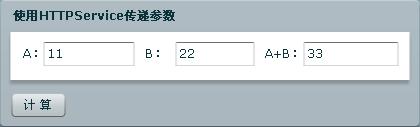
     下面以一道简单的加法运算来演示HTTPService传递参数的使用,在Flex里将需要进行加法运算的两个数传递到.NET服务端并计算其和后返回给Flex客户端,两种方式传递没有太大的区别,详细请看如下代码演示:

 1 /**
 2  * 通过RUL参数直接传递
 3  * */
 4 internal function onClick():void
 5 {
 6     var service:HTTPService = new HTTPService();
 7     var a:String = txtA.text;
 8     var b:String = txtB.text;
 9     service.url = "http://localhost:1146/OperationHandler.ashx?a="+a+"&b="+b;
10     service.useProxy = false;
11     service.resultFormat="e4x";
12     service.addEventListener(ResultEvent.RESULT,onResultHandler);
13     service.send();
14 }
15 
16 /**
17  * 通过URLVariables进行参数传递
18  * */
19 internal function onClick():void
20 {
21     var service:HTTPService = new HTTPService();
22     service.url = "http://localhost:1146/OperationHandler.ashx";
23     service.useProxy = false;
24     service.resultFormat="e4x";
25     service.addEventListener(ResultEvent.RESULT,onResultHandler);
26     var param:URLVariables = new URLVariables();
27     param.a = txtA.text;
28     param.b = txtB.text;
29     service.send();
30 }


      下面是完整的示例代码,可以把onClick()方法相互切换来测试两种不同的参数传递方式。

完整的示例代码


OperationHandler.ashx


     上面示例的运行界面截图:


二、了解URLReqeust

     使用URLRequest 类可捕获单个 HTTP 请求中的所有信息。将URLRequest 对象传递给URLStream或URLLoader 类以及其他加载操作的load()方法以启动URL数据加载。它的使用很简单,通过构造方法构造对象就OK:

1 var request:URLRequest = new URLRequest("http://localhost:1146/Data/Book.xml")


     同样可以使用URLRequest来请求一个本地项目/应用里的文件,如下代码示例:

1 var request:URLRequest = new URLRequest("Data/Book.xml")

 
     如上便构造好了URLRequest对象,只要将他传递给相应的对象load()方法便可实现数据加载。从某种角度可以将URLRequest 理解为建立请求的工具。要是URLRequest类对象变成可用的对象还需得通过其他类来与之配合协作,详细见后面使用URLLoader加载数据。

     URLRequest虽然功能强大,使用简单。但我们还是需要了解更多的东西,以便可以正确的应用URLRequest类和处理相应的错误。其中最引人关注的就是安全沙箱的问题,这部分我将在以后的文章中介绍,这里只需要记住两点就OK。  

     1、如果执行调用的 SWF 文件在只能与本地文件系统内容交互的沙箱中,而目标资源来自网络沙箱,则不允许进行数据加载。

     2、如果执行调用的 SWF 文件来自网络沙箱而目标资源在本地,也不允许进行数据加载。

     这里就简单介绍这些,关于URLRequest的详细资料大家可以查看官方提供的在线文档:http://livedocs.adobe.com/flash/9.0/ActionScriptLangRefV3/flash/net/URLRequest.html


三、使用URLLoader加载数据

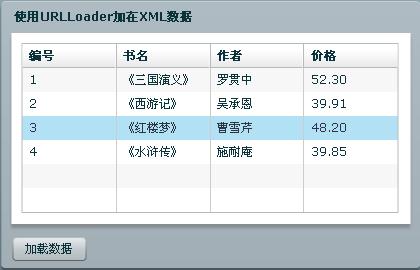
     URLLoader 类可以以文本、二进制数据或 URL 编码变量的形式从 URL 下载数据。下面将结合使用本地服务器上的数据(详细见文章前面的xml文件定义)的加载示例来演示URLLoader的使用方法。 

      那我们怎么通过URLLoader来加载它呢?很简单,使用上面介绍的URLRequest来创建请求连接,然后将URLRequest对象传递给URLLoader的load方法来实现数据加载。

 1 internal function onClick():void
 2 {
 3     var request:URLRequest = new URLRequest("http://localhost:1146/Data/Book.xml");
 4     var loader:URLLoader = new URLLoader();
 5     loader.load(request);
 6     loader.addEventListener(Event.COMPLETE,onCompleteHandler);
 7 }
 8 
 9 private function onCompleteHandler(evt:Event):void
10 {
11     var xml:XML = new XML(evt.target.data);
12     bookGrid.dataProvider = xml.Book;
13 }

     下面是整个mxml的代码定义:


 1 <?xml version="1.0" encoding="utf-8"?>
 2 <mx:Application xmlns:mx="http://www.adobe.com/2006/mxml" layout="absolute">
 3     <mx:Script>
 4         <![CDATA[
 5             internal function onClick():void
 6             {
 7                 var request:URLRequest = new URLRequest("http://localhost:1146/Data/Book.xml");
 8                 var loader:URLLoader = new URLLoader();
 9                 loader.load(request);
10                 loader.addEventListener(Event.COMPLETE,onCompleteHandler);
11             }
12             
13             private function onCompleteHandler(evt:Event):void
14             {
15                 var xml:XML = new XML(evt.target.data);
16                 bookGrid.dataProvider = xml.Book;
17             }
18         ]]>
19     </mx:Script>
20     <mx:Panel x="49.5" y="94" width="419" height="267" layout="absolute" fontSize="12" borderColor="#E2E2E2" themeColor="#009DDF" title="使用URLLoader加在XML数据">
21         <mx:DataGrid x="10" y="10" width="377" id="bookGrid">
22             <mx:columns>
23                 <mx:DataGridColumn headerText="编号" dataField="Id"/>
24                 <mx:DataGridColumn headerText="书名" dataField="Name"/>
25                 <mx:DataGridColumn headerText="作者" dataField="Author"/>
26                 <mx:DataGridColumn headerText="价格" dataField="Price"/>
27             </mx:columns>
28         </mx:DataGrid>
29         <mx:ControlBar height="42">
30             <mx:Button label="加载数据" fontWeight="normal" click="onClick()"/>
31         </mx:ControlBar>
32     </mx:Panel>
33 </mx:Application>
34 


     本示例的运行结果如下图:


关于URLLoader的更多资料大家可以查看Adobe提供的在线文档:http://livedocs.adobe.com/flash/9.0/ActionScriptLangRefV3/flash/net/URLLoader.html


版权说明

  本文属原创文章,欢迎转载,其版权归作者和博客园共有。  

  作      者:Beniao

 文章出处:http://beniao.cnblogs.com/  或  http://www.cnblogs.com/


[MVC]Asp.net MVC :Custom Action Filters

mikel阅读(823)

来自:http://quickstarts.ASP.NET/previews/mvc/mvc_ActionFiltering.htm

Custom Action Filters

Introduction

The possible uses for action filters are as varied as the actions to which they can be applied. Some possible uses for action filters include the following:

  • Logging to track user interactions.
  • "Anti-image-leeching" to prevent images from being loaded in pages that are not on your site.
  • Web crawler filtering to change application behavior based on the browser user agent.
  • Localization to set the locale.
  • Dynamic actions to inject an action into a controller.

Implementing a Custom Action Filter

An action filter is implemented as an attribute class that inherits from ActionFilterAttribute. ActionFilterAttribute is an abstract class that has four virtual methods that you can override: OnActionExecuting, OnActionExecuted, OnResultExecuting, and OnResultExecuted. You must override at least one of these methods.
The ASP.NET MVC framework will call the OnActionExecuting method of your action filter before it calls any action method that is marked with your action filter attribute. Similarly, the framework will call the OnActionExecuted method after the action method has finished.
The OnResultExecuting method is called just before the ActionResult instance that is returned by your action is invoked. The OnResultExecuted method is called just after the result is executed. These methods are useful for performing actions such as logging, output caching, and so forth.
The following example shows a simple action filter that logs trace messages before and after an action method is called.

Visual Basic

Public Class LoggingFilterAttribute
Inherits ActionFilterAttribute
Public Overrides Sub OnActionExecuting(ByVal filterContext _
As ActionExecutingContext)
filterContext.HttpContext.Trace.Write("Starting: " & _
filterContext.ActionMethod.Name)
MyBase.OnActionExecuting(filterContext)
End Sub
Public Overrides Sub OnActionExecuted(ByVal filterContext _
As ActionExecutedContext)
If Not filterContext.Exception Is Nothing Then
filterContext.HttpContext.Trace.Write("Exception thrown")
End If
MyBase.OnActionExecuted(filterContext)
End Sub
End Class

public class LoggingFilterAttribute : ActionFilterAttribute
{
public override void OnActionExecuting(ActionExecutingContext
filterContext)
{
filterContext.HttpContext.Trace.Write("Starting: " +
filterContext.ActionMethod.Name);
base.OnActionExecuting(filterContext);
}
public override void OnActionExecuted(ActionExecutedContext
filterContext)
{
if (filterContext.Exception != null)
filterContext.HttpContext.Trace.Write("Exception thrown");
base.OnActionExecuted(filterContext);
}
}

Action Filter Context

Each of the controller event handlers for action filtering takes a context object as a parameter. The following list shows the event handlers and the context type that each takes.

  • OnActionExecuting takes an ActionExecutingContext object.
  • OnActionExecuted takes an ActionExecutedContext object.
  • OnResultExecuting takes a ResultExecutingContext object.
  • OnResultExecuted takes a ResultExecutedContext object.

All context classes inherit from the ControllerContext class and include an ActionMethod property. You can use the ActionMethod property to identify which action the filter is currently applied to.
The ActionExecutingContext and ResultExecutingContext classes contain a Cancel property that enables you to cancel the action.
The ActionExecutedContent and ResultExecutedContext classes contain an Exception property and an ExceptionHandled property. If the Exception property is null, it indicates that no error occurred when the action method ran. If the Exception property is not null and the filter knows how to handle the exception, the filter can handle the exception and then signal that it has done so by setting the ExceptionHandled property to true. Even if the ExceptionHandled property is true, the OnActionExecuted or OnResultExecuted method of any additional action filters in the stack will be called and exception information will be passed to them. This enables scenarios such as letting a logging filter log an exception even though the exception has been handled. In general, an action filter should not handle an exception unless the error is specific to that filter.

Marking an Action Method with a Filter Attribute

You can apply an action filter to as many action methods as you need. The following example shows a controller that contains action methods that are marked with an action-filter attribute. In this case, all the action methods in the controller will invoke the same action filter.

Visual Basic

Public Class HomeController
Inherits Controller
Shared clicked As Boolean = False
<LoggingFilter()> _
Public Function Index()
ViewData("Title") = "Home Page"
ViewData("Message") = "Welcome to ASP.NET MVC!"
If clicked = True Then
ViewData("Click") = "You clicked this button."
clicked = False
End If
Return View()
End Function
<LoggingFilter()> _
Public Function About()
ViewData("Title") = "About Page"
Return View()
End Function
<LoggingFilter()> _
Public Function ClickMe()
clicked = True
Return RedirectToAction("Index")
End Function
End Class

public class HomeController : Controller
{
static Boolean clicked = false;
[LoggingFilter]
public ActionResult Index()
{
ViewData["Title"] = "Home Page";
ViewData["Message"] = "Welcome to ASP.NET MVC!";
if (clicked == true)
{
ViewData["Click"] = "You clicked this button.";
clicked = false;
}
return View();
}
[LoggingFilter]
public ActionResult About()
{
ViewData["Title"] = "About Page";
return View();
}
[LoggingFilter]
public ActionResult ClickMe()
{
clicked = true;
return RedirectToAction("Index");
}
}
Note:
If you want to apply an action filter to all action methods of a controller, you can mark the controller with the filter attribute. This is the same as marking every action method with the attribute.

Executing Code Before and After an Action from Within a Controller

The ASP.NET MVC Controller class defines OnActionExecuting and OnActionExecuted methods that you can override. When you override one or both of these methods, your logic will execute before or after all action methods of that controller. This functionality is like action filters, but the methods are controller-scoped.
The following example shows controller-level OnActionExecuting and OnActionExecuted methods that apply to all action methods in the controller.

Visual Basic

Public Class HomeController
Inherits Controller
Shared clicked As Boolean = False
Public Function Index()
ViewData("Title") = "Home Page"
ViewData("Message") = "Welcome to ASP.NET MVC!"
If clicked = True Then
ViewData("Click") = "You clicked this button."
clicked = False
End If
Return View()
End Function
Public Function About()
ViewData("Title") = "About Page"
Return View()
End Function
Public Function ClickMe()
clicked = True
Return RedirectToAction("Index")
End Function
Protected Overrides Sub OnActionExecuting(ByVal filterContext _
As ActionExecutingContext)
filterContext.HttpContext.Trace.Write("Action Executing: " & _
filterContext.ActionMethod.Name)
If clicked = True Then
filterContext.HttpContext.Trace.Write("Button clickced")
End If
MyBase.OnActionExecuting(filterContext)
End Sub
Protected Overrides Sub OnActionExecuted(ByVal filterContext _
As ActionExecutedContext)
If Not filterContext.Exception Is Nothing Then
filterContext.HttpContext.Trace.Write("Exception thrown")
End If
MyBase.OnActionExecuted(filterContext)
End Sub
End Class
C#

public class HomeController : Controller
{
static Boolean clicked = false;
public ActionResult Index()
{
ViewData["Title"] = "Home Page";
ViewData["Message"] = "Welcome to ASP.NET MVC!";
if (clicked == true)
{
ViewData["Click"] = "You clicked this button.";
clicked = false;
}
return View();
}
public ActionResult About()
{
ViewData["Title"] = "About Page";
return View();
}
public ActionResult ClickMe()
{
clicked = true;
return RedirectToAction("Index");
}
protected override void OnActionExecuting(ActionExecutingContext
filterContext)
{
filterContext.HttpContext.Trace.Write("Action Executing: " +
filterContext.ActionMethod.Name);
if (clicked == true)
filterContext.HttpContext.Trace.Write("Button clickced");
base.OnActionExecuting(filterContext);
}
protected override void OnActionExecuted(ActionExecutedContext
filterContext)
{
if (filterContext.Exception != null)
filterContext.HttpContext.Trace.Write("Exception thrown");
base.OnActionExecuted(filterContext);
}
}

Scope of Action Filters

In addition to marking individual action methods with an action filter, you can mark a controller class as a whole with an action filter. In that case, the filter applies to all action methods of that controller.
Additionally, if your controller derives from another controller, the base controller might have its own action-filter attributes. Likewise, if your controller overrides an action method from a base controller, the method might have its own action-filter attributes and those it inherits from the overridden action method.
To make it easier to understand how action filters work together, action methods are grouped into scopes. A scope defines where the attribute applies, such as whether it marks a class or a method, and whether it marks a base class or a derived class.

Order of Execution for Action Filters

Each action filter has an Order property, which is used to determine the order that filters are executed in the scope of the filter. The Order property takes an integer value that must be 0 (default) or greater (with one exception). Omitting the Order property gives the filter an order value of -1, which indicates an unspecified order. Any action filters in a scope whose Order property is set to -1 will be executed in a nondeterministic order, but before the filters that have a specified order.
When an Order property of a filter is specified, it must be set to a unique value in a scope. If two or more action filters in a scope have the same Order property value, an exception is thrown.
Action filters are executed in an order that meets the following constraints. If more than one ordering fulfills all these constraints, the selected ordering is undetermined.
1. The implementation of the OnActionExecuting and OnActionExecuted methods on the controller always go first. For more information, see Executing Code Before and After an Action from Within a Controller.
2. Unless the Order property explicitly set, an action filter has an implied order of -1.
3. If the order property of multiple action filters are explicitely set, the one with the lowest value executes before those with greater values, as shown in the following example.

Visual Basic

<Filter1(Order = 2)> _
<Filter2(Order = 3)> _
<Filter3(Order = 1)> _
Public Sub Index()
View("Index")
End Sub
C#

[Filter1(Order = 2)]
[Filter2(Order = 3)]
[Filter3(Order = 1)]
public void Index()
{
View("Index");
}
In this example, action filters would execute in the following order: Filter3, Filter1, and then Filter2.

4. If two action filters have the same Order property value, and if one action filter is defined on a type and the other action filter is defined on a method, the action filter defined on the type executes first.

Visual Basic

<FilterType(Order = 1)> _
Public Class MyController
<FilterMethod(Order = 1)> _
Public  Sub Index()
View("Index")
End Sub
End Class
C#

[FilterType(Order = 1)]
public class MyController
{
[FilterMethod(Order = 1)]
public void Index()
{
View("Index");
}
}

In this example, FilterType executes before FilterMethod.

Example of Action Filter order of Execution

The following example shows an MVC application that contains two action filters. The DebugFilter filter writes trace messages, and the ThrowExceptionFilter filter causes an exception. The application also contains a base controller, a derived controller, and a view.
The following example shows the class that defines the DebugFilter filter. The filter uses some static methods and properties to trace filter depth and to control indentation of the output.

C#

public class DebugFilterAttribute : ActionFilterAttribute
{
public static void Reset()
{
counter = 1;
indent = 0;
incrementIndex = true;
}
public static int Counter
{
get
{
return counter++;
}
}
static int counter
{
get
{
return (int)(HttpContext.Current.Items["counter"] ?? 1);
}
set
{
HttpContext.Current.Items["counter"] = value;
}
}
static int indent
{
get
{
return (int)(HttpContext.Current.Items["indent"] ?? 1);
}
set
{
HttpContext.Current.Items["indent"] = value;
}
}
static bool incrementIndex
{
get
{
return (bool)(HttpContext.Current.Items["incrementIndex"] ?? true);
}
set
{
HttpContext.Current.Items["incrementIndex"] = value;
}
}
public string Message { get; set; }
public int Id { get; set; }
public override void OnActionExecuting(ActionExecutingContext
filterContext)
{
HttpContext.Current.Trace.Write(
"Action Filter",
string.Format("{0}: {3}(PRE) DebugFilter.OnActionExecuting - order={1} Message='{2}'",
Counter,
this.Order,
this.Message,
Indent)
);
}
public override void OnActionExecuted(ActionExecutedContext
filterContext)
{
HttpContext.Current.Trace.Write(
"Action Filter",
string.Format("{0}: {3}(POST) DebugFilter.OnActionExecuted - order={1} Message='{2}'",
Counter,
this.Order,
this.Message,
Indent)
);
}
public static string Indent
{
get
{
indent += (incrementIndex ? 1 : -1);
string indentText = string.Empty;
for (int i = 0; i < indent; i++)
indentText += " ";
return indentText;
}
}
public static void StartDecrement()
{
incrementIndex = false;
}
}

The following example shows a class that defines the base controller with action filters applied.

C#

[DebugFilter(Message = "(CONTROLLER) MyBaseController", order = 1)]
[DebugFilter(Message = "(CONTROLLER) MyBaseController", order=2)]
public class MyBaseController : Controller
{
[DebugFilter(Message = "(ACTION) MyBaseController.Index()", order=2)]
[DebugFilter(Message = "(ACTION) MyBaseController.Index()", order=1)]
public virtual ActionResult Index()
{
return View();
}
}

The following example shows a class that defines the derived controller with action filters applied. Notice that this controller implements its OnActionExecuting and OnActionExecuted methods.

C#

[DebugFilter(Message = "(CONTROLLER) MyDerivedController", order = 2)]
[DebugFilter(Message = "(CONTROLLER) MyDerivedController", order=1)]
public class MyDerivedController : MyBaseController
{
[DebugFilter(Message = "(ACTION) MyDerivedController.Index()", order=1)]
[DebugFilter(Message = "(ACTION) MyDerivedController.Index()", order = 2)]
// Uncomment the following line to cause an exception to be
// thrown and to see what happens in the trace messages.
//[ThrowExceptionFilter(Message = "(ACTION) Exception thrown!", order=3)]
public override ActionResult Index()
{
base.Index();
HttpContext.Trace.Write("Action Filter",
string.Format("{0}: {1}(ACTION) MyDerivedController.Index()",
DebugFilterAttribute.Counter,
DebugFilterAttribute.Indent));
DebugFilterAttribute.StartDecrement();
return View();
}
protected override void OnActionExecuting(ActionExecutingContext
filterContext)
{
// Processing begins here.
DebugFilterAttribute.Reset();
HttpContext.Trace.Write("Action Filter",
string.Format("{0}: {1}(PRE) MyDerviedController.OnActionExecuting VIRTUAL METHOD",
DebugFilterAttribute.Counter,
DebugFilterAttribute.Indent));
}
protected override void OnActionExecuted(ActionExecutedContext
filterContext)
{
HttpContext.Trace.Write("Action Filter",
string.Format("{0}: {1}(POST) MyDerviedController.OnActionExecuted VIRTUAL METHOD",
DebugFilterAttribute.Counter,
DebugFilterAttribute.Indent));
if (filterContext.Exception != null)
filterContext.ExceptionHandled = true;
// Processing ends here.
((MyDerivedController)filterContext.Controller).View("Index");
}
}

The following example shows the Index view for the application whose Trace property is set to true.

HTML

<%@ Page Language="C#" CodeBehind="Index.aspx.cs"
Inherits="ActionFilterTests.Views.MyDerived.Index" Trace="true" %>
<!DOCTYPE html PUBLIC "-//W3C//DTD XHTML 1.0 Transitional//EN"
"http://www.w3.org/TR/xhtml1/DTD/xhtml1-transitional.dtd">
<html xmlns="http://www.w3.org/1999/xhtml" >
<head runat="server">
<title>Attribute Filter Test</title>
</head>
<body>
<form id="form1" runat="server">
<div>
Hello World
</div>
</form>
</body>
</html>

The following example shows the output trace messages that are displayed when this application runs.

(PRE) MyDerviedController.OnActionExecuting VIRTUAL METHOD
(PRE) DebugFilter.OnActionExecuting - order=1 Message='(CONTROLLER) MyBaseController
(PRE) DebugFilter.OnActionExecuting - order=2 Message='(CONTROLLER) MyBaseController
(PRE) DebugFilter.OnActionExecuting - order=1 Message='(CONTROLLER) MyDerivedController
(PRE) DebugFilter.OnActionExecuting - order=2 Message='(CONTROLLER) MyDerivedController
(PRE) DebugFilter.OnActionExecuting - order=1 Message='(ACTION) MyBaseController.Index()
(PRE) DebugFilter.OnActionExecuting - order=2 Message='(ACTION) MyBaseController.Index()
(PRE) DebugFilter.OnActionExecuting - order=1 Message='(ACTION) MyDerivedController.Index()
(PRE) DebugFilter.OnActionExecuting - order=2 Message='(ACTION) MyDerivedController.Index()
(ACTION) MyDerivedController.Index() 0.010142769541939 0.008739
(POST) DebugFilter.OnActionExecuted - order=2 Message='(ACTION) MyDerivedController.Index()
(POST) DebugFilter.OnActionExecuted - order=1 Message='(ACTION) MyDerivedController.Index()
(POST) DebugFilter.OnActionExecuted - order=2 Message='(ACTION) MyBaseController.Index()
(POST) DebugFilter.OnActionExecuted - order=1 Message='(ACTION) MyBaseController.Index()
(POST) DebugFilter.OnActionExecuted - order=2 Message='(CONTROLLER) MyDerivedController
(POST) DebugFilter.OnActionExecuted - order=1 Message='(CONTROLLER) MyDerivedController
(POST) DebugFilter.OnActionExecuted - order=2 Message='(CONTROLLER) MyBaseController
(POST) DebugFilter.OnActionExecuted - order=1 Message='(CONTROLLER) MyBaseController
(POST) MyDerviedController.OnActionExecuted VIRTUAL METHOD

See Also

Controllers and Controller Actions
ASP.NET Model View Controller Applications
How to: Create an Action Filter in Visual Studio