[C#]BlogEngine.Net架构与源代码分析系列part10:开发扩展(中)——Widget

mikel阅读(951)

   上篇文章我向大家介绍了BlogEngine.Net中开发扩展的重要一部分——Extension。在本文中我将向大家展示它的另外一种扩展特性,那就是Widget小工具,主要是Widget的开发标准和工作原理等。

     什么是Widget与为什么要使用Widget

     Widget实际上就是一种带有界面的小工具,主要应用在桌面领域,例 如:Yahoo!Widget,还有Vista自带的边栏等。在BlogEngine.Net中它就是页面左侧或右侧的那种小的分区,例如 Category list,Calendar,Tag cloud等,这种东西实际上在很多Blog系统中都存在,在BlogEngine.Net中我们就叫它Widget。

     Widget可以将Blog系统中很多的功能提供给用户一个统一的界面访问接口。如果有一些功能需要加到页面上,我们首先考虑的就是可否作成一个Widget来实现,因为这种Widget具有统一的开发标准,可以很方便的达到我们的目的。

     WidgetBase和WidgetEditBase

     在BlogEngine.Net中,作为一个有界面的Widget我们只需要继承WidgetBase类就行了。WidgetBase直接继承了UserControl,重写了Render用来生成统一的Widget界面,至于具体Widget中显示什么,则由自定义Widget类本身来完成,WidgetBase中 有一个抽象方法LoadWidget用来完成Widget对象的初始化工作,IsEditable用于说明Widget是否可以编辑,如果可以编辑在 Render时就会输出编辑按钮,那么这个Widget也必须提供一个编辑界面(继承了WidgetEditBase)。此外还需要注意WidgetBase中GetSettings会根据WidgetID从DataStore(前文讲述过)中获得相应的配置信息(也就是内容信息)并存储在Cache中。Cache在这部分的DataStore的处理中运用很多,希望大家留意。

     如果某个Widget可以编辑,那么它还需要一个实现WidgetEditBase的类,这个类主要是给用户提供一个对于Widget配置信息(具体内容)修改的界面,它提供了一个抽象的Save方法用于将修改的信息保存到DataStore中,还有一个Saved事件用于外部监听以便进行扩展。

     所有已经实现的Widget必须放在widgets目录下,并以Widget的名称给相应的文件夹命名,如果只是浏览我们加入一个widget.ascx就行了,如果需要修改还需要加入一个edit.ascx,以TextBox(可以设置一些关于作者的描述信息)的实现为例:

在widgets\TextBox中有widget.ascxedit.ascx两个文件(加上Codebehind一共四个),在widget.ascx.cs的LoadWidget(重写父类的方法)获得DataStore信息并加入到Widget内容中。

Code

同样对于edit.ascx.cs中重写了父类的Save方法将内容又保存回DataStore中。

     Widget的增,删,改,排序等是如何处理的

     在admin目录下存在WidgetEditor.aspx用来对Widget的操作进行处理。它实际上是一个通用的模板,也是一个操作的路由,根据请求的参数进行相应的操作。

增加Widget:我们将自己的按照上文的标准开发的Widget放在widgets的目录以后就已经完成了Widget的安装。通过添加列表(这 是WidgetZone生成的一个列表,实际上就是搜索widgets目录下的文件而获得的所有已安装的Widget列表)就可以转向 WidgetEditor.aspx,之后将这个Widget添加进来,而WidgetEditor.aspx是通过AddWidget方法完成的。

删除Widget:这里的删除不是卸载,而只是从WidgetZone中移出Widget,同时删除DataStore信息。当我们点击 Widget中的删除时会使用WidgetEditor.aspx来处理,而WidgetEditor.aspx又是通过RemoveWidget完成 的。

修改Widget:当我们点击Widget的修改时会转向WidgetEditor.aspx,而WidgetEditor.aspx使用 InitEditor读取了DataStore中的信息并加载了相应Widget中的edit.ascx,实际上对于Widget的修改一部分(总体的描 述信息)是通过WidgetEditor.aspx直接修改完成的,而另一部分(Widget的配置信息)则是由WidgetEditor.aspx委托 edit.ascx来完成的,这样做的好处显而易见,可以实现修改界面的个性化处理,这也是继承带来的好处。

Code


排序Widget:当我们在拖动某个Widget时它会进行新的排序,这个排序是持久性的。最初见到BlogEngine.Net时这个功能就很吸引我。那么它是如何实现的呢?

Code

从这里可以看出move是一个使用";"分隔的WidgetID序列来表示顺序,这个序列是JavaScript生成的。服务器接收到这个序列以后 使用MoveWidgets并对于DataStore中的Widget列表进行重新的排序。对于JavaScript的实现已经超出本文的范围,这里不做 讨论。感兴趣的朋友可以研究一下admin/widget.js,Widget这部分的所有JavaScript都在此,写的也是不错的。

     由此可见WidgetEditor.aspx是Widget管理的一个核心。

     WidgetZone是一个Widget的容器

     WidgetZone上文已经涉及到,它就是一个Widget的容器。 WidgetZone继承自PlaceHolder,在OnLoad时会根据DataStore将已经添加的Widget加载到PlaceHolder 中,在Render的时候还会去查找安装在widgets目录下的Widget列表。这个WidgetZone在BlogEngine.Net中并不是一 个必须的类,你可以将Widget直接放在主界面的某个位置上就可以使用。但是,如果不使用它来管理而直接显示Widget会失去Widget的管理特 性,在下一篇制作Theme的文章中我会对其进行详细的说明。

     总结

     Widget的实现无非是BlogEngine.Net中的经典。 BlogEngine.Net对这些界面上的小工具进行了统一的抽象,尤其是继承的使用带来了很大的扩展空间。WidgetEditor.aspx的统一 管理也是非常经典的,尤其是排序和修改部分更值得大家仔细研究。此外,Widget的XCopy安装也是很不错的,实际上BlogEngine.Net的 一个重要特性就是在Web上实现了很多这种热插拔(Plug'n play),包括Extension,Widget等。

     继承的正确使用给我们带来的好处实在太多

     上一篇:BlogEngine.Net架构与源代码分析系列part9:开发扩展(上)——Extension与管理上的实现


     返回到目录

版权声明
作者:Thriving.country
出处:http://thriving-country.cnblogs.com/
本文版权归作者和博客园共同所有,欢迎转载,但未经作者同意必须保留此段声明,且在文章页面明显位置给出原文链接.

[C#]BlogEngine.Net架构与源代码分析系列part9:开发扩展(上)——Extensi

mikel阅读(1424)

     从这篇文章开始的连续三篇文章我将向大家展示BlogEngine.Net中的三大开发扩展特性,它们分别是Extension,Widget和Theme。程序员可以在符合一定标准条件下开发自己的扩展,然后将扩展像插件一样(Plug'n play)与BlogEngine.Net进行集成,来达到个性化的应用。本文将详细介绍第一种扩展Extension的开发标准,管理部分介绍等。

     声明一下
     上一篇文章的回复中有人提到希望我写一下自己的看法和BlogEngine.Net的优缺点等,实际上我想把这些内容放在最后的总结篇里,不过 在以后的每一篇文章中我也会或多或少的加入一些。对于这些看法只是我的一己之见,如果您觉得有帮助那更好,如果有不对之处还请指出。

     什么是Extension与为什么使用Extension

     Extension这个词我很喜欢,具有扩展之意。BlogEngine.Net中的Extension是特指使用了ExtensionAttribute特性标明的类。ExtensionAttribute被定义在BlogEngine.Core.Web.Controls中,继承了.Net中Attribute,内部主要有描述,版本,作者等成员。主要用来标识一个Extension类的信息,以便统一管理模型。BlogEngine.Net中的Extension都被放在了Web站点的App_Code\Extensions或子目录中。它在内部实现时大都是通过静态构造器来监听业务类的消息,并对这些消息提供一些处理。

     Extension在BlogEngine.Net中可以做很多事情,例如:纪录业务日志,对文章的词语进行过滤或替换,对业务类活动的统计分析等。总之,写一些Extension会给你的Blog带来很多意想不到的扩展,目前一些开源社区已经有很多对于BlogEngine.Net的Extension的开发,这里有很多下载,感兴趣的朋友可以研究一下。

     认识一下BlogEngine.Net已有的Extension

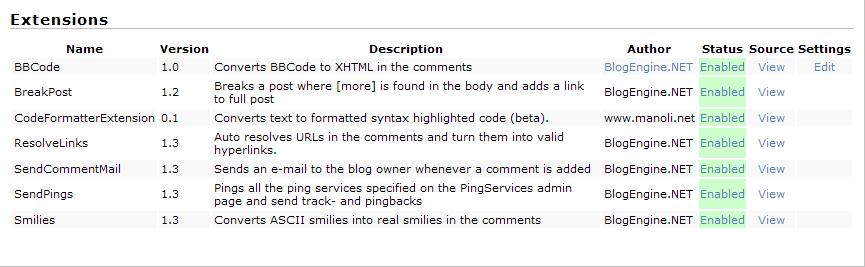
     在Web站点的App_Code\Extensions中我们会看到有很多Extension。

     Smilies:监听了Comment.Serving,也就是每当有评论被显示(Serving)时,它就会使用Post_CommentServing处理,主要是将评论中一些词语替换成一些图片。

     SendPings:这里不再说了,在本系列的第七篇文章中已经做了详细的说明。它主要是发送pingback和trackback信息等。

     SendCommentMail:就是每当文章有评论产生时根据配置会向文章作者的邮箱发送评论邮件,功能类似博客园中的评论邮件发送,实现类似Smilies的实现。

     ResolveLinks:也就是每当有评论被显示(Serving)时,解决评论中的超链接过长等问题。

     BreakPost:实现得很有意思,主要是处理文章显示的[more]问题,这都可以作为扩展,真是绝了。从这里我们也能看出以前的一个疑问,那就是Serving的作用,它主要是处理显示问题的,给[more]加入超链接。

     BBCode:似乎是一个在评论显示时,进行字符替换以便按照样式显示的Extension。

     CodeFormatter:这是一个第三方开发的对文章中包含的源代码进行格式输出的Extension。对于它的实现比较复杂,但是结构还是比较清晰的,有兴趣的朋友可以研究一下,这里就不再做过多说明。

     实现一个自己的Extension

     对于开发人员来说实现一个Extension是很简单的事,例如我们想把文章访问的IP纪录下来就可以这样实现:

LoggingIP


     Extension如何被Host起来的

     BlogEngine.Net使用反射技术来启动这些Extension。这些Extension在整个应用程序启动时随之启动,应用程序通过查找已编译的程序集动态加载这些Extension类到内存中来,也就执行了类构造器,实际上这些Extension也就运行起来。我们在Global.asax中可以看到如下代码:

 1 void Application_Start(object sender, EventArgs e)
 2 {
 3     ArrayList codeAssemblies = Utils.CodeAssemblies();
 4     foreach (Assembly a in codeAssemblies)
 5     {
 6         Type[] types = a.GetTypes();
 7         foreach (Type type in types)
 8         {
 9             object[] attributes = type.GetCustomAttributes(typeof(ExtensionAttribute), false);
10             foreach (object attribute in attributes)
11             {
12                 if (ExtensionManager.ExtensionEnabled(type.Name))
13                 {
14                     a.CreateInstance(type.FullName);
15                 }
16             }
17         }
18     }
19 }

这里请大家注意一下Utils.CodeAssemblies()的实现使用了反射动态加载已编译的程序集(查找程序集的方法)。对于 ExtensionManager.ExtensionEnabled是在管理中判断这个Extension是否启用,ExtensionManager 下文会提到。

     Extension的管理

     这里所说的Extension目前可能还不是很完善。不过它的实现是 BlogEngine.Net非常经典的一部分,很值得去仔细学习和研究,其中很多地方应用到了反射,XML序列化等。它提供给管理员对这些 Extension一个统一的管理,包括控制源代码的浏览,应用和取消Extension,对其进行设置(DataStore)等。由于这部分的源代码比 较多,不适合对其进行更细致的分析,我在这里只是简单介绍一下它的整体设计。

ExtensionManager分成了两部分:
1.逻辑处理,位于App_Code/ExtensionManager中,有四个.cs文件:
ExtensionManager:完成了Extension管理部分常用的方法,也对页面提供一些直接性的服务。
ManagedExtension:是每个可被管理的Extension类的封装。
ExtensionSettings:也是为了管理Extension而封装的设置类,注意它与BlogEngine.Core.DataStore中的同名类的区别。
ExtensionParameter:主要是为ExtensionSettings服务的参数处理的封装。
这些是ExtensionManager主要逻辑,完成包括Extenison配置的加载和存储调用,缓存处理,统一化的管理模型,为页面提供一些直接的服务等。
1.页面管理,位于admin/Extension Manager中,这一部分是调用第一部分来实现管理的,第一部分中有很多信息也是为它服务的:

Default.aspx:一个承载页面,路由导航。
Extensions.ascx:一个Extenison的管理列表。
Editor.ascx:是Extension源代码浏览器。
Settings.ascx:是Extension设置器。注意它实际上是一个统一的配置界面。

对于ExtensionManager的实现逻辑是很复杂的,希望这个整体的介绍能给您阅读代码时带来帮助,如果有不清楚的问题可以给我回复一起讨 论。这一部分我们需要注意一下配置从DataStore的加载和修改是如何完成的,对于逻辑中的配置和参数部分是如何统一化的。

     总结

     我觉得Extension这种扩展非常的优秀,当然这种扩展要想发挥出来肯定对于业务核心部 分地设计是有很多要求的。尤其是它的ExtensionManager对模型的统一性的处理更值得我们去学习和研究,里面的反射机制用的很棒。不过目前这 个ExtensionManager还有很多不太完善的地方,例如源代码修改支持,新Extension的动态添加等,可能BlogEngine.Net 会在将来的版本中提供这些功能吧。

     上一篇:BlogEngine.Net架构与源代码分析系列part8:扩展——DataStore分析


     返回到目录

版权声明
作者:Thriving.country
出处:http://thriving-country.cnblogs.com/
本文版权归作者和博客园共同所有,欢迎转载,但未经作者同意必须保留此段声明,且在文章页面明显位置给出原文链接.

[C#]BlogEngine.Net架构与源代码分析系列part8:扩展——DataStore分析

mikel阅读(818)

     本系列的第四篇文章我 给大家做了关于BlogEngine.Net全局配置的分析。在这篇文章里我将会对BlogEngine.Net中比较经典的部分DataStore做一 个简单的分析,这个DataStore主要完成了BlogEngine.Net三大扩展特性(Extension,Widget,Theme)的数据存储 部分,它提供了一个扩展特性统一的存储模型。DataStore是建立在Provider存储(本系列第三篇文章中介绍过)的上层,本文研究的内容会和后面讲到的扩展部分的文章有一定联系,希望大家继续关注。

     BlogEngine.Net三大扩展特性大多数都是由开发者完成的, 也就是说大多数都是后加入到BlogEngine.Net中的,所以这些存储必须单独完成,而且对于模型的统一性很重要。既然是由开发者开发,那么这些标 准就显得格外重要,这样开发出的部分才可以与系统中的部分很好的集成。这里所说的DataStore就是指 BlogEngine.Core.DataStore空间下的类型。

BlogEngine.Net中的DataStore如何设计的

先看一幅继承图吧:

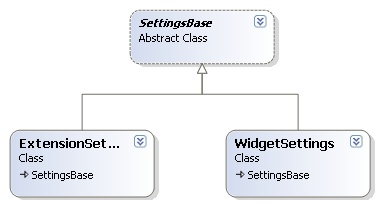
从上图我们可以看到ExtensionSettings和WidgetSettings是SettingBase的直接子类。ExtensionSettings主要是为Extension而对SettingBase的实现,WidgetSettings是为Widget而对SettingBase的实现,对于Theme整个BlogEngine.Net中目前没有涉及到。

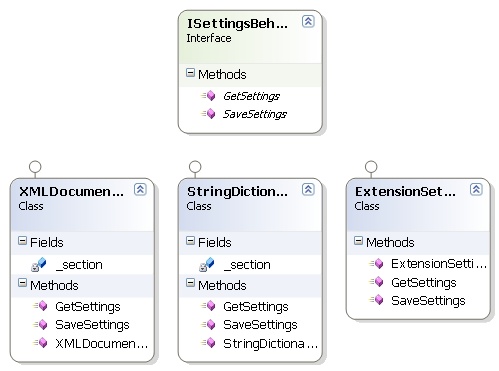
ExtensionSettingsBehavior,StringDictionaryBehavior,XMLDocumentBehavior 这三个类都实现了ISettingsBehavior接口,而ISettingsBehavior只有加载配置和保存配置两个方法声明。此外 ExtensionType是一个枚举用来表示扩展的类型。

SettingBase也有加载和保存配置的两个方法,此外SettingBase中还有一个对于ISettingsBehavior的引用,而SettingBase的加载和保存内部也是通过ISettingsBehavior的保存和加载完成的,这好像是一个桥模式。由以上分析我们可以知道对于Extension的数据加载和保存是通过ExtensionSettings完成的,具体实现是由ExtensionSettingsBehavior来做,ExtensionSettingsBehavior的内部使用BlogService调用Provider完成。对于Widget的数据的加载和保存是通过WidgetSettings完成的,具体实现由StringDictionaryBehavior来做,StringDictionaryBehavior的内部也是使用BlogService调用Provider完成,注意SerializableStringDictionary继承自StringDictionary并实现了IXmlSerializable来完成字典对象的序列化和反序列化。

     对于Extension的存储的具体信息通过代码我们可以看到是一个Object,这个Object的格式是由ExtensionManager(这个在后续的相关文章也会讲到)来确定的,也主要是为ExtensionManager服务的。

<?xml version="1.0" encoding="utf-8"?>
<ManagedExtension xmlns:xsi="http://www.w3.org/2001/XMLSchema-instance" xmlns:xsd="http://www.w3.org/2001/XMLSchema" Name="Smilies">
<Version>1.3</Version>
     <Description>Converts ASCII smilies into real smilies in the comments</Description>
     <Author>BlogEngine.NET</Author>
     <AdminPage />
     <Enabled>true</Enabled>

     <ShowSettings>true</ShowSettings>
</ManagedExtension>

WidgetSettings的存储的具体信息实际上是一个字典,字典项代表具体信息。

<?xml version="1.0" encoding="utf-8"?>
<SerializableStringDictionary>
  
<SerializableStringDictionary>
    
<DictionaryEntry Key="content" Value="Something about the author " />
  
</SerializableStringDictionary>

XMLDocumentBehavior主要是为了配置WidgetZone而设计的,它实际上是一个Widget的集合的配置,在页面加载时会读取这些配置来决定怎样显示相应的Widget。

除此之外还需要我们注意的一个地方就是配置对象在XML和数据库的存储表示,实际上它们内部的信息都是一段XML,相应的对于这两种的数据访问的结 果处理也是不一致的(我觉得这个地方设计的不是很好,因为这一层似乎对于Provider有些依赖关系代码,参见 XMLDocumentBehavior.cs,不过还好毕竟是实现依赖于实现嘛,可能也没想出更好的办法)。

客户端的使用

     Extension(App_Code\ExtensionManager\Manager.cs):

Code

     StringDictionary(widgets\TextBox\edit.ascx.cs):

Code

     XMLDocument(App_Code\Controls\WidgetZone.cs):

Code

     对于客户端的使用部分涉及到了Extension,Widget部分等,这些内容会在后续的文章中进行详细说明。

总结

1.桥模式的使用

2.统一的配置模型

3.对于XML存储和数据库存储的处理方式不同

     面向对象的设计原则真是太经典了

     上一篇:BlogEngine.Net架构与源代码分析系列part7:Web2.0特性——Pingback&Trackback


     返回到目录

版权声明
作者:Thriving.country
出处:http://thriving-country.cnblogs.com/
本文版权归作者和博客园共同所有,欢迎转载,但未经作者同意必须保留此段声明,且在文章页面明显位置给出原文链接.

[C#]BlogEngine.Net架构与源代码分析系列part7:Web2.0特性——Pingba

mikel阅读(964)

     今 天这篇文章主要向大家讲述一下Blog系统中应用最多的,具有Web2.0特性的,也是一种标准化的——Pingback&Trackback。 分析一下BlogEngine.Net提供的比较全面的Pingback&Trackback支持。本文内容相对来说比较独立,如果您对整个系列 感兴趣请参照这里

Pingback&Trackback参考

     简单地说,Pingback&Trackback是博客在链接、引用其他博客内容时通知对方博客的一种自动机制,告知对方链接位置及可能包含一定的摘要文本(视情况而定)。这样带来的好处是显而易见的,对Pingback&Trackback发送者来说,避免了手动通知对方的麻烦;对Pingback&Trackback接收者而言,则可以随时掌握自己的某篇文章被什么人链接及具体链接信息,等等。例如:

博客A发布了一篇文章;博客B看到后,发布评论、引用、介绍博客A上该篇文章的贴子;但此时博 客A是无从知道博客B上对自己文章的引用情况的,要让博客A知道,博客B须:在博客A上留言,介绍自己对该篇文章的看法,比如说“在我的博客发布了一篇文 章,也讨论这个问题——”,并附上相应页面的链接;向博客A发送E-mail,说明自己对该篇文章的进一步讨论,同时,也许希望博客A能在页面上放上自己 的链接,以帮助对这一话题有兴趣的用户能找到自己的博客;Pingback&Trackback实现的功能便是将第三个步骤自动化了,再也不需这么一个繁琐的过程,即:博客A发布了一篇文章;博客B看到后,发布评论、引用、介绍博客A上该篇文章的贴子;在文章发布时,博客B即自动向博客A发送Pingback&Trackback;博客A收到相应的Pingback&Trackback,如果未设置人工审核,相应的内容即会出现在博客A该文的留言中,如果设置了人工审核,则出现在博客A的审核列表中,博客A认为不是spam后将其发布在留言中。

BlogEngine.Net中的Pingback&Trackback实现

BlogEngine.Net中的Pingback&Trackback的实现主要涉及到以下几组文件:

1.Web站点App_Code/Extensions中:SendPings.cs
2.BlogEngine.Core的Ping中:PingService.cs、Manager.cs、Pingback.cs、Trackback.cs
3.BlogEngine.Core的Web/HttpHandlers中:PingbackHandler.cs、TrackbackHandler.cs

     从BlogEngine.Net中的Pingback&Trackback的具体实现来看,Pingback和Trackback的区别只在于数据的交换格式上,Pingback和PingService主要是使用标准的XMLRPC来完成数据的交换(上一篇文章中有部分涉及),而Trackback主要的request是使用类似的下面的格式完成:title={0}&url={1}&excerpt={2}&blog_name={3},response同样是使用XML传输

<?xml version=\"1.0\" encoding=\"iso-8859-1\"?><response><error>0</error></response>

但是它们要实现的功能是类似的。

     实际上SendPings类是BlogEngine.Net的一个Extension(类具有Extension特性,这个后面会有专门的一篇文章来讲解),它监听了Page.Saved和Post.Saved:

1 /// <summary>
2 /// Hooks up an event handler to the Post.Saved event.
3 /// </summary>
4 static SendPings()
5 {
6     Post.Saved += new EventHandler<SavedEventArgs>(Post_Saved);
7     Page.Saved += new EventHandler<SavedEventArgs>(Post_Saved);
8 }

这里再次证明了BusinessBase这种状态维护方式的优越性。

     通过代码我们可以看出当Page或Post被保存时会向 SendPings发出通知,之后SendPings会从线程池中获得一个线程来向PingService发送Ping消息并使用Manager发送 Pingback&Trackback消息。PingService这里主要是处理我们自己设置的Ping服务,对服务地址列表中的服务发送通知 来说明某篇文章已经更新了。Manager主要分析文章中的超链接部分,找到Trackback入口地址,然后向该地址发送Trackback的 TrackbackMessage(这是一个消息的封装,注意它使用Trackback请求的格式重写了ToString方法),如果发送不成功再向这个 地址发送Pingback消息。Pingback和Trackback这两个类主要完成了Pingback&Trackback消息格式的具体处 理并执行发送之。

Code


使用PingbackHandler和TrackbackHandler对外提供支持

     同样PingbackHandler和TrackbackHandler两个 HttpHandler主要是为了使BlogEngine.Net也具有接收Pingback&Trackback消息并处理的能力。它们都是从 请求中获得数据,并将这些数据生成一个Comment对象并关联到相应的文章中,同样它们也提供了 Received,Accepted,Rejected,Spammed四个静态(类)事件来对这一处理周期进行跟踪,外部可以对这些事件提供相应的处理 程序来达到扩展的目的。请大家注意,在Web站点中的Post.aspx中有下面一段代码:

<!– 
    <rdf:RDF xmlns:rdf="http://www.w3.org/1999/02/22-rdf-syntax-ns#" xmlns:dc="http://purl.org/dc/elements/1.1/" xmlns:trackback="http://madskills.com/public/xml/rss/module/trackback/">
      <rdf:Description rdf:about="<%=Post.AbsoluteLink %>" dc:identifier="<%=Post.AbsoluteLink %>" dc:title="<%=Post.Title %>" trackback:ping="<%=Post.TrackbackLink %>" />
    </rdf:RDF>
    
–>

这段代码被使用Html注释掉了,生成的Html为如下格式:

<!– 
    <rdf:RDF xmlns:rdf="http://www.w3.org/1999/02/22-rdf-syntax-ns#" xmlns:dc="http://purl.org/dc/elements/1.1/" xmlns:trackback="http://madskills.com/public/xml/rss/module/trackback/">
      <rdf:Description rdf:about="http://localhost/BlogEngine.Web/post/2008/06/28/Welcome-to-BlogEngineNET-1-4.aspx" dc:identifier="http://localhost/BlogEngine.Web/post/2008/06/28/Welcome-to-BlogEngineNET-1-4.aspx" dc:title="Welcome to BlogEngine.NET 1.4.5" trackback:ping="http://localhost/BlogEngine.Web/trackback.axd?id=c3b491e5-59ac-4f6a-81e5-27e971b903ed" />
    </rdf:RDF>
    
–>

http://localhost/BlogEngine.Web/trackback.axd?id=c3b491e5-59ac-4f6a-81e5-27e971b903ed实际上就是这篇文章的Trackback地址。

     当然这个Trackback地址一般可以由用户自己指定,例如在博客园发文章时我们就可以自己输入一个。

参考文章

1.Trackback和Pingback的区别

2.Trackback, Pingback , Backlink与博客

     有些东西只有成为标准以后才会发光。

     上一篇:BlogEngine.Net架构与源代码分析系列part6:开放API——MetaWeblog与BlogImporter

     下一篇:BlogEngine.Net架构与源代码分析系列part8:扩展——DataStore分析


     返回到目录

版权声明
作者:Thriving.country
出处:http://thriving-country.cnblogs.com/
本文版权归作者和博客园共同所有,欢迎转载,但未经作者同意必须保留此段声明,且在文章页面明显位置给出原文链接.

[C#]项目管理实践【六】自动同步数据库【Using Visual Studio with Sour

mikel阅读(805)

在上一篇项目管理实践【五】自动编译和发布网站中,我们讲解了如何使用MSBuild+Robocopy+WebDeployment来自动编译和部署网站,今天,我们来看一下,如何使用MSBuild +SVN来自动同步数据库。 

首先,将我们项目中的数据库文件和数据库日志文件放到某个目录下,这里放到StartKitDB目录下,然后在该目录下新建一个名为 StartKitDB的文本文件,修改扩展名为proj,实际上,在理论上任何扩展名都可以,然后,使用记事本或其他程序打开文件,将下面的内容复制到其 中,保存。

<?xml version="1.0" encoding="utf-8"?>

<Project DefaultTargets="All" xmlns="http://schemas.microsoft.com/developer/msbuild/2003">

<!– 需要引入MSBuild Community Tasks –>

<Import Project="$(MSBuildExtensionsPath)\MSBuildCommunityTasks\MSBuild.Community.Tasks.Targets"/>

<PropertyGroup>

<!–数据库连接字符串,可以根据需要修改–>

<ConnectionString>Server=.;Integrated Security=True</ConnectionString>

</PropertyGroup>


<ItemGroup>

<!–数据库文件–>

<DBFiles Include="StartKitDB.mdf;StartKitDB_log.ldf"/>

</ItemGroup>

<Target Name="ALL">

<!–重启SQLServer服务–>

<ServiceController ServiceName="msSQLServer" Action="Restart" />

<!–分离数据库–>

<Exec Command="OSQL -S . -E -n -Q &quot;EXEC sp_detach_db 'StartKitDB','True'&quot;" IgnoreExitCode="false" />

<!–停止SQLServer服务–>

<ServiceController ServiceName="msSQLserver" Action="Stop" />

<!–删除旧版本的数据库文件–>

<Delete Files="C:\StartKitDB\$(DBFiles)" />

<!–复制最新版本的数据库文件–>

<Copy SourceFiles="@(DBFiles)" DestinationFolder="C:\StartKitDB" />

<!–启动SqlServer服务–>

<ServiceController ServiceName="mssqlserver" Action="Start" />

<!–附加复制过来的最新版本的数据库文件到数据库中–>

<Exec Command="OSQL -S . -E -n -Q &quot;EXEC sp_attach_db @dbname = N'StartKitDB',@filename1 = N'C:\StartKitDB\StartKitDB.mdf', @filename2 = N'C:\StartKitDB\StartKitDB_log.ldf'&quot;" IgnoreExitCode="false" />

</Target>

</Project

当然了,如果我们希望:当我们提交最新的数据库文件和日志文件到服务器后,自动从服务器分离旧版本的数据库,同时附加最新版本的数据库,那么我们就 要借助CCNET和SVN服务器,所以我们首先要把存放数据库文件、日志文件及StartKitDB.proj文件的StartKitDB文件夹,纳入到 我们的版本控制中。但是,如果我们简单的把这个文件添加到我们的StartKit项目的代码库中,那么,当我们提交数据库更新时,就会自动编译整个 StartKit项目,而这时候,我们项目可能并没有更新,所以我们要把数据库和项目分开为二个代码库。 

我们按照在项目管理实践教程二、源代码控制 中的讲解,使用VisualSVN Server添加一个代码库【Repository】StartKitDB,然后,使用TortoiseSVN把上面的三个文件迁入到SVN服务器上,最后,按照项目管理实践【三】每日构建 的讲解,在CCNET上添加一个项目【Project】,一定根据实际情况修改相应的文件路径,把tasks的子节点msbuild下的projectFile节点值配置为我们上面新建的StartKitDB.proj文件。 

OK,搞定啦!你可以提交一次数据库到SVN服务器,试试看有没有效果,怎么样?成功了吧!嘿嘿…

这种方法适合在开发过程中使用,如果我们已经部署了项目或者已经交付给了用户,那么用户可能已经添加和更新的很多数据,此时和我们开发时在SVN上 的最新版本也不一致了,这时候考虑到用户数据的安全,我们可能需要给用户的是数据库更新脚本,而且要保证用户的数据安全,那么这时候,怎么办呢?我在Visual Studio 2008中如何比较二个数据库的架构【Schema】和数据【Data】并同步做了比较详细的讲解,大家可以做个参考!
如果你对我讲解的这些内容不熟悉,建议你从头开始看这个系列的教程:项目管理实践系列教程


作者:ttzhangTechnology Life
出处:http://ttzhang.cnblogs.com/
本文版权归作者和博客园共有,欢迎转载,但未经作者同意必须保留此段声明,且在文章页面明显位置给出原文连接,否则保留追究法律责任的权利。

[JQuery]JQuery的取值

mikel阅读(817)

  JQuery无疑是现在比较流行的js开发库之一,在web开发,特别是服务器组件开发中起到了很大的作用。而且在一些公司的面试中,问及js

就问你,用过JQuery吗?没用过,那种眼神似乎你低人一等似的。废话少说,优秀的东西还是学习学习的,不管在做项目的时候,是否为了公司

整体的需要不用这个,还是值得我们好好研究下。


$(html)
功能:根据参数html创建DOM元素
返回:JQuery对象
参数:要创建的html
例子:将html添加到body中
$("
<div><p>Hello</p></div>").appendTo("body")


$(elems)
 功能:包装jQuery一个或多个DOM元素,这个函数也接受xml Document元素或Window Object作为有效的参数,甚至不是Dom元素
 返回:jQuery对象
参数:dom元素或dom元素数组
例子:
设定页面的背景色
$(document.body).css( "background", "black" );
隐藏指定表单中的input元素
$( myForm.elements ).hide()


$(fn)
功能:$(document).ready()的快捷方式,允许你绑定一个的函数到页面完成加载的时候执行
返回:jQuery对象
参数:Dom ready后要执行的函数
例子:
$(function(){
  // Document is ready
});


$(expr, context)
功能:根据css或基本的xpath选择器查找元素
返回:jQuery对象
参数:
expr (String): 要搜索的表达式
context (Element|jQuery): (可选的)dom元素,Document或jQuery对象,作为当前选择的上下文 
例子:
jQuery Code
$("div > p")
Before
<p>one</p> <div><p>two</p></div> <p>three</p>
Result:
<p>two</p> ]
Example
Searches for all inputs of type radio within the first form in the document
jQuery Code
$("input:radio", document.forms[0])


$.extend(prop)
功能:扩展jQuery自身,添加函数到jQuery命名空间或插件方法
返回:Object
参数:
例子:
Adds two plugin methods.
jQuery Code
jQuery.fn.extend({
  check: function() {
    return this.each(function() { this.checked = true; });
  },
  uncheck: function() {
    return this.each(function() { this.checked = false; });
  }
});
$("input[@type=checkbox]").check();
$("input[@type=radio]").uncheck();
Adds two functions into the jQuery namespace
jQuery Code
jQuery.extend({
  min: function(a, b) { return a 
< b ? a : b; },
  max: function(a, b) { return a 
> b ? a : b; }
});


each(fn)
功能:遍历元素并添加响应函数
返回:jQuery对象
参数:fn (Function): A function to execute 
例子:
Iterates over two images and sets their src property
jQuery Code
$("img").each(function(i){
  this.src = "test" + i + ".jpg";
});
Before
<img/><img/>
Result:
<img src="test0.jpg"/><img src="test1.jpg"/>


eq(pos)
功能:返回指定位置的一个元素,位置是指匹配的元素从0到length – 1的位置
返回:jQuery对象
参数:pos (Number): The index of the element that you wish to limit to. 
例子:
jQuery Code
$("p").eq(1)
Before
<p>This is just a test.</p><p>So is this</p>
Result:
<p>So is this</p> ]


get()
功能:返回所有匹配的dom元素
返回:元素数组
参数:
例子:
Selects all images in the document and returns the DOM Elements as an Array
jQuery Code
$("img").get();
Before
<img src="test1.jpg"/> <img src="test2.jpg"/>
Result:
<img src="test1.jpg"/> <img src="test2.jpg"/> ]


get(num)
功能:返回指定索引位置的dom元素
返回:DOM Element
参数:num (Number): Access the element in the Nth position. 
例子:
Selects all images in the document and returns the first one
jQuery Code
$("img").get(0);
Before
<img src="test1.jpg"/> <img src="test2.jpg"/>
Result:
<img src="test1.jpg"/>


gt(pos)
功能:返回某个位置之后的元素
返回:jQuery对象
参数:pos (Number): Reduce the set to all elements after this position. 
例子:
jQuery Code
$("p").gt(0)
Before
<p>This is just a test.</p><p>So is this</p>
Result:
<p>So is this</p> ]


lt(pos)
功能:返回某个位置之前的元素
返回:jQuery对象
参数:pos (Number): Reduce the set to all elements below this position. 
例子:
jQuery Code
$("p").lt(1)
Before
<p>This is just a test.</p><p>So is this</p>
Result:
<p>This is just a test.</p> ]


size()
功能:匹配元素的个数
返回:
参数:
例子:
jQuery Code
$("img").size();
Before
<img src="test1.jpg"/> <img src="test2.jpg"/>
Result:
2


length
功能:匹配元素的个数,同size函数
返回:
参数:
例子:
jQuery Code
$("img").length;
Before
<img src="test1.jpg"/> <img src="test2.jpg"/>
Result:
2


index(subject)
功能:搜索所有匹配的元素,返回索引值
返回:
参数:subject (Element): Object to search for 
例子:
Returns the index for the element with ID foobar
jQuery Code
$("*").index( $('#foobar')[0] )
Before
<div id="foobar"><b></b><span id="foo"></span></div>
Result:
0Returns the index for the element with ID foo within another element
jQuery Code
$("*").index( $('#foo')[0] )
Before
<div id="foobar"><b></b><span id="foo"></span></div>
Result:
2
Returns -1, as there is no element with ID bar
jQuery Code
$("*").index( $('#bar')[0] )
Before
<div id="foobar"><b></b><span id="foo"></span></div>
Result:
-1


$.noConflict()
功能:避免和以前移入的jQuery库的冲突
返回:undefined
参数:
例子:
Maps the original object that was referenced by $ back to $
jQuery Code
jQuery.noConflict();
// Do something with jQuery
jQuery("div p").hide();
// Do something with another library's $()
$("content").style.display = 'none';
jQuery.noConflict();
(function($) { 
  $(function() {
    // more code using $ as alias to jQuery
  });

[IIS]IIS 7.0添加URL重写模块

mikel阅读(994)

  1. Go to IIS Manager
  2. Select “Default Web Site”
  3. In the Feature View click “URL Rewrite Module“
  4. In the “Actions” pane on right hand side click on “Add rules…
  5. In the "Add Rules" dialog, select the "Blank Rule" and click "Ok"

Now you must define the actual rewrite rule. In the URL rewrite module, a rewrite rule is defined by specifying four required pieces of information:

  • Name of the rule;
  • Pattern to use for matching the URL string;
  • Optional set of conditions;
  • Action to perform if a pattern is matched and all conditions checks succeed.
Naming a rule

In the “Name” text box enter a name that will uniquely identify the rule, for example: ”Rewrite to article.aspx”.

Defining a pattern

In the “Pattern” text box enter the following string:

^article/([0-9]+)/([_0-9a-z-]+)

This string is a regular expression that specifies that the pattern will match any URL string that meets the following conditions:

  1. Starts with the sequence of characters “article/”.
  2. Contains one or more numeric characters after the first “/”.
  3. Contains one or more alphanumeric or “_” or “-” characters after the second “/”.

Notice that certain parts of the regular expression are within parentheses. These parentheses create capture groups, which can be later referenced in the rule by using back-references.

Defining an action

Since the rule that we are creating is supposed to rewrite the URL, choose the “Rewrite” action type that is listed in the “Action” group box. In the “Rewrite URL:” text box, enter the following string:

article.aspx?id={R:1}&title={R:2}

This string specifies the new value to which the input URL should be rewritten. Notice that for the values of the query string parameters we used {R:1} and {R:2}, which are back-references to the capture groups that were defined in the rule pattern by using parentheses.

Leave default values for all other settings. The "Edit Rule" property page should look like the following page:

Save the rule by clicking on “Apply” action on the right hand side.

Viewing the rewrite rule in configuration file

The rewrite rules are stored either in aplicationHost.config file or in web.config files. To check the configuration of the rule that we have just created, open a web.config file located in %SystemDrive%\inetput\wwwroot\. In this file you should see the <rewrite> section that contains this rule definition:

<rewrite>
  <rules>
    <rule name="Rewrite to article.aspx">
      <match url="^article/([0-9]+)/([_0-9a-z-]+)" />
      <action type="Rewrite" url="article.aspx?id={R:1}&amp;title={R:2}" />
    </rule>
  </rules>
</rewrite>

Testing the rule

To test that the rule correctly rewrites URL’s, open a Web browser and request the following URL:

http://localhost/article/234/some-title

You should see that the rewrite rule on web server has changed the original URL to article.aspx and it has passed “234” and “some-title” as values for query string parameters.

Creating a redirect rule

Now we will create a redirect rule that will redirect all URLs in the following format:

http://localhost/blog/some-other-title/543
will be redirected to:
http://localhost/article/543/some-other-title

To do this, open the URL Rewrite feature view UI in IIS Manager and then click "Add Rule…" and select "Blank Rule" template again.
Within the “Edit Rule” page, enter the following:

  • Name: "Redirect from blog" (this is a unique name for the rule)
  • Pattern: "^blog/([_0-9a-z-]+)/([0-9]+)" (This pattern will match the URL string that starts with “blog” and captures the second and third segments of the URL into back-references)
  • Action: "Redirect" (The redirect action will cause a redirect response to be sent back to the browser)
  • Redirect URL: "article/{R:2}/{R:1}" (this substitution string will be used as a redirect URL; notice that it uses back-references to preserve and re-arrange the original URL pieces captured during pattern match)

Leave default values for all other settings. The "Edit rule" property page should look like the following page:

save the rule by clicking on “Apply” action on the right hand side.

Testing the rule

To test that the rule redirects requests correctly, open a Web browser and request the following URL:

http://localhost/blog/some-other-title/323

You should see that the browser was redirected to http://localhost/article/323/some-other-title as a result of redirect rule execution and then the request was rewritten in accordance to the rewrite rule that you have created earlier:

Creating an access block rule

The third rule that we will create is used to block all requests made to Web site if those requests do not have the host header set. This type of rule is useful when you want to prevent hacking attempts that are made by issuing HTTP requests against the IP address of the server instead of using the host name.

We will create this rule without using IIS Manager. Open the Web.config file and locate the <rewrite> section. Insert the following rule:

<rule name="Fail bad requests">
      <match url=".*"/>
      <conditions>
        <add input="{HTTP_HOST}" pattern="localhost" negate="true" />
      </conditions>
      <action type="AbortRequest" />
</rule>

into the <rules> collection, so that it is a first rule in a collection. The <rewrite> section should look like the following code:

<rewrite>
  <rules>
    <rule name="Fail bad requests">
      <match url=".*"/>
      <conditions>
        <add input="{HTTP_HOST}" pattern="localhost" negate="true" />
      </conditions>
      <action type="AbortRequest" />
    </rule>
    <rule name="Redirect from blog">
      <match url="^blog/([_0-9a-z-]+)/([0-9]+)" />
      <action type="Redirect" url="article/{R:2}/{R:1}" redirectType="Found" />
    </rule>
    <rule name="Rewrite to article.aspx">
      <match url="^article/([0-9]+)/([_0-9a-z-]+)" />
      <action type="Rewrite" url="article.aspx?id={R:1}&amp;title={R:2}" />
    </rule>
  </rules>
</rewrite>

Let’s analyze the rule to understand what it does.

  • <match url=".*"/> – This element says that the rule will match any URL string
  • <add input="{HTTP_HOST}" pattern="localhost" negate="true" /> – This element adds a condition to the rule that retrieves the host header value by reading the server variable HTTP_HOST, matches it against the pattern “localhost” and then negates the result of matching. In other words, the condition verifies that the host header does not match “localhost”.
  • <action type="AbortRequest" /> – this element tells the URL rewrite module to end the HTTP request.
Testing the rule

To test this rule, open a Web browser and make a request to http://127.0.0.1/article/234/some-title. What you should see is a browser that does not receive any response from the server. However, if you request http://localhost/article/234/some-title, then the Web server will respond successfully.


相关地址:http://learn.iis.net/page.aspx/461/creating-rewrite-rules-for-the-url-rewrite-module/

[Flash]动画编程中关于Time Based和Frame Based运动

mikel阅读(720)

作者:Yang Zhou
日期:2008年11月

在Flash 3D编程探秘的第七篇里,我们提到关于基于时间的运动公式(只要我们知道了物体运动的速度,那么根据牛顿第一运动定律就可以得出物体在某个时间点的位移):

位移 = 时间 X 速度

不过在第一到第六几篇文章里的动画使用的都是基于祯的运动,然而基于祯的运动是不稳定的,它的公式是:

位移 = 执行次数 X 速度


基于祯的运动不管我们程序执行流逝了多少时间,只在function执行的时候给物体的x或者y加减一定的值。这种运动是不稳定的,所以我建议大家 使用基于时间的运动,下面的两个动画分别用两种运动模式做成,点击一下动画就会在function执行时执行大量的junk运算,这时你就会看到两种运动 的差异。而基于时间的运动中,当速度恒定时,物体会处在正确的位置;基于祯的运动,你就会看到物体运动慢下来很多, 并不能达到物体在某个时间点应该到达的位置。


对比基于时间和基于祯的运动


下载文中的Flash文件

[C#]项目管理实践【五】自动编译和发布网站【Using Visual Studio with So

mikel阅读(944)

在上一篇教程项目管理实践【三】每日构建【Daily Build Using CruiseControl.NET and MSBuild】 中,我们讲解了如何使用CCNET+MSBuild来自动编译项目,今天我们讲解一下怎么使用MSBuild+WebDeployment+Robocopy自动编译过和部署ASP.NET网站
首先安装下面的三个软件:

1.MSBuild.Community.Tasks下载:
http://msbuildtasks.tigris.org/files/documents/3383/28296/MSBuild.Community.Tasks.msi

源代码:
http://msbuildtasks.tigris.org/files/documents/3383/36642/MSBuild.Community.Tasks.v1.2.0.306.zip

 2.WebDeployment下载:
http://download.microsoft.com/download/c/c/b/ccb4877f-55f7-4478-8f16-e41886607a0e/WebDeploymentSetup.msi

 3.Utility Spotlight Robocopy GUI 下载:【下载后,解压后安装,Vista不用安装】
http://download.microsoft.com/download/f/d/0/fd05def7-68a1-4f71-8546-25c359cc0842/UtilitySpotlight2006_11.exe 

安装完成后,就开始今天的教程了。 

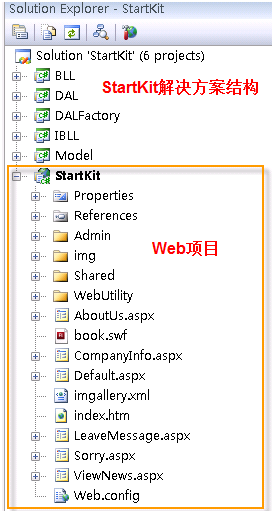
我们以前面教程中创建的StartKit解决方案为例子,结构如下: 


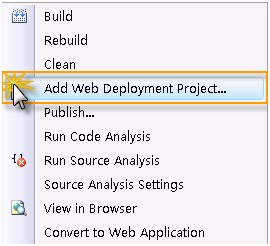
在上图所示的Web项目StartKit上右键点击,然后点击Add Web Deployment Project…,如下图:

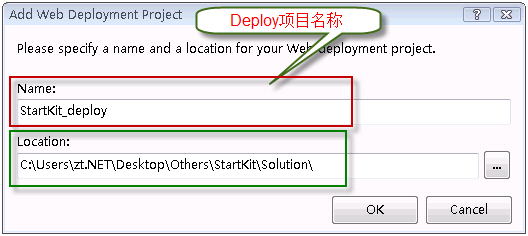
 弹出下面的窗体,分别输入部署项目名称和项目要放置的位置,如下图:

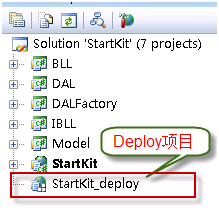
 点击OK按钮后,解决方案的结构如下图:

今天会讲到下面二个方法,上面的步骤一样,从这里开始,下面的步骤有区别。

方法一:使用WebDeployment创建虚拟目录

优点:使用简单

缺点:功能不够强大,只能部署到虚拟目录 

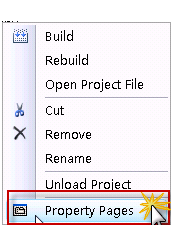
右键点击部署项目,点击菜单中的Property Pages,如下图:

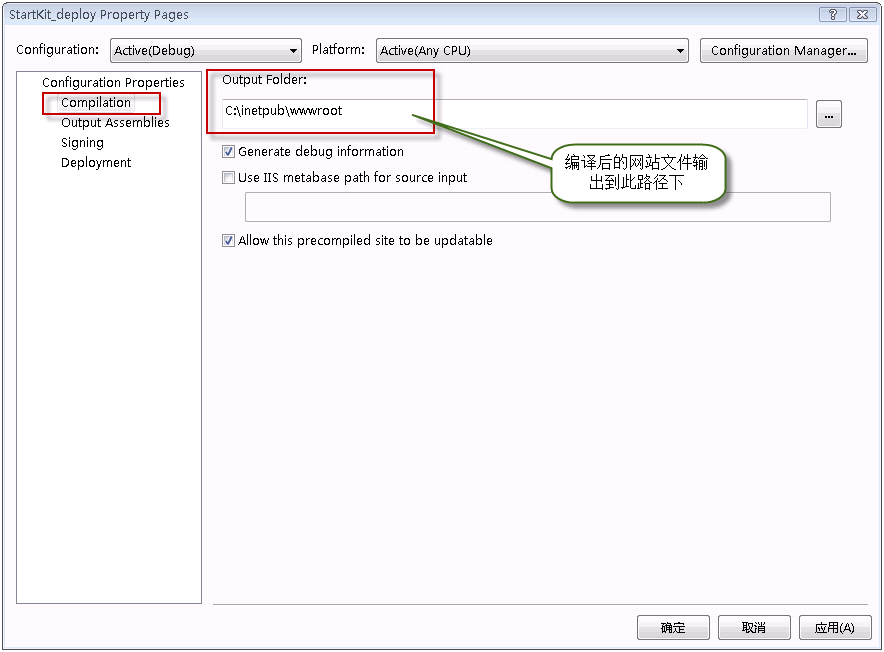
在下面的窗体中,点击左侧的Complication,在右侧的Output Folder下的文本框中输入编译后网站文件的输出路径:

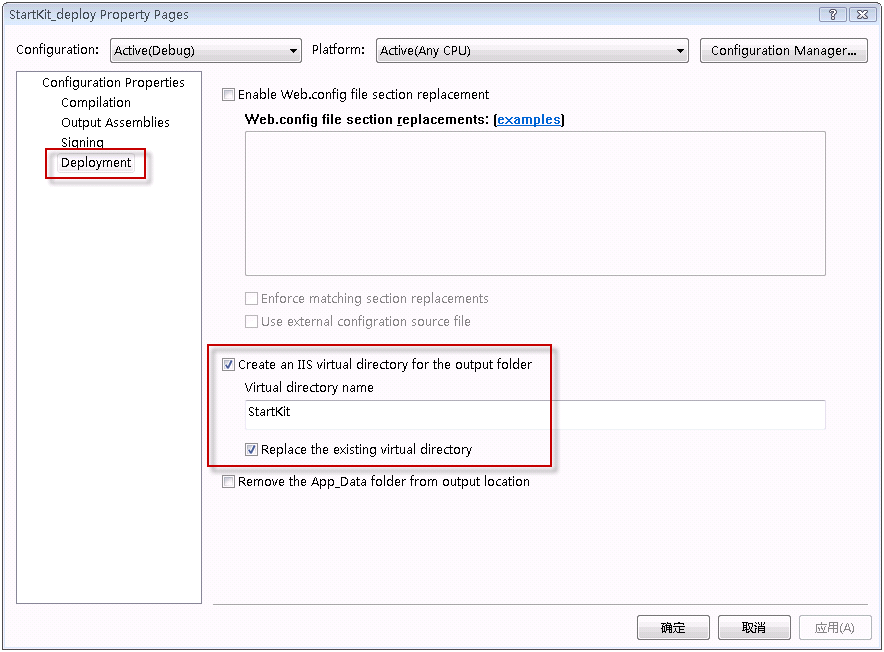
 然后,点击左侧的Deploment,在右侧选中Create an IIS virtual directory for the output folder前面的CheckBox,在下面的Virtual directory name下的文本框中输入虚拟目录的名字,Replace the existing virtual directory前面的CheckBox根据实际情况确定是否选中,如下图:

 点击确定按钮,编译部署项目StartKit.csproj_deploy,编译成功后,我们打开IIS,在默认网站下可以看到虚拟目录StartKit。OK,成功了! 

方法二:使用WebDeployment+MSBuild+Robocopy

优点:功能强大

缺点:配置有点麻烦 

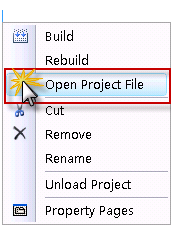
这个方法不用配置Property Pages,直接右键点击StartKit.csproj_deploy项目文件,在菜单中点击Open Project File打开部署项目文件:

修改部署项目文件为下面的内容:

<!–Microsoft Visual Studio 2008 Web Deployment Project http://go.microsoft.com/fwlink/?LinkID=104956–>

<Project ToolsVersion="3.5" DefaultTargets="Build" xmlns="http://schemas.microsoft.com/developer/msbuild/2003">
<PropertyGroup>
<Configuration Condition=" '$(Configuration)' == '' ">Debug</Configuration>
<Platform Condition=" '$(Platform)' == '' ">AnyCPU</Platform>
<ProductVersion>9.0.21022</ProductVersion>
<SchemaVersion>2.0</SchemaVersion>
<ProjectGuid>{00000000-0000-0000-0000-000000000000}</ProjectGuid>
<SourceWebPhysicalPath>..\StartKit</SourceWebPhysicalPath>
<SourceWebProject>{96E1A089-3FBB-4909-94F6-172665994449}|StartKit\StartKit.csproj</SourceWebProject>
<SourceWebVirtualPath>/StartKit.csproj</SourceWebVirtualPath>
<TargetFrameworkVersion>v3.5</TargetFrameworkVersion>
<ProjectName>StartKit</ProjectName>
<Major>1</Major>
<Minor>0</Minor>
<Revision>0</Revision>
<VSSName>ttzhang</VSSName>
<VSSPassword>123456</VSSPassword>
<FtpName>anonymous</FtpName>
<FtpPassword>anonymous</FtpPassword>
<SmtpServerName>smtp.163.com</SmtpServerName>
<FromAddress>ttzhang@163.com</FromAddress>
<ToAddress>zttc@163.com</ToAddress>
<MailPassword>testmail</MailPassword>
</PropertyGroup>
<PropertyGroup Condition=" '$(Configuration)|$(Platform)' == 'Debug|AnyCPU' ">
<DebugSymbols>true</DebugSymbols>
<OutputPath>.\Debug</OutputPath>
<EnableUpdateable>true</EnableUpdateable>
<UseMerge>true</UseMerge>
<SingleAssemblyName>StartKit_deploy</SingleAssemblyName>
</PropertyGroup>
<PropertyGroup Condition=" '$(Configuration)|$(Platform)' == 'Release|AnyCPU' ">
<DebugSymbols>false</DebugSymbols>
<OutputPath>.\Release</OutputPath>
<EnableUpdateable>true</EnableUpdateable>
<UseMerge>true</UseMerge>
<SingleAssemblyName>StartKit_deploy</SingleAssemblyName>
</PropertyGroup>
<ItemGroup>
</ItemGroup>
<!–下面的ItemGroup节点可选,这个和项目文件StartKit.csproj中的内容相同–>
<ItemGroup>
<ProjectReference Include="..\BLL\BLL.csproj">
<Project>{73A293A1-CDCC-4919-9B05-BA2531ADDB56}</Project>
<Name>BLL</Name>
</ProjectReference>
<ProjectReference Include="..\DAL\DAL.csproj">
<Project>{AFF6077D-DD2D-48A0-BFAD-051BD67A6953}</Project>
<Name>DAL</Name>
</ProjectReference>
<ProjectReference Include="..\IBLL\IBLL.csproj">
<Project>{620770BB-7A27-4585-9B97-44EEE349121D}</Project>
<Name>IBLL</Name>
</ProjectReference>
<ProjectReference Include="..\Model\Model.csproj">
<Project>{EA43EC2E-5890-4431-BD3E-5F6C090DEA3A}</Project>
<Name>Model</Name>
</ProjectReference>
</ItemGroup>
<!–引入MSBuildCommunityTasks–>
<Import Project="$(MSBuildExtensionsPath)\MSBuildCommunityTasks\MSBuild.Community.Tasks.Targets" />
<!–邮件发送–>
<!–<Target Name="EmailTest" >
<Message Text = " Mail sending…"></Message>
<Mail SmtpServer="$(SmtpServerName)"
Subject="Test"
Password="$(MailPassword)"
From ="$(FromAddress)"
To ="$(ToAddress)"
Body="This is a test of the mail task." />
</Target>–>
<!–备份文件到FTP–>
<!–<Target Name="Backup" DependsOnTargets="Zip" >
<FtpUpload UserName="$(FtpName)"
Password="$(FtpPassword)"
LocalFile="$(ZipFileName)"
RemoteUri="ftp://192.168.1.2/SourceBackup/$(ZipFileName)" />
<OnError ExecuteTargets="HandleErrorBackup" />
</Target>–>
<!–备份文件到FTP失败则发送邮件–>
<!–<Target Name="HandleErrorBackup">
<Message Text="Backup failed……………" />
<Mail SmtpServer="$(SmtpServerName)"
To="$(ToAddress)"
From="$(FromAddress)"
Subject="$(ProjectName) Build failed"
Body="Backup Failure: Could not finish Backup ." />
</Target>–>
<!–编译项目–>
<Target Name="BuildProjectReferences">
<MSBuild Projects="@(ProjectReference)" Targets="Build" />
</Target>
<!–生成压缩文件–>
<Target Name="Zip">
<!–时间格式–>
<Time Format="yyyyMMddHHmmss">
<Output TaskParameter="FormattedTime" PropertyName="buildDate"/>
</Time>
<Zip Files="@(ZipFiles)" ZipFileName="StartKit V$(Major)-$(Minor)-$(Revision)-$(buildDate).zip"/>
</Target>
<!–复制文件–>
<Target Name="Copy">
<!–停止IIS服务–>
<ServiceController ServiceName="w3svc" Action="Stop" />
<!–使用Robocopy复制编译后的文件到指定位置 /XD是要忽略的文件夹,/XF要忽略的文件类型–>
<Exec Command="Robocopy Debug c:\inetpub\StartKit /MIR /XD Fckeditor attachments .svn obj doc Test /XF *.zip *.wdproj *.user *.cs *.csproj" IgnoreExitCode="true" />
<!–启动IIS服务–>
<ServiceController ServiceName="w3svc" Action="Start" />
</Target>
<!–引入WebDeployment–>
<Import Project="$(MSBuildExtensionsPath)\Microsoft\WebDeployment\v9.0\Microsoft.WebDeployment.targets" />
<!– To modify your build process, add your task inside one of the targets below and uncomment it.
Other similar extension points exist, see Microsoft.WebDeployment.targets.–>
<Target Name="BeforeBuild"></Target>
<Target Name="BeforeMerge"></Target>
<Target Name="AfterMerge"></Target>
<Target Name="AfterBuild">
<!–编译成功后,执行下面的Targets–>
<!—不想生成ZIP文件,可以注释下面ZIPtarget–>
<CallTarget Targets="Zip"/>
<CallTarget Targets="Copy" />
<!–<CallTarget Targets="EmailTest"/>
<CallTarget Targets="Backup" />–>
</Target>
</Project>

编译部署项目成功后,打开C\inetpub\StartKit文件夹,看看是否成功复制过去了呢?好的,我去看看,哈哈,文件果然都在,OK,成功啦!

这时候,在IIS上创建一个虚拟目录或者网站,指向我们部署项目中指定的目录。上一篇我们已经将该项目添加到了CCNET中,所以以后我们每次提交代码后,MSBuild就会编译整个解决方案【当然也会编译部署项目】,如果编译成功,就会自动将最新的程序部署到我们网站上。这样就可以使网站和我们的开发实时保持同步,这只不是唯一的实现方法,其他还有很多可以实现这个功能的方法,大家可以在这里讨论和交流。

补充:
Microsoft Build Engine (MSBuild) Microsoft Visual Studio 的新的生成平台。MSBuild 在如何处理和生成软件方面是完全透明的,使开发人员能够在未安装 Visual Studio 的生成实验室环境中组织和生成产品。通过这几篇教程,我们可以看出,MSBuild的强大功能,如果希望理解更多关于MSBuild的信息,请查看这里http://msdn.microsoft.com/zh-cn/library/ms171451.aspx


作者:
ttzhangTechnology Life
出处:http://ttzhang.cnblogs.com/
本文版权归作者和博客园共有,欢迎转载,但未经作者同意必须保留此段声明,且在文章页面明显位置给出原文连接,否则保留追究法律责任的权利。

[Flash]Flash与3D编程探秘(七)- 3D物体框架

mikel阅读(661)

作者:Yang Zhou
日期:2008年11月

点此下载程序源文件


从这篇文章开始,我将开始介绍3D物体及其在空间中运动和交互。这里提到的物体是指单个的实体,比如银河系中的一颗恒星,那么空间就是银河系了。不过,所 有的一切都是相对的,当一个分子作为我们例子中的实体的时候,那么一个细胞也可以作为3D的空间来看待(一个细胞是由很多的分子组成),同理你可以知道细 胞相对于一个生物(空间)来说也是一个物体。有些说多了,不过我想让你明白,我们用程序模拟一只小狗,或者一个人作为一个整体,但是我们不可能完全真实的 模拟它。因为,人体由数不清的细胞组成,每一个细胞都是一个物体,做着自己的运动,除非我们使用计算机真实模拟着人体的每一个细胞以及它的运动,否则我们 永远不可能得到一个真实模拟的人。但是使用现代的计算机科技我们是不可能模拟组成人体的所有细胞,那就更不用说组成每个细胞的分子。

还是言归正传来看一个3D物体的例子,这也是第一个绘制一个3D物体的例子。这个程序里,我们要创建一个正方体并且让它围绕着正方体的对角线交点自转,不过这个正方体还是由8个好朋友小P组成,每个顶点站一个,由它们来勾勒这个正方体的框架。

一个小P组成的正方体


动画制作步骤

1. 首先在Flash IDE里绘制一个物体小P。

2. 开始设置还是和以前一样,原点,摄像机,焦距等等,另外不要忘记创建一个旋转角度object,存放物体在x,y和z轴的旋转角度变量。

// constants
var PI = 3.1415926535897932384626433832795;
// origin is the center of the view point in 3d space
// everything scale around this point
// these lines of code will shift 3d space origin to the center
var origin = new Object();
origin.x 
= stage.stageWidth/2;
origin.y 
= stage.stageHeight/2;
origin.z 
= 0;
// focal length of viewer's camera
var focal_length = 300;
// now create a scene object to hold the spinning box
var scene = new Sprite();
scene.x 
= origin.x;
scene.y 
= origin.y
this.addChild(scene);
var axis_rotation 
= new Object();
axis_rotation.x 
= 0;
axis_rotation.y 
= 0;
axis_rotation.z 
= 0;
var camera 
= new Object();
camera.x 
= 0;
camera.y 
= 0;
camera.z 
= 0;


3. 写一个函数,我们用它来创建空间中的一个点,scale_point代表这个点在投射到2D平面上后位置缩放的比率。

// this function construct a 3d vertex
function vertex3d(x, y, z, scale = 1):Object
{
    var point3d 
= new Object();
    point3d.x 
= x;
    point3d.y 
= y;
    point3d.z 
= z;
    point3d.scale_point 
= scale;
    
return point3d;
}


4. 下面发挥一下你的空间想象力,使用第3步的函数创建正方体的8个顶点,并且把它们添加到一个数组里。

// we calculate all the vertex
var len = 50;                    // half of the cube width
// now create the vertexes for the cube
var points = [
                
//        x        y        z
                vertex3d(len,    len,     len),            // rear upper left
                vertex3d(len,    len,     len),            // rear upper right
                vertex3d(len,    len,     len),            // front upper right
                vertex3d(len,    len,     len),            // front upper left
                
                vertex3d(
len,    len,     len),            // rear lower left
                vertex3d(len,    len,     len),            // rear lower right
                vertex3d(len,    len,     len),            // front lower right
                vertex3d(len,    len,     len),            // front lower left
            ];

5. 初始化8个小P,并且把它们放在8个顶点(映射到xy轴上的点)所在的x和y位置。

// init balls and put them on the screen
for (var i = 0; i < points.length; i++)
{
    var ball 
= new Sphere();
    ball.x 
= points[i].x;
    ball.y 
= points[i].y;
    ball.z 
= 0;
    scene.addChild(ball);
}


6. 这个函数你在摄像机空间旋转一篇文章中应该见过,函数的功能是把3D空间的点,映射到2D平面xy上。函数执行的步骤是这样的:
    a) 提前计算出x,y和z旋转角度的正余弦值。
    b) 使用for loop遍历物体所有的顶点。
    c) 使用计算出的正余弦和三角函数对三个轴的旋转分别进行计算,得出旋转后顶点的x,y和z。
    d) 然后计算出物体在2D平面上映射后的x和y值。
    e) 并且把这些2D点添加到一个新的数组里。

    f) 最后返回这个数组。

function project_pts(points)
{
    var projected 
= [];
    
// declare some variable for saving function call
    var sin_x = Math.sin(axis_rotation.x);
    var cos_x 
= Math.cos(axis_rotation.x);
    var sin_y 
= Math.sin(axis_rotation.y);
    var cos_y 
= Math.cos(axis_rotation.y);
    var sin_z 
= Math.sin(axis_rotation.z);
    var cos_z 
= Math.cos(axis_rotation.z);
    
    var x, y, z,                
// 3d x, y, z
        xy, xz,            // rotate about x axis
        yx, yz,            // rotate about y axis
        zx, zy,            // rotate about z axis
        scale;            // 2d scale transform
    
    
for (var i = 0; i < points.length; i++)
    {
        x 
= points[i].x;
        y 
= points[i].y;
        z 
= points[i].z;
        
        
// here is the theroy:
        
// suppose a is the current angle, based on given current_x, current_y on a plane
        
// (can be x, y plane, or y, z plane or z, x plane), rotate angle b
        
// then the new x would be radius*cos(a+b) and y would be  radius*sin(a+b)
        
// radius*cos(a+b) = radius*cos(a)*cos(b) – radius*sin(a)*sin(b)
        
// radius*sin(a+b) = radius*sin(a)*cos(b) + radius*cos(a)*sin(b)


        // rotate about x axis
        xy = cos_x* sin_x*z;
        xz 
= sin_x*+ cos_x*z;
        
// rotate about y axis
        yz = cos_y*xz  sin_y*x;
        yx 
= sin_y*xz + cos_y*x;
        
// rotate about z axis
        zx = cos_z*yx  sin_z*xy;
        zy 
= sin_z*yx + cos_z*xy;
        
// scale it
        scale = focal_length/(focal_length+yzcamera.z);
        x 
= zx*scale  camera.x;                // get x position in the view of camera
        y = zy*scale  camera.y;                // get x position in the view of camera
        
        projected[i] 
= vertex3d(x, y, yz, scale);
    }
    
return projected;
}


这样我们就得到一个数组,包含所有我们需要的2D数据。并不困难,你完全可以把这一段代码叫做这个程序的3D引擎,它负责了所有点的数据在空间里旋转计算和输出。


7. 下面是动画执行的循环函数。需要注意的一点,在以后的文章中我都将使用基于时间的运动。在这里你只要知道下面的公式就可以了:旋转角度=角速度X时间。使 用上面的公式,我们递增物体围绕y轴和x轴的旋转角度。然后使用第6步的函数计算所有的3D顶点旋转后的位置并且得到映射后的2D点。剩下你应该能想到, 就是把相应的小P定位到这些定点上,并且对小球进行缩放比率scale_point,最后不要忘记对小P进行z排序。

function move(e:Event):void
{
    
// well we use time based movement in this tutorial
    var current_time = new Date().getTime();                // sampe the current time
    
// increment the rotation around y axis
    axis_rotation.y += 0.0008*(current_timestart_time);
    
// increment the rotation around x axis
    axis_rotation.x += 0.0006*(current_timestart_time);
    start_time 
= current_time;                                // reset the start time
    
    var projected 
= project_pts(points);        // 3d ponts to 2d transformation         
    
    
// now we have all the data we need to position the balls
    for (var i = 0; i < scene.numChildren; i++)                // loop throught the scene
    {
        
// positioning the ball
        scene.getChildAt(i).x = projected[i].x;
        scene.getChildAt(i).y 
= projected[i].y;
        scene.getChildAt(i).z 
= projected[i].z;
        scene.getChildAt(i).scaleX 
= scene.getChildAt(i).scaleY = projected[i].scale_point;
    }
    
    swap_depth(scene);                
// sort out the depth 
}
// bubble sort algo
function swap_depth(container:Sprite)
{
    
for (var i = 0; i < container.numChildren  1; i++)
    {
        
for (var j = container.numChildren  1; j > 0; j)
        {
            
if (Object(container.getChildAt(j1)).z < Object(container.getChildAt(j)).z)
            {
                container.swapChildren(container.getChildAt(j
1), container.getChildAt(j));
            }
        }
    }
}
// now add the event listener and spin the box
this.addEventListener(Event.ENTER_FRAME, move);


注意

例子中物体沿着x和y轴旋转,但是并没有添加z轴旋转,你可以自己添加上,看看有什么不同。

注意

例子中我们使用了两个for loop,第一次遍历所有的顶点把3D点转化为2D点,第二个把相应的小P定位到这些2D点的位置。虽然这样看起来会降低执行速度,但是这样会使程序的流程一目了然。如果你已经非常熟练,你可以试着修改这两个函数提高执行速度。


使用Flash绘制API

上面的例子看起来不错,不过只有顶点有小球,我们看起来还不满意,那么接下来做一个动态绘制的正方体。这个例子里,基本的框架并没有什么变化,正方体所有的边都是用Flash的moveTo()和lineTo()来绘制。那么我就把需要更改代码的地方解释一下。

一个正方体的框架


制作步骤

1. 基本上的代码和前面是一样的,同样我们需要设置场景,创建正方体的顶点,注意不要再在舞台上添加小P。

2. 当我们把3D点映射到2D平面上后,我们使用黑线把正方体相邻的两个点连接起来。非常容易理解,不过注意我们有很多种办法连接这些点,你可以先连接正方体顶面的点,然后底面的点,最后连接顶面和底面。当然还有很多连接方法,你总能找到合适你思维方式的连接方式。

function move(e:Event):void
{
    
// well we use time based movement in this tutorial
    var current_time = new Date().getTime();                // sampe the current time
    
// increment the rotation around y axis
    axis_rotation.y += 0.0008*(current_timestart_time);
    
// increment the rotation around x axis
    axis_rotation.x += 0.0006*(current_timestart_time);
    start_time 
= current_time;                            // reset the start time
    
    var projected 
= project_pts(points);        // 3d ponts to 2d transformation         
    
    
// now we start drawing the cube
    with (scene.graphics)
    {
        clear();
        lineStyle(
0.50x0F6F9F1);
        
// top face
        moveTo(projected[0].x, projected[0].y);
        lineTo(projected[
1].x, projected[1].y);
        lineTo(projected[
2].x, projected[2].y);
        lineTo(projected[
3].x, projected[3].y);
        lineTo(projected[
0].x, projected[0].y);
        
// bottom face
        moveTo(projected[4].x, projected[4].y);
        lineTo(projected[
5].x, projected[5].y);
        lineTo(projected[
6].x, projected[6].y);
        lineTo(projected[
7].x, projected[7].y);
        lineTo(projected[
4].x, projected[4].y);
        
// vertical lines
        moveTo(projected[0].x, projected[0].y);
        lineTo(projected[
4].x, projected[4].y);
        moveTo(projected[
1].x, projected[1].y);
        lineTo(projected[
5].x, projected[5].y);
        moveTo(projected[
2].x, projected[2].y);
        lineTo(projected[
6].x, projected[6].y);
        moveTo(projected[
3].x, projected[3].y);
        lineTo(projected[
7].x, projected[7].y);
    }
}


3. 还有一个地方需要改动,因为我们不再对顶点的物体进行缩放,所以就必须要传递scale_point这个属性。

// this function construct a 3d vertex
function vertex3d(x, y, z):Object
{
    var point3d 
= new Object();
    point3d.x 
= x;
    point3d.y 
= y;
    point3d.z 
= z;
    
return point3d;
}


建议

试着把上面的两种框架构建方式结合在一起,制作一个旋转的物体被线连着,试一试制作下面的这个一条螺旋体的模型。如果你想增加难度的话,你还可以做一个DNA链。

一个螺旋体


那么到目前为止,你已经知道如何使用框架构建一个方体,不过现实中物体总是有纹理和填充色的。你也许会想,那么我们使用Flash的 beginFill()函数就可以给物体加上填充色了。Hum,很接近不过如果我们要给物体上色的话,还有很多工作要做,后面的文章中我们将重点开始介绍 着色筛选和相关内容。

关于Time Based和Frame Based运动

文章第一个例子中的制作步骤里,我们提到关于基于时间的运动公式(只要我们知道了物体运动的速度,那么根据牛顿第一运动定律就可以得出物体在某个时间点的位移):

位移 = 时间 X 速度


回想一下,我们前面的几篇文章里使用的都是基于祯的运动,然而基于祯的运动是不稳定的,它的公式是:

位移 = 执行次数 X 速度


基于祯的运动不管我们程序执行流逝了多少时间,只在function执行的时候给物体的x或者y加减一定的值。这种运动是不稳定的,所以我建议大家 使用基于时间的运动,下面的两个动画分别用两种运动模式做成,点击一下动画就会在function执行时执行大量的junk运算,这时你就会看到两种运动 的差异。而基于时间的运动中,当速度恒定时,物体会处在正确的位置;基于祯的运动,你就会看到物体运动慢下来很多, 并不能达到物体在某个时间点应该到达的位置。如果你的电脑CPU不是很快的话(不要忘记这个页面里还有另外3个使用大量CPU运算的动画),点击这里到另外一个文章里查看下面的两个动画,如果感觉动画还是不够连贯的话,那么你可以下载这两个动画到本机察看


对比基于时间和基于祯的运动


点此下载程序源文件

上一篇          目录          下一篇

作者:Yang Zhou
出处:http://yangzhou1030.cnblogs.com
感谢:Yunqing
本文版权归作者和博客园共有,转载未经作者同意必须保留此段声明。请在文章页面明显位置给出原文连接,作者保留追究法律责任的权利。