[.Net].NET 3.5 SP 1发布了

mikel阅读(800)

.NET 3.5 SP 1发布了

作者 Jonathan Allen译者 朱永光 发布于 2008年8月11日 下午9时46分

社区
.NET
主题
.NET框架,
IDE
标签
Visual Studio

.NET 3.5和Visual Studio 2008的Service Pack 1今天已经发布了。虽然称为“Service Pack”,但大量全新的特性让这个版本就像.NET 3.0那样意义重大。它包含了引起广泛争论的ADO.NET Entity Framework(实体框架),以及针对C#实时语法检查的所需的大量改善。

其他特性包括:

ASP.NET Dynamic Data(ASP.NET 动态数据):这个向导能自动生成以数据库为后端存储的网站,而无需任何手写的代码。以此为基础,开发人员能够直接使用它,也可以像任何其他ASP.NET的项目那样进行定制。

ADO.NET Data Services(ADO.NET 数据服务):这个框架使开发人员为查询和更新数据而创建REST风格的接口更为简单。这样的接口优于Web Services的一个关键地方就是,它具有一个基于URL的查询语言,直接内建于这个框架中,这样就避免了为每个应用程序都引入一套新的方式。

.NET Client Framework(.NET客户端框架):这是.NET Framework一个非常小型的版本,只包含了客户端应用程序会用到的一些API。内建于Visual Studio中的工具将决定你的应用程序是否适合这个版本。这一特性非常适合于ClickOnce风格的部署方式,这种情况下,用户是通过 Internet来下载框架安装包的。

还有大量针对IDE的增强,如Website部署、JavaScript/AJAX编码支持和WPF窗体设计。

这个版本也包含了.NET 2.0 SP2和.NET 3.0 SP2,这意味着它已经进行了回归测试。

查看英文原文:.NET 3.5 SP 1 Released

[问题]Asp.net中Master Page中的图片路径问题

mikel阅读(692)

ASP.NET中新加入的Master Page很好用,实际上就是将页面分块生成然后拼装起来成为一个文件发送到客户端的过程,只不过简化了重复劳动,不过当Master Page 中使用图片时一定要定义好路径,否则到打开子页面时会出现路径错误一般不要用“../Content/images/ss.gif”这样的路径,会显示不出来,用”/Content/images/ss.gif”

[MVC]Forms Framework with Validation for ASP.NET M

mikel阅读(963)

One thing that is notably missing from ASP.NET MVC is a good way to handle forms and their validation.  To resolve this issue, I started on a simple forms framework this weekend.

The end goal


I don't particularly like the action filter to handle the insertion of the model as a parameter.  I would prefer it be done via windsor and interceptors; however, for the first go round I have decided to keep the castle stack out of this.  The technique could easily be adapted to use MVC Contrib's WindsorControllerFactory and interceptors so that attributes do not have to be on every action you wish to use a form helper with.  More on that later.
For those of you who want to skip the reading and get straight to the code, download the sample project.  Look at the /Home/Contact page.  Note: the sample project depends on MVC Preview 4.

The Components

  • Field – A field is the smallest unit of input and validation in a form.
  • Widget – A widget is an abstraction of HTML template text for input.
  • FormBase – Base class for form helpers.
  • ModelForm – A form auto created from a POCO model.

Widget

A widget has a name, a value, and some attributes.  The name and value properties are by default shortcuts to the name and value attributes of the widget's attribute collection.  However, this behavior is overridable in subclasses.  A widget also has a way of rendering itself as XHTML.

Field

A field has a name, a value, and a widget.  By default a field is required, and it has a publicly exposed validate method so that it can be asked to validate its value.  It also has the ability to output itself as XHTML. 

FormBase

FormBase, the base class for forms contains a collection of fields, a method to validate the fields, and a method to load the values of fields from a name value collection.  The latter facilitates the loading of data from a browser request.
The first concrete implementation of FormBase I created was ModelForm.  A ModelForm accepts a generic type argument and in its constructor takes an object of that type.  It uses this object to generate fields for the form.  The generation logic is implemented using the strategy pattern so that it is easily customizable.
Here is the strategy interface

The ModelForm registers default strategies

The constructor allows you to pass in your own strategies

With that, we have everything we need to make a form from a POCO.

Model Action Filter

One of the neatest things ASP.NET MVC does is allow you to make controllers with parameters that will be filled in from the request. 
I wanted to be able to do this with my form classes as well.
For the first go round, I decided not to use what I would prefer: Windsor and IInterceptors.  Instead I integrated the MVC way by using their action filters.
The filters give us everything we need to set the values for a parameter.  We have access to the parameters through the ActionMethod.GetParmaeters() method and we can set the parameters via the ActionParameters dictionary.
Here is the action filter

FormFactory is a simple helper class that uses a strategy pattern to create forms based upon the type passed in and a NameValueCollection.
Settings filterContext.Action
Now, this action will work!

Rendering the Form in a View

I provided three canonical methods for rendering the form:
AsDiv – renders the form with each field wrapped in a div
AsTable – render the form with each field as a table row
AsList – render the form with each field as a list item of an unordered list
I also provided a AsCustom method that allows you to specify an XElement to wrap the form fields inside of and an XElement to use as the parent for the children generated by the field instances.
If you want even more flexibility, the rendering is completely overridable by subclassing.
Rendering the form is as simple as passing it to a view and calling AsDiv() or your preferred alternative.
All output is valid XHTML.  Invalid fields receive an error class.
Rendered

Validation

Download the Sample Project
Note: the sample project depends on MVC Preview 4.

[MVC]Combining JQuery Validation with ASP.NET MVC

mikel阅读(758)

Combining JQuery Validation with ASP.NET MVC

One of the most nicest things about JQuery – in addition to the powerful mechanism it provides to manipulate the HTML DOM – is the great number of very useful plugins available out there.

JQuery Validation is one of my favorites, and today we will see how this plugin can be used with the MVC framework to validate all the inputs in a form before it is submitted to the controller.

This plugin supports the concept of "validation rule", a validation that has to be performed to an input field. For instance, "The field is required", "The field should have at least N characters", or "This field has to be a valid email", many of them are the same you can find in the ASP.NET validators. (These validators do not work with the MVC framework because they are tied to the ASP.NET Viewstate). Of course, new rules can also be created for performing custom validations specific to an application, some examples of this are also available in the plugin's website.

A rule can be applied to an input field in two ways:

1. Declarative, the rule is specified in the input field by means of the class attribute:

<input name="email" id="email" maxlength="60" class="required email" type="text"/>

As you can see, two rules were specified in the class attribute, "Required" and "Email", which means that two validations have to be performed for this field. Many rules can be applied to the same field, they only have to be separated by an space.

2. Imperative in code, the rule is specified in an script:

<script type="text/JavaScript">

$(document).ready(function(){

  $("#form-sign-up").validate( {

    rules: {

      email: {

        required: true,

        email: true

    },

    messages: {

      email: {

        required: "Please provide an email",

        email: "Please provide a valid email"

     } });

});

</script>

The validation was attached to the input field "email" in the form "form-sign-up". The message displayed when a validation fails for an specific field can also be customized using the "messages" section in the script. (This is optional, the plugin already comes with a set of pre-defined error messages)

And finally, one of the most interesting validation rules you can find there is "remote", which performs a remote validation using an Ajax endpoint. At this point we can use an MVC controller method to perform an specific validation, for instance to see if a login name is still available to be used.

<script type="text/JavaScript">

$(document).ready(function(){

$("#form-sign-up").validate( {

  rules: {

    login: {

      required: true,

      remote: '<%=Url.Action("IsLoginAvailable", "Accounts") %>'

   }

  },

  messages: {

    login: {

     required: "Please provide an alias",

     remote: JQuery.format("{0} is already in use")

   }

  } });

});

</script>

The only requirement for the controller is that it must be return Json with the result of the validation. This can be easily done with MVC,

public JsonResult IsLoginAvailable(string login)

{

    //TODO: Do the validation

    JsonResult result = new JsonResult();

    if (login == "cibrax")

      result.Data = false;

    else

      result.Data = true;


    return result;

}

In the example above, if "cibrax" is entered as login name, the validation will fail and the user will see an error message.

The styles for the error messages can also be customized with the following rules,

label.error {

display: block;

color: red;

font-style: italic;

font-weight: normal;

}

input.error {

border: 2px solid red;

}

td.field input.error, td.field select.error, tr.errorRow td.field input,tr.errorRow td.field select {

border: 2px solid red;

background-color: #FFFFD5;

margin: 0px;

color: red;

}

As we have discussed here, jQuery validation is a great tool that we all should consider at the moment to validate data in the ASP.NET MVC framework.

A complete example with different validations can be downloaded from this location.

[JQuery]JQuery的Form校验组件

mikel阅读(921)

JQuery formValidator表单验证插件,它是基于JQuery类库,实现了js脚本于页面html代码的分离。你可以划分多个校验组,每个组的校验都是互不影响。对一个表单对象,你只需要写一行代码就可以轻松实现无数种(理论上)脚本控制。
    * 支持所有类型客户端控件的校验
    * 支持jQuery所有的选择器语法,只要控件有唯一ID和type属性
    * 支持函数和正则表达式的扩展。提供扩展库formValidatorReg.js,你可以自由的添加、修改里面的内容。
    * 支持2种校验模式。第一种:文字提示(showword模式);第二种:弹出窗口提示(showalert模式)
    * 支持多个校验组。如果一个页面有多个提交按钮,分别做不同得提交,提交前要做不同的校验,所以你得用到校验组的功能。
    * 支持4种状态的信息提示功能,可以灵活的控制4种状态是否显示。第一种:刚打开网页的时候进行提示;第二种:获得焦点的时候进行提示;第三种:失去焦点时,校验成功时候的提示;第四种:失去焦点时,校验失败的错误提示。
    * 支持自动构建提示层。可以进行精确的定位。
    * 支持自定义错误提示信息。
    * 支持控件的字符长度、值范围、选择个数的控制。值范围支持数值型和字符型;选择的个数支持radio/checkbox/select三种控件
    * 支持2个控件值的比较。目前可以比较字符串和数值型。
    * 支持服务器端校验。
    * 支持输入格式的校验。
在线演示:http://www.yhuan.com/formvalidator/demo.html
博客发布页面:http://www.cnblogs.com/wzmaodong/archive/2008/01/11/1034901.html
下载:http://www.cnblogs.com/Files/wzmaodong/formValidator3.1.rar
目前最新版本:3.1ver

[问题]Asp.Net下的Session丢失问题

mikel阅读(1058)

最近在做ASP.NET项目时,测试网站老是取不出Session中的值,在网上搜索了一下,找到一些解决方法,记录在这里。最后使用存储在StateServer中的办法解决了问题。

SessionState 的Timeout),其主要原因有三种。
一:有些杀病毒软件会去扫描您的Web.Config文件,那时Session肯定掉,这是微软的说法。
二:程序内部里有让Session掉失的代码,及服务器内存不足产生的。
三:程序有框架页面和跨域情况。
第一种解决办法是:使杀病毒软件屏蔽扫描Web.Config文件(程序运行时自己也不要去编辑它)
第二种是检查代码有无Session.Abandon()之类的。
第三种是在Window服务中将ASP.NET State Service 启动。

下面是帮助中的内容:
(ms-help://MS.VSCC.2003/MS.MSDNQTR.2003FEB.2052/cpguide/html/cpconsessionstate.htm)
ASP.NET 提供一个简单、易于使用的会话状态模型,您可以使用该模型跨多个 Web 请求存储任意数据和对象。它使用基于字典的、内存中的对象引用(这些对象引用存在于 IIS 进程中)缓存来完成该操作。使用进程内会话状态模式时请考虑下面的限制:

使用进程内会话状态模式时,如果 aspnet_wp.exe 或应用程序域重新启动,则会话状态数据将丢失。这些重新启动通常会在下面的情况中发生:
在应用程序的 Web.config 文件的 <processModel> 元素中,设置一个导致新进程在条件被满足时启动的属性,例如 memoryLimit。
修改 Global.asax 或 Web.config 文件。
更改到 Web 应用程序的 \Bin 目录。
用杀毒软件扫描并修改 Global.asax 文件、Web.config 文件或 Web 应用程序的 \Bin 目录下的文件。
如果在应用程序的 Web.config 文件的 <processModel> 元素中启用了网络园模式,请不要使用进程内会话状态模式。否则将发生随机数据丢失。

还有这二种:
一:在第一个页面置了SESSION,然后REDIRECT去第二个页面。解决方法是在REDIRECT中设置endResponse为FALSE。
二: ASP.NET中使用了ACCESS数据库,而且数据库是放在bin目录中的。解决方法是不要放会更新的文件在BIN目录中。
参考:http://www.dotnet247.com/247reference/msgs/58/290316.aspx

Asp.net 默认配置下,Session莫名丢失的原因及解决办法


正常操作情况下Session会无故丢失。因为程序是在不停的被操作,排除Session超时的可能。另外,Session超时时间被设定成60分钟,不会这么快就超时的。
这次到CSDN上搜了一下帖子,发现好多人在讨论这个问题,然后我又google了一下,发现微软网站上也有类似的内容。
现在我就把原因和解决办法写出来。

原因:

由于Asp.net程序是默认配置,所以Web.Config文件中关于Session的设定如下:
<sessionState mode='InProc' stateConnectionString='tcpip=127.0.0.1:42424' SQLConnectionString='data source=127.0.0.1;Trusted_Connection=yes' cookieless='true' timeout='60'/>
我 们会发现sessionState标签中有个属性mode,它可以有3种取值:InProc、StateServer?SQLServer(大小写敏感) 。默认情况下是InProc,也就是将Session保存在进程内(IIS5是aspnet_wp.exe,而IIS6是W3wp.exe),这个进程不 稳定,在某些事件发生时,进程会重起,所以造成了存储在该进程内的Session丢失。
哪些情况下该进程会重起呢?微软的一篇文章告诉了我们:
1、配置文件中processModel标签的memoryLimit属性
2、Global.asax或者Web.config文件被更改
3、Bin文件夹中的Web程序(DLL)被修改
4、杀毒软件扫描了一些.config文件。
更多的信息请参考PRB: Session variables are lost intermittently in ASP.NET applications

解决办法:

前面说到的sessionState标签中mode属性可以有三个取值,除了InProc之外,还可以为StateServer、SQLServer。这两种存Session的方法都是进程外的,所以当aspnet_wp.exe重起的时候,不会影响到Session。
现在请将mode设定为StateServer。StateServer是本机的一个服务,可以在系统服务里看到服务名为ASP.NET State Service的服务,默认情况是不启动的。当我们设定mode为StateServer之后,请手工将该服务启动。
这样,我们就能利用本机的StateService来存储Session了,除非电脑重启或者StateService崩掉,否则Session是不会丢的(因Session超时被丢弃是正常的)。
除 此之外,我们还可以将Session通过其他电脑的StateService来保存。具体的修改是这样的。同样还在sessionState标签中,有个 stateConnectionString='tcpip=127.0.0.1:42424'属性,其中有个ip地址,默认为本机 (127.0.0.1),你可以将其改成你所知的运行了StateService服务的电脑IP,这样就可以实现位于不同电脑上的Asp.net程序互通 Session了。
如果你有更高的要求,需要在服务期重启时Session也不丢失,可以考虑将mode设定成SQLServer,同样需要修改SQLConnectionString属性。关于使用SQLServer保存Session的操作,请访问这里
在使用StateServer或者SQLServer存储Session时,所有需要保存到Session的对象除了基本数据类型(默认的数据类型,如int、string等)外,都必须序列化。只需将[Serializable]标签放到要序列化的类前就可以了。
如:
[Serializable]
public class MyClass
{
    ……
}
具体的序列化相关的知识请参这里
至此,问题解决。
参考文章:
ASP.NET Session State FAQ
ASP.NET Session State
[ASP.NET] Session 详解
PRB: Session Data Is Lost When You Use ASP.NET InProc Session State Mode
ASP.NET HTTP 运行时
.NET 中的对象序列化

可能的原因1:

win2003 server下的IIS6默认设置下对每个运行在默认应用池中的工作者进程都会经过20多个小时后自动回收该进程,造成保存在该进程中的session丢失。

因为Session,Application等数据默认保存在运行该Web应用程序的工作者进程中,如果回收工作者进程,则会造成丢失。

解决办法:

修改配置,设置为不定时自动回收该工作者进程,比如设置为当超出占用现有物理内存60%后自动回收

该进程。通过使用默认应用程序池,可以确保多个应用程序间互相隔离,保证由于一个应用程序的崩溃不会影响另外的Web应用程序。还可以使一个独立的应用程序运行在一个指定的用户帐号特权之下。

如果使用StateServer方式或者Sql Server数据库方式来保存Session,则不受该设置的影响。

可能的原因2:

系统要运行在负载平衡的 Web 场环境中,而系统配置文件web.config中的Session状态却设置为InProc(即在本地存储会话状态),导至在用户访问量大 时,Session常经超时的情况。引起这个现象的原因主要是因为用户通过负载平衡IP来访问WEB应用系统,某段时候在某台服务器保存了Session 的会话状态,但在其它的WEB前端服务器中却没有保存Session的会话状态,而随着并发量的增大,负载平衡会当作路由随时访问空闲的服务器,结果空闲 的服务器并没有之前保存的Session会话状态。

解决办法:
1.当您在负载平衡的 Web 场环境中运行 ASP.NET Web 应用程序时,一定要使用 SqlServer 或 StateServer 会话状态模式,在项目中我们基于性能考虑并没有选择SqlServer模式来存储Session状态,而是选择一台SessionStateServer 服务器来用户的Session会话状态。我们要在系统配置文件web.config中设置如下:
<sessionState mode="StateServer" cookieless="false" timeout="240" stateConnectionString="tcpip=192.168.0.1:42424" stateNetworkTimeout="14400" />

还要添加一项
<machineKey validationKey="78AE3850338BFADCE59D8DDF58C9E4518E7510149C46142D7AAD7F1AD49D95D4" decryptionKey="5FC88DFC24EA123C" validation="SHA1"/> 
2. 我们同时还要在SessionStateServer 服务器中启动ASP.NET State Service服务,具体设置:控制面板>>管理工具>>服务>>ASP.NET State Service,把它设为自动启动即可。 
3. 每台前端WEB服务的Microsoft“Internet 信息服务”(IIS)设置
             要在 Web 场中的不同 Web 服务器间维护会话状态,Microsoft“Internet 信息服务”(IIS) 配置数据库中 Web 站点的应用程序路径(例如,\LM\W3SVC\2)与 Web 场中所有 Web 服务器必须相同。大小写也必须相同,因为应用程序路径是区分大小写的。在一台 Web 服务器上,承载 ASP.NET 应用程序的 Web 站点的实例 ID 可能是 2(其中应用程序路径是 \LM\W3SVC\2)。在另一台 Web 服务器上,Web 站点的实例 ID 可能是 3(其中应用程序路径是 \LM\W3SVC\3)。因此,Web 场中的 Web 服务器之间的应用程序路径是不同的。我们必须使Web 场Web 站点的实例 ID 相同即可。你可以在IIS中把某一个WEB配置信息保存为一个文件,其他Web 服务器的IIS配置可以来自这一个文件。您如果想知道具体的设置请访问Microsoft Support网站:

补充一些相关资料:
PRB: Session Variables Are Lost If You Use FRAMESET in Internet Explorer 6.0
http://support.microsoft.com/kb/323752/EN-US/#

PRB: Session Data Is Lost When You Use ASP.NET InProc Session State Mode
http://support.microsoft.com/?id=324772

PRB:如果您使用 SqlServer 或 StateServer 会话模式 Web 场中会丢失会话状态
http://support.microsoft.com/default.aspx?scid=kb;zh-cn;325056
 

[JQuery]JQuery取值

mikel阅读(714)

http://www.cnblogs.com/xlfj521/archive/2008/01/29/1057375.html

获取一组radio被选中项的值
var item = $('input[@name=items][@checked]').val();
获取select被选中项的文本
var item = $("select[@name=items] option[@selected]").text();
select下拉框的第二个元素为当前选中值
$('#select_id')[0].selectedIndex = 1;
radio单选组的第二个元素为当前选中值
$('input[@name=items]').get(1).checked = true;

获取值:

文本框,文本区域:$("#txt").attr("value");
多选框checkbox:$("#checkbox_id").attr("value");
单选组radio: $("input[@type=radio][@checked]").val();
下拉框select: $('#sel').val();

控制表单元素:
文本框,文本区域:$("#txt").attr("value",'');//清空内容
 $("#txt").attr("value",'11');//填充内容

多选框checkbox: $("#chk1").attr("checked",'');//不打勾
 $("#chk2").attr("checked",true);//打勾
 if($("#chk1").attr('checked')==undefined) //判断是否已经打勾

单选组radio: $("input[@type=radio]").attr("checked",'2');//设置value=2的项目为当前选中项
下拉框select: $("#sel").attr("value",'-sel3');//设置value=-sel3的项目为当前选中项
 $("<option value='1'>1111</option><option value='2'>2222</option>").appendTo("#sel")//添加下拉框的option
 $("#sel").empty();//清空下拉框

[MVC]ASP.NET MVC文章推荐

mikel阅读(758)

JQuery for ASP.NET MVC preview 3
http://www.chrisvandesteeg.nl/2008/06/13/jquery-for-aspnet-mvc-preview-3/
哈哈,喜欢ASP.NET MVC和JQuery的朋友有福了….
另一篇:Using JQuery to perform Ajax calls in ASP.NET MVC

还有:

Using jQuery with ASP.NET MVC
http://www.chadmyers.com/Blog/archive/2007/12/13/using-jquery-with-asp.net-mvc.aspx


ASP.NET MVC框架添加AJAX支持
http://www.infoq.com/cn/news/2007/12/ajax-aspnet-mvc


Troy Goode: SquaredRoot – SSL Links/URLs in MVC
http://www.squaredroot.com/post/2008/06/MVC-and-SSL.aspx

Code based ASP.NET MVC GridView
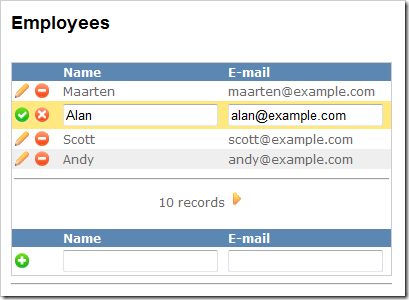
http://blog.maartenballiauw.be/post/2008/06/Code-based-ASPNET-MVC-GridView.aspx
该作者的BLOG关于ASP.NET MVC的文章不少,文章都不错,大家可以订阅来看:
http://blog.maartenballiauw.be/category/MVC.aspx

image 


HydrogenCMS Released
http://gravitycube.net/blog/post/HydrogenCMS-Released.aspx
HydrogenCMS 是一个全功能的、低要求的、开源的CMS,它使用 asp.net mvc, linq2SQL, linq2xml, 还有 BlogEngine, Kigg的一些优点. 


ViewData &quot;dot&quot; Notation Expressions in ASP.NET MVC
http://blog.eworldui.net/post/2008/05/ViewData-quot3bdotquot3b-Notation-Expressions-in-ASPNET-MVC.aspx
ASP.NET MVC 3比较COOL的一个地方….
作者的BLOG关于ASP.NET MVC的文章不错,大家可以收藏、订阅.


MVC Post-Redirect-Get Sample Updated
http://blog.eworldui.net/post/2008/06/MVC-Post-Redirect-Get-Sample-Updated.aspx
前一篇:ASP.NET MVC – Using Post, Redirect, Get Pattern(我翻译的:使用Post, Redirect, Get (PRG)模式).


ASP.NET MVC – Localization Helpers
http://blog.eworldui.net/post/2008/05/ASPNET-MVC—Localization.aspx
本地化。

im imge


ASP.NET MVC Tips
http://weblogs.asp.net/stephenwalther/archive/tags/Tips/ASP.NET+MVC/default.aspx
作者Stephen Walther是微软的一位项目经理,负责http://www.asp.net/网站中ASP.NET MVC部分的内容。这是一个系列的文章,关于ASP.NET MVC的一些技巧。对ASP.NET MVC有兴趣的朋友可关注.


http://blog.wekeroad.com/mvc-storefront/
直接引用园子上另外一位朋友的推荐词:这是Rob Conery的个人网站,他采用了Asp.Net MVC做了一个Demo, 不仅在codeplex上提供了这个项目的源代码,还提供了15个视频,这些视频的内容包括从项目的构思、到设计、再到实现和重构的一个完整的过程。


版权声明:本文原创发表于博客园,作者为QLeelulu
本文版权归作者和博客园共有,欢迎转载,但未经作者同意必须保留此段声明,且在文章页面明显位置给出原文连接,否则视为侵权。
 

一篇:ASP.NET MVC 资源大全,内容如下:

[原文出自http://weblogs.asp.net/craigshoemaker/archive/2008/04/24/47-asp-net-mvc-resources-to-rock-your-development.aspx ]

ASP.NET MVC官方网站

MVC 社区网站

MVC 搜索引擎

MVC 结构综述

MVC 101 Video

MVC Request 周期

MVC Routing

1. First tutorial on the subject

2. Store routes in the database

3. Store routes in the web.config

4. Upcoming changes to routes

MVC 界面 UI

分页pagination view user control
UI 帮助方法 (Helper Methods) Automatically map to your controller classes
使用component controller class
部分视图 "Partial View" that you can provide with variable-based parameters
正确使用控件 ASP.NET user controls appropriately in an MVC application

MVC + AJAX:

MVC + ASP.NET Membership:

MVC + IIS 5/6

MVC Security

Secure controller actions
Secure controller actions with an XML file

REST

REST定义 – Wikipedia
How I Explained REST to My Wife
Illustrates on the concepts of REST in MVC
ASP.NET MVC in the context of REST
Build your site once and make it readable.

MVC Validation

Validation framework for MVC
Validator Toolkit
Article on how to add CAPTCHA

MVC 测试Testing

ASP.NET MVC Framework – Part 2: Testing
TDD while building an MVC application
Testing controller actions.

其他

RSS feed with the new ASP.NET MVC Framework.
错误处理Build action filters to handle errors.
缓存和压缩 Caching and compression.
开源项目MVC Contrib , docmentation and features and Code Camp Server.

MVC 书籍

ASP.NET MVC In Action
Pro ASP.NET MVC Framework