 Mikel
Mikel微软MSDN中的面向服务介绍
地址:
http://www.microsoft.com/china/MSDN/library/architecture/SOADesign.mspx?mfr=true

ASP抓取Flash中的图片组件
 点击下载此文件
IronSoft ASP系列组件里面包含着四个组件:文件上传组件,图片处理组件,Flash抓图组件, Gif动画处理组件。原生的Win32组件,让它们运行起来特别有效率。
文件上传组件:支持上G级的大文件上传,同时使用磁盘缓存,可以最少占用系统的内存资源。是企业局域网内大文件上传的完美解决方案。
图片处理组件:现在已经支持BMP,GIF(非动画,透明),JPG三种网上主流的图片格式,可以高效地进行复杂的图片处理,格式转换,制作水印等。支持简单的滤镜(灰度和反转),以及支持JPEG的EXIF信息提取。
Flash抓图组件:国内首创的Flash组件,可以对FLASH的指定帧进行抓图,是制作Flash欣赏网站的不可缺少的助手。
GIF动画处理组件:支持GIF动画的创建,缩放,添加删除帧,单独提取指定帧里的图像等。
在asp文件中访问flash详细信息
<%
Class SWFDump
Private header
Private RECTdata
Private nBits
Private mversion
Private mfilelen
Private mxMin
Private mxMax
Private myMin
Private myMax
Private mheigt
Private mwidth
Private mframerate
Private mframecount
Private Sub Class_Initialize()
End Sub
Private Sub Class_Terminate()
End Sub
Private Function ReadHeader (filename)
Const ForReading = 1, ForWriting = 2, ForAppending = 8
Dim fso, f
Set fso = CreateObject("Scripting.FileSystemObject")
Set f = fso.OpenTextFile(filename, ForReading)
ReadHeader = f.Read(21)
End Function
Private Function ToBin(inNumber, OutLenStr )
Dim binary
binary = ""
do while inNumber >= 1
binary = binary & inNumber mod 2
inNumber = inNumber \ 2
loop
binary = binary & String(OutLenStr - len(binary), "0")
ToBin = StrReverse(binary)
End Function
Private Function Bin2Decimal(inBin)
Dim counter
Dim temp
Dim Value
inBin = StrReverse(inBin)
temp = 0
For counter = 1 to Len(inBin)
If counter = 1 then
Value = 1
Else
Value = Value * 2
End If
temp = temp + mid(inBin, counter ,1) * Value
Next
Bin2Decimal = temp
End Function
Public Function SWFDump(fileName)
header = ReadHeader (fileName)
mversion = asc(mid(header,4,1))
mfilelen = asc(mid(header,5,1))
mfilelen = mfilelen + asc(mid(header,6,1)) * 256
mfilelen = mfilelen + asc(mid(header,7,1)) * 256 * 256
mfilelen = mfilelen + asc(mid(header,8,1)) * 256 * 256 * 256
RECTdata = ToBin(asc(mid(header,9,1)),8)
RECTdata = RECTdata & ToBin(asc(mid(header,10,1)),8)
RECTdata = RECTdata & ToBin(asc(mid(header,11,1)),8)
RECTdata = RECTdata & ToBin(asc(mid(header,12,1)),8)
RECTdata = RECTdata & ToBin(asc(mid(header,13,1)),8)
RECTdata = RECTdata & ToBin(asc(mid(header,14,1)),8)
RECTdata = RECTdata & ToBin(asc(mid(header,15,1)),8)
RECTdata = RECTdata & ToBin(asc(mid(header,16,1)),8)
RECTdata = RECTdata & ToBin(asc(mid(header,17,1)),8)
nBits = Mid(RECTdata,1,5)
nBits = Bin2Decimal(nBits)
mxMin = Bin2Decimal(Mid(RECTdata,6,nBits))
mxMax = Bin2Decimal(Mid(RECTdata,6 + nBits * 1 ,nBits))
myMin = Bin2Decimal(Mid(RECTdata,6 + nBits * 2 ,nBits))
myMax = Bin2Decimal(Mid(RECTdata,6 + nBits * 3 ,nBits))
mheigt = (myMax - myMin) / 20
mwidth = (mxMax - mxMin) / 20
mframerate = asc(mid(header,18,1))
mframecount = asc(mid(header,19,1))
mframecount = mframecount + asc(mid(header,20,1)) * 256
End Function
Public Property Get Heigt()
Heigt = mheigt
End Property
Public Property Get Width()
Width = mwidth
End Property
Public Property Get Version()
Version = mversion
End Property
Public Property Get FileLen()
FileLen = mfilelen
End Property
Public Property Get xMin()
xMin = mxMin
End Property
Public Property Get xMax()
xMax = mxMax
End Property
Public Property Get yMin()
yMin = myMin
End Property
Public Property Get yMax()
yMax = myMax
End Property
Public Property Get Framerate()
Framerate = mframerate
End Property
Public Property Get Framecount()
Framecount = mframecount
End Property
End Class
%>
做成包含文件swfheaderdump.inc
调用:
<!-- #include file="swfheaderdump.inc" -->
<%
' Pass the SWF name in querystring this way
' swfdump.asp?swf=yourmovie.swf
set myObj = new swfdump
myObj.SWFDump (Server.MapPath(request("swf")))
Response.Write "Heigt (pixel) = " & myObj.Heigt & "<br>"
Response.Write "Width (pixel) = " & myObj.Width & "<br>"
Response.Write "Version = " & myObj.Version & "<br>"
Response.Write "FileLen (bytes) = " & myObj.FileLen & "<br>"
Response.Write "xMin (twips) = " & myObj.xMin & "<br>"
Response.Write "xMax (twips) = " & myObj.xMax & "<br>"
Response.Write "yMin (twips) = " & myObj.yMin & "<br>"
Response.Write "yMax (twips) = " & myObj.yMax & "<br>"
Response.Write "FrameRate = " & myObj.FrameRate & "<br>"
Response.Write "FrameCount = " & myObj.FrameCount & "<br>"
%>
Flash SWF 文件性能优化
flash避免占用CPU资源过度的几种方法
最近做网站时候,发现首页打开后一段时间,客户端的IE进程会出现CPU资源100%甚至内存不断增长导致客户端死机的问题,一直以为是JavaScript脚本在进行死循环插入html造成,页面文件不断增加,结果屏蔽了所有JavaScript的脚本,还是无济于事,又仔细思考了一下原因,首先从web页面的原理来说,第一次访问主页,可能需要客户端资源进行与服务器间的交互,然后服务器端响应客户端请求,执行服务器端代码,生成静态的html网页代码,然后返回给客户端浏览器解析html显示,浏览器解析后,显示完毕,客户端的内存和cpu就不应该再增长了,分析了原理,于是对页面进行了审视,发现页面上除了脚本的滚动字幕效果外,就是那些花花绿绿的flash动画是动的东西了,于是将script滚动和flash全部注释掉,再次访问主页,内存和cpu就此定格,然后将script的滚动解禁了,依然不会持续占用资源,那么只有一个可能就是flash!于是搜索了一下flash动画优化方法,特转贴:
1.减少本透明物体的使用率
2.减少大型图片的移动,这个是最最耗资源的,罪魁祸首!
3.减少大型元件的复制
4.压缩声音的输出品质
5.将大型位图转换成矢量图
6.将部分mc单独输出成swf文件,然后使用load movie导入
7.实在不行的话降低swf的品质。
用户喜爱的10个AIR应用
http://www.readwriteweb.com/archives/10_adobe_air_apps_bloggers_will_love.php
另外的消息:
未来两天,Adobe Media Player正式版就要发布了。Flash Player 9.4也将会很快出现。
Flash Media Server 3.0.1已经出现在Adobe support专区。
ASP.NET MVC Framework
One of the things that many people have asked for over the years with ASP.NET is built-in support for developing web applications using a model-view-controller (MVC) based architecture.
Last weekend at the Alt.NET conference in Austin I gave the first public demonstration of a new ASP.NET MVC framework that my team has been working on. You can watch a video of my presentation about it on Scott Hanselman's blog here.
We'll be releasing a public preview of this ASP.NET MVC Framework a little later this year. We'll then ship it as a fully supported ASP.NET feature in the first half of next year.
What is a Model View Controller (MVC) Framework?
MVC is a framework methodology that divides an application's implementation into three component roles: models, views, and controllers.
* “Models” in a MVC based application are the components of the application that are responsible for maintaining state. Often this state is persisted inside a database (for example: we might have a Product class that is used to represent order data from the Products table inside SQL).
* “Views” in a MVC based application are the components responsible for displaying the application's user interface. Typically this UI is created off of the model data (for example: we might create an Product “Edit” view that surfaces textboxes, dropdowns and checkboxes based on the current state of a Product object).
* “Controllers” in a MVC based application are the components responsible for handling end user interaction, manipulating the model, and ultimately choosing a view to render to display UI. In a MVC application the view is only about displaying information – it is the controller that handles and responds to user input and interaction.
One of the benefits of using a MVC methodology is that it helps enforce a clean separation of concerns between the models, views and controllers within an application. Maintaining a clean separation of concerns makes the testing of applications much easier, since the contract between different application components are more clearly defined and articulated.
The MVC pattern can also help enable red/green test driven development (TDD) – where you implement automated unit tests, which define and verify the requirements of new code, first before you actually write the code itself.
A few quick details about the ASP.NET MVC Framework
I'll be doing some in-depth tutorial posts about the new ASP.NET MVC framework in a few weeks once the bits are available for download (in the meantime the best way to learn more is to watch the video of my Alt.net presentation).
A few quick details to share in the meantime about the ASP.NET MVC framework:
* It enables clean separation of concerns, testability, and TDD by default. All core contracts within the MVC framework are interface based and easily mockable (it includes interface based IHttpRequest/IHttpResponse intrinsics). You can unit test the application without having to run the Controllers within an ASP.NET process (making unit testing fast). You can use any unit testing framework you want to-do this testing (including NUnit, MBUnit, MS Test, etc).
* It is highly extensible and pluggable. Everything in the MVC framework is designed so that it can be easily replaced/customized (for example: you can optionally plug-in your own view engine, routing policy, parameter serialization, etc). It also supports using existing dependency injection and IOC container models (Windsor, Spring.Net, NHibernate, etc).
* It includes a very powerful URL mapping component that enables you to build applications with clean URLs. URLs do not need to have extensions within them, and are designed to easily support SEO and REST-friendly naming patterns. For example, I could easily map the /products/edit/4 URL to the “Edit” action of the ProductsController class in my project above, or map the /Blogs/scottgu/10-10-2007/SomeTopic/ URL to a “DisplayPost” action of a BlogEngineController class.
* The MVC framework supports using the existing ASP.NET .ASPX, .ASCX, and .Master markup files as “view templates” (meaning you can easily use existing ASP.NET features like nested master pages, <%= %> snippets, declarative server controls, templates, data-binding, localization, etc). It does not, however, use the existing post-back model for interactions back to the server. Instead, you'll route all end-user interactions to a Controller class instead – which helps ensure clean separation of concerns and testability (it also means no viewstate or page lifecycle with MVC based views).
* The ASP.NET MVC framework fully supports existing ASP.NET features like forms/windows authentication, URL authorization, membership/roles, output and data caching, session/profile state management, health monitoring, configuration system, the provider architecture, etc.
Summary
If you are looking to build your web applications using a MVC approach, I think you'll find this new ASP.NET MVC Framework option very clean and easy to use. It will enable you to easily maintain separation of concerns in your applications, as well as facilitate clean testing and TDD.
I'll post more tutorials in the weeks ahead on how the new MVC features work, as well as how you can take advantage of them.
Hope this helps,
Scott
Two weeks ago I blogged about a new MVC (Model View Controller) framework for ASP.NET that we are going to be supporting as an optional feature soon. It provides a structured model that enforces a clear separation of concerns within applications, and makes it easier to unit test your code and support a TDD workflow. It also helps provide more control over the URLs you publish in your applications, and can optionally provide more control over the HTML that is emitted from them.
Since then I've been answering a lot of questions from people eager to learn more about it. Given the level of interest I thought it might make sense to put together a few blog posts that describe how to use it in more detail. This first post is one of several I'll be doing in the weeks ahead.
A Simple E-Commerce Storefront Application
I'm going to use a simple e-commerce store application to help illustrate how the ASP.NET MVC Framework works. For today's post I'll be implementing a product listing/browsing scenario in it.
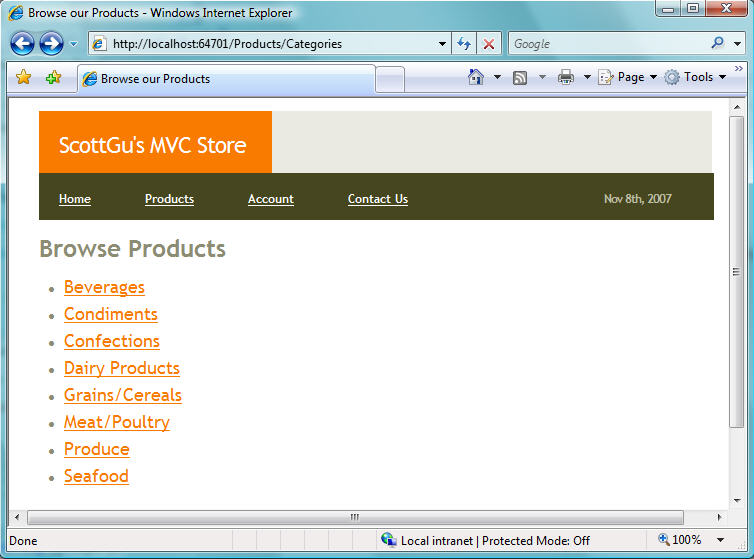
Specifically, we are going to build a store-front that enables end-users to browse a list of product categories when they visit the /Products/Categories URL on the site:
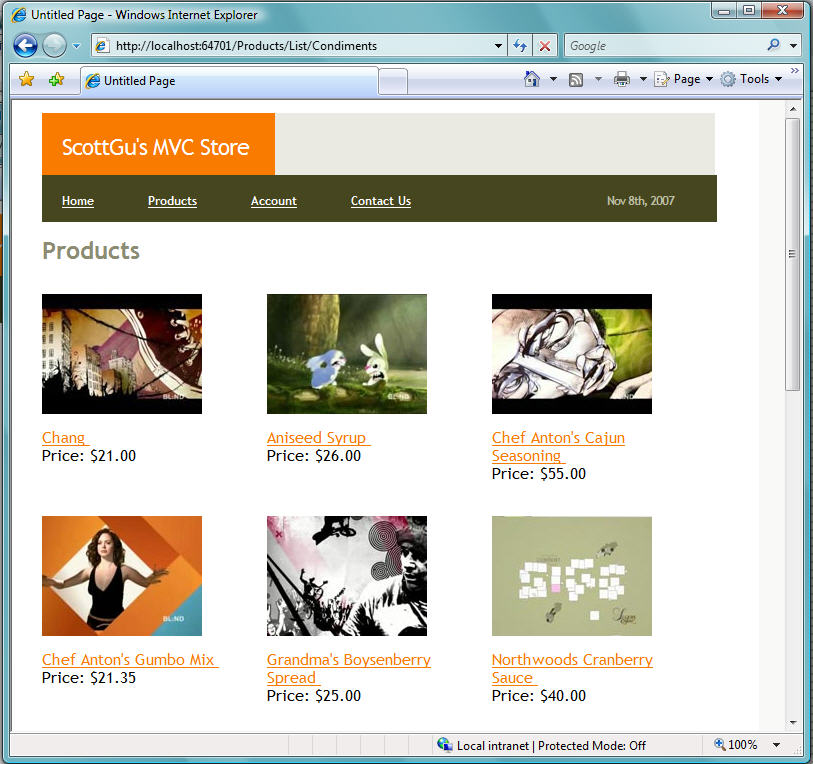
When a user clicks on a product category hyperlink on the above page, they'll navigate to a product category listing URL – /Products/List/CategoryName – that lists the active products within the specific category:
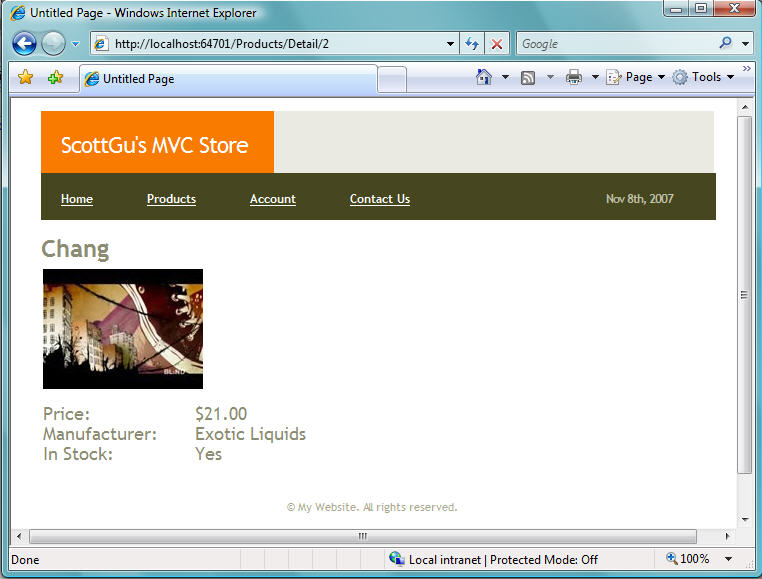
When a user clicks an individual product, they'll navigate to a product details URL – /Products/Detail/ProductID – that displays more details about the specific product they selected:
We'll build all of the above functionality using the new ASP.NET MVC Framework. This will enable us to maintain a “clean separation of concerns” amongst the different components of the application, and enable us to more easily integrate unit testing and test driven development.
Creating A New ASP.NET MVC Application
The ASP.NET MVC Framework includes Visual Studio Project Templates that make it easy to create a new web application with it. Simply select the File->New Project menu item and choose the “ASP.NET MVC Web Application” template to create a new web application using it.
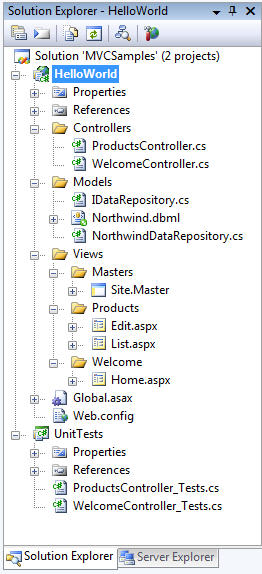
By default when you create a new application using this option, Visual Studio will create a new solution for you and add two projects into it. The first project is a web project where you'll implement your application. The second is a testing project that you can use to write unit tests against it:
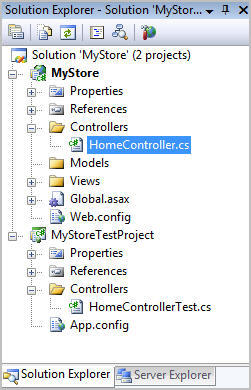
You can use any unit testing framework (including NUnit, MBUnit, MSTest, XUnit, and others) with the ASP.NET MVC Framework. VS 2008 Professional now includes built-in testing project support for MSTest (previously in VS 2005 this required a Visual Studio Team System SKU), and our default ASP.NET MVC project template automatically creates one of these projects when you use VS 2008.
We'll also be shipping project template downloads for NUnit, MBUnit and other unit test frameworks as well, so if you prefer to use those instead you'll also have an easy one click way to create your application and have a test project immediately ready to use with it.
Understanding the Folder Structure of a Project
The default directory structure of an ASP.NET MVC Application has 3 top-level directories:
* /Controllers
* /Models
* /Views
As you can probably guess, we recommend putting your Controller classes underneath the /Controllers directory, your data model classes underneath your /Models directory, and your view templates underneath your /Views directory.
While the ASP.NET MVC framework doesn't force you to always use this structure, the default project templates use this pattern and we recommend it as an easy way to structure your application. Unless you have a good reason to use an alternative file layout, I'd recommend using this default pattern.
Mapping URLs to Controller Classes
In most web frameworks (ASP, PHP, JSP, ASP.NET WebForms, etc), incoming URLs typically map to template files stored on disk. For example, a “/Products.aspx” or “/Products.php” URL typically has an underlying Products.aspx or Products.php template file on disk that handles processing it. When a http request for a web application comes into the web server, the web framework runs code specified by the template file on disk, and this code then owns handling the processing of the request. Often this code uses the HTML markup within the Products.aspx or Products.php file to help with generating the response sent back to the client.
MVC frameworks typically map URLs to server code in a different way. Instead of mapping URLs to template files on disk, they instead map URLs directly to classes. These classes are called “Controllers” and they own processing incoming requests, handling user input and interactions, and executing appropriate application and data logic based on them. A Controller class will then typically call a separate “View” component that owns generating the actual HTML output for the request.
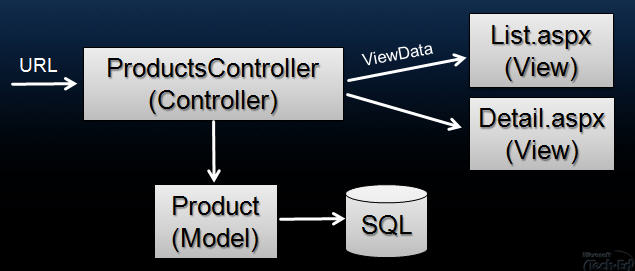
The ASP.NET MVC Framework includes a very powerful URL mapping engine that provides a lot of flexibility in how you map URLs to Controller classes. You can use it to easily setup routing rules that ASP.NET will then use to evaluate incoming URLs and pick a Controller to execute. You can also then have the routing engine automatically parse out variables that you define within the URL and have ASP.NET automatically pass these to your Controller as parameter arguments. I'll be covering more advanced scenarios involving the URL routing engine in a future blog post in this series.
Default ASP.NET MVC URL Routing to Controller Classes
By default ASP.NET MVC projects have a preconfigured set of URL routing rules that enable you to easily get started on an application without needing to explicitly configure anything. Instead you can start coding using a default set of name-based URL mapping conventions that are declared within the ASP.NET Application class of the Global.asax file created by the new ASP.NET MVC project template in Visual Studio.
The default naming convention is to map the leading URL path of an incoming HTTP request (for example: /Products/) to a class whose name follows the pattern UrlPathController (for example: by default a URL leading with /Products/ would map to a class named ProductsController).
To build our e-commerce product browsing functionality, we'll add a new “ProductsController” class to our project (you can use the “Add New Item” menu in Visual Studio to easily create a Controller class from a template):
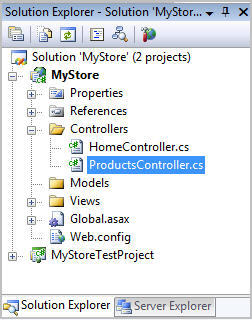
Our ProductsController class will derive from the System.Web.MVC.Controller base class. Deriving from this base class isn't required – but it contains some useful helper methods and functionality that we'll want to take advantage of later:
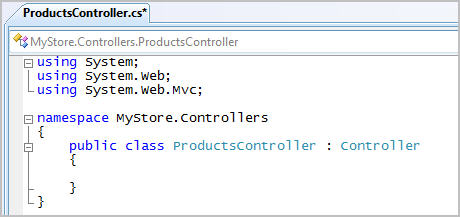
Once we define this ProductsController class within our project, the ASP.NET MVC framework will by default use it to process all incoming application URLs that start under the “/Products/” URL namespace. This means it will be automatically called to process the “/Products/Categories”, “/Products/List/Beverages”, and “/Products/Detail/3” URLs that we are going to want to enable within our store-front application.
In a future blog post we'll also add a ShoppingCartController (to enable end users to manage their shopping carts) and an AccountController (to enable end users to create new membership accounts on the site and login/logout of it). Once we add these two new controller classes to our project, URLs that start with /ShoppingCart/ and /Account/ will automatically be routed to them for processing.
Note: The ASP.NET MVC framework does not require that you always use this naming convention pattern. The only reason our application uses this by default is because there is a mapping rule that configures this that was automatically added to our ASP.NET Application Class when we created the new ASP.NET MVC Project using Visual Studio. If you don't like this rule, or want to customize it to use a different URL mapping pattern, just go into the ASP.NET Application Class (in Global.asax) and change it. I'll cover how to-do this in a future blog post (when I'll also show some of the cool scenarios the URL routing engine enables).
Understanding Controller Action Methods
Now that we have a created a ProductsController class in our project we can start adding logic to handle the processing of incoming “/Products/” URLs to the application.
When defining our e-commerce storefront use cases at the beginning of this blog post, I said we were going to implement three scenarios on the site: 1) Browsing all of the Product Categories, 2) Listing Products within a specific Category, and 3) Showing Details about a Specific Product. We are going to use the following SEO-friendly URLs to handle each of these scenarios:
URL Format Behavior URL Example
/Products/Categories Browse all Product Categories /Products/Categories
/Products/List/Category List Products within a Category /Products/List/Beverages
/Products/Detail/ProductID Show Details about a Specific Product /Products/Detail/34
There are a couple of ways we could write code within our ProductsController class to process these three types of incoming URLs. One way would be to override the “Execute” method on the Controller base class and write our own manual if/else/switching logic to look at the incoming URL being requested and then execute the appropriate logic to process it.
A much easier approach, though, is to use a built-in feature of the MVC framework that enables us to define “action methods” on our controller, and then have the Controller base class automatically invoke the appropriate action method to execute based on the URL routing rules in use for our application.
For example, we could add the below three controller action methods to our ProductsController class to handle our three e-commerce URL scenarios above:
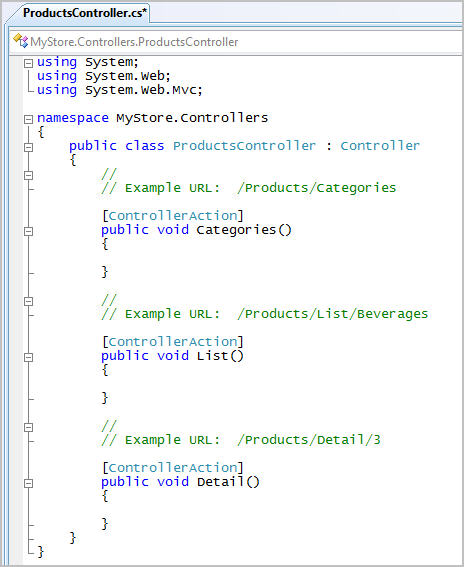
The URL routing rules that are configured by default when a new project is created treat the URL sub-path that follows the controller name as the action name of the request. So if we receive a URL request of /Products/Categories, the routing rule will treat “Categories” as the name of the action, and the Categories() method will be invoked to process the request. If we receive a URL request of /Products/Detail/5, the routing rule will treat “Detail” as the name of the action, and the Detail() method will be invoked to process the request, etc.
Note: The ASP.NET MVC framework does not require that you always use this action naming convention pattern. If you want to use a different URL mapping pattern, just go into the ASP.NET Application Class (in Global.asax) and change it.
Mapping URL Parameters to Controller Action Methods
There are several ways to access URL parameter values within the action methods of Controller classes.
The Controller base class exposes a set of Request and Response objects that can be used. These objects have the exact same API structure as the HttpRequest/HttpResponse objects that you are already familiar with in ASP.NET. The one important difference is that these objects are now interface based instead of sealed classes (specifically: the MVC framework ships with new System.Web.IHttpRequest and System.Web.IHttpResponse interfaces). The benefit of having these be interfaces is that it is now easy to mock them – which enables easy unit testing of controller classes. I'll cover this in more depth in a future blog post.
Below is an example of how we could use the Request API to manually retrieve an ID querystring value from within our Detail action method in the ProductsController class:
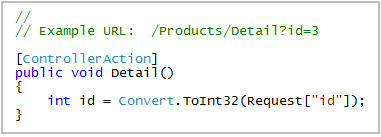
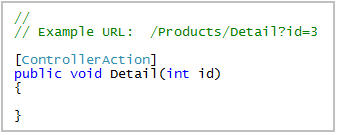
The ASP.NET MVC framework also supports automatically mapping incoming URL parameter values as parameter arguments to action methods. By default, if you have a parameter argument on your action method, the MVC framework will look at the incoming request data to see if there is a corresponding HTTP request value with the same name. If there is, it will automatically pass it in as a parameter to your action method.
For example, we could re-write our Detail action method to take advantage of this support and make it cleaner like below:
In addition to mapping argument values from the querystring/form collection of a request, the ASP.NET MVC framework also allows you to use the MVC URL route mapping infrastructure to embed parameter values within the core URL itself (for example: instead of /Products/Detail?id=3 you could instead use /Products/Detail/3).
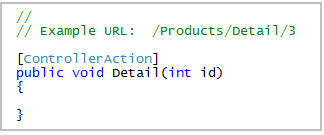
The default route mapping rule declared when you create a new MVC project is one with the format: “/[controller]/[action]/[id]”. What this means is that if there is any URL sub-path after the controller and action names in the URL, it will by default be treated as a parameter named “id” – and which can be automatically passed into our controller action method as a method argument.
This means that we can now use our Detail method to also handle taking the ID argument from the URL path (e.g: /Products/Detail/3):
太多了,具体访问地址:http://weblogs.asp.net/scottgu/archive/2007/11/13/asp-net-mvc-framework-part-1.aspx
吧
滚动字幕效果
<div id="body" style="width:200px;height:10px;">
<div id="demo3" style=overflow:hidden;height:<%=hhheight%>;width:600;>
<div id="demo4">
<table width="100%" height="100%">
<tr><td>滚滚滚滚滚滚滚</td</tr>
<tr><td>滚滚滚滚滚滚滚</td</tr>
<tr><td>滚滚滚滚滚滚滚</td</tr>
<tr><td>滚滚滚滚滚滚滚</td</tr>
<tr><td>滚滚滚滚滚滚滚</td</tr>
<tr><td>滚滚滚滚滚滚滚</td</tr>
<tr><td>滚滚滚滚滚滚滚</td</tr>
<tr><td>滚滚滚滚滚滚滚</td</tr>
</table>
</div>
<div id="demo5"></div>
</div>
<script language="javascript">
var i=0;
var speed1=80
var demo5=document.getElementById('demo5');
demo5.innerHTML=demo4.innerHTML
function Marquee1(){
if(demo5.offsetTop-demo3.scrollTop<=0)
demo3.scrollTop-=demo4.offsetHeight
else{
demo3.scrollTop++
}
i++;
//alert(i);
}
var MyMar1=setInterval(Marquee1,speed1)
demo3.onmouseover=function() {clearInterval(MyMar1)}
demo3.onmouseout=function() {MyMar1=setInterval(Marquee1,speed1)}
</script>
scrollTop
网页可见区域宽: document.body.clientWidth;
网页可见区域高: document.body.clientHeight;
网页可见区域宽: document.body.offsetWidth (包括边线的宽);
网页可见区域高: document.body.offsetHeight (包括边线的宽);
网页正文全文宽: document.body.scrollWidth;
网页正文全文高: document.body.scrollHeight;
网页被卷去的高: document.body.scrollTop;
网页被卷去的左: document.body.scrollLeft;
网页正文部分上: window.screenTop;
网页正文部分左: window.screenLeft;
屏幕分辨率的高: window.screen.height;
屏幕分辨率的宽: window.screen.width;
屏幕可用工作区高度: window.screen.availHeight;
屏幕可用工作区宽度:window.screen.availWidth;
XML加ASP实现网页自动适应多国语言
XML加ASP实现网页自动适应多国语言
作者:未知
想让你的站点能被来自多个国家的冲浪者看明白吗?无疑,这就需要提供多个语言版本的页面内容,也就是所谓的“本地化”功能。最容易想到的方法就是分别编写多种语言的页面内容,然后放置到不同的目录下,再在首页上添加导航到各自语言位置的链接。很明显,这样的处理方式将浪费许多包含公共元素以及设计框架的空间,而且修改、维护也很烦琐。有什么好方法吗?当然,本文就介绍如何结合使用XML与ASP技术实现这个目的。
本文将讨论如下几个方面的内容:创建包含语言资源的XML文档、使用ASP创建Web页面模板、使用XPath语法和MSXML3分析器定位XML文档中的目标内容以及动态地在HTML流中插入语言字符串。
准备条件
本文讨论的技术涉及到以下方面:IIS4 或者 PWS(包含ASP功能),MSXML 版本 3。
功能展示
本文要讨论的例程是一个简单的HTML表单,用以提交名字和地址信息。下面是在Netscape Navigator中显示西班牙语言的图示:
采用本文论述的技术,你就可以非常简单地通过更新一个XML文件实现为站点添加多种语言的功能。
创建包含语言资源的XML文档
首先,使用喜爱的页面编辑器创建一个叫做xmltrans.asp的Web页面文件。我发现使用静态占位符文字(比如”First name “)设计页面最容易。当XML准备好后,就可以使用变量替换这些静态文字。要下载例程文件请点击这里。
完成基本页面的功能设计后,开始创建一个包含语言字符串的良好格式XML文档。在这里,我使用纯文本编辑器Notepad编写初始的XML语言集-英语版本。Notepad使我感觉更接近于源代码。XML文件命名为xmltrans.xml。下面列出了包含English、French和 Spanish字符串的XML文件代码内容:
xmltrans.xml文件的第一行是XML声明。其中的version属性告诉读者文档符合XML 1.0的标准,encoding属性指示解析器使用压缩版本的Unicode:
一个XML文档需要一个包含其他元素的根元素。因为这里的例程是包含一些语言,所以就命名根元素为languages:
作为集合类型,languages元素包含了一个或多个language元素:
以上language标记包含4个属性。xml:lang属性是其中最重要的,在ASP程序中将通过这个属性值的2字母语言代码搜索字符串组。其他的属性,比如charset,可以为将来的功能扩充而用。
每种语言节点中,我都添加了一个元素作为变量,其中含有显示在HTML页面上的文字。XML允许使用有含义的名字作为自定义标记,比如,我使用
最后,良好格式的XML文档包含了一整套对应于HTML页面的字符串。下图显示了XML文件中的标记和English语言字符串。注意,现在这里只讨论English版本,以后可以添加更多种语言。
ASP文件代码分析
现在回来看看ASP文件xmltrans.asp。在其中我们使用XML路径语言(XPath),它可以在微软的XML解析器(MSXML)中执行。你可以认为XPath是抵达XML文档一部分内容预定位置的工具,这有些类似于在命令行中输入一个路径以执行文件,比如c:\winnt\ notepad.exe,或者在浏览器中敲入了一个URL访问页面。下面研究这个ASP文件看看如何取回English语言字符串。首先,我们实例化一个叫做MSXML2.DOMDocument的XML解析器工作对象:
set doc=server._
CreateObject _
(“MSXML2.DOMDocument”)
由于ASP程序不能象Win32程序一样处理事件,所以在这里我们关闭了异步操作选项。这样就确保了在转向其他任务前,脚本程序会一直等待当前事件的完成:
doc.async = False
接着使用DOMDocument对象的Load方法装载包含字符串的XML文档。如果转载过程中发生了错误,就发出警告信息并停止运行:
if not doc.Load(server._
mappath(“xmltrans.xml”)) then
msg=”Failed to load ”
msg=msg & “the XML file”
Response.Write msg
Response.End
end if
我们可以使用两种方法查询XML文档:XSL和XPath。在这里让解析器使用后者,传递属性名字和正确数值给setProperty方法:
doc.setProperty _
“SelectionLanguage”, “XPath”
然后,创建选择XML文档部分内容的路径。很明显,相关字符串位于languages元素的某个位置内,因此languages成为路径的最开始部分。同时我们知道字符串是被包含在一个language元素内的,但是是哪一个呢?请别忘记在前面的XML文档中,我们嵌入了一个叫做xml:lang的属性,并给出了一个唯一数值“en”。这就是我们要选择的,下面是操作它的语法:
sel=”/languages/language”
sel=sel & “[@xml:lang='en']”
这有些不好理解,但你可以将这段XPath代码想像为一个SQL语句,类似于取回一个记录集的命令:
Select * FROM languages.language Where xml:lang='en'
回到现实的XPath查询,要使用下面的代码返回包含第一个匹配节点的节点对象:
set selectednode = _
doc.selectSingleNode(sel)
最后一步是传递元素名字(“title”)给selectSingleNode方法,并要求它取回”title”节点的text属性值。就是说,取得包含在
txt=selectednode._
selectSingleNode(“title”).text
与SQL命令对照,就象从ADO记录集内部取回一个字段值,语句是:
txt=rs(“title”)
在ASP页面中插入语言字符串
知道了如何从XML元素中选取文字并赋值给变量,就可以将变量值插入到HTML流中了。为了使代码简洁,创建一个叫做getstring()的函数,如下:
function getstring(instring)
temp=selectednode._
selectSingleNode _
(instring).text
getstring= _
server.htmlencode(temp)
end function
getstring()函数的输入值是元素名,元素值要从XML文档中取回。比如,将”firstname”传递给getstring(), getstring函数就选择firstname元素并返回它的文本数值。为保险起见,在返回给调用者前,我们使用ASP的 server.htmlencode方法转换文本为合法的HTML代码。在ASP页面中,调用代码类似如下:
如果选择了XML文档的English部分,HTML输出结果如下:
如果选择了French,HTML输出结果如下:
下图显示了French语言版本的表单:
选择可用语言
XML的一大优势就是它是以清晰的文本格式保存,我们能够在任何时候更新Web服务器上的XML文件。而且,我们还可以将English版本的 xmltrans.xml文件在XML编辑器XML NotHPad中打开,复制一份,然后将其中文字翻译为一种新语言。下图显示了XML Notepad中的例程文件:
上图中,在左边可以执行添加、删除以及选择元素和属性的操作,在右边可以编辑相关内容。当站点需要多种语言版本时,只需要在内容中执行粘贴操作,然后上载最新的XML文档就可以了。
为了使添加的语言立即生效,要增加一个程序,用它判断文件中不同语言的种类数量,并返回语言代码和语言名称。如下面的代码段所示,我们可以将数据格式化处理以创建一个HTML列表框。当用户提交表单时,2字母表示的语言种类代码被存储到ASP会话变量choselang中。
<%
for i=0 to selectednodes.length - 1
response.write "” & vbcrlf
next
%>
添加提示信息以及字符集数据
上面使用XML提供了HTML表单的可变语言文字显示,接着还要考虑一些更丰富的用途。比如说,要在选择语言时添加一个提示信息,只需要在文字前后嵌入HTML标记