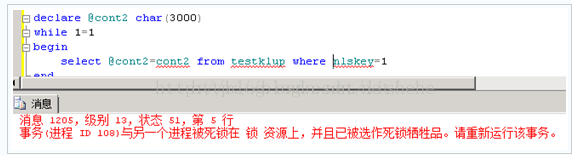
事务(进程 ID )与另一个进程已被死锁在 lock 资源上,且该事务已被选作死锁牺牲品。请重新运行该事务_zwkandy的专栏-CSDN博客

mikel阅读(1852)

来源: 事务(进程 ID )与另一个进程已被死锁在 lock 资源上,且该事务已被选作死锁牺牲品。请重新运行该事务_zwkandy的专栏-CSDN博客

其实所有的死锁最深层的原因就是一个:资源竞争 表现一:
一个用户A 访问表A(锁住了表A),然后又访问表B
另一个用户B 访问表B(锁住了表B),然后企图访问表A

这时用户A由于用户B已经锁住表B,它必须等待用户B释放表B,才能继续,好了他老人家就只好老老实实在这等了
同样用户B要等用户A释放表A才能继续这就死锁了
解决方法:
这种死锁是由于你的程序的BUG产生的,除了调整你的程序的逻辑别无他法
仔细分析你程序的逻辑,
1:尽量避免同时锁定两个资源
2: 必须同时锁定两个资源时,要保证在任何时刻都应该按照相同的顺序来锁定资源.

表现二:
用户A读一条纪录,然后修改该条纪录
这是用户B修改该条纪录
这里用户A的事务里锁的性质由共享锁企图上升到独占锁(for update),而用户B里的独占锁由于A有共享锁存在所以必须等A释
放掉共享锁,而A由于B的独占锁而无法上升的独占锁也就不可能释放共享锁,于是出现了死锁。
这种死锁比较隐蔽,但其实在稍大点的项目中经常发生。
解决方法:
让用户A的事务(即先读后写类型的操作),在select 时就是用Update lock
语法如下:
select * from table1 with(updlock) where ….

==========================

在联机事务处理(OLTP)的数据库应用系统中,多用户、多任务的并发性是系统最重要的技术指标之一。为了提高并发性,目前大部分RDBMS都采用加锁技术。然而由于现实环境的复杂性,使用加锁技术又不可避免地产生了死锁问题。因此如何合理有效地使用加锁技术,最小化死锁是开发联机事务处理系统的关键。
死锁产生的原因
在联机事务处理系统中,造成死机主要有两方面原因。一方面,由于多用户、多任务的并发性和事务的完整性要求,当多个事务处理对多个资源同时访问时,若双方已锁定一部分资源但也都需要对方已锁定的资源时,无法在有限的时间内完全获得所需的资源,就会处于无限的等待状态,从而造成其对资源需求的死锁。
另一方面,数据库本身加锁机制的实现方法不同,各数据库系统也会产生其特殊的死锁情况。如在Sybase  SQL  Server  11中,最小锁为2K一页的加锁方法,而非行级锁。如果某张表的记录数少且记录的长度较短(即记录密度高,如应用系统中的系统配置表或系统参数表就属于此类表),被访问的频率高,就容易在该页上产生死锁。
几种死锁情况及解决方法
清算应用系统中,容易发生死锁的几种情况如下:
●  不同的存储过程、触发器、动态SQL语句段按照不同的顺序同时访问多张表;
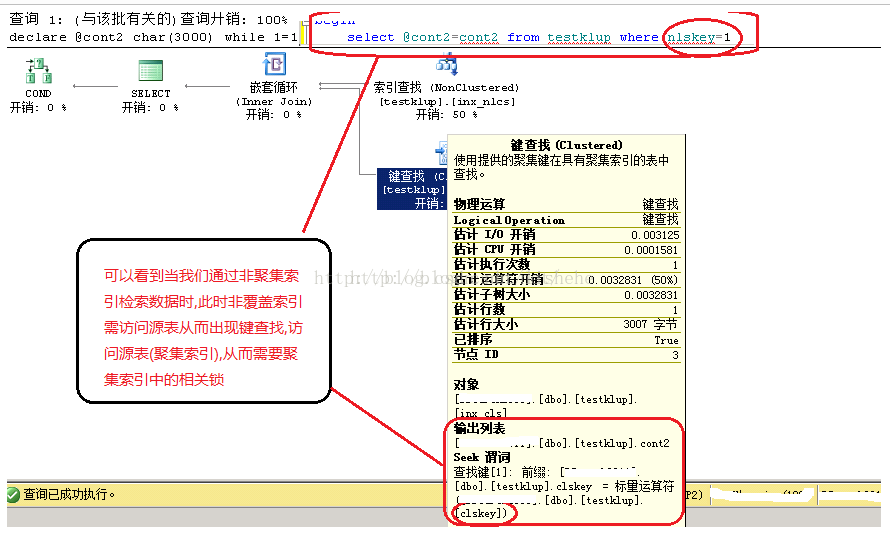
●  在交换期间添加记录频繁的表,但在该表上使用了非群集索引(non-clustered);
●  表中的记录少,且单条记录较短,被访问的频率较高;
●  整张表被访问的频率高(如代码对照表的查询等)。
以上死锁情况的对应处理方法如下:
●  在系统实现时应规定所有存储过程、触发器、动态SQL语句段中,对多张表的操作总是使用同一顺序。如:有两个存储过程proc1、proc2,都需要访问三张表zltab、z2tab和z3tab,如果proc1按照zltab、z2tab和z3tab的顺序进行访问,那么,proc2也应该按照以上顺序访问这三张表。
●  对在交换期间添加记录频繁的表,使用群集索引(clustered),以减少多个用户添加记录到该表的最后一页上,在表尾产生热点,造成死锁。这类表多为往来账的流水表,其特点是在交换期间需要在表尾追加大量的记录,并且对已添加的记录不做或较少做删除操作。
●  对单张表中记录数不太多,且在交换期间select或updata较频繁的表可使用设置每页最大行的办法,减少数据在表中存放的密度,模拟行级锁,减少在该表上死锁情况的发生。这类表多为信息繁杂且记录条数少的表。
如:系统配置表或系统参数表。在定义该表时添加如下语句:
with  max_rows_per_page=1
●  在存储过程、触发器、动态SQL语句段中,若对某些整张表select操作较频繁,则可能在该表上与其他访问该表的用户产生死锁。对于检查账号是否存在,但被检查的字段在检查期间不会被更新等非关键语句,可以采用在select命令中使用at  isolation  read  uncommitted子句的方法解决。该方法实际上降低了select语句对整张表的锁级别,提高了其他用户对该表操作的并发性。在系统高负荷运行时,该方法的效果尤为显著。
例如:
select*from  titles  at  isolation  read  uncommitted
●  对流水号一类的顺序数生成器字段,可以先执行updata流水号字段+1,然后再执行select获取流水号的方法进行操作。
小结
笔者对同城清算系统进行压力测试时,分别对采用上述优化方法和不采用优化方法的两套系统进行测试。在其他条件相同的情况下,相同业务笔数、相同时间内,死锁发生的情况如下:
采用优化方法的系统:  0次/万笔业务;
不采用优化方法的系统:50~200次/万笔业务。
所以,使用上述优化方法后,特别是在系统高负荷运行时效果尤为显著。总之,在设计、开发数据库应用系统,尤其是OLTP系统时,应该根据应用系统的具体情况,依据上述原则对系统分别优化,为开发一套高效、可靠的应用系统打下良好的基础。

============
–转
/********************************************************
//   创建 :
//   日期 :
//   修改 :
//
//   说明 : 查看数据库里阻塞和死锁情况
********************************************************/

use master

go
CREATE procedure sp_who_lock
as
begin
declare @spid int,@bl int,
@intTransactionCountOnEntry      int,
@intRowcount              int,
@intCountProperties          int,
@intCounter              int
create table #tmp_lock_who (
id int identity(1,1),
spid smallint,
bl smallint)
IF @@ERROR<>0 RETURN @@ERROR
insert into #tmp_lock_who(spid,bl) select   0 ,blocked
from (select * from sysprocesses where   blocked>0 ) a
where not exists(select * from (select * from sysprocesses
where   blocked>0 ) b
where a.blocked=spid)
union select spid,blocked from sysprocesses where   blocked>0
IF @@ERROR<>0 RETURN @@ERROR
— 找到临时表的记录数
select      @intCountProperties = Count(*),@intCounter = 1
from #tmp_lock_who
IF @@ERROR<>0 RETURN @@ERROR
if     @intCountProperties=0
select ‘现在没有阻塞和死锁信息’ as message
— 循环开始
while @intCounter <= @intCountProperties
begin
— 取第一条记录
select      @spid = spid,@bl = bl
from #tmp_lock_who where Id = @intCounter
begin
if @spid =0
select ‘引起数据库死锁的是: ‘+ CAST(@bl AS VARCHAR(10))
+ ‘进程号,其执行的SQL语法如下’
else
select ‘进程号SPID:’+ CAST(@spid AS VARCHAR(10))+ ‘被’
+ ‘进程号SPID:’+ CAST(@bl AS VARCHAR(10)) +’阻塞,其当前进程执行的SQL语法如下’
DBCC INPUTBUFFER (@bl )
end
— 循环指针下移
set @intCounter = @intCounter + 1
end
drop table #tmp_lock_who
return 0
end
GO
==========================
呵呵,解决死锁,光查出来没有多大用处,我原来也是用这个存储过程来清理死锁的
我解决死锁的方式主要用了:
1  优化索引
2  对所有的报表,非事务性的select  语句  在from  后都加了  with  (nolock)  语句
3  对所有的事务性更新尽量使用相同的更新顺序来执行
现在已解决了死锁的问题,希望能对你有帮助

with  (nolock)的用法很灵活  可以说只要有  from的地方都可以加  with  (nolock)  标记来取消产生意象锁,这里  可以用在  delete  update,select  以及  inner  join  后面的from里,对整个系统的性能提高都很有帮助

==========================
use master –必须在master数据库中创建
go

if exists (select * from dbo.sysobjects where id = object_id(N [dbo].[p_lockinfo] ) and OBJECTPROPERTY(id, N IsProcedure ) = 1)
drop procedure [dbo].[p_lockinfo]
GO

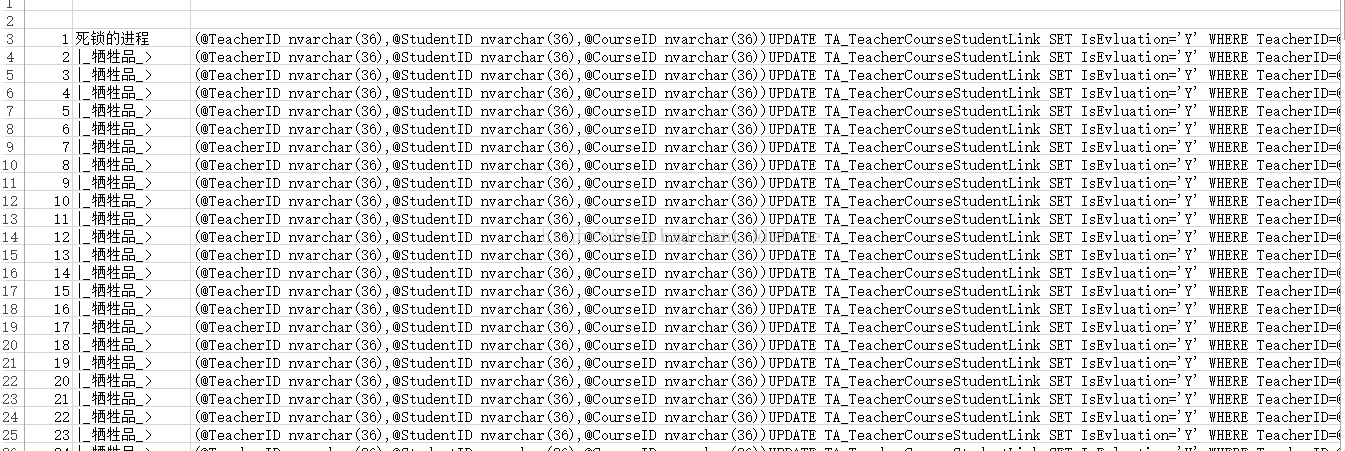
/*–处理死锁

查看当前进程,或死锁进程,并能自动杀掉死进程

因为是针对死的,所以如果有死锁进程,只能查看死锁进程
当然,你可以通过参数控制,不管有没有死锁,都只查看死锁进程

–邹建 2004.4–*/

/*–调用示例

exec p_lockinfo
–*/
create proc p_lockinfo
@kill_lock_spid bit=1, –是否杀掉死锁的进程,1 杀掉, 0 仅显示
@show_spid_if_nolock bit=1 –如果没有死锁的进程,是否显示正常进程信息,1 显示,0 不显示
as
declare @count int,@s nvarchar(1000),@i int
select id=identity(int,1,1),标志,
进程ID=spid,线程ID=kpid,块进程ID=blocked,数据库ID=dbid,
数据库名=db_name(dbid),用户ID=uid,用户名=loginame,累计CPU时间=cpu,
登陆时间=login_time,打开事务数=open_tran, 进程状态=status,
工作站名=hostname,应用程序名=program_name,工作站进程ID=hostprocess,
域名=nt_domain,网卡地址=net_address
into #t from(
select 标志=’死锁的进程’,
spid,kpid,a.blocked,dbid,uid,loginame,cpu,login_time,open_tran,
status,hostname,program_name,hostprocess,nt_domain,net_address,
s1=a.spid,s2=0
from master..sysprocesses a join (
select blocked from master..sysprocesses group by blocked
)b on a.spid=b.blocked where a.blocked=0
union all
select ‘|_牺牲品_>’,
spid,kpid,blocked,dbid,uid,loginame,cpu,login_time,open_tran,
status,hostname,program_name,hostprocess,nt_domain,net_address,
s1=blocked,s2=1
from master..sysprocesses a where blocked<>0
)a order by s1,s2

select @count=@@rowcount,@i=1

if @count=0 and @show_spid_if_nolock=1
begin
insert #t
select 标志=’正常的进程’,
spid,kpid,blocked,dbid,db_name(dbid),uid,loginame,cpu,login_time,
open_tran,status,hostname,program_name,hostprocess,nt_domain,net_address
from master..sysprocesses
set @count=@@rowcount
end

if @count>0
begin
create table #t1(id int identity(1,1),a nvarchar(30),b Int,EventInfo nvarchar(255))
if @kill_lock_spid=1
begin
declare @spid varchar(10),@标志 varchar(10)
while @i<=@count
begin
select @spid=进程ID,@标志=标志 from #t where id=@i
insert #t1 exec(‘dbcc inputbuffer(‘+@spid+’)’)
if @标志=’死锁的进程’ exec(‘kill ‘+@spid)
set @i=@i+1
end
end
else
while @i<=@count
begin
select @s=’dbcc inputbuffer(‘+cast(进程ID as varchar)+’)’ from #t where id=@i
insert #t1 exec(@s)
set @i=@i+1
end
select a.*,进程的SQL语句=b.EventInfo
from #t a join #t1 b on a.id=b.id
end

GO

SQL Server性能调优之缓存_MsSql_脚本之家

mikel阅读(1273)

来源: SQL Server性能调优之缓存_MsSql_脚本之家

在执行任何查询时,SQL Server都会将数据读取到内存,数据使用之后,不会立即释放,而是会缓存在内存Buffer中,当再次执行相同的查询时,如果所需数据全部缓存在内存中,那么SQL Server不会产生Disk IO操作,立即返回查询结果,这是SQL Server的性能优化机制。

一,主要的内存消费者(Memory Consumer)

1,数据缓存(Data Cache)

Data Cache是存储数据页(Data Page)的缓冲区,当SQL Server需要读取数据文件(File)中的数据页(Data Page)时,SQL Server会把整个Page都调入内存(内存中的一个Page叫做buffer),Page是数据访问的最小单元。

当用户修改了某个Page上的数据时,SQL Server 会先在内存中修改Buffer,但是不会立即将这个数据叶写回硬盘,而是等到CheckPoint或lazy Writer进程运行时集中处理。当用户读取某个Page后,如果SQL Server没有内存压力,它不会在内存中删除这个Page,因为内存中的数据页始终存放着数据的最新状态,如果有其他用户使用这个Page,SQL Server 不需要从硬盘中读取一次,节省语句执行的时间。理想情况是SQL Server将用户需要访问的所有数据都缓存在内存中,SQL Server 永远不需要去硬盘读取数据,只需要在CheckPoint 或 lazy Write运行时把修改过的页面写回硬盘即可

2,查询计划缓存(Query Plan Cache)

存储查询语句和存储过程的执行计划,以供重用,而不需要重新编译(Compile),因为编译查询语句产生执行计划是一个非常耗费资源的过程。

二,查看内存消耗

在SQL Server中,只有内存书记员(Memory Clerk)能够分配内存,Memory Clerk会记录已经分配内存的数量,任何一个需要使用内存的对象,必须创建自己的Memory Clerk,并使用该Memory clerk来分配内存。

1,查看Memory clerk分配的内存量

1
2
3
4
5
6
7
8
9
10
select memory_node_id,
 type,
 pages_kb,
 virtual_memory_reserved_kb,
 virtual_memory_committed_kb,
 shared_memory_reserved_kb,
 shared_memory_committed_kb,
 page_size_in_bytes
from sys.dm_os_memory_clerks
where type = 'MEMORYCLERK_SQLQERESERVATIONS'

对于内存结点64,只在DAC中使用。

2,统计Memory Clerk分配的内存总量

1
2
3
4
5
6
7
8
9
10
select mc.type,mc.name,
 sum(mc.pages_kb) as AllocatedPages_KB,
 sum(mc.virtual_memory_reserved_kb) as VM_Reserved_KB,
 sum(mc.virtual_memory_committed_kb) as VM_Committed_KB,
 --sum(mc.shared_memory_reserved_kb) as ShareMem_Reserved_KB,
 --sum(mc.shared_memory_committed_kb) as ShareMem_Committed_KB,
 max(mc.page_size_in_bytes)/1024 as SinglePageSize_KB
from sys.dm_os_memory_clerks mc
group by mc.type,mc.name
order by AllocatedPages_KB desc,mc.type,mc.name

消耗内存较大的Clerk是:

  • MEMORYCLERK_SQLBUFFERPOOL:基本是Buffer Pool中page的大小
  • OBJECTSTORE_LOCK_MANAGER:锁结构使用的内存,当发生严重的锁阻塞时,这表明系统中,存储大量锁,造成锁管理占用大量的内存;
  • CACHESTORE_OBJCP:触发器和存储过程等模块(Module)的执行计划占用的缓存空间;
  • CACHESTORE_SQLCP:动态TSQL语句,即席(Adhoc)查询和预编译(Prepared) TSQL的执行计划缓存;
  • CACHESTORE_COLUMNSTOREOBJECTPOOL:列存储索引(ColumnStore Index)占用的缓存

3,查看缓存中的数据页

当数据页从硬盘读取到内存之后,该数据页被复制到缓冲池(Buffer Pool),供SQL Server重用。每个缓存的数据页都有一个缓存描述器(Buffer Descriptor),用户唯一标识内存中的数据页,在SQL Server实例中缓存的每一个数据页,都能从 sys.dm_os_buffer_descriptors 查看缓存描述的信息。

1
2
3
4
5
6
7
8
9
10
11
12
13
14
15
16
17
18
19
20
21
select DB_NAME(bd.database_id) as dbname,
 OBJECT_NAME(p.object_id) as ObjectName,
 i.name as IndexName,
 count(0) as BufferCounts,
 sum(bd.free_space_in_bytes)/1024 as TotalFreeSpace_KB,
 cast(sum(bd.free_space_in_bytes)/(8*1024.0)/count(0) as decimal(10,4))*100 as FreeSpaceRatio,
 sum(cast(bd.is_modified as int)) as TotalDirtyPages,
 sum(bd.row_count) as TotalRowCounts
from sys.allocation_units au
inner join sys.dm_os_buffer_descriptors bd
 on au.allocation_unit_id=bd.allocation_unit_id
inner join sys.partitions p
 on au.container_id=p.hobt_id
inner join sys.indexes i
 on p.object_id=i.object_id and p.index_id=p.index_id
inner join sys.objects o
 on p.object_id=o.object_id
where bd.database_id=DB_ID(N'database_name')
 and o.type<>N'S'
group by bd.database_id,p.object_id,i.name
order by BufferCounts desc,dbname,ObjectName

4,查看计划缓存

产生执行计划是十分消耗CPU资源的,SQL Server会在内存的Plan Cache中存储每个查询计划(Query Plan),及其占用的内存空间,重用次数等信息。

1
2
3
4
5
6
7
8
select cp.objtype,cp.cacheobjtype,
 sum(cp.size_in_bytes) as TotalSize_B,
 COUNT(cp.bucketid) as CacheCounts,
 sum(cp.refcounts) as TotalRefCounts,
 sum(cp.usecounts) as TotalUseCounts
from sys.dm_exec_cached_plans cp
group by cp.objtype,cp.cacheobjtype
order by TotalSize_B desc

三,清空缓存

在调优存储过程性能时,清空缓存是必需的,缓冲池(Buffer Pool)是SQL Server的缓存管理器,包含了SQL Server的绝大部分缓存数据(Cache),例如,执行计划缓存(Plan cache),数据缓存(Data cache)等。

清空缓存常用的命令有如下三个:

1
2
3
CHECKPOINT
DBCC DROPCLEANBUFFERS
DBCC FREEPROCCACHE

Checkpoint和DBCC DROPCLEANBUFFERS 用于清理数据缓存(Data Cache)中的脏页(dirty pages)和干净页(clean pages),而DBCC FREEPROCCACHE 用于清空所有的计划缓存(Plan Cache)。

1,清空数据缓存

checkpoint 用于将脏页(Dirty Pages)写入硬盘,脏页(Dirty Pages)是指数据页读入缓存后,被修改过,导致内存中数据页和硬盘中的数据页中的内容不同;干净页(Clean Pages)是指数据页被读入缓存后,没有被修改过,所以,内存中的数据页和硬盘中的数据页中的内容相同。不管是Dirty pages 还是 Clean pages 都是Data Cache,在性能调优时,都必须从内存中清理掉,否则,查询性能将忽略掉数据从硬盘加载到内存的IO消耗,影响查询语句的执行情况。

CHECKPOINT 命令用于产生冷缓存(Cold buffer Cache),该命令将当前数据库产生的所有脏页写入到硬盘,并清理内存buffer;在执行CHECKPOINT命令之后,执行 DBCC DROPCLEANBUFFERS 用于从缓冲池中清空所有的干净页。

在性能测试时,使用DBCC DROPCLEANBUFFERS从SQLServer的数据缓存池中清除所有的clean缓存数据,需要注意的是该命令只移走干净的缓存,不移走脏缓存。因此,在执行这个命令前,应该先执行CheckPoint,将所有脏页写入磁盘,这样在运行DBCC RROPCLEANBUFFERS 时,可以保证所有的数据缓存被清理,而不是其中的一部分。

2,清空计划缓存

计划缓存(Plan Cache)用于缓存查询语句的执行计划,每一条查询语句在执行之后,其查询计划都会缓存Plan Cache中。在产品环境中,不要轻易清理掉Plan Cache。如果检测到某个Plan Cache产生参数嗅探问题,导致性能十分低下,推荐修改查询语句,重新编译存储过程,以单独刷新该SP的计划缓存。

DBCC FREEPROCCACHE [ ( { plan_handle | sql_handle} ) ]

计划缓存,之前叫做过程缓存(procedure cache),执行DBCC FREEPROCCACHE 命令,释放所有的计划缓存,这回导致存储过程,AdHoc 查询等查询必须重新编译,产生新的计划缓存。

四,强制重新编译执行计划

修改存储过程,触发器等模块(Module)能够使其执行计划重新编译,除此之外,还有其他方法,能够强制重新编译执行计划

1,标记,下次重新编译

使用该存储过程,标记一个执行模块(SP,Trigger,User-Defined Function)在下次执行时,重新编译执行计划

sys.sp_recompile [ @objname = ] 'object'

2,不复用执行计划

在创建存储过程时,使用WITH RECOMPILE 选项,在每次执行SP时,都重新编译,使用新的执行计划。

1
2
3
CREATE PROCEDURE dbo.usp_procname
 @Parameter_Name varchar(30) = 'Parameter_default_value'
WITH RECOMPILE

3,执行时重新编译

在执行存储过程时,重新编译存储过程的执行计划

1
2
exec dbo.usp_procname @Parameter_name='Parameter_value'
WITH RECOMPILE

4,语句级别的重新编译

在SP中,使用查询选项 option(recompile),只重新编译该语句级别的执行计划

1
2
3
select column_name_list
from dbo.tablename
option(recompile)

SQL Server在执行查询之后,查询提示(RECOMPILE)指示存储引擎将计划缓存抛弃,在下次执行存储过程时,强制查询优化器重新编译,生成新的执行计划。在重新编译时,SQL Server 优化器使用当前的变量值生成新的计划缓存。

附:

冷缓存,热缓存,脏缓存和干净缓存名词解释:

  • 净缓存页(Clean Buffer) 是指内存中未被修改的数据页,DBCC DROPCLEANBUFFERS 用于从缓冲池(Buffer Pool)移除干净页,释放Buffer。
  • 脏缓存页(Dirty Buffer)是指数据页在内存中被修改,但是还没有写入到硬盘中,导致硬盘中的数据不同于内存,通常情况下,脏页通过CHECKPOINT进程来自动同步,CHECKPOINT 将脏页数据写入到硬盘中,使内存和硬盘文件中的数据保持一致,能够减少数据还原的时间。
  • 冷缓存页(Cold Buffer)是指,在数据处理阶段,最近没有被使用的缓存页。
  • 热缓存页(Hot Buffer)是指,在数据处理阶段,最近经常被使用的缓存页。

参考文档:

Recompile a Stored Procedure

What is a COLD, DIRTY or CLEAN Buffer

以上就是本文的全部内容,希望本文的内容对大家的学习或者工作能带来一定的帮助,同时也希望多多支持脚本之家!

如何取消WIN2008下应用崩溃后弹出的错误对话框-百度经验

mikel阅读(1067)

来源: 如何取消WIN2008下应用崩溃后弹出的错误对话框-百度经验

在WINDOWS SERVER 2008下,程序崩溃后弹出的对话框:程序已停止 要求关闭程序,这导致程序的进程处于阻塞中,使得守护进程无法自动重启程序。所以在此种情况下必须取消这功能。

如何取消WIN2008下应用崩溃后弹出的错误对话框

工具/原料

  • Windows Server 2008 R2

方法/步骤

  1. 1

    打开“开始”菜单,选择“运行”

    如何取消WIN2008下应用崩溃后弹出的错误对话框
  2. 2

    在运行中输入:regedit

    打开注册表编辑器

    如何取消WIN2008下应用崩溃后弹出的错误对话框
  3. 3

    找到注册项:

    HKEY_CURRENT_USER\Software\ Microsoft\Windows\Windows Error Reporting\DontShowUI

    默认值是0

    如何取消WIN2008下应用崩溃后弹出的错误对话框
  4. 4

    将HKEY_CURRENT_USER\Software\ Microsoft\Windows\Windows Error Reporting\DontShowUI的值改成1,然后保存

    如何取消WIN2008下应用崩溃后弹出的错误对话框
  5. 5

    这样,程序崩溃后不会在弹出错误对话框。

layuitable数据表格渲染前回调(重写layui的ajax执行前回调)_seesun2012的专栏-CSDN博客

mikel阅读(2095)

来源: layuitable数据表格渲染前回调(重写layui的ajax执行前回调)_seesun2012的专栏-CSDN博客

起因:
今天对旧框架进行版本升级改造,找遍整个layui开发文档以及其他解决方案,竟然没有table相关的渲染前回调、执行前回调函数;通过阅读开发文档,发现layui默认起始页为page=1&limit=10,而后端使用mySQL查询时用到的分页语句需要的是limit 0,10,结果就导致了前后端分页起始页不匹配,为了在开发过程中避免过多的浪费时间在这些小事情上,于是做了统一处理,在layui的ajax请求执行前做url处理,方案如下:

方案:
将代码拷贝到<script> </script>标签内,注意是放在layui.js引入文件后面(可纳入封装好的通用工具文件中去),代码:

<script src=”js/layui-v2.5.4/layui.js” charset=”utf-8″></script>
<script type=”text/JavaScript”>
//重写layui的Ajax请求
if (!(typeof layui == “undefined”)) {
layui.use([‘layer’, ‘JQuery’], function () {
var layer = layui.layer,
$ = layui.JQuery;
//首先备份下jQuery的ajax方法
var _ajax = $.ajax;
//重写jQuery的ajax方法
var flashLoad;
$.ajax = function (opt) {
//备份opt中error和success方法
var fn = {
error: function (XMLHttpRequest, textStatus, errorThrown) {
},
success: function (data, textStatus) {
}
}
if (opt.error) {
fn.error = opt.error;
}
if (opt.success) {
fn.success = opt.success;
}
//扩展增强处理
var _opt = $.extend(opt, {
error: function (XMLHttpRequest, textStatus, errorThrown) {
//错误方法增强处理
if (‘TIMEOUT’ == XMLHttpRequest.getResponseHeader(‘SESSIONS_TATUS’)) {
parent.window.parent.window.location.href = XMLHttpRequest.getResponseHeader(‘content_path’);
}
fn.error(XMLHttpRequest, textStatus, errorThrown);
},
success: function (data, textStatus) {
//成功回调方法增强处理
if (-1 == data.status || ‘-1’ == data.status || 0 == data.status || ‘0’ == data.status) {
return layer.msg(data.tip);
}
fn.success(data, textStatus);
},
beforeSend: function (XHR, response) {
/**
* 修复layui分页bug,pageNum属性-1适应后端查询
*/
var urlParams = util.url.getUrlAllParams(response.url);
if (urlParams && urlParams.pageNum) {
var urlIndex = response.url.substring(0, response.url.indexOf(‘?’) + 1);
urlParams.pageNum = urlParams.pageNum-1;
for (var item in urlParams) {
urlIndex += (item + ‘=’ + urlParams[item]) + ‘&’;
}
response.url = urlIndex.substring(0, urlIndex.length-1);
}
//提交前回调方法
flashLoad = layer.load(0, {shade: [0.7, ‘#393D49’]}, {shadeClose: true}); //0代表加载的风格,支持0-2
},
complete: function (XHR, TS) {
//请求完成后回调函数 (请求成功或失败之后均调用)。
layer.close(flashLoad);
}
});
return _ajax(_opt);
}
});
};
</script>
1
2
3
4
5
6
7
8
9
10
11
12
13
14
15
16
17
18
19
20
21
22
23
24
25
26
27
28
29
30
31
32
33
34
35
36
37
38
39
40
41
42
43
44
45
46
47
48
49
50
51
52
53
54
55
56
57
58
59
60
61
62
63
64
65
66
67
结语:
如果这个方案对您有用,请在右上方点个赞;如果有任何疑问,可以留言,小编会在24小时内及时回复!如果你想汲取小编更多的精华,请关注小编!`
————————————————
版权声明:本文为CSDN博主「seesun2012」的原创文章,遵循CC 4.0 BY-SA版权协议,转载请附上原文出处链接及本声明。
原文链接:https://blog.csdn.net/seesun2012/article/details/100674080

layui 如何在渲染table前处理数据 - Meou~ - 博客园

mikel阅读(1722)

来源: layui 如何在渲染table前处理数据 – Meou~ – 博客园

最近在用layui开发管理系统,果然是“累”ui

实现功能:将之前选择的选项勾选,渲染备注信息(原数据为空的列)

<table class="layui-hide" id="test" lay-filter="test">
</table>

table 渲染前修改数据,需要用ajax


$.ajax({
    url: "/product/showProduct",
    type: "GET",
    dataType: 'json',
    success: function (res) {
		//数据处理
        for (var item in res.datas) {
            renderInfo(res.datas[item], idList, amountList, remarksList);
        }

        table.render({
            elem: '#test'
            // ,skin: 'nob' //无边框风格
            , toolbar: '#toolbarDemo'
            , title: '产品数据表'
            // , totalRow: true
            , cols: [
                [
                    {type: 'checkbox', fixed: 'left'}
                    , {
                    field: 'id',
                    title: 'ID',
                    width: 80,
                    fixed: 'left',
                    unresize: true,
                    cellMinWidth: 80,//全局定义常规单元格的最小宽度,layui 2.2.1 新增
                    sort: true,
                    totalRowText: '合计'
                }
                    , {field: 'productName', title: '功能模块'}
                ]
            ]
            , data: res.datas
            // , page: true  //是否显示分页

        });
    }
});

table渲染后修改数据,layui提供done方法


table.render({
    elem: '#test'
    // ,skin: 'nob' //无边框风格
    , url: '/product/showProduct'
    , toolbar: '#toolbarDemo'
    , title: '产品数据表'
    , response: {
        // countName: 'count',
        dataName: 'datas' //规定数据列表的字段名称,默认:data
    }
    // , totalRow: true
    , cols: [
        [
            {type: 'checkbox', fixed: 'left'}
            , {
            field: 'id',
            title: 'ID',
            width: 80,
            fixed: 'left',
            unresize: true,
            cellMinWidth: 80 ,//全局定义常规单元格的最小宽度,layui 2.2.1 新增
            sort: true,
            totalRowText: '合计'
        }
            , {field: 'productName', title: '功能模块'}
        ]
    ],
    // , page: true  //是否显示分页

    // done: function(res, curr, count){//  done模板
    //     //如果是异步请求数据方式,res即为你接口返回的信息。
    //     //如果是直接赋值的方式,res即为:{data: [], count: 99} data为当前页数据、count为数据总长度
    //     console.log(res.datas);
    //
    //     //得到当前页码
    //     console.log(curr);
    //
    //     //得到数据总量
    //     console.log(count);
    // }

    done: function (res, curr, count) {//修改totalRow时刚好用到了done
                $(".layui-table-total div").each(function (i,item) {
                    var div_text = $(item).html();
                    if(div_text != ""&&div_text != '合计') {
                        $(item).html(total);
                    }
                });

            }
});

Win7中如何在服务中启动一个当前用户的进程——函数CreateProcessAsUser()的一次使用记录 - Alvin Huang - 博客园

mikel阅读(872)

110 [DllImport(“Wtsapi32.dll”, EntryPoint = “WTSQueryUserToken”, SetLastError = true)] 111 private static extern bool WTSQueryUserToken(uint SessionId, ref IntPtr hToken);

来源: Win7中如何在服务中启动一个当前用户的进程——函数CreateProcessAsUser()的一次使用记录 – Alvin Huang – 博客园

这次工作中遇到要从服务中启动一个具有桌面UI交互的应用,这在winXP/2003中只是一个简单创建进程的问题。但在Vista 和 win7中增加了session隔离,这一操作系统的安全举措使得该任务变得复杂了一些。

一、Vista和win7的session隔离

一个用户会有一个独立的session。在Vista 和 win7中session 0被单独出来专门给服务程序用,用户则使用session 1、session 2…

这样在服务中通过CreateProcess()创建的进程启动UI应用用户是无法看到的。它的用户是SYSTEM。所以用户无法与之交互,达不到需要的目的。

关于更多session 0的信息请点击这里查看微软介绍。


二、实现代码

首先贴出自己的实现代码,使用的是C#

复制代码
  1 using System;
  2 using System.Security;
  3 using System.Diagnostics;
  4 using System.Runtime.InteropServices;
  5 
  6 namespace Handler
  7 {
  8     /// <summary>
  9     /// Class that allows running applications with full admin rights. In
 10     /// addition the application launched will bypass the Vista UAC prompt.
 11     /// </summary>
 12     public class ApplicationLoader
 13     {
 14         #region Structures
 15 
 16         [StructLayout(LayoutKind.Sequential)]
 17         public struct SECURITY_ATTRIBUTES
 18         {
 19             public int Length;
 20             public IntPtr lpSecurityDescriptor;
 21             public bool bInheritHandle;
 22         }
 23 
 24         [StructLayout(LayoutKind.Sequential)]
 25         public struct STARTUPINFO
 26         {
 27             public int cb;
 28             public String lpReserved;
 29             public String lpDesktop;
 30             public String lpTitle;
 31             public uint dwX;
 32             public uint dwY;
 33             public uint dwXSize;
 34             public uint dwYSize;
 35             public uint dwXCountChars;
 36             public uint dwYCountChars;
 37             public uint dwFillAttribute;
 38             public uint dwFlags;
 39             public short wShowWindow;
 40             public short cbReserved2;
 41             public IntPtr lpReserved2;
 42             public IntPtr hStdInput;
 43             public IntPtr hStdOutput;
 44             public IntPtr hStdError;
 45         }
 46 
 47         [StructLayout(LayoutKind.Sequential)]
 48         public struct PROCESS_INFORMATION
 49         {
 50             public IntPtr hProcess;
 51             public IntPtr hThread;
 52             public uint dwProcessId;
 53             public uint dwThreadId;
 54         }
 55 
 56         #endregion
 57 
 58         #region Enumerations
 59 
 60         enum TOKEN_TYPE : int
 61         {
 62             TokenPrimary = 1,
 63             TokenImpersonation = 2
 64         }
 65 
 66         enum SECURITY_IMPERSONATION_LEVEL : int
 67         {
 68             SecurityAnonymous = 0,
 69             SecurityIdentification = 1,
 70             SecurityImpersonation = 2,
 71             SecurityDelegation = 3,
 72         }
 73 
 74         #endregion
 75 
 76         #region Constants
 77 
 78         //public const int TOKEN_DUPLICATE = 0x0002;
 79         public const uint MAXIMUM_ALLOWED = 0x2000000;
 80         public const int CREATE_NEW_CONSOLE = 0x00000010;
 81         public const int CREATE_UNICODE_ENVIRONMENT = 0x00000400;
 82 
 83         public const int NORMAL_PRIORITY_CLASS = 0x20;
 84         //public const int IDLE_PRIORITY_CLASS = 0x40;        
 85         //public const int HIGH_PRIORITY_CLASS = 0x80;
 86         //public const int REALTIME_PRIORITY_CLASS = 0x100;
 87 
 88         #endregion
 89 
 90         #region Win32 API Imports  
 91 
 92         [DllImport("Userenv.dll", EntryPoint = "DestroyEnvironmentBlock", 
 93                                     SetLastError = true)]
 94         private static extern bool DestroyEnvironmentBlock(IntPtr lpEnvironment);
 95 
 96         [DllImport("Userenv.dll", EntryPoint = "CreateEnvironmentBlock", 
 97                                     SetLastError = true)]
 98         private static extern bool CreateEnvironmentBlock(ref IntPtr lpEnvironment, 
 99                                                     IntPtr hToken, bool bInherit);
100 
101         [DllImport("kernel32.dll", EntryPoint = "CloseHandle", SetLastError = true)]
102         private static extern bool CloseHandle(IntPtr hSnapshot);
103 
104         [DllImport("kernel32.dll", EntryPoint = "WTSGetActiveConsoleSessionId")]
105         static extern uint WTSGetActiveConsoleSessionId();
106 
107         [DllImport("Kernel32.dll", EntryPoint = "GetLastError")]
108         private static extern uint GetLastError();
109 
110         [DllImport("Wtsapi32.dll", EntryPoint = "WTSQueryUserToken", SetLastError = true)]
111         private static extern bool WTSQueryUserToken(uint SessionId, ref IntPtr hToken);
112 
113         [DllImport("advapi32.dll", EntryPoint = "CreateProcessAsUser", SetLastError = true,
114                                     CharSet = CharSet.Unicode, 
115                                     CallingConvention = CallingConvention.StdCall)]
116         public extern static bool CreateProcessAsUser(IntPtr hToken, 
117                                                       String lpApplicationName,
118                                                       String lpCommandLine, 
119                                                       ref SECURITY_ATTRIBUTES lpProcessAttributes,
120                                                       ref SECURITY_ATTRIBUTES lpThreadAttributes, 
121                                                       bool bInheritHandle, 
122                                                       int dwCreationFlags, 
123                                                       IntPtr lpEnvironment, 
124                                                       String lpCurrentDirectory,
125                                                       ref STARTUPINFO lpStartupInfo,
126                                                       out PROCESS_INFORMATION lpProcessInformation);
127 
128         [DllImport("advapi32.dll", EntryPoint = "DuplicateTokenEx")]
129         public extern static bool DuplicateTokenEx(IntPtr ExistingTokenHandle, uint dwDesiredAccess,
130             ref SECURITY_ATTRIBUTES lpThreadAttributes, int TokenType,
131             int ImpersonationLevel, ref IntPtr DuplicateTokenHandle);
132         
133         #endregion
134 
135         /// <summary>
136         /// Launches the given application with full admin rights, and in addition bypasses the Vista UAC prompt
137         /// </summary>
138         /// <param name="commandLine">A command Line to launch the application</param>
139         /// <param name="procInfo">Process information regarding the launched application that gets returned to the caller</param>
140         /// <returns></returns>
141         public static bool StartProcessAndBypassUAC(String commandLine, out PROCESS_INFORMATION procInfo)
142         {
143             IntPtr hUserTokenDup = IntPtr.Zero, hPToken = IntPtr.Zero, hProcess = IntPtr.Zero;            
144             procInfo = new PROCESS_INFORMATION();
145 
146             // obtain the currently active session id; every logged on user in the system has a unique session id
147             uint dwSessionId = WTSGetActiveConsoleSessionId();
148 
149             if (!WTSQueryUserToken(dwSessionId, ref hPToken))
150             {
151                 return false;
152             }
153 
154             SECURITY_ATTRIBUTES sa = new SECURITY_ATTRIBUTES();
155             sa.Length = Marshal.SizeOf(sa);
156 
157             // copy the access token of the dwSessionId's User; the newly created token will be a primary token
158             if (!DuplicateTokenEx(hPToken, MAXIMUM_ALLOWED, ref sa, (int)SECURITY_IMPERSONATION_LEVEL.SecurityIdentification,
159                 (int)TOKEN_TYPE.TokenPrimary, ref hUserTokenDup))
160             {
161                 CloseHandle(hPToken);
162                 return false;
163             }
164 
165             IntPtr EnvironmentFromUser = IntPtr.Zero;
166             if (!CreateEnvironmentBlock(ref EnvironmentFromUser, hUserTokenDup, false))
167             {
168                 CloseHandle(hPToken);
169                 CloseHandle(hUserTokenDup);
170                 return false;
171             }
172            
173             // By default CreateProcessAsUser creates a process on a non-interactive window station, meaning
174             // the window station has a desktop that is invisible and the process is incapable of receiving
175             // user input. To remedy this we set the lpDesktop parameter to indicate we want to enable user 
176             // interaction with the new process.
177             STARTUPINFO si = new STARTUPINFO();
178             si.cb = (int)Marshal.SizeOf(si);
179             si.lpDesktop = @"winsta0\default";
180  
181             // flags that specify the priority and creation method of the process
182             int dwCreationFlags = NORMAL_PRIORITY_CLASS | CREATE_NEW_CONSOLE | CREATE_UNICODE_ENVIRONMENT;
183 
184             // create a new process in the current user's logon session
185             bool result = CreateProcessAsUser(hUserTokenDup,        // client's access token
186                                             null,                   // file to execute
187                                             commandLine,            // command line
188                                             ref sa,                 // pointer to process SECURITY_ATTRIBUTES
189                                             ref sa,                 // pointer to thread SECURITY_ATTRIBUTES
190                                             false,                  // handles are not inheritable
191                                             dwCreationFlags,        // creation flags
192                                             EnvironmentFromUser,    // pointer to new environment block 
193                                             null,                   // name of current directory 
194                                             ref si,                 // pointer to STARTUPINFO structure
195                                             out procInfo            // receives information about new process
196                                             );
197            
198             // invalidate the handles
199             CloseHandle(hPToken);
200             CloseHandle(hUserTokenDup);
201             DestroyEnvironmentBlock(EnvironmentFromUser);
202 
203             return result; // return the result
204         }
205     }
206 }
复制代码


三、几个遇到的问题

  1.环境变量

起初用CreateProcessAsUser()时并没有考虑环境变量,虽然要的引用在桌面起来了,任务管理器中也看到它是以当前用户的身份运行的。进行一些简单的操作也没有什么问题。但其中有一项操作发生了问题,打开一个该程序要的特定文件,弹出如下一些错误:

Failed to write: %HOMEDRIVE%%HOMEPATH%\…

Location is not avaliable: …

通过Browser打开文件夹命名看看到文件去打不开!由于该应用是第三方的所以不知道它要做些什么。但是通过Failed to write: %HOMEDRIVE%%HOMEPATH%\…这个错误信息显示它要访问一个user目录下的文件。在桌面用cmd查看该环境变量的值为:

HOMEDRIVE=C:

HOMEPATH=\users\Alvin

的确是要访问user目录下的文件。然后我编写了一个小程序让CreateProcessAsUser()来以当前用户启动打印环境变量,结果其中没有这两个环境变量,及值为空。那么必然访问不到了,出这些错误也是能理解的了。其实CreateProcessAsUser()的环境变量参数为null的时候,会继承父进程的环境变量,即为SYSTEM的环境变量。在MSDN中有说:

使用CreateEnvironmentBlock()函数可以得到指定用户的环境变量,不过还是略有差别——没有一下两项:

PROMPT=$P$G

SESSIONNAME=Console

这个原因我就不清楚了,求告知。

  值得注意的是,产生的环境变量是Unicode的字符时dwCreationFlags 要有CREATE_UNICODE_ENVIRONMENT标识才行,在MSDN中有解释到:

An environment block can contain either Unicode or ANSI characters. If the environment block pointed to by lpEnvironment contains Unicode characters, be sure thatdwCreationFlags includes CREATE_UNICODE_ENVIRONMENT. If this parameter is NULL and the environment block of the parent process contains Unicode characters, you must also ensure that dwCreationFlags includes CREATE_UNICODE_ENVIRONMENT.

C#中字符char、string都是Unicode字符。而且这里的CreateEnvironmentBlock()函数在MSDN中有说到,是Unicode的:

lpEnvironment [in, optional]

A pointer to an environment block for the new process. If this parameter is NULL, the new process uses the environment of the calling process.


2.一个比较奇怪的问题

按以上分析后我加入了环境变量,并添加了CREATE_UNICODE_ENVIRONMENT标识。但是我觉得这是不是也应该把CreateProcessAsUser()的DllImport中的CharSet = CharSet.Ansi改为CharSet = CharSet.Unicode。这似乎合情合理,但是改完之后进程就起不来,且没有错误。一旦改回去就完美运行,并且没有环境变量的问题。想了半天也没有搞明白是为什么,最后问了一个前辈,他要我注意下CreateProcessAsUser()的第三个参数的声明,然后我一琢磨才知道问题的真正原因,大家先看CreateProcessAsUser()的函数声明:

注意第二、三个参数的区别,并查看我写的代码。我用的是第三个参数,第二个我赋null。LPCTSTR是一个支持自动选择字符编码[Ansi或Unicode]  的常量字符串指针;LPTSTR与之的差别是不是常量。它为什么有这样的差别呢,看MSDN的解释:

The system adds a null character to the command line string to separate the file name from the arguments. This divides the original string into two strings for internal processing.

在第二个参数为空时,可以用第三个参数完成AppName和CmdLineArg的功能,方法是添加一个null进行分割。那么这为什么能导致函数不起作用呢?原因是C#中string类型是只读的,在我这里给它的赋值是string类型。它不能完成分割的动作,所以会造成访问违例。这其实在MSDN中都有相关的描述:

The Unicode version of this function, CreateProcessAsUserW, can modify the contents of this string. Therefore, this parameter cannot be a pointer to read-only memory (such as a const variable or a literal string). If this parameter is a constant string, the function may cause an access violation.

那么为什么用CharSet = CharSet.Ansi可以呢?LPTSTR支持两种字符格式,它会自动将Unicode的字符串转变为Ansi的字符串,即产生另外一个Ansi的字符串,该字符串是复制来的当然可以修改了!!哈哈!

这里可以看出认认真真看好MSDN的解释是很有帮助的。顺便说下这第三个参数分割办法,以及我们要注意自己的路径。来看MSDN的说明:

The lpApplicationName parameter can be NULL. In that case, the module name must be the first white space–delimited token in the lpCommandLine string. If you are using a long file name that contains a space, use quoted strings to indicate where the file name ends and the arguments begin; otherwise, the file name is ambiguous. For example, consider the string “c:\program files\sub dir\program name”. This string can be interpreted in a number of ways. The system tries to interpret the possibilities in the following order:

c:\program.exe files\sub dir\program name
c:\program files\sub.exe dir\program name
c:\program files\sub dir\program.exe name
c:\program files\sub dir\program name.exe


关于CreateProcessAsUser()详细信息请查看http://msdn.microsoft.com/en-us/library/ms682429.aspx

关于CreateEnvironmentBlock()请查看http://msdn.microsoft.com/en-us/library/bb762270(VS.85).aspx

解决vista和win7在windows服务中交互桌面权限问题:穿透Session 0 隔离

mikel阅读(524)

服务(Service)对于大家来说一定不会陌生,它是Windows 操作系统重要的组成部分。我们可以把服务想像成一种特殊的应用程序,它随系统的“开启~关闭”而“开始~停止”其工作内容,在这期间无需任何用户参与。

Windows 服务在后台执行着各种各样任务,支持着我们日常的桌面操作。有时候可能需要服务与用户进行信息或界面交互操作,这种方式在XP 时代是没有问题的,但自从Vista 开始你会发现这种方式似乎已不起作用。

Session 0 隔离实验

下面来做一个名叫AlertService 的服务,它的作用就是向用户发出一个提示对话框,我们看看这个服务在Windows 7 中会发生什么情况。

using System.ServiceProcess;
using System.Windows.Forms;

namespace AlertService
{
    public partial class Service1 : ServiceBase
    {
        public Service1()
        {
            InitializeComponent();
        }

        protected override void OnStart(string[] args)
        {
            MessageBox.Show("A message from AlertService.");
        }

        protected override void OnStop()
        {
        }
    }
}

程序编译后通过Installutil 将其加载到系统服务中:

在服务属性中勾选“Allow service to interact with desktop” ,这样可以使AlertService 与桌面用户进行交互。

在服务管理器中将AlertService 服务“启动”,这时任务栏中会闪动一个图标:

点击该图标会显示下面窗口,提示有个程序(AlertService)正在试图显示信息,是否需要浏览该信息:

flashmeg

尝试点击“View the message”,便会显示下图界面(其实这个界面我已经不能从当前桌面操作截图了,是通过Virtual PC 截屏的,其原因请继续阅读)。注意观察可以发现下图的桌面背景已经不是Windows 7 默认的桌面背景了,说明AlertService 与桌面系统的Session 并不相同,这就是Session 0 隔离作用的结果。

Session 0 隔离原理

在Windows XP、Windows Server 2003 或早期Windows 系统时代,当第一个用户登录系统后服务和应用程序是在同一个Session 中运行的。这就是Session 0 如下图所示:


但是这种运行方式提高了系统安全风险,因为服务是通过提升了用户权限运行的,而应用程序往往是那些不具备管理员身份的普通用户运行的,其中的危险显而易见。

从Vista 开始Session 0 中只包含系统服务,其他应用程序则通过分离的Session 运行,将服务与应用程序隔离提高系统的安全性。如下图所示:

这样使得Session 0 与其他Session 之间无法进行交互,不能通过服务向桌面用户弹出信息窗口、UI 窗口等信息。这也就是为什么刚才我说那个图已经不能通过当前桌面进行截图了。

Session 检查

在实际开发过程中,可以通过Process Explorer 检查服务或程序处于哪个Session,会不会遇到Session 0 隔离问题。我们在Services 中找到之前加载的AlertService 服务,右键属性查看其Session 状态。

可看到AlertService 处于Session 0 中:

再来看看Outlook 应用程序:

很明显在Windows 7 中服务和应用程序是处于不同的Session,它们之间加隔了一个保护墙,在下篇文章中将介绍如何穿过这堵保护墙使服务与桌面用户进行交互操作。


如果在开发过程中确实需要服务与桌面用户进行交互,可以通过远程桌面服务的API 绕过Session 0 的隔离完成交互操作。

对于简单的交互,服务可以通过WTSSendMessage 函数,在用户Session 上显示消息窗口。对于一些复杂的UI 交互,必须调用CreateProcessAsUser 或其他方法(WCF、.NET远程处理等)进行跨Session 通信,在桌面用户上创建一个应用程序界面。

WTSSendMessage 函数

如果服务只是简单的向桌面用户Session 发送消息窗口,则可以使用WTSSendMessage 函数实现。首先,在上一篇下载的代码中加入一个Interop.cs 类,并在类中加入如下代码:

public static IntPtr WTS_CURRENT_SERVER_HANDLE = IntPtr.Zero;

public static void ShowMessageBox(string message, string title)
{
    int resp = 0;
    WTSSendMessage(
        WTS_CURRENT_SERVER_HANDLE, 
        WTSGetActiveConsoleSessionId(),
        title, title.Length, 
        message, message.Length, 
        0, 0, out resp, false);
}

[DllImport("kernel32.dll", SetLastError = true)]
public static extern int WTSGetActiveConsoleSessionId();

[DllImport("wtsapi32.dll", SetLastError = true)]
public static extern bool WTSSendMessage(
    IntPtr hServer,
    int SessionId,
    String pTitle,
    int TitleLength,
    String pMessage,
    int MessageLength,
    int Style,
    int Timeout,
    out int pResponse,
    bool bWait);

在ShowMessageBox 函数中调用了WTSSendMessage 来发送信息窗口,这样我们就可以在Service 的OnStart 函数中使用,打开Service1.cs 加入下面代码:

protected override void OnStart(string[] args)
{
    Interop.ShowMessageBox("This a message from AlertService.",
                           "AlertService Message");
}


编译程序后在服务管理器中重新启动AlertService 服务,从下图中可以看到消息窗口是在当前用户桌面显示的,而不是Session 0 中。

CreateProcessAsUser 函数

如果想通过服务向桌面用户Session 创建一个复杂UI 程序界面,则需要使用CreateProcessAsUser 函数为用户创建一个新进程用来运行相应的程序。打开Interop 类继续添加下面代码:

public static void CreateProcess(string app, string path)
{
    bool result;
    IntPtr hToken = WindowsIdentity.GetCurrent().Token;
    IntPtr hDupedToken = IntPtr.Zero;

    PROCESS_INFORMATION pi = new PROCESS_INFORMATION();
    SECURITY_ATTRIBUTES sa = new SECURITY_ATTRIBUTES();
    sa.Length = Marshal.SizeOf(sa);

    STARTUPINFO si = new STARTUPINFO();
    si.cb = Marshal.SizeOf(si);

    int dwSessionID = WTSGetActiveConsoleSessionId();
    result = WTSQueryUserToken(dwSessionID, out hToken);
    
    if (!result)
    {
        ShowMessageBox("WTSQueryUserToken failed", "AlertService Message");
    }

    result = DuplicateTokenEx(
          hToken,
          GENERIC_ALL_ACCESS,
          ref sa,
          (int)SECURITY_IMPERSONATION_LEVEL.SecurityIdentification,
          (int)TOKEN_TYPE.TokenPrimary,
          ref hDupedToken
       );

    if (!result)
    {
        ShowMessageBox("DuplicateTokenEx failed" ,"AlertService Message");
    }

    IntPtr lpEnvironment = IntPtr.Zero;
    result = CreateEnvironmentBlock(out lpEnvironment, hDupedToken, false);

    if (!result)
    {
        ShowMessageBox("CreateEnvironmentBlock failed", "AlertService Message");
    }

    result = CreateProcessAsUser(
                         hDupedToken,
                         app,
                         String.Empty,
                         ref sa, ref sa,
                         false, 0, IntPtr.Zero,
                         path, ref si, ref pi);

    if (!result)
    {
        int error = Marshal.GetLastWin32Error();
        string message = String.Format("CreateProcessAsUser Error: {0}", error);
        ShowMessageBox(message, "AlertService Message");
    }

    if (pi.hProcess != IntPtr.Zero)
        CloseHandle(pi.hProcess);
    if (pi.hThread != IntPtr.Zero)
        CloseHandle(pi.hThread);
    if (hDupedToken != IntPtr.Zero)
        CloseHandle(hDupedToken);
}

[StructLayout(LayoutKind.Sequential)]
public struct STARTUPINFO
{
    public Int32 cb;
    public string lpReserved;
    public string lpDesktop;
    public string lpTitle;
    public Int32 dwX;
    public Int32 dwY;
    public Int32 dwXSize;
    public Int32 dwXCountChars;
    public Int32 dwYCountChars;
    public Int32 dwFillAttribute;
    public Int32 dwFlags;
    public Int16 wShowWindow;
    public Int16 cbReserved2;
    public IntPtr lpReserved2;
    public IntPtr hStdInput;
    public IntPtr hStdOutput;
    public IntPtr hStdError;
}

[StructLayout(LayoutKind.Sequential)]
public struct PROCESS_INFORMATION
{
    public IntPtr hProcess;
    public IntPtr hThread;
    public Int32 dwProcessID;
    public Int32 dwThreadID;
}

[StructLayout(LayoutKind.Sequential)]
public struct SECURITY_ATTRIBUTES
{
    public Int32 Length;
    public IntPtr lpSecurityDescriptor;
    public bool bInheritHandle;
}

public enum SECURITY_IMPERSONATION_LEVEL
{
    SecurityAnonymous,
    SecurityIdentification,
    SecurityImpersonation,
    SecurityDelegation
}

public enum TOKEN_TYPE
{
    TokenPrimary = 1,
    TokenImpersonation
}

public const int GENERIC_ALL_ACCESS = 0x10000000;

[DllImport("kernel32.dll", SetLastError = true,
    CharSet = CharSet.Auto, CallingConvention = CallingConvention.StdCall)]
public static extern bool CloseHandle(IntPtr handle);

[DllImport("advapi32.dll", SetLastError = true,
    CharSet = CharSet.Ansi, CallingConvention = CallingConvention.StdCall)]
public static extern bool CreateProcessAsUser(
    IntPtr hToken,
    string lpApplicationName,
    string lpCommandLine,
    ref SECURITY_ATTRIBUTES lpProcessAttributes,
    ref SECURITY_ATTRIBUTES lpThreadAttributes,
    bool bInheritHandle,
    Int32 dwCreationFlags,
    IntPtr lpEnvrionment,
    string lpCurrentDirectory,
    ref STARTUPINFO lpStartupInfo,
    ref PROCESS_INFORMATION lpProcessInformation);

[DllImport("advapi32.dll", SetLastError = true)]
public static extern bool DuplicateTokenEx(
    IntPtr hExistingToken,
    Int32 dwDesiredAccess,
    ref SECURITY_ATTRIBUTES lpThreadAttributes,
    Int32 ImpersonationLevel,
    Int32 dwTokenType,
    ref IntPtr phNewToken);

[DllImport("wtsapi32.dll", SetLastError=true)]
public static extern bool WTSQueryUserToken(
    Int32 sessionId, 
    out IntPtr Token);

[DllImport("userenv.dll", SetLastError = true)]
static extern bool CreateEnvironmentBlock(
    out IntPtr lpEnvironment, 
    IntPtr hToken, 
    bool bInherit);

在CreateProcess 函数中同时也涉及到DuplicateTokenEx、WTSQueryUserToken、CreateEnvironmentBlock 函数的使用,有兴趣的朋友可通过MSDN 进行学习。完成CreateProcess 函数创建后,就可以真正的通过它来调用应用程序了,回到Service1.cs 修改一下OnStart 我们来打开一个CMD 窗口。如下代码:

protected override void OnStart(string[] args)
{
    Interop.CreateProcess("cmd.exe",@"C:\Windows\System32\");
}

重新编译程序,启动AlertService 服务便可看到下图界面。至此,我们已经可以通过一些简单的方法对Session 0 隔离问题进行解决。大家也可以通过WCF 等技术完成一些更复杂的跨Session 通信方式,实现在Windows 7 及Vista 系统中服务与桌面用户的交互操作。

C# windows服务启动winform程序不显示UI问题解决 - _不离 - 博客园

mikel阅读(674)

来源: C# windows服务启动winform程序不显示UI问题解决 – _不离 – 博客园

由于工作需要写一个解决winform程序自动更新下载重启的自动更新程序,之前用控制台全部实现,然而换成windows  service出现了两个问题,一个是路径问题(https://i.cnblogs.com/PostDone.aspx?postid=7086750&actiontip=%E5%8F%91%E5%B8%83%E6%88%90%E5%8A%9F),一个是服务启动其他winform程序不显示UI问题。

本篇解决UI显示问题。

以下为引用尤尼博文(原文地址:http://www.cnblogs.com/luxilin/p/3347212.html):

我开发的系统中有一接口程序(这里就称Task,是一个C#的Console Application)经常无故的死掉,导致第二天的数据不能正常解析,所以,我写了一个window service去监视Task,如果发现Task在进程列表中不存在或线程数少于两个(Task为多线程程序),就重新调起Task。

开始没接触过window service调用application的例子,在网上查了下,百度的实现方法大致都是直接初始一个新的进程实例,然后将要调用的程序路径赋给这个新的进程实例,最后启动进程。这样写了后,我在window server 2008(R2)系统或window 7的任务管理器中能看到被调用程序的进程,但是没有被调用程序的UI。这问题一直耽搁我好长时间,最后在google中看到Pero Matić 写的一篇文章 Subverting Vista UAC in Both 32 and 64 bit Architectures

原文章地址为:http://www.codeproject.com/Articles/35773/Subverting-Vista-UAC-in-Both-32-and-64-bit-Archite

这里也很感谢作者,我在google和bing中搜了好多都没能解决问题。

原来问题在于,xp系统的用户和window service运行在一个session下,在xp以后,windows系统改变了用户会话管理的策略,window service独立运行在session0下,依次给后续的登录用户分配sessionX(X =1,2,3…),session0没有权限运行UI。所以在window xp以后的系统下,window service调用有UI的application时只能看到程序进程但不能运行程序的UI。

原文章Pero Matić给出了详细的解释和代码,请大家去仔细阅读,这里我只想谢我自己的解决过程中的问题

作者的解决思路是:window service创建一个和与当前登陆用户可以交互的进程,这个进程运行在admin权限下,能够调起应用程序的UI

具体的做法是:widow service复制winlogon.exe进程句柄,然后通过调用api函数CreateProcessAsUser()以winlogon.exe权限创建新进程,新创建的进程有winlogon.exe的权限(winlogon.exe运行在system权限下),负责调用程序。

这里CreateProcessAsUser()是以用户方式创建新的进程,winlogon.exe进程是负责管理用户登录的进程,每个用用户登录系统后都会分配一个winlogon.exe进程,winlogon.exe与用户的session ID关联。以下是作者原文,作者的描述很详细很到位,这也是我贴出来作者原文的目的。^_^    ^_^

作者原文:

First, we are going to create a Windows Service that runs under the System account. This service will be responsible for spawning an interactive process within the currently active User’s Session. This newly created process will display a UI and run with full admin rights. When the first User logs on to the computer, this service will be started and will be running in Session0; however the process that this service spawns will be running on the desktop of the currently logged on User. We will refer to this service as the LoaderService.

Next, the winlogon.exe process is responsible for managing User login and logout procedures. We know that every User who logs on to the computer will have a unique Session ID and a corresponding winlogon.exe process associated with their Session. Now, we mentioned above, the LoaderService runs under the System account. We also confirmed that each winlogon.exe process on the computer runs under the System account. Because the System account is the owner of both the LoaderService and the winlogon.exe processes, our LoaderService can copy the access token (and Session ID) of the winlogon.exe process and then call the Win32 API function CreateProcessAsUser to launch a process into the currently active Session of the logged on User. Since the Session ID located within the access token of the copied winlogon.exe process is greater than 0, we can launch an interactive process using that token.


我以作者的源代码实现后在win7下完美的调起了Task的UI。但当我部署到服务器(服务器系统是window server2008r2)时出问题了,怎么都调不起Task程序的UI,甚至连Task的进程都看不到了。之后我通过测试程序,看到在服务器上登陆了三个用户,也分配了三个session,我所登陆账户的session id为3,但却发现存在4个winlogon.exe进程,通过我所登陆的session id关联到的winlogon.exe进程的id却是4,???这问题让我彻底的乱了…(现在依然寻找这问题的答案)

winlogon.exe不靠谱,我只能通过拷贝其他进程的句柄创建用于调用程序UI的进程,找了半天发现explorer.exe桌面进程肯定运行在用户下,所以尝试了用explorer.exe进程替代winlogon.exe,测试后,在win7 和window server 2008r2下都能完美调用Task的UI。

启动程序的代码:

 //启动Task程序
                ApplicationLoader.PROCESS_INFORMATION procInfo;
                ApplicationLoader.StartProcessAndBypassUAC(applicationName, out procInfo);


ApplicationLoader类

复制代码
复制代码
using System;
using System.Collections.Generic;
using System.Text;
using System.Security;
using System.Diagnostics;
using System.Runtime.InteropServices;


namespace WS_Monitor_Task_CSharp
{


     /// <summary>
     /// Class that allows running applications with full admin rights. In
     /// addition the application launched will bypass the Vista UAC prompt.
     /// </summary>
    public  class ApplicationLoader
    {


        #region Structrures

        [StructLayout(LayoutKind.Sequential)]
        public struct SECURITY_ATTRIBUTES
        {
            public int Length;
            public IntPtr lpSecurityDescriptor;
            public bool bInheritHandle;
        }


        [StructLayout(LayoutKind.Sequential)]
        public struct STARTUPINFO
        { 
            public int cb;
            public String lpReserved;         
            public String lpDesktop;
            public String lpTitle;
            public uint dwX;        
            public uint dwY;
            public uint dwXSize;
            public uint dwYSize ;             
            public uint dwXCountChars;
            public uint dwYCountChars;
            public uint dwFillAttribute;             
            public uint dwFlags;
            public short wShowWindow;
            public short cbReserved2;              
            public IntPtr lpReserved2;
            public IntPtr hStdInput;
            public IntPtr hStdOutput;
            public IntPtr hStdError;
        
        }


         [StructLayout(LayoutKind.Sequential)]
          public struct PROCESS_INFORMATION
          {
              public IntPtr hProcess;
              public IntPtr hThread;
              public uint dwProcessId;
              public uint dwThreadId;
          }

          #endregion

        
          #region Enumberation
          enum TOKEN_TYPE : int
          {
              TokenPrimary = 1,
              TokenImpersonation = 2
          }

          enum SECURITY_IMPERSONATION_LEVEL : int
          {
              SecurityAnonymous = 0,
              SecurityIdentification = 1,
              SecurityImpersonation = 2,
              SecurityDelegation = 3,
          }

          #endregion


          #region Constants

          public const int TOKEN_DUPLICATE = 0x0002;
          public const uint MAXIMUM_ALLOWED = 0x2000000;
          public const int CREATE_NEW_CONSOLE = 0x00000010;

          public const int IDLE_PRIORITY_CLASS = 0x40;
          public const int NORMAL_PRIORITY_CLASS = 0x20;
          public const int HIGH_PRIORITY_CLASS = 0x80;
          public const int REALTIME_PRIORITY_CLASS = 0x100;

          #endregion


          #region Win32 API Imports

          [DllImport("kernel32.dll", SetLastError = true)]
          private static extern bool CloseHandle(IntPtr hSnapshot);

          [DllImport("kernel32.dll")]
          static extern uint WTSGetActiveConsoleSessionId();

          [DllImport("advapi32.dll", EntryPoint = "CreateProcessAsUser", SetLastError = true, CharSet = CharSet.Ansi, CallingConvention = CallingConvention.StdCall)]
          public extern static bool CreateProcessAsUser(IntPtr hToken, String lpApplicationName, String lpCommandLine, ref SECURITY_ATTRIBUTES lpProcessAttributes,
             ref SECURITY_ATTRIBUTES lpThreadAttributes, bool bInheritHandle, int dwCreationFlags, IntPtr lpEnvironment,
            String lpCurrentDirectory, ref STARTUPINFO lpStartupInfo, out PROCESS_INFORMATION lpProcessInformation);

          [DllImport("kernel32.dll")]
          static extern bool ProcessIdToSessionId(uint dwProcessId, ref uint pSessionId);

          [DllImport("advapi32.dll", EntryPoint = "DuplicateTokenEx")]
          public extern static bool DuplicateTokenEx(IntPtr ExistingTokenHandle, uint dwDesiredAccess,
              ref SECURITY_ATTRIBUTES lpThreadAttributes, int TokenType,
               int ImpersonationLevel, ref IntPtr DuplicateTokenHandle);

          [DllImport("kernel32.dll")]
          static extern IntPtr OpenProcess(uint dwDesiredAccess, bool bInheritHandle, uint dwProcessId);

          [DllImport("advapi32", SetLastError = true), SuppressUnmanagedCodeSecurityAttribute]
          static extern bool OpenProcessToken(IntPtr ProcessHandle, int DesiredAccess, ref IntPtr TokenHandle);

          #endregion


          /// <summary>
          /// Launches the given application with full admin rights, and in addition bypasses the Vista UAC prompt
          /// </summary>
          /// <param name="applicationName">The name of the application to launch</param>
          /// <param name="procInfo">Process information regarding the launched application that gets returned to the caller</param>
          /// <returns></returns>
          public static bool StartProcessAndBypassUAC(String applicationName, out PROCESS_INFORMATION procInfo)
          {
              uint winlogonPid = 0;
              IntPtr hUserTokenDup = IntPtr.Zero, 
                  hPToken = IntPtr.Zero, 
                  hProcess = IntPtr.Zero;
              procInfo = new PROCESS_INFORMATION();

              // obtain the currently active session id; every logged on user in the system has a unique session id
              TSControl.WTS_SESSION_INFO[] pSessionInfo = TSControl.SessionEnumeration();
              uint dwSessionId = 100;
              for (int i = 0; i < pSessionInfo.Length; i++)
              {
                  if (pSessionInfo[i].SessionID != 0)
                  {
                      try
                      {
                          int count = 0;
                          IntPtr buffer = IntPtr.Zero;
                          StringBuilder sb = new StringBuilder();

                          bool bsuccess = TSControl.WTSQuerySessionInformation(
                             IntPtr.Zero, pSessionInfo[i].SessionID,
                             TSControl.WTSInfoClass.WTSUserName, out sb, out count);

                          if (bsuccess)
                          {
                              if (sb.ToString().Trim() == "dmpadmin")
                              {
                                  dwSessionId = (uint)pSessionInfo[i].SessionID;
                              }
                          }
                      }
                      catch (Exception ex)
                      {
                          LoaderService.WriteLog(ex.Message.ToString(),"Monitor");
                      }
                  }
              }


              // obtain the process id of the winlogon process that is running within the currently active session
              Process[] processes = Process.GetProcessesByName("explorer");
              foreach (Process p in processes)
              {
                  if ((uint)p.SessionId == dwSessionId)
                  {
                      winlogonPid = (uint)p.Id;
                  }
              }

              LoaderService.WriteLog(winlogonPid.ToString(), "Monitor");

              // obtain a handle to the winlogon process
              hProcess = OpenProcess(MAXIMUM_ALLOWED, false, winlogonPid);

              // obtain a handle to the access token of the winlogon process
              if (!OpenProcessToken(hProcess, TOKEN_DUPLICATE, ref hPToken))
              {
                  CloseHandle(hProcess);
                  return false;
              }

              // Security attibute structure used in DuplicateTokenEx and CreateProcessAsUser
              // I would prefer to not have to use a security attribute variable and to just 
              // simply pass null and inherit (by default) the security attributes
              // of the existing token. However, in C# structures are value types and therefore
              // cannot be assigned the null value.
              SECURITY_ATTRIBUTES sa = new SECURITY_ATTRIBUTES();
              sa.Length = Marshal.SizeOf(sa);

              // copy the access token of the winlogon process; the newly created token will be a primary token
              if (!DuplicateTokenEx(hPToken, MAXIMUM_ALLOWED, ref sa, (int)SECURITY_IMPERSONATION_LEVEL.SecurityIdentification, (int)TOKEN_TYPE.TokenPrimary, ref hUserTokenDup))
              {
                  CloseHandle(hProcess);
                  CloseHandle(hPToken);
                  return false;
              }

              // By default CreateProcessAsUser creates a process on a non-interactive window station, meaning
              // the window station has a desktop that is invisible and the process is incapable of receiving
              // user input. To remedy this we set the lpDesktop parameter to indicate we want to enable user 
              // interaction with the new process.
              STARTUPINFO si = new STARTUPINFO();
              si.cb = (int)Marshal.SizeOf(si);
              si.lpDesktop = @"winsta0\default"; // interactive window station parameter; basically this indicates that the process created can display a GUI on the desktop

              // flags that specify the priority and creation method of the process
              int dwCreationFlags = NORMAL_PRIORITY_CLASS | CREATE_NEW_CONSOLE;

              // create a new process in the current user's logon session
              bool result = CreateProcessAsUser(hUserTokenDup,        // client's access token
                                              null,                   // file to execute
                                              applicationName,        // command line
                                               ref sa,                 // pointer to process SECURITY_ATTRIBUTES
                                               ref sa,                 // pointer to thread SECURITY_ATTRIBUTES
                                               false,                  // handles are not inheritable
                                               dwCreationFlags,        // creation flags
                                               IntPtr.Zero,            // pointer to new environment block 
                                               null,                   // name of current directory 
                                               ref si,                 // pointer to STARTUPINFO structure
                                               out procInfo            // receives information about new process
                                               );

              // invalidate the handles
              CloseHandle(hProcess);
              CloseHandle(hPToken);
              CloseHandle(hUserTokenDup);
              LoaderService.WriteLog("launch Task","Monitor");

              return result; // return the result
          }

      }
}
复制代码
复制代码


TSControl类

复制代码
复制代码
using System;
using System.Collections.Generic;
using System.Text;
using System.Runtime.InteropServices;

namespace WS_Monitor_Task_CSharp
{
    public class TSControl
    {
        /**/
        /// <summary> 
        /// Terminal Services API Functions,The WTSEnumerateSessions function retrieves a list of sessions on a specified terminal server, 
        /// </summary> 
        /// <param name="hServer">[in] Handle to a terminal server. Specify a handle opened by the WTSOpenServer function, or specify WTS_CURRENT_SERVER_HANDLE to indicate the terminal server on which your application is running</param> 
        /// <param name="Reserved">Reserved; must be zero</param> 
        /// <param name="Version">[in] Specifies the version of the enumeration request. Must be 1. </param> 
        /// <param name="ppSessionInfo">[out] Pointer to a variable that receives a pointer to an array of WTS_SESSION_INFO structures. Each structure in the array contains information about a session on the specified terminal server. To free the returned buffer, call the WTSFreeMemory function. 
        /// To be able to enumerate a session, you need to have the Query Information permission.</param> 
        /// <param name="pCount">[out] Pointer to the variable that receives the number of WTS_SESSION_INFO structures returned in the ppSessionInfo buffer. </param> 
        /// <returns>If the function succeeds, the return value is a nonzero value. If the function fails, the return value is zero</returns> 
        [DllImport("wtsapi32", CharSet = CharSet.Auto, SetLastError = true)]
        private static extern bool WTSEnumerateSessions(int hServer, int Reserved, int Version, ref long ppSessionInfo, ref int pCount);

        /**/
        /// <summary> 
        /// Terminal Services API Functions,The WTSFreeMemory function frees memory allocated by a Terminal Services function. 
        /// </summary> 
        /// <param name="pMemory">[in] Pointer to the memory to free</param> 
        [DllImport("wtsapi32.dll")]
        public static extern void WTSFreeMemory(System.IntPtr pMemory);

        /**/
        /// <summary> 
        /// Terminal Services API Functions,The WTSLogoffSession function logs off a specified Terminal Services session. 
        /// </summary> 
        /// <param name="hServer">[in] Handle to a terminal server. Specify a handle opened by the WTSOpenServer function, or specify WTS_CURRENT_SERVER_HANDLE to indicate the terminal server on which your application is running. </param> 
        /// <param name="SessionId">[in] A Terminal Services session identifier. To indicate the current session, specify WTS_CURRENT_SESSION. You can use the WTSEnumerateSessions function to retrieve the identifiers of all sessions on a specified terminal server. 
        /// To be able to log off another user's session, you need to have the Reset permission </param> 
        /// <param name="bWait">[in] Indicates whether the operation is synchronous. 
        /// If bWait is TRUE, the function returns when the session is logged off. 
        /// If bWait is FALSE, the function returns immediately.</param> 
        /// <returns>If the function succeeds, the return value is a nonzero value. 
        /// If the function fails, the return value is zero.</returns> 
        [DllImport("wtsapi32.dll")]
        public static extern bool WTSLogoffSession(int hServer, long SessionId, bool bWait);


        [DllImport("Wtsapi32.dll")]
        public static extern bool WTSQuerySessionInformation(
            System.IntPtr hServer, 
            int sessionId, 
            WTSInfoClass wtsInfoClass,
            out StringBuilder ppBuffer, 
            out int pBytesReturned
            );

        public enum WTSInfoClass
        {
            WTSInitialProgram,
            WTSApplicationName,
            WTSWorkingDirectory,
            WTSOEMId,
            WTSSessionId,
            WTSUserName,
            WTSWinStationName,
            WTSDomainName,
            WTSConnectState,
            WTSClientBuildNumber,
            WTSClientName,
            WTSClientDirectory,
            WTSClientProductId,
            WTSClientHardwareId,
            WTSClientAddress,
            WTSClientDisplay,
            WTSClientProtocolType
        }

        /**/
        /// <summary> 
        /// The WTS_CONNECTSTATE_CLASS enumeration type contains INT values that indicate the connection state of a Terminal Services session. 
        /// </summary> 
        public enum WTS_CONNECTSTATE_CLASS
        {
            WTSActive,
            WTSConnected,
            WTSConnectQuery,
            WTSShadow,
            WTSDisconnected,
            WTSIdle,
            WTSListen,
            WTSReset,
            WTSDown,
            WTSInit,
        }


        /**/
        /// <summary> 
        /// The WTS_SESSION_INFO structure contains information about a client session on a terminal server. 
        /// if the WTS_SESSION_INFO.SessionID==0, it means that the SESSION is the local logon user's session. 
        /// </summary> 
        public struct WTS_SESSION_INFO
        {
            public int SessionID;
            [MarshalAs(UnmanagedType.LPTStr)]
            public string pWinStationName;
            public WTS_CONNECTSTATE_CLASS state;
        }

        /**/
        /// <summary> 
        /// The SessionEnumeration function retrieves a list of 
        ///WTS_SESSION_INFO on a current terminal server. 
        /// </summary> 
        /// <returns>a list of WTS_SESSION_INFO on a current terminal server</returns> 
        public static WTS_SESSION_INFO[] SessionEnumeration()
        {
            //Set handle of terminal server as the current terminal server 
            int hServer = 0;
            bool RetVal;
            long lpBuffer = 0;
            int Count = 0;
            long p;
            WTS_SESSION_INFO Session_Info = new WTS_SESSION_INFO();
            WTS_SESSION_INFO[] arrSessionInfo;
            RetVal = WTSEnumerateSessions(hServer, 0, 1, ref lpBuffer, ref Count);
            arrSessionInfo = new WTS_SESSION_INFO[0];
            if (RetVal)
            {
                arrSessionInfo = new WTS_SESSION_INFO[Count];
                int i;
                p = lpBuffer;
                for (i = 0; i < Count; i++)
                {
                    arrSessionInfo[i] =
                        (WTS_SESSION_INFO)Marshal.PtrToStructure(new IntPtr(p),
                        Session_Info.GetType());
                    p += Marshal.SizeOf(Session_Info.GetType());
                }
                WTSFreeMemory(new IntPtr(lpBuffer));
            }
            else
            {
                //Insert Error Reaction Here 
            }
            return arrSessionInfo;
        }

        public TSControl()
        {
            // 
            // TODO: 在此处添加构造函数逻辑 
            // 

        }


    }
}
复制代码
复制代码

请记住将dmpadmin字符串改成自己PC机的用户名。

C# 判断程序是否已经在运行 - 冰魂雪魄&&冰雪奇缘 - 博客园

mikel阅读(618)

来源: C# 判断程序是否已经在运行 – 冰魂雪魄&&冰雪奇缘 – 博客园

方式1:

复制代码
  /// <summary>
        /// 应用程序的主入口点。
        /// </summary>
        [STAThread]
        static void Main()
        {
            //获取欲启动进程名
            string strProcessName = System.Diagnostics.Process.GetCurrentProcess().ProcessName;
            ////获取版本号 
            //CommonData.VersionNumber = Application.ProductVersion; 
            //检查进程是否已经启动,已经启动则显示报错信息退出程序。 
            if (System.Diagnostics.Process.GetProcessesByName(strProcessName).Length > 1)
            {

                MessageBox.Show("CtiAgentClient呼叫中心客户端已经运行!", "消息", MessageBoxButtons.OK, MessageBoxIcon.Exclamation);
                Application.Exit();
                return;
            }

            Application.EnableVisualStyles();
            Application.SetCompatibleTextRenderingDefault(false);
            Application.Run(new frmMain());
        }
复制代码

方式2:

复制代码
第一种方式:利用Mutex互斥量实现同时只有一个进程实例在运行

 
static class Program
    {
        /// <summary>
        /// 应用程序的主入口点。
        /// </summary>
        [STAThread]
 static void Main()
        {
             
            Application.EnableVisualStyles();
            Application.SetCompatibleTextRenderingDefault(false);
            //控制当前程序已经打开(即启动)
            //方式1:利用Mutex互斥量实现同时只有一个进程实例在运行
            //互斥锁(Mutex)
            //互斥锁是一个互斥的同步对象,意味着同一时间有且仅有一个线程可以获取它。
            //互斥锁可适用于一个共享资源每次只能被一个线程访问的情况
            bool flag = false;
            System.Threading.Mutex hMutex = new System.Threading.Mutex(true, Application.ProductName, out flag);
            bool b = hMutex.WaitOne(0, false);
            /*上面的参数说明:
             第一个参数【initiallyOwned】:true:指示调用线程是否应具有互斥体的初始所有权 (老实说没理解透)
             第二个参数【name】:程序唯一name,(当前操作系统中)判定重复运行的标志
             第三个参数【createdNew】:返回值,如果检测到已经启动则返回(false)。
             */
            if (flag)
            {
                //没有启动相同的程序
                Application.Run(new MainForm());
            }
            else
            {
                MessageBox.Show("当前程序已在运行,请勿重复运行。");
                Environment.Exit(1);//退出程序 
            }
        }
}
复制代码


c#守护进程(windows服务监测程序,程序关闭后自启动)最详细!!!!!!!!_Struggle_Cxg的博客-CSDN博客

mikel阅读(589)

来源: c#守护进程(windows服务监测程序,程序关闭后自启动)最详细!!!!!!!!_Struggle_Cxg的博客-CSDN博客

最近项目需要:程序关闭后自动重新启动,需要一个监测程序所以写下这篇文章,为自己以后留个印象,也给大家一个参考,不喜勿喷!!!

1.打开VS创建windows服务

2.实现服务的操作步骤(查看service1代码)

3.(右键)添加引用(这个dll是为显示界面的,很多人说windows服务开启了,程序也在运行就是不显示界面那就需要这个了)
下载地址: 链接:https://pan.baidu.com/s/1R2AFVxLArZCkwCumlUxN1w 密码:4qhn

记得添加命名空间!!!
引用dll需要用到的代码
try
{
//appStartPath = “程序路径”;
IntPtr userTokenHandle = IntPtr.Zero;
ApiDefinitions.WTSQueryUserToken(ApiDefinitions.WTSGetActiveConsoleSessionId(), ref userTokenHandle);

ApiDefinitions.PROCESS_INFORMATION procInfo = new ApiDefinitions.PROCESS_INFORMATION();
ApiDefinitions.STARTUPINFO startInfo = new ApiDefinitions.STARTUPINFO();
startInfo.cb = (uint)System.Runtime.InteropServices.Marshal.SizeOf(startInfo);

ApiDefinitions.CreateProcessAsUser(
userTokenHandle,
appStartPath,
“”,
IntPtr.Zero,
IntPtr.Zero,
false,
0,
IntPtr.Zero,
null,
ref startInfo,
out procInfo);

if (userTokenHandle != IntPtr.Zero)
ApiDefinitions.CloseHandle(userTokenHandle);

int _currentAquariusProcessId = (int)procInfo.dwProcessId;
}
catch (Exception ex)
{

}
4.在对应位置写入代码
protected override void OnStart(string[] args)
{
//服务开启执行代码
}
protected override void OnStop()
{
//服务结束执行代码
}
protected override void OnPause()
{
//服务暂停执行代码
base.OnPause();
}
protected override void OnContinue()
{
//服务恢复执行代码
base.OnContinue();
}
protected override void OnShutdown()
{
//系统即将关闭执行代码
base.OnShutdown();
}
全部代码
using System;
using System.Collections.Generic;
using System.ComponentModel;
using System.Data;
using System.Diagnostics;
using System.Linq;
using System.ServiceProcess;
using System.Text;
using System.Threading.Tasks;
using System.IO;
using Cjwdev.WindowsApi;

namespace process
{
public partial class Service1 : ServiceBase
{
string appStartPath = @”C:\Users\Administrator\Desktop\okl1\okl1.exe”;
public Service1()
{
InitializeComponent();
}
protected override void OnStart(string[] args)
{
// string appStartPath= @”C:\Users\Administrator\Desktop\okl1\okl1.exe”;
System.Timers.Timer timer;

timer = new System.Timers.Timer();
timer.Interval = 10000;//设置计时器事件间隔执行时间
timer.Elapsed += new System.Timers.ElapsedEventHandler(circulation);
timer.Enabled = true;
}
protected override void OnStop()
{
}
private void circulation(object sender,System.Timers.ElapsedEventArgs e)
{
try
{
//appStartPath = “程序路径”;
IntPtr userTokenHandle = IntPtr.Zero;
ApiDefinitions.WTSQueryUserToken(ApiDefinitions.WTSGetActiveConsoleSessionId(), ref userTokenHandle);

ApiDefinitions.PROCESS_INFORMATION procInfo = new ApiDefinitions.PROCESS_INFORMATION();
ApiDefinitions.STARTUPINFO startInfo = new ApiDefinitions.STARTUPINFO();
startInfo.cb = (uint)System.Runtime.InteropServices.Marshal.SizeOf(startInfo);

ApiDefinitions.CreateProcessAsUser(
userTokenHandle,
appStartPath,
“”,
IntPtr.Zero,
IntPtr.Zero,
false,
0,
IntPtr.Zero,
null,
ref startInfo,
out procInfo);

if (userTokenHandle != IntPtr.Zero)
ApiDefinitions.CloseHandle(userTokenHandle);

int _currentAquariusProcessId = (int)procInfo.dwProcessId;
}
catch (Exception ex)
{

}
string appName = “okl1”;//the path of the exe file
bool runFlag = false;
Process[] myProcesses = Process.GetProcesses();
foreach (Process myProcess in myProcesses)
{
if (myProcess.ProcessName.CompareTo(appName) == 0)
{
runFlag = true;
}

}

if (!runFlag) //如果程序没有启动
{
Process proc = new Process();
proc.StartInfo.FileName = appName;
proc.StartInfo.WorkingDirectory = Path.GetDirectoryName(appStartPath);
proc.Start();

}
}
}
}
5.添加安装程序
在services1的设计界面右键,选择添加安装程序:
生成serviceInstaller1和 serviceProcessInstaller1两个组件 。

6.把serviceInstaller1的属性ServiceName改写为你的服务程序名,并把启动模式设置为AUTOMATIC

7.把serviceProcessInstaller1的属性account改写为 LocalSystem

8.通过从生成菜单中选择生成来生成项目
安装卸载Windows服务
现在你所需要的代码写完之后点击运行是运行不了的!!!

9.安装windows服务
1.InstallUtil.exe存在路径为:C:\WINDOWS\Microsoft.NET\Framework\.NET版本号\InstallUtil.exe

2.找到它把它复制到你的项目中的bin\Debug或者bin\Release下

3.打开cmd输入命令runas /user:Administrator cmd                     输入密码(不知道的自己百度吧)

4.获得更高权限,避免后续权限不够出问题

5.输入安装命令比如:C:\Windows\system32>xxx\xxx\bin\Debug\InstallUtil.exe 空格 服务名.exe

6.安装成功之后:控制面板>管理工具>计算机管理>服务和应用程序>服务>找到你的服务开启就ok了

卸载Windows服务
输入命令:C:\Windows\system32>xxx\xxx\bin\Debug\InstallUtil.exe 空格 服务名.exe/u     就是多了个/u

如果修改这个服务,但是路径没有变化的话是不需要重新注册服务的,直接停止服务,然后用新的文件覆盖原来的文件即可,如果路径发生变化,应该先卸载这个服务,然后重新安装这个服务。

转载请注明出处

作者:Struggle_Cxg
来源:CSDN
原文:https://blog.csdn.net/Struggle_Cxg/article/details/83302251
版权声明:本文为博主原创文章,转载请附上博文链接!
————————————————
版权声明:本文为CSDN博主「Struggle_Cxg」的原创文章,遵循CC 4.0 BY-SA版权协议,转载请附上原文出处链接及本声明。
原文链接:https://blog.csdn.net/Struggle_Cxg/article/details/83302251