SQL Server审计功能入门:CDC(Change Data Capture) - Joe.TJ - 博客园

mikel阅读(1134)

SQL Server审计功能入门:CDC(Change Data Capture)

来源: SQL Server审计功能入门:CDC(Change Data Capture) – Joe.TJ – 博客园

介绍

SQL Server 2008引入了CDC(Change Data Capture),它能记录:

1. 哪些数据行发生了改变

2. 数据行变更的历史记录,而不仅仅是最终值。

跟CT(Change Tracking)相比,它通过作业实现异步变更跟踪(像事务复制),而CT是同步实现的。因此它对性能的影响较轻并且不会影响事务。

典型应用是在提取、传输和加载数据到其它数据源,就像图中的数据仓库。

clip_image001

实现

微软建议CDC结合快照快照隔离级别使用,可以避免读取变更数据与变更数据写入时的读写阻塞。

需要注意:快照隔离级别会有额外的开销,特别是Tempdb(所有的数据更改都会被版本化存到tempdb)。

复制代码
use master

go

create database CDCTest

go

alter database CDCTest set allow_snapshot_isolation on

go

--enable CDC on database CDCTest

use CDCTest

go

exec sys.sp_cdc_enable_db

go
复制代码

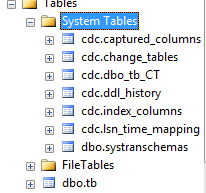
启用CDC之后会新增一个叫CDC的Schema和一系列的系统表、SP和View。官方建议不要直接查询系统表而是使用对应的系统SP/FN来获取CDC数据。

clip_image002

系统对象 说明 建议使用的对象
cdc.captured_columns 为在捕获实例中跟踪的每一列返回一行 sys.sp_cdc_get_source_columns
cdc.change_tables 为数据库中的每个更改表返回一行 sys.sp_cdc_help_change_data_capture
cdc.ddl_history 针对启用了变更数据捕获的表所做的每一数据定义语言 (DDL) 更改返回一行 sys.sp_cdc_get_ddl_history
cdc.lsn_time_mapping 为每个在更改表中存在行的事务返回一行 sys.fn_cdc_map_lsn_to_time (Transact-SQL) ,sys.fn_cdc_map_time_to_lsn (Transact-SQL)
cdc.index_column 为与更改表关联的每一索引列返回一行 sys.sp_cdc_help_change_data_capture
msdb.dbo.cdc_jobs 存储用于捕获和清除作业的变更数据捕获配置参数 NA
cdc.<capture_instance>_CT 对源表启用变更数据捕获时创建的更改表。 该表为对源表执行的每个插入和删除操作返回一行,为对源表执行的每个更新操作返回两行.capture_instance格式=SchameName_TableName cdc.fn_cdc_get_all_changes_<capture_instance> ,

cdc.fn_cdc_get_net_changes_<capture_instance>

创建测试表并对期启用CDC。使用sys.sp_cdc_enable_table 对表启用CDC。

复制代码
--Create a test table for CDC

use CDCTest

GO

create table tb(ID int primary key ,name varchar(20),weight decimal(10,2));

go

EXECUTE sys.sp_cdc_enable_table

    @source_schema = N'dbo'

  , @source_name = N'tb'

  , @role_name = null;

GO
复制代码

如果源表是数据库中第一个要启用变更数据捕获的表,并且数据库不存在事务发布,则 sys.sp_cdc_enable_table 还将为数据库创建捕获和清理作业。 它将 sys.tables 目录视图中的 is_tracked_by_cdc 列设置为 1。

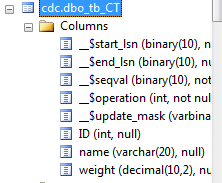
对应的跟踪表cdc.dbo_tb_CT包含了源表所有的变更数据。它包含原来所有的列和5个新的列,结构如图:

clip_image003

验证

当在源表中操行数据更改操作,表cdc.dbo_tb_CT会记录下来。试一下:

clipboard[22]

为什么没有数据呢?因为之前介绍过了,CDC是靠作业来捕获变更数据的,我的Agent还没有运行。

手动启用后,就有数据了。

clip_image005

结果列的含义:

列名 数据类型 说明
__$start_lsn binary(10) 更改提交的LSN。在同一事务中提交的更改将共享同一个提交 LSN 值。
__$seqval binary(10) 一个事务内可能有多个更改发生,这个值用于对它们进行排序。
__$operation int 更改操作的类型:

1 = 删除

2 = 插入

3 = 更新(捕获的列值是执行更新操作前的值)。

4 = 更新(捕获的列值是执行更新操作后的值)。

__$update_mask varbinary(128) 位掩码,源表中被CDC跟踪的每一列对应一个位。如果__$operation = 1 或 2,该值将所有已定义的位设置为 1。如果__$operation = 3 或 4,则只有那些对应已更改列的位设置为 1。

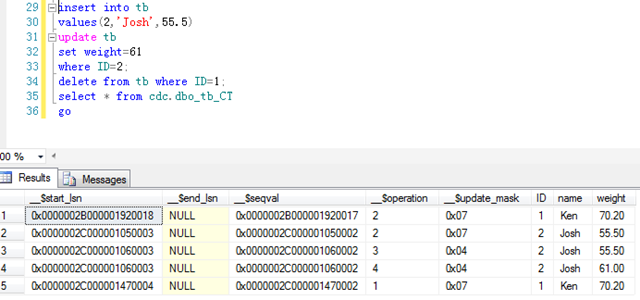
现在再插入一行,并更新它,然后再删除ID=1的行。再查看结果:

clip_image006

简单说明一下跟踪的查询结果:总共5行,第一行和第二行是插入数据,第三行和第四行是更新前后的数据,第五行是删除数据。操作类型由_$operation值可得知。

简单应用

前文中创建的tb表,记录了每个人的姓名和体重变化信息。另外某一个数据库(表tb_rs),它是体重变化趋势报表的数据源。它每天同步一次数据,更新自己的数据。怎么用CDC来实现这个需求呢?

CDC中记录了start_lsn,如果能知道tb_rs上次同步完成时,tb中被同步的最大LSN。那下次同步时,只需要同步tb表中大于此LSN的变更记录即可。

问题就简单:获取上次同步完成tb的最大LSN,获取大于此LSN的所有变更记录,更新tb_rs。

复制代码
insert into tb

values(1,'Ken',70.2),(3,'Joe',66),(4,'Rose',50)

update tb

set weight=70

where ID=3;

delete from tb where name='Rose';

go

DECLARE @begin_time datetime, @end_time datetime, @begin_lsn binary(10), @end_lsn binary(10); 

--get the interval

select @begin_time=GETDATE()-1,@end_time=GETDATE();

--map the time to LSN of the CDC table tb

select  @begin_lsn = sys.fn_cdc_map_time_to_lsn('smallest greater than or equal', @begin_time),

  @end_lsn = sys.fn_cdc_map_time_to_lsn('largest less than or equal', @end_time);

--get the net changes within the specified LSNs

SELECT * FROM cdc.fn_cdc_get_net_changes_dbo_tb(@begin_lsn, @end_lsn, 'all');
复制代码

clip_image007

居然没有Rose的记录?Joe的信息被更新过,怎么才一条记录?

这是因为这里得到是净变更行,也就是最终结果的意思。新增然后又删除,不影响最终结果,所以没有。多次更新同一行的某一列数据,只返回最后更新的结果。

得到这个结果,我们就可以根据__$operation和实际数据定义同步数据的逻辑了。比如:

复制代码
--generate sync statements

SELECT (case __$operation when 2 then 'insert into tb_rs values ('+cast(ID as varchar(2))+', '+Name+', '+cast(weight as varchar(10))+')'

        when 4 then 'update tb_rs set name='+name+',weight='+cast(weight as varchar(10))+' where ID='++cast(ID as varchar(2)) END)

FROM cdc.fn_cdc_get_net_changes_dbo_tb(@begin_lsn, @end_lsn, 'all');
复制代码

对于更新过的行,同步数据时,我想要先判断出列是否被更改过和被更改的时间。更改过的列才需要被同步,而不是所有列同步一次。以name为例:

复制代码
DECLARE @begin_time datetime, @end_time datetime, @begin_lsn binary(10), @end_lsn binary(10); 

--get the interval

select @begin_time=GETDATE()-1,@end_time=GETDATE();

--map the time to LSN of the CDC table tb

select  @begin_lsn = sys.fn_cdc_map_time_to_lsn('smallest greater than or equal', @begin_time),

  @end_lsn = sys.fn_cdc_map_time_to_lsn('largest less than or equal', @end_time);

--get the all changes within the specified LSNs

SELECT *,

(Case sys.fn_cdc_has_column_changed('dbo_tb','name',__$update_mask) when 1 then 'Yes' when 0 then 'No' End) as isNameUpdated,

sys.fn_cdc_map_lsn_to_time(__$start_lsn) as updateTime

FROM cdc.fn_cdc_get_all_changes_dbo_tb(@begin_lsn, @end_lsn, 'all')

where __$operation in(3,4);

go
复制代码

CDC不仅能记录DML操作,还能记录DDL操作。查询cdc.ddl_history。

clip_image008

但有一点要格外注意:新增的列,能被CDC DDL跟踪到,但是新列的数据变更却不能被CDC跟踪到。如果需要跟踪它,先禁用表上的CDC,再启用即可。


CDC Agent Job

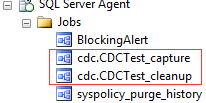
在指定的数据库中首次启用CDC,并且不存在事务复制,则会创建capture和cleanup两个作业:

clip_image009

capture作业是用于扫描日志文件,把变更记录写到变更表中。调用sp_MScdc_capture_job来实现,可以根据当前库的实际事务吞吐量来设置扫描参数和扫描间隔,使得在性能开销和跟踪需求间达到合理平衡。

cleanup作业是清理变更变表中的数据,默认三天的数据。

所以合理设定cleanup的间隔是非常重要的。

这两个作业的相关的配置存储在msdb.dbo.cdc_jobs中。当前的默认配置如图:

clip_image010

总结

1. CDC使用方便,易于配置,能与同步抽取等应用结合使用。

2. CDC能满足大多数对数据审计的要求,但不能告诉你“谁”更改了数据。

3. 虽说CDC是异步的,对应性能影响小,但还是会增加开销,特别是IO读写和容量方面的。开启CDC,每次更改,都至少会额外增加一次数据文件写和日志文件写操作。

————————————-

作者:Joe.TJ

Joe’s Blog:http://www.cnblogs.com/Joe-T/


transactionscope报“此操作对该事务的状态无效”问题 - 左正 - 博客园

mikel阅读(1130)

来源: transactionscope报“此操作对该事务的状态无效”问题 – 左正 – 博客园

编写的保存方法里面有个transactionscope代码一直报“此操作对该事务的状态无效”,弄了半天,原来是超时问题(transactionscope默认超时时间是1分钟)

经过修改,设置了超时时间为10分钟,目前已能正常保存:

using (TransactionScope scope = new TransactionScope(TransactionScopeOption.Required, new TimeSpan(6000000000)))
{

//保存内容

}

C# 线程手册 第六章 线程调试与跟踪 代码跟踪 - DanielWise - 博客园

mikel阅读(962)

来源: C# 线程手册 第六章 线程调试与跟踪 代码跟踪 – DanielWise – 博客园

我们下一个将要分析的代码检测技术是跟踪。在一个多线程应用程序中,这个技术非常重要。当已经启动了多个任务时,你可以跟踪一个线程的行为和相互之间的各个线程之间的影响。我们稍后将看到在这种情况下使用调试器是不现实的。.NET Framework 提供了很多有用的类来帮助开发人员轻松地实现跟踪功能。让我们看一下.NET Framework 提供的System.Diagnostics 命名空间中的跟踪类。

1. Trace: 这个类有很多向一个监听器写消息的静态方法。默认情况下,VS.NET 中的调试输出窗口将被用来作为监听程序,由于使用了监听器集合,所以你可以添加不同的监听器,比如文本监听器或者Windows事件日志监听器。

2. Debug: 这个类的方法和Trace 类的一样,都向一个监听器应用程序中写入信息。这两个类在使用上最大的不同是,Trace 用于运行阶段,Debug 用于开发阶段。

3. BooleanSwitch: 这个类允许我们定义一个开关来打开/关闭跟踪消息。

4. TraceSwitch: 这个类提供四个不同的跟踪级别来帮助开发人员选择发送不同级别的消息给监听器。

Trace 类

在这部分,我们将分析Trace 类中使用最频繁的几个方法。这些方法由.NET Framework包装好后提供给我们。Trace 类位于System.Diagnostics 命名空间中并提供很多静态方法来发送消息给监听程序。

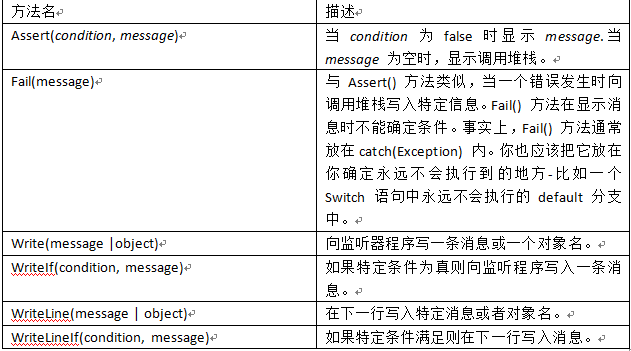
下表列出来由Trace 类提供的一些静态方法:

2012-4-23 21-04-07

这些方法的默认行为取决于选择的监听器程序。例如,当使用默认监听器的时候,Assert() 方法会显示一个消息框。

默认监听器程序

Trace 类提供一个允许我们添加一个新的监听器程序的监听器集合。当没有向监听器集合中添加新的监听器对象时,Trace 类就会使用默认的监听器程序:调试输出窗体。这个窗体由Visual Studio.NET IDE 在调试过程中提供。让我们来看一个简单的例子,TraceExample:

/*************************************
/* Copyright (c) 2012 Daniel Dong
 * 
 * Author:Daniel Dong
 * Blog:  www.cnblogs.com/danielWise
 * Email: guofoo@163.com
 * 
 */

using System;
using System.Collections.Generic;
using System.Linq;
using System.Text;
using System.Diagnostics;

namespace TraceExample
{
    class Program
    {
        static void Main(string[] args)
        {
            Trace.WriteLine("Enter Main()");

            for (int i = 0; i < 6; i++)
            {
                Trace.WriteLine(i);
            }

            Trace.WriteLine("Exiting from Main()");
        }
    }
}

这段代码真的非常简单;当进入和退出Main() 方法时它打出调试信息,在循环中累加变量值。在下一个截图中,你可以看到Visual Studio.NET 输出监听器是如何显示信息的:

2012-4-23 21-26-57

Trace 类也提供了两个有用的方法来断言错误提示:Assert() 和 Fail(). 前者允许开发人员检查作为参数传入的条件是否满足并在条件不满足时向监听器中写入一条消息。后者会在每次发生失败时向监听器中写入一条消息。当监听器集合中没有其他监听器对象时,Assert() 方法显示一个消息对话框来提供用户断言失败。下面的代码片段,TraceAssert.cs, 可以在SQL Server 服务被故意停止且引发一个连接错误的时候测试出来:

/*************************************
/* Copyright (c) 2012 Daniel Dong
 * 
 * Author:Daniel Dong
 * Blog:  www.cnblogs.com/danielWise
 * Email: guofoo@163.com
 * 
 */

using System;
using System.Collections.Generic;
using System.Linq;
using System.Text;
using System.Diagnostics;
using System.Threading;
using System.Data.SqlClient;

namespace TraceExample
{
    class Program
    {
        [STAThread]
        static void Main(string[] args)
        {
            //Create a thread
            Thread t = new Thread(new ThreadStart(DBThread));

            //Start the thread
            t.Start();
        }

        private static void DBThread()
        {
            //Create a connection object
            SqlConnection dbConn = 
                new SqlConnection(@"Data Source=DANIELFORWARD\SQLEXPRESS;Initial Catalog=Northwind;Integrated Security=True");

            //Create a command object to execute a SQL statement
            SqlCommand dbComm = new SqlCommand("SELECT * FROM Region", dbConn);

            SqlDataReader dr = null;

            Trace.WriteLine(DateTime.Now + "- Execute SQL statement");

            try
            {
                //Open the connection to the database
                dbConn.Open();

                //Assert that the connection opened
                Trace.Assert(dbConn.State == System.Data.ConnectionState.Open, "Error", "Connection failed...");

                //Execute the SQL statement
                dr = dbComm.ExecuteReader(System.Data.CommandBehavior.CloseConnection);

                //Assert that the statement executed OK
                Trace.Assert(dr != null, "Error", "The SqlDataReader is null.");

                while (dr.Read())
                {
                    //Reading records
                    Trace.WriteLine(dr[0].ToString());
                }
            }
            catch (Exception ex)
            {
                //Log the error to the Trace application
                Trace.Fail("An error occured in database access, details: " + ex.Message);
            }
            finally
            {
                if (!dr.IsClosed && dr != null)
                {
                    dr.Close();
                }
            }
        }
    }
}

在Main() 方法中,创建并启动了一个新线程。新线程运行DBThread()中的代码。代码简单地连接了下SQL Server 的Northwind数据库,从Region表中收集所有数据。如果SQL Server 不可用,在执行代码过程中会弹出下面的断言失败窗体。

2012-4-23 21-53-30

引发异常断言的代码为:

Trace.Assert(dbConn.State == System.Data.ConnectionState.Open, "Error", "Connection failed...");

你可以看到,第一个参数检查连接状态是否打开。当连接没有打开时它将被设置为false, 然后会显示断言失败。你将会从本章的后续部分了解到也可以使用配置文件禁用消息跟踪。那样的话,你就可以在运行时决定是否显示断言消息。

Visual Studio 调试技巧 - LightSmaile - 博客园

mikel阅读(1264)

来源: Visual Studio 调试技巧 – LightSmaile – 博客园

写在前面:假定你在日常的工作中使用到了Visual Studio,并期望了解一些调试技巧来提高工作效率,也许本文适合你。以下Visual Studio简称vs。

一、入门

以最简单的控制台应用程序为例,代码如下:

 1 class Program
 2 {
 3     static void Main(string[] args)
 4     {
 5         int result = Sum(2, 3);
 6         Console.WriteLine("2+3={0}", result);
 7     }
 8 
 9     private static int Sum(int a,int b)
10     {
11         return a + b;
12     }
13 }

调试的根本目的是跟踪代码、程序的状态,判断是否按照期望的行为运行。常用的跟踪手段有控制台输出、日志输出以及断点调试。

  1. 控制台输出用于开发环境,可以在vs输出窗口中查看程序输出的内容如下图所示:

由于是控制台应用程序,Console.WriteLine() 输出的内容不会显示在输出窗口,故采用Trace.WriteLine() 。对非控制台应用程序,Console.WriteLine() 输出的内容会正常显示在输出窗口。

2. 日志输出用于开发环境和生产环境,但更多用于生产环境,用来收集程序的运行信息。常用的日志组件有Log4Net、NLog以及自定义日志组件。依据问题严重程度大致分为严重错误、错误、警告、信息以及调试信息等几个级别。可结合实际需求灵活配置。

3. 断点调试多用于开发环境,通过设置断点,让程序在指定的位置暂停,以便观察上下文环境情况。

以上图为例,添加断点后,鼠标移动到变量名上,可以观察一些变量的值。对于复杂类型的变量,通过选中变量,右键选择快速监视的方式。避免鼠标移动后,监视的信息消失。

以上三种调试方法中,对于开发环境而言,使用最为频繁的方法当数断点调试。后面以断点调试为主,深入介绍。

二、进阶

  • 启动外部程序

要使用断点调试,需要满足一些断点调试的条件。对于可执行程序,如控制台应用程序、窗体应用程序、WPF应用程序以及Web应用程序,启动调试后,可以在期望的位置添加断点。而对于如动态库类型,不可以直接启动调试。想要调试这类项目,有两种方式。一种是可以设置项目属性中的启动操作,指定引用该动态库的可执行程序路径。

另一种方式是运行调用了动态库的可执行程序,通过附加可执行程序进程的方式来调试。

  • 附加进程

新建 DllDemo 动态库项目,添加 MyMath 类,添加静态方法 Max(int a,int b) 。代码如下:

 1 using System;
 2 
 3 namespace DllDemo
 4 {
 5     public class MyMath
 6     {
 7         public static int Max(int a,int b)
 8         {
 9             return Math.Max(a, b);
10         }
11     }
12 }

添加对 DllDemo 动态库项目引用, 并修改控制台应用程序如下。为了方便后续调试,控制台应用程序中添加 Console.Read()。

 1 using DllDemo;
 2 using System;
 3 using System.Diagnostics;
 4 
 5 namespace DebugDemo
 6 {
 7     class Program
 8     {
 9         static void Main(string[] args)
10         {
11             Console.WriteLine("等待键盘输入...");
12 
13             Console.Read();
14 
15             int result = Sum(2, 3);
16 
17             Console.WriteLine(string.Format("2+3={0}", result));
18 
19             result = MyMath.Max(2, 3);
20 
21             Console.WriteLine(string.Format("MyMath.Max(2, 3)={0}", result));
22         }
23 
24         private static int Sum(int a, int b)
25         {
26             return a + b;
27         }
28     }
29 }

运行控制台应用程序DebugDemo.exe ,附加该进程,在合适的位置添加断点。

  • 条件断点

在多层循环中,有时想要满足一定条件时命中断点。这时,条件断点会比较有效。以下面代码为例,想要index = 10(number > 10)时命中断点。

private int Sum(int number)
{
    int result = 0;

    for(int index= 0;index<number;index++)
    {
        result += index;
    }

    return result;
}

在合适的位置,按下F9设置断点。右键红色的断点,选择条件…,在条件中输入 index == 10 然后关闭。运行程序进入循环体后,会在index = 10时,命中断点

  • 即时窗口

有时,当程序运行起来后,进入了某种上下文环境中。此时,想要跟踪程序在另一种上下文环境的运行情况,可以在即时窗口中直接设置某些上下文环境。代码如下所示:

internal class People
{
    public string Name { get; set; }
    public bool IsMale { get; set; }
}

static void Main(string[] args)
{
    PrintSex(new People() { Name = "张三",IsMale =true});
}

private static void PrintSex(People people)
{
    if (people.IsMale)
    {
        Console.WriteLine("{0} is 男性", people.Name);
    }
    else
    {
        Console.WriteLine("{0} is 女性", people.Name);
    }
}

程序运行以后,会进入people为男性的分支。在 if (people.IsMale) 行设置断点,当进入断点以后,在即时窗口中更改 people.IsMale 的值后按下Enter键执行,使程序进入另一个分支。

  • 更改执行顺序

以即时窗口涉及到的代码为例,无论上下文环境如何,想要直接进入 people.IsMale 的分支,可在if (people.IsMale) 行设置断点。进入断点后,在红色断点处。直接按住鼠标左键,拖动到 Console.WriteLine(“{0} is 女性”, people.Name); 行,进入该分支。

  • 查看调用堆栈

当程序包含接口继承、抽象类继承等逻辑,导致结构过于复杂,知道功能入口以及出口,想要了解过程时,调用堆栈会比较有用。以下面代码为例:

private static void DoWork()
{
    DoWork1();
}

private static void DoWork1()
{
    DoWork2();
}

private static void DoWork2()
{
    DoWork3();
}

private static void DoWork3()
{
    Console.Write("DoWork3");
}

假设知道功能入口为DoWork,功能结果为DoWork3,想要了解DoWork3的调用逻辑,可以在DoWork3中设置断点,启动调试后打开调用堆栈窗口,如下图:

  • 异常设置

当程序运行以后,结果不是预期的。初步猜测发生了异常,由于某些原因,捕获了异常,却未妥善处理,导致异常信息被“吞”掉。此时,异常设置会格外有效。以下面代码为例:

private static void TryToDivideByZero()
{
    try
    {
        int a = 9;
        int b = 0;
        int c = a / b;
    }
    catch(Exception ex)
    {
        Console.WriteLine(ex.Message);
    }
}

由于方法中存在异常,又有异常捕获,后续逻辑会被打断,此时对异常设置做如下设置:

重新调试程序会有如下结果,方便快速定位异常发生点。

三、高级

在某些场景下,开发环境运行正常,非开发环境运行异常,依赖常规手段无法定位问题原因,想要断点调试,非开发环境运行缺少VS时,远程调试会比较有效。

在VS安装目录下拷贝远程调试所需的文件夹x86,x64到非开发环境

依据远程目标机系统环境,运行x86/x64文件夹下msvsmon.exe,选择工具中的选项菜单做如下配置:

运行待调试程序后,在VS中选择调试>附加到进程(ctrl+alt+p),设置连接类型,连接目标(远程ip地址或计算机名)后查找,会自动列出相关内容。

在可用进程中选择对应的进程

在合适的位置添加断点即可开始调试了

.Net利用Newtonsoft进行解析Json的快捷方法-云栖社区-阿里云

mikel阅读(697)

来源: .Net利用Newtonsoft进行解析Json的快捷方法-云栖社区-阿里云

现在异构系统之间的数据交换多采用Json格式

.Net如何快捷地解析Json和将Object转换成json呢?

1.利用Newtonsoft解析Json字符串

在百度上查找资料,利用Newtonsoft解析Json多是把Json转换成某一特定的Object,这样的不便之处是有事需要特意为了解析该json而写一个class,对一些不规范的的Json,难以用Object来转换的,用他们的方法就不叫难行得通了。

如,需要对以下Json进行解析

{
    "total": 1,
    "rows": [
        {
            "datetime": "2017-12-19 0:00:00",
            "product": "硅树脂",
            "value": "3"
        }
    ]
}

对于该Json,如果我们先转成object再来解析,那么问题来了,这个object怎么写呢?不好写,那么,我们就用最直接暴力的方法!!


            JArray obj = (JArray)JsonConvert.DeserializeObject("["+JsonText+"]");

需要注意的是,我们上文中提到的json的最外围是没有[ ]的,所以拼接一对[ ](代码中的红色部分)


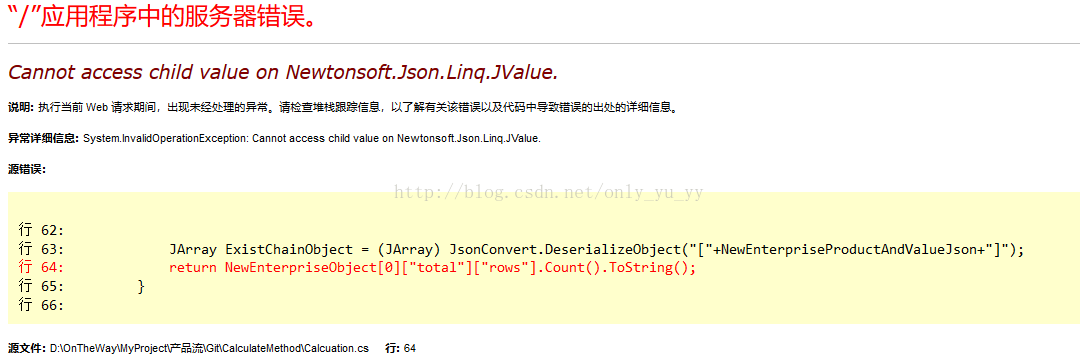
如果不加这对中括号,会产生以下报错:Cannot access child value on Newtonsoft.Json.Linq.JValue.

好,如何取json中的值呢?

比如  我们如果要去total的值1   怎么取?


obj[0]["total"].toString()

如果要去取rows下的项目的数量呢?


obj[0]["rows"].count()

如果要取rows的第一项的value的值呢?


obj[0]["rows"][0]["value"].toString()


学会了吗?很灵活简单,类似数组的用法。


最后,Newtonsoft还可以把object(包括list和枚举等)转换成json


JsonConvert.SerializeObject(object);

C#中使用GUID - Elliott.Dong - 博客园

mikel阅读(1021)

来源: C#中使用GUID – Elliott.Dong – 博客园

GUID(全局统一标识符)是指在一台机器上生成的数字,它保证对在同一时空中的所有机器都是唯一的。通常平台会提供生成GUID的API。生成算法很有意思,用到了以太网卡地址、纳秒级时间、芯片ID码和许多可能的数字。GUID的唯一缺陷在于生成的结果串会比较大。”
1. 一个GUID为一个128位的整数(16字节),在使用唯一标识符的情况下,你可以在所有计算机和网络之间使用这一整数。

2. GUID 的格式为“xxxxxxxx-xxxx-xxxx-xxxx-xxxxxxxxxxxx”,其中每个 x 是 0-9 或 a-f 范围内的一个十六进制的数字。例如:337c7f2b-7a34-4f50-9141-bab9e6478cc8 即为有效的 GUID 值。

3. 世界上(Koffer注:应该是地球上)的任何两台计算机都不会生成重复的 GUID 值。GUID 主要用于在拥有多个节点、多台计算机的网络或系统中,分配必须具有唯一性的标识符。

4. 在 Windows 平台上,GUID 应用非常广泛:注册表、类及接口标识、数据库、甚至自动生成的机器名、目录名等。


.NET中使用GUID

GUID 在 .NET 中使用非常广泛,而且 .NET Framework 提供了专门 Guid 基础结构。
Guid 结构的常用法包括:
1) Guid.NewGUID()
生成一个新的 GUID 唯一值
2) Guid.ToString()
将 GUID 值转换成字符串,便于处理
3)构造函数 Guid(string)
由 string 生成 Guid 结构,其中string 可以为大写,也可以为小写,可以包含两端的定界符“{}”或“()”,甚至可以省略中间的“-”,Guid 结构的构造函数有很多,其它构造用法并不常用。

.NET Framework 中可以使用类 GuidConverter 提供将 Guid 结构与各种其他表示形式相互转换的类型转换器。


C#中生成一个GUID

处理一个唯一标识符使得存储和获得信息变得更加容易。在处理一个数据库中这一功能变得尤其有用,因为一个GUID能够操作一个主键。

同样,SQL Server也很好地集成了GUID的用途。SQL Server数据类型uniqueidentifier能够存储一个GUID数值。你可以通过使用NEWID()函数在SQL Server中生成这一数值,或者可以在SQL Server之外生成GUID,然后再手动地插入这一数值。

在.NET中,后面一种方法显得更加直接。.NET Framework中的基本System类包括GUID数值类型。除此之外,这一数值类型包含了处理GUID数值的方法。特别地,NewGUID方法允许你很容易地生成一个新的GUID。


1using System;
2namespace DisplayGUID
3{
4    class Program
5    {
6        static void Main(string[] args)
7        {
8            GenerateGUID();
9        }

10        static void GenerateGUID()
11        {
12            Console.WriteLine(“GUID:” + System.Guid.NewGuid().ToString());
13        }

14    }

15}


下面为这一程序的输出:(虽然不同系统之间的GUID是变化的。)

GUID: 9245fe4a-d402-451c-b9ed-9c1a04247482

以上范例使用到System.Guid空间名称的NewGuid函数来返回一个数值。在这一点上,你可以看到GUID是一个很好的功能,但在程序的什么地方使用到它们,并如何使用它们?


在程序中使用一个GUID

一个GUID可以在后台数据库中操作一个主键。以下代码使用一个GUID在一个后台数据库中存储信息,这一数据库包含以下的列:

pk_guid  —uniqueidentifier  数据类型
name      —nvarchar  数据类型
这样出现一个包含文本框的简单Windows窗体。当选择按钮时,文本框中的数据被插入到数据库中name列。通过程序代码可以生成一个GUID并存储在pk_guid列中:


1using System;
2using System.Collections.Generic;
3using System.ComponentModel;
4using System.Data;
5using System.Drawing;
6using System.Linq;
7using System.Text;
8using System.Windows.Forms;
9using System.Data.SqlClient;
10
11namespace GuidSqlDBExample
12{
13    public partial class Form1 : Form
14    {
15        public Form1()
16        {
17            InitializeComponent();
18        }

19
20        private void btnInsert_Click(object sender, EventArgs e)
21        {
22            string _str = “server=(local);Initial Catalog=TestGuid;Integrated Security=SSPI”;
23            using (SqlConnection conn = new SqlConnection(_str))
24            {
25                try
26                {
27                    string _sqlInsert = “INSERT INTO dbo.Guid(pk_guid, name) VALUES (‘”+ System.Guid.NewGuid().ToString() + “‘, ‘” + txtName.Text + “‘)”;
28                    conn.Open();
29                    SqlCommand _cmd = new SqlCommand(_sqlInsert, conn);
30                    _cmd.ExecuteNonQuery();
31                }

32                catch (Exception ex)
33                {
34                    System.Console.Write(“Error: ” + ex.Message);
35                }

36            }

37        }

38    }

39
40}


另一个GUID程序将一个唯一的标识符分配给一个.NET类或者接口,也就是说,GUID作为一个属性被分配给类或者接口。可以使用标准属性语法来实现这一过程: 本

我们可以扩展第一个范例来分配一个GUID。System.Runtime.InteropServices空间名称必须被引用来使用GUID属性。以下C#代码实现了这一过程:


1using System;
2using System.Collections.Generic;
3using System.Linq;
4using System.Text;
5using System.Runtime.InteropServices;
6
7namespace GuidTest
8{
9    [Guid(“9245fe4a-d402-451c-b9ed-9c1a04247482”)]
10    class Program
11    {
12        static void Main(string[] args)
13        {
14            GenerateGUID();
15        }

16        static void GenerateGUID()
17        {
18            Console.WriteLine(“GUID:” + System.Guid.NewGuid().ToString());
19        }

20    }

21}


GUID永远是方便的
对于程序开发的各个方面,.NET Framework简化了建立和处理GUID数值的过程。在.NET程序需要的地方,这一功能很容易地生成唯一的数值。


c# OrderBy 实现List升序降序 - 贫民窟里的程序高手 - 博客园

mikel阅读(1282)

来源: c# OrderBy 实现List升序降序 – 贫民窟里的程序高手 – 博客园

本文转载自:http://blog.csdn.net/chadcao/article/details/8730132

1)前台代码

复制代码
<%@ Page Language="C#" AutoEventWireup="true" CodeBehind="Default.aspx.cs" Inherits="WebApplication8.Default" %>


<!DOCTYPE html PUBLIC "-//W3C//DTD XHTML 1.0 Transitional//EN" "http://www.w3.org/TR/xhtml1/DTD/xhtml1-transitional.dtd">


<html xmlns="http://www.w3.org/1999/xhtml">
<head runat="server">
    <title></title>
</head>
<body>
    <form id="form1" runat="server">
    <div>
        <asp:GridView ID="GridView1" runat="server">
        </asp:GridView>
    </div>
    </form>
</body>
</html>
复制代码

2)后台代码

复制代码
using System;
using System.Collections.Generic;
using System.Linq;
using System.Web;
using System.Web.UI;
using System.Web.UI.WebControls;


namespace WebApplication8
{
    public partial class Default : System.Web.UI.Page
    {
        protected void Page_Load(object sender, EventArgs e)
        {
            if (!IsPostBack)
            {
                BindStudents();
            }
        }
        private void BindStudents()
        {
            List<Student> items = GetStudents().OrderBy(u => u.Name).ToList();//order by name asc
            //List<Student> items = GetStudents().OrderByDescending(u => u.Name).ToList();//order by name desc
            GridView1.DataSource = items;
            GridView1.DataBind();
        }
        private List<Student> GetStudents()
        {
            List<Student> items = new List<Student>();
            items.Add(new Student
            {
                ID = 2,
                Name = "abd"
            });
            items.Add(new Student
            {
                ID = 1,
                Name = "abc"
            });
            items.Add(new Student
            {
                ID = 3,
                Name = "bcd"
            });
            items.Add(new Student
            {
                ID = 4,
                Name = "acd"
            });
            return items;
        }
    }
    public class Student
    {
        public int ID { set; get; }
        public string Name { set; get; }
    }
}
复制代码

【半小时大话.net依赖注入】(下)详解AutoFac+实战Mvc、Api以及.NET Core的依赖注入 - 在7楼's Blogs

mikel阅读(806)

来源: 【半小时大话.net依赖注入】(下)详解AutoFac+实战Mvc、Api以及.NET Core的依赖注入 – 在7楼’s Blogs

系列目录#

  1. 第一章|理论基础+实战控制台程序实现AutoFac注入
  2. 第二章|AutoFac的使用技巧
  3. 第三章|实战Asp.Net Framework Web程序实现AutoFac注入
  4. 第四章|实战Asp.Net Core自带DI实现依赖注入
  5. 第五章|实战Asp.Net Core引入AutoFac的两种方式

前言#

本来计划是五篇文章的,每章发个半小时随便翻翻就能懂,但是第一篇发了之后,我发现.NET环境下很多人对IoC和DI都很排斥,搞得评论区异常热闹。
同一个东西,在Java下和在.NET下能有这么大的差异,也是挺有意思的一件事情。
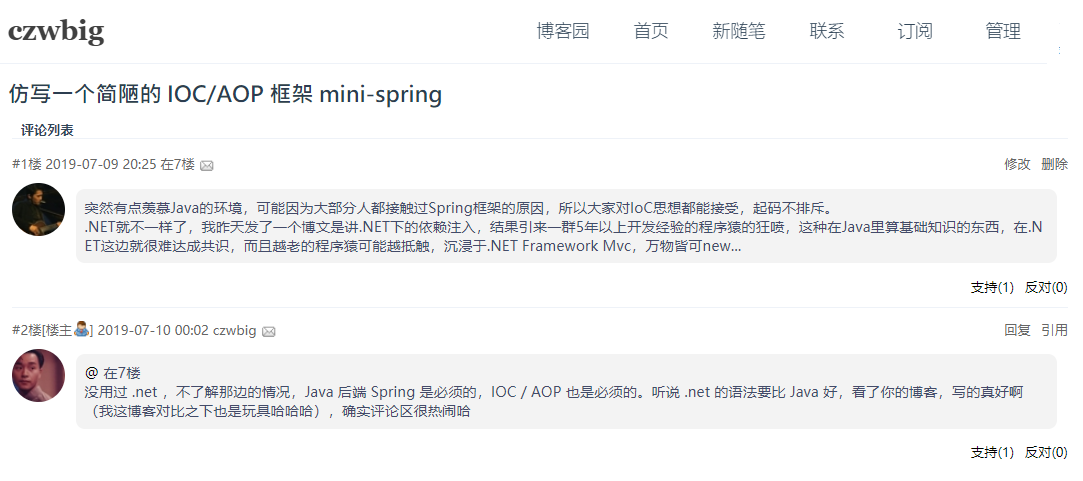
所以我就把剩下四篇内容精简再精简,合成一篇了,权当是写给自己的一个备忘记录了。
GitHub源码地址:https://github.com/WangRui321/Ray.EssayNotes.AutoFac

源码是一个虚构的项目框架,类似于样例性质的代码或者测试程序,里面很多注释,对理解DI,或怎么在MVC、WebApi和Core Api分别实现依赖注入有很好的帮助效果。
所以,以下内容,配合源码食用效果更佳~

第一部分:详解AutoFac用法#

名词解释#

老规矩,理论先行。

组件(Components)#

一串声明了它所提供服务和它所消费依赖的代码。

可以理解为容器内的基本单元,一个容器内会被注册很多个组件,每个组件都有自己的信息:比如暴露的服务类型、生命周期域、绑定的具象对象等。

服务(Services)#

一个在提供和消费组件之间明确定义的行为约定。

和项目中的xxxService不同,AutoFac的服务是对容器而言的,可以简单的理解为上一章讲的组件的暴露类型(即对外开放的服务类型),也就是As方法里的东西:

Copy
builder.RegisterType<CallLogger>()
       .As<ILogger>()
       .As<ICallInterceptor>();

这里,针对同一个注册对象(CallLogger),容器就对外暴露了两个服务(service),ILogger服务和ICallInterceptor服务。

生命周期作用域(LifeTimeScope)#

  • 生命周期

指服务实例在你的应用中存在的时长:从开始实例化到最后释放结束。

  • 作用域

指它在应用中能共享给其他组件并被消费的作用域。例如, 应用中有个全局的静态单例,那么该全局对象实例的 “作用域” 将会是整个应用。

  • 生命周期作用域

其实是把这两个概念组合在了一起, 可以理解为应用中的一个工作单元。后面详细讲。

怎么理解它们的关系#

容器是一个自动售货机,组件是放在里面的在售商品,服务是商品的出售名称
把商品(项目里的具象对象)放入自动售货机(容器)上架的过程叫注册
注册的时候会给商品贴上标签,标注该商品的名称,这个名称就叫服务
我们还可以标注这个商品的适用人群和过期时间等(生命周期作用域);
把这个包装后的商品放入自动售货机后,它就变成了在售商品(组件)。
当有顾客需要某个商品时,他只要对着售货机报一个商品名(服务名),自动售货机找到对应商品,抛出给客户,这个抛给你的过程,就叫做注入你;
而且这个售货机比较智能,抛出前还可以先判断商品是不是过期了,该不该抛给你。

注册组件#

即在容器初始化时,向容器内添加对象的操作。AutoFac封装了以下几种便捷的注册方法:

反射注册#

直接指定注入对象与暴露类型,使用RegisterType<T>()或者RegisterType(typeof(T))方法:

Copy
builder.RegisterType<StudentRepository>()
    .As<IStudentRepository>();
builder.RegisterType(typeof(StudentService))
    .As(typeof(IStudentService));

实例注册#

将实例注册到容器,使用RegisterInstance()方法,通常有两种:

  • new出一个对象注册:
Copy
var output = new StringWriter();
builder.RegisterInstance(output).As<TextWriter>();
  • 注册项目已存在单例:
Copy
builder.RegisterInstance(MySingleton.Instance).ExternallyOwned();

Lambda表达式注册#

Copy
builder.Register(x => new StudentRepository())
    .As<IStudentRepository>();
builder.Register(x => new StudentService(x.Resolve<IStudentRepository>()))
    .As<IStudentService>();

利用拉姆达注册可以实现一些常规反射无法实现的操作,比如一些复杂参数注册。

泛型注册#

最常见的就是泛型仓储的注册:

Copy
builder.RegisterGeneric(typeof(BaseRepository<>))
    .As(typeof(IBaseRepository<>))
    .InstancePerLifetimeScope();

条件注册#

通过加上判断条件,来决定是否执行该条注册语句。

  • IfNotRegistered

表示:如果没注册过xxx,就执行语句:

Copy
builder.RegisterType<TeacherRepository>()
    .AsSelf()
    .IfNotRegistered(typeof(ITeacherRepository));

只有当ITeacherRepository服务类型没有被注册过,才会执行该条注册语句。

  • OnlyIf

表示:只有…,才会执行语句:

Copy
builder.RegisterType<TeacherService>()
    .AsSelf()
    .As<ITeacherService>()
    .OnlyIf(x => 
            x.IsRegistered(new TypedService(typeof(ITeacherRepository)))||
            x.IsRegistered(new TypedService(typeof(TeacherRepository))));

只有当ITeacherRepository服务类型或者TeacherRepository服务类型被注册过,才会执行该条注册语句。

程序集批量注册#

最常用,也最实用的一个注册方法,使用该方法最好要懂点反射的知识。

Copy
        /// <summary>
        /// 通过反射程序集批量注册
        /// </summary>
        /// <param name="builder"></param>
        public static void BuildContainerFunc8(ContainerBuilder builder)
        {
            Assembly[] assemblies = Helpers.ReflectionHelper.GetAllAssemblies();

            builder.RegisterAssemblyTypes(assemblies)//程序集内所有具象类(concrete classes)
                .Where(cc =>cc.Name.EndsWith("Repository")|//筛选
                            cc.Name.EndsWith("Service"))
                .PublicOnly()//只要public访问权限的
                .Where(cc=>cc.IsClass)//只要class型(主要为了排除值和interface类型)
                //.Except<TeacherRepository>()//排除某类型
                //.As(x=>x.GetInterfaces()[0])//反射出其实现的接口,默认以第一个接口类型暴露
                .AsImplementedInterfaces();//自动以其实现的所有接口类型暴露(包括IDisposable接口)

            builder.RegisterGeneric(typeof(BaseRepository<>))
                .As(typeof(IBaseRepository<>));
        }

如上会批量注册项目中所有的Repository和Service。

属性注入#

讲属性注入之前,要先看下构造注入。

  • 构造注入
    即解析的时候,利用构造函数注入,形式如下:
Copy
    /// <summary>
    /// 学生逻辑处理
    /// </summary>
    public class StudentService : IStudentService
    {
        private readonly IStudentRepository _studentRepository;
        /// <summary>
        /// 构造注入
        /// </summary>
        /// <param name="studentRepository"></param>
        public StudentService(IStudentRepository studentRepository)
        {
            _studentRepository = studentRepository;
        }
    }

在构造函数的参数中直接写入服务类型,AutoFac解析该类时,就会去容器内部已存在的组件中查找,然后将匹配的对象注入到构造函数中去。

  • 属性注入
    属性注入与构造注入不同,是将容器内对应的组件直接注入到类内的属性中去,形式如下:
Copy
    /// <summary>
    /// 教师逻辑处理
    /// </summary>
    public class TeacherService : ITeacherService
    {
        /// <summary>
        /// 用于属性注入
        /// </summary>
        public ITeacherRepository TeacherRepository { get; set; }

        public string GetTeacherName(long id)
        {
            return TeacherRepository?.Get(111).Name;
        }
    }

要使用这种属性注入,在注册该属性所属类的时候,需要使用PropertiesAutowired()方法额外标注,如下:

Copy
builder.RegisterType<TeacherService>().PropertiesAutowired();

这样,容器在解析并实例化TeacherService类时,便会将容器内的组件与类内的属性做映射,如果相同则自动将组件注入到类内属性种。

  • 注意

属性注入争议性很大,很多人称这是一种_反模式_,事实也确实如此。
使用属性注入会让代码可读性变得极其复杂(而复杂难懂的代码一定不是好的代码,不管用的技术有多高大上)。
但是属性注入也不是一无是处,因为属性注入有一个特性:
在构造注入的时候,如果构造函数的参数中有一个对象在容器不存在,那么解析就会报错。
但是属性注入就不一样了,当容器内没有与该属性类型对应的组件时,这时解析不会报异常,只会让这个属性保持为空类型(null)。
利用这个特性,可以实现一些特殊的操作。

暴露服务#

即上面提到的As<xxx>()函数,AutoFac提供了以下三种标注暴露服务类型的方法:

以其自身类型暴露服务#

使用AsSelf()方法标识,表示以其自身类型暴露,也是当没有标注暴露服务的时候的默认选项。
如下四种写法是等效的:

Copy
builder.RegisterType<StudentService>();//不标注,默认以自身类型暴露服务
builder.RegisterType<StudentService>().AsSelf();
builder.RegisterType<StudentService>().As<StudentService>();
builder.RegisterType<StudentService>().As(typeof(StudentService));

以其实现的接口(interface)暴露服务#

使用As()方法标识,暴露的类型可以是多个,比如CallLogger类实现了ILogger接口和ICallInterceptor接口,那么可以这么写:

Copy
builder.RegisterType<CallLogger>()
       .As<ILogger>()
       .As<ICallInterceptor>()
       .AsSelf();

程序集批量注册时指定暴露类型#

  • 方法1:自己指定
Copy
        public static void BuildContainerFunc8(ContainerBuilder builder)
        {
            Assembly[] assemblies = Helpers.ReflectionHelper.GetAllAssemblies();

            builder.RegisterAssemblyTypes(assemblies)//程序集内所有具象类(concrete classes)
                .Where(cc =>cc.Name.EndsWith("Repository")|//筛选
                            cc.Name.EndsWith("Service"))
                .As(x=>x.GetInterfaces()[0])//反射出其实现的接口,并指定以其实现的第一个接口类型暴露
        }
  • 方法2:以其实现的所有接口类型暴露

使用AsImplementedInterfaces()函数实现,相当于一个类实现了几个接口(interface)就会暴露出几个服务,等价于上面连写多个As()的作用。

Copy
        public static void BuildContainerFunc8(ContainerBuilder builder)
        {
            Assembly[] assemblies = Helpers.ReflectionHelper.GetAllAssemblies();

            builder.RegisterAssemblyTypes(assemblies)//程序集内所有具象类(concrete classes)
                .Where(cc =>cc.Name.EndsWith("Repository")|//筛选
                            cc.Name.EndsWith("Service"))
                .AsImplementedInterfaces();//自动以其实现的所有接口类型暴露(包括IDisposable接口)
        }

生命周期作用域#

相当于UnitWork(工作单元)的概念。下面罗列出了AutoFac与.NET Core的生命周期作用域,并作了简要的对比。

AutoFac的生命周期作用域#

下面讲下AutoFac定义的几种生命周期作用域,上一篇评论里也有人提了,关于生命周期作用域这块确实不是很好理解,所以下面每中类型我都写了一个例子程序,这些例子程序对理解很有帮助,只要能读懂这些例子程序,就一定能弄懂这些生命周期作用域。(例子项目源码里都有,可以去试着实际运行下,更易理解)

瞬时实例(Instance Per Dependency)

也叫每个依赖一个实例。
即每次从容器里拿出来的都是全新对象,相当于每次都new出一个。
在其他容器中也被标识为 ‘Transient'(瞬时) 或 ‘Factory’(工厂)。

  • 注册

使用InstancePerDependency()方法标注,如果不标注,这也是默认的选项。以下两种注册方法是等效的:

Copy
//不指定,默认就是瞬时的
builder.RegisterType<Model.StudentEntity>();

//指定其生命周期域为瞬时
builder.RegisterType<Model.StudentEntity>().InstancePerDependency();
  • 解析:
Copy
using (var scope = Container.Instance.BeginLifetimeScope())
{
    var stu1 = scope.Resolve<Model.StudentEntity>();
    Console.WriteLine($"第1次打印:{stu1.Name}");
    stu1.Name = "张三";
    Console.WriteLine($"第2次打印:{stu1.Name}");

    var stu2 = scope.Resolve<Model.StudentEntity>();
    Console.WriteLine($"第2次打印:{stu2.Name}");
}

上面解析了2次,有两个实例,stu1和stu2指向不同的两块内存,彼此之间没有关系。
打印结果:

单例(Single Instance)

即全局只有一个实例,在根容器和所有嵌套作用域内,每次解析返回的都是同一个实例。

  • 注册

使用SingleInstance()方法标识:

Copy
builder.RegisterType<Model.StudentEntity>().SingleInstance();
  • 解析:
Copy
//直接从根域内解析(单例下可以使用,其他不建议这样直接从根域内解析)
var stu1 = Container.Instance.Resolve<Model.StudentEntity>();
stu1.Name = "张三";
Console.WriteLine($"第1次打印:{stu1.Name}");

using (var scope1 = Container.Instance.BeginLifetimeScope())
{
    var stu2 = scope1.Resolve<Model.StudentEntity>();
    Console.WriteLine($"第2次打印:{stu2.Name}");

    stu1.Name = "李四";
}
using (var scope2 = Container.Instance.BeginLifetimeScope())
{
    var stu3 = scope2.Resolve<Model.StudentEntity>();
    Console.WriteLine($"第3次打印:{stu3.Name}");
}

上面的stu1、stu2、stu3都是同一个实例,在内存上它们指向同一个内存块。
打印结果:

域内单例(Instance Per Lifetime Scope)

即在每个生命周期域内是单例的。

  • 注册
    使用InstancePerLifetimeScope()方法标识:
Copy
x.RegisterType<Model.StudentEntity>().InstancePerLifetimeScope();
  • 解析
Copy
//子域一
using (var scope1 = Container.Instance.BeginLifetimeScope())
{
    var stu1 = scope1.Resolve<Model.StudentEntity>();
    Console.WriteLine($"第1次打印:{stu1.Name}");
    
    stu1.Name = "张三";

    var stu2 = scope1.Resolve<Model.StudentEntity>();
    Console.WriteLine($"第2次打印:{stu2.Name}");
}
//子域二
using (var scope2 = Container.Instance.BeginLifetimeScope())
{
    var stuA = scope2.Resolve<Model.StudentEntity>();
    Console.WriteLine($"第3次打印:{stuA.Name}");
    
    stuA.Name = "李四";

    var stuB = scope2.Resolve<Model.StudentEntity>();
    Console.WriteLine($"第4次打印:{stuB.Name}");
}

如上,在子域一中,虽然解析了2次,但是2次解析出的都是同一个实例,即stu1和stu2指向同一个内存块Ⅰ。
子域二也一样,stuA和stuB指向同一个内存块Ⅱ,但是内存块Ⅰ和内存块Ⅱ却不是同一块。
打印结果如下,第1次和第3次为null:

指定域内单例(Instance Per Matching Lifetime Scope)

即每个匹配的生命周期作用域一个实例。
该域类型其实是上面的“域内单例”的其中一种,不一样的是它允许我们给域“打标签”,只要在这个特定的标签域内就是单例的。

  • 注册
    使用InstancePerMatchingLifetimeScope(string tagName)方法注册:
Copy
builder.RegisterType<Worker>().InstancePerMatchingLifetimeScope("myTag");
  • 解析
Copy
//myScope标签子域一
using (var myScope1 = Container.Instance.BeginLifetimeScope("myTag"))
{
    var stu1 = myScope1.Resolve<Model.StudentEntity>();
    stu1.Name = "张三";
    Console.WriteLine($"第1次打印:{stu1.Name}");

    var stu2 = myScope1.Resolve<Model.StudentEntity>();
    Console.WriteLine($"第2次打印:{stu2.Name}");
    //解析了2次,但2次都是同一个实例(stu1和stu2指向同一个内存块Ⅰ)
}
//myScope标签子域二
using (var myScope2 = Container.Instance.BeginLifetimeScope("myTag"))
{
    var stuA = myScope2.Resolve<Model.StudentEntity>();
    Console.WriteLine($"第3次打印:{stuA.Name}");
    //因为标签域内已注册过,所以可以解析成功
    //但是因为和上面不是同一个子域,所以解析出的实例stuA与之前的并不是同一个实例,指向另一个内存块Ⅱ
}
//无标签子域三
using (var noTagScope = Container.Instance.BeginLifetimeScope())
{
    try
    {
        var stuOne = noTagScope.Resolve<Model.StudentEntity>();//会报异常
        Console.WriteLine($"第4次正常打印:{stuOne.Name}");
    }
    catch (Exception e)
    {
        Console.WriteLine($"第4次异常打印:{e.Message}");
    }
    //因为StudentEntity只被注册到带有myScope标签域内,所以这里解析不到,报异常
}

打印结果:

需要注意:

  • 第3次打印为null,不同子域即使标签相同,但也是不同子域,所以域之间不是同一个实例
  • 在其他标签的域内(包括无标签域)解析,会报异常

每次请求内单例(Instance Per Request)

该种类型适用于“request”类型的应用,比如MVC和WebApi。
其实质其实又是上一种的“指定域内单例”的一种特殊情况:AutoFac内有一个静态字符串叫Autofac.Core.Lifetime.MatchingScopeLifetimeTags.RequestLifetimeScopeTag,其值为"AutofacWebRequest",当“指定域内单例”打的标签是这个字符串时,那它就是“每次请求内单例”了。

  • 注册
    使用InstancePerRequest()方法标注:
Copy
builder.RegisterType<Model.StudentEntity>().InstancePerRequest();

也可以使用上面的域内单例的注册法(但是不建议):

Copy
//使用静态字符串标记
builder.RegisterType<Model.StudentEntity>().InstancePerMatchingLifetimeScope(Autofac.Core.Lifetime.MatchingScopeLifetimeTags.RequestLifetimeScopeTag);
//或者直接写明字符串
builder.RegisterType<Model.StudentEntity>().InstancePerMatchingLifetimeScope("AutofacWebRequest");

这里用控制台程序不好举例子就不写解析代码了,要理解“每次请求内单例”的作用,最好的例子就是EF中的DBContext,我们在一次request请求内,即使是用到了多个Service和多个Repository,也只需要一个数据库实例,这样即能减少数据库实例初始化的消耗,还能实现事务的功能。

.NET Core的生命周期作用域(Service lifetimes)#

相比于AutoFac的丰富复杂,.NET Core就比较简单粗暴了,只要3种类型:

瞬时实例(Transient)

与AutoFac的瞬时实例(Instance Per Dependency)相同,每次都是全新的实例。
使用AddTransient()注册:

Copy
services.AddTransient<IStudentService, StudentService>();

请求内单例(Scoped)

其意义与AutoFac的请求内单例(Instance Per Request)相同,但实际如果真正在.NET Core中使用使用AutoFac的话,应该使用AutoFac的域内单例(Instance Per LifetimeScope)来代替。
原因是.NET Core框架自带的DI(Microsoft.Extensions.DependencyInjection)全权接管了请求和生命周期作用域的创建,所以AutoFac无法控制,但是使用域内单例(Instance Per LifetimeScope)可以实现相同的效果。
使用AddScoped()注册:

Copy
services.AddScoped<IStudentService, StudentService>();

单例(Singleton)

与AutoFac的单例(Single Instance)相同。
使用AddSingleton();注册:

Copy
services.AddSingleton<StudentEntity>();

第二部分:.NET Framework Web程序AutoFac注入#

MVC项目#

思路很简单,三步走:

  1. 新建AutoFac容器
  2. 初始化容器,向容器注册所有需要的依赖对象
  3. 将AutoFac解析器设置为系统的依赖解析器(Dependency Resolver)

MVC容器#

除了AutoFac主包之外,还需要Nuget导入AutoFac.Mvc5包:

容器代码:

Copy
using System;
using System.Linq;
using System.Reflection;
//
using Autofac;
using Autofac.Integration.Mvc;
//
using Ray.EssayNotes.AutoFac.Repository.IRepository;
using Ray.EssayNotes.AutoFac.Repository.Repository;


namespace Ray.EssayNotes.AutoFac.Infrastructure.Ioc
{
    /// <summary>
    /// .net framework MVC程序容器
    /// </summary>
    public static class MvcContainer
    {
        public static IContainer Instance;

        /// <summary>
        /// 初始化MVC容器
        /// </summary>
        /// <param name="func"></param>
        /// <returns></returns>
        public static System.Web.Mvc.IDependencyResolver Init(Func<ContainerBuilder, ContainerBuilder> func = null)
        {
            //新建容器构建器,用于注册组件和服务
            var builder = new ContainerBuilder();
            //注册组件
            MyBuild(builder); 
            func?.Invoke(builder);
            //利用构建器创建容器
            Instance = builder.Build();

            //返回针对MVC的AutoFac解析器
            return new AutofacDependencyResolver(Instance);
        }

        public static void MyBuild(ContainerBuilder builder)
        {
            Assembly[] assemblies = Helpers.ReflectionHelper.GetAllAssembliesWeb();

            //注册仓储 && Service
            builder.RegisterAssemblyTypes(assemblies)//程序集内所有具象类(concrete classes)
                .Where(cc => cc.Name.EndsWith("Repository") |//筛选
                             cc.Name.EndsWith("Service"))
                .PublicOnly()//只要public访问权限的
                .Where(cc => cc.IsClass)//只要class型(主要为了排除值和interface类型)
                .AsImplementedInterfaces();//自动以其实现的所有接口类型暴露(包括IDisposable接口)

            //注册泛型仓储
            builder.RegisterGeneric(typeof(BaseRepository<>)).As(typeof(IBaseRepository<>));

            //注册Controller
            //方法1:自己根据反射注册
            //builder.RegisterAssemblyTypes(assemblies)
            //    .Where(cc => cc.Name.EndsWith("Controller"))
            //    .AsSelf();
            //方法2:用AutoFac提供的专门用于注册MvcController的扩展方法
            Assembly mvcAssembly = assemblies.FirstOrDefault(x => x.FullName.Contains(".NetFrameworkMvc"));
            builder.RegisterControllers(mvcAssembly);
        }
    }
}

这里Init()初始化函数返回类型变成了System.Web.Mvc.IDependencyResolver接口,即MVC的系统依赖解析器。
AutoFac自己封装了一个AutofacDependencyResolver类(AutoFac依赖解析器类)实现了这个接口,所以直接new一个AutofacDependencyResolver类返回,等下把这个AutoFac依赖解析器类设置为MVC的系统依赖解析器就可以了。

Copy
using System;
using System.Collections.Generic;
using System.Globalization;
using System.Reflection;
using System.Web.Mvc;

namespace Autofac.Integration.Mvc
{
  /// <summary>
  /// Autofac implementation of the <see cref="T:System.Web.Mvc.IDependencyResolver" /> interface.
  /// </summary>
  public class AutofacDependencyResolver : IDependencyResolver
  {
        //内部实现
        //......
  }

项目主程序:#

  • Global.asax启动项

启动时初始化容器,并把AutoFac生成的解析器设置为系统依赖解析器:

Copy
using System.Web.Mvc;
using System.Web.Optimization;
using System.Web.Routing;
//
using Ray.EssayNotes.AutoFac.Infrastructure.Ioc;


namespace Ray.EssayNotes.AutoFac.NetFrameworkMvc
{
    public class MvcApplication : System.Web.HttpApplication
    {
        protected void Application_Start()
        {
            AreaRegistration.RegisterAllAreas();
            FilterConfig.RegisterGlobalFilters(GlobalFilters.Filters);
            RouteConfig.RegisterRoutes(RouteTable.Routes);
            BundleConfig.RegisterBundles(BundleTable.Bundles);

            //初始化容器,并返回适用于MVC的AutoFac解析器
            System.Web.Mvc.IDependencyResolver autoFacResolver = MvcContainer.Init();
            //将AutoFac解析器设置为系统DI解析器
            DependencyResolver.SetResolver(autoFacResolver);
        }
    }
}

其中DependencyResolver.SetResolver()为MVC封装的一个静态方法,用于设置MVC的依赖解析器。
其参数只要是实现了System.Web.Mvc.IDependencyResolver接口的对象都可以,AutoFac自己封装的解析器AutofacDependencyResolver类实现了这个接口,所以可以传进来,从而实现了让AutoFac接管MVC的依赖注入。

  • 学生控制器:

直接利用构造注入就可以了:

Copy
using System.Web.Mvc;
//
using Ray.EssayNotes.AutoFac.Service.IService;


namespace Ray.EssayNotes.AutoFac.NetFrameworkMvc.Controllers
{
    /// <summary>
    /// 学生Api
    /// </summary>
    public class StudentController : Controller
    {
        private readonly IStudentService _studentService;

        /// <summary>
        /// 构造注入
        /// </summary>
        /// <param name="studentService"></param>
        public StudentController(IStudentService studentService)
        {
            _studentService = studentService;
        }

        /// <summary>
        /// 获取学生姓名
        /// </summary>
        /// <param name="id"></param>
        /// <returns></returns>
        public string GetStuNameById(long id)
        {
            return _studentService.GetStuName(id);
        }
    }
}

运行调用Api#

WebApi项目#

和MVC一样,思路很简单,三步走:

  1. 新建AutoFac容器
  2. 初始化容器,向容器注册所有需要的依赖对象
  3. 将AutoFac解析器设置为系统的依赖解析器(Dependency Resolver)

Api容器#

除了AutoFac主包之外,还需要Nuget导入AutoFac.WebApi2包:

容器代码:

Copy
using System;
using System.Linq;
using System.Reflection;
//
using Autofac;
using Autofac.Integration.WebApi;
//
using Ray.EssayNotes.AutoFac.Repository.Repository;
using Ray.EssayNotes.AutoFac.Repository.IRepository;


namespace Ray.EssayNotes.AutoFac.Infrastructure.Ioc
{
    /// <summary>
    /// .NET Framework WebApi容器
    /// </summary>
    public static class ApiContainer
    {
        public static IContainer Instance;

        /// <summary>
        /// 初始化Api容器
        /// </summary>
        /// <param name="func"></param>
        public static System.Web.Http.Dependencies.IDependencyResolver Init(Func<ContainerBuilder, ContainerBuilder> func = null)
        {
            //新建容器构建器,用于注册组件和服务
            var builder = new ContainerBuilder();
            //注册组件
            MyBuild(builder);
            func?.Invoke(builder);
            //利用构建器创建容器
            Instance = builder.Build();

            //返回针对WebApi的AutoFac解析器
            return new AutofacWebApiDependencyResolver(Instance);
        }

        public static void MyBuild(ContainerBuilder builder)
        {
            var assemblies = Helpers.ReflectionHelper.GetAllAssembliesWeb();

            //注册仓储 && Service
            builder.RegisterAssemblyTypes(assemblies)//程序集内所有具象类(concrete classes)
                .Where(cc => cc.Name.EndsWith("Repository") |//筛选
                             cc.Name.EndsWith("Service"))
                .PublicOnly()//只要public访问权限的
                .Where(cc => cc.IsClass)//只要class型(主要为了排除值和interface类型)
                .AsImplementedInterfaces();//自动以其实现的所有接口类型暴露(包括IDisposable接口)

            //注册泛型仓储
            builder.RegisterGeneric(typeof(BaseRepository<>)).As(typeof(IBaseRepository<>));

            //注册ApiController
            //方法1:自己根据反射注册
            //Assembly[] controllerAssemblies = assemblies.Where(x => x.FullName.Contains(".NetFrameworkApi")).ToArray();
            //builder.RegisterAssemblyTypes(controllerAssemblies)
            //    .Where(cc => cc.Name.EndsWith("Controller"))
            //    .AsSelf();
            //方法2:用AutoFac提供的专门用于注册ApiController的扩展方法
            Assembly mvcAssembly = assemblies.FirstOrDefault(x => x.FullName.Contains(".NetFrameworkApi"));
            builder.RegisterApiControllers(mvcAssembly);
        }
    }
}

这里Init()初始化函数返回类型变成了System.Web.Http.Dependencies.IDependencyResolver接口,即WebApi的系统依赖解析器。
AutoFac自己封装了一个AutofacWebApiDependencyResolver类(AutoFac针对WebApi的依赖解析器类)实现了这个接口,所以直接new一个AutofacWebApiDependencyResolver类返回,等下把这个AutoFac依赖解析器类设置为WebApi的系统依赖解析器就可以了。

WebApi主程序#

  • Global.asax启动项

在项目启动时初始化容器:

Copy
using System.Web.Http;
using System.Web.Mvc;
using System.Web.Optimization;
using System.Web.Routing;
//
using Ray.EssayNotes.AutoFac.Infrastructure.Ioc;


namespace Ray.EssayNotes.AutoFac.NetFrameworkApi
{
    public class WebApiApplication : System.Web.HttpApplication
    {
        protected void Application_Start()
        {
            AreaRegistration.RegisterAllAreas();
            GlobalConfiguration.Configure(WebApiConfig.Register);
            FilterConfig.RegisterGlobalFilters(GlobalFilters.Filters);
            RouteConfig.RegisterRoutes(RouteTable.Routes);
            BundleConfig.RegisterBundles(BundleTable.Bundles);

            //初始化容器,并返回适用于WebApi的AutoFac解析器
            System.Web.Http.Dependencies.IDependencyResolver autoFacResolver = ApiContainer.Init();
            //获取HttpConfiguration
            HttpConfiguration config = GlobalConfiguration.Configuration;
            //将AutoFac解析器设置为系统DI解析器
            config.DependencyResolver = autoFacResolver;
        }
    }
}

这里跟上面的MVC项目不太一样,是通过HttpConfiguration对象来设置依赖解析器的,但是原理相同,不赘述了。

  • 学生控制器:

直接利用构造函数注入即可:

Copy
using System.Web.Http;
//
using Ray.EssayNotes.AutoFac.Service.IService;


namespace Ray.EssayNotes.AutoFac.NetFrameworkApi.Controllers
{
    /// <summary>
    /// 学生Api
    /// </summary>
    public class StudentController : ApiController
    {
        private readonly IStudentService _studentService;

        /// <summary>
        /// 构造注入
        /// </summary>
        /// <param name="studentService"></param>
        public StudentController(IStudentService studentService)
        {
            _studentService = studentService;
        }

        /// <summary>
        /// 获取学生姓名
        /// </summary>
        /// <param name="id"></param>
        /// <returns></returns>
        [HttpGet]
        [Route("Student/GetStuNameById")]
        public string GetStuNameById(long id)
        {
            return _studentService.GetStuName(123);
        }
    }
}

运行调用接口#

第三部分:.NET Core的DI#

自带的DI#

与.NET Framework不同,.NET Core把DI提到了非常重要的位置,其框架本身就集成了一套DI容器。
针对其自带DI,主要理解两个对象,IServiceCollection和 IServiceProvider。

  • IServiceCollection

用于向容器注册服务,可以和AutoFac的ContainerBuilder(容器构建器)类比。

  • IServiceProvider

负责从容器中向外部提供实例,可以和AutoFac的解析的概念类比。

注册的地方就在主程序下的startup类中。

但是其本身的注册语法并没有AutoFac那么丰富,泛型注册、批量注册这些全都没有,只有下面这种最基础的一个一个注册的形式:

Copy
using System.Linq;
using System.Reflection;
//
using Microsoft.AspNetCore.Builder;
using Microsoft.AspNetCore.Hosting;
using Microsoft.AspNetCore.Mvc;
using Microsoft.Extensions.Configuration;
using Microsoft.Extensions.DependencyInjection;
//
using Ray.EssayNotes.AutoFac.Infrastructure.CoreIoc.Extensions;
using Ray.EssayNotes.AutoFac.Infrastructure.CoreIoc.Helpers;


namespace Ray.EssayNotes.AutoFac.CoreApi
{
    public class Startup
    {
        public IConfiguration Configuration { get; }

        public Startup(IConfiguration configuration)
        {
            Configuration = configuration;
        }

        // This method gets called by the runtime. Use this method to add services to the container.
        public void ConfigureServices(IServiceCollection services)
        {
            services.AddMvc().SetCompatibilityVersion(CompatibilityVersion.Version_2_2);
            //注册
            //自定义注册
            //注册仓储
            services.AddScoped<ITeacherRepository, TeacherRepository>();
            services.AddScoped<IStudentRepository, StudentRepository>();
            services.AddScoped<IBaseRepository<StudentEntity>, BaseRepository<StudentEntity>>();
            services.AddScoped<IBaseRepository<TeacherEntity>, BaseRepository<TeacherEntity>>();
            services.AddScoped<IBaseRepository<BookEntity>, BaseRepository<BookEntity>>();
            //注册Service
            services.AddScoped<IStudentService, StudentService>();
            services.AddScoped<ITeacherService, TeacherService>();
            services.AddScoped<IBookService, BookService>();
        }

        // This method gets called by the runtime. Use this method to configure the HTTP request pipeline.
        public void Configure(IApplicationBuilder app, IHostingEnvironment env)
        {
            if (env.IsDevelopment())
            {
                app.UseDeveloperExceptionPage();
            }
            else
            {
                // The default HSTS value is 30 days. You may want to change this for production scenarios, see https://aka.ms/aspnetcore-hsts.
                app.UseHsts();
            }

            app.UseHttpsRedirection();
            app.UseMvc();
        }
    }
}

所以,大家通常都会自己去扩展这些注册方法,以实现一些和AutoFac一样的便捷的注册操作,下面我根据反射写了一个小扩展,写的比较简单潦草,可以参考下:

扩展#

扩展代码:

Copy
using System;
using System.Collections.Generic;
using System.Linq;
using System.Reflection;
//
using Microsoft.Extensions.DependencyInjection;
//
using Ray.EssayNotes.AutoFac.Model;
using Ray.EssayNotes.AutoFac.Repository.IRepository;
using Ray.EssayNotes.AutoFac.Repository.Repository;
using Ray.EssayNotes.AutoFac.Service.IService;
using Ray.EssayNotes.AutoFac.Service.Service;


namespace Ray.EssayNotes.AutoFac.Infrastructure.CoreIoc.Extensions
{
    /// <summary>
    /// asp.net core注册扩展
    /// </summary>
    public static class RegisterExtension
    {
        /// <summary>
        /// 反射批量注册
        /// </summary>
        /// <param name="services"></param>
        /// <param name="assembly"></param>
        /// <param name="serviceLifetime"></param>
        /// <returns></returns>
        public static IServiceCollection AddAssemblyServices(this IServiceCollection services, Assembly assembly, ServiceLifetime serviceLifetime = ServiceLifetime.Scoped)
        {
            var typeList = new List<Type>();//所有符合注册条件的类集合

            //筛选当前程序集下符合条件的类
            List<Type> types = assembly.GetTypes().
                Where(t => t.IsClass && !t.IsGenericType)//排除了泛型类
                .ToList();

            typeList.AddRange(types);
            if (!typeList.Any()) return services;

            var typeDic = new Dictionary<Type, Type[]>(); //待注册集合<class,interface>
            foreach (var type in typeList)
            {
                var interfaces = type.GetInterfaces();   //获取接口
                typeDic.Add(type, interfaces);
            }

            //循环实现类
            foreach (var instanceType in typeDic.Keys)
            {
                Type[] interfaceTypeList = typeDic[instanceType];
                if (interfaceTypeList == null)//如果该类没有实现接口,则以其本身类型注册
                {
                    services.AddServiceWithLifeScoped(null, instanceType, serviceLifetime);
                }
                else//如果该类有实现接口,则循环其实现的接口,一一配对注册
                {
                    foreach (var interfaceType in interfaceTypeList)
                    {
                        services.AddServiceWithLifeScoped(interfaceType, instanceType, serviceLifetime);
                    }
                }
            }
            return services;
        }

        /// <summary>
        /// 暴露类型可空注册
        /// (如果暴露类型为null,则自动以其本身类型注册)
        /// </summary>
        /// <param name="services"></param>
        /// <param name="interfaceType"></param>
        /// <param name="instanceType"></param>
        /// <param name="serviceLifetime"></param>
        private static void AddServiceWithLifeScoped(this IServiceCollection services, Type interfaceType, Type instanceType, ServiceLifetime serviceLifetime)
        {
            switch (serviceLifetime)
            {
                case ServiceLifetime.Scoped:
                    if (interfaceType == null) services.AddScoped(instanceType);
                    else services.AddScoped(interfaceType, instanceType);
                    break;
                case ServiceLifetime.Singleton:
                    if (interfaceType == null) services.AddSingleton(instanceType);
                    else services.AddSingleton(interfaceType, instanceType);
                    break;
                case ServiceLifetime.Transient:
                    if (interfaceType == null) services.AddTransient(instanceType);
                    else services.AddTransient(interfaceType, instanceType);
                    break;
                default:
                    throw new ArgumentOutOfRangeException(nameof(serviceLifetime), serviceLifetime, null);
            }
        }
    }
}

利用这个扩展,我们在startup里就可以用类似AutoFac的语法来注册了。

主程序#

注册代码:

Copy
using System.Linq;
using System.Reflection;
//
using Microsoft.AspNetCore.Builder;
using Microsoft.AspNetCore.Hosting;
using Microsoft.AspNetCore.Mvc;
using Microsoft.Extensions.Configuration;
using Microsoft.Extensions.DependencyInjection;
//
using Ray.EssayNotes.AutoFac.Infrastructure.CoreIoc.Extensions;
using Ray.EssayNotes.AutoFac.Infrastructure.CoreIoc.Helpers;


namespace Ray.EssayNotes.AutoFac.CoreApi
{
    public class Startup
    {
        public IConfiguration Configuration { get; }

        public Startup(IConfiguration configuration)
        {
            Configuration = configuration;
        }

        // This method gets called by the runtime. Use this method to add services to the container.
        public void ConfigureServices(IServiceCollection services)
        {
            services.AddMvc().SetCompatibilityVersion(CompatibilityVersion.Version_2_2);
            //注册
            
            //自定义批量注册
            Assembly[] assemblies = ReflectionHelper.GetAllAssembliesCoreWeb();
            //注册repository
            Assembly repositoryAssemblies = assemblies.FirstOrDefault(x => x.FullName.Contains(".Repository"));
            services.AddAssemblyServices(repositoryAssemblies);
            //注册service  
            Assembly serviceAssemblies = assemblies.FirstOrDefault(x => x.FullName.Contains(".Service"));
            services.AddAssemblyServices(serviceAssemblies);
        }

        // This method gets called by the runtime. Use this method to configure the HTTP request pipeline.
        public void Configure(IApplicationBuilder app, IHostingEnvironment env)
        {
            if (env.IsDevelopment())
            {
                app.UseDeveloperExceptionPage();
            }
            else
            {
                // The default HSTS value is 30 days. You may want to change this for production scenarios, see https://aka.ms/aspnetcore-hsts.
                app.UseHsts();
            }

            app.UseHttpsRedirection();
            app.UseMvc();
        }
    }
}

其实AutoFac针对.NET Core已经帮我们集成了一套注册的扩展,我们可以通过两种方式把AutoFac引入.NET Core:一种是将AutoFac容器作为辅助容器,与.NET Core的DI共存,我们可以同时向两个容器里注册组件;一种是让AutoFac容器接管.NET Core的DI,注册时只选择往Autofac容器中注册。
下面就分别实现下这两种引入AutoFac的方式。

AutoFac作为辅助注册#

Core容器#

先按照之前写AutoFac容器的方法,新建一个针对Core的AutoFac容器:

Copy
using System;
//
using Microsoft.Extensions.DependencyInjection;
//
using Autofac;
using Autofac.Extensions.DependencyInjection;
//
using Ray.EssayNotes.AutoFac.Repository.IRepository;
using Ray.EssayNotes.AutoFac.Repository.Repository;


namespace Ray.EssayNotes.AutoFac.Infrastructure.CoreIoc
{
    /// <summary>
    /// Core的AutoFac容器
    /// </summary>
    public static class CoreContainer
    {
        /// <summary>
        /// 容器实例
        /// </summary>
        public static IContainer Instance;

        /// <summary>
        /// 初始化容器
        /// </summary>
        /// <param name="services"></param>
        /// <param name="func"></param>
        /// <returns></returns>
        public static IServiceProvider Init(IServiceCollection services, Func<ContainerBuilder, ContainerBuilder> func = null)
        {
            //新建容器构建器,用于注册组件和服务
            var builder = new ContainerBuilder();
            //将Core自带DI容器内的服务迁移到AutoFac容器
            builder.Populate(services);
            //自定义注册组件
            MyBuild(builder);
            func?.Invoke(builder);
            //利用构建器创建容器
            Instance = builder.Build();

            return new AutofacServiceProvider(Instance);
        }

        /// <summary>
        /// 自定义注册
        /// </summary>
        /// <param name="builder"></param>
        public static void MyBuild(this ContainerBuilder builder)
        {
            var assemblies = Helpers.ReflectionHelper.GetAllAssembliesCoreWeb();

            //注册仓储 && Service
            builder.RegisterAssemblyTypes(assemblies)
                .Where(cc => cc.Name.EndsWith("Repository") |//筛选
                             cc.Name.EndsWith("Service"))
                .PublicOnly()//只要public访问权限的
                .Where(cc => cc.IsClass)//只要class型(主要为了排除值和interface类型)
                .AsImplementedInterfaces();//自动以其实现的所有接口类型暴露(包括IDisposable接口)

            //注册泛型仓储
            builder.RegisterGeneric(typeof(BaseRepository<>)).As(typeof(IBaseRepository<>));

            /*
            //注册Controller
            Assembly[] controllerAssemblies = assemblies.Where(x => x.FullName.Contains(".CoreApi")).ToArray();
            builder.RegisterAssemblyTypes(controllerAssemblies)
                .Where(cc => cc.Name.EndsWith("Controller"))
                .AsSelf();
                */
        }
    }
}

主程序#

在主程序中新建一个StartupWithAutoFac类,用于注册。
StartupWithAutoFac代码:

Copy
using Microsoft.AspNetCore.Builder;
using Microsoft.AspNetCore.Hosting;
using Microsoft.AspNetCore.Mvc;
using Microsoft.Extensions.Configuration;
using Microsoft.Extensions.DependencyInjection;
//
using Autofac;
//
using Ray.EssayNotes.AutoFac.Infrastructure.CoreIoc;


namespace Ray.EssayNotes.AutoFac.CoreApi
{
    public class StartupWithAutoFac
    {
        public IConfiguration Configuration { get; }

        public StartupWithAutoFac(IConfiguration configuration)
        {
            Configuration = configuration;
        }

        // This method gets called by the runtime. Use this method to add services to the container.
        public void ConfigureServices(IServiceCollection services)
        {
            services.AddMvc().SetCompatibilityVersion(CompatibilityVersion.Version_2_2);
        }

        /// <summary>
        /// 利用该方法可以使用AutoFac辅助注册,该方法在ConfigureServices()之后执行,所以当发生覆盖注册时,以后者为准。
        /// 不要再利用构建器去创建AutoFac容器了,系统已经接管了。
        /// </summary>
        /// <param name="builder"></param>
        public void ConfigureContainer(ContainerBuilder builder)
        {
            builder.MyBuild();
        }

        // This method gets called by the runtime. Use this method to configure the HTTP request pipeline.
        public void Configure(IApplicationBuilder app, IHostingEnvironment env)
        {
            if (env.IsDevelopment())
            {
                app.UseDeveloperExceptionPage();
            }
            else
            {
                // The default HSTS value is 30 days. You may want to change this for production scenarios, see https://aka.ms/aspnetcore-hsts.
                app.UseHsts();
            }

            app.UseHttpsRedirection();
            app.UseMvc();
        }
    }
}

这里其他地方与原startup都相同,只是多了一个ConfigureContainer()方法,在该方法内可以按照AutoFac的语法进行自由注册。

然后修改program类,将AutoFac hook进管道,并将StartupWithAutoFac类指定为注册入口:

Copy
using Microsoft.AspNetCore;
using Microsoft.AspNetCore.Hosting;


namespace Ray.EssayNotes.AutoFac.CoreApi
{
    public class Program
    {
        public static void Main(string[] args)
        {
            CreateWebHostBuilder(args).Build().Run();
        }

        public static IWebHostBuilder CreateWebHostBuilder(string[] args) =>
            WebHost.CreateDefaultBuilder(args)
                //第一种:使用自带DI
                //.UseStartup<Startup>();

                //第二种:添加AutoFac作为辅助容器
                .HookAutoFacIntoPipeline()
                .UseStartup<StartupWithAutoFac>();

                //第三种:添加AutoFac接管依赖注入
                //.UseStartup<StartupOnlyAutoFac>();
    }
}

AutoFac接管注册#

容器#

还是上面的CoreContainer容器。

主程序#

主程序新建一个StartupOnlyAutoFac类,
代码如下:

Copy
using System;
//
using Microsoft.AspNetCore.Builder;
using Microsoft.AspNetCore.Hosting;
using Microsoft.AspNetCore.Mvc;
using Microsoft.Extensions.Configuration;
using Microsoft.Extensions.DependencyInjection;
//
using Ray.EssayNotes.AutoFac.Infrastructure.CoreIoc;


namespace Ray.EssayNotes.AutoFac.CoreApi
{
    public class StartupOnlyAutoFac
    {
        public IConfiguration Configuration { get; }

        public StartupOnlyAutoFac(IConfiguration configuration)
        {
            Configuration = configuration;
        }

        // This method gets called by the runtime. Use this method to add services to the container.
        public IServiceProvider ConfigureServices(IServiceCollection services)
        {
            services.AddMvc().SetCompatibilityVersion(CompatibilityVersion.Version_2_2);

            return CoreContainer.Init(services);
        }

        // This method gets called by the runtime. Use this method to configure the HTTP request pipeline.
        public void Configure(IApplicationBuilder app, IHostingEnvironment env)
        {
            if (env.IsDevelopment())
            {
                app.UseDeveloperExceptionPage();
            }
            else
            {
                // The default HSTS value is 30 days. You may want to change this for production scenarios, see https://aka.ms/aspnetcore-hsts.
                app.UseHsts();
            }

            app.UseHttpsRedirection();
            app.UseMvc();
        }
    }
}

这里直接改了ConfigureServices()方法的返回类型,然后在该方法内直接利用AutoFac注册。

最后当然也要更改下program类,指定StartupOnlyAutoFac类为注册入口。
代码:

Copy
using Microsoft.AspNetCore;
using Microsoft.AspNetCore.Hosting;


namespace Ray.EssayNotes.AutoFac.CoreApi
{
    public class Program
    {
        public static void Main(string[] args)
        {
            CreateWebHostBuilder(args).Build().Run();
        }

        public static IWebHostBuilder CreateWebHostBuilder(string[] args) =>
            WebHost.CreateDefaultBuilder(args)
                //第一种:使用自带DI
                //.UseStartup<Startup>();

                //第二种:添加AutoFac作为辅助容器
                //.HookAutoFacIntoPipeline()
                //.UseStartup<StartupWithAutoFac>();

                //第三种:添加AutoFac接管依赖注入
                .UseStartup<StartupOnlyAutoFac>();
    }
}

运行调用#

  • StudentController
Copy
using Microsoft.AspNetCore.Mvc;
//
using Ray.EssayNotes.AutoFac.Service.IService;


namespace Ray.EssayNotes.AutoFac.CoreApi.Controllers
{
    [ApiController]
    public class StudentController : ControllerBase
    {
        private readonly IStudentService _studentService;
        public StudentController(IStudentService studentService)
        {
            _studentService = studentService;
        }

        [Route("Student/GetStuNameById")]
        public string GetStuNameById(long id)
        {
            return _studentService.GetStuName(id);
        }
    }
}
  • 调用

Code Review最佳实践 - 宝玉 - 博客园

mikel阅读(983)

来源: Code Review最佳实践 – 宝玉 – 博客园

我一直认为Code Review(代码审查)是软件开发中的最佳实践之一,可以有效提高整体代码质量,及时发现代码中可能存在的问题。包括像Google、微软这些公司,Code Review都是基本要求,代码合并之前必须要有人审查通过才行。

然而对于我观察到的大部分软件开发团队来说,认真做Code Review的很少,有的流于形式,有的可能根本就没有Code Review的环节,代码质量只依赖于事后的测试。也有些团队想做好代码审查,但不知道怎么做比较好。

 网上关于如何做Code Review的文章已经有很多了,这里我结合自己的一些经验,也总结整理了一下Code Review的最佳实践,希望能对大家做好Code Review有所帮助。

Code Review有什么好处?

很多团队或个人不做Code Review,根源还是不觉得这是一件有意义的事情,不觉得有什么好处。这个问题要从几个角度来看。

  • 首先是团队知识共享的角度 

一个开发团队中,水平有高有低,每个人侧重的领域也有不同。怎么让高水平的帮助新人成长?怎么让大家都对自己侧重领域之外的知识保持了解?怎么能有人离职后其他人能快速接手?这些都是团队管理者关心的问题。

而代码审查,就是一个很好的知识共享的方式。通过代码审查,高手可以直接指出新手代码中的问题,新手可以马上从高手的反馈中学习到好的实践,得到更快的成长;通过代码审查,前端也可以去学习后端的代码,做功能模块A的可以去了解功能模块B的。

可能有些高手觉得给新手代码审查浪费时间,自己也没收获。其实不然,新人成长了,就可以更多的帮高手分担繁重的任务;代码审查中花时间,就少一些帮新人填坑擦屁股的时间;良好的沟通能力、发现问题的能力、帮助其他人成长,都是技术转管理或技术上更上一层楼必不可少的能力,而通过代码审查可以有效的去练习这些方面的能力。

  • 然后是代码质量的角度

现实中的项目总是人手缺进度紧,所以被压缩的往往就是自动化测试和代码审查,结果影响代码质量,欠下技术债务,最后还是要加倍偿还。

也有人寄希望于开发后的人工测试,然而对于代码质量来说,很多问题通过测试是测试不出来的,只能通过代码审查。比如说代码的可读性可维护性,比如代码的结构,比如一些特定条件才触发的死循环、逻辑算法错误,还有一些安全上的漏洞也更容易通过代码审查发现和预防。

也有人觉得自己水平高就不需要代码审查了。对于高手来说,让别人审查自己的代码,可以让其他人学习到好的实践;在让其他人审查的同时,在给别人说明自己代码的时候,也等于自己对自己的代码进行了一次审查。这其实就跟我们上学时做数学题一样,真正能拿高分的往往是那些做完后还会认真检查的。

  • 还有团队规范的角度

每个团队都有自己的代码规范,有自己的基于架构设计的开发规范,然而时间一长,就会发现代码中出现很多不遵守代码规范的情况,有很多绕过架构设计的代码。比如难以理解和不规范的命名,比如三层架构里面UI层绕过业务逻辑层直接调用数据访问层代码。

如果这些违反规范的代码被纠正的晚了,后面再要修改就成本很高了,而且团队的规范也会慢慢的形同虚设。

通过代码审查,就可以及时的去发现和纠正这些问题,保证团队规范的执行。

关于代码审查的好处,还有很多,也不一一列举。还是希望能认识到Code Review和写自动化测试一样,都是属于磨刀不误砍柴工的工作,在上面投入一点点时间,未来会收获代码质量,会节约整体的开发时间。

该怎么做?

现在很多人都已经有意识到Code Review的重要性了,只是苦于不知道如何去实践,不知道怎么样算是好的Code Review实践。

把Code Review作为开发流程的必选项而不是可选项

在很早以前,我就尝试过将代码审查作为代码流程的一部分,但只是一个可选项,没有Code Review也可以把代码合并到master。这样的结果就是想起来才会去做Code Review,去检查的时候已经有了太多的代码变更,审查起来非常困难,另外就算审查出问题,也很难得以修改。

我们现在对代码的审查则是作为开发流程的一个必选项,每次开发新功能或者修复Bug,开一个新的分支,分支要合并到master有两个必要条件:

  • 所有的自动化测试通过
  • 有至少一个人Code Review通过,如果是新手的PR,还必须有资深程序员Code Review通过

图片来源:How to Do Code Reviews Like a Human

这样把Code Review作为开发流程的一个必选项后,就很好的保证了代码在合并之前有过Code Review。而且这样合并前要求代码审查的流程,好处也很明显:

  • 由于每一次合并前都要做代码审查,这样一般一次审查的代码量也不会太大,对于审查者来说压力也不会太大
  • 如果在Code Review时发现问题,被审查者希望代码能尽快合并,也会积极的对审查出来的问题进行修改,不至于对审查结果太过抵触

如果你觉得Code Review难以推行,不妨先尝试着把Code Review变成你开发流程的一个必选项。

把Code Review变成一种开发文化而不仅仅是一种制度

把Code Review 作为开发流程的必选项后,不代表Code Review这件事就可以执行的很好,因为Code Review 的执行,很大部分程度上依赖于审查者的认真审查,以及被审查者的积极配合,两者缺一不可!

如果仅仅只是当作一个流程制度,那么就可能会流于形式。最终结果就是看起来有Code Review,但没有人认真审查,随便看下就通过了,或者发现问题也不愿意修改。

真要把Code Review这件事做好,必须让Code Review变成团队的一种文化,开发人员从心底接受这件事,并认真执行这件事。

要形成这样的文化,不那么容易,也没有想象的那么难,比如这些方面可以参考:

  • 首先,得让开发人员认识到Code Review这件事为自己、为团队带来的好处
  • 然后,得要有几个人做好表率作用,榜样的力量很重要
  • 还有,对于管理者来说,你激励什么,往往就会得到什么
  • 最后,像写自动化测试一样,把Code Review要作为开发任务的一部分,给审查者和被审查者都留出专门的时间去做这件事,不能光想着马儿跑得快又舍不得给马儿吃草

如何形成这样的文化,有心的话,还有很多方法可以尝试。只有真正让大家都认同和践行,才可能去做好Code Review这件事。

一些Code Review的经验技巧

在做好Code Review这件事上,还有一些经验技巧可以参考。

选什么工具辅助做CODE REVIEW?

现在很多源代码管理工具都自带Code Review工具,典型的像Github、Gitlab、微软的Azure DevOps,尤其是像Gitlab,还可以自己在本地搭建环境,根据自己的需要灵活配置。

配合什么样的开发流程比较好?

Github Flow这样基于分支开发的流程是特别适合搭配Code Review的。其实不管什么样的开发流程,关键点在于代码合并到master(主干)之前,要先做Code Review。

真遇到紧急情况,来不及代码审查怎么办?

虽然原则上,必须要Code Review才能合并,但有时候确实会存在一些紧急情况,比如说线上故障补丁,而又没有其他人在线,那么这种情况下,最好是在任务管理系统中,创建一个Ticket,用来后续跟踪,确保后续补上Code Review,并对Code Review结果有后续的代码更新。

先设计再编码

有些新人发现自己的代码提交PR(Pull Request)后,会收到一堆的Code Review意见,必须要做大量的改动。这多半是因为在开始做之前,没有做好设计,做出来后才发现问题很多。

建议在做一个新功能之前,写一个简单的设计文档,表达清楚自己的设计思路,找资深的先帮你做一下设计的审查,发现设计上的问题。设计上没问题了,再着手开发,那么到Review的时候,相对问题就会少很多。

代码在提交CODE REVIEW之前,作者要自己先REVIEW和测试一遍

我在做代码审查的时候,有时候会发现一些非常明显的问题,有些甚至自己都没有测试过,就等着别人Code Review和测试帮助发现问题。这种依赖心理无论是对自己还是对团队都是很不负责任的。

一个好的开发人员,代码在提交Code Review之前,肯定是要自己先Review一遍,把该写的自动化测试代码写上,自己把基本的测试用例跑一遍的。

我对于团队提交的PR,有个要求就是要在PR的描述中增加截图或者录屏,就是为了通过截图或者录屏,确保提交PR的人自己是先测试过的。这也是一个有效的辅助手段。

PR要小

在做Code Review的时候,如果有大量的文件修改,那么Review起来是很困难的,但如果PR比较小,相对就比较容易Review,也容易发现代码中可能存在的问题。

所以在提交PR时,PR要小,如果是比较大的改动,那么最好分批提交,以减轻审查者的压力。

对评论进行分级

在做Code Review时,需要针对审查出有问题的代码行添加评论,如果只是评论,有时候对于被审查者比较难甄别评论所代表的含义,是不是必须要修改。

建议可以对Review的评论进行分级,不同级别的结果可以打上不同的Tag,比如说:

  • [blocker]: 在评论前面加上一个[blocker]标记,表示这个代码行的问题必须要修改
  • [optional]:在评论前面加上一个[optional]标记,表示这个代码行的问题可改可不改
  • [question]:在评论前面加上一个[question]标记,表示对这个代码行不理解,有问题需要问,被审查者需要针对问题进行回复澄清

类似这样的分级可以帮助被审查者直观了解Review结果,提高Review效率。

评论要友好,避免负面词汇;有说不清楚的问题当面沟通

虽然评论是主要的Code Review沟通方式,但也不要过于依赖,有时候面对面的沟通效率更高,也容易消除误解。

另外文明用语,不要用一些负面的词汇。

总结

Code Review是一种非常好的开发实践,如果你还没开始,不妨逐步实践起来;如果已经做了效果不好,不妨对照一下,看有没有把Code Review作为开发流程的必选项而不是可选项?有没有把Code Review变成一种开发文化而不仅仅是一种制度?

Introduction to Change Data Capture (CDC) in SQL Server 2008[转] - Artech - 博客园

mikel阅读(1007)

来源: Introduction to Change Data Capture (CDC) in SQL Server 2008[转] – Artech – 博客园

Change Data Capture records INSERTs, UPDATEs, and DELETEs applied to SQL Server tables, and makes a record available of what changed, where, and when, in simple relational ‘change tables’ rather than in an esoteric chopped salad of XML. These change tables contain columns that reflect the column structure of the source table you have chosen to track, along with the metadata needed to understand the changes that have been made. Pinal Dave explains all, with plenty of examples in a simple introduction. [原文地址:http://www.simple-talk.com/sql/learn-sql-server/introduction-to-change-data-capture-(cdc)-in-sql-server-2008/;作者:Pinal Dave]

1. Introduction
2. Enabling Change Data Capture on a Database
3. Enabling Change Data Capture on one or more Database Tables
4. Example of Change Data Capture
5. Capture Selected Column
Summary

1. Introduction

Often, you’ll be told that the specification of an application requires that  the value of  data in the database of an application must be recorded before it is changed. In other words, we are required to save all the history of the changes to the data. This feature is usually implemented for data security purposes. To implement this, I have seen a variety of solutions from triggers, timestamps and complicated queries (stored procedures) to audit data.

SQL Server 2005 introduced the new features of ‘after update’, ‘after insert’ and ‘after delete’ triggers that  almost solved the problem of tracking changes in data.  A better solution was introduced in SQL Server 2008 and is called Change Data Capture (CDC). CDC has allowed SQL Server developers to deliver SQL Server data archiving and capturing without any additional programming.

CDC is one of the new data tracking and capturing features of SQL Server 2008. It only tracks changes in user-created tables. Because captured data is then stored in relational tables, it can be easily accessed and retrieved subsequently, using regular T-SQL.

When you apply Change Data Capture features on a database table, a mirror of the tracked table is created with the same column structure of the original table, but with additional columns that include the metadata used to summarize the nature of the change in the database table row.  The SQL Server DBA can then easily monitor the activity for the logged table using these new audit tables .

2. Enabling Change Data Capture on a Database

CDC first has to be enabled for the database. Because CDC is a table-level feature, it then has to be enabled for each table to be tracked. You can run following query and check whether it is enabled for any database.

   1: USE master
   2: GO
   3: SELECT [name], database_id, is_cdc_enabled
   4: FROM sys.databases
   5: GO

This query will return the entire database name along with a column that shows whether  CDC is enabled.

clip_image001

You can run this stored procedure in the context of each database to enable CDC at database level. (The following script will enable CDC in AdventureWorks database. )

   1: USE AdventureWorks
   2: GO
   3: EXEC sys.sp_cdc_enable_db
   4: GO

As soon as CDC is enabled, it will show this result in SSMS.

clip_image002

Additionally, in the database AdventureWorks, you will see that a schema with the name ‘cdc’ has now been  created.

clip_image003

Some System Tables will have been created within the  AdventureWorks database as part of the cdc schema.

clip_image004

The table which have been created are listed here.

  • cdc.captured_columns – This table returns result for list of captured column.
  • cdc.change_tables – This table returns list of all the tables which are enabled for capture.
  • cdc.ddl_history – This table contains history of all the DDL changes since capture data enabled.
  • cdc.index_columns – This table contains indexes associated with change table.
  • cdc.lsn_time_mapping – This table maps LSN number (for which we will learn later) and time.

3. Enabling Change Data Capture on one or more Database Tables

The CDC feature can be applied at the table-level  to any database for which CDC is enabled.  It has to be enabled for any table which needs to be tracked. First run following query to show which tables of database have already been enabled for CDC.

   1: USE AdventureWorks
   2: GO
   3: SELECT [name], is_tracked_by_cdc
   4: FROM sys.tables
   5: GO

The above query will return a result that includes a column with the  table name, along with a column which displays if CDC is enabled or not.

clip_image005

You can run the following stored procedure to enable each table. Before enabling CDC at the table level, make sure that you have  enabled SQL Server Agent. When CDC is enabled on a table, it creates two CDC-related jobs that are specific to the database,  and executed using SQL Server Agent. Without SQL Server Agent enabled, these jobs will not execute.

Additionally, it is very important to understand the role of the required parameter @role_name. If there is any restriction of how data should be extracted from database, this option is used to specify any role which is following restrictions and gating access to data to this option if there is one.  If you do not specify any role and, instead, pass a NULL value, data access to this changed table will not be tracked and will be available to access by everybody.

Following script will enable CDC on HumanResources.Shift table.

   1: USE AdventureWorks
   2: GO
   3: EXEC sys.sp_cdc_enable_table
   4: @source_schema = N'HumanResources',
   5: @source_name   = N'Shift',
   6: @role_name     = NULL
   7: GO

clip_image006

As we are using AdventureWorks database, it creates the jobs with following names.

1. cdc.AdventureWorks_capture – When this job is executed it runs the system stored procedure sys.sp_MScdc_capture_job.  The procedure sys.sp_cdc_scan  is called internally by sys.sp_MScdc_capture_job. This procedure cannot be executed explicitly when a change data capture log scan operation is already active or when the database is enabled for transactional replication. This system SP enables SQL Server Agent, which in facts enable Change Data Capture feature.

2. cdc.AdventureWorks_cleanup – When this job is executed it runs the system stored procedure sys.sp_MScdc_cleanup_job. This system SP cleans up database changes tables.

The Stored Procedure sys.sp_cdc_enable_table enables CDC. There are several options available with this SP but we will only mention the required options for this SP. CDC is very powerful and versatile tool. By understanding the Stored Procedure  sys.sp_cdc_enable_table you will gain the true potential of the CDC feature. One more thing to notice is that when these jobs are created they are automatically enabled as well.

clip_image007

By default, all the columns of the specified table  is taken into consideration of this operation. If you want to only few columns of this table to be tracked in that case you can specify the columns as one of the parameters of above mentioned SP.

When everything is successfully completed,  check  the system tables again and you will find a new table  called cdc.HumanResources_Shift_CT. This table will contain all the changes in the table HumanResources.Shift. If you expand this table, you will find five additional columns as well.

As you will see there are five additional columnsto the mirrored original table

  • __$start_lsn
  • __$end_lsn
  • __$seqval
  • __$operation
  • __$update_mask

There are two values which are very important to us is __$operation and __$update_mask.

Column _$operation contains value which corresponds to DML Operations. Following is quick list of value and its corresponding meaning.

  • Delete Statement = 1
  • Insert Statement = 2
  • Value before Update Statement = 3
  • Value after Update Statement = 4

The column _$update_mask shows, via a bitmap,   which columns were updated in the DML operation that was specified by _$operation.  If this was  a DELETE or INSERT operation,   all columns are updated and so the mask contains value which has all 1’s in it. This mask is contains value which is formed with Bit values.

4. Example of Change Data Capture

We will test this feature by doing  DML operations such as INSERT, UPDATE and DELETE on the table HumanResources.Shift which we have set up for CDC. We will observe the effects on the CDC table cdc.HumanResources_Shift_CT.

Before we start let’s first SELECT from both tables and see what is in them.

   1: USE AdventureWorks
   2: GO
   3: SELECT *
   4: FROM HumanResources.Shift
   5: GO
   6: USE AdventureWorks
   7: GO
   8: SELECT *
   9: FROM cdc.HumanResources_Shift_CT
  10: GO

The result  of the query is as displayed here.

clip_image008

The original table HumanResources.Shift has three rows in it, whereas the  table cdc.HumanResources_Shift_CT is totally empty. This table will have entries after an operation on the tracked table.

Insert Operation

   1: Lets run an INSERT operation on the table HumanResources.Shift.
   2:
   3: USE AdventureWorks
   4: GO
   5: INSERT INTO [HumanResources].[Shift]
   6: ([Name],[StartTime],[EndTime],[ModifiedDate])
   7: VALUES ('Tracked Shift',GETDATE(), GETDATE(), GETDATE())
   8: GO
   9:

Once the script is run, we will check the content of two of our tables HumanResources.Shift and cdc.HumanResources_Shift_CT.

clip_image009

Because of the INSERT operation, we have a newly inserted fourth row in the tracked table HumanResources.Shift . The tracking table also has the same row visible. The value of _operation is 2 which means that this is an INSERT operation.

Update Operation

To illustrate the effects of an UPDATE we will update a newly inserted row.

   1: USE AdventureWorks
   2:
   3: GO
   4:
   5: UPDATE [HumanResources].[Shift]
   6:
   7: SET Name = 'New Name',
   8:
   9:       ModifiedDate = GETDATE()
  10:
  11: WHERE ShiftID = 4
  12:
  13: GO
  14:

Once more, we check our tables HumanResources.Shift and cdc.HumanResources_Shift_CT.

clip_image010

UPDATE operations always result in two different entries in the tracking table. One entry contains the previous values before the UPDATE is executed.  The second entry is for new data after the UPDATE is executed. In our case we have only changed two columns of the table but we are tracking the complete table so all the entries in the tableare logged before, and after, the update happens. The Change Data Capture mechanism always captures all the columns of the table unless, when CDC is set up on a table, it is restricted to track only a few columns. We will see how this can be done later on this article.

Delete Operation

To verify this option we will be running a DELETE operation on a newly inserted row.

   1: USE AdventureWorks
   2: GO
   3: DELETE
   4: FROM [HumanResources].[Shift]
   5: WHERE ShiftID = 4
   6: GO

Once this script is run, we can see the contents of  our tables HumanResources.Shift and cdc.HumanResources_Shift_CT.

clip_image011

Due to the DELETE operation, we now have only three rows in the tracked table HumanResources.Shift We can see the deleted row visible in the tracking table as new entry. The value of _operation is 4 , meaning that this is a delete operation.

Change Data Capture and Operations

We have now verified that, by using CDC, we are able to capture all the data  affected by DML operation. In the tracked table we have four values of the operation. We can see this operation’s value in the following image.

clip_image012

Understanding Update mask

It is important to understand the Update mask column in the tracking table. It is named as _$update_mask. The value displayed in the field is hexadecimal but is stored as binary.

In our example we have three different operations. INSERT and DELETE operations are done on the complete row and not on individual columns. These operations are listed marked masked with 0x1F is translated in binary as 0b11111, which means all the five columns of the table.

In our example, we had an UPDATE on only two columns – the second and fifth column. This is represented with 0x12 in hexadecimal value ( 0b10010 in binary).  Here, this value stands for second and fifth value if you look at it from the right, as a bitmap. This is a useful way of finding out which columns are being updated or changed.

The tracking table shows  two columns which contains the suffix lsn in them i.e. _$start_lsn and _$end_lsn. These two values correspond to the  Log Sequential Number. This number is associated with committed transaction of the DML operation on the tracked table.

Disabling Change Data Capture on a table

Disabling this feature is very simple. As we have seen earlier, if we have to enable CDC we have to do this in two steps – at table level and at database level,: In the same way, when we have to disable this feature, we can do this at same two levels. Let us see both of them one after one.

For dropping any tracking of any table we need three values the Source Schema, the Source Table name, and the Capture Instance. It is very easy to get schema and table name. In our case, the schema is HumanResource and table name is Shift, however we do not know the name of the Capture Instance. We can retrieve it very easily by running following T-SQL Query.

   1: USE AdventureWorks;
   2: GO
   3: EXEC sys.sp_cdc_help_change_data_capture
   4: GO

this will return a result which contains all the three required information for disabling CDC ona table.

clip_image013

The Stored Procedure  sys.sp_cdc_help_change_data_capture provides lots of other useful information as well. Once we have name of the capture instance, we can disable tracking of the table by running this T-SQL query.

   1: USE AdventureWorks;
   2:
   3: GO
   4:
   5: EXECUTE sys.sp_cdc_disable_table
   6:
   7: @source_schema = N'HumanResources',
   8:
   9:     @source_name = N'Shift',
  10:
  11:     @capture_instance = N'HumanResources_Shift';
  12:
  13: GO
  14:

Once Change Data Capture is disabled on any table, it drops the change data capture table as well all the functions which were associated with them. It also deletes all the rows and data associated with this feature from all the system tables and changes relevant data in catalog views.

clip_image014

In our example, we can clearly see that capture table cdc.HumanResources_Shift_CT is dropped.

Disable Change Data Capture Feature on Database

This is the easiest task out of all process. Running following T-SQL query will disable CDC on whole database.

   1: USE AdventureWorks
   2: GO
   3: EXEC sys.sp_cdc_disable_db
   4: GO

This Stored Procedure will delete all the data, functions, tables related to CDC. If this data is needed for any reason, you must take a  backup  before dropping CDC from any database

5. Capture Selected Column

When CDC is enabled on any table, it usually captures the data of all the columns. During INSERT or DELETE operations, it is necessary to capture all the data but in UPDATE operations  only the data of the updated columns are required. CDC is not yet advanced enough to provide this kind of dynamic column selection but CDC can let you select the columns from which changes to data should be captured from the beginning.

This stored procedure should be run in the context of each database to enable it at database level. Following script will enable CDC in AdventureWorks database.

   1: USE AdventureWorks
   2: GO
   3: EXEC sys.sp_cdc_enable_db
   4: GO

Now we will enable this feature at table level but for selected columns of ShiftID and Name only. This script will enable table-level change data capture for only two columns.

   1: USE AdventureWorks
   2: GO
   3: EXEC sys.sp_cdc_enable_table
   4: @source_schema = N'HumanResources',
   5: @source_name   = N'Shift',
   6: @role_name     = NULL,
   7: @captured_column_list = '[ShiftID],[Name]'
   8: GO

So what’s in the system table which will be created by data capturing purpose in AdventureWorks Database?

clip_image015

So you can see that there are now only two rows which are tracked.

We will change the data of one of the columns that weren’t specified so as to see  the value in cdc.HumanResources_Shift_CT table.

Before we start let us first select from both of the table and observe its content.

   1: USE AdventureWorks
   2: GO
   3: SELECT *
   4: FROM HumanResources.Shift
   5: GO
   6: USE AdventureWorks
   7: GO
   8: SELECT *
   9: FROM cdc.HumanResources_Shift_CT
  10: GO

Here is the result.

clip_image008[1]

The original table HumanResources.Shift now has three rows in it; whereas  table cdc.HumanResources_Shift_CT is totally empty. Lets update ModifiedDate for ShiftID =1 and see if that record creates an entry in the tracking table.

   1: USE AdventureWorks
   2: GO
   3: UPDATE [HumanResources].[Shift]
   4: SET        ModifiedDate = GETDATE()
   5: WHERE  ShiftID = 3
   6: GO

Now to check the contents of the tracking table  table cdc.HumanResources_Shift_CT and see whether that change is captured.

clip_image016

The tracking table is empty because it only tracks the changes which it contains, and it ignores any changes in other columns.

Retrieve Captured Data of Specific Time Frame

Quite often, one is asked for data to be tracked over a  time interval. If you look at the tracking data there is apparently no time captured at all. It always provides all the information. However, there are few fields which can definitely help us out i.e. _$start_lsn . LSN stands for Last Sequence Number. Every record in transaction log is uniquely identified by a LSN. They are always incrementing numbers.

LSN numbers are always associated with time and their mapping can be found after querying system table  cdc.lsn_time_mapping. This table is one of the tables which was created when AdventureWorks database was enabled for CDC. You can run this query to get all the data in the table  cdc.lsn_time_mapping.

   1: USE AdventureWorks
   2: GO
   3: SELECT *
   4: FROM cdc.lsn_time_mapping
   5: GO

When  this query is run it will give us all the rows of table. It is a little difficult to find the  necessary information from all the data. The usual case is when we need to inspect a change that occurred in a particular  time period.

clip_image017

We can find the time that corresponds to the LSN by using the system function sys.fn_cdc_map_time_to_lsn. If we want all the changes done yesterday, we can run this function as described below and it will return all the rows from yesterday.

Before we run this query let us explore two table valued functions (TVF) in AdventureWorks database. You can see that there are two new TVF are created with schema cfc. These functions are created when table level CDC was enabled.

clip_image018

The function cdc.fn_cdc_get_all_changes_HumanResources_Shift can be used to get events that occurred over a particular time period. You can run this T-SQL script to get event happened during any specific time period. In our case, we will be retrieving this data for the past 24 hours.

Following query should do retrieve data which was modified in the past 24 hours..

   1: USE AdventureWorks
   2: GO
   3: DECLARE @begin_time DATETIME, @end_time DATETIME, @begin_lsn BINARY(10), @end_lsn BINARY(10);
   4: SELECT @begin_time = GETDATE()-1, @end_time = GETDATE();
   5: SELECT @begin_lsn = sys.fn_cdc_map_time_to_lsn('smallest greater than', @begin_time);
   6: SELECT @end_lsn = sys.fn_cdc_map_time_to_lsn('largest less than or equal', @end_time);
   7: SELECT *
   8: FROM cdc.fn_cdc_get_all_changes_HumanResources_Shift(@begin_lsn,@end_lsn,'all')
   9: GO

we have used relational operations in the function sys.fn_cdc_map_time_to_lsn. There can be total of four different relational operations available to use in that function:

  • largest less than
  • largest less than or equal
  • smallest greater than
  • smallest greater than or equal

This way captured data can be queried very easily and query based on time interval.

Automatic Clean Up Process

If we track every change of all the  data in our database, there is very good chance that we will outgrow the hard drive of main server. This will also lead to issues with maintenance and input/output buffer issues.

In CDC this there is automatic cleanup process that runs at regular intervals. By default the interval is of 3 days but it can be configured. We have observed that, when we enable CDC on the database, there is one additional system stored procedure created with the  name sys.sp_cdc_cleanup_change_table which cleans up all the tracked data at interval.

Summary

For years, programmers have tried to create systems that record all the changes made to the data in a database application.  At last, with SQL Server 2008, we have a robust way, CDC, that comes ‘out of the box’ to deliver this functionality in a standard way. This should be useful for auditing databases and for tracking obscure problems that require you to know exactly when and where a change to a base table was made.
This article has been written keeping SQL Server 2008 SP1 Cumulative Update 3 in mind. I would encourage any of your suggestions or ideas on this subject as comments to the article.