

[转载]jQuery1.9.1源码分析--Animation模块 - LukeLin - 博客园

mikel阅读(921)

[转载]jQuery1.9.1源码分析–Animation模块 – LukeLin – 博客园.

JQuery1.9.1源码分析–Animation模块

var fxNow,
// 使用一个ID来执行动画setInterval
timerId,
rfxtypes = /^(?:toggle|show|hide)$/,
// eg: +=30.5px
// 执行exec匹配["+=30.5px", "+", "30.5", "px"]
rfxnum = new RegExp('^(?:([+-])=|)(' + core_pnum + ')([a-z%]*)$', 'i'),
// 以“queueHooks”结尾
rrun = /queueHooks$/,
animationPrefilters = [defaultPrefilter],
tweeners = {
// 在动画前再次对动画参数做调整
'*': [
function(prop, value) {
var end, unit,
// this指向animation对象
// 返回一个Tween构造函数实例
tween = this.createTween(prop, value),
// eg:["+=30.5px", "+", "30.5", "px"]
parts = rfxnum.exec(value),
// 计算当前属性样式值
target = tween.cur(),
start = +target || 0,
scale = 1,
maxIterations = 20;

if (parts) {
// 数值
end = +parts[2];
// 单位
// jQuery.cssNumber里面的值是不需要单位的
unit = parts[3] || (jQuery.cssNumber[prop] ? '' : 'px');

// We need to compute starting value
// 我们需要计算开始值
if (unit !== 'px' && start) {
// Iteratively approximate from a nonzero starting point
// Prefer the current property, because this process will be trivial if it uses the same units
// Fallback to end or a simple constant
// 尝试从元素样式中获取开始值
start = jQuery.css(tween.elem, prop, true) || end || 1;

do {
// If previos iteration zeroed out, double until we get *something*
// Use a string for doubling factor so we don't accidentally see scale as unchanged below
scale = scale || '.5';

// Adjust and apply
start = start / scale;
jQuery.style(tween.elem, prop, start + unit);

// Update scale, tolerating zero or NaN from tween.cur()
// And breaking the loop if scale is unchanged or perfect. or if we've just had enough
} while (scale !== (scale = tween.cur() / target) && scale !== 1 && --maxIterations);
}

tween.unit = unit;
tween.start = start;
// If a +=/-= token was provided, we're doing a relative animation
tween.end = parts[1] ? start + (parts[1] + 1) * end : end;
}
return tween;
}
]
};

// Animations created synchronous will run synchronously
// TODO
// 返回一个时间戳,然后用setTimeout延时将fxNow设置为undefined

function createFxNow() {
setTimeout(function() {
fxNow = undefined;
});
return (fxNow = jQuery.now());
}

function createTweens(animation, props) {
// 遍历props动画属性对象,并执行回调
jQuery.each(props, function(prop, value) {
// 如果tweeners[prop]数组存在,将它和tweeners['*']连接
var collection = (tweeners[prop] || []).concat(tweeners['*']),
index = 0,
length = collection.length;

// 遍历函数数组
for (; index < length; index++) {
// 如果该函数有返回值,且==true,退出函数
if (collection[index].call(animation, prop, value)) {
// We're done with this property
return;
}
}
});
}

function Animation(elem, properties, options) {
var result, stopped, index = 0,
length = animationPrefilters.length,
// deferred无论成功还是失败都会删除elem元素
deferred = jQuery.Deferred().always(function() {
// don't match elem in the :animated selector
// 在“:animated”选择器中不会匹配到它们
delete tick.elem;
}),
tick = function() {
if (stopped) {
return false;
}
var // 计算当前动画时间戳
currentTime = fxNow || createFxNow(),
// 结束时间减当前时间,计算出剩余时间
remaining = Math.max(0, animation.startTime + animation.duration - currentTime),
// archaic crash bug won't allow us to use 1 - ( 0.5 || 0 ) (#12497)
// 剩余时间百分比
temp = remaining / animation.duration || 0,
// 已执行百分比
percent = 1 - temp,
index = 0,
// 动画属性对应的tweens
length = animation.tweens.length;

// 遍历tweens,并执行对应的run方法,将已执行百分比通过传参传入
// run方法通过缓动算法计算出样式值,然后应用到元素上
for (; index < length; index++) {
animation.tweens[index].run(percent);
}

// 触发notify回调列表
deferred.notifyWith(elem, [animation, percent, remaining]);

// 如果执行进度为完成且tweens数组有元素
// 返回剩余时间
if (percent < 1 && length) {
return remaining;
} else {
// 否则表示已完成,触发resolve回调列表,
// 并返回false值
deferred.resolveWith(elem, [animation]);
return false;
}
},
animation = deferred.promise({
// 动画元素
elem: elem,
// 需要动画的属性
props: jQuery.extend({}, properties),
// 给optall添加specialEasing属性对象
opts: jQuery.extend(true, {
specialEasing: {}
}, options),
// 原始动画属性
originalProperties: properties,
// 原始的配置项optall
originalOptions: options,
// 动画开始时间,使用当前时间的毫秒数
startTime: fxNow || createFxNow(),
// 动画时长
duration: options.duration,
tweens: [],
createTween: function(prop, end) {
var tween = jQuery.Tween(elem, animation.opts, prop, end, animation.opts.specialEasing[prop] || animation.opts.easing);
animation.tweens.push(tween);
return tween;
},
stop: function(gotoEnd) {
var index = 0,
// if we are going to the end, we want to run all the tweens
// otherwise we skip this part
length = gotoEnd ? animation.tweens.length : 0;
if (stopped) {
return this;
}
stopped = true;
for (; index < length; index++) {
animation.tweens[index].run(1);
}

// resolve when we played the last frame
// otherwise, reject
if (gotoEnd) {
deferred.resolveWith(elem, [animation, gotoEnd]);
} else {
deferred.rejectWith(elem, [animation, gotoEnd]);
}
return this;
}
}),
props = animation.props;

/*
将是动画属性转换成驼峰式,并设置其相应的缓动属性,
如果存在cssHooks钩子对象,则需要另作一番处理
*/
propFilter(props, animation.opts.specialEasing);

// 遍历动画预过滤器,并执行回调
// 其中defaultPrefilter为默认预过滤器,每次都会执行
for (; index < length; index++) {
result = animationPrefilters[index].call(animation, elem, props, animation.opts);
// 如果有返回值,退出函数
if (result) {
return result;
}
}

createTweens(animation, props);

if (jQuery.isFunction(animation.opts.start)) {
animation.opts.start.call(elem, animation);
}

// 开始执行动画
jQuery.fx.timer(
jQuery.extend(tick, {
elem: elem,
anim: animation,
queue: animation.opts.queue
}));

// attach callbacks from options
return animation.progress(animation.opts.progress).done(animation.opts.done, animation.opts.complete).fail(animation.opts.fail).always(animation.opts.always);
}

/**
* 动画属性调整与过滤
*
* 将是动画属性转换成驼峰式,并设置其相应的缓动属性,
* 如果存在cssHooks钩子对象,则需要另作一番处理
* @param {[type]} props [需要动画的属性]
* @param {[type]} specialEasing [description]
* @return {[type]} [description]
*/
function propFilter(props, specialEasing) {
var value, name, index, easing, hooks;

// camelCase, specialEasing and expand cssHook pass
for (index in props) {
// 驼峰化属性
name = jQuery.camelCase(index);
// TODO
easing = specialEasing[name];
// 属性值
value = props[index];
// 如果属性值是数组
if (jQuery.isArray(value)) {
easing = value[1];
// 取数组第一个元素为属性值
value = props[index] = value[0];
}

// 如果属性名精过驼峰化后,删除原有的属性名,减少占用内存
if (index !== name) {
props[name] = value;
delete props[index];
}

// 处理兼容性的钩子对象
hooks = jQuery.cssHooks[name];
// 如果存在钩子对象且有expand属性
if (hooks && "expand" in hooks) {
// 返回expand处理后的value值
// 该类型是一个对象,属性是
// (margin|padding|borderWidth)(Top|Right|Bottom|Left)
value = hooks.expand(value);

// 我们已经不需要name属性了
delete props[name];

// not quite $.extend, this wont overwrite keys already present.
// also - reusing 'index' from above because we have the correct "name"
for (index in value) {
// 如果props没有(margin|padding|borderWidth)(Top|Right|Bottom|Left)属性
// 添加该属性和对应的值,并设置缓动属性
if (!(index in props)) {
props[index] = value[index];
specialEasing[index] = easing;
}
}
} else {
// 没有钩子对象就直接设置其为缓动属性
specialEasing[name] = easing;
}
}
}

jQuery.Animation = jQuery.extend(Animation, {

tweener: function(props, callback) {
if (jQuery.isFunction(props)) {
callback = props;
props = ["*"];
} else {
props = props.split(" ");
}

var prop, index = 0,
length = props.length;

for (; index < length; index++) {
prop = props[index];
tweeners[prop] = tweeners[prop] || [];
tweeners[prop].unshift(callback);
}
},
// 为animationPrefilters回调数组添加回调
prefilter: function(callback, prepend) {
if (prepend) {
animationPrefilters.unshift(callback);
} else {
animationPrefilters.push(callback);
}
}
});

/**
* 动画预处理
* 添加fx队列缓存(没有的话),对动画属性“width/height,overflow”, 值有“toggle/show/hide”采取的一些措施
*
* @param {[type]} elem [动画元素]
* @param {[type]} props [动画属性]
* @param {[type]} opts [动画配置项]
* @return {[type]} [description]
*/
function defaultPrefilter(elem, props, opts) { /*jshint validthis:true */
var prop, index, length, value, dataShow, toggle, tween, hooks, oldfire,
// animation对象(同时是个deferred对象)
anim = this,
style = elem.style,
orig = {},
handled = [],
hidden = elem.nodeType && isHidden(elem);

// handle queue: false promises
if (!opts.queue) {
// 获取或者设置动画队列钩子
hooks = jQuery._queueHooks(elem, "fx");
// 如果hooks.unqueued为null/undefined
if (hooks.unqueued == null) {
hooks.unqueued = 0;
// 获取旧的empty回调对象
// 用于清除动画队列缓存
oldfire = hooks.empty.fire;
// 装饰,添加新的职责
hooks.empty.fire = function() {
// 当hooks.unqueued为0时执行清除动画队列缓存
if (!hooks.unqueued) {
oldfire();
}
};
}
hooks.unqueued++;

anim.always(function() {
// doing this makes sure that the complete handler will be called
// before this completes
// 延迟处理,确保该回调完成才调用下面回调
anim.always(function() {
hooks.unqueued--;
// 如果动画队列没有元素了,清空缓存
if (!jQuery.queue(elem, "fx").length) {
hooks.empty.fire();
}
});
});
}

// height/width overflow pass
// 对width或height的DOM元素的动画前的处理
if (elem.nodeType === 1 && ("height" in props || "width" in props)) {
// Make sure that nothing sneaks out
// Record all 3 overflow attributes because IE does not
// change the overflow attribute when overflowX and
// overflowY are set to the same value
// IE不会改变overflow属性当iverflowX和overflowY的值相同时。
// 因此我们要记录三个overflow的属性
opts.overflow = [style.overflow, style.overflowX, style.overflowY];

// Set display property to inline-block for height/width
// animations on inline elements that are having width/height animated
// 将inline元素(非浮动的)设置为inline-block或者BFC(iE6/7),使它们的width和height可改变
if (jQuery.css(elem, "display") === "inline" && jQuery.css(elem, "float") === "none") {

// inline-level elements accept inline-block;
// block-level elements need to be inline with layout
if (!jQuery.support.inlineBlockNeedsLayout || css_defaultDisplay(elem.nodeName) === "inline") {
style.display = "inline-block";

} else {
style.zoom = 1;
}
}
}

if (opts.overflow) {
style.overflow = "hidden";
// 如果不支持父元素随着子元素宽度改变而改变
// 动画结束后将style设置为初始状态
if (!jQuery.support.shrinkWrapBlocks) {
anim.always(function() {
style.overflow = opts.overflow[0];
style.overflowX = opts.overflow[1];
style.overflowY = opts.overflow[2];
});
}
}

// show/hide pass
// 遍历动画属性
for (index in props) {
// 获取目标值
value = props[index];
// 判断值是否有toggle|show|hide
if (rfxtypes.exec(value)) {
delete props[index];
// 是否需要toggle
toggle = toggle || value === "toggle";
// 如果hide(或者show)状态的初始值和我们动画的值相同,就不需要做处理
if (value === (hidden ? "hide" : "show")) {
continue;
}
// 将需要show/hide/toggle的属性保存到handled数组中
handled.push(index);
}
}

length = handled.length;
// 如果handled数组有元素
// 对需要toggle|show|hide的属性处理
if (length) {
// 获取或者设置元素的fxshow缓存(保存显示状态)
dataShow = jQuery._data(elem, "fxshow") || jQuery._data(elem, "fxshow", {});
// 如果元素已经有hidden属性,说明我们设置过了,
// 取该值
if ("hidden" in dataShow) {
hidden = dataShow.hidden;
}

// store state if its toggle - enables .stop().toggle() to "reverse"
// 如果需要toggle,将hidden状态取反
if (toggle) {
dataShow.hidden = !hidden;
}
// 如果元素隐藏了就显示出来,为了后期的动画
if (hidden) {
jQuery(elem).show();
} else {
// 否则动画结束后才隐藏
anim.done(function() {
jQuery(elem).hide();
});
}
// 动画结束后删除fxshow缓存,并恢复元素原始样式
anim.done(function() {
var prop;
jQuery._removeData(elem, "fxshow");
for (prop in orig) {
jQuery.style(elem, prop, orig[prop]);
}
});
for (index = 0; index < length; index++) {
prop = handled[index];
// 创建Tween实例
tween = anim.createTween(prop, hidden ? dataShow[prop] : 0);
// 获取元素原始样式值
orig[prop] = dataShow[prop] || jQuery.style(elem, prop);

// 如果dataShow引用的缓存没有show|hide|toggle属性
if (!(prop in dataShow)) {
// 添加该属性,并赋初值
dataShow[prop] = tween.start;
if (hidden) {
tween.end = tween.start;
tween.start = prop === "width" || prop === "height" ? 1 : 0;
}
}
}
}
}

// 实例化init构造函数
// 对单个动画属性,在初始化的时候计算开始值
function Tween(elem, options, prop, end, easing) {
return new Tween.prototype.init(elem, options, prop, end, easing);
}
jQuery.Tween = Tween;

Tween.prototype = {
constructor: Tween,
init: function(elem, options, prop, end, easing, unit) {
this.elem = elem;
this.prop = prop;
this.easing = easing || "swing";
this.options = options;
this.start = this.now = this.cur();
this.end = end;
this.unit = unit || (jQuery.cssNumber[prop] ? "" : "px");
},
cur: function() {
var hooks = Tween.propHooks[this.prop];

return hooks && hooks.get ? hooks.get(this) : Tween.propHooks._default.get(this);
},
// 通过缓动算法计算出样式值,然后应用到元素上
run: function(percent) {
var eased, hooks = Tween.propHooks[this.prop];

// 当前执行位置,
// 如果有时长,就用缓动算法
if (this.options.duration) {
this.pos = eased = jQuery.easing[this.easing](
percent, this.options.duration * percent, 0, 1, this.options.duration);
} else {
this.pos = eased = percent;
}
// 当前时间戳
this.now = (this.end - this.start) * eased + this.start;

if (this.options.step) {
this.options.step.call(this.elem, this.now, this);
}

// 有钩子对象就执行set方法,否则使用默认set方法
if (hooks && hooks.set) {
hooks.set(this);
} else {
Tween.propHooks._default.set(this);
}
return this;
}
};

Tween.prototype.init.prototype = Tween.prototype;

Tween.propHooks = {
_default: {
// 默认的获取样式初始值方法
get: function(tween) {
var result;

if (tween.elem[tween.prop] != null && (!tween.elem.style || tween.elem.style[tween.prop] == null)) {
return tween.elem[tween.prop];
}

// passing an empty string as a 3rd parameter to .css will automatically
// attempt a parseFloat and fallback to a string if the parse fails
// so, simple values such as "10px" are parsed to Float.
// complex values such as "rotate(1rad)" are returned as is.
result = jQuery.css(tween.elem, tween.prop, "");
// Empty strings, null, undefined and "auto" are converted to 0.
return !result || result === "auto" ? 0 : result;
},
// 设置元素样式
set: function(tween) {
// use step hook for back compat - use cssHook if its there - use .style if its
// available and use plain properties where available
if (jQuery.fx.step[tween.prop]) {
jQuery.fx.step[tween.prop](tween);
} else if (tween.elem.style && (tween.elem.style[jQuery.cssProps[tween.prop]] != null || jQuery.cssHooks[tween.prop])) {
jQuery.style(tween.elem, tween.prop, tween.now + tween.unit);
} else {
tween.elem[tween.prop] = tween.now;
}
}
}
};

// Remove in 2.0 - this supports IE8's panic based approach
// to setting things on disconnected nodes
Tween.propHooks.scrollTop = Tween.propHooks.scrollLeft = {
set: function(tween) {
if (tween.elem.nodeType && tween.elem.parentNode) {
tween.elem[tween.prop] = tween.now;
}
}
};

jQuery.each(["toggle", "show", "hide"], function(i, name) {
var cssFn = jQuery.fn[name];
jQuery.fn[name] = function(speed, easing, callback) {
return speed == null || typeof speed === "boolean" ? cssFn.apply(this, arguments) : this.animate(genFx(name, true), speed, easing, callback);
};
});

jQuery.fn.extend({
fadeTo: function(speed, to, easing, callback) {

// show any hidden elements after setting opacity to 0
return this.filter(isHidden).css("opacity", 0).show()

// animate to the value specified
.end().animate({
opacity: to
}, speed, easing, callback);
},
animate: function(prop, speed, easing, callback) {
var // prop对象是否为空
empty = jQuery.isEmptyObject(prop),
// 返回{complete, duration, easing, queue, old}
optall = jQuery.speed(speed, easing, callback),
// TODO
doAnimation = function() {
// Operate on a copy of prop so per-property easing won't be lost
var anim = Animation(this, jQuery.extend({}, prop), optall);
doAnimation.finish = function() {
anim.stop(true);
};
// Empty animations, or finishing resolves immediately
if (empty || jQuery._data(this, "finish")) {
anim.stop(true);
}
};
doAnimation.finish = doAnimation;

// 如果prop为空对象或者queue为false(即不进行动画队列),
// 遍历元素集并执行doAnimation回调
return empty || optall.queue === false ? this.each(doAnimation) :
// 否则prop不为空且需要队列执行,
// 将doAnimation添加到该元素的队列中
// jQuery.queue('fx', doAnimation)
this.queue(optall.queue, doAnimation);
},
// 停止所有在指定元素上正在运行的动画。
stop: function(type, clearQueue, gotoEnd) {
var stopQueue = function(hooks) {
var stop = hooks.stop;
delete hooks.stop;
stop(gotoEnd);
};

if (typeof type !== "string") {
gotoEnd = clearQueue;
clearQueue = type;
type = undefined;
}
if (clearQueue && type !== false) {
this.queue(type || "fx", []);
}

return this.each(function() {
var dequeue = true,
index = type != null && type + "queueHooks",
timers = jQuery.timers,
data = jQuery._data(this);

if (index) {
if (data[index] && data[index].stop) {
stopQueue(data[index]);
}
} else {
for (index in data) {
if (data[index] && data[index].stop && rrun.test(index)) {
stopQueue(data[index]);
}
}
}

for (index = timers.length; index--;) {
if (timers[index].elem === this && (type == null || timers[index].queue === type)) {
timers[index].anim.stop(gotoEnd);
dequeue = false;
timers.splice(index, 1);
}
}

// start the next in the queue if the last step wasn't forced
// timers currently will call their complete callbacks, which will dequeue
// but only if they were gotoEnd
if (dequeue || !gotoEnd) {
jQuery.dequeue(this, type);
}
});
},
finish: function(type) {
if (type !== false) {
type = type || "fx";
}
return this.each(function() {
var index, data = jQuery._data(this),
queue = data[type + "queue"],
hooks = data[type + "queueHooks"],
timers = jQuery.timers,
length = queue ? queue.length : 0;

// enable finishing flag on private data
data.finish = true;

// empty the queue first
jQuery.queue(this, type, []);

if (hooks && hooks.cur && hooks.cur.finish) {
hooks.cur.finish.call(this);
}

// look for any active animations, and finish them
for (index = timers.length; index--;) {
if (timers[index].elem === this && timers[index].queue === type) {
timers[index].anim.stop(true);
timers.splice(index, 1);
}
}

// look for any animations in the old queue and finish them
for (index = 0; index < length; index++) {
if (queue[index] && queue[index].finish) {
queue[index].finish.call(this);
}
}

// turn off finishing flag
delete data.finish;
});
}
});

// Generate parameters to create a standard animation
/**
* 用于填充slideDown/slideUp/slideToggle动画参数
* @param {[String]} type [show/hide/toggle]
* @param {[type]} includeWidth [是否需要包含宽度]
* @return {[type]} [description]
*/
function genFx(type, includeWidth) {
var which,
attrs = {
height: type
},
i = 0;

// if we include width, step value is 1 to do all cssExpand values,
// if we don't include width, step value is 2 to skip over Left and Right
includeWidth = includeWidth ? 1 : 0;
// 不包含宽度,which就取“Top/Bottom”,
// 否则“Left/Right”
for (; i < 4; i += 2 - includeWidth) { which = cssExpand[i]; attrs["margin" + which] = attrs["padding" + which] = type; } if (includeWidth) { attrs.opacity = attrs.width = type; } return attrs; } // Generate shortcuts for custom animations jQuery.each({ slideDown: genFx("show"), slideUp: genFx("hide"), slideToggle: genFx("toggle"), fadeIn: { opacity: "show" }, fadeOut: { opacity: "hide" }, fadeToggle: { opacity: "toggle" } }, function(name, props) { jQuery.fn[name] = function(speed, easing, callback) { return this.animate(props, speed, easing, callback); }; }); /** * 配置动画参数 * * 配置动画时长,动画结束回调(经装饰了),缓动算法,queue属性用来标识是动画队列 * @param {[Number|Objecct]} speed [动画时长] * @param {[Function]} easing [缓动算法] * @param {Function} fn [动画结束会掉] * @return {[Object]} [description] */ jQuery.speed = function(speed, easing, fn) { var opt = // speed是否为对象 speed && typeof speed === "object" ? // 如果是,克隆speed对象 jQuery.extend({}, speed) : // 否则返回一个新的对象 { // complete是我们的animate的回调方法, // 即动画结束时的回调 // (speed, easing, fn) // (speed || easing, fn) // (fn) complete: fn || !fn && easing || jQuery.isFunction(speed) && speed, // 动画时长 duration: speed, // 缓动 easing: fn && easing || easing && !jQuery.isFunction(easing) && easing }; opt.duration = // jQuery.fx.off是否为真,如果是则将opt.duration设置为0, // 这将会停止所有动画 jQuery.fx.off ? 0 : // 否则判断duration属性值是否为数字类型,是则使用 typeof opt.duration === "number" ? opt.duration : // 否则判断duration属性值字符串是否在jQuery.fx.speeds(jQuery的预配置动画时长)属性key字段中,是则使用 opt.duration in jQuery.fx.speeds ? jQuery.fx.speeds[opt.duration] : // 否则就是用默认动画时长 jQuery.fx.speeds._default; // normalize opt.queue - true/undefined/null -> "fx"
// 如果opt.queue的值是true/undefined/null之一,
// 将其值设置为"fx"字符串,标示动画队列
if (opt.queue == null || opt.queue === true) {
opt.queue = "fx";
}

// Queueing
// 将旧的回调(即我们添加的回调)存入opt.old
opt.old = opt.complete;

// 给opt.complete重新定义,
// 在旧方法中通过装饰包装
opt.complete = function() {
if (jQuery.isFunction(opt.old)) {
// 执行我们的回调
opt.old.call(this);
}

// 如果有队列,执行我们下一个队列
if (opt.queue) {
jQuery.dequeue(this, opt.queue);
}
};

// 返回opt
/*
{complete, duration, easing, queue, old}
*/
return opt;
};

jQuery.easing = {
linear: function(p) {
return p;
},
swing: function(p) {
return 0.5 - Math.cos(p * Math.PI) / 2;
}
};

// 全局timers数组,保存着所有动画tick
jQuery.timers = [];
jQuery.fx = Tween.prototype.init;
// setInterval回调
jQuery.fx.tick = function() {
var timer, timers = jQuery.timers,
i = 0;

fxNow = jQuery.now();

// 遍历所有tick
for (; i < timers.length; i++) {
timer = timers[i];
// Checks the timer has not already been removed
// 如果当前tick返回的为假(经弱转换)
// 移除该tick
// 然后继续遍历当前项,因为数组长度被改变了
if (!timer() && timers[i] === timer) {
timers.splice(i--, 1);
}
}

// 如果没有tick回调了,停止定时器
if (!timers.length) {
jQuery.fx.stop();
}
fxNow = undefined;
};

/**
*
*
* @param {Object} timer tick回调
*/
jQuery.fx.timer = function(timer) {
if (timer() && jQuery.timers.push(timer)) {
jQuery.fx.start();
}
};

jQuery.fx.interval = 13;

// 动画正式开始
jQuery.fx.start = function() {
if (!timerId) {
// 间隔执行jQuery.fx.tick
timerId = setInterval(jQuery.fx.tick, jQuery.fx.interval);
}
};

jQuery.fx.stop = function() {
clearInterval(timerId);
timerId = null;
};

jQuery.fx.speeds = {
slow: 600,
fast: 200,
// Default speed
_default: 400
};

// Back Compat jQuery.fx.step = {};

if (jQuery.expr && jQuery.expr.filters) {
jQuery.expr.filters.animated = function(elem) {
return jQuery.grep(jQuery.timers, function(fn) {
return elem === fn.elem;
}).length;
};
}
没有信任,就没有买卖!

mikel阅读(1124)

互联网的电商革了传统企业的命,结果让线下企业看不懂、看不透、看上去很美了!!

然后移动互联网紧随革了互联网的命,从双十一的统计看,淘宝系的成交量45%的交易量被移动互联网占据了,可想而知移动互联网来了,互联网要变天了!!

各位小伙伴儿们是不是要开始抱团取暖了?!

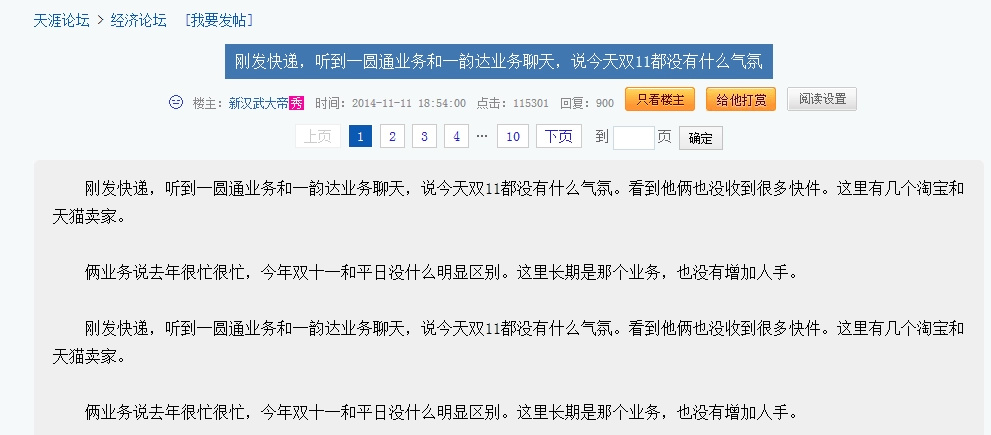
那么通过今年双十一的申通和圆通快递员的对话,就可以听出来传统的电商模式要被信任经济模式革命了

快递小哥的对话有图有真相:

感兴趣的可以去看看:http://bbs.tianya.cn/post-develop-1897412-1.shtml

图片

再看看下面的评论,能不能看出个变天前的预兆呢,

图片

没有信任的刷单;然后是抬高价格搞特惠;接着是审美疲劳和新鲜感消失后无奈;

一切的一切就是没人再把电商当个新玩意儿在好奇心驱使下去体验了,大家习以为常的各种作弊行为让电商产生了信任危机。

估计未来的电商应该是没有信任,就没有买卖吧!! 善待自己的粉丝吧!!

[转载]网站502与504错误分析

mikel阅读(1059)

[转载]网站502与504错误分析.

一. 戏说
不管你是做运维还是做开发,哪怕你是游客,时不时会遇到502 Bad Gateway或504 Gateway Time-out。出现这页面,把服务重启下,再实在不行重启下服务器,问题就解决了,但是,这问题还是会困扰着你,特别是做运维的人员。夜黑风高正酣睡 时,一个电话响起,让你重启服务或IISRESET,肯定是极大不爽,立马要问候他妈了。呵呵,本文总结502与504故障分析与解决方法。

二. 状态码解释
502 Bad Gateway:作为网关或者代理工作的服务器尝试执行请求时,从上游服务器接收到无效的响应。
504 Gateway Time-out:作为网关或者代理工作的服务器尝试执行请求时,未能及时从上游服务器(URI标识出的服务器,例如HTTP、FTP、LDAP)或者辅助服务器(例如DNS)收到响应。

三. 502 Bad Gateway原因分析
将请求提交给网关如php-fpm执行,但是由于某些原因没有执行完毕导致php-fpm进程终止执行。说到此,这个问题就很明了了,与网关服务如php-fpm的配置有关了。
php-fpm.conf配置文件中有两个参数就需要你考虑到,分别是max_children和request_terminate_timeout。
max_children最大子进程数,在高并发请求下,达到php-fpm最大响应数,后续的请求就会出现502错误的。可以通过netstat命令来查看当前连接数。
request_terminate_timeout设置单个请求的超时终止时间。还应该注意到php.ini中的max_execution_time参数。当请求终止时,也会出现502错误的。
当积累了大量的php请求,你重启php-fpm释放资源,但一两分钟不到,502又再次呈现,这是什么原因导致的呢? 这时还应该考虑到数据库,查看下数据库进程是否有大量的locked进程,数据库死锁导致超时,前端终止了继续请求,但是SQL语句还在等待释放锁,这时 就要重启数据库服务了或kill掉死锁SQL进程了。
对于长时间的请求可以考虑使用异步方式,可以参阅《关于PHP实现异步操作的研究》。

四. 504 Gateway Time-out原因分析
504错误一般是与nginx.conf 配置有关了。主要与以下几个参数有关:fastcgi_connect_timeout、fastcgi_send_timeout、 fastcgi_read_timeout、fastcgi_buffer_size、fastcgi_buffers、 fastcgi_busy_buffers_size、fastcgi_temp_file_write_size、 fastcgi_intercept_errors。特别是前三个超时时间。如果fastcgi缓冲区太小会导致fastcgi进程被挂起从而演变为 504错误。

五. 小结
总而言之,502错误主要从四个方向入手:
1. max_children
2. request_terminate_timeout、max_execution_time
3. 数据库
4. 网关服务是否启动如php-fpm

504错误主要查看nginx.conf关于网关如fastcgi的配置。

如需转载请注明出处:http://www.ttlsa.com/html/3112.html

[转载]解决Zend加密的PHP页面出现Incompatible file format的问题 - Powered by Sablog-X

mikel阅读(919)

[转载]解决Zend加密的PHP页面出现Incompatible file format的问题 – Powered by Sablog-X.

解决Zend加密的PHP页面出现Incompatible file format的问题

手头有一套php程序是zend加密的,将它放到主机空间上运行的时候遭遇如下问题:Fatal error: Incompatible file format: The encoded file has format major ID 3, whereas the Loader expects 4 in

百度总结之后,汇总该问题相关信息如下:

  1. 从PHP5.3开始如果要支持zendguard加密的PHP代码,必须安装zend guard loader,老的zend optimizer将不被支持。
  2. PHP5.2之前的Zend加密程序用Zend Optimizer解析。
  3. PHP5.3开始的Zend加密程序用Zend Guard Loader解析。

综上,造成该问题的原因是Zend Guard 5.1更新了加密PHP文件的算法来迎合PHP5.3新版本支持,用Zend Guard老版本加密过的PHP文件在 PHP5.3 + Zend Guard Loader的环境下都无法正常浏览,会报出文章开头的错误。

解决方法:

  • 可以把PHP程序源文件在Zend Guard 5.1下重新加密,然后才能浏览。本处因为拿到的就是加密商业代码,故放弃这一招。
  • 也可以把程序放到PHP5.2 + Zend Optimizer的环境下运行即可。本处选择它来运行这套加密程序。

     把空间搬迁到了低版本PHP的环境下,搞定。摘录前后主机PHP环境如下:

  • 搬迁前:PHP5.3.17 + Zend Engine v2.3.0 + Zend Guard Loader v3.3
  • 搬迁后:PHP5.2.17 + Zend Engine v2.2.0 + Zend Optimizer v3.3.9

[转载]ASP.NET MVC5 + EntityFramwork6 完整入门教程三 - MiroYuan - 博客园

mikel阅读(1214)

[转载]MVC5 + EF6 完整入门教程三 – MiroYuan – 博客园.

期待已久的EF终于来了。

学完本篇文章,你将会掌握基于EF数据模型的完整开发流程。

本次将会完成EF数据模型的搭建和使用。

基于这个模型,将之前的示例添加数据库查询验证功能。

文章提纲

概述 & 要点

详细步骤

总结

概述 & 要点

下面是本文要点,正文部分会有详细介绍。

  • EF架构图
  • 新建基于EF的Data Model的约定
  • 关于ORM的重要概念,和传统方式开发的区别
  • EF开发的整体过程

详细步骤

  • 新建文件夹,规划好代码摆放位置
  • 创建相关类 (Data Model)
  • 创建 Database Context
  • 创建Initializer, 使用EF初始化数据库,插入示例数据
  • 完成数据库查询验证

新建文件夹,规划好代码摆放位置

  1. 根目录下新建一个 ViewModels文件夹。

           Models文件夹里面存放对应于数据库表的实体。

           View中需要显示的数据和Models中实体模型不一定能对应上, 因此需要专门给View使用的自定义数据模型,我们称之为ViewModel , 放在ViewModels文件夹里面。

  1. 根目录下新建一个DAL 文件夹。

           DAL 放置数据访问相关类。

            NOTE 本文中放AccountContext.cs, AccountInitializer.cs

创建相关类(Data Model)

为了更加贴近真实情况,我们针对用户建立三个相关的类。

SysUser, SysRole, SysUserRole

这是用户权限管理RBAC (Role – Based Access Control)的一个典型模型, 更复杂的模型都可以在这个基础上进行扩展。

OK,下面我们就开始新建这个模型。

我们先去网上找个大致的关系图做参考,打开百度,输入 user role , 搜索图片。

挑一个类似的做参考。

NOTE 权限相关是系统管理范畴的,不涉及具体业务,我起名字的时候都加了Sys前缀,这样和业务区隔开来。

参考上面这个图建立 Data Model

SysUser Entity

SysRole Entity

SysUserRole Entity

对于上面几个类的约定和说明:

  1. EF生成数据库时,ID 属性将会成为主键。(约定:EF默认会将ID或classnameID生成主键, MSDN建议保持风格的一致性, 都用ID或classnameID, 我们这里都用ID)
  2. EF 生成数据库时 , <navigation property name><primary key property name>这种形式的会成为外键. ( 约定 )

    例如外键 SysUserID = SysUser(navigation property)+ID(SysUser的主键)

  3. 定义为virtual的几个属性是 navigation 属性(virtual非必须, 只是惯例用法, 后面文章将会讲解用virtual的好处).

    navigation 属性保存着其他的关联entity(entities)

    示例中, SysUser和SysUserRole是一对多的关系, SysRole和SysUserRole也是一对多的关系.

    如果是 “多”, 属性类型就必须是list( 这里用的是Icollection )

创建 Database Context

前置条件:安装EF

打开 工具à库程序包管理器à程序包管理器控制台

输入 install-package entityframework

去MSDN上查看下EF的架构图:http://msdn.microsoft.com/en-us/data/aa937709

从上图可以看出,EF框架在底层是通过调用ADO.NET来实现数据库操作的。

多转一道弯性能和灵活性肯定会受到影响,所以本系列文章结束后同样也会给出MVC+ADO.NET的方案,大家可以根据需要选择。

NOTE

微软官方推出的ORM框架主要有Linq to SQL和Entity Framework.

EF是目前最新的,也是推荐配合MVC使用的框架。

实际操作前再补充一些重要概念:

如果不用ORM框架,我们一般这样来使用ADO.NET进行数据库开发:

  1. 将ADO.NET对数据库的操作封装到一个类里SQLHelper中
  2. 在DAL层调用SQLHelper
  3. 其他层再调用DAL进行数据库操作

使用ORM之后,以前面的SysUser为例:

O(Object) à 程序中的类 SysUser, 就是对象

R (Relation)à 数据库中的表

M(Mapping)à O和R的映射关系

ORM对传统方式的改进:

充当桥梁,实现了关系数据和对象数据的映射,通过映射自动产生SQL语句。

对常用的操作,节省了写SQL语句的步骤。

好了,现在必要的概念应该理解了吧,下面我们就进行实际的操作了。

创建类 AccountContext.cs , 让他继承自System.Data.Entity.DbContext, 我们用这个类完成EF的功能。

主要做下面三件事:

  1. 为每个entity set创建一个DbSet

    在EF中,通常情况下一个entity set对应数据库中的一张表,一个entity对应表中的一行。

  2. 指定一个连接字符串

    构造函数中的 base(“AccountContext“) 。

    默认情况下和类名一样,即AccountContext,我们显式的给他指定出来。

  3. 指定单数形式的表名

    modelBuilder.Conventions.Remove<PluralizingTableNameConvention>();

    默认情况下会生成复数形式的表,如SysUsers

    NOTE 表名用单复数形式看各自的习惯,没有明确的规定。有的公司表名全用单数,有的公司根据表的意思,有单数也有复数。

配合上面第2点,先把web.config中连接字符串给指定了。

如下图,贴着appSettings配置节上面添加。

NOTE AttachDBFilename=|DataDirectory|\MVCDemo.mdf设定了数据库文件的存放位置:在项目根目录的App_Data文件夹下。


创建Initializer, 使用EF初始化数据库,插入示例数据

EF可以以多种方式建立数据库。

我们采用如下方式:

第一次运行程序时新建数据库,插入测试数据; model改变(和database不一致)时删除重建数据库,插入测试数据。

目前在开发阶段,不用管数据丢失的问题,直接drop and re-create比较方便。

等系列文章结束后会讲解生产环境中如何不丢失数据修改schema

下面我们就新建类AccountInitializer.cs来完成这个工作。

Seed方法用我们之前定义的database context(即AccountContext) 作为参数,通过这个context将entities添加到database中去。(就是我们前面说的桥梁作用)

从上面代码可以看出, Seed方法对每一个entity的类型(我们用了SysUser和SysRole, SysUserRole我们暂不添加):

创建一个colletion à 添加到适当的 DbSet property à 保存到数据库。

NOTE 不一定要在每个entity组后面都调用SaveChanges方法,可以在所有组结束后调用一次也可以。这样做是因为如果写入数据库代码出错,比较容易定位代码的错误位置。


修改web.config, 通知EF使用我们刚刚写好的initializer类。

找到entityFramework配置节,添加下图方框处内容。

context 配置节中, type 的值对应 (context class的完整描述,程序集)

databaseInitializer 配置节中 , type 的值对应 (initializer class 的完整描述,程序集)

NOTE : 如果你不想EF使用某个context, 可以将下面方框处设置为true.

完成数据库查询验证

现在EF一切就绪.

运行程序,当第一次连接数据库时,EF比较model(AccountContext和entity classes) 和database. 如果两边不一致,程序将会drop and re-create数据库。

因为目前我们还没有连接数据库的操作,所以EF还没发挥作用。

现在我们完成前面的Login功能。

  1. 先做点小修改,在ModelsàSysUser.cs里面添加个Email字段。

    同样DALàAccountInitializer.csàSeed里面示例数据也要增加这个字段

NOTE 添加一个Email是因为之前的登录页面填入的是Email值,后面将会输入Email和Password到数据库中进行比对。

  1. 打开Controllers à AccountController.cs
    1. Instantiate 一个database context 对象
    2. 修改HttpPost类型的Login Action,查询数据库进行比对。

NOTE

用过SQL的人都知道,学习SQL,最复杂的是查询,把各种查询学好了,基本就掌握70%以上了。

EF数据模型的数据操作也一样,重点是查询,下篇文章会展开讲。(从简单查询到条件、聚合、连接等复杂查询都会涉及到)

运行Login.cshtml页面,输入正确的和错误的登录信息验证下。

另外再检查一下数据库部分是否符合我们的预期:

  1. 打开数据库,发现MVCDemo这个数据库已经新建,示例数据已经插入。
  2. 打开项目的App_Data 文件夹,发现数据库文件已经存在。

总结

OK,到此为止,我们搭建好了EF框架,进行了数据库的初始化,查询了一条用户信息。

需要说明的是,现在的登录功能还比较简陋,不是真正的登录功能(例如输入项还缺少验证,密码还没有加盐),只是为了说明EF的用法。根据系列文章讲述知识点的需要,最终会实现完整功能。

最后再回顾下本篇文章的重点:掌握使用EF开发的整个过程。

创建Data Modelà创建Database Context à创建databaseInitializerà配置entityFramework的context配置节

希望大家能清晰的了解上面整个过程,理解每一个过程的作用。


好了,本次文章就到这里。

欢迎大家多提问题多评论,让下一篇文章更好 :)

[转载]ASP.NET MVC5 + EntityFramework6 入门完整教程 - MiroYuan - 博客园

mikel阅读(1738)

[转载]MVC5 + EF6 入门完整教程 – MiroYuan – 博客园.

第0课 从0开始

ASP.NET MVC开发模式和传统的WebForm开发模式相比,增加了很多”约定”。

直接讲这些 “约定” 会让人困惑,而且东西太多容易忘记。

和微软官方教程不同,笔者尽量不用脚手架,从空白框架开始,一步一步添加功能,每次添加的东西刚好够用,让大家能真正能用起来,理解每一个过程。

文章提纲

  • 概述
  • 核心概念介绍
  • 从空白开始,建立一个基本框架详细步骤

概述

  1. 本系列文章及文章中的例子主要基于微软官方文档
  2. 使用工具 : VS2013 + MS SQL 2012
  3. 开始主要讲解MVC + EF搭配使用,后续同样也会提供MVC + ADO.NET的实现方案

核心概念介绍

MVC,Model – View – Controller 的简写

Model 封装业务逻辑相关的数据及对数据的处理方法

View 向用户提供交互界面

Controller 负责控制Model和View

看下面这张图。目前只要理解这一个概念就可以了,下面就开始建一个空框架,从做中学。


从空白开始,建立一个基本框架详细步骤

  1. 新建项目


NOTE:模板要选Empty,如果直接选MVC会产生多余代码。

NOTE:上图方框处正好对应于M, V, C

到此为止,就建立了一个最基本的MVC解决方案,基本是空的。

我们简单介绍下其中的RouteConfig.cs文件

打开Global.asax, 注意到在程序启动的时候注册了路由规则,如下方框处。

下面我们就看下具体的路由规则。打开RouteConfig.cs文件

注意到里面有个静态方法,这就是映射路由的控制,这个方法定义了路由规则。

其中:url: “{controller}/{action}/{id}”定义了URL的格式。

后续会结合实际的URL地址来讲解。


  1. 添加一个示例

先不管Model, 我们先创建Controller和View

  1. 添加Controller

右键Controllers文件夹,按图示添加。

控制器必须以Controller结尾(这是ASP.NET MVC的一个约定)。

后续文章会讲用户登录的例子,所以这里先建一个AccountController.

添加后会发现多了下图方框处的类和文件夹。

我们打开新建的AccountController.cs看下,自动生成了一个方法

public ActionResult Index()

{

return View();

}

我们称这个Index为一个Action,返回类型为ActionResult.

可以看到,这个Action返回了一个View, 我们现在来建立这个View

  1. 添加View

添加View有两种方法,一种是直接在Views文件夹下添加(右键ViewsàAccount文件夹)

另外一种是通过Controller中的Action来添加。这次我们采用后一种方法。

打开AccountController, 右键Index方法,按图示添加。

这样就添加了一个和特定的Controller和Action(这里指AccountController和Index)相对应的View(ViewsàAccountàIndex.cshtml)

这个View就是最终显示的前端页面,我们在Body里面添加一行字。

右键Index.cshtml,在浏览器中查看可以看到熟悉的HTML界面了。

注意浏览器中的地址 xx/Account/Index

这个地址与开头的路由规则(url: “{controller}/{action}/{id}”就对应了起来,应该很容易理解吧。


典型的一个执行过程。

  1. 网址路由比对
  2. 如成功,执行相应的Controller与Action
  3. 执行相应的View并返回结果

记住这个过程。后面的过程都会在这个简单的过程中进行扩展。


总结

MVC比之前的WebForm开发方式做了很大改变,分离更彻底。

本次文章主要是让大家建立ASP.NET MVC的基本观念。

下篇文章主要介绍View的UI设计,介绍一些重点的HtmlHelper, 从前端开始容易看到效果。

后续所有的文章都会以这个示例进行扩展,有问题欢迎大家评论:)

[转载]ASP.NET MVC5 + EntityFramework6 入门完整教程二 - MiroYuan - 博客园

mikel阅读(1413)

[转载]MVC5 + EF6 入门完整教程二 – MiroYuan – 博客园.

从前端的UI开始

MVC分离的比较好,开发顺序没有特别要求,先开发哪一部分都可以,这次我们主要讲解前端UI的部分。

ASP.NET MVC抛弃了WebForm的一些特有的习惯,例如服务器端控件,ViewState这些东西,让Web回归原始的状态,Web是什么样子就是什么样子。 而谈到一个Web Application的UI,涉及到的无非就是html、css、 js这些东西。

文章提纲

  • 概述
  • 重要概念介绍
  • 建立 注册/登录UI 步骤(静态页面àViewà功能)

概述

一般来说,有两块功能是每个系统都要使用的。

一个是 用户注册/登录,一个是Table的CRUD

最近四篇文章的规划:

  1. 本次会先做简单的注册/登录UI
  2. 结合EF完成注册/登录的功能
  3. 以Table的CRUD为例子,展开讲解EF (code first方式)
  4. 借助bootstrap加入页面样式,补充其他功能,将前面的代码扩展成一个开发的基础框架

P.S. 顺便回答下园友的两个问题:

1.有园友表示没看到EF

原因是不想一下引入太多的概念,大概下篇文章开始涉及到EF.

2. 系列的文章数量和更新:

a. 数量:本系列文章会从一个主干开始,逐渐深入,初步规划30篇。初级10篇,中级10篇,综合项目实战10篇。

b. 更新:大概每周会更新一篇

重要概念介绍

  1. View的存放位置约定
  2. Action Method Selector

应用在Controller的Action上,以帮助选择适当的Action,

文中以 [HttpPost] 举例

  1. ViewBag

在View和Controller中传递数据的一种方式 (类似的方式还有ViewData、TempData), 掌握通过ViewBag在View和Controller中传递数据

  1. HtmlHelper

通过View的Html属性调用,文中以Html.BeginForm为例


建立 注册/登录 UI详细步骤

  1. 打开上次项目,新建两个Action

本系列文章知识点和演示代码都以前一篇文章为基础,有问题可以回上一篇进行查找。本次我们将会新建用户 注册/登录 的两个页面。

打开Controllersà AccountController.cs ,仿照已有的Index, 添加两个Action, 如下图。

NOTE: 添加这Action可以

a. 通过手打或粘贴复制,

b.右键,插入代码段(或ctrl k, x)àASP.NET MVC4à mvcaction4(或mvcpostaction4), 如下面一组图。

  1. 添加Action相应的View

根据上一步中添加的Action, 添加相关View: Login.cshtml, Register.cshtml

添加方法详见上篇文章,不再重复讲解。

这里再说明下View的存放位置约定。记住下面三句话:

  1. 所有的View都放在Views文件夹
  2. Views文件夹创建了一系列与Controller同名的子文件夹
  3. 各子文件夹内存放与Action同名的cshtml文件(对应的View文件)

    1. 完成登录界面UI

    1.1 我们把Login.cshtml就当做一个静态html页面,完成登录界面的UI

    大家可以把cshtml理解成原来的aspx和html的混合体:

    利用了aspx的优点,方便和后台交互;利用了html的优点,语法简洁(HtmlHelper)

    a. 到bootstrap上复制个登录界面html

    http://getbootstrap.com/css/#forms

    b. 放到Login.cshtml 的body的div中

    NOTE为了减少干扰项,我们不加任何样式, 项目全部结束后再进行页面美化。

    右键浏览器 View page source, 发现多了VS Browser Link废代码。

    我们将它禁用掉。

    打开web.config添加如下代码,再去浏览器查看源代码,可以看到纯净的html了。

    1. 将前端的数据传递到Controller中去

    完成一个登录工作:

    填写表单 à Controller获取表单数据 à 进一步操作(例如去数据库比对,通过后获取用户身份跳转到指定页面)

    我们这次先完成到Controller获取数据,对数据库的操作我们下一章和EF结合起来一起讲。

    OK, 现在我们对Login.cshtml进行修改。

    修改前的Login.cshtml:

    1. 首先我们先去AccountController.cs中创建一个Login同名的Action来接受表单提交的数据。

    注 意新添加的Action中增加了一个[HttpPost] ,表示这个Action只会接受http post请求。ASP.NET MVC提供了Action Method Selector, HttpPost就是其中之一。(后续文章中会专门有一篇讲解这些Selector)

    HttpPost属性典型的应用场景:

    涉及到需要接受客户端窗口数据的时候,创建一个用于接收HTTP Get请求的Action, 用于显示界面, 提供给用户填写数据;

    另一个同名Action则应用[HttpPost]属性,用于接收用户发来的数据,完成对应的功能。

    1. 打开Login.cshtml, 修改form,为后端接收数据做准备。

    先在form标签内增加两个属性action, method。对于form中的method(默认是get),通常情况下, get用于简单的读取数据操作,post用于写数据操作。

    在input元素下添加name属性,设置成和id一样的值。

    NOTE: 服务器端需要通过name来取值。

     2. 打开AccountController.cs,修改[HttpPost]的Login Action用于接收数据

为了区分登录前后,我们通过ViewBag传递一个登录状态过去。

前台同样加个文字标识。

登录效果:

 优化:使用第一个HtmlHelper

       因为这次的内容比较简单,还没必要用到HtmlHelper

       我们对Login.cshtml中的form做一点改良。

       如下图,action的位置是固定的,这样的话部署发生变化时有可能地址会不可用(如放在IIS根目录下和虚拟目录下是不同的)


     使用HtmlHelper动态计算路由地址就是其中的一种方法。

     添加下面一句代码,将form中内容放到 {} 中去即可

    @using (Html.BeginForm(“login”, “Account”, FormMethod.Post)) { }

    运行,到浏览器中查看源代码,可以看到生成的源代码和原来一样。

同样的,完成注册界面UI(类似登录界面,步骤略)

总结

通过开发了一个最基本的登录界面,介绍了如何从Controller中获取表单数据。

因本次示例比较简单,还不需要用到HtmlHelper

下篇文章会通过model自动生成数据库,完成整个功能。

本次源码:http://files.cnblogs.com/miro/MVCDemo%401021.rar


有问题欢迎大家评论 :)

[转载]Ecshop与Jquery冲突的完美解决方案_ecshop常见调整_进阶教程_知识堂_ECSHOP模板堂

mikel阅读(1046)

[转载]Ecshop与Jquery冲突的完美解决方案_ecshop常见调整_进阶教程_知识堂_ECSHOP模板堂.

ecshop把AJAX事件和JSON解析的模块放在common/transport.js之中,可以说它也有自己封装的一套工具,这其实是很正常的。

但恰恰的,在封装JSON各种方法的同时对object的模型进行了重写,这个就跟JQuery冲突了。因为众所周知的,JQuery对各种JavaScript对象进行了扩展。
这一切其实都很容易理解,各有各的理由十分自然,但头痛和无奈的就变得在我们这些使用者身上了。在ECShop论坛上原来也有很多朋友提出了这个问题,也提出了各种各样的方法,我尝试了一些,不好或者甚至无用,所以只好自己动手了。
解决思路大概就是屏蔽ecshop扩展的toJSONString方法,用别的函数代替。
为了照顾下小菜们,就写详细点吧。
一,修改默认js文件
1、首先复制一份 transport.js 改名为 transport.org.js 提供给后台使用
2、屏蔽掉transport.js里的toJSON功能 行数大概有497-737行之间
由if ( ! Object.prototype.toJSONString) { 开头的代码。
修改352行为:
 legalParams = “JSON=” + $.toJSON(params);
修改408行为:
result = $.evalJSON(result);
屏蔽掉global.js里的如下代码(第10-13行):
Object.prototype.extend = function(object)
{
  return Object.extend.apply(this, [this, object]);
}
3、修改index.js文件44行改为:
var res = $.evalJSON(result);
4、修改common.js文件
第34行改为:
Ajax.call(‘flow.php?step=add_to_cart’, ‘goods=’ + $.toJSON(goods), addToCartResponse, ‘POST’, ‘JSON’);
第850行改为:
Ajax.call(‘flow.php?step=add_package_to_cart’, ‘package_info=’ + $.toJSON(package_info), addPackageToCartResponse, ‘POST’, ‘JSON’);
第1056行改为:
Ajax.call(‘flow.php?step=add_to_cart’, ‘goods=’ + $.toJSON(goods), addToCartResponse, ‘POST’, ‘JSON’);
5、修改compare.js文件
第49行改为:
 this.data = $.evalJSON(cookieValue);
第67行改为:
 var obj = $.evalJSON(cookieValue);
第133行改为:
 document.setCookie(“compareItems”, $.toJSON(this.data));
6、修改global.js文件
第16行改函数名 :function $e()
第114和126行都改为:    var element = $e(element);
二,修改后台调用部分
7、
修改后台头部引入transport.js路径 admin/templates/pageheader.htm 第9行改为: {insert_scripts files=”../js/transport.org.js,common.js”}
admin/templates/menu.htm
151行改成 {insert_scripts files=”../js/global.js,../js/utils.js,../js/transport.org.js”}
 三,修改前台模板部分
8、修改themes/default/library/page_header.lbi文件在{insert_scripts files=’transport.js,utils.js’}上面加上如下代码
{insert_scripts files=’jQuery.js,jQuery.json.js’}
9、
library/comment_list.lbi
第188行 :
 Ajax.call(‘comment.php’, ‘cmt=’ + $.toJSON(cmt), commentResponse, ‘POST’, ‘JSON’);
10、compare.dwt
第20行 :
var obj = $.evalJSON(document.getCookie(“compareItems”));
第24行 :
document.setCookie(“compareItems”, $.toJSON(obj));
11、flow.dwt
第138行 :
Ajax.call(‘flow.php?step=add_to_cart’, ‘goods=’ + $.toJSON(goods), collect_to_flow_response, ‘POST’, ‘JSON’);
第199行 :
 Ajax.call(‘flow.php?step=add_to_cart’, ‘goods=’ + $.toJSON(goods), fittings_to_flow_response, ‘POST’, ‘JSON’);
12、
brand.dwt
brand_list.dwt
category.dwt
exchange_list.dwt
search.dwt
如:
{* 包含脚本文件 *}
{insert_scripts files=’jQuery.js,jquery.json.js’}
{insert_scripts files=’common.js,global.js,compare.js’}

[转载]ecshop支付宝前台付款后台不显示已付款_ecshop常见问题_ecshop经验分享_ecshop教程_ECSHOP开发中心官网

mikel阅读(939)

[转载]ecshop支付宝前台付款后台不显示已付款_ecshop常见问题_ecshop经验分享_ecshop教程_ECSHOP开发中心官网.

客户最近反映在支付宝付款之后,后台订单却显示未付款,着实让ecshop商家很头疼,现在ECSHOP开发中心(www.68ecshop.com)

总结下如何处理这样的问题。

网站根目录下respond.php,在文件中搜索:

if (file_exists($plugin_file))
改成
if (file_exists(ROOT_PATH.$plugin_file))

这样就能支付宝付款之后后台就正常显示了


[转载]Apktool源码解析——第一篇 - bvin - 博客园

mikel阅读(1457)

[转载]Apktool源码解析——第一篇 – bvin – 博客园.

著名的apktool是Android逆向界用的最普遍的一个工具,这个项目的原始地址在这里http://code.google.com/p/android-apktool/,但是你们都懂的在天朝谷歌是无法访问的,所以直接上github的 https://github.com/brutall/brut.apktool。

在brut.apktool路径是主要代码所在,当然还有brut.apktool.smali是反编译smali的目录,目测还有brut.j.common,brut.j.dir,brut.j.utils是用到java的一些类。

brut.apktool路径下的apktool-cli还不知道是干嘛的,总之下面的apktool-lib正是我们最需要了解的。


Android目录是利用XmlPullParser实现的专门用于Android当中xml的解码工具包。

brut/androlib目录正是我们研究的主题。

com/mindprod/ledatastream目录是le数据支持库。

org/xmlpull/mxp1_serializer目录是XmlPullParser的Xml解析库。

androlib目录一览。

先看一下ApkDecoder这个类。

public ApkDecoder(File apkFile, Androlib androlib) {
        mAndrolib = androlib;
        setApkFile(apkFile);
    }

    public void setApkFile(File apkFile) {
        mApkFile = new ExtFile(apkFile);
        mResTable = null;
    }

mResTable这个一直很迷惑,很多地方用到了它,但是目前还不住到具体是干嘛的,先不研究这个,继续往下看。

public void setOutDir(File outDir) throws AndrolibException {
        mOutDir = outDir;
    }

    public void setApi(int api) {
        mApi = api;
    }

这两个方法一看名字就不言而喻,这里就不啰嗦了。多看了几行代码发现,这代码质量相当高,简直不要太优质,比起什么AxmlPrinter2的代码好看多了,呵呵!

下面就是反编译的核心方法了,客观请往下看。

public void decode() throws AndrolibException, IOException,DirectoryException {
        File outDir = getOutDir();

        if (!mForceDelete && outDir.exists()) {//如果输出目录不是因为删除而不存在就抛出异常
            throw new OutDirExistsException();
        }

        if (!mApkFile.isFile() || !mApkFile.canRead()) {//如果apk文件不是文件类型或者不能读也抛出异常
            throw new InFileNotFoundException();
        }

        try {
            OS.rmdir(outDir);//暂不明
        } catch (BrutException ex) {
            throw new AndrolibException(ex);
        }
        outDir.mkdirs();

        LOGGER.info("Using Apktool " + Androlib.getVersion() + " on " + mApkFile.getName());

        if (hasResources()) {//判断依据mApkFile.getDir().contraincontainsFile("resources.arsc")
            setTargetSdkVersion();
            setAnalysisMode(mAnalysisMode, true);//如果后面的参数为true,将会影响mResTable的取值
            setCompressionMode();//mCompressResources赋值,res.arsc是个zip获取它的压缩模式是否是ZipEntry.DEFLATED默认

            switch (mDecodeResources) {//这里默认是FULL
                case DECODE_RESOURCES_NONE://不解码直接解压到指定res目录
                    mAndrolib.decodeResourcesRaw(mApkFile, outDir);
                    break;
                case DECODE_RESOURCES_FULL://调用androilib.decodearesources方法,其实本质还是调AndrolibResources.decode()方法
                    mAndrolib.decodeResourcesFull(mApkFile, outDir, getResTable());
                    break;
            }
        } else {//没有资源文件
            // if there's no resources.asrc, decode the manifest without looking
            // up attribute references
            if (hasManifest()) {//如果没有res.asrc就不需要查找manifest中的引用属性了
                switch (mDecodeResources) {
                    case DECODE_RESOURCES_NONE:
                        mAndrolib.decodeManifestRaw(mApkFile, outDir);
                        break;
                    case DECODE_RESOURCES_FULL://调mAndRes.decodeManifest(resTable, apkFile, outDir)
                        mAndrolib.decodeManifestFull(mApkFile, outDir,
                                getResTable());
                        break;
                }
            }
        }

        if (hasSources()) {//如果有源文件
            switch (mDecodeSources) {
                case DECODE_SOURCES_NONE://直接复制classes.dex
                    mAndrolib.decodeSourcesRaw(mApkFile, outDir, "classes.dex");
                    break;
                case DECODE_SOURCES_SMALI://反编译成smali,SmaliDecoder.decode()
                    mAndrolib.decodeSourcesSmali(mApkFile, outDir, "classes.dex", mDebug, mDebugLinePrefix, mBakDeb, mApi);
                    break;
                case DECODE_SOURCES_JAVA://反编译jarnew AndrolibJava().decode()
                    mAndrolib.decodeSourcesJava(mApkFile, outDir, mDebug);
                    break;
            }
        }

        if (hasMultipleSources()) {//如果有多个dex
            // foreach unknown dex file in root, lets disassemble it
            Set<String> files = mApkFile.getDirectory().getFiles(true);
            for (String file : files) {//反编译多个dex
                if (file.endsWith(".dex")) {
                    if (! file.equalsIgnoreCase("classes.dex")) {
                        switch(mDecodeSources) {
                            case DECODE_SOURCES_NONE:
                                mAndrolib.decodeSourcesRaw(mApkFile, outDir, file);
                                break;
                            case DECODE_SOURCES_SMALI:
                                mAndrolib.decodeSourcesSmali(mApkFile, outDir, file, mDebug, mDebugLinePrefix, mBakDeb, mApi);
                                break;
                            case DECODE_SOURCES_JAVA:
                                mAndrolib.decodeSourcesJava(mApkFile, outDir, mDebug);
                                break;
                        }
                    }
                }
            }
        }

        mAndrolib.decodeRawFiles(mApkFile, outDir);//复制libs和assets
        mAndrolib.decodeUnknownFiles(mApkFile, outDir, mResTable);//发现一个问题,brutall的代码没有更新,新的在这里https://github.com/iBotPeaches/Apktool
        mAndrolib.writeOriginalFiles(mApkFile, outDir);
        writeMetaFile();
    }

下面几个方法不解释咯

public void setAnalysisMode(boolean mode, boolean pass) throws AndrolibException{
        mAnalysisMode = mode;

        // only set mResTable, once it exists
        if (pass) {
            if (mResTable == null) {
                mResTable = getResTable();
            }
            mResTable.setAnalysisMode(mode);
        }
    }

    public void setCompressionMode() throws AndrolibException, IOException {
        // read the resources.arsc checking for STORED vs DEFLATE
        // this will determine whether we compress on rebuild or not.
        ZipExtFile zef = new ZipExtFile(mApkFile.getAbsolutePath());
        ZipArchiveEntry ze = zef.getEntry("resources.arsc");
        if (ze != null) {
            int compression = ze.getMethod();
            mCompressResources = (compression == ZipEntry.DEFLATED);
        }
        zef.close();
    }

    public void setTargetSdkVersion() throws AndrolibException, IOException {
        if (mResTable == null) {
            mResTable = mAndrolib.getResTable(mApkFile);
        }

        Map<String, String> sdkInfo = mResTable.getSdkInfo();
        if (sdkInfo.get("targetSdkVersion") != null) {
            mApi = Integer.parseInt(sdkInfo.get("targetSdkVersion"));
        }
    }
public ResTable getResTable() throws AndrolibException {
        if (mResTable == null) {
            boolean hasResources = hasResources();
            boolean hasManifest = hasManifest();
            if (! (hasManifest || hasResources)) {//一个apk文件不能没有AndroidManifest.xml和resource.arsc,否则就不是合法的apk文件
                throw new AndrolibException(
                        "Apk doesn't contain either AndroidManifest.xml file or resources.arsc file");
            }
            AndrolibResources.sKeepBroken = mKeepBrokenResources;
            mResTable = mAndrolib.getResTable(mApkFile, hasResources);
        }
        return mResTable;
    }