C# 自定义项写入配置文件appsettings.json中(如url和token)_c# appsettings.json-CSDN博客

mikel阅读(157)

来源: C# 自定义项写入配置文件appsettings.json中(如url和token)_c# appsettings.json-CSDN博客

一、打开项目的 `appsettings.json` 文件,通常位于项目的根目录。
二、在 `appsettings.json` 文件中添加相应的配置项。可以使用类似下面的格式添加配置项:
{
“ApiConfiguration”: {
“BaseApiUrl”: “your_url_here”,
“Token”: “your_token_here”
},
// 其他配置项…
}
AI写代码
JavaScript
运行
三、在 `Startup.cs` 文件中的 `ConfigureServices` 方法中,注册配置项,并使其可供应用程序的其他部分访问。确保引用 `Microsoft.Extensions.Configuration` 和 `Microsoft.Extensions.Options` 命名空间。
using Microsoft.Extensions.Configuration;
using Microsoft.Extensions.DependencyInjection;
using Microsoft.Extensions.Options;

namespace YourNamespace
{
public class Startup
{
//…

public void ConfigureServices(IServiceCollection services)
{
//…

services.Configure<ApiConfiguration>
Configuration.GetSection(“ApiConfiguration”));
//…
}
}
}
AI写代码
cs
运行

四、创建一个包含配置项属性的类 `ApiConfiguration`,用于将配置项映射到实际的类属性。
public class ApiConfiguration
{
public string BaseApiUrl { get; set; }
public string Token { get; set; }
}
AI写代码
cs
运行
五、在所需使用配置文件的类中,如 `ApiDataProcessor` 类使用 `IOptions<ApiConfiguration>` 注入配置项,并将其作为构造函数参数。
public class ApiDataProcessor : BackgroundService
{
private readonly ApiConfiguration _apiConfiguration;

public ApiDataProcessor(IOptions<ApiConfiguration> apiConfigurationOptions)
{
_apiConfiguration = apiConfigurationOptions.Value;
}

//…
}
AI写代码
cs
运行

现在,就可以在 ApiDataProcessor 类(可替换为实际类)中使用 _apiConfiguration.BaseApiUrl 和 _apiConfiguration.Token 来访问配置项的值,而不是硬编码在代码中。这样的好处是,可以在不更改代码的情况下更改配置项的值。
————————————————

版权声明:本文为博主原创文章,遵循 CC 4.0 BY-SA 版权协议,转载请附上原文出处链接和本声明。

原文链接:https://blog.csdn.net/weixin_42060801/article/details/132576647

如何使用 appsettings.json 配置文件?

mikel阅读(174)

来源: 如何使用 appsettings.json 配置文件?

appsettings.json 是一个相较于 App.config 更加灵活的配置文件,是 .NET Core 以来新增的一种配置方式,提供了更多的灵活性

在 .NET Core 项目中,我们可以使用 appsettings.json 配置文件来存储应用程序的配置信息。在这篇文章中,我们将学习如何使用 appsettings.json 配置文件。

appsettings.json 是一个相较于 App.config 更加灵活的配置文件,是 .NET Core 以来新增的一种配置方式,提供了更多的灵活性。

快速入门 

我们可以在项目中创建一个 appsettings.json 文件,然并将其生成操作设置为「较新时复制」或「总是复制」,这样在项目构建时,appsettings.json 文件会被复制到输出目录中。

然后我们可以在其中添加如下内容:

1
2
3
4
5
6
7
8
{
    "AppSettings": {		
        "LogLevel":"Warning",
        "ConnectionStrings": {
            "Default": "this is the connection string"
        }	
    }
}

这样我们就可以尝试读取了。我们使用 NuGet 包管理器安装 Microsoft.Extensions.Configuration.Json 包。它会隐式安装 Microsoft.Extensions.Configuration 等依赖项,这些我们不需要显式安装。

然后我们可以在代码中读取配置文件:

1
2
3
4
5
using Microsoft.Extensions.Configuration;

var configuration = new ConfigurationBuilder()
    .AddJsonFile("appsettings.json", optional: false, reloadOnChange: true)
    .Build();

这样我们就可以获取上面的配置信息了:

1
2
var logLevel = configuration["AppSettings:LogLevel"];
var connectionString = configuration["AppSettings:ConnectionStrings:Default"];

这里的形如 AppSettings.LogLevel 是一种特殊的写法,简单来说就是借助 : 来表示 JSON 中的层级关系。

如果要获取的配置项是一个数字,我们除了可以先通过上述方式获取到字符串,进而使用 int.Parse 或 Convert.ToInt32 等方法进行转换,还可以使用 GetValue 方法:

1
2
3
4
// 传统方法
var logLevel = int.Parse(configuration["AppSettings:LogLevel"]);
// 使用 GetValue 方法
var logLevel = configuration.GetValue<int>("AppSettings:LogLevel");

对于连接字符串,我们还可以使用 GetConnectionString 方法:

1
var connectionString = configuration.GetConnectionString("Default");

可选与自动重载 

在上面的代码中,我们可以看到 AddJsonFile 方法有两个参数,optional 和 reloadOnChange

  • optional 参数表示是否允许配置文件不存在,如果设置为 false,则会抛出异常,否则会忽略。
  • reloadOnChange 参数表示是否在配置文件发生变化时重新加载配置文件。如果设置为 true,则会在配置文件发生变化时重新加载配置文件。

比如我们可以用下面的例子测试自动重载的效果:

1
2
3
4
5
6
7
8
9
var configuration = new ConfigurationBuilder()
    .AddJsonFile("appsettings.json", optional: false, reloadOnChange: true)
    .Build();

while (true)
{
    Console.WriteLine(configuration["AppSettings:LogLevel"]);
    Thread.Sleep(1000);
}

在运行程序后,我们可以修改 appsettings.json 文件中的 LogLevel 配置,然后我们会发现程序会自动重新加载配置文件。注意这里我们修改的是输出目录(也就是 .exe 文件所在位置)下的 appsettings.json 文件,而不是项目中的 appsettings.json 文件。

添加多个 JSON 文件 

如果只能添加一个 JSON 文件,那么配置文件的灵活性就大大降低了。事实上,我们可以通过多次调用 AddJsonFile 方法来添加多个 JSON 文件。一个典型的情形是添加一个 appsettings.Development.json 文件,用于存储开发环境的配置信息。

1
2
3
4
var configuration = new ConfigurationBuilder()
    .AddJsonFile("appsettings.json", optional: false, reloadOnChange: true)
    .AddJsonFile("appsettings.Development.json", optional: true, reloadOnChange: true)
    .Build();

这样我们就可以在 appsettings.Development.json 文件中存储开发环境的配置信息,而在 appsettings.json 文件中存储通用的配置信息。

不仅如此,这二者之间存在优先级,或者说覆盖关系。具体来说:

  • 如果 appsettings.json 和 appsettings.Development.json 中都有相同的配置项,那么 appsettings.Development.json 中的配置项会覆盖 appsettings.json 中的配置项
  • 如果 appsettings.Development.json 中没有某个配置项,而 appsettings.json 中有,那么会使用 appsettings.json 中的配置项
  • 如果 appsettings.Development.json 中有某个配置项,而 appsettings.json 中没有,那么会使用 appsettings.Development.json 中的配置项

使用强类型配置 

在上面的例子中,我们使用 configuration["AppSettings:LogLevel"] 来获取配置信息,这种方式是一种弱类型的方式。我们也可以使用强类型的方式来获取配置信息。

我们修改一下 appsettings.json 文件中的配置项:

1
2
3
4
5
6
7
{
    "UserSettings": {
        "Name": "Alice",
        "Age": 18,
        "IsActive": true
    }
}

然后我们定义一个强类型的配置类:

1
2
3
4
5
6
public class UserSettings
{
    public string Name { get; set; }
    public int Age { get; set; }
    public bool IsActive { get; set; }
}

在获取配置前,我们还需要安装一个 NuGet 包:Microsoft.Extensions.Options.ConfigurationExtensions。然后我们就可以这样获取配置信息:

1
var userSettings = configuration.GetSection("UserSettings").Get<UserSettings>();

这样我们就可以获取到 UserSettings 对象了,然后就可以使用 userSettings.NameuserSettings.AgeuserSettings.IsActive 来获取配置信息了。

但是需要注意,因为这里的 userSettings 实例已经初始化,所以前面提到的自动重载功能不再生效。如果需要自动重载,我们需要重新获取 userSettings 对象。

添加环境变量和命令行参数 

在 .NET Core 中,我们还可以通过环境变量和命令行参数来覆盖配置文件中的配置信息。我们需要再安装两个 NuGet 包:

  • Microsoft.Extensions.Configuration.EnvironmentVariables
  • Microsoft.Extensions.Configuration.CommandLine

然后我们可以这样添加环境变量和命令行参数:

1
2
3
4
5
var configuration = new ConfigurationBuilder()
    .AddJsonFile("appsettings.json", optional: false, reloadOnChange: true)
    .AddEnvironmentVariables()
    .AddCommandLine(args)
    .Build();

这样我们就可以通过环境变量和命令行参数来覆盖配置文件中的配置信息了。

比如我们可以创建一个 .bat 批处理文件:

1
2
3
4
5
@echo off
set UserSettings__Name=Bob
set UserSettings__Age=20

.\Demo.exe

或者还可以使用 PowerShell:

1
2
3
4
$env:UserSettings__Name = "Bob"
$env:UserSettings__Age = 20

.\Demo.exe

总结 

相信通过这篇文章,大家已经认识到了 appsettings.json 配置文件的强大之处。它不仅提供了一种灵活的配置方式,还提供了多种配置方式的组合,使得我们可以更加灵活地配置应用程序。

但是它也有一些局限性。最重要的一条就是它的配置项是“只读”的,也就是不能像 App.config 那样在运行时方便地修改配置项。毕竟,一个项目中可能存在多个配置项,而不是只有一个 appsettings.json 文件。此时如果修改了,该保存到哪个文件呢?

当然,如果只有一个配置文件,那么 appsettings.json 是一个不错的选择。比如我们可以使用 Newtonsoft.Json 来轻松地写入 JSON 文件,这样就可以实现配置项的修改了。

最后,其实通常情况下,我们并不会使用上面的方式读取配置项,而是会更进一步,使用 Host 作为整个程序的入口,并读取配置、注入服务等。在之后的文章中,我们会学习如何使用 Host 来构建一个 .NET 应用程序。

windows server使用 LetsEncrypt-Win-Simple来安装和使用用Let's Encrypt免费SSL证书 - 米高佐敦 - 博客园

mikel阅读(240)

来源: windows server使用 LetsEncrypt-Win-Simple来安装和使用用Let’s Encrypt免费SSL证书 – 米高佐敦 – 博客园

一、网站部署

LetsEncrypt-Win-Simple可以自动发现已经部署的网站供我们选择要生成证书的网站,而且还需要进行验证。所以在生成证书之前,确保网站已经部署好并可以正常访问。

二、生成证书

软件下载地址如下:

https://github.com/Lone-Coder/letsencrypt-win-simple/releases

直接下载zip压缩包就好,下载完之后解压运行里面的letsencrypt.exe打开控制台窗口,第一次运行会提示你输入一个邮箱以供后续使用。

Let’s Encrypt (Simple Windows ACME Client)

Renewal Period: 60

Certificate Store: WebHosting

ACME Server: https://acme-v01.api.letsencrypt.org/

Config Folder: C:\Users\ling\AppData\Roaming\letsencrypt-win-simple\httpsacme-v01.api.letsencrypt.org

Certificate Folder: C:\Users\ling\AppData\Roaming\letsencrypt-win-simple\httpsacme-v01.api.letsencrypt.org

Getting AcmeServerDirectory

Enter an email address (not public, used for renewal fail notices):

输入一个可用邮箱回车即开始注册,并问你是否同意协议

Calling Register

Do you agree to https://letsencrypt.org/documents/LE-SA-v1.1.1-August-1-2016.pdf? (Y/N)

输入Y回车,邮箱注册完之后,程序会自动获取当前服务器部署的所有网站,如下:

Scanning IIS Site Bindings for Hosts

1: IIS xxling.com (D:\www\xxx)

2: IIS www.xxling.com (D:\www\xxx)

W: Generate a certificate via WebDav and install it manually.

F: Generate a certificate via FTP/ FTPS and install it manually.

M: Generate a certificate manually.

A: Get certificates for all hosts

Q: Quit

Which host do you want to get a certificate for:

输入1或者2就会为相应的域名生成证书,M为手动生成一个证书,A则为所有域名生成证书。这里我们选择A然后回车继续,生成完证书程序还会自动为相应网站配置IIS的SSL。选择了A之后生成的证书在C:\Users\Administrator\AppData\Roaming\letsencrypt-win-simple\httpsacme-v01.api.letsencrypt.org下,具体看后面输出的提示会有位置信息。

由于Let’s Encrypt免费SSL证书只有90天的有效期,过期需要更新,该程序会生成一个计划任务,每天上午9点钟运行检查过期的证书并更新。所以生成完成证书会提示你是不是需要指定用户运行刷新证书的计划任务(会显示下次过期的时间),选择Y,输入相应的用户和密码即可。

注意:生成的计划任务的执行程序默认是生成证书时的letsencrypt.exe的路径,请到管理工具-计划任务查看相应任务属性,确认action的letsencrypt.exe路径对不对,如果移动到其它地方了也需要进行相应修改,否则会执行失败!

三、IIS配置

打开IIS,查看域名绑定,就会看到多了443的端口绑定,证书也以配置好。重启一下iis,通过https访问就可以了。

如果是手动配置,在IIS7配置https绑定是host name那栏灰掉,不可输入,此时如果需要指定相应的域名,可以打开以下位置文件:
C:\Windows\System32\inetsrv\config\applicationHost.config

搜索相应域名找到该网站的配置节点,你会发现不输入域名是的https配置如下

<binding protocol=”https” bindingInformation=”*:443:” />

将其改为

<binding protocol=”https” bindingInformation=”:443:www.xxling.com” />

即可,域名改为自己实际的域名。

其次,要注意的是,IIS只能绑定一个SSL证书,这生成证书的新版软件好像没有多域名证书生成的选项了,所以只能把其他域名重定向到有证书的域名上。


四、强制HTTPS访问

首先IIS配置选中要求SSL选项

IIS6中,站点属性-》目录安全性-》编辑中把“要求安全通道(SSL)”勾选上即可。

IIS7、8中,SSL设置-》把“要求SSL”勾选即可

此时通过http访问的话会报403错误,我们找到403的html页面,加入以下JavaScript脚本进行跳转:

<script type=”text/JavaScript”>

var url = window.location.href;

if (url.indexOf(“https”) < 0) {

url = url.replace(“http:”, “https:”);

window.location.replace(url);

}

</script>

403文件所在路径如下:

IIS6.0 :C:\WINDOWS\Help\iisHelp\common\403-4.htm

IIS7.0以上 :C:\inetpub\custerr\zh-CN\403.htm

如果使用的英文版系统zh-CN可能为en-US或者其它。

此时我们通过http访问我们的网站时就会自动跳转到https了。

ASP.NET HttpRuntime.Cache缓存类使用总结 - Kencery - 博客园

mikel阅读(267)

来源: ASP.NET HttpRuntime.Cache缓存类使用总结 – Kencery – 博客园

  1.高性能文件缓存key-value存储—Redis

  2.高性能文件缓存key-value存储—Memcached

备注:三篇博文结合阅读,简单理解并且使用,如果想深入学习,请多参考文章中给出的博文地址。

1.前言

a.在Web开发中,我们经常能够使用到缓存对象(Cache),在ASP.NET中提供了两种缓存对象,HttpContext.Current.Cache和HttpRuntime.Cache,那么他们有什么区别呢?下面简单描述一下:

(1):HttpContext.Current.Cache 为当前Http请求获取Cache对象,通俗来说就是由于此缓存封装在了HttpContenxt中,而HttpContext只局限于Web中,所以此缓存信息只能够在Web中使用。

(2):HttpRuntime.Cache 获取当前应用程序的Cache,通俗来说就是此缓存信息虽然被放在了System.Web命名空间下,但是非Web程序也可以使用此缓存。

上面两种类型作对比,我们就能够看出,一般情况下我们都建议使用HttpRuntime.Cache 。

b.在缓存领域中,现在不止只有ASP.NET提供的缓存,还有Redis和Memcached等开源的Key_Value存储系统,也是基于内存去管理的,那么我们在这些文章中基本也都会有说到。

c.那么这篇文章我们就简单的封装一下HttpRuntime.Cache类的公用类,提供给别人直接使用,如有错误或者问题,请留言,必在第一时间去处理。

d.缓存详解:http://www.cnblogs.com/caoxch/archive/2006/11/20/566236.html

e.GitHub地址:https://github.com/kencery/Common/tree/master/KenceryCommonMethod/%E7%BC%93%E5%AD%98

2.为什么使用缓存

a.那么说了这么多,最终要的一个问题是我们为什么要使用缓存呢?

(1):降低延迟,使响应速度加快。

(2):降低网络传输,使响应速度加快。

………………………

简单总结就是一句话,使用缓存是为了使系统更加稳定和快速。

b.上面我们知道了为什么使用缓存,那么在什么情况下我们能够使用缓存呢?

(1):数据可能会被频繁的使用。

(2):数据的访问不频繁,但是它的生命周期很长,这样的数据建议也缓存起来,比如:淘宝的商品明细。

………………….

c.当然一般系统中我们建议使用Memcached和Redis键值对来存储缓存信息。

d.那么是不是我们在写程序的时候想写缓存就写缓存呢?当然不是,我们还要判断哪里该用,哪里不该用,比如:如果我们整页输出缓存的话,会影响我们数据的更新等等…….

e.这篇博文我们整理了HttpRuntime Cache的共同类,将如何使用此类都已经在代码中展示出来,代码如下:

3.代码展示

复制代码
  1 // 源文件头信息:
  2 // <copyright file="HttpRuntimeCache.cs">
  3 // Copyright(c)2014-2034 Kencery.All rights reserved.
  4 // 个人博客:http://www.cnblogs.com/hanyinglong
  5 // 创建人:韩迎龙(kencery)
  6 // 创建时间:2015-8-11
  7 // </copyright>
  8 
  9 using System;
 10 using System.Collections;
 11 using System.Web;
 12 using System.Web.Caching;
 13 
 14 namespace KenceryCommonMethod
 15 {
 16     /// <summary>
 17     /// HttpRuntime Cache读取设置缓存信息封装
 18     /// <auther>
 19     ///     <name>Kencery</name>
 20     ///     <date>2015-8-11</date>
 21     /// </auther>
 22     /// 使用描述:给缓存赋值使用HttpRuntimeCache.Set(key,value....)等参数(第三个参数可以传递文件的路径(HttpContext.Current.Server.MapPath()))
 23     /// 读取缓存中的值使用JObject jObject=HttpRuntimeCache.Get(key) as JObject,读取到值之后就可以进行一系列判断
 24     /// </summary>
 25     public class HttpRuntimeCache
 26     {
 27         /// <summary>
 28         /// 设置缓存时间,配置(从配置文件中读取)
 29         /// </summary>
 30         private const double Seconds = 30*24*60*60;
 31 
 32         /// <summary>
 33         /// 缓存指定对象,设置缓存
 34         /// </summary>
 35         public static bool Set(string key, object value)
 36         {
 37             return Set(key, value, null, DateTime.Now.AddSeconds(Seconds), Cache.NoSlidingExpiration,
 38                 CacheItemPriority.Default, null);
 39         }
 40 
 41         /// <summary>
 42         ///  缓存指定对象,设置缓存
 43         /// </summary>
 44         public static bool Set(string key, object value, string path)
 45         {
 46             try
 47             {
 48                 var cacheDependency = new CacheDependency(path);
 49                 return Set(key, value, cacheDependency);
 50             }
 51             catch
 52             {
 53                 return false;
 54             }
 55         }
 56 
 57         /// <summary>
 58         /// 缓存指定对象,设置缓存
 59         /// </summary>
 60         public static bool Set(string key, object value, CacheDependency cacheDependency)
 61         {
 62             return Set(key, value, cacheDependency, Cache.NoAbsoluteExpiration, Cache.NoSlidingExpiration,
 63                 CacheItemPriority.Default, null);
 64         }
 65 
 66         /// <summary>
 67         /// 缓存指定对象,设置缓存
 68         /// </summary>
 69         public static bool Set(string key, object value, double seconds, bool isAbsulute)
 70         {
 71             return Set(key, value, null, (isAbsulute ? DateTime.Now.AddSeconds(seconds) : Cache.NoAbsoluteExpiration),
 72                 (isAbsulute ? Cache.NoSlidingExpiration : TimeSpan.FromSeconds(seconds)), CacheItemPriority.Default,
 73                 null);
 74         }
 75 
 76         /// <summary>
 77         /// 获取缓存对象
 78         /// </summary>
 79         public static object Get(string key)
 80         {
 81             return GetPrivate(key);
 82         }
 83 
 84         /// <summary>
 85         /// 判断缓存中是否含有缓存该键
 86         /// </summary>
 87         public static bool Exists(string key)
 88         {
 89             return (GetPrivate(key) != null);
 90         }
 91 
 92         /// <summary>
 93         /// 移除缓存对象
 94         /// </summary>
 95         /// <param name="key"></param>
 96         /// <returns></returns>
 97         public static bool Remove(string key)
 98         {
 99             if (string.IsNullOrEmpty(key))
100             {
101                 return false;
102             }
103             HttpRuntime.Cache.Remove(key);
104             return true;
105         }
106 
107         /// <summary>
108         /// 移除所有缓存
109         /// </summary>
110         /// <returns></returns>
111         public static bool RemoveAll()
112         {
113             IDictionaryEnumerator iDictionaryEnumerator = HttpRuntime.Cache.GetEnumerator();
114             while (iDictionaryEnumerator.MoveNext())
115             {
116                 HttpRuntime.Cache.Remove(Convert.ToString(iDictionaryEnumerator.Key));
117             }
118             return true;
119         }
120 
121         //------------------------提供给上面方法进行调用-----------------------------------
122         /// <summary>
123         /// 设置缓存
124         /// </summary>
125         public static bool Set(string key, object value, CacheDependency cacheDependency, DateTime dateTime,
126             TimeSpan timeSpan, CacheItemPriority cacheItemPriority, CacheItemRemovedCallback cacheItemRemovedCallback)
127         {
128             if (string.IsNullOrEmpty(key) || value == null)
129             {
130                 return false;
131             }
132             HttpRuntime.Cache.Insert(key, value, cacheDependency, dateTime, timeSpan, cacheItemPriority,
133                 cacheItemRemovedCallback);
134             return true;
135         }
136 
137         /// <summary>
138         /// 获取缓存
139         /// </summary>
140         private static object GetPrivate(string key)
141         {
142             return string.IsNullOrEmpty(key) ? null : HttpRuntime.Cache.Get(key);
143         }
144     }
145 }
复制代码

C# 6.0 内插字符串 (Interpolated Strings ) - 刀是什么样的刀 - 博客园

mikel阅读(290)

来源: C# 6.0 内插字符串 (Interpolated Strings ) – 刀是什么样的刀 – 博客园

看Interpolated Strings之前,让我们先看EF Core 2.0 的一个新的特性:String interpolation in FromSql and ExecuteSqlCommand

var city = "London";

using (var context = CreateContext())
{
    context.Customers
       .FromSql($@"
           SELECT *
           FROM Customers
           WHERE City = {city}")
       .ToArray();
}

SQL语句以参数化的方式执行,所以是防字符串注入的。

@p0='London' (Size = 4000)

SELECT *
FROM Customers
WHERE City = @p0

一直认为Interpolated Strings只是String.Format的语法糖,传给FromSQL的方法只是一个普通的字符串,已经移除了花括号,并把变量替换成了对应的值。FromSQL获取不到变量信息,怎么实现参数化查询的呢? OK,让我们从头看起吧。

什么是内插字符串 (Interpolated Strings)

内插字符串是C# 6.0 引入的新的语法,它允许在字符串中插入表达式。

var name = "world";
Console.WriteLine($"hello {name}");

这种方式相对与之前的string.Format或者string.Concat更容易书写,可读性更高。就这点,已经可以令大多数人满意了。事实上,它不仅仅是一个简单的字符串。

内插字符串 (Interpolated Strings) 是什么?

用代码来回答这个问题:

var name = "world";
string str1 = $"hello {name}";  //等于 var str1 = $"hello {name}";
IFormattable str2 =  $"hello {name}";
FormattableString str3 = $"hello {name}";

可以看出,Interpolated Strings 可以隐式转换为3种形式。实际上式编译器默默的为我们做了转换:

var name = "world";
string str1 = string.Format("hello {0}",name);  //等于 var str1 = $"hello {name}";
IFormattable str2 = FormattableStringFactory.Create("hello {0}",name);
FormattableString str3 = FormattableStringFactory.Create("hello {0}",name);
  • IFormattable 从.net Framwork 1 时代就有了,只有一个ToString方法,可以传入IFormatProvider来控制字符串的格式化。今天的主角不是他。
  • FormattableString 伴随Interpolated Strings引入的新类。

FormattableString 是什么?

先看一段代码

var name = "world";
FormattableString fmtString = $"hello {name}";
Console.WriteLine(fmtString.ArgumentCount);  //1
Console.WriteLine(fmtString.Format);  //hello {0}
foreach (var arg in fmtString.GetArguments())
{
    Console.WriteLine(arg);  //world
    Console.WriteLine(arg.GetType()); //System.String
}

可以看出FormattableString保存了Interpolated Strings的所有信息,所以EF Core 2.0能够以参数化的方式来执行SQL了。

EF Core 中的注意事项

因为隐式转换的原因,在使用EF Core的FromSql 方法和 ExecuteSqlCommand方法时,需要特别小心。一不留神就会调入陷阱。

var city = "London";

using (var context = CreateContext())
{
    //方法一,非参数化
    var sql = $" SELECT * FROM Customers WHERE City = {city}";
    context.Customers.FromSql(sql).ToArray();

    //方法二,参数化
    context.Customers.FromSql($" SELECT * FROM Customers WHERE City = {city}").ToArray();

   //方法三,参数化
    FormattableString fsql = $" SELECT * FROM Customers WHERE City = {city}";
    context.Customers.FromSql(fsql).ToArray();

    //方法四,非参数化
    var sql = " SELECT * FROM Customers WHERE City = @p0";
    context.Customers.FromSql(sql, city).ToArray();

}

第一种方法,因为sql的赋值被编译成String.Format方法的调用,返回的是字符串。sql变量传入FromSql方法时,又经过一次System.String 到Microsoft.EntityFrameworkCore.RawSqlString隐式转换。但sql变量本身已经丢失了参数信息,所以无法实现参数化的查询。
第四种方法, 也是Interpolated Strings -> String -> RawSqlString的转换过程,但因为变量是分开传入FromSql方法的,所以是以参数化的方式执行的。

其他

熟悉ES2015的同学可以看看JavaScript中的实现,Tagged template literals,这和Interpolated Strings 非常类似。

昨晚凌晨12点发帖,不知道为什么被移除首页了。感觉是篇幅不够的原因,重新加了点EF Core注意事项,但超过1小时没办法重新回首页了。七年来的第一篇文章,有点遗憾。希望大家喜欢。

.NET单点登录实现方法----两种 - 其实丿很简单 - 博客园

mikel阅读(219)

来源: .NET单点登录实现方法—-两种 – 其实丿很简单 – 博客园

第一种模式:同一顶级域名下cookie共享,代码如下

1
2
3
4
5
6
HttpCookie cookies = new HttpCookie("Token");
cookies.Expires = DateTime.Now.AddDays(7);
cookies.Path = "/";
cookies.Domain = "xxxx.com";//设置同一顶级域名
cookies.Value = "token的值";
System.Web.HttpContext.Current.Response.Cookies.Add(cookies);


第二种模式:跨域下实现单点登录

IIS 搭建https站点_iis 新建443-CSDN博客

mikel阅读(167)

来源: IIS 搭建https站点_iis 新建443-CSDN博客

1. 新建自签名证书


2. 新建一个https站点,type选https, 端口号默认443,也可以更改。证书下拉选择上一步创建的那个.hostname填写自己想要的。高版本iis可以直接填写host name. 低版本需要修改,用图二方法


3. 创建好后,选中网站,点击右栏的ssl settings. 操作如下。这样新建的站点就不会弹出是否继续的安全提示


4. 然后host里配置好域名指向本机。至此,自搭建https 站点就此完成。
————————————————

版权声明:本文为博主原创文章,遵循 CC 4.0 BY-SA 版权协议,转载请附上原文出处链接和本声明。

原文链接:https://blog.csdn.net/flyingshuai/article/details/105795847

本地PostMan双击无响应解决方法_为什么双击了postman转了一下就关掉了-CSDN博客

mikel阅读(466)

来源: 本地PostMan双击无响应解决方法_为什么双击了postman转了一下就关掉了-CSDN博客

解决步骤
本地安装postman后,一直使用正常,现突然双击无响应,网上查了一些解决方法,可能是我本地自动更新导致此问题,以下是我解决的过程。猜想可能是高版本不稳定,或者更新过程文件有缺失。

(1)通过桌面快捷方式找到postman的exe启动文件的路径
(2)选择低版本文件夹里面的启动文件

(3)启动正常后,通过File==>settings==>Update 关闭自动更新

————————————————

版权声明:本文为博主原创文章,遵循 CC 4.0 BY-SA 版权协议,转载请附上原文出处链接和本声明。

原文链接:https://blog.csdn.net/qq_38820345/article/details/109547494

未能加载文件或程序集“Newtonsoft.Json”或它的某一个依赖项。找到的程序集清单 --解决-CSDN博客

mikel阅读(333)

来源: 未能加载文件或程序集“Newtonsoft.Json”或它的某一个依赖项。找到的程序集清单 –解决-CSDN博客

一:页面显示如下错误


二 运行时显示


三:在web.config中修改Newtonsoft.Json.dll版本

出错前显示如下:


找到Newtonsoft.Json.dll引用的版本

然后修改成当前版本


然后保存web.config 运行即可。
————————————————

版权声明:本文为博主原创文章,遵循 CC 4.0 BY-SA 版权协议,转载请附上原文出处链接和本声明。

原文链接:https://blog.csdn.net/mym2018/article/details/82143781

阿里云短信 - __破 - 博客园

mikel阅读(205)

来源: 阿里云短信 – __破 – 博客园

阿里云短信

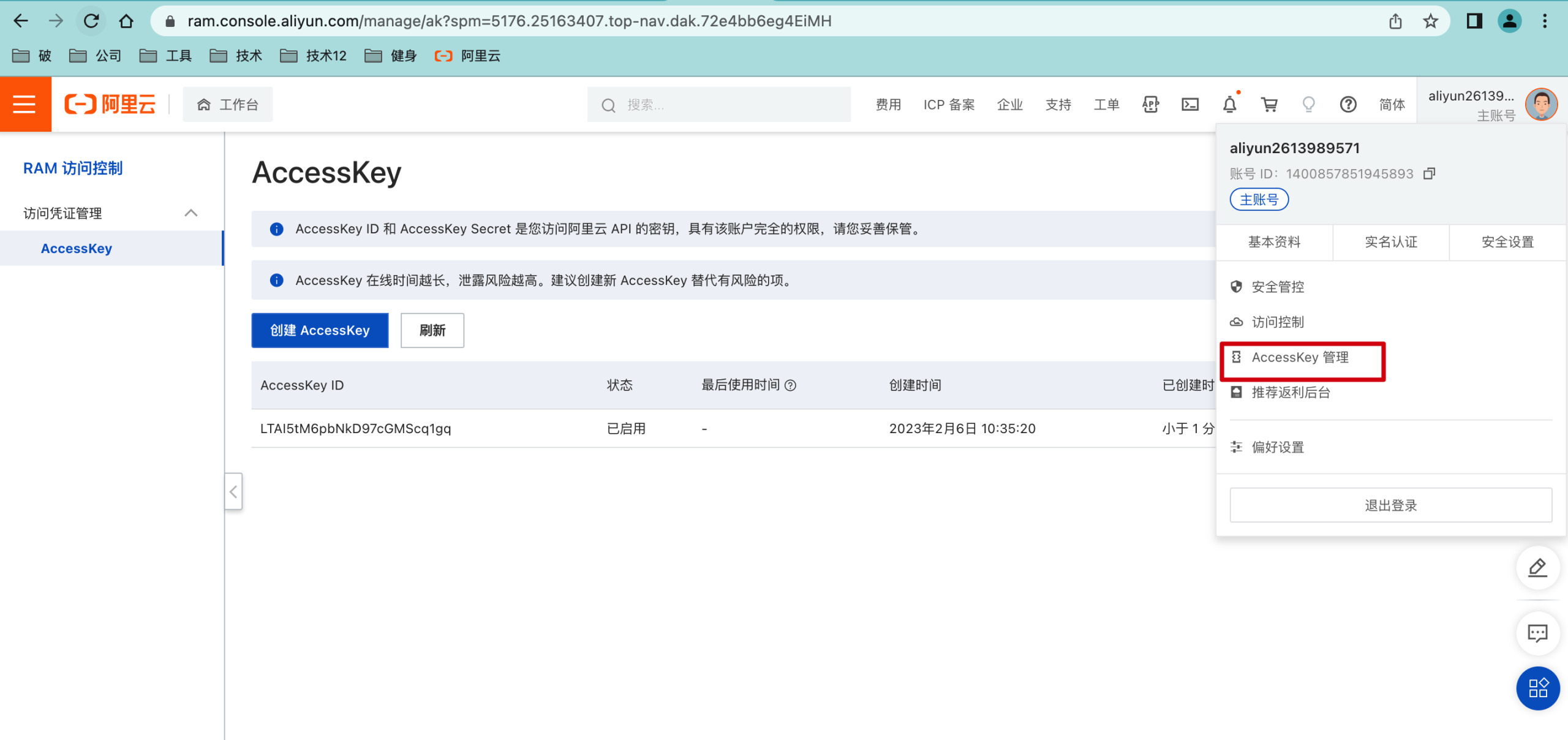
需要创建Accesskey


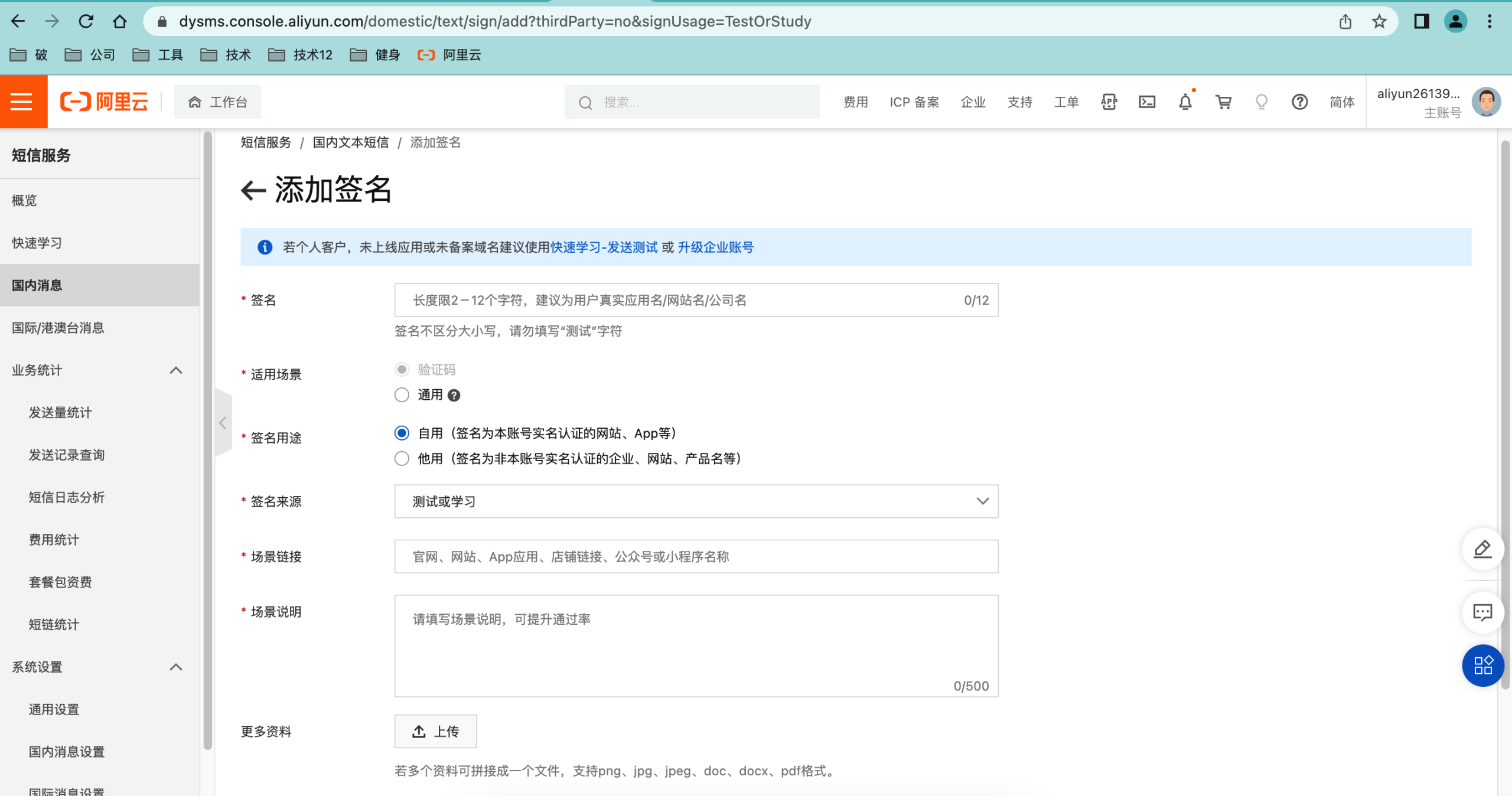
需要创建签名 发送模板

调用api发送短信相关代码

1
2
3
4
5
6
7
8
9
10
11
12
13
14
15
16
17
18
19
20
21
22
23
24
25
26
27
28
29
30
31
32
33
34
35
36
37
38
39
40
41
42
43
44
45
package com.po.reggie.utils;
import com.aliyuncs.DefaultAcsClient;
import com.aliyuncs.IAcsClient;
import com.aliyuncs.dysmsapi.model.v20170525.SendSmsRequest;
import com.aliyuncs.dysmsapi.model.v20170525.SendSmsResponse;
import com.aliyuncs.exceptions.ClientException;
import com.aliyuncs.profile.DefaultProfile;
/**
 * 短信发送工具类
 */
public class SMSUtils {
    /**
     * 发送短信
     * @param signName 签名
     * @param templateCode 模板
     * @param phoneNumbers 手机号
     * @param param 参数
     */
    public static void sendMessage(String signName, String templateCode,String phoneNumbers,String param){
        DefaultProfile profile = DefaultProfile.getProfile("cn-hangzhou""LTAI5tM6p--------MScq1gq""4fhp0t8j0y2-----UIlbgfH1GU");
        IAcsClient client = new DefaultAcsClient(profile);
        SendSmsRequest request = new SendSmsRequest();
        request.setSysRegionId("cn-hangzhou");
        request.setPhoneNumbers(phoneNumbers);
        request.setSignName(signName);
        request.setTemplateCode(templateCode);
        request.setTemplateParam("{\"code\":\""+param+"\"}");
        try {
            SendSmsResponse response = client.getAcsResponse(request);
            System.out.println("短信发送成功");
        }catch (ClientException e) {
            e.printStackTrace();
        }
    }
    public static void main(String[] args) {
        sendMessage("破土重生科技股份有限公司","SMS_154950909","13522715896","12345678");
    }
}

代码开发-导入maven坐标

1
2
3
4
5
6
7
8
9
10
<dependency>
<groupId>com.aliyun</groupId>
<artifactId>aliyun-java-sdk-core</artifactId>
<version>4.5.16</version>
</dependency>
<dependency>
<groupId>com.aliyun</groupId>
<artifactId>aliyun-java-sdk-dysmsapi</artifactId>
<version>2.1.0</version>
</dependency>

验证码的校验和登录

1
2
3
4
5
6
7
8
9
10
11
12
13
14
15
16
17
18
19
20
21
22
23
24
25
26
27
28
29
30
31
32
33
34
35
36
37
38
39
40
41
42
43
44
45
46
47
48
49
50
51
52
53
54
55
56
57
58
59
60
61
62
63
64
65
66
67
68
69
70
71
72
73
74
75
76
77
78
79
80
81
82
83
84
85
86
87
88
89
90
91
92
93
94
package com.po.reggie.controller;
import com.baomidou.mybatisplus.core.conditions.query.LambdaQueryWrapper;
import com.po.reggie.common.R;
import com.po.reggie.domain.User;
import com.po.reggie.service.UserService;
import com.po.reggie.utils.ValidateCodeUtils;
import lombok.extern.slf4j.Slf4j;
import org.apache.commons.lang.StringUtils;
import org.springframework.beans.factory.annotation.Autowired;
import org.springframework.web.bind.annotation.PostMapping;
import org.springframework.web.bind.annotation.RequestBody;
import org.springframework.web.bind.annotation.RequestMapping;
import org.springframework.web.bind.annotation.RestController;
import javax.servlet.http.HttpSession;
import java.util.Map;
@RestController
@RequestMapping("/user")
@Slf4j
public class UserController {
    @Autowired
    private UserService userService;
    /**
     * 发送手机短信验证码
     * @param user
     * @return
     */
    @PostMapping("/sendMsg")
    public R<String> sendMsg(@RequestBody User user, HttpSession session){
        //获取手机号
        String phone = user.getPhone();
        if(StringUtils.isNotEmpty(phone)){
            //生成随机的4位验证码
            String code = ValidateCodeUtils.generateValidateCode(4).toString();
            log.info("code={}",code);
            //调用阿里云提供的短信服务API完成发送短信
            //SMSUtils.sendMessage("瑞吉外卖","",phone,code);
            //需要将生成的验证码保存到Session
            session.setAttribute(phone,code);
            return R.success("手机验证码短信发送成功");
        }
        return R.error("短信发送失败");
    }
    /**
     * 移动端用户登录
     * @param map
     * @param session
     * @return
     */
    @PostMapping("/login")
    public R<User> login(@RequestBody Map map, HttpSession session){
        log.info(map.toString());
        //获取手机号
        String phone = map.get("phone").toString();
        //获取验证码
        String code = map.get("code").toString();
        //从Session中获取保存的验证码
        Object codeInSession = session.getAttribute(phone);
        //进行验证码的比对(页面提交的验证码和Session中保存的验证码比对)
        if(codeInSession != null && codeInSession.equals(code)){
            //如果能够比对成功,说明登录成功
            LambdaQueryWrapper<User> queryWrapper = new LambdaQueryWrapper<>();
            queryWrapper.eq(User::getPhone,phone);
            User user = userService.getOne(queryWrapper);
            if(user == null){
                //判断当前手机号对应的用户是否为新用户,如果是新用户就自动完成注册
                user = new User();
                user.setPhone(phone);
                user.setStatus(1);
                userService.save(user);
            }
            session.setAttribute("user",user.getId());
            return R.success(user);
        }
        return R.error("登录失败");
    }
}