[转载]Asp.net MVC2 使用经验,性能优化建议

mikel阅读(902)

[转载]Asp.net MVC2 使用经验,性能优化建议 – Otis’s Technology Space – 博客园.

这个月一直在用 ASP.NET MVC2 做http://www.86e0.com/t 这个网站,用的时候是 aps.net MVC2 RC2,然后现在ASP.NET MVC2正式版已经是发布了。 在MVC的使用上,有一些心得。下面作一下总结,希望对大家有用,也欢迎大家讨论。

1.关于 缓存

缓存上,数据层上的缓存是必须的,这点不必多说了。

另一个很重要的是:视图片段缓存。

我参考了老赵的写的三篇关于片段缓存的文章:

本想用老赵的了,但是我发现Asp.net MVC2 的有一个新功能: Html.Partial可以返回生成的HTML, 返回的类型是:MvcHtmlString. 虽然要利用Partial View才能生成Html片段,但是我想这个已经够我用的了, 所以我做了一个这样一个Helper,主要是将生成的HTML片段缓存到Memcached里。代码如下:

01 public static class MvcHtmlHelper
02 {
03 public static MvcHtmlString MemcacheHtmlPartial(this HtmlHelper htmlHelper,int duration, string partialViewName, object model, ViewDataDictionary viewData)
04 {
05 object obaear = htmlHelper.ViewContext.RouteData.DataTokens["area"];
06 string area=string.Empty;
07 if (obaear != null) area = obaear.ToString();
08 string key = string.Format("MemcacheHtmlPartial_{0}{1}", area, partialViewName);
09 object ob = DistCache.Get(key);
10 if (ob == null)
11 {
12 MvcHtmlString mstr = htmlHelper.Partial(partialViewName, model, viewData);
13 DistCache.Add(key, mstr.ToString(), TimeSpan.FromSeconds(duration));
14 return mstr;
15 }
16 else
17 {
18 return MvcHtmlString.Create((string)ob);
19 }
20 }
21 }

然后,我觉得,这样,在每次请求时,还是要在Controller 里把数据取出来,然后再传到 Partial View里。 既然已经缓存了,就应该不用每次请求都要在Controller里把数据取出来才对!虽然数据层会有缓存。

所以我,能不能再省下去Controller取数据的消耗,于是又有了以下代码,其功能是:缓存Action生成的HTML到Memcached 里。

01 public static MvcHtmlString MemcacheHtmlRenderAction(this HtmlHelper htmlHelper, int duration, string actionName,string controllerName, RouteValueDictionary routeValues)
02 {
03 object obaear = htmlHelper.ViewContext.RouteData.DataTokens["area"];
04 string area = string.Empty;
05 if (obaear != null) area = obaear.ToString();
06 string key = string.Format("MemcacheHtmlRenderAction_{0}{1}{2}", area, controllerName,actionName);
07 object ob = DistCache.Get(key);
08 if (ob == null)
09 {
10
11 // htmlHelper.RenderAction(actionName, controllerName, routeValues);
12 StringWriter writer = new StringWriter(CultureInfo.CurrentCulture);
13 ActionHelper(htmlHelper, actionName, controllerName, routeValues, writer);
14 string wStr = writer.ToString();
15 DistCache.Add(key, wStr,TimeSpan.FromSeconds(duration));
16 MvcHtmlString mstr = MvcHtmlString.Create(wStr);
17
18 return mstr;
19 }
20 else { return MvcHtmlString.Create((string)ob); }
21 }

说明一下,Actionhelper的方法是在MVC原代码里提取出来的。 因为MVC2里的 Html.RenderAction方法并没有返回 MvcHtmlString的重载版。那位有更好的方法?

其实,MVC里的Action有输出缓存,所以直接在View里用 Html.RenderAction都可以解决很多问题了。这个主要是可以用程序管理缓存。

2.关于静态内容的放置

习惯上,静态内容会放在 mvc程序所在的目录下,比如说js,css,上传的图片等。但是这样的话,所有的静态请求都要经过 aspnet_isapi 处理,这样是非常不合算的。所以静态内容一般都会放在另外的子域上。http://www.86e0.com/t 是放在 cdn.86e0.com上。

3.关于强类型ViewModel

我基本上看了老赵的ASP.NET MVC最佳实践。 其中有一点,就是强烈推荐使用强类型的ViewModel. 我试了一些页面,发现用强类型的ViewModel,现阶段并不适用于我。因为我是用NbearLite,从数据库抓出来的大多是DataTable. 我是觉得DataTable+NbearLite蛮方便的,虽然没有动态语言的数据访问来得方便,但是比用Entity,ViewModel, DTO,等等来说,还是可以省下很多代码。然后,最重要的是,由于我这种站经常会修改,所以数据库改变,加字段,减字段是很经常性的事。但是,用 NbearLite + DataSet,DataTable,却非常方便。

所以我觉得,做Asp.net MVC,如果你不是用DDD,DDT的话,用DataTable还是可以的。因为DDD,DDT学习起来还是要点成本的。

4.关于URL生成

URL生成, 老赵写了一系列文章:

  • 各 种URL生成方式的性能对比
  • 各 种URL生成方式的性能对比(结论及分析)
  • 为 URL生成设计流畅接口(Fluent Interface)
  • URL生成方式性能优化结果我直接选择

    Raw方式了, 速度最快的,才是适合我的。呵。 而不是强类型的才是适合我的。

    最后,分享一个很实用的ASP.NET MVC 分页Helper.

    这个Helper引自重典老大的blog:http://www.cnblogs.com/chsword/ . 我在之前做了少少修改,现已经在http://www.86e0.com/t 上使用了。

    效果如下:

    image

    请大家注意生成的 URL, 是用 ?参数=页码 的方式。代码如下:

    01 /// <summary>
    02 /// 分页Pager显示
    03 /// </summary>
    04 /// <param name="html"></param>
    05 /// <param name="currentPageStr">标识当前页码的QueryStringKey</param>
    06 /// <param name="pageSize">每页显示</param>
    07 /// <param name="totalCount">总数据量</param>
    08 /// <returns></returns>
    09 public static string Pager(this HtmlHelper html, string currentPageStr, int pageSize, int totalCount)
    10 {
    11 var queryString = html.ViewContext.HttpContext.Request.QueryString;
    12 int currentPage = 1; //当前页
    13 if(!int.TryParse(queryString[currentPageStr], out currentPage)) currentPage = 1; //与相应的QueryString绑定
    14 var totalPages = Math.Max((totalCount + pageSize - 1) / pageSize, 1); //总页数
    15 var dict = new RouteValueDictionary(html.ViewContext.RouteData.Values);
    16
    17 var output = new StringBuilder();
    18
    19 foreach (string key in queryString.Keys)
    20 if (queryString[key] != null && !string.IsNullOrEmpty(key))
    21 dict[key] = queryString[key];
    22 if (totalPages > 1)
    23 {
    24 if (currentPage != 1)
    25 {//处理首页连接
    26 dict[currentPageStr] = 1;
    27 output.AppendFormat("<span class=\"p_home\">{0}</span>", html.RouteLink(" 首页", dict));
    28 }
    29 if (currentPage > 1)
    30 {//处理上一页的连接
    31 dict[currentPageStr] = currentPage - 1;
    32 output.AppendFormat("<span class=\"p_up\">{0}</span>", html.RouteLink(" 上一页", dict));
    33 }
    34 else
    35 {
    36 output.AppendFormat("<span class=\"p_disable\">{0}</span>","上一页");
    37 }
    38 int currint = 5;
    39 for (int i = 0; i <= 10; i++)
    40 {//一共最多显示10个页 码,前面5个,后面5个
    41 if ((currentPage + i - currint) >= 1 && (currentPage + i - currint) <= totalPages)
    42 if (currint == i)
    43 {//当前页处理
    44 output.Append(string.Format("<span class=\"p_current\">{0}</span>", currentPage));
    45 }
    46 else
    47 {//一般页处理
    48 dict[currentPageStr] = currentPage + i - currint;
    49 output.AppendFormat("<span class=\"p_num\">{0}</span>",html.RouteLink((currentPage + i - currint).ToString(), dict));
    50 }
    51 }
    52 if (currentPage < totalPages)
    53 {//处理下一页的链接
    54 dict[currentPageStr] = currentPage + 1;
    55 output.AppendFormat("<span class=\"p_down\">{0}</span>", html.RouteLink(" 下一页", dict));
    56 }
    57 else
    58 {
    59 output.AppendFormat("<span class=\"p_disable\">{0}</span>", "下一页");
    60 }
    61 if (currentPage != totalPages)
    62 {
    63 dict[currentPageStr] = totalPages;
    64 output.AppendFormat("<span class=\"p_last\">{0}</span>",html.RouteLink(" 末页", dict));
    65 }
    66 }
    67 output.AppendFormat("<span class=\"p_count\">第{0}页/共{1}页</span>", currentPage, totalPages);//这个统计加不加都行
    68 return output.ToString();
    69 }

    另: http://www.86e0.com/t 是做淘宝客类应用的。园子里还有谁在做淘宝客类网站么? 有的话多交流。^_^

  • [转载]项目优化经验——垃圾回收导致的性能问题

    mikel阅读(1000)

    [转载]项目优化经验——垃圾回收导致的性能问题 – lovecindywang – 博客园.

    谈谈最近优化一个网站项目的经验,首先说一下背景情况:

    1) 在页面后台代码中我们把页面上大部分的HTML都使用字符串来拼接生成然后直接赋值给LiteralControl。

    2) 网站CPU很高,基本都在80%左右,即使使用了StringBuilder来拼接字符串性能也不理想。

    3) 为了改善性能,把整个字符串保存在memcached中,性能还是不理想。

    在比较了这个网站和其它网站服务器上相关性能监视器指标后发 现有一个参数特别显眼:

    image

    就是其中的每秒分配字节数,这个性能比较差的网 站每秒分配2GB的内存(而且需要注意由于性能监视器是每秒更新一下,对于一个非常健康的网站这个值应该经常看到是0才对)!而其它一些网站只分配 200M左右的内存。服务器配备4G内存,而每秒分配2G内存,我想垃圾回收器一定需要不断运行来回收这些内存。观察%Time in GC可以发现,这个值一直在10%左右,也就是说上次回收到这次回收间隔10秒的话,这次垃圾回收1秒,由于回收的时间相对固定,那么这个值可以反映回收 的频繁度。

    知道了这个要点就知道了方向,在项目中找可能的问题点:

    1) 是否分配了大量临时的小对象

    2) 是否分配了数量不多但比较大的大对象

    在经历了一番查找之后,发现一个比较大的问题,虽然使用了memcached来缓存整个页面的 HTML,但是在输出之前居然进行了几次string的Replace操作,这样就产生了几个大的字符串,我们来做一个实验模拟这种场景:

    public partial class _Default : System.Web.UI.Page
    {
        static string template;
        protected void Page_Load(object sender, EventArgs e)
        {
            if (template == null)
            {
                StringBuilder sb = new StringBuilder();
                for (int i = 0; i < 10000; i++)
                    sb.Append("1234567890");
                template = sb.ToString(); 
            }
    
            Stopwatch sw = Stopwatch.StartNew();
    
            for (int i = 0; i < 1; i++)
            {
                long mem1 = GC.GetTotalMemory(false);
                string s = template + i;
                long mem2 = GC.GetTotalMemory(false);
                Response.Write((mem2 - mem1).ToString("N0"));
                Response.Write("<br/>");
                GC.KeepAlive(s);
            }
    
            for (int i = 0; i < 100000; i++)
            {
                double d = Math.Sqrt(i);
            }
    
            Thread.Sleep(30);
            Response.Write(sw.ElapsedMilliseconds);
        }
    }

    在这段代码中:

    1) 我们首先使用一个静态变量模拟缓存中的待输出的HTML

    2) 我们中间的一段代码测算一下这个字符串占用的内存空间

    3) 随后我们做了一些消耗CPU的运算操作来模拟页面的一些计算

    4) 然后休眠一段时间

    4) 最后我们输出了页面执行时间

    我们这么做的目的是模拟一个比较“正常的”ASP.NET页面需要做的一些工作:

    1) 内存上的分配

    2) 一些计算

    3) 涉及到IO访问的一些等待

    来看看输出结果:

    image

    这里可以看到,我们这个字符串占用差不多200K的字节,字符串是字符数组,CLR中字符采用Unicode双字节存储,因此10万长度的字符串占 用200千字节,并且也可以看到这个页面执行时间30毫秒,差不多是一个正常aspx页面的时间,而200K不到的字符串也差不多相当于这个页面的 HTML片段,现在我们来改一下其中的一段代码模拟优化前进行的Replace操作带来的几个大字符串:

    for (int i = 0; i < 10; i++)
    {
        //long mem1 = GC.GetTotalMemory(false);
        string s = template + i;
        //long mem2 = GC.GetTotalMemory(false);
        //Response.Write((mem2 - mem1).ToString("N0"));
        //Response.Write("<br/>");
        //GC.KeepAlive(s);
    }

    然后使用IDE自带压力测试1000常量用户来测试这个页面:

    image

    可以看到每秒分配了超过400M字节(这和我们线上环境比还差点毕竟请求少),CPU占用基本在120-160左右(双核),我们去掉每秒分配内存 这个数值,来看看垃圾回收频率和CPU占用两个值的图表:

    image

    可以看到红色的CPU波动基本和蓝色的垃圾回收波动保持一致(这里不太准确的另外一个原因是压力测试客户端运行于本机,而为w3wp关联2个处理 器)!为什么说垃圾回收会带来CPU的波动,从理论上来说有以下原因:

    1) 垃圾回收的时候会暂时挂起所有线程,然后GC会检测扫描每一个线程栈上可回收对象,然后会移动对象,并且重新设置对象指针,这整个过程首先是消耗CPU的

    2) 而且在这个过程之后恢复线程执行,这个时候CPU往往会引起一个高峰因为已经有更多的请求等待了

    我们把Math.Sqrt这段代码注释掉并且把w3wp和VSTestHost关联到不同的处理器来看看对于CPU计算很少的页面,上图更明显的对 比:

    image

    这说明垃圾回收的确会占用很多CPU资源,但这只是一部分,其实我觉得网站的CPU压力来自于几个地方:

    1) 就是大量的内存分配带来的垃圾回收所占用的CPU,对于ASP.NET框架内部的很多行为无法控制,但是可以在代码中尽量避免在堆上产生很多不必要的对象

    2) 是实际的CPU运算,不涉及IO的运算,这些可以通过改良算法来优化,但是优化比较有限

    3) 是IO操作这块,数据量的多少很关键,还有要考虑memcached等外部缓存对象序列化反序列化的消耗

    4) 虽然很多IO操作不占用CPU资源,线程处于休眠状态,但是很多时候其实是依托新线程进行的,带来的就是线程切换和线程创建消耗的消耗,这一块可以通过合 理使用多线程来优化

    发现了这个问题之后优化就很简单了,把Replace操作放到memcached的Set操作之前,取出之后不产生过多大字符串,把for循环改为 一次,再来看一下:

    image

    image

    这次内存分配明显少了很多,CPU降下来了,降的不多,但从压力测试监视器中看到页面执行平均时间从5秒变为3秒了,每秒平均请求数从170到了 200(最高从200到了300)。在这里要说明一点很多时候网站的性能优化不能光看CPU还要对比优化前后网站的负载,因为在优化之后页面执行时间降低 了,负载量就增大了CPU消耗也随之增大。并且可以看到垃圾回收频率的缩短很明显,从长期在30%到几十秒一次30%。

    最后想补充几点:

    1) 有的时候我们会使用GC.GetTotalMemory(true); 来得到垃圾回收之后内存分配数,类似这样涉及到垃圾回收的代码在项目上线后千万不能出现,否则很可能会% Time in GC达到80%以上大量占用CPU。

    2) 对于放在缓存中的对象我们往往会觉得性能得到保障大量去使用,其实缓存实现的只是把创造这个对象过程的时间转化为空间,而在拿到这个对象之后再进行很多运 算带来的大量空间始终会进行垃圾回收。做网站和做应用程序不一样,一个操作如果申请200K堆内存,一个页面执行这个操作10次,一秒200多个请求,大 家可以自己算一下平均每秒需要分配多少内存,这个数值是相当可怕的,网站是一个多线程的环境,我们对内存的使用要考虑更多。

    作者:lovecindywang
    本文版权归作者和博客园共有,欢迎转载,但未经作者同意必须保留此段声明,且在文章页面明显位置给出原文连接,否则保留追究法律责任的权利。

    [转载]什么是软件的MSDN版、OEM版、RTM版?

    mikel阅读(883)

    (一)MSDN (Microsoft Developer Network)版 MSDN软件是微软公司面向软件开发者的一种版本。MSDN 涵盖了所有可以被开发扩充的平台和应用程序,如微软公司的百科全书 Encarta,或者是各种游戏,是不包括在 MSDN 之内的,因为这些产品直接面向最终用户,没有进行程序开发的必要。 (二) OEM(Original Equipment Manufacturer)版 OEM软件只能随机器出货,不能零售,所以也叫做随机版。OEM软件只能全新安装,不能从旧有操作系统升级。如果买笔记型计算机或品牌计算机就会有随机版软件。包装不像零售版精美,通常只有一片cd和说明书(授权书)。这种系统通常会少一些驱动,而且目前的OEM软件很少放在光盘里能给你安装,要么就是恢复盘,要么就是硬盘镜像。 (三) RTM(Release to Manufacturing)版 软件在正式在零售商店上架前,需要一段时间来压片,包装、配销,所以程序代码必须在正式发行前一段时间就要完成,这个完成的程序代码叫做 final.code,程序代码开发完成之后,要将母片送到工厂大量压片,这个版本就叫做rtm版。rtm版的程序码和正式版一样。但是和正式版也有不一样的地方:例如正式版中的oem不能升级安装,升级版要全新安装的话会检查旧版操作系统光盘等,这些就是Rtm和正式版不同的地方,但是它们的主要程序代码都是一样的。严格的说这种版本还是属于fpp零售版,需要激活。

    [转载]深入分析 ASP.NET Mvc 1.0

    mikel阅读(923)

    [转载]深入分析 ASP.NET Mvc 1.0 – ModelBinder – Never give up – 博客园.

    前一篇文章已经讲叙Controller.Execute(…)方法的执行流程中会调用 ControllerActionInvoker类的InvokeAction(ControllerContext controllerContext, string actionName)方法, 在InvokeAction(…)方法内又调用了GetParameterValues(…)方法,这个方法为Action中的每个参数赋值,追踪到 GetParameterValues(…)方法内部会发现其实每个参数的值是由GetParameterValue(…)返回的,观察 GetParameterValue(…)方法的源码:

    protected virtual object GetParameterValue(ControllerContext controllerContext, ParameterDescriptor parameterDescriptor) {
                // collect all of the necessary binding properties
                Type parameterType = parameterDescriptor.ParameterType;
                IModelBinder binder = GetModelBinder(parameterDescriptor);
                IDictionary<string, ValueProviderResult> valueProvider = controllerContext.Controller.ValueProvider;
                string parameterName = parameterDescriptor.BindingInfo.Prefix ?? parameterDescriptor.ParameterName;
                Predicate<string> propertyFilter = GetPropertyFilter(parameterDescriptor);
    
                // finally, call into the binder
                ModelBindingContext bindingContext = new ModelBindingContext() {
                    FallbackToEmptyPrefix = (parameterDescriptor.BindingInfo.Prefix == null), // only fall back if prefix not specified
                    ModelName = parameterName,
                    ModelState = controllerContext.Controller.ViewData.ModelState,
                    ModelType = parameterType,
                    PropertyFilter = propertyFilter,
                    ValueProvider = valueProvider
                };
                object result = binder.BindModel(controllerContext, bindingContext);
                return result;
            }

    代码的逻辑分为:

    1. 获取继承了IModelBinder接口的对象
    2. 执行IModelBinder对象的BindModel(…)方法并返回Action的参数值

    继承IModelBinder接口的对象有三个类:DefaultModelBinder, FormCollectionModelBinderHttpPostedFileBaseModelBinder

    在GetParameterValue(…)方法中可以看到由GetModelBinder(parameterDescriptor)负责返回 IModelBinder对象,但他是如何确定返回哪个ModeBinder的呢?

    • 当Action的参数类型为FormCollection时,GetParameterValue(…)方法返回 FormCollectoinModelBinder对象
    • 当Action的参数类型为HttpPostedFileBase时,GetParameterValue(…)方法返回 HttpPostedFileBaseModelBinder对象
    • 当Action的参数类型除了FormCollection和HttpPostedFileBase外(int, string, boolean或强类型),GetParameterValue(…)方法返回DefaultModelBinder对 象,DefaultModelBinder也是最常用的ModelBinder

    来深入到GetModelBinder(…)方法的内部

    private IModelBinder GetModelBinder(ParameterDescriptor parameterDescriptor) {
                // look on the parameter itself, then look in the global table
                return parameterDescriptor.BindingInfo.Binder ?? Binders.GetBinder(parameterDescriptor.ParameterType);
            }

    通常情况下IModelBinder都是由 Binders.GetBinder(parameterDescriptor.ParameterType)返回, Binders属性调用ModelBinders.Binders返回ModelBinderDictionary的静态实例,在调用 ModelBinders.Binders属性返回ModelBinderDictionary对象之前先初始化 ModelBinderDictionary对象并将HttpPostedFileBaseModelBinder保存到 ModelBinderDictionary对象中(代码如下),最后其实是调用ModelBinderDictionary的GetBinder()方 法返回的IModelBinder对象。

    public static class ModelBinders {
            private static readonly ModelBinderDictionary _binders = CreateDefaultBinderDictionary();
    
            public static ModelBinderDictionary Binders {
                get {
                    return _binders;
                }
            }
            
            private static ModelBinderDictionary CreateDefaultBinderDictionary() {
                // We can't add a binder to the HttpPostedFileBase type as an attribute, so we'll just
                // prepopulate the dictionary as a convenience to users.
    
                ModelBinderDictionary binders = new ModelBinderDictionary() {
                    { typeof(HttpPostedFileBase), new HttpPostedFileBaseModelBinder() }
                };
                return binders;
            }
    
        }

    ModelBinderDictionary的GetBinder()方法

    public IModelBinder GetBinder(Type modelType) {
                return GetBinder(modelType, true /* fallbackToDefault */);
            }
    
            public virtual IModelBinder GetBinder(Type modelType, bool fallbackToDefault) {
                if (modelType == null) {
                    throw new ArgumentNullException("modelType");
                }
    
                return GetBinder(modelType, (fallbackToDefault) ? DefaultBinder : null);
            }
    
            private IModelBinder GetBinder(Type modelType, IModelBinder fallbackBinder) {
                // Try to look up a binder for this type. We use this order of precedence:
                // 1. Binder registered in the global table
                // 2. Binder attribute defined on the type
                // 3. Supplied fallback binder
    
                IModelBinder binder;
                if (_innerDictionary.TryGetValue(modelType, out binder)) {
                    return binder;
                }
    
                binder = ModelBinders.GetBinderFromAttributes(modelType,
                    () => String.Format(CultureInfo.CurrentUICulture, MvcResources.ModelBinderDictionary_MultipleAttributes, modelType.FullName));
    
                return binder ?? fallbackBinder;
            }

    在签名为private IModelBinder GetBinder(Type modelType, IModelBinder fallbackBinder) 的方法中会最返回IModelBinder对象,并且可以看出如果Action的参为类型为HttpPostedFileBase时,在 _innerDictionary.TryGetValue(modelType, out binder) 时就可能找到这个IModelBinder并返回;如果参数的类型为FormCollection 时,ModelBinders.GetBinderFromAttributes()会返回FormControllerModelBinder否则会返 回fallbackBinder也主是DefaultModelBinder对象

    来看一个DefaultModelBinder对象的BindModel(…)方法的代码:

    public virtual object BindModel(ControllerContext controllerContext, ModelBindingContext bindingContext) {
                if (bindingContext == null) {
                    throw new ArgumentNullException("bindingContext");
                }
    
                bool performedFallback = false;
    
                if (!String.IsNullOrEmpty(bindingContext.ModelName) && !DictionaryHelpers.DoesAnyKeyHavePrefix(bindingContext.ValueProvider, bindingContext.ModelName)) {
                    // We couldn't find any entry that began with the prefix. If this is the top-level element, fall back
                    // to the empty prefix.
                    if (bindingContext.FallbackToEmptyPrefix) {
                        bindingContext = new ModelBindingContext() {
                            Model = bindingContext.Model,
                            ModelState = bindingContext.ModelState,
                            ModelType = bindingContext.ModelType,
                            PropertyFilter = bindingContext.PropertyFilter,
                            ValueProvider = bindingContext.ValueProvider
                        };
                        performedFallback = true;
                    }
                    else {
                        return null;
                    }
                }
    
                // Simple model = int, string, etc.; determined by calling TypeConverter.CanConvertFrom(typeof(string))
                // or by seeing if a value in the request exactly matches the name of the model we're binding.
                // Complex type = everything else.
                if (!performedFallback) {
                    ValueProviderResult vpResult;
                    bindingContext.ValueProvider.TryGetValue(bindingContext.ModelName, out vpResult);
                    if (vpResult != null) {
                        return BindSimpleModel(controllerContext, bindingContext, vpResult);
                    }
                }
                if (TypeDescriptor.GetConverter(bindingContext.ModelType).CanConvertFrom(typeof(string))) {
                    return null;
                }
    
                return BindComplexModel(controllerContext, bindingContext);
            }

    if (!String.IsNullOrEmpty(bindingContext.ModelName) && !DictionaryHelpers.DoesAnyKeyHavePrefix(bindingContext.ValueProvider, bindingContext.ModelName))  查找指定的参数名是否包含在ValueProvider中,有两种情况:

    1. 在ValueProvider找到指定的参数名: 一般都是简单类型(int, boolean, string)或数组(页面中相同name的元素会以数组的形式赋给指定的参数)
    2. 没有在ValueProvider中找到指定的参数名:通常情况下都是strongly-typed类型,因为他的参数名不能与页面中的name 属性相同,否则会有异常被抛出;还有一种情况就是页面中元素的name属性与Action的参数名不一致,这时如果参数不能接收null类型就会有异常抛 出 。

    接着上面的if语句,如果没有找到指定的参数并且 ModelBindingContext.FallbackToEmptyPrefix==true,那么就重新创建一个 ModelBindingContext对象,并设置performedFallback = true。

    接下来的代码分两步执行:

    • BindSimpleModel(controllerContext, bindingContext, vpResult): 为简单对象返回参数值
    • BindComplexModel(controllerContext, bindingContext): 返 回complex对象(这里我理解为strongly-typed)的参数值
    1. 首先看看BindSimpleModel(…)方法的过程:
    internal object BindSimpleModel(ControllerContext controllerContext, ModelBindingContext bindingContext, ValueProviderResult valueProviderResult) {
                bindingContext.ModelState.SetModelValue(bindingContext.ModelName, valueProviderResult);
    
                // if the value provider returns an instance of the requested data type, we can just short-circuit
                // the evaluation and return that instance
                if (bindingContext.ModelType.IsInstanceOfType(valueProviderResult.RawValue)) {
                    return valueProviderResult.RawValue;
                }
    
                // since a string is an IEnumerable<char>, we want it to skip the two checks immediately following
                if (bindingContext.ModelType != typeof(string)) {
    
                    // conversion results in 3 cases, as below
                    if (bindingContext.ModelType.IsArray) {
                        // case 1: user asked for an array
                        // ValueProviderResult.ConvertTo() understands array types, so pass in the array type directly
                        object modelArray = ConvertProviderResult(bindingContext.ModelState, bindingContext.ModelName, valueProviderResult, bindingContext.ModelType);
                        return modelArray;
                    }
    
                    Type enumerableType = ExtractGenericInterface(bindingContext.ModelType, typeof(IEnumerable<>));
                    if (enumerableType != null) {
                        // case 2: user asked for a collection rather than an array
                        // need to call ConvertTo() on the array type, then copy the array to the collection
                        object modelCollection = CreateModel(controllerContext, bindingContext, bindingContext.ModelType);
                        Type elementType = enumerableType.GetGenericArguments()[0];
                        Type arrayType = elementType.MakeArrayType();
                        object modelArray = ConvertProviderResult(bindingContext.ModelState, bindingContext.ModelName, valueProviderResult, arrayType);
    
                        Type collectionType = typeof(ICollection<>).MakeGenericType(elementType);
                        if (collectionType.IsInstanceOfType(modelCollection)) {
                            CollectionHelpers.ReplaceCollection(elementType, modelCollection, modelArray);
                        }
                        return modelCollection;
                    }
                }
    
                // case 3: user asked for an individual element
                object model = ConvertProviderResult(bindingContext.ModelState, bindingContext.ModelName, valueProviderResult, bindingContext.ModelType);
                return model;
            }

    valueProviderResult.RawValue就是简单类型的参数值,if (bindingContext.ModelType.IsInstanceOfType(valueProviderResult.RawValue)) 是判断RawValue是否是指定的参数类型的实例,如果是那就直接返回RawValue。 跳转到最后ConvertProviderResult(…)方法处进行分析,上面的代码都是对数组的操作,最后也还是会调用 ConvertProviderResult(…)方法,来看看ConvertProviderResult(…)方法的代码:

    [SuppressMessage("Microsoft.Design", "CA1031:DoNotCatchGeneralExceptionTypes",
                Justification = "We're recording this exception so that we can act on it later.")]
            private static object ConvertProviderResult(ModelStateDictionary modelState, string modelStateKey, ValueProviderResult valueProviderResult, Type destinationType) {
                try {
                    object convertedValue = valueProviderResult.ConvertTo(destinationType);
                    return convertedValue;
                }
                catch (Exception ex) {
                    modelState.AddModelError(modelStateKey, ex);
                    return null;
                }
            }

    调用ValueProviderResult类(ValueProviderResult.cs)的ConvertTo方法, 后又跳转到UnwrapPossibleArrayType(…)方法

            public object ConvertTo(Type type) {
                return ConvertTo(type, null /* culture */);
            }
    
            public virtual object ConvertTo(Type type, CultureInfo culture) {
                if (type == null) {
                    throw new ArgumentNullException("type");
                }
    
                CultureInfo cultureToUse = culture ?? Culture;
                return UnwrapPossibleArrayType(cultureToUse, RawValue, type);
            }
    
            private static object UnwrapPossibleArrayType(CultureInfo culture, object value, Type destinationType) {
                if (value == null || destinationType.IsInstanceOfType(value)) {
                    return value;
                }
    
                // array conversion results in four cases, as below
                Array valueAsArray = value as Array;
                if (destinationType.IsArray) {
                    Type destinationElementType = destinationType.GetElementType();
                    if (valueAsArray != null) {
                        // case 1: both destination + source type are arrays, so convert each element
                        IList converted = Array.CreateInstance(destinationElementType, valueAsArray.Length);
                        for (int i = 0; i < valueAsArray.Length; i++) {
                            converted[i] = ConvertSimpleType(culture, valueAsArray.GetValue(i), destinationElementType);
                        }
                        return converted;
                    }
                    else {
                        // case 2: destination type is array but source is single element, so wrap element in array + convert
                        object element = ConvertSimpleType(culture, value, destinationElementType);
                        IList converted = Array.CreateInstance(destinationElementType, 1);
                        converted[0] = element;
                        return converted;
                    }
                }
                else if (valueAsArray != null) {
                    // case 3: destination type is single element but source is array, so extract first element + convert
                    if (valueAsArray.Length > 0) {
                        value = valueAsArray.GetValue(0);
                        return ConvertSimpleType(culture, value, destinationType);
                    }
                    else {
                        // case 3(a): source is empty array, so can't perform conversion
                        return null;
                    }
                }
                // case 4: both destination + source type are single elements, so convert
                return ConvertSimpleType(culture, value, destinationType);
            }

    在UnwrapPossibleArrayType(…)方法中首先是一些对数组的判断和操作,如果参数的类型不是Array那么就运行最后一行的 ConvertSimpleType(…)方法并返回参数值

    private static object ConvertSimpleType(CultureInfo culture, object value, Type destinationType) {
                if (value == null || destinationType.IsInstanceOfType(value)) {
                    return value;
                }
    
                // if this is a user-input value but the user didn't type anything, return no value
                string valueAsString = value as string;
                if (valueAsString != null && valueAsString.Length == 0) {
                    return null;
                }
    
                TypeConverter converter = TypeDescriptor.GetConverter(destinationType);
                bool canConvertFrom = converter.CanConvertFrom(value.GetType());
                if (!canConvertFrom) {
                    converter = TypeDescriptor.GetConverter(value.GetType());
                }
                if (!(canConvertFrom || converter.CanConvertTo(destinationType))) {
                    string message = String.Format(CultureInfo.CurrentUICulture, MvcResources.ValueProviderResult_NoConverterExists,
                        value.GetType().FullName, destinationType.FullName);
                    throw new InvalidOperationException(message);
                }
    
                try {
                    object convertedValue = (canConvertFrom) ?
                         converter.ConvertFrom(null /* context */, culture, value) :
                         converter.ConvertTo(null /* context */, culture, value, destinationType);
                    return convertedValue;
                }
                catch (Exception ex) {
                    string message = String.Format(CultureInfo.CurrentUICulture, MvcResources.ValueProviderResult_ConversionThrew,
                        value.GetType().FullName, destinationType.FullName);
                    throw new InvalidOperationException(message, ex);
                }
            }

    TypeConverter converter = TypeDescriptor.GetConverter(destinationType) 来返回一个destinationType类型TypeConverter转换器,并用convert.CanConvertFrom和 CanConvertTo两个方法是否可以从value.GetType()转换为destationType类型,如果可以转换那么就将转换的返回给 Action对应的参数,否则换出一个异常。

    2. BindComplexModel

    在BindComplexModel中只讨论strongly-typed。先来看看BindComplexModel(…)方法的代码

    internal object BindComplexModel(ControllerContext controllerContext, ModelBindingContext bindingContext) {
                object model = bindingContext.Model;
                Type modelType = bindingContext.ModelType;
                
                // if we're being asked to create an array, create a list instead, then coerce to an array after the list is created
                if (model == null && modelType.IsArray) {
                    Type elementType = modelType.GetElementType();
                    Type listType = typeof(List<>).MakeGenericType(elementType);
                    object collection = CreateModel(controllerContext, bindingContext, listType);
    
                    ModelBindingContext arrayBindingContext = new ModelBindingContext() {
                        Model = collection,
                        ModelName = bindingContext.ModelName,
                        ModelState = bindingContext.ModelState,
                        ModelType = listType,
                        PropertyFilter = bindingContext.PropertyFilter,
                        ValueProvider = bindingContext.ValueProvider
                    };
                    IList list = (IList)UpdateCollection(controllerContext, arrayBindingContext, elementType);
    
                    if (list == null) {
                        return null;
                    }
    
                    Array array = Array.CreateInstance(elementType, list.Count);
                    list.CopyTo(array, 0);
                    return array;
                }
    
                if (model == null) {
                    model = CreateModel(controllerContext,bindingContext,modelType);
                }
    
                // special-case IDictionary<,> and ICollection<>
                Type dictionaryType = ExtractGenericInterface(modelType, typeof(IDictionary<,>));
                if (dictionaryType != null) {
                    Type[] genericArguments = dictionaryType.GetGenericArguments();
                    Type keyType = genericArguments[0];
                    Type valueType = genericArguments[1];
    
                    ModelBindingContext dictionaryBindingContext = new ModelBindingContext() {
                        Model = model,
                        ModelName = bindingContext.ModelName,
                        ModelState = bindingContext.ModelState,
                        ModelType = modelType,
                        PropertyFilter = bindingContext.PropertyFilter,
                        ValueProvider = bindingContext.ValueProvider
                    };
                    object dictionary = UpdateDictionary(controllerContext, dictionaryBindingContext, keyType, valueType);
                    return dictionary;
                }
    
                Type enumerableType = ExtractGenericInterface(modelType, typeof(IEnumerable<>));
                if (enumerableType != null) {
                    Type elementType = enumerableType.GetGenericArguments()[0];
    
                    Type collectionType = typeof(ICollection<>).MakeGenericType(elementType);
                    if (collectionType.IsInstanceOfType(model)) {
                        ModelBindingContext collectionBindingContext = new ModelBindingContext() {
                            Model = model,
                            ModelName = bindingContext.ModelName,
                            ModelState = bindingContext.ModelState,
                            ModelType = modelType,
                            PropertyFilter = bindingContext.PropertyFilter,
                            ValueProvider = bindingContext.ValueProvider
                        };
                        object collection = UpdateCollection(controllerContext, collectionBindingContext, elementType);
                        return collection;
                    }
                }
    
                // otherwise, just update the properties on the complex type
                BindComplexElementalModel(controllerContext, bindingContext, model);
                return model;
            }

    先从ModelBindingContext中 获取model和modelType,在BindComplexModel方法的中间判断model是否为null,如果不是将调用 CreateModel(…)方法来创建一个strongly-typed对象的实例: if (model == null) { model = CreateModel(controllerContext,bindingContext,modelType); } 。跳转到倒数第二行的BindComplexElementalModel(…)方法处

    internal void BindComplexElementalModel(ControllerContext controllerContext, ModelBindingContext bindingContext, object model) {
                // need to replace the property filter + model object and create an inner binding context
                BindAttribute bindAttr = (BindAttribute)TypeDescriptor.GetAttributes(bindingContext.ModelType)[typeof(BindAttribute)];
                Predicate<string> newPropertyFilter = (bindAttr != null)
                    ? propertyName => bindAttr.IsPropertyAllowed(propertyName) && bindingContext.PropertyFilter(propertyName)
                    : bindingContext.PropertyFilter;
    
                ModelBindingContext newBindingContext = new ModelBindingContext() {
                    Model = model,
                    ModelName = bindingContext.ModelName,
                    ModelState = bindingContext.ModelState,
                    ModelType = bindingContext.ModelType,
                    PropertyFilter = newPropertyFilter,
                    ValueProvider = bindingContext.ValueProvider
                };
    
                // validation
                if (OnModelUpdating(controllerContext, newBindingContext)) {
                    BindProperties(controllerContext, newBindingContext);
                    OnModelUpdated(controllerContext, newBindingContext);
                }
            }

    先获取参数前面的BindAttribute,创建一个新的ModelBindingContext对 象并重新设置了PropertyFilter属性,在下面的if语句中调用了三个方法,OnModelUpdating(…)永远返回true,接着是 BindProperties(…),这个方法为strongly-typed对象的每个属性赋值,来看看它的源码:

    private void BindProperties(ControllerContext controllerContext, ModelBindingContext bindingContext) {
                PropertyDescriptorCollection properties = GetModelProperties(controllerContext, bindingContext);
                foreach (PropertyDescriptor property in properties) {
                    BindProperty(controllerContext, bindingContext, property);
                }
            }

    调用GetModelProperties(…)方法返回一个PropertyDescriptorCollection 集合对象,注意,这个集合不一定是stronly-typed中的全部属性,在GetModelProperties()方法中会根据参 数前面定义的BindAttribute.Incude和BindAttribute.Exclude过滤掉不被使用的属性,将那些确定使用的属性存放到PropertyDescriptorCollection 中。 在foreach中调用BindProperty(…)为每个可用的属性赋值,

    protected virtual void BindProperty(ControllerContext controllerContext, ModelBindingContext bindingContext, PropertyDescriptor propertyDescriptor) {
                // need to skip properties that aren't part of the request, else we might hit a StackOverflowException
                string fullPropertyKey = CreateSubPropertyName(bindingContext.ModelName, propertyDescriptor.Name);
                if (!DictionaryHelpers.DoesAnyKeyHavePrefix(bindingContext.ValueProvider, fullPropertyKey)) {
                    return;
                }
    
                // call into the property's model binder
                IModelBinder propertyBinder = Binders.GetBinder(propertyDescriptor.PropertyType);
                object originalPropertyValue = propertyDescriptor.GetValue(bindingContext.Model);
                ModelBindingContext innerBindingContext = new ModelBindingContext() {
                    Model = originalPropertyValue,
                    ModelName = fullPropertyKey,
                    ModelState = bindingContext.ModelState,
                    ModelType = propertyDescriptor.PropertyType,
                    ValueProvider = bindingContext.ValueProvider
                };
                object newPropertyValue = propertyBinder.BindModel(controllerContext, innerBindingContext);
    
                // validation
                if (OnPropertyValidating(controllerContext, bindingContext, propertyDescriptor, newPropertyValue)) {
                    SetProperty(controllerContext, bindingContext, propertyDescriptor, newPropertyValue);
                    OnPropertyValidated(controllerContext, bindingContext, propertyDescriptor, newPropertyValue);
                }
            }

    在BindProperty(…)内部递归调用IModelBinder.GetBinder(…)方法来为属性赋值。

    ModelBinder并不复杂,Action所有的参数值都是循环调用IModelBinder.GetBinder()方法获得,而 complex类型递归调用IModelBinder来为complex类型的可用属性赋值。

    [转载]泛型委托在项目中的应用

    mikel阅读(1002)

    [转载]泛型委托在项目中的应用 – ASP.NET2.0 – 博客园.

    感悟:对泛型委托基本属于有点认识,但从来没真正在项目中使用过,有时感觉没有合适的场景应用,但看 了artech兄 的文章,我才明白,原来泛型委托真的可以做很多事情,而且效果往往是没有使用委托所达不到的。

    Action<T> 泛型委托:封装一个方法,该方法只采用一个参数并且不返回值。可以使 用此委托以参数形式传递方法,而不用显式声明自定义的委托。该方法必须与此委托定义的方法签名相对应。也就是说,封装的方法必须具有一个通过值传递给它的 参数,并且不能返回值。当然泛型委托不只是只能支持一个参数,它最多可以支持四个参数。

    泛型委托与直接显示声明自定义委托的示例比较:

    1:显示声明自定义委托:

    代码

    delegate void DisplayMessage(string message);
    public class TestCustomDelegate
    {
    public static void Main()
    {
    DisplayMessage messageTarget;
    messageTarget
    = ShowWindowsMessage;
    messageTarget(
    Hello, World!);
    }
    private static void ShowWindowsMessage(string message)
    {
    MessageBox.Show(message);
    }
    }

    2: Action<T> 用法。比起自定义委托,明显可以看出代码简洁了。

    代码

    public class TestAction1
    {
    public static void Main()
    {
    Action
    <string> messageTarget;
    messageTarget
    = ShowWindowsMessage;
    messageTarget(
    Hello, World!);
    }
    private static void ShowWindowsMessage(string message)
    {
    MessageBox.Show(message);
    }
    }

    Func<T, TResult> 委托:封装一个具有一个参数并返回 TResult 参数指定的类型值的方法。同理,这里的泛型委托只是接受一个参数的委托,它最多同样支持四个参数。TResult:此委托封装的方法的返回值类型。
    问题:目前本公司在写程序时,都使用了log4net,我想大家在做异常时,都会利用try catch来捕获异常,日志就在catch块中完成,但每个方法都写一堆的try catch往往显的有点别扭。虽然写程序时提倡尽量去捕获具体的错误异常,但总会有你预想不到的异常抛出,为此直接捕获Exception算是不错的做 法。

    具体场景:在客户端调用WCF服务时,我们都需要在客户做异常处理,最常见的错误异常为 CommunicationException,TimeoutException,Exception示例如下:

    代码

    try
    {
    //执行方法调用
    ……
    (proxy
    as ICommunicationObject).Close();
    }
    catch (CommunicationException ex)
    {
    (proxy
    as ICommunicationObject).Abort();

    WebLog.SquareLog.CommonLogger.Error(取积分广场首页酒店数据异常CommunicationException: + ex.ToString());
    }
    catch (TimeoutException ex)
    {
    (proxy
    as ICommunicationObject).Abort();
    WebLog.SquareLog.CommonLogger.Error(
    取积分广场首页酒店数据超时TimeoutException: + ex.ToString());
    }
    catch (Exception ex)
    {
    (proxy
    as ICommunicationObject).Close();
    WebLog.SquareLog.CommonLogger.Error(
    取积分广场首页酒店数据异常Exception: + ex.ToString());
    }

    但如果这种代码遍布整个项目,我想就有重构的必要了,因为项目中最好不要出现类似复制的代码出现,为此我们可以采用Invoke形式来重构我们已有代码, 下面给出两个方法,一个是没有返回值的,一个是有值的。

    代码

    public static void Invoke<TContract>(TContract proxy, Action<TContract> action)
    {
    try
    {
    action(proxy);
    (proxy
    as ICommunicationObject).Close();
    }
    catch (CommunicationException ex)
    {
    (proxy
    as ICommunicationObject).Abort();
    WebLog.SquareLog.CommonLogger.Error(
    取积分广场首页酒店数据异常CommunicationException: + ex.ToString());
    }
    catch (TimeoutException ex)
    {
    (proxy
    as ICommunicationObject).Abort();
    WebLog.SquareLog.CommonLogger.Error(
    取积分广场首页酒店数据超时TimeoutException: + ex.ToString());
    }
    catch (Exception ex)
    {
    (proxy
    as ICommunicationObject).Close();
    WebLog.SquareLog.CommonLogger.Error(
    取积分广场首页酒店数据异常Exception: + ex.ToString());
    }
    }
    public static TReturn Invoke<TContract, TReturn>(TContract proxy, Func<TContract, TReturn> func)
    {
    TReturn returnValue
    = default(TReturn);
    try
    {
    returnValue
    = func(proxy);
    }
    catch (CommunicationException ex)
    {
    (proxy
    as ICommunicationObject).Abort();

    WebLog.SquareLog.CommonLogger.Error(取积分广场首页酒店数据异常CommunicationException: + ex.ToString());
    }
    catch (TimeoutException ex)
    {
    (proxy
    as ICommunicationObject).Abort();

    WebLog.SquareLog.CommonLogger.Error(取积分广场首页酒店数据超时TimeoutException: + ex.ToString());
    }
    catch (Exception ex)
    {
    WebLog.SquareLog.CommonLogger.Error(
    取积分广场首页酒店数据异常Exception: + ex.ToString());
    }
    return returnValue;
    }

    如何调用:可以看出客户端代码已经变成一条简洁代码了,它即完成了完整的异常处理,而且也把所有能 够捕获的异常信息记录下来。

    list = ErrorHandler.Invoke<ISearchHotelForSquare, List<HotelGenericInfo>>(cli, proxy => proxy.GetHotelGenericListForSquare(requestInfo).ToList());

    说明:至于Invoke的应用,在System .Runtime .Remoting.Proxies有一个RealProxy,可以称做真正代理,里面有IMessage Invoke(System.Runtime.Remoting.Messaging.IMessage msg)方法:只不过这里面没有应用泛型委托。

    代码

    // 返回结果:
    // The message returned by the invoked method, containing the return value and
    // any out or ref parameters.
    public abstract IMessage Invoke(IMessage msg);

    [转载]6款开源微博客程序

    mikel阅读(1461)

    [转载]6款开源微博客程序 | CoCo Bauer.

    6款开源微博客程序

    twitter, 饭否, 叽歪,嘀吐等一众微博客皆受伤,但挡不住广大群众对微博客这种形式的热情。或许你愿意自己搭建一个微博客,尽管这看上去没什么意义: 你搭建一个就几个人玩的微博客,那比喊谁谁谁回家还要无趣。但可能有的站长朋友有远大的理想,想迎风破浪,研究一些微博客程序,本文里就介绍了六 种开源的微博客 程 序

    1. Jaiku

    Jaiku(演示地址) 是一个基于Python的微博客平台,2007年被Google收购,不过之后并没有对其成功运营,只好在2009年宣布对 其停止维护,稍后Google就将Jaiku完全开源,并切换到AppEngine上运行,目前Jaiku完全 开源并提供用户免费下载,大家可以到Jaiku源代码项目地址,使用一个SVN 工具下载其源代码。

    2. Laconica

    Laconica(演示地址) 是一个基于PHP和MySQL的开源微型博客程序,也是一个Twitter克隆,可以实现Microblog的常用功能,国外不少微博客系统都是通过这个 开源系统架设的。Laconica得到大量应用系统的支持,包括Twitterfeed、Hellotxt和Gravity等。点这里下载其源代码。

    3. Sweetter

    Sweetter是一个开源的微博客程序,具有一定的投票机制,基于Python,点这里可下载其源程序代码。

    4. Jisko

    Jisko的界面和Twitter很像,能够自动通过ajax更 新,也是基于PHP和MySQL的,这个系统可能是西班牙人开发的,使用SVN到这里下载其源代码。

    最后介绍两个国内中文的开源微博客系统。

    5. EasyTalk

    国产的开源微博客程序,界面挺像饭否的,API接口也和饭否类似,基于PHP和MySQL点这里下载源代码。

    6. PageCookery

    也是基于PHP和MySQL,支持和叽歪的同步,点这里下载源代码。

    [转载]ASP.NET MVC 请求生命周期

    mikel阅读(1114)

    [转载]MVC 请求生命周期 – 展翅高飞 – 博客园.

    当一个ASP.NET mvc应用程序提出请求,为了响应请求,包含一些请求执行流程步骤! 在ASP.NET mvc应用程序Http request
    和Http response 过程中,主要包含8个步骤:
    1)RouteTable(路由表)的创建
    2)UrlRoutingModule 请求拦截
    3)Routing engine 确定route
    4)route handler 创建相关的IHttpHandler实例
    5)IHttpHandler实例确定Controller(控制器)
    6)Controller执行
    7)一个视图引擎创建
    8) 视图呈现
    主要流程图如下:

    1)RouteTable的创建
    RouteTable的创建发生在mvc应用程序的启动 或者web应用程序池的重启!通常的asp.net程序,一个页面请求对应磁盘上的一个页面!如(http://localhost/index.aspx
    对 应到服务器磁盘上的文件index.aspx)index.aspx实际上是一个类,由IHttpHandler创建实例化。IHttpHandler包 含一个
    ProcessRequest方法,负责响应页面输出!

    但是mvc application 是不同的,每一个请求映射到route,route 定义在route table,在应用程序启动时创建!

    RouteTable的在应用程序的具体使用如下

    代码

    public class MvcApplication : System.Web.HttpApplication
    {
    public static void RegisterRoutes(RouteCollection routes)
    {
    routes.IgnoreRoute(
    {resource}.axd/{*pathInfo});

    routes.MapRoute(

    Default, // Route name
    {controller}/{action}/{id}, // URL with parameters
    new { controller = Home, action = Index, id = “” } // Parameter defaults
    );
    routes.MapRoute(
    Account, // Route name
    {controller}/{action}/{id}, // URL with parameters
    new { controller = Account, action = LogOn, id = “” } // Parameter defaults
    );

    }

    protected void Application_Start()
    {
    RegisterRoutes(RouteTable.Routes);
    }
    }

    2)UrlRoutingModule 请求拦截
    每 一个Http 请求 都被UrlRoutingModule拦截,UrlRoutingModule提供了当前的HttpContext的routing engine(路由引擎)。HttpContext实例包含当前请求的所有数据。UrlRoutingModule控制着routing engine,提供了HttpContext数据到routing engine! UrlRoutingModule实现了IHttpModule接口,在web.config 文件进行了注册!

    UrlRoutingModule 具体的数据结构如下:

    代码


    public class UrlRoutingModule : IHttpModule
    {
    // 主要的 Methods
    protected virtual void Init(HttpApplication application);
    private void OnApplicationPostMapRequestHandler(object sender, EventArgs e);
    private void OnApplicationPostResolveRequestCache(object sender, EventArgs e);
    public virtual void PostMapRequestHandler(HttpContextBase context);
    public virtual void PostResolveRequestCache(HttpContextBase context);
    void IHttpModule.Init(HttpApplication application);

    // Properties
    public RouteCollection RouteCollection { get; set; }

    }
    UrlRoutingModule 在 WebConfig的注册

    <httpModules>
    <add name=UrlRoutingModule type=System.Web.Routing.UrlRoutingModule, System.Web.Routing, Version=3.5.0.0,

    Culture=neutral,    PublicKeyToken=31BF3856AD364E35/>
    </httpModules>

    3)Routing engine 确定route
    routing engine基于当前HttpContext确定Route的处理。routing engine 指出route table里面匹配的route ,并在IRouteHandler实例创建route处理!

    4)route handler 创建相关的IHttpHandler实例
    在route table里,每一个route 都与一个IHttpHandler对应。IHttpHandler基于当前的HttpContext数据负责创建一个Controller(控制 器)!IHttpHandler是由当前活动的IRouteHandler的GetHttpHandler所创建!

    具体的细节如下

    public interface IRouteHandler
    {
    // Methods
    IHttpHandler GetHttpHandler(RequestContext requestContext);
    }

    5)IHttpHandler实例确定 Controller(控制器)
    在MVC应用程序中,MvcHandler实现了 IHttpHandler,Controller实例,是基于所输入的HttpContext 和Url参数与route 对应的,ControllerFactory 创建一个controller,ControllerContext包含上下文数据,传入到controller的Excute方法,触发 controller的逻辑处理!

    MvcHandler主要有一个ControllerBuilder  _controllerBuilder字段;

    具体细节如下

    代码

    public class MvcHandler : IHttpAsyncHandler, IHttpHandler, IRequiresSessionState
    {
    // 主要的Fields
    private ControllerBuilder _controllerBuilder;
    }
    ControllerBuilder类主要有一个方法GetControllerFactory
    public class ControllerBuilder
    {
    public IControllerFactory GetControllerFactory();
    }

    通过实现IControllerFactory 工厂 创建一个Controller

    6)Controller执行
    所 有的controller 逻辑调用执行时,actions请求被执行!当controller的逻辑被执行时,会返回一个ActionResult。一个ActionResult 实例,会触发呈现一个View(视图),当触发发生时,一个视图引擎被创建,进行进一步的处理

    7)一个视图引擎创建
    视 图引擎实例会创建一个IView接口实例,返回一个ViewEngineResult实例,

    8) 视图呈现
    IView 实例编译请求视图,提供Render方法调用的数据!

    [转载].Net下与传统COM和ActiveX的交互(原理与实践) - Top的Color Net - 博客园

    mikel阅读(1032)

    [转载].Net下与传统COM和ActiveX的交互(原理与实践) – Top的Color Net – 博客园.

    .Net下与传 统COMActiveX的交互(原理与实践)

    概要:本文主要说明在.netC#)中是如何也传统的COMActiveX进 行交互的。其中包括:

    1、 如 何在.net中使用传统的COMActiveX

    2、 反 之,如何让其它应用程序以传统的COMActiveX方式访问.net对象?也就是如何将.net对象以COMActiveX的 形式暴露给操作系统。

    3、 一 些开发概要和示例,以及开发示例代码。代码只做演示与测试,不涉及细节问题。

    0部 份:COMActiveX的简介

    我不是COM高手, 也不是ActiveX能人,对它们只是 了解皮毛,所以为了防止读者对文章中的一些说明出现理解的偏差,有必要先说明一下本人对COMActiveX的 理解。简单明了,COMActiveX都是不同的应用程序可以公用的组件。COM没有界面,而ActiveX是有界面的。ActiveX是特殊的COM。因此,COM所具有的功能,ActiveX都有,而ActiveX有更强大的功能及用户交界界面。本文不涉及COMActiveX的实现细节问题,主要是介绍把.net对象经COM的形式暴露给OS及其它应用程序的原理以及一些实现细节,而并非COM的开发细节。

    COM是以组件的形式发布到目标机器上的,它可 以被多个不同的应用程序公用。它是由操作系统的一个COM运 行环境管理的(个人理解)。类似于.net运 行环境,COM的运行环境负责整个COM的运行,从产生到结束。由于COMMSwindows上较早的一个软件开发模式,而且COM是基于二进制的组件,所以目前基本上所有的windows平台上都可以使用COM,也就是不用担心你开发的COM不能在其它机器上使用了。(再次说明,完全是个人理解)

    既然是操作系统管理COM的, 当你开发一个COM时,必须让OS知道你开发的是什么COM,如何使用等一些必须的信息。相关的有关于COMGUID,注册等一些 常见的知识。这里就不多说了。

    我们所关心的问题之一是:当我的机上可以正常的使用COM时, 如何让.net平台来使用传统的COM,当然也包括ActiveX.

    1部 份:如何在.net(VS2003)下 引用传统的COMActiveX

    这是一个很简单的问题,想必很多读者都使用过,而我也不准备在这块上说很多。你可以通过引用,然后找到COM的注册文件,直接添加一个引用,然后像使用.net的对象一样使用经过引用后的COM。如果它是一个ActiveX,你还可以把它添加到工具栏上。当然,你的目标对象必须是正确的COM或者ActiveX

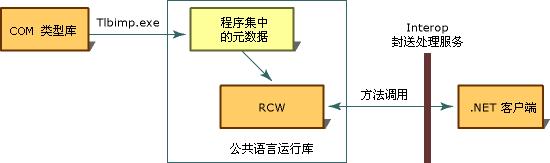
    那么经过引用后,它是如何工作的呢?其实我想讨论的,也就是传统的COM是如何在.net下工作的。看下面的图示(载自MSDN

    RCW.JPG
    解释一下:

    1、 首 先就是把COM封装成程序集中的元数 据,也就是.net可以使用的数据。VS2003给我们提供的工具是Tlibmp.exe,当你在引用COM时,VS2003就是用这个工具帮助我们把COM封装成了一个.net下可以用的元数据。也就是我们引用后,项目目录里会生成一个DLL文件,而它,就是.net可以使用的元数据。

    2、 而 在运行时,RCW会为我们处理一些细节 问题,然后通过Interop来调用, 你就像使用.net对象一样的使用COM

    我要说明的是:经过Tlbimp.exe封 装后的元数据,只是在.net项目开发 时使用的,运行时,真正的COM还是要 在目标机器上安装注册。下面的一篇文章很有参考价值,读者可以深入的理解一下,.net是 如何使用COM的。

    http://www.microsoft.com/china/msdn/archives/library/dndotnet/html/bridge.asp

    下面就是我们所关心的很二个问题,如何以COM的 形式来访问.net对象?

    2部 份,如何让其它应用程序以传统的COM方 法来访问.net对象(原理)

    请注意这里的措词,.net是 不能开发传统的COM的。因此,一些关 于.net开发COM以及ActiveX的说明都是不完全正确的。它的本质是把.net的对象,通过一些封装,然后暴露给操作系统,让其实的应用程序可以像 传统的COM方式那样来访问.net对象,而访问该对象的同时,因为该对象只能在.net下生成,所以运行环境还是要.net支持的。

    先看一下MSDN上 的一个图示。

    CCW.JPG
    解释一下:

    1. 托 管代码经编译成中间语言,想必大家都明白。而让其它应用程序也可以访问你所编译的DLL文 件,却有很多不同的方法。这里,就是一种,以COM的 形式暴露给OS

    2. 这 是技术核心,通过Tlbxp.exe工 具,把DLL文件导出成组件(COM组件)类型库,也就是:把中间语言可以使用的DLL文件,通过工具,导出成COM可以使用的数据。

    3. 注 册,还有一个工具regasm.exe, 可以把DLLOS(注册表)以COM的形式注册对象。这样OS里的COM运 行环境就知道系统里有一个对象,可以用GUID来 标识并生成和使用。

    4. COM的方式实例化.net对象,先是应用程序向COM运行环境请求,要以生成一个对象(GUID标识)。COM运行环境通过注册信息找到COM类型数据库,然后通过.netCCW(COM Callable Wrapper)COM可调用包装)来访问.net下的DLL文件,然后生成.net对象,再返回给COM运行环境。而COM运行环境再以COM的形式把.net对象返回给应用程序。然后应用程序就像访问COM一样的来访问.net对象。

    因此,.net不能 开发正真的COM,只是对.net对象进行一个封装,然后以COM的形式暴露给OS,让OS里 的其它应用程序也可以像访问COM那样 来访问.net对象。而本身的.net对象还是要.net环境来支持的。

    好了,知道了它的原理后,我们就明白可以做什么事了。下面,我们就是如何来做事了。

    3部 份,最简单的方法来暴露.net对象(VS2003)

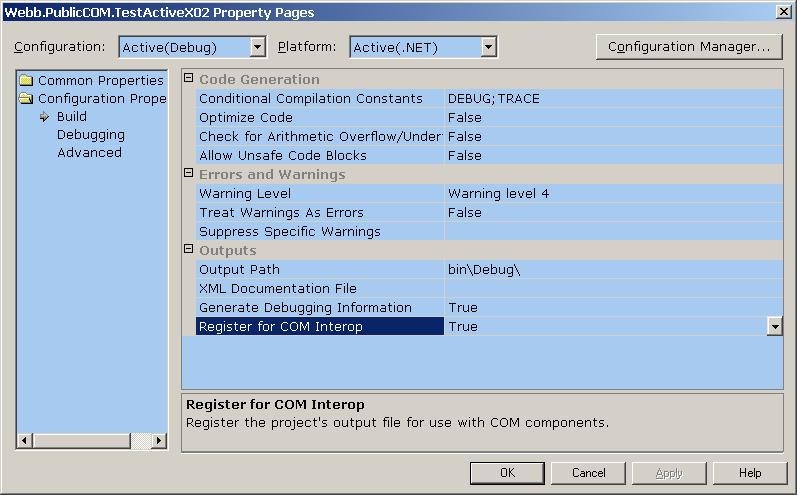
    这个方法很简单,就是做一个Library项 目,然后把编译选项设定为Interop交 互为true.

    projectproperty.JPG
    编译过后,系统会自动的为你在
    OS中注册一个COM,当然,有点类似ActiveX,就要看你的对象有没有界面了。

    这里引用博客园里的另一文章给大家看看,应该有收获。

    红马天下(http://www.cnblogs.com/homer/ )的这几篇文章:用C#编写ActiveX控 件

    http://www.cnblogs.com/homer/archive/2005/01/04/86473.html

    http://www.cnblogs.com/homer/archive/2005/01/08/88780.html

    http://www.cnblogs.com/homer/archive/2005/01/26/97822.html

    上面的几篇文章里介绍了一些操作细节,我这里就不重复了。上面的工作大部份都是系统自动给我们完成的,下面我们来讨论一些细节问题。

    4部 份:以传统的COM方式向OS暴露.net对象(VS2003下的操作及实现)

    1、 还 是new一个Library项目。

    2、 添 加一个COM对象(要安装插件,后面有下载)

    newcom.JPG

    3、 看看这个插件为我们做了什么(代码):

    using System;
    using System.Runtime.InteropServices;

    namespace Webb.PublicCOM.TestCOM01
    {
    Events raised by your COM class#region Events raised by your COM class
    //
    // TODO: Insert delegates for events raised by your class here.
    //
    //public delegate void Event1Handler(int i, int j);

    [    Guid(
    6C656B6C-F101-4CC8-A7C4-B2296A0A715C),
    InterfaceType(ComInterfaceType.InterfaceIsIDispatch) ]
    public interface IWebbTestCOM02Events
    {
    //
    // TODO: Insert event handlers for events your class raises here.
    //
    //[DispId(1)] void Event1(int i, int j);
    }

    #endregion


    Interface published by your COM class#region Interface published by your COM class
    [    Guid(
    BE268E05-CF9C-43B4-986E-720971A924A2),
    InterfaceType(ComInterfaceType.InterfaceIsDual) ]
    public interface IWebbTestCOM02
    {
    //
    // TODO: Insert functions your class publishes here.
    //
    //[DispId(1)] int Function1(string s1, string s2);
    }

    #endregion


    [    Guid(
    B303E55E-F40A-4E8C-B94B-BE781E01274C),
    ProgId(
    Webb.PublicCOM.TestCOM01.WebbTestCOM02),
    ClassInterface(ClassInterfaceType.None),
    ComSourceInterfaces(
    typeof(IWebbTestCOM02Events)) ]
    public class WebbTestCOM02 : IWebbTestCOM02
    {
    //
    // TODO: Insert events raised by your class here.
    //
    //public event Event1Handler Event1;

    // A COM class must have a public parameterless constructor.
    // Otherwise the class might not be registered for COM and
    // cannot be created by CreateObject.
    public WebbTestCOM02() : base()
    {
    }


    //
    // TODO: Implement the methods of your class interface here.
    //
    //public int Function1(string s1, string s2)
    //{
    // return 0;
    //}
    }

    }

    4、 删 除一些注释的代码,编译项目,你就可以得到一个已经向OS暴 露过的.net对象了。当然,你还可以 添加一些函数或者事件。编译过后,有一个DLL文 件,还有一个tlb文件,它就是用工具 导出后,向COM暴露的组件库数据。C++可以用该文件通过COM方式来访问.net对象,注意,这与C++写托管代码完全不同。源代码有一个用C++通过COM来访问.net对象的实例。

    5、 用 其它应该程序来访问上面的对象。
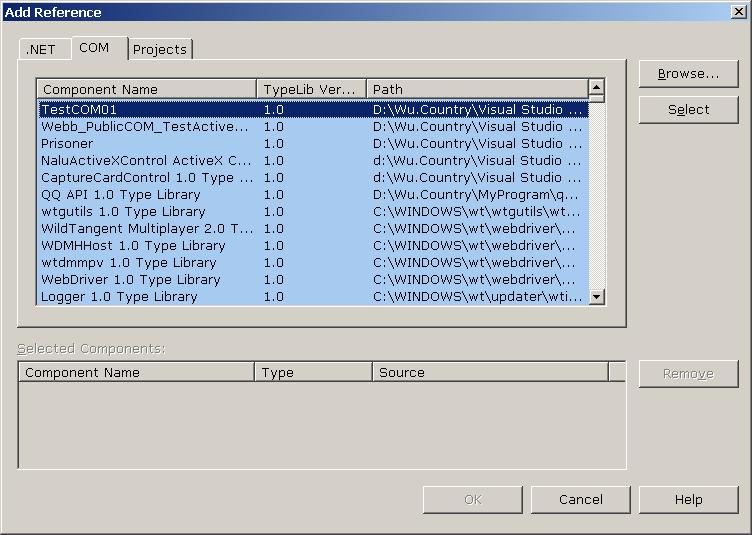
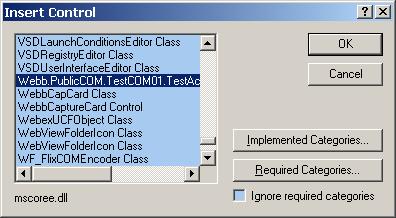
    我们的目标很明确,就是以COM的方式来访问前面的.net对象,首先你可以在COM对象里找到我们编译过和注册过的对象:
    selectCOM.JPG

    如果你是在.net下 引用该COM,你会得到一个错误:

    selectCOMerror.JPG
    这里说明两个问题:

    i. 我们在vs.net2003下 添加COM引用时,其实就是我第1部份里说的原理,而这里我们所引用的对象本身已经是.net对象,所以再引用时,是会出错的。这里是引用,不是运行时创建。

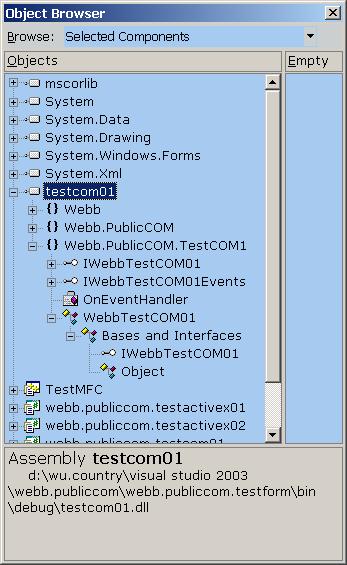
    ii. 我们可以直接对DLL文 件引用,这与一般的.net程序集引用 是有一点区别的:

    comview.JPG
    可以看到,我们引用后的对象,与一般程序集的引用不一样,反而也
    COM的引用很像。也就说,我们这里的引用是通过了RCW的。

    接下来,你就可以自由的把你的.net对 象写的很完善了。大家应该可以注意到,我们写这个项目的时候,就是要遵守一些开发原则。因为COM的特殊性,我们的对象必须定义和实现一些接口,而在每种开发语言里,它的 实现方法是不一样的。本文暂时不讨论代码实现细节,示例代码里有一个例子,可以参考一下。

    5部 份:以ActiveX方式向OS暴露.net对象(VS2003下的操作及实现)

    接上面的思路,我们应该可以想到,以COM方 式向OS暴露.net对象,就是让我们的对象实现一些接口,定义一些必须信息。然后利用工 具向OS注册这些信息就行了。下面讨论 的就是,我们手动的修改和添加一些信息,让我们的.net对 象实现更多的接口,然后以ActiveX的 形式暴露给OS。首先说明,ActiveX是有页面的,因此我们可以从一个UserControl上开发。

    在原来的项目中,添加一个TestActiveX01对 象,从UserControl继承。然 后给我们的对象添加一些特殊功能,让它以ActiveX的 形式暴露给OS

    using System;
    using System.Collections;
    using System.ComponentModel;
    using System.Drawing;
    using System.Data;
    using System.Windows.Forms;

    // Add in these    using clauses for this example
    using System.Runtime.InteropServices;
    using System.Text;
    using System.Reflection;
    using Microsoft.Win32;


    namespace Webb.PublicCOM.TestCOM01
    {
    /**//// <summary>
    /// Summary description for TestActiveX03.
    /// </summary>

    [ProgId(Webb.PublicCOM.TestActiveX03)]
    [ClassInterface(ClassInterfaceType.AutoDual)]
    public class TestActiveX03 : System.Windows.Forms.UserControl
    {
    private System.Windows.Forms.PictureBox pictureBox1;
    /**//// <summary>
    /// Required designer variable.
    /// </summary>

    private System.ComponentModel.Container components = null;

    public TestActiveX03()
    {
    // This call is required by the Windows.Forms Form Designer.
    InitializeComponent();
    // TODO: Add any initialization after the InitializeComponent call
    }


    /**//// <summary>
    /// Clean up any resources being used.
    /// </summary>

    protected override void Dispose( bool disposing )
    {
    if( disposing )
    {
    if(components != null)
    {
    components.Dispose();
    }

    }

    base.Dispose( disposing );
    }


    Component Designer generated code#region Component Designer generated code
    /**//// <summary>
    /// Required method for Designer support – do not modify
    /// the contents of this method with the code editor.
    /// </summary>

    private void InitializeComponent()
    {
    System.Resources.ResourceManager resources
    = new System.Resources.ResourceManager(typeof(TestActiveX03));
    this.pictureBox1 = new System.Windows.Forms.PictureBox();
    this.SuspendLayout();
    //
    // pictureBox1
    //
    this.pictureBox1.Image = ((System.Drawing.Image)(resources.GetObject(pictureBox1.Image)));
    this.pictureBox1.Location = new System.Drawing.Point(0, 0);
    this.pictureBox1.Name = pictureBox1;
    this.pictureBox1.Size = new System.Drawing.Size(128, 40);
    this.pictureBox1.TabIndex = 0;
    this.pictureBox1.TabStop = false;
    //
    // TestActiveX03
    //
    this.Controls.Add(this.pictureBox1);
    this.Name = TestActiveX03;
    this.Size = new System.Drawing.Size(200, 152);
    this.ResumeLayout(false);

    }

    #endregion


    /**//// <summary>
    /// Register the class as a    control    and    set    it’s CodeBase entry
    /// </summary>
    /// <param name=”key”>The registry key of the control</param>

    [ComRegisterFunction()]
    public static void RegisterClass ( string key )
    {
    // Strip off HKEY_CLASSES_ROOT\ from the passed key as I don’t need it
    StringBuilder    sb = new StringBuilder ( key ) ;
    sb.Replace(
    @”HKEY_CLASSES_ROOT\,“”) ;
    // Open the CLSID\{guid} key for write access
    RegistryKey k = Registry.ClassesRoot.OpenSubKey(sb.ToString(),true);
    // And create    the    ‘Control’ key –    this allows    it to show up in
    // the ActiveX control container
    RegistryKey ctrl = k.CreateSubKey    ( Control ) ;
    ctrl.Close ( ) ;
    // Next create the CodeBase entry    – needed if    not    string named and GACced.
    RegistryKey inprocServer32 = k.OpenSubKey    ( InprocServer32 , true )    ;
    inprocServer32.SetValue (
    CodeBase , Assembly.GetExecutingAssembly().CodeBase )    ;
    inprocServer32.Close ( ) ;
    // Finally close the main    key
    k.Close (    ) ;
    }


    /**//// <summary>
    /// Called to unregister the control
    /// </summary>
    /// <param name=”key”>Tke registry key</param>

    [ComUnregisterFunction()]
    public static void UnregisterClass ( string key    )
    {
    StringBuilder    sb
    = new StringBuilder ( key ) ;
    sb.Replace(
    @”HKEY_CLASSES_ROOT\,“”) ;
    // Open    HKCR\CLSID\{guid} for write    access
    RegistryKey    k = Registry.ClassesRoot.OpenSubKey(sb.ToString(),true);
    // Delete the ‘Control’    key, but don’t throw an    exception if it    does not exist
    k.DeleteSubKey ( Control , false ) ;
    // Next    open up    InprocServer32
    RegistryKey    inprocServer32 = k.OpenSubKey ( InprocServer32 , true ) ;
    // And delete the CodeBase key,    again not throwing if missing
    k.DeleteSubKey ( CodeBase , false ) ;
    // Finally close the main key
    k.Close    ( )    ;
    }

    }

    }

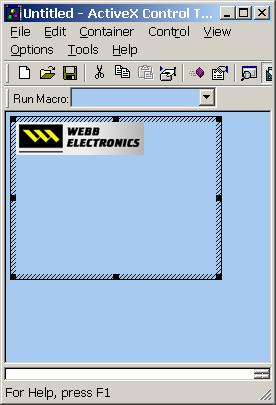
    编译,然而用Active Control Test Container 来测试和查看我们的ActiveX:

    selectActiveX.JPG
    可以看到,经过特殊方法实现后的对象可以在
    ActiveX中查看的到,而且可以添加到容器中:

    ActiveXView.JPG
    接下来的工作就是一些功能的实现细节问题了,本文暂时不讨论这些内 容。

    最后一个问题就是在其它语言中通过COM来 访问我们的.net对象,我们在C++下经过测试并实现了一些细节问题,事件等。但源代码不在示例中。

    总结:.net开发COM或者ActiveX,其实是把写好的.net对象(当然是准备暴露给OS的),实现一些特殊的接口,通过工具把元数据导出成COM可用的组件库数据,然后注册给OS。运行时,通过CCW来动态的管理与维护.net对象。而对于用户来说,他就像访问COM一样访问.net对象。

    MSDN参考:

    http://msdn2.microsoft.com/zh-cn/library/8bwh56xe(VS.80).aspx

    http://msdn2.microsoft.com/zh-cn/library/e753eftz(vs.80).aspx

    下载文档:

    1、 VS2003COM开发插件。

    http://files.cnblogs.com/WuCountry/CSComSetup.zip

    2、 示 例项目代码。
    http://files.cnblogs.com/WuCountry/Webb.PublicCOM.zip

    3、 本 文doc文档。
    http://files.cnblogs.com/WuCountry/TempDoc.zip

    [转载]整理了几条 LogParser 命令

    mikel阅读(1127)

    [转载]http://www.room702.cn/index.php/archives/244

    注入分析:
    LogParser "select time,c-ip,cs-uri-stem,cs-uri-query,sc-status,cs(User-Agent) from ex080228.log where cs-uri-query LIKE '%select%'"
    
    查询日志文件:ex080228.log , 查询关键字:select
    
    ==================================================
    
    反射型XSS分析:
    LogParser "select time,c-ip,cs-uri-stem,cs-uri-query,sc-status,cs(User-Agent) from ex080228.log where cs-uri-query LIKE '%<script>%'"
    
    查询日志文件:ex080228.log ,查询关键字:<script>
    
    ==================================================
    
    特定时间记录搜索:
    LogParser "select time,c-ip,cs-uri-stem,cs-uri-query,sc-status,cs(User-Agent) from ex080228.log where time between TIMESTAMP( '09:07:00', 'hh:mm:ss' ) and TIMESTAMP( '09:08:00', 'hh:mm:ss' )"
    
    查询日志文件:ex080228.log ,搜索时间段:09:07:00 至 09:08:00
    
    ==================================================
    
    根据IP地址统计访问情况:
    LogParser "select date,time,c-ip,cs-uri-stem,cs-uri-query,cs(User-Agent),sc-status from ex080228.log WHERE IPV4_TO_INT(c-ip) BETWEEN IPV4_TO_INT('172.16.9.0') AND IPV4_TO_INT('172.16.9.255')" 
    
    查询日志文件:ex080228.log , 搜索IP段:172.16.9.0/24
    
    ==================================================
    
    目录猜解搜索:
    LogParser "select time,c-ip,count(time) as BAD from ex080228.log where sc-status=404 group by time,c-ip having BAD>5"
    
    查询日志文件:ex080228.log , 搜索错误次数大于N次:5
    
    ==================================================
    
    表单破解搜索:
    LogParser "select time,c-ip,cs-uri-stem,count(time,cs-uri-stem) as BAD from ex090609.log where sc-status=200 and cs-method='POST' group by time,c-ip,cs-uri-stem having BAD>4"
    
    查询日志文件:ex090609.log , 搜索同一秒内POST次数大于N次:4
    
    ==================================================
    
    异常User-Agent搜索:
    LogParser "select time,c-ip,cs-uri-stem,cs-uri-query,sc-status,cs(User-Agent) from ex080228.log where cs(User-Agent) NOT LIKE 'Mozilla%'"
    
    查询日志文件:ex080228.log , 搜索User-Agent:全部未以Mozilla开头的User-Agent
    
    ==================================================
    
    不正常的HTTP Method
    LogParser "select time,c-ip,cs-method,cs-uri-stem from ex090609.log where cs-method in ('HEAD';'OPTIONS';'PUT';'MOVE';'COPY';'TRACE';'DELETE')"
    
    查询日志文件:ex090609.log , 搜索异常方法:('HEAD';'OPTIONS';'PUT';'MOVE';'COPY';'TRACE';'DELETE')"


    [转载]网站策划必备三大软件及介绍(一)

    mikel阅读(1157)

    [转载]网站策划必备三大软件及介绍(一) – 站长网 admin5.com.

    一个网站项目立项以后,每个功能、页面的制作一般都会走这样一个流程:

    项目策划(产品、功能策划及策划论证) 、界面设计与前期用户体验设计(ui+ue)、页面制作与前端脚本及后期用户体验设计、功能的程序编写与实现、功能测试、内容填充、全面检查与整站优化

    我们可以发现,产品策划人员从开始一直到最后,都贯穿于整个项目的实施之中,而策划人员自己本身需要出具一些相关的图表或者文档,一般包括项目 结构图、功能流程图、页面框图、项目进度表以及对应的说明文档。这里我向大家推荐三个软件,一是Mindjet MindManager ,专门用于结构图制作,二是亿图,用于流程图制作,三是Axure,用于线框图制作,由于三者一起介绍篇幅太长,呵呵,分二部分到admin5来发。本文 就主要介绍Mindjet MindManager 与亿图(EdrawMax)。

    这几个相关的图表与文档的制作中,说明文档我们可以用微软的word来实现,而项目结构图则可以使用Mindjet MindManager来实现,这个软件Mindjet MindManager 最新版本为V8.0,目前比较好用的是6.0汉化版。从字面上大家可以发现它有“思维引导管理”的意思,也就是使用此软件可以很方便的把自己的想法或者团 队的想法给充分的展现出来,经过最终的整理,将可以得到一个完整的结构图表。我们以vb86点com为例子,来看看一下Mindjet MindManager 的特点。我花几分钟制作出一张图表,见图1。

    图1

    这样一来,网站的结构就了然于胸了。也方便给其它流程的同事进行演示,此软件有几个特点:

    a.每个节点都可以点击收缩或者伸展

    b.可以导出常见的图片jpg、png、gif、bmp以及word、html等多种格式

    c.可以在主文件中插入多个类似文档,实现不同文档之间的切换

    d.支持各主题(方块)的局部对齐与全局对齐

    e支持自定义样式等

    Mindjet MindManager 的功能很多,如果大家有兴趣,可以去慢慢发掘。接下来我们来说一说流程图制作。

    对于项目来说,有许多的流程,包括团队工作流程,项目的功能流程,用户体验流程等,我就从团队工作流程这一点来给大家介绍一下我常用的工具:亿 图(EdrawMax)。

    此软件由上海风山网络科技有限公司出品,目前最版本是v5.0,准备推出。目前好用的版本是4.0版本。此软件包含了大量的图表例子,上手简 单。我们还用vb86团队工作流程作为例子,大家看一张表,见图2.

    图2

    我相信大家一定能制作出比我这个漂亮很多的图表来。

    本软件有几个特点:

    1、巨量的符号图库,可以满足你一切需求

    2、可以导出多种格式,包括图形、文档格式、网页格式等

    3、超多的例子,有许多只需要一改就能用

    4、可以自定义多种主题风格,当然已经有很多主题提供了

    5、图形之间支持吸附,很方便操作

    6、标尺与辅助线非常好用,并有吸附功能

    7、可自定义背景

    8、可以自定义图片、符号、以及相关的几何参数等

    总之,功能非常强大,制作流程图一流了。篇幅已经很长了,下一章我们再来介绍另一款常用工具:Axure线框图制作工具。

    说明一下,www.vb86.com是我的小站,刚开两天,本文目的在于分享好用的策划工具(当然你也可以用来做很多东西),其次昵,也想在 admin5发一下链接,呵呵。感谢大家,欢迎一起分享你的好软件哦。