[CMS]NetCMS开源CMS项目

mikel阅读(1155)

安装环境

SQL Server 版基本安装环境
操作系统: Windows Server 2003(推荐)、Windows 2000、Windows XP
数据库 :SQL Server 2000(推荐)、SQL Server 2005
Web服务器: IIS 5.0及以上版本(推荐IIS6.0)
其它:.NET Framework 2.0

下载NetCMS 1.7.0.1125

更新列表
NetCMS 1.7.0 build1125 正式版(最后更新 2008年11月25日) 
NetCMS 1.7.0 build1125 源码版(最后更新 2008年11月25日) 
NetCMS 1.7.0 build1125 正式版(中国站长站分流)(最后更新 2008年11 月25日) 
NetCMS 1.7.0 build1125 源码版(中国站长站分流)(最后更新 2008年11 月25日) 

下载NetSNS1.5.1 1209

NetSNS V1.5.1 build1209正式版(最后更新 2008年12月09日) 
NetSNS V1.5.1 build1209源码版(最后更新 2008年12月09日) 
NetSNS V1.5.1 build1209正式版(中国站长站分流)(最后更新 2008年12月09日) 
NetSNS V1.5.1 build1209源码版(中国站长站分流)(最后更新 2008年12月09日) 
NETSNS功能使用说明(最后更新 2008年7月15日)
由于大头贴文件过大,单独提供下载,请解压后放到inc/cam文件夹下(最后更新 2008年12月08日) 
请在SQL数据库查询分析器中执行database/sql/1.sql(表结构),database/sql/2.sql(初始值),SQL脚本也可以在这里单独下载(最后更新 2008年12月09日) 
管理员帐号:admin,密码:admin888

下载用户手册

点击下载 (最后更新 2008年4月21日)

下载数据库设计文档

点击下载(最后更新 2008年4月11日)

下载标签说明

点击下载 (最后更新 2008年05月09日)

下载模板风格

查看(最后更新 2008年05月09日)

[C#]利用Windows系统服务自动更新网站

mikel阅读(1152)

利用Windows系统服务自动更新网站


       Tag: windows服务   自动更新 自动发布 网站自动更新

应用背景:作为一个站长,为了管理好网站,也为了讨好搜索引擎,每天都需要在不同的时段更新网站的内容,有的站长需要维护几个网站,每天的工作量可想而知,如果逢年过节,站长没有在电脑旁边或者无法上网,这个维护工作也就无法进行。

       使用原理:本文介绍了一种方法来自动更新网站内容,采用一个Windows系统服务,设置好它的URL访问地址,每天在特定时间内访问需要更新内容的网站 的特殊页面(假定这个页面为A);在网站端,设置一个审核机制,只有通过审核的内容才能显示在网站前端,新加的信息默认是不审核,页面A的作用就是从未审 核信息中挑出几条进行审核,这样就更新了网站内容,对于静态首页的,页面A还可以生成下首页静态页面。当然页面A还可以做更多的用途,如备份数据库、更改 到期用户状态、删除无用的临时文件等。

       详细原理:

1)        Windows服务端:

              Windows服务采用.Net Framework2.0框架,所以使用时应该先安装好.Net Framework2.0,下载地址:

http://www.microsoft.com/downloads/details.aspx?FamilyID=0856EACB-4362-4B0D-8EDD-AAB15C5E04F5&displaylang=zh-cn

       采用一个xml文件存储配置信息,里面存储需要访问的网址,示例结构如下:

<?xml version="1.0" encoding="utf-8" ?>

<root>

  <Urls>

    <item url="http://www.shouji138.com/" time="3:59"/>

    <item url="http://www.baidu.com/" time="11:59"/>

    <item url="http://www.baidu.com/" time="13:59"/>

    <item url="http://www.baidu.com/" time="15:59"/>

    <item url="http://www.baidu.com/" time="16:59"/>

  </Urls>

</root>

一个item代表一次访问,url是具体的网址,设置为网站自动更新的url地址,可以带查询字符串来设置更新的数量,time表示每天访问的时间,time只能精确到1分钟,而且必须保证每个item在同一分钟内只有一个url任务。

       程序采用一个定时器,每隔20秒扫描一下配置项中是否有需要访问的网址,如果有则访问一次这个网址。相关代码如下:

public Job()

        {

            System.Timers.Timer myTimer = new System.Timers.Timer(20000);

            myTimer.Elapsed += new ElapsedEventHandler(myTimer_Elapsed);

            myTimer.Enabled = true;

            myTimer.AutoReset = true;

            XmlDocument xml = new XmlDocument();

            xml.Load(AppDomain.CurrentDomain.BaseDirectory + ConfigurationManager.AppSettings["xmlfile"]);

            xmllist = xml.SelectNodes("//root/Urls/item");


        }


        void myTimer_Elapsed(object source, ElapsedEventArgs e)

        {

            try

            {

                Log.SaveNote(DateTime.Now.ToString("yyyy-MM-dd HH:mm:ss") + " Heart Work!(心跳检测)");

                YourTask();

            }

            catch (Exception ee)

            {

                Log.SaveException(ee);

            }

        }

        void YourTask()

        {

            count++;

            if (count > 10000)

                count = 0;

            for (int i = 0; i < xmllist.Count; i++)

            {

                string url = xmllist[i].Attributes["url"].Value;

                string time = xmllist[i].Attributes["time"].Value;

                //Log.SaveNote(url + "-" + time);


                DateTime workTime = DateTime.Parse(DateTime.Now.ToShortDateString() + " " + time);


                //lastwork

                if (DateUtil.DateDiff(DateUtil.DateInterval.Minute, workTime, DateTime.Now) == 0)

                {

                    //到了执行时间

                    if (DateUtil.DateDiff(DateUtil.DateInterval.Minute, workTime, lastworktime) != 0)

                    {

                                          //访问网址,如 手机主题 http://www.shouji138.com/

                        visit(url);

                        lastworktime = DateTime.Now;

                    }

                }

            }

        }


        void visit(string url)

        {

            HttpWebRequest myHttpWebRequest = null;

            HttpWebResponse myHttpWebResponse = null;

            Stream receiveStream = null;

            try

            {

                myHttpWebRequest = (HttpWebRequest)WebRequest.Create(url);

                myHttpWebResponse = (HttpWebResponse)myHttpWebRequest.GetResponse();

                receiveStream = myHttpWebResponse.GetResponseStream();//得到回写的字节流

                Log.SaveNote("访问:" + url);

            }

            catch (Exception ex)

            {

                Log.SaveNote("访问失败:" + url);

                Log.SaveException(ex);

            }

            finally

            {

                if (receiveStream != null)

                    receiveStream.Close();

                if (myHttpWebResponse != null)

                    myHttpWebResponse.Close();

            }

        }

2)        网站端:

网站端应该采用审核机制,比如一个表News表,设置字段isaccept为审核字段,1表示已审核,0表示未审核,新增的内容默认为未审核0。我 们在平时的时候多添加一些内容到未审核库中,然后交给程序来自动更新。更新程序可以采用任何动态网页技术,asp、php、jsp都可以,该程序的作用就 是把未审核的内容更改为审核状态,为了灵活起见,可以设置一个表示更新数量的查询字符串变量给程序,如num,则更新3条的网址就变成http://www.shouji138.com/A.asp?num=3这 种形式,这个网址可以在Windows服务的配置文件中设置好。本文的重点是讲采用Windows服务来进行网站更新,所以具体网站端的代码我就没有写出 来了,各位站长可以根据自己网站的情况来编写。Windows服务是与网站端没有业务逻辑关联的,windows服务只管定期的来访问网站端的更新网址, 而网站端的更新网址只管更新的业务逻辑。


最后,提供下工具和源代码的下载地址:

Windows服务工具下载:http://www.shouji138.com/aspnet2/files/autopub.rar

Windows服务源码下载: http://www.shouji138.com/aspnet2/files/autopubsource.rar

[C#]如何在ASP.NET中使用验证通过的Windows Live ID用户登录网站

mikel阅读(974)

前言

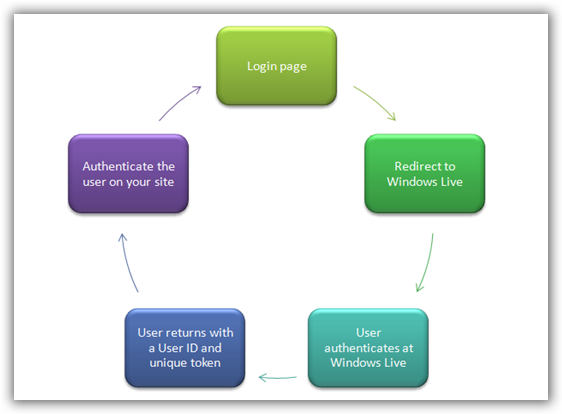
现在有很多在线服务的验证,我曾经就写过一篇 如何在ASP.NET中创建OpenID, 这里我再介绍如何使用Windows Live ID在ASP.NET应用程序中验证用户的身份,说穿了这也是一种特殊验证模型,也就是说当在您的网站中使用Windows Live ID登录时,此用户首先会重定向到Windows Live登录页,然后通过验证的用户Windows Live将该用户再重定向到您的网站,并提供一个用户ID。

sshot-3


使用Windows Live ID

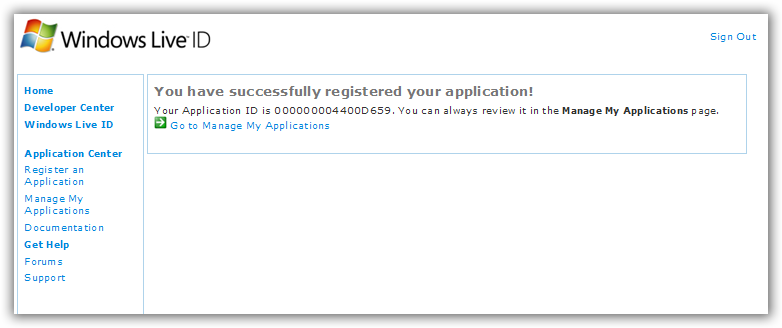
要开始使用的Windows Live ID ,首先你需要申请一个应用程序ID。转到:https://msm.live.com/app/default.aspx 注册应用程序ID,其实微软针对此应用还有一个指南—>http://msdn.microsoft.com/en-us/library/cc287659.aspx

sshot-1

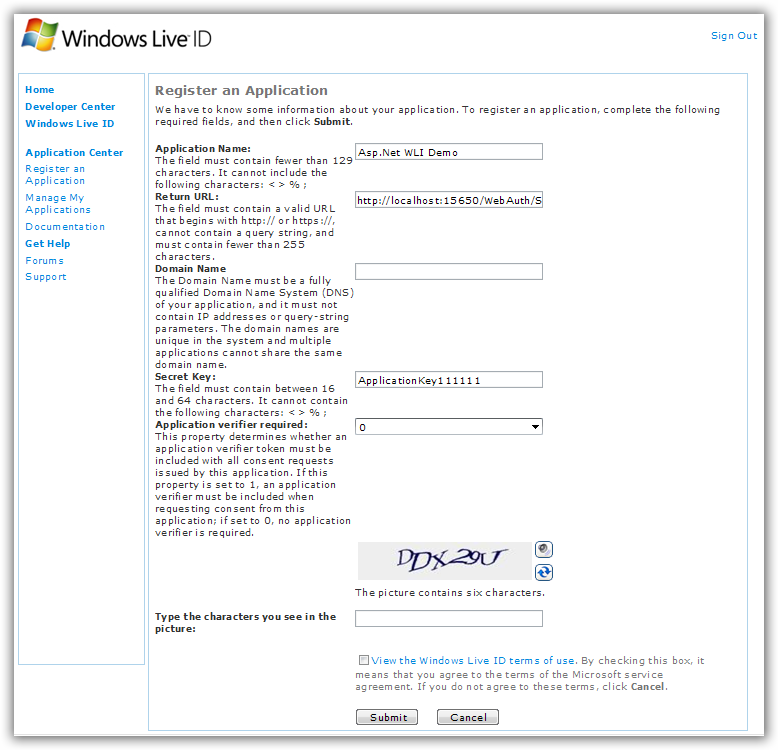
sshot-2

上面这个注册表格要填的我都填了,其中要注意的是 返回的URL,这个页面主要是处理与 Windows Live ID的沟通,如我现在VS的启动页是:
http://localhost:15650/WebAuth/Sample/webauth-handler.aspx


下载并安装Windows Live ID Web身份验证的SDK

呵呵,老样子,微软已经为ASP.NET开发者已经提供了非常容易实现的示例模板。这里下载:http://www.microsoft.com/downloads/details.aspx?FamilyId=E565FC92-D5F6-4F5F-8713-4DD1C90DE19F&displaylang=en, 准确点可以看该文:http://livesino.net/archives/302.live。默认安装路径在:C:\Program Files\Windows Live ID\WebAuth。


整合到您的网站

首 先用Visual Studio2008或者2005创建一个ASP.NET网站,然后将安装的示例模板中的App_Code文件夹中的 WindowsLiveLogin.cs(C:\Program Files\Windows Live ID\WebAuth\Sample\App_Code\WindowsLiveLogin.cs)添加到我们的App_Code文件夹中。这里我直接用 微软的示例,不自己新建网站了。

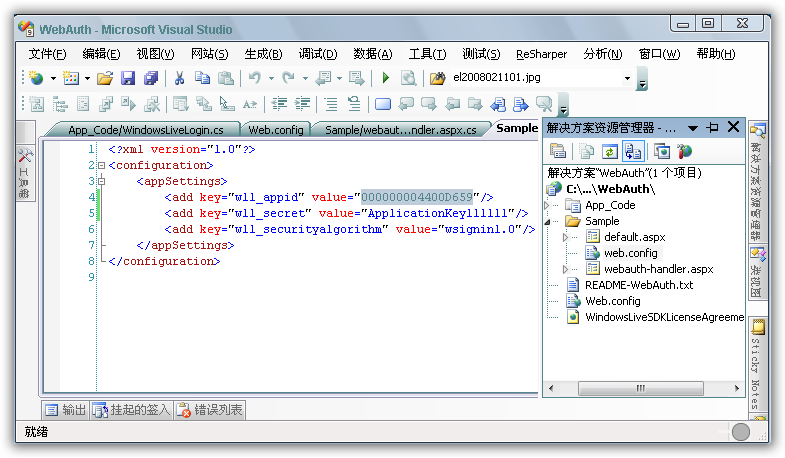
然后在web.config文件中配置刚申请一个应用程序ID 000000004400D659,

sshot-4

Default.aspx页面中的HTML的代码如下:

<body>
<table width="320">
<tr>
<td>
<h1>
欢迎来到Windows Live ID&trade;网络身份验证SDK中的C#模板</h1>
<p>
下面的链接表明您是否登录。如果该链接的文本是 <b>Sign in</b>, 表明您尚未登录。如果它显示 <b>Sign out</b>,表明您已经登录。</p>
<iframe id="WebAuthControl" name="WebAuthControl"
src="http://login.live.com/controls/WebAuth.htm?appid=<%=AppId%>&style=font-size%3A+10pt%3B+font-family%3A+verdana%3B+background%3A+white%3B"
width="80px" height="20px" marginwidth="0" marginheight="0" align="middle" frameborder="0"
scrolling="no"></iframe>
<p>
<% if ( UserId == null ) { %>
你还没有登录到网站,请点击 <b>Sign in</b> 链接.
<% }
else { %>
您已经登录到网站,您的用户编号ID = "<b><%=UserId%></b>".
<% } %>
</p>
</td>
</tr>
</table>
</body>
</html>

Default.aspx文件的代码隐藏文件代码如下:

using System;
using System.Web;
using System.IO;
using WindowsLive;
/// <summary>
/// This is the default aspx.cs page for the sample Web Auth site.
/// It gets the application ID and user ID for display on the main
/// page.  
/// </summary>
public partial class DefaultPage : System.Web.UI.Page
{
const string LoginCookie = "webauthtoken";
// Initialize the WindowsLiveLogin module.
static WindowsLiveLogin wll = new WindowsLiveLogin(true);
protected static string AppId = wll.AppId;
protected string UserId;
protected void Page_Load(object sender, EventArgs e)
{
/* If the user token has been cached in a site cookie, attempt
           to process it and extract the user ID. */
HttpRequest req = HttpContext.Current.Request;
HttpCookie loginCookie = req.Cookies[LoginCookie];
if(loginCookie != null){
string token = loginCookie.Value;
if (!string.IsNullOrEmpty(token))
{
WindowsLiveLogin.User user = wll.ProcessToken(token);
if (user != null)
{
UserId = user.Id;
}
}
}
}
}

Default.aspx 将作为网站的一个登录页。 用户点击登录按钮,将被重定向到的Windows Live 登录页面。 当他微软进行身份验证后,微软会重新回到我们的处理程序页上,所以,我们现在将创建一个新的aspx页,并将其命名webauth- handler.aspx。 还记得,当我们在注册申请Windows Live 时提供的返回URL的网页吗。

webauth- handler.aspx页面将作为处理Windows Live重定向回到您的网站用户的网页。 而且微软Windows Live将提供一个验证特定值给您使用。 我们可以简单地删除所有的标记,下面是webauth-handler.aspx代码隐藏类的代码:

   1: using System;
   2: using System.Web;
   3: using System.IO;
   4: using WindowsLive;
   5:  
   6: /// <summary>
   7: /// This page handles the login, logout and clearcookie Web Auth
   8: /// actions.  When you create a Windows Live application, you must
   9: /// specify the URL of this handler page.
  10: /// </summary>
  11: public partial class HandlerPage : System.Web.UI.Page
  12: {
  13:     const string LoginPage = "default.aspx";
  14:     const string LogoutPage = LoginPage;
  15:     const string LoginCookie = "webauthtoken";
  16:     static DateTime ExpireCookie = DateTime.Now.AddYears(-10);
  17:     static DateTime PersistCookie = DateTime.Now.AddYears(10);
  18:  
  19:     // Initialize the WindowsLiveLogin module.
  20:     static WindowsLiveLogin wll = new WindowsLiveLogin(true);
  21:  
  22:     protected void Page_Load(object sender, EventArgs e)
  23:     {
  24:         HttpRequest req = HttpContext.Current.Request;
  25:         HttpResponse res = HttpContext.Current.Response;
  26:  
  27:         // Extract the 'action' parameter from the request, if any.
  28:         string action = req["action"];
  29:  
  30:         /*
  31:           If action is 'logout', clear the login cookie and redirect
  32:           to the logout page.
  33: 
  34:           If action is 'clearcookie', clear the login cookie and
  35:           return a GIF as response to signify success.
  36: 
  37:           By default, try to process a login. If login was
  38:           successful, cache the user token in a cookie and redirect
  39:           to the site's main page.  If login failed, clear the cookie
  40:           and redirect to the main page.
  41:         */
  42:  
  43:         if (action == "logout")
  44:         {
  45:             HttpCookie loginCookie = new HttpCookie(LoginCookie);
  46:             loginCookie.Expires = ExpireCookie;
  47:             res.Cookies.Add(loginCookie);
  48:             res.Redirect(LogoutPage);
  49:             res.End();
  50:         } 
  51:         else if (action == "clearcookie")
  52:         {
  53:             HttpCookie loginCookie = new HttpCookie(LoginCookie);
  54:             loginCookie.Expires = ExpireCookie;
  55:             res.Cookies.Add(loginCookie);
  56:  
  57:             string type;
  58:             byte[] content;
  59:             wll.GetClearCookieResponse(out type, out content);
  60:             res.ContentType = type;
  61:             res.OutputStream.Write(content, 0, content.Length);
  62:  
  63:             res.End();
  64:         } 
  65:         else 
  66:         {
  67:             WindowsLiveLogin.User user = wll.ProcessLogin(req.Form);
  68:  
  69:             HttpCookie loginCookie = new HttpCookie(LoginCookie);
  70:             if (user != null)
  71:             {
  72:                 loginCookie.Value = user.Token;
  73:  
  74:                 if (user.UsePersistentCookie)
  75:                 {
  76:                     loginCookie.Expires = PersistCookie;
  77:                 }
  78:             } 
  79:             else 
  80:             {
  81:                 loginCookie.Expires = ExpireCookie;
  82:             }   
  83:  
  84:             res.Cookies.Add(loginCookie);
  85:             res.Redirect(LoginPage);
  86:             res.End();
  87:         }
  88:     }
  89: }


第一次登录测试

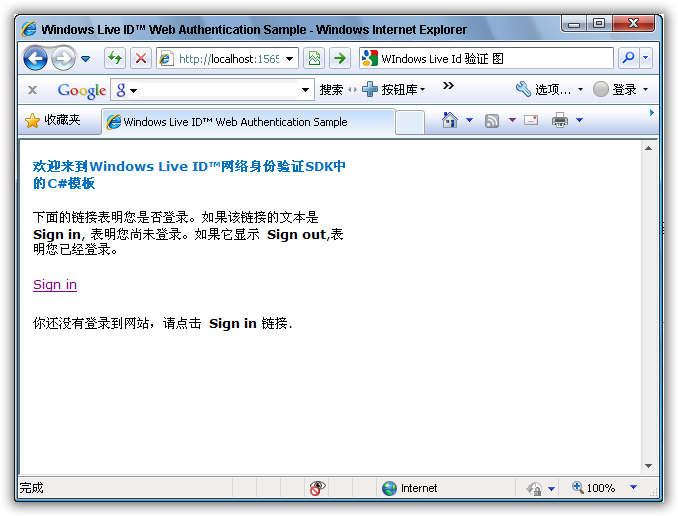
当以上操作都完成后,现在应该可以使用Windows Live ID登录了,我们首页浏览登录页面Default.Aspx:

sshot-6

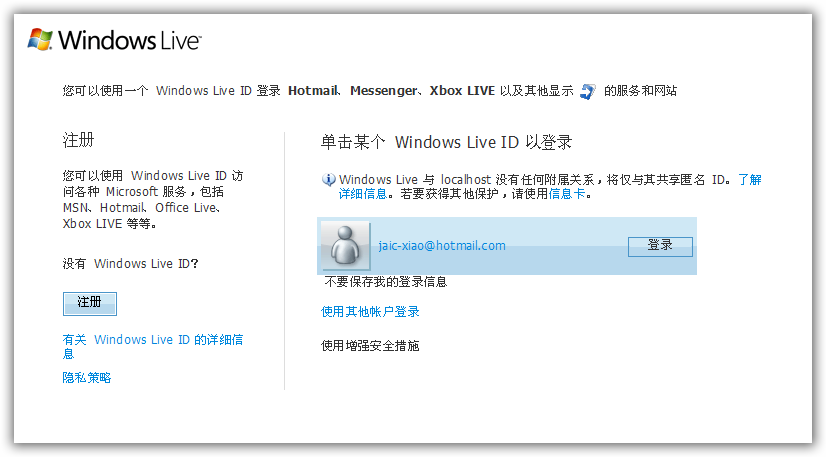
点Sign In链接后,将重定向到Windows Live的登录页面:

sshot-7

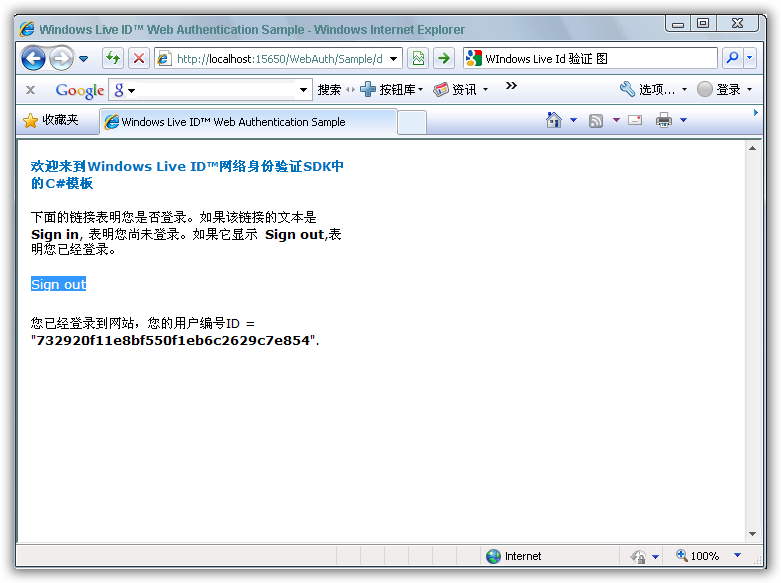
当Windows Live ID验证通过,Widnows Live将返回到我们的登录页面,下面这个页面现在将显示欢迎您的信息和您的用户ID :

sshot-5

完毕!

[C#]如何在ASP.NET中创建OpenID

mikel阅读(1139)

前言( 引用 Lee's 程序人生- 博客园-OpenID使用手册JAVA版


了解一下openID

openID在中国还不怎么普及,而且支持openID登录的站点也比较少

,不过还是先补充点openID的信息吧

啥是openID呢,所谓openID就是用一个URL作为登录帐号和密码的验证

再详细一点就是,不用注册,也不用输入密码,只要你拥有一个openID就可以登录网站

可能这样说有点难以理解,接下来我们稍微深一点的去理解

假设你现在已经从一个可以申请openID的网站上申请了一个openID,链接是”rjys.163.com”

{openID是一个URL链接,不是一个以前的字母或者字母+数字哦}

什么是OpenID?
OpenID是一种开放、离散式的用于用户数字标识的开源框架。
请让我们思考自己所拥有的在线帐号种类:博客、wiki、to-do list、 个人相册。在网络应用日益充斥的今天,这些个人在线帐号可谓不胜枚举,而对帐号的需要也同样无处不在,乃至当我们想在好友博客上进行评论时都需要注册成为 该博客系统的用户。于是作为终端用户,我们不得不在每个网站上设置帐号,并管理众多的帐号。而采用OpenID技术的话,你就无须再管理这些相互独立的帐 号,而是通过认证服务器管理自己唯一的身份标识。
OpenID常见的应用场景:某用户试图登录一个外部网站。与提交用户名和密码的方式不同,他只提交了属于自己的一个URL,例如:http://johnsmith.example.com/
这 个URL即指向了用户的OpenID认证服务器,同时又是用户的身份标识。因此外部网站使用此URL便可以找到用户的认证服务器,并询问认证服务器:“该 用户声称他拥有此URL。而这个URL说明了你负责认证工作,那么请告诉我,该用户能否访问我的站点?”。认证服务器将提示用户登入认证系统,并询问用户 是否允许和外部网站进行认证。如果用户同意的话,那么认证服务器将通知外部网站——用户已经通过认证。在上面,我们通过拟人化的表达方式来形象生动地诠释 整个认证请求/回应过程。
用户可以使用同一个URL用作在任何支持OpenID认证的外部网站中使用的标识。这正是OpenID与其它传统认 证方式的最大不同。通过使用URL,可以使外部站点非常容易地获取到负责认证工作的服务器位置。而只有认证服务器才需要输入密码来验证用户身份。其它希望 验证用户身份的站点都将询问用户所注册的认证服务器。如果你正在使用支持OpenID的门户站点(比如AOL),那么你就可以使用现成的AOL即时消息登 录帐号来登录AOL站点,而无需另外注册。因此,我们可以猜想Google和Yahoo也许已经开始着手建造他们的OpenID服务。
你一定想知道OpenID是如何实现分散化服务的?由于用户具有选择OpenID服务提供者的权利,因此你会在最初选择AOL作为OpenID提供者,而过一段时间后,可能觉得希望更换到另外一个OpenID提供者,此时你所需要做的就是修改以下的HTML标签:

<link rel="openid.server" href="http://openid.example.com/">

保存这些link元数据的最常见位置就是个人站点(比如博客)的根页面。
如何使用OpenID?
OpenID 绝妙地解决了多个帐号同步问题,但并不仅仅如此。例如,你可以利用它建立跨应用、跨域的单点登录(Single sign-on)。如果你使用同一个OpenID登入了博客和个人相册,那么你只需要在登录过程中进行一次认证。对于在此之后的每个需要登录的应用(在同 一个session周期)只需提供OpenID,而不是传统的用户名和密码。
大多数OpenID提供者也提供了支持多个配置的功能。这样你就可以使用“Bob Smith”登录博客,而使用“Robert J Smith”登录企业wiki。随着OpenID提供者的日益成熟和OpenID功能上的提升,我们不久就会使用对来自伙伴公司OpenID认证服务器主 机名的用户进行认证的服务。
哪些网站支持OpenID?
OpenID技术出现不久,便获得了在众多公共消费站点的热捧:DiggSix ApartZoomrAOL。 其中AOL为老用户提供了OpenID支持,使得六千五百万的登录用户在一日之内就全部能够使用OpenID。目前已经具有超过九千五百万的用户能够使用 OpenID登录系统,并且每天都有25至50个站点加入到支持OpenID规范的队伍中。另外,OpenID增加了对Firefox3和微软 Windows Vista的支持。
下面是实现了OpenID代码库的语言列表:
        • C#
        • C++
        • Java
        • Perl
        • Python
        • Ruby
        • PHP
        • Coldfusion
OpenID社区维护了这些代码库的清单:http://openid.net/wiki/index.php/Libraries


ASP.NET中实现OpenID登录

  注册一个OPENID帐号,这里使用http://www.myopenid.com
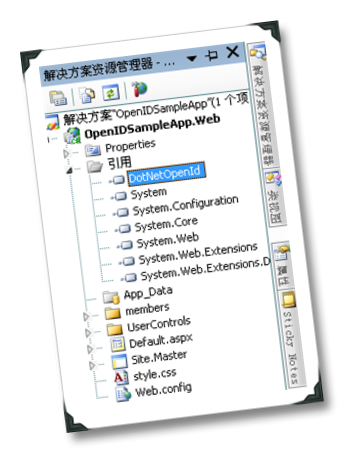
  1.从谷歌CODE上下载强大的C# OpenID库DotNetOpenId,并把它应用到你的项目中。
 

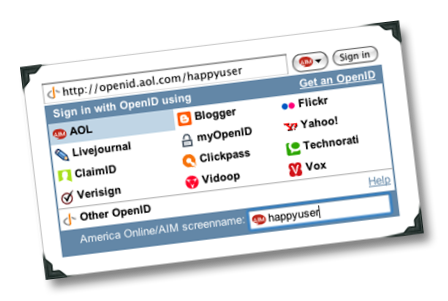
  2.在OpenID登录时添加了一些不错的可用性功能,这是可选的,下图为格式化了的OpenID框,请转到:ID Selector

  3.转到Scott Hanselman's的示例帖子。你将很好的了解如何新增的OpenID到ASP.NET的网站。
  4.创建登录表单,这里用用户控件。

<%@ Control Language="C#" AutoEventWireup="true" CodeBehind="OpenIdLoginForm.ascx.cs"
Inherits="OpenIDSampleApp.Web.UserControls.OpenIdLoginForm" %>
OpenID:
<asp:TextBox ID="openid_identifier" runat="server" />
<asp:Button ID="loginButton" runat="server" Text="登录" OnClick="loginButton_Click" />
<!-- BEGIN ID SelectOR -->
<script type="text/javascript">
<!--
idselector_input_id = "<%= openid_identifier.ClientID %>";
-->
</script>
<script type="text/javascript" id="Script1" 
    src="https://www.idselector.com/selector/acd9fbc926f4707be4d6a05b400fe40de1f31449"
charset="utf-8"></script>
<!-- END ID SelectOR -->
<br />
<asp:CheckBox ID="chkRememberMe" runat="server" Text="记住我." />
<asp:CustomValidator
runat="server"
ID="openidValidator"
ErrorMessage="OpenID格式无效"
ControlToValidate="openid_identifier"
EnableViewState="false"
OnServerValidate="openidValidator_ServerValidate" />
<asp:Label ID="loginFailedLabel" runat="server" EnableViewState="False" Text="登录失败"
Visible="False" />
<asp:Label ID="loginCanceledLabel" runat="server" EnableViewState="False" Text="登录取消"
Visible="False" />
  5.登录按钮下的代码,Scott Hanselman's提供,基本上告诉的OpenID库需要用户的电子邮件和昵称。

        protected void loginButton_Click ( object sender, EventArgs e ) {
if ( !openidValidator.IsValid )
return; // 如果自定义验证失败,将不会登录。
OpenIdRelyingParty openid = new OpenIdRelyingParty ();
try {
IAuthenticationRequest request = openid.CreateRequest ( openid_identifier.Text );
// 请将您的访客给供应商进行验证。
ClaimsRequest fetch = new ClaimsRequest ();
fetch.Nickname = DemandLevel.Require;
fetch.Email = DemandLevel.Require;
request.AddExtension ( fetch );
//SaveCookies (); //在网站上保存身份票
request.RedirectToProvider ();
}
catch ( OpenIdException ex ) {
// 可能不是一个有效的OpenID。
openidValidator.Text = ex.Message;
openidValidator.IsValid = false;
}
}
  6.处理OpenID库的答复,当然你也可以让用户选择是否用OPENID创建一个帐户,或者直接看看是否用户已经存在与网站上的ASP.NET成员数据库。
如果不存在可以为OPEN用户创建一个成员帐户使用OpenID作为他们的用户名。

  protected void Page_Load ( object sender, EventArgs e ) {
openid_identifier.Focus ();
OpenIdRelyingParty openid = new OpenIdRelyingParty ();
if ( openid.Response != null ) {
switch ( openid.Response.Status ) {
case AuthenticationStatus.Authenticated:
// 下面2个变量只是为了作为后面的添加网站用户表字段的值,
// 也就是创建Membership[web.config]时才用到
string email = "";
string alias = "";
ClaimsResponse fetch = openid.Response.GetExtension ( 
                              typeof ( ClaimsResponse ) ) as ClaimsResponse;
if ( fetch != null ) {
alias = fetch.Nickname;
email = fetch.Email;
}
if ( string.IsNullOrEmpty ( alias ) )
alias = openid.Response.ClaimedIdentifier;
if ( string.IsNullOrEmpty ( email ) )
email = openid.Response.ClaimedIdentifier;
//#region Membership[web.config]
// 是否在网站上添加OPEN用户 
//if (Membership.GetUser(openid.Response.ClaimedIdentifier) == null)
//{
//    MembershipCreateStatus membershipCreateStatus;
//    MembershipUser user = Membership.CreateUser(
//        openid.Response.ClaimedIdentifier, 
//        "123456", 
//        email, 
//        "这是一个的OpenID帐户。昵称是什么?", 
//        alias, 
//        true, 
//        out membershipCreateStatus );
//    if (membershipCreateStatus != MembershipCreateStatus.Success) {
//        loginFailedLabel.Text += ": 帐户添加不成功的: " +
//                                 membershipCreateStatus.ToString();
//        loginFailedLabel.Visible = true;
//        break;
//    }
//    user.Comment = alias;
//    Membership.UpdateUser(user);
//}
// 使用FormsAuthentication告诉ASP.NET,用户现在已经登录成功, 
// 并使用OpenID标识作为用户名 
//#endregion
FormsAuthentication.RedirectFromLoginPage (
openid.Response.ClaimedIdentifier, chkRememberMe.Checked );
break;
case AuthenticationStatus.Canceled:
loginCanceledLabel.Visible = true;
break;
case AuthenticationStatus.Failed:
loginFailedLabel.Visible = true;
break;
}
}
}
  7.测试.

补充:Scott Hanselman's Blog

          http://www.codeplex.com/dasblog

          示例代码下载

[DB4O]DB4O发布7.8版本数据库引擎

mikel阅读(888)

下载地址:
http://www.db4o.com/community/download.aspx?file=db4o-7.8-net35.zip
介绍:

db4o 7.8 Release is available for immediate download! For more details please check the release notes.

Highlighted Contributions
from the community projects blog

  • Solving class loading issues with db4o and OSGi: Lukas Neukom kindly contributed a proof of concept (source code included) where he shows two ways to solve class loading issues with db4o and OSGi (by either using fragments or by implementing a bundle extender).
  • New podcast about object databases and db4o: Alt.NET Podcast just featured db4o in Episode 14 entitled "Object Databases". Guests to the podcast are Rob Conery and James Avery.
  • Tips on indexing and query optimization: This blog post shows some indexing basics and performance tips by Arne Claassen. Among other things Arne shows you which assemblies to include to make sure your native queries can be optimized.
  • db4o v7.4 for Mono: Arne Claassen has been playing with db4o under Mono and came up with a DLL for db4o v7.4 that works beautifully across .NET and Mono from a single build (dll available for download).
  • Using db4o for unit test results verification: The author of "Nails and Hammers" blog shows how to use the TestSpy pattern (described in Gerard Meszaros' xUnit Test Patterns) in combination with db4o. TestSpy is a class that can be ?injected' in a tested class in order to instrument and capture its behaviour. In this blog post TestSpy is used to persist objects created in the tested method to be verified at a later stage.
  • New db4o sample app: BookStore.NET: a digital book management application by Mihnea Radulescu using db4o v7.4 and C# 2.0, targeting the .NET Framework 2.0. It allows the user to manage all of its digital books and articles (pdf, chm, html, doc, rtf, etc.) on the computer in an elegant and effective way (files are stored as binary in the database file).
  • Follow db4o on Twitter!: db4objects is now broadcasting news and updates on Twitter!

[技术]09/10年关注的8项移动性技术

mikel阅读(793)

市场分析公司Gartner近期发布了一份报告,预测了在未来2年内将影响移动行业的8项移动性技术。该公司副总裁及分析师Nick Jones表示,该公司在报告中列出的技术将很快的演进,同时有些问题也需要尽快解决。

蓝牙3.0

蓝牙3.0 这项技术是毫无异议的当然之选。蓝牙3.0的技术标准将在今年发布,并且预计支持蓝牙3.0标准的各类设备将会在2010年商用。目前,对3.0标准最大 的期望在于更快的速度,据说在近距离的传送速度可以达到480Mbps,而10米左右距离的传送速度可到100Mbps。同时蓝牙3.0还将支持一种超低 功耗模式,Gartner预测这将使得更多更新的外围设备、感应器和其他类似健康监控类的应用成为可能。蓝牙3.0还将实现向后兼容,允许旧版本的设备与 新版本设备通信,所以很明显未来几年蓝牙3.0技术将得到大量应用。

移动设备用户界面/移动设备上的web应用和widget应用

在报告中,移动设 备用户界面和移动设备上的web/widget应用是分开列出的两项,但我们认为可以把她们归在一起。这两者都是关于移动计算设备快速成为一个面向消费者 用户新平台,消费者在这个平台上可以实现关于B2E(企业对员工)和B2C(企业对用户)的任何应用。(gartner没有包含B2B企业对企业在内)如 今像iPhone, Android, Blackberry, 以及马上发布的Pre这类智能手机,都可以提供更好的浏览互联网的用户界面,使得更多的人可以使用互联网应用。类似Widget的程序,包括那些大量的瘦 客户端技术,将变得越来越普遍,特别是在B2C这一领域。不过移动互联网行业还面临很多挑战。比如,在报告中提到目前还没有为像数码相机和GPS等手持设 备设计的浏览器标准。

定位信息服务

通过GPS定位技术或者WiFi三角定位技术等实现的定位信息服务,为移动社 交网络和在线服务开启了新的可能性。那些快速接受并应用新技术的用户已经很熟悉像Brightkite和Loopt这种可以通过网络向你的朋友提供你的位 置信息的社交网络服务。但是我们都还处在尝鲜阶段。例如,iPhone上的即时通信软件Palringo,刚刚增加了位置信息服务。这一功能使得用户可以 看到他们的联系人现在离他们有多远,这给移动通信带来了全新的体验。未来的一两年,我们期待这类技术变的更加普遍,当然它也带来了隐私类的问题。你希望你 的在线朋友群知道你准确的位置信息么?是不是你关闭了定位信息就表示你在做啥#¥%的事儿那?(你的老婆、丈夫或者老板会开始怀疑了)作为社会的一份子,我们得尽快考虑好这些问题。

近距离通信(NFC

NFC技术为消费者提供一种手段来使用他们的移动电 话实现类似付账这种功能。其实这一应用已经在世界上很多国家开始普及了,但不是所有国家,特别是美国。不幸的是,Gartner预测这一移动支付系统在像 美国和西欧这样的成熟市场不会很快得到普及。相反的,NFC技术更可能在新兴市场快速普及。这一技术还可以应用到其他领域,比如在手机和电子相框间传照 片,同样的,在成熟市场也存在较大的不确定性。

802.11n与无线(蜂窝)宽带

802.11n是无线局域网的一个标准,initially gave us pause(不确定意思)。尽管还没有正式标准化,这一技术已经开始普及了。然而,在他成为主流之前,还不大能渗透到移动领域的各个地方。就算是最激进的iphone目前也只支持802.11b/g。

另一方面,另一项网络连接技术,蜂窝无线宽带则更在不断提高速度,反而会使WIFI变得不再是必须的技术了。除了手机外,笔记本电脑制造商们也将继续将这一技术通过更高性能的芯片集成到他们的笔记本或上网本产品中,而不再只是通过额外的上网卡这类设备。

显示技术

显示技术也将在未来看到进步。类似有源像素显示、无缘显示和超微投影仪这类新技术将带来一定的影响。今年在CES展会上看到的超微投影仪是种小尺寸的便携投影仪,肯定将创造新的移动应用。在非正式场合没有投影仪的情况下,即时演示将越来越普遍。Gartner预测2009和10年将要出现的不同类型的显示技术将成为设备制造商之间的分水岭,并且将影响用户的选择。

[Lucene]Lucene.net实现自定义排序笔记

mikel阅读(682)

在Lucene.net实现自定义排序,需要实现两个Lucene.Net.Search的两个接口:
public interface SortComparatorSource
{
   ScoreDocComparator NewComparator(IndexReader reader , System.String fieldname) ;
}

public interface ScoreDocComparator
{
   int Compare(ScoreDoc i , ScoreDoc j) ;
   System.IComparable SortValue(ScoreDoc i) ;
   int SortType() ;
}

涉及到的一个类:
public class ScoreDoc
{
   public float score ;
   public int doc ;
   public ScoreDoc(int doc , float score)
   {
      this.doc = doc ;
      this.score = score ;
   }
}

Lucene.net 2.0包含的SortType有:
在Lucene.Net.Search.SortField里定义的:
public class SortField
{
   public const int SCORE = 0 ;  //相关度
   public const int DOC = 1 ;    //文挡号
   public const int AUTO = 2 ;   //自动识别
   public const int STRING = 3 ; //字符型
   public const int INT = 4 ;    //int
   public const int FLOAT = 5 ;  //float
   public const int CUSTOM = 9 ; //自定义
   …..
}

少了DateTime,那就实现DateTime类型的自定义排序来测试下:
Lucene.Net.Search.ScoreDocComparator接口的实现类:
    public class DateDocComparator : Lucene.Net.Search.ScoreDocComparator
    {
        private string fieldname = null;
        private System.IComparable[] cachedValues ;

        public DateDocComparator(System.IComparable[] cachedValues, string fieldname)
        {
            this.cachedValues = cachedValues;
            this.fieldname = string.Intern(fieldname) ;
        }

        public int Compare(ScoreDoc i, ScoreDoc j)
        {
            return this.cachedValues[i.doc].CompareTo(this.cachedValues[j.doc]) ;
        }

        public System.IComparable SortValue(ScoreDoc i)
        {
            return this.cachedValues[i.doc] ;
        }

        public int SortType()
        {
            return Lucene.Net.Search.SortField.CUSTOM ;
        }
    }

Lucene.Net.Search.SortComparatorSource接口的实现类:
    public class DateSortComparatorSource : Lucene.Net.Search.SortComparatorSource
    {
        public ScoreDocComparator NewComparator(Lucene.Net.Index.IndexReader reader, System.String field)
        {
            return new DateDocComparator(GetCustom(reader, field), field);
        }

        protected virtual System.IComparable[] GetCustom(Lucene.Net.Index.IndexReader reader, System.String field)
        {
                System.IComparable[] retArray = new System.IComparable[reader.MaxDoc()];
                Lucene.Net.Index.TermDocs termDocs = reader.TermDocs();
                Lucene.Net.Index.TermEnum termEnum = reader.Terms(new Lucene.Net.Index.Term(field, ""));
                try
                {
                    do
                    {
                        Lucene.Net.Index.Term term = termEnum.Term();
                        if (term == null || term.Field() != field)
                            break;
                        System.IComparable termval = Lucene.Net.Documents.DateTools.StringToDate(term.Text()) ;
                        termDocs.Seek(termEnum);
                        while (termDocs.Next())
                        {
                            retArray[termDocs.Doc()] = termval;
                        }
                    }
                    while (termEnum.Next());
                }
                finally
                {
                    termDocs.Close();
                    termEnum.Close();
                }
                return retArray;
        }
    }

使用:
Sort sort = new Sort(new SortField("datecreated",new DateSortComparatorSource(),true)) ;

[Lucene]Lucene.net搜索结果排序(单条件和多条件)

mikel阅读(681)

Lucene支持对搜索条件的排序,一个条件或者多个条件,以及是升序还是降序,部分代码如下:

        string INDEX_STORE_PATH = Server.MapPath("index");  //INDEX_STORE_PATH 为索引存储目录
        string keyword = TextBox2.Text;                     //搜索内容

        Hits myhit 
= null;
         
        IndexSearcher mysea 
= new IndexSearcher(INDEX_STORE_PATH);
        QueryParser q 
= new QueryParser("indexcontent"new StandardAnalyzer());
        Query query 
= q.Parse(keyword);
        Sort sort 
= new Sort();
        SortField f 
= new SortField("createdate", SortField.STRING, true);//按照createdate字段排序,true表示降序
        sort.SetSort(f);
        
//多个条件排序
        
//Sort sort = new Sort();
        
//SortField f1 = new SortField("createdate", SortField.DOC, true);
        
//SortField f2 = new SortField("bookname", SortFiedl.INT, false);
        
//sort.setSort(new SortField[] { f1, f2 });
        myhit = mysea.Search(query, sort);
        Response.Write(
"关于:" + keyword + "  搜索到" + myhit.Length() + "个结果<br>");

对于数据量大(索引文件大于50M)的索引,尽量不要用索引中的字段排序,要用索引ID排序(INDEXORDER);两者效率相差近10倍。
注:lucene.net版本为:2.0.0.4

[MVC]使用Asp.net MVC, Jquery, Jquery UI构建基于Ajax的RIA应

mikel阅读(844)

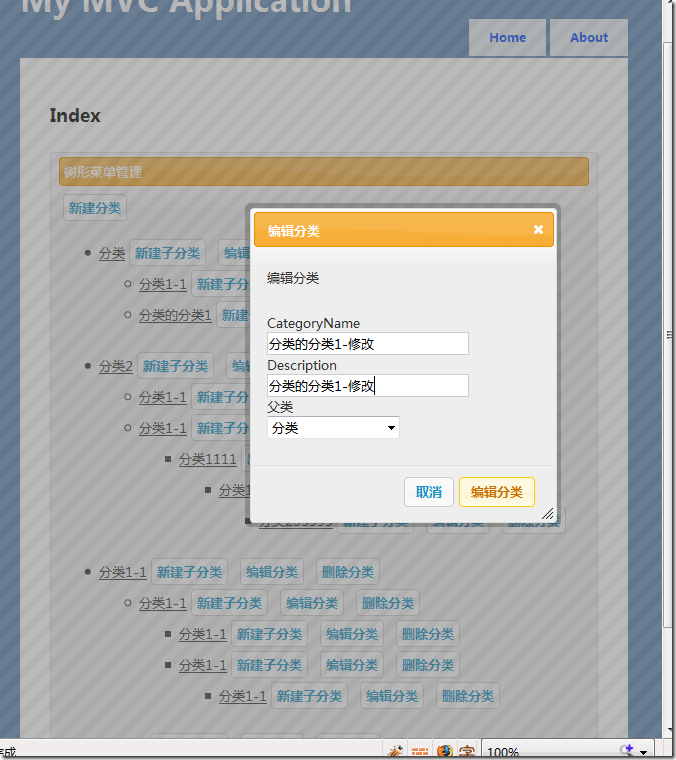
前天初学ASP.NET MVC,发现有些东西用Web Form来做的确会比较方便. 但ASP.NET MVC也有它的优点. 它如果跟JQueryJQuery UI结合起来做基于Ajax的应用实在是太方便了!!下面用图形说明:

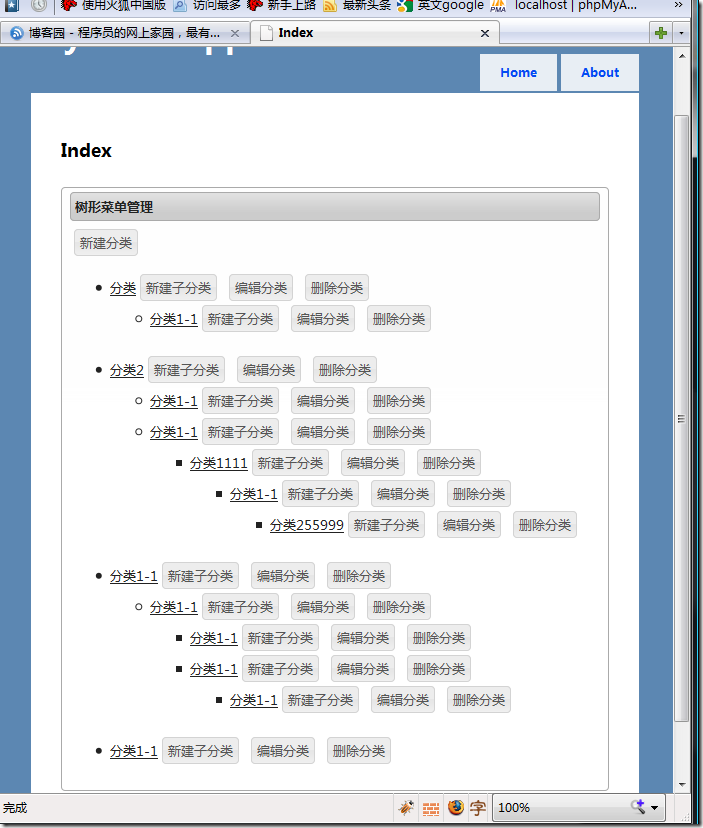
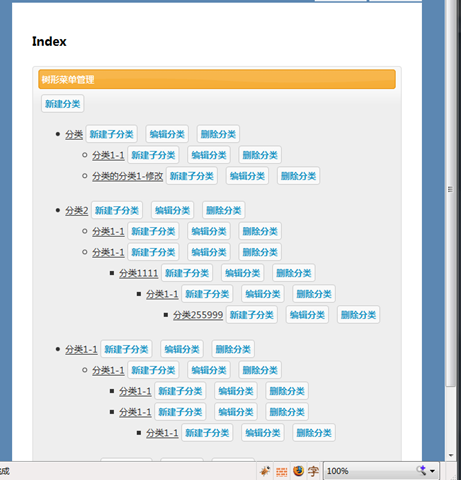
这次还是做一个树形控件.需要特别说明的是,这个Demo全部都是用Ajax做的,增删改都无刷新,而且可以方便地换肤..以下是最终的效果图:
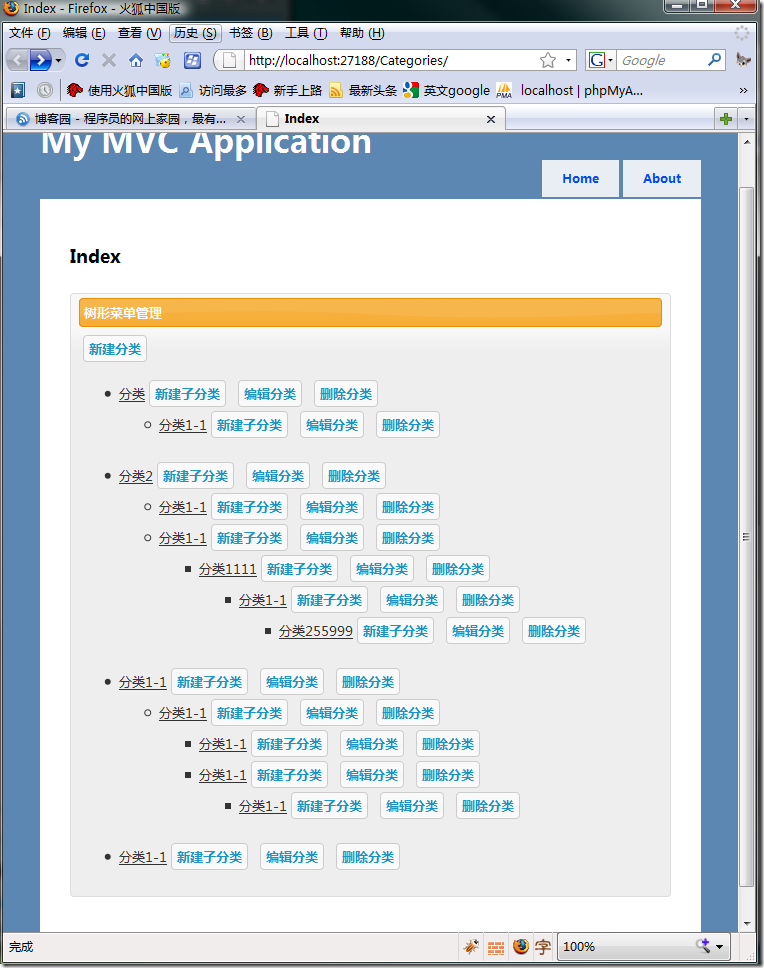
image

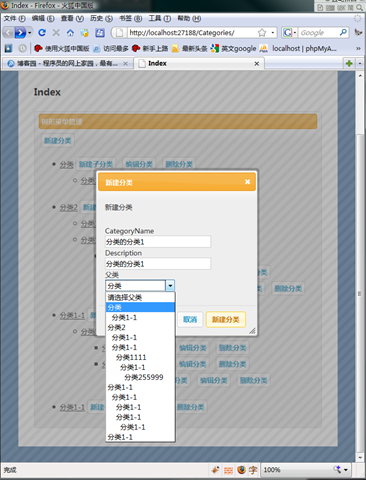
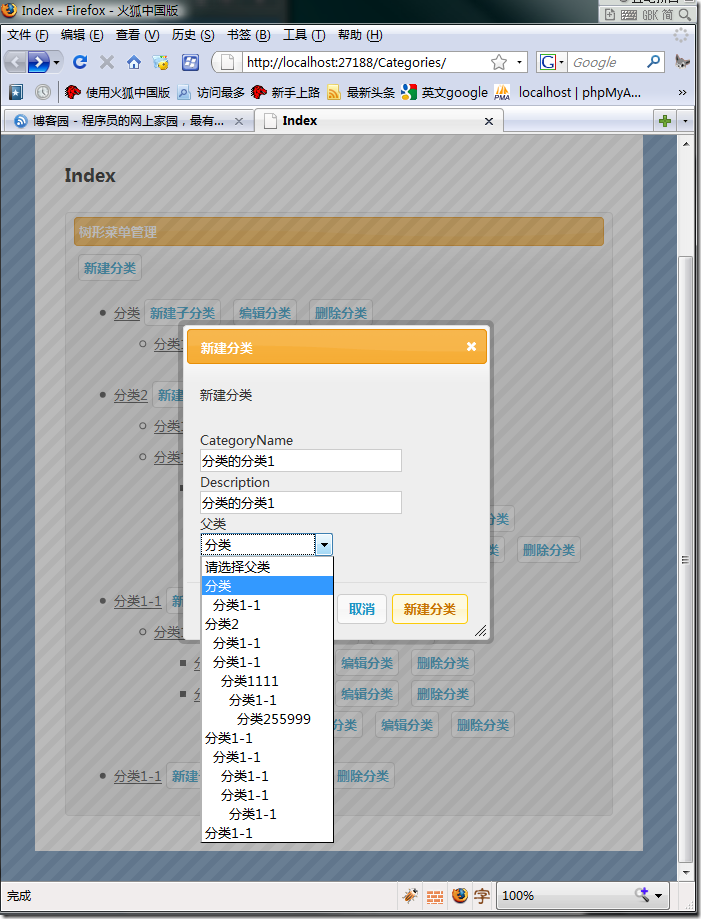
新建分类. 用上Effect就跟Flex有得拼了..而且做出这种效果非常方便.
image

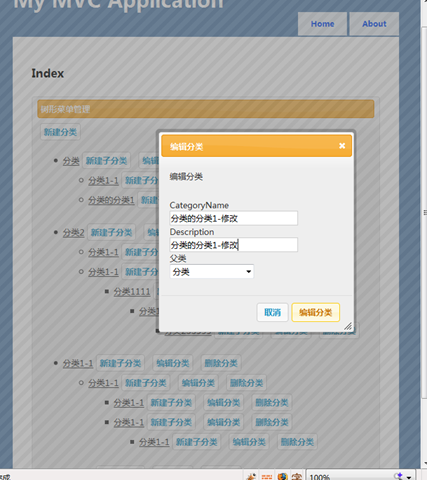
编辑分类.. 一样的开dialog

 image


 image

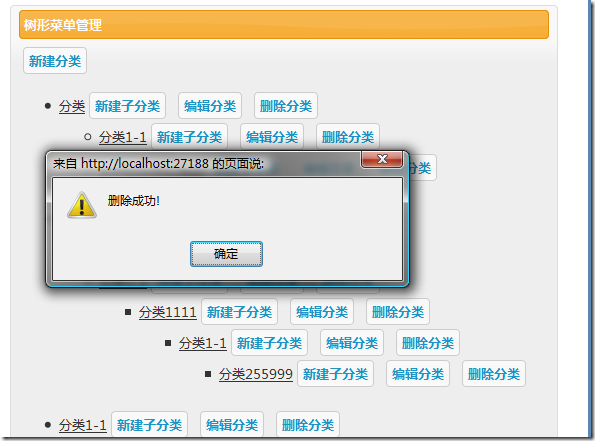
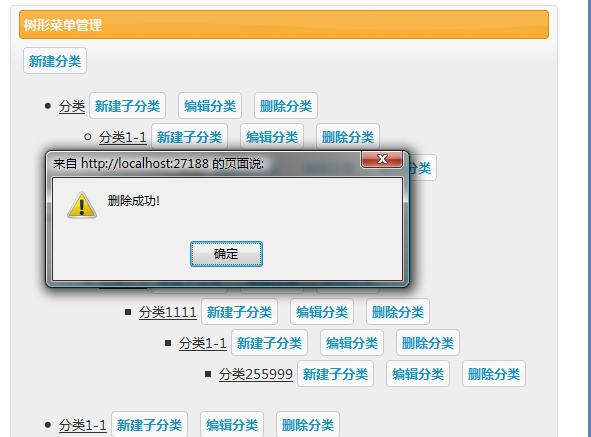
删除功能.

image

image


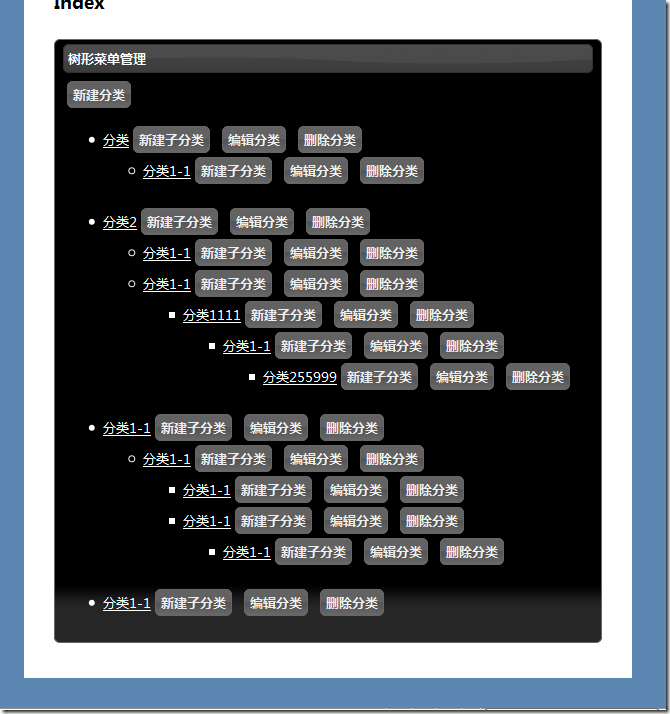
以下是另一种主题.. 换主题非常方便 .. 换个css就OK


image

这个是黑色的主题.. 官方也有很多下载..


image

感觉真是太强了..


下面简要说一下它的ajax功能怎么方便法..以下功能用到了NbearLite. 我一直很喜欢用NbearLite..

我们要做一个添加数据的功能.于是写了以下Controller

 [AcceptVerbs(HttpVerbs.Post)]
public ContentResult Create(FormCollection f)
{
int pid = 0; if (!int.TryParse(f["ParentID"], out pid)) pid = 0;
Gateways.DB.Insert(Tables.Tree)
.AddColumn(Tables.Tree.pid, pid)
.AddColumn(Tables.Tree.title, f["CategoryName"])
.AddColumn(Tables.Tree.description, f["Description"])
.Execute();
return Content("新建成功!");
}

我们一般都会写下以下的view

<button id="btn-createCategories" class="ui-button ui-state-default ui-corner-all">
新建分类</button><br />

<div id="createCategories" style="display: none;" title="新建分类">
<p>
新建分类</p>
<% using (Html.BeginForm("Create", "Categories", FormMethod.Post, new { id = "frm-CreateCategories", name = "frm-CreateCategories" }))
{
List<OtisTreeNode> treeList = this.Model as List<OtisTreeNode>;
%>
<fieldset>
<label for="CategoryName">
CategoryName</label>
<% =Html.TextBox("CategoryName")%>
<label for="Description">
Description</label>
<% =Html.TextBox("Description")%>
<label for="ParentID">
父类</label>
<% =Html.TreeSelect(treeList , "ParentID", "请选择父类", "&nbsp;&nbsp;", "", "")%>
</fieldset>
<% } %>
</div>

可以看出,如果加上一个submit 按钮,以上,已经可以工作了.或许Controller应该要返回一个ActionResult,并做一些try{} catch{}..但基本结构是这样..

下面我们再为它加上ajax功能和用上jQuery的UI..

引入相关JavaScript和css如下:

 <link href="/Scripts/Jquery/themes/darkness/ui.all.css" rel="stylesheet" type="text/css" />
<style type="text/css">
label, input
{
display: block;
}
body
{
font-size: 12px;
}
input.text
{
margin-bottom: 12px;
width: 95%;
padding: .4em;
}
fieldset
{
padding: 0;
border: 0;
margin-top: 25px;
}
.ui-button
{
margin: 2px 4px;
padding: 2px;
text-decoration: none;
cursor: pointer;
position: relative;
text-align: center;
}
.ui-dialog .ui-state-highlight, .ui-dialog .ui-state-error
{
padding: 4px;
}
.portlet
{
padding: 4px 8px;
}
.portlet-header
{
padding: 4px;
margin-bottom: 6px;
}
</style>
<script src="/Scripts/Jquery/jquery-1.3.1.js" type="text/javascript"></script>
<script src="/Scripts/Jquery/ui/ui.core.js" type="text/javascript"></script>
<script src="/Scripts/Jquery/ui/ui.draggable.js" type="text/javascript"></script>
<script src="/Scripts/Jquery/ui/ui.resizable.js" type="text/javascript"></script>
<script src="/Scripts/Jquery/ui/ui.dialog.js" type="text/javascript"></script>
<script type="text/javascript" src="/Scripts/Jquery/ui/effects.core.js"></script>
<script type="text/javascript" src="/Scripts/Jquery/ui/effects.highlight.js"></script>
<script type="text/javascript" src="/Scripts/Jquery/external/bgiframe/jquery.bgiframe.js"></script>
现在我们要做的是捕获传统的form的post, 让它以ajax的方式提交.

第一步是收集要post的数据.于是我们写下以下JavaScript代码,为了方便,我加在jQuery的全局函数中了..

jQuery.otisAjax = {
getPostData: function(FromID) {
var ob = new Object();
$(FromID + " :input").each(function(i) {
ob[$(this).attr("name")] = $(this).val();
});
return { data: ob, action: $(FromID).attr("action"), method: $(FromID).attr("method") };
},
returnType: { text: "text", html: "html", script: "script", json: "json" },
post: function(FromID, callback, rType) {
var pInfo = this.getPostData(FromID);
$.post(pInfo.action, pInfo.data, callback, rType == undefined ? this.returnType.html : rType);
}
};

jQuery.otisAjax.getPostData的功能是捕获包含在form中的所有要Post出去的数据,并抓取要Post到的URL和method. Jquery的强大的选择功能,可以很轻松地做到.

jQuery.otisAjax.post的功能是简单地调用一下jQuery.post.

OK,好了. 现在开始构建对话框并实现ajax提交. 以下是全部代码.

 $(function() {
$("#createCategories").dialog({
bgiframe: true,
autoOpen: false,
modal: true,
buttons: {
'新建分类': function() {
$.otisAjax.post("#frm-CreateCategories",
function(data, textStatus) {
alert(data); if (textStatus == "success") { $("#createCategories").dialog('close'); getTree(); } // $("#createCategories").dialog('close');
}, "text");
},
'取消': function() {
$(this).dialog('close');
}
}
});
$("#btn-createCategories").click(function() {
$("#createCategories").dialog('open');
});

});


这就是带Ajax功能的简单的增加数据的全部代码. 因为是Demo,所以少考虑了N种情况.可以看出这种做法非常地简单,非常方便..


下载地址;http://files.cnblogs.com/OtisBlog/OtisMVCBlog.rar