[MVC]ASP.NET MVC unit Test

mikel阅读(759)

ASP.NET MVC Framework – Part 2: Testing

Published: 27 Mar 2008
By: Simone Chiaretta
Download Sample Code

In this article Simone will cover one of the main reasons for adopting the ASP.NET MVC framework: testability.

Introduction

In the first part of this series we introduced the MVC pattern and how Microsoft implemented it in the ASP.NET MVC framework. In this part we will cover one of the most important aspects of the framework: unit testing.

In the last article we saw how the MVC pattern allows a better separation of concerns and decreases the coupling between presentation logic and infrastructure code: these 2 features make it easier than before testing an ASP.NET web application.

Before looking at how to test a Controller Action let's have a brief overview of what unit testing is and why it matters.

Note: This article is based on the version of ASP.NET MVC released during the MIX08 conference at the beginning of March '08. Things may change in the future. It is also different from the version used for my previous article, so the code I showed may not work with the current code drop..

Unit testing: What it is and why it's important to do

Hundreds of books and thousands of articles have been written on this topic, but I'll try to summarize here the main concepts behind using unit testing.

From Wikipedia: "Unit testing is a procedure used to validate that individual units of source code are working properly. A unit is the smallest part of an application. […] In object-oriented programming the smallest unit is a method."

This short definition includes two important concepts:

  • Each test must be independent from the others
  • Each test should isolate a single part of the program and show that this individual part is correct

Why should we want to unit test an application? Mainly because it's an automated way to make sure it is always behaving the way it is supposed to behave. This way we can make changes to the code and refactor pieces of the application without the fear of breaking something somewhere else in the application. This is particularly useful with Agile development procedures.

One of the main concepts was that we should be able to isolate each single part of the program: this seems an easy concept in theory but can be difficult to apply. Usually a method in the Business Logic layer instantiates a class that lives in the Data Access layer. This in turn uses a data access provider to get the real data out of the database. And last, the web form that sits on top of everything uses the Business Logic passing the inputs collected from the user on the site.

Without taking the appropriate precautions, while testing the methods in the Business Logic we will test the Data Access layer and the data access provider as well. And this is against one of the main concepts of unit testing: isolation. Why is this that bad? Because if the Business Logic test failed we would not know whether the problem was really in the Business Logic, or in the procedure that retrieved the data from the DB, or maybe it was the DBA that erroneously deleted a stored procedure from the database.

The reason why we cannot isolate the part to be tested is that our Business Logic object is "dependent" on certain other objects in the Data Access layer. If we looked at how the application is designed we would see that the BL "knows" the DA through his real name at compile time (they are tightly coupled). The solution to the problem is to design the application so that the two components are loosely coupled: the BL "knows" the DA only through the interface it implements and the real dependency is defined only at runtime. This allows us to use a SQL Data Access provider in the real application and to use a fake Data Access provider that always returns the same results in our tests.

How ASP.NET MVC facilitates testing

We just saw that to easily test an application it's needed that all its components can be "faked" out, and this is achieved when the component is not just a class, but implements a well known interface or extent some kind of abstract base class.

In the first article of this series I said that the "classic" approach to developing web applications with .NET, the WebForm approach, is not easily testable: it's because the main class of ASP.NET, System.Web.UI.Page, has dependencies to HttpContext, HttpResponse, HttpRequest, HttpCookie and all the other objects coming from the fact that the Page is being executed inside a web server. And all these classes are "just" concrete classes, and cannot be replaced by fake implementations for the purpose of testing the web applications outside the context of the web server.

To address this issue, the ASP.NET MVC framework introduces a series of "abstractions" in order to remove all the direct references to the HTTP runtime. If you look at the API you will see that methods accept things like HttpContextBase, HttpRequestBase and so on. This way all the classes representing the HTTP runtime environment can be replaced by fake implementations that always return pre-baked responses instead of interacting with the web server.

From version P2 all these abstractions are located in a separate assembly called System.Web.Abstractions.dll.

But enough with theoretical talking, let's see how to test an MVC application.

Creating a test project

In the first article of the series we created a sample ASP.NET MVC web application using a project template provided with the ASP.NET 3.5 extensions: ASP.NET MVC Web Application. In version P2 they removed the ASP.NET MVC Web Application and Test project template and introduced a wizard that pops up and asks you whether you want to create a test project and which testing framework you want to use. It only supports Visual Studio Unit Test, but other testing framework can be added as well.

Let's create our test project in the File> New> Project, and selecting the ASP.NET MVC Web Application project. Notice that the description says Preview 2: if you don't see this then you are probably still running the first release. In this case you have to download and install the new version first.

Figure 1: New Project Dialog

images/fig01.jpg

After you select the ASP.NET MVC application, a new dialog window comes out.

Figure 2: Create Test Project dialog

images/fig02.jpg

Let's select Yes, generate a unit test project and choose Visual Studio Unit Test.

At this point the project template will create a solution with two projects, the first with the same sample application that we created in the first article, the second with a sample testing project, with an empty fixture for the HomeController.

Inside this class we will write tests to prove the correctness of the Controller Actions. We are going to write a test to verify that the Index action of the HomeController really asks for the view named "Index" to be rendered, and that the About action will redirect to the Index action. This is the code of the controller we are going to test:

Listing 1: Controller to be tested

  1. public class HomeController : Controller  
  2. {  
  3. public void Index()      {  
  4.          /* Call the Model here */  
  5.          RenderView("Index");  
  6.       }  
  7.   
  8. public void About()      {  
  9.          /* Call the Model here */  
  10.          RedirectToAction("Index");  
  11.       }  
  12. }  

There are a few possible approaches for testing a controller action:

  • using the Extract and override call pattern (also called Test-Specific Subclass)
  • replacing all the external dependencies with mocked objects

Extract and Override Call

This testing pattern comes from a practice used when testing legacy code that doesn't come with mockable interfaces or base classes. ASP.NET MVC is not "legacy" code and comes with mockable dependencies, but, as we will see later, the amount of code you have to write to mock everything is a bit more that one would expect, so for shorter tests I prefer this approach.

The concept behind this approach is that you extract the method that is using the dependency that you want to remove and then you override it with an implementation specific for the test you are writing.

In the application code we make calls to the RenderView and RedirectToAction methods. These ones have dependencies to a few other objects both in the ASP.NET MVC framework (IViewEngine, RouteData and ControllerContext) and in the HTTP runtime (HttpResponse and HttpContext) because in the real application they have to render a view and redirect to another URL. But for the purpose of this test we only need to store the name of the view we are going to render and invoke the method specified as the action we want to redirect to.

Listing 2: Test Specific Sub-Class

  1. internal class HomeControllerForTest : HomeController  
  2. {  
  3.    public string SelectedViewName { getprivate set; }  
  4.   
  5.    protected override void RenderView(string viewName,  
  6.                                       string masterName, object viewData)  
  7.    {  
  8.       SelectedViewName = viewName;  
  9.    }  
  10.   
  11.    protected override void RedirectToAction(  
  12.                          System.Web.Routing.RouteValueDictionary values)  
  13.    {  
  14.       string action = (string)values["action"];  
  15.       GetType().GetMethod(action).Invoke(thisnull);  
  16.    }  
  17. }  

With this test-specific class in place now we can test the controller class:

Listing 3: Testing using the test-specific sub-class

  1. [TestMethod]  
  2. public void AboutOverride()  
  3. {  
  4.    HomeControllerForTest controller = new HomeControllerForTest();  
  5.   
  6.    controller.About();  
  7.   
  8.    Assert.AreEqual("Index", controller.SelectedViewName,  
  9.                               "Should have redirected to Index");  
  10. }  
  11.   
  12. [TestMethod]  
  13. public void IndexOverride()  
  14. {  
  15.    HomeControllerForTest controller = new HomeControllerForTest();  
  16.   
  17.    controller.Index();  
  18.   
  19.    Assert.AreEqual("Index", controller.SelectedViewName,  
  20.                               "Should have selected Index");  
  21. }  

As you can see the code is pretty straightforward:

  • Instantiate the test specific class
  • Call the method we want to test
  • Assert that the Index view has been rendered

This approach works but can leave a bad taste in the mouths of some people, since here you are testing something that is different from what you are putting in the working application. Furthermore it's a trick used when testing legacy code not written with testability in mind while ASP.NET MVC is a new library written to be easily testable. A better and more elegant approach is the one that involves mocking dependencies.

Mock Objects

As we said earlier, everything that interacts with a controller is referenced through its interface so we can make our own implementation of the ViewEngine in order to test that the view that the controller wants to render is the one we are expecting.

Listing 4: FakeViewEngine

  1. public class FakeViewEngine : IViewEngine  
  2. {  
  3.     public ViewContext ViewContext { getprivate set; }  
  4.   
  5.     public void RenderView(ViewContext viewContext)  
  6.    {  
  7.       ViewContext = viewContext;  
  8.    }  
  9. }  

The only method that is specified inside the IViewEngine interface is RenderView. A real View Engine should select the view to be rendered based on the ViewContext passed, but for the purpose of this test we just need to store the ViewContext so that we can check that the ViewName is the one we are expecting.

But there is another step to be taken: even if we are not dealing with HttpContext and ControllerContext directly in our code, the framework needs this information in order to populate the ViewContext that is passed to the View Engine. So we have to mock them out.

I'll not discuss about what a mock object is in detail but here is a short definition: mock objects are objects that mimic the behavior of real objects and can also do some assertions on how methods are called. In the references you'll find some links to other articles on mocking, as well as on unit testing.

Let's have a look at how to test the Index controller action using mock objects. There are a few mocking framework around: I'm going to use RhinoMocks, but the same concepts apply to all of them.

Listing 5: Testing the Index action with RhinoMocks

  1. [TestMethod]  
  2. public void IndexMock()  
  3. {  
  4.    HomeController controller = new HomeController();  
  5.    var fakeViewEngine = new FakeViewEngine();  
  6.    controller.ViewEngine = fakeViewEngine;  
  7.   
  8.    MockRepository mocks = new MockRepository();  
  9.    using (mocks.Record())  
  10.    {  
  11.       mocks.SetFakeControllerContext(controller);  
  12.    }  
  13.    using (mocks.Playback())  
  14.    {  
  15.       controller.Index();  
  16.       Assert.AreEqual("Index", fakeViewEngine.ViewContext.ViewName,  
  17.                           "Should have selected Index");  
  18.    }  
  19. }  

First we created an instance of our controller class and set the view engine to use the FakeViewEngine we defined earlier.

Then RhinoMocks comes in:

  • We start setting expectations (mocks.Record).
  • We create a fake controller Context (We'll talk about this in a moment).

Then we put the mock repository in playback mode, we call the method we want to test and we assert that the ViewName that has been passed to the View Engine is the one we were expecting.

The SetFakeControllerContext method is a helper method that creates a fake HttpContext using RhinoMocks and then populates a controller context with all the other information needed by the framework code.

Listing 6: SetFakeControllerContext helper method

  1. public static void SetFakeControllerContext(this MockRepository mocks,  
  2.                                             Controller controller)  
  3. {  
  4.    var httpContext = mocks.FakeHttpContext();  
  5.    ControllerContext context = new ControllerContext(new RequestContext(httpContext,   
  6.                                                       new RouteData()), controller);  
  7.    controller.ControllerContext = context;  
  8. }  

This method, as well as other helper methods, is contained in the MvcMockHelpers class created by the ASP.NET MVC team.

In the code available for download there is a complete solution that includes a working sample of what we discussed here, and the testing method for the About action as well. The RedirectToAction method is still too coupled with the HTTP Runtime and in my opinion it still requires too much mocking. This is probably going to change in the next release so I prefer not writing the code here in the article. If you are curious have a look at the code.

Conclusions

In this article we introduced the problems related to unit testing and we saw how the ASP.NET MVC framework facilitates unit testing. We also saw how to test Controller Actions both using the Extract and Override Call approach and using Mock objects.

In the next article we will see how to pass data from the controller to the view and vice versa.

References

[MVC]ASP.NET MVC controller actions unit Test

mikel阅读(860)

This is how ASP.NET MVC controller actions should be unit tested

I'm upgrading my partywithpalermo.com website for the MVP Summit party, and I'm retrofitting my tests to use the March CTP of the MVC Framework.  I have the following action that I need to unit test:

public class MainController : ControllerBase
{
    private readonly IAttendeesRepository _repository;
 
    public MainController(IAttendeesRepository repository, IViewEngine viewEngine)
    {
        _repository = repository;
        ViewEngine = viewEngine;
    }
 
 
    public void Register(string name, string website, string comment)
    {
        var attendee = new Attendee(name, website, comment);
        _repository.SaveNewAttendee(attendee);
        RenderView("confirm", attendee);
    }
}


Note the explicit dependencies on IAttendeeRepository and IViewEngine.  That means that I'll be interacting with those two dependencies in this controller.  Here is my unit test (this passes, by the way):


[Test]
public void ShouldSaveAttendee()
{
    var repository = new FakeRepository();
 
    var mockViewEngine = new MockViewEngine();
    var controller = new MainController(repository, mockViewEngine);
    controller.ControllerContext = new ControllerContext(new RequestContext(new HttpContextStub(), new RouteData()), controller);
    controller.Register("Jeffrey.',", "http://www.jeffreypalermo.com?=&@%20", "this comment!?,'.");
 
    Attendee attendee = repository.SavedAttendee;
    Assert.That(attendee.Name, Is.EqualTo("Jeffrey.',"));
    Assert.That(attendee.Website, Is.EqualTo("http://www.jeffreypalermo.com?=&@%20"));
    Assert.That(attendee.Comment, Is.EqualTo("this comment!?,'."));
 
    Assert.That(mockViewEngine.ActualViewContext.ViewName, Is.EqualTo("confirm"));
    Assert.That(mockViewEngine.ActualViewContext.ViewData, Is.EqualTo(attendee));
}
 
private class HttpContextStub : HttpContextBase
{
 
}


This is a pretty straightforward unit test except for the line before calling the Register() method.  I have to use setter-injection to set a stubbed ControllerContext.  If I don't, the Register() method will bomb with an exception when the ViewContext is created, and the code tries to get an HttpContextBase off of the ControllerContext.  It'll throw a NullReferenceException.  My code doesn't really care about the ControllerContext or what is in it, but because of how the code is structured, I must use setter injection to break this dependency.  Note that testability is next up on the list of things to do for the MVC Framework team.

Preview2 (March CTP) was all about getting the routing engine out into its own assembly so that it can be used separate from MVC controllers.  Also, the MVC Framework is "binnable".  You can xcopy deploy it.  There is plenty of time to fix these things, and the team is working on it.  You can also be sure that I'll keep raising the issue because I've been test-driving code for three years, and it's instinct now to see what is easy and frictionless and separate it from code that is harder to test than it should be.  Overall, pretty good for a CTP.


The following is what I would like to write.  The following is how I would like my test to look.  Notice just the absence of the ControllerContext line.

[TestFixture]
public class MainControllerTester
{
    [Test]
    public void ShouldSaveAttendee()
    {
        var repository = new FakeRepository();
 
        var mockViewEngine = new MockViewEngine();
        var controller = new MainController(repository, mockViewEngine);
        controller.Register("Jeffrey", "http://www.jeffreypalermo.com", "this comment");
 
        Attendee attendee = repository.SavedAttendee;
        Assert.That(attendee.Name, Is.EqualTo("Jeffrey"));
        Assert.That(attendee.Website, Is.EqualTo("http://www.jeffreypalermo.com"));
        Assert.That(attendee.Comment, Is.EqualTo("this comment"));
 
        Assert.That(mockViewEngine.ActualViewContext.ViewName, Is.EqualTo("confirm"));
        Assert.That(mockViewEngine.ActualViewContext.ViewData, Is.EqualTo(attendee));
    }
 
    private class MockViewEngine : IViewEngine
    {
        public ViewContext ActualViewContext;
 
        public void RenderView(ViewContext viewContext)
        {
            ActualViewContext = viewContext;
        }
    }
 
    private class FakeRepository : IAttendeesRepository
    {
        public Attendee SavedAttendee;
 
        public IEnumerable<Attendee> GetAttendees()
        {
            throw new NotImplementedException();
        }
 
        public void SaveNewAttendee(Attendee attendee)
        {
            SavedAttendee = attendee;
        }
    }
}


Note that my unit test is concerned with explicit dependencies and doesn't know or care that I'm making use of a PROTECTED method named "RenderView" inside my action.  That detail doesn't matter because the interaction with the IViewEngine is what is important. 

I also understand that I could use the Legacy code pattern of "Extract and Override Call" (Feathers, p348).  Microsoft has already provided the extracted method, RenderView.  I can override the call to break the dependency, but that pattern is meant to be used as a dependency-breaking technique with legacy code.  If you haven't read Michael Feathers' book, Working Effectively with Legacy Code, you should order it right now.  It talks about all kinds of dependency-breaking techniques in order to write unit tests on existing code.  My goal in providing feedback to the MVC Framework team (and I provide feedback, believe me) is to have this framework be something that I would want to use.  There is plenty of time to make the necessary changes, and the team is working hard.

I revised this post a bit after chatting on the phone with Scott Guthrie this evening.  We'll see some testability improvements in the next drop, and the team is aiming to make drops around every 6 weeks or so.

Note:  I'm playing around with using "var" for locals.  Not sure if I like it yet.  We'll see.  No need to comment on the "vars".  Comment on controllers, actions, and unit tests.

[MVC]ASP.NET MVC Action Filter - 缓存与压缩

mikel阅读(759)

原文地址: ASP.NET MVC Action Filter – Caching and Compression

下载源码: Source.zip

关于Action Filter你可以参考我的另外一篇文章: ASP.NET MVC : Action过滤器(Filtering)


缓 存在开发高扩充性WEB程序的时候扮演着很重要的角色.我们可以将HTTP请求在一个定义的时间内缓存在用户的浏览器中,如果用户在定义的时间内请求同一 个URL,那么用户的请求将会从用户浏览器的缓存中加载,而不是从服务器.你可以在ASP.NET MVC应用程序中使用下面的Action Filter来实现同样的事情:

using System;
using System.Web;
using System.Web.Mvc;
public class CacheFilterAttribute : ActionFilterAttribute
{
/// <summary>
/// Gets or sets the cache duration in seconds. The default is 10 seconds.
/// </summary>
/// <value>The cache duration in seconds.</value>
public int Duration
{
get;
set;
}
public CacheFilterAttribute()
{
Duration = 10;
}
public override void OnActionExecuted(FilterExecutedContext filterContext)
{
if (Duration <= 0) return;
HttpCachePolicyBase cache = filterContext.HttpContext.Response.Cache;
TimeSpan cacheDuration = TimeSpan.FromSeconds(Duration);
cache.SetCacheability(HttpCacheability.Public);
cache.SetExpires(DateTime.Now.Add(cacheDuration));
cache.SetMaxAge(cacheDuration);
cache.AppendCacheExtension("must-revalidate, proxy-revalidate");
}
}

你可以好像下面一样在你的Controller Action 方法中使用这个Filter :

[CacheFilter(Duration = 60)]
public void Category(string name, int? page)

下面是在firebug中当 缓存Filter 没有应用的时候的截图 :

NoCache

下面的截图是应用了 Cache Filter 时候的截图 :

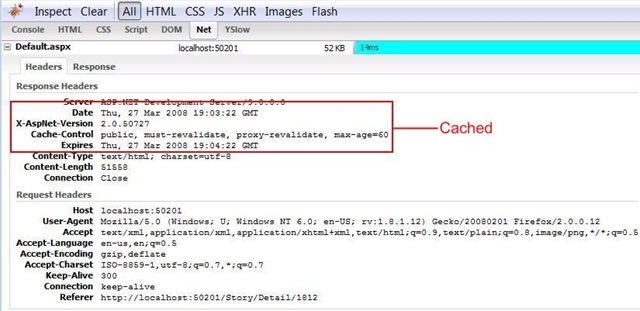
Cache


另外一个很重要的事情就是压缩.现在的浏览器都可以接收压缩后的内容,这可以节省大量的带宽.你可以在你的ASP.NET MVC 程序中应用下面的Action Filter 来压缩你的Response :

using System.Web;
using System.Web.Mvc;
public class CompressFilter : ActionFilterAttribute
{
public override void OnActionExecuting(FilterExecutingContext filterContext)
{
HttpRequestBase request = filterContext.HttpContext.Request;
string acceptEncoding = request.Headers["Accept-Encoding"];
if (string.IsNullOrEmpty(acceptEncoding)) return;
acceptEncoding = acceptEncoding.ToUpperInvariant();
HttpResponseBase response = filterContext.HttpContext.Response;
if (acceptEncoding.Contains("GZIP"))
{
response.AppendHeader("Content-encoding", "gzip");
response.Filter = new GZipStream(response.Filter, CompressionMode.Compress);
}
else if (acceptEncoding.Contains("DEFLATE"))
{
response.AppendHeader("Content-encoding", "deflate");
response.Filter = new DeflateStream(response.Filter, CompressionMode.Compress);
}
}
}

然后将这个Filter应用到你的Controller Action 中 :

[CompressFilter]
public void Category(string name, int? page)

下面是没有应用压缩的时候的截图 :

Uncompressed

下面的截图是应用了压缩Filter后的情形 :

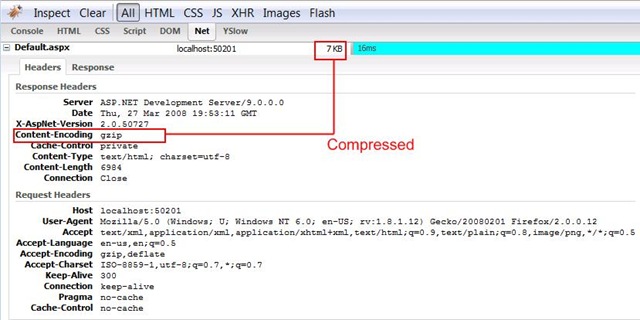
Compressed

你当然也可以将这两个Filter都应用到同一个Action方法上,就好像下面所示 :

[CompressFilter(Order = 1)]
[CacheFilter(Duration = 60, order = 2)]
public void Category(string name, int? page)

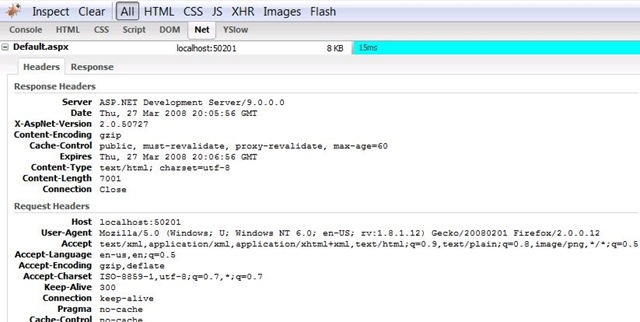
下面是截图 :

Both

Enjoy!!!

下载源码: Source.zip

[DES]DES加密原理

mikel阅读(680)

DES加密算法的原理. (转)
一.本文實用於初學者,目的在於幫助大家熟悉一些系統底層的知識。
二.本文只是為了讓廣大網友共同提高一些基礎知識,本人決無賣弄之意,只供需要這方面知識的讀者閱讀,如果你是高手,或者不需要這方面知識,請跳過。
三.本文是一篇翻譯文章,如有雷同,敬請諒解。
四.本文歡迎傳抄轉載,但是不要用於任何商業用途。請尊重作者勞動,也歡迎來信交流 fnlq@263.net


【正文】

DES算法理論

本 世紀五十年代以來,密碼學研究領域出現了最具代表性的兩大成就。其中之一就是1971年美國學者塔奇曼 (Tuchman)和麥耶(Meyer)根據信息論創始人香農(Shannon)提出的「多重加密有效性理論」創立的,後於1977年由美國國家標準局頒 布的數據加密標準。
DES密碼實際上是Lucifer密碼的進一步發展。它是一種採用傳統加密方法的區組密碼。

它的算法是對稱的,既可用於加密又可用於解密。

美國國家標準局1973年開始研究除國防部外的其它部門的計算機系統的數據加密標準,於1973年5月15日和1974年8月27日先後兩次向公眾發出了徵求加密算法的公告。 加密算法要達到的目的通常稱為DES密碼算法要求主要為以下四點:

提 供高質量的數據保護,防止數據未經授權的洩露和未被察覺的修改;具有相當高的複雜性,使得破譯的開銷超過可能獲得的利益,同時又要便於理解和掌握 DES密碼體制的安全性應該不依賴於算法的保密,其安全性僅以加密密鑰的保密為基礎實現經濟,運行有效,並且適用於多種完全不同的應用。

1977年1月,美國政府頒布:採納IBM公司設計的方案作為非機密數據的正式數據加密標準(DES棗Data Encryption Standard)。

   目前在這裡,隨著三金工程尤其是金卡工程的啟動,DES算法在POS、ATM、磁卡及智能卡(IC卡)、加油站、高速公路收費站等領域被廣泛應用,以此 來實現關鍵數據的保密,如信用卡持卡人的PIN的加密傳輸,IC卡與POS間的雙向認證、金融交易數據包的MAC校驗等,均用到DES算法。

  DES算法的入口參數有三個:Key、Data、Mode。其中Key為8個字節共64位,是DES算法的工作密鑰;Data也為8個字節64位,是要被加密或被解密的數據;Mode為DES的工作方式,有兩種:加密或解密。

   DES算法是這樣工作的:如Mode為加密,則用Key 去把數據Data進行加密, 生成Data的密碼形式(64位)作為DES的輸出結果;如Mode為解密,則用Key去把密碼形式的數據Data解密,還原為Data的明碼形式(64 位)作為DES的輸出結果。在通信網絡的兩端,雙方約定一致的Key,在通信的源點用Key對核心數據進行DES加密,然後以密碼形式在公共通信網(如電 話網)中傳輸到通信網絡的終點,數據到達目的地後,用同樣的Key對密碼數據進行解密,便再現了明碼形式的核心數據。這樣,便保證了核心數據(如PIN、 MAC等)在公共通信網中傳輸的安全性和可靠性。

  通過定期在通信網絡的源端和目的端同時改用新的Key,便能更進一步提高數據的保密性,這正是現在金融交易網絡的流行做法。

  DES算法詳述

  DES算法把64位的明文輸入塊變為64位的密文輸出塊,它所使用的密鑰也是64位,其功能是把輸入的64位數據塊按位重新組合,並把輸出分為L0、R0兩部分,每部分各長32位,其置換規則見下表:

58,50,12,34,26,18,10,2,60,52,44,36,28,20,12,4,
  62,54,46,38,30,22,14,6,64,56,48,40,32,24,16,8,
  57,49,41,33,25,17, 9,1,59,51,43,35,27,19,11,3,
  61,53,45,37,29,21,13,5,63,55,47,39,31,23,15,7,

  即將輸入的第58位換到第一位,第50位換到第2位,…,依此類推,最後一位是原來的第7位。L0、R0則是換位輸出後的兩部分,L0是輸出的左 32位,R0 是右32位,例:設置換前的輸入值為D1D2D3……D64,則經過初始置換後的結果 為:L0=D550…D8;R0=D57D49…D7。

  經過26次迭代運算後。得到L16、R16,將此作為輸入,進行逆置換,即得到密文輸出。逆置換正好是初始置的逆運算,例如,第1位經過初始置換後,處於第40位,而通過逆置換,又將第40位換回到第1位,其逆置換規則如下表所示:

  40,8,48,16,56,24,64,32,39,7,47,15,55,23,63,31,
  38,6,46,14,54,22,62,30,37,5,45,13,53,21,61,29,
  36,4,44,12,52,20,60,28,35,3,43,11,51,19,59,27,
  34,2,42,10,50,18,58 26,33,1,41, 9,49,17,57,25,

放大換位表

  32, 1, 2, 3, 4, 5, 4, 5, 6, 7, 8, 9, 8, 9, 10,11,
  12,13,12,13,14,15,16,17,16,17,18,19,20,21,20,21,
  22,23,24,25,24,25,26,27,28,29,28,29,30,31,32, 1,

單純換位表

  16,7,20,21,29,12,28,17, 1,15,23,26, 5,18,31,10,
  2,8,24,14,32,27, 3, 9,19,13,30, 6,22,11, 4,25,

  在f(Ri,Ki)算法描述圖中,S1,S2…S8為選擇函數,其功能是把6bit數據變為4bit數據。下面給出選擇函數Si(i=1,2……8)的功能表:
選擇函數Si

S1:
  14,4,13,1,2,15,11,8,3,10,6,12,5,9,0,7,
  0,15,7,4,14,2,13,1,10,6,12,11,9,5,3,8,
  4,1,14,8,13,6,2,11,15,12,9,7,3,10,5,0,
  15,12,8,2,4,9,1,7,5,11,3,14,10,0,6,13,
S2:
  15,1,8,14,6,11,3,4,9,7,2,13,12,0,5,10,
  3,13,4,7,15,2,8,14,12,0,1,10,6,9,11,5,
  0,14,7,11,10,4,13,1,5,8,12,6,9,3,2,15,
  13,8,10,1,3,15,4,2,11,6,7,12,0,5,14,9,
S3:
  10,0,9,14,6,3,15,5,1,13,12,7,11,4,2,8,
  13,7,0,9,3,4,6,10,2,8,5,14,12,11,15,1,
  13,6,4,9,8,15,3,0,11,1,2,12,5,10,14,7,
  1,10,13,0,6,9,8,7,4,15,14,3,11,5,2,12,
S4:
  7,13,14,3,0,6,9,10,1,2,8,5,11,12,4,15,
  13,8,11,5,6,15,0,3,4,7,2,12,1,10,14,9,
  10,6,9,0,12,11,7,13,15,1,3,14,5,2,8,4,
  3,15,0,6,10,1,13,8,9,4,5,11,12,7,2,14,
S5:
  2,12,4,1,7,10,11,6,8,5,3,15,13,0,14,9,
  14,11,2,12,4,7,13,1,5,0,15,10,3,9,8,6,
  4,2,1,11,10,13,7,8,15,9,12,5,6,3,0,14,
  11,8,12,7,1,14,2,13,6,15,0,9,10,4,5,3,
S6:
  12,1,10,15,9,2,6,8,0,13,3,4,14,7,5,11,
  10,15,4,2,7,12,9,5,6,1,13,14,0,11,3,8,
  9,14,15,5,2,8,12,3,7,0,4,10,1,13,11,6,
  4,3,2,12,9,5,15,10,11,14,1,7,6,0,8,13,
S7:
  4,11,2,14,15,0,8,13,3,12,9,7,5,10,6,1,
  13,0,11,7,4,9,1,10,14,3,5,12,2,15,8,6,
  1,4,11,13,12,3,7,14,10,15,6,8,0,5,9,2,
  6,11,13,8,1,4,10,7,9,5,0,15,14,2,3,12,
S8:
  13,2,8,4,6,15,11,1,10,9,3,14,5,0,12,7,
  1,15,13,8,10,3,7,4,12,5,6,11,0,14,9,2,
  7,11,4,1,9,12,14,2,0,6,10,13,15,3,5,8,
  2,1,14,7,4,10,8,13,15,12,9,0,3,5,6,11,

在此以S1為例說明其功能,我們可以看到:在S1中,共有4行數據,命名為0,1、2、3行;每行有16列,命名為0、1、2、3,……,14、15列。

  現設輸入為: D=D1D2D3D4D5D6
令:列=D2D3D4D5
  行=D1D6

  然後在S1表中查得對應的數,以4位二進製表示,此即為選擇函數S1的輸出。下面給出子密鑰Ki(48bit)的生成算法

   從子密鑰Ki的生成算法描述圖中我們可以看到:初始Key值為64位,但DES算法規定,其中第8、16、……64位是奇偶校驗位,不參與 DES運算。故Key 實際可用位數便只有56位。即:經過縮小選擇換位表1的變換後,Key 的位數由64 位變成了56位,此56位分為C0、D0兩部分,各28位,然後分別進行第1次循環左移,得到C1、D1,將C1(28位)、D1(28位)合併得到56 位,再經過縮小選擇換位2,從而便得到了密鑰K0(48位)。依此類推,便可得到K1、K2、……、K15,不過需要注意的是,16次循環左移對 應的左移位數要依據下述規則進行:

循環左移位數
1,1,2,2,2,2,2,2,1,2,2,2,2,2,2,1
  以上介紹了DES算法的加密過程。DES算法的解密過程是一樣的,區別僅僅在於第一次迭代時用子密鑰K15,第二次K14、……,最後一次用K0,算法本身並沒有任何變化。
DES算法具有極高安全性,到目前為止,除了用窮舉搜索法對DES算法進行攻擊外,還沒有發現更有效的辦法。而56位長的密鑰的窮舉空間為256,這意味 著如果一台計算機的速度是每一秒種檢測一百萬個密鑰,則它搜索完全部密鑰就需要將近2285年的時間,可見,這是難以實現的,當然,隨著科學技術的發展, 當出現超高速計算機後,我們可考慮把DES密鑰的長度再增長一些,以此來達到更高的保密程度。

   由上述DES算法介紹我們可以看到:DES算法中只用到64位密鑰中的其中56位,而第8、16、24、……64位8個位並未參與DES運算, 這一點,向我們提出了一個應用上的要求,即DES的安全性是基於除了8,16,24,……64位外的其餘56位的組合變化256才得以保證的。因 此,在實際應用中,我們應避開使用第8,16,24,……64位作為有效數據位,而使用其它的56位作為有效數據位,才能保證DES算法安全可靠 地發揮作用。如果不瞭解這一點,把密鑰Key的8,16,24,….. .64位作為有效數據使用,將不能保證DES加密數據的安全性,對運用DES來達到保密作用的系統產生數據被破譯的危險,這正是DES算法在應用上的誤 區,是各級技術人員、各級領導在使用過程中應絕對避免的,而當今各金融部門及非金融部門,在運用DES工作,掌握DES工作密鑰Key的領導、主管們,極 易忽略,給使用中貌似安全的系統,留下了被人攻擊、被人破譯的極大隱患。
DES算法應用誤區的驗證數據

  筆者用Turbo C編寫了DES算法程序,並在PC機上對上述的DES 算法的應用誤區進行了騅,其驗證數據如下:

Key: 0x30 0x30 0x30 0x30……0x30(8個字節)
Data: 0x31 0x31 0x31 0x31……0x31(8個字節)
Mode: Encryption
結果:65 5e a6 28 cf 62 58 5f

   如果把上述的Key換為8個字節的0x31,而Data和Mode均不變,則執行DES 後得到的密文完全一樣。類似地,用Key:8個0x32和用Key:8個0x33 去加密Data (8 個0x31),二者的圖文輸出也是相同的:5e c3 ac e9 53 71 3b ba
我們可以得到出結論:
Key用0x30與用0x31是一樣的;
Key用0x32與用0x33是一樣的,……

  當Key由8個0x32換成8個0x31後,貌似換成了新的Key,但由於0x30和0x31僅僅是在第8,16,24……64有變化,而DES算法並不使用Key的第8,16,……64位作為Key的有效數據位,故:加密出的結果是一樣的。
DES解密的驗證數據:

Key: 0x31 0x31……0x31(8個0x31)
Data: 65 5e a6 28 cf 62 58 5f
Mode: Decryption
結果:0x31 0x31……0x31(8個0x31)

  由以上看出:DES算法加密與解密均工作正確。唯一需要避免的是:在應用中,避開使用Key的第8,16……64位作為有效數據位,從而便避開了DES 算法在應用中的誤區。
避開DES算法應用誤區的具體操作

   在DES密鑰Key的使用、管理及密鑰更換的過程中,應絕對避開DES 算法的應用誤區,即:絕對不能把Key的第8,16,24……64位作為有效數據位,來對Key 進行管理。這一點,特別推薦給金融銀行界及非金融業界的領導及決策者們,尤其是負責管理密鑰的人,要對此點予以高度重視。有的銀行金融交易網絡,利用定期 更換DES密鑰Key的辦法來進一步提高系統的安全性和可靠性,如果忽略了上述應用誤區,那麼,更換新密鑰將是徒勞的,對金融交易網絡的安全運行將是十分 危險的,所以更換密鑰一定要保證新Key與舊Key真正的不同,即除了第8,16,24,…64位外其它位數據發生了變化,請務必對此保持高度重視!

[.Net].NET 3.5 SP 1发布了

mikel阅读(806)

.NET 3.5 SP 1发布了

作者 Jonathan Allen译者 朱永光 发布于 2008年8月11日 下午9时46分

社区
.NET
主题
.NET框架,
IDE
标签
Visual Studio

.NET 3.5和Visual Studio 2008的Service Pack 1今天已经发布了。虽然称为“Service Pack”,但大量全新的特性让这个版本就像.NET 3.0那样意义重大。它包含了引起广泛争论的ADO.NET Entity Framework(实体框架),以及针对C#实时语法检查的所需的大量改善。

其他特性包括:

ASP.NET Dynamic Data(ASP.NET 动态数据):这个向导能自动生成以数据库为后端存储的网站,而无需任何手写的代码。以此为基础,开发人员能够直接使用它,也可以像任何其他ASP.NET的项目那样进行定制。

ADO.NET Data Services(ADO.NET 数据服务):这个框架使开发人员为查询和更新数据而创建REST风格的接口更为简单。这样的接口优于Web Services的一个关键地方就是,它具有一个基于URL的查询语言,直接内建于这个框架中,这样就避免了为每个应用程序都引入一套新的方式。

.NET Client Framework(.NET客户端框架):这是.NET Framework一个非常小型的版本,只包含了客户端应用程序会用到的一些API。内建于Visual Studio中的工具将决定你的应用程序是否适合这个版本。这一特性非常适合于ClickOnce风格的部署方式,这种情况下,用户是通过 Internet来下载框架安装包的。

还有大量针对IDE的增强,如Website部署、JavaScript/AJAX编码支持和WPF窗体设计。

这个版本也包含了.NET 2.0 SP2和.NET 3.0 SP2,这意味着它已经进行了回归测试。

查看英文原文:.NET 3.5 SP 1 Released

[问题]Asp.net中Master Page中的图片路径问题

mikel阅读(698)

ASP.NET中新加入的Master Page很好用,实际上就是将页面分块生成然后拼装起来成为一个文件发送到客户端的过程,只不过简化了重复劳动,不过当Master Page 中使用图片时一定要定义好路径,否则到打开子页面时会出现路径错误一般不要用“../Content/images/ss.gif”这样的路径,会显示不出来,用”/Content/images/ss.gif”

[MVC]Forms Framework with Validation for ASP.NET M

mikel阅读(969)

One thing that is notably missing from ASP.NET MVC is a good way to handle forms and their validation.  To resolve this issue, I started on a simple forms framework this weekend.

The end goal


I don't particularly like the action filter to handle the insertion of the model as a parameter.  I would prefer it be done via windsor and interceptors; however, for the first go round I have decided to keep the castle stack out of this.  The technique could easily be adapted to use MVC Contrib's WindsorControllerFactory and interceptors so that attributes do not have to be on every action you wish to use a form helper with.  More on that later.
For those of you who want to skip the reading and get straight to the code, download the sample project.  Look at the /Home/Contact page.  Note: the sample project depends on MVC Preview 4.

The Components

  • Field – A field is the smallest unit of input and validation in a form.
  • Widget – A widget is an abstraction of HTML template text for input.
  • FormBase – Base class for form helpers.
  • ModelForm – A form auto created from a POCO model.

Widget

A widget has a name, a value, and some attributes.  The name and value properties are by default shortcuts to the name and value attributes of the widget's attribute collection.  However, this behavior is overridable in subclasses.  A widget also has a way of rendering itself as XHTML.

Field

A field has a name, a value, and a widget.  By default a field is required, and it has a publicly exposed validate method so that it can be asked to validate its value.  It also has the ability to output itself as XHTML. 

FormBase

FormBase, the base class for forms contains a collection of fields, a method to validate the fields, and a method to load the values of fields from a name value collection.  The latter facilitates the loading of data from a browser request.
The first concrete implementation of FormBase I created was ModelForm.  A ModelForm accepts a generic type argument and in its constructor takes an object of that type.  It uses this object to generate fields for the form.  The generation logic is implemented using the strategy pattern so that it is easily customizable.
Here is the strategy interface

The ModelForm registers default strategies

The constructor allows you to pass in your own strategies

With that, we have everything we need to make a form from a POCO.

Model Action Filter

One of the neatest things ASP.NET MVC does is allow you to make controllers with parameters that will be filled in from the request. 
I wanted to be able to do this with my form classes as well.
For the first go round, I decided not to use what I would prefer: Windsor and IInterceptors.  Instead I integrated the MVC way by using their action filters.
The filters give us everything we need to set the values for a parameter.  We have access to the parameters through the ActionMethod.GetParmaeters() method and we can set the parameters via the ActionParameters dictionary.
Here is the action filter

FormFactory is a simple helper class that uses a strategy pattern to create forms based upon the type passed in and a NameValueCollection.
Settings filterContext.Action
Now, this action will work!

Rendering the Form in a View

I provided three canonical methods for rendering the form:
AsDiv – renders the form with each field wrapped in a div
AsTable – render the form with each field as a table row
AsList – render the form with each field as a list item of an unordered list
I also provided a AsCustom method that allows you to specify an XElement to wrap the form fields inside of and an XElement to use as the parent for the children generated by the field instances.
If you want even more flexibility, the rendering is completely overridable by subclassing.
Rendering the form is as simple as passing it to a view and calling AsDiv() or your preferred alternative.
All output is valid XHTML.  Invalid fields receive an error class.
Rendered

Validation

Download the Sample Project
Note: the sample project depends on MVC Preview 4.

[MVC]Combining JQuery Validation with ASP.NET MVC

mikel阅读(763)

Combining JQuery Validation with ASP.NET MVC

One of the most nicest things about JQuery – in addition to the powerful mechanism it provides to manipulate the HTML DOM – is the great number of very useful plugins available out there.

JQuery Validation is one of my favorites, and today we will see how this plugin can be used with the MVC framework to validate all the inputs in a form before it is submitted to the controller.

This plugin supports the concept of "validation rule", a validation that has to be performed to an input field. For instance, "The field is required", "The field should have at least N characters", or "This field has to be a valid email", many of them are the same you can find in the ASP.NET validators. (These validators do not work with the MVC framework because they are tied to the ASP.NET Viewstate). Of course, new rules can also be created for performing custom validations specific to an application, some examples of this are also available in the plugin's website.

A rule can be applied to an input field in two ways:

1. Declarative, the rule is specified in the input field by means of the class attribute:

<input name="email" id="email" maxlength="60" class="required email" type="text"/>

As you can see, two rules were specified in the class attribute, "Required" and "Email", which means that two validations have to be performed for this field. Many rules can be applied to the same field, they only have to be separated by an space.

2. Imperative in code, the rule is specified in an script:

<script type="text/JavaScript">

$(document).ready(function(){

  $("#form-sign-up").validate( {

    rules: {

      email: {

        required: true,

        email: true

    },

    messages: {

      email: {

        required: "Please provide an email",

        email: "Please provide a valid email"

     } });

});

</script>

The validation was attached to the input field "email" in the form "form-sign-up". The message displayed when a validation fails for an specific field can also be customized using the "messages" section in the script. (This is optional, the plugin already comes with a set of pre-defined error messages)

And finally, one of the most interesting validation rules you can find there is "remote", which performs a remote validation using an Ajax endpoint. At this point we can use an MVC controller method to perform an specific validation, for instance to see if a login name is still available to be used.

<script type="text/JavaScript">

$(document).ready(function(){

$("#form-sign-up").validate( {

  rules: {

    login: {

      required: true,

      remote: '<%=Url.Action("IsLoginAvailable", "Accounts") %>'

   }

  },

  messages: {

    login: {

     required: "Please provide an alias",

     remote: jQuery.format("{0} is already in use")

   }

  } });

});

</script>

The only requirement for the controller is that it must be return Json with the result of the validation. This can be easily done with MVC,

public JsonResult IsLoginAvailable(string login)

{

    //TODO: Do the validation

    JsonResult result = new JsonResult();

    if (login == "cibrax")

      result.Data = false;

    else

      result.Data = true;


    return result;

}

In the example above, if "cibrax" is entered as login name, the validation will fail and the user will see an error message.

The styles for the error messages can also be customized with the following rules,

label.error {

display: block;

color: red;

font-style: italic;

font-weight: normal;

}

input.error {

border: 2px solid red;

}

td.field input.error, td.field select.error, tr.errorRow td.field input,tr.errorRow td.field select {

border: 2px solid red;

background-color: #FFFFD5;

margin: 0px;

color: red;

}

As we have discussed here, jQuery validation is a great tool that we all should consider at the moment to validate data in the ASP.NET MVC framework.

A complete example with different validations can be downloaded from this location.

[JQuery]JQuery的Form校验组件

mikel阅读(932)

JQuery formValidator表单验证插件,它是基于JQuery类库,实现了js脚本于页面html代码的分离。你可以划分多个校验组,每个组的校验都是互不影响。对一个表单对象,你只需要写一行代码就可以轻松实现无数种(理论上)脚本控制。
    * 支持所有类型客户端控件的校验
    * 支持JQuery所有的选择器语法,只要控件有唯一ID和type属性
    * 支持函数和正则表达式的扩展。提供扩展库formValidatorReg.js,你可以自由的添加、修改里面的内容。
    * 支持2种校验模式。第一种:文字提示(showword模式);第二种:弹出窗口提示(showalert模式)
    * 支持多个校验组。如果一个页面有多个提交按钮,分别做不同得提交,提交前要做不同的校验,所以你得用到校验组的功能。
    * 支持4种状态的信息提示功能,可以灵活的控制4种状态是否显示。第一种:刚打开网页的时候进行提示;第二种:获得焦点的时候进行提示;第三种:失去焦点时,校验成功时候的提示;第四种:失去焦点时,校验失败的错误提示。
    * 支持自动构建提示层。可以进行精确的定位。
    * 支持自定义错误提示信息。
    * 支持控件的字符长度、值范围、选择个数的控制。值范围支持数值型和字符型;选择的个数支持radio/checkbox/select三种控件
    * 支持2个控件值的比较。目前可以比较字符串和数值型。
    * 支持服务器端校验。
    * 支持输入格式的校验。
在线演示:http://www.yhuan.com/formvalidator/demo.html
博客发布页面:http://www.cnblogs.com/wzmaodong/archive/2008/01/11/1034901.html
下载:http://www.cnblogs.com/Files/wzmaodong/formValidator3.1.rar
目前最新版本:3.1ver