 Mikel
Mikel| Java | ActionScript |
| java.utile.HashMap | Object |
| int | int |
| java.utile.List | ArrayCollection |
| String | String |

[教程]Asp.Net AJAX系列教程
ASP.NET AJAX入门系列将会写关于ASP.NET AJAX一些控件的使用方法以及基础知识,其中部分文章为原创,也有一些文章是直接翻译自官方文档,本部分内容会不断更新。
目录
导读:作为本系列文章的开篇,简单介绍一下ASP.NET AJAX的概况及各个组成部分。
ASP.NET AJAX入门系列(2):使用ScriptManager控件
导读:ScriptManager控件包括在ASP.NET 2.0 AJAX Extensions中,它用来处理页面上的所有组件以及页面局部更新,生成相关的客户端代理脚本以便能够在JavaScript中访问Web Service,所有需要支持ASP.NET AJAX的ASP.NET页面上有且只能有一个ScriptManager控件。在ScriptManager控件中我们可以指定需要的脚本库,或者指定通过JS来调用的Web Service,以及调用AuthenticationService和ProfileService,还有页面错误处理等。
ASP.NET AJAX入门系列(3):使用ScriptManagerProxy控件
导读:在ASP.NET AJAX中,由于一个ASPX页面上只能有一个ScriptManager控件,所以在有母版页的情况下,如果需要在Master-Page和Content-Page中需要引入不同的脚本时,这就需要在Content-page中使用ScriptManagerProxy,而不是ScriptManager,ScriptManager 和 ScriptManagerProxy 是两个非常相似的控件。
ASP.NET AJAX入门系列(4):使用UpdatePanel控件(一)
导读:UpdatePanel可以用来创建丰富的局部更新Web应用程序,它是ASP.NET 2.0 AJAX Extensions中很重要的一个控件,其强大之处在于不用编写任何客户端脚本,只要在一个页面上添加几个UpdatePanel控件和一个ScriptManager控件就可以自动实现局部更新。通过本文来学习一下UpdatePanel简单的使用方法(第一篇)。
ASP.NET AJAX入门系列(5):使用UpdatePanel控件(二)
导读:UpdatePanel可以用来创建丰富的局部更新Web应用程序,它是ASP.NET 2.0 AJAX Extensions中很重要的一个控件,其强大之处在于不用编写任何客户端脚本,只要在一个页面上添加几个UpdatePanel控件和一个ScriptManager控件就可以自动实现局部更新。通过本文来学习一下UpdatePanel其他的一些使用方法(第二篇)。
ASP.NET AJAX入门系列(6):UpdateProgress控件简单介绍
导读:在ASP.NET AJAX Beta2中,UpdateProgress控件已经从“增值”CTP中移到了ASP.NET AJAX核心中,本文简单介绍一些它的基本用法,翻译自官方文档。
ASP.NET AJAX入门系列(7):使用客户端脚本对UpdateProgress编程
导读:在本篇文章中,我们将通过编写JavaScript来使用客户端行为扩展UpdateProgress控件,客户端代码将使用ASP.NET AJAX Library中的PageRequestManager,在UpdateProgress控件中,将添加一个Button,来允许用户取消异步更新,并且使用客户端脚本来显示或者隐藏进度信息,翻译自官方文档。
导读:在UpdatePanel控件异步更新时,如果有错误发生,默认情况下会弹出一个Alert对话框显示出错误信息,这对用户来说是不友好的,本文看一下如何在服务端和客户端脚本中自定义异常处理,翻译自官方文档。
ASP.NET AJAX入门系列(9):在母版页中使用UpdatePanel
导读:本文简单介绍一下在母版页中使用UpdatePanel控件,翻译自官方文档。
ASP.NET AJAX入门系列(10):Timer控件简单使用
导读:本文主要通过一个简单示例,让Web页面在一定的时间间隔内局部刷新,来学习一下ASP.NET AJAX中的服务端Timer控件的简单使用。
ASP.NET AJAX入门系列(11):在多个UpdatePanle中使用Timer控件
导读:本文将使用Timer控件更新两个UpdatePanel控件,Timer控件将放在UpdatePanel控件的外面,并将它配置为UpdatePanel的触发器,翻译自官方文档
[教程]ASP.NET Page Templates - Using Inheritance
Introduction
Anyone who has developed commercial websites has run into the problem of creating a template for the site. For most sites a large percentage of the HTML is the same or similar for all pages. The header, navigation, and footer elements of a typical site layout appear on almost every page.
Some developers will put that markup in every page's source file. Anyone who's had to maintain a site put together this way knows how difficult it is to make site-wide changes. You end up depending on massive search and replace operations, which can be difficult to do without creating markup errors that require hand-tuning to repair.
In traditional ASP programming, like many other server-based programming environments, this was typically solved using an include file. The page is divided into logical sections representing the header, left navigation, body, and footer elements. A separate include is created for each of the common elements and the body section is placed in the actual ASP page. The page then includes the appropriate files to build up the look and feel of the page. This is a significant improvement over the previous approach, but still creates a few maintenance problems.
First of all, the individual ASP files must contain the code necessary to include the correct support files. This makes each page's content strongly coupled to the site's template. It also means that when you add a new page to the site, you must remember to setup all the correct includes in the right order.
An additional problem happens when you decide to make a significant look-and-feel change to the site. If you're lucky, you may be able to make all of your changes in the include files. Most of the time, however, the tight coupling between the include files and the ASP pages means that you end up having to edit each and every ASP page as well.
With the introduction of ASP.NET, developers have been giving a powerful new set of tools to help resolve these problems. ASP.NET uses an object-oriented development paradigm. In practical terms this means that every page is a class that derives from System.Web.UI.Page. This class provides a number of services to the web developer including caching, rendering, response and request access, etc.
So the question is: How can we best take advantage of the object-oriented nature of ASP.NET when creating websites? Is there a better way to create templates than using include-files?
Web User Controls
One of the first things a developer notices when getting started with ASP.NET is that a new style of control has been introduced: Web User Controls. User Controls allow a developer to encapsulate a common chunk of HTML or server-side code into a component that can be reused on many different pages.
User controls are not used in a page using the #include directive. Instead that are either placed in the ASPX file as a custom tag (with the Register directive) or from server-side code with the LoadControl statement.
This article is not going to go into the details of creating and using User Controls; there are many other sources that cover that topic. They are, however, and improvement over the old include-file approach and deserved mention here.
They don't solve all of the problems discussed above though. If, for example, you encapsulate your page header in a user control, you still have to remember to use it on each and every page in the site. If you decide you need to add another user control to another part of your site, then once again you end up editing every page to get that user control embedded.
Also, depending on the layout of the pages in your site, you may end up having some formatting or positioning markup in each page to make sure that the User Control is exactly where you want it on the page. This markup is common to every page and we should be able to find a way to have that code exist in only one place.
Simple Page Inheritance
If you're familiar with object-oriented programming then you are probably already seeing something familiar. When you have a chunk of code that occurs in more than one class, it is common practice to refactor that code by creating a base class and moving that code "up" one level in the inheritance chain. Why not do that here?
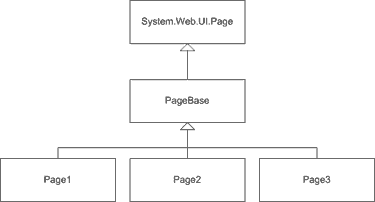
Since all ASPX pages derive from System.Web.UI.Page, we should be able to create a base class that sits between our page class and the Page class. This class will be responsible for producing the template used in our site. Then our page classes will derive from the base class and will only contain the markup and server controls needed for their specific task. To illustrate this, let's create an example base class called PageBase and then derive a page class from it. (All of the examples in this article are written in C#, but you should easily be able to convert them to VB.NET or any other .NET language.)
 Collapse
using System;
using System.Web.UI;
public class PageBase : System.Web.UI.Page
{
private string _pageTitle;
public string PageTitle
{
get { return _pageTitle; }
set { _pageTitle = value; }
}
protected override void Render(HtmlTextWriter writer)
{
// First we will build up the html document,
// the head section and the body section.
writer.Write( @"
<html>
<head>
<title>" + PageTitle + @"</title>
</head>
<body>" );
// Then we allow the base class to render the
// controls contained in the ASPX file.
base.Render( writer );
// Finally we render the final tags to close
// the document.
Writer.Write( @"
</body>
</html>" );
}
}
Let's take a look at a few interesting points illustrated in this base class. First of all, we expose a property called PageTitle that will contain the title for the page. This property's contents are written out in the <title> section of the page. Also notice the '@' symbol used before the string literals. While not explicitly required for this example, the '@' symbol is a C# token that says the following string literal should not have escape sequences expanded. If we didn't do this, we would have to escape our slash characters. If you are working in VB.NET you don't have to worry about this.
Now we will create an ASPX page that derives from PageBase. I'll be using code-behind pages, so we have two files. The first file has a file extension .ASPX and contains the markup for the page.
<%@ Page language="c#" Codebehind="SimplePageInheritance.aspx.cs" AutoEventWireup="false"
Inherits="SimplePageInheritance" %>
<form id="SimplePageInheritance" method="post" runat="server">
<h1>This is Page 1</h1>
<p>
This page demonstrates Simple Page Inheritance where the content is rendered
using the base class' Render() method. You cannot use Server Controls that
postback in the base class, they can only be used in the .ASPX page itself.
</p>
</form>
Notice that there is no markup for "standard" content like <html>, <head> and <body> because they will be rendered in the base class. The code-behind class defines the SimplePageInheritance class referenced in the Page declaration.
public class SimplePageInheritance : PageBase
{
public SimplePageInheritance()
{
PageTitle = "Simple Page Inheritance";
}
}
Pretty cool, eh? This solution solves all of the problems with include-based templates mentioned earlier. For some situations, however, it doesn't solve everything. For those we need Advanced Page Inheritance.
Advanced Page Inheritance
The biggest problem with the Simple Page Inheritance system is that you cannot put any server controls that cause a post-back in the template base class. The reason for this is related to the position of the <form> tag. In Simple Page Inheritance, the <form> tag is included in the derived ASPX page. Therefore any markup rendered by the base class will be either before or after the ASPX file markup. This might occur if, for example, we wanted a search system included in the template.
There are many different ways we could solve this problem. For this example, we will move the <form> tag from the ASPX file to the base class. We can't just render the <form> tag as a string literal either, because in ASPX files, the form is actually processed on the server before the markup is sent to the browser. So we have to create a Form object and insert it into the Controls collection of the page.
Collapseusing System;
using System.Web.UI;
using System.Web.UI.HtmlControls;
using System.Web.UI.WebControls;
public class AdvancedPageInheritanceBase : System.Web.UI.Page
{
protected override void OnInit(System.EventArgs e)
{
BuildPage( GenerateHtmlForm() );
base.OnInit(e);
}
protected void BuildPage( HtmlForm form )
{
////////////////////////////////////////////////////////
// Build the page and include the generated form
this.Controls.AddAt( 0, new LiteralControl( @"
<html>
<head>
<title>" + PageTitle + @"</title>
</head>
<body>
") );
this.Controls.Add( form );
this.Controls.Add( new LiteralControl( @"
</body>
</html>
"));
}
private HtmlForm GenerateHtmlForm()
{
HtmlForm form = new HtmlForm();
AddSearch(form);
AddControlsFromDerivedPage(form);
return form;
}
private void AddSearch( HtmlForm form )
{
searchBox = new TextBox();
Button searchButton = new Button();
searchButton.Text = "Search";
searchButton.Click +=
new EventHandler( this.OnSearchButtonClicked );
form.Controls.Add( searchBox );
form.Controls.Add( searchButton );
form.Controls.Add( new LiteralControl("<br>") );
}
protected void OnSearchClick( object sender, EventArgs e )
{
// Do the search here
}
private void AddControlsFromDerivedPage(HtmlForm form)
{
int count = this.Controls.Count;
for( int i = 0; i<count; ++i )
{
System.Web.UI.Control ctrl = this.Controls[0];
form.Controls.Add( ctrl );
this.Controls.Remove( ctrl );
}
}
}
Remember that I said there are many ways to solve the <form> tag placement problem. In this solution we create an HtmlForm control, populate it with the contents of the ASPX page and then insert it into the template.
This system works very well and allows us to create ASPX pages that are completely independent of the template. Here is the ASPX file:
<%@ Page language="c#" Codebehind="AdvancedPageInheritance.aspx.cs"
AutoEventWireup="false"
Inherits="PageInheritanceSample.AdvancedPageInheritance" %>
<h1>Advanced Page Inheritance</h1>
<p>This demonstrates the Advanced Page Inheritance Technique.</p>
The code-behind file is no different than the one used in the Simple Page Inheritance example. Notice that our ASPX file doesn't have a <form> tag in it.
Performance
I was surprised to find that there is almost no performance difference when using page inheritance. Using Microsoft Application Center Test, I ran page load tests on three different versions of similar page structures:
- The first page used user controls to encapsulate the header, left navigation and footer sections. It did not use any page inheritance.
- The second page had the same look & feel and the same content but used the method outlined in Simple Page Inheritance.
- The third page had a similar look & feel (it included a search box like in the example code) and used the method outlined in Advanced Page Inheritance.
The following table shows the results after loading each page continuously for 5 minutes on my development workstation. As you can see, the differences are minimal.
| Page | # of Requests | Avg. Response Time (ms) | Avg. Requests per Sec. |
|---|---|---|---|
| WebUserControl.aspx | 16,693 | 10.53 | 55.64 |
| SimplePageInheritance.aspx | 16,636 | 10.54 | 55.45 |
| AdvancedPageInheritance.aspx | 16,965 | 10.20 | 56.55 |
Conclusion
Developing websites and web applications that are easy to maintain has always been a challenge. Over time the techniques used have evolved from almost nothing to modern object-oriented techniques like those presented in this article. These techniques can be used by anyone with a basic understanding of object-oriented programming and will almost certainly help you produce better factored, easier to maintain code.
[MVC]this.ReadFromRequest读取的是Name的值
发现个问题,原来ASP.NET MVC 框架中的this.ReadFromRequest(string key)读取的是form中组件的name值,不觉得让我很是不解,难怪只定义了id不能获得到值呢
代码如下:
<form id="Area" method="post" action="<%=Url.Action("SaveArea") %>">
<div>
AreaName:<%=ViewData.AreaName %>
<label>地区名称:</label><input type="text" id="AreaName" name="AreaName"/>
<label><input type="submit" value="保存" /></label>
</div>
</form>
不过这样也可以理解,毕竟ID不能重复,而name可以重复,这样就可以用来读取radio的值了
代码如下:
<div class="qygr">
<label>
<input id="Enterprise" type="radio" name="radiobutton" value="2"  onclick="showCompany();"/>
</label>
企业
<label>
<input id="Person" type="radio" name="radiobutton" value="1" checked="checked" onclick="hideCompany();" />
个人</label>
</div>
[应用]Flair在线制作应用Flex
Flair允许使用者创建自己的Web或者是桌面的Flex应用程序,也就是说,是在Flair运行中,直接在里面添加控件,自定义程序各种UI以及事 件。相当不错的想法,Flair应该是刚刚被放出来没多久的项目,Demo已经上线,不过在Google Code的主页上还没有任何东西可以下载。Demo中基本的控件已经实现(双击进行添加),不过位置的移动等操作实现比较麻烦。有兴趣地可以去体验一下。
Google Code上主页:http://code.google.com/p/flair/
Demo地址:http://www.flairbuilder.com/FlairBuilder.html
Permalink:http://blog.minidx.com/2008/06/09/901.html
Related PostRuboss Framework:将Adobe Flex和AIR应用简单高效的与Ruby On Rails集成的开发框架AIR/Flex博客圈中居然也存在这种人利用Away3D快速创建Flex/Flash的3D应用的教程Flex中利用 Ruby on Rails解决超大文件上传问题Flex中通过设置fontFamily和labelStyleName样式在HSlider控件中使用嵌入字体的例子 Flex中如何通过设置tickLength样式设定HSlider控件上一个标记号(tick)长度的例子Flex中通过设置textAlign样式在 一个List控件中改变文本对齐方向的例子Flex中如何通过设置fontFamily样式在ComboBox控件中使用自定义嵌入字体的例子Flex中 如何通过prompt属性在ComboBox控件中添加一个提示项(prompt)的例子Flex中如何通过设定headerStyleName样式在 Accordion控件中使用嵌入字体的例子Flex中如何通过leading样式在一个text控件中设置文本铅框(text leading)的例子Flex中通过自定义Accordion容器头部来阻止用户点击Accordion容器头部的例子Flex中利用 firstDayOfWeek属性改变DateChooser控件日历(calendar)布局的例子作为一个Flash平台开发/设计者应该拥有的10 本书36款新鲜出炉的很酷的Flex/AS3组件,开发包和工具Flex中利用Repeater显示一组CheckBox控件的例子Flex中利用 Repeater显示一组RadioButton控件的例子Flex中如何通过borderStyle和borderSides样式设置 NumericStepper控件特定边框(上下左右边)的例子Flex中如何通过borderThickness样式设置NumericStepper 控件边框厚度的例子Flex中通过borderColor样式设置NumericStepper控件边框颜色的例子
[理论]世界第一张互联网虚拟大脑结构图
前 言:经过近一年的努力,我们详细探讨了互联网进化规律,并最终绘制了世界第一张互联网虚拟大脑结构图,我们相信这一推论将对预测互联网下一步的发展动向以 及研究人类大脑的组织结构都会起到重要作用。从威客理论到互联网进化论再到互联网虚拟大脑理论,它们将成为真正属于中国的互联网理论。
作者:刘锋,彭庚,刘颖 原创
转载或引用请标明作者
在互联网繁杂混乱的现象背后,有两个问题始终摆在人们的面前,第一,互联网的发展有没有规律可循?第二,互联网的最终结局是什么?从2005 年开始,网络经济领域陆续涌现出的web2.0、长尾理论、维基经济学、海星组织等概念和理论,这从不同方面探讨和描述了互联网的一些发展规律。总体上 看,它们是对网络经济的表象和特征的描述,并不能有效地回答这两个问题:互联网发展的规律是什么?互联网发展的最终结果是什么?本文将围绕这两个核心问题 进行展开阐述。
一, 互联网发展的规律是什么?
从人类的发展史看,人类的进步就是器官不断延长和连接的历史。棍棒延伸了双臂,石头延伸了拳头,汽车延伸了双腿,望远镜延伸了眼睛,电话线延伸了耳朵,公 路、铁路使人类四肢最终实现联网。从1837年英国人库克获得了电报机专利到20世纪50年代数据通信的产生,从互联网的诞生到博客,威客,搜索引擎的出 现。历史表明人类大脑的延伸和联结一刻也没有停止。
为了实现人类大脑的充分联网,科技的进步不断延长人的大脑与互联网接驳的时间。互联网早期,人们使用台式机登陆互联网,随后人们可以携带笔记本随时寻找联网接口,无线通信技术的广泛应用和手机的电脑化进程使人们可以随时随地与互联网进行接驳。
互联网进化的终极目标是使人类的大脑充分联网,但是目前互联网不可能通过物理手段直接将线路和信号接驳到人的大脑中。互联网进化到这一阶段产生的解决办法 是用大脑映射(brain mapping)作为缓冲[3],即将人脑的功能映射到互联网中,图一就反映出这种映射关系。

图一 人脑功能在互联网中的映射
如果我们将电子邮件的通讯功能和博客中的用户访问记录功能也描绘出来,可得到图二左图的形状,而这一图形与人类大脑神经元具有很强的相似性。因此我们将大脑映射定义为互联网虚拟神经元[4][5],

图二 互联网虚拟神经元与人类大脑神经元
如果这些互联网虚拟神经元相互连接在一起,将形成互联网虚拟神经网状结构,如图三所示。这一结构目前在互联网中已经出现,如www.yahoo.com.cn的站长天下系统,www.witkey.com的 威客地图系统,一方面这些系统给用户提供个人空间,具备撰写博客,发布个人智力作品,发送电子邮件的功能。另一方面网站用搜索引擎的方式连接这些个人空 间。 通过对互联网虚拟神经元的深入研究。我们提出互联网进化的最终结果是成为一个与人类大脑结构非常类似的组织结构,我们称其为互联网虚拟大脑。

图三 互联网虚拟神经网状结构
二,互联网发展的最终结果是什么?
我们提到互联网发展最终结果是形成一个与人类大脑结构非常类似的组织结构。为了证明这一点,我们将从互联网虚拟运动神经系统,互联网虚拟视觉神经系统,互联网虚拟躯体感觉神经系统,互联网虚拟听觉神经系统,互联网虚拟记忆系统等五个方面进行介绍。

图四 互联网虚拟大脑
图四 互联网虚拟大脑
人体的躯体感觉又包括触觉,痛觉,温度决,体位觉,运动觉,和震动觉。躯体感觉是从感受器开始的,感受器指的的是分布 在机体上的用来接收机体外刺激的专门机构。下面我们看一下互联网虚拟躯体感觉系统的发展情况,目前已有些机构在河流,土地,空气中安放传感器,通过网络进 行汇总,实时监控温度,湿度,风速,气压等等。这是互联网虚拟躯体感觉系统的萌芽,随着互联网的发展,我们认为这些传感器将会安放在城市,海洋,太空,沙 漠,森林等世界每一个角落,他们将源源不断的向互联网虚拟大脑传送地球各个方面的感觉信息,供互联网虚拟大脑神经元进行处理,参见图四。
互联网虚拟视觉系统和虚拟听觉系统都起源于安放在家庭、工厂、旅游区、交通路口的监视器和视频录制系统,它们将收集到时视频信号,音频信号通过互联网进行 汇聚。这一应用已经相当普及和发达,这些视频音频录制系统将发展为互联网虚拟视觉系统和虚拟听觉系统,收集来自城市、海洋、太空、沙漠、森林等世界每一个 角落的图像和声波(包括无线电波)。这些信息也会传送给互联网虚拟大脑供互联网虚拟大脑神经元进行处理,参见图四。
互联网虚拟运动系统起源于机械设备的远程控制,目前人们已经可以通过局域网和互联网远程控制打印机、小家电、手术刀。随着互联网的发展这些远程设备将更加 灵敏和强大,互联网用户将通过各自的互联网虚拟大脑神经元经过互联网的虚拟神经系统远程操控挖掘机、潜水器、收割机、家用电器、工厂生产设备和仪器,参见 图四。
从神经生物学角度看,大脑皮层是种系发生学上最新的部分,并管理一系列庞大的识别和认知过程,该过程与情感行为、运动功能、躯体感觉的感知、整合以及记忆功能有关[7]。神经生物学按功能将人类大脑皮层分为如下功能区,如图五:

图五 人类大脑皮层的功能分区
通过前面的介绍,我们注意到互联网虚拟神经元将处理虚拟感觉系统、虚拟视觉系统、虚拟听觉系统、虚拟运动系统的信息。根据处理信息的不同领域,这些虚拟神 经元可以划分和聚合成不同的区域。除此之外,互联网用户也会因为不同的兴趣聚合在一起,如新闻社区、学习社区、游戏社区的等等。这些区域同自然界人类大脑 皮层的功能性划分是一至的。目前互联网用户以博客为单位正在进行以兴趣和爱好进行聚合的社区化演变。人们在这些社区内认识朋友,交换个人信息,对共同感兴 趣的信息进行讨论。以互联网虚拟大脑神经元为单位的互联网区域就形成了互联网虚拟大脑皮层。随着互联网虚拟大脑神经元(互联网用户)的增多和互联网社区的 不断涌现,互联网虚拟大脑皮层将不断发育和增厚,如图六。

图六 互联网虚拟大脑皮层
有证据表明,人类记忆的巩固需要海马到大脑皮层的输入重复达一到三年之久[6],大脑皮层的记忆编码在三年后变得相当可靠而无须来自海马输入的进一步强化(海马是人类大脑结构中的一个组成部分)。
当互联网虚拟视觉系统,互联网虚拟听觉系统和虚拟躯体感觉系统出现并逐渐完善后,他们收集的数据将首先存放在互联网信息处理中心服务器中进行筛选和整理。 这些服务器将担当互联网虚拟大脑的海马区功能。互联网用户通过各自的互联网虚拟大脑神经元从这个中央信息处理中心获得需要的信息,并转移到自己的虚拟神经 元以及所在的互联网社区和兴趣小组里,这个过程就实现了记忆信息从互联网虚拟海马区向互联网虚拟大脑皮层的扩散和转移,参见图四。
3,结论
互联网的起源和进化的最终目标是为了实现人类大脑的充分联网,这一目标产生了强大的拉动力,不断引导互联网向前发展,这就是互联网发展的规律。互联网进化 的最终结果是,第一,实现人类大脑的充分联网。第二,形成一个与人类大脑高度相似的互联网虚拟大脑。
互联网的起源和进化的最终目标是为了实现人类大脑的充分联网,这一目标产生了强大的拉动力,不断引导互联网向前发展,这就是互联网发展的规律。互联网进化 的最终结果是,第一,实现人类大脑的充分联网。第二,形成一个与人类大脑高度相似的互联网虚拟大脑。
4。互联网目前仍处在发展的初级阶段
从互联网的进化论中我们可以推断出互联网最终将进化成一个非常类似于人类大脑的组织,那么当前互联网处在一个什么样的发展阶段。纵观目前世界互 联网发展状况。我们注意到互联网虚拟神经元还仅仅进化到可共享知识区(博客)繁荣的阶段,可交易知识区,问题区,即时通讯软件还没有大范围的与博客进行结 合。因此互联网虚拟神经元还处在进化的初级阶段。
互联网的虚拟视觉系统和听觉系统随着互联网视频和音频的兴起已经开始发育,人们已经可以把拍摄录制现实世界的景象和声音上传到互联网中,监控器直接把图像和声应传到互联网中供所有互联网用户查看的应用还没有普及,因此互联网的虚拟视觉系统和听觉系统也处在进化的初级阶段。
安放在世界各地的传感器把来自现实世界的温度,湿度,风力等参数传入到互联网中的应用还没有出现,这种现象目前还主要存在于国家相关部门和科技机构的局域网里。因此互联网的虚拟躯体感觉系统也处在萌芽阶段。
目前人们可以通过互联网远程操控打印机,计算机,医疗设备,但大规模的操控工作设备的情况还没有出现,因此互联网的虚拟运动神经系统也没有发育成熟。
目前分散在世界各地的互联网服务器接受和储存大量的数据,应该说互联网虚拟记忆神经系统已经存在,但这个系统十分分散,前文提到互联网虚拟海马区和互联网虚拟大脑皮层还十分分散和不成熟,因此互联网的虚拟记忆神经系统处在进化的萌芽阶段。
总体上看目前互联网还处在进化的初级阶段,离完整的互联网虚拟大脑结构还有相当远的距离。
5 ,互联网进化论进一步的研究方向
5. 1研究互联网进化论还需要解决的问题
1. 推动互联网进化的背后机理是什么?
2. 互联网进化过程中,哪些技术是过渡性产品,通过互联网进化规律,可以预见到哪些还未出现的技术和产品?
3. 通过对目前人类大脑研究成果的了解,我们可以预见到互联网还将会发生哪些变化?
2. 互联网进化过程中,哪些技术是过渡性产品,通过互联网进化规律,可以预见到哪些还未出现的技术和产品?
3. 通过对目前人类大脑研究成果的了解,我们可以预见到互联网还将会发生哪些变化?
5. 2研究互联网虚拟大脑对医学研究人类大脑的启示
1. 人类大脑神经元中是否同样具备共享信息区,问题区,隐私区的分区功能?
2. 人类大脑的是否拥有和互联网中一样的地址编码系统。即每个大脑神经元和功能区是否具有唯一的编码地址。
3. 人类大脑的是否拥有和互联网中一样的信息索引系统,一个类似于google或百度一样的信息搜索引擎?
4. 通过对互联网虚拟大脑组织结构的研究,我们还将发现人类大脑的哪些未知区域。
2. 人类大脑的是否拥有和互联网中一样的地址编码系统。即每个大脑神经元和功能区是否具有唯一的编码地址。
3. 人类大脑的是否拥有和互联网中一样的信息索引系统,一个类似于google或百度一样的信息搜索引擎?
4. 通过对互联网虚拟大脑组织结构的研究,我们还将发现人类大脑的哪些未知区域。
参考文献:
1.Dave Kristula[美],The history of the Internet,1997
2.Ben greenstein,Adam greenstein[英 ]原著,师蔚王芳茹主译, 神经科学彩色图谱,世界图书出版公司,2003,p254,p32
3. John.C,Eccles[澳大利亚]著,潘泓译, 脑的进化, 上海世纪出版集团,2007,p134,p194
4.徐科主编, 神经生物学纲要,科学出版社 ,2000,p16, p17,p209,p270
5..尹文刚著,神经心理学,科学出版社,2007,P92-
6.钱学森、于景元,戴汝为,综合集成的重要性,1990
7.顾基发,综合集成的重要性,2007
8.王众托著, 知识系统工程, 北京:科学出版社,2004
9.刘锋,张玲玲,顾基发,The Application of Knowledge Management in the Internet— Witkey Mode in China,International Journal of Knowledge and Systems Sciences,2008
10.刘锋,威客地图(witmap)的发明与定义,新浪科技频道,2007
11.刘锋,互联网的分裂与统一,互联网周刊,2008,2
12, 刘锋,互联网进化断代史,互联网周刊,2008,3
[新闻]Adobe在线创意节
Adobe 搞的一个在线创意节,有很多 CS3 软件使用技巧分享.
地球对面 7.1 日早上11点开幕,可以先注册,到时候有邮件通知.
这边应该是 7.1 日晚上 11 点左右,有精神的朋友可以去看看.
[教程]ASP.net中Master页面的子页面的标题设置
母版页共有三个文件 Master,Master.cs,Master.designer.cs
在Master中打开html源代码部分将其中的
另外在你引用的页面里应该有这样一段
<%@ Page Language="C#" MasterPageFile="~/引用的母板页" AutoEventWireup="true" CodeFile="当前页面.aspx.cs" Inherits="当前页面" Title="Untitled Page" %>
将这个位置的Untitled Page改成你想要的名称就好了
[代码]C#上传文件代码
注意一定要加runat=“Server”,否则无法执行服务器端代码
页面代码:
<form id="form1" runat="server">
<input id="uploadfile" type="file" size="9" runat="server" />
<asp:Button ID="Button1" runat="server" Text="Button" onclick="Button1_Click" />
<asp:Label ID="Label1" runat="server" Text="Label">文件:</asp:Label>
</form>
Button1_Click代码:
protected void Button1_Click(object sender, EventArgs e)
{
DateTime now = System.DateTime.Now;
string strBaseLocation = "d:\\up\\";
string filename = now.DayOfYear.ToString() + uploadfile.PostedFile.ContentLength.ToString() + uploadfile.PostedFile.FileName;
//上传文件名
uploadfile.PostedFile.SaveAs(strBaseLocation+filename);
Label1.Text = "上传成功,文件名为:" + filename;
}
[教程]ASP.Net MVC中操作Cookie
做网站免不了要保存用户状态,ASP.NET MVC 框架的Controller提供了对Cookie的操作
代码如下:
HttpCookie cookies = new HttpCookie("UserName", user.UserName);
//设置为永久Cookie 去掉则为临时cookie 用户关闭后自动清除,类似session
cookies.Expires = DateTime.Parse("03/24/2009");
this.Response.SetCookie(cookies);
RenderView("UserPanel", user);
页面Page_onload
Response.Write("Cookie:" + Request.Cookies["UserName"].Value);