一、netcore跨平台之 Linux上部署netcore和webapi - 流月无双 - 博客园

mikel阅读(1158)

来源: 一、netcore跨平台之 Linux上部署netcore和webapi – 流月无双 – 博客园

一、netcore跨平台之 Linux上部署netcore和webapi

这几天闲着的时候在linux上部署了一下netcore webapi,下面就纪要一下这个过程。

中间遇到不少的坑,心里都是泪啊。

话不多说,开始干活。

————————————————————————

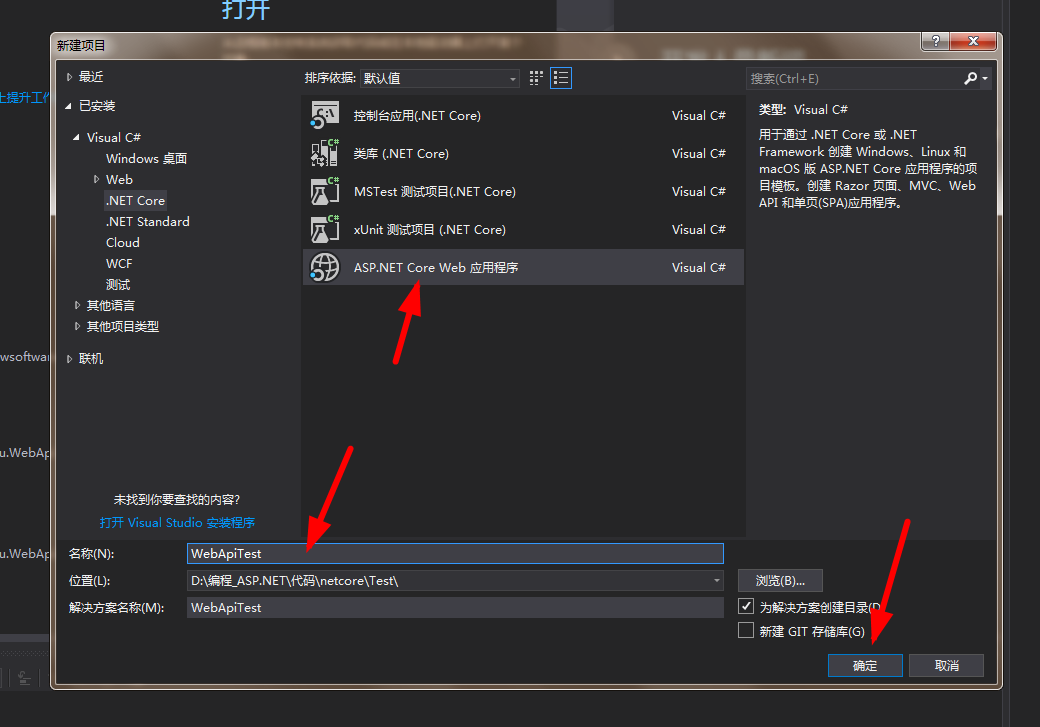
第一步,你得先创建一个netcore的接口,这个我就简单创建一个接口。

关于开发工具,我用的是vs2017,当然最新的vs2019也出来了,你可以用新的,都没关系。

开始选择创建项目,如图所示,这个入门的程序员都应该懂


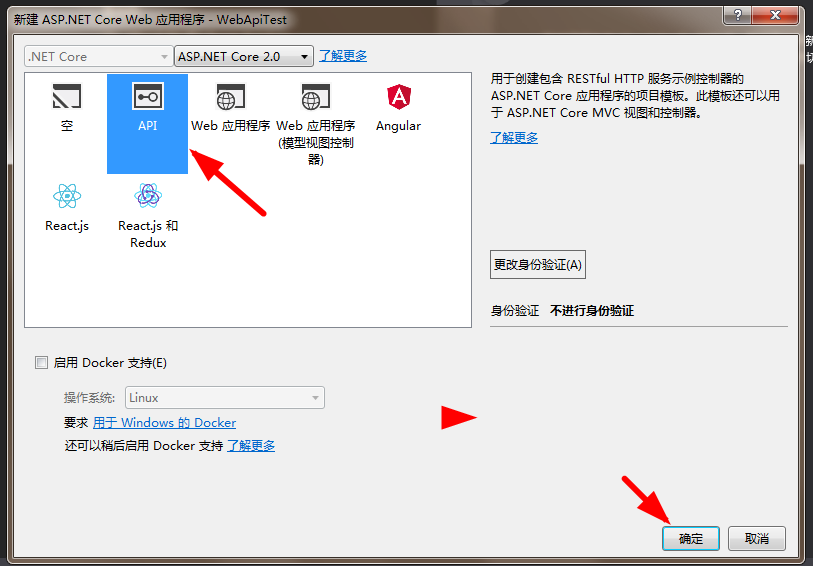
选择API


点击确定按钮就创建成功。

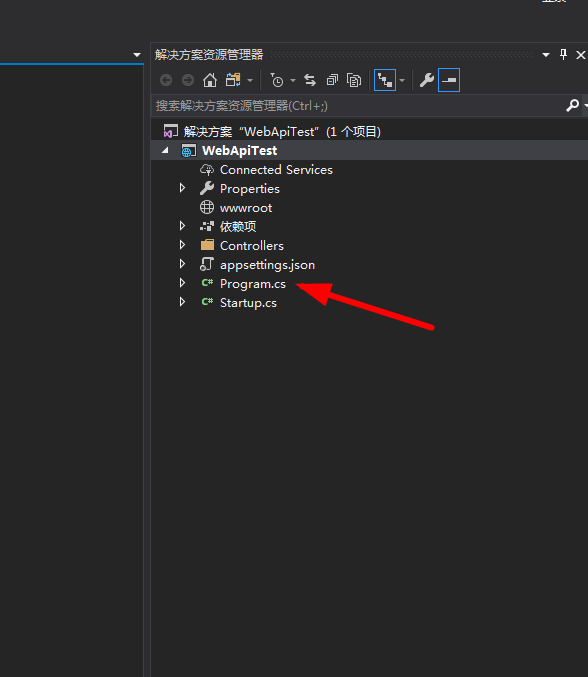
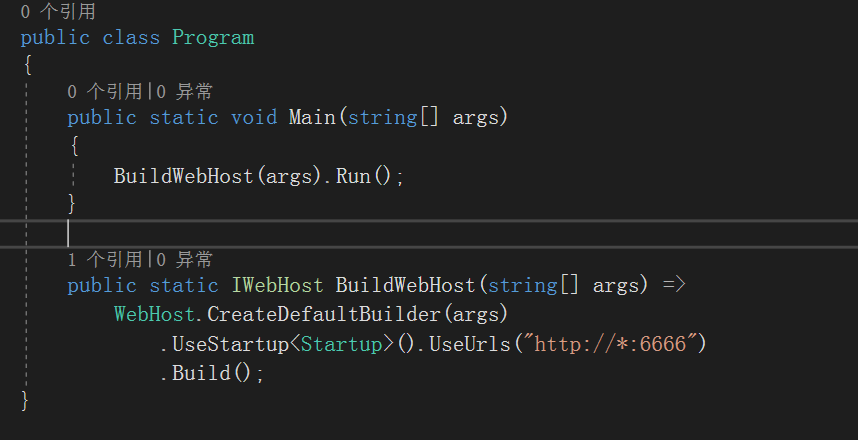
如图打开 Program.cs


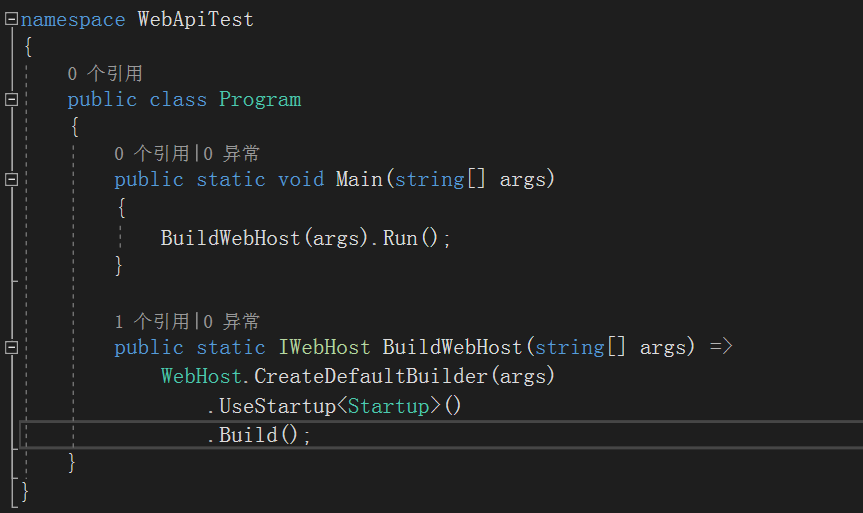
在这里添加一段代码


代码添加后


这样代码就写好了。

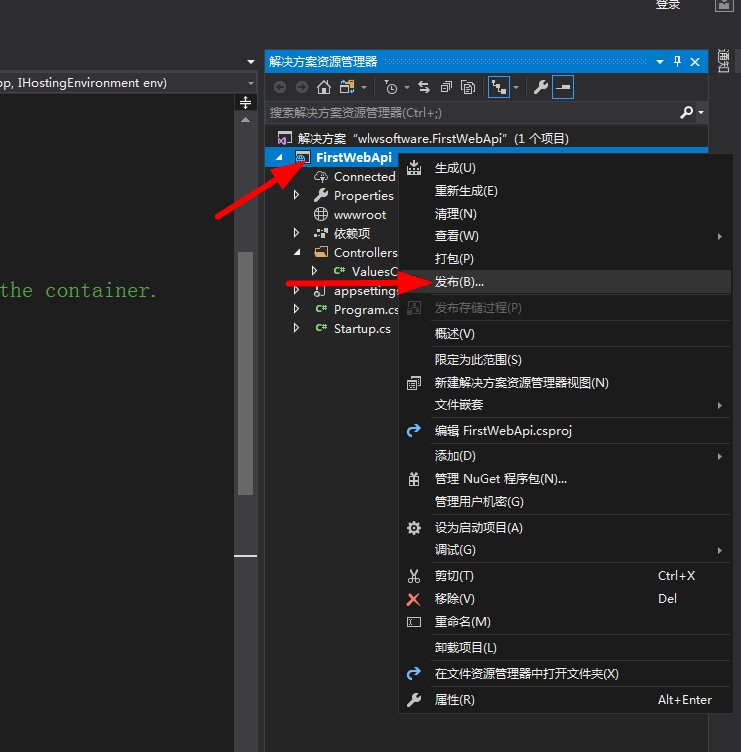
接下来就是发布。


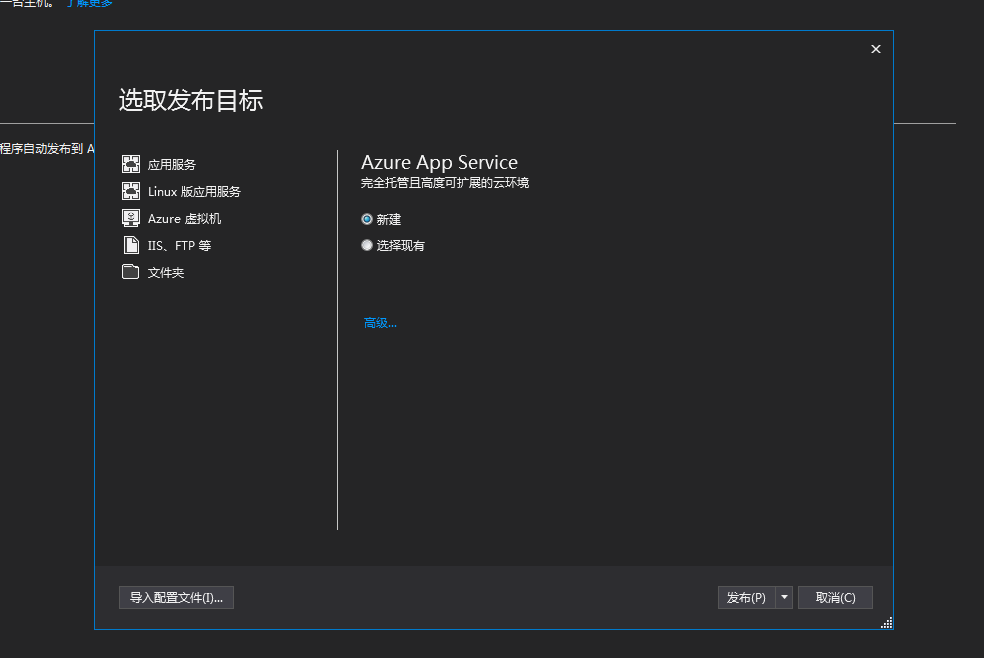
选择文件夹,选择你要发布的项目的位置。


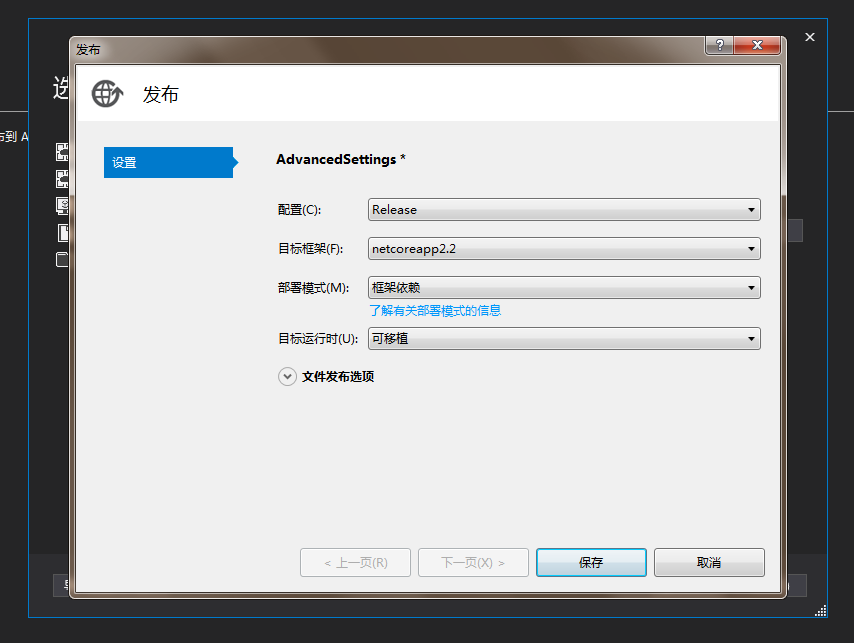
点击高级配置如下,注意下,这里的目标框架是2.2版本,所以我们在linux上安装的也是2.2。

这里我就遇到过坑,我vs发布的是2.0的版本,结果我linux是2.2,就各种运行报错,后来改成2.2就好了。


最后保存并发布就好了。

netcore项目的创建和发布就这样结束了。

第二步,你得准备一个linux服务器,然后安装环境

如果你条件允许,可以直接在阿里云或者腾讯云、华为云、百度云上买一个服务器。

新用户是白菜价哦,(这里真不是打广告)当然你可以在你电脑上安装一个VMware虚拟机。

具体安装步骤百度一下一大把,这里就不演示了。

我就在在百度云买了一个linux服务器,嗯,价格还算便宜,毕竟新用户,为什么用百度云??

当然不是因为他好,而是我阿里云已经不是新用户了

好了,我们继续。

用xshell登录到你的linux服务器上。(如果不懂linux,没关系,你总会百度吧)

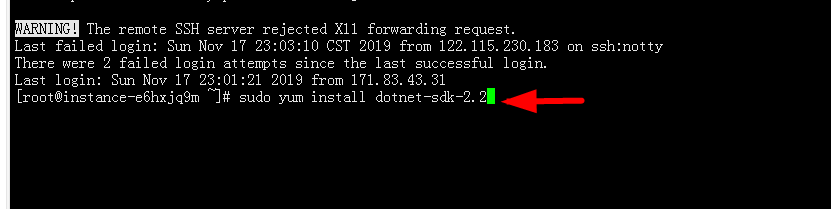
登录成功后,你可以在直接输入如下命令

sudo yum install dotnet-sdk-2.2


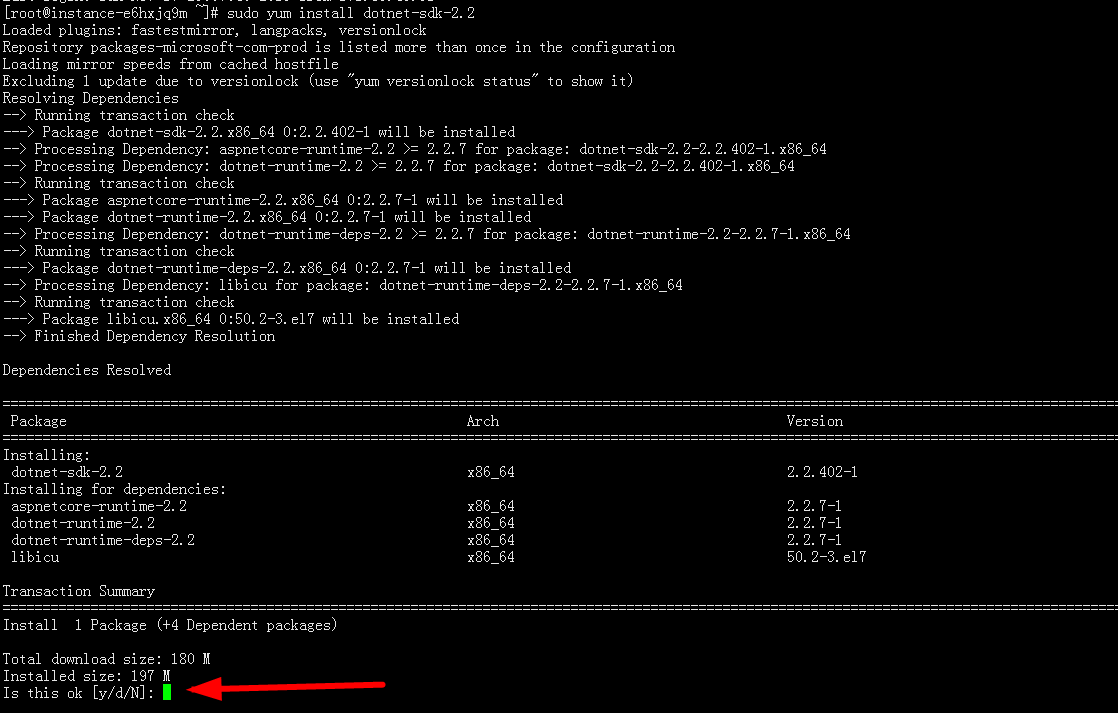
点击确认,你需要等一段时间,如果你服务器网速很差,那么你可以会等很久。

如下图示,遇到这里你需要点击敲一下你的键盘上的 y 回车即可

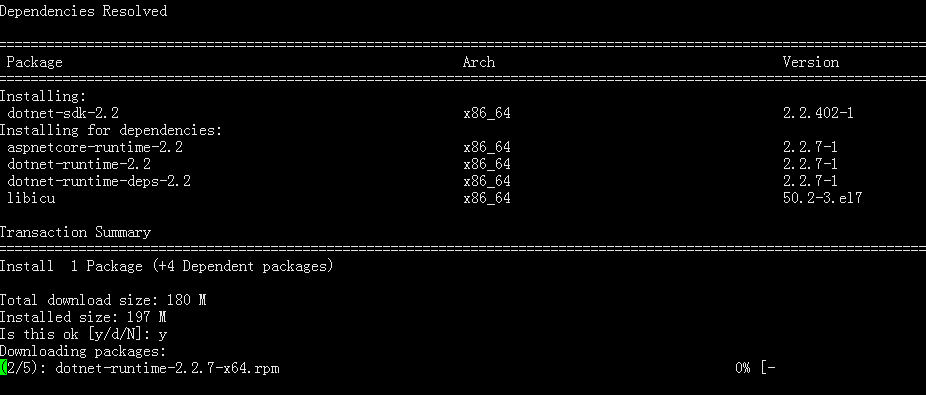
这个时候系统开始慢慢的下载了,请耐心等待即可。


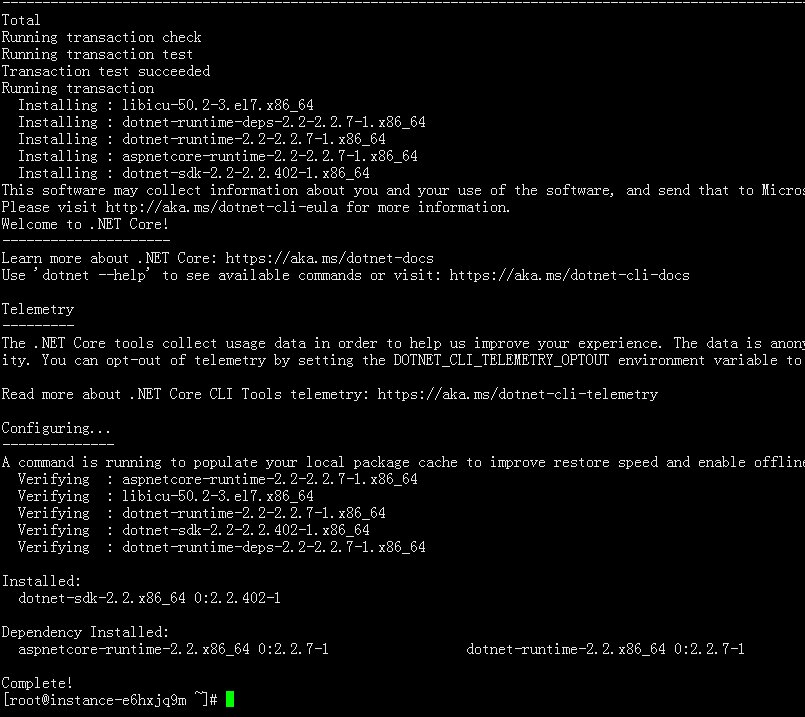
终于下载完成了


你可以输入下面的命令看看是否成功

dotnet --version

显示如下,表示按照成功


然后我们把发布包上传到服务器上来

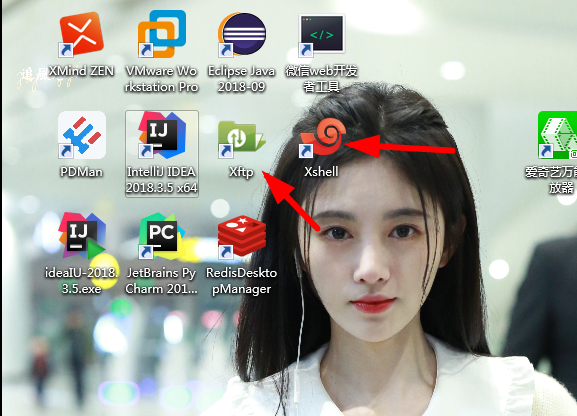
我这里用的是xftp工具,当然也有其他工具可,下图所示是我安装的两个工具,大家可以去下载安装。


这里给大家提供一些我在网盘保存的一些工具

Xshell+Xftp真正破解版    https://pan.baidu.com/s/1Ew1XPg11sakpc8mvK6QsHg

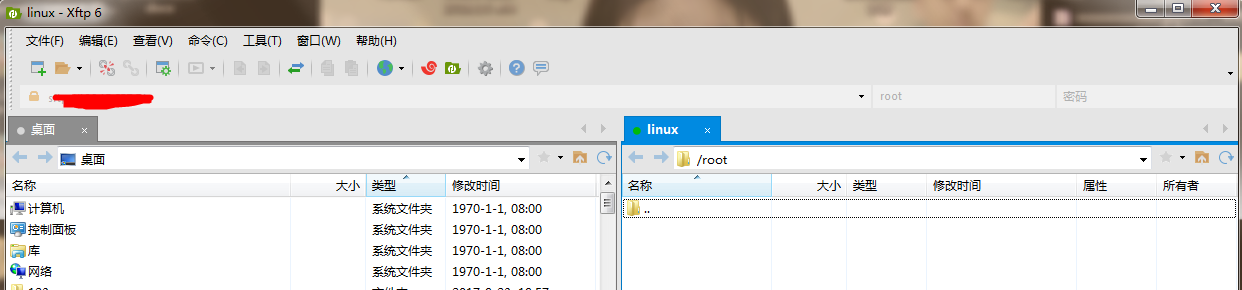
打开xftp并连接到服务器,如下所示


我这里用的root权限,这里进来就直接就是root根目录了

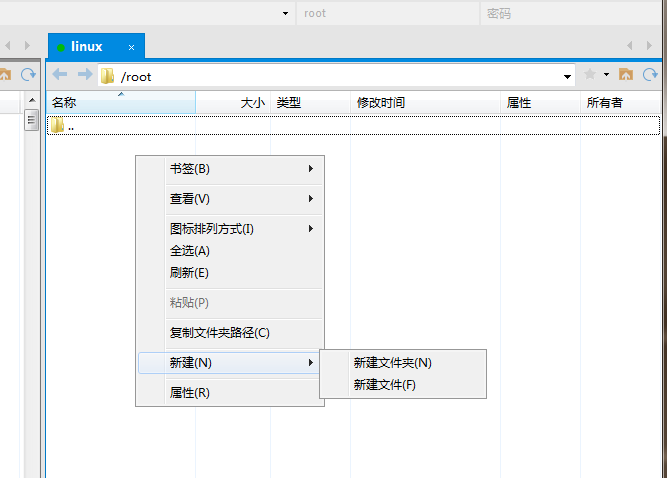
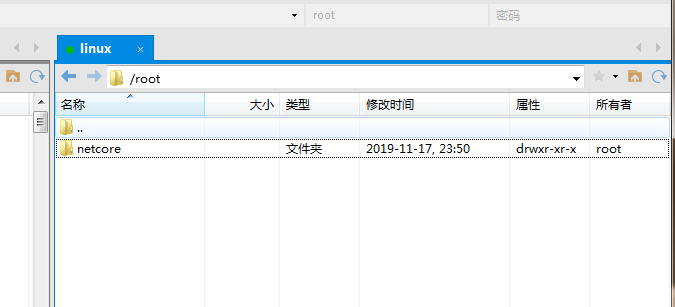
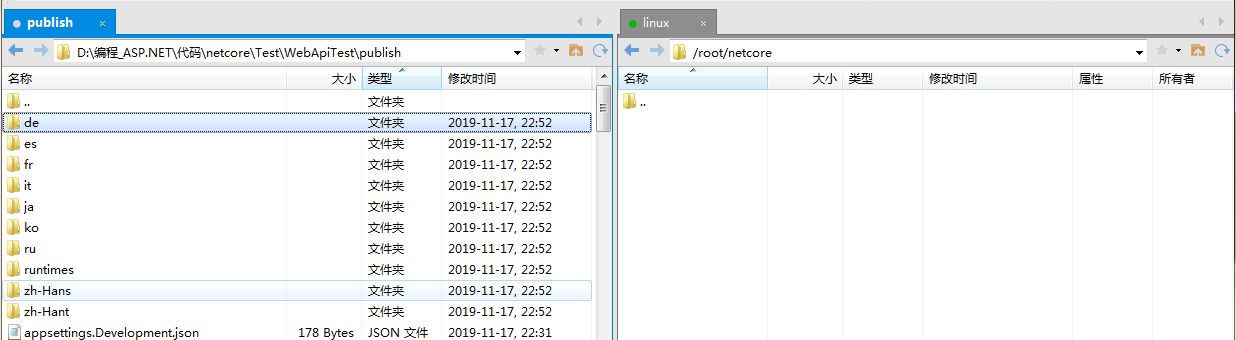
然后右键点击创建一个目录用来保存你上传的netcore文件,嗯,就取名netcore吧


然后在左边找到你刚刚发布的那个包的位置,并且点击右边的netcore进入到对应的目录中


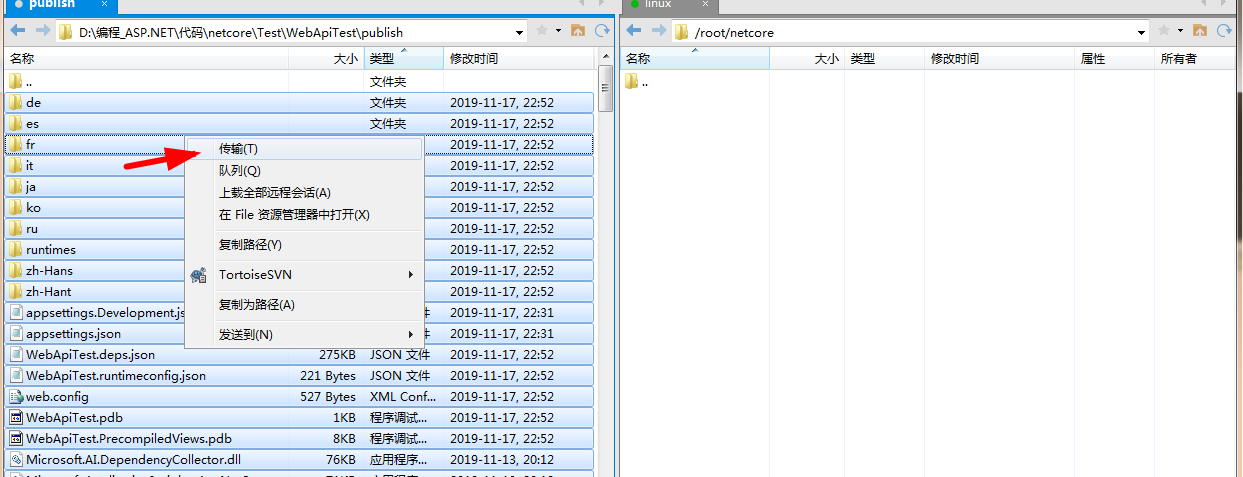
然后全选左边的所有文件,并右键然后点击传输,如图所示


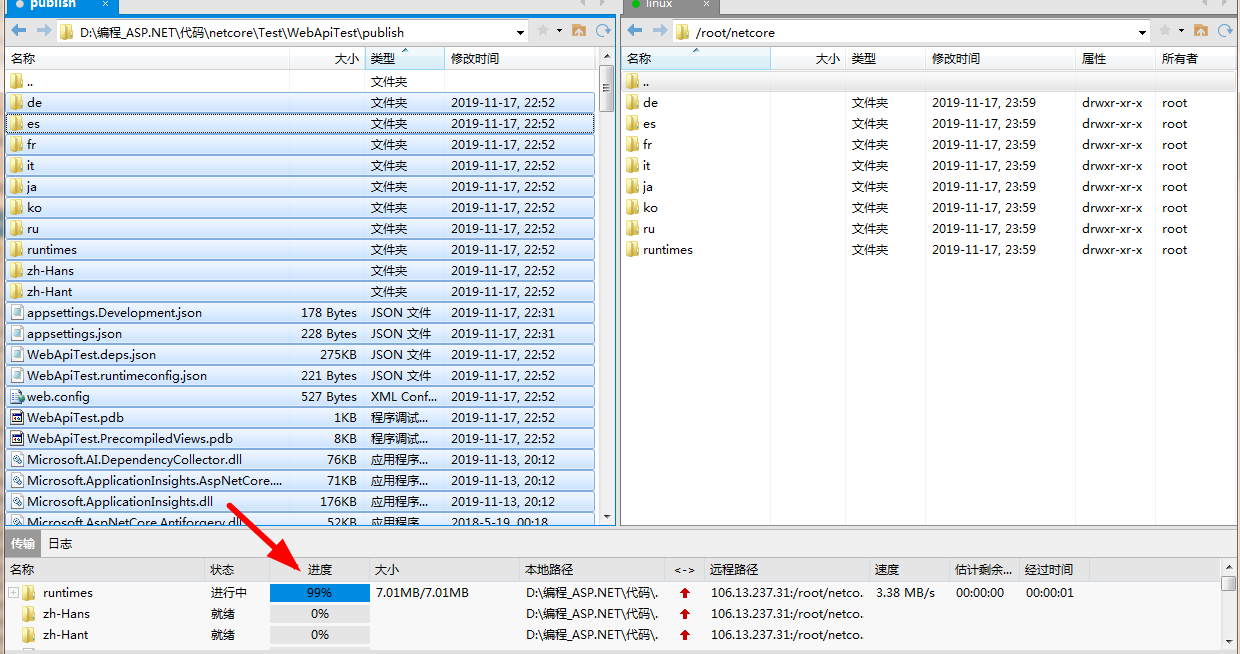
然后文件就开始传输了


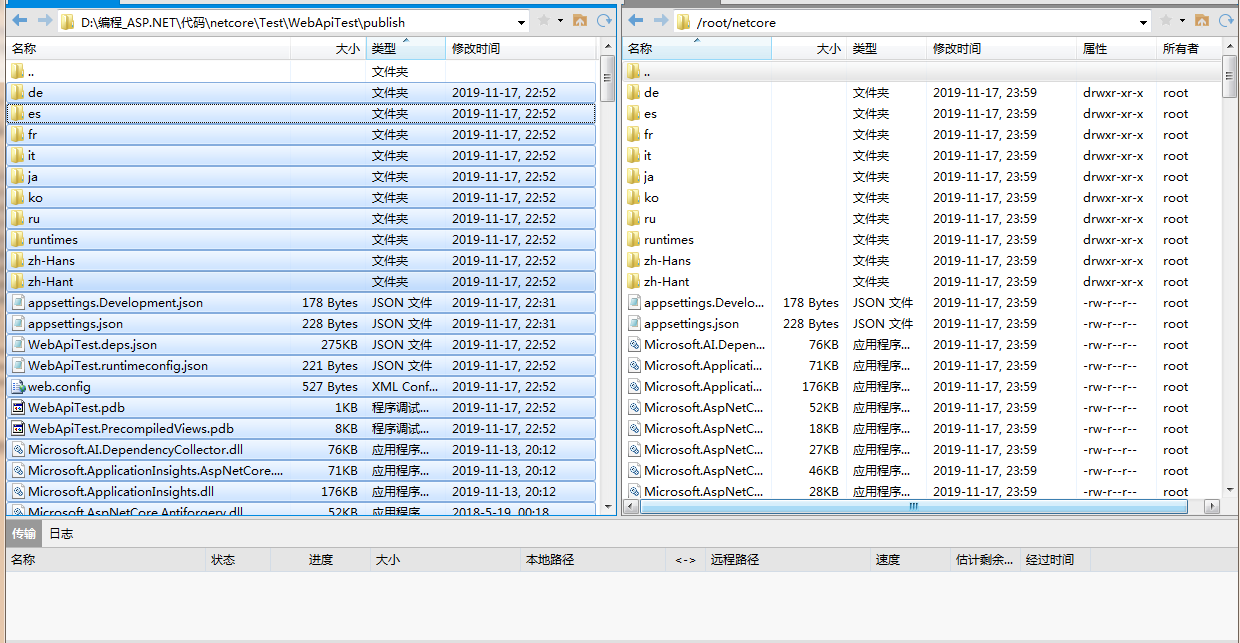
等下面的传输没有记录了,那么恭喜你,你传递完成了。


有人可能会问为啥这么多文件,我vs2017本来没有2.2版本,后来我在本机安装了2.2,结果发布后就这么多……

然后我们再次回到xshell看看

输入命令 ll 可以看到我们新加了一个文件 netcore


然后输入命令cd  进入到我们上传的这个发布包中。

然后在输入命令 ll

cd netcore
ll

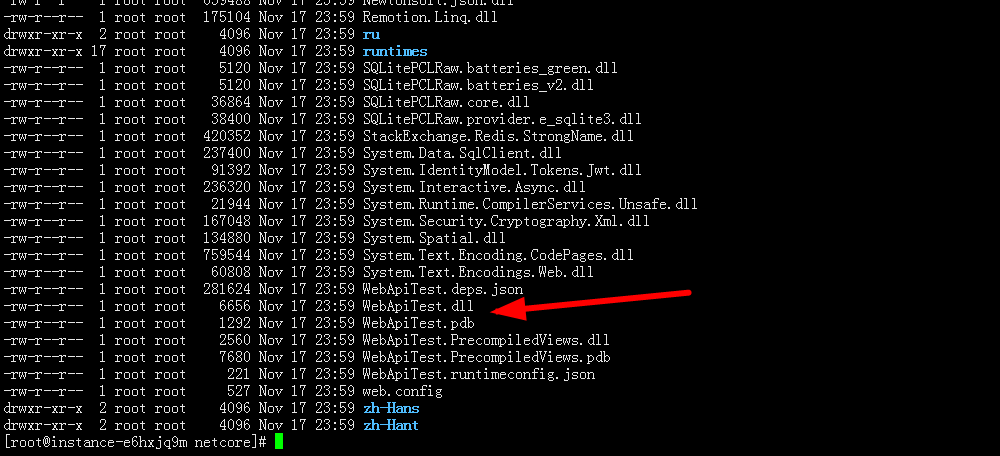
我们可以找到WebApiTest.dll文件


然后输入命令

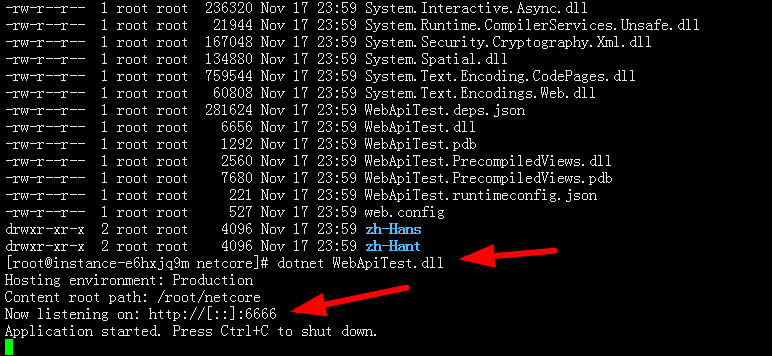
dotnet WebApiTest.dll

如图所示,就恭喜你你的项目运行正常。


然后你Ctrl+C结束掉这个程序,这里只能在服务器内部访问,外面是不能访问的。

然后输入如下命令

dotnet WebApiTest.dll   --server.urls "http://*:6666"

如图所示


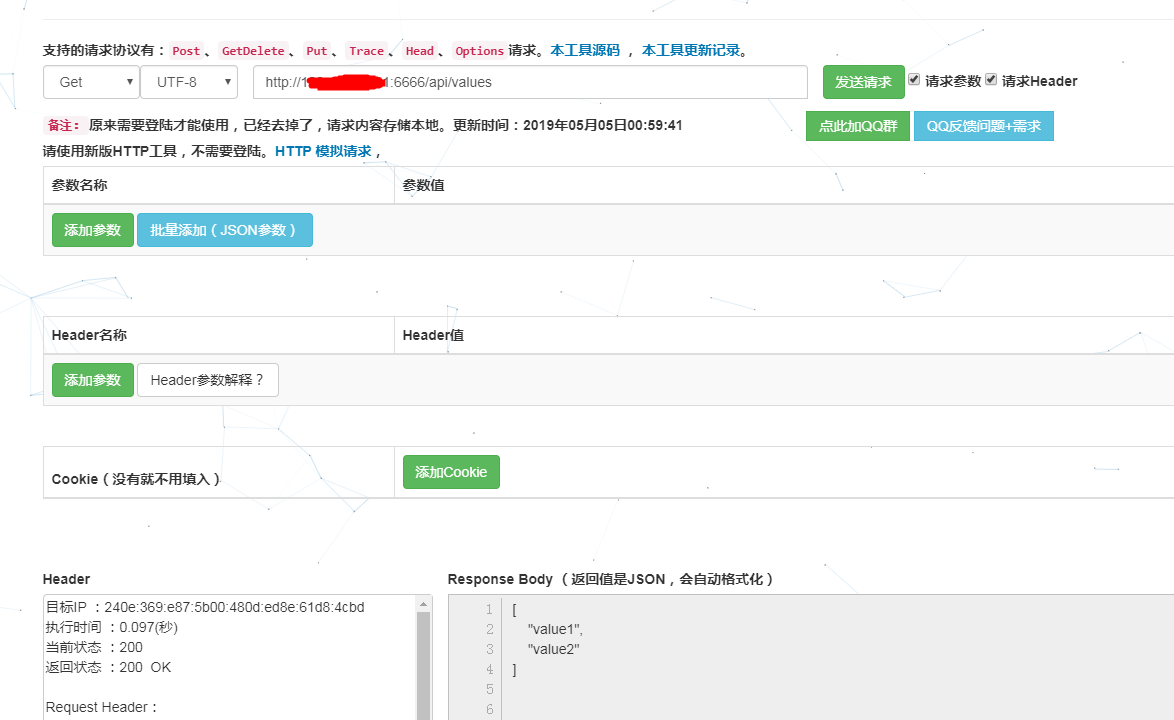
然后用postman或者一些在线工具访问这个接口,如图所示,那么恭喜你成功了

这个测试工具的网站:https://www.sojson.com/httpRequest/


好了,到这里netcore在linux上配置就基本完成了,接下来下一篇我们开始讲nginx的配置,以及让netcore运行在nginx下。


NodePort,LoadBalancer还是Ingress?我该如何选择 - kubernetes - justmine - 博客园

mikel阅读(1432)

来源: NodePort,LoadBalancer还是Ingress?我该如何选择 – kubernetes – justmine – 博客园

原文:http://mp.weixin.qq.com/s/dHaiX3H421jBhnzgCCsktg

当我们使用k8s集群部署好应用的Service时,默认的Service类型是ClusterIP,这种类型只有 Cluster 内的节点和 Pod 可以访问。如何将应用的Service暴露给Cluster外部访问呢,Kubernetes 提供了多种类型的 Service,如下:

ClusterIP


ClusterIP服务是Kuberntets的默认服务。它在集群内部生成一个服务,供集群内的其他应用访问。外部无法访问。

ClusterIP服务的 YAML 文件如下:

apiVersion: v1
kind: Service
metadata:  
  name: my-internal-service
selector:    
  app: my-app
spec:
  type: ClusterIP
  ports:  
  - name: http
    port: 80
    targetPort: 80
    protocol: TCP

如果不能从互联网访问ClusterIP服务,那我们还介绍它干啥?其实,我们可以使用Kubernetes proxy来访问它!


开启Kubernetes Proxy:

$ kubectl proxy --port=8080

现在可以通过Kubernetes API使用下面这个地址来访问这个服务:

http://localhost:8080/api/v1/proxy/namespaces/<NAMESPACE>/services/<SERVICE-NAME>:<PORT-NAME>/

为了访问上面定义的服务,可以使用下面这个地址:

http://localhost:8080/api/v1/proxy/namespaces/default/services/my-internal-service:http/

使用场景

在某些场景下,你会使用Kubernetes proxy来访问服务:

  1. 调试服务,或者是因为某些原因需要从电脑直接连接服务;
  2. 允许内部流量,显示内部仪表盘等。

这个访问需要你作为一个已验证的用户去运行kubectl,所以不要通过这种方式将服务发布到互联网,或者是在生产环境下使用。

NodePort


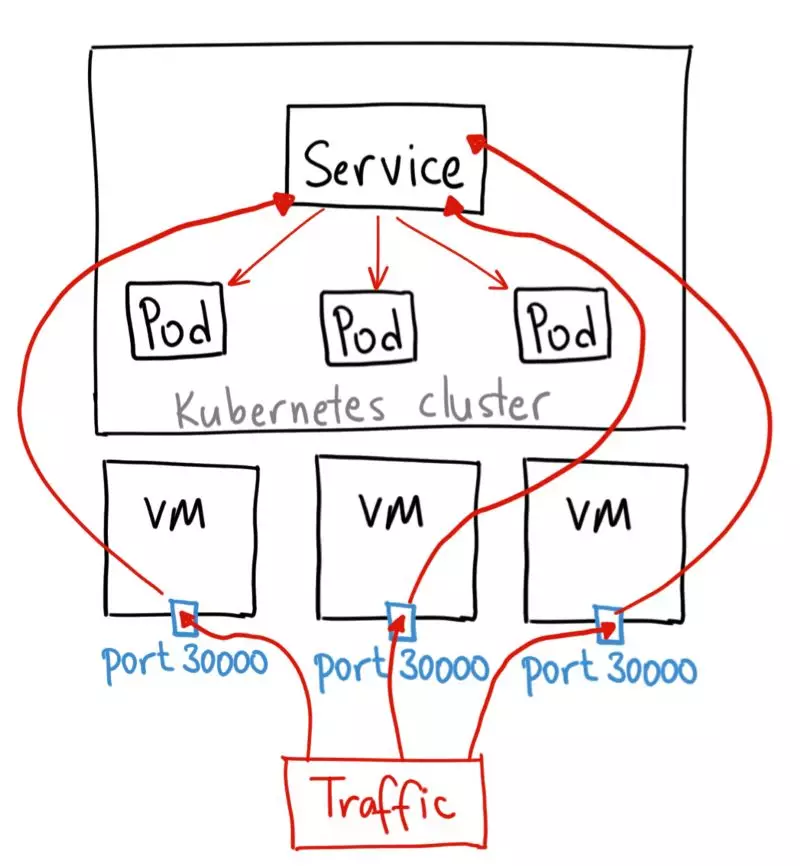
NodePort服务是让外部流量直接访问服务的最原始方式。NodePort,顾名思义,在所有的节点(虚拟机)上开放指定的端口,所有发送到这个端口的流量都会直接转发到服务。

NodePort服务的YAML文件如下:

apiVersion: v1
kind: Service
metadata:  
 name: my-nodeport-service
selector:   
 app: my-app
spec:
 type: NodePort
 ports:  
 - name: http
  port: 80
  targetPort: 80
  nodePort: 30036
  protocol: TCP

从本质上来看,NodePort服务有两个地方不同于一般的“ClusterIP”服务。首先,它的类型是“NodePort”。还有一个叫做“nodePort”的端口,能在节点上指定开放哪个端口。如果没有指定端口,它会选择一个随机端口。大多数时候应该让Kubernetes选择这个端口,就像谷歌领导人Thockin说的,关于能使用哪些端口,有很多注意事项。

使用场景

这种方式有一些不足:

  1. 一个端口只能供一个服务使用;
  2. 只能使用30000–32767的端口;
  3. 如果节点 / 虚拟机的IP地址发生变化,需要进行处理。

因此,我不推荐在生产环境使用这种方式来直接发布服务。如果不要求运行的服务实时可用,或者在意成本,这种方式适合你。例如用于演示的应用或是临时运行就正好用这种方法。

LoadBalancer


LoadBalancer服务是发布服务到互联网的标准方式。在GKE中,它会启动一个Network Load Balancer,分配一个单独的IP地址,将所有流量转发到服务中。


使用场景

如果你想直接发布服务,这是默认方式。指定端口的所有流量都会转发到服务中,没有过滤,也没有路由。这意味着你几乎可以发送任意类型的流量到服务中,比如HTTP、TCP、UDP、Websockets、gRPC等等。

这里最大的不足是,使用LoadBalancer发布的每个服务都会有一个自己的IP地址,你需要支付每个服务的LoadBalancer 费用,这是一笔不小的开支。

Ingress


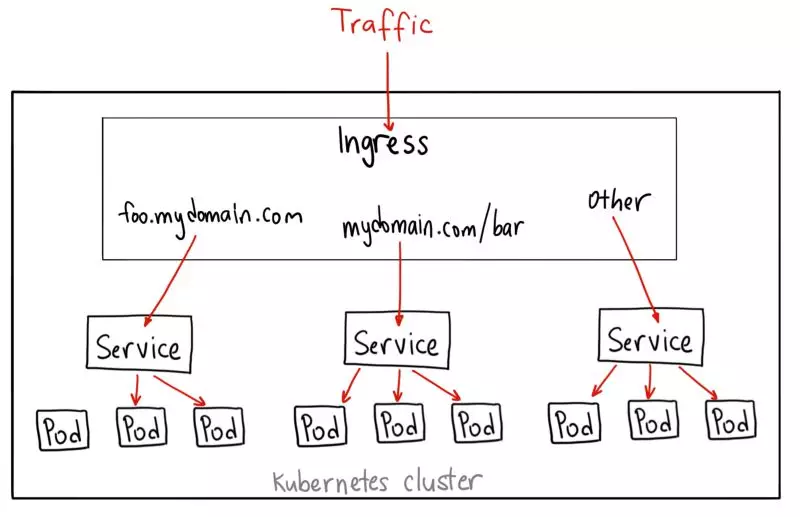
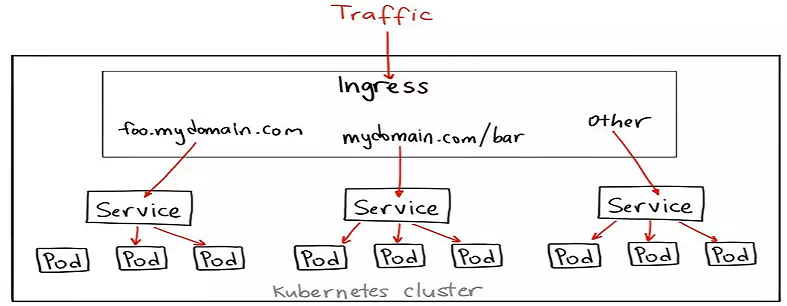
Ingress实际上不是一种服务。相反,它在多个服务前面充当“智能路由”的角色,或者是集群的入口。

使用Ingress可以做很多事情,不同类型的Ingress控制器有不同的功能。

默认的GKE ingress控制器会启动一个 HTTP(S) Load Balancer,可以通过基于路径或者是基于子域名的方式路由到后端服务。例如,可以通过foo.yourdomain.com 发送任何东西到foo服务,或者是发送yourdomain.com/bar/路径下的任何东西到bar服务。

对于使用第 7 层HTTP Load Balancer 的GKE上的Ingress对象,其YAML文件如下:

apiVersion: extensions/v1beta1
kind: Ingress
metadata:
  name: my-ingress
spec:
  backend:
    serviceName: other
    servicePort: 8080
  rules:
  - host: foo.mydomain.com
    http:
      paths:
      - backend:
          serviceName: foo
          servicePort: 8080
  - host: mydomain.com
    http:
      paths:
      - path: /bar/*
        backend:
          serviceName: bar
          servicePort: 8080

使用场景

Ingress可能是发布服务最强大的方式,同时也是最复杂的。Ingress控制器的类型很多,如 Google Cloud Load Balancer,Nginx,Contour,Istio等等。还有一些Ingress控制器插件,比如证书管理器,可以自动为服务提供SSL认证。

如果想在同一个IP地址下发布多个服务,并且这些服务使用相同的第 7 层协议(通常是 HTTP),Ingress是最有用的。如果使用原生的GCP集成,只需要支付一个负载均衡器的费用。因为Ingress是“智能”的,你可以得到很多开箱即用的特性(比如SSL、认证、路由等)。

实践


NodePort: kubernetes实践之运行aspnetcore webapi微服务  

Ingress:等待正在更新中…..

详解k8s组件Ingress边缘路由器并落地到微服务 - kubernetes - justmine - 博客园

mikel阅读(1417)

来源: 详解k8s组件Ingress边缘路由器并落地到微服务 – kubernetes – justmine – 博客园

写在前面

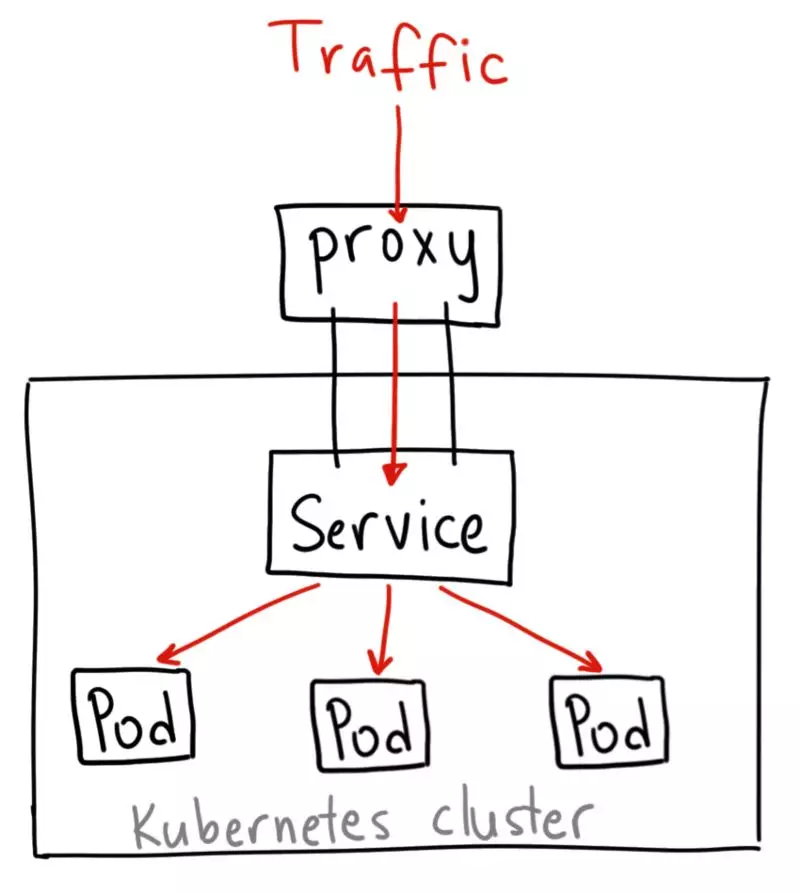
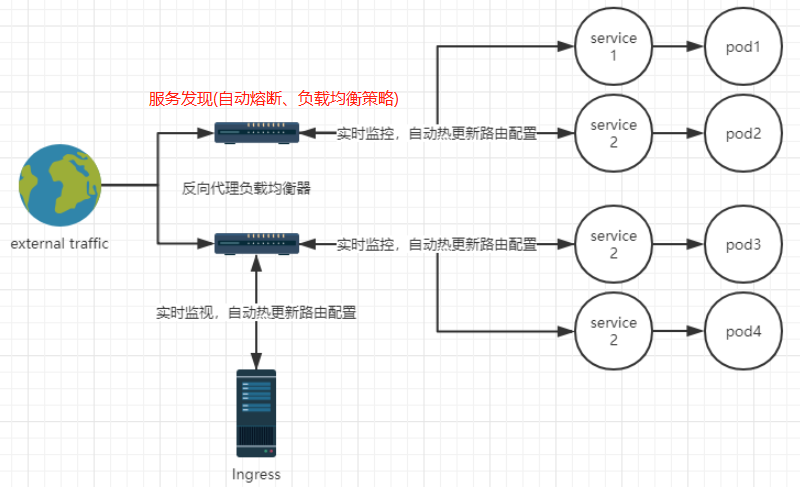
Ingress 英文翻译 进入;进入权;进食,更准确的讲就是入口,即外部流量进入k8s集群必经之口。这道大门到底有什么作用?我们如何使用Ingressk8s又是如何进行服务发现的呢?先看一张图:

备注:此图来源我转载的一篇博客NodePort,LoadBalancer还是Ingress?我该如何选择 – kubernetes,特此说明。

原理

虽然k8s集群内部署的podserver都有自己的IP,但是却无法提供外网访问,以前我们可以通过监听NodePort的方式暴露服务,但是这种方式并不灵活,生产环境也不建议使用。Ingresssk8s集群中的一个API资源对象,扮演边缘路由器(edge router)的角色,也可以理解为集群防火墙集群网关,我们可以自定义路由规则来转发、管理、暴露服务(一组pod),非常灵活,生产环境建议使用这种方式。另外LoadBlancer也可以暴露服务,不过这种方式需要向云平台申请负债均衡器;虽然目前很多云平台都支持,但是这种方式深度耦合了云平台,所以你懂的。

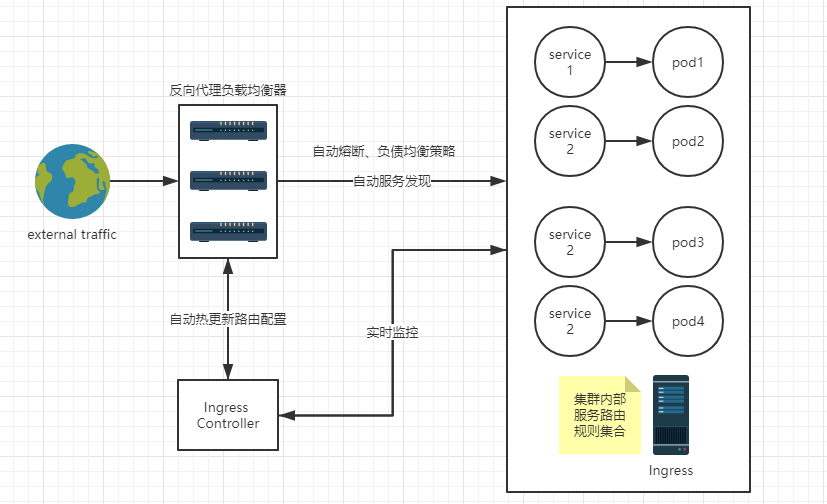
首先我们来思考用传统的web服务器,比如Nginx,如何处理这种场景?
Nginx充当一个反向代理服务器拦截外部请求,读取路由规则配置,转发相应的请求到后端服务。

kubernetes处理这种场景时,涉及到三个组件

  1. 反向代理web服务器
    负责拦截外部请求,比如NginxApachetraefik等等。我一般以Deployment方式部署到kubernetes集群中,当然也可以用DeamonSet方式部署;这两种部署方式个人觉得有利有弊,感兴趣的请参考这篇文章,这里就不敖述了。
  2. Ingress controller
    k8s中的controller有很多,比如CronJobDeamonSetDeploymentReplicationSetStatefulSet等等,大家最熟悉的应该是Deployment(嘿嘿,我也是),它的作用就是监控集群的变化,使集群始终保持我们期望的最终状态(yml文件)。同理,Ingress controller的作用就是实时感知Ingress路由规则集合的变化,再与Api Server交互,获取ServicePod在集群中的 IP等信息,然后发送给反向代理web服务器,刷新其路由配置信息,这就是它的服务发现机制。
  3. Ingress
    定义路由规则集合,上面已经详细介绍,这里就不再敖述了。

经过上面的剖析,知道了吧,如果我们仅仅创建Ingress对象,只是定义了一系列路由规则集合而已,没有任何作用,不要想得太简单了,嘿嘿

Ingress 选型

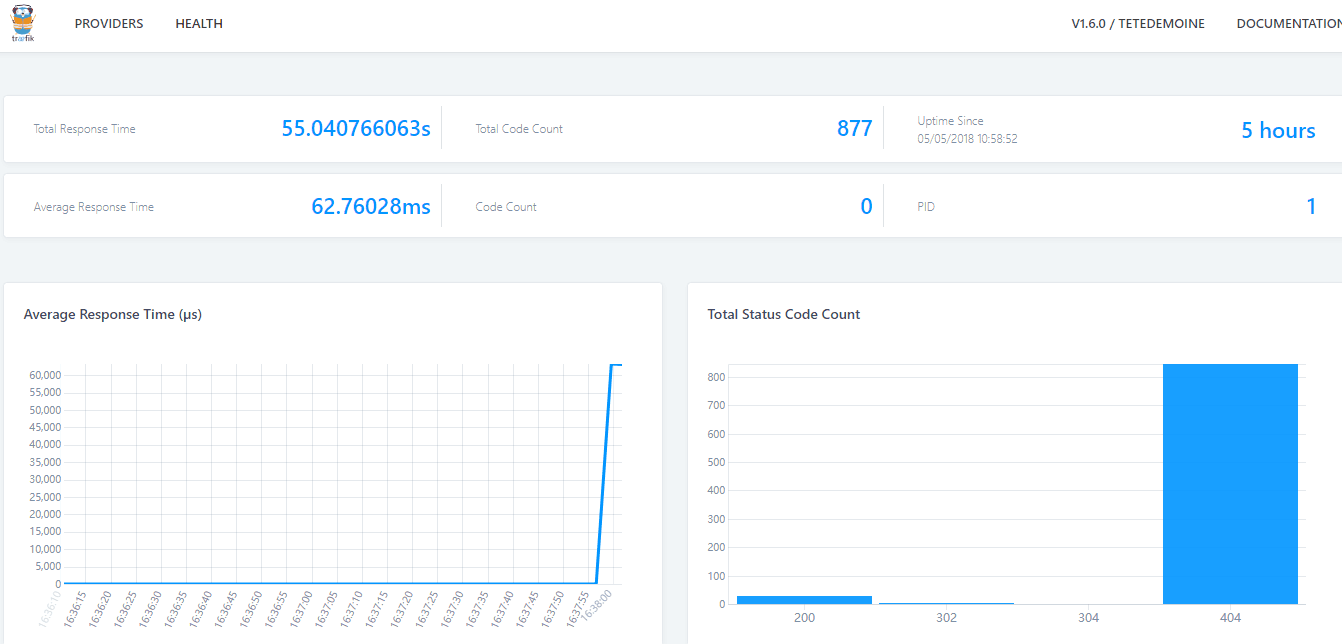
这个我花费了不少时间,最终选用的是Traefik,它是一个用Golang开发的轻量级的Http反向代理和负载均衡器,虽然相比于Nginx,它是后起之秀,但是它天然拥抱kubernetes,直接与集群k8s的Api Server通信,反应非常迅速,实时感知集群中Ingress定义的路由规则集合和后端ServicePod的变化,自动热更新Traefik后端配置,根本不用创建Ingress controller对象,同时还提供了友好的控制面板和监控界面,不仅可以方便地查看Traefik根据Ingress生成的路由配置信息,还可以查看统计的一些性能指标数据,如:总响应时间、平均响应时间、不同的响应码返回的总次数等,Traefik部署请参考官网用户示例Kubernetes Ingress Controller。不仅如此,Traefik还支持丰富的annotations配置,可配置众多出色的特性,例如:自动熔断负载均衡策略黑名单白名单;还支持许多后端存储,如:zookeeper、eureka、consul、rancher、docker等,它会自动感知这些统一配置中心的变化,热更新自己的路由配置,所以Traefik对于微服务来说简直就是一神器啊,嘿嘿。那么Traefik性能又如何呢?容器化部署,还担心性能,不要这么搞笑,好吗。而Nginx在拥抱kubernetes这方面比较后知后觉,详情请参考官方网站和开源项目ingress-nginx ;另外微软开源的微服务示例项目 eShopOnContainers 采用了ingress-nginx,大家可以下去自行研究。

**Traefik **:

示例说明

使用Ingress暴露微服务

apiVersion: extensions/v1beta1
kind: Ingress
metadata:
  labels:
    app: light
    component: frontend
  name: light-edge-router
  namespace: geekbuying-light
  annotations:
    kubernetes.io/ingress.class: "traefik"
    ingress.kubernetes.io/ssl-redirect: "false"  
    traefik.frontend.rule.type: "PathPrefixStrip"
    traefik.ingress.kubernetes.io/frontend-entry-points: "http,https"
    traefik.ingress.kubernetes.io/priority: "3"
spec:
  rules:
  - host: <hostdomain literal>
    http:
      paths:
      - path: /api/v1/light
        backend: 
          serviceName: aggregation-light-api
          servicePort: 80
      - path: /api/v1/identity
        backend: 
          serviceName: identity-api
          servicePort: 80

非常重要

  1. 当我们定义额外的路由时,比如这里的/api/vi/identity,必须添加这个traefik.ingress.kubernetes.io/rule-type: PathPrefixStrip注解传递路径,否则会看不到任何效果;ingress.kubernetes.io/ssl-redirect: "false"是否强制使用https,其他的配置信息,请查看详情。另外,不同的Ingress选型,请参照各自的组件说明。
  2. 其他命名空间下的服务发现规则为:[serviceName].[namespace]:[port],如:exceptionless-ui.geekbuying-light-addons:80(备注:端口80可以省略,其他端口不能省略),表示查找geekbuying-light-addons命名空间下的exceptionless-ui服务,并匹配端口。

特性配置

traefik支持强大的annotations配置,需要添加到kubernetes相应资源对象的annotations下面。至于具体配置到的哪个对象,先弄清楚三个概念:

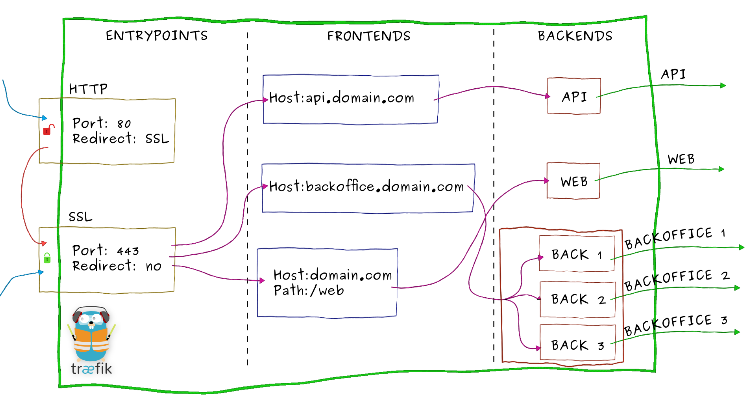
  • EntryPoint(入口点)
    顾名思义,这是外部网络进入traefik的入口,我们上面就是通过监听主机端口拦截请求。
  • FrontEnd(前端)
    traefik拦截请求后,会转发给FrontEnd。前端定义EntryPoint映射到BackEnd的路由规则集,字段包括HostPathHeaders 等,匹配请求后,默认通过加权轮询负载算法路由到一个可用的BackEnd,然后进入指定的微服务,这就是服务发现。

备注:这些路由规则可以来自不同的后端存储,如Kubernetes、zookeeper、eureka、consul等,Kubernetes使用的Ingress资源对象定义路由规则集。建议大家自行去官网学习Kubernetes Ingress Backend

  • BackEnd(后端)
    一组http服务集,kubernetes中对应一个service对象下的一组pod地址。对于后端的服务发现,可配置负载均衡策略熔断器等特性。

一个后端service对象的配置例子

apiVersion: v1
kind: Service
metadata:
  annotations:
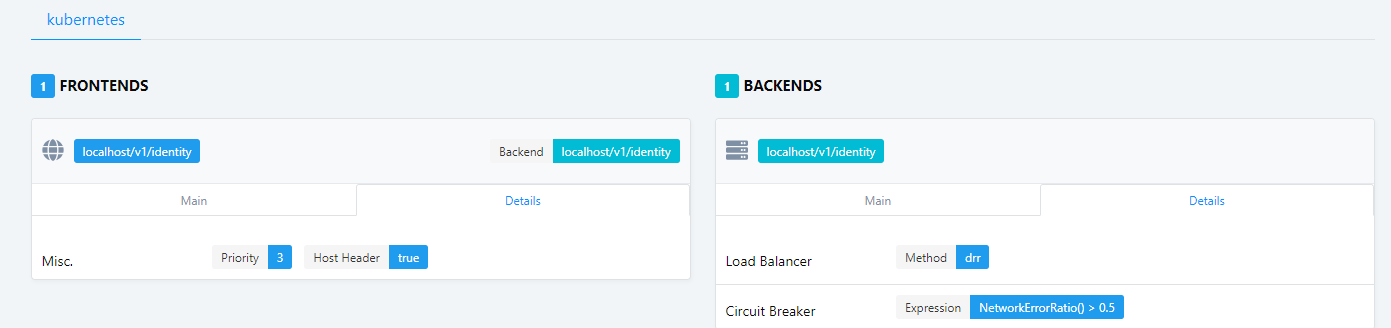
    traefik.backend.circuitbreaker: NetworkErrorRatio() > 0.5
    traefik.backend.loadbalancer.method: drr
  labels:
    app: light
    component: identity
  name: identity-api
  namespace: geekbuying-light
spec:
  ports:
  - port: 80
  selector:
    app: light
    component: identity
    type: webapi

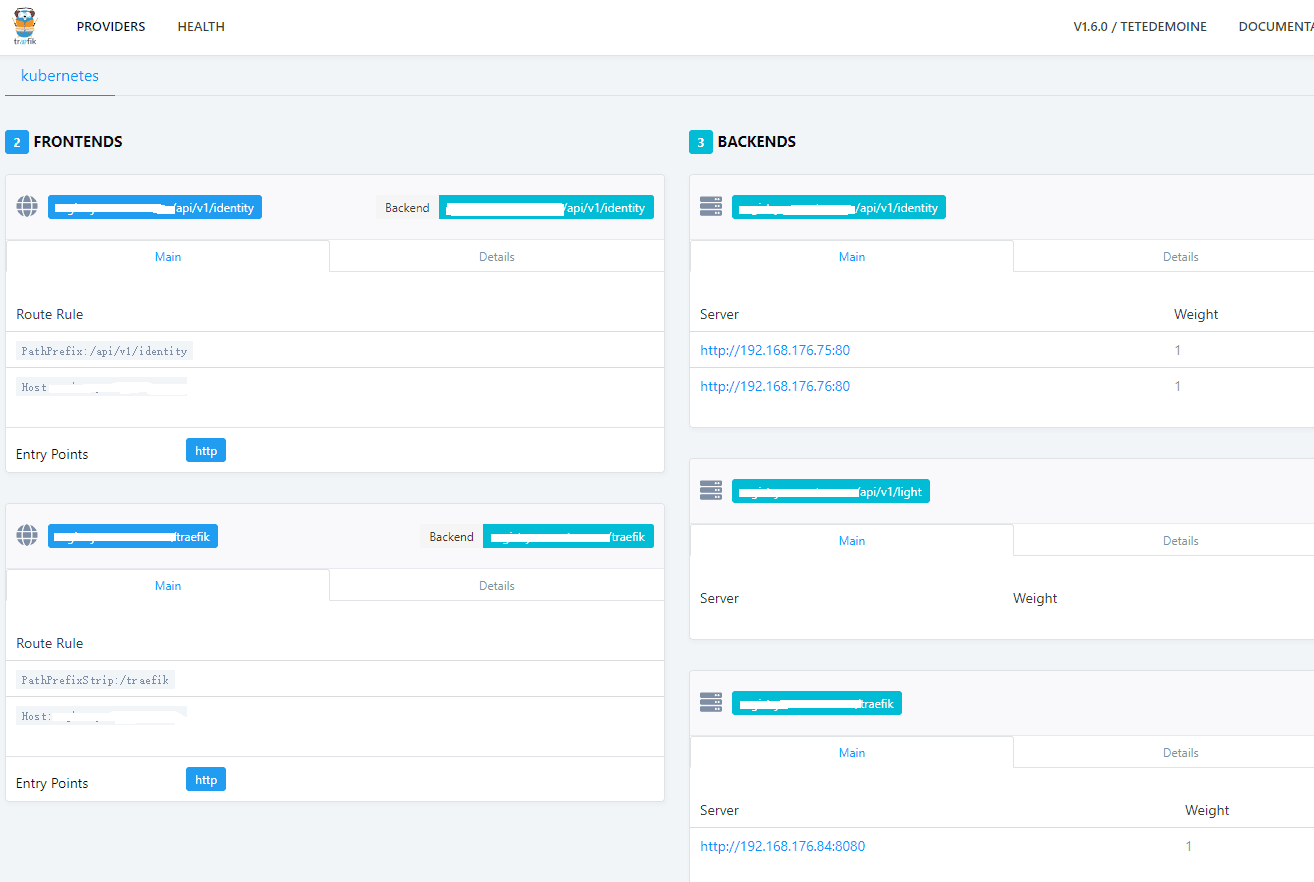
效果图

控制面板

前端优先级、后端熔断器和负载均衡策略

监控界面

总结

综上所述,首先部署拥抱k8s的反向代理服务器(treafik、nginx等)拦截请求,然后拦截的请求会根据Ingress定义的路由规则集,转发到集群内部对应的Service

延伸阅读

https://docs.traefik.io/
https://github.com/containous/traefik
https://docs.traefik.io/user-guide/kubernetes/
https://docs.traefik.io/configuration/backends/kubernetes/
https://kubernetes.io/docs/concepts/services-networking/ingress/
https://kubernetes.io/docs/admin/authorization/rbac/
https://github.com/kubernetes/ingress-nginx/blob/master/README.md
https://kubernetes.github.io/ingress-nginx/development/
https://www.kubernetes.org.cn/1237.html
https://github.com/kubernetes/ingress-nginx
https://blog.csdn.net/hxpjava1/article/details/79459489
https://blog.csdn.net/hxpjava1/article/details/79375452

如果你觉得本篇文章对您有帮助的话,感谢您的【推荐】
如果你对 kubernets 感兴趣的话可以关注我,我会定期的在博客分享我的学习心得

做一个有底蕴的软件工作者

[Java 开源项目]一款无需写任何代码,即可一键生成前后端代码的工具 - 削微寒 - 博客园

mikel阅读(1007)

来源: [Java 开源项目]一款无需写任何代码,即可一键生成前后端代码的工具 – 削微寒 – 博客园


作者:HelloGitHub-小鱼干

JeecgBoot 是一款基于代码生成器的低代码开发平台,零代码开发。JeecgBoot 采用开发模式:Online Coding 模式-> 代码生成器模式-> 手工 MERGE 智能开发,帮助解决 Java 项目 70% 的重复工作,让开发更多关注业务逻辑。

它引入了 No Coding 概念:在线表单配置(表单设计器)、移动配置能力、工作流配置(在线设计流程)、报表配置能力、在线图表配置、插件能力(可插拔)…

技术架构

开发环境

  • 语言:Java 8
  • IDE(JAVA): IDEA/Eclipse 安装 lombok 插件
  • IDE(前端): WebStorm 或者 IDEA
  • 依赖管理:Maven
  • 数据库:MySQL 5.7+ & Oracle 11g & SQLServer 2017
  • 缓存:Redis

后端

  • 基础框架:Spring Boot 2.1.3.RELEASE
  • 持久层框架:Mybatis-plus_3.1.2
  • 安全框架:Apache Shiro 1.4.0,Jwt_3.7.0
  • 数据库连接池:阿里巴巴 Druid 1.1.10
  • 缓存框架:Redis
  • 日志打印:logback
  • 其他:fastjson、poi、Swagger-ui、quartz、lombok(简化代码)等

前端

功能模块

├─系统管理
│  ├─用户管理
│  ├─角色管理
│  ├─菜单管理
│  ├─权限设置(支持按钮权限、数据权限)
│  ├─表单权限(控制字段禁用、隐藏)
│  ├─部门管理
│  ├─我的部门(二级管理员)
│  └─字典管理
│  └─分类字典
│  └─系统公告
│  └─职务管理
│  └─通讯录
│  └─多租户管理
├─消息中心
│  ├─消息管理
│  ├─模板管理
├─智能化功能
│  ├─代码生成器功能(一键生成前后端代码,生成后无需修改直接用,绝对是后端开发福音)
│  ├─代码生成器模板(提供4套模板,分别支持单表和一对多模型,不同风格选择)
│  ├─代码生成器模板(生成代码,自带excel导入导出)
│  ├─查询过滤器(查询逻辑无需编码,系统根据页面配置自动生成)
│  ├─高级查询器(弹窗自动组合查询条件)
│  ├─Excel导入导出工具集成(支持单表,一对多 导入导出)
│  ├─平台移动自适应支持
├─系统监控
│  ├─Gateway路由网关
│  ├─性能扫描监控
│  │  ├─监控 Redis
│  │  ├─Tomcat
│  │  ├─jvm
│  │  ├─服务器信息
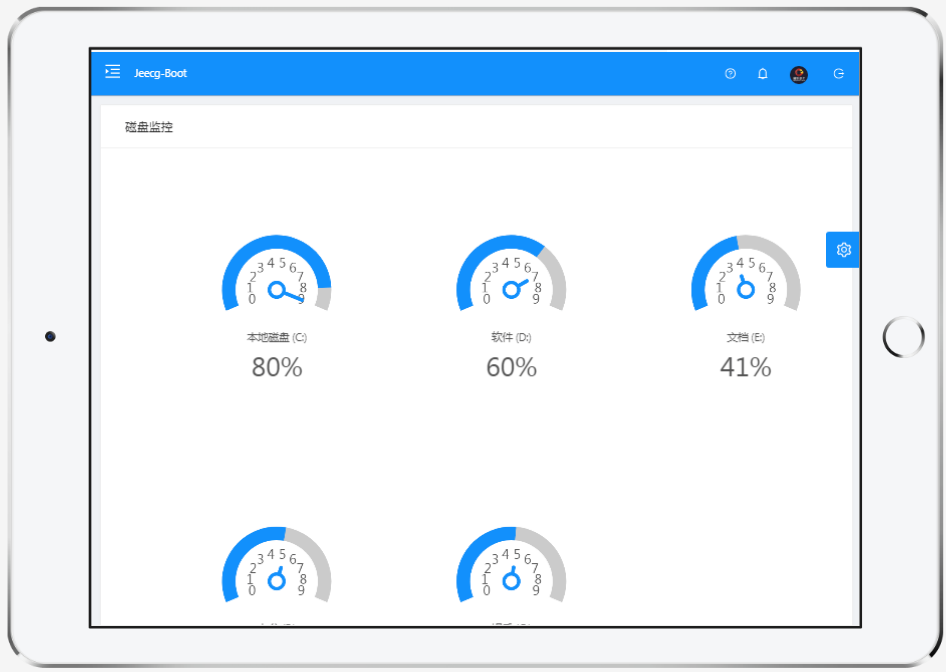
│  │  ├─请求追踪
│  │  ├─磁盘监控
│  ├─定时任务
│  ├─系统日志
│  ├─消息中心(支持短信、邮件、微信推送等等)
│  ├─数据日志(记录数据快照,可对比快照,查看数据变更情况)
│  ├─系统通知
│  ├─SQL监控
│  ├─swagger-ui(在线接口文档)
│─报表示例
│  ├─曲线图
│  └─饼状图
│  └─柱状图
│  └─折线图
│  └─面积图
│  └─雷达图
│  └─仪表图
│  └─进度条
│  └─排名列表
│  └─等等
│─大屏模板
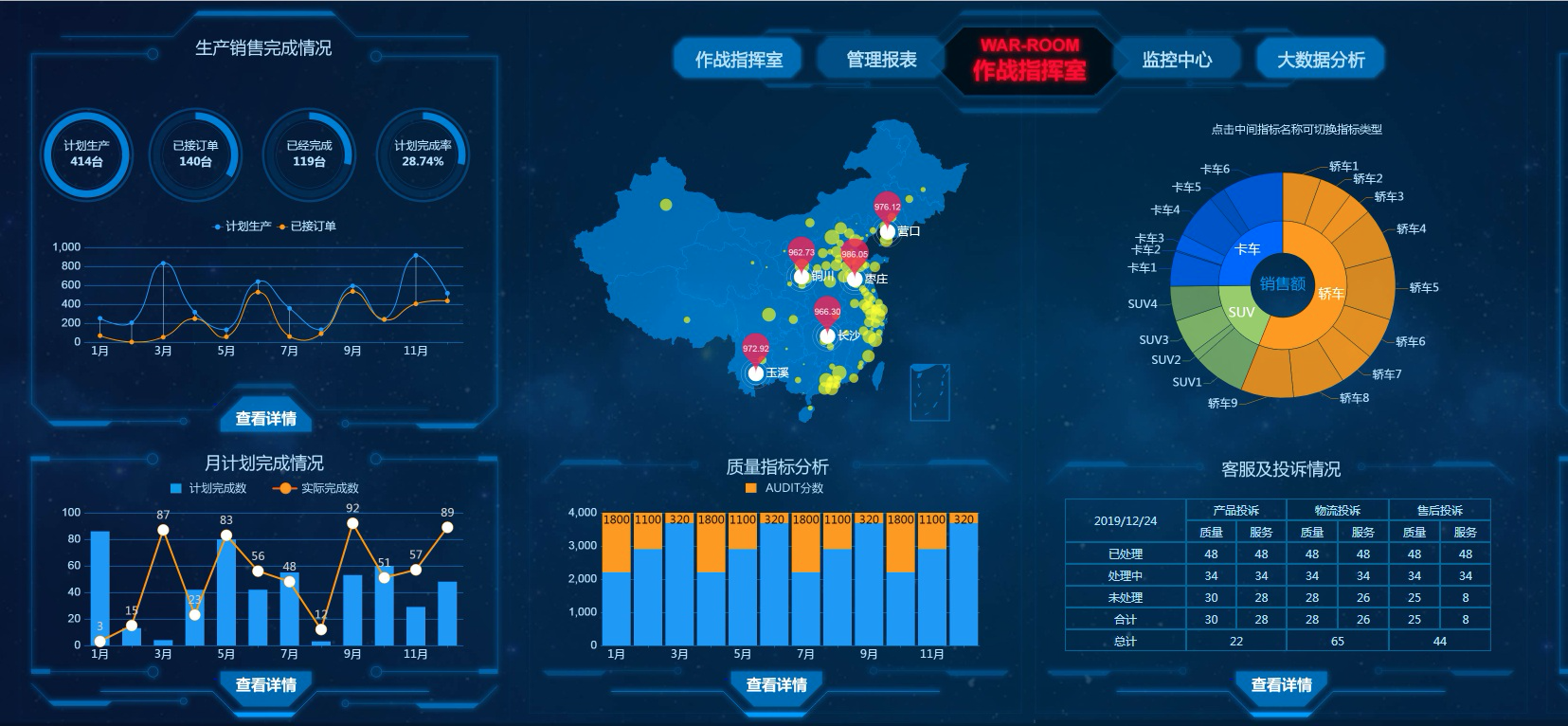
│  ├─作战指挥中心大屏
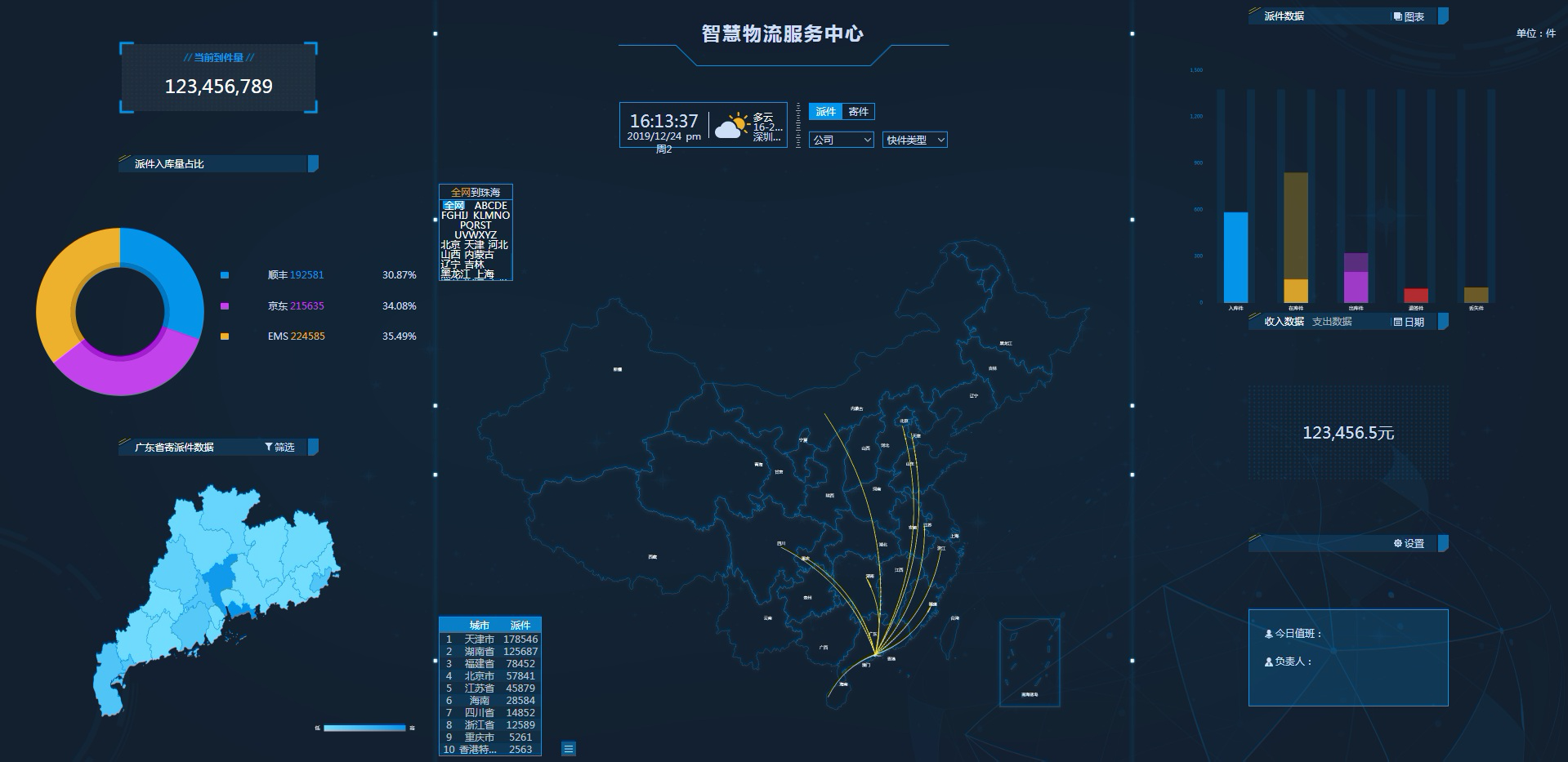
│  └─物流服务中心大屏
│─常用示例
│  ├─自定义组件
│  ├─对象存储(对接阿里云)
│  ├─JVXETable示例(各种复杂ERP布局示例)
│  ├─单表模型例子
│  └─一对多模型例子
│  └─打印例子
│  └─一对多TAB例子
│  └─内嵌table例子
│  └─常用选择组件
│  └─异步树table
│  └─接口模拟测试
│  └─表格合计示例
│  └─异步树列表示例
│  └─一对多JEditable
│  └─JEditable组件示例
│  └─图片拖拽排序
│  └─图片翻页
│  └─图片预览
│  └─PDF预览
│  └─分屏功能
│─封装通用组件	
│  ├─行编辑表格JEditableTable
│  └─省略显示组件
│  └─时间控件
│  └─高级查询
│  └─用户选择组件
│  └─报表组件封装
│  └─字典组件
│  └─下拉多选组件
│  └─选人组件
│  └─选部门组件
│  └─通过部门选人组件
│  └─封装曲线、柱状图、饼状图、折线图等等报表的组件(经过封装,使用简单)
│  └─在线code编辑器
│  └─上传文件组件
│  └─验证码组件
│  └─树列表组件
│  └─表单禁用组件
│  └─等等
│─更多页面模板
│  ├─各种高级表单
│  ├─各种列表效果
│  └─结果页面
│  └─异常页面
│  └─个人页面
├─高级功能
│  ├─系统编码规则
│  ├─提供单点登录CAS集成方案
│  ├─提供APP发布方案
│  ├─集成Websocket消息通知机制
├─Online在线低代码开发(暂未开源)
│  ├─Online在线表单 - 功能已开放
│  ├─在线代码生成器 - 功能已开放
│  ├─Online在线报表 - 功能已开放
│  ├─多数据源管理
│  ├─Online在线图表
│  ├─Online图表模板配置
│  ├─高级表单设计器
│─流程模块功能 (暂不开源)
│  ├─流程设计器
│  ├─在线表单设计
│  └─我的任务
│  └─历史流程
│  └─历史流程
│  └─流程实例管理
│  └─流程监听管理
│  └─流程表达式
│  └─我发起的流程
│  └─我的抄送
│  └─流程委派、抄送、跳转
│  └─。。。
└─其他模块
   └─更多功能开发中。。
   

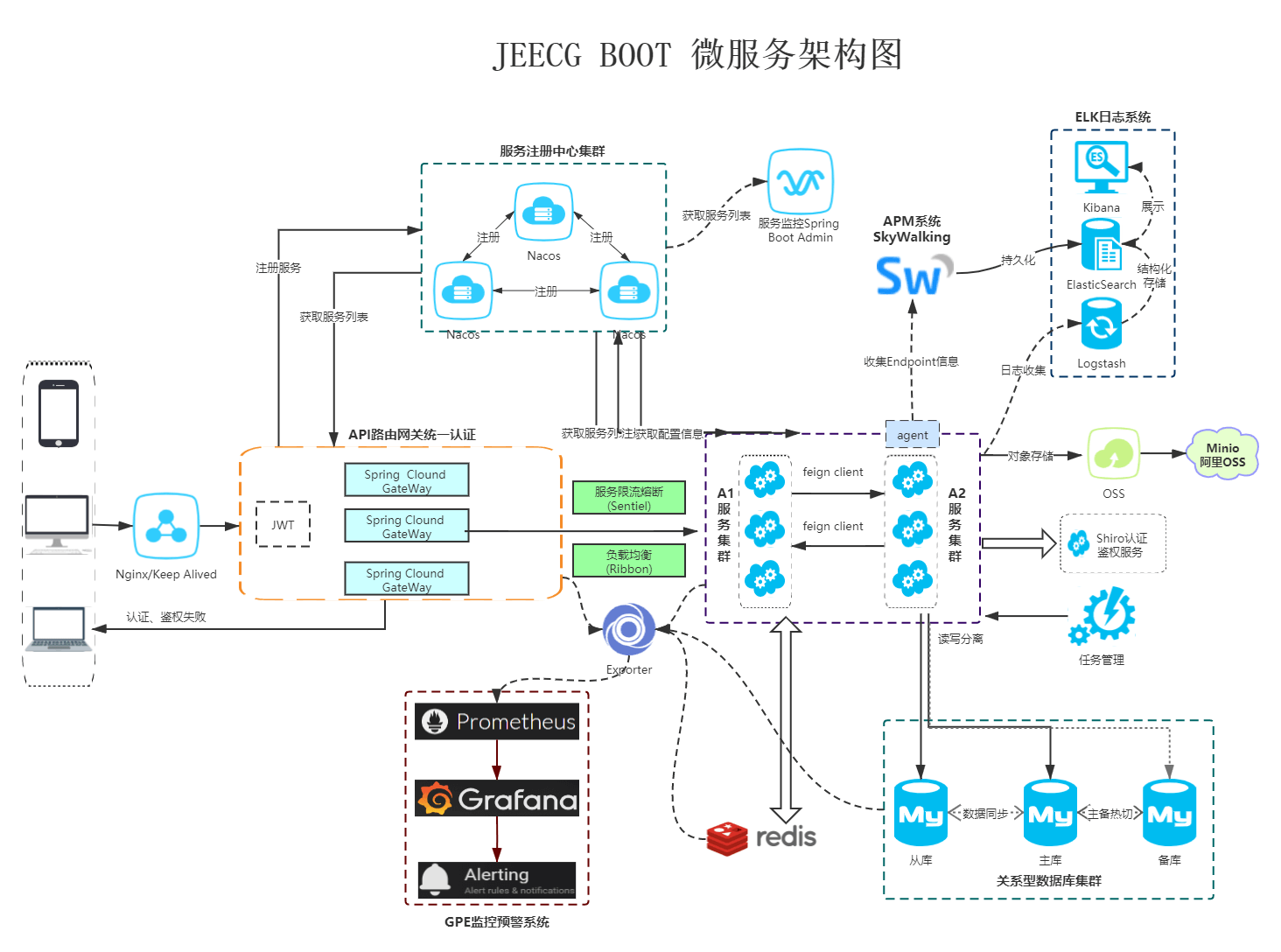
微服务架构图

项目截图

大屏

PC 端

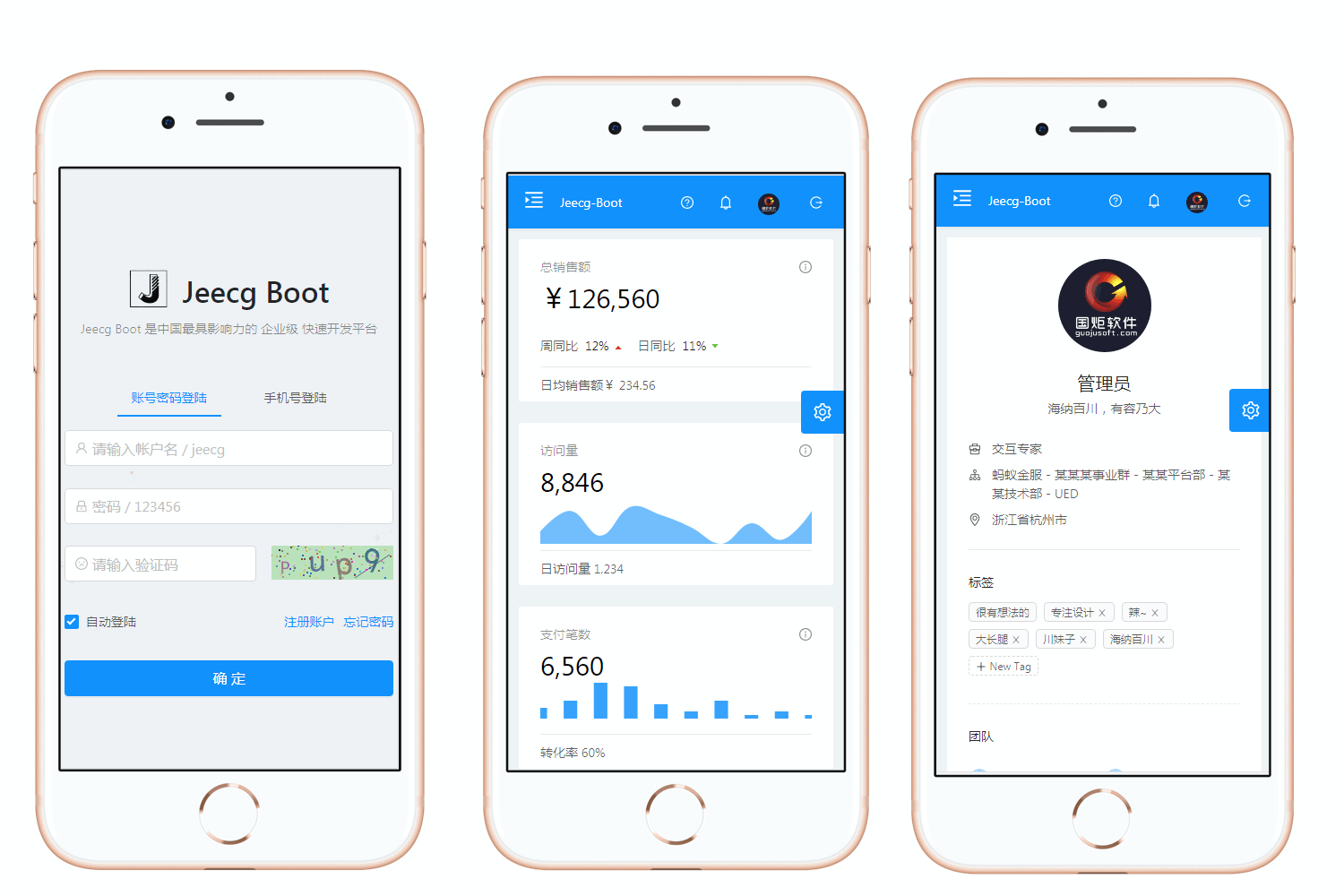
手机端

iPad 端

项目地址

源码和项目地址:https://github.com/zhangdaiscott/jeecg-boot

最后,这里是不变的结束语,如果你有更好的 Repo 在手,记得和 HelloGitHub 资源共享下哟:https://github.com/521xueweihan/HelloGitHub/issues ~~

AngularJs版本升级项目build后报错Error: [$injector:unpr] Unknown provider: e

mikel阅读(1584)

错误提示:

Uncaught Error: [$injector:modulerr] Failed to instantiate module mulan due to:
Error: [$injector:modulerr] Failed to instantiate module login due to:
Error: [$injector:unpr] Unknown provider: e

原因是因为AngularJs升级了,现有项目是meteor的build后提示这个错误,是因为angular声明module的时候需要用array数组声明$stateProvider,这样build后就能初始化module了

修改方法:

报错代码:

export default angular.module(‘member’, [
angularMeteor,
uiRouter,
‘header_search’,
])
.config(function ($stateProvider) { //这么声明老版本的支持,新版本不支持了
‘ngInject’;

。。。。

});

修改后的代码:

export default angular.module(‘member’, [
angularMeteor,
uiRouter,
‘header_search’,
])
.config([‘$stateProvider’,function ($stateProvider) {
‘ngInject’;

。。。。

]});

引申问题:Controller的声明也需要按数组式声明,官方文档参考:

https://docs.angularjs.org/guide/di#dependency-annotation

Using Dependency Injection

Dependency Injection is pervasive throughout AngularJS. You can use it when defining components or when providing run and config blocks for a module.

  • Servicesdirectivesfilters, and animations are defined by an injectable factory method or constructor function, and can be injected with “services”, “values”, and “constants” as dependencies.
  • Controllers are defined by a constructor function, which can be injected with any of the “service” and “value” as dependencies, but they can also be provided with “special dependencies”. See Controllers below for a list of these special dependencies.
  • The run method accepts a function, which can be injected with “services”, “values” and, “constants” as dependencies. Note that you cannot inject “providers” into run blocks.
  • The config method accepts a function, which can be injected with “providers” and “constants” as dependencies. Note that you cannot inject “services” or “values” into configuration.
  • The provider method can only be injected with other “providers”. However, only those that have been registered beforehand can be injected. This is different from services, where the order of registration does not matter.

See Modules for more details about run and config blocks and Providers for more information about the different provider types.

Factory Methods

The way you define a directive, service, or filter is with a factory function. The factory methods are registered with modules. The recommended way of declaring factories is:

angular.module('myModule', [])
.factory('serviceId', ['depService', function(depService) {
  // ...
}])
.directive('directiveName', ['depService', function(depService) {
  // ...
}])
.filter('filterName', ['depService', function(depService) {
  // ...
}]);

Module Methods

We can specify functions to run at configuration and run time for a module by calling the config and run methods. These functions are injectable with dependencies just like the factory functions above.

angular.module('myModule', [])
.config(['depProvider', function(depProvider) {
  // ...
}])
.run(['depService', function(depService) {
  // ...
}]);

Controllers

Controllers are “classes” or “constructor functions” that are responsible for providing the application behavior that supports the declarative markup in the template. The recommended way of declaring Controllers is using the array notation:

someModule.controller('MyController', ['$scope', 'dep1', 'dep2', function($scope, dep1, dep2) {
  ...
  $scope.aMethod = function() {
    ...
  }
  ...
}]);

Unlike services, there can be many instances of the same type of controller in an application.

Moreover, additional dependencies are made available to Controllers:

  • $scope: Controllers are associated with an element in the DOM and so are provided with access to the scope. Other components (like services) only have access to the $rootScope service.
  • resolves: If a controller is instantiated as part of a route, then any values that are resolved as part of the route are made available for injection into the controller.

Dependency Annotation

AngularJS invokes certain functions (like service factories and controllers) via the injector. You need to annotate these functions so that the injector knows what services to inject into the function. There are three ways of annotating your code with service name information:

  • Using the inline array annotation (preferred)
  • Using the $inject property annotation
  • Implicitly from the function parameter names (has caveats)

Inline Array Annotation

This is the preferred way to annotate application components. This is how the examples in the documentation are written.

For example:

someModule.controller('MyController', ['$scope', 'greeter', function($scope, greeter) {
  // ...
}]);

Here we pass an array whose elements consist of a list of strings (the names of the dependencies) followed by the function itself.

When using this type of annotation, take care to keep the annotation array in sync with the parameters in the function declaration.

$inject Property Annotation

To allow the minifiers to rename the function parameters and still be able to inject the right services, the function needs to be annotated with the $inject property. The $inject property is an array of service names to inject.

var MyController = function($scope, greeter) {
  // ...
}
MyController.$inject = ['$scope', 'greeter'];
someModule.controller('MyController', MyController);

In this scenario the ordering of the values in the $inject array must match the ordering of the parameters in MyController.

Just like with the array annotation, you’ll need to take care to keep the $inject in sync with the parameters in the function declaration.

Implicit Annotation

Careful: If you plan to minify your code, your service names will get renamed and break your app.

The simplest way to get hold of the dependencies is to assume that the function parameter names are the names of the dependencies.

someModule.controller('MyController', function($scope, greeter) {
  // ...
});

Given a function, the injector can infer the names of the services to inject by examining the function declaration and extracting the parameter names. In the above example, $scope and greeter are two services which need to be injected into the function.

One advantage of this approach is that there’s no array of names to keep in sync with the function parameters. You can also freely reorder dependencies.

However this method will not work with JavaScript minifiers/obfuscators because of how they rename parameters.

Tools like ng-annotate let you use implicit dependency annotations in your app and automatically add inline array annotations prior to minifying. If you decide to take this approach, you probably want to use ng-strict-di.

Because of these caveats, we recommend avoiding this style of annotation.

参考资料:

https://www.blacksandsolutions.co/blog/posts/debug-unknown-provider-error-with-ng-strict/

https://github.com/brandon-barker/angular-floatThead/issues/14

https://stackoverflow.com/questions/32467677/angularjs-debugging-of-injectorunpr-unknown-provider-e

https://docs.angularjs.org/guide/di#dependency-annotation

https://segmentfault.com/q/1010000005020067

MongoDB for .Net Core 查询条件之 Builders类 - hahaMan - 博客园

mikel阅读(1053)

来源: MongoDB for .Net Core 查询条件之 Builders类 – hahaMan – 博客园

使用MongoDB有段时间了 今天终于有用总结下

UpdateDefinitionBuilder,SortDefinitionBuilder,ProjectionDefinitionBuilder,IndexKeysDefinitionBuilder,FilterDefinitionBuilder应用


Builders

复制代码
//
// 摘要:
// A static helper class containing various builders.
//
// 类型参数:
// TDocument:
// The type of the document.
public static class Builders<TDocument>
{
//
// 摘要:
// Gets a MongoDB.Driver.FilterDefinitionBuilder`1.
public static FilterDefinitionBuilder<TDocument> Filter { get; }
//
// 摘要:
// Gets an MongoDB.Driver.IndexKeysDefinitionBuilder`1.
public static IndexKeysDefinitionBuilder<TDocument> IndexKeys { get; }
//
// 摘要:
// Gets a MongoDB.Driver.ProjectionDefinitionBuilder`1.
public static ProjectionDefinitionBuilder<TDocument> Projection { get; }
//
// 摘要:
// Gets a MongoDB.Driver.SortDefinitionBuilder`1.
public static SortDefinitionBuilder<TDocument> Sort { get; }
//
// 摘要:
// Gets an MongoDB.Driver.UpdateDefinitionBuilder`1.
public static UpdateDefinitionBuilder<TDocument> Update { get; }
}
复制代码


案例:

FilterDefinitionBuilder这个一般用作查询条件

复制代码
var builderlist = new List<FilterDefinition<BsonDocument>>();
builderlist.Add(Builders<BsonDocument>.Filter.Gte("EndTime", DateTime.UtcNow));
builderlist.Add(Builders<BsonDocument>.Filter.Eq("Type", BanType.Freeze));
builderlist.Add(Builders<BsonDocument>.Filter.Eq("RoleId", form.RoleId));
var filter = Builders<BsonDocument>.Filter.And(builderlist);

//同步

_mongoDbContext.Collection<BsonDocument>().Find(filter).SortByDescending(n => n.EndTime).ToList();

//异步
await _mongoDbContext.Collection<BsonDocument>().Find(filter).SortByDescending(n => n.EndTime).ToListAsync();
复制代码
UpdateDefinitionBuilder 此类用在修改数据的时候
复制代码
FilterDefinition<BsonDocument> filter = Builders<BsonDocument>.Filter.Eq("_id", id);
var list = new List<UpdateDefinition<BsonDocument>>();
list.Add(Builders<BsonDocument>.Update.Set("EndTime", DateTime.UtcNow.AddDays(day)));
list.Add(Builders<BsonDocument>.Update.Set("Operator", new UserSnapshot { Id = UserId, Name = UserName }));
list.Add(Builders<BsonDocument>.Update.Set("Remark", Remark));
list.Add(Builders<BsonDocument>.Update.Set("Category", Category));
var setfilter = Builders<BsonDocument>.Update.Combine(list);

//同步调用

_mongoDbContext.Collection<BsonDocument>().UpdateOne(filter , setfilter);

//异步调用
await _mongoDbContext.Collection<BsonDocument>().UpdateOneAsync(filter , setfilter);

复制代码


ProjectionDefinitionBuilder  查询指定的值

复制代码
//创建约束生成器
FilterDefinitionBuilder<BsonDocument> builderFilter = Builders<BsonDocument>.Filter;
ProjectionDefinitionBuilder<BsonDocument> builderProjection = Builders<BsonDocument>.Projection;
//Include 包含某元素 Exclude 不包含某元素
ProjectionDefinition<BsonDocument> projection = builderProjection.Include("RoleId");

var list = await _mongoDbContext.Collection<BsonDocument>().Find(builderFilter.Empty).Project(projection).ToListAsync();


//创建约束生成器
FilterDefinitionBuilder<BsonDocument> builderFilter = Builders<BsonDocument>.Filter;
ProjectionDefinitionBuilder<BsonDocument> builderProjection = Builders<BsonDocument>.Projection;
//Include 包含某元素 Exclude 不包含某元素
ProjectionDefinition<BsonDocument> projection = builderProjection.Exclude("RoleId");

_mongoDbContext.Collection<BsonDocument>().Find(builderFilter.Empty).Project(projection).ToListAsync();
复制代码


SortDefinitionBuilder 排序

复制代码
FilterDefinitionBuilder<BsonDocument> builderFilter = Builders<BsonDocument>.Filter;

SortDefinitionBuilder<BsonDocument> builderSort = Builders<BsonDocument>.Sort;

//排序约束 Ascending 正序 Descending 倒序
SortDefinition<BsonDocument> sort = builderSort.Ascending("RoleId");

SortDefinition<BsonDocument> sort2 = builderSort.Descending("RoleId");

var list = await _mongoDbContext.Collection<BsonDocument>().Find(builderFilter.Empty).Sort(sort).ToListAsync();
复制代码


Angular 1.5+ with dependency injection and uglifyjs | Maxime Rouiller

mikel阅读(740)

来源: Angular 1.5+ with dependency injection and uglifyjs | Maxime Rouiller

Here’s a problem that doesn’t come too often.

You build your own build pipeline with AngularJS and you end-up going in production with your development version. Everything runs fine.

Then you try your uglified version and… it fails. For the fix, skip to the end of the article. Otherwise? Keep on reading.

The Problem

Here’s some Stack Trace you might have in your console.

Failed to instantiate module myApp due to:

Error: [$injector:unpr] http://errors.angularjs.org/1.5.8/$injector/unpr?p0=e

and this link shows you this:

Unknown provider: e

Our Context

Now… in a sample app, it’s easy. You have few dependencies and finding them will make you go through a few files at most.
My scenario was in an application with multiple developers after many months of development. Things got a bit sloppy and we made decisions to go faster.

We already had practices in place to require developers to use explicit dependency injection instead of implicit. However, we didn’t have anything but good faith in place. Nothing against human mistake or laziness.

Implicit vs Explicit

Here’s an implicit injection

1
2
3
4
angular.module('myApp')
    .run(function($rootScope){
        //TODO: write code
    });

Here’s what it looks like explicitly (inline version)

1
2
3
4
angular.module('myApp')
    .run(['$rootScope', function($rootScope){
        //TODO: write code
    }]);

Why is it a problem?

When UglifyJS will minify your code, it will change variable names. Names that AngularJS won’t be able to match to a specific provider/injectable. That will cause the problem we have where it can’t find the right thing to inject. One thing that UglifyJS won’t touch however is strings. so the '$rootScope' present in the previous tidbit of code will stay. Angular will be able to find the proper dependency to inject. And that, even after the variable names get mangled.

The Fix

ng-strict-di will basically fails anytime it finds an implicit declaration. Make sure to put that into your main Angular template. It will save you tons of trouble.

1
2
3
<html ng-app="myApp" ng-strict-di>
...
</html>

Instead of receiving the cryptic error from before, we’ll receive something similar to this:

Uncaught Error: [$injector:modulerr] Failed to instantiate module myApp due to:

Error: [$injector:strictdi] function(injectables) is not using explicit annotation and cannot be invoked in strict mode

function(e) is not using explicit annotation and cannot be invoked in strict mode

mikel阅读(1191)

来源: Black Sand Solutions

Angular is awesome; but sometimes it can be difficult to decipher error messages it raises, particularly when you are just starting out.

USING NG-STRICT-DI TO Debug ANGULARJS UNKNOWN PROVIDER ERROR – OR, HOW TO FIX A MISSING $INJECTOR ERROR

A common error for the newbie and sometimes even the seasoned pro is the Unknown Provider, or $injector error. I know I fell foul of this a lot in my early days – And normally, after the site was deployed.

Here is the typical error message and associated output in the console.

Error An error has occurred. Please try again. Error: [$injector:strictdi] > http://errors.angularjs.org/1.3.16/$injector/strictdi?p0=function(n%2Ct)

injectError.pngInject Error

NG-STRICT-DI

The easiest way to Debug these errors is to catch them before the code is minified – i.e. during development. As of Angular 1.3 there is a directive called ng-strict-di which will help you find these issues.

From the documenation:

if this attribute is present on the app element, the injector will be created in “strict-di” mode. This means that the application will fail to invoke functions which do not use explicit function annotation (and are thus unsuitable for minification), as described in the Dependency Injection guide, and useful Debugging info will assist in tracking down the root of these bugs.

Using this directive is simple. Add it where you declare your app.

<div ng-app=“some-angular-app” ng-strict-di=“”></div>

Then, when you forget to inject your dependencies you’ll now get an error like this:

Error: [$injector:strictdi] function($scope, > $stateParams) is not using explicit annotation and cannot be invoked in strict mode
http://errors.angularjs.org/1.3.16/$injector/strictdi?p0=function(%24scope%2C %24stateParams)

angularStrictDiMessage.pngStrict Message

CORRECTING SOME TYPICAL SCENARIOS

OK, so you forgotten to inject your dependencies, how do you resolve this?
Some common scenarios are shown below.

CONTROLLER

Probably the most common scenario, or at least the first time you are likely to see this.

angular.module(‘app’) .controller(‘AppController’, AppController); function AppController($rootScope, $scope, AppService) { }

You can prevent these errors by using the either the array notation or explicit injection. Both can be applied to controllers, services and directives alike.

My personal preference is the explicit injection which I found easier to read and follows John Papa’s StyleGuide. If you have not read this yet I strongly recommend you do.

/// array notation angular.module(‘app’) .controller(‘AppController’, [‘$rootScope’, ‘$scope’, ‘$AppService’, function AppController($rootScope, $scope, AppService){ controller code here }]);
/// explicit injection angular.module(‘app’) .controller(‘AppController’, AppController); AppController.$inject = [‘$rootScope’, ‘$scope’, ‘$AppService’]; function AppController($rootScope, $scope, AppService) { controller code here }

UIROUTER STATE CONTROLLER

The following code will generate the $inject error.

$stateProvider .state(‘someState’, { templateUrl: ‘/someTemplate’, controller: function ($scope, $stateParams) { $scope.imagePath = $stateParams.param; } })

This can be resolved either by using the array notation.

$stateProvider .state(‘someState’, { templateUrl: ‘/someTemplate’, controller: [‘$scope’, ‘$stateParams’, function($scope, $stateParams){ $scope.imagePath = $stateParams.param; } ]} })

UIROUTER STATE RESOLVE

Similarly this use of the state’s resolve property will raise the error.

$stateProvider .state(‘someState’, { templateUrl: ‘/someTemplate’, controller: someController, resolve: { someDependency: function(someService){ return someService.getData(); } }; } })

Again, use array notation to solve.

$stateProvider .state(‘someState’, { templateUrl: ‘/someTemplate’, controller: someController, { someDependency: [‘someService’, function(someService){ return someService.getData(); } ]} })

ALTERNATIVELY

An alternative approach is to not worry about this and simply let your build tools sort it out.
If you are using Grunt or Gulp it might be worth looking at ng-annotate. This task will:

add and remove AngularJS dependency injection annotations. It is non-intrusive so your source code stays exactly the same otherwise. No lost comments or moved lines. Annotations are useful because with them you’re able to minify your source code using your favorite JS minifier.
https://www.npmjs.com/package/ng-annotate

SEE ALSO

Angular DI Guide

angularjs 用uglifyJS合并压缩过程中遇见的坑_junli110的博客-CSDN博客

mikel阅读(798)

来源: angularjs 用uglifyJS合并压缩过程中遇见的坑_junli110的博客-CSDN博客

用现在很火的 nodejs 写了一个压缩 js 文件的脚本。没有用glup,webpack,而选用的uglifyJS。

不过 一开始就遇到了问题。

没有压缩合并前正常运行,可是一压缩就报错。

查找原因 ,结果是angularjs 依赖注入到Controller 中的 变量 $scope,$timeout 什么的是根据变量名匹配的,

可是压缩后 这些局部变量 的名字就变了。所以会报依赖注入错误。

  1. .controller(‘controller’, [‘$scope’, ‘$rootScope’, ‘$http’, ,
  2. function ($scope, $rootScope, $http) {
})

后来百度。在 注入的变量 前面加对应的 字符串,这样 即使 $scope 会被压缩成 E 这样的变量 ,angular 也可以按照 前面的字符串正确的注入$scope等变量。

这才是第一个 坑。后来改用了新版的 uglifyJS 后 就有 好的 使用的JS 包 ,报错了。

还以为压缩有问题,后来 百度 报的错误 才知道是因为 uglifyJS 在压缩文件的开头 加了“use strick”。

可能是 有些包不支持 所以才报错

删除压缩文件中 的 “use strick”

一切OK

AngularJs中的$scope与$rootScope_Ethan Mr.的博客-CSDN博客

mikel阅读(896)

来源: AngularJs中的$scope与$rootScope_Ethan Mr.的博客-CSDN博客

作为初次接触 AngularJS的新手,想要深层理解里面的内容短时间还是不可能的,所以标题写了浅谈字样,以下内容是参考各位大神以及相关书籍整理加个人理解,出现错误的地方请大家指正。


$scope(作用域),为AngularJS中MVC的核心,整理起来很麻烦, 看着大神们发的一些文章对于$scope的理解,有些方面还是看不懂,作为新手,应该站在新手的位置上去思考,所以这篇文章的目的,就是让我们这些新手初步理解$scope,懂得会用就可以了。

一、$scope概念及用法。

什么是作用域。

作用域是一个指向应用模型的对象。作用域有层次结构,有根作用域,多个子作用域,位置不同,作用不同。作用域能监控表达式和传递事件。应用在 HTML (视图) 和 JavaScript (控制器)之间的纽带。

谈到AngularJS作用域之前,先熟悉下js中全局变量跟局部变量的差别。看下图


 var too="test";

        if(true){//这是在块中的定义,此时还是全局变量
            var too="new test";
        }
        alert(too=="new test");//return true;
        function test()
        {
            var too="old test";//这是在函数中的定义,此时是局部变量

        }

        test();

        alert(too=="new test");//return true;too并没有改变

这里说明,全局变量可以在方法,或者闭包内引入,而局部变量只能在定义的方法内使用,其他方法引用不到,angular作用域跟变量性质相似。想深入了解js作用域链或者全局、局部变量关系,请参考汤姆大叔博客

http://www.cnblogs.com/TomXu/archive/2011/12/15/2288411.html   接下来看angular全局作用域和局部作用域区别用法:

angular中的$scope作用域可以根据需求,定义成一个变量或者是一个对象。


    myApp.controller('myAppCtrl', function($scope){
        //定义成变量
        $scope.book = "Angular开发指南";

        //定义成对象
        $scope.book ={
            name :'',
            author:'',
            pubTime:''
        }
    })


全局作用域:

var myApp = angular.module('myApp', []);

    /*
     *run方法用于初始化全局的数据,仅对全局作用域起作用。
     *这里的run方法只会在angular启动的时候运行一次。
     */
    myApp.run(function($rootScope){
        $rootScope.people ={
            name:'小明',
            age:'12',
            tel:'12233333333'
        };    
    });

全局作用域是各个 controller 中 scope 的桥梁。用 rootscope 定义的值,可以在各个 controller 中使用。经常用于的场景在多个页面切换,数据随时绑定。(若是把数据绑定在$scope局部作用域是行不通的)。

局部作用域:

myApp.controller('myAppCtrl', function($scope){
        $scope.book ={
            name :'',
            author:'',
            pubTime:''
        }
    })

    myApp.controller('myAppCtrl1',function($scope,$rootScope){
        console.log($scope.book.name);//undefined
        console.log($rootScope.people.name)  //小明                           
    })


二、$scope(作用域)特点

1.$scope提供了一些工具方法$watch()、$apply()

$watch()用于监听模型变化,当模型发生变化,它会提示你的。

表达式: $watch(watchExpression, listener, objectEquality);

其参数:

watchExpression:监听的对象,它可以是一个angular表达式如’name’,或函数如function(){return $scope.name}。

 listener:当watchExpression变化时会被调用的函数或者表达式,它接收3个参数:newValue(新值), oldValue(旧值), scope(作用域的引用)。

objectEquality:是否深度监听,如果设置为true,它告诉Angular检查所监控的对象中每一个属性的变化. 如果你希望监控数组的个别元素或者对象的属性而不是一个普通的值, 那么你应该使用它。

举例说明:

$scope.name = 'hello';

var watch = $scope.$watch('name',function(newValue,oldValue, scope){

        console.log(newValue);

        console.log(oldValue);

});

$timeout(function(){

        $scope.name = "world";

},1000);

$apply()用于传播模型的变化。AngularJS 外部的控制器(DOM 事件、外部的回调函数如 JQuery UI 空间等)调用了AngularJS 函数之后,必须调用$apply。

比如:

myApp.controller('myAppCtrl', function($scope){
         $scope.user = '';  
         $scope.test = function() {  
             setTimeout(function () {  
                 $scope.user = "hello";  
             }, 2000);  
         }  
      
         $scope.test1 = function() {  
              $scope.user = 'world';  
         }  
      
         $scope.test1();  
         $scope.test();  
      
         console.log($scope.user); 
    })

上例解释:

         正常理解是:在后台显示world,2秒后,会变成hello。

         实际情况是:在后台显示world,2秒后,不会成hello。

怎么才能让user自动变化呢?修改一下。

$scope.test = function() {  
    setTimeout(function () {  
        $scope.$apply(function () {  
            $scope.user = "hello";  
        });  
    }, 2000);  
}  

这样就可以了。。。。。。

2.$scope可以为一个对象传播事件,类似DOM事件。举例说明:

<!DOCTYPE html>
<html lang="en" ng-app="myApp">
<head>
    <meta charset="UTF-8">
    <title>demo</title>
    <script src="dist/angular-1.3.0.14/angular.js"></script>
</head>
<body>
    <div class="form" ng-controller="myAppCtrl">
        <input type="button" value="提交" ng-click="submit()">
    </div>

    <script type="text/javascript">
        var myApp = angular.module('myApp', []);

        myApp.controller('myAppCtrl',function($scope){

            $scope.submit = function(){
                alert("提交成功!");
            }
        })
    </script>
</body>
</html>

3.$scope不仅是MVC的基础,也是实现双向数据绑定的基础。作用域提供表达式执行上下文,比如说表达式{{username}}本身是无意义的。要与作用域$scope指定的username属性中才有意义。举个栗子:

<!DOCTYPE html>
<html lang="en" ng-app="myApp">
<head>
    <meta charset="UTF-8">
    <title>demo</title>
    <script src="dist/angular-1.3.0.14/angular.js"></script>
</head>
<body>
    <div class="form" ng-controller="myAppCtrl">
        <input type="text" name="username" ng-model="username">{{username}}
        <input type="button" value="提交" ng-click="submit()">
    </div>

    <script type="text/javascript">
        var myApp = angular.module('myApp', []);

        myApp.controller('myAppCtrl',function($scope){

            $scope.username = '小明同学';

            $scope.submit = function(){
                alert("提交成功!");
            }
        })
    </script>
</body>
</html>

其他几点就不一一举例说明了,做些实例应该就会理解了。

4.$scope是一个POJO(Plain Old JavaScript Object)。

5.$scope是一个树型结构,与DOM标签平行。

6.子$scope对象会继承父$scope上的属性和方法。


三、$scope(作用域)的作用。

在特点部分中,也明显的看出来它的作用是怎样的了,下面总结一下它的作用:

  1. 提供了观察者可以监听数据模型的变化
  2. 可以将数据模型的变化通知给整个 App
  3. 可以进行嵌套,隔离业务功能和数据
  4. 给表达式提供上下文执行环境


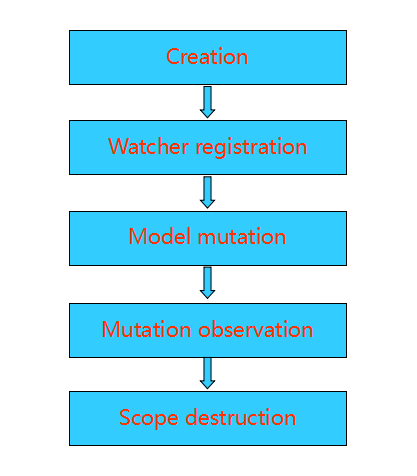
四、$scope(作用域)的生命周期。

1.  创建 – 更作用域会在应用启动时通过注入器创建并注入。在模板连接阶段,一些指令会创建自己的作用域。

2.  注册观察者 – 在模板连接阶段,将会注册作用域的监听器。这也监听器被用来识别模型状态改变并更新视图。

3.  模型状态改变 – 更新模型状态必须发生在scope.$apply方法中才会被观察到。Angular框架封装了$apply过程,无需我们操心。

4.  观察模型状态 – 在$apply结束阶段,angular会从根作用域执行$digest过程并扩散到子作用域。在这个过程中被观察的表达式或方法会检查模型状态是否变更及执行更新。

5.  销毁作用域 – 当不再需要子作用域时,通过scope.$destroy()销毁作用域,回收资源。


接下来,$scope(作用域)与控制器、指令等之间的联系,在以后关于控制器、指令整理的文章解析,敬请期待。