[转载]Asp.Net MVC 4 Web API 中的安全认证-使用OAuth

mikel阅读(1160)

[转载]Asp.Net MVC 4 Web API 中的安全认证-使用OAuth – Nic Pei – 博客园.

image

各种语言实现的oauth认证: http://oauth.net/code/

上一篇文章介 绍了如何使用基本的http认证来实现ASP.NET web api的跨平台安全认证。 这里说明一个如何使用oauth实现的认证。oauth大家可能不陌生。那么这里需要注意的是我们使用的是.net平台一个比较好的开源oauth库。 DOTNETOPENAUTH。

就像上图所示,我们需要一个ISSSUE Server来给我们一个token,然后再去资源服务器请求资源,也就是Web API Server。
image

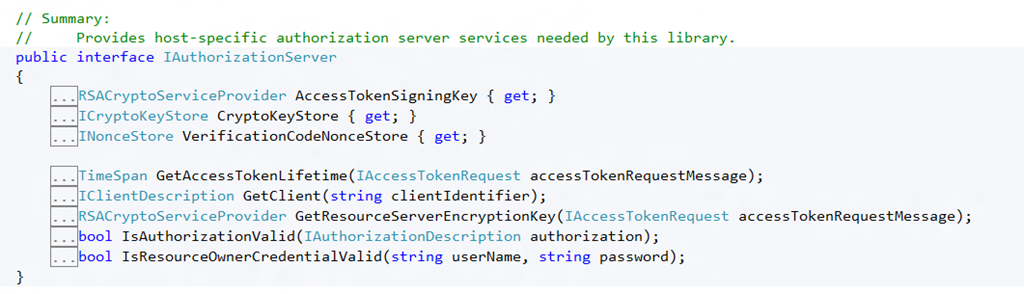
首先在oAuthIssuer服务端我们需要实现一个DotNetOpenAuth的接口:IAuthorizationServer
image

对接口的实现:

public class OAuth2Issuer: IAuthorizationServer {
    private readonly IssuerConfiguration _configuration;
    public OAuth2Issuer(IssuerConfiguration configuration) {
        if (configuration == null) throw new ArgumentNullException("configuration");
        _configuration = configuration;
    }
    public RSACryptoServiceProvider AccessTokenSigningKey {
        get {
            return (RSACryptoServiceProvider) _configuration.SigningCertificate.PrivateKey;
        }
    }
    public DotNetOpenAuth.Messaging.Bindings.ICryptoKeyStore CryptoKeyStore {
        get {
            throw new NotImplementedException();
        }
    }
    public TimeSpan GetAccessTokenLifetime(DotNetOpenAuth.OAuth2.Messages.IAccessTokenRequest accessTokenRequestMessage) {
        return _configuration.TokenLifetime;
    }
    public IClientDescription GetClient(string clientIdentifier) {
        const string secretPassword = "test1243";
        return new ClientDescription(secretPassword, new Uri("http://localhost/"), ClientType.Confidential);
    }
    public RSACryptoServiceProvider GetResourceServerEncryptionKey(DotNetOpenAuth.OAuth2.Messages.IAccessTokenRequest accessTokenRequestMessage) {
        return (RSACryptoServiceProvider) _configuration.EncryptionCertificate.PublicKey.Key;
    }
    public bool IsAuthorizationValid(DotNetOpenAuth.OAuth2.ChannelElements.IAuthorizationDescription authorization) { //claims added to the token authorization.Scope.Add("adminstrator"); 
authorization.Scope.Add("poweruser"); return true;
 } 
public bool IsResourceOwnerCredentialValid(string userName, string password) { return true; } 
public DotNetOpenAuth.Messaging.Bindings.INonceStore VerificationCodeNonceStore { get { throw new NotImplementedException(); } } }


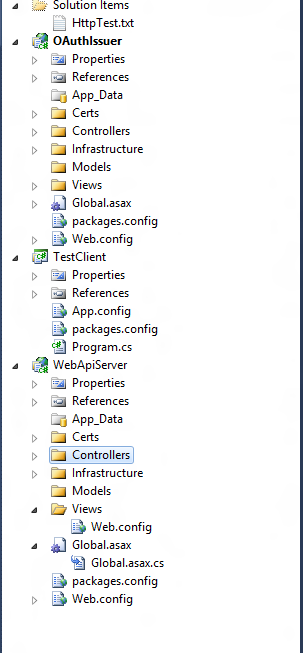
在 Web API Server端,我们需要使用Http Message Handler来获取httprequest信息;并进行是否有授权认证。

public class OAuth2Handler : DelegatingHandler { private readonly ResourceServerConfiguration _configuration; public OAuth2Handler(ResourceServerConfiguration configuration) { if (configuration == null) throw new ArgumentNullException(“configuration”); _configuration = configuration; } protected override Task<HttpResponseMessage> SendAsync(HttpRequestMessage request, CancellationToken cancellationToken) { HttpContextBase httpContext; string userName; HashSet<string> scope; if (!request.TryGetHttpContext(out httpContext)) throw new InvalidOperationException(“HttpContext must not be null.”); var resourceServer = new ResourceServer(new StandardAccessTokenAnalyzer( (RSACryptoServiceProvider)_configuration.IssuerSigningCertificate.PublicKey.Key, (RSACryptoServiceProvider)_configuration.EncryptionVerificationCertificate.PrivateKey)); var error = resourceServer.VerifyAccess(httpContext.Request, out userName, out scope); if (error != null) return Task<HttpResponseMessage>.Factory.StartNew(error.ToHttpResponseMessage); var identity = new ClaimsIdentity(scope.Select(s => new Claim(s, s))); if (!string.IsNullOrEmpty(userName)) identity.Claims.Add(new Claim(ClaimTypes.Name, userName)); httpContext.User = ClaimsPrincipal.CreateFromIdentity(identity); Thread.CurrentPrincipal = httpContext.User; return base.SendAsync(request, cancellationToken); } }

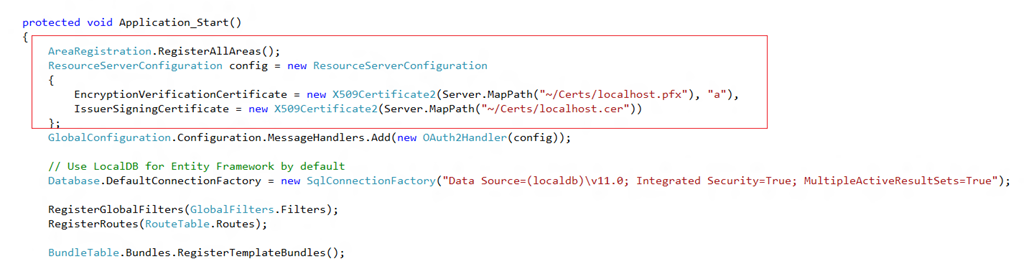
这里的ResourceServerConfiguration 我们是使用加密证书的。
image

客户端调用代码:

image

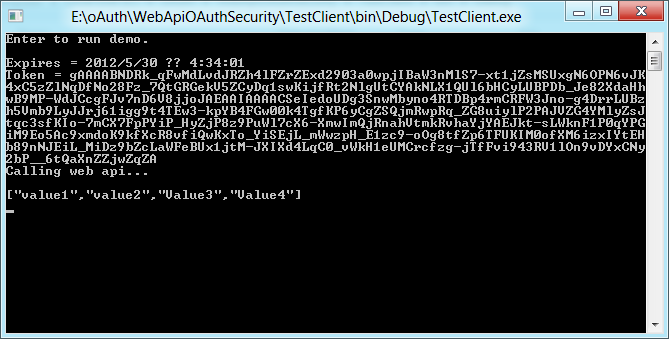
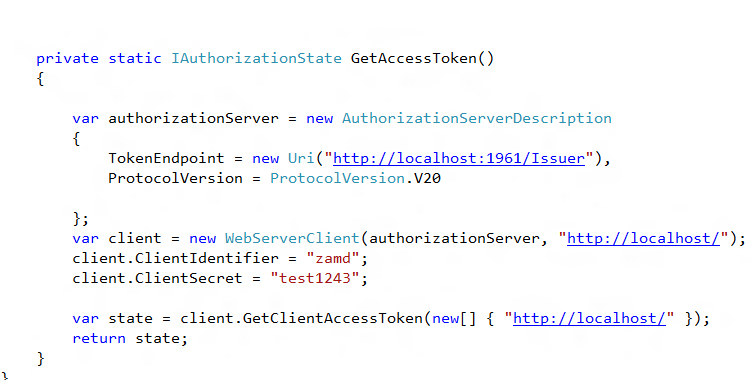
调用API获取数据之前需要从IssueServer获取Token。

GetAccessToken:
image

看一下Token信息:

{“access_token”:”gAAAAIoUBVBrZ5jAxe5XeTgnJ8mGwwKsCReknueg4gLGlDQ77lR1yPfxt0yNfWLCBT7hxnHjRjuEwDTJ3J1YAnqML4MIgQg8A2cz2bs0EnxvCMfKnayKEesRM-lxLTFbWMpSxe2Xvjm61IbaXjrMkYDRMnV4Do8-7132tiOLIv02WOGlJAEAAIAAAACJ8F3SsE6cTI1XsioW_xOxHeESDzG16y01Gxm3HikYFUC3XIdekpPw0yMB4tavPmUj-kRyC1halbUX7JKf-Dihm6Ou5mexe9lcYTr9or_kH7WcDN5ZCryUK3OaecvwwjQVr5o9XD2ZyZSNDCNhVRFc5ypvP85zZCBW1KJkP3OTCV4AkMN-ROvgI8jxutYdsLLN-YbB7Ot5iypzWWbW0QxiwOzMEqG9nVtPwnIWOUMOvW5KbiELELhgjap60mwHzGrHG4TtA4jrNy8S9zjixO_q-FrgpAuC06CkSH-R4w9yPCLLDc9m3UoAnknFjd4PUbWLxCvlBpEK2sg03ENa0EOKzc2O5fEic9P-BiYt6afMwTgLkJlGBBjmCBpGZMkfLTw”,”token_type”:”bearer”,”expires_in”:”300″,”scope”:”http:\/\/localhost\/ adminstrator poweruser”}

image

客户端调用:

image

[原创]将 numeric 转换为数据类型 numeric 时出现算术溢出错误解决方法

mikel阅读(3315)

问题:

执行存储过程报:

将 numeric 转换为数据类型 numeric 时出现算术溢出错误。

问题原因:

存储过程中创建临时表时,临时表的字段类型长度小于后续更新的值的长度导致

转换异常

解决办法:

创建临时表时利用cast将字段类型转换为长度符合插入值的类型

代码如下:


	SELECT Identifier,Stock_State,Supplier_ID,Buyer_ID,Goods_ID,Unit_ID,Tax_ID,
	cast(0 as money) as Start_Amount,cast(0 as money) as Into_Amount,cast(0 as money) as Outlay_Amount,
	Stock_Money as End_Amount,Into_Price,Tax_Money,
	@Start_Date as Start_Date,@End_Date as End_Date,cast(0 as decimal(18,4)) as Start_Stock,
	cast(0 as decimal(18,4)) as Into_Stock,cast(0 as decimal(18,4)) as Outlay_Stock,Total_Stock as End_Stock,
	Tax_Value,Batch_Code,Supplier,Supplier_Secrecy,Buyer,
	Goods_Name,Physical,Chemistry,Detail_Params,Stock_Unit,Tax_Rate
	INTO #temp_AccountsInventory
	FROM
		Stock_Details

[转载]新浪微博SDK for .Net 4.0第二版正式发布了。

mikel阅读(1152)

[转载]新浪微博SDK for .Net 4.0第二版正式发布了。 – 林选臣 – 博客园.

可以去此处查看第一版的特性和使用方法


首先感谢各位热心博友提出了意见和建议,有了大家的支持,做起事情来就更有动力了^_^

第二版SDK的一些新特性

  • 采用了新浪官方主推的OAuth2.0进行授权和认证
  • 所有接口都升级到了官方V2版的API,也就是说可以用官方V2版的API机型操作了
  • 参考了官方PHP版的SDK,将授权认证的方法和API操作的方法独立成了两个类,逻辑上更清晰了


使用方法

第一步:授权认证

传统方式(适用于Web项目)

  • 初始化OAuth类
  • 获取Authorize地址
  • 访问Authorize地址并进行授权,取得code
  • 使用OAuth类的GetAccessTokenByAuthorizationCode方法获得AccessToken
  • 完成

模拟登录方式(适用于Winform项目和其他项目类型)

  • 初始化OAuth类
  • 调用OAuth类中的ClientLogin方法,传入账号、密码以及绑定回调地址(ClientLogin方法模拟了上述整个授权过程,实现了一件登录和授权)
  • 完成

第二步:实例化操作类

至此,授权完成了。接下来用刚才的OAuth作为参数来实例化一个Client操作类。

Client实例化以后,通过API命名空间,即可调用各种方法。


简单的使用案例

基于正常的授权认证流程

//初始化oAuth,准备认证
var oauth = new NetDimension.Weibo.OAuth("1028898141", "78be07c9bcfa30b7871788d3778ce131");
/* * 正常的流程或Web流程: * 1. 获取授权地址 * 2. 访问授权地址 * 3. 授权成功后自动跳转至callback指定的网站,并获得code * 4. 通过code换取access token */

var url = oauth.GetAuthorizeURL("https://api.weibo.com/oauth2/default.html", ResponseType.Code);//根据授权方法,获得授权地址。
System.Diagnostics.Process.Start(url);//模拟弹窗,Console方式直接打开了浏览器,Web项目可以根据需求来使用iframe、新窗口等打开此页面。
//打开浏览器,进行授权流程,之后会跳转到callback指定的网址,并获得code
//填写刚才得到的code
Console.Write("请填写浏览器地址中的Code参数:");
var code = Console.ReadLine();
//根据code获取AccessToken
var accessToken = oauth.GetAccessTokenByAuthorizationCode(code, "https://api.weibo.com/oauth2/default.html");//注意:callback指定的url必须一致
//看看我们获得的access token
Console.WriteLine(accessToken);
//至此,我们已经获得了AccessToken

使用简化流程之后的ClientLogin方法

//初始化oAuth,准备认证
var oauth = new NetDimension.Weibo.OAuth("1028898141", "78be07c9bcfa30b7871788d3778ce131");
//简化的认证流程,直接调用ClientLogin。这个方法不需要去申请password方式的认证,只是模拟了上面的步骤并进行了封装
var result = oauth.ClientLogin("<你的微博账号>", "<你的微博地址>", "https://api.weibo.com/oauth2/default.html");
//返回值为bool型,为true则表示授权、登录成功。为false的话,要不密码错了,要不就是回调地址和新浪后台里面填写的不一样

Console.WriteLine(oauth.AccessToken);
//看看这里获得的AccessToken,理论上应该是和上面那种方法获得的Token一样。

接口调用示例

在上面的步骤中获得AccessToken后,直接将OAuth对象作为参数来实例化一个操作类Client实例。之后的事情,你懂的^_^

//实例化一个操作类,用刚才成功获得了AccessToken的OAuth实例
NetDimension.Weibo.Client Sina = new NetDimension.Weibo.Client(oauth);
//调用各种方法吧
Console.WriteLine(Sina.API.Statuses.FriendsTimeline());//获取最新微博
Console.WriteLine(Sina.API.Statuses.Update("发布一条微博来测试下火力!" + DateTime.Now.ToLongTimeString()));//发条微博测试下,不加后面的时间,会产生Exception,不能重复发微博
//来个取数据的例子
var mentions = Sina.API.Statuses.Mentions();	//通过“提到我的微博”接口来获得数据
//到 http://open.weibo.com/wiki/2/statuses/mentions 查一下mentions的数据结构,接下来咱们操作下数据。
foreach (var status in mentions.statuses)
{
	if (status.IsDefined("user"))	//这里要判断下是不是有user这个项,一般微博被删除了就不会返回user,直接xxx.user要出错。
	{
		Console.WriteLine(string.Format("{0} 说:{1}", status.user.screen_name, status.text));//打印用户名和他说的内容
	}
}


类及方法简要说明

SDK中的相关方法及方法中的返回值与官方API一致,因此不对此部分内容进行列举。详细的返回内容请参考官方的API文档

OAuth类,封装了授权、认证、登录等操作方法。

OAuth类
OAuth 构造函数
GetAuthorize 获取应用授权地址,并设置返回方式
GetAccessTokenByAuthorizationCode 通过code方式获取AccessToken
GetAccessTokenByAuthorizationCode 通过password方式获得AccessToken,需要官方申请权限。
GetAccessTokenByRefreshToken 通过token方式获取AccessToken,也需要官方申请权限后才能获得RefreshToekn
ClientLogin 客户端登录,使用模拟code授权的方式完成授权和登录过程(俗称一键登录)
VerifierAccessToken 验证AccessToken的有效性


Client类,封装了官方API中微博各项操作方法。所有方法均按照分类封装在API命名空间中,方法按照官方的文档进行了分类。参数及返回值可参考官方文档,此处就不再一一列举。

Client类
Client 构造函数
API 官方所有接口方法的封装。已经按照官方文档中的分类对各方法进行了封装,方法名称也基本和官方的API保持一致。返回值为JSON,使用DynamicJson进行了动态化,可直接使用xxx.xxx.xxx的形式获取内容,返回内容的数据结构请参考官方文档。


本人微博:http://weibo.com/xuanchenlin

项目托管地址:http://weibosdk.codeplex.com

欢迎关注,欢迎交流!

[转载]Basic Tutorial | WebKit .NET

mikel阅读(1697)

[转载]Basic Tutorial | WebKit .NET.

Introduction

This tutorial gives a very basic overview of how to get started with WebKit .NET. It is assumed that you have either Visual C# 2008 Express or Visual Studio 2008 installed and that you have some experience with C#, or at the very least another .NET language such as VB .NET. More experienced coders will probably benefit more from the API reference which goes into greater detail. If you have any trouble with the tutorial, please get in touch.

Getting Started

In this tutorial we will create a very basic web browser in C#. There is very little code involved so hopefully the ideas should be clear to anyone with knowledge of a modern programming language.

Lets begin by downloading the latest binary release of WebKit .NET from the project download page. Extract the contents of the included ‘bin’ folder to somewhere on your local machine, for example D:\webkitdotnet\bin.

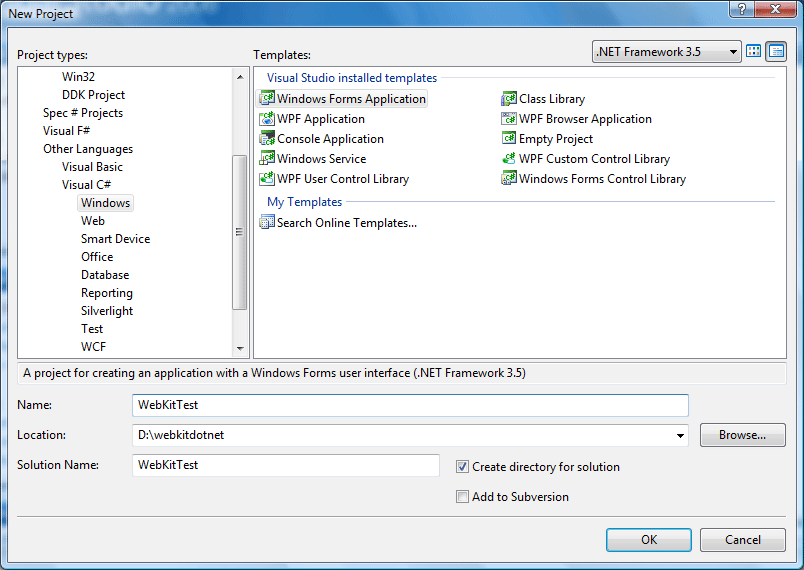
Next, fire up Visual C# and create a new Windows Forms Application:

New Project

Choose a suitable name and location and click OK to create the project.

Adding the Controls

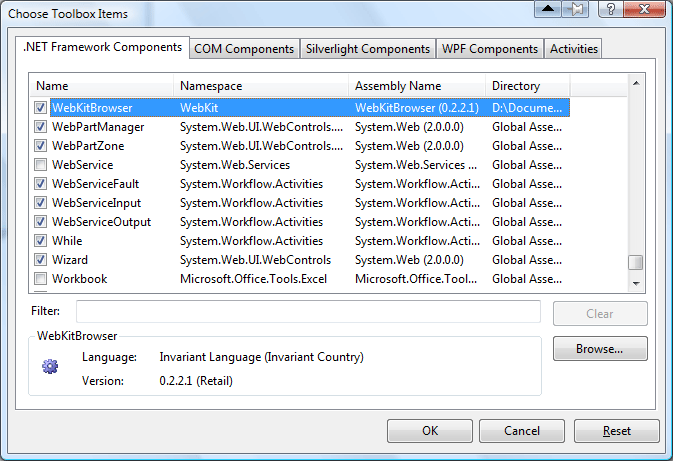
With the project created, you should be presented with a blank ‘Form1’ in the Windows Forms designer. To use the control in the designer, right click the toolbox and select Choose Items -> .NET Framework Components. Click ‘Browse…’, navigate to the WebKit .NET directory and select WebKitBrowser.dll. The WebKitBrowser control should appear in the list as below:

Adding WebKitBrowser to Toolbox

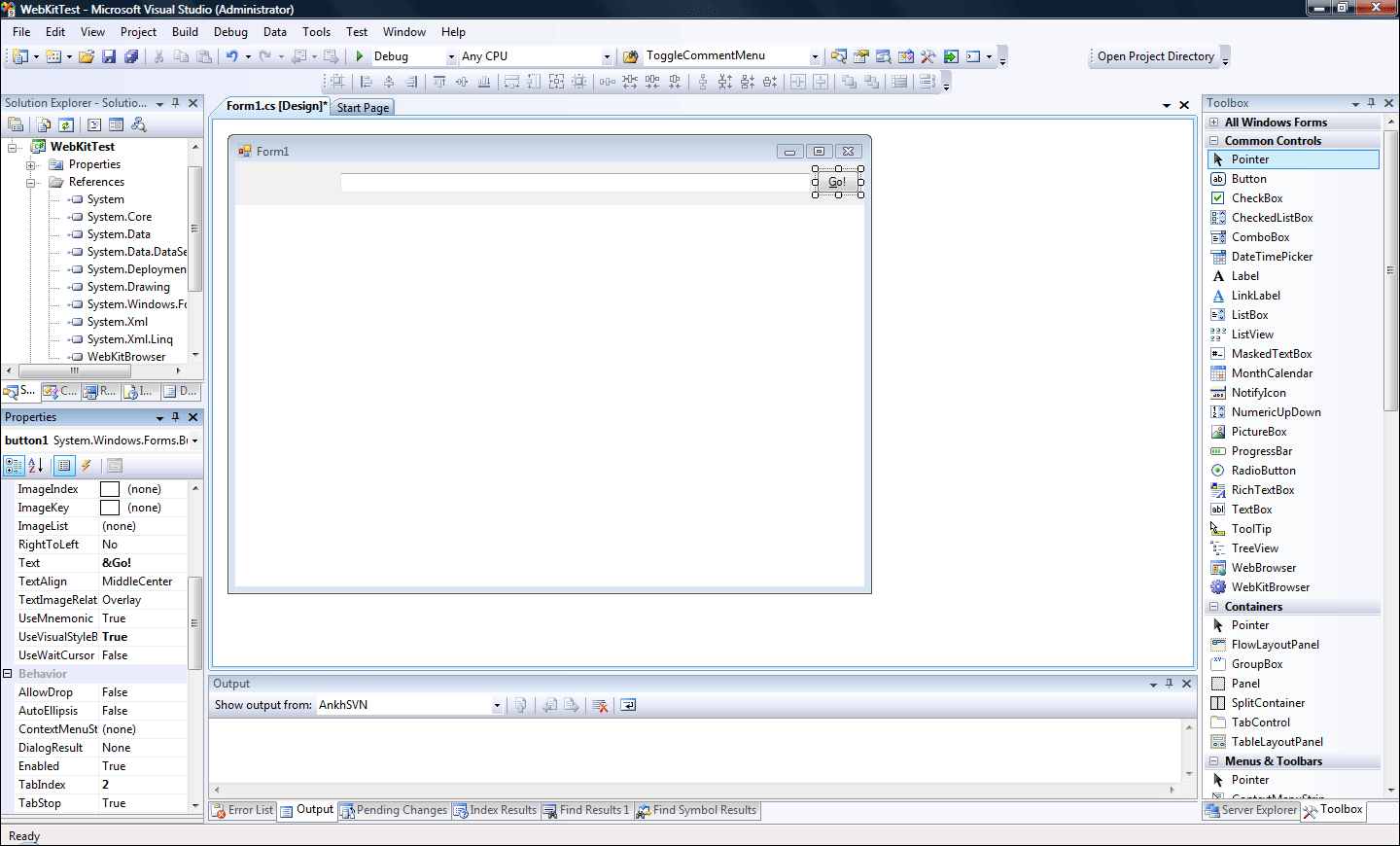
Make sure the checkbox is ticked and click OK. Select the WebKitBrowser in the toolbox and drag it onto the empty form. In the properties window, change the ‘Dock’ property to ‘Bottom’ and resize the control leaving enough room at the top of the form for a navigation bar.

Select a TextBox from the toolbox and drag it onto the top of the form, moving and resizing to suit. Do the same with a Button control. Change the ‘Text’ property of the button to ‘&Go!’

Adding WebKitBrowser to form

Adding the Code

Double-click the Go! button to create a Click event handler and open the code view. Add the following code which causes the WebKitBrowser to navigate to the Url in our textbox when the button is clicked:

private void button1_Click(object sender, EventArgs e) { webKitBrowser1.Navigate(textBox1.Text); }

In the constructor for Form1, add the following code to create handlers for the form load and browser navigation events:

public Form1() { InitializeComponent(); this.Load += new EventHandler(Form1_Load); this.webKitBrowser1.Navigated += new WebBrowserNavigatedEventHandler(webKitBrowser1_Navigated); }

Add the following event handlers. When the form is loaded, we set the browser to display an obligitory ‘Hello World’ message. When the browser navigates to a new page, we update the contents of the textbox to reflect the new location:

void Form1_Load(object sender, EventArgs e) { webKitBrowser1.DocumentText = "<h1><a href=\"http://google.com\">Hello, World!</a></h1>"; } void webKitBrowser1_Navigated(object sender, WebBrowserNavigatedEventArgs e) { textBox1.Text = webKitBrowser1.Url.ToString(); }

Running the Application

Before we can run the program, there are a few important things still to do.

Changing the Application Platform

As there is no x64 build of WebKit yet, WebKit .NET is configured to run only as a 32-bit process so that it functions correctly on 64-bit versions of Windows. As a consequence of this, ALL .NET applications which use WebKit .NET must also be configured in this way. By default, C# applications will run as a 64-bit process on Win64, and we will get an error if we try to use a 32-bit library with them. To change the platform, right click the project in the Solution Explorer and select ‘Properties’. Select the ‘Build’ tab and choose ‘x86’ as the platform (by default it will be set to ‘Any CPU’).

We can now build the application (Build -> Build Solution) but it will not run yet without the WebKit library.

WebKit and Dependencies

Before we can run the application, WebKit.dll and it’s dependencies must be present in the output directory. In Windows Explorer (or otherwise), copy all of the files from the WebKit .NET ‘bin’ directory to your project’s output directory. For example, here is the listing of my output directory after copying:

D:\webkitdotnet\WebKitTest\WebKitTest\bin\Debug>ls CFLite.dll icudt40.dll JavaScriptCore.dll icuin40.dll JavaScriptCore.resources icuuc40.dll SQLite3.dll libcurl.dll WebKit.Interop.dll libcurl.dll.manifest WebKit.dll libeay32.dll WebKit.resources libeay32.dll.manifest WebKitBrowser.dll libpng13.dll WebKitBrowser.dll.manifest libxml2.dll WebKitBrowser.pdb libxslt.dll WebKitTest.exe pthreadVC2.dll WebKitTest.pdb ssleay32.dll WebKitTest.vshost.exe ssleay32.dll.manifest WebKitTest.vshost.exe.manifest zlib1.dll curl.exe.manifest Alternatively, you could create a post-build event that automatically copies the WebKit files to the output directory after each successful build.

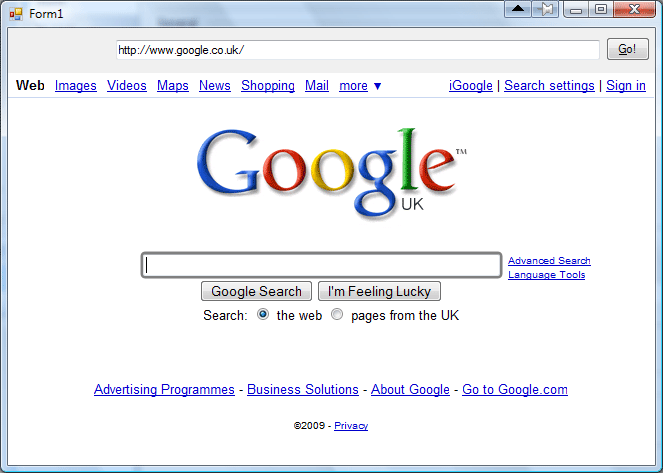
We can now finally run the test application – select ‘Start Without Debugging’ from the Debug menu within Visual C#. Our web browser should appear:

Adding WebKitBrowser to form

This concludes the tutorial. It is left as an exercise to implement back, forward and home navigation buttons, or browser tabs if you’re feeling ambitious! You may want to have a look at the test browser application included in the WebKit .NET source.

[转载]Downloads | WebKit .NET

mikel阅读(1018)

[转载]Downloads | WebKit .NET.

Downloads

Latest Version – 0.5

Download Win32 BinaryWin32 Binary – This package contains the compiled WebKit .NET library, a sample application which implements a simple web browser, a build of the Cairo WebKit library and all of its dependencies. Download this if you want to use the web browser control in your projects or want to try out the sample application.

Download Source CodeSource Code – This package contains the Visual Studio 2008 solution for WebKit .NET. Download this if you want to build the library from scratch. A build of WebKit is also required; you can either use the one included in the binary package above or you can build your own. A guide on building WebKit .NET is available here.

[转载]SQL压力测试用的语句和相关计数器

mikel阅读(1016)

[转载]SQL压力测试用的语句和相关计数器 – CareySon – 博客园.

将数据库中所有表的所有的内容选一遍:


IF object_id(‘tempdb..#temp’)   is   not   null
BEGIN
DROP TABLE #temp
END

DECLARE @index int
DECLARE @count int
DECLARE @schemaname varchar(50)
DECLARE @tablename varchar(50)
set @index=1
set @count=(select count(*) from sysobjects where xtype=’U’)

select row_number() over(order by name) as rowNumber,name,
( SELECT a.name from sys.tables t inner join sys.schemas a
ON t.schema_id=a.schema_id
WHERE t.name=ob.name) as schemaname
into #temp from sysobjects ob where xtype=’U’

WHILE(@index<@count)
BEGIN
set @schemaname=(SELECT schemaname from #temp where rowNumber=@index)
set @tablename=(SELECT name from #temp where rowNumber=@index)

exec(‘select * from ‘+ @schemaname+’.’+@tablename)

set @index=@index+1

END


通常来说,需要看如下几个计数器(下面资料参考自http://www.sqlservercentral.com/articles/Miscellaneous/2634/):

  • Memory: Pages/sec
  • Memory: Available Bytes
  • Network Interface: Bytes Total/Sec
  • Physical Disk: % Disk time
  • Physical Disk: Avg. Disk Queue Length
  • Processor: % Processor Time
  • System: Processor Queue Length
  • SQL Server Buffer: Buffer Cache Hit Ratio
  • SQL Server General: User Connections


Memory: Pages/sec:最好不要大于5,否则有内存问题

Memory: Available Bytes :这个可以望文生义,不解释

Network Interface: Bytes Total/Sec :如果这个计数器下降的太快有可能是网络出现问题

Physical Disk: Avg Disk Queue Length:每个逻辑盘的等待队列,大于2有可能是IO瓶颈问题

Physical Disk: % Disk time: 读/写活动的百分比,不要大于90%,和上面的计数器一起可以显示IO瓶颈

Processor: % Processor Time :CPU瓶颈,不要大于90%,大多数情况下,内存和IO瓶颈要更多

System: Processor Queue Length :同样,和上面计数器一起找出IO瓶颈

SQL Server Buffer: Buffer Cache Hit Ratio :缓存命中率,不要低于85%,否则考虑加内存

SQL Server General:并发数,压测时快到某一瓶颈看看这个数字,可以作为基准(BaseLine)记下来

[转载]ERP产品框架设计之路(二)

mikel阅读(1345)

[转载]ERP产品框架设计之路(二) – 贤达 – 博客园.

要应对灵活的需求,对于产品需求多数来说与自身,而且这个ERP产品,要求功能上达到用友和金蝶的ERP那个层次,而且老板总是吹牛 说自己以前的写的ERP比用友U8企业应用套件好要好,

一千多个表,Hibernate框架使用第一个被否定,在页面显示的字段用户可以自定义设置(主要设置是否显示,还有显示的位置),这样Struts不能用,

经过一个星期走火入魔的思考之后,我终于设计出一条比较满意的方案,记得在这一个星期当中,

有一次我因为思考框架设计的问题时站在公交站发呆,从六点多站到八点多,晚上准备睡觉的时候发现自己好像没有吃饭。

还有一次晚上和一个女的去吃饭的时候,我把点菜单的上面写着table- window,而且我的写的字还比较丑,后来被一个女生狠狠地批评了一顿,而我当时还在傻笑,我给她留下的印象是程序员都很傻,很莫名奇妙!这就话是她另个人朋友跟我说的。

要满足目前的需要,数据库设计必须要做一下设计

数据库表,必须要有视图管理表,视图字段管理表,系统表管理表,系统表字段管理表,

要满足用户个性化用户,必须设计用户配置视图表,和用户配置视图字段表,用户配置系统表,用户字段管理表

要满足多数据库和业务逻辑层可以拓展和升级,必须使用接口对个层进行抽象,在这里Spring就可以发挥它的作用了,


要做上千给表的管理(添加、修改、删除、设置) 必须采用模板管理代码生成用户动态配置,并且是可视化配置!


模板必须满足,一个一个的表管理,一对多的表管理,多对多的管理,以及单表的分组生成管理,还有自定义生成规则


要满足页面显示层和业务对接之间最好的办法就是采用xml, 而模式设计业基本采用的静态的html

逻辑成生成xml

页面采用全静态的html 、ajax 

对应数据浏览窗体我采用的dhtmlx控件

因为extjs/dojo/性能太差了,而且dhtmlx性能是主流的grid控件中最好的一个,而且功能强大开源,

不过在实际应用中dhtmlx有一些小的bug,本人已经将它进行了修改,而且现在的功能不专业版的还要强,

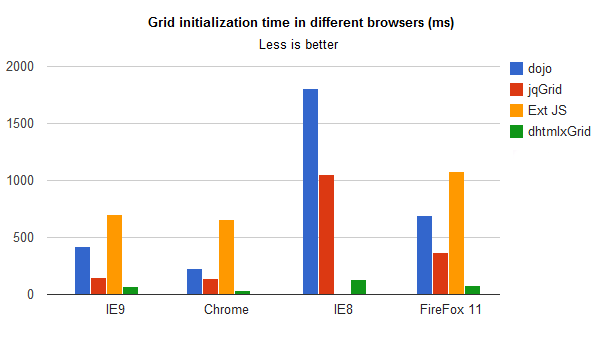
现在是grid测试的结果:地址 http://www.dhtmlx.com/blog/?p=1525

Results in IE8:

Dojo jqGrid Ext JS dhtmlxGrid
100 rows 915 ms 236 ms 310 ms 68 ms
500 rows 964 ms 270 ms 380 ms 71 ms
1,000 rows 1,124 ms 301 ms 511 ms 79 ms
5,000 rows 1,396 ms 642 ms failed 100 ms
10,000 rows 1,805 ms 1,049 ms failed 135 ms


Results in FireFox 11:

Dojo jqGrid Ext JS dhtmlxGrid
100 rows 500 ms 146 ms 319 ms 70 ms
500 rows 529 ms 148 ms 343 ms 74 ms
1,000 rows 540 ms 154 ms 384 ms 75 ms
5,000 rows 610 ms 258 ms 696 ms 78 ms
10,000 rows 694 ms 369 ms 1,082 ms 80 ms


Results in all browsers for grid with 10,000 rows and 10 columns:

Dojo jqGrid Ext JS dhtmlxGrid
IE9 418 ms 148 ms 702 ms 67 ms
Chrome 226 ms 143 ms 654 ms 32 ms
IE8 1,805 ms 1,049 ms failed 135
FireFox 11 694 ms 369 ms 1,082 ms 80 ms
Speed Test Results - Grid with 10,000 RowsSpeed Test Results – Grid with 10,000 Rows

According to the tests, dhtmlxGrid has the shortest loading time and loads on the page faster than


我的框架主要用到的第三方东西主要有DHTMXGrid ,DHTMLXWindow,Apache common, Spring, fastReport


下面我将继续我的框架系列,希望大家多多关注


数据库详细设计、和系统架构详细设计

C++和Delphi程序员的惯病,面向对象设计的而无意中采用的面向过程实现!

如何带领让只懂html和基础的JavaScript的做开发

如果避免成为一个失败的项目负责人

无需写代码生成简单关联关系的页面的添加、修改、删除、验证

无需写代码生成复杂多表关系的页面的添加、修改、删除、验证

[转载]ERP产品框架设计之路(一)

mikel阅读(1038)

[转载]ERP产品框架设计之路(一) – 贤达 – 博客园.

对于做java web开的多数程序员会选择SSH、Spring Mvc 、SSI之类的框架!这些框架的优点我想大家都很清楚,在这里我就不多说了!

当你遇到下面的需求的,而且要达到快速开发的时候,你会发现用这些框架组合好像不太现实!而且会成为一种累赘.

本人以前做是做C++、.net 的开发,2011年8月 转入java项目组,负责一个产品开发,主要任务是负责这个产品的程序框架!
目前这个框架基本上以成型,在这里我主要想和大家分享一下java开发、框架设计、以及产品设计之路的经验,不足之处希望大侠指点一下,
在用做这个框架之前,我对java主要了解还只有J2SE、jsp,servlet,JDBC!

2011年8月公司决定把以前引以为豪用delphi开发一个产品做成web形式,
(据说是老板在一次项目投标中被打击了,一个客户对他说了一句这样的话:“这个年代ERP还有用C/S的,还好意思来投标,太out了吧”)

于是公司开始筹划这个web形式的产品开发,开始打算用.net 开发,没过几天产品经理的在一次同学聚会中听他同学说.net 成本高,不能跨平台!
对于我这种做了多年.net开发人来说还是希望公司用.net的,不过mono跨平台成功的商业项目还不多,所以我没有足够的理由说服产品经理,
于是老板决定用java开发,开始找java项目负责人,应该薪水的原因,公司没有招聘到合适的项目负责人,于是我就成了这个产品开发的技术负责人,

应该是第一次做java项目组负责人时鸭梨山大,于是就开始研究java的各种框架,Strut,jsf,hibernate,iBATIS,Spring  了解流行框架所拥有的优缺点,以及所能做的功能,

两个星期之后需求和设计总结下来了,因为这个产品以前是c/s delphi开发的,现在改成java web方式
所以需求总结进行的比较快,产品的需求通过产品经理审核就开始动工了!

因为产品要求灵活,而且业务比较复杂的!这个产品涉及比较广。

数据库有一千多个表(实体),两千多个视图,两百多个表量函数和普通函数,以及一千多个存储过程

涉及:原材(进销存管理)、设备、生产调度,产品检测、人事(CRM)、财务,预算、等管理!

     产品要求达到的基本功能

第一、产品要满足行业内大小公司、集团客户的的需求
第二、产品要为非程序员提供第二次开发接口,(用户在数据库添加几个表,可以自定义生产维护页面、和查询业务)
第三、每个用户都有个性化数据,每个用户看到的页面、字段不一样,可以主题风格!
第四、每个用户有不同的功能模块权限,以及不同的数据查询条件,可以用管理员定义查询过滤,
第五、页面布局自定义改动,(用户可以改变控件的位置,可以添加或者删除)
第六,下来框的数据,用户可以动态的改动、动态级联关系用户可以自定义设置
第七、用户对每个字段可以指定验证规则(比如有写用户可以录入重复的数据,二其他的用户不能录重复的数据,指定有些用户必填有些用户可以为空)
第八、数据添加、修改、删除、日志记录, 系统异常记录

    权限设计

权限分角色、角色组,部门权限,个人权限,功能模块权限,菜单权限,查询条件权限,操作权限、字段(增删改查权限)

流程设计
               生产流程、工作流程、审批流程
报表
           要求、可以在线编辑打印报表,图形化报表、导出excel,pdf,在线打印速度必须快,一秒钟要可以打印一张!

  框架要求统一规范,

代码统一规范、命名统一规范!格式统一规范,

类设计必须到底可以扩展,可以维护,要实现多数据库、业务逻辑层的代码可以替换方便以后维护和升级、跨平台,多国语言,

在设计上尽量可以达到兼容多种开发语言模式!(比如方便以后用 .net 重写)
公司要求,我两个月的时候把框架设计出来!公司再招聘七八个一年多工作经验的java程序员,然后一年之后上线!

这样的需求对于没有java开发的我欲哭无泪 ,于是找做java开发同学、朋友要他们开发的项目源码。我想最后的结果大家应该知道的!
下一篇讲框架的基本设计!
设计之路、如何应对灵活变动的需求,以及能够快速开发

[转载]千呼万唤 HTML 5 系列文章索引

mikel阅读(1030)

[转载]千呼万唤 HTML 5 系列文章索引 – webabcd – 博客园.

[源码下载]

千呼万唤 HTML 5 系列文章索引

作者:webabcd

介绍
千呼万唤 HTML 5 系列文章索引:HTML 5

1、千呼万唤 HTML 5 (1) – 根元素, 元数据元素, 脚本元素
介绍
HTML 5: 根元素, 元数据元素, 脚本元素

  • 根元素 – doctype, html
  • 元数据元素 – head, title, base, link, meta, style
  • 脚本元素 – script, noscript

2、千呼万唤 HTML 5 (2) – 区块元素
介绍
HTML 5: 区块元素

  • 区块元素 – body, article, section, header, footer, h1, h2, h3, h4, h5, h6, hgroup, aside, nav, address

3、千呼万唤 HTML 5 (3) – 内容分组元素
介绍
HTML 5: 内容分组元素

  • 内容分组元素 – p, hr, pre, blockquote, ul, ol, li, dl, dt, dd, figure, figcaption, div

4、千呼万唤 HTML 5 (4) – 文本语义元素
介绍
HTML 5: 文本语义元素

  • 文本语义元素 – a, em, strong, small, s, cite, q, abbr, time, code, var, dfn, samp, kbd, sub, sup, i, b, u, mark, ruby, rt, rp, bdi, bdo, span, br, wbr

5、千呼万唤 HTML 5 (5) – 元素的通用属性
介绍
HTML 5: 元素的通用属性

  • 元素的通用属 性 – accesskey, style, class, title, tabindex, id, dir, spellcheck, hidden, contenteditable, contextmenu, draggable, dropzone

6、千呼万唤 HTML 5 (6) – 表单元素之 input 元素
介绍
HTML 5: 表单元素之 input 元素

  • 表单元素之 input 元素 – text, password, url, telephone, email, search, file, radio, checkbox, button, submit, reset, number, range, image, hidden, color, datetime, datetime-local, date, time, month, week
  • input 元素的通用属性 – autocomplete, placeholder, pattern, dirname, size, maxlength, readonly, required, list, multiple, min, max, step

7、千呼万唤 HTML 5 (7) – 表单元素
介绍
HTML 5: 表单元素

  • 表单元素 – form, label, button, select, option, optgroup, datalist, textarea, fieldset, legend, progress, meter, keygen, output
  • 表单验证

8、千呼万唤 HTML 5 (8) – 画布(canvas)之绘制图形
介绍
HTML 5: 画布(canvas)之绘制图形

  • 画布 Demo – 画布的基本概念及 Demo,canvas.getContext(), CanvasRenderingContext2D, canvas.width, canvas.height, canvas.toDataURL()
  • 在画布上绘制矩形 – canvas.getContext(), fillRect(), fillStyle, lineWidth, strokeStyle, strokeRect(), clearRect()
  • 在画布上绘制弧线(以路径的方式)- beginPath(), arc(), fill(), stroke(), moveTo(), arcTo(), isPointInPath()
  • 在画布上绘制曲线(以路径的方式)- quadraticCurveTo(), bezierCurveTo()
  • 在画布上绘制直线(以路径的方式)- lineWidth, beginPath(), stroke(), moveTo(), lineTo(), lineCap, lineJoin, miterLimit, closePath()
  • 在画布上绘制矩形(以路径的方式)- rect()

9、千呼万唤 HTML 5 (9) – 画布(canvas)之承载媒体
介绍
HTML 5: 画布(canvas)之承载媒体

  • 呈现文本 – font, textAlign, textBaseline, strokeStyle, fillStyle, fillText(), measureText, TextMetrics.width
  • 呈现图片 – drawImage()
  • 呈现视频截图 – drawImage()
  • 呈现其他画布 – drawImage()

10、千呼万唤 HTML 5 (10) – 画布(canvas)之转换
介绍
HTML 5: 画布(canvas)之转换(转换画布的用户坐标系)

  • 平移 | translate()
  • 旋转 | rotate()
  • 缩放 | scale()
  • 矩阵转换 | transform(a, b, c, d, e, f)
  • 矩阵转换 | setTransform(a, b, c, d, e, f)

11、千呼万唤 HTML 5 (11) – 画布(canvas)之效果
介绍
HTML 5: 画布(canvas)之效果

  • 填充色, 笔划色, 颜色值 | fillStyle, strokeStyle
  • 剪裁 | clip()
  • 渐变色 | createLinearGradient(), createRadialGradient(), CanvasGradient.addColorStop()
  • 贴图的平铺模式 | createPattern()
  • 阴影效果 | shadowOffsetX, shadowOffsetY, shadowBlur, shadowColor
  • 全局 Alpha | globalAlpha
  • 新颜色与画布当前已有颜色的合成方式 | globalCompositeOperation
  • 保存画布上下文,以及恢复画布上下文 | save(), restore()
  • 像素操作 | createImageData(), getImageData(), putImageData(), ImageData, CanvasPixelArray

OK
[源码下载]

[转载]asp.net中的cookie

mikel阅读(1095)

[转载]asp.net中的cookie – 张龙豪 – 博客园.

一.cookie导读,理解什么是cookie


1.什么是cookie:cookie是一种能够让网站服务器把少量数据(4kb左右)存储到客户端的硬盘或内存。并且读可以取出来的一种技术。

2.当你浏览某网站时,由web服务器放置于你硬盘上的一个非常小的文本文件,它 可以记录你的用户id、浏览过的网页或者停留的时间等网站想要你保存的信息。当你再次通过浏览器访问该网站时,浏览器会自动将属于该网站的cookie发 送到服务器去,服务器通过读取cookie,得知你的相关信息,就可以做出相应的动作。比如,显示欢迎你的小标题,不用填写帐号密码直接登录等。。
3.不同的浏览器存储的cooks位置是也不一样的。cookie文件的信息是不安全的,所以cookie里面的数据最好加密。
4.浏览器保存cookie数据有2中形式:浏览器的内存中,浏览器所在的电脑硬盘中。


二.cookie的查看


cookie在硬盘中的存在位置查看方法:


.cookie的代码解释


1.将cookie写入浏览器端


HttpCookie cookie = new HttpCookie("id","234"); //创建cookie的实例。
Response.Cookies.Add(cookie);//将创建的cookie文件输入到浏览器端


explain这里相当于在cookie文件中写入键值对为id:234,我们可以读取这个数据


2.读出cookie中存放的数据


 HttpCookie cookie = new HttpCookie("id","234"); //创建cookie的实例。
Response.Cookies.Add(cookie);//将创建的cookie文件输入到浏览器端
Response.Write(Request.Cookies["id"].Value); //读取cookie文件中存储的值


explain页面写出的数据就是234,从这里我们就能看出cookie的不安全性。所以使用的时候最好不要存放重要信息,如果就想存放,可以对其加密,在写入cookie存储文件中。还有如果对其无限制的写入,会造成垃圾文件过多。所以我们可以给cookie文件加一个有效期。


3.cookie文件的有效期设置


HttpCookie cookie = new HttpCookie("id","234"); //创建cookie的实例。
            cookie.Expires = DateTime.Now.AddMonths(5);//设置cookie的过期时间,5分钟后过期,自动清除文件
            Response.Cookies.Add(cookie);//将创建的cookie文件输入到浏览器端
            Response.Write(Request.Cookies["id"].Value); //读取cookie文件中存储的值


4.cookie文件的删除、销毁


            HttpCookie cookie = new HttpCookie("id","234"); //创建cookie的实例。
            cookie.Expires = DateTime.Now.AddMonths(5);//设置cookie的过期时间,5分钟后过期,自动清除文件
            Response.Cookies.Add(cookie);//将创建的cookie文件输入到浏览器端
            Response.Write(Request.Cookies["id"].Value); //读取cookie文件中存储的值
            cookie.Expires = DateTime.Now.AddMonths(-5); //cookie的销毁,给他设置一个多去了的时间,他就倍销毁了。

四.一个cookie的小例子,记住我。(如果登录的时候选择记住我,下次无需登录直接跳转的内容页)

<body>
    <form id="form1" method="post" action="rembPage.aspx">
    <div>
        帐号: <input type="text" name="userName" /><br />
        密码 :<input type="password" name="pass" /><br />
        记住我: <input type="checkbox" value="rem" name="sele1" /><br />
        <input type="submit" value=" 登录 " /> 
    </div>
    </form>
</body>

[chsarp]
protected void Page_Load(object sender, EventArgs e)
{
if (Request.Cookies[“userName”] == null && Request.Cookies[“passWord”] == null) //判断师傅存在cookie,如果存在表示上次选择了记住我
{
if (Request.Form[“userName”] != null && Request.Form[“pass”] != null)
{
String userName = Request.Form[“userName”];
String userPassWord = Request.Form[“pass”];
if (userName == “admin” && userPassWord == “123”)
{
if (Request.Form[“sele1”] != null)
{
HttpCookie cookieUserName = new HttpCookie(“userName”, userName); //创建帐号的cookie实例
HttpCookie cookiePassWord = new HttpCookie(“passWord”, userPassWord);
cookieUserName.Expires = DateTime.Now.AddDays(2); //设置帐号cookie的过期时间,当前时间算往后推两天
cookiePassWord.Expires = new DateTime(2012, 5, 27); //设置密码cookie的过期时间,过期时间为2012年5月27日
Response.Cookies.Add(cookieUserName); //将创建的cookieUserName文件输入到浏览器端
Response.Cookies.Add(cookiePassWord);
Response.Redirect(“1.aspx”); //跳转到你想要的页面
}
else
{
Response.Redirect(“1.aspx”);//即便不记住密码也要跳转
}
}

}
}
else
{
Response.Redirect(“1.aspx”);//如果记住密码,第二次登录将直接进入1.aspx页面
}
}
[/csharp]