[转载]ASP.NET MVC3 20个秘方-(19)URL—其实我更想懂你:路由用户到特定的Controller和Action

mikel阅读(885)

[转载]【译】MVC3 20个秘方-(19)URL—其实我更想懂你:路由用户到特定的Controller和Action – 技术弟弟 – 博客园.

问题

当今如此对搜索引擎霸主的争夺战是如此激烈,像下边这样的网站地址很难在这场比赛中获胜:http://www.example.com/books/details?id=4

使用路由,网站可以变成这样:

http://www.example.com/20-recipes-for-mvc3

无论是对用户还是搜索引擎,这将提供更多的语境。

解决方案

使用RouteCollectionExtensions 类下的MapRoute 函数去生成更友好的名字去展示内容而不是数字ID。

讨论

在MVC中可以通过Web.config和Global.asax.cs文件设置路由。在web.config中包含 System.Web.Routing程序集并且在Global.asax.cs中使用它去对在它其中的所有controller和action创建一个 默认的路由机制。因此在添加BooksController的时候,可以通过/Books 访问不带扩展名的 URL,就像在ASP.NET 官网那样。

接下来的秘方将演示设立几个不同的有用的技术去创建路由。

第一个路由将允许网站直接连接到book的title上。例如,有一本书叫MVC3的20个秘方,它可以通过http://localhost /20 Recipes for Programming MVC 3这个地址被直接访问。然而当前的解决方案就需要一个更复杂的URL就像:http://localhost/Books/Details?id=1。 要开始创建这个路由,打开在MVC project里的Global.asax.cs文件。在RegisterRoutes()函数里创建里了一个默认的路由。在第一次加载网站的时候 Application_Start()函数会调用它。下边的例子包含一个更新的RegisterRoutes 函数,添加了一个新的路由到MapRoute函数中:

using System;
using System.Collections.Generic;
using System.Linq;
using System.Web;
using System.Web.Mvc;
using System.Web.Routing;
using MvcApplication.Models;
using System.Data.Entity;
using System.Globalization;
using System.Threading;
namespace MvcApplication
{
    public class MvcApplication : System.Web.HttpApplication
    {
        public static void RegisterGlobalFilters(
        GlobalFilterCollection filters)
        {
            filters.Add(new HandleErrorAttribute());
        }
        public static void RegisterRoutes(RouteCollection routes)
        {
            routes.IgnoreRoute("{resource}.axd/{*pathInfo}");
            routes.MapRoute(
            "BookName", // Route name
            "{Keyword}", // URL with parameters
            new
            {
                controller = "Books",
                action = "Index",
                id = UrlParameter.Optional
            },
            new { Keyword = "\\w+" });
            routes.MapRoute(
            "Default", // Route name
            "{controller}/{action}/{id}",
                // URL with parameters
            new
            {
                controller = "Home",
                action = "Index",
                id = UrlParameter.Optional
            }
            );
        }
        protected void Application_Start()
        {
            Database.SetInitializer<BookDBContext>(
            new BookInitializer());
            AreaRegistration.RegisterAllAreas();
            RegisterGlobalFilters(GlobalFilters.Filters);
            RegisterRoutes(RouteTable.Routes);
        }
        protected void Application_AcquireRequestState(
        object sender, EventArgs e)
        {
            if (HttpContext.Current.Session != null)
            {
                CultureInfo ci =
                (CultureInfo)this.Session["CurrentLanguage"];
                if (ci == null)
                {
                    ci = new CultureInfo("en");
                    this.Session["CurrentLanguage"] = ci;
                }
                Thread.CurrentThread.CurrentUICulture = ci;
                Thread.CurrentThread.CurrentCulture =
                CultureInfo.CreateSpecificCulture(ci.Name);
            }
        }
    }
}

在上边的例子里,MapRoute 函数接收4个参数。

  1. route name,在这里是BookName。
  2. 附带任何参数的URL。在这里是{Keyword},这是可变的,一会儿会用到。
  3. 这个参数默认的是controller ,action和任何附加的变量。在这个例子里,默认的controller是Books 并且Action是Index
  4. 他包含(例如,变量)对于URL。在这里,前边提到的Keyword变量传递到BooksController的Index action上。

当搜索关键字时,他可以在URL的域名后边输入一个书名或关键字,如果仅仅返回了一个结果,用户将被重定向到详细信息页面,并看到那本书。否则用户 将看到一个根据他关键字的搜索结果。在下一个例子里。一个新的路由将被创建。它将口占RouteBase类。均需一个更复杂的路由。将用一个子域名替代在 域名后边输入书名。例如 http://mvc3book.localhost/ 将返回上述图书的详细内容-MVC3编程的20个秘方。

为了让这成为可能,BOOK model 需要被更新去包含一个新的参数,名为“ShortName”。      此参数将被用来作为子域,并允许书籍通过创建扩展的RouteBase类的类进行搜索。

using System;
using System.Collections.Generic;
using System.Linq;
using System.Web;
using System.ComponentModel.DataAnnotations;
using MvcApplication.Validations;

namespace MvcApplication.Models
{
    public class Book
    {
        public int ID { get; set; }

        [Required]
        public string ShortName { get; set; }

        [Required]
        [Display(Name = "TitleDisplay", ResourceType = typeof(Resources.Resource1))]
        public string Title { get; set; }

        [Display(Name = "IsbnDisplay", ResourceType = typeof(Resources.Resource1))]
        [Required]
        [IsbnValidation]
        public string Isbn { get; set; }

        [Display(Name = "SummaryDisplay", ResourceType = typeof(Resources.Resource1))]
        [Required]
        public string Summary { get; set; }

        [Display(Name = "AuthorDisplay", ResourceType = typeof(Resources.Resource1))]
        [Required]
        public string Author { get; set; }

        [Display(Name = "ThumbnailDisplay", ResourceType = typeof(Resources.Resource1))]
        public string Thumbnail { get; set; }

        [Display(Name = "PriceDisplay", ResourceType = typeof(Resources.Resource1))]
        [Range(1, 100)]
        public double Price { get; set; }

        [Display(Name = "PublishedDisplay", ResourceType = typeof(Resources.Resource1))]
        [DataType(DataType.Date)]
        [Required]
        public DateTime Published { get; set; }
    }

}

现在必须创建一个新的类将包含新的路由背后的逻辑。选择Utils文件夹中,右键单击并选择“添加→类。这个新的类将被称为 BookDomainRoute.cs。下面的类将从Request.Headers为当前HttpContext检索域名。该域名将被.”操作符的分成 “数组。执行一些错误检查以确保我们有一个子域名不是WWW。

第一块子域,例如,ShortName,是用来执行书本上表的搜索,找到特定书籍。如果查找到了书籍,创建一个新的对象类RouteData,设置 Controller为Books,Action 设置为Detail,最后的ID是这本书的ID。如果没有找到书籍,主页将显示出来。在下面的例子,它可以很容易改变以直接导航用户到一个错误页或根据 Keyword 跳转到Books/index 页(在前面的例子)。

using System;
using System.Collections.Generic;
using System.Linq;
using System.Web;
using System.Web.Routing;
using System.Web.Mvc;
using MvcApplication.Models;

namespace MvcApplication.Utils
{
    public class BookDomainRoute : RouteBase
    {
        private BookDBContext db = new BookDBContext();

        public override RouteData GetRouteData(HttpContextBase httpContext)
        {
            // Get the domain name
            var url = httpContext.Request.Url.Authority;
            // Split into array of parts
            var pieces = url.Split('.');
 
            // Ensure there is a subdomain and it's not www
            if (pieces.Length < 2 && pieces[0] != "www")
            {
                return null;
            }

            string ShortName = pieces[0];
 
            // Find the book by ShortName
            var books = from b in db.Books select b;
            books = books.Where(b => b.ShortName.ToUpper().Contains(ShortName.ToUpper()));

            // Check to make sure a book was found
            if (books.Count() == 0)
            {
                return null;
            }

            // Get the first result
            Book book = books.First();

            // Set the route data
            RouteData routeData = new RouteData(this, new MvcRouteHandler());
            routeData.Values.Add("controller", "Books");
            routeData.Values.Add("action", "Details");
            routeData.Values.Add("id", book.ID);

            return routeData;
        }
 
        public override VirtualPathData GetVirtualPath(RequestContext requestContext, RouteValueDictionary values)
        {
            return null;
        }
    }
}

最后Global.asax.cs文件必须再次更新,包括新创建的路由。为了使新的路由类可以找到。需要添加using语句到utils目录。

using System;
using System.Collections.Generic;
using System.Linq;
using System.Web;
using System.Web.Mvc;
using System.Web.Routing;
using MvcApplication.Models;
using System.Data.Entity;
using System.Globalization;
using System.Threading;
using MvcApplication.Utils;

namespace MvcApplication
{
    // Note: For instructions on enabling IIS6 or IIS7 classic mode, 
    // visit http://go.microsoft.com/?LinkId=9394801

    public class MvcApplication : System.Web.HttpApplication
    {
        public static void RegisterGlobalFilters(GlobalFilterCollection filters)
        {
            filters.Add(new HandleErrorAttribute());
        }

        public static void RegisterRoutes(RouteCollection routes)
        {
            routes.IgnoreRoute("{resource}.axd/{*pathInfo}");

            routes.Add(new BookDomainRoute());

            routes.MapRoute(
                "BookName", // Route name
                "{Keyword}", // URL with parameters
                new { controller = "Books", action = "Index", id = UrlParameter.Optional }, // Parameter defaults
                new { Keyword = "\\w+" });

            routes.MapRoute(
                "Default", // Route name
                "{controller}/{action}/{id}", // URL with parameters
                new { controller = "Home", action = "Index", id = UrlParameter.Optional } // Parameter defaults
            );

        }

        protected void Application_Start()
        {
            Database.SetInitializer<BookDBContext>(new BookInitializer());

            AreaRegistration.RegisterAllAreas();

            RegisterGlobalFilters(GlobalFilters.Filters);
            RegisterRoutes(RouteTable.Routes);

            String connectionString = System.Configuration.ConfigurationManager.ConnectionStrings["BooksDBContext"].ConnectionString;
            System.Web.Caching.SqlCacheDependencyAdmin.EnableNotifications(connectionString);
            System.Web.Caching.SqlCacheDependencyAdmin.EnableTableForNotifications(connectionString, "Books");
        }

        protected void Application_AcquireRequestState(object sender, EventArgs e)
        {
            if (HttpContext.Current.Session != null)
            {
                CultureInfo ci = (CultureInfo)this.Session["CurrentLanguage"];
                if (ci == null)
                {
                    ci = new CultureInfo("en");
                    this.Session["CurrentLanguage"] = ci;
                }
  
                Thread.CurrentThread.CurrentUICulture = ci;
                Thread.CurrentThread.CurrentCulture = CultureInfo.CreateSpecificCulture(ci.Name);
            }
        }
    }
}

上述的例子包含良好的使用路由的伟大的开始。两者都可以很容易地更新执行其他路由,例如,子域名可以用来显示用户的特定的个人资料页,或以前实施的 多语种秘方可更新为使用一个路由类允许象en.example.com或fr.example.com一样的URL设置当前的语言文化。

另请参见

RouteCollectionExtension, RouteData

[转载]实例:在Android调用WCF服务

mikel阅读(1198)

[转载][翻译]实例:在Android调用WCF服务 – 一味 – 博客园.

原文:http://fszlin.dymetis.com/post/2010/05/10/Comsuming-WCF-Services-With-Android.aspx

在移动设备中,使用XML传输可能会消耗更多的资源,Android没有提供任何组件来直接调用WCF,但是我们可以通过第三方的包(例如:org.apache.http,org.json)来相对简单的调用REST形式的WCF服务。

本文将演示如何创建REST形式的WCF服务和在Android上如何调用服务。

第一步,创建一个包含两个GET操作和一个POST操作的Service Contract。由于是通过JSON对象传输数据,这里需要指定Request和Response的数据格式为JSON。为了支持多个参数,还需要设置 BodyStyle为WrappedRequest。

 1 namespace HttpWcfWeb
 2 {
 3     [ServiceContract(Namespace = "http://services.example.com")]
 4     public interface IVehicleService
 5     {
 6         [OperationContract]
 7         [WebGet(
 8             UriTemplate = "GetPlates",
 9             BodyStyle = WebMessageBodyStyle.WrappedRequest,
10             ResponseFormat = WebMessageFormat.Json,
11             RequestFormat = WebMessageFormat.Json)]
12         IList<string> GetPlates();
13  
14         [OperationContract]
15         [WebGet(UriTemplate = "GetVehicle/{plate}",
16             BodyStyle = WebMessageBodyStyle.WrappedRequest,
17             ResponseFormat = WebMessageFormat.Json,
18             RequestFormat = WebMessageFormat.Json)]
19         Vehicle GetVehicle(string plate);
20  
21         [OperationContract]
22         [WebInvoke(
23             Method = "POST",
24             UriTemplate = "SaveVehicle",
25             BodyStyle = WebMessageBodyStyle.WrappedRequest,
26             ResponseFormat = WebMessageFormat.Json,
27             RequestFormat = WebMessageFormat.Json)]
28         void SaveVehicle(Vehicle vehicle);
29     }
30 }

下一步,定义一个用于数据传输的对象,这个对象很简单。

 1 namespace HttpWcfWeb
 2 {
 3     [DataContract]
 4     public class Vehicle
 5     {
 6         [DataMember(Name = "year")]
 7         public int Year
 8         {
 9             get;
10             set;
11         }
12 
13         [DataMember(Name = "plate")]
14         public string Plate
15         {
16             get;
17             set;
18         }
19 
20         [DataMember(Name = "make")]
21         public string Make
22         {
23             get;
24             set;
25         }
26 
27         [DataMember(Name = "model")]
28         public string Model
29         {
30             get;
31             set;
32         }
33     }
34 }

现在,我们修改web.config文件,发布WCF服务。

<system.serviceModel>
  <behaviors>
    <endpointBehaviors>
      <behavior name="httpBehavior">
        <webHttp />
      </behavior>
    </endpointBehaviors>
    <serviceBehaviors>
      <behavior name="">
        <serviceMetadata httpGetEnabled="true" />
        <serviceDebug includeExceptionDetailInFaults="false" />
      </behavior>
    </serviceBehaviors>
  </behaviors>
  <serviceHostingEnvironment multipleSiteBindingsEnabled="true" />
    <services>
      <service name="HttpWcfWeb.VehicleService">
        <endpoint address=""
                     behaviorConfiguration="httpBehavior"
                     binding="webHttpBinding"
                     contract="HttpWcfWeb.IVehicleService" />
    </service>
  </services>
</system.serviceModel>

由于VS内置的开发服务器只能处理来自本机的请求,所以需要把服务部署到IIS。

另外,如果你在URL中使用主机名(比如:机器名)的话,你也许还需要在设备或模拟器中设置DNS,这样才可以解析主机名。方法是,进入“系统设置 (Setting)”->无线网络设置(Wireless Control)->网络接入点,选择正在使用的那一个,填写代理和端口。

image

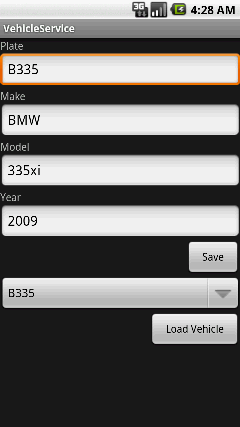
现在,我需要创建Android客户端来调用WCF服务。

image[1]_3

在启动过程中,活动(Activity)调用IVehicleService.GetPlates方法填充Spinner。

当Load Vehicle按钮点击时,通过调用IVehicleService.GetVehicle方法得到Vehicle对象并填充到EditText中。

点击Save按钮时,将数据包装并提交到IVehicleService.SaveVehicle方法。

public class MainActivity extends Activity {

    private final static String SERVICE_URI = "http://lt0.studio.entail.ca:8080/VehicleService.svc";

    private Spinner plateSpinner;
    private EditText makeEdit;
    private EditText plateEdit;
    private EditText yearEdit;
    private EditText modelEdit;

    @Override
    public void onCreate(Bundle savedInstanceState) {
        super.onCreate(savedInstanceState);
        setContentView(R.layout.main);

        plateSpinner = (Spinner)findViewById(R.id.plate_spinner);
        makeEdit = (EditText)findViewById(R.id.make_edit);
        plateEdit = (EditText)findViewById(R.id.plate_edit);
        yearEdit = (EditText)findViewById(R.id.year_edit);
        modelEdit = (EditText)findViewById(R.id.model_edit);
    }
     
    @Override
    public void onResume() {
        super.onResume();

        // Invoke IVehicleService.GetPlates and populate plateSpinner
        refreshVehicles();
    }
}

在数据保存或者Activity被恢复(resumed)的时候会调用refreshVehicles方法,它向WCF服务发送一个Get请求,得到一个由JSON字符串表达的数据对象。

private void refreshVehicles() {
    try {

        // Send GET request to <service>/GetPlates
        HttpGet request = new HttpGet(SERVICE_URI + "/GetPlates");
        request.setHeader("Accept", "application/json");
        request.setHeader("Content-type", "application/json");

        DefaultHttpClient httpClient = new DefaultHttpClient();
        HttpResponse response = httpClient.execute(request);

        HttpEntity responseEntity = response.getEntity();
         
        // Read response data into buffer
        char[] buffer = new char[(int)responseEntity.getContentLength()];
        InputStream stream = responseEntity.getContent();
        InputStreamReader reader = new InputStreamReader(stream);
        reader.read(buffer);
        stream.close();

        JSONArray plates = new JSONArray(new String(buffer));

        // Reset plate spinner
        ArrayAdapter<String> adapter = new ArrayAdapter<String>(this, android.R.layout.simple_spinner_item);
        adapter.setDropDownViewResource(android.R.layout.simple_spinner_dropdown_item);
        for (int i = 0; i < plates.length(); ++i) {
            adapter.add(plates.getString(i));
        }
        plateSpinner.setAdapter(adapter);
         
    } catch (Exception e) {
        e.printStackTrace();
    }
}

onLoadVehicleClick 方法处理Load Vehicle 点击事件,和refreshVehicles 方法相似,它发送一个GET请求到WCF服务,通过plate number得到一个vehicle对象,但区别在于,它在结果处理中使用了JSONObject 转换,就像直接从WCF服务中拿到的vehicle对象一样。

public void onLoadVehicleClick(View button) {
    try {
        // Send GET request to <service>/GetVehicle/<plate>
        DefaultHttpClient httpClient = new DefaultHttpClient();
        HttpGet request = new HttpGet(SERVICE_URI + "/GetVehicle/" + plateSpinner.getSelectedItem());

        request.setHeader("Accept", "application/json");
        request.setHeader("Content-type", "application/json");

        HttpResponse response = httpClient.execute(request);

        HttpEntity responseEntity = response.getEntity();

        // Read response data into buffer
        char[] buffer = new char[(int)responseEntity.getContentLength()];
        InputStream stream = responseEntity.getContent();
        InputStreamReader reader = new InputStreamReader(stream);
        reader.read(buffer);
        stream.close();

        JSONObject vehicle = new JSONObject(new String(buffer));

        // Populate text fields
        makeEdit.setText(vehicle.getString("make"));
        plateEdit.setText(vehicle.getString("plate"));
        modelEdit.setText(vehicle.getString("model"));
        yearEdit.setText(vehicle.getString("year"));

    } catch (Exception e) {
        e.printStackTrace();
    }
}

当Save按钮点击时,调用onSaveVehicleClick 方法。这个方法中简单的将所有的文本字段的值放入一个JSONObject对象,然后提交(POST)给WCF服务。注意所有的数据包装进了一个叫vehicle的对象,WCF收到后,会将其作为名称为vehicle的参数。

public void onSaveVehicleClick(View button) {

    try {

        Editable make = makeEdit.getText();
        Editable plate = plateEdit.getText();
        Editable model = modelEdit.getText();
        Editable year = yearEdit.getText();

        boolean isValid = true;

        // Data validation goes here

        if (isValid) {

            // POST request to <service>/SaveVehicle
            HttpPost request = new HttpPost(SERVICE_URI + "/SaveVehicle");
            request.setHeader("Accept", "application/json");
            request.setHeader("Content-type", "application/json");

            // Build JSON string
            JSONStringer vehicle = new JSONStringer()
                .object()
                    .key("vehicle")
                        .object()
                            .key("plate").value(plate)
                            .key("make").value(make)
                            .key("model").value(model)
                            .key("year").value(Integer.parseInt(year.toString()))
                        .endObject()
                    .endObject();
            StringEntity entity = new StringEntity(vehicle.toString());

            request.setEntity(entity);

            // Send request to WCF service
            DefaultHttpClient httpClient = new DefaultHttpClient();
            HttpResponse response = httpClient.execute(request);

            Log.d("WebInvoke", "Saving : " + response.getStatusLine().getStatusCode());
             
            // Reload plate numbers
            refreshVehicles();
        }

    } catch (Exception e) {
        e.printStackTrace();
    }
}

最后,在AndroidManifest.xml中添加Internet的访问权限。

<uses-permission android:name="android.permission.INTERNET" />

DEMO可以运行。

android application

[原创]EasyUI的Form中fckeditor编辑器不显示编辑的值问题解决办法

mikel阅读(1370)

最近项目需要用到页面编辑器,于是沿用以前项目的代码,使用fckeditor编辑器,具体整合方法见[原创]JQuery的FckEditor插件使用教程,按上述方法整合后的代码如下:
$(function(){
//初始化FCKEditor
$.fck.config = { path: ‘../../FCKeditor/’, width: 700, height: 300, toolbar: ‘Basic’ };
$(‘textarea#Meeting_Content’).fck();
});

但是编辑数据时编辑器显示不出值,分析原因可能是EasyUI的form组件加载数据是在编辑器初始化之后赋值给textarea导致编辑器显示不住编辑的值,因此需要在
EasyUI的form组件的onLoadSuccess事件中再将加载后的值赋给编辑器显示出来才行,于是加入了form的onLoadSuccess事件,代码如下:
$(function(){
//初始化FCKEditor
$.fck.config = { path: ‘../../FCKeditor/’, width: 700, height: 300, toolbar: ‘Basic’ };
$(‘textarea#Meeting_Content’).fck();

$(‘#editform’).form({
onLoadSuccess: function(data) {
$.fck.content(‘infoContent’, $(‘#infoContent’).val());
}
});

});
编辑显示值的问题解决了,但是在EasyUI的datagrid中显示编辑器保存的内容时,firefox下的行的高度变高了,开始以为是JQuery的fckEditor的插件的样式和EasyUI的样式有重名冲突,但是查看处理后的代码发现没冲突,于是发现是因为编辑器保存后的值都加入了p标签,导致行变高了,那就在datagrid之前用正则
表达式去除掉html标签,这样就ok了!

[转载]原型设计工具集

mikel阅读(905)

[转载]让程序员最头疼的事——原型设计 – 紫青城 – 博客园.

1、源码:江苏雨情系统.rp 下载: 江苏雨情系统.rar

2、一个比较好的Axure RP Libraries:Better GUI.rplib 下载: BetterGUI.rar

3、原型生成后的html,可直接点击运行,查看原型运行效果下载: 原型HTML.rar

4、AxureRP-Pro-5.6.0.2097汉化版注册码

IloveyouAxure
UChpuxwbDW6eAIaAf9UujEFSBwN3vpEz9snHvlCQVJGQy4p7WrCyKLLvV5QLvqva


[转载][C#基础知识]Ref 关键字在修饰在引用类型时的行为

mikel阅读(983)

[转载][C#基础知识]Ref 关键字在修饰在引用类型时的行为 – sujiantao – 博客园.

这是个老话题了,不过还是有一些初学者不是太明白,这个也是在面试时容易问的问题。

试验1:Ref对于改变引用对象的属性时的影响

using System;

namespace SOVT
{
class Program
{
static void Main()
{
MyClass myClass=new MyClass();
Console.WriteLine(myClass.Field);
ChangeMyClass(myClass);
Console.WriteLine(myClass.Field);
ChangeMyClass(ref myClass);
Console.WriteLine(myClass.Field);
Console.ReadKey();
}
public class MyClass
{
public int Field;
}

public static void ChangeMyClass(MyClass myClass)
{
myClass.Field = 1;
}

public static void ChangeMyClass(ref MyClass myClass)
{
myClass.Field = 2;
}
}
}

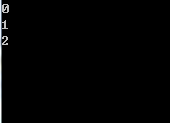
其运行结果为:

结论:对于引用对象,无论是否有Ref关键字修饰,都能改变其调用方法外部的引用的对象的字段值,用不用Ref无影响。

试验2:Ref对于在方法内部改变其指向对象时影响

using System;

namespace SOVT
{
class Program
{
static void Main()
{
MyClass myClass=new MyClass();
Console.WriteLine(myClass.Field);
ChangeMyClass(myClass);
Console.WriteLine(myClass.Field);
ChangeMyClass(ref myClass);
Console.WriteLine(myClass.Field);
Console.ReadKey();
}
public class MyClass
{
public int Field;
}

public static void ChangeMyClass(MyClass myClass)
{
myClass = new MyClass {Field = 1};
}

public static void ChangeMyClass(ref MyClass myClass)
{
myClass = new MyClass { Field = 2 };
}
}
}

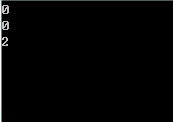
运行结果:

结论:对于再分配引用对象的引用的操作,没有Ref修饰时是不能在外部生效的,只有有Ref修饰的引用参数才能使再分配操作应用于外部。

小结:

  1. 当没有Ref修饰引用类型的参数时,在方法中只能改变此引用参数的属性内容,而不能改变整个引用参数对象本身。
  2. 当有Ref修饰引用类型的参数时,则可以在方法中改变此引用参数的指向位置,而不仅是其属性内容。
  3. 当 一个引用类型传给一个方法时,是传递了这个引用类型对象的引用的副本(不是对象本身),所以对于在调用方法外部的引用和方法中的引用来说,这两个引用都指 向堆上的同一个对象。所以在修改此对象的属性值时,修改同时会应用于内部和外部的两个引用上。但重新分配其引用位置时,则只是修改副本引用的引用位置,原 引用(方法外部)的位置不变,原引用还是指向原来的对象。
  4. 而如果加上Ref关键字,这时传入的参数则为些引用对象的原始引用,而不是引用的副本,这样的话,你就不但可以修改原始引用对象的内容,还可以再分配此引用的引用位置(用New 来重新初始化)。
  5. 如果你只想在方法中改变引用参数的内容,没有必要使用Ref来修饰引用参数。
  6. 如果你希望在方法中改变引用对象参数的引用(调用方法外的),如重新初始化对象,则需要使用Ref关键字来修饰参数。

[转载]B2C电子商务系统研发——商品模块E-R图建模

mikel阅读(1614)

[转载]B2C电子商务系统研发——商品模块E-R图建模 – 颜超敏 – 博客园.

【说明】:这只是我提出的一种建模思路,电子商务的业务比较复杂,而且各个网站和系统会有其特定的需求,

这个模型虽然具备一定的通用性,但不能保证适用所有的业务。各位读者可以根据自己项目的需要来做调整。

  1. 商品
    模块的核心实体之一。承担和内部、外部的关联。该表内设计基础属性和冗余信息。
    前台商品详细页面,已本实体的记录作为单元,一条记录一个详细页面。
  2. 商品SKU
    模块的另一个核心实体,从属于商品。每一个商品SKU是商品关联的规格的一种组合。
    比如 [颜色SKU-红色] + [尺码SKU-42码] 形成一种组和。这个组合构成一个商品SKU。
    价格、库存和关联购物车、订单等,都通过此实体完成。
  3. 商品描述
    和商品是一对一关系,将只会在商品详细页面使用的SEO、描述等相关字段分离出来,
    对提高商品列表的检索效率会有帮助。
  4. 商品媒体
    通过媒体类型来区分图片、视频和文档等。
  5. 属性扩展模块
    上面粉红色框住的部分是属性扩展模块,通过各类关联为商品模块实现SKU、评论项、查询属性和普通描述性
    属性的扩展。从设计上考虑,属性扩展模块并不从属商品模块,它可以为其它的实体(如分类、订单、客户)
    提供属性扩展服务。当然SKU属性则是商品独有的。
  6. 商品库存
    这块是可选的设计,需要专设一章来分析,而对于有紧迫进度要求的项目,可以先直接在商品SKU实体中设计
    一个“库存数量”字段,留待以后扩展也可以。

[原创]EasyUI的datagrid页脚footer使用注意事项

mikel阅读(1632)

最近项目中遇到datagrid数据需要再form加载完成后根据具体的商品显示页脚footer合计数量的问题,页面初始化的时候不加载datagrid数据,初始化完成后需要读取form中的项目值然后加载对应的数据到

datagrid中,问题代码如下:

$('#grid').datagrid({
   showFooter:true
});
$('#form').form({
  onLoadSuccess:function(data){
    //datagrid    
    $('#grid').datagrid({
       url:'/grid/getData?id='+$('#id').val()+'&r='+Math.random()
    });
 }
});

结果datagrid不显示页脚footer,列数据能显示正常,分析问题原因是因为页面创建datagrid的时候因为没有数据导致错误,firefox中提示rows未定义,当然未定义了,因为我根本没给datagrid赋值,这样datagrid的页脚就显示不出来,那么怎么修改呢,参考了我以前写的文章[原创]EasyUI的DataGrid合击汇总页脚使用教程得到解决办法,那就初始化的时候给datagrid一个空的数据集,让它顺利初始化完成,然后再当form加载成功后更换它的数据,代码如下:

var nullData='{"rows":[],"total":0;"footer":{"Footer":"合计","num":0}}';
var json=eval('(' + nullData + ')');
$('#grid').datagrid({
   data:json,
   showFooter:true
});
$('#form').form({
  onLoadSuccess:function(data){
    //datagrid    
    $('#grid').datagrid({
       url:'/grid/getData?id='+$('#id').val()+'&r='+Math.random()
    });
 }
});

[转载]ASP.NET MVC 3 开发的20个秘诀(十一)[20 Recipes for Programming MVC 3]:通过表单上传文件

mikel阅读(838)

[转载][翻译]ASP.NET MVC 3 开发的20个秘诀(十一)[20 Recipes for Programming MVC 3]:通过表单上传文件 – O2DS – 博客园.

议题

同意用户将文件上传并保存到你的网站

解决方案

通过HttpPostedFileBase实现将文件上传并保存到磁盘。

讨论

在下面这个示例中,我们将在之前创建的添加和编辑书籍的视图中添加上传一个缩略图的控件。开始,必须修改BooksCreate视图表单的“enctype”以及在表单中用缩略图控件替换文本输入框。以下是修改后的视图文件:

@model MvcApplication4.Models.Book
@{
ViewBag.Title = "Create";
}
<h2>Create</h2>
<script src="@Url.Content("~/Scripts/jquery.validate.min.js")"
type="text/javascript"></script>
<script src="
@Url.Content("~/Scripts/jquery.validate.unobtrusive.min.js")"
type="text/javascript"></script>

@using (Html.BeginForm("Create", "Books", FormMethod.Post,
    new { enctype = "multipart/form-data" }))
{
    @Html.ValidationSummary(true)
    <fieldset>
        <legend>Book</legend>
        <div class="editor-label">
            @Html.LabelFor(model => model.Title)
        </div>
        <div class="editor-field">
            @Html.EditorFor(model => model.Title)
            @Html.ValidationMessageFor(model => model.Title)
        </div>
        <div class="editor-label">
            @Html.LabelFor(model => model.Isbn)
        </div>
        <div class="editor-field">
            @Html.EditorFor(model => model.Isbn)
            @Html.ValidationMessageFor(model => model.Isbn)
        </div>
        <div class="editor-label">
            @Html.LabelFor(model => model.Summary)
        </div>
        <div class="editor-field">
            @Html.EditorFor(model => model.Summary)
            @Html.ValidationMessageFor(model => model.Summary)
        </div>
        <div class="editor-label">
            @Html.LabelFor(model => model.Author)
        </div>
        <div class="editor-field">
            @Html.EditorFor(model => model.Author)
            @Html.ValidationMessageFor(model => model.Author)
        </div>
        <div class="editor-label">
            @Html.LabelFor(model => model.Thumbnail)
        </div>
        <div class="editor-field">
            <input type="file" name="file" />
            @Html.ValidationMessageFor(model => model.Thumbnail)
        </div>
        <div class="editor-label">
            @Html.LabelFor(model => model.Price)
        </div>
        <div class="editor-field">
            @Html.EditorFor(model => model.Price)
            @Html.ValidationMessageFor(model => model.Price)
        </div>
        <div class="editor-label">
            @Html.LabelFor(model => model.Published)
        </div>
        <div class="editor-field">
            @Html.EditorFor(model => model.Published)
            @Html.ValidationMessageFor(model => model.Published)
        </div>
        <p>
            <input type="submit" value="Create" />
        </p>
    </fieldset>
}
<div>
    @Html.ActionLink("Back to List", "Index")
</div>

书籍的编辑视图也必须以同样的方式进行修改,与之前不同在这个表单上添加了一个隐藏字段(用于传递旧的缩略图信息)。这将会通知BookController在上传新文件之后将旧文件删除:

@model MvcApplication4.Models.Book
@{
    ViewBag.Title = "Edit";
}
<h2>Edit</h2>
<script src="@Url.Content("~/Scripts/jquery.validate.min.js")"
    type="text/javascript"></script>
<script src="
    @Url.Content("~/Scripts/jquery.validate.unobtrusive.min.js")"
        type="text/javascript"></script>
@using (Html.BeginForm("Edit", "Books", FormMethod.Post,
    new { enctype = "multipart/form-data" }))
{
    @Html.ValidationSummary(true)
    <fieldset>
        <legend>Book</legend>
        @Html.HiddenFor(model => model.ID)
        <div class="editor-label">
            @Html.LabelFor(model => model.Title)
        </div>
        <div class="editor-field">
            @Html.EditorFor(model => model.Title)
            @Html.ValidationMessageFor(model => model.Title)
        </div>
        <div class="editor-label">
            @Html.LabelFor(model => model.Isbn)
        </div>
        <div class="editor-field">
            @Html.EditorFor(model => model.Isbn)
            @Html.ValidationMessageFor(model => model.Isbn)
        </div>
        <div class="editor-label">
            @Html.LabelFor(model => model.Summary)
        </div>
        <div class="editor-field">
            @Html.EditorFor(model => model.Summary)
            @Html.ValidationMessageFor(model => model.Summary)
        </div>
        <div class="editor-label">
            @Html.LabelFor(model => model.Author)
        </div>
        <div class="editor-field">
            @Html.EditorFor(model => model.Author)
            @Html.ValidationMessageFor(model => model.Author)
        </div>
        <div class="editor-label">
            @Html.LabelFor(model => model.Thumbnail)
        </div>
        <div class="editor-field">
            <input type="file" name="file" />
            @Html.HiddenFor(model => model.Thumbnail)
            @Html.ValidationMessageFor(model => model.Thumbnail)
        </div>
        <div class="editor-label">
            @Html.LabelFor(model => model.Price)
        </div>
        <div class="editor-field">
            @Html.EditorFor(model => model.Price)
            @Html.ValidationMessageFor(model => model.Price)
        </div>
        <div class="editor-label">
            @Html.LabelFor(model => model.Published)
        </div>
        <div class="editor-field">
            @Html.EditorFor(model => model.Published)
            @Html.ValidationMessageFor(model => model.Published)
        </div>
        <p>
            <input type="submit" value="Save" />
        </p>
    </fieldset>
}
<div>
    @Html.ActionLink("Back to List", "Index")
</div>

因为在BooksControllerCreateEdit方法都会使用保存上传文件的方法,为了避免写重复的代码,我们需要创建一个新类,右键单击“Utils”文件夹选择“添加”→“类”并创建“FileUpload”类。

这个类将会负责两个重要的功能:保存文件和删除文件。在下面的示例中,FileUpload类将会接收一个HttpPostedFile类型的变量,并将其保存到服务器指定路径。另一个功能则相反,当服务器接收到新的文件时,它负责按照传回的名称将文件从服务器上删掉:

using System;
using System.Collections.Generic;
using System.Linq;
using System.Web;
using System.IO;
namespace MvcApplication4.Utils
{
    public static class FileUpload
    {
        public static char DirSeparator =
        System.IO.Path.DirectorySeparatorChar;
        public static string FilesPath = "Content" +
        DirSeparator + "Uploads" + DirSeparator;
        public static string UploadFile(HttpPostedFileBase file)
        {
            // 确认接收到文件
            if (null == file) return "";
            // 确认接收到的文件非空
            if (!(file.ContentLength > 0)) return "";
            string fileName = file.FileName;
            string fileExt = Path.GetExtension(file.FileName);
            // 确认接受到的文件的类型
            if (null == fileExt) return "";
            // 检测当前要存储的文件夹是否存在
            if (!Directory.Exists(FilesPath))
            {
                // 不存在则创建一个
                Directory.CreateDirectory(FilesPath);
            }
            // 设置完整保存路径
            string path = FilesPath + DirSeparator + fileName;
            // 保存文件
            file.SaveAs(Path.GetFullPath(path));
            // 返回文件名
            return fileName;
        }
        public static void DeleteFile(string fileName)
        {
            // 确认文件名合法
            if (fileName.Length == 0) return;
            // 设置要删除的文件的完整路径
            string path = FilesPath + DirSeparator + fileName;
            // 检测文件是否存在
            if (File.Exists(Path.GetFullPath(path)))
            {
                // 删除文件
                File.Delete(Path.GetFullPath(path));
            }
        }
    }
}

为了避免在BooksController类中再次进行实例化,这个类和方法都定义为静态的。类顶部的常量定义了文件将会保存的位置,请修改这些变量指定文件在你的站点的存储位置。在UploadFile方法中,检测如果上传文件要保存到目录不存在,则通过System.IO.Directory类的CreateDirectory方法创建。删除方法也有一个类似的检查,以确保通过File.Delete方法删除的文件是存在的。如果不执行这个检测,那么在删除一个不存在的文件时,方法将会抛出一个错误。

最后需要修改BooksController,在下面这个示例中,做了三处修改:

  1. 修改Create方法调用UploadFile方法;
  2. 修改Edit方法,先调用DeleteFile方法,然后再调用UploadFile方法;
  3. 修改DeleteConfirmed方法,调用DeleteFile方法删除文件后,将书籍从数据中删除。
using System;
using System.Collections.Generic;
using System.Data;
using System.Data.Entity;
using System.Linq;
using System.Linq.Dynamic;
using System.Web;
using System.Web.Mvc;
using MvcApplication4.Models;
using MvcApplication4.Utils;
using PagedList;
namespace MvcApplication4.Controllers
{
    public class BooksController : Controller
    {
        private BookDBContext db = new BookDBContext();
        … 
        //
        // GET: /Books/Create
        public ActionResult Create()
        {
            return View();
        }
        //
        // POST: /Books/Create
        [HttpPost]
        public ActionResult Create(Book book,
        HttpPostedFileBase file)
        {
            if (ModelState.IsValid)
            {
                // Upload our file
                book.Thumbnail = FileUpload.UploadFile(file);
                db.Books.Add(book);
                db.SaveChanges();
                return RedirectToAction("Index");
            }
            return View(book);
        }
        //
        // GET: /Books/Edit/5
        public ActionResult Edit(int id)
        {
            Book book = db.Books.Find(id);
            return View(book);
        }
        //
        // POST: /Books/Edit/5
        [HttpPost]
        public ActionResult Edit(Book book,
        HttpPostedFileBase file)
        {
            if (ModelState.IsValid)
            {
                // Delete old file
                FileUpload.DeleteFile(book.Thumbnail);
                // Upload our file
                book.Thumbnail = FileUpload.UploadFile(file);
                db.Entry(book).State = EntityState.Modified;
                db.SaveChanges();
                return RedirectToAction("Index");
            }
            return View(book);
        }
        //
        // GET: /Books/Delete/5
        public ActionResult Delete(int id)
        {
            Book book = db.Books.Find(id);
            return View(book);
        }

        //
        // POST: /Books/Delete/5
        [HttpPost, ActionName("Delete")]
        public ActionResult DeleteConfirmed(int id)
        {
            Book book = db.Books.Find(id);
            // Delete old file
            FileUpload.DeleteFile(book.Thumbnail);
            db.Books.Remove(book);
            db.SaveChanges();
            return RedirectToAction("Index");
        }
        ...
    }

}

参考

HttpPostedFileBase原书地址书籍源代码

[转载]巧用ASP.net MVC3里的HandleErrorAttribute

mikel阅读(929)

[转载]大叔手记(6):巧用ASP.net MVC3里的HandleErrorAttribute – 汤姆大叔 – 博客园.

前言

一直在给Team的人强调“Good programming is good Error Handling”,没人喜欢YSOD(Yellow Screen of Death)。我每次看到黄页的时候都是心惊肉跳的,尤其是在给客户演示的时候,所以在任何时候,如果出现黄页是由于你开发的代码导致的话,对不起,我会 给你的绩效打很低的分。

当然,有些情况的黄页,在某些特殊的情况,我们可能真的无法预知,但我们起码得一些技巧让终端用户看不到这个YSOD页面。

方案

幸运的是,在MVC3里有现成的功能支持让我们可以做到这一点,它就是HandleErrorAttribte类,有2种方式可以使用它,一是在类或者方法上直接使用HandleError属性来定义:

// 在这里声明
[HandleError]
public class HomeController : Controller
{
    // 或者在这里声明
    // [HandleError]
    public ActionResult Index()
    {
        return View();
    }
}

另外一种方式是使用MVC3的Global Filters功能来注册,默认新建MVC项目在Global.asax文件里就已经有了,代码如下:

public static void RegisterGlobalFilters(GlobalFilterCollection filters)
{
    filters.Add(new HandleErrorAttribute());
}

public static void RegisterRoutes(RouteCollection routes)
{
    routes.IgnoreRoute("{resource}.axd/{*pathInfo}");

    routes.MapRoute(
"Default", // Route name
"{controller}/{action}/{id}", // URL with parameters
new { controller = "Home", action = "Index", id = UrlParameter.Optional } // Parameter defaults
    );

}

protected void Application_Start()
{
    AreaRegistration.RegisterAllAreas();

    RegisterGlobalFilters(GlobalFilters.Filters);
    RegisterRoutes(RouteTable.Routes);
}

代码段里的filters.Add(new HandleErrorAttribute());设置是说整个程序所有的Controller都使用这个HandleErrorAttribute来处理错误。

注意:HandleErrorAttribute只处理500系列错误,所以404错误需要另外单独处理,稍后会提到。

下一步,我们要做的是开启web.config根目录里的customErrors(不是views目录下的那个web.config哦),代码如下:

<customerrors mode="On" defaultredirect="~/Error/HttpError">
    <error redirect="~/Error/NotFound" statuscode="404" />
</customerrors>

defaultredirect是设置为所有错误页面转向的错误页面地址,而里面的error元素可以单独定义不同的错误页面转向地址,上面的error行就是定义404所对应的页面地址。

最后一件事,就是定义我们所需要的错误页面的ErrorController:

public class ErrorController : BaseController
{
    //
    // GET: /Error/
    public ActionResult HttpError()
    {
       return View("Error");
    }
     public ActionResult NotFound()
    {
        return View();
    }
    public ActionResult Index()
    {
        return RedirectToAction("Index", "Home");
    }
}

默认Error的view是/views/shared/Error.cshtml文件,我们来改写一下这个view的代码,代码如下:

@model System.Web.Mvc.HandleErrorInfo
@{
    ViewBag.Title = "General Site Error";
}

<h2>A General Error Has Occurred</h2>

@if (Model != null)
{
    <p>@Model.Exception.GetType().Name<br />
    thrown in @Model.ControllerName @Model.ActionName</p>
    <p>Error Details:</p>
    <p>@Model.Exception.Message</p>
}

你也可以通过传递参数来重写GlobalFilter里的HandleErrorAttribte注册,单独声明一个特定的Exception,并且带有Order参数,当然也可以连续声明多个,这样就会多次处理。

filters.Add(new HandleErrorAttribute
{
    ExceptionType = typeof(YourExceptionHere),
    // DbError.cshtml是一个Shared目录下的view.
    View = "DbError",
    Order = 2
});

同步与结束语

本文已同步至目录索引:《大叔手记全集》

大叔手记:旨在记录日常工作中的各种小技巧与资料(包括但不限于技术),如对你有用,请推荐一把,给大叔写作的动力

[转载]2012年网页设计趋势

mikel阅读(984)

[转载]2012年网页设计趋势 – 创想中国(羲闻) – 博客园.

每年的网页设计趋势都会有所改变,跟时装界一样,或者说世间万物亦是如此。作为网页设计师,你必须时刻关注业界的发展和变化,随时作出应对的准备。2012年网页设计的趋势将会是怎样的呢?一起来看看flashuser博客的观点。
各位网页设计师看到了这一篇文章,应该不太意外的发现,许多内容提及的趋势其实已经正在制作,甚至已经成为了各位的设计一部分呢!

我们无法预测未来,但是我们却可以改变。由于网络的产业的变化,我们多少都会稍微的改变了原本网页设计的做法,让设计出的东西更符合客户的需求,当越来越多人这么做的时候,自然就成为了趋势。

web design trends

以下是设计师所观察到的,网页设计2012年的趋势
1. 文字艺术的盛行
flashuser viewpoint 01

文字艺术一直以来都在设计产业中活跃,不过感谢设计师这几年的努力,网页的文字艺术的活力不仅更为旺盛,更可以预测成为明年网页设计的重要元素。简 洁、强力、易于表达涵义是文字艺术的强项。此外文字艺术用于浏览受限的智慧手机与平板计算机,也非常的合适,因此绝对会成为2012年的焦点!

按编:其实台湾也大量的使用了文字艺术于不同的领域中,例如花博展、民国100年纪念、2011年设计展…等,都以文字艺术作为主要的识别象征

2. 石板字体

flashuser viewpoint 02

石板文字(Slab typefaces)一直以来用于带点艺术的设计世界中(例如T-Shirt、艺术展、设计展等)较少用于正式的场合。不过石板字体近年受到了青睐,原因是字体的呈现效果强烈,不论是一般字体或是粗体,视觉效果都十分的出色。

按编:目前英语网站的设计中,我们普遍建议使用的字体为:Time News Roman, Arial等,强烈的标题字体则可使用Arial Black或Impact。

3. 一页式网站

flashuser viewpoint 03

终于,人们发现他们不需要一个包含所有信息的复杂网站,现在的人们希望网站简洁、快速、只要几页就能解决他们的问题。一页式的网页设计正好满足了这样的族群。不用担心人们关注不到我们想呈现的内容,透过导引的方式可以让使用者跳离一页式网站,亦是流行的趋势。

良好的一页式网页设计,可以在有限的页面设计中,呈现必要的信息。目前最受欢迎的一页式网页为个人型态的中小企业,与正规的企业网站相比不仅要求明显,且易于阅读,网页内留下email或电话,便于客户询问合作事宜。

4. 自介式网站

flashuser viewpoint 04

「您好,很高兴认识你…」这样的风气已经开始影响了网页设计的潮流。网页设计者希望可以打破传统网站与用户的界线,希望可以用更为贴近用户的方式沟通,因此加入了柔性的对话,就像是跟朋友相互打招呼一样。

这样的设计并没有特殊的规则,只要轻松、贴切、感觉良好就可以了。有的设计师会将这样的口吻置于文章的标题,也有设计师用斗大的抬头来强调这个要求。

按编:其实近年科技产业大量的使用了这样的设计技巧,例如知名的苹果公司、hTC手机…等,介绍产品的口吻越来越轻松,也普遍获得大众好评

5. 超大的页首与页尾

flashuser viewpoint 05

超大的Logo、页首、页尾都能够强化视觉的表现,让浏览者留下深刻的印象,超过原本尺寸的的Logo能够让企业的印象深植于客户内心,此外页尾的扩大可以让网站塞入更多关联的信息,例如网页的链接、企业的介绍、社群网站等,是近年不少企业、专门领域网站的趋势。