[转载]网站架构之缓存应用(3)实现篇

mikel阅读(1107)

[转载]网站架构之缓存应用(3)实现篇 – ASP.NET – 博客园.

这篇来讲如何利用memcached实现一级缓存,以及如何让一级缓存组件支持在企业库,memcached或者其它第三方实施方案之间的切换。 memcached本人并没有太多经验,如果文中有说的不对的地方,还希望批评指出,且文中关于memcached的代码大多来自网络。

创建memcached实现类MemcachedWebCacheProvider,由它来继承缓存提供者接口IWebCacheProvider,主里 memcached客户端我采用.NET memcached client library ,这个类库很久没有更新这过了,没有和java版同步,有部分功能目前没有实现。
1:初始化memcached服务,这段初始化代码在程序中保证执行一次就够,一般可以放在gloabl文件中,或者是设置一个静态变量来存储服务的状态。

代码

private void Setup()
{
String[] serverlist
= { 127.0.0.1:11211 };
this._pool = SockIOPool.GetInstance(default);
this._pool.SetServers(serverlist); //设置服务器列
//各服务器之间负载均衡的设置
this._pool.SetWeights(new int[] { 1 });
//socket pool设置
this._pool.InitConnections = 5; //初始化时创建的连接数
this._pool.MinConnections = 5; //最小连接数
this._pool.MaxConnections = 250; //最大连接数
//连接的最大空闲时间,下面设置为6个小时(单位ms),超过这个设置时间,连接会被释放掉
this._pool.MaxIdle = 1000 * 60 * 60 * 6;
//通讯的超时时间,下面设置为3秒(单位ms),.NET版本没有实现
this._pool.SocketTimeout = 1000 * 3;
//socket连接的超时时间,下面设置表示连接不超时,即一直保持连接状态
this._pool.SocketConnectTimeout = 0;
this._pool.Nagle = false; //是否对TCP/IP通讯使用Nalgle算法,.NET版本没有实现
//维护线程的间隔激活时间,下面设置为60秒(单位s),设置为0表示不启用维护线程
this._pool.MaintenanceSleep = 60;
//socket单次任务的最大时间,超过这个时间socket会被强行中断掉(当前任务失败)
this._pool.MaxBusy = 1000 * 10;
this._pool.Initialize();
}

2:获取一个memcached客户端。

private MemcachedClient GetClient()
{
MemcachedClient client
= new MemcachedClient();
client.PoolName
= default;
return client;
}

3:根据memcached提供的功能实现IWebCacheProvider,代码就不贴了,大家可以自己去试试。

到此我们就利用memcached实现了一级缓存,由于.NET memcached client library 实现了分布式,我们只需要在多台服务器上安装上memcached服务,在初始化memcached代码中增加了服务器相关配置即可。 String[] serverlist = { 127.0.0.1:11211 };

如何让一级缓存组件支持多实现方案之间的切换。
MyWebCacheServiceClient:客户端缓存组件实例,它来完成一级缓存与二级缓存之间的联系,以及根据配置文件来选择一级缓存的实施方案。
第一:CacheServiceMode,根据它就可以决定缓存是只缓存二级缓存还是两级都缓存。

1:LocalCacheOnlyMode,只启用web server上的二级缓存。

2:BufferedLCacheServerMode,即启用web server上的二级缓存也启用cache server上的缓存。

3:Off,关闭缓存功能。
第二:IWebCacheProvider service = this .GetPrimaryCacheProvider(hashKey);方式决定了一级缓存的实施方案。

代码

/// <summary>
/// 获取一级缓存
/// </summary>
/// <param name=”hashKey”></param>
/// <param name=”configFilePath”></param>
/// <returns></returns>
private IWebCacheProvider GetPrimaryCacheProvider(uint hashKey)
{
IWebCacheProvider provider
= null;
string cacheType = WebConfig.ChannelConfig[CacheType].ToString().ToLower();
switch (cacheType)
{
case memcached:
provider
= WebCacheProviderFactory.GetMemcachedWebCacheProvider(configFilePath);
break;
case entlib:
provider
= servicePool.GetServiceClient(hashKey) as IWebCacheProvider;
break;
}

return provider;
}

插入缓存的逻辑:原理就是根据配置文件中的CacheMode来完成缓存级别的判定以及一级缓存的方案。

代码

public void Insert(string key, object value, string region, string subRegion, CacheItemConfig cacheItemConfig)
{
if (string.IsNullOrEmpty(key) || value == null)
return;
//关闭模式,不使用缓存
if (Options.CacheServiceMode == ECacheServiceMode.Off)
{
return;
}
else if (Options.CacheServiceMode == ECacheServiceMode.BufferedLCacheServerMode
|| Options.CacheServiceMode == ECacheServiceMode.LocalAndCacheServerAndSQL
|| Options.CacheServiceMode == ECacheServiceMode.LocalCacheOnlyMode)
{
//使用带缓冲的模式
if (Options.BufferType == ECacheDependencyType.SlidingTime)
{
SecondaryCacheProvider.Insert(key, value, region, subRegion, MyCacheItemPriority.Normal, Options.BufferSlidingTime);
}
else if (Options.BufferType == ECacheDependencyType.AbsoluteTime)
{
SecondaryCacheProvider.Insert(key, value, region, subRegion, MyCacheItemPriority.Normal, Options.BufferAbsoluteTime);
}

if (Options.CacheServiceMode == ECacheServiceMode.LocalCacheOnlyMode)
{
//只使用本地缓存
return;
}
}

checkKey(key);
uint hashKey = hash(key);

try
{
if (Options.CacheServiceMode == ECacheServiceMode.CacheServerMode
|| Options.CacheServiceMode == ECacheServiceMode.BufferedLCacheServerMode
|| Options.CacheServiceMode == ECacheServiceMode.CacheServerAndSQL
|| Options.CacheServiceMode == ECacheServiceMode.LocalAndCacheServerAndSQL)
{
//CacheServer模式使用Cache服务器保存Cache
IWebCacheProvider service = this .GetPrimaryCacheProvider(hashKey);
byte[] byteValue = SerializationHelper.SaveToBinaryBytes(value);
var cachePriority
= ModelConverter.ToRefClass(cacheItemConfig.CachePriority);
if (cacheItemConfig.CacheType == ECacheDependencyType.AbsoluteTime)
{
AbsoluteTimeCacheDependency absTime
= new AbsoluteTimeCacheDependency();
absTime.AbsoluteTime
= DateTime.Now.AddMinutes(cacheItemConfig.CacheTimeMinutes);
service.Insert(key, byteValue, region, subRegion, cachePriority, absTime);
}
else if (cacheItemConfig.CacheType == ECacheDependencyType.SlidingTime)
{
SlidingTimeCacheDependency slTime
= new SlidingTimeCacheDependency();
slTime.SlidingTime
= new TimeSpan(0, cacheItemConfig.CacheTimeMinutes, 0);
service.Insert(key, byteValue, region, subRegion, cachePriority, slTime);
}
}
}
catch (Exception ex)
{
//出现异常,保存到数据库中
servicePool.ReplaceServiceClient(hashKey);
this.SendLogEmail(ex);
}

}

客户端调用代码:为了调用方便,创建一个CacheHelper来帮助完成:

代码

public class CacheHelper
{
/// <summary>
/// 主分区
/// </summary>
public const string REGION = MyBlog;
/// <summary>
/// 子分区
/// </summary>
public const string SUB_REGION = default;
public const string BlogListConfigKey = BlogListConfigKey;
#region 页面间数据传递
/// <summary>
/// 新增页面间传递数据到WebCache
/// </summary>
/// <returns>返回PageKeyID,用于页面间传递的键值</returns>
public static string InsertPageParams(string configKey, object obj,string pageKey)
{
string result = null;

MyWebCacheServiceClient cacheClient = CacheClientFactory.GetWebCacheServiceClient(REGION, SUB_REGION, configKey);
cacheClient.Insert(
MyWebCacheServiceClient.BuildKey(configKey,pageKey),
obj,
REGION,
SUB_REGION);

return result;
}
/// <summary>
/// 从Cache里获取页面传递Cache
/// </summary>
/// <param name=”key”>FlightCacheKey里的常量</param>
/// <param name=”pageKeyID”>页面传递的键值</param>
public static object GetPageParams(string configKey, string pageKey)
{
object result = null;
MyWebCacheServiceClient cacheClient
= CacheClientFactory.GetWebCacheServiceClient(REGION,
SUB_REGION, configKey);
result
= cacheClient.Get(
MyWebCacheServiceClient.BuildKey(configKey, pageKey),
REGION,
SUB_REGION);

return result;

}
#endregion
}

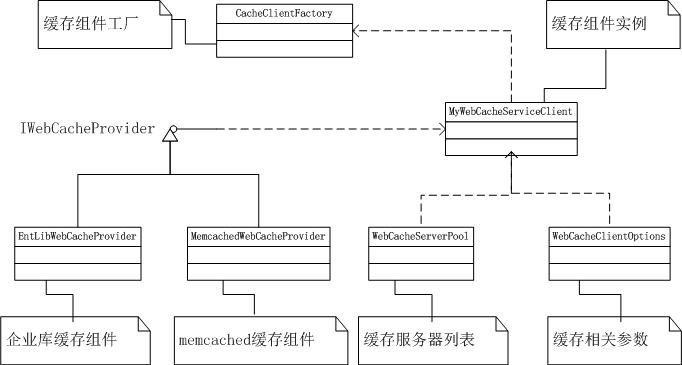
两级缓存类结构图:

以上代码贴出来看起来有点乱,这里贴出网站两级缓存类结构图:
[转载]使用QOAuth来进行新浪/腾讯微博验证(一)

mikel阅读(1519)

[转载]使用QOAuth来进行新浪/腾讯微博验证(一) – 风雷云雪电 – 博客园.

在上篇文章Qt简介以及如何配置Qt使用VS2010进行开发以及微博是个大金矿,使用VS2010编译QOAuth支持微博通用认证OAuth实现SINA微博登陆中向大家介绍了如何编译Qt及QOauth,在这篇文章中我会用实例的方式来介绍如何使用QOAuth来通过新浪或者腾讯微博验证。

由于边写代码别写博文,进度会比较慢,会以多篇文档的方式来完成整个文章。由于OAuth基本上分为3个部分

  • requestToken
  • 各个网站自定义验证
  • accessToken

这篇文章作为该系列的第一篇,主要介绍下如何完成Api的申请和项目的搭建以及接口的部分设计。

1. 为了创建新浪/腾讯微博的应用程序,首先要注册成为开发者。

新浪API的注册地址: http://open.t.sina.com.cn/

腾讯API的注册地址:http://open.t.qq.com/

进行注册之后会获得App Key和App Secret:这个是OAuth验证用来通过requestToken的必备参数,下图是我注册后的新浪和腾讯微博的截图

image

新浪微博应用截图

image

腾讯微博应用截图

2. 在获得了调用资格后我们正式开始我的微博验证之旅。首先我们先创建一个Qt的应用程序,选择File-New-Project

image

选择Qt4Project,输入项目名称“MyMicro-blog”

image

选择OK,连续选择两次Next,到以下界面,Base class:选择QDialog,Class name:输入LoginMicroblog, 选择Finish结束创建向导

image

3. 设计

由于我们想在程序中支持新浪和腾讯的微博登陆,而且除第二步执行方式不同外,第一步和第三步执行方式相同,所有首先我们定义一个接口,为了让程序有更好的结构,我们创建一个静态库来放置接口及后面的实现。

在解决方案上点击右键,选择Add-New Project…

image

选择Qt Library,并输入名字MyMicro-blogLib

image

选择OK,在下一个界面选中Create Static Library(.lib),选中Next

image

在Class name:中输入IMicroblog,点Finish

image

首先我们定义接口成下面这个样子

image

virtual bool requestToken();
virtual bool customAouth(const QString & userName,const QString & password) = 0;
virtual bool accessToken();
virtual int error() const;

可以看到前三个函数对于OAuth认证的三个通用方法,都是bool型的,最后面是一个error函数,如果认证出错返回具体出错代码

下一步就要定义属性了,从前面知道我们需要知道App Key和App Secret这两个属性,由于这两个属性是可修改的,该属性是可读可写

经过进一步查看OAuth的实现,我们可以看到在requestToken后,服务器会返回oauth_token和oauth_token_secret两个参数,这两个参数在后面有大用处,所以需要增加这两个属性,由于这两个属性是服务器给的,所以只要只读就可以了

由于C++不支持属性,修改后成为这个样子

image

class IMicroblog
{
public:

    virtual bool requestToken();
    virtual bool customAouth(const QString & userName,const QString & password) = 0;
    virtual bool accessToken();
    virtual int error() const;

    QString appKey() const;
    void setAppKey(const QString & appkey); 
    QString appSecret() const;
    void setAppSecret(const QString & appsecret);
    QString oauthToken() const;
    QString oauthTokenSecret() const;

protected:
    QString _appKey;
    QString _appSecret;
    QString _oauthToken;
    QString _oauthTokenSecret;
};

不知不觉写了一下午,好累啊,下一篇咱们继续,先闪!

[转载]ASP.NET MVC中的扩展点(八)模型绑定

mikel阅读(1143)

[转载]MVC中的扩展点(八)模型绑定 – xfrog – 博客园.

MVC可以将用户提交的数据绑定到Action参数,我们将这个过程称之为模型绑定,在模型绑定中有两个关键:一个是值提供器,用于确定数据来源,另一个称为模型绑定器,用于确定如何将值绑定到特性的数据模型。

MVC中默认的值提供器

值提供器是一组实现了IValueProvider接口的类,MVC中的值提供其使用了标准的抽象工厂设计模式,其类图如下:

IValueProvider

MVC提供了四种默认的值提供器:

FormValueProvider:表单数据,对应于ASP.NET的Request.Form集合

QueryStringValueProvider:查询字符串,对应于ASP.NET的Request.QueryString集合

HttpFileCollectionValueProvider:文件集合,数据来源于Request.Files集合

RouteDataValueProvider:路由信息,对应于RouteData.Values集合

MVC为每一个值提供器提供了一个工厂:ValueProviderFactory,ValueProviderFactoryCollection是一 个值提供器工厂集合,其中的GetValueProvider方法返回与当前控制器上下文匹配的值提供器。ValueProviderFactories 是一个静态类,内部封装一个ValueProviderFactoryCollection集合(Factories属性),此集合默认包含MVC中4个 默认的值提供器,所以,如果我们要使用自己的值绑定器,可以通过此类的Factories属性,使用InsertItem增加新的值提供器,使用 SetItem方法将某个默认值提供器替换为我们的自定义值提供器。 需要注意的是,ValueProviderFactoryCollection的GetValueProvider方法实际返回的是一个 ValueProviderCollection集合,但由于此集合类同样实现了IValueProvider接口(其GetValue方法会从集合中所 有的值提供器中查找符合条件的项),所以GetValueProvider的返回类型仍然为IValueProvider。

MVC中默认的模型绑定器

模型绑定器用于将值提供器提供的数据映射到特定的模型类型,正因为有模型绑定器的存在,才使我们可以直接使用带参数的控制器方法:绑定器可以从值提供器中获取数据,并根据控制器方法参数类型,自动实例化参数并填充数据。

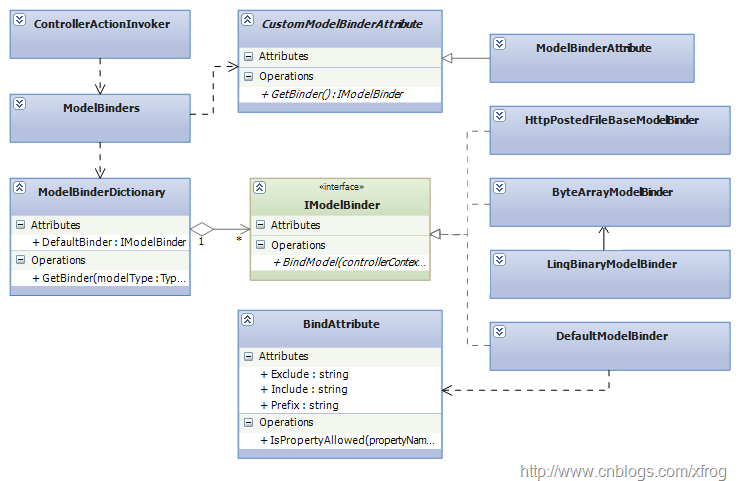
MVC中默认的模型绑定器类结构如下:

IModelBinder

MVC中实现四种模型绑定器:

HttpPostedFileBaseModelBinder:用于处理HttpPostedFileBase类型

ByteArrayModelBinder:用于处理Byte[]类型

LinqBinaryModelBinder:用于处理Linq中的Binary类型

DefaultModelBinder:默认绑定器,如果某个类型没有特定的绑定器,则使用此绑定器。

ModelBinderDictionary是一个IModelBinder字典,键为类型,值为类型所对应的绑定器。DefaultBinder属性指 定如果集合中不存在指定类型的绑定器时,应返回的默认绑定器,默认为DefaultModelBinder。我们可以通过此属性来指定我们自己的默认绑定 器。ModelBinders是一个静态类,内部封装了ModelBinderDictionary(Binders属性),包含默认的绑定器列表。

CustomModelBinderAttribute是一个用于指定自定义绑定器的特性的抽象基类,方法GetBinder用于返回一个绑定器实例。 ModelBinderAttribute是CustomModelBinderAttribute的一个实现,它根据指定的绑定器类型,返回其实例。 MVC在查找适当的绑定器时,遵循以下顺序:

在参数上通过ModelBinderAttribute特性指定的绑定器

在ModelBinders.Binders中注册的绑定器

在类型上通过ModelBinderAttribute特性指定的绑定器

默认绑定器(通常为DefaultModelBinder)

BindAttribute特性用于指定默认绑定器在绑定时的具体行为:Exlude属性指定绑定器在填充数据时,不处理的属性列表,Include属性 指定绑定器在填充数据时,只需处理的属性列表,Prefix用于指定类型的前缀,默认情况下,前缀为控制器方法中参数的名称。 IsPropertyAllowed方法用于判断特定的属性是否需要被处理。

自定义值提供器

要实现自定义的值提供器,我们需要实现一个ValueProviderFactory和一个IValueProvider,之后将其添加到 ValueProviderFactories.Factories集合中。下例实现一个CookieValueProvider,用于从Cookie中 获取数据:

1、创建一个空MVC项目

2、实现CookieValueProviderFactory工厂及CookieValueProvider提供器

显示行号 复制代码 CookieValueProviderFactory
  1. public class CookieValueProviderFactory : ValueProviderFactory
    
  2.  {
    
  3.     public override IValueProvider GetValueProvider(ControllerContext controllerContext)
    
  4.     {
    
  5.         return new CookieValueProvider(controllerContext.HttpContext.Request.Cookies);
    
  6.     }
    
  7.     private class CookieValueProvider : IValueProvider
    
  8.     {
    
  9.         private HttpCookieCollection Cookies;
    
  10.         public CookieValueProvider(HttpCookieCollection cs)
    
  11.         {
    
  12.             Cookies = cs;
    
  13.         }
    
  14.         public bool ContainsPrefix(string prefix)
    
  15.         {
    
  16.             return Cookies.AllKeys.Contains(prefix);
    
  17.         }
    
  18.         public ValueProviderResult GetValue(string key)
    
  19.         {
    
  20.             if (!ContainsPrefix(key))
    
  21.                 return null;
    
  22.             string value = Cookies[key].Value;
    
  23.             return new ValueProviderResult(value,value, CultureInfo.CurrentCulture );
    
  24.         }
    
  25.     }
    
  26. }
    

.src_container { background-color: rgb(231, 229, 220); width: 99%; overflow: hidden; margin: 12px 0pt ! important; padding: 0px 3px 3px 0px; }.src_container .titlebar { background-color: rgb(212, 223, 255); border-width: 1px 1px 0pt; border-style: solid solid none; border-color: rgb(79, 129, 189) rgb(79, 129, 189) -moz-use-text-color; padding: 3px 24px; margin: 0pt; width: auto; line-height: 120%; overflow: hidden; text-align: left; font-size: 12px; }.src_container .toolbar { display: inline; font-weight: normal; font-size: 100%; float: right; color: rgb(0, 0, 255); text-align: left; overflow: hidden; }.toolbar span.button { display: inline; font-weight: normal; font-size: 100%; color: rgb(0, 0, 255); text-align: left; overflow: hidden; cursor: pointer; }.src_container div.clientarea { background-color: white; border: 1px solid rgb(79, 129, 189); margin: 0pt; width: auto ! important; height: auto; overflow: auto; text-align: left; font-size: 12px; font-family: “Courier New”,”Consolas”,”Fixedsys”,courier,monospace,serif; }.src_container ol.mainarea { padding: 0pt 0pt 0pt 52px; margin: 0pt; background-color: rgb(247, 247, 255) ! important; }.number_show { padding-left: 52px ! important; list-style: decimal outside none ! important; }.number_show li { list-style: decimal outside none ! important; border-left: 1px dotted rgb(79, 129, 189); }.number_hide { padding-left: 0px ! important; list-style-type: none ! important; }.number_hide li { list-style-type: none ! important; border-left: 0px none; }ol.mainarea li { display: list-item ! important; font-size: 12px ! important; margin: 0pt ! important; line-height: 18px ! important; padding: 0pt 0pt 0pt 0px ! important; background-color: rgb(247, 247, 255) ! important; color: rgb(79, 129, 189); }ol.mainarea li pre { color: black; line-height: 18px; padding: 0pt 0pt 0pt 12px ! important; margin: 0em; background-color: rgb(255, 255, 255) ! important; }.linewrap ol.mainarea li pre { white-space: pre-wrap; word-wrap: break-word; }ol.mainarea li pre.alt { background-color: rgb(247, 247, 255) ! important; } 3、在Application_Start中注册自定义值提供器工厂

ValueProviderFactories.Factories.Insert(0, new CookieValueProviderFactory());

.codearea { color: black; background-color: white; line-height: 18px; border: 1px solid rgb(79, 129, 189); margin: 0pt; width: auto ! important; overflow: auto; text-align: left; font-size: 12px; font-family: “Courier New”,”Consolas”,”Fixedsys”,”BitStream Vera Sans Mono”,courier,monospace,serif; }.codearea pre { color: black; line-height: 18px; padding: 0pt 0pt 0pt 12px ! important; margin: 0em; background-color: rgb(255, 255, 255) ! important; }.linewrap pre { white-space: pre-wrap; word-wrap: break-word; }.codearea pre.alt { background-color: rgb(247, 247, 255) ! important; }.codearea .lnum { color: rgb(79, 129, 189); line-height: 18px; }

4、实现一个测试控制器,HomeController:

显示行号 复制代码 HomeController
  1. public class HomeController : Controller
    
  2. {
    
  3.     public ActionResult Index(DateTime? lastTime)
    
  4.     {
    
  5.         if (!Request.Cookies.AllKeys.Contains("lastTime"))
    
  6.         {
    
  7.             Response.Cookies.Add(new HttpCookie("lastTime", DateTime.Now.ToString()));
    
  8.         }
    
  9.         return Content(lastTime == null ? String.Empty : lastTime.ToString());
    
  10.     }
    
  11. }
    

.src_container { background-color: rgb(231, 229, 220); width: 99%; overflow: hidden; margin: 12px 0pt ! important; padding: 0px 3px 3px 0px; }.src_container .titlebar { background-color: rgb(212, 223, 255); border-width: 1px 1px 0pt; border-style: solid solid none; border-color: rgb(79, 129, 189) rgb(79, 129, 189) -moz-use-text-color; padding: 3px 24px; margin: 0pt; width: auto; line-height: 120%; overflow: hidden; text-align: left; font-size: 12px; }.src_container .toolbar { display: inline; font-weight: normal; font-size: 100%; float: right; color: rgb(0, 0, 255); text-align: left; overflow: hidden; }.toolbar span.button { display: inline; font-weight: normal; font-size: 100%; color: rgb(0, 0, 255); text-align: left; overflow: hidden; cursor: pointer; }.src_container div.clientarea { background-color: white; border: 1px solid rgb(79, 129, 189); margin: 0pt; width: auto ! important; height: auto; overflow: auto; text-align: left; font-size: 12px; font-family: “Courier New”,”Consolas”,”Fixedsys”,courier,monospace,serif; }.src_container ol.mainarea { padding: 0pt 0pt 0pt 52px; margin: 0pt; background-color: rgb(247, 247, 255) ! important; }.number_show { padding-left: 52px ! important; list-style: decimal outside none ! important; }.number_show li { list-style: decimal outside none ! important; border-left: 1px dotted rgb(79, 129, 189); }.number_hide { padding-left: 0px ! important; list-style-type: none ! important; }.number_hide li { list-style-type: none ! important; border-left: 0px none; }ol.mainarea li { display: list-item ! important; font-size: 12px ! important; margin: 0pt ! important; line-height: 18px ! important; padding: 0pt 0pt 0pt 0px ! important; background-color: rgb(247, 247, 255) ! important; color: rgb(79, 129, 189); }ol.mainarea li pre { color: black; line-height: 18px; padding: 0pt 0pt 0pt 12px ! important; margin: 0em; background-color: rgb(255, 255, 255) ! important; }.linewrap ol.mainarea li pre { white-space: pre-wrap; word-wrap: break-word; }ol.mainarea li pre.alt { background-color: rgb(247, 247, 255) ! important; } 注意,参数类型为DateTime?可空类型,这样可防止默认绑定器在没有找到对应值时报错。测试时,首次运行,由于Cookie中没有lastTime项,所以页面为空,刷新一次页面,此时页面将显示上一次访问的时间。

自定义模型绑定器

通过实现IModelBinder接口可实现自定义模型绑定器,下例将实现一个XDocument类型的绑定器:

1、创建一个空MVC项目

2、实现XDocumentBinder

显示行号 复制代码 XDocumentBinder
  1. public class XDocumentBinder : IModelBinder
    
  2. {
    
  3.     public object BindModel(ControllerContext controllerContext, ModelBindingContext bindingContext)
    
  4.     {
    
  5.         string key = bindingContext.ModelName;
    
  6.         ValueProviderResult vpr = bindingContext.ValueProvider.GetValue(key);
    
  7.         if (vpr !=null && vpr.RawValue != null && !String.IsNullOrEmpty(vpr.AttemptedValue))
    
  8.         {
    
  9.             //在模型状态中保存尝试值
    
  10.             bindingContext.ModelState.SetModelValue(key, vpr);
    
  11.             string tempString = ((String[])vpr.RawValue)[0];
    
  12.             XDocument xml = null;
    
  13.             try
    
  14.             {
    
  15.                 xml = XDocument.Parse(tempString);
    
  16.             }
    
  17.             catch (XmlException)
    
  18.             {
    
  19.                 //无法解析XML文本,则设置模型错误状态
    
  20.                 bindingContext.ModelState.AddModelError(key, "Not valid XML");
    
  21.                 return null;
    
  22.             }
    
  23.             //如果模型已经存在,则替换
    
  24.             XDocument existingModel = bindingContext.Model as XDocument;
    
  25.             if (existingModel != null)
    
  26.             {
    
  27.                 if (existingModel.Root != null)
    
  28.                 {
    
  29.                     existingModel.Root.ReplaceWith(xml.Root);
    
  30.                 }
    
  31.                 else
    
  32.                 {
    
  33.                     existingModel.Add(xml.Root);
    
  34.                 }
    
  35.                 return existingModel;
    
  36.             }
    
  37.             else
    
  38.             {
    
  39.                 return xml;
    
  40.             }
    
  41.         }
    
  42.         return null;
    
  43.     }
    
  44. }
    

.src_container { background-color: rgb(231, 229, 220); width: 99%; overflow: hidden; margin: 12px 0pt ! important; padding: 0px 3px 3px 0px; }.src_container .titlebar { background-color: rgb(212, 223, 255); border-width: 1px 1px 0pt; border-style: solid solid none; border-color: rgb(79, 129, 189) rgb(79, 129, 189) -moz-use-text-color; padding: 3px 24px; margin: 0pt; width: auto; line-height: 120%; overflow: hidden; text-align: left; font-size: 12px; }.src_container .toolbar { display: inline; font-weight: normal; font-size: 100%; float: right; color: rgb(0, 0, 255); text-align: left; overflow: hidden; }.toolbar span.button { display: inline; font-weight: normal; font-size: 100%; color: rgb(0, 0, 255); text-align: left; overflow: hidden; cursor: pointer; }.src_container div.clientarea { background-color: white; border: 1px solid rgb(79, 129, 189); margin: 0pt; width: auto ! important; height: auto; overflow: auto; text-align: left; font-size: 12px; font-family: “Courier New”,”Consolas”,”Fixedsys”,courier,monospace,serif; }.src_container ol.mainarea { padding: 0pt 0pt 0pt 52px; margin: 0pt; background-color: rgb(247, 247, 255) ! important; }.number_show { padding-left: 52px ! important; list-style: decimal outside none ! important; }.number_show li { list-style: decimal outside none ! important; border-left: 1px dotted rgb(79, 129, 189); }.number_hide { padding-left: 0px ! important; list-style-type: none ! important; }.number_hide li { list-style-type: none ! important; border-left: 0px none; }ol.mainarea li { display: list-item ! important; font-size: 12px ! important; margin: 0pt ! important; line-height: 18px ! important; padding: 0pt 0pt 0pt 0px ! important; background-color: rgb(247, 247, 255) ! important; color: rgb(79, 129, 189); }ol.mainarea li pre { color: black; line-height: 18px; padding: 0pt 0pt 0pt 12px ! important; margin: 0em; background-color: rgb(255, 255, 255) ! important; }.linewrap ol.mainarea li pre { white-space: pre-wrap; word-wrap: break-word; }ol.mainarea li pre.alt { background-color: rgb(247, 247, 255) ! important; }3、在Application_Start中注册XDocumentBinder

ModelBinders.Binders.Add(typeof(XDocument), new XDocumentBinder());

4、创建用于测试的HomeController及其View

显示行号 复制代码 HomeController
  1. public class HomeController : Controller
    
  2. {
    
  3.     [ValidateInput(false)]
    
  4.     public ActionResult Index(XDocument xml)
    
  5.     {
    
  6.            
    
  7.         if (xml == null)
    
  8.         {
    
  9.             return View();
    
  10.         }
    
  11.         else
    
  12.         {
    
  13.             Response.Clear();
    
  14.             return Content(xml.ToString(), "application/xml");
    
  15.         }
    
  16.     }
    
  17. }
    

.src_container { background-color: rgb(231, 229, 220); width: 99%; overflow: hidden; margin: 12px 0pt ! important; padding: 0px 3px 3px 0px; }.src_container .titlebar { background-color: rgb(212, 223, 255); border-width: 1px 1px 0pt; border-style: solid solid none; border-color: rgb(79, 129, 189) rgb(79, 129, 189) -moz-use-text-color; padding: 3px 24px; margin: 0pt; width: auto; line-height: 120%; overflow: hidden; text-align: left; font-size: 12px; }.src_container .toolbar { display: inline; font-weight: normal; font-size: 100%; float: right; color: rgb(0, 0, 255); text-align: left; overflow: hidden; }.toolbar span.button { display: inline; font-weight: normal; font-size: 100%; color: rgb(0, 0, 255); text-align: left; overflow: hidden; cursor: pointer; }.src_container div.clientarea { background-color: white; border: 1px solid rgb(79, 129, 189); margin: 0pt; width: auto ! important; height: auto; overflow: auto; text-align: left; font-size: 12px; font-family: “Courier New”,”Consolas”,”Fixedsys”,courier,monospace,serif; }.src_container ol.mainarea { padding: 0pt 0pt 0pt 52px; margin: 0pt; background-color: rgb(247, 247, 255) ! important; }.number_show { padding-left: 52px ! important; list-style: decimal outside none ! important; }.number_show li { list-style: decimal outside none ! important; border-left: 1px dotted rgb(79, 129, 189); }.number_hide { padding-left: 0px ! important; list-style-type: none ! important; }.number_hide li { list-style-type: none ! important; border-left: 0px none; }ol.mainarea li { display: list-item ! important; font-size: 12px ! important; margin: 0pt ! important; line-height: 18px ! important; padding: 0pt 0pt 0pt 0px ! important; background-color: rgb(247, 247, 255) ! important; color: rgb(79, 129, 189); }ol.mainarea li pre { color: black; line-height: 18px; padding: 0pt 0pt 0pt 12px ! important; margin: 0em; background-color: rgb(255, 255, 255) ! important; }.linewrap ol.mainarea li pre { white-space: pre-wrap; word-wrap: break-word; }ol.mainarea li pre.alt { background-color: rgb(247, 247, 255) ! important; }

显示行号 复制代码 Index.aspx
  1.     <div>
    
  2.     <%using (Html.BeginForm())
    
  3.       {%>
    
  4.       <%= Html.ValidationSummary() %>
    
  5.        <%=Html.TextArea("xml", new { Rows=20, Cols=50 })%> 
    
  6.        <input type="submit" value ="submit" />
    
  7.      <% } %>
    
  8.     </div>
    
  9. 
    

.src_container { background-color: rgb(231, 229, 220); width: 99%; overflow: hidden; margin: 12px 0pt ! important; padding: 0px 3px 3px 0px; }.src_container .titlebar { background-color: rgb(212, 223, 255); border-width: 1px 1px 0pt; border-style: solid solid none; border-color: rgb(79, 129, 189) rgb(79, 129, 189) -moz-use-text-color; padding: 3px 24px; margin: 0pt; width: auto; line-height: 120%; overflow: hidden; text-align: left; font-size: 12px; }.src_container .toolbar { display: inline; font-weight: normal; font-size: 100%; float: right; color: rgb(0, 0, 255); text-align: left; overflow: hidden; }.toolbar span.button { display: inline; font-weight: normal; font-size: 100%; color: rgb(0, 0, 255); text-align: left; overflow: hidden; cursor: pointer; }.src_container div.clientarea { background-color: white; border: 1px solid rgb(79, 129, 189); margin: 0pt; width: auto ! important; height: auto; overflow: auto; text-align: left; font-size: 12px; font-family: “Courier New”,”Consolas”,”Fixedsys”,courier,monospace,serif; }.src_container ol.mainarea { padding: 0pt 0pt 0pt 52px; margin: 0pt; background-color: rgb(247, 247, 255) ! important; }.number_show { padding-left: 52px ! important; list-style: decimal outside none ! important; }.number_show li { list-style: decimal outside none ! important; border-left: 1px dotted rgb(79, 129, 189); }.number_hide { padding-left: 0px ! important; list-style-type: none ! important; }.number_hide li { list-style-type: none ! important; border-left: 0px none; }ol.mainarea li { display: list-item ! important; font-size: 12px ! important; margin: 0pt ! important; line-height: 18px ! important; padding: 0pt 0pt 0pt 0px ! important; background-color: rgb(247, 247, 255) ! important; color: rgb(79, 129, 189); }ol.mainarea li pre { color: black; line-height: 18px; padding: 0pt 0pt 0pt 12px ! important; margin: 0em; background-color: rgb(255, 255, 255) ! important; }.linewrap ol.mainarea li pre { white-space: pre-wrap; word-wrap: break-word; }ol.mainarea li pre.alt { background-color: rgb(247, 247, 255) ! important; }

关于注册XDocumentBinder,我们可以通过ModelBinders.Binders将某个类型映射到绑定器,也可以通过在参数上、类型上通过ModelBinderAttribute特性来指定。

本例中Index方法上,我们指定了[ValidateInput(false)]特性,用于跳过输入验证,这是因为默认设置下,MVC不允许提交XML类型的数据。

默认绑定器扩展

DefaultModelBinder默认绑定器通过Activator.CreateInstance来实例化模型类型,所以我们的模型必须要用无参构 造器。要解除此限制,我们可以使用DI技术对默认绑定器进行扩展:从DefaultModelBinder继承一个新类,并重写CreateModel方 法,使用DI来实例化模型。最后通过 ModelBinders.Binders.DefaultBinder属性指定我们的自定义默认绑定器。

关于DI,在MVC中的扩展点(三)控制器工厂中有所涉及,有兴趣的朋友可参照该示例来实现自定义默认绑定器。

源代码下载

[转载]青梅煮酒论C#:Specification pattern

mikel阅读(999)

[转载]青梅煮酒论C#:Specification pattern – 空逸云 – 博客园.

Specification模式早在3个多月前,阅读一个开源博客的时候便接触到了.但并没多少深入.最近,抽空将其好好研究了一番,果然,其魅力的确能让你回味无穷,那现在,就让我们零距离接触Specification模式吧!

何为Specification?

Specification,中文有翻译规格,虽然有很多争论,但目前叫得最多的,还是规格模式,既然说到了规格,那其作用估计就能不言而喻了.

Specification模式的作用是构建可以自由组装的业务逻辑元素.

上 面这句话可以完整的概括Specification的作用,但第一次理解或许会有些许困难,没关系,可以这么理解,Specification模式起作用 的,是每个Specification类,每一个Specification类,可以看成一张”规格书”,或者说是某种”规格约束”,而通过这张”规格 书”或者”规格约束”,我们能得到我们所想要的这种”规格”的对象,并且,不同的规格是可以组合起来,形成新的规格.如果还不明白.好吧,您知道乐高积木 吧?我们形象的把每个规格想象成一个不同的乐高模型,而不同的乐高模型组合在一起了,就形成了新的模型,以达到我们所需的结果.

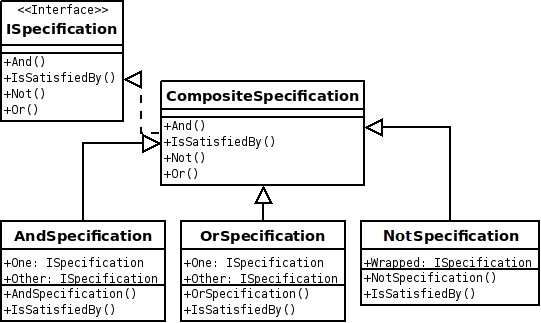
specification-pattern-uml

如何实现Specification

了 解了什么是Specification,那接下去,您肯定会问,该怎么实现?其实很简单,Specification模式里面只有一个方法,我们有了”规 格书”,下一步,当然就是从不同的对象中得到符合”规格书”的对象,那这个匹配的过程就形成了一个动作抽象.IsSatisfiedBy就是帮助你从”对 象堆”中找到你所需”规格”的动作.如此.我们可以实现的Specification接口如下

    public interface ISpecification<T>
    {

        bool IsSatisfiedBy(T candidate);

    }

但是,一般的Specification都提供了几个基本的组合操作,例如Add,Or,Not,可以利用它们分别组合成一个新的Specification.经过初步改动,最后ISpecification如下

    public interface ISpecification<T>
    {

        bool IsSatisfiedBy(T candidate);

        ISpecification<T> Add(ISpecification<T> other);

        ISpecification<T> Or(ISpecification<T> other);

        ISpecification<T> Not();

    }

为了重用可复用逻辑,我们定义了一个抽象类CompositeSpecification

    public abstract class CompositeSpecification<T> : ISpecification<T>
    {

        public abstract bool IsSatisfiedBy(T candidate);

        public ISpecification<T> Add(ISpecification<T> other)
        {

            return new AddSpecification<T>(this, other);

        }

        public ISpecification<T> Or(ISpecification<T> other)
        {

            return new OrSpecification<T>(this, other);

        }

        public ISpecification<T> Not()
        {

            return new NotSpecification<T>(this);

        }

    }

并定义了基本的几个”组合”类

    public class AddSpecification<T> : CompositeSpecification<T>
    {

        private ISpecification<T> one;

        private ISpecification<T> other;

        public AddSpecification(ISpecification<T> one, ISpecification<T> other)
        {

            this.one = one;

            this.other = other;

        }

        public override bool IsSatisfiedBy(T candidate)
        {

            return one.IsSatisfiedBy(candidate) && other.IsSatisfiedBy(candidate);

        }

    }

    public class OrSpecification<T> : CompositeSpecification<T>
    {

        private ISpecification<T> one;

        private ISpecification<T> other;

        public OrSpecification(ISpecification<T> one, ISpecification<T> other)
        {

            this.one = one;

            this.other = other;

        }

        public override bool IsSatisfiedBy(T candidate)
        {

            return one.IsSatisfiedBy(candidate) || other.IsSatisfiedBy(candidate);

        }

    }

    public class NotSpecification<T> : CompositeSpecification<T>
    {

        private ISpecification<T> one;

        public NotSpecification(ISpecification<T> one)
        {

            this.one = one;

        }

        public override bool IsSatisfiedBy(T candidate)
        {

            return !one.IsSatisfiedBy(candidate);

        }

    }

最后,我们定义我们所需要的规格,在这里,我们定义一个基数规格与正数规格

    public class OddSpecification : ComsptionSpecification<int>
    {

        public override bool IsSatisfiedBy(int candidate)
        {

            return candidate % 2 != 0;

        }

    }

    public class PlusSpecification : ComsptionSpecification<int>
    {

        public override bool IsSatisfiedBy(int candidate)
        {

            return candidate > 0;

        }

    }

现在,万事俱备,只欠东风.就差你来调用了.

        static void Main(string[] args)
        {

            var items = Enumerable.Range(-5, 10);

            ISpecification<int> oddSpec = new OddSpecification();

            var spec = MoreCandidate(oddSpec);

            foreach (var i in items.Where(it => spec.IsSatisfiedBy(it)))
            {

                Console.WriteLine(i);

            }

        }

        static ISpecification<int> MoreCandidate(ISpecification<int> spec)
        {

            ISpecification<int> plusSpec = new PlusSpecification();

            return spec.Or(plusSpec);

        }

这个逻辑还是十分简单的.我们先定义了一个基数规格,后面我们发现这个规格不足以得到我们所需要的,我们想OrWhere它是正数.于是,我们”组合”成了一个新的规格.结果

clip_image002

这里应该注意的是.在这里我们提供了一种OrWhere功能,这是在一条条件的基础上再匹配多另一条条件,有同学说直接Where(it=> it%2!==0||it>0)就可以了.必须指明的是,后者就变成了一个条件.你把两个条件合并写死成一个条件了.不是将其”组合”成一个新条 件.就像你用乐高堆砌出一架跑车模型和直接浇铸出一架跑车模型的概念是完全不同的.

优雅实现

虽然我们完美的实现了Specification模式,但是,聪明的你应该能看到它的弊病了.就是传统的Specification模式实在是太” 重量级”了,如果你想实现一个新的”规格”,那么你必须需要新增一个新的Specification类.这样下来,最终我们的类库中必然堆积了许许多多的 Specification类.既然如此,有没有什么方法可以让其的实现变得更加的轻易?答案是肯定的.我们再一次解析Specification模式, 其重点是IsSatisfiedBy方法.遵守我们一贯的思路,改进必然是在重点实现处.于是,一种优雅的实现便诞生了.

    public interface ISpecification<T>
    {

        bool IsSatisfiedBy(T candidate);

    }

我们还是必须定义一个ISpecification接口.与前面不同的是,该接口里不再有Add,Or,Not等方法.为何?后面讲解.

    public class Specification<T> : ISpecification<T>
    {

        private Func<T, bool> m_isSatisfiedBy;

        public bool IsSatisfiedBy(T candidate)
        {

            return m_isSatisfiedBy(candidate);

        }

        public Specification(Func<T, bool> isSatisfiedBy)
        {

            this.m_isSatisfiedBy = isSatisfiedBy;

        }

    }

接下来,我们定义了Specification<T>类继承了ISpecification<T>接口,此处要注意的是. 在其构造函数中.我们传入了一个委托,然后,将该委托赋给私有变量m_isSatisfiedBy,最后.IsSatisfiedBy方法只是简单的调用 了该Func,这实际上了也是依赖了注入.只不过我们注入的是一种特殊的类,委托.如此一来,只要我们需要新的”规格”时,只需要传入相应不同委托便可以 实现.那么传统实现中Add,Or,Not等组合实现该如何实现.在次我们利用C#3.5的特性–扩展方法.我们实现了一个扩展类,并将所有的”组合” 方法变成扩展方法.

    public static class SpecificationExtensions
    {

        public static ISpecification<T> Add<T>(this ISpecification<T> one, ISpecification<T> other)
        {

            return new Specification<T>(candidate => one.IsSatisfiedBy(candidate) && other.IsSatisfiedBy(candidate));

        }

        public static ISpecification<T> Or<T>(this ISpecification<T> one, ISpecification<T> other)
        {

            return new Specification<T>(candidate => one.IsSatisfiedBy(candidate) || other.IsSatisfiedBy(candidate));

        }

        public static ISpecification<T> Not<T>(this ISpecification<T> one)
        {

            return new Specification<T>(candidate => !one.IsSatisfiedBy(candidate));

        }

    }

至于为什么要生成一个新的扩展类,并将方法提取出来.站在面向对象的角度上并不能说哪种更”面向对象”,实际上,并没有纯粹意义上的”面向对象标 准”.只是我们习惯上会不知不觉把一些”良好的面向对象实践”当成”标准”,开发者站在不同的位置上,看到的东西,细节必然不同.如此,”面向对象”的结 果也就不同.老赵说得很对(个人观点),当我们执行Add,Or,Not等操作的时候,并不是对象本身去Add,Or,Not,一般比较而言,更多的我们 不会拿自己与别人比较,这样未免有失公正,而是有个”第三方”,由它来进行比较,拿”你”和”他”进行比较.这里,我们也是借鉴现实生活的抽象,完成类的 抽象.至此,这个轻量级的实现已经完成.

        static void Main(string[] args)
        {

            var items = Enumerable.Range(-5, 10);

            ISpecification<int> oddSpec = new Specification<int>(it => it % 2 != 0);

            var spec = MoreCandidate(oddSpec);

            foreach (var i in items.Where(it => spec.IsSatisfiedBy(it)))
            {

                Console.WriteLine(i);

            }

        }

        static ISpecification<int> MoreCandidate(ISpecification<int> spec)
        {

            ISpecification<int> plusSpec = new Specification<int>(it => it > 0);

            return spec.Or(plusSpec);

        }

clip_image004

轻量级实现

即使前面的实现已经足够”轻量级”,但对于懒人而言却往往还是不够的.那么是否还有更”懒”的实现方法?答案是肯定的.再一想一 下,Specification模式的实现其实就是IsSatisfiedBy方法的实现.那么我们直接把IsSatisfiedBy提取出来,形成一种 更”懒”的实现.聪明的你应该想到了.答案就是利用委托.我们新建了一个委托.

    public delegate bool Spec<T>(T candidate);

命名为Spec完全只是为了说明这是一个Specification,它接受一个参数,并返回一个布尔值.只不过这种实现是在太过于简单.简单到没 有提供一定的约束.所以,必须遵守一种约定,这也是约定大于约束的一种实现.和第二种实现同理,我们还实现一个 SpecificationExtension类.

    public static class SpecExtensitions
    {

        public static Spec<T> Add<T>(this Spec<T> one, Spec<T> other)
        {

            return candidate => one(candidate) && other(candidate);

        }

        public static Spec<T> Or<T>(this Spec<T> one, Spec<T> other)
        {

            return candidate => one(candidate) || other(candidate);

        }

        public static Spec<T> Not<T>(this Spec<T> one)
        {

            return candidate => !one(candidate);

        }

    }

这样一来.我们就实现了一套”超轻量级”的Specification实现.

        static void Main(string[] args)
        {

            var items = Enumerable.Range(-5, 10);

            Spec<int> oddSpec = it => it % 2 != 0;

            var spec = MoreCandidate(oddSpec);

            foreach (var i in items.Where(it => spec(it)))
            {

                Console.WriteLine(i);

            }

        }

        static Spec<int> MoreCandidate(Spec<int> spec)
        {

            return spec.Or(it => it > 0);

        }

结语

Specification模式的应用能很大程度上减少我们的工作量,目前应用的比较多的是在LINQ2SQL上,查询数据时采用不同的 Specification从而获取你所需要的数据.MVC下的Reposity+Specification能大大提高项目的扩展性.不过,世上没有万 能的灵丹妙药,如一把双刃剑,能伤人,也能伤己.任何一种模式的滥用都会造成不良的影响.所以,只有该需要它的时候使用它才是最合理的.那什么时候该使用 呢?当你发现你的条件实在是太过千变万化,当你需要OrWhere,当你…..(欢迎你留下你认为合适的时候,:-) )

扩展阅读

Specification模式

依赖注入(控制反转)

趣味编程:C#中Specification模式的实现

趣味编程:C#中Specification模式的实现(参考答案 – 上)

趣味编程:C#中Specification模式的实现(参考答案 – 下)

[转载]在Android手机上配置Python运行环境

mikel阅读(1460)

[转载]让Python在Android系统上飞一会儿:第一节 在手机上配置Python运行环境 – 铁骑世界 – 博客园.

本节目录:

1.下载和安装 Scripting Layer for Android (SL4A)
2.下载和安装 Python for Android
3.第一个HelloWorld程序

1.下载和安装 Scripting Layer for Android (SL4A)

Scripting Layer for Android (SL4A) 是一个开源项目,目标是为android系统提供脚本语言的支持,使用户可以直接在android平台上进行脚本语言的编辑、解释和执行。这些脚本语言已 经可是使用很多封装好的android API来开发功能丰富的android应用程序,并且使开发变得更加的简单和高效!
这个平台支持多种脚本语言,比如 Python, Perl, JRuby, Lua, BeanShell, JavaScript, Tcl, shell 等,你可以选择你熟悉的语言进行开发,本系列教程使用Python为编程脚本语言
SL4A项目的地址:http://code.google.com/p/android-scripting/
页面打开后,你可以选择用手机扫描该页面的二维码将应用直接下载并安装到手机上,或者点击二维码图片,将应用下载的电脑上在传输到手机上安装。你要是懒得去羡慕主页,直接扫描下图的二维码即可:

2.下载和安装 Python for android

在需项目主页面的右上方,有该应用支持的所有脚本语言的下载列表,如下图所示;

选择你使用的语言,打开相应的语言环境的下载页面,与下载SL4A的方式类似,将该语言包应用下载并安装到你的手机上。我打开的是Python的页面,如下图所示:

程序安装完成后,打开Python for Android应用,在应用的最上方会有一个Install的按钮,点击该按钮,就会自动下载Python相关的文件并解压和安装,这个过程结束后,你的android手机上的Python开发环境就配置好了!

3.第一个HelloWorld程序

打开SL4A应用,会进入Python示例代码列表,基本上是对主要API的演示,部分示例可能由于偏老,运行时会提示方法过期或者运行异常的问题,这个至少修改少许代码即可,有机会的话,我会在后续课程中介绍这是示例以及修正的方法。
点Menu键,然后点击Add,选择Python2.6.2,就会新建一个Python脚本文件,将文件的名字命名为:HelloPythonInAndroid.py
点击屏幕进入脚本编辑区,开始输入如下内容:

import android
droid = android.Android()
droid.makeToast(‘Hello, Python in Android’)

输入完成后,如下图所示:

点击Menu,选择Save&Run,恭喜你,你已经用Python完成了第一个Android应用:HelloPythonInAndroid!

[转载]网站架构之缓存应用(2)实现篇

mikel阅读(1109)

[转载]网站架构之缓存应用(2)实现篇 – ASP.NET – 博客园.

上一篇我主要总结了网站缓存中的一些基本概念,以及我对于网站架构缓存应用的架构实现思路,这篇主要分享下如何利用微软企业库来实现一二级缓存的缓存服务。

为了能够有效的管理缓存,需要对使用缓存方法上做一些规范,即要想使用缓存组件提供的服务,需要在指定的配置文件中按照一定的规则来配置缓存条目,不允许在配置之处使用缓存。下面先展示下一条Cache条目的配置:

代码

<Region name=”MyBlog”>
<SubRegion name=”default”>
<Cache CacheMode=”LocalCacheOnlyMode” Key=”BlogListConfigKey” BufferType=”AbsoluteTime” BufferTimeSeconds=”300″ CacheType=”AbsoluteTime” CacheTimeMinutes=”30″ CachePriority=”Normal”/>
</SubRegion>
</Region>

上面的代码中,其实由三部分构成:
1:主分区:Regin,如果一个网站分很多子系统,可以为每个子系统定义一个这样的主分区,例如食品频道Food,手机频道Mobile等;
2:子分区:SubRegion,主分区下面的子分区,即对子系统更加小的划分,可以根据子系统的功能来划分,例如产品列表页List,详细页Detail等;
3:缓存条目:Cache,指具体的一则缓存条目规则,这里的缓存条目规则并不是指某一条缓存设置,而是指一条缓存规则,与具体的缓存条目是一对多的关系。
<1>:CacheMode,设置缓存模式,是只有二级缓存还是即有一级缓存也有二级缓存,例如用户页面之间的信息沟通就只需要二级缓存,即 缓存在web server上。而产品列表页的数据属于全局数据,就需要即采用二级缓存也需要一级缓存。
<2>:BufferType,指二级缓存的过期方式,分为绝对过期,滑动过期,文件依赖。
<3>:BufferTimeSeconds,二级缓存Timespan中的秒。
<4>:CacheType,一级缓存的过期方式,类型同BufferType.
<5>:CacheTimeMinutes,一级缓存Timespan中的分钟。
<6>:CachePriority,缓存的优先级。
二级缓存实现:
第一:IWebCacheProvider,缓存提供者接口,它公布了所有缓存组件需要的方法,接口之所以加上了ServeiceContract标签, 是由于下面的一级缓存WCF服务也继承此接口的原因。小提示:WCF服务契约对于方法重载的实现和普通方式有小小区别,请注意 OperationContract标签的定义。

代码

[ServiceContract]
public interface IWebCacheProvider
{
[OperationContract(Name
= Add)]
void Insert(string key, object value, string region, string subRegion);

[OperationContract(Name = AddByAbsoluteTime)]
void Insert(string key, object value, string region, string subRegion, MyCacheItemPriority scavengingPriority, AbsoluteTimeCacheDependency absoluteTimeCacheDependency);

[OperationContract(Name = AddBySlidingTime)]
void Insert(string key, object value, string region, string subRegion, MyCacheItemPriority scavengingPriority, SlidingTimeCacheDependency slidingTimeCacheDependency);

[OperationContract(Name = AddByFile)]
void Insert(string key, object value, string region, string subRegion, MyCacheItemPriority scavengingPriority, FileCacheDependency fileCacheDependency);

[OperationContract]
void Delete(string key, string region, string subRegion);

[OperationContract]
object Get(string key, string region, string subRegion);

[OperationContract]
void Clear(string region);

[OperationContract]
int Count(string region);
}

第二:EntLibWebCacheProvider,微软企业库实现缓存实现类。代码并不贴了,基本就是利用企业库的缓存组件实现上面的接口。

第三:MyWebCacheServiceClient,提供缓存客户端的实例。包含了两个重要的属性:一级缓存实例,二级缓存实例。余下的就是调用 EntLibWebCacheProvider来完成缓存的调用,以及根据缓存规则,选择操作一级缓存以及二级缓存。

说明:下面代码中的GetMemcachedWebCacheProvider是下篇文章会提到的利用memcached实现一级缓存,由于需要支持一级缓存在企业库以及memcached之间的切换才出现的逻辑。

代码

//一级缓存
IWebCacheProvider PrimaryCacheProvider;
//二级缓存
IWebCacheProvider SecondaryCacheProvider;
/// <summary>
/// 实例化二级缓存
/// </summary>
/// <param name=”configFilePath”></param>
/// <returns></returns>
private IWebCacheProvider GetSecondaryCacheProvider()
{
IWebCacheProvider provider
= null;
provider
= WebCacheProviderFactory.GetEntLibWebCacheProvider(configFilePath);
return provider;
}
/// <summary>
/// 获取一级缓存
/// </summary>
/// <param name=”hashKey”></param>
/// <param name=”configFilePath”></param>
/// <returns></returns>
private IWebCacheProvider GetPrimaryCacheProvider(uint hashKey)
{
IWebCacheProvider provider
= null;
string cacheType = WebConfig.ChannelConfig[CacheType].ToString().ToLower();
switch (cacheType)
{
case memcached:
provider
= WebCacheProviderFactory.GetMemcachedWebCacheProvider(configFilePath);
break;
case entlib:
provider
= servicePool.GetServiceClient(hashKey) as IWebCacheProvider;
break;
}

return provider;
}

一级缓存的实现:由于一级缓存也采用微软企业库实现,而企业库本身是不具备分布式功能的,就算是memcached,本身也不具备分布式,而在于客户端的实现,所以企业库我们也可以实现分布式。
首先:我们把实现了缓存的组件以WCF服务形式分布出来,在多个服务器上部署,形成一个服务器群;
其实:实现分布式的客户端,让服务的请求均匀的分布到之前部署的WCF缓存服务器上。这里采用一致性hash算法实现,主要是根据key的hash值以及服务器数量来选择存储的服务器,这里贴些主要的实现代码,供参考:

1:定义一个hash的服务器实例集合,为每个服务器分配250个hash值,这里的值可以根据实际情况调整。

private Dictionary<uint, isRoc.Common.Cache.CacheProvider.IWebCacheProvider> hostDictionary;

2:定义一个hash的服务实例key集合,用来统计所有服务器实例中的hash key。

private uint[] hostKeysArray;

3:创建服务器列表的hash值。

代码

/// <summary>
/// 重新设置服务器列表
/// </summary>
/// <param name=”hosts”>服务器列表</param>
internal void Setup(List<WebCacheServerInfo> hosts)
{
hostDictionary
= new Dictionary<uint, isRoc.Common.Cache.CacheProvider.IWebCacheProvider>();
List
<isRoc.Common.Cache.CacheProvider.IWebCacheProvider> clientList = new List<isRoc.Common.Cache.CacheProvider.IWebCacheProvider>();
List
<uint> hostKeysList = new List<uint>();
foreach (WebCacheServerInfo host in hosts)
{
//创建客户端

isRoc.Common.Cache.CacheProvider.IWebCacheProvider client
= ServiceProxyFactory.Create<isRoc.Common.Cache.CacheProvider.IWebCacheProvider>(host .HostUri );
//Create 250 keys for this pool, store each key in the hostDictionary, as well as in the list of keys.
for (int i = 0; i < 250; i++)
{
uint key = 0;
switch (this.HashAlgorithm)
{
case EHashAlgorithm.KetamaHash:
key
= (uint)Math.Abs(KetamaHash.Generate(host.HostUri + + i));
break;
case EHashAlgorithm.FnvHash32:
key
= BitConverter.ToUInt32(new ModifiedFNV1_32().ComputeHash(Encoding.UTF8.GetBytes(host.HostUri + + i)), 0);
break;
}

if (!hostDictionary.ContainsKey(key))
{
hostDictionary.Add(key, client);
hostKeysList.Add(key);
}
}

clientList.Add(client);
}

//Hostlist should contain the list of all pools that has been created.
clientArray = clientList.ToArray();

//Hostkeys should contain the list of all key for all pools that have been created.
//This array forms the server key continuum that we use to lookup which server a
//given item key hash should be assigned to.
hostKeysList.Sort();
hostKeysArray
= hostKeysList.ToArray();

}

4:如何根据key值来查找具体的缓存服务实例呢,即具体的key存储在哪一台服务器上呢?根据传入的key值,计算出对应的hash值,然后经过特定的算法计算出服务器实例地址。

代码

internal isRoc.Common.Cache.CacheProvider.IWebCacheProvider GetServiceClient(uint hash)
{
//Quick return if we only have one host.
if (clientArray.Length == 1)
{
return clientArray[0];
}

//New “ketama” host selection.
int i = Array.BinarySearch(hostKeysArray, hash);

//If not exact match…
if (i < 0)
{
//Get the index of the first item bigger than the one searched for.
i = ~i;

//If i is bigger than the last index, it was bigger than the last item = use the first item.
if (i >= hostKeysArray.Length)
{
i
= 0;
}
}
return hostDictionary[hostKeysArray[i]];
}

总结:本文简单的介绍了如何利用微软企业库来实现具有两级缓存的缓存组件,上篇我提到过,实现一级缓存也可以采用memcached,采用 memcached可以不用自己开发分布式客户端,目前有两个成熟的解决方 案:1:Memcached.ClientLibrary2:EnyimMemcached。下篇我来介绍一级缓存如何通过memcached实现,以及 如何让组件在一级缓存上即支持企业库也支持memcached。

[转载]网站架构之缓存应用(1)概念篇

mikel阅读(836)

[转载]网站架构之缓存应用(1)概念篇 – ASP.NET – 博客园.

网站缓存这个话题并不新颖,但是能否将它用好,可是一门学问,同一件工具在不同人的手中会做出不同的事情来。这里我来分享总结下我对于网站架构中缓存应用的一些看法和经验,大家有好的想法可以补充。

第一:缓存的一些基本概念。
1:缓存(CACHE)与缓冲(BUFFER)的区别,我认为缓存可以在某种程序上理解成一级缓存(Primary Cache),数据全局共享。缓冲则属于二级缓存,只对一部分对象共享数据,二级缓存在某种程序上主要是降低一级缓存组件的访问压力以及提高缓存的存取效 率。
2:缓存的一些基本属性:命中率,表示缓存命中的次数/总的请求数,这是缓存设计的重要质量指标之一;缓存执行效率,例如GET,INSERT,DELETE等;容量,即缓存介质的容量最大值;成本,即开发成本,部署成本,软硬件成本。
3:缓存的问题,存储介质的选择往往左右缓存的设计,缓存在不命中时往往会使性能下降。
第二:网站中缓存的应用场景:
1:可以缓存整个页面的html,提高访问响应能力;
2:针对局部页面元素进行缓存;
3:对复杂数据的结果进行缓存,例如一个查询需要结合多个数据集,然后根据这些数据集进行相应的运算,即使每个子集查询有缓存,但还是需要额外的运算,这种情况可以考虑缓存计算后的结果。
4:对耗时的查询进行缓存,例如产品列表页的查询。
5:和上下文相关的用户数据,例如用户从订单埴写页进入到订单成功页,或者是从产品列表页点击详细产品进行预订时的订单填写页,此时这两个页面之间都需要传递大量的相关数值,我们可以把所有的数值封装在一个类中,然后通过缓存进行通信。
第三:影响缓存命中率的因素。
1:数据时实性,每个业务系统都对自己的数据有相应的要求,有些数据的实时性非常强,像每日的股票信息,这种情况如果设置了缓存,缓存的命中率会特别低。
2:缓存粒度问题,一般来说是缓存的跨度太大,即此时的KEY值包含的条件太多,会出现缓存命中率特别低的情况。
第四:提高缓存命中率的方法:
1:增大存储介质的容量;
2:对非常热点的数据进行捕捉,可以采用实时更新缓存的方式来平衡缓存与实时性的问题,例如可以单独开启一个后台服务来定时做更新缓存的工作。
3:调整缓存KEY值的算法,尽量保证缓存KEY的细粒度,KEY-VALUE就是很好的细粒度例子。
4:根据业务调整缓存的过期策略。

第五:如何实现缓存组件:
1:采用二级缓存架构,即在web server上设置二级缓存,这里的二级缓存即上面的提到的缓冲,只对具体的webserver进行数据共享,二级缓存可以考虑采用微软企业库的缓存组件 来完成。由于一级缓存的实现往往都是单独的服务器,为了减少缓存服务器的压力,在webserver上对数据进行缓冲,在降低缓存服务器压力的情况下最大 的好处在于缓存的存取速度上。
2:一级缓存由单独的缓存服务器来完成,至于缓存服务器采用哪种缓存方案,可以根据不同的场景来决定。如果考虑到部署的方便性,可以采用微软企业库来完成一级缓存,如果服务器允许,可以采用memcached来实现。
cache服务器采用微软企业库实现的优缺点:
1:优点,开发以及部署都非常容易,不需要安装第三方软件等等;
2:缺点,需要自己开发客户端功能以实现分布式,这里我们可以采用一致性hash算法来实现,同时如果服务以WCF形式公布开,在访问效率上也不是最优的,比起memcached的通信方式要差一些。
memcached的优缺点:
1:优点,通信方式比起wcf要高;
2:缺点,需要第三方服务的支持,需要在服务器上安装memcached服务,这好像也不是什么重要的缺点。
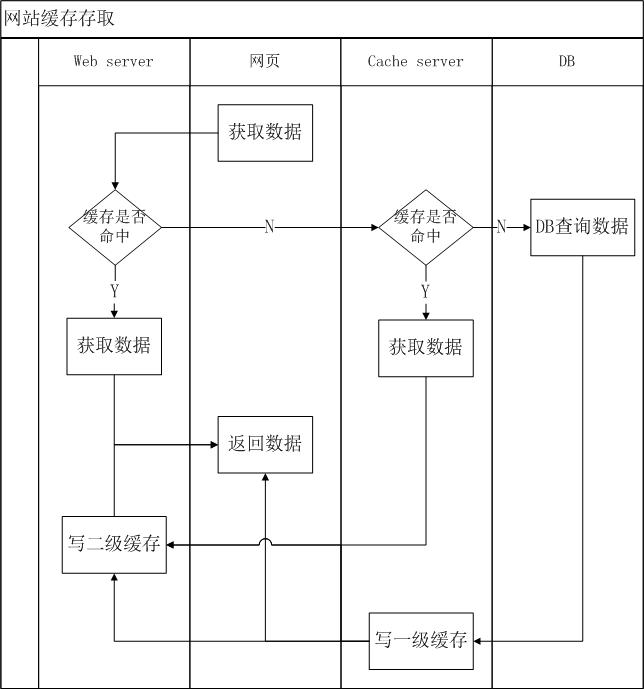
最后,贴出网站网页在数据访问上的流程图,供大家参考,在下面的文章中我会把实现的方案分享出来。

[转载]ASP.NET访问网络驱动器(映射磁盘)

mikel阅读(1170)

[转载]ASP.NET访问网络驱动器(映射磁盘) – 路人乙 – 博客园.

也许很多朋友在做WEB项目的时候都会碰到这样一个需求:

当用户上传文件时,需要将上传的文件保存到另外一台专门的文件服务器。

要实现这样一个功能,有两种解决方案:

方案一、在文件服务器上新建一站点,用来接收上传的文件,然后保存。

方案二、将文件服务器的指定目录共享给WEB服务器,用来保存文件。

方案一不用多说,应该是很简单的了,将上传文件的FORM表单的ACTION属性指向文件服务器上的站点即可,我们来重点说下方案二。

也许你会说,其实方案二也很简单,在WEB服务器上做下磁盘映射,然后直接访问不就行了。其实不是这样的,IIS默认账户为 NETWORK_SERVICE,该账户是没权限访问共享目录的,所以当你把站点部署到IIS上的时候,再访问映射磁盘就会报“找不到路径”的错误。所 以,直接创建磁盘映射是行不通的,我们需要在程序中用指定账户创建映射,并用该账户运行IIS进程,下面来说下详细步骤及相关代码。

1、在文件服务器上创建共享目录,并新建访问账户。

比如共享目录为:\\192.168.0.9\share

访问账户为:user-1 密码为:123456

2、在WEB服务器上新建用户:user-1 密码为:123456,用户组选择默认的user组即可。

3、在WEB项目中新建公共类WNetHelper

01 using System.Runtime.InteropServices;
02
03 public class WNetHelper
04 {
05 [DllImport("mpr.dll", EntryPoint = "WNetAddConnection2")]
06 private static extern uint WNetAddConnection2(NetResource lpNetResource, string lpPassword, string lpUsername, uint dwFlags);
07
08 [DllImport("Mpr.dll", EntryPoint = "WNetCancelConnection2")]
09 private static extern uint WNetCancelConnection2(string lpName, uint dwFlags, bool fForce);
10
11 [StructLayout(LayoutKind.Sequential)]
12 public class NetResource
13 {
14 public int dwScope;
15
16 public int dwType;
17
18 public int dwDisplayType;
19
20 public int dwUsage;
21
22 public string lpLocalName;
23
24 public string lpRemoteName;
25
26 public string lpComment;
27
28 public string lpProvider;
29 }
30
31 /// <summary>
32 /// 为网络共享做本地映射
33 /// </summary>
34 /// <param name="username">访问用户名(windows系统需要加计算机名,如:comp-1\user-1)</param>
35 /// <param name="password">访问用户密码</param>
36 /// <param name="remoteName">网络共享路径(如:\\192.168.0.9\share)</param>
37 /// <param name="localName">本地映射盘符</param>
38 /// <returns></returns>
39 public static uint WNetAddConnection(string username, string password, string remoteName, string localName)
40 {
41 NetResource netResource = new NetResource();
42
43 netResource.dwScope = 2;
44 netResource.dwType = 1;
45 netResource.dwDisplayType = 3;
46 netResource.dwUsage = 1;
47 netResource.lpLocalName = localName;
48 netResource.lpRemoteName = remoteName.TrimEnd('\\');
49 uint result = WNetAddConnection2(netResource, password, username, 0);
50
51 return result;
52 }
53
54 public static uint WNetCancelConnection(string name, uint flags, bool force)
55 {
56 uint nret = WNetCancelConnection2(name, flags, force);
57
58 return nret;
59 }
60 }

4、为IIS指定运行账户user-1

要实现此功能,有两种办法:

a) 在web.config文件中的<system.web>节点下,添加如下配置:<identity impersonate=”true” userName=”user-1″ password=”123456″ />

b) 在WEB项目中添加公用类LogonImpersonate

01 public class LogonImpersonate : IDisposable
02 {
03 static public string DefaultDomain
04 {
05 get
06 {
07 return ".";
08 }
09 }
10
11 const int LOGON32_LOGON_INTERACTIVE = 2;
12 const int LOGON32_PROVIDER_DEFAULT = 0;
13
14 [System.Runtime.InteropServices.DllImport("Kernel32.dll")]
15 extern static int FormatMessage(int flag, ref IntPtr source, int msgid, int langid, ref string buf, int size, ref IntPtr args);
16
17 [System.Runtime.InteropServices.DllImport("Kernel32.dll")]
18 extern static bool CloseHandle(IntPtr handle);
19
20 [System.Runtime.InteropServices.DllImport("Advapi32.dll", SetLastError = true)]
21 extern static bool LogonUser(
22 string lpszUsername,
23 string lpszDomain,
24 string lpszPassword,
25 int dwLogonType,
26 int dwLogonProvider,
27 ref IntPtr phToken
28 );
29
30 IntPtr token;
31 System.Security.Principal.WindowsImpersonationContext context;
32
33 public LogonImpersonate(string username, string password)
34 {
35 if (username.IndexOf("\\") == -1)
36 {
37 Init(username, password, DefaultDomain);
38 }
39 else
40 {
41 string[] pair = username.Split(new char[] { '\\' }, 2);
42 Init(pair[1], password, pair[0]);
43 }
44 }
45 public LogonImpersonate(string username, string password, string domain)
46 {
47 Init(username, password, domain);
48 }
49 void Init(string username, string password, string domain)
50 {
51 if (LogonUser(username, domain, password, LOGON32_LOGON_INTERACTIVE, LOGON32_PROVIDER_DEFAULT, ref token))
52 {
53 bool error = true;
54 try
55 {
56 context = System.Security.Principal.WindowsIdentity.Impersonate(token);
57 error = false;
58 }
59 finally
60 {
61 if (error)
62 CloseHandle(token);
63 }
64 }
65 else
66 {
67 int err = System.Runtime.InteropServices.Marshal.GetLastWin32Error();
68
69 IntPtr tempptr = IntPtr.Zero;
70 string msg = null;
71
72 FormatMessage(0x1300, ref tempptr, err, 0, ref msg, 255, ref tempptr);
73
74 throw (new Exception(msg));
75 }
76 }
77 ~LogonImpersonate()
78 {
79 Dispose();
80 }
81 public void Dispose()
82 {
83 if (context != null)
84 {
85 try
86 {
87 context.Undo();
88 }
89 finally
90 {
91 CloseHandle(token);
92 context = null;
93 }
94 }
95 }
96 }

在访问映射磁盘之前首先调用此类为IIS更换运行用户:LogonImpersonate imper = new LogonImpersonate(“user-1”, “123456”);

5、在访问共享目录前,调用WNetHelper.WNetAddConnection,添加磁盘映射

01 public static bool CreateDirectory(string path)
02 {
03 uint state = 0;
04 if (!Directory.Exists("Z:"))
05 {
06 state = WNetHelper.WNetAddConnection(@"comp-1\user-1", "123456", @"\\192.168.0.9\share", "Z:");
07 }
08 if (state.Equals(0))
09 {
10 Directory.CreateDirectory(path);
11 return true;
12 }
13 else
14 {
15 throw new Exception("添加网络驱动器错误,错误号:" + state.ToString());
16 }
17 }

6、完成。

简洁代码就是:

LogonImpersonate imper = new LogonImpersonate(“user-1”, “123456”);

WNetHelper.WNetAddConnection(@”comp-1\user-1″, “123456”, @”\\192.168.0.9\share”, “Z:”);
Directory.CreateDirectory(@”Z:\newfolder”);

file1.SaveAs(@”Z:\newfolder\test.jpg”);

有不明白的可以发EMAIL给我:sqzhuyi@gmail.com

[转载]Ajax实现无刷新任务进度条

mikel阅读(1104)

[转载]Ajax实现无刷新任务进度条 – YangLei’s – 博客园.

前段时间参考了别人写的一篇关于在服务器端用session保存状态,客户端用js实时刷新页面的方法获取后台线程运行的当前任务量百分比如下图:

上面方法优点在于session保存的线程运算类对象页面刷新后方便获得运算对象

而用Session[“work”]=w可能因为很多原因而丢失

用window.setTimeout(‘location.href=location.href’,1000)刷新,但在页面元素多的情况下页面不断刷新很有可能进度条一直不能显示

下面是在上面的基础上去掉了用session保存线程类而是用在线程类中用静态变量保存当前任务量百分比此方法将带来线程同步问题、使用Ajax实现进度条局部刷新

效果如下面:

前台用Timer控件实时局部刷新。

前台代码

1 <head runat="server"> 2 <title></title> 3 <style type="text/css"> 4 .lblTxtCenter 5 { 6 text-align: center; 7 } 8 </style> 9  </head> 10  <body> 11 <form id="form1" runat="server"> 12 <div> 1
3 <asp:ScriptManager ID="ScriptManager1" runat="server"> 14 </asp:ScriptManager> 15 <asp:UpdatePanel ID="UpdatePanel1" runat="server"> 16 <ContentTemplate> 17 <div style='width: 200px; background-color: Silver; height: 20px;'> 18 <asp:Label runat="server" ID="lbl" CssClass="lblTxtCenter"></asp:Label></div> 19 <asp:Timer ID="Timer1" runat="server" Interval="1000" OnTick="Timer1_Tick" Enabled="false"> 20 </asp:Timer> 21 <br /> 22 <asp:Button ID="Button1" runat="server" Text="开始运算" OnClick="Button1_Click" /> 23 </ContentTemplate> 24 </asp:UpdatePanel> 25 </div> 26 </form> 27  </body>
后台代码

1 protected void Button1_Click(object sender, EventArgs e) 2 { 3 //线程计算类 4   ThreadClass cl = new ThreadClass(); 5 cl.begin(); 6 Timer1.Enabled = true; 7 } 8 protected void Timer1_Tick(object sender, EventArgs e) 9 { 10 11 if (ThreadClass.present <= 100) 12 { 13 Button1.Enabled = false; 14 lbl.Text = ThreadClass.present.ToString() + "%"; 15 lbl.BackColor = System.Drawing.Color.Red; 16 lbl.Width = ThreadClass.present * 2; 17 } 18 if (ThreadClass.present == 100) 19 { 20 ThreadClass.present = 0; 21 Button1.Enabled = true; 22 Timer1.Enabled = false; 23 } 24 }
线程类

1 public class ThreadClass 2 { 3 public static int present; 4 public ThreadClass() 5 { 6 7 } 8 public void begin() 9 { 10 if (present == 0) 11 { 12 lock (this) 13 { 14 Thread tr = new Thread(new ThreadStart(() => 15 { 16 for (int i = 0; i <= 1000; i++) 17 { 18 present = 100 * i / 1000;//计算已完成的百分比 19   Thread.Sleep(10); 20 } 21 })); 22 tr.IsBackground = true; 23 tr.Start(); 24 } 25 } 26 } 27 }

[转载]备用:Asp.NET生成各种网页快捷方式(桌面url快捷方式,收藏夹/开始菜单快捷方式)

mikel阅读(989)

[转载]备用:Asp.NET生成各种网页快捷方式(桌面url快捷方式,收藏夹/开始菜单快捷方式) – IT鸟.NET记录 – 博客园.

1 using System;
2 using System.Data;
3 using System.Configuration;
4 using System.Collections;
5 using System.Web;
6 using System.Web.Security;
7 using System.Web.UI;
8 using System.Web.UI.WebControls;
9 using System.Web.UI.WebControls.WebParts;
10 using System.Web.UI.HtmlControls;
11
12 public partial class CreateShortcut : System.Web.UI.Page
13 {
14 protected void Page_Load(object sender, EventArgs e)
15 {
16 }
17
18 /// <summary>
19 /// 创建快捷方式
20 /// </summary>
21 /// <param name=”Title”>标题</param>
22 /// <param name=”URL”>URL地址</param>
23 private void CreateShortcut(string Title, string URL)
24 {
25 string strFavoriteFolder;
26
27 // “收藏夹”中 创建 IE 快捷方式
28 strFavoriteFolder = System.Environment.GetFolderPath(Environment.SpecialFolder.Favorites);
29 CreateShortcutFile(Title, URL, strFavoriteFolder);
30
31 // “ 桌面 ”中 创建 IE 快捷方式
32 strFavoriteFolder = System.Environment.GetFolderPath(Environment.SpecialFolder.Desktop);
33 CreateShortcutFile(Title, URL, strFavoriteFolder);
34
35 // “ 链接 ”中 创建 IE 快捷方式
36 strFavoriteFolder = System.Environment.GetFolderPath(Environment.SpecialFolder.Favorites) + \\链接;
37 CreateShortcutFile(Title, URL, strFavoriteFolder);
38
39 //「开始」菜单中 创建 IE 快捷方式
40 strFavoriteFolder = System.Environment.GetFolderPath(Environment.SpecialFolder.StartMenu);
41 CreateShortcutFile(Title, URL, strFavoriteFolder);
42
43 }
44
45 /// <summary>
46 /// 创建快捷方式
47 /// </summary>
48 /// <param name=”Title”>标题</param>
49 /// <param name=”URL”>URL地址</param>
50 /// <param name=”SpecialFolder”>特殊文件夹</param>
51 private void CreateShortcutFile(string Title, string URL, string SpecialFolder)
52 {
53 // Create shortcut file, based on Title
54 System.IO.StreamWriter objWriter = System.IO.File.CreateText(SpecialFolder + \\ + Title + .url);
55 // Write URL to file
56 objWriter.WriteLine([InternetShortcut]);
57 objWriter.WriteLine(URL= + URL);
58 // Close file
59 objWriter.Close();
60 }
61
62 private void btnShortcut_Click(object sender, System.EventArgs e)
63 {
64 CreateShortcut(IT鸟的专栏 – 博客圆, http://www.cnblogs.com/ITniao/);
65 }