[转载]神奇的Redis

mikel阅读(1109)

[转载]神奇的Redis – lovecindywang – 博客园.

Redis按照官方的定义是一个开源的,高级的键值存储。本文就想扩展开介绍,高级和存储两点。

为什么高级,咱们列一下它的基本特性:

  1. 每秒10万+的读,8万+的写(是不是有点吹?)
  2. 操作原子性(还支持把一组命令合并为一个原子操作)
  3. 多种基元数据类型的支持(hash/list/(sorted)set/string)
  4. 支持过期(可以用作缓存)
  5. 支持主从架构(多级层次)
  6. 支持管道(一次性发送多个命令执行)

以及丰富的API:

  1. 提供丰富有关key的操作命令
    1. 移动/排序/删除/重命名/获取类型/是否存在
    2. 获得符合某个表达式的所有键
    3. 设置和删除过期时间
    4. 随机获得一个
  2. 提供丰富的list结构操作命令
    1. 获取列表长度
    2. 获取列表中一段元素
    3. 移除一个或若干项
    4. 从最后开始移除若干项
    5. 追加一个项
    6. 为列表最前加入一项
    7. 移除并获取第一项
    8. 移除并获取最后一项
    9. 按照索引号获取或设置项
    10. 移除A列表最后一项追加到B列表
    11. 在列表中某个项(根据值)前或后加入项
    12. 获取项的索引号
  3. 提供丰富的string操作命令
    1. 设置(允许有过期)和追加值
    2. 获取值的一段
    3. 递减和递增
    4. 减少和增加
    5. 设置新值并且返回老的值
    6. 一次获取和设置多个键的值
    7. 获取值的长度
  4. 提供丰富的set结构操作命令
    1. 增加
    2. 批量增加
    3. 交集(并且保存到另外一个集合)
    4. 并集(并且保存到另外一个集合)
    5. 从一个移除加入另一个
    6. 获取长度
    7. 随机获取(并移除)
    8. 是否存在
    9. 获取所有
  5. 提供丰富的hash结构操作命令
  6. 提供丰富的sorted set操作命令
  7. 支持主从(并且支持多层)
  8. 提供发布订阅功能
    1. 监听某个信道(符合某个表达式)的消息
    2. 向某个信道发布消息
  9. 提供事务功能
    1. 开始事务块
    2. 抛弃之前的所有命令
    3. 执行事务块中的所有命令
    4. 监视某个键的事务执行
  10. 其它
    1. 授权
    2. 改变数据库
    3. 在线配置
    4. 异步刷新数据到磁盘
    5. 同步刷新数据到磁盘
    6. 获取状态信息
    7. 获得调试信息
    8. 删除所有数据
    9. 关闭
  11. 支持SET if Not eXists(可以用作分布式锁)

这么多API总结起来:

  1. 如此多的基于服务端的命令可以实现各种各样的逻辑(这里重点突出服务端这个词,虽然我们知道很多情况下可以get后再set,或是getall后再setall,但是这效率无法和服务端直接操作相比)
  2. 很多命令都组合成了原子命令(这是很重要的,使得我们不需要在客户端做分布式锁)
  3. 创新的list/set/sorted set存储结构,比单纯的key/value丰富多了

接下来说说存储这个词,很多人把它和memcached来比较,其实Redis的配置和架构是如此灵活,我们想怎么用就怎么用,想怎么调优就怎么调,可以为我们的应用来定制存储架构:

  1. 设置数据刷新到磁盘的条件(几秒内几次改动)
  2. 设置数据刷新到磁盘的方式(总是/每秒/不刷新)
  3. 设置虚拟内存(最大内存/页大小/页数量)
  4. 设置限制(内存占用/并发数/端口/是否后台)

对于用作缓存还是存储,数据的安全性等我们都可以根据不同的应用来调整。那么Redis可以用作哪些应用呢?

  1. 分布式缓存
  2. 分布式锁
  3. 消息队列
  4. 全文索引
  5. 和业务逻辑绑定的存储

对于.NET客户端来说,目前ServiceStack.Redis是不错的选择,其中也有一些不错的例子:

  1. 发布订阅
  2. 分布式锁
  3. 博客的例子

更多信息,参阅:

  1. http://blog.mjrusso.com/2010/10/17/redis-from-the-ground-up.html
  2. http://simonwillison.net/static/2010/redis-tutorial/
  3. http://antirez.com/

Mongodb作为大数据量的存储,把Redis作为中数据量的业务热点的存储确实是不错的方案。

[转载]android开发我的新浪微博客户端-登录页面UI篇(4.1)

mikel阅读(922)

[转载]android开发我的新浪微博客户端-登录页面UI篇(4.1) – 遇见未知的自己 – 博客园.

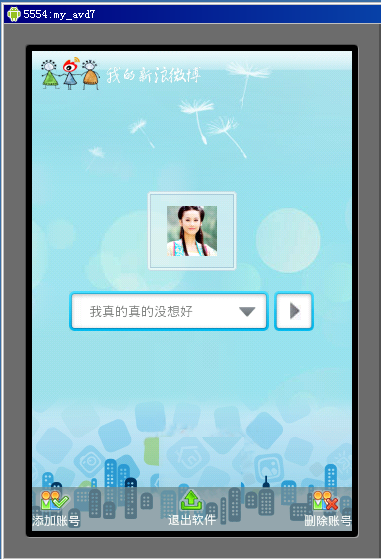
首先回顾一下功能流程当用户开启软件显示载入页面时程序首先去SQLite库查询是否已经保存有用户的新浪微博的UserID号、Access Token、Access Secret的记录如果没有一条记录那么跳转到用户授权功能页面,这个已经由上面两篇文章实现了,如果有记录那么页面跳转到用户登录页面,也就是本篇以及 下篇要实现的功能,本篇讲UI的实现,本项目支持多微博账号了,也就是用户可以设置多个微博账号,登录的时候选择其中的一个登录,具体效果如上图,新建名 LoginActivity.java的Activity并且在AndroidManifest.xml中进行相应配置,这个页面就是我们要实现的用户登 录页面。

看上面的效果,首先页面分3部分实现,背景部分、底部菜单部分、用户选择以及头像显示部分,首先在res/layout的目录下新建名为login.xml的layout,然后根据页面显示要求编写如下的布局控制:

代码

<?xml version=”1.0″ encoding=”utf-8″?>
<LinearLayout
xmlns:Android=”http://schemas.Android.com/apk/res/android”
android:id
=”@+id/layout”
android:orientation
=”vertical”
android:layout_width
=”fill_parent”
android:layout_height
=”fill_parent”>
<ImageView
android:layout_width=”wrap_content”
android:layout_height
=”wrap_content”
android:src
=”@drawable/logo_s”
android:layout_marginTop
=”5dip”
android:layout_marginLeft
=”5dip”>
</ImageView>
<RelativeLayout
android:layout_width=”fill_parent”
android:layout_height
=”fill_parent”>
<RelativeLayout
android:id=”@+id/iconBtn”
android:layout_width
=”90px”
android:layout_height
=”80px”
android:background
=”@drawable/icon_selector”
android:layout_above
=”@+id/selectLayout”
android:layout_centerHorizontal
=”true”
android:layout_marginBottom
=”20dip”>
<ImageView
android:id=”@+id/icon”
android:layout_width
=”wrap_content”
android:layout_height
=”wrap_content”
android:layout_centerInParent
=”true”>
</ImageView>
</RelativeLayout>

<RelativeLayout
android:id=”@+id/selectLayout”
android:layout_width
=”wrap_content”
android:layout_height
=”wrap_content”
android:layout_centerInParent
=”true”>
<EditText
android:id=”@+id/iconSelect”
android:layout_width
=”200px”
android:layout_height
=”wrap_content”
android:maxLength
=”10″
android:paddingLeft
=”20px”
android:editable
=”false”
android:enabled
=”false”
android:textSize
=”13px”
android:background
=”@drawable/input_over” >
</EditText>
<ImageButton
android:id=”@+id/iconSelectBtn”
android:layout_width
=”wrap_content”
android:layout_height
=”wrap_content”
android:layout_marginRight
=”1.0dip”
android:layout_alignTop
=”@+id/iconSelect”
android:layout_alignRight
=”@+id/iconSelect”
android:layout_alignBottom
=”@+id/iconSelect”
android:background
=”@drawable/more_selector” >
</ImageButton>
<ImageButton
android:id=”@+id/login”
android:layout_width
=”40px”
android:layout_height
=”40px”
android:layout_marginLeft
=”5dip”
android:layout_alignTop
=”@+id/iconSelectBtn”
android:layout_toRightOf
=”@+id/iconSelectBtn”
android:layout_alignBottom
=”@+id/iconSelectBtn”
android:background
=”@drawable/btn_in_selector” >
</ImageButton>
</RelativeLayout>

<RelativeLayout
android:layout_width=”fill_parent”
android:layout_height
=”44dip”
android:layout_alignParentBottom
=”true”
android:background
=”#BB768e95″>
<LinearLayout
android:id=”@+id/addLayout”
android:layout_width
=”wrap_content”
android:layout_height
=”wrap_content”
android:orientation
=”vertical”
android:layout_alignParentLeft
=”true”
android:gravity
=”center”
android:layout_marginTop
=”3px”>
<ImageButton
android:id=”@+id/addIcon”
android:layout_width
=”wrap_content”
android:layout_height
=”wrap_content”
android:background
=”@drawable/add_selector”>
</ImageButton>
<TextView
android:layout_width=”wrap_content”
android:layout_height
=”wrap_content”
android:textColor
=”#ffffff”
android:textSize
=”12px”
android:text
=”添加账号”>
</TextView>
</LinearLayout>
<LinearLayout
android:id=”@+id/exitLayout”
android:layout_width
=”wrap_content”
android:layout_height
=”wrap_content”
android:orientation
=”vertical”
android:layout_centerInParent
=”true”
android:gravity
=”center”
android:layout_marginTop
=”3px”>
<ImageButton
android:id=”@+id/exitIcon”
android:layout_width
=”wrap_content”
android:layout_height
=”wrap_content”
android:background
=”@drawable/exit_selector”>
</ImageButton>
<TextView
android:layout_width=”wrap_content”
android:layout_height
=”wrap_content”
android:textColor
=”#ffffff”
android:textSize
=”12px”
android:text
=”退出软件”>
</TextView>
</LinearLayout>
<LinearLayout
android:id=”@+id/delLayout”
android:layout_width
=”wrap_content”
android:layout_height
=”wrap_content”
android:orientation
=”vertical”
android:layout_alignParentRight
=”true”
android:gravity
=”center”
android:layout_marginTop
=”3px”>
<ImageButton
android:id=”@+id/delIcon”
android:layout_width
=”wrap_content”
android:layout_height
=”wrap_content”
android:background
=”@drawable/del_selector”>
</ImageButton>
<TextView
android:layout_width=”wrap_content”
android:layout_height
=”wrap_content”
android:textColor
=”#ffffff”
android:textSize
=”12px”
android:text
=”删除账号”>
</TextView>
</LinearLayout>
</RelativeLayout>
</RelativeLayout>
</LinearLayout>

正对上面的login.xml的layout进行一下说明,背景部分前面已经讲过了这里也就不重复。

底部菜单实现,原本我是采用GridView实现的非常的方便但是后来由于显示位置不好控制改成了用RelativeLayout和LinearLayout嵌套的方式,实现的比较土但是达到了显示需求,首先是一个最外面的RelativeLayout目的是用来实现底部对齐显示,并且把这个RelativeLayout的背景设置为浅蓝色半透明的效果,关键这2行:android:layout_alignParentBottom=”true”和android:background=”#BB768e95″。然后是在RelativeLayout内部添加3个LinearLayout分别是用来显示添加账号退出软件删除账号3个功能按钮菜单,并且分别设置为左对齐、居中对齐、右对齐,3个LinearLayout都设置为垂直布局android:orientation=”vertical”,然后每LinearLayout添加相应的图片和文字。

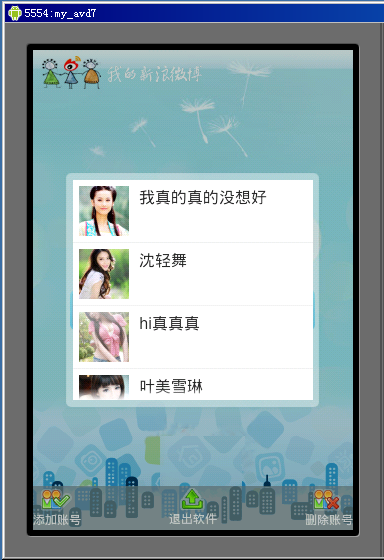
用户选择以及头像显示部分,这块分成3小块,用来显示用户头像的ImageView、用来显示用户名字并且点击可以出现选择列表的EditText、用来 点击进入当前选择用户首页的功能按钮ImageButton,这3小块的布局实现也是采用elativeLayout和LinearLayout相互嵌套 配合的方式实现的具体参考login.xml。这里重点说说这个账号选择列表弹出窗口的实现,当点击下拉箭头按钮的时候弹出并显示,这个是用Dialog 控件实现,首先准备好圆角的半透明背景图mask_bg.png然后添加到res/drawable-mdpi文件夹下,接着自定义一个Dialog样式 文件,在res/values目录下新建名为dialogStyles2.xml的resources文件,在用户授权验证页面的时候我们也自定义过类似 的Dialog的样式,具体解释可以参考前面的户授权验证页面功能,内容如下:

代码

<?xml version=”1.0″ encoding=”utf-8″?>
<resources>
<style name=”dialog2″ parent=”@android:style/Theme.Dialog”>
<item name=”android:windowFrame”>@null</item>
<item name=”android:windowIsFloating”>true</item>
<item name=”android:windowIsTranslucent”>false</item>
<item name=”android:windowNoTitle”>true</item>
<item name=”android:windowBackground”>@drawable/mask_bg</item>
<item name=”android:backgroundDimEnabled”>true</item>
</style>
</resources>

接下来还需要定义选择列表的layout,新建名为dialog2.xml的layout文件,内容如下:

代码

<?xml version=”1.0″ encoding=”utf-8″?>
<LinearLayout
xmlns:android=”http://schemas.android.com/apk/res/android”
android:layout_width
=”wrap_content”
android:layout_height
=”wrap_content”
android:orientation
=”vertical”
android:padding
=”4dip”>
<ListView
android:id=”@+id/list”
android:layout_width
=”240px”
android:layout_height
=”220px”
android:divider
=”#f1f2f2″
android:dividerHeight
=”1px”
android:layout_margin
=”5px”
android:background
=”#ffffff”
android:cacheColorHint
=”#00000000″>
</ListView>
</LinearLayout>

完成了layout和样式文件的编写,接下来就是把dialogStyles2.xml样式文件和dialog2.xml的列表layout用起来,当点击id为iconSelectBtn的ImageButton时显示用户选择窗口,在LoginActivity的onCreate方法中添加如下代码:

代码

public void onCreate(Bundle savedInstanceState) {
super.onCreate(savedInstanceState);
setContentView(R.layout.login);

LinearLayout layout=(LinearLayout)findViewById(R.id.layout);
//背景自动适应
AndroidHelper.AutoBackground(this, layout, R.drawable.bg_v, R.drawable.bg_h);

ImageButton iconSelectBtn=(ImageButton)findViewById(R.id.iconSelectBtn);
iconSelectBtn.setOnClickListener(
new OnClickListener(){
@Override
public void onClick(View v) {
View diaView
=View.inflate(LoginActivity.this, R.layout.dialog2, null);
dialog
=new Dialog(LoginActivity.this,R.style.dialog2);
dialog.setContentView(diaView);
dialog.show();

……
}

});

到这里登录的UI部分就实现的差不多了,剩下的都是一些功能部分代码用来实现从SQLite中账号列表的获取,以及点击选择等交互操作等,这些在下一篇中来继续的讲。

[转载]SWF文件格式和ABC代码混淆工具的开发 (一) - 出发点和目标

mikel阅读(1186)

[转载]SWF文件格式和ABC代码混淆工具的开发 (一) – 出发点和目标 – Tony Huang 的编程园地 – 博客园.

在2010年11月28日,我在盛大举办的WeDoSwf会议上,我做了一个演讲,主题就是关于Swf的文件格式和Abc文件的混淆。 最近一个多月的时间里面,各种零零总总的事情特别多,一直没有时间把这个东西整理好放到博客中。 首先呢,把我的演讲的视频的ppt放上来: 视频: http://v.ku6.com/show/MwjMgfhEgUFoiZ.html PPT: http://www.slideshare.net/swfsh/swfabc 然后呢,经过我们的努力,我们已经将这个东西做成了一个产品,有兴趣的朋友可以去我们的公司主页上下载试用。 Ok, 接下来切入正题:

出发点和目标

现在游戏行业已经越来越激烈,竞争对手之间的不正当竞争手段也越来越恶劣。 而现在的游戏的内核已经越来越重要,由于Flash的局限性,每个厂商都都会设计一些高性能的算法以支持复杂游戏的流畅运行。 在这同时,由于Flash和Web环境的特点,网页游戏的外挂简直泛滥到了一定的程度。 所以,我们加密Swf文件要达到如下的几个目的:

  • 防止游戏中的高性能算法被他人盗用
  • 防止游戏的客户端成为外挂编写者的参考资料
  • 防止游戏被破解后,广泛传播,却不能给开发者带来合理的收益

所以,我们不能任由他人践踏我们的知识产权。 现在在市场上,最流行的Swf反编译软件主要有两款:

  • 硕思闪客精灵说来惭愧,我是这款软件的正版用户。这款软件应该是市面上用户界面最友好,使用面积也最广的Flash破解软件了。个人认为他的主要强项在于资源文件的破解。它的反编译引擎比较傻瓜,依葫芦画瓢,所以我们插入的混淆代码能起到很好的作用。
  • ASVASV也是市面上非常流行的反编译软件。它的侧重点恰恰相反,在于AS代码的反编译上面,它反编译出来的代码可读性非常强,如果swf是采 用Debug编译的,基本上能够反编译几乎完全相同的代码。试用我们的方法进行混淆了以后,用ASV打开文件,就会发现,它根本无法正常识别AS脚本。

所以,我们加密的目标也就是要保证,这两款软件的最新版本也无法破解我们的软件,即:

  • 硕思闪客精灵 5.6
  • ASV 2010/6

效果

直接上图是最给力的,先把我们的加密效果发布出来大家围观一下吧:

[转载]最全的CSS浏览器兼容问题整理

mikel阅读(983)

[转载]最全的CSS浏览器兼容问题整理 – 华仔崽 – 博客园.

CSS 对浏览器的兼容性有时让人很头疼,或许当你了解当中的技巧跟原理,就会觉得也不是难事,从网上收集了IE7,6与Fireofx的兼容性处理方法并整理了 一下.对于web2.0的过度,请尽量用xhtml格式写代码,而且DOCTYPE 影响 CSS 处理,作为W3C的标准,一定要加DOCTYPE声 名.

CSS技巧

1.div的垂直居中问题

vertical-align:middle; 将行距增加到和整个DIV一样高 line-height:200px; 然后插入文字,就垂直居中了。缺点是要控制内容不要换行

2. margin加倍的问题

设置为float的div在ie下设置的margin会加倍。这是一个ie6都存在的bug。解决方案是在这个div里面加上display:inline;
例如:
<#div id=”imfloat”>
相应的css为
#IamFloat{
float:left;
margin:5px;/*IE下理解为10px*/
display:inline;/*IE下再理解为5px*/}

3.浮动ie产生的双倍距离

#box{ float:left; width:100px; margin:0 0 0 100px; //这种情况之下IE会产生200px的距离 display:inline; //使浮动忽略}
这里细说一下block与inline两个元素:block元素的特点是,总是在新行上开始,高度,宽度,行高,边距都可以控制(块元素);Inline元素的特点是,和其他元素在同一行上,不可控制(内嵌元素);
#box{ display:block; //可以为内嵌元素模拟为块元素 display:inline; //实现同一行排列的效果 diplay:table;

4 IE与宽度和高度的问题

IE 不认得min-这个定义,但实际上它把正常的width和height当作有min的情况来使。这样问题就大了,如果只用宽度和高度,正常的浏览器里这两 个值就不会变,如果只用min-width和min-height的话,IE下面根本等于没有设置宽度和高度。
比如要设置背景图片,这个宽度是比较重要的。要解决这个问题,可以这样:
#box{ width: 80px; height: 35px;}html>body #box{ width: auto; height: auto; min-width: 80px; min-height: 35px;}

5.页面的最小宽度

min -width是个非常方便的CSS命令,它可以指定元素最小也不能小于某个宽度,这样就能保证排版一直正确。但IE不认得这个,而它实际上把width当 做最小宽度来使。为了让这一命令在IE上也能用,可以把一个<div> 放到 <body> 标签下,然后为div指定一个类, 然后CSS这样设计:
#container{ min-width: 600px; width:expression(document.body.clientWidth < 600? “600px”: “auto” );}
第一个min-width是正常的;但第2行的width使用了JavaScript,这只有IE才认得,这也会让你的HTML文档不太正规。它实际上通过JavaScript的判断来实现最小宽度。

6.DIV浮动IE文本产生3象素的bug

左边对象浮动,右边采用外补丁的左边距来定位,右边对象内的文本会离左边有3px的间距.
#box{ float:left; width:800px;}
#left{ float:left; width:50%;}
#right{ width:50%;}
*html #left{ margin-right:-3px; //这句是关键}
<div id=”box”>
<div id=”left”></div>
<div id=”right”></div>
</div>

7.IE捉迷藏的问题

当div应用复杂的时候每个栏中又有一些链接,DIV等这个时候容易发生捉迷藏的问题。
有些内容显示不出来,当鼠标选择这个区域是发现内容确实在页面。 解决办法:对#layout使用line-height属性 或者给#layout使用固定高和宽。页面结构尽量简单。

8.float的div闭合;清除浮动;自适应高度;

① 例如:<#div id=”floatA” ><#div id=”floatB” ><#div id=” NOTfloatC” >这里的NOTfloatC并不希望继续平移,而是希望往下排。(其中floatA、floatB的属性已经设置为 float:left;)
这段代码在IE中毫无问题,问题出在FF。原因是NOTfloatC并非float标签,必须将float标签 闭合。在 <#div class=”floatB”> <#div class=”NOTfloatC”>之间加上 < #div class=”clear”>这个div一定要注意位置,而且必须与两个具有float属性的div同级,之间不能存在嵌套关系,否则会 产生异常。 并且将clear这种样式定义为为如下即可: .clear{ clear:both;}

②作为外部 wrapper 的 div 不要定死高度,为了让高度能自动适应,要在wrapper里面加上overflow:hidden; 当包含float的 box的时候,高度自动适应在IE下无效,这时候应该触发IE的layout私有属性(万恶的IE啊!)用zoom:1;可以做到,这样就达到了兼容。
例如某一个wrapper如下定义:
.colwrapper{ overflow:hidden; zoom:1; margin:5px auto;}

③对于排版,我们用得最多的css描述可能就是float:left.有的时候我们需要在n栏的float div后面做一个统一的背景,譬如:
<div id=”page”>
<div id=”left”></div>
<div id=”center”></div>
<div id=”right”></div>
</div>
比 如我们要将page的背景设置成蓝色,以达到所有三栏的背景颜色是蓝色的目的,但是我们会发现随着left center right的向下拉长,而 page居然保存高度不变,问题来了,原因在于page不是float属性,而我们的page由于要居中,不能设置成float,所以我们应该这样解决
<div id=”page”>
<div id=”bg” style=”float:left;width:100%”>
<div id=”left”></div>
<div id=”center”></div>
<div id=”right”></div>
</div>
</div>
再嵌入一个float left而宽度是100%的DIV解决之

④万能float 闭合(非常重要!)
关 于 clear float 的原理可参见 [How To Clear Floats Without Structural Markup],将以下 代码加入Global CSS 中,给需要闭合的div加上 class=”clearfix” 即可,屡试不爽.
/* Clear Fix */
.clearfix:after { content:”.”; display:block; height:0; clear:both; visibility:hidden; }
.clearfix { display:inline-block; }
/* Hide from IE Mac */
.clearfix {display:block;}
/* End hide from IE Mac */
/* end of clearfix */
或者这样设置:.hackbox{ display:table; //将对象作为块元素级的表格显示}

11.高度不适应

高度不适应是当内层对象的高度发生变化时外层高度不能自动进行调节,特别是当内层对象使用margin 或paddign 时。
例:
#box {background-color:#eee; }
#box p {margin-top: 20px;margin-bottom: 20px; text-align:center; }
<div id=”box”>
<p>p对象中的内容</p>
</div>
解决方法:在P对象上下各加2个空的div对象CSS代码:.1{height:0px;overflow:hidden;}或者为DIV加上border属性。

12 .IE6下为什么图片下有空隙产生

解 决这个BUG的方法也有很多,可以是改变html的排版,或者设置img 为display:block 或者设置vertical-align 属性为 vertical-align:top | bottom |middle |text-bottom 都可以解决.

13.如何对齐文本与文本输入框

加上 vertical-align:middle;
<style type=”text/css”>
<!–
input {
width:200px;
height:30px;
border:1px solid red;
vertical-align:middle;
}
–>
</style>

14.web标准中定义id与class有什么区别吗

一.web标准中是不容许重复ID的,比如 div id=”aa”   不容许重复2次,而class 定义的是类,理论上可以无限重复, 这样需要多次引用的定义便可以使用他.

二.属性的优先级问题
ID 的优先级要高于class,看上面的例子

三.方便JS等客户端脚本,如果在页面中要对某个对象进行脚本操作,那么可以给他定义一个ID,否则只能利用遍历页面元素加上指定特定属性来找到它,这是相对浪费时间资源,远远不如一个ID来得简单.

15. LI中内容超过长度后以省略号显示的方法

此方法适用与IE与OP浏览器

<style type=”text/css”>
<!–
li {
width:200px;
white-space:nowrap;
text-overflow:ellipsis;
-o-text-overflow:ellipsis;
overflow: hidden;
}

–>
</style>

16.为什么web标准中IE无法设置滚动条颜色了

解决办法是将body换成html
<!DOCTYPE html PUBLIC “-//W3C//DTD XHTML 1.0 Strict//EN” “http://www.w3.org/TR/xhtml1/DTD/xhtml1-strict.dtd”>
<meta http-equiv=”Content-Type” content=”text/html; charset=gb2312″ />
<style type=”text/css”>
<!–
html {
scrollbar-face-color:#f6f6f6;
scrollbar-highlight-color:#fff;
scrollbar-shadow-color:#eeeeee;
scrollbar-3dlight-color:#eeeeee;
scrollbar-arrow-color:#000;
scrollbar-track-color:#fff;
scrollbar-darkshadow-color:#fff;
}
–>
</style>

17.为什么无法定义1px左右高度的容器

IE6下这个问题是因为默认的行高造成的,解决的方法也有很多,例如:overflow:hidden | zoom:0.08 | line-height:1px

18.怎么样才能让层显示在FLASH之上呢

解决的办法是给FLASH设置透明
<param name=”wmode” value=”transparent” />

19.怎样使一个层垂直居中于浏览器中

这里我们使用百分比绝对定位,与外补丁负值的方法,负值的大小为其自身宽度高度除以二
<style type=”text/css”>
<!–
div {
position:absolute;
top:50%;
lef:50%;
margin:-100px 0 0 -100px;
width:200px;
height:200px;
border:1px solid red;
}
–>
</style>

FF与IE

1. Div居中问题

div设置 margin-left, margin-right 为 auto 时已经居中,IE 不行,IE需要设定body居中,首先在父级元素定义text-algin: center;这个的意思就是在父级元素内的内容居中。

2.链接(a标签)的边框与背景

a 链接加边框和背景色,需设置 display: block, 同时设置 float: left 保证不换行。参照 menubar, 给 a 和 menubar 设置高度是为了避免底边显示错位, 若不设 height, 可以在 menubar 中插入一个空格。

3.超链接访问过后hover样式就不出现的问题

被点击访问过的超链接样式不在具有hover和active了,很多人应该都遇到过这个问题,解决方法是改变CSS属性的排列顺序: L-V-H-A
Code:
<style type=”text/css”>
<!–
a:link {}
a:visited {}
a:hover {}
a:active {}
–>
</style>

4. 游标手指cursor

cursor: pointer 可以同时在 IE FF 中显示游标手指状, hand 仅 IE 可以

5.UL的padding与margin

ul标签在FF中默认是有padding值的,而在IE中只有margin默认有值,所以先定义 ul{margin:0;padding:0;}就能解决大部分问题

6. FORM标签

这 个标签在IE中,将会自动margin一些边距,而在FF中margin则是0,因此,如果想显示一致,所以最好在css中指定margin和 padding,针对上面两个问题,我的css中一般首先都使用这样的样式ul,form{margin:0;padding:0;}给定义死了,所以后 面就不会为这个头疼了.

7. BOX模型解释不一致问题

在FF和IE 中的BOX模型解释不一致导致相差2px解决方法:div{margin:30px!important;margin:28px;} 注意这两个 margin的顺序一定不能写反, important这个属性IE不能识别,但别的浏览器可以识别。所以在IE下其实解释成这样: div {maring:30px;margin:28px}重复定义的话按照最后一个来执行,所以不可以只写margin:xx px!important;
#box{ width:600px; //for ie6.0- w\idth:500px; //for ff+ie6.0}
#box{ width:600px!important //for ff width:600px; //for ff+ie6.0 width /**/:500px; //for ie6.0-}

8.属性选择器(这个不能算是兼容,是隐藏css的一个bug)

p[id]{}div[id]{}
这个对于IE6.0和IE6.0以下的版本都隐藏,FF和OPera作用.属性选择器和子选择器还是有区别的,子选择器的范围从形式来说缩小了,属性选择器的范围比较大,如p[id]中,所有p标签中有id的都是同样式的.

9.最狠的手段 – !important;

如果实在没有办法解决一些细节问题,可以用这个方法.FF对于”!important”会自动优先解析,然而IE则会忽略.如下
.tabd1{
background:url(/res/images/up/tab1.gif) no-repeat 0px 0px !important; /*Style for FF*/
background:url(/res/images/up/tab1.gif) no-repeat 1px 0px; /* Style for IE */}
值得注意的是,一定要将xxxx !important 这句放置在另一句之上,上面已经提过

10.IE,FF的默认值问题

或 许你一直在抱怨为什么要专门为IE和FF写不同的CSS,为什么IE这样让人头疼,然后一边写css,一边咒骂那个可恶的M$ IE.其实对于css的标 准支持方面,IE并没有我们想象的那么可恶,关键在于IE和FF的默认值不一样而已,掌握了这个技巧,你会发现写出兼容FF和IE的css并不是那么困 难,或许对于简单的css,你完全可以不用”!important”这个东西了。
我们都知道,浏览器在显示网页的时候,都会根据网页的 css样式表来决定如何显示,但是我们在样式表中未必会将所有的元素都进行了具体的描述,当然也没有必要那么做,所以对于那些没有描述的属性,浏览器将采 用内置默认的方式来进行显示,譬如文字,如果你没有在css中指定颜色,那么浏览器将采用黑色或者系统颜色来显示,div或者其他元素的背景,如果在 css中没有被指定,浏览器则将其设置为白色或者透明,等等其他未定义的样式均如此。所以有很多东西出现FF和IE显示不一样的根本原因在于它们的默认显 示不一样,而这个默认样式该如何显示我知道在w3中有没有对应的标准来进行规定,因此对于这点也就别去怪罪IE了。

11.为什么FF下文本无法撑开容器的高度

标准浏览器中固定高度值的容器是不会象IE6里那样被撑开的,那我又想固定高度,又想能被撑开需要怎样设置呢?办法就是去掉height设置min-height:200px;   这里为了照顾不认识min-height的IE6 可以这样定义:

{
height:auto!important;
height:200px;
min-height:200px;
}

12.FireFox下如何使连续长字段自动换行

众所周知IE中直接使用 word-wrap:break-word 就可以了, FF中我们使用JS插入的方法来解决

<style type=”text/css”>
<!–
div {
width:300px;
word-wrap:break-word;
border:1px solid red;
}
–>
</style>

<div id=”ff”>aaaaaaaaaaaaaaaaaaaaaaaaaaaaaaaaaaaaaaaaaaaaaaaaaaaaaaaaaaaaaaaaaaaaaaaaaaaaaaaaaaaaaaaaaaaaaaaaaaaaaaaaaaaaaaaaaaaaaaaaaaaaaaaaaaaaaaaaaaaaaaaaaaaaaaaaaaaaaaaaaaaaaaaaaaaaaaaaaaaaaaaaaaaaaaaaaaaaaaaaaaaaaaaaaaaaaaaaaaaaaaaa</div>

<scrīpt type=”text/javascrīpt”>
/* <![CDATA[ */
function toBreakWord(el, intLen){
var ōbj=document.getElementById(el);
var strContent=obj.innerHTML;
var strTemp=””;
while(strContent.length>intLen){
strTemp+=strContent.substr(0,intLen)+” “;
strContent=strContent.substr(intLen,strContent.length);
}
strTemp+=” “+strContent;
obj.innerHTML=strTemp;
}
if(document.getElementById   &&   !document.all)   toBreakWord(“ff”, 37);
/* ]]> */
</scrīpt>

13.为什么IE6下容器的宽度和FF解释不同呢

<?xml version=”1.0″ encoding=”gb2312″?>
<!DOCTYPE html PUBLIC “-//W3C//DTD XHTML 1.0 Strict//EN” “http://www.w3.org/TR/xhtml1/DTD/xhtml1-strict.dtd”>
<meta http-equiv=”Content-Type” content=”text/html; charset=gb2312″ />
<style type=”text/css”>
<!–
div {
cursor:pointer;
width:200px;
height:200px;
border:10px solid red
}
–>
</style>
<div ōnclick=”alert(this.offsetWidth)”>让FireFox与IE兼容</div>

问 题的差别在于容器的整体宽度有没有将边框(border)的宽度算在其内,这里IE6解释为200PX ,而FF则解释为220PX,那究竟是怎么导致的 问题呢?大家把容器顶部的xml去掉就会发现原来问题出在这,顶部的申明触发了IE的qurks mode,关于qurks mode、 standards mode的相关知识,请参考:http: //www.microsoft.com/china/msdn/library/webservices/ASP.NET/
ASPNETusStan.mspx?mfr=true

IE6,IE7,FF

IE7.0 出来了,对CSS的支持又有新问题。浏览器多了,网页兼容性更差了,疲于奔命的还是我们 ,为解决IE7.0的兼容问题,找来了下面这篇文章: 现在我大 部分都是用!important来hack,对于ie6和firefox测试可以正常显示,但是ie7对!important可以正确解释,会导致页面没 按要求显示!下面是三个浏览器的兼容性收集.

第一种,是CSS HACK的方法

height:20px; /*For Firefox*/
*height:25px; /*For IE7 & IE6*/
_height:20px; /*For IE6*/

注意顺序。

这样也属于CSS HACK,不过没有上面这样简洁。
#example { color: #333; } /* Moz */
* html #example { color: #666; } /* IE6 */
*+html #example { color: #999; } /* IE7 */

第二种,是使用IE专用的条件注释

<!–其他浏览器 –>
<link rel=”stylesheet” type=”text/css” href=”css.css” />

<!–[if IE 7]>
<!– 适合于IE7 –>
<link rel=”stylesheet” type=”text/css” href=”ie7.css” />
<![endif]–>

<!–[if lte IE 6]>
<!– 适合于IE6及一下 –>
<link rel=”stylesheet” type=”text/css” href=”ie.css” />
<![endif]–>

第三种,css filter的办法,以下为经典从国外网站翻译过来的。.

新建一个css样式如下:
#item {
width: 200px;
height: 200px;
background: red;
}

新建一个div,并使用前面定义的css的样式:
<div id=”item”>some text here</div>

在body表现这里加入lang属性,中文为zh:
<body lang=”en”>

现在对div元素再定义一个样式:
*:lang(en) #item{
background:green !important;
}

这样做是为了用!important覆盖原来的css样式,由于:lang选择器ie7.0并不支持,所以对这句话不会有任何作用,于是也达到了ie6.0下同样的效果,但是很不幸地的是,safari同样不支持此属性,所以需要加入以下css样式:
#item:empty {
background: green !important
}
:empty选择器为css3的规范,尽管safari并不支持此规范,但是还是会选择此元素,不管是否此元素存在,现在绿色会现在在除ie各版本以外的浏览器上。

对IE6和FF的兼容可以考虑以前的!important 个人比较喜欢用第一种,简洁,兼容性比较好

好记性不如烂博客

[转载]Android编程获取网络连接状态(3G/Wifi)及调用网络配置界面

mikel阅读(852)

[转载]Android编程获取网络连接状态(3G/Wifi)及调用网络配置界面 – Android平台开发技术 – 博客园.

获取网络连接状态

随着3G和Wifi的推广,越来越多的Android应用程序需要调用网络资源,检测网络连接状态也就成为网络应用程序所必备的功能。

Android平台提供了ConnectivityManager 类,用于网络连接状态的检测。

Android开发文档这样描述ConnectivityManager 的作用:

Class that answers queries about the state of network connectivity. It also notifies applications when network connectivity changes. Get an instance of this class by callingContext.getSystemService(Context.CONNECTIVITY_SERVICE).

The primary responsibilities of this class are to:

  1. Monitor network connections (Wi-Fi, GPRS, UMTS, etc.)
  2. Send broadcast intents when network connectivity changes
  3. Attempt to “fail over” to another network when connectivity to a network is lost
  4. Provide an API that allows applications to query the coarse-grained or fine-grained state of the available networks
下面这个简单的例子 checkNetworkInfo() 说明了如何编程获取Android手机的当前网络状态

private void checkNetworkInfo() { ConnectivityManager conMan = (ConnectivityManager) getSystemService(Context.CONNECTIVITY_SERVICE); //mobile 3G Data Network State mobile = conMan.getNetworkInfo(ConnectivityManager.TYPE_MOBILE).getState(); txt3G.setText(mobile.toString()); //显示3G网络连接状态 //wifi State wifi = conMan.getNetworkInfo(ConnectivityManager.TYPE_WIFI).getState(); txtWifi.setText(wifi.toString()); //显示wifi连接状态 }

注:


据Android的安全机制,在使用ConnectivityManager时,必须在AndroidManifest.xml中添加<uses-
permission android:name=”android.permission.ACCESS_NETWORK_STATE” />
否则无法获得系统的许可。

运行结果(关闭3G及wifi网络连接的状态下)

调用Android手机的网络配置界面

使用过Android手机上的手机QQ的朋友,应该知道,当QQ启动时,如果没有有效的网络连接,QQ会提示转入手机的网络配置界面。这是如何实现的呢。其实很简单啦

private void checkNetworkInfo() { ConnectivityManager conMan = (ConnectivityManager) getSystemService(Context.CONNECTIVITY_SERVICE); //mobile 3G Data Network State mobile = conMan.getNetworkInfo(ConnectivityManager.TYPE_MOBILE).getState(); txt3G.setText(mobile.toString()); //wifi State wifi = conMan.getNetworkInfo(ConnectivityManager.TYPE_WIFI).getState(); txtWifi.setText(wifi.toString()); //如果3G网络和wifi网络都未连接,且不是处于正在连接状态 则进入Network Setting界面 由用户配置网络连接 if(mobile==State.CONNECTED||mobile==State.CONNECTING) return; if(wifi==State.CONNECTED||wifi==State.CONNECTING) return; startActivity(new Intent(Settings.ACTION_WIRELESS_SETTINGS));//进入无线网络配置界面 //startActivity(new Intent(Settings.ACTION_WIFI_SETTINGS)); //进入手机中的wifi网络设置界面 }

运行结果(关闭3G及wifi网络连接的状态下),程序转入无线网络配置界面

startActivity(new Intent(Settings.ACTION_WIRELESS_SETTINGS));//进入无线网络配置界面

如果调用

startActivity(new Intent(Settings.ACTION_WIFI_SETTINGS)); //直接进入手机中的wifi网络设置界面

则直接进入手机中的wifi网络设置界面

在wifi网络连接后 运行该程序

我们可以看到 wi-fi 状态为已连接(CONNECTED).

[转载]如何利用C#批量注册QQ邮箱

mikel阅读(1286)

[转载]如何利用C#批量注册QQ邮箱 – wuhuacong(伍华聪)的专栏 – 博客园.

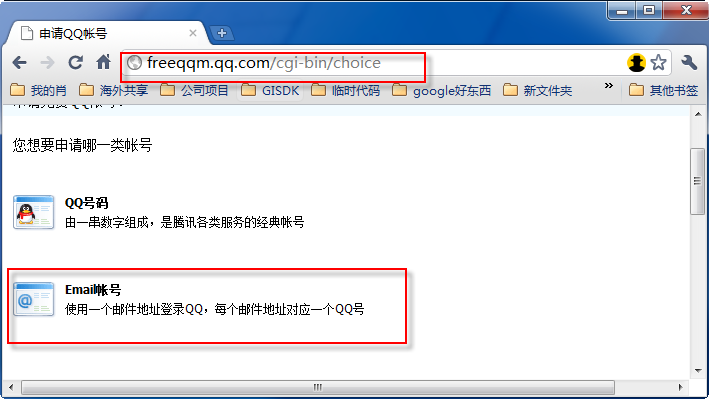
在上篇随笔《如何使用C#实现QQ号码的申请》 有介绍如何利用C#实现QQ号码的批量申请功能,其实腾讯还提供了一个注册QQ邮箱伴随有QQ号码的注册方式,就是QQ邮箱的注册,QQ邮箱的批量注册, 在很多场合需要用到,如注册淘宝账号,或者用来发送邮件,做营销加群,然后发送群邮件等等操作,注册QQ邮箱的界面如下图所示:

相对来说,QQ邮件的注册会比较容易一些,腾讯没有那么多变态古怪的加密处理方式,是比较正常的POST操作处理。

关键申请代码如下所示:

postData.AppendFormat(email={0}&nick={0}, randomUser, randomUser.Length > 10 ? randomUser.Substring(10) : randomUser);
postData.AppendFormat(
&age=1993&age_month=8&age_day=23&regsex=1);
postData.AppendFormat(
&password_1={0}&password_2={0}, qqDefaultPass);
postData.AppendFormat(
&Country=6&State=26&City=7);
postData.AppendFormat(
&validecode={0}&regqqmail=1&asdfg={1}&, this.txtVerifyCode.Text, asdfg);

string tempUrl = http://emailreg.qq.com/cgi-bin/signup/srv_tj?type=54796&seed=0. + GetRandomNumber();
string temp = httpHelper.GetHtml(tempUrl, cookieReg, tempUrl);
Thread.Sleep(
100);

string content = httpHelper.GetHtml(postUrl, cookieReg, postData.ToString(), true, refer);
if (content.Contains(恭喜您,申请成功))
{
string qq = httpHelper.GetHiddenKeyValue(content, uin);

re = new Regex(您申请的Email帐号为:<strong>(?<email>.*?)</strong>, RegexOptions.IgnoreCase | RegexOptions.Singleline | RegexOptions.IgnorePatternWhitespace);
mc
= re.Match(content);
string email = “”;
if (mc.Success)
{
email
= mc.Groups[1].Value;
}

SuccessCount++;//成功计数
AddToList(string.Format(qq:{0} email:{1}, qq, email));
SetTips(
string.Format(恭喜您,申请到QQ邮件:{0} Email:{1}, qq, email));

int redialCount = Convert.ToInt32(this.txtReDailCount.Value);
if (redialCount > 0 && (SuccessCount % redialCount == 0))
{
btnRedail_Click(
null, null);//重新拨号
}
}
else
{
string error = 申请失败,请重试;
if (content.IndexOf(此IP申请的操作过于频繁) > 0)
{
error
= 此IP申请的操作过于频繁;
}
else if (content.IndexOf(验证码错误) > 0)
{
error
= 验证码错误;
}
SetTips(error);
}

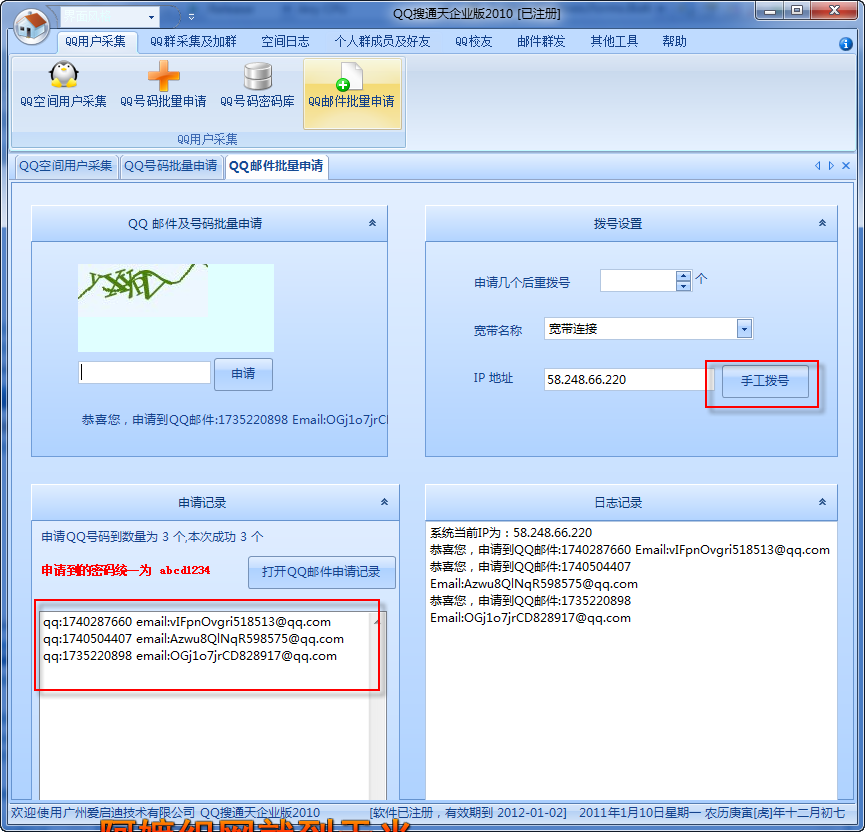
软件实现的效果如下所示:

腾讯一般一天一个IP只是允许注册几个号码,如果太过频繁,容易被封锁一段时间,这个时候,就可以利用快速拨号方式,重新更换IP地址,然后又是好汉一条,非常酷爽,哈哈。

[转载]ASP.NET MVC中的扩展点(七)视图及视图引擎

mikel阅读(1041)

[转载]MVC中的扩展点(七)视图及视图引擎 – xfrog – 博客园.

我们知道在MVC框架中,最终通过ActionResult来生成应答内容。上一篇中我们介绍了MVC中默认的结果类型,本章我们将详细介绍ViewResult及PartialViewResult,了解MVC是如何通过视图来生成应答内容的。

MVC默认的视图被称为Web Forms视图引擎,原因在于它的视图文件使用与ASP.NET Web Forms相同的文件类型(.aspx .ascx),并且使用ASP.NET的页面解析器来解释视图文件内容。也在于,我们在编写视图文件时,可以完全像编写aspx页面文件一样,使用智能提 示功能及内联代码等。

与传统ASP.NET页面一样,在运行时内建的页面编译器会将我们的aspx或ascx文件转换为标准的.NET类,假设我们的视图内容为:

<%@ Page Language="C#" Inherits="System.Web.Mvc.ViewPage" %>
 <div>
 <%=Html.Label("Hello World!") %>
<%
     using (Html.BeginForm())
    {
    }
%>
 </div>
 
.codearea { color: black; background-color: white; line-height: 18px; border: 1px solid rgb(79, 129, 189); margin: 0pt; width: auto ! important; overflow: auto; text-align: left; font-size: 12px; font-family: “Courier New”,”Consolas”,”Fixedsys”,”BitStream Vera Sans Mono”,courier,monospace,serif; }.codearea pre { color: black; line-height: 18px; padding: 0pt 0pt 0pt 12px ! important; margin: 0em; background-color: rgb(255, 255, 255) ! important; }.linewrap pre { white-space: pre-wrap; word-wrap: break-word; }.codearea pre.alt { background-color: rgb(247, 247, 255) ! important; }.codearea .lnum { color: rgb(79, 129, 189); line-height: 18px; }

页面编译器会将此视图转换为类似以下的类:

public class views_home_index_aspx : ViewPage, IRequiresSessionState, IHttpHandler
 {
    private void @__BuildControlTree(views_home_index_aspx @__ctrl)
    {
        this.InitializeCulture();
        @__ctrl.SetRenderMethodDelegate(new System.Web.UI.RenderMethod(this.@__Render));
    }

    private void @__Render(System.Web.UI.HtmlTextWriter @__w, System.Web.UI.Control parameterContainer)
    {
        @__w.Write("\r\n<div>\r\n");
        @__w.Write(Html.Label("Hello World!"));
        @__w.Write("\r\n");
        using (Html.BeginForm())
        {
        }
        @__w.Write("\r\n</div>\r\n");
    }
}

.codearea { color: black; background-color: white; line-height: 18px; border: 1px solid rgb(79, 129, 189); margin: 0pt; width: auto ! important; overflow: auto; text-align: left; font-size: 12px; font-family: “Courier New”,”Consolas”,”Fixedsys”,”BitStream Vera Sans Mono”,courier,monospace,serif; }.codearea pre { color: black; line-height: 18px; padding: 0pt 0pt 0pt 12px ! important; margin: 0em; background-color: rgb(255, 255, 255) ! important; }.linewrap pre { white-space: pre-wrap; word-wrap: break-word; }.codearea pre.alt { background-color: rgb(247, 247, 255) ! important; }.codearea .lnum { color: rgb(79, 129, 189); line-height: 18px; }

根据此类,生成的页面HTML源代码如下:


<div>
<label for="Hello World!">Hello World!</label>
<form action="/" method="post"></form>
</div>
 

.codearea { color: black; background-color: white; line-height: 18px; border: 1px solid rgb(79, 129, 189); margin: 0pt; width: auto ! important; overflow: auto; text-align: left; font-size: 12px; font-family: “Courier New”,”Consolas”,”Fixedsys”,”BitStream Vera Sans Mono”,courier,monospace,serif; }.codearea pre { color: black; line-height: 18px; padding: 0pt 0pt 0pt 12px ! important; margin: 0em; background-color: rgb(255, 255, 255) ! important; }.linewrap pre { white-space: pre-wrap; word-wrap: break-word; }.codearea pre.alt { background-color: rgb(247, 247, 255) ! important; }.codearea .lnum { color: rgb(79, 129, 189); line-height: 18px; }

显然,在转换时,编译器将非代码内容转换为Response.Write(…)的形式,即直接将内容写入Response,将<%=表达式%& gt;转换为Response.Write(表达式)的形式,即将表达式的返回值写入Response,将<%表达式%>中的表达式直接按代 码写入,即直接执行代码,不写入Response。

从技术上讲,ASP.NET中的aspx是通过PageParserFilter抽象类来控制类代码的生成,在MVC中,MVC实现了自己的解析 器:ViewTypeParserFilter,通过它控制将视图文件转换为标准的.NET类的行为。MVC不使用ASP.NET默认解析器的原因在于默 认的解析器不支持泛型,即aspx不能从泛型基类中继承,而ViewTypeParserFilter解除了此限制。当我们生成一个MVC项目后,在 Views目录下包含了一个Web.config配置文件,从中可以看到MVC已经通过pages的pageParserFilterType项将此目录 下的默认页面解析器指定为ViewTypeParserFilter。

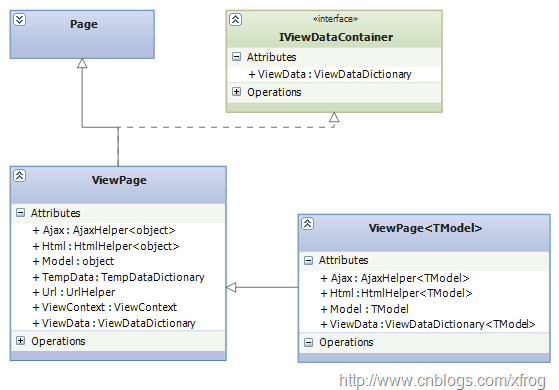
另外,视图文件与传统的aspx页面文件的一种重要不同点在于,传统页面从Page类继承,而视图是从MVC框架中的ViewPage类继承,本质上 ViewPage从Page继承,并在Page类基础针对MVC进行了扩展,这也是我们为什么可以在视图中使用模型对象、Html、Ajax等辅助类的原 因:

ViewPage

ViewPage<TModel>是ViewPage的泛型,在创建视图时,通过指定TModel的类型,从而实现强类型的ViewPage。

MVC视图引擎架构

视图引擎的执行方式很简单:通过ViewEngines.FindView根据当前的ControllerContext找出适当的视图引擎及视图,然后调用视图的Render方法生成应答内容,最后通过视图引擎的ReleaseView方法是否视图资源:

ViewActivity

MVC默认的Web Forms视图引擎类图如下:

ViewClass

IView、IViewEngine、ViewEngineResult是视图引擎的核心,IView接口负责视图的渲染,IViewEngine负责找出合适的视图文件,ViewEngineResult是对IView和IViewEngine的封装。

ViewEngineCollection表示一个IViewEngine集合,MVC提供向集合添加视图引擎的方法,并提供FindView、 FindPartialView方法,从集合项中找出与当前ControllerContext匹配的ViewEngineResult。

ViewEngines是一个静态类,其内部封装了一个ViewEngineCollection,构成了MVC框架默认的视图引擎集合,默认下,该结合仅包含一个Web Forms引擎。我们可通过视图引擎集合上的方法向其添加自定义的视图引擎。

WebFormViewEngine是IViewEngine的一个实现,表示一个Web Forms视图引擎。

WebFormView是IView的一个实现,表示一个Web Forms视图,其内部Render方法,将实例化一个通过视图aspx文件转换而来的类型。通过该类型将试图文件渲染为最终的应答结果。

第三方视图引擎

MVC视图引擎有不少开源项目,比较完善的有以下几种:

1、Spark View Engine:

官网:http://sparkviewengine.com/ 下载:http://sparkviewengine.codeplex.com/

2、NHaml View Engine

官网:http://code.google.com/p/nhaml/ 下载:http://code.google.com/p/nhaml/downloads/list

3、Razor:

此引擎有MVC同一团队开发,官网:http://www.asp.net/mvc 或者 http://www.asp.net/WebMatrix

每一个视图引擎都有自己不同的语法规则,对此本文不做介绍,请参考官方文档。另外,关于这几个引擎的粗略介绍,可参考以下博客:http://blogs.msdn.com/b/coding4fun/archive/2010/10/04/10070953.aspx

下面以Spark视图引擎为例,简要介绍第三方视图引擎的使用步骤:

1、下载Spark视图引擎并解压

2、新建一空的MVC项目,并添加对Spark.dll及Spark.Web.Mvc.dll的引用

3、修改Global.asax.cs,在Application_Start过程中想默认视图引擎集合中添加Spark视图引擎

protected void Application_Start()
{
    AreaRegistration.RegisterAllAreas();
    RegisterRoutes(RouteTable.Routes);
    ViewEngines.Engines.Add(new SparkViewFactory());
}

.codearea { color: black; background-color: white; line-height: 18px; border: 1px solid rgb(79, 129, 189); margin: 0pt; width: auto ! important; overflow: auto; text-align: left; font-size: 12px; font-family: “Courier New”,”Consolas”,”Fixedsys”,”BitStream Vera Sans Mono”,courier,monospace,serif; }.codearea pre { color: black; line-height: 18px; padding: 0pt 0pt 0pt 12px ! important; margin: 0em; background-color: rgb(255, 255, 255) ! important; }.linewrap pre { white-space: pre-wrap; word-wrap: break-word; }.codearea pre.alt { background-color: rgb(247, 247, 255) ! important; }.codearea .lnum { color: rgb(79, 129, 189); line-height: 18px; }4、添加一个HomeController:

显示行号 复制代码 HomeController
  1. public class HomeController : Controller
    
  2.  {
    
  3.     private List<Product> products = new List<Product>()
    
  4.     {
    
  5.         new Product(){ID="0001", Name = "测a试?产ú品·1", Price=1},
    
  6.         new Product(){ID="0002", Name = "测a试?产ú品·2", Price=1}
    
  7.     };
    
  8.     public ActionResult Index()
    
  9.     {
    
  10.         ViewData["products"] = products;
    
  11.         return View();
    
  12.     }
    
  13. }
    

.src_container { background-color: rgb(231, 229, 220); width: 99%; overflow: hidden; margin: 12px 0pt ! important; padding: 0px 3px 3px 0px; }.src_container .titlebar { background-color: rgb(212, 223, 255); border-width: 1px 1px 0pt; border-style: solid solid none; border-color: rgb(79, 129, 189) rgb(79, 129, 189) -moz-use-text-color; padding: 3px 24px; margin: 0pt; width: auto; line-height: 120%; overflow: hidden; text-align: left; font-size: 12px; }.src_container .toolbar { display: inline; font-weight: normal; font-size: 100%; float: right; color: rgb(0, 0, 255); text-align: left; overflow: hidden; }.toolbar span.button { display: inline; font-weight: normal; font-size: 100%; color: rgb(0, 0, 255); text-align: left; overflow: hidden; cursor: pointer; }.src_container div.clientarea { background-color: white; border: 1px solid rgb(79, 129, 189); margin: 0pt; width: auto ! important; height: auto; overflow: auto; text-align: left; font-size: 12px; font-family: “Courier New”,”Consolas”,”Fixedsys”,courier,monospace,serif; }.src_container ol.mainarea { padding: 0pt 0pt 0pt 52px; margin: 0pt; background-color: rgb(247, 247, 255) ! important; }.number_show { padding-left: 52px ! important; list-style: decimal outside none ! important; }.number_show li { list-style: decimal outside none ! important; border-left: 1px dotted rgb(79, 129, 189); }.number_hide { padding-left: 0px ! important; list-style-type: none ! important; }.number_hide li { list-style-type: none ! important; border-left: 0px none; }ol.mainarea li { display: list-item ! important; font-size: 12px ! important; margin: 0pt ! important; line-height: 18px ! important; padding: 0pt 0pt 0pt 0px ! important; background-color: rgb(247, 247, 255) ! important; color: rgb(79, 129, 189); }ol.mainarea li pre { color: black; line-height: 18px; padding: 0pt 0pt 0pt 12px ! important; margin: 0em; background-color: rgb(255, 255, 255) ! important; }.linewrap ol.mainarea li pre { white-space: pre-wrap; word-wrap: break-word; }ol.mainarea li pre.alt { background-color: rgb(247, 247, 255) ! important; }5、在Models下建立一个Product类

显示行号 复制代码 Product
  1. public class Product
    
  2. {
    
  3.     public string ID { get; set; }
    
  4.     public string Name { get; set; }
    
  5.     public string Description { get; set; }
    
  6.     public decimal Price { get; set; }
    
  7. }
    

.src_container { background-color: rgb(231, 229, 220); width: 99%; overflow: hidden; margin: 12px 0pt ! important; padding: 0px 3px 3px 0px; }.src_container .titlebar { background-color: rgb(212, 223, 255); border-width: 1px 1px 0pt; border-style: solid solid none; border-color: rgb(79, 129, 189) rgb(79, 129, 189) -moz-use-text-color; padding: 3px 24px; margin: 0pt; width: auto; line-height: 120%; overflow: hidden; text-align: left; font-size: 12px; }.src_container .toolbar { display: inline; font-weight: normal; font-size: 100%; float: right; color: rgb(0, 0, 255); text-align: left; overflow: hidden; }.toolbar span.button { display: inline; font-weight: normal; font-size: 100%; color: rgb(0, 0, 255); text-align: left; overflow: hidden; cursor: pointer; }.src_container div.clientarea { background-color: white; border: 1px solid rgb(79, 129, 189); margin: 0pt; width: auto ! important; height: auto; overflow: auto; text-align: left; font-size: 12px; font-family: “Courier New”,”Consolas”,”Fixedsys”,courier,monospace,serif; }.src_container ol.mainarea { padding: 0pt 0pt 0pt 52px; margin: 0pt; background-color: rgb(247, 247, 255) ! important; }.number_show { padding-left: 52px ! important; list-style: decimal outside none ! important; }.number_show li { list-style: decimal outside none ! important; border-left: 1px dotted rgb(79, 129, 189); }.number_hide { padding-left: 0px ! important; list-style-type: none ! important; }.number_hide li { list-style-type: none ! important; border-left: 0px none; }ol.mainarea li { display: list-item ! important; font-size: 12px ! important; margin: 0pt ! important; line-height: 18px ! important; padding: 0pt 0pt 0pt 0px ! important; background-color: rgb(247, 247, 255) ! important; color: rgb(79, 129, 189); }ol.mainarea li pre { color: black; line-height: 18px; padding: 0pt 0pt 0pt 12px ! important; margin: 0em; background-color: rgb(255, 255, 255) ! important; }.linewrap ol.mainarea li pre { white-space: pre-wrap; word-wrap: break-word; }ol.mainarea li pre.alt { background-color: rgb(247, 247, 255) ! important; }
6、修改web.config,在configSections下添加spark配置节:

<section name="spark" type="Spark.Configuration.SparkSectionHandler, Spark"/>

7、在web.config中配置spark(如默认的命名空间引用):

  <spark>
    <compilation debug="true" defaultLanguage="CSharp" />
    <pages automaticEncoding="true" >
      <namespaces>
        <add namespace="System"/>
        <add namespace="System.Collections.Generic"/>
        <add namespace="System.Linq"/>
        <add namespace="System.Web"/>
        <add namespace="System.Web.Mvc"/>
        <add namespace="System.Web.Mvc.Html"/>
      </namespaces>
    </pages>
  </spark>

8、在Views下创建Home目录,并在此目录下添加Index.spark视图模板文件:

<viewdata products="IList[[Models.Product]]"/>
<div each="var product in products">
    <h2>${product.Name}</h2>
</div>

.codearea { color: black; background-color: white; line-height: 18px; border: 1px solid rgb(79, 129, 189); margin: 0pt; width: auto ! important; overflow: auto; text-align: left; font-size: 12px; font-family: “Courier New”,”Consolas”,”Fixedsys”,”BitStream Vera Sans Mono”,courier,monospace,serif; }.codearea pre { color: black; line-height: 18px; padding: 0pt 0pt 0pt 12px ! important; margin: 0em; background-color: rgb(255, 255, 255) ! important; }.linewrap pre { white-space: pre-wrap; word-wrap: break-word; }.codearea pre.alt { background-color: rgb(247, 247, 255) ! important; }.codearea .lnum { color: rgb(79, 129, 189); line-height: 18px; }

说明:本例仅演示如何使用第三方视图引擎,如果想详细了解Spark视图引擎,请访问官方网站

源代码下载

[转载]Android XML解析

mikel阅读(913)

[转载]Android XML解析 – Feisky – 博客园.

Android平台上可以使用Simple API for XML(SAX) 、 Document Object Model(DOM)和Android附带的pull解析器解析XML文件。

下面是本例子要解析的XML文件:

文件名称:itcast.xml

<?xml version=”1.0″ encoding=”UTF-8″?>

<persons>

<person id=”23″>

<name>李明</name>

<age>30</age>

</person>

<person id=”20″>

<name>李向梅</name>

<age>25</age>

</person>

</persons>

例子定义了一个javabean用于存放上面解析出来的xml内容, 这个javabean为Person,代码:

public class Person {

private Integer id;

private String name;

private Short age;

public Integer getId() {

return id;

}

public void setId(Integer id) {

this.id = id;

}

public String getName() {

return name;

}

public void setName(String name) {

this.name = name;

}

public Short getAge() {

return age;

}

public void setAge(Short age) {

this.age = age;

}

}

使用SAX读取XML文件

SAX是一个解析速度快并且占用内存少的xml解析器,非常适合用于Android等移动设备。 SAX 解析XML文件采用的是事件驱动,也就是说,它并不需要解析完整个文档,在按内容顺序解析文档的过程中,SAX会判断当前读到的字符是否合法XML语法中 的某部分,如果符合就会触发事件。所谓事件,其实就是一些回调(callback)方法,这些方法(事件)定义在ContentHandler接口。

下面是一些ContentHandler接口常用的方法:

  • startDocument() 当遇到文档的开头的时候,调用这个方法,可以在其中做一些预处理的工作。
  • endDocument() 和上面的方法相对应,当文档结束的时候,调用这个方法,可以在其中做一些善后的工作。
  • startElement(String namespaceURI, String localName, String qName, Attributes atts) 当 读到一个开始标签的时候,会触发这个方法。namespaceURI就是命名空间,localName是不带命名空间前缀的标签名,qName是带命名空 间前缀的标签名。通过atts可以得到所有的属性名和相应的值。要注意的是SAX中一个重要的特点就是它的流式处理,当遇到一个标签的时候,它并不会纪录 下以前所碰到的标签,也就是说,在startElement()方法中,所有你所知道的信息,就是标签的名字和属性,至于标签的嵌套结构,上层标签的名 字,是否有子元属等等其它与结构相关的信息,都是不得而知的,都需要你的程序来完成。这使得SAX在编程处理上没有DOM来得那么方便。
  • endElement(String uri, String localName, String name) 这个方法和上面的方法相对应,在遇到结束标签的时候,调用这个方法。
  • characters(char[] ch, int start, int length) 这个方法用来处理在XML文件中读到的内容,第一个参数用于存放文件的内容,后面两个参数是读到的字符串在这个数组中的起始位置和长度,使用new String(ch,start,length)就可以获取内容。

解析itcast.xml触发的事件为:

读到的标签及内容       触发事件

{文档开始}          startDocument()

<persons>           startElement(, “persons”, null, “{Attributes}”)

“\n\t”              characters(“<persons>…</persons>”, “12”, “2”)

<person>            startElement(, “person”, null, “{Attributes}”)

“\n\t\t”            characters(“<persons>…</persons>”, “31”, “3”)

<name>              startElement(, “name”, null, “{Attributes}”)

“李明”              characters(“<persons>…</persons>”, “40”, “2”)

</name>             endElement(“”, “name”, null)

“\n\t\t”            characters(“<persons>…</persons>”, “50”, “3”)

<age>               startElement(, “age”, null, “{Attributes}”)

“30”                characters(“<persons>…</persons>”, “58”, “2”)

</age>              endElement(“”, “age”, null)

“\n\t”              characters(“<persons>…</persons>”, “67”, “2”)

</person>           endElement(“”, “person”, null)

“\n\t”              characters(“<persons>…</persons>”, “79”, “2”)

<person>            startElement(, “person”, null, “{Attributes}”)

“\n\t\t”            characters(“<persons>…</persons>”, “98”, “3”)

<name>              startElement(, “name”, null, “{Attributes}”)

“李向梅”            characters(“<persons>…</persons>”, “107”, “3”)

</name>             endElement(“”, “name”, null)

“\n\t\t”            characters(“<persons>…</persons>”, “118”, “3”)

<age>               startElement(, “age”, null, “{Attributes}”)

“25”                characters(“<persons>…</persons>”, “126”, “2”)

</age>              endElement(“”, “age”, null)

“\n\t”              characters(“<persons>…</persons>”, “135”, “2”)

</person>           endElement(“”, “person”, null)

“\n”                characters(“<persons>…</persons>”, “147”, “1”)

</persons>          endElement(“”, “persons”, null)

{文档结束}          endDocument()

只要为SAX提供实现ContentHandler接口的类,那么该类就可以得到通知事件(实际上就是SAX调用了该类中的回调方法)。因为ContentHandler是一个接口,在使用的时候可能会有些不方便,因此,SAX还为其制定了一个Helper类:DefaultHandler,它实现了这个接口,但是其所有的方法体都为空,在实现的时候,你只需要继承这个类,然后重载相应的方法即可。使用SAX解析itcast.xml的代码如下:

public static List<Person> readXML(InputStream inStream) {

try {

SAXParserFactory spf = SAXParserFactory.newInstance();

SAXParser saxParser = spf.newSAXParser(); //创建解析器

//设置解析器的相关特性,http://xml.org/sax/features/namespaces = true 表示开启命名空间特性

saxParser.setProperty(“http://xml.org/sax/features/namespaces”,true);

XMLContentHandler handler = new XMLContentHandler();

saxParser.parse(inStream, handler);

inStream.close();

return handler.getPersons();

} catch (Exception e) {

e.printStackTrace();

}

return null;

}

import java.util.ArrayList;

import java.util.List;

import org.xml.sax.Attributes;

import org.xml.sax.SAXException;

import org.xml.sax.helpers.DefaultHandler;

import cn.itcast.xml.domain.Person;

public class XMLContentHandler extends DefaultHandler {

private List<Person> persons = null;

private Person currentPerson;

private String tagName = null;//当前解析的元素标签

public List<Person> getPersons() {

return persons;

}

/*

* 接收文档的开始的通知。

*/

@Override public void startDocument() throws SAXException {

persons = new ArrayList<Person>();

}

/*

* 接收字符数据的通知。

*/

@Override public void characters(char[] ch, int start, int length) throws SAXException {

if(tagName!=null){

String data = new String(ch, start, length);

if(tagName.equals(“name”)){

this.currentPerson.setName(data);

}else if(tagName.equals(“age”)){

this.currentPerson.setAge(Short.parseShort(data));

}

}

}

/*

* 接收元素开始的通知。

* 参数意义如下:

*    namespaceURI:元素的命名空间

*    localName :元素的本地名称(不带前缀)

*    qName :元素的限定名(带前缀)

*    atts :元素的属性集合

*/

@Override public void startElement(String namespaceURI, String localName, String qName, Attributes atts) throws SAXException {

if(localName.equals(“person”)){

currentPerson = new Person();

currentPerson.setId(Integer.parseInt(atts.getValue(“id”)));

}

this.tagName = localName;

}

/*

* 接收文档的结尾的通知。

* 参数意义如下:

*    uri :元素的命名空间

*    localName :元素的本地名称(不带前缀)

*    name :元素的限定名(带前缀)

*

*/

@Override public void endElement(String uri, String localName, String name) throws SAXException {

if(localName.equals(“person”)){

persons.add(currentPerson);

currentPerson = null;

}

this.tagName = null;

}

}

使用DOM读取XML文件

除 了可以使用 SAX解析XML文件,大家也可以使用熟悉的DOM来解析XML文件。 DOM解析XML文件时,会将XML文件的所有内容读取到内存中,然后允许您使用DOM API遍历XML树、检索所需的数据。使用DOM操作XML的代码看起来比较直观,并且,在某些方面比基于SAX的实现更加简单。但是,因为DOM需要将 XML文件的所有内容读取到内存中,所以内存的消耗比较大,特别对于运行Android的移动设备来说,因为设备的资源比较宝贵,所以建议还是采用SAX 来解析XML文件,当然,如果XML文件的内容比较小采用DOM是可行的。

import java.io.InputStream;

import java.util.ArrayList;

import java.util.List;

import javax.xml.parsers.DocumentBuilder;

import javax.xml.parsers.DocumentBuilderFactory;

import org.w3c.dom.Document;

import org.w3c.dom.Element;

import org.w3c.dom.Node;

import org.w3c.dom.NodeList;

import cn.itcast.xml.domain.Person;

/**

* 使用Dom解析xml文件

*

*/

public class DomXMLReader {

public static List<Person> readXML(InputStream inStream) {

List<Person> persons = new ArrayList<Person>();

DocumentBuilderFactory factory = DocumentBuilderFactory.newInstance();

try {

DocumentBuilder builder = factory.newDocumentBuilder();

Document dom = builder.parse(inStream);

Element root = dom.getDocumentElement();

NodeList items = root.getElementsByTagName(“person”);//查找所有person节点

for (int i = 0; i < items.getLength(); i++) {

Person person = new Person();

//得到第一个person节点

Element personNode = (Element) items.item(i);

//获取person节点的id属性值

person.setId(new Integer(personNode.getAttribute(“id”)));

//获取person节点下的所有子节点(标签之间的空白节点和name/age元素)

NodeList childsNodes = personNode.getChildNodes();

for (int j = 0; j < childsNodes.getLength(); j++) {

Node node = (Node) childsNodes.item(j); //判断是否为元素类型

if(node.getNodeType() == Node.ELEMENT_NODE){    Element childNode = (Element) node;

//判断是否name元素

if (“name”.equals(childNode.getNodeName())) {

//获取name元素下Text节点,然后从Text节点获取数据

person.setName(childNode.getFirstChild().getNodeValue());

} else if (“age”.equals(childNode.getNodeName())) {

person.setAge(new Short(childNode.getFirstChild().getNodeValue()));

}

}

}

persons.add(person);

}

inStream.close();

} catch (Exception e) {

e.printStackTrace();

}

return persons;

}

使用Pull解析器读取XML文件

除了可以使用 SAX和DOM解析XML文件,大家也可以使用Android内置的Pull解析器解析XML文件。 Pull 解析器的运行方式与 SAX 解析器相似。它提供了类似的事件,如:开始元素和结束元素事件,使用parser.next()可以进入下一个元素并触发相应事件。事件将作为数值代码被 发送,因此可以使用一个switch对感兴趣的事件进行处理。当元素开始解析时,调用parser.nextText()方法可以获取下一个Text类型 元素的值。

Pull解析器的源码及文档下载网址:http://www.xmlpull.org/

import org.xmlpull.v1.XmlPullParser;

import android.util.Xml;

import cn.itcast.xml.domain.Person;

public class PullXMLReader {

public static List<Person> readXML(InputStream inStream) {

XmlPullParser parser = Xml.newPullParser();

try {

parser.setInput(inStream, “UTF-8”);

int eventType = parser.getEventType();

Person currentPerson = null;

List<Person> persons = null;

while (eventType != XmlPullParser.END_DOCUMENT) {

switch (eventType) {

case XmlPullParser.START_DOCUMENT://文档开始事件,可以进行数据初始化处理

persons = new ArrayList<Person>();

break;

case XmlPullParser.START_TAG://开始元素事件

String name = parser.getName();

if (name.equalsIgnoreCase(“person”)) {

currentPerson = new Person();

currentPerson.setId(new Integer(parser.getAttributeValue(null, “id”)));

} else if (currentPerson != null) {

if (name.equalsIgnoreCase(“name”)) {

currentPerson.setName(parser.nextText());// 如果后面是Text元素,即返回它的值

} else if (name.equalsIgnoreCase(“age”)) {

currentPerson.setAge(new Short(parser.nextText()));

}

}

break;

case XmlPullParser.END_TAG://结束元素事件

if (parser.getName().equalsIgnoreCase(“person”) && currentPerson != null) {

persons.add(currentPerson);

currentPerson = null;

}

break;

}

eventType = parser.next();

}

inStream.close();

return persons;

} catch (Exception e) {

e.printStackTrace();

}

return null;

}

}

使用Pull解析器生成XML文件

有些时候,我们需要生成一个XML文件,生成XML文件的方法有很多,如:可以只使用一个StringBuilder组拼XML内容,然后把内容写入到文件中;或者使用DOM API生成XML文件,或者也可以使用pull解析器生成XML文件,这里推荐大家使用Pull解析器。

使用Pull解析器生成一个与itcast.xml文件内容相同的myitcast.xml文件。

public static String writeXML(List<Person> persons, Writer writer){

XmlSerializer serializer = Xml.newSerializer();

try {

serializer.setOutput(writer);

serializer.startDocument(“UTF-8”, true);

//第一个参数为命名空间,如果不使用命名空间,可以设置为null

serializer.startTag(“”, “persons”);

for (Person person : persons){

serializer.startTag(“”, “person”);

serializer.attribute(“”, “id”, person.getId().toString());

serializer.startTag(“”, “name”);

serializer.text(person.getName());

serializer.endTag(“”, “name”);

serializer.startTag(“”, “age”);

serializer.text(person.getAge().toString());

serializer.endTag(“”, “age”);

serializer.endTag(“”, “person”);

}

serializer.endTag(“”, “persons”);

serializer.endDocument();

return writer.toString();

} catch (Exception e) {

e.printStackTrace();

}

return null;

}

使用代码如下(生成XML文件):

File xmlFile = new File(“myitcast.xml”);

FileOutputStream outStream = new FileOutputStream(xmlFile);

OutputStreamWriter outStreamWriter = new OutputStreamWriter(outStream, “UTF-8”);

BufferedWriter writer = new BufferedWriter(outStreamWriter);

writeXML(persons, writer);

writer.flush();

writer.close();

如果只想得到生成的xml内容,可以使用StringWriter:

StringWriter writer = new StringWriter();

writeXML(persons, writer);

String content = writer.toString();

源码下载:http://dl.dbank.com/c0glt5uic5

注:请打开DDMS查看读取结果

[转载]Css技巧: 模块化编码

mikel阅读(1131)

[转载]Css技巧: 模块化编码 – Mr.Think的博客@MrThink.net… – 博客园.

原生Js因JQuery的”write less,do more”变得极简, Html因语义化编码变得简明, 那么, 有没有一种方式让Css也更加的高效精致呢? 当然有, 那便是模块化编码. Css的模块化,我们可以理解成(抑或本身就是)OOP思想, 重用性、灵活性、可扩展性便是它终极的目标, “类”便是它的核心, OOP的多用组合少用继承一样是它的基本原则. Css模块化是一个新颖高效的Css编码方式, 若有接触过YUI Css的朋友肯定对这种方式有所了解. 如何Css模块化, 我想这才是大家真正关心的. 我所理解的Css模块化, 应该从两大块去区分. 第一大块, 从整站全局模块化. 这一点大家并不陌生, 时常用到的reset css便是模块化的一部分, 全局通用的字体样式, 链接样式, 以及通用头部底部及主体容器等等这些我们已经熟知, 另外诸如定义文字排版(如.f12{font-size:12px})、定位(如.tl{text-align:left})、长度高度 (如.w10{width:10px})、边距(如.m10{margin:10px})等页面中会常用到的样式,这一类,我们称之为Css通用原子类 (哈,与类扯上关系了,那就权当成类吧).通用原子类有两个特点: 通用性和原子性, 任何页面都可以随意使用它们, 且他们只表现最基础的样式, 一个通用原子类只设置一个样式,不可再分. 关于整站全局模块化不再详述, 本文后面我会贴出阿当的《Web前端开发修炼之道》一书中常用通用原子类样式. 第二大块, 是从视觉效果上模块化, 在视觉上样式和功能相对独立稳定的部分即可视为模块. 拆分这些模块, 应该尽量遵循一个原则: 模块与模块之间尽量不要包含相同的部分, 若有相同部分就再拆出来独立成一个模块. 下图是我画的一个简易的页面视觉图: Css模块化视觉样例 看到上图, 菜鸟的Css编码一般是为1~4定义四个类名,为他们写各自的样式; 明智一点的写法是为1~4定义四个类名, 用.a .b .c .d{…}方式定义共同样式, 然后再为各自定义不同部分的样式; 但是, 还有一种完美的方式, 那便是模块化. 下面我就以上图为例做个简单的模块化分析. 第一步, 分析整个视觉共用部分. 可以看出,1~4中,标题背景,标题文字,内容文字这三个部分的样式都是相同的, 所以, 我们可以为这个四个区块定义一个类名, 将共同的样式写给这个类名:

01 ...
02 <div class="box">
03 <h2>倒霉松鼠再出山</h2>
04 <p>20世纪福克斯将为卖座动画片《冰河世纪》(Ice Age内地译做《冰川时代》)再次开拍续集...</p>
05 </div>
06 <div class="box">
07 <h2>倒霉松鼠再出山</h2>
08 <p>20世纪福克斯将为卖座动画片《冰河世纪》(Ice Age内地译做《冰川时代》)再次开拍续集...</p>
09 </div>
10 <div class="box">
11 <h2>倒霉松鼠再出山</h2>
12 <p>20世纪福克斯将为卖座动画片《冰河世纪》(Ice Age内地译做《冰川时代》)再次开拍续集...</p>
13 </div>
14 <div class="box">
15 <h2>倒霉松鼠再出山</h2>
16 <p>20世纪福克斯将为卖座动画片《冰河世纪》(Ice Age内地译做《冰川时代》)再次开拍续集...</p>
17 </div>
18 ...
19 </div>

第二步, 分析出不同部分, 并权衡高效使用. 可以看出, 不同部分, 主要是内容背景色和区块宽度两部分. 先说背景色, 背景色有三种, 淡黄(1个), 白色(2个), 灰色(1个), 遵从”模块与模块之间尽量不要包含相同的部分, 若有相同部分就再拆出来独立成一个模块”的原则, 我们要把2个白底的样式提出来, 另两个单独定义, 而根据Css优先原则, 我们可以把白底默认定义到第一步中的box样式中, 另两种背景色可做重定义处理. 再来看看宽度与定位, 2,4宽度等同且都右浮动, 所以, 我们可以把这部分提出来模块化, 而浮动一般可以直接调用通用原子类, 所以, 我们仅仅需要定义一个宽度样式中(若这个宽度在通用原子类中也有就更好了). 如此以来, Html可以这样写:

01 ...
02 <div class="box bg_y">
03 <h2>倒霉松鼠再出山</h2>
04 <p>20世纪福克斯将为卖座动画片《冰河世纪》(Ice Age内地译做《冰川时代》)再次开拍续集...</p>
05 </div>
06 <div class="box fr right_w">
07 <h2>倒霉松鼠再出山</h2>
08 <p>20世纪福克斯将为卖座动画片《冰河世纪》(Ice Age内地译做《冰川时代》)再次开拍续集...</p>
09 </div>
10 <div class="box">
11 <h2>倒霉松鼠再出山</h2>
12 <p>20世纪福克斯将为卖座动画片《冰河世纪》(Ice Age内地译做《冰川时代》)再次开拍续集...</p>
13 </div>
14 <div class="box fr right_w bg_g">
15 <h2>倒霉松鼠再出山</h2>
16 <p>20世纪福克斯将为卖座动画片《冰河世纪》(Ice Age内地译做《冰川时代》)再次开拍续集...</p>
17 </div>
18 ...

或许, 这样的结构对Html页面来说, 会显的有些臃肿, 但Css文件因为重用性的提高而大大的减小了. Css模块化是一个比较实用但也需要去领悟的思想, 实际使用中也需要全面的分析, 过多的模块也会导致维护性的降低, 如同OOP编程一样, 我们也要考虑”公有属性”与”私有属性”. 本文通过一个简单的例子解析了Css模块化的基本思想, 更多关于Css模块化的知识, 可以看YUI Css或者其他网络上的资源. do write, less more…Css也可以做到. 附: 阿当《Web前端开发修炼之道》一书中分享的通用原子类:

001 /*文字排版*/
002 .f12{font-size:12px}
003 .f13{font-size:13px}
004 .f14{font-size:14px}
005 .f16{font-size:16px}
006 .f20{font-size:20px}
007 .fb{font-weight:bold}
008 .fn{font-weight:normal}
009 .t2{text-indent:2em}
010 .lh150{line-height:150%}
011 .lh180{line-height:180%}
012 .lh200{line-height:200%}
013 .unl{text-decoration:underline;}
014 .no_unl{text-decoration:none;}
015 /*定位*/
016 .tl{text-align:left}
017 .tc{text-align:center}
018 .tr{text-align:right}
019 .bc{margin-left:auto;margin-right:auto;}
020 .fl{float:left;display:inline}
021 .fr{float:right;display:inline}
022 .cb{clear:both}
023 .cl{clear:left}
024 .cr{clear:right}
025 .clearfix:after{content:".";display:block;height:0;clear:both;visibility:hidden}
026 .clearfix{display:inline-block}* html .clearfix{height:1%}.clearfix{display:block}
027 .vm{vertical-align:middle}
028 .pr{position:relative}
029 .pa{position:absolute}
030 .abs-right{position:absolute;right:0}
031 .zoom{zoom:1}
032 .hidden{visibility:hidden}
033 .none{display:none}
034 /*长度高度*/
035 .w10{width:10px}
036 .w20{width:20px}
037 .w30{width:30px}
038 .w40{width:40px}
039 .w50{width:50px}
040 .w60{width:60px}
041 .w70{width:70px}
042 .w80{width:80px}
043 .w90{width:90px}
044 .w100{width:100px}
045 .w200{width:200px}
046 .w250{width:250px}
047 .w300{width:300px}
048 .w400{width:400px}
049 .w500{width:500px}
050 .w600{width:600px}
051 .w700{width:700px}
052 .w800{width:800px}
053 .w{width:100%}
054 .h50{height:50px}
055 .h80{height:80px}
056 .h100{height:100px}
057 .h200{height:200px}
058 .h{height:100%}
059 /*边距*/
060 .m10{margin:10px}
061 .m15{margin:15px}
062 .m30{margin:30px}
063 .mt5{margin-top:5px}
064 .mt10{margin-top:10px}
065 .mt15{margin-top:15px}
066 .mt20{margin-top:20px}
067 .mt30{margin-top:30px}
068 .mt50{margin-top:50px}
069 .mt100{margin-top:100px}
070 .mb10{margin-bottom:10px}
071 .mb15{margin-bottom:15px}
072 .mb20{margin-bottom:20px}
073 .mb30{margin-bottom:30px}
074 .mb50{margin-bottom:50px}
075 .mb100{margin-bottom:100px}
076 .ml5{margin-left:5px}
077 .ml10{margin-left:10px}
078 .ml15{margin-left:15px}
079 .ml20{margin-left:20px}
080 .ml30{margin-left:30px}
081 .ml50{margin-left:50px}
082 .ml100{margin-left:100px}
083 .mr5{margin-right:5px}
084 .mr10{margin-right:10px}
085 .mr15{margin-right:15px}
086 .mr20{margin-right:20px}
087 .mr30{margin-right:30px}
088 .mr50{margin-right:50px}
089 .mr100{margin-right:100px}
090 .p10{padding:10px;}
091 .p15{padding:15px;}
092 .p30{padding:30px;}
093 .pt5{padding-top:5px}
094 .pt10{padding-top:10px}
095 .pt15{padding-top:15px}
096 .pt20{padding-top:20px}
097 .pt30{padding-top:30px}
098 .pt50{padding-top:50px}
099 .pb5{padding-bottom:5px}
100 .pb10{padding-bottom:10px}
101 .pb15{padding-bottom:15px}
102 .pb20{padding-bottom:20px}
103 .pb30{padding-bottom:30px}
104 .pb50{padding-bottom:50px}
105 .pb100{padding-bottom:100px}
106 .pl5{padding-left:5px}
107 .pl10{padding-left:10px}
108 .pl15{padding-left:15px}
109 .pl20{padding-left:20px}
110 .pl30{padding-left:30px}
111 .pl50{padding-left:50px}
112 .pl100{padding-left:100px}
113 .pr5{padding-right:5px}
114 .pr10{padding-right:10px}
115 .pr15{padding-right:15px}
116 .pr20{padding-right:20px}
117 .pr30{padding-right:30px}
118 .pr50{padding-right:50px}
119 .pr100{padding-right:100px}

原文发布于Mr.Think的博客: http://mrthink.net/css-tips-oopcoding/, 转载请注明.

[转载]案例实战zencart1.38a支付模块简化Fast and Easy Checkout配置

mikel阅读(1265)

[转载]案例实战zencart1.38a支付模块简化Fast and Easy Checkout配置 – PHP编程最快明白 – 博客园.

案例实战zencart1.38a支付模块简化Fast and Easy Checkout配置

zencart默认的支付功能是三步以上才能进入paypal等支付页面的,非常繁复, 所以,有必要实现一个一页买单(one page checkout)的功能,现在,以我的成功经验,给大家讲一个成功的案例吧,绝对能弄好,如果有看不明白的可以找我,只要看完我的教程,一般是不会有问 题了。

虽然可以修改checkout_shipping的内容实现了one page checkout的功能,但是一般的phper还是无从下手。例如,请看这个支付页面:

这是通过手工修改的zencart的支付模块,实现了one page checkout,但难点是Ajax和一些代码逻辑。

今天,我将在我们的网站www.dm800.eu上使用专门的模块实现这一功能,请先看效果:

以上是做好了的效果,www.dm800.eu我采用的是Fast and Easy Checkout模块,只需改动少数(前台显示css等)代码便可,其实不难。步骤和注意的地方如下:

前提条件:

软件我使用的是zencart 1.38a,Fast and Easy Checkout 1.93,都是免费的,php编辑器用的是Dreamweaver。整个测试通过,如果你的zencart版本不是1.38+,建议你安装前先备份好网站 数据,以防万一,具体请看第一步。

第一步,网站数据和数据库备份,Fast and Easy Checkout会覆盖极个别includes或admin里的文件,比如admin里的order.php等,所以,如果你的网站改过了这些文件,就要 备份后按需求改回来的。数据库则会在configuration和configuration_group增加记录而已。这一步是必要的,必须养成良好的 习惯。

第二步,下载Fast and Easy Checkout 1.93,可以用google搜索:Fast and Easy Checkout 1.93 download,出来第一个就是啦,这是英文的,没有带中文等语言,呆会给大家讲语言包翻译。我用的下载地址是:http://www.numinix.com/fast-and-easy-checkout-for-zen-cart,点download now即可,不用放在购物车里面的。

第三步,解压缩Fast and Easy Checkout,对着required_files文件夹,查找所有叫YOUR_TEMPLATE,全部重命名为你的网站里对应的一个TEMPLATE 名字,并且把required_files里的admin文件夹重命名为对应的你的管理文件夹名字。这一步用于最后覆盖用。

第四步,把includes\languages\english复制成你的语言目录名称,对应你网站的这个目录的几个语言,里面的php文件的 define都要一一翻译过来,否则会只看到英文的,小技巧:这里的对应语言的TEMPLATE目录下login.php、logoff.php你的网站 对应的上一级目录是有的,你可以参考一下,只要复制一份再把多出来的定义加上去就行。

第五步,进phpmyadmin,把install.SQL里的内容复制了在zencart数据库上的SQL上运行一次,这时 候,configuration约增加了23条记录和configuration_group增加了一条记录。当然,你也可以复制 install.SQL 到 ADMIN->TOOLS->INSTALL SQL(也就是SQL运行器中进行运行)。这时候,管理后台的configuration菜单最后出现了Fast and Easy Checkout configuration,进去把第一个选项Fast and Easy Checkout改为true即可。你也可以改一下跳转到paypal时的字Checkout Confirmation Alternate Text,其他选项不需要改,数据库和后台配置成功。

第六步,现在把required_files里的文件全部覆盖到网站的主目录,打开你的网站,新的支付页面是否大体出来了?现在,美化一下页面的CSS等,如下:

进入required_files\includes\templates\(YOUR_TEMPLATE)目录,打开template里的tpl_checkout_default.php文件,找到这一行:

<?php include(DIR_WS_TEMPLATE . ‘templates/tpl_checkout_stacked.php’); ?>

可以知道checkout的显示是另一个文件控制的。

打开tpl_checkout_stacked.php开始编辑,因为默认的页面显示顺序是先显示运输方式和支付方式的,不符合我们的习惯,我们要 把显示顺序改一改,现在把<!–BOF SHIPPING–>前面的代码全部剪切到<fieldset class=”checkout” id=”checkoutComments”>这一行前面。现在看看效果如何吧。

然后,打开CSS\checkout.css,我们可能要在最后增加些修改的显示样式,比如把id为checkoutShipto的宽度改为80%,把class为checkoutAddress的边框改为无,把class为gvBal的input框的文字上下对齐方式改为top,以及把class为cartTableHeading的背景颜色改为#dedede等。还有一些边距也需要调小一些,具体要和你的模板搭配好。现在刷新再看看效果吧。

第七步,由于www.dm800.eu是免运费的,每次要点击free shipping的checkbox,现在我要不这个按钮默认是选上的,所以在tpl_checkout_stacked.php代码最后增加以下代码:

1 <?php 2  //code:free shipping checked,power by www.dm800.eu 3  if($_SESSION['shipping']==null){ ?> 4  <script type="text/javascript" language="javascript"><!--// 5 updateForm(); 6 //--></script> 7 <?php }

这几行代码是如果shipping没记录则使用JQuery初始化,调用updateForm()函数刷新,这时候加载的运输方式默认都会选上的。

第八步,把原来网站上includes\modules\order_total\ot_coupon.php,找到这一行:

$ratioTax = $adjustedTax/$order->info[‘tax’];

改为:

1 //$ratioTax = $adjustedTax/$order->info['tax']; 2 $ratioTax = (isset($order->info['tax']) && $order->info['tax'] != 0) ? $adjustedTax/$order->info['tax'] : 0;

这是zencart1.38+一个bug,第二行代码我是从1.39h复制过来的,优惠码加上去后报错是因为在后台没定义tax时,会有如下报错:

Warning: Division by zero in 。。。/public_html/includes/modules/order_total/ot_coupon.php on line 364

这时候,我们的Fast and Easy Checkout配置完毕。

其实,整个过程看上去很难,其实,做起来还是比较简单的,也就是小小的错误修复一下,Fast and Easy Checkout采用JQuery来刷新修改自己的地址,这是比较好的地方,还有其他功能比如Checkout Without Account  充许用户不注册购买等,适合做不同的网站需求。