[转载]jQuery数组处理详解(含实例演示)

mikel阅读(1076)

[转载]jQuery数组处理详解(含实例演示) – Mr.Think的博客@MrThink.net… – 博客园.

jQuery的数组处理,便捷,功能齐全. 最近的项目中用到的比较多,深感实用,一步到位的封装了很多原生js数组不能企及的功能. 最近时间紧迫,今天抽了些时间回过头来看 jQuery中文文档 中对数组的介绍,顺便对JQuery数组做个总结.温故,知新.
强烈建议你打开DEMO演示后再看下面的详解: 点此查看DEMO
1. $.each(array, [callback]) 遍历[常用]
解释: 不 同于例遍 JQuery 对象的 $().each() 方法,此方法可用于例遍任何对象(不仅仅是数组哦~). 回调函数拥有两个参数:第一个为对象的成员或数组的索引, 第二个为对应变量或内容. 如果需要退出 each 循环可使回调函数返回 false, 其它返回值将被忽略.
each遍历,相信都不陌生,在平常的事件处理中,是for循环的变体,但比for循环强大.在数组中,它可以轻松的攻取数组索引及对应的值.例:

var _mozi=[墨家,墨子,墨翟,兼爱非攻,尚同尚贤]; //本文所用到的数组, 下同
$.
each(_mozi,function(key,val){
//回调函数有两个参数,第一个是元素索引,第二个为当前值
alert(_mozi数组中 ,索引 : +key+ 对应的值为: +val);
});

相对于原生的for..in,each更强壮一点. for..in也可以遍历数组,并返回对应索引,但值是需要通过arrName[key]来获取;
2. $.grep(array, callback, [invert]) 过滤数组[常用]
解释: 使 用过滤函数过滤数组元素.此函数至少传递两个参数(第三个参数为true或false,对过滤函数返回值取反,个人觉得用处不大): 待过滤数组和过滤函数. 过滤函数必须返回 true 以保留元素或 false 以删除元素. 另外,过滤函数还可以是可设置为一个字条串(个人不推荐,欲了解自行查阅);

$.grep(_mozi,function(val,key){
//过滤函数有两个参数,第一个为当前元素,第二个为元素索引
if(val==墨子){
alert(数组值为 墨子 的下标是: +key);
}
});

var _moziGt1=$.grep(_mozi,function(val,key){
return key>1;
});
alert(_mozi数组中索引值大于1的元素为: +_moziGt1);

var _moziLt1=$.grep(_mozi,function(val,key){
return key>1;
},true);
//此处传入了第三个可靠参数,对过滤函数中的返回值取反
alert(_mozi数组中索引值小于等于1的元素为: +_moziLt1);

3. $.map(array,[callback])按给定条件转换数组 [一般]
解释:作为参数的转换函数会为每个数组元素调用, 而且会给这个转换函数传递一个表示被转换的元素作为参数. 转换函数可以返回转换后的值、null(删除数组中的项目)或一个包含值的数组, 并扩展至原始数组中.
这个是个很强大的方法,但并不常用. 它可以根据特定条件,更新数组元素值,或根据原值扩展一个新的副本元素.

var _mapArrA=$.map(_mozi,function(val){
return val+[新加];
});
var _mapArrB=$.map(_mozi,function(val){
return val==墨子 ? [只给墨子加]+val : val;
});
var _mapArrC=$.map(_mozi,function(val){
//为数组元素扩展一个新元素
return [val,(val+[扩展])];
});
alert(在每个元素后面加\’[新加]\’字符后的数组为: + _mapArrA);
alert(只给元素 墨子 添加字符后的数组为: + _mapArrB);
alert(为原数组中每个元素,扩展一个添加字符\’[新加]\’的元素,返回的数组为 +_mapArrC);

4 .$.inArray(val,array)判断值是否存在于数组中[常用]
解释: 确定第一个参数在数组中的位置, 从0开始计数(如果没有找到则返回 -1 ).
记 得indexOf()方法了吗? indexOf()返回字符串的首次出现位置,而$.inArray()返回的是传入参数在数组中的位置,同样的,如果找到的,返回的是一个大于或等于0 的值,若未找到则返回-1.现在, 知道怎么用了吧. 有了它, 判断某个值是否存在于数组中,就变得轻而易举了.

var _exist=$.inArray(墨子,_mozi);
var _inexistence=$.inArray(卫鞅,_mozi)
if(_exist>=0){
alert(墨子 存在于数组_mozi中,其在数组中索引值是: +_exist);
}
if(_inexistence<0){
alert(卫鞅 不存在于数组_mozi中!,返回值为: +_inexistence+!);
}

5 .$.merge(first,second)合并两个数组[一般]
解释: 返回的结果会修改第一个数组的内容——第一个数组的元素后面跟着第二个数组的元素.
这个方法是用JQuery的方法替代原生concat()方法, 但功能并没有concat()强大, concat()可以同时合并多个数组.

//原生concat()可能比它还简洁点
_moziNew=$.merge(_mozi,[鬼谷子,商鞅,孙膑,庞涓,苏秦,张仪])
alert(合并后新数组长度为: +_moziNew.length+. 其值为: +_moziNew);

6 .$.unique(array)过滤数组中重复元素[不常用]
解释: 删除数组中重复元素. 只处理删除DOM元素数组,而不能处理字符串或者数字数组.
第一次看到这个方法,觉得这是个很便捷的方法, 可以过滤重复, 哈, 多完美, 但仔细一看, 仅限处理DOM元素. 功能8折了.所以, 我给它定义成了一个不常用的元素, 至少, 我用jQuery以来没用到过它.

var _h2Arr=$.makeArray(h2obj);
//将数组_h2Arr重复一次
_h2Arr=$.merge(_h2Arr,_h2Arr);
var _curLen=_h2Arr.length;
_h2Arr=$.unique(_h2Arr);
var _newLen=_h2Arr.length;
alert(数组_h2Arr原长度值为: +_curLen+ ,过滤后为: +_newLen
+
.共过滤 +(_curLen_newLen)+个重复元素)

7. $.makeArray(obj) 将类数组对象转换为数组[不常用]
解释: 将类数组对象转换为数组对象, 类数组对象有 length 属性,其成员索引为0至 length-1.
这是个多余的方法, 无所不能的$本来就包含了这个功能. jQuery官网上解释的非常模糊. 其实, 它就是将某个类数组对象(比如用getElementsByTagName获取的元素对象集合)转换成数组对象.

var _makeArr=$.makeArray(h2obj);
alert(h2元素对象集合的数据类型转换为: +_makeArr.constructor.name);//输出Array

8. $(dom).toArray()将所有DOM元素恢复成数组[不常用]
解释: 把jQuery集合中所有DOM元素恢复成一个数组;
并不常用的方法, 个人甚至觉得它和$.makeArray一样多余.

var _toArr=$(h2).toArray();
alert(h2元素集合恢复后的数据类型是: +_toArr.constructor.name);

[转载]Windows Phone 7应用之sina微博

mikel阅读(990)

[转载]Windows Phone 7应用之sina微博——UI设计 – 乱世经典 – 博客园.

Windows phone 7应用一直没有时间去做,上周在APP Store的论坛上看到一个国外DVP写了一篇Twitter在Wp7上客户端,仔细看了一下觉得很简单,只是单一利用WP7获取Twitter上信息列 表. 国内的微博我只玩过163网易的,但是可惜的是并没对开发人员开放API. 反而Sina推出了自己微博的API访问接口. 而且还出了相关SDK.

2010-11-27_212919

仔 细看了API文档很详细, 尝试把Sina的微博移植WP7客户端上,注册了一个新浪账号觉得Sina的微博界面有些过于简陋了.而且给我的第一感觉对页面色调的搭配上有些不舒服. 总体布局是4:1左右比例, 图片的边框有些太过明显,sina微博虽然给我第一感觉并不太好,但功能确实比网易的要丰富. 决定逐步的把Sina MiniBlog[微博]移植到WP7客户端上.本篇关于客户端UI设计 展示只做了两个界面.

Wp7 在安装附带有一个Express Bland 4设计器, Vs2010中关于如果做UI设计 总觉得界面太小 想对属性都是通过编码方式确定 尝试一番很耗费时间久放弃了,对于开发人员来说Express Bland设计器很多人第一直觉是抗拒的. 但是我使用完之后才知道设计器所带方便.

2010-11-27_214237

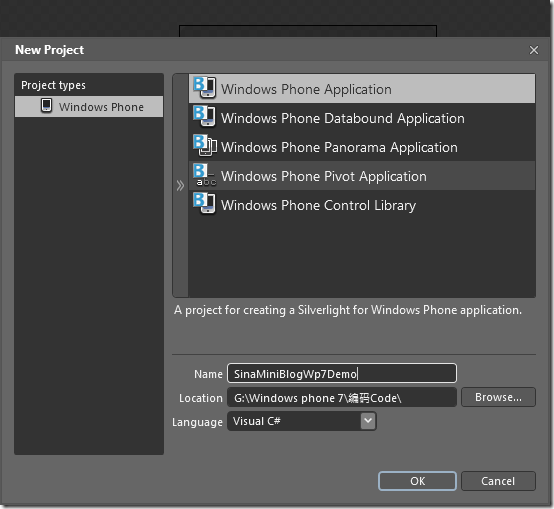
关 于WP7上Sina客户端 我打算逐步迭代方式把功能完善上来.对于WP7 的UI设计第一次做,色调搭配以及模板设计完全是按照自己设想去做. 有可能不太合适,也希望有人提出更好建议.打开Express Bland 4工具 新建一个Project.:命名SinaMiniBlogWP7Demo

2010-11-27_215052

创建解决方案结构:

2010-11-27_215151

创建WP7上Sina客户端登陆页面:LoginFrom.xaml先看看UI效果:

2010-11-27_215725

Sina链接API需要提供一个指定登陆账户.登陆微博WP7上客户端.登陆之后显示主页面设计UI如下:

2010-11-27_220035

如上展示模板.静态数据.初步设想是登陆WP7上Sina客户端后用户能够同Web页面一样操作自己的微博.而不是单一预览自己微博信息.发布自己微薄信息模板[功能上加上图片 超级链接等]:

2010-11-27_220443

微博信息及时浏览列表静态单一模板:

2010-11-27_220546

经常用微博的用户应该都知道,微博列表不仅可以发表单一信息 同时还可以发表丰富图片文字信息, 并且支持他人回复评论,收藏和转发等基本功能,鉴于此我特别比对自己比较熟悉的网易,初步分析三个微博预览模板,如上只是单一文字信息模板,:

模板A:包含图片 文字 超链接富文本显示模板 设计效果如下:

2010-11-27_221735

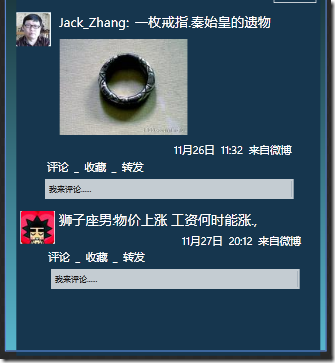
模板B:针对某条微博信息附带有文字或图片评论模板 设计效果如下:

2010-11-27_223238

如 上市附带评论文字信息模板,.对于附加图片的模板正在制作,另外对于有人也提出是否在回复人前面加上相关的个人图像类似QQ,但我觉得这样一来就反而使页 面更加混乱 信息失去重点,另外一个很实际问题 会给更多的人产生必要信息流量, 类似出现多条评论时 加以隐藏是一个触控按钮,对于单一列表 如果用户采用触屏方式当已到达 列表地步就会自动浏览加载更多信息和列表.

在发布微博信息那个页面也有人提出是否单独建立一个页面,附加更多表情和图片 在目前操作不便, 毕竟屏幕宽度有限,.这个问题正在考虑.

如上市关于Sina微博在WP7上UI设计初步设想,欢迎各位在留言中提出相关建议.

[转载]C#3.0新特性 扩展方法

mikel阅读(945)

[转载]C#3.0新特性 扩展方法 – 星空有我 – 博客园.

扩展方法可以使我们为现有的添加方法,现有的类可是是CLB的也可以是自己定义的。
注意事项:
通过this修饰方法第一个参数
方法声明在静态类中
方法通过对象调用
重要注意事项:
扩展方法和类中方法同名,扩展方法将永远不会被调用
扩展类型如果修改,扩展方法可能失效

下面我们讲一个扩展silverlight中RichTextBox的例子,在实际的开发中我们可能需要对RichTextBox取值或者设置值,在silverlight中并没有提供这个方法
实例如下:

建一个RichTextBox的扩展类RTBExtension:

代码

接下里我们在界面上拖一个RichtextBox TextBox 和两个Button,来测试这两个扩展方法

代码

运行的效果:

从Textbox中取值设置给RichtextBox

从RichtextBox中取值设置给Textbox

[转载]Jquery拖拽并简单保存

mikel阅读(1067)

[转载]Jquery拖拽并简单保存 – ygm – 博客园.

今闲着无聊 顺便看了下JQuery ui的拖拽插件,实现拖拽的方法很简单,看到效果后兴奋小下…但是如何保存顺序呢,想到了cookie,但是用如何用cookie保存顺序呢,直接保 存html代码下次读取覆盖可以,但是总感觉内容多的话 保存的东西比较多,后用ui插件获取id保存id在读取实现了顺序的保存,废话不多说..直接看代码…

<!DOCTYPE html PUBLIC “-//W3C//DTD XHTML 1.0 Transitional//EN” “http://www.w3.org/TR/xhtml1/DTD/xhtml1-transitional.dtd“>
<html xmlns=”http://www.w3.org/1999/xhtml“>
<head runat=”server”>
<title></title>
<style type=”text/css”>
div
{
border: 1px solid red;
}
#myList
{
padding-top: 20px;
width: 500px;
background: #EEE;
list-style-type: none;
}
#myList li
{
height: 30px;
cursor: pointer;
margin: 20px;
border: 1px solid blue;
}
#myList a
{
text-decoration: none;
color: #0077B0;
}
#myList a:hover
{
text-decoration: underline;
}
#myList .qlink
{
font-size: 12px;
color: #666;
margin-left: 10px;
}
</style>

<script src=”JQuery-1.3.2.min.js” type=”text/JavaScript”></script>

<script src=”ui.core.js” type=”text/JavaScript”></script>

<script src=”ui.sortable.js” type=”text/JavaScript”></script>

<script src=”cookie.js” type=”text/javascript”></script>

<script type=”text/javascript”>
$(function() {

$(“#myList”).sortable({ delay: 1, containment: “div”, connectWith: “.otherlist”, stop: function() {
//alert($(“#myList”).sortable(“serialize”));
//alert($(“#myList”).sortable(“toArray”));
$.cookie(“myCookie”, $(“#myList”).sortable(‘toArray’), { expires: 7 })
}
});

$(“.qlink”).click(function() {
alert(this.className);
});
if ($.cookie(“myCookie”)) {
var ids = $.cookie(“myCookie”).split(“,”);
for (var i = 0; i < ids.length; i++) {
$(“#” + ids[i]).appendTo(“#myList”);
}
}

});

</script>

</head>
<body>
<div>
<ul id=”myList”>
<li id=”myList_mood”><a href=”#”>心情</a> </li>
<li id=”myList_photo”><a href=”#”>相册</a> <a href=”#” class=”qlink”>上传</a> </li>
<li id=”myList_blog”><a href=”#”>日志</a> <a href=”#” class=”qlink”>发表</a> </li>
<li id=”myList_vote”><a href=”#”>投票</a> </li>
<li id=”myList_shate”><a href=”#”>分享</a> </li>
<li id=”myList_group”><a href=”#”>群组</a> </li>
</ul>
</div>
</body>
</html>

呵呵.. 这下看到了效果,不足方面望高手赐教….

[转载]ASP.NETMVC3RC的一些新特性 (2010.11.9发布版)

mikel阅读(1086)

[转载]ASP.NETMVC3RC的一些新特性 (2010.11.9发布版) – 撞破南墙 – 博客园.

1控制Controller的SESSION

[ControllerSessionState(SessionStateBehavior.Disabled)]

//禁用SESSION

public class CoolController : Controller {

public ActionResult Index() {

object o = Session[“Key”]; // 触发异常

}

}

[ControllerSessionState(SessionStateBehavior.ReadOnly)]

public class CoolController : Controller {

public ActionResult Index() {

Session[“Key”] = “value”; // SESSION属于只读

}

}

2新的验证属性

2.1比较Compare

public class User {

[Required]

public string Password { get; set; }

[Required, Compare(“Password”)]

public string ComparePassword { get; set; }

}

2.2 控制客户端属性

UserName 属性被赋予UserNameAvailable,当username属于被编辑页面的时候,客户端验证将调用UserNameAvailable 方法

public class User {

[Remote(“UserNameAvailable”, “Users”)]

public string UserName { get; set; }

}

The following example shows the corresponding controller.

public class UsersController {

public bool UserNameAvailable(string username) {

return !MyRepository.UserNameExists(username);

}

}

2.3LabelFor和LabelForModel的新的重载函数

@Html.LabelFor(m => m.PropertyName, “Label Text”);

@Html.LabelForModel(“Label Text”);

3action可以使用缓存

当前时间: @DateTime.Now

被缓存时候的事件: @Html.Action(“GetDate”)

The GetDate action is annotated with the OutputCacheAttribute:

[OutputCache(Duration = 100, VaryByParam = “none”)]

public string GetDate() {

return DateTime.Now.ToString();

}

4″Add View” 的对话框变干净了。

不会跟以前一样把整个.NET FRAMEWORK 的类 都包含进去。

5 更小粒度的验证Granular Request Validation

跳过验证。

这次是粒度到了某个属性

public class BlogPostViewModel {

[SkipRequestValidation]

public string Description {get; set;}

}

之前的版本的粒度是整个函数

[HttpPost]

[ValidateInput(false)]

public ActionResult Edit(BlogPostViewModel post) {

// Save the post in the database

[转载]XML和实体序列化和反序列化

mikel阅读(998)

[转载]XML和实体序列化和反序列化 – 星空有我 – 博客园.

近来的项目中用到了序列化就抽空学习了一下,拿出来给大家分享一下:

类为我们提供了自己对象串行化(Serialize)和反串行化(Deserialize)的xml的方法,该类可以序列化的内容:
公共类的公共读写字段或者属性
XmlElement对象
XmlNode对象
Dataset对象
实现了Icollection 或IEnumerable的类

该类在设计中有一个设计需求:
需要被序列化的类要提供一个空参数的构造函数,否则运行时会出现异常

在开发过程中可能会有很多地方要用到对象和XML相互转化,在此提供一个通用的类,提供泛类型的支持。

该类提供两方法,一个是从实体到返回XML字符串的方法,一个是把XML字符串装成对象实体的方法。下面我们来看看这个类是怎么用的。

首先建两个类USer和Users,User测试一个实体的序列化和反序列化,USers测试一个List集合序列化和反序列化。注意这两个类都标注了[Serializable]特性,并且提供了空参数的构造函数。

代码

[Serializable] public class User { public int ID { get; set; } public string Name { get; set; } public string Add { get; set; } public int Age { get; set; } public User() { this.ID = default(int); this.Name = default(string); this.Add = default(string); this.Age = default(int); } }
[Serializable] public class Users { public List<User> Datas { get; set; } public Users() { this.Datas=new List<User>(); } }

下面我们建一个页面Default.aspx,在这个页面中我们测试序列化,提供两个按钮和两个TextBox,来分别显示单个实体的序列化和List集合的序列化。

代码

<form id="form1" runat="server"> <div> <asp:Button ID="Button1" runat="server" Text="一个对象序列化" onclick="Button1_Click" /> <br /> <asp:TextBox ID="TextBox1" runat="server" Width="100%" Height="200"></asp:TextBox><br /> <asp:Button ID="Button2" runat="server" Text="多个对象序列化" onclick="Button2_Click" /><br /> <asp:TextBox ID="TextBox2" runat="server" Width="100%" Height="200"></asp:TextBox><br /> </div> </form>

后台代码的实现:

代码

/// <summary> /// 一个对象序列化 /// </summary> /// <param name="sender"></param> /// <param name="e"></param> protected void Button1_Click(object sender, EventArgs e) { User user = new User() { ID=1001,Name="小王",Add="北京",Age=21}; var str = SHelper.SaveXmlFromObj<User>(user); this.TextBox1.Text = str; } /// <summary> /// 多个对象序列化 /// </summary> /// <param name="sender"></param> /// <param name="e"></param> protected void Button2_Click(object sender, EventArgs e) { Users users = new Users(); User user = new User() { ID = 1001, Name = "小王", Add = "北京", Age = 21 }; users.Datas.Add(user); users.Datas.Add(user); users.Datas.Add(user); var str = SHelper.SaveXmlFromObj<Users>(users); this.TextBox2.Text = str; }

序列化结果如下:

单对象:

<?xml version=”1.0″?><User xmlns:xsi=”http://www.w3.org/2001/XMLSchema-instance” xmlns:xsd=”http://www.w3.org/2001/XMLSchema“>  <ID>1001</ID>  <Name>小王</Name>  <Add>北京</Add>  <Age>21</Age></User>

List集合:

<?xml version=”1.0″?><Users xmlns:xsi=”http://www.w3.org/2001/XMLSchema-instance” xmlns:xsd=”http://www.w3.org/2001/XMLSchema“>  <Datas>    <User>      <ID>1001</ID>      <Name>小王</Name>      <Add>北京</Add>      <Age>21</Age>    </User>    <User>      <ID>1001</ID>      <Name>小王</Name>      <Add>北京</Add>      <Age>21</Age>    </User>    <User>      <ID>1001</ID>      <Name>小王</Name>      <Add>北京</Add>      <Age>21</Age>    </User>  </Datas></Users>

下面我们来测试反序列化:

首先建一个webservice,写两个测试方法:

代码

[WebMethod] public string GetObjFromXml(string data) { var obj = SHelper.LoadObjFromXML<User>(data); if (obj != null) { return obj.Name; } else { return "传入数据出错"; } } [WebMethod] public string GetObjsFromXml(string data) { var obj = SHelper.LoadObjFromXML<Users>(data); if (obj != null) { string returnstr = ""; foreach (User user in obj.Datas) { returnstr += user.Name + "\n"; } return returnstr; } else { return "传入数据出错"; } }

编译后运行,我们用刚才序列化出来的字符串贴出参数值位置就可以测试反序列化的方法,在此不再详述,有兴趣的童鞋可以把实例代码运行。

示例代码:http://files.cnblogs.com/Clivia/SerializerHelper.rar

[转载]强烈推荐:2010 iPhone/iPad英文原版书籍(第一季)

mikel阅读(1058)

[转载]强烈推荐:2010 iPhone/iPad英文原版书籍(第一季) – 银光映画 – 博客园.

iPhone/iPad开发的中文资料并不多,所以参考最新最经典的英文书籍成了程序员必须的修炼。

网上收集的2010年关于iPhone/iPad出版的书,与大家共勉,有做或打算学习iPhone/iPad开发的不要错过。

附件空间有限,放在网盘了,有AD,等待时间,不爽,有好网盘的推荐下。

1、iPhone and iPad in Action(经典Action系列)


Book Description
iPhone and iPad In Action, compiled by mobile software developer and blogger Brandon Trebitowski, simplifies existing iPhone topics while also updating them to account for the 3.4 SDK framework including iPad coverage. Beyond covering the basics of iPhone development, this edition also explores exciting topics such as the accelerometer, peer-to-peer gaming, mapkit, push notifications, and in-app purchasing. The reader is provided with step-by-step instructions on how to integrate the APIs into new or existing applications.
After completing this book, the reader will have all of the knowledge necessary to create fully functional iPhone applications ready for the App Store. There are many sample applications to work from including a chat client, video game, interactive map, and many others.
About the Author
Brandon Trebitowski is a software developer and author. In August of 2008, he started iCodeBlog.com to teach aspiring developers how to write software for the iPhone. After the blog was acquired by RightSprite in December of 2008, he began working full time for them developing mobile software.
Christopher Allen hosts iphonewebdev.com, the largest iPhone web dev community, and is a founder and organizer of the iPhoneDevCamp conference. A longtime technologist, Chris was one of the authors of TLS, the next-generation SSL protocol.
Shannon Appelcline is a widely published writer and technologist, who has written everything from game programming articles to comic books.
Book Details

  • Paperback: 600 pages
  • Publisher: Manning Publications; 1 edition (September,   2010)
  • Language: English
  • ISBN-10: 1935182587
  • ISBN-13: 978-1935182580

下载地址(11.43 MB)

2、iPhone 4 Made Simple

Book Description

Congratulations—you’ve purchased the new iPhone 4, the coolest smartphone on the market. Now it’s time to learn how to take advantage of all the features, apps, and secret techniques available. To accomplish this, look no further than

iPhone 4 Made Simple

. Over 1,000 screen visuals and clear-cut instructions guide you through both basic and advanced features of the iPhone 4, from email and calendar tips to navigating the App Store and understanding Bluetooth and Wi-Fi networks. Written by two successful smartphone trainers and authors, this is the go-to guide for the latest and greatest version of the iPhone.
What you’ll learn

  • Use copy/Paste, spotlight search, and voice memos
  • Support for both Windows and Mac users
  • Use music, videos, photos & voice notes
  • Detailed iTunes instructions
  • Sync playlists, videos, contacts, calendar, and notes
  • Fast email, phone, calendar, and browser tips
  • Create your own ringtones & wallpapers
  • Use Google Maps to find just about anything!
  • Navigate the App Store for games, productivity apps, and more
  • Understand Bluetooth and Wi-Fi network setup & security
  • Install & remove software icons
  • Use you phone internationally and save money when traveling overseas
  • Save your battery life by understanding the network settings
  • All the best tips and tricks for the touch screen

Book Details

  • Paperback: 840 pages
  • Publisher: Apress; 1 edition (August, 2010)
  • Language: English
  • ISBN-10: 1430231920
  • ISBN-13: 978-1430231929

下载地址(41.76 MB)

3、Beginning iPad Application Development

Book Description
A hands-on approach to iPad application development. Beginning iPad Application Development is written to help jumpstart beginning iPad developers. It covers the various topics in such a manner that you will progressively learn without being overwhelmed by the details. It adopts the philosophy that the best way to learn is by doing, hence the numerous Try It Out sections in all the chapters, which first show you how to build something and then explain how things work.

Although iPad programming is a huge topic, the aim for this book is to get you started with the fundamentals, and help you understand the underlying architecture of the SDK, and appreciate why things are done certain ways. After reading this book (and doing the exercises), you will be well equipped to tackle your next iPad programming challenge.

This book is for the beginning iPad developer who wants to start developing iPad applications using the Apple iPhone SDK. To truly benefit from this book, you should have some background in programming and at least be familiar with object-oriented programming concepts. If you are totally new to the Objective-C language, you might want to jump straight to Appendix D, which provides an overview of the language. Alternatively, you can use Appendix D as a quick reference while you tackle the various chapters, checking out the syntax as you try the exercises. Depending on your learning pattern, one of those approaches may work best for you.

From the Back Cover
Learn to develop successful—and profitable—iPad applications. Eager to start developing applications for the iPad? Then look no further than the book in your hands. This comprehensive, hands-on approach to iPad development walks you through all the necessary tools and skills required for successful iPad app programming. You’ll first familiarize yourself with the iPhone® SDK, Xcode®, and Interface Builder tools, all of which provide a solid foundation for developing apps. You’ll then explore the features and syntax of the Objective-C® language, which is essential for creating most iPad apps. Plus, you’ll discover how to best implement the many features of the iPhone SDK into your apps so that you can deploy your applications to the Apple AppStore.

Beginning iPad Application Development:

  • Explains the various types of iPad applications supported by the iPhone SDK
  • Discusses the various types of screen orientations and ways to handle rotations
  • Covers the new Gesture Recognizers available in this release of the iPhone SDK
  • Covers the new Split View-based Application project type
  • Zeroes in on database storage using SQLite3
  • Examines Web Services, Bluetooth programming, and Bonjour programming
  • Covers Apple Push Notification Services programming

Wrox Beginning guides are crafted to make learning programming languages and technologies easier than you think, providing a structured, tutorial format that will guide you through all the techniques involved.

About the Author
Wei-Meng Lee is a technologist and founder of Developer Learning Solutions, a technology company specializing in hands-on training in the latest Microsoft and Apple technologies. He is also the author of Beginning iPhone SDK Programming with Objective-C and writes frequently for online publications.

Book Details

  • Paperback: 600 pages
  • Publisher: Wrox (May, 2010)
  • Language: English
  • ISBN-10: 0470641657
  • ISBN-13: 978-0470641651

下载(11.43 MB)

4、Objective-C: Visual QuickStart Guide

Book Description
Objective C 2.0 is the object-oriented language that is the basis for Cocoa and Cocoa Touch, the development environment for the iPhone/iPod Touch.You’ll learn all the basics: from handling data and creating functions to managing memory and handling exceptions. For programmers who want to develop iPhone apps, it’s a must, and this title in the Visual QuickStart-style is the easy, fast way to get started.

Table of Contents:
Introduction
Chapter 1: Getting Started: Essential Objective-C
Chapter 2: Directing Program Flow
Chapter 3: Handling Data
Chapter 4: Creating Functions
Chapter 5: Classes and Objects
Chapter 6: Object-Oriented Programming
Chapter 7: Working with Object-Oriented Inheritance
Chapter 8: Categories, Posing, and Protocols
Chapter 9: Using Arrays and Dictionaries
Chapter 10: Managing Memory in Objective-C
Chapter 11: Exception Handling
Index

About the Author
Stephen Holzner is an award-winning author who has written extensively on programming languages, including XML, JavaScript, Visual Basic and more. With over 100 titles published, he’s sold over a million copies of his books and been translated into 16 languages. A former faculty member of MIT and Cornell, he teaches corporate seminars around the country.

Book Details

  • Paperback: 240 pages
  • Publisher: Peachpit Press; 1 edition (February, 2010)
  • Language: English
  • ISBN-10: 0321699467
  • ISBN-13: 978-0321699466

下载(5.68 MB)

5、iPhone The Missing Manual: Covers iPhone 4 & All Other Models with iOS 4 Software

Book Description
With multitasking and more than a 100 other new features, iPhone 4.0 is a real treat, cooked up with Apple’s traditional secret sauce of simplicity, intelligence, and whimsy. iPhone: The Missing Manual gives you a guided tour of everything the new iPhone has to offer, with lots of tips, tricks, and surprises. Learn how to make calls and play songs by voice control, take great photos, keep track of your schedule, and much more with complete step-by-step instructions and crystal-clear explanations by iPhone master David Pogue.

Whether you have a brand-new iPhone, or want to update an earlier model with the iPhone 4.0 software, this beautiful full-color book is the best, most objective resource available.

  • Use it as a phone — learn the basics as well as time-saving tricks and tips for contact searching, texting, and more
  • Treat it as an iPod — master the ins and outs of iTunes, and listen to music, upload and view photos, and fill the iPhone with TV shows and movies
  • Take the iPhone online — make the most of your online experience to browse the Web, read and compose email, use social networks, or send photos and audio files
  • Go beyond the iPhone — learn how to use the App Store, and how to multitask between your apps, organize them in folders, and read ebooks in iBooks

Unlock the full potential of your iPhone — with the book that should have been in the box.

About the Author
David Pogue, Yale ’85, is the weekly personal-technology columnist for the New York Times and an Emmy award-winning tech correspondent for CBS News. His funny tech videos appear weekly on CNBC. And with 3 million books in print, he is also one of the world’s bestselling how- to authors. In 1999, he launched his own series of amusing, practical, and user-friendly computer books called Missing Manuals, which now includes 100 titles.

Book Details

  • Paperback: 448 pages
  • Publisher: Pogue Press; 4 edition (August, 2010)
  • Language: English
  • ISBN-10: 1449393659
  • ISBN-13: 978-1449393656

下载(11.49 MB)

[转载]Flex Cairngorm详解

mikel阅读(1068)

[转载]Flex Cairngorm详解 – 宅男Johnny – 博客园.

Cairngorm是一个开源的Flex项目,为FLex提供了一个类似MVC的体系结构框架,它是Flex RIA开发的最好框架之一。使用Cairngorm框架可以大大提高开发和维护的效率。

Cairngorm说白了就是一大堆的设计模式和功能模块,它分为6部分,分别是:

  1. Business(业务逻辑部分)。
  2. Command(命令部分)。
  3. Control(控制部分)。
  4. Model(数据模型部分)。
  5. View(界面部分)。
  6. Value Object(数据部分)。一般简称VO

先来了解一下这6部分的组成和功能:

Business

Business包括两部分内容:Delegate和ServiceLocator。
ServiceLocator是一段用于描述远程服务的mxml文件,实际上如果不需要调用远程服务的时候我们可以不必写这样一个mxml文件,但是那样的话Cairngorm就失去了它强大的优势。
Delegate相当于一个代理,通过 Command调用,它的工作是定位远程服务并且完成相应的服务调用,ServiceLocator就是这个远程服务的定义。Delegate是一个单例 模式(singleton pattern),我们一般用如下的方式通过Delegate调用远程服务:

1 private var remoteObject:RemoteObject = ServiceLocator.getInstance().getRemoteObject("countingService");

其中 “countingService”在ServiceLocator中通过如下方式定义:

1 <?xml version="1.0" encoding="utf-8"?>
2 <cairngorm:ServiceLocator xmlns:fx="http://ns.adobe.com/mxml/2009"
5 xmlns:cairngorm="com.adobe.cairngorm.business.*">
6 <fx:Declarations>
7 <s:RemoteObject id="counting" destination="countingService"/>
8 </fx:Declarations>
9 </cairngorm:ServiceLocator>

当然,我们也可以通过HttpService和 WebService调用远程服务,如此的话,在Delegate中的调用方法也会有变化。Cairngorm提供了 getRemoteObject(), getHttpService(), getWebService()三种基本方法分别调用RemoteObject, HttpService和WebService三种远程调用机制。

每一个自定义的Delegate要具有如下的构造函数:

1 public function CountDelegate(responder:IResponder)
2 {
3 this.responder = responder;
4 }

为什么这样写,我们在Command部分解释。

Command

Command部分包含所有可执行的命令,你可 以理解为所有的后台函数调用都在Command部分完成,至于Command如何完成这些任务我们稍后再说。Command部分定义了ICommand接 口,并且需要实现一个叫做execute()的方法。我们可已通过定义自己的Command来完成我们需要的任务,所有的Command命令都要实现 ICommand和IResponder接口,IResponder接口定义了result()和fault()方法,所以我们自定义的Command应 当是如下效果:

01 package command
02 {
03 import com.adobe.cairngorm.commands.ICommand;
04 import com.adobe.cairngorm.control.CairngormEvent;
05 import mx.rpc.IResponder;
06 import mx.rpc.events.ResultEvent;
07 public class CountCommand implements ICommand, IResponder
08 {
09 public function CountCommand()
10 {
11 }
12 public function execute(event:CairngormEvent):void
13 {
14 }
15 public function result(data:Object):void
16 {
17 }
18 public function fault(info:Object):void
19 {
20 }
21 }
22 }

其中execute()函数声明一个Delegate变量,然后通过这个Delegate调用相应的方法。Command任务的实现实际上是通过 Delegate完成的,Command并不负责定位远程的服务。另外,Command的另外两个方法——result()和fault()一般用来处理 Delegate的返回信息,其中result()是在处理成功时执行,一般是对Model进行一些处理(Model部分有一个单例模式的 ModelLocator),fault是在处理失败时候执行。还记得上面我们提到的Delegate必须有一个带有IResponder类型的构造函数吗?现在我们可以解释了。
试想,我们用Command调用Delegate来执行远程服务,当Delegate执行完毕之后(或者说调用完毕之后)应当如何返回呢?Delegate应当如何定位是
哪一个Command传来的执行信号呢?通过给Delegate传递一个IResponder变量(实际上这个变量就是Command自己)Delegate就可以在处理完毕之后直
接调用Command中的result方法。一般Delegate中有这么一句话:

1 responder.result(objec);

object一般是要返回的值或者服务相关信息。

Control

COntrol部分定义了三个基类:CairngormEvent, CairngormEventDispatcher, FrontController。
CairngormEvent定义一个 Event,一般在CairngormEvent中存储数据模型,例如我们要做一个用户登录页面,点击登录按钮之后我们就发送一个包含用户名和登录密码的 event,我们可以把用户名和登录密码封装在一个类中(这就是后面我们要说的VO)然后放入event里面。
CairngormEventDispatcher是一个单例模式,它的作用就是发送消息,一般用如下方法调用:

1 CairngormEventDispatcher.getInstance().dispatchEvent(CairngormEvent);

FrontController相当于一个控制中心,我们所发送的所有消息和执行的所有命令都在这里有记录。FrontController的构造函数一般只有一句话:

1 public function MyFrontControl()
2 {
3 this.addCommand(EVENT_NAME,Command);
4 }

FrontController一个重要的任务就是它监听所有的Event,并且为这些消息指定相应的Command。在此提醒一下,我们需要在界面中声明FrontController,举例如下:

1 <s:Application xmlns:control="control.*">
2 <fx:Declarations>
3 <control:MyFrontControl/>
4 </fx:Declarations>
5 </s:Application>

MyFrontControl是位于control包中的一个自定义FrontController。

Model

Model定义了一个ModelLocator接口,我们只需要实现它并且写成一个单例模式即可。Model部分一般存放需要绑定在页面的数据。

01 package model
02 {
03 import com.adobe.cairngorm.model.ModelLocator;
04 import vo.VO;
05
06 [Bindable]
07 public class MyModelLocator implements ModelLocator
08 {
09 public var vo:VO;
10 private static var modelLocator:MyModelLocator;
11
12 public static function getInstance():MyModelLocator{
13 if(modelLocator==null){
14 modelLocator=new MyModelLocator();
15 }
16 return modelLocator;
17 }
18 }
19 }

View

View部分就是页面了,这部分需要注意的就是声明ServiceLocator和FrontControl。ServiceLocator的声明和我们之前提到的FrontControl是一样的。View部分的作用就是提供界面,发送信号,响应绑定数据变化。

VO

Value Object部分说简单点就是一个个对象,虽然Cairngorm定义了VO的一些接口,但是实际上可以不用。


了解了这6大部分之后,我们再来说一说Cairngorm的流程:
  1. View部分提供所有可视组件,FrontControl监听所有的Event。
  2. 当用户操作引起Event发送时,View通过CairngormEventDispatcher发送Event,之后Event在FrontControl接受处理。
  3. FrontControl将Event发送到相应的Command,Command调用相应Delegate。
  4. Delegate完成远程调用,返回到Command。
  5. Command结果处理部分处理返回的信息,并且对Model部分进行修改。
  6. Model部分的绑定数据被修改,View部分做出相应变化。

想进一步学习请看Flex Cairngorm入门例子

[转载]Flex Cairngorm入门例子

mikel阅读(924)

[转载]Flex Cairngorm入门例子 – 宅男Johnny – 博客园.

我们按一个完整的Cairngorm流程来介绍这个例子。这个例子很简单,一个按钮和一个标签,当按钮点下之后标签上的数字开始递增。首先,我们需要一个页面,也就是Cairngorm中的View部分:

01 <?xml version="1.0" encoding="utf-8"?>
02 <s:Application xmlns:fx="http://ns.adobe.com/mxml/2009"
04 xmlns:mx="library://ns.adobe.com/flex/mx" minWidth="955" minHeight="600"
05 <span style="color: rgb(255, 0, 0);">xmlns:model="model.*" xmlns:control="control.*" xmlns:business="business.*"</span>
06 creationComplete="application1_creationCompleteHandler(event)">
07 <fx:Script>
08 <![CDATA[
09 import com.adobe.cairngorm.control.CairngormEventDispatcher;
10 import control.CountEvent;
11 import control.MyFrontControl;
12 import flash.utils.setTimeout;
13 import model.MyModelLocator;
14 import mx.events.FlexEvent;
15 import vo.Num;
16
17 private function loggingHandler(evt:MouseEvent):void
18 {
19 var num:Num = new Num();
20 num.startNum = MyModelLocator.getInstance().count;
21 var countEvent:CountEvent = new CountEvent(num);
22 <span style="color: rgb(255, 0, 0);">CairngormEventDispatcher.getInstance().dispatchEvent(countEvent);</span>
23 }
24
25 protected function application1_creationCompleteHandler(event:FlexEvent):void
26 {
27 lable.text = "0";
28 }
29
30 ]]>
31 </fx:Script>
32 <span style="color: rgb(255, 0, 0);"><fx:Declarations>
33 <control:MyFrontControl/>
34 <business:MyServiceLocator/>
35 </fx:Declarations></span>
36 <s:Label id="lable" x="430" y="158" width="66" height="22" text="{<span style="color: rgb(255, 0, 0);">MyModelLocator.getInstance().count</span>}"/>
37 <s:Button id="button" x="430" y="201" label="start" width="66" click="loggingHandler(event)"/>
38
39 </s:Application>

当用户点击按钮之后,就会调用loggingHandler函数。这loggingHandler中声明了一个自定义Event——CountEvent。

01 package control
02 {
03 import com.adobe.cairngorm.control.CairngormEvent;
04
05 import vo.Num;
06
07 public class CountEvent <span style="color: rgb(255, 0, 0);">extends CairngormEvent</span>
08 {
09 public var num:Num = new Num();
10 public function CountEvent(num:Num)
11 {
12 super(MyFrontControl.COUNT_EVENT);
13 this.num = num;
14 }
15 }
16 }

CountEvent的构造函数中有一句super(MyFrontControl.COUNT_EVENT),在上一篇中我们讲到 FrontControl的作用是监听所有Event,其中COUNT_EVENT就是我们所定义的Event的type,记 住,CairngormEvent也是继承自Event的。当然,COUNT_EVENT不是凭空产生的,是我们在自定义的FrontControl中定 义的。自定义的FrontControl代码如下:

01 package control
02 {
03 import com.adobe.cairngorm.control.FrontController;
04 import command.CountCommand;
05
06 public class MyFrontControl extends FrontController
07 {
08 public static var COUNT_EVENT:String = "counting";
09 public function MyFrontControl()
10 {
11 this.addCommand(COUNT_EVENT,CountCommand);
12 }
13 }
14 }

FrontControl管理所有的Event,监听它们并且接受处理它们,回想一下Observer Pattern,我们会在把所有的Observer对象存入Subject中,当事件发生之后Subject会在其内部的表中查找相应的Observer 然后调用它们的notify方法。你可以用相同的方法去理解FrontControl的机制,试想,如果我有两个Event,那么 FrontControl就应该这样写了:

01 package control
02 {
03 import com.adobe.cairngorm.control.FrontController;
04
05 import command.CountCommand;
06 import command.CountCommand2;
07
08 public class MyFrontControl extends FrontController
09 {
10 public static var COUNT_EVENT:String = "counting";
11 public static var COUNT_EVENT2:String = "counting2";
12 public function MyFrontControl()
13 {
14 this.addCommand(COUNT_EVENT,CountCommand);
15 this.addCommand(COUNT_EVENT2,CountCommand2);
16 }
17 }
18 }

FrontControl相当于一个Subject的实例,它把所有需要监听的Event和其对应的Command名称加入到内部的列表,并且 对所有的Event进行监听,当接受的Event之后它就会在内部列表中查找这个Event然后调用相应的Command类的execute()方法。

现在我们就可以很好地理解 CairngormEventDispatcher.getInstance().dispatchEvent(countEvent)这句话 了,Event被发送之后FrontControl处理之,现在我们来看FrontControl调用的Command是什么样的。

01 package command
02 {
03 import business.CountDelegate;
04 import com.adobe.cairngorm.commands.ICommand;
05 import com.adobe.cairngorm.control.CairngormEvent;
06 import control.CountEvent;
07 import model.MyModelLocator;
08 import mx.rpc.IResponder;
09 import mx.rpc.events.ResultEvent;
10 import vo.Num;
11
12 public class CountCommand <span style="color: rgb(255, 0, 0);">implements ICommand, IResponder</span>
13 {
14 public function CountCommand(){
15
16 }
17 public function <span style="color: rgb(255, 0, 0);">execute</span>(event:CairngormEvent):void
18 {
19 <span style="color: rgb(255, 0, 0);">var delegate:CountDelegate = new CountDelegate(this);</span>
20 var countEvent:CountEvent = CountEvent(event);
21 delegate.count(countEvent.num);
22 }
23 public function <span style="color: rgb(255, 0, 0);">result</span>(data:Object):void
24 {
25 var result:Num = data as Num;
26 MyModelLocator.getInstance().num = result;
27 MyModelLocator.getInstance().count = result.startNum;
28 }
29 public function <span style="color: rgb(255, 0, 0);">fault</span>(info:Object):void
30 {
31 }
32 }
33 }

我们看到了execute()方法,其实这个方法在接口ICommand中定义。在execute()方法中,Delegate被声明,并且相 应的方法被调用。result()方法同样需引起注意,因为它决定了Delegate调用远程服务之后如何处理结果。记住,result()方法是在 Delegate中调用的。fault()方法和result()一样,它们都在接口IResponder中定义。

我们接着说自定义的Delegate

01 package business
02 {
03 import com.adobe.cairngorm.business.ServiceLocator;
04 import flash.utils.clearTimeout;
05 import flash.utils.setTimeout;
06 import mx.rpc.IResponder;
07 import mx.rpc.events.ResultEvent;
08 import mx.rpc.remoting.RemoteObject;
09 import vo.Num;
10
11 public class CountDelegate
12 {
13 private var responder:IResponder;
14 private var counter:int;
15 private var remoteObject:RemoteObject;
16 public function CountDelegate(responder:IResponder)
17 {
18 this.responder = responder;
19 }
20 public function count(num:Num):void
21 {
22 counter = num.startNum;
23 <span style="color: rgb(255, 0, 0);">remoteObject = ServiceLocator.getInstance().getRemoteObject("counting");
24 remoteObject.addEventListener(ResultEvent.RESULT,OnResult);</span>
25 counting();
26 }
27 private function counting():void
28 {
29 remoteObject.getOperation("count").send(counter);
30 flash.utils.setTimeout(counting, 1000);
31 }
32 private function OnResult(evt:ResultEvent):void
33 {
34 var result:Num = new Num();
35 counter = evt.result as int;
36 result.startNum = counter;
37 <span style="color: rgb(255, 0, 0);">responder.result(result);</span>
38 }
39 }
40 }

这里我们以一个RemoteObject远程调用为例,首先,我们调用的远程服务在ServiceLocator中定义,可以通过 remoteObject = ServiceLocator.getInstance().getRemoteObject(“counting”)来制定这个远程对 象,”counting”是在ServiceLocator中定义的RemoteObject id(当然这个ServiceLocator也是我们自定义的,Cairngorm提供的ServiceLocator是一个单例模式的对象)。然后我们 为这个远程对象添加ResultEvent的监听器。当我们收到远程调用的结果时,我们调用responder.result()执行在Command中 实现的结果处理方法。

下面是我们自定义的ServiceLocator:

1 <?xml version="1.0" encoding="utf-8"?>
2 <cairngorm:ServiceLocator xmlns:fx="http://ns.adobe.com/mxml/2009"
5 xmlns:cairngorm="com.adobe.cairngorm.business.*">
6 <fx:Declarations>
7 <s:RemoteObject id="counting" destination="countingService"/>
8 </fx:Declarations>
9 </cairngorm:ServiceLocator>

RemoteObject和Blazeds的配置就不解释了,再附上我们自定义的VO和JAVA服务端代码就完整了。

1 package vo
2 {
3 import com.adobe.cairngorm.vo.IValueObject;
4 public class Num implements IValueObject
5 {
6 public var startNum:int;
7 }
8 }

JAVA服务端代码

1 package cairngorm;
2
3 public class CountingService {
4 public CountingService(){}
5 public int count(int num){
6 return ++num;
7 }
8 }

[转载]通告(公告)消息(站内短信)提醒的设计:通告

mikel阅读(866)

[转载]通告(公告),消息(站内短信),提醒的设计:通告 – 软件设计开发 – 博客园.

1 业务描述

首先我们来认识一下通告,消息,提醒这三者的区别和联系。

1.1 通告Bulletin

平台发,用户收。分为实时通告和非实时通告。通告有优先级:紧急,高,普通。

平台向单个用户发,平台向多个用户发,平台向某一个用户类型发,平台向全部用户发。

平台发布通告。

平台撤销通告。

平台删除通告。

平台查询通告。

用户查看通告。

用户查询通告。

数据库特点

一般不修改,每个用户一份,或者每个群体一份

1.2 消息Message(站内短信):

用户之间互相发消息,好比是手机短信。可以针对一个消息进行回复。分为实时消息和非实时消息。

用户发送消息。可以是个人向个人发消息,个人向群体发消息,群体向个人发消息,群体向群体发消息。个人向多个用户发消息。

用户查看消息。

用户回复消息。

用户标记消息已读。

用户查询消息。

数据库特点

一般不修改,每个用户一份,或者每个群体一份,或者多个用户一份。

3 提醒Remind

一般情况下,提醒对于被提醒者来说是被动的。主要是由于外界直接或者间接更新自己相关的信息,对自己产生了影响,自己又不知道的情况下,需要系统主动提醒自己。

统计性的提醒:相关内容的个数变化,统计相关内容的个数。又可以分为实时统计和登录统计。

弹出窗口提醒:弹出一个窗口,提醒用户发生变化的内容,或者点击可以跳转到相应的窗口显示结果。又可以分为登录之后提醒距离上次登录之间发生的影响;和实时的提醒。

通常是由于其他操作附带产生需要提醒的信息。

数据库特点

统计性的提醒,记录需要提醒的个数,以及个数代表的意义。

弹出窗口提醒,提醒的格式是统一的。格式例如:提醒的对象,提醒的内容,提醒的优先级(紧急,高,普通,不同优先级,有不同的颜色)。

2 设计

今天只是设计一下通告,大家有什么不同意见,尽管提出来。

数据库表

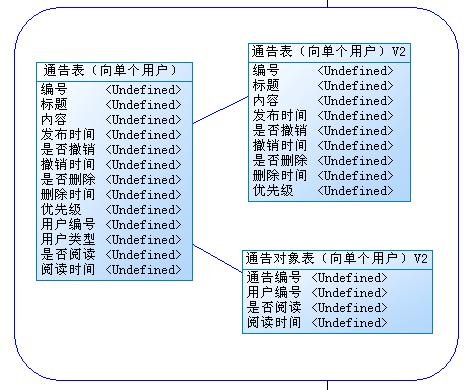
2.1 平台向单个用户发通告

添加公告的时候,直接将用户编号写在通告表中。用户阅读之后修改响应的标记。

bulletin3

刚开始考虑单个用户,就直接在通告表添加几个字段,反正是1对1的关系。后来觉得可以变相的理解一下,分开两张表,是的通告表尽量还是存放通告相关的信息,应该更好一点吧。

通告表

编号
标题
内容
发布时间
是否撤销
撤销时间
是否删除
删除时间
优先级
用户编号
用户类型
是否阅读
阅读时间

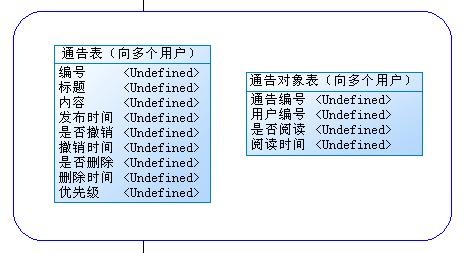
2.2 平台向多个用户发通告

添加公告记录的同时【通告对象】表中添加多个用户相应的记录。用户阅读之后修改【通告对象】表响应的标记。

bulletin2

通告表

编号
标题
内容
发布时间
是否撤销
撤销时间
是否删除
删除时间
优先级

通告对象表

通告编号
用户编号
是否阅读
阅读时间

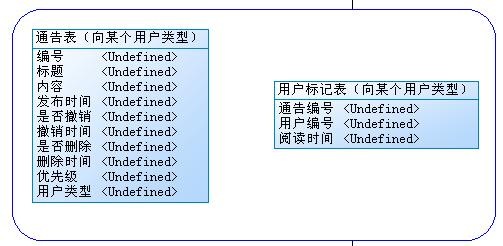
2.3 平台向某个用户类型发通告

添加通告,通告信息中附带有用户类型信息。用户根据自己的类型查看通告,阅读之后,在【用户标记】表中添加记录。在【用户标记】表中存在的通告,就是历史通告,不存在的就是新通告。

bulletin4

通告表

编号
标题
内容
发布时间
是否撤销
撤销时间
是否删除
删除时间
优先级
用户类型

用户标记表

通告编号
用户编号
阅读时间

2.4 平台向全部用户发通告

添加通告,只有通告的相关信息。在【用户标记】表中存在的通告,就是历史通告,不存在的就是新通告。

bulletin1

通告表

编号
标题
内容
发布时间
是否撤销
撤销时间
是否删除
删除时间
优先级

用户标记表

通告编号
用户编号
阅读时间

2.5 综合比较

bulletin5

综合前面的设计思路,得出上面的这张图。

3 相关业务描述

3.1 添加通告

单个用户:通告表添加一条记录,用户标记表添加一条记录
多个用户:通告表添加一条记录,用户标记表添加多条记录
全部用户:通告表添加一条记录
用户类型:通告表添加一条记录

3.2 阅读公告

单个用户:修改用户标记表中的记录
多个用户:修改用户标记表中的记录
全部用户:用户标记表添加阅读记录
用户类型:用户标记表添加阅读记录

3.3 发现新通告的规则

单个用户:通告表中有,并且通告对象类型是“单个用户”,并且用户标记表中的未读标记是“0”
多个用户:通告表中有,并且通告对象类型是“多个用户”,并且用户标记表中的未读标记是“0”
全部用户:通告表中有,并且通告对象类型是“全部用户”,并且用户标记表中没有用户的信息
用户类型:通告表中有,并且通告对象类型是“用户类型”,并且用户标记表中没有用户的信息,并且通告表中的用户类型是自己的用户类型

3.4 查询

单个用户:通告表中有,并且通告对象类型是“单个用户”,并且用户标记表中有
多个用户:通告表中有,并且通告对象类型是“多个用户”,并且用户标记表中有
全部用户:通告表中有,并且通告对象类型是“全部用户”
用户类型:通告表中有,并且通告对象类型是“用户类型”,并且通告表中的用户类型是自己的类型