[转载]详解ASP.NET的最新安全漏洞,Padding Oracle攻击原理及其他

mikel阅读(907)

[转载]详解ASP.NET的最新安全漏洞,Padding Oracle攻击原理及其他 – 好记性不如烂键盘 – 博客园.

微软在9月17号中午正式对外公布了ASP.NET平台下的安全漏洞,即Microsoft Security Advisory (2416728)

SecurityFocus上已将此漏洞定义成了”Design Error”,那么微软一开始的设计就是错误的,为什么这么说呢?且待我们慢慢来分析。

昨天在园友的一篇博文:对ASP.NET的最新安全漏洞进一步跟进说明中也看到了对此问题的详细追踪,但上午也只是粗粗浏览,下午细看时总觉文中有些地方略显含糊,所以晚上也就顺带查了些资料,略有所得,不敢独享,遂成此文!

微软的态度

查看了许多微软官方的说明文档,总觉得这位大姑娘犯了错后总是显得扭扭捏捏,遮遮掩掩,当然对于这个比较大的安全漏洞,不管是出于商业角度的考虑还是对现有.NET架构网站的保护,我们都暂且不去谈论它,但我想攻防该有的一条策略就是:知己知彼,百战不殆!

首先,比较长的一篇文章就是ScottGu的这篇:Important: ASP.NET Security Vulnerability

在这篇文章中,其主要谈及了此漏洞的影响,简单提及了一下此漏洞产生的原因,下面就是微软教科书式的解决方案了。

这个解决方案有两个注意点:

1:公布了一段vbs,没细看,我想应该是一段检测web.config文件是否添加了customErrors节及是否配置正确的代码;

2:在错误页面中添加的一段代码,我先贴出来,看了下面的分析,我想你就该理解那段代码什么意思了。

1 void Page_Load()
2 {
3 byte[] delay = new byte[1];
4 RandomNumberGenerator prng = new RNGCryptoServiceProvider();
5 prng.GetBytes(delay);
6 Thread.Sleep((int)delay[0]);
7 IDisposable disposable = prng as IDisposable;
8 if (disposable != null) { disposable.Dispose(); }
9 }

当然,在这里你还可以看到一些类官方的讨论。

什么叫Padding Oracle

在ScottGu的文章中也提到了Padding Oracle,”……, there is a vulnerability in ASP.NET which acts as a padding oracle“。

首先得承认,padding和Oracle的确太迷惑人了,css+数据库,还挺挑战想象力的。

本人也想不出太好的中文翻译,就直译成了”附加断言”(oracle: 神谕、预言),还望各位指正。

好了,我们来看看Padding Oracle到底是什么。

在ASP.NET中设计ViewState等加密字符串时,在加密算法中,当提交一个文本(ciphertext)去加密后,加密函数将返回是否成功,如返回valid或invalid。

那 么攻击者使用不同的值去提交,并捕获返回的值,对每次返回的值进行分析,再纠正,重新提交,就这样解密出原文。那么需要多少次可以解密出到明文呢?答案 是:128*N,N是这段密文的字节数,所以也就有了博友辰文章中提到的: 这个过程100%成功而且只需要30分钟。(当然,不会是100%成功的!)

原文是这样的:

The attack works under the assumption that the attackers can intercept padded messages encrypted in CBC mode, and have access to the aforementioned padding oracle. The result is that attackers can recover the plaintext corresponding to any block of ciphertext using an average of 128 * b oracle calls, where b is the number of bytes in a block.

理解有失偏颇的,提醒下。

那么在博友辰的文章中还提到了:这个问题不仅仅存在于asp.net,而且还有java等。

这个背景在于:在隐藏字段(如ViewState),cookies,请求参数中,当加密成BASE64字符串时都涉及到这个漏洞,而在一些Java框架,如JavaServer Face中也设计了ViewState的东西,所以才有了上面的结论。

如何攻击

其实此漏洞的利用在2002年的Eurocrypt会议中已经被提及过了,可以去BlackHat网站下载PDF查看,本人上文的许多分析也提炼自此文档。

Then we decode each Base64 string found. If the result looks random, and its length is a multiple of common block cipher sizes, i.e. 8, 16 or 32 bytes, then there’s a good chance that it is a ciphertext. We also look for common separators, i.e. –, | or :, which are often used to separate IV, ciphertext, or MAC. Then we replace a byte in the last block of the ciphertext by a random value, then send it back to the target, and see what changes in the response. If there is an error message, then there’s a high chance that this is a Padding Oracle.

此段英文就比较简单了,也很明了地说明了测试是否可破解的方法。

每次替换掉最后一个字节,并将新拼接的字符串提交加密,再记录返回结果,如果可以,那么再进一步解密出原文。

到这里,我们大概对此漏洞有了一个清晰的认识,欲深入分析请查看上面的PDF文档。

再回过来看ScottGu公布的解决方案,我的猜想是:

添加错误配置节,当攻击者第一次尝试破解时,被配置节强制跳转到错误页面,在错误页面中,如果发现提交过来的构造密码种子(我理解成了种子 🙂 )为1,那么就将其对象强行Dispose掉,那么攻击者也就没法继续下去了。

小结

那么微软将如何去修复此漏洞呢,修改加密机制,还是……,持续关注。

好了,我的分析就到这里,也很晚了,文章中欠妥的地方,欢迎拍砖,一起再讨论下!

[转载]ASP.net MVC、Extjs多级目录(理论上可以无限级、非递归)treepanel显示和数据库(多级目录)存储结构的设计(上篇)

mikel阅读(1133)

[转载]ASP.net MVC、Extjs多级目录(理论上可以无限级、非递归)treepanel显示和数据库(多级目录)存储结构的设计(上篇) – 夜雨瞳 – 博客园.

1、数据库(多级目录)存储结构的设计:

1.1、表设计

1.2、数据显示及相关信息:

升序:

select C.tre_parent,B.tre_name as tre_parentname,C.tre_children as tre_children,A.tre_name as tre_childrenname,C.tre_children as children from treetable A,treetable B,treestruct C where A.tre_id=C.tre_children and B.tre_id=C.tre_parent order by C.tre_parent asc

降序:

select C.tre_parent,B.tre_name as tre_parentname,C.tre_children as tre_children,A.tre_name as tre_childrenname,C.tre_children as children from treetable A,treetable B,treestruct C where A.tre_id=C.tre_children and B.tre_id=C.tre_parent order by C.tre_parent desc

2、多级目录思想的大概模型:

3、显示运行效果:

4、性能上分析:

5、总结:

个人觉得这个treepanel的优点:灵活运用它的数据库设计。

当然,可能这样子的多级目录在很多项目开发上并不一定用得上。不过可以参考一下的,毕竟思想上的交流是互动的。数据库的表设计使这 多级目录上的增删除改有很大意义和灵活性。

6、以下是相关配置和使用的环境:

win7系统

vs2008 sp1

SQL2005

.NET FrameWork3.5

extjs3.2版本

7、下载相关

因为源代码没有加入Extjs所以这部分添加麻烦读者自己到它们的官方网站下载了。

Extjs官方下载包:http://www.sencha.com/products/js/

源代码下载包:http://files.cnblogs.com/yongfeng/TreePanel_First.rar

[转载]对ASP.NET的最新安全漏洞进一步跟进说明

mikel阅读(933)

[转载]对ASP.NET的最新安全漏洞进一步跟进说明 – 美丽人生 – 博客园.

今天上博客园,看见了关于ASP.NET的安全漏洞,内容大致是:黑客可以下载ASP.NET网站的核心文件(WEB.CONFIG),我估计还可以下载任意文件,例如数据库。

这个BUG基本上是致命的,可是博客园的描述却非常的少,我看了半天也没有明白什么意思,如何攻击,于是挖掘下去。现在把一些明细写出来。

微软原文:

http://weblogs.asp.net/scottgu/archive/2010/09/18/important-asp-net-security-vulnerability.aspx

黑客如何发起攻击:

代码

To understand how this vulnerability works, you need to know about cryptographic oracles. An oracle in the context of cryptography is a system which provides hints as you ask it questions. In this case, there is a vulnerability in ASP.NET which acts as a padding oracle. This allows an attacker to send cipher text to the web server and learn if it was decrypted properly by examining which error code was returned by the web server.  By making many such requests (and watching what errors are returned) the attacker can learn enough to successfully decrypt the rest of the cipher text.

大致意思是关于 cryptographic oracle. 黑客通过不断重复发送信息,检测返回的错误信息,然后了解加密算法,最后实现攻击。可是这段话还是没有明白,于是继续搜索:

http://visualstudiomagazine.com/articles/2010/09/14/aspnet-security-hack.aspx

这篇文章说明了大致的攻击流程。由于这个问题影响非常大,我就不翻译中文了,只是简单概述一下:

代码

they can repeatedly modify an ASP.NET Forms Authentication cookie encrypted using AES and, by examining the errors returned, determine the Machine Key used to encrypt the cookie. The process is claimed to be 100 percent reliable and takes between 30 and 50 minutes for any site.

2个研究员发现,通过一个工具,能够 修改被AES加密过的 ASP.NET窗体验证cookie;然后检查返回错误信息;获取Machine Key。这个过程100%成功而且只需要30分钟。

代码

Once the Machine Key is determined, attackers can create bogus forms authentication cookies. If site designers have chosen the option to embed role information in the security cookie, then attackers could arbitrarily assign themselves to administrator roles. This exposure also affects other membership provider features, spoofing protection on the ViewState, and encrypted information that might be stored in cookies or otherwise be made available at the client.

一 旦machine key被破解出来了,黑客就能够模拟出验证 cookie。如果网站设计者启动了选项,让安全信息放入 security cookie,那么攻击者就能够获取了 管理员权限。 包含的影响范围包括:membership provider, viewstate, 保存在security cookie里面的所有信息。

代码

While the exposure is both wide and immediate, the fix is simple. The hack exploits a bug in .NETs implementation of AES encryption. The solution is to switch to one of the other encryption mechanisms — to 3DES, for instance. Since encryption for the membership and roles providers is handled by ASP.NET, no modification of existing code should be required for Forms Authentication.

这个bug源于AES加密算法中的一个bug。因此解决方案就是:使用DES(后来被验证是错误的解决方案)。

第一部分小结

——————–

问题的关键字包括:

security cookie,  ASP.NET Forms Authentication cookie, Machine Key,role information in the security cookie.

大概意思就是,启动了asp.net的验证,并且启动了使用AES加密算法保存敏感信息在验证框架的cookie中后,黑客能够获取machinekey,然后获得管理员权限。

现在问题就是,具体是asp.net中什么操作、部署、框架会受到这个影响。于是我进一步搜索。

攻击方式:padded oracle attack

—————————————

文章下载地址:http://usenix.org/events/woot10/tech/full_papers/Rizzo.pdf

具体我没有太明白,也不知道和oracle是什么关系。不过有个回复说的比较详细:

代码

Before worrying too much, go to http://usenix.org/events/woot10/tech/full_papers/Rizzo.pdf and read the original paper from Rizzo and Duong (May 25th, 2010). The “padded oracle attack” relies on a chaining block cypher (common) but also requires the “oracle”. As some have correctly pointed out above, we need to have ASP.NET (or Java since this is not unique to .NET) return the padding error exception. Without that information, the exploit doesn’t work. By default, this exception information is not reported by ASP.NET and this is configurable behavior for Java. If you go to the aforementioned link, I think you’ll find more interesting reading related to cracking CAPTCHA using this exploit. However, that too requires cooperation from the web site. It’s great learning about exploits and even a little fun but the media sure scares a lot of people (and scares up a lot of clicks) by providing this hyperbole. One guy above said he was happy he used Java. Read the PDF above and you will find Rizzo and Duong found the problem with Java (JSF but also Ruby on Rails) and then turned to see if the same exploit would work with ASP.NET. Technically, it is an exploit but if it doesn’t happen with properly configured servers (or the default ASP.NET configuration), it’s much ado about nothing.

大致意思是,这个问题不仅仅存在在asp.net,而且还有java等。技术上,如果使用了asp.net的默认配置,是不需要担心的(所谓默认配置,就是新建一个asp.net项目的配置,没有做任何修改)。

窗体验证:Asp.net Form Authentication:

————————————————–

http://www.codeproject.com/KB/aspnet/Forms_Auth_Internals.aspx

这次受影响的,主要是因为启动了asp.net的权限框架,就是这个所谓的窗体验证。 这个窗体验证的原理在上面的连接给出了。

全文小结

————————————

浏览了很多页面,浪费了1个小时,终于有点头绪。

问题在于如果用户使用了微软提供的窗体验证框架,就会出现安全漏洞,被黑客破解了保存安全信息的算法(machine key), 然后获取了管理员权限,下载服务器的文件。

如果整个权限框架是自己写的,那么就不需要担心了。

[转载]ASP.NET 惊爆新安全漏洞 攻击者可访问任意文件

mikel阅读(891)

[转载]ASP.NET 惊爆新安全漏洞 攻击者可访问任意文件 – 思想的思想 – 博客园.

微软安全响应中心今天中午发布最新安全预警, 提醒广大ASP.NET用户防范一处新安全漏洞. 攻击者可利用存在于ASP.NET加密模块的一处最新漏洞访问到包括web.config在内的任何文件. 此漏洞存在于ASP.NET所有已发布的版本中, 其影响程度不容小视. 目前尚无补丁发布. 请广大开发和维护人员加强防范. 据悉, ASP.Net 加密模块中新公开的漏洞可使攻击者解密并篡改任意加密数据。 如果 ASP.Net 应用程序使用的是 ASP.Net 3.5 SP1 或更高版本,攻击者可以使用此加密漏洞请求 ASP.Net 应用程序中的任意文件的内容。 网络上一些已流传开的攻击案例显示出攻击者可以利用该加密漏洞获取 web.config 文件的内容。 实际上一旦攻击者获取了web应用程序worker process的访问权限, 他即有权访问的应用程序中的任意文件。

有关该漏洞的详细信息, 请访问:  http://www.microsoft.com/technet/security/advisory/2416728.mspx

[转载]ASP.NET MVC:通过 FileResult 向浏览器发送文件

mikel阅读(1000)

[转载]ASP.NET MVC:通过 FileResult 向浏览器发送文件 – 鹤冲天 – 博客园.

在 Controller 中我们可以使用 FileResult 向客户端发送文件。

FileResult

FileResult

FileResult 是一个抽象类,继承自 ActionResult。在 System.Web.Mvc.dll 中,它有如上三个子类,分别以不同的方式向客户端发送文件。

在实际使用中我们通常不需要直接实例化一个 FileResult 的子类,因为 Controller 类已经提供了六个 File 方法来简化我们的操作:

protected internal FilePathResult File(string fileName, string contentType);
protected internal virtual FilePathResult File(string fileName, string contentType, string fileDownloadName);
protected internal FileContentResult File(byte[] fileContents, string contentType);
protected internal virtual FileContentResult File(byte[] fileContents, string contentType, string fileDownloadName);
protected internal FileStreamResult File(Stream fileStream, string contentType);
protected internal virtual FileStreamResult File(Stream fileStream, string contentType, string fileDownloadName);

FilePathResult

FilePathResult 直接将磁盘上的文件发送至浏览器:

1. 最简单的方式

public ActionResult FilePathDownload1()
{
    var path = Server.MapPath("~/Files/鹤冲天.zip");
    return File(path, "application/x-zip-compressed");
}

第一个参数指定文件路径,第二个参数指定文件的 MIME 类型。

用户点击浏览器上的下载链接后,会调出下载窗口:

FilePathDownload1

大家应该注意到,文件名称会变成 Download1.zip,默认成了 Action 的名字。我们使用 File 方法的第二个重载来解决文件名的问题:

2. 指定 fileDownloadName

public ActionResult FilePathDownload2()
{
    var path = Server.MapPath("~/Files/鹤冲天.zip"); 
    return File("g:\\鹤冲天.zip", "application/x-zip-compressed", "crane.zip");
}

public ActionResult FilePathDownload3()
{
    var path = Server.MapPath("~/Files/鹤冲天.zip"); 
    var name = Path.GetFileName(path);
    return File(path, "application/x-zip-compressed", name);
}

我们可以通过给 fileDownloadName 参数传值来指定文件名,fileDownloadName 不必和磁盘上的文件名一样。下载提示窗口分别如下:

FilePathDownload2

FilePathDownload3

FilePathDownload2 没问题,FilePathDownload3 还是默认为了 Action 的名字。原因是 fileDownloadName 将作为 URL 的一部分,只能包含 ASCII 码。我们把 FilePathDownload3 改进一下:

3. 对 fileDownloadName 进行 Url 编码

public ActionResult FilePathDownload4()
{
    var path = Server.MapPath("~/Files/鹤冲天.zip");
    var name = Path.GetFileName(path);
    return File(path, "application/x-zip-compressed", Url.Encode(name));
}

再试下,下载窗口如下:

FilePathDownload4

好了,没问题了。上面代码中 Url.Encode(…),也可使用 HttpUtility.UrlEncode(…),前者在内部调用后者。

我们再来看 FileContentResult.

FileContentResult

FileContentResult 可以直接将 byte[] 以文件形式发送至浏览器(而不用创建临时文件)。参考代码如下:

public ActionResult FileContentDownload1()
{
    byte[] data = Encoding.UTF8.GetBytes("欢迎访问 鹤冲天 的博客 http://www.cnblogs.com/ldp615/");
    return File(data, "text/plain", "welcome.txt");
}

点击后下载链接后,弹出提示窗口如下:

FileContentDownload1

FileStreamResult

想给 FileStreamResult 找一个恰当的例子是不太容易的,毕竟 Http Response 中已经包含了一个输出流,如果要动态生成文件的话,可以直接向这个输出流中写入数据,效率还高。当然,我们不会在 Controller 中直接向 Response 的 OutputStream 写入数据,这样做是不符合MVC的,我们应该把这个操作封装成一个 ActionResult。

不过仔细想想,用途还是有的,比如服务器上有个压缩(或加密)文件,需要解压(或解密)后发送给用户。

1. 解压(或解密)

演示代码如下,解压使用 ICSharpCode.SharpZipLib.dll:

public ActionResult FileStreamDownload1()
{
    var path = Server.MapPath("~/Files/鹤冲天.zip");
    var fileStream = new FileStream(path, FileMode.Open);
    var zipInputStream = new ZipInputStream(fileStream);
    var entry = zipInputStream.GetNextEntry();
    return File(zipInputStream, "application/pdf", Url.Encode(entry.Name));
}

简单起见,假定压缩文件中只有一个文件,且是 pdf 格式的。鹤冲天.zip 如下:

FileStreamDownload1

点击后弹出下载提示窗口如下:

FileStreamDownload1-2

2. 转发(或盗链)

FileStreamResult 的另一种用途是将其它网站上的文件作为本站文件下载(其实就是盗链):

public ActionResult FileStreamDownload1()
{
    var stream = new WebClient().OpenRead("http://files.cnblogs.com/ldp615/Mvc_TextBoxFor.rar");
    return File(stream, "application/x-zip-compressed", "Mvc_TextBoxFor.rar");
}

看下面提示窗口,来源还是 localhost:

FileStreamDownload2

——————-

[转载]Web 2.0应用客户端性能问题十大根源

mikel阅读(992)

[转载]Web 2.0应用客户端性能问题十大根源 – 心 涯 – 博客园.

Web 2.0应用的推广为用户带来了全新的体验,同时也让开发人员更加关注客户端性能问题。最近,资深Web性能诊断专家、知名工具dynatrace的创始人之一Andreas Grabner根据自己的工作经验,总结了Web 2.0应用客户端性能问题十大根源,InfoQ中文站将这十个问题做了概括整理,供Web开发人员借鉴和思考。

1. IE中的CSS选择器(selector)运行缓慢

Web开发人员通常使用JavaScript框架(如JQuery)提供的CSS选择器来实现查找功能,如var element = $(“.shoppingcart”),但是IE 6和7没有提供这种查找方法的原生实现。所以,JavaScript框架不得不通过遍历整个DOM树来达到目的。这种方式花费的时间比在其他浏览器中的消 耗要多得多,而且严重依赖于DOM树的规模。IE 8对CSS查找提供了较好的支持,所以Web人员最好升级相应的JavaScript框架版本以利用这些新特性。

2.针对相同对象重复进行CSS查找

正如第一点所说,单个CSS查找代价高昂,在这种情况下,如果还要对相同的对象进行多次重复查找,那性能问题就可想而知了。下图是一个典型的Web页面中CSS查找功能调用统计结果:

dynaTrace analysis how often a CSS Selector got executed on a single page

(引自dynatrace博客,中间一列为查找函数总执行时间,单位毫秒,最后一列为函数调用次数)

对于这种问题,Andreas Grabner建议将第一次查找的结果保存到变量中,在以后需要的时候重用即可,不必再重复进行查找。

3.XHR调用太多

JavaScript和XmlHttpRequest是AJAX技术的基础,很多JavaScript框架都提供了非常方便的使用方法,Web开发人员会充分利用其异步通信优势来实现诸如分页加载等效果,避免对整个页面的操作。

Andreas Grabner根据自己的经验指出,他发现这种方式被滥用了——过多的信息通过过多的调用来动态访问。例如,在一个显示10种商品的页面中,开发人员可能 想分别加载每种商品的详细信息。这意味着,你需要和服务器端进行10次交流才能得到全部信息,也会对后台系统产生压力。他建议,在这种情况下,把10次调 用合并成1次来减少通信压力。

4.代价高昂的DOM操作

操作DOM是网页交互性的必要技术。拿添加DOM元素来说,存在多种实现方式,每种方式因为不同的浏览器类型和元素数量大小带来的性能影响也各不相同。建议大家仔细分析比较不同的方法,采用适合自身情况的技术。

5.JavaScript文件过多

Andreas Grabner说,对于一个典型的网站来说,存在超过40个单独的JavaScript文件并不少见。他指出,JavaScript文件过多带来两个问 题:一是浏览器在加载这些文件时需要通过JavaScript引擎切换上下文运行环境,二是因为下载文件而带来额外的网络通信。解决方法是:减少 JavaScript文件数量!

6.DOM规模庞大

DOM规模对页面性能影响很大,具体表现在:

  • 占用的内存
  • 从根节点到子节点的style变化所花费的开销
  • IE中CSS查找的性能问题
  • DOM遍历操作的性能问题

所以,警惕你的DOM树!

7.事件处理函数绑定过多

对于Web开发人员来说,绑定事件处理函数是日常工作之一。Andreas Grabner提醒大家关注其对性能的影响:

  • 绑定操作本身消耗时间(如查找对象、注册事件管理器等)。
  • 当事件被触发时,事件管理器需要查找注册该事件的元素,并调用正确的事件处理函数。
  • 在切换页面时,要记住对事件解绑,避免DOM相关的内存泄露问题。

8.外部服务执行缓慢

很多网页都嵌入了外部内容(如广告栏等)或者调用外部服务,Web开发人员通常需要在页面中包含由第三方提供商发布的JavaScript文件,而通常这些文件中就存在前面所提到的性能问题,我们需要擦亮眼睛,如果有问题要反馈给第三方供应商让其修改优化。

9.滥用视觉效果

很多JavaScript框架都提供了绚丽的视觉特效,如动态弹出表单等,一些方法在示例代码中运行良好,但是在实际的页面中特别是DOM 规模较大时表现不尽人意。Andreas Grabner建议Web开发人员在引入视觉效果时关注其对浏览器CPU、渲染引擎和整个网站性能的负面影响。

10.日志和监控粒度过细

现在存在很多优秀的日志和监控工具,但是如果把粒度设得太细(如记录每次鼠标移动的详情),信息的收集过程会对JavaScript引擎和网络产生额外的负担。

Web 2.0应用客户端性能问题十大根源向大家介绍完了,原文作者Andreas Grabner不仅是Web性能诊断工具dynatrace的创始人之一,而且参与了许多企业级Web应用的性能优化项目,他总结的这些问题相信会对国内Web开发人员带来一定的启示。

POST:http://www.infoq.com/cn/news/2010/08/web-performance-root

[转载]JavaScript制作flash文件进度条

mikel阅读(1097)

[转载]js制作flash文件进度条 – 郝国微 – 博客园.

演示地址:好游戏网 中的任何一个游戏

前几天在做一个flash游戏网站时遇到这样一个问题,有时一个游戏还没加载完,游戏就可以开始了,玩着玩着就加载不出来了。于是想到了做一个flash游戏的加载进度条一下是js代码:

var ubType = (navigator.userAgent.indexOf(“MSIE”) > 0);//是否是ie浏览器
var timer;//时钟

//根据id获得对象

function $(idValue){
return document.getElementById(idValue);
}

function load(swfUrl) {
if (ubType)
objrUrl.movie = swfUrl;//ie设置param的movie
else
$(“emSrc”).src = swfUrl;//火狐设置embed的src
timer = setInterval(“loading()”, 1000);//一秒钟执行一次更新加载状态
}
function loading() {

var divIng = $(“divBoolar”);进度条内实际进度
var tmeValue = 0;

//获取加载进度
if (ubType) {//判断是否IE浏览器
tempValue = objrUrl.PercentLoaded();
}
else {
tempValue = document.embeds[“emSrc”].PercentLoaded();
}

divIng.style.width = tempValue + “%”;//用内div的长度的百分比作为可视的实际进度
divIng.innerHTML = tempValue + “%”;//显示进度值
if (tempValue == 100) {//如果已经加载完
$(“objrUrl”).style.visibility = “visible”;//显示游戏
$(“objrUrl”).style.height=”400px”;//设置游戏高度
if(!ubType){
$(“emSrc”).style.visibility = “visible”;
$(“emSrc”).style.height=”400px”;
}
$(“imgLoad”).style.display = “none”;//遮盖图片消失
clearInterval(timer);//清除时钟
}
}

[转载]Jquery读取.Net WebService Json数据

mikel阅读(1110)

[转载]Jquery读取.Net WebService Json数据 – 灵动生活 – 博客园.

鉴于上篇文章中 提到的Json优点:易读性、可扩展性和操作方便,接下来我们实现一个简单的例子Demo,场景是:查询商品信息;实现过程:Web程序通过JQuery 调用WebService,Web Service返回Json对象,成功调用后,对返回的JSon结果进行处理,下面我们看一下具体实现过程:

1、 首先创建一个Aap.net web 应用程序,如下图:

2、 添加实体类Product.cs到工程中,并且序列化,代码如下

[Serializable]

public class Product

{

public long ProductId { get; set; }

public string ProductName { get; set; }

public decimal Price { get; set; }

public int Stock { get; set; }

}

3、 添加数据类ProductData.cs类到工程中,此类主要完成数据的查询操作,代码如下所示:

public class ProductData

{

private List<Product> productList = new List<Product>()

{

new Product(){ProductId=1,ProductName=”笔记本”, Price=10000M, Stock=10},

new Product(){ProductId=2,ProductName=”格子绒长袖衬衫”, Price=90M, Stock=20},

new Product(){ProductId=3,ProductName=”纯棉长袖T恤”, Price=99M, Stock=40},

new Product(){ProductId=4,ProductName=”炫彩T恤”, Price=67M, Stock=30},

new Product(){ProductId=5,ProductName=”直筒裤男牛仔裤”, Price=100M, Stock=20},

new Product(){ProductId=6,ProductName=”[无印严选]纯色V领长袖T恤”, Price=67M, Stock=50},

new Product(){ProductId=7,ProductName=”英伦学院派马夹”, Price=44M, Stock=40},

new Product(){ProductId=8,ProductName=”纯棉连帽宽松卫衣”, Price=66M, Stock=30},

new Product(){ProductId=9,ProductName=”纯棉多口袋工装裤”, Price=80M, Stock=990},

new Product(){ProductId=10,ProductName=”假两件长袖T恤”, Price=89M, Stock=30},

};

/// <summary>

/// 查询所有商品

/// </summary>

/// <returns>所有商品</returns>

public List<Product> GetProducts()

{

return productList;

}

/// <summary>

/// 根据商品Id查询商品

/// </summary>

/// <param name=”id”>商品编号</param>

/// <returns>商品</returns>

public Product GetProductById(long id)

{

return productList.FirstOrDefault(p => p.ProductId == id);

}

/// <summary>

/// 根据商品名称查询商品

/// </summary>

/// <param name=”id”>商品名称</param>

/// <returns>商品</returns>

public List<Product> GetProductByName(string name)

{

return productList.Where(p => p.ProductName == name).ToList();

}

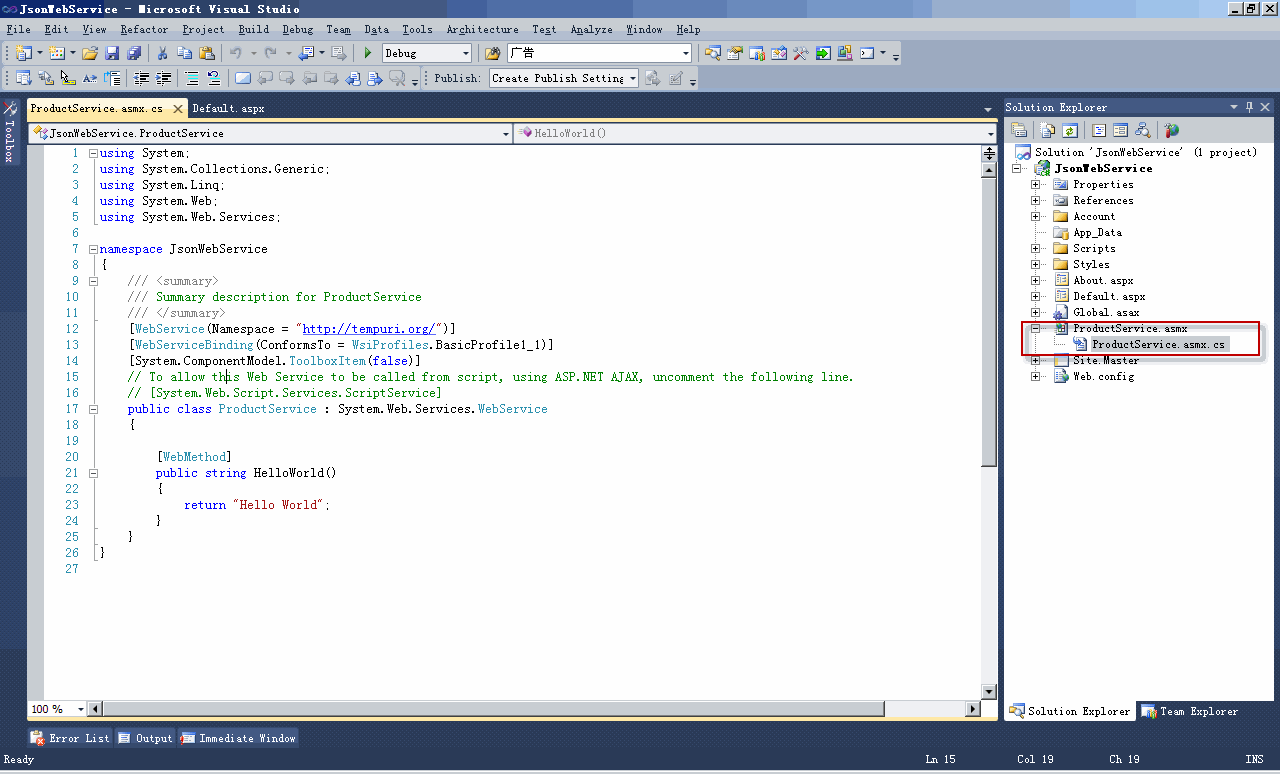
4、 添加ASP.NET Web Service 到工程中,命名为ProductServic.asmx,如下图:

此Web Service调用ProductData类,完成数据查询操作,具体代码如下:

/// <summary>

/// Summary description for ProductService

/// </summary>

[WebService(Namespace = “http://tempuri.org/”)]

[WebServiceBinding(ConformsTo = WsiProfiles.BasicProfile1_1)]

[System.ComponentModel.ToolboxItem(false)]

// To allow this Web Service to be called from script, using ASP.NET AJAX, uncomment the following line.

[System.Web.Script.Services.ScriptService]

public class ProductService : System.Web.Services.WebService

{

private ProductData dataSource

{

get

{

return new ProductData();

}

}

/// <summary>

/// Get the Products

/// </summary>

/// <returns></returns>

[WebMethod]

[ScriptMethod(ResponseFormat=ResponseFormat.Json,UseHttpGet=true)]

public List<Product> GetProducts()

{

return dataSource.GetProducts();

}

/// <summary>

/// 根据商品Id查询商品

/// </summary>

/// <param name=”object”>商品编号</param>

/// <returns>商品</returns>

[WebMethod]

[ScriptMethod(ResponseFormat=ResponseFormat.Json,UseHttpGet=true)]

public Product GetProductById(object id)

{

Product p = null;

if (id!=null)

{

int productId = 0;

int.TryParse(id.ToString(),out productId);

p = dataSource.GetProductById(productId);

}

return p;

}

/// <summary>

/// 根据商品名称查询商品

/// </summary>

/// <param name=”id”>商品名称</param>

/// <returns>商品</returns>

[WebMethod]

[ScriptMethod(ResponseFormat = ResponseFormat.Json, UseHttpGet = true)]

public List<Product> GetProductById(string name)

{

return dataSource.GetProductByName(name);

}

}    }

注:

Ø 引用命名空间:System.Web.Script.Services.ScriptService

Ø 给方法添加注解:[ScriptMethod(ResponseFormat = TheResponseFormat, UseHttpGet = true/false)]

ResponseFormat:方法要返回的类型,一般为Json或者XML

UseHttpGet:true表示“Get”可以访问此方法

5、 在Defualt.aspx页面引用JQuery类库

引用Google网络JQuery 类库http://ajax.googleapis.com/ajax/libs/jQuery/1.4.2/jQuery.js

或者本地类库<script src=”Scripts/jQuery-1.4.1.js” type=”text/JavaScript”></script>

6、 在Defualt.aspx页添加如下HTML代码:

<div id=”listContainer” class=”container”>

<div id=”title”>

Product List</div>

<table id=”productList”>

<thead>

</thead>

<tbody>

</tbody>

</table>

</div>

Jquery会动态向id=ProductList的Table中添加查询到的数据

7、 在Defualt.aspx页添加如下样式代码:

<style type=”text/css”>

body

{

font-family: Verdana,Arial;

}

.container

{

width: auto;

padding: 1.5em;

margin: 1em;

}

.container #title

{

font-size: 2em;

width: 100%;

border-bottom: groove 0.5em blue;

}

#productList

{

width: 100%;

border-collapse: collapse;

}

#productList td

{

padding: 1em;

border-style: solid;

border-width: 1px;

border-color: Blue;

margin: 0;

}

thead td

{

background-color: Yellow;

}

tbody tr:hover

{

background-color: #aaa;

}

</style>

8、 使用Jquery的Ajax方法调用Web Service中方法,代码如下:

$(document).ready(function () {

// Get Product list

$.ajax({

type: “GET”,

contentType: “application/json; charset=utf-8”,

url: “ProductService.asmx/GetProducts”,

dataType: “json”,

success: insertCallback,

error: errorCallback

});

function insertCallback(result) {

$(“#productList”).find(“tr:gt(0)”).remove();

if (result[“d”].length > 0) {

$(‘#productList > thead:last’).append(‘<tr><td>商品名称</td><td>价格</td><td>库存量</td></tr>’);

}

for (var i = 0; i < result[“d”].length; i++) {

var product = eval(result[“d”][i]);

$(‘#productList > tbody:last’).append(‘<tr onclick=”ShowDetail(‘ + product.ProductId + ‘)”><td>’ +

product.ProductName + ‘</td><td>’ +

product.Price + ‘</td><td>’ +

product.Stock + ‘</td></tr>’);

}

}

function errorCallback(XMLHttpRequest, textStatus, errorThrown) {

alert(errorThrown + ‘:’ + textStatus);

}

注:

$.ajax方法有以下属性:

Type:    HTTP请求方法,在做查询操作时,经常用Get方法

contentType:在请求头部的类型,由于Web Service返回Json对象,此处值为:application/json; charset=utf-8

url:求的URL地址

dataTyep:定义返回的类型

Success:调用成功时,要执行的方法

error:调用失败是,要执行的方法

9、 执行程序,效果如下:

至此,使用Jquery查询Web Service返回的JSon对象已经完成

[转载]WCSF vs ASP.NET MVC

mikel阅读(1043)

[转载]WCSF vs ASP.NET MVC – tonyqus.cn – 博客园.

前段时间有个兄弟问我wcsf的问题,说实话,第一次听到这玩意,我一开始还以为他说wcf呢,寒。网上一搜,哦~~原来这是practice and pattern team的大作,于是用了两周的时间研究了一把,发觉这套东西的确很强,由于那个兄弟是要为自己的公司选架构,所以我就趁此机会分析了下他们的异同和优缺 点。

WCSF是啥?

WCSF全称Web Client Software Factory, 貌似08年就已经很成熟了,最近还出了vs2010版,可惜我机器上vs2010死活装不上去,老报2908和1935(已在microsoft connect上提交bug,希望vs team会瞧一眼),所以只能看基于vs2008的wcsf,其实vs2005 wcsf也是支持的。尽管这套框架很成熟,但似乎国内很少有人讨论,即使是国外的blog也只有少数几个作者在写教程,不知道是推广没做好还是啥原因。

详见http://msdn.microsoft.com/en-us/library/ff648752.aspx

ASP.NET MVC是啥?

ASP.NET MVC是微软最新推出的web编程框架,从名字就可以看出MVC模式是这个框架的重点。这是微软重点推的开发框架,目前已经出了2.0版。

详见http://www.asp.net/mvc

以下是功能对照表(如有不全或欠妥的请在回复中补充,谢谢)

WCSF ASP.NET MVC
开发模式 MVP MVC
开发指导文档 (官方)
开发指导文档 (民间)
测试指导文档(官方)
测试指导文档(民间)
开发平台支持 vs2005, vs2008, vs2010 vs2008 sp1, vs2010
使用ASP.NET web controls 不能
模块化加载 支持
Web视图引擎 好多
模板引擎
页面流程控制
内嵌MockObject
支持master page 支持 支持
安全认证支持 EnterpriseLibrary.Security ASP.NET安全机制
内嵌EnterpriseLibrary
页面响应机制 ASP.NET postback url routing
代码与UI分离 较强
业务层单元测试 支持,并有详细指导文档 支持
UI层(Controller, Presenter)单元测试 支持 支持,有详细文档
前台(JavaScript)单元测试 无,需自己开发 无,需自己开发
JavaScript 无自带库,但可根据需要嵌入 JQuery, asp.net ajax framework

下面有些stackoverflow的讨论帖,大家可以参考

http://stackoverflow.com/questions/53479/asp-net-mvc-vs-web-client-software-factory-wcsf

http://stackoverflow.com/questions/170799/is-net-wcsf-the-way-to-go

http://stackoverflow.com/questions/1729810/wcsf-reading-materials

说到架构选择,我们就不得不提几个必须考虑的问题:

1. 雇佣成本

这个是做任何事必须要考虑的问题,对于公司来说降低成本是非常重要的(虽然大公司有很多钱可以烧,也有闲人可以养),HR和老板应该会对这个很感兴 趣。从目前来看,WCSF由于国内使用的人较少,其雇佣成本会略高于ASP.NET MVC,并且使用WCSF的人对于架构的理解可能要比ASP.NET MVC更加深入些,毕竟ASP.NET MVC的架构远比WCSF简单,当然这也间接说明ASP.NET MVC架构的透明度做得比WCSF要好,能够让一些初级程序员不需要知道具体实现就可以使用它。

2. 培训成本

从目前的文档情况来看,wcsf的文档(包括民间blog)远少于ASP.NET mvc,再加上WCSF把很多东西都包括了进去,所以其培训成本将远高于ASP.NET MVC。另外,由于微软重点推广ASP.NET MVC,似乎只要是用ASP.NET的人基本都知道ASP.NET MVC,或多或少会有些概念。另外由于ASP.NET MVC支持多种web视图引擎,从一定意义上讲,这会降低一定的培训成本,因为不排除有些程序员曾经使用过其他平台上的视图引擎,转过来会很方便。

2. 性能

但从这两个架构来说,并不存在很明显的性能差别,这主要还是取决于使用的人。在使用WCSF的时候,必须注意ViewState的使用,一旦 ViewState泛滥,将直接导致页面过大,而引起性能下降。另外,wcsf使用了Object Builder,所以必须考虑其构建对象的性能,并对一些对象做适当的缓存处理,以减少反射带来的性能影响(据说WCSF新版本使用了 DynamicMethod,这东西的性能我测过,确实能比反射快很多)。ASP.NET MVC由于架构相对简单,也没有ViewState,就目前来看不会有性能问题,当然最终的性能还是取决于开发的代码质量。

3. 可扩展性

WCSF在可扩展性方面更胜一筹,因为它为你提供了很多选择,比如说模块化加载、页面流程控制、Guidance Automation,以及Enterprise Library本身提供的各种扩展功能,并且这些功能在WCSF的文档中已经有了很明确的指示,谁该用哪些功能,例如架构师应该用Guidance Automation Tookit和Guidance Automation Extension,而开发人员应该使用Automation Package,并且这些东西能与VS完美融合,这样也可以在无形中限制初中级开发人员的行为,而不是让他们“为所欲为”。ASP.NET MVC尽管也提供了例如Area、模板引擎,但其文档并没有明确指出架构师应该负责哪些部分,并且也没有和VS融合,只能通过文档来约束开发人员的行为和 代码。

4. 可测试性

从白盒测试角度看,这两个东西的可测试性基本相当。ASP.NET MVC由于MVC模式本身的优势,基于Controller、Model和HtmlHelper的单元测试很容易写,基本没有什么限制,只是View的测 试就相对比较困难。而WCSF由于采用了MVP模式,尽管提升了UI和代码分离的程度,但是做Presenter的事件测试稍微麻烦一点,但总体不影响单 元测试的进行。

5. 后期维护成本

(这个就目前我对这两样东西的了解,还很难做出比较合理的分析,也没有具体实践的项目,如果有兄弟有较好的分析方法可以写在回复中。)

6. 移植成本

如果公司以前采用的是ASP进行编码,转换成WCSF和ASP.NET MVC的成本基本相当,说白了都是重新写。如果公司以前有过分层设计,且假设有服务层、业务逻辑层、数据层三层,那么业务逻辑层和数据层基本可以不动,但 是服务层会有所变化,主要要适应新的调用方式,以及实现接口。相对而言,由于ASP.NET MVC没有实现太多的东西,相对WCSF而言,从以前的代码移植到ASP.NET MVC反而相对容易些,这和之前提到的培训成本也是有关系的,尽管我们要自己搭一些架构,比如身份认证、权限控制、流程控制等。当然有人会指责这有“重新 发明轮子”的嫌疑。

以上有说的不对的地方还请各位多包涵,并指出,谢谢。

[转载]Flash 生成验证码

mikel阅读(1125)

[转载]Flash 生成验证码_胡说八道_百度空间.

Flash ActionScript3.0如何生成随机验证码,依据生成验证码的一般原理,先生成一个四位的随机数字或字母(当然也可以六位甚至其它), 然后对每一个字母设置不同的字体,并适当的倾斜,然后生成一张半透明之类状的燥声图片和原文字融合便生成了验证码的图片,原程序如下:

package
{
import fl.motion.Color;
import flash.display.Bitmap;
import flash.display.BitmapData;
import flash.display.Graphics;
import flash.display.Sprite;
import flash.text.TextField;
import flash.text.TextFormat;
/**
* …
* @author Samson wen & Addis
*/
public class Main extends Sprite
{
private var num:int;
private var vStr:String = “0123456789”
private var color:Array;
private var font:Array;
private var vColor:Array;
private var w:int;
private var h:int;
private var r:int = 15;

public function Main()
{
init();
num = 4;
var s:Sprite = makeFont();
addChild(s);
var b:Bitmap = makeV(w, h);
b.alpha = 0.6;
addChild(b);
}
private function init():void
{
//生成字体颜色数组
color = new Array();
color.push(0x000000);
color.push(0x000066);
color.push(0x330000);
color.push(0x00002F);
//生成字体数组
font = new Array();
font.push(“黑体”);
font.push(“Comic Sans MS”);
font.push(“Arial”);
font.push(“Symbol”);
//生成燥声点的颜色数组
vColor = new Array();
vColor.push(0xFF99FF);
vColor.push(0xFFCCFF);
vColor.push(0xFFCC99);
vColor.push(0x9999FF);
}

//生成随机点燥声
private function makeV(w:int, h:int):Bitmap
{
var bit:BitmapData = new BitmapData(w, h);
var color:int;
var px:int;
var py:int;
var c:int;
for (var i:int = 0; i < 1000; i++)
{
py = Math.random() * h;
px = Math.random() * w;
c = vColor[int(Math.random() * (vColor.length – 1))];
bit.setPixel(px, py, c);
}
return new Bitmap(bit);
}

//生成验证码文字
private function makeFont():Sprite
{
var t:Array = new Array();
var temp:TextField;
var str:String;
var format:TextFormat;
var l:int = 0;
var sprite:Sprite = new Sprite();
for (var i:int = 0; i < num; i++)
{
temp = new TextField();
temp.text = vStr.charAt(int(Math.random() * (vStr.length – 1)));
temp.textColor = 0x000000;
format = new TextFormat();
format.color = color[int(Math.random() * ( color.length – 1 ))];
format.font = font[int(Math.random() * ( font.length – 1 ))];
format.size = 15;
temp.setTextFormat(format);
temp.x = l;
temp.y = setRandom( -5, 5) + 7;
l += temp.textWidth + 5;
temp.selectable = false;
sprite.addChild(temp);
}
w = l + 5;
h = temp.textHeight + 10;
return sprite;
}

private function setRandom(b:Number,e:Number):Number
{
var result:Number;
result = Math.random() * (e – b);
result += b;
return result;
}
}
}