[转载]NVelocity templates and absolute paths

mikel阅读(1011)

[转载]NVelocity templates and absolute paths – George V. Reilly’s Technical Blog.

We’ve started using the NVelocity template formatting engine. We were absolutely stymied for an hour, trying to figure out how to get it working with an absolute path to the template file, instead of the relative path shown in the documentation.

The trick is to set file.resource.loader.path. Here’s how to load C:\foo\bar\somefile.vm:

 ExtendedProperties props = new ExtendedProperties();
 props.AddProperty("file.resource.loader.path", new ArrayList(new string[]{".", "C:\\"}));
 velocity.Init(props);

 template = velocity.GetTemplate("foo\\bar\\somefile.vm");

[转载]深入探析c# Socket

mikel阅读(1278)

[转载]【原创】深入探析c# Socket – 追求卓越,成功会不经意间追上你。 – 博客园.

最近浏览了几篇有关Socket发送消息的文章,发现大家对Socket Send方法理解有所偏差,现将自己在开发过程中对Socket的领悟写出来,以供大家参考。

(一)架构

基于TCP协议的Socket通信,架构类似于B/S架构,一个Socket通信服务器,多个Socket通信客户端。Socket通信服务器 启动时,会建立一个侦听Socket,侦听Socket将侦听到的Socket连接传给接受Socket,然后由接受Socket完成接受、发送消息,当 Socket存在异常时,断开连接。在实际开发项目中,往往要求Socket通信服务器能提供高效、稳定的服务,一般会用到以下技术:双工通信、完成端 口、SAEA、池、多线程、异步等。特别是池,用的比较多,池一般包括一下几种:

1)Buffer池,用于集中管控Socket缓冲区,防止内存碎片。

2)SAEA池,用于集中管控Socket,重复利用Socket。

3)SQL池,用于分离网络服务层与数据访问层(SQL的执行效率远远低于网络层执行效率)


(二)Send

主服务器接受Socket为一端口,客户端Socket为一端口,这两个端口通过TCP协议建立连接,通信基础系统负责管理此连接,它有两个功能:

1)发送消息

2)接受消息

Socket的Send方法,并非大家想象中的从一个端口发送消息到另一个端口,它仅仅是拷贝数据到基础系统的发送缓冲区,然后由基础系统将发 送缓冲区的数据到连接的另一端口。值得一说的是,这里的拷贝数据与异步发送消息的拷贝是不一样的,同步发送的拷贝,是直接拷贝数据到基础系统缓冲区,拷贝 完成后返回,在拷贝的过程中,执行线程会IO等待, 此种拷贝与Socket自带的Buffer空间无关,但异步发送消息的拷贝,是将Socket自带的Buffer空间内的所有数据,拷贝到基础系统发送缓 冲区,并立即返回,执行线程无需IO等待,所以异步发送在发送前必须执行SetBuffer方法,拷贝完成后,会触发你自定义回调函数 ProcessSend,在ProcessSend方法中,调用SetBuffer方法,重新初始化Buffer空间。

口说无凭,下面给个例子:

服务器端:

客户端:

解释:

客户端第一次发送数据:1234567890。

客户端第一个接受数据:1234567890,该数据由服务端用Send同步方法发送返回。

客户端第二个接受数据:1234567890,该数据由服务端用Send异步方法发送返回。

以上似乎没什么异常,好,接下来,我只发送abc。

客户端第一个接受数据:abc,理所当然,没什么问题。

客户端第二个接受数据:abc4567890!为什么呢?应该是abc才对呀!

好,现在为大家解释一下:

异步发送是将其Buffer空间中所有数据拷贝到基础系统发送缓冲区,第一次拷贝1234567890到发送缓冲区,所以收到1234567890,第二次拷贝abc到发送缓冲区,替换了先前的123,所以收到abc4567890,大家明白的?

源码:

BufferManager

using System.Collections.Generic; using System.Net.Sockets; // This class creates a single large buffer which can be divided up // and assigned to SocketAsyncEventArgs objects for use with each // socket I/O operation. // This enables bufffers to be easily reused and guards against // fragmenting heap memory. // // The operations exposed on the BufferManager class are not thread safe. class BufferManager { int m_numBytes; // the total number of bytes controlled by the buffer pool byte[] m_buffer; // the underlying byte array maintained by the Buffer Manager Stack<int> m_freeIndexPool; // int m_currentIndex; int m_bufferSize; public BufferManager(int totalBytes, int bufferSize) { m_numBytes = totalBytes; m_currentIndex = 0; m_bufferSize = bufferSize; m_freeIndexPool = new Stack<int>(); } // Allocates buffer space used by the buffer pool public void InitBuffer() { // create one big large buffer and divide that // out to each SocketAsyncEventArg object m_buffer = new byte[m_numBytes]; } // Assigns a buffer from the buffer pool to the // specified SocketAsyncEventArgs object // // <returns>true if the buffer was successfully set, else false</returns> public bool SetBuffer(SocketAsyncEventArgs args) { if (m_freeIndexPool.Count > 0) { args.SetBuffer(m_buffer, m_freeIndexPool.Pop(), m_bufferSize); } else { if ((m_numBytes - m_bufferSize) < m_currentIndex) { return false; } args.SetBuffer(m_buffer, m_currentIndex, m_bufferSize); m_currentIndex += m_bufferSize; } return true; } // Removes the buffer from a SocketAsyncEventArg object. // This frees the buffer back to the buffer pool public void FreeBuffer(SocketAsyncEventArgs args) { m_freeIndexPool.Push(args.Offset); args.SetBuffer(null, 0, 0); } }
SocketAsyncEventArgsPool

using System; using System.Collections.Generic; using System.Net.Sockets; // Represents a collection of reusable SocketAsyncEventArgs objects. class SocketAsyncEventArgsPool { Stack<SocketAsyncEventArgs> m_pool; // Initializes the object pool to the specified size // // The "capacity" parameter is the maximum number of // SocketAsyncEventArgs objects the pool can hold public SocketAsyncEventArgsPool(int capacity) { m_pool = new Stack<SocketAsyncEventArgs>(capacity); } // Add a SocketAsyncEventArg instance to the pool // //The "item" parameter is the SocketAsyncEventArgs instance // to add to the pool public void Push(SocketAsyncEventArgs item) { if (item == null) { throw new ArgumentNullException("Items added to a SocketAsyncEventArgsPool cannot be null"); } lock (m_pool) { m_pool.Push(item); } } // Removes a SocketAsyncEventArgs instance from the pool // and returns the object removed from the pool public SocketAsyncEventArgs Pop() { lock (m_pool) { return m_pool.Pop(); } } // The number of SocketAsyncEventArgs instances in the pool public int Count { get { return m_pool.Count; } } }
using System; using System.Collections.Generic; using System.Linq; using System.Text; using System.Net.Sockets; class AsyncUserToken { public Socket Socket; }
Server

using System; using System.Threading; using System.Net.Sockets; using System.Net; using System.Text; // Implements the connection logic for the socket server. // After accepting a connection, all data read from the client // is sent back to the client. The read and echo back to the client pattern // is continued until the client disconnects. class Server { private int m_numConnections; // the maximum number of connections the sample is designed to handle simultaneously private int m_receiveBufferSize;// buffer size to use for each socket I/O operation BufferManager m_bufferManager; // represents a large reusable set of buffers for all socket operations const int opsToPreAlloc = 2; // read, write (don't alloc buffer space for accepts) Socket listenSocket; // the socket used to listen for incoming connection requests // pool of reusable SocketAsyncEventArgs objects for write, read and accept socket operations SocketAsyncEventArgsPool m_readWritePool; int m_totalBytesRead; // counter of the total # bytes received by the server int m_numConnectedSockets; // the total number of clients connected to the server Semaphore m_maxNumberAcceptedClients; // Create an uninitialized server instance. // To start the server listening for connection requests // call the Init method followed by Start method // // <param name="numConnections">the maximum number of connections the sample is designed to handle simultaneously</param> // <param name="receiveBufferSize">buffer size to use for each socket I/O operation</param> public Server(int numConnections, int receiveBufferSize) { m_totalBytesRead = 0; m_numConnectedSockets = 0; m_numConnections = numConnections; m_receiveBufferSize = receiveBufferSize; // allocate buffers such that the maximum number of sockets can have one outstanding read and //write posted to the socket simultaneously m_bufferManager = new BufferManager(receiveBufferSize * numConnections * opsToPreAlloc, receiveBufferSize); m_readWritePool = new SocketAsyncEventArgsPool(numConnections); m_maxNumberAcceptedClients = new Semaphore(numConnections, numConnections); } // Initializes the server by preallocating reusable buffers and // context objects. These objects do not need to be preallocated // or reused, but it is done this way to illustrate how the API can // easily be used to create reusable objects to increase server performance. // public void Init() { // Allocates one large byte buffer which all I/O operations use a piece of. This gaurds // against memory fragmentation m_bufferManager.InitBuffer(); // preallocate pool of SocketAsyncEventArgs objects SocketAsyncEventArgs readWriteEventArg; for (int i = 0; i < m_numConnections; i++) { //Pre-allocate a set of reusable SocketAsyncEventArgs readWriteEventArg = new SocketAsyncEventArgs(); readWriteEventArg.Completed += new EventHandler<SocketAsyncEventArgs>(IO_Completed); readWriteEventArg.UserToken = new AsyncUserToken(); // assign a byte buffer from the buffer pool to the SocketAsyncEventArg object m_bufferManager.SetBuffer(readWriteEventArg); // add SocketAsyncEventArg to the pool m_readWritePool.Push(readWriteEventArg); } } // Starts the server such that it is listening for // incoming connection requests. // // <param name="localEndPoint">The endpoint which the server will listening // for connection requests on</param> public void Start(IPEndPoint localEndPoint) { // create the socket which listens for incoming connections listenSocket = new Socket(localEndPoint.AddressFamily, SocketType.Stream, ProtocolType.Tcp); listenSocket.Bind(localEndPoint); // start the server with a listen backlog of 100 connections listenSocket.Listen(100); // post accepts on the listening socket StartAccept(null); //Console.WriteLine("{0} connected sockets with one outstanding receive posted to each....press any key", m_outstandingReadCount); Console.WriteLine("Press any key to terminate the server process...."); Console.ReadKey(); } // Begins an operation to accept a connection request from the client // // <param name="acceptEventArg">The context object to use when issuing // the accept operation on the server's listening socket</param> public void StartAccept(SocketAsyncEventArgs acceptEventArg) { if (acceptEventArg == null) { acceptEventArg = new SocketAsyncEventArgs(); acceptEventArg.Completed += new EventHandler<SocketAsyncEventArgs>(AcceptEventArg_Completed); } else { // socket must be cleared since the context object is being reused acceptEventArg.AcceptSocket = null; } m_maxNumberAcceptedClients.WaitOne(); bool willRaiseEvent = listenSocket.AcceptAsync(acceptEventArg); if (!willRaiseEvent) { ProcessAccept(acceptEventArg); } } // This method is the callback method associated with Socket.AcceptAsync // operations and is invoked when an accept operation is complete // void AcceptEventArg_Completed(object sender, SocketAsyncEventArgs e) { ProcessAccept(e); } private void ProcessAccept(SocketAsyncEventArgs e) { Interlocked.Increment(ref m_numConnectedSockets); Console.WriteLine("Client connection accepted. There are {0} clients connected to the server", m_numConnectedSockets); // Get the socket for the accepted client connection and put it into the //ReadEventArg object user token SocketAsyncEventArgs readEventArgs = m_readWritePool.Pop(); ((AsyncUserToken)readEventArgs.UserToken).Socket = e.AcceptSocket; // As soon as the client is connected, post a receive to the connection bool willRaiseEvent = e.AcceptSocket.ReceiveAsync(readEventArgs); if (!willRaiseEvent) { ProcessReceive(readEventArgs); } // Accept the next connection request StartAccept(e); } // This method is called whenever a receive or send operation is completed on a socket // // <param name="e">SocketAsyncEventArg associated with the completed receive operation</param> void IO_Completed(object sender, SocketAsyncEventArgs e) { // determine which type of operation just completed and call the associated handler switch (e.LastOperation) { case SocketAsyncOperation.Receive: ProcessReceive(e); break; case SocketAsyncOperation.Send: ProcessSend(e); break; default: throw new ArgumentException("The last operation completed on the socket was not a receive or send"); } } // This method is invoked when an asynchronous receive operation completes. // If the remote host closed the connection, then the socket is closed. // If data was received then the data is echoed back to the client. // private void ProcessReceive(SocketAsyncEventArgs e) { // check if the remote host closed the connection AsyncUserToken token = (AsyncUserToken)e.UserToken; if (e.BytesTransferred > 0 && e.SocketError == SocketError.Success) { //increment the count of the total bytes receive by the server Interlocked.Add(ref m_totalBytesRead, e.BytesTransferred); Console.WriteLine("The server has read a total of {0} bytes", m_totalBytesRead); Int32 BytesToProcess = e.BytesTransferred; Byte[] bt = new Byte[BytesToProcess]; Buffer.BlockCopy(e.Buffer, e.Offset, bt, 0, BytesToProcess); string strReceive = Encoding.Default.GetString(bt); Send(token.Socket, bt, 0, bt.Length, 1000); Thread.Sleep(1000); //echo the data received back to the client //e.SetBuffer(e.Offset, e.BytesTransferred); bool willRaiseEvent = token.Socket.SendAsync(e); if (!willRaiseEvent) { ProcessSend(e); } } else { CloseClientSocket(e); } } public static void Send(Socket socket, byte[] buffer, int offset, int size, int timeout) { socket.SendTimeout = 0; int startTickCount = Environment.TickCount; int sent = 0; // how many bytes is already sent do { if (Environment.TickCount > startTickCount + timeout) //throw new Exception("Timeout."); try { sent += socket.Send(buffer, offset + sent, size - sent, SocketFlags.None); } catch (SocketException ex) { if (ex.SocketErrorCode == SocketError.WouldBlock || ex.SocketErrorCode == SocketError.IOPending || ex.SocketErrorCode == SocketError.NoBufferSpaceAvailable) { // socket buffer is probably full, wait and try again Thread.Sleep(30); } else throw ex; // any serious error occurr } } while (sent < size); } // This method is invoked when an asynchronous send operation completes. // The method issues another receive on the socket to read any additional // data sent from the client // // <param name="e"></param> private void ProcessSend(SocketAsyncEventArgs e) { if (e.SocketError == SocketError.Success) { //e.SetBuffer(e.Offset, 10); // done echoing data back to the client AsyncUserToken token = (AsyncUserToken)e.UserToken; // read the next block of data send from the client bool willRaiseEvent = token.Socket.ReceiveAsync(e); if (!willRaiseEvent) { ProcessReceive(e); } } else { CloseClientSocket(e); } } private void CloseClientSocket(SocketAsyncEventArgs e) { AsyncUserToken token = e.UserToken as AsyncUserToken; // close the socket associated with the client try { token.Socket.Shutdown(SocketShutdown.Send); } // throws if client process has already closed catch (Exception) { } token.Socket.Close(); // decrement the counter keeping track of the total number of clients connected to the server Interlocked.Decrement(ref m_numConnectedSockets); m_maxNumberAcceptedClients.Release(); Console.WriteLine("A client has been disconnected from the server. There are {0} clients connected to the server", m_numConnectedSockets); // Free the SocketAsyncEventArg so they can be reused by another client m_readWritePool.Push(e); } }
Program

using System; using System.Net; using System.Collections.Generic; using System.IO; class Program { static void Main(string[] args) { IPEndPoint iep = new IPEndPoint(IPAddress.Parse("10.1.20.6"), 1333); Server objServer = new Server(1000, 10); objServer.Init(); objServer.Start(iep); } }

[转载]Flex 数据交互的三种方式

mikel阅读(981)

[转载]Flex 数据交互的三种方式 – 每一点知识的积累都是对生命的充实!!! – 博客园.

需要的工具:

Vs2008 or Vs2010

Adobe Flash Builder 4(Flex开发工具)

Flex本身并不支持直接与数据库交互,但可以通过间接的三种方式与数据库交互,下面分别介绍:

Webservice通讯

大家最能想到的就是调用webservice,其特性我就不一一例举, 总之webservice具有通用性,当然Flex也可以支持了.

首先简单的建立个web项目,添加一个web服务,最简单的定义一个方法,比如HelloWorld:

[WebMethod]

public string HelloWorld()

{

return "Hello World";

}

在Flex里面建立项目,并添加一个mxml文件…名字随便..

<fx:Declarations>

<s:WebService id="WS" 

//webservice的地址

wsdl="http://localhost:3431/WebSite1/WebServiceFlex.asmx?wsdl" 

//错误提示

fault="Alert.show(event.fault.faultString,'Error')" showBusyCursor="true">

//调用的webservice 里面的方法名称

<s:operation name="HelloWorld" resultFormat="object" 

//回调函数

result="onResult(event);"></s:operation>

</s:WebService>

</fx:Declarations>

下面在Script标签里面写上Flex的回调函数onResult(event);

import mx.controls.Alert;

import mx.events.ResizeEvent;

import mx.rpc.events.ResultEvent;

internal function onResult(evt:ResultEvent):void

{

//返回结果

Alert.show(evt.result.toString());

}

在页面上放一个按钮来触发这个webservice

<mx:Button x=”26″ y=”209″ label=”获取webservice的信息” fontSize=”12″ click=”WS.HellowWorld.send()”/>

运行就可以看到效果了.\

HttpService通讯

<mx:HTTPService id=”menus” resultFormat=”xml” url=”dataAsset/rooms.xml” result=”httpservice1_resultHandler(event)”/>

resultFormat :

指示如何反序列化由 HTTP 调用返回的结果的值。该项目的值根据以下条件确定:

· 返回的是 XML 还是名称/值对。

· 访问结果的方式;可以将结果作为 object、text 或 XML 进行访问。

默认值为 object。允许使用的值包括:

· object 返回的值为 XML 并且按照 ActionScript 对象树分析。此为默认。

· array 返回的值是 XML 并且按照 ActionScript 对象树分析。但是,如果顶级对象不是数组,将创建一个新数组并且将结果设置为第一个项目。如果 makeObjectsBindable 为 true,则该数组将被包装在 ArrayCollection 中。

· xml 返回的值为 XML 并且作为 ActionScript XMLnode 对象中的文本 XML 返回。

· flashvars 返回的值是包含由 & 符号分隔的名称=值对的文本,该文本被分析为 ActionScript 对象。

· text 返回的值为文本并且未经处理。

· e4x 返回的值为 XML 并且作为 ActionScript XML 对象中的文本 XML 返回,可以使用 ECMAScript for XML (E4X) 表达式进行访问。

Result : 当 HTTPService 调用成功返回时分派。

Url: 服务的位置。如果指定 url 并指定非默认目标,则 services-config.xml 文件中的目标必须允许该指定的 URL。

httpservice1_resultHandler(event) 是返回结果调用的函数:

protected function httpservice1_resultHandler(event:ResultEvent):void

{

Var roomsXml=new XML(event.result);

menuInfo=roomsXml.node;

trace(menuInfo);

}

Httpservice比较简单.还有一个技巧是url可以指定一个aspx页面的连接地址, 在这个aspx 里面通过Respince.write() 输出一个xml 格式的字符串也可以达到这种效果.比较灵活。

利用Remoting 与数据库通讯

需要的组件

Remoting网关 : FluorineFx 一个第三方的组件 下载地址

当然还有 Vs2008

介绍

FluorineFX是一个开源库,提供了一种在.NET framework下对Flex/Flash的远程过程调用,Flex数据服务和实时数据的使用技术。

能被.NET frameworks支持的FluorineFx有:

Microsoft .NET Framework 1.1 (1.1.4322)

Microsoft .NET Framework 2.0 (2.0.50727)

Microsoft .NET Framework 3.5 (3.5.21022.8)

Microsoft .NET Framework 4.0

Mono 1.2.4

.NET frameworks 支持向下兼容,所以新版本的框架将运行的二进制集会被定位到先前版本的框架

Fluorine是一种开源的AMF(ActionScript Messaging Formatter)网关,专门负责Flex3.0与.Net交互时的数据类型转换。Fluorine现支持ActionScript 2.0和ActionScript 3.0,所以Fluorine也可作为Flash与.Net交互时的AMF网关。

安装

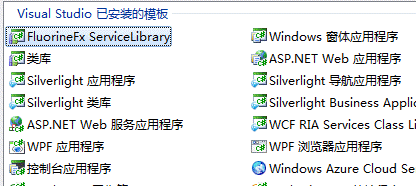
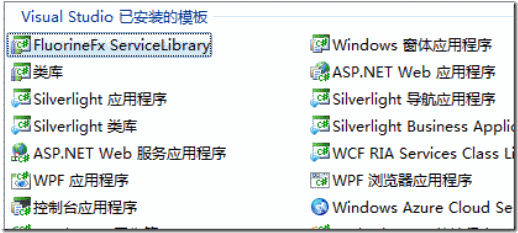
安装好FluorineFX 在Vs2008下新建项目,可以看到多了一个FluorineFX ServiceLibrary
clip_image002

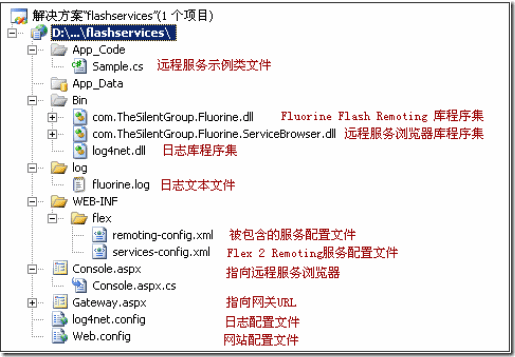
OK,说明你的FluorineFX安装成功了.创建项目.

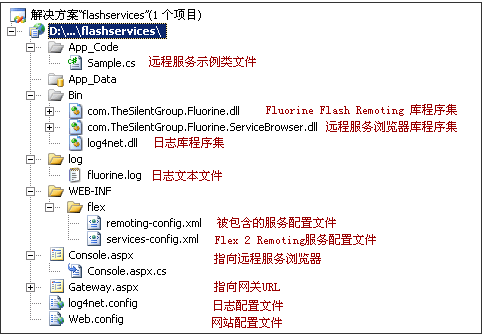
clip_image004

此图来源于网上..这个图是很形象滴..不过少了些文件

如果不支持Fluorine模板的话.那就需要你自己手动配置Flash Remoting了,大致和上面的目录差不多就可以..具体的网上应该有介绍,

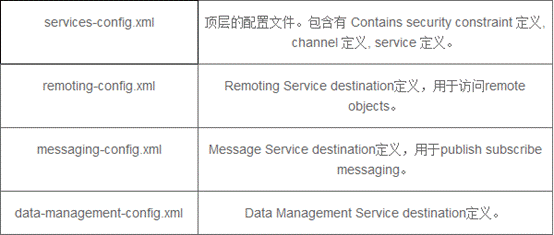
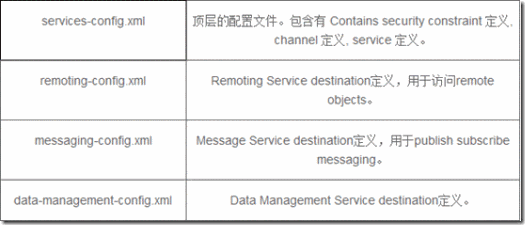
上图flex文件夹下少了两个xml文件 这里贴出来:
clip_image006

如果你使用的是跟我一样的环境的话,这些配置默认就可以,.我也没有做过深入研究

创建好之后 我的地址是 http://localhost:9313/WebFlexService/ 这个要留着..

创建 Flex项目

我使用的是Adobe Flash Builder 4所以这里创建的时候或许有些不同

创建Flex项目..
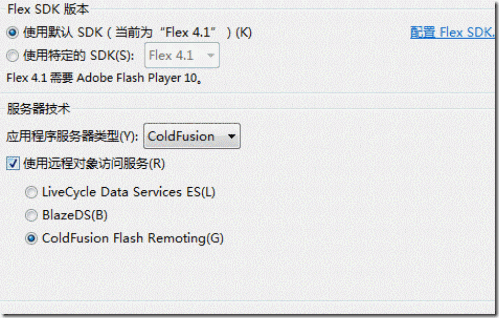
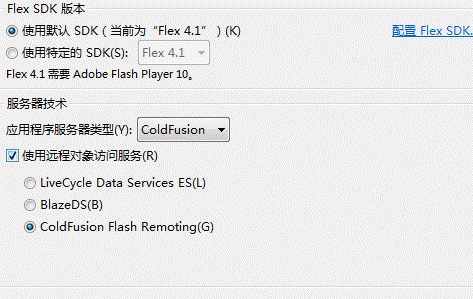
clip_image008

选择ColdFusion ,选中该ColdFusion Flash Remoting

Next!
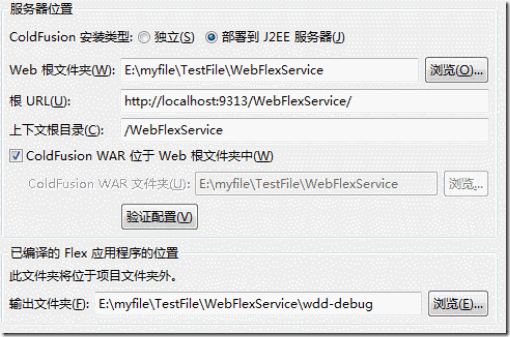
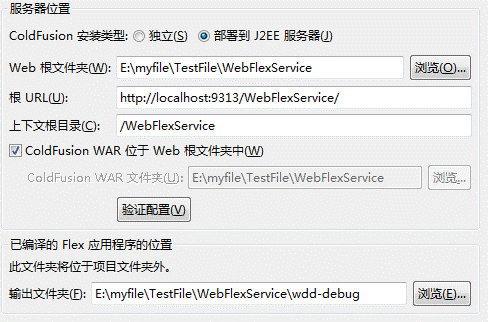
clip_image010

这个是我的配置,但总感觉不对,咱是做.net的,还得选中部署到J2EE服务器,心中有些不爽.但是选择独立那个,总是配置不成功,也就只能这样了..

利用 Remoting通讯可以接收服务器端传递的 带参数,数组,集合等等格式的数据.

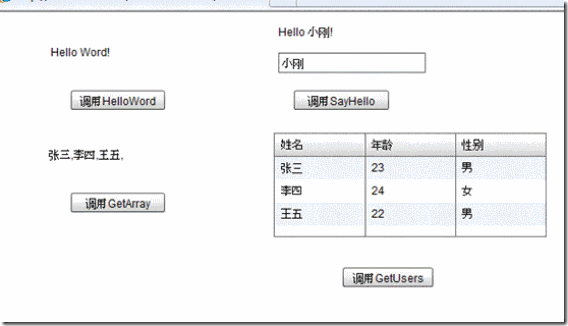
这里演示这几种传送数据的方式

.net端代码:

//这句话很重要

[RemotingService("Fluorine sample service")]

public class Sample

{

public Sample()

{

}

public string HelloWord()

{

return "Hello Word!";

}

public string SayHello(string name)

{

return "Hello " + name + "!";

}

public string[] GetArray()

{

string[] array = new string[] { "张三", "李四", "王五" };

return array;

}

public List<User> GetUsers()

{

List<User> users = new List<User>();

User user = new User();

user.Name = "张三";

user.Age = 23;

user.Sex = "";

users.Add(user);

user = new User();

user.Name = "李四";

user.Age = 24;

user.Sex = "";

users.Add(user);

user = new User();

user.Name = "王五";

user.Age = 22;

user.Sex = "";

users.Add(user);

return users;

}

}

Flex端代码:

<fx:Script>

<![CDATA[

import mx.collections.ArrayCollection;

import mx.containers.Form;

import mx.controls.Alert;

import mx.rpc.events.FaultEvent;

import mx.rpc.events.ResultEvent;

public function RemoteResult(cvt:ResultEvent):void

{

var str:String = "";

switch(cvt.currentTarget.name)

{

case "HelloWord"://无参数

str = cvt.result as String;

this.showtxt.text = str;

break;

case "SayHello"://带参数

str = cvt.result as String;

this.SayHellotxt.text = str;

break;

case "GetArray"://数组

for(var i:int = 0;i<cvt.result.length;i++){

this.showGetArraytxt.text += cvt.result[i].toString() + ",";

}

break;

case "GetUsers"://传递实体对象

var userArray:ArrayCollection = new ArrayCollection();

for(var j:int = 0;j<cvt.result.length;j++){

var user:User = cvt.result[j] as User;

userArray.addItem(user);

}

this.dgGrid.dataProvider = userArray;

break;

}

}

public function RemoteFault(cvt:FaultEvent):void

{

Alert.show("Message:" + cvt.fault.faultString,"出错");

}

]]>

</fx:Script>
<fx:Declarations>

<mx:RemoteObject

id="sampleRemoteObject"

destination="fluorine"

source="Sample"

showBusyCursor="true">

<!--这里是.NET中的方法,name = 方法名 -->

<mx:method name="HelloWord" result="RemoteResult(event)" fault="RemoteFault(event)"/>

<mx:method name="SayHello" result="RemoteResult(event)" fault="RemoteFault(event)"/>

<mx:method name="GetArray" result="RemoteResult(event)" fault="RemoteFault(event)"/>

<mx:method name="GetUsers" result="RemoteResult(event)" fault="RemoteFault(event)"/>

</mx:RemoteObject>

</fx:Declarations>

<mx:Text id="showtxt" text="" x="63" y="34" width="145" height="23">

</mx:Text>

<s:Button x="87" y="85" label="调用HelloWord" click="sampleRemoteObject.HelloWord()" />

<s:Label id="SayHellotxt" x="312" y="17" text="" width="160" height="22"/>

<s:Button x="329" y="85" label="调用SayHello" width="103" click="sampleRemoteObject.SayHello(this.nameInput.text)"/>

<s:TextInput id="nameInput" x="312" y="44" width="160"/>

<s:Label x="63" y="149" id="showGetArraytxt" text="" width="145" height="24"/>

<s:Button x="87" y="196" label="调用GetArray" width="102" click="sampleRemoteObject.GetArray()"/>

<mx:DataGrid id="dgGrid" x="307" y="131" width="296" height="113">

<mx:columns>

<mx:DataGridColumn headerText="姓名" dataField="Name"/>

<mx:DataGridColumn headerText="年龄" dataField="Age"/>

<mx:DataGridColumn headerText="性别" dataField="Sex"/>

</mx:columns>

</mx:DataGrid>

<s:Button x="382" y="277" label="调用GetUsers" click ="sampleRemoteObject.GetUsers()"/>

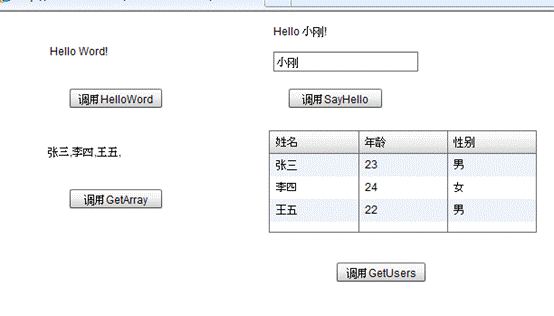
效果图:
clip_image012

[转载]利用Flash XMLSocket实现”服务器推”技术

mikel阅读(1294)

[转载]利用Flash XMLSocket实现”服务器推”技术 – 无风 – 博客园.

利用Flash XML Socket实现”服务器推”技术的基础是:1.Flash提供了XMLSocket类,服务器利用Socket向Flash发送数据;2.JavaScript和Flash的紧密结合,JavaScript和as可以相互调用。

具体实现的方法:在HTML页面中陷入一个使用了XMLSocket类的Falsh程序。JavaScript通过调用此Flash程序提供的套接口接口 与服务端的套接口进行通信。JavaScript在收到服务器端以XML格式传送的信息控制HTML的Dom对象改变页面的内容显示。

image

一、XMLSocket简介

XMLSocket 类实现了客户端套接字,这使得运行 Flash Player 的计算机可以与由 IP 地址或域名标识的服务器计算机进行通信。 对于要求滞后时间较短的客户端/服务器应用程序,如实时聊天系统,XMLSocket 类非常有用。 传统的基于 HTTP 的聊天解决方案频繁轮询服务器,并使用 HTTP 请求来下载新的消息。 与此相对照,XMLSocket 聊天解决方案保持与服务器的开放连接,这一连接允许服务器即时发送传入的消息,而无需客户端发出请求。 若要使用 XMLSocket 类,服务器计算机必须运行可识别 XMLSocket 类使用的协议的守护程序。可以参考XMLSocket简介

二、AS与JavaScript通信

利用ExternalInterface可以实现AS与JavaScript的通信,具体请看Flex与JavaScript交互

三、实现Socket

客户端Flex:

 1:  <?xml version="1.0" encoding="utf-8"?>
 2:  <mx:Application xmlns:mx="http://www.adobe.com/2006/mxml" layout="absolute">
 3:      <mx:Script>
 4:          <![CDATA[
 5:              private var socket:XMLSocket=new XMLSocket();
 6:  
 7:              private function ConncetServer():void
 8:              {
 9:                  socket.addEventListener(DataEvent.DATA,OnReceived);
10:                  socket.addEventListener(Event.CONNECT , onConnected);
11:                  this.socket.connect("127.0.0.1",8080);
12:              }
13:  
14:              private function onConnected(event:Event):void
15:              {
16:                  socket.send("begin connect");
17:                  this.txtContent.text=this.txtContent.text+"conect success\n";
18:              }
19:  
20:              private function Send():void
21:              {
22:                  socket.send("message from flex");
23:              }
24:  
25:               private function OnReceived(event:DataEvent):void
26:               {
27:                  trace("receive data.");
28:                  this.txtContent.text=this.txtContent.text+"\n"+ event.text;
29:               }
30:          ]]>
31:      </mx:Script>
32:      
33:      <mx:Button label="Connect" fontSize="12" id="btnConnect" left="10" top="20" click="ConncetServer()"/>
34:      <mx:Button label="Send" fontSize="12" id="btnSend" left="80" top="20" click="Send();" />
35:      <mx:TextArea borderColor="#010A10" id="txtContent" left="10" top="110" right="10" bottom="10" backgroundColor="#DEEEF3" cornerRadius="12"/>
36:  </mx:Application>
.codearea { color: black; background-color: white; line-height: 18px; border: 1px solid rgb(79, 129, 189); margin: 0pt; width: auto ! important; overflow: auto; text-align: left; font-size: 12px; font-family: “Courier New”,”Consolas”,”Fixedsys”,”BitStream Vera Sans Mono”,courier,monospace,serif; }.codearea pre { color: black; line-height: 18px; padding: 0pt 0pt 0pt 12px ! important; margin: 0em; background-color: rgb(255, 255, 255) ! important; }.linewrap pre { white-space: pre-wrap; word-wrap: break-word; }.codearea pre.alt { background-color: rgb(247, 247, 255) ! important; }.codearea .lnum { color: rgb(79, 129, 189); line-height: 18px; }

Socket服务端:

  1:  using System;
  2:  using System.Collections.Generic;
  3:  using System.Linq;
  4:  using System.Text;
  5:  using System.Net;
  6:  using System.Net.Sockets;
  7:  using System.Threading;
  8:  
  9:  namespace SocketServer
 10:  {
 11:      class Program
 12:      {
 13:          static bool ServiceStartFlag = false;
 14:          static Socket socket;
 15:          static Thread thread;
 16:  
 17:          static void Main(string[] args)
 18:          {
 19:              socket = new Socket(AddressFamily.InterNetwork, SocketType.Stream, ProtocolType.Tcp);
 20:              IPHostEntry ieh = Dns.GetHostEntry("localhost");
 21:              IPAddress localServerIP = ieh.AddressList[1];
 22:              IPEndPoint localIPEndPoint = new IPEndPoint(localServerIP, 8080);
 23:  
 24:              socket.Bind(localIPEndPoint);
 25:              socket.Listen(600);
 26:  
 27:              thread = new Thread(new ThreadStart(AcceptClient));
 28:              thread.IsBackground = true;
 29:              thread.Start();
 30:  
 31:              Console.ReadLine();
 32:          }
 33:  
 34:          static void AcceptClient()
 35:          {
 36:              ServiceStartFlag = true;
 37:  
 38:              while (ServiceStartFlag)
 39:              {
 40:                  try
 41:                  {
 42:                      Socket newSocket = socket.Accept();
 43:                      string onemessge = "<cross-domain-policy><allow-access-from domain=\"" + "*" + "\" to-ports=\"8080\"/></cross-domain-policy>\0";
 44:  
 45:                      byte[] tmpBytes = Encoding.UTF8.GetBytes(onemessge);
 46:                      newSocket.Send(tmpBytes);
 47:  
 48:                      Thread newThread = new Thread(new ParameterizedThreadStart(ReadMsg));
 49:                      newThread.IsBackground = true;
 50:                      object obj = newSocket;
 51:                      newThread.Start(obj);
 52:                  }
 53:                  catch (SocketException ex)
 54:                  {
 55:  
 56:  
 57:  
 58:                  }
 59:              }
 60:          }
 61:  
 62:          static void ReadMsg(object obj)
 63:          {
 64:              Socket socket = (Socket)obj;
 65:  
 66:              byte[] byteMessage = null; ;
 67:  
 68:              while (ServiceStartFlag)
 69:              {
 70:                  try
 71:                  {
 72:                      if (socket.Connected)
 73:                      {
 74:  
 75:                          byteMessage = new byte[1000];
 76:                          int len = socket.Receive(byteMessage);
 77:                          if (len > 0)
 78:                          {
 79:                              string sTime = DateTime.Now.ToShortTimeString();
 80:  
 81:                              string msg = sTime + ":" + "Message from:";
 82:  
 83:                              msg += socket.RemoteEndPoint.ToString() + Encoding.UTF8.GetString(byteMessage);
 84:                              Console.WriteLine(msg);
 85:                              byteMessage = null;
 86:  
 87:                              byte[] tmpBytes = Encoding.UTF8.GetBytes("Sended Sucessed!\0");
 88:  
 89:                              socket.Send(tmpBytes);
 90:                          }
 91:  
 92:  
 93:                      }
 94:                  }
 95:                  catch (SocketException ex)
 96:                  {
 97:                      Console.WriteLine(ex.Message);
 98:                  }
 99:              }
100:          }
101:      }
102:  }
103:  
104:  

.codearea { color: black; background-color: white; line-height: 18px; border: 1px solid rgb(79, 129, 189); margin: 0pt; width: auto ! important; overflow: auto; text-align: left; font-size: 12px; font-family: “Courier New”,”Consolas”,”Fixedsys”,”BitStream Vera Sans Mono”,courier,monospace,serif; }.codearea pre { color: black; line-height: 18px; padding: 0pt 0pt 0pt 12px ! important; margin: 0em; background-color: rgb(255, 255, 255) ! important; }.linewrap pre { white-space: pre-wrap; word-wrap: break-word; }.codearea pre.alt { background-color: rgb(247, 247, 255) ! important; }.codearea .lnum { color: rgb(79, 129, 189); line-height: 18px; }

运行结果:

image

image

[转载]jquery的Theme和Theme Switcher使用总结

mikel阅读(1553)

[转载]jquery的Theme和Theme Switcher使用总结 – caonidayecnblogs – 博客园.

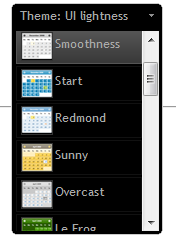
首先上一幅截图,效果不错吧:

一、引入JQuery主题theme
在head中引用JQuery主题的CSS链接http://ajax.googleapis.com/ajax/libs/jqueryui/1.7/themes/base/jquery-ui.css还 有许多其他不同的主题:base, black-tie, blitzer, cupertino, dark-hive, dot-luv, eggplant, excite-bike, flick, hot-sneaks, humanity, le-frog, mint-choc, overcast, pepper-grinder, redmond, smoothness, south-street, start, sunny, swanky-purse, trontastic, ui-darkness, ui-lightness, vader。只要将上面链接中的base替换成主题名即可切换不同的主题。

二、使用jQuery主题theme
给想要装饰的部分加上class,如:<a class=”ui-state-default ui-corner-all” href=”#”>Nothing’s gonna change my love for you</a> 表示默认的ui, corner-all表示圆滑四个角。

三、增加hover的效果

这里需要使用jQuery的脚本。首先在head中引入jquery库
<script type=”text/JavaScript” src=”http://ajax.googleapis.com/ajax/libs/jquery/1.3/jquery.min.js”></script>
1.3表示1.3里面的最新版本,现在是1.3.2。
然后手写脚本;

1 $(function(){$('.ui-state-default').hover(function(){$(this).addClass('ui-state-hover');},function(){$(this).removeClass('ui-state-hover');});});

这样就实现了鼠标移到上方是改变样式的效果了。

四、使用Theme Switcher在前台更换主题
先引入库

,然后可以在页面任何地方加入层<div id=”switcher”>主题切换功能载入中…</div>,我习惯将这个switch的wikget做成apDiv层,方便挪动合适的位置。最后手写script激活这个层:

$(‘#switcher’).themeswitcher();


五、使网页记住自己的主题
每次更换主题,jquery都会写入cookie的,要使网页记住自己的主题,只需要提取这个cookie出来,并且刷新页面的css即可。
把脚本写出来

1 $(function(){if(theme==null) updateCSS("http://ajax.googleapis.com/ajax/libs/jqueryui/1.7.2/themes/base/jquery-ui.css");else updateCSS("http://ajax.googleapis.com/ajax/libs/jqueryui/1.7.2/themes/"+theme+"/jquery-ui.css");}) function updateCSS(locStr){var cssLink=$('<link href="'+locStr+'"type="text/css" rel="Stylesheet" class="ui-theme"/>');$("head").append(cssLink);if($("link.ui-theme").size()>3){$("link.ui-theme:first").remove();}}

=====================我只是一条分割线=====================

最后页面代码大概是这样子的:

01 <?xml version="1.0" encoding="UTF-8" ?>
02 <%@ page language="java" contentType="text/html; charset=UTF-8"
03 pageEncoding="UTF-8"%>
04 <!DOCTYPE html PUBLIC "-//W3C//DTD XHTML 1.0 Transitional//EN" "http://www.w3.org/TR/xhtml1/DTD/xhtml1-transitional.dtd">
05 <html xmlns="http://www.w3.org/1999/xhtml">
06 <head>
07 <meta http-equiv="Content-Type" content="text/html; charset=utf-8" />
08 <style type="text/css">
09 #switcher {
10 position:absolute;
11 left: 564px;
12 top: 20px;
13 }
14 </style>
15 <script src="http://www.google.com/jsapi"></script>
16 <script type="text/JavaScript">google.load("jquery","1.3.2");google.load("jqueryui","1.7.2");function OnLoad(){$('#switcher').html("");var theme=$.cookie('jquery-ui-theme');$(function(){if(theme==null) updateCSS("http://ajax.googleapis.com/ajax/libs/jqueryui/1.7.2/themes/base/jquery-ui.css");else updateCSS("http://ajax.googleapis.com/ajax/libs/jqueryui/1.7.2/themes/"+theme+"/jquery-ui.css");});$(function(){$('.ui-state-default').hover(function(){$(this).addClass('ui-state-hover');},function(){$(this).removeClass('ui-state-hover');});});$("#pic2").hide();$('#switcher').themeswitcher();}google.setOnLoadCallback(OnLoad);function updateCSS(locStr){var cssLink=$('<link href="'+locStr+'"type="text/css" rel="Stylesheet" class="ui-theme"/>');$("head").append(cssLink);if($("link.ui-theme").size()>3){$("link.ui-theme:first").remove();}}
17 </script>
18 <script type="text/javascript" src="http://jqueryui.com/themeroller/themeswitchertool/"></script>
19 </script>
20 <title></title>
21 </head>
22 <body>
23 <div id="switcher">主题切换功能载入中...</div>
24 <p><a class="ui-state-default ui-corner-all" href="http://mee-moo.googlecode.com/svn/trunk/resource/music/nothinggcmlfu.mp3">Nothing's gonna change my love for you</a></p>
25 </body>
26 </html>

[转载]SQL Server 2008各版本区别

mikel阅读(953)

[转载]SQL Server 2008各版本区别 – 无名小草 – 博客园.

SQL Server 2008分为SQL Server 2008企业版、标准版、工作组版、Web版、开发者版、Express版、Compact 3.5版,其功能和作用也各不相同,其中SQL Server 2008 Express版是免费版本。企业版/开发版下载+安装+破解说明:SQL Server 2008正式版 下载 安装 指南 (序列号)+(破解)

SQL Server 2008企业版

SQL Server 2008企业版是一个全面的数据管理和业务智能平台,为关键业务应用提供了企业级的可扩展性、数据仓库、安全、高级分析和报表支持。这一版本将为你提供更加坚固的服务器和执行大规模在线事务处理。这个是最牛B的版本。

SQL Server 2008标准版

SQL Server 2008标准版是一个完整的数据管理和业务智能平台,为部门级应用提供了最佳的易用性和可管理特性。

SQL Server 2008工作组版

SQL Server 2008工作组版是一个值得信赖的数据管理和报表平台,用以实现安全的发布、远程同步和对运行分支应用的管理能力。 这一版本拥有核心的数据库特性,可以很容易地升级到标准版或企业版。

SQL Server 2008 Web版

SQL Server 2008 Web版是针对运行于Windows服务器中要求高可用、面向Internet Web服务的环境而设计。这一版本为实现低成本、大规模、高可用性的Web应用或客户托管解决方案提供了必要的支持工具。

SQL Server 2008开发者版

SQL Server 2008开发者版允许开发人员构建和测试基于SQL Server的任意类型应用。这一版本拥有所有企业版的特性,但只限于在开发、测试和演示中使用。基于这一版本开发的应用和数据库可以很容易地升级到企业版。

SQL Server 2008 Express版

SQL Server 2008 Express版是SQL Server的一个免费版本,它拥有核心的数据库功能,其中包括了SQL Server 2008中最新的数据类型,但它是SQL Server的一个微型版本。这一版本是为了学习、创建桌面应用和小型服务器应用而发布的,也可供ISV再发行使用。

SQL Server Compact 3.5版

SQL Server Compact是一个针对开发人员而设计的免费嵌入式数据库,这一版本的意图是构建独立、仅有少量连接需求的移动设备、桌面和Web客户端应用。 SQL Server Compact可以运行于所有的微软Windows平台之上,包括Windows XP和Windows Vista操作系统,以及Pocket PC和SmartPhone设备。

[转载]如何正确地使用#region指令

mikel阅读(942)

[转载]如何正确地使用#region指令 – 海纳百川 – 博客园.

这篇文章我将不会去介绍如何使用#region指令。因为每个C#开发人员都应该见过和使用过#region指令的。这篇文章将讨论如何在代码中正确的使 用它。使用#region就是将一些有关联的代码组织在一起,然后折叠起来。这样你就在一个函数中看不到很长很长的代码段。例如:

public void DoSomething() { bool shouldIDoSomething; #region Decide if I should do something if(needToDoSomething && haventDoneSomethingThisDay) shouldIDoSomething = true; else { // do some other logic to decide and set shouldIDoSomething to some value } #endregion if(shouldIDoSomething) { done++; } }

当然这段代码很简单。在实际项目中,你可能看到上百行甚至更多的代码在一个#region中。如果把它折叠起来。看起来就会很整洁。是吧?

public void DoSomething() { bool shouldIDoSomething; [Decide if I should do something] if(shouldIDoSomething) { done++; } }

我们只是把一些代码和一些变量组合起来放在#region中。如果你在仔细想想,其实我们相当与创建了一个新的函数,只是将这些方法内置到当前方法中。一 个函数只做单一的一件事情,这是Clean Code这本书的一个原理。为什么我们不把它提取为一个方法呢,这样一来,一个函数就只做一件事情了。

public void DoSomething() { if(ShouldIDoSomething()) { done++; } } private bool ShouldIDoSomething() { if(needToDoSomething && haventDoneSomethingThisDay) shouldIDoSomething = true; else { // do some other logic to decide and set shouldIDoSomething to some value } }

这样看起来就清楚很多,因为我们降低了之前的 DoSomething 方法的复杂度。两个函数可以分开测试,确保没有逻辑错误。
小段总结1: #region 不适合在大方法中使用,当你在一个方法中使用#region 的时候,停下来想想你刚刚创建了什么东西?大多数时候,你可以将这些代码段独立成一个方法。

看看下面这段非常漂亮的代码:

#region Get Customer public void GetCustomer() { // code to get the customer } #endregion #region Save Customer public void SaveCustomer() { // code to save the customer } #endregion

将它折叠之后,变成下面这样:

[Get Customer] [Save Customer]

这样做很容易阅读吗?这样做的目的是什么,我不明白?代码折叠就会变得更好?我觉得这样做只会让代码更难以阅读,因为你每次要看region中的代码,你都要展开一次。小段总结2:不要因为你能,你就使用#region 。

再看下面这个例子

public class PriceCalculator { public decimal CalculatePrice() { decimal price = 100m; decimal discount = CalculateDiscount(); return price * (1m - discount)); } #region Discount Calculation private void CalculateDiscount() { decimal discount = 0m; if(CanApplyDiscount()) discount = 0.05m; return discount; } private void CanApplyDiscount() { // some logic, other method calls } // some other discount calculation methods ... #endregion }

如果你将这个例子和本文中的第一个例子做下比较,你可能会看到它们的共同点。他们是相同的,不过一个是在类中,一个是在函数中,层级不同而已。这里 在提一个原则:单一职责原则,一个类应该只有一个职责。看上面的类,你可以很容易看出它有两个职责:价格计算和折扣计算。折扣计算的方法被放到一 个#region中。同样,可以将它们提取出来做为一个新类。

小段总结3:可以将一组相关的函数提取到一个新类中,这个类职责是单一的。

那我们到底怎么使用 #region 呢。将东西分组它是非常有用的。在我写的类中或多或少有几个regions,用来对类中不同的结构进行分组。比如: fields, properties, methods, events, types等。如果你打开类文件,你会看到我的类结构如下:

public class SomeClass { [Events] [Fields] [Properties] [Methods] }

总的来说:我将region看成控制阅读源代码的复杂度。因为你可以将一些相关的代码放在一个区域 (region)里面。但是,这不是创建一个很烂的新的方法或者类的接口。Region并不能消除复杂度,它只是在你阅读代码的时候,隐藏了部分代码。你 必须通过写出灵巧的,清晰,重点突出的方法和类。才能控制代码的复杂度。但你做到这些的时候,你甚至会发现region是不必要的。

本文翻译:About #region preprocessor directive

[转载]Db4o结合Linq、Lambda表达式的简单示例 - SkyD - 斯克迪亚(徐明璐)个人博客 - 博客园

mikel阅读(989)

[转载]Db4o结合Linq、Lambda表达式的简单示例 – SkyD – 斯克迪亚(徐明璐)个人博客 – 博客园.

大多数人接触Db4o的查询,都是从“样本查询”(Query by Example)开始的,这种查询方式简单但不方便,功能和性能也很受局限。以下是引自官方的样本查询示例:

// retrievePilotByName
Pilot proto=new Pilot("Michael Schumacher",0);
ObjectSet result=db.get(proto);
listResult(result);

这种查询要求我们先建立一个样本,然后再交由Db4o根据此样本返回符合条件的数据,其主要的不便之处在于对类默认值的处理及组合条件查询上,同时其执行性能是很差的。

而当Db4o开始支持.Net 3.5之后,我们就有了更为简单且又十分方便而强大的选择了,让我们来一起领略Db4o与.Net 3.5擦出的火花之美吧:

准备工作

首先创建一个命令行应用程序。

书写一个简单的“学生”类:

public class 学生
{
static Random R = new Random();

public 学生(int 学号)
{
this.学号 = 学号;
性别 = R.Next(2) == 1;
成绩 = R.Next(101);
}

public int 学号 { get; set; }
public bool 性别 { get; set; }
public int 成绩 { get; set; }

public override string ToString()
{
return string.Format(“学号:{0:0000} 性别:{1} 成绩:{2}”, 学号, 性别 ? “男” : “女”, 成绩);
}
}

该类就是用于模拟学生的数据,性别和成绩都是在构造时随机生成的。
然后引入Db4o对应.Net 3.5版的dll:
image
引入命名空间:

using Db4objects.Db4o;
using Db4objects.Db4o.Linq;

在Main函数中编写代码:

var db = Db4oFactory.OpenFile(“db.db4o”);

for (int i = 0; i < 5000; i++)
{
db.Store(new 学生(i));
}

这段代码用于打开数据库,并存储5000个学生数据到数据库中。

Linq查询

接着编写Linq查询代码,将查询到的集合存入变量l中:

var l = (from 学生 q in db
where !q.性别 && q.成绩 == 100
orderby q.学号 descending
select q).Take(5);

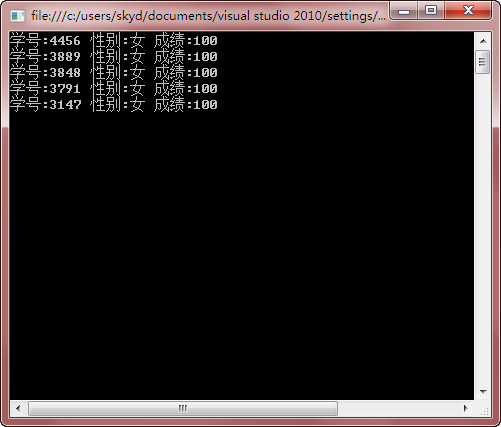
这里我们查询的是所有成绩为100的女生,并将结果按学号降序排列,取最前面的5位。

由此可看出Db4o与Linq结合的非常紧密,我们在使用Linq查询时完全没有任何不适应感,依然是得心应手的感觉。

然后遍历并输出一下结果:

foreach (var f in l)
{
Console.WriteLine(f);
}

Console.ReadLine();

查询结果输出:

SNAGHTML58588bb

Lambda表达式查询

其实这个在支持Linq之前就已经获得支持了,或者说支持Lambda表达式这项工作根本不是Db4o开发人员的工作范畴。

我们知道Lambda表达式其实就是一个委托,而Db4o的原生查询(Native Queries)所需的参数就是一个委托,所以也就说在.Net框架引入Lambda表达式的时候,它就已经可以被用在Db4o查询中了。以下是引自官方的原生查询示例:

IList <Pilot> pilots = db.Query <Pilot> (delegate(Pilot pilot) {
    return pilot.Points == 100;
});

你可以很轻松的把它改为Lambda表达式形式:

IList <Pilot> pilots = db.Query <Pilot> (q=>q.Points ==100);

这样就简明许多了吧?

同理,上文的Linq查询也可以改作:

var l = db.Query<学生>(q => !q.性别 && q.成绩 == 100).OrderByDescending(q => q.学号).Take(5);

得到的结果是等同的,而书写上更为方便,推荐使用。

结语

Db4o很好很强大,现在很多一流大企业也都开始使用它了,它在开发效率和数据持久化方式上都带来了质的革新,绝对值得我们学习和使用。

推荐学习资料: 《db4o7.0指南》(译者:hankjin、jeff、lixianfeng、richard.liangyx、cleverpig)

下载

示例源代码:http://www.uushare.com/user/icesee/file/3490887

本文的XPS版本:http://www.uushare.com/user/icesee/file/3490892

[转载]PHP开源Apache日志分析工具收集与比较

mikel阅读(1537)

[转载]PHP开源Apache日志分析工具收集与比较 – 小狼的世界 – 博客园.

我们知道已经有很多像Awtstat这样的使用perl、c或者c++开发的强大的日志分析工具,但是同样也有很多使用PHP开发并且开源的日志分析软件,今天我就收集了一些与大家分享。

1、LogAnalyzer

LogAnalyzer是 Adiscon的监控软件产品线中的一部分。可以再Windows以及Unix环境下运行。LogAnalyzer本是是免费的,GPL许可的产品。

LogAnalyzer的原名为phpLogCon,他在2010年的3月29日发布了3.0的稳定版,并且正式改名为LogAnalyzer

程序运行必须有他们制定的数据支持,在Windows环境下, 可以使用MonitorWare AgentWinSysLogEventReport。在Linux环境下可以使用rsyslog。现在Yum的源中包含了rsyslog这款软件,源中的版本是3.22.1,官方的最高版本是4.6.4的稳定版以及6.1.0的开发版。

由于不能使用原生的数据进行分析,我觉得算是他的一个缺点。

2、Jawstats

image

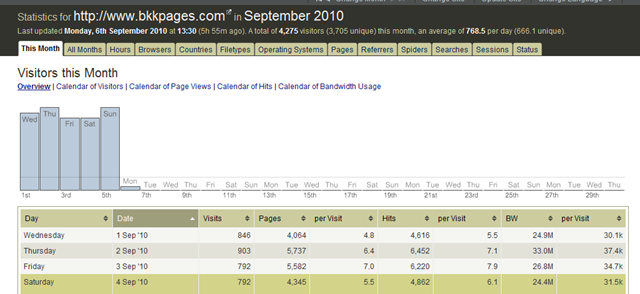
这是一款基于Awstat的PHP开源程序,提供了非常漂亮的分析统计结果的展示界面,支持中文。他的作者是 Jon Come

JAWStats可以减轻AWStats的计算压力,同时安装非常简单,只要稍微修改一下配置文件就可以运行。配置项也可以非常简单。

JAWStats的使用界面也非常人性化,因为作者原来是一个UI工程师。在系统中,我们可以非常容易的在不同月份之间切换,还可以在不同站点的日志之间进行切换。也可以通过Web界面来进行分析数据的更新,正好切合我们的需求,只在需要看的时候出报表就好了。

JAWStats支持主题,可以进行主题的设计和切换。

总的来说,看完了JAWStats的介绍,觉得是比较推荐的一款产品。

3、Web Analytics. Open Source

一款GPL协议下的开源软件,界面和数据获取方式都是模仿GA的,对于小型站点的分析应该不错。有对于Wordpress和Mediawiki的统计支持。

4、Log Miner

LogMiner 是一个分析Apache或者IIS日志,或者其他支持 combined 或者 W3C扩展日志格式的服务器。能够提取并展示包括访问量、点击、流量、请求数、访问路径、浏览器和操作系统在内的诸多指标。数据存储采用的是 PostgreSQL,存储比较精简。

Log Miner开发的灵感源自于流行的 Webalizer ,但是有一些主要的不同:

使用关系型数据库作为后端数据存储,实时生成报表。而 Webalizer 则是生成 html 文件。基于DBMS数据库的方式能够随时提供不同形式的数据,但是日志文件的解析速度上不如 Webalizer。

Webalizer只保存最近12个月的数据,之前的数据则无法再查看。

Webalizer的报告结果是硬编码的,而Logminer则是每个报告对应一个PHP类,我们可以灵活的进行定义。

LogMiner提供了比Webalizer更多的报表,比如操作系统和访问路径。

5、Webalizer

Webalizer虽然不是PHP的,但是上面LogMiner总是拿这个作比较,就顺便说一下。用C写成,日志分析能力非常出众,采用HTML的报表展示形式,是一个非常流行的日志分析工具。

6、TraceWatch

一个PHP+MySQL的日志分析工具,界面不太喜欢,好像就是路径分析比较有特点,其他的感觉还有点慢,就没什么了。

其他还有一些不太知名的工具,就没有一一细看:

AudiStatSlimStatPiwik

结合看到的这些工具,针对我们单位的实际需求,感觉 Awstat + JAWStats 组合更为好一点。因为日志会收集到单独的日志服务器上,所以性能上的消耗也就不会在意了。接下来看看实际的效果吧。

Technorati 标签: ,,,,

参考资料:

1、CrunchTools
2、LogAnalyzer
3、Jawstats
4、Awstat
5、Web Analytics . Open Source
6、Log Miner
7、Webalizer
8、TraceWatch

[转载]Jquery——ThickBox插件使用心德

mikel阅读(1247)

[转载]Jquery——ThickBox插件使用心德 – caonidayecnblogs – 博客园.

最近发现一个不错的基于JQuery的插件thickBox ,感觉比facebox好用。

做项目中发现facebox如果快速单击两下,容易出现黑屏。而且facebox的框架是用table写的,可能因为table相对div在结构方面更稳定些。如果弹出层里是table布局的,样式就会受到facebox的样式影响,还要重新reset一下。

看了下官方的api,我研究了下,做了个整理。看下图:

附件中index.html是主页,其它页面都是调用页面。点击index页面,就能看到如图的页面。图、按钮、文字都是可以点的。需要点击的标签 都要加上class=”thickbox”。当页面出现滚动条时,弹出层固定在窗口的正中间不会移动。当弹出层中只是图片时,图片大小会根据当前窗口的大 小进行压缩。所有的弹出层都可以按”esc”退出,除了需要点确认的弹出层外,点击弹出层以外的地方都可以关闭弹出层。

1.展示图片(单张):

Html代码
1 <a href="images/single.jpg" title="add a caption to title attribute / or leave blank" class="thickbox">
2 <img src="images/single.jpg" alt="Plant" width="100" height="75" />
3 </a>

2.展示图片(多张):

Html代码
01 <a href="images/plant1.jpg" title="add a caption to title attribute / or leave blank" class="thickbox" rel="flowers">
02 <img src="images/plant1.jpg" alt="Plant 1" width="100" height="75"/>
03 </a>
04 <a href="images/plant2.jpg" title="add a caption to title attribute / or leave blank" class="thickbox" rel="flowers">
05 <img src="images/plant2.jpg" alt="Plant 2" width="100" height="75"/>
06 </a>
07 <a href="images/plant3.jpg" title="add a caption to title attribute / or leave blank" class="thickbox" rel="flowers">
08 <img src="images/plant3.jpg" alt="Plant 3" width="100" height="75"/>
09 </a>
10 <a href="images/plant4.jpg" title="add a caption to title attribute / or leave blank" class="thickbox" rel="flowers">
11 <img src="images/plant4.jpg" alt="Plant 4" width="100" height="75"/>
12 </a>

这里每个a都要加上rel属性,而且属性值要一样。前后展示图可以通过” > “和” < “来切换

3.弹出层内容在当前页面中时:

Html代码
01 <input alt="#TB_inline?height=150&width=400&inlineId=myOnPageContent" title="add a caption to title attribute / or leave blank" class="thickbox" value="Show" type="button">
02 the paragraph and input below in a ThickBox, or
03 <input alt="#TB_inline?height=155&width=300&inlineId=hiddenModalContent&modal=true" title="add a caption to title attribute / or leave blank" class="thickbox" value="Show hidden modal content" type="button">
04 <div id="myOnPageContent" style="display:none;">
05 <p>Lorem ipsum dolor sit amet, consectetuer adipiscing elit, sed diam nonummy nibh euismod tincidunt ut laoreet dolore magna aliquam erat volutpat. Ut wisi enim ad minim veniam, quis nostrud exerci tation ullamcorper suscipit lobortis nisl ut aliquip ex ea commodo consequat.</p>
06 <p><select name=""><option>test</option></select></p>
07 </div>
08 <div id="hiddenModalContent" style="display:none;">
09 <p>Lorem ipsum dolor sit amet, consectetuer adipiscing elit, sed diam nonummy nibh euismod tincidunt ut laoreet dolore magna aliquam erat volutpat. Ut wisi enim ad minim veniam, quis nostrud exerci tation ullamcorper suscipit lobortis nisl ut aliquip ex ea commodo consequat.</p>
10 <p style="text-align: center;"><input type="submit" onclick="tb_remove()" value=" Ok " id="Login"/></p>
11 </div>

第一个input点开的弹出层有input框、title和操作按钮以及文字。第二个input点开的弹出层只有文字。

弹出层的大小是根据input的alt属性里的width和height值来定义的。下面讲到的几种情况也是这样来定义弹出层大小的。

4.调用外部文件,弹出层是iframe

Html代码
1 <a href="ajaxFrame.PHP?keepThis=true&TB_iframe=true&height=250&width=400" title="add a caption to title attribute / or leave blank" class="thickbox">Example 1</a>
2 <a href="ajaxOverFlow2.html?keepThis=true&TB_iframe=true&height=300&width=500" title="add a caption to title attribute / or leave blank" class="thickbox">Example 2</a>
3 <a href="iframeModal.html?placeValuesBeforeTB_=savedValues&TB_iframe=true&height=200&width=300&modal=true" title="add a caption to title attribute / or leave blank" class="thickbox">Open iFrame Modal</a>

如果弹出层是嵌套在iframe里需要添加“TB_iframe=true”。

第一个是调用ajaxFrame.PHP文件。

第二个是调用ajaxOverFlow2.html文件。

第三个是调用了iframeModal.html文件,隐藏了title和操作按钮。

5.调用外部文件,弹出层不是iframe

Html代码
1 <a href="ajaxOverFlow.html?height=300&width=400" title="add a caption to title attribute / or leave blank" class="thickbox">Scrolling content</a>
2 <a href="ajax.PHP?height=220&width=400" class="thickbox" title="add a caption to title attribute / or leave blank">No-scroll content</a>
3 <a href="ajaxLogin.html?height=85&width=250&modal=true" class="thickbox" title="Please Sign In">login (modal)</a>
4 <a href="ajaxTBcontent.html?height=200&width=300" class="thickbox" title="">Update ThickBox content</a>

第一个调用ajaxOverFlow.html文件。

第二个调用ajax.PHP文件。

第三个调用ajaxLogin.html文件,form表单。

第四个调用ajaxTBcontent.html文件,弹出层里再调用newTBcontent.html文件。