InquiryT1 /*
查询站点@StartStops到站点@EndStops之间的一次换乘乘车路线,多个站点用'/'分开,如:
exec InquiryT1 '站点1/站点2','站点3/站点4' */ Createproc InquiryT1(@StartStopsvarchar(32),@EndStopsvarchar(32)) as begin declare@ss_tabtable(name varchar(32)) declare@es_tabtable(name varchar(32)) insert@ss_tabselect Value from dbo.SplitString(@StartStops,'/') insert@es_tabselect Value from dbo.SplitString(@EndStops,'/') if(exists(select*from@ss_tab sst,@es_tab est where sst.name=est.name)) begin raiserror ('起点集和终点集中含有相同的站点',16,1) return end declare@stopstable(name varchar(32)) insert@stopsselect name from@ss_tab insert@stopsselect name from@es_tab declare@resulttable(
StartStop varchar(32),
Route1 varchar(256),
TransStop varchar(32),
Route2 varchar(256),
EndStop varchar(32),
StopCount int
) declare@countint set@count=0 —查询"步行-乘车"路线 insert@result select
sst.name as StartStop, '从'+r1.StartStop+'步行到'+r1.EndStop as Route1,
r1.EndStop as TransStop,
r2.Route as Route2,
est.name as EndStop,
r2.StopCount as StopCount from @ss_tab sst, @es_tab est,
(select*from WalkRoute where EndStop notin (select name from@stops)) r1,
RouteT0 r2 where
sst.name=r1.StartStop and r1.EndStop=r2.StartStop and r2.EndStop=est.name orderby r2.StopCount set@count=@@rowcount —查询"乘车-步行"路线 insert@result select
sst.name as StartStop,
r1.Route as Route1,
r1.EndStop as TransStop, '从'+r2.StartStop+'步行到'+r2.EndStop as Route2,
est.name as EndStop,
r1.StopCount as StopCount from @ss_tab sst, @es_tab est,
RouteT0 r1,
(select*from WalkRoute where StartStop notin (select name from@stops)) r2 where
sst.name=r1.StartStop and r1.EndStop=r2.StartStop and r2.EndStop=est.name orderby r1.StopCount set@count=@count+@@rowcount
if(@count=0) begin —查询"乘车-乘车"路线 insert@result select
sst.name as StartStop,
r1.Route as Route1,
r1.EndStop as TransStop,
r2.Route as Route2,
est.name as EndStop,
r1.StopCount+r2.StopCount as StopCount from @ss_tab sst, @es_tab est,
(select*from RouteT0 where EndStop notin (select name from@stops)) r1,
RouteT0 r2 where
sst.name=r1.StartStop and r1.EndStop=r2.StartStop and r2.EndStop=est.name and r1.Route<>r2.Route orderby r1.StopCount+r2.StopCount end select
StartStop as 起始站点,
Route1 as 路线1,
TransStop as 中转站点,
Route2 as 路线2,
EndStop as 目的站点,
StopCount as 总站点数 from @result end
假设你是一家专门出售Mud的在线商店的页面设计人员,让我们暂且称它为“在线MUD商店”。你们的业务很旺,客户下了各种类型和数量的mud订单。他们都是通过输入用户名和密码后才登陆到你的网站,登陆后就允许他们查看订单并购买更多的mud。现在,一种非常流行的mud正在打折销售。另外有一些客户规律性的购买另外一种也在打折但是不是很流行的Bright Red Mud,由于购买的人并不多所以它被安置在页面的边缘。所有用户的信息都是被跟踪并存放于数据库中的,所以某天有一个问题可能会冒出来:为什么不使用velocity来使用户更好的浏览他们感兴趣的商品呢?
foreach 的详细用法不久就会进行深入描述。重要的是,这短小的脚本能在你的网站上出现。当一个对Bright Red Mud 很感兴趣的顾客登陆的时候,同时Bright Red Mud在热卖中,这时顾客就能显著地看到。假如一个玩Terracotta Mud很久的顾客登陆,Terracotta Mud 的售卖信息就会出现在前面中间。Velocity的适用性是很巨大的,限制的只是你的创造性。
这是没有问题的:"I bought a 4 lb. sack of potatoes at the farmer's market for only $2.50!",VTL中使用$2.5这样的货币标识是没有问题得的,VTL不会将它错认为是一个reference,因为VTL中的reference总是以一个大写或者小写的字母开始。
Velocity.properties文件中的velocimacro.permissions.allow.inline.local.scale属性也是有true和false两个可选值,默认是false。它的作用是用于确定你inline定义的Velocimacros是否仅仅在被定义的template内可见。换句话说,如果这个属性设置为true,一个inline定义的Velocimacros只能在定义它的template内使用。你可以使用此设置实现一个奇妙的VM窍门:a template can define a private implementation of the second VM that will be called by the first VM when invoked by that template. All other templates are unaffected。
假设你是一家专门出售Mud的在线商店的页面设计人员,让我们暂且称它为“在线MUD商店”。你们的业务很旺,客户下了各种类型和数量的Mud订单。他们都是通过输入用户名和密码后才登陆到你的网站,登陆后就允许他们查看订单并购买更多的Mud。现在,一种非常流行的mud正在打折销售。另外有一些客户规律性的购买另外一种也打折但不是很流行的Bright Red Mud,由于购买的人并不多所以它被安置在页面的边缘。所有用户的信息都是被跟踪并存放于数据库中的,所以某天有一个问题可能会冒出来:为什么不使用nVelocity来使用户更好的浏览他们感兴趣的商品呢?
This article's main goal is to show how to manage SWF encoded files with .NET, C#, or VB.NET. SWF is a binary format which represents compiled Flash animations.
Using the SwfDotNet library
The SwfDotNet library is a C# open source framework available at:
This library offers some good stuff to read and write SWF format files from version 1 to 7 for now. SwfDotNet.IO.dll is compatible with the .NET framework 1.1, 2.0 and +. This library respects MacromediaTM SWF format specifications. You can read and download the Macromedia official specifications here.
For our decompiler application, we used this framework like in these examples:
Write in a Swf object and save as an SWF file or stream:
Collapse
// Create a new swf animation

Swf swf = new Swf();
// Define background as blue

swf.Tags.Add(new SetBackgroundColorTag(255, 0, 0));
// Define a new frame

swf.Tags.Add(new ShowFrameTag());
// Define a swf writer

SwfWriter writer = new SwfWriter("myfile.swf");
// Write animation

writer.Write(swf);
// Close the stream

writer.Close();
List of available tag objects in the framework:
Collapse
// Include tags namespace

using SwfDotNet.IO.Tags;
...
// Tags are organized as followed:

// 1. To control the frames flow

// Create a new frame

ShowFrameTag resTag = new ShowFrameTag();
// End of frames sequence

EndTag resTag = new EndTag();
// Define a frame name

FrameLabelTag resTag = new FrameLabelTag();
// Place an object to the screen

PlaceObjectTag resTag = new PlaceObjectTag();
// Place an object to the screen

PlaceObject2Tag resTag = new PlaceObject2Tag();
// Remove an object of the screen

RemoveObjectTag resTag = new RemoveObjectTag();
// Remove an object of the screen

RemoveObject2Tag resTag = new RemoveObject2Tag();
// Define background color

SetBackgroundColorTag resTag = new SetBackgroundColorTag();
// Protect the animation

ProtectTag resTag = new ProtectTag();
// Define tag index of object

SetTabIndexTag resTag = new SetTabIndexTag();
// 2. To embed a picture in an animation

//Add bitmap or gif

DefineBitsTag resTag = new DefineBitsTag();
//Define bitmap

DefineBitsLossLessTag resTag = new DefineBitsLossLessTag();
//Define bitmap with transparency

DefineBitsLossLess2Tag resTag = new DefineBitsLossLess2Tag();
//Define a jpeg compression table

JpegTableTag resTag = new JpegTableTag();
// To include jpeg files

DefineBitsJpeg2Tag resTag = new DefineBitsJpeg2Tag();
//To include transparent jpeg files

DefineBitsJpeg3Tag resTag = new DefineBitsJpeg3Tag();
// 3. To define new button

// To create a simple button

DefineButtonTag resTag = new DefineButtonTag();
// To create a simple button

DefineButton2Tag resTag = new DefineButton2Tag();
// To create a simple button

DefineButtonCxFormTag resTag = new DefineButtonCxFormTag();
// To create a button with sound

DefineButtonSoundTag resTag = new DefineButtonSoundTag();
// 4. To create a new movie clip (container of tags sequence)

DefineSpriteTag resTag = new DefineSpriteTag();
// 5. To add text

// To create an edit text area

DefineEditTextTag resTag = new DefineEditTextTag();
// To use a font

DefineFontTag resTag = new DefineFontTag();
DefineFont2Tag resTag = new DefineFont2Tag();
DefineFontInfoTag resTag = new DefineFontInfoTag();
DefineFontInfo2Tag resTag = new DefineFontInfo2Tag();
// To add static text

DefineTextTag resTag = new DefineTextTag();
// To add static text

DefineText2Tag resTag = new DefineText2Tag();
// 6. Define shapes or morph shapes to draw

// To create morph shapes

DefineMorphShapeTag resTag = new DefineMorphShapeTag();
// To create glyph shapes

DefineShapeTag resTag = new DefineShapeTag();
// To create glyph shapes

DefineShape2Tag resTag = new DefineShape2Tag();
// To create glyph shapes

DefineShape3Tag resTag = new DefineShape3Tag();
// 7. Audio and video embedding

DefineSoundTag resTag = new DefineSoundTag();
SoundStreamBlockTag resTag = new SoundStreamBlockTag();
SoundStreamHeadTag resTag = new SoundStreamHeadTag();
SoundStreamHead2Tag resTag = new SoundStreamHead2Tag();
StartSoundTag resTag = new StartSoundTag();
DefineVideoStreamTag resTag = new DefineVideoStreamTag();
VideoFrameTag resTag = new VideoFrameTag();
// 8. Add action script and debugg

// Add action script code

DoActionTag resTag = new DoActionTag();
// Enable debugger

EnableDebuggerTag resTag = new EnableDebuggerTag();
// Enable debugger

EnableDebugger2Tag resTag = new EnableDebugger2Tag();
// Export assets

ExportAssetsTag resTag = new ExportAssetsTag();
// Import assets

ImportAssetsTag resTag = new ImportAssetsTag();
// Init action

InitActionTag resTag = new InitActionTag();
ScriptLimitTag resTag = new ScriptLimitTag();
Use the byte code decompiler to get the action script code of an Action tag:
Collapse
//include bytecode management namespace

using SwfDotNet.IO.ByteCode;
...
//Browse swf tags list

IEnumerator tagsEnu = swf.Tags.GetEnumerator();
while (tagsEnu.MoveNext())
{
BaseTag tag = (BaseTag)tagsEnu.Current;
if (tag.ActionRecCount != 0)
// The tag contains action script ?

{
IEnumerator byteCodeEnu = tag.GetEnumerator();
while (enum2.MoveNext())
{
//Init the action script decompiler

Decompiler dc = new Decompiler(swf.Version);
//Decompile the current actionscript action from a tag

ArrayList actions = dc.Decompile((byte[])tagsEnu.Current);
foreach (BaseAction obj in actions)
{
//Write action script byte code to the console

Console.WriteLine(obj.ToString());
}
}
}
}
We can directly extract media files from tags:
Collapse
//Browse swf tags list
IEnumerator tagsEnu = swf.Tags.GetEnumerator();
while (tagsEnu.MoveNext())
{
BaseTag tag = (BaseTag)tagsEnu.Current;
if (tag is DefineBitsJpeg2Tag) //Extract a jpeg:
{
//Extract to a file:
((DefineBitsJpeg2Tag)tag).DecompileToFile("extract_image.jpeg");
//Or in a stream:
Image img = ((DefineBitsJpeg2Tag)tag).DecompileToImage();
}
elseif (tag is DefineSoundTag) //Extract a sound file:
{
DefineSoundTag soundTag = (DefineSoundTag)tag;
//Extract to a file
if (soundTag.SoundFormat == SoundCodec.MP3)
soundTag.DecompileToFile("extract_sound.mp3");
else
soundTag.DecompileToFile("extract_sound.wav");
}
}
Creating the SWF decompiler sample
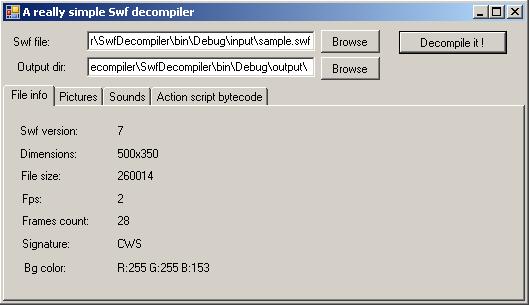
The goal of this sample is to create a very simple SWF decompiler. From a compiled FlashTM animation (SWF file), we want to load it, and extract in separate files, all the pictures and all the embedded MP3 files.
Attention: This sample decompiler is not a full SWF decompiler! This sample only decompiles embedded JPEG files without the JPEG table, and only non-streamed MP3 and WAV sounds. Only the action script byte code is extracted too.
You can see a file called SwfDecompiler.exe.log.xml in the project, this file is the log4net framework configuration file. For more information about log4net, you can read this article or go to the official web site.
The SwfDotNet library uses log4net for all the trace operations. When you read an SWF file, you can trace all the SWF tags read by the SwfReader object, and you can trace the different shapes contained by a DefineShape tag for example.
To do it, just change these lines in the SwfDecompiler.exe.log.xml file:
Collapse
<!-- To trace tags readed --><loggername="SwfDotNet.IO"><levelvalue="ALL"/><!-- Turn it to ALL --></logger><!-- To trace shapes readed --><loggername="SwfDotNet.IO.Tags.Types"><levelvalue="ALL"/><!-- Turn it to ALL --></logger>
If you change these values and execute the decompiler one more time, a file named "Log.txt" will appear in the same directory of the application, with some lines like this::
As you can see, thanks to the SwfDotNet library, you can easily analyse, manage, create, read, or write SWF binary files. This sample is a really "light" SWF decompiler but shows the way to do it, shows how to do a real one, and doesn't require to be a binary reading process expert.
Moreover, the SwfDotNet library is 100% free (GPL license) and not platform dependent: you can use it in a web project or in a WinForms application, and, for sure, with Mono.
History
19/12/2006: First article version.
License
This article has no explicit license attached to it but may contain usage terms in the article text or the download files themselves. If in doubt please contact the author via the discussion board below.
A list of licenses authors might use can be found here
Olivier Carpentier is a french C#.Net Architect, Microsoft Certified Professional.
Software Expert at SQLi, french consulting company http://www.sqli.com
[AcceptVerbs(HttpVerbs.Post)] public ActionResult Create(IDictionary<string, Book> books) { //TO DO //Insert book into Database return RedirectToAction("Index");
}
相应的,View中的命名如下:
<div> <%using (Html.BeginForm("Create", "Book")) { %> <div>
Book SN: <%=Html.TextBox("books[0].Key") %> </div> <div>
Book Name: <%=Html.TextBox("books[0].Value.BookName")%> </div> <div>
Published Date: <%=Html.TextBox("books[0].Value.PublishedDate")%> </div> <div>
Author's Name: <%=Html.TextBox("books[0].Value.Author")%> </div> <div>
Book SN: <%=Html.TextBox("books[1].Key") %> </div> <div>
Book Name: <%=Html.TextBox("books[1].Value.BookName")%> </div> <div>
Published Date: <%=Html.TextBox("books[1].Value.PublishedDate")%> </div> <div>
Author's Name: <%=Html.TextBox("books[1].Value.Author")%> </div> <div> <input type="submit" id="submit" name="submit" value="submit"/> </div> <%} %> </div>
 Mikel
Mikel




 France


 }
} }
}