[教程]Linq to SQL 基础教程

mikel阅读(1069)

Contents

Introduction

This article demonstrates what LINQ to SQL is and how to use its basic functionality. I found this new feature amazing because it really simplifies a developer's Debugging work and offers many new ways of coding applications.

Background

For this article, I have used the Northwind database sample from Microsoft. The database is included in the ZIP file or can be found on the Microsoft website.

What is LINQ to SQL

The LINQ Project is a codename for a set of extensions to the .NET Framework that encompasses language-integrated query, set and transform operations. It extends C# and Visual Basic with native language syntax for queries. It also provides class libraries to take advantage of these capabilities. For more general details, refer to the Microsoft LINQ Project page.

LINQ to SQL is a new system which allows you to easily map tables, views and stored procedures from your SQL server. Moreover, LINQ to SQL helps developers in mapping and requesting a database with its simple and SQL-like language. It is not the ADO.NET replacement, but more an extension that provides new features.
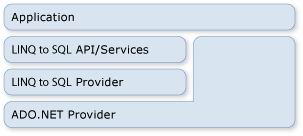
Sample Image - LINQ to SQL with ADO.NET

How to Use LINQ to SQL

Create a New C# Project

In this section I'll show you how to use LINQ to SQL from the start, at project creation.

  1. Create a new Windows form application with Visual C# 2008.
  2. Make a new "Data Connection" with the SQL Server 2005 northwind.mdf file.
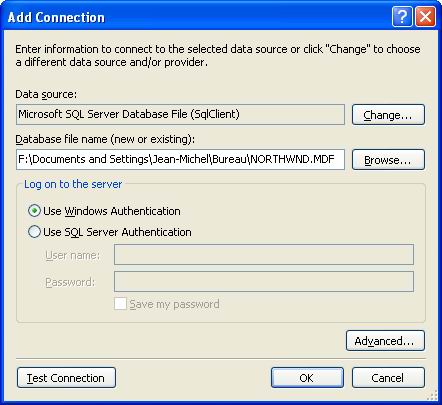
    Sample Image - data connection
  3. Add a new item to your project and choose "LINQ to SQL Classes." Name it NorthwindDataClasses.dbml. This new DBML file will contain the mapping of SQL Server tables into C# classes.
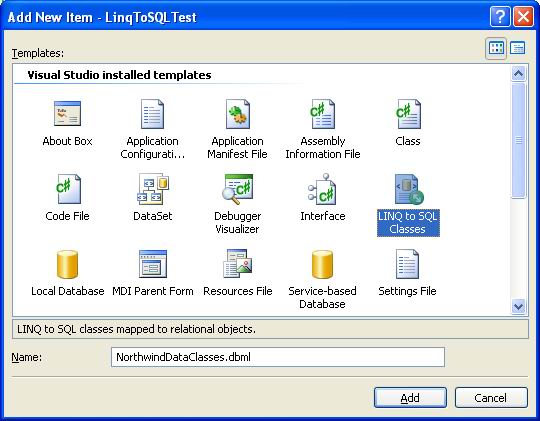
    Sample Image - adding a new Linq to SQL object

The Object Relational Designer is a design surface that maps a database table into a C# class. To do that, just drag and drop tables from the database explorer into the designer. The designer automatically displays the tables in a UML way and represents the relationship between them. For example, I have dragged and dropped the four tables Customers, order, order_Detail and Product, as shown below:
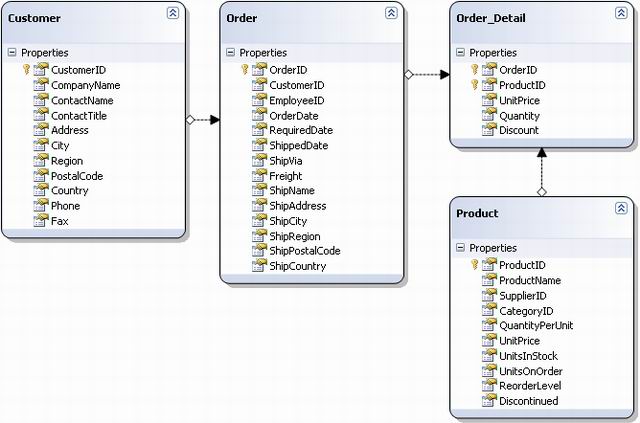
Sample Image - database tables

In NorthwindDataClasses.designer.cs (under NorthwindDataClasses.dbml from the project explorer), you will find definitions for all classes corresponding to tables like this:

SQL LINQ to SQL O/R Designer
Table name Class name
Columns Attributes
Relations EntitySet and EntityRef
Stored procedures Methods
Collapse
[Table(Name="dbo.Customers")]
public partial class Customer : INotifyPropertyChanging, INotifyPropertyChanged
{
private static PropertyChangingEventArgs emptyChangingEventArgs =
new PropertyChangingEventArgs(String.Empty);
private string _CustomerID;
private string _CompanyName;
private string _ContactName;
private string _ContactTitle;
private string _Address;
private string _City;
private string _Region;
private string _PostalCode;
private string _Country;
private string _Phone;
private string _Fax;
private EntitySet<Order> _Orders;
//..............

}

Understanding DataContext

dataContext is a class that gives direct access to C# classes, database connections, etc. This class is generated when the designer is saved. For a file named NorthwindDataClasses.dbml, the class NorthwindDataClassesDataContext is automatically generated. It contains the definition of tables and stored procedures.

Understanding the var Keyword

This keyword is used when you do not know the type of the variable. Visual Studio 2008 automatically chooses the appropriate type of data and so does IntelliSense!

Examples:

Collapse
var anInteger = 5;
var aString = "a string";
var unknown_type = new MyClass();

Querying the Database

Once the database is modeled through the designer, it can easily be used to make queries.

Query the Customers from Database

Collapse
//creating the datacontext instance

NorthwindDataClassesDataContext dc =  new NorthwindDataClassesDataContext();
//Sample 1 : query all customers

var customers =
from c in dc.Customers
select c;
//display query    result in a dataGridView

dataGridResult.DataSource = customers.ToList();

Query the Customers with a Simple Statement

Collapse
//Sample 2 : query customers which country is UK

//constructing the query

var customers_from_uk =
from c in dc.Customers
where c.Country == "UK"
select c;

Query Specified Columns Only, Returning a Collection of a Specified Class

Use a very simple class definition.

Collapse
public class CMyClassTwoStrings
{
public CMyClassTwoStrings(string name, string country)
{
m_name = name;
m_country = country;
}
public string m_name;
public string m_country;
}

For example:

Collapse
//Sample 4a : query customers(name and country) which contact name starts with a 'A'

//using specific class

var customers_name_starts_a_2col_in_specific_class =
from c in dc.Customers
where c.ContactName.StartsWith("A")
select new CMyClassTwoStrings (c.ContactName, c.Country );
//using the returned collection (using foreach in

//console output to really see the differences with the dataGridView way.)

foreach (CMyClassTwoStrings a in customers_name_starts_a_2col_in_specific_class)
Console.WriteLine(a.m_name + " " + a.m_country);

Query Specified Columns Only, Returning a Collection of an Undefined Class

Collapse
//Sample 4b : query customers(name and country) which contact name starts with a 'A'

//using anonymous class

var customers_name_starts_a_2col_in_anonymous_class =
from c in dc.Customers
where c.ContactName.StartsWith("A")
select new {
Name = c.ContactName,      //naming the column Name

Country = c.Country     //naming the column Country

};
foreach (var a in customers_name_starts_a_2col_in_anonymous_class)
Console.WriteLine(a.Name + " " + a.Country);

This example demonstrates how to use an anonymous class that is (in this example) composed of two strings. The aim of this feature is to create a new class for temporary storage that the developer does not want (or need) to declare. It may be useful in some cases where the declaration of class is used only for storage.

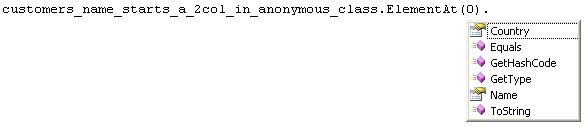
For example, in the sample 4a, the class CMyClassTwoStrings is used only to create the interface between the query engine and the output in the console. It is not used anywhere else and is a loss of time. This new way of writing enables the developer to create temporary classes with an unlimited number of attributes of any type. Every attribute is named, either by specifying the name with Name = c.ContactName or by leaving the attribute without, i.e. Name =. IntelliSense also works with anonymous classes!
Screenshot - LinqToSQL6.JPG

Query Multiple Tables

Collapse
//Sample 5 : query customers and products

//(it makes a cross product it do not represent anything else than a query

var customers_and_product =
from c in dc.Customers
from p in dc.Products
where c.ContactName.StartsWith("A") && p.ProductName.StartsWith("P")
select new { Name = c.ContactName, Product = p.ProductName };

The resulting collection is the cross product between all contact names starting with "A" and all products starting with "P."

Query with Tables Joined

Collapse
//Sample 6 : query customers and orders

var customers_and_orders =
from c in dc.Customers
from p in dc.Orders
where c.CustomerID == p.CustomerID
select new { c.ContactName, p.OrderID};

This example demonstrates how to specify the relation between tables' joins on an attribute.

Query with Tables Joined through entityref

Collapse
//Sample 7 : query customers and orders with entityref

var customers_and_orders_entityref =
from or in dc.Orders
select new {
Name = or.Customer.ContactName,
orderId = or.OrderID,
orderDate = or.OrderDate
};

In this example, the entityref property is used. The class orders have an attribute named Customer that refers to the customer who realizes the order. It is just a pointer to one instance of the class Customer. This attribute gives us direct access to customer properties. The advantage of this feature is that the developer does not need to know exactly how tables are joined and access to attached data is immediate.

Query in the Old Way: with SQL as String

As you may want to execute SQL that is not yet supported by LINQ to SQL, a way to execute SQL queries in the old way is available.

Collapse
//Sample 8 : execute SQL queries

dc.ExecuteCommand("Update Customers SET PostalCode='05024' where CustomerId='ALFKI' ");

Insert, Update and Delete Rows from Database

LINQ to SQL provides a new way of managing data into database. The three SQL statements Insert, Delete and Update are implemented, but using them is not visible.

Update Statement

Collapse
//Sample 9 : updating data

var customers_in_paris =
from c in dc.Customers
where c.City.StartsWith("Paris")
select c;
foreach (var cust in customers_in_paris)
cust.City = "PARIS";
//modification to database are applied when SubmitChanges is called.

dc.SubmitChanges();

To make modifications to a database, just modify any relevant object properties and call the method SubmitChanges().

Insert Statement

To insert a new entry into the database, you just have to create an instance of a C# class and Attach it to the associated table.

Collapse
//Sample 10 : inserting data

Product newProduct = new Product();
newProduct.ProductName = "RC helicopter";
dc.Products.Attach(newProduct);
dc.SubmitChanges();

Delete Statement

Deleting data is quite easy. When requesting your database, give a collection of data. Then just call DeleteOnSubmit (or DeleteAllOnSubmit) to delete the specified items.

Collapse
//Sample 11 : deleting data

var products_to_delete =
from p in dc.Products
where p.ProductName.Contains("helicopter")
select p;
dc.Products.DeleteAllOnSubmit(products_to_delete);
dc.SubmitChanges();

IntelliSense

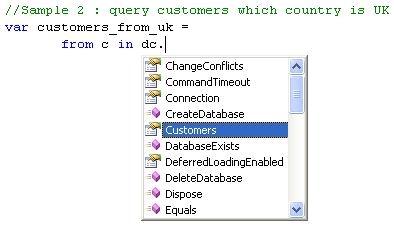
IntelliSense works into the query definition and can increase developer productivity. It's very interesting because it pops up on DataContext, tables and attributes. In this first example, IntelliSense shows the list of tables mapped from the database, the connection instance and a lot of other properties.
Sample Image - IntelliSense

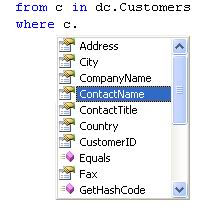
For a table, the list contains all of its columns:
Sample Image - table IntelliSense

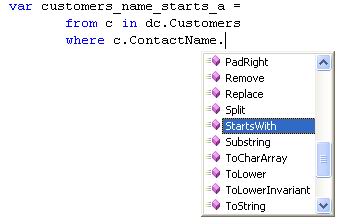
For an attribute, it will display methods and properties depending on the type (string, integer, etc).
Sample Image - attributes IntelliSense

Order of Operations

To use LINQ to SQL, a developer must know exactly when a query is executed. Indeed, LINQ to SQL is very powerful because the query is executed when it's required, but not at definition! In the first sample, we have this code:

Collapse
///constructing the query

var customers =
from c in dc.Customers
select c;

The query is not yet executed; it is just compiled and analysed. In fact, the query is run when the code makes an access to the customer variable, like here:

Collapse
//display query    result in a dataGridView

dataGridResult.DataSource = customers.ToList();

Enhanced Features

Other LINQ to SQL Options

LINQ to SQL supports deferred loading options. This functionality allows a user to modify query engine behaviour when retrieving data. One of them is the deferred loading that will load all the data of a query. As an example, a query on the order table gives you entry to the customer properties by entityref. If Datacontext.DeferredLoadingEnabled is set at true (default) then the Customer attribute will be loaded when an access to the order entry is made. Otherwise (when at false), it is not loaded. This option helps a developer when optimizing requests, data size and time for querying. There is a good example about that here.

Manage Conflicts

When the function SubmitChanges() is executed, it starts by verifying if there is no conflict that occurs by an external modification. For a server/client application, the application must take conflicts into account in case multiple clients access the database at the same time. To implement conflict resolution, SubmitChanges() generates a System.Data.LINQ.ChangeConflictException exception. The DataContext instance gives details about conflicts to know why exactly they throw. I wrote a basic conflict resolution, but I will not give the full details of all other possibilities because I think it should be an entire article.

Collapse
try{
//query the database

var customers_in_paris_conflict =
from c in dc.Customers
where c.City.StartsWith("Paris")
select c;
foreach (var cust in customers_in_paris_conflict)
cust.City = "PARIS";
//Make a breakpoint here and modify one customer entry

//(where City is Paris) manually (with VS  for example)

//When external update is done, go on and SubmitChanges should throw.

dc.SubmitChanges();
}
catch (System.Data.LINQ.ChangeConflictException)
{
//dc.ChangeConflicts contains the list of all conflicts

foreach (ObjectChangeConflict prob in dc.ChangeConflicts)
{
//there are many ways in resolving conflicts,

//see the RefreshMode enumeration for details

prob.Resolve(RefreshMode.KeepChanges);
}
}

If you want more details about conflict resolution, I suggest you to refer to this page (in VB).

Points of Interest

As a conclusion to this article, I summarize the important points of LINQ to SQL:

  • LINQ to SQL is a query language
  • Query syntax is verified at build (not at runtime like old SQL queries)
  • IntelliSense works with all objects of LINQ to SQL
  • Making queries is quite easy (select, insert, update and delete)
  • Manage tables' PK/FK relationships
  • Databases are automatically mapped to C# classes and queries return a collection of C# class instances
  • Conflict detection and resolution

Other LINQs 😉

License

This article, along with any associated source code and files, is licensed under The Code Project Open License (CPOL)

About the Author

Le Sourcier

I am a software developer for aeronautical.
I use:
– Visual C++ 6 (with MFC, STL and BOOST)
– Visual C# 2008
– Visual Web developer 2008

Occupation: Software Developer
Company: ECT Industries
Location: France France

[代码]全国哀悼日 网站灰黑色CSS滤镜代码

mikel阅读(866)

根据国务院文件,5.19-5.21为全国哀悼日,在此期间,全国和各驻外机构下半旗志哀,停止公共娱乐活动,外交部和我国驻外使领馆设立吊唁簿。5月 19日14时28分起,全国人民默哀3分钟,届时汽车、火车、舰船鸣笛,防空警报鸣响。 Admin5与很多草根网站都将整站换成素装。并建议中国所有站点更换为素装。 国务院决定5月19日至21日为全国哀悼日  http://www.admin5.com/article/20080518/85035.shtml

为方便站点哀悼,特提供css滤镜代码,以表哀悼。以下为全站CSS代码。

html { filter:progid:DXImageTransform.Microsoft.BasicImage(grayscale=1); }

使用方法:这段代码可以变网页为黑白,将代码加到CSS最顶端就可以实现素装。建议全国站长动起来。为在地震中遇难的同胞哀悼。
如果网站没有使用CSS,可以在网页/模板的HTML代码<head>和</head> 之间插入:

<style>
html{filter:progid:DXImageTransform.Microsoft.BasicImage(grayscale=1);}
</style>

有一些站长的网站可能使用这个css 不能生效,是因为网站没有使用最新的网页标准协议

<!DOCTYPE html PUBLIC "-//W3C//DTD XHTML 1.0 Transitional//EN" "http://www.w3.org/TR/xhtml1/DTD/xhtml1-transitional.dtd">
<html xmlns="http://www.w3.org/1999/xhtml">

请将网页最头部的<html>替换为以上代码。
有一些网站FLASH动画的颜色不能被CSS滤镜控制,可以在FLASH代码的<object …>和</object>之间插入:

<param value="false" name="menu"/>
<param value="opaque" name="wmode"/>

最简单的把页面变成灰色的代码是在head 之间加

<style type="text/css">
html {
    FILTER: gray
}
</style>

一般的discuz论坛在 你的控制css 文件下修改
/images/header/header.css 这个文件,点源码即可看到 参考 http://bbs.admin5.com

另在哀悼日或遇难的新闻,所有专题和主题 图片上不能使用红色标题。

[教程]ASP.net WorkFlow的实例

mikel阅读(1102)

I built a sample (you can download it here) based upon a question asked in the WF forums last night (you can see the post here).

I wanted to post it here so I could point out some of the interesting features it has in it.

First – there is a CallWorkflowActivity – which creates and executes another workflow in a synchronous manner.  The WF built-in InvokeWorkflowActivity invokes another workflow – but does it asynchronously.    It turns out to do is synchronously you have to build a custom activity – mostly because synchronously you have to make some assumptions about the workflow you are calling.   In my example – the assumption I am making is that the "called" workflow will have parameters to pass in, and parameters that are return – but there is no other communication between the host and the workflow.

Now – since my CallWorkflowActivity can't talk to the WorkflowRuntime directly – in order to make it work I implemented a service to add to the WorkflowRuntime.  Why can't the activity talk to the WorkflowRuntime?  Well that could create some interesting problems – like what if an Activity could ask the WorkflowRuntime to persist the WorkflowInstance the Activity is being executed inside of?  The Activity would be executing waiting for persistence, the WorkflowRuntime would be waiting to persist until the Activity completed – classic deadlock.


InvokeWorkflow uses a service that is installed by default – IStartWorkflow – which works create in the async case – but doesn't work in the sync case.  So I just created a custom service.  One aspect of WF that I try to emphasize to people when I do my WF trainings is that even though there are well-known services inside of the WorkflowRuntime – you can add any number of services which won't be known to the WorkflowRuntime – but can be used by your Activities.  In fact this is necessary in some cases (like this one) where the code you want to execute would be "illegal" inside of Activity.Execute (things like spawning threads or anything that would go against the model of WF in terms of what Activities should do).  Now in this case I made the Service derive from WorkflowRuntimeService because my service needs the WorkflowRuntime to do its job, and that is the easiest way to get a reference to the WorkflowRuntime.   But it isn't a requirement that a service added via WorkflowRuntime.AddService derive from WorkflowRuntimeService. 

So here is how my service executes a workflow:

public class CallWorkflowService : WorkflowRuntimeService
{
public void StartWorkflow(Type workflowType,Dictionary<string,object> inparms,Guid caller,IComparable qn)
{
WorkflowRuntime wr = this.Runtime;
WorkflowInstance wi = wr.CreateWorkflow(workflowType,inparms);
wi.Start();
ManualWorkflowSchedulerService ss = wr.GetService<ManualWorkflowSchedulerService>();
if (ss != null)
ss.RunWorkflow(wi.InstanceId);
EventHandler<WorkflowCompletedEventArgs> d = null;
d = delegate(object o, WorkflowCompletedEventArgs e)
{
if (e.WorkflowInstance.InstanceId ==wi.InstanceId)
{
wr.WorkflowCompleted -= d;
WorkflowInstance c = wr.GetWorkflow(caller);
c.EnqueueItem(qn, e.OutputParameters, null, null);
}
};
EventHandler<WorkflowTerminatedEventArgs> te = null;
te = delegate(object o, WorkflowTerminatedEventArgs e)
{
if (e.WorkflowInstance.InstanceId == wi.InstanceId)
{
wr.WorkflowTerminated -= te;
WorkflowInstance c = wr.GetWorkflow(caller);
c.EnqueueItem(qn, new Exception("Called Workflow Terminated", e.Exception), null, null);
}
};
wr.WorkflowCompleted += d;
wr.WorkflowTerminated += te;
}
}


Notice the use of anonymous delegates really helps in this case.  No need to keep state about workflow instances around in the service – the anonymous delegates get registered and unregistered for each Workflow execution. 

To get the data back to the Activity – the WorkflowQueue name that the Activity created – so the Activity can return ActivityExecutionStatus.Executing from Execute – and it waits for an item to come back on the Queue.

If the Workflow terminates – the service sends an exception into the WorkflowQueue – which causes that exception to promolgate to the workflow itself.

Another interesting part of this sample is the use of the WorkflowParameterBindingCollection – similar to the way that the InvokeWorkflow,CallExternalMethod and other built-in activities do.  Make note of the DependencyProperty declaration and the call to base.SetReadOnlyProperty in the constructor – both are necessary to get Collections to serialize correctly into your .designer file.

[教程]SQLServer2005还原数据提示数据备份不同

mikel阅读(782)

刚才还原数据的时候发现还原失败问题,于是去google搜了一下,
原来2005恢复2000的备份文件,需要设置一下兼容级别
SQL server 2005的兼容级别设置为80,然后再恢复SQL server 2000的备份文件.
更改方式如下:
Microsoft SQL Server Management Studio->ServerName->Database->database name ,right manu->properties->options->Campatiblity level->downframe list,select: sql sever 2000 (80)-> Click buton ok
恢复完毕后,再改为90.
同时还原SQLServer2005时千万千万不要改备份文件中的还原路径,否则会提示备份数据库与现有数据库不同的错误

[资源]ASP.net资源汇总

mikel阅读(850)

概述

本期共有10篇文章,内容涉及ASP.NET MVC Framework、ASP.NET 3.5、Unity、ASP.NET AJAX、Silverlight、ADO.NET Entity Framework、WCF、Web Service Software Factory等。

1.Kigg – Building a Digg Clone with ASP.NET MVC Part – 1

2.Building Sleek, Soft and Simple DataGrids

3.Building a LinkedIn Style Address Book with the ListView and LinqDataSource Controls

4.Create a Slide Show Using the AJAX SlideShow and TreeView Controls

5.挖掘ADO.NET Entity框架的性能

6.Web 服务软件工厂建模版本

7.Reviewing Unity

8.First Look at Silverlight 2

9.Your First Silverlight 1.1 and Ajax Project

10.Dropthings – Ajax Web Portal

ASP.NET

1.Kigg – Building a Digg Clone with ASP.NET MVC Part – 1

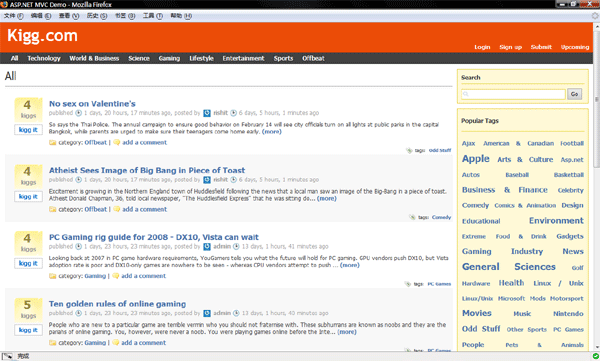
导 读:又是一篇关于ASP.NET MVC Framework的非常棒的文章,使用ASP.NET MVC Framework、LINQ to SQL和ASP.NET AJAX来开发一个类似于Digg网站的应用程序,本文为第一部分,是学习ASP.NET MVC Framework项目实战不可多得的好文章。开发出来的网站最终效果如下:

TerryLee_0013

图1 Kigg.com网站

推荐指数:

2.Building Sleek, Soft and Simple DataGrids

导读:Matt Berseth大牛实现的一个非常酷的圆角DataGrid效果,啥也不说了,直接贴张效果图吧:TerryLee_0024

推荐指数:

3.Building a LinkedIn Style Address Book with the ListView and LinqDataSource Controls

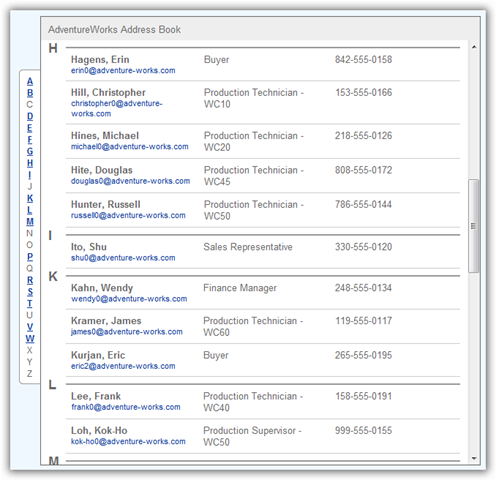
导读:同样是来自于Matt Berseth大牛的一篇文章,使用ListView和LinqDataSource控件实现了一个类似于LinkedIn.com网站中的通讯录,效果如下:

TerryLee_0025

推荐指数:

ASP.NET AJAX

4.Create a Slide Show Using the AJAX SlideShow and TreeView Controls

导读:使用ASP.NET AJAX Control Toolkit中的SlideShow控件和TreeView控件来构建一个幻灯片播放应用程序。

推荐指数:

.NET Framework

5.挖掘ADO.NET Entity框架的性能

导 读:ADO.NET团队最近讨论了ADO.NET Entity框架的各种性能特征。ADO.NET Entity框架在12月已经进入它的第三个beta版本,自那时起开发团队就开始为开发人员提供了使用该框架的相关信息。而现在,则为开发人员提供了框 架性能方面的信息。

本文鞭辟入里地介绍了ADO.NET Entity框架的性能,演示了如何提高简单查询速度的方法,并阐释了框架的性能特征。在之前的推荐系列中我曾经推荐过ADO.NET团队博客上的一篇文章。

推荐指数:

6.Web 服务软件工厂建模版本

导 读:来自于MSDN杂志的一篇文章。Web 服务软件工厂:建模版本也称为“服务工厂”,它是一个资源集合,这些资源可帮助您以简单有效的方式在 Windows® Communication Foundation (WCF) 和 ASMX 中建模和构建 Web 服务。与先前版本的服务工厂相比,最新版本使用的是模型,而先前版本使用的是基于 Guidance Automation Toolkit (GAT) 的向导。服务工厂现在允许您通过创建三种不同的模型来构建 Web 服务:数据约定模型、服务约定模型和宿主模型。本文将首先讨论这三种模型,然后再为您介绍如何自定义服务工厂。

Web服务软件工厂主页:http://www.codeplex.com/servicefactory

推荐指数:

7.Reviewing Unity

导读:Oren Eini作为Castle项目的负责人之一,作者对微软推出的依赖注入容器Unity进行评述,分别阐述了Unity的优缺点,包括Unity中的对于对象实例的生命周期、属性依赖等,值得大家认真关注一下。

推荐指数:

Silverlight

8.First Look at Silverlight 2

导 读:期待已久的Silverlight2终于快要见面了,大家可以通过这篇先了解一下Silverlight2的一些新特性。改进的功能包括:WPF UI框架、丰富的控件、丰富的Networking支持、丰富的基础类库。同时,ScottGu大牛也写了一个关于Silverlight2的系列文章, 使用Silverlight2构建了一个Digg应用,内容涉及到控件,布局管理,networking,数据绑定,样式,用户控件,模板等等,总共有8 篇文章:

Part 1: Creating "Hello World" with Silverlight 2 and VS 2008

Part 2: Using Layout Management

Part 3: Using Networking to Retrieve Data and Populate a DataGrid

Part 4: Using Style Elements to Better Encapsulate Look and Feel

Part 5: Using the ListBox and DataBinding to Display List Data

Part 6: Using User Controls to Implement Master/Details Scenarios

Part 7: Using Templates to Customize Control Look and Feel

Part 8: Creating a Digg Desktop Version of our Application using WPF

推荐指数:

9.Your First Silverlight 1.1 and Ajax Project

导读:来自于Al Pascual的一篇文章,演示了如何开发一个Silverlight1.1和ASP.NET AJAX结合的简单示例程序。

推荐指数:

开源项目

10.Dropthings – Ajax Web Portal

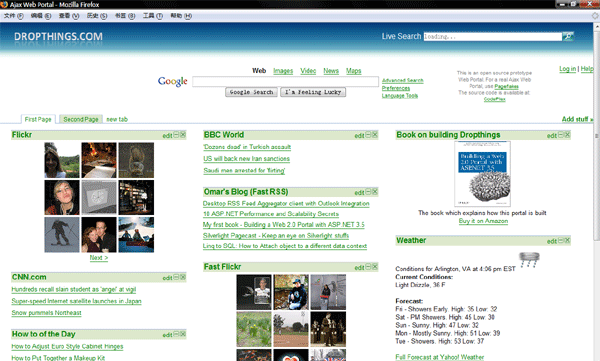
导读:Dropthings是一个AJAX Web Portal示例项目,类似于Live.com站点,构建于Linq、Workflow Foundation和ASP.NET AJAX之上。该项目的官方网站是http://www.codeplex.com/dropthings/,演示站点http://www.dropthings.com/。同时作者还为这个项目写了《Building a Web 2.0 Portal with ASP.NET3.5》一书,一步一步讲解如何构建该项目。

TerryLee_0014

推荐指数:

作者:TerryLee

出处:http://terrylee.cnblogs.com

[教程]ASP.net组件开发教程

mikel阅读(792)

本系列文章示例源码下载.各位如遇问题,请多查msdn,多利用网络.本人可能没时间一一回复,谢谢你们的支持,希望看到此文的人都能学好控件开发
http://www.cnblogs.com/Clingingboy/archive/2008/01/31/1059617.html
此系列我将尽我所能写下去吧,跟大家分享自己的经验。也希望大家对我多提意见,让我们共同进步
本文将持续更新.

推荐图书

道不远人:深入解析ASP.NET 2.0控件开发 作者博客(博客园自己人写的)http://thinhunan.cnblogs.com/ 书出错或有问题就找他-__-
1.Building ASP.NET Server Controls

2.Developing Microsoft ASP.NET Server Controls and Components Microsoft

3.Wrox Professional ASP.NET2.0 ServerControl and Component Development

4.ASP.NET服务器控件开发技术与实例

5.深入剖析ASP.NET组件设计

第一部分 asp.net控件开发基础
1.asp.net控件开发基础(1) ———-接触自定义控件

2.asp.net控件开发基础(2) ———-明白使用Render方法呈现自定义控件
3.asp.net控件开发基础(3) ———-自定义控件事件处理
4.asp.net控件开发基础(4) ———-明白使用RenderContent方法呈现自定义控件
5.asp.net控件开发基础(5) ———-简单介绍自定义控件简单属性和复杂属性
6.asp.net控件开发基础(6) ———-简单介绍自定义控件样式属性

7.asp.net控件开发基础(7) ———-初步认识复合控件
8.asp.net控件开发基础(8) ———-在复合控件中中的事件处理(事件冒泡)
9.asp.net控件开发基础(9) ———-再谈属性,学习自定义类型转换器
10.asp.net控件开发基础(10) ——–再谈属性,实现自定义控件集合属性
11.asp.net控件开发基础(11) ——–自定义视图状态管理
12.asp.net控件开发基础(12) ——–为子控件添加样式
13.asp.net控件开发基础(13) ——–服务器控件客户端功能
14.asp.net控件开发基础(14) ——–服务器控件生成器
15.asp.net控件开发基础(15) ——–总结和补充
第二部分 asp.net控件开发进阶
16.asp.net控件开发基础(16) ——–服务器模板控件
17.asp.net控件开发基础(17) ——–初识数据绑定控件
18.asp.net控件开发基础(18) ——–让DadaSource接受过多的数据源

19.asp.net控件开发基础(19) ——–数据列表绑定控件
20 .asp.net控件开发基础(20) ——–asp.net2.0数据绑定控件新做法
21 .asp.net控件开发基础(21) ——–让旧数据绑定控件支持数据源控件
22 .asp.net控件开发基础(22) ——–定义数据源控件(1)
asp.net控件设计时支持

1.asp.net控件设计时支持(1)—-基础认识
2.asp.net控件设计时支持(2)—-自动格式设置
3.asp.net控件设计时支持(3)—-操作列表与模板编辑
4.asp.net控件设计时支持(4)—-设计器区域编辑

[教程]使用微软ASP.NET MVC Framework的一些感受 + 收集园子朋友发现的bug反

mikel阅读(631)

ASP.NET MVC快一星期了,之前是苦苦的等待,之后是苦苦的摸索和总结,现在这个MVC在我脑子里已经有了个大体的评价,写出来与大家分享。
    关于MVC本身的优点,就不再详述,地球人说了好多了。
    所以我光说说微软的ASP.NET MVC Framework(目前还非正式发布版本,为CTP版)的一些个人感受。
    这里先确定一个个人的感情基调:我对.NET3.5绝对拥护,对MVC绝对期待。正因为如此,对里面的不足我会不遗余力地和大家分析探讨。
    首先,ASP.NET 引入MVC这个模块不本身不能算是3.5的什么“独门绝技”,也不用因为使用了MVC而对.NET3.5大加赞赏(没有贬义),因为MVC(以下说的MVC都是ASP.NET MVC Framework CTP版) 的引入只能说明ASP.NET向更合理、更顺应企业级的开发模式潮流又进了一步,其模式是早就存在的(我不太愿意说谁抄谁的话,也不关心,对我们来说好用 就行)。甚至从这个角度上来说MS已经慢了半拍。之所以说是进步,至少MVC的出现解决了我认为ASP.NET在客户体验和模式上的3大不足:
   
    一、网页生命周期过长(那是相当的长)。
    二、与第一点相关的,“巨无霸”VIEWSTATE以及PostBack功能大大增加了用户流量,使得客户体验大大降低(这里不讨论Ajax的弥补作用,光说最基本的WebForm模式,不然有很多可以引起技术争论的地方)
    三、服务器控件自动生成的客户端ID,使得开发人员对客户端页面控制(如使用js)太吃力。不得不一天到晚和.ClientID打交道,效率也太低。
    
    所以有人说MVC具有里程碑式的意义,这点我赞同。
    下面来说说这一周不到的时间内我发现了MVC哪些值得改进和需要注意的地方。
   
    一、
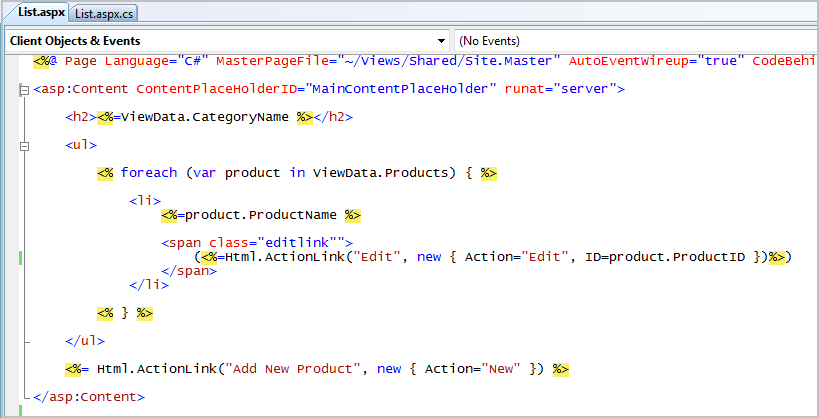
不是MVC本身不足,而是 Scott Guthrie 在他的教程(包括示例源码)中有点误导地球人,他普遍使用了这样的格式(下面说的这种方式需要用到MVCToolkit.dll,这里有下载http://asp.net/downloads/3.5-extensions/MVCToolkit.zip,目前vs2008和MVC CTP没有提供):
    
    大家注意Html.ActionLink()里面的"Action="后面,他使用的是字符串常量"Edit" 和"New",这是Controller层中的一个方法,用于控制网页行为。第一次看到这个,我简直有点气愤——.net3.5在面向对象上面花了那么大 功夫,到他手里怎么还要这样引用?这也叫面向对象?况且这比起原始的Codebehinde更不利于程序员和美工的协调。让我感觉大楼快封顶的时候,决定 用草棚做顶。两个字——失望。
    
    二、不过我信心马上又来了,我看到了ActionLink提供了另外一种使用范型的方法ActionLink<T>,并且找到了一篇ASP.NET MVC Preview: Using The MVC UI Helpers 的文章(强烈建议大家作为基础看看),看到了ActionLink<T>的使用已经另外一些ScottGu没有提到的方法。
    比如Button<T>是这样使用的:

<%=Html.Button<HomeController>(x=>x.Index(),“cmdNav2″,“Home”) %>

    用Lambda表达式x=>x.Index()取代了生硬的"Index"。
    于是我开始coding……几秒钟后,让我失望的事又发生了……
    当我输到x=>x.的时候,后面的再也出不来了,看来又是一个bug!
    起初我以为这只个是MVC调用功能上的bug,是不是这个功能他们还没有做好?
    后来TT.NET发现其实Button<T>不是不能调用,只是不能显示,如果先把后面的内容输好,再完成Lambda是可以.出来的!松了一口气,但这还是MVC或者是VS2008显示上的一个bug。
    补充一下:TT.NET刚才跟我说,不是所有的ctl<T>都不能使用Lambda来自动完成,比如Html.Form<>就是可以的,那应该可以更加肯定是MVC或者说是MVCToolkit的bug了。——2007.12.18 14:2
    三、在调试的时候发现,即使你在输入

<%=Html.Button<HomeController>(x=>x.Index(),“cmdNav2″,“Home”) %>

    的时候,忘了输入最后一个),编译也不会报错(这个问题可能属于vs本身检测机制的问题),而是到打开网页的时候,运行时错误,虽然不是大问题,细心的程 序员都会自己看一遍,但是由于是在.aspx中编写,貌似就享受不到linq在.cs中编译时就检查出错误的那种“舒适”。当然话说回来,MVC是不提倡 在View层使用这些Controller层的命令的,但终归是个遗憾。
    四、我们有时候需为了简化网页流程和减少代码页,往往把插入新纪录和编辑区域合为一体,即同样一 组TextBox输入框,在一个变量或者控件的控制下,可以转换“Insert”或者"Update"的功能。这是一种不错的思路,也免去了这一组 “TextBox”该不该复用的思想斗争以及复用之后一系列繁琐的操作(即使有些MVC观点似乎更提倡分开表示)。当你修改的时候,由ViewData传 入一个Entity,Entity里面是某条记录的所有值,这时候赋给TextBox显示是没有问题的,问题就出在这个页面需要我们执行"Insert" 的时候,我们往往会传入一个空的Entity(如:SzwEntity szwEntity= new SzwEntity();),这时候麻烦来了,如果你使用O/RM设计并且里面有string字段的话会发现一运行就报错,我找了半天总算找到了原因: 在.dbml(O/RM文件)下面的.designer.cs中,定义publish string str;的时候,并没有按照我SQL数据库中Default 'xxx'赋予初始值,当我们SzwEntity szwEntity= new SzwEntity();的时候,里面所有的string字段都为null,这当然不能为Html.TextBox()等作为value显示,此时int反而没事,因为int初始默认值已经是0了。
    因此目前最好的解决办法就是在.designer.cs中给他们赋一个初始值,比如:

        private System.DateTime _EndTime=DateTime.Now;
        
        
private string _UserName=string.Empty;

    他们原本是这样的:

        private System.DateTime _EndTime;
        
        
private string _UserName;

    这应该是算VS2008和MVC配合上出了点小问题。如果分来开看,或许倒不算什么bug,反而有他们各自的用意和规范在里面。

    五、我觉得最头疼的一个问题,应为在MVC技术层面上似乎还不那么好解决:打开MVC的Global.asax,我们可以看大哦这样一句话:

            // Note: Change Url= to Url="[controller].mvc/[action]/[id]" to enable 
            
//       automatic support on IIS6 

    就是说,如果你用的是IIS6(WindowsXP/2003)的话,你就势必要使用[controller].mvc/[action]/[id]的格 式,而不能“享用”[controller]/[action]/[id]了。最大的问题倒不是在美观和这种格式可读性的初衷上面,而是在以下两个方面:
    1、如果到时候系统升级到IIS7(Windows2008/Vista),所有外部的链接是不是还能访问带".mvc"的路径,这面临着一个兼容性的考验。
    2、了解Search engine robots 工作原理的朋友肯定都知道,我们当初煞费苦心把.aspx/asp/php/jsp“伪装”成.html是为了什么。对,就是为了让Search engine robots能有对这些.html产生“好感”,便于收录和打分,而现在的.mvc算什么?Search engine robots是不是可能会把.mvc后面的当做网页参数,把.mvc当成文件扩展名?如果我的假设成立,天,那.mvc的遭遇岂不是很悲惨?不知道 Search engine robots是否会看到.mvc之后,久久崇拜一番然后一声叹息扬长而去。

    以上是我用了MVC之后,发觉的比较重要和“隐藏的够深”的一些问题,不涉及整体框架的不足(比如用{$}替换机制等等)。还有一些显示上的问题可能和 VS2008本身有关,待我确认是MVC的问题之后,我会都发上来,如果大家还发现了别的什么问题,希望一同交流,我会一并整理进来,方便大家参考!
    前途是光明的,道路是曲曲折折的 LIKE THIS~~~~~~~~haha  only a joke

http://szw.cnblogs.com/
研究、探讨ASP.NET
转载请注明出处和作者,谢谢!