[转载]巧用WebBrowser实现代码操作网页

mikel阅读(1127)

[转载]巧用WebBrowser实现代码操作网页 – 老翁的开发随记 – 博客园.

回顾一下上一个随笔,给出了两种方法自动化操作网页

  • 篡改HTML代码,加载到WebBrowser运行
  • 使用Fiddle截获POST给服务器的URL和数据,使用HttpRequest类代码POST到服务器

今天给出另外一种方法,就是利用WinForm控件中的WebBrowser控件来操作页面。

这里我们会模拟一个搜索过程,打开百度网站,输入搜索关键字,在搜索结果中打开连接。

image

image

首先,我们建立一个Windows Form Application Project,并在界面上拉一个WebBrowser控件。

WebBrowser1的URL我们写成百度的地址

image

并设置WebBrowser加载网页完成后的事件

image

需要注意在这个项目中由于会用到一些操作HTML结点的类,需要引用一下的两个DLL。

image

然后,在后台编写WebBrowser1切换地址后的完成事件

public Form1()
{
InitializeComponent();
(webBrowser1.ActiveXInstance as SHDocVw.WebBrowser).NavigateComplete2 +=
new SHDocVw.DWebBrowserEvents2_NavigateComplete2EventHandler(Form1_NavigateComplete2);
}
void Form1_NavigateComplete2(object pDisp, ref object URL)
{
IHTMLDocument2 doc = (webBrowser1.ActiveXInstance as SHDocVw.WebBrowser).Document as IHTMLDocument2;
doc.parentWindow.execScript("window.alert=null", "JavaScript");
doc.parentWindow.execScript("window.confirm=null", "JavaScript");
doc.parentWindow.execScript("window.open=null", "JavaScript");
doc.parentWindow.execScript("window.showModalDialog=null", "javascript");
doc.parentWindow.execScript("window.close=null", "javascript");
}

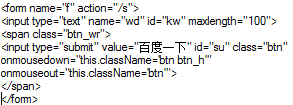
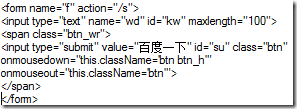
当然,还有文档加载完的事件,这里需要知道百度首页搜索框的ID和搜索按钮的ID,以方便填写关键字和执行搜索。我们查看了百度首页的源代码发现了一个用于提交搜索的Form

<a href="http://images.cnblogs.com/cnblogs_com/wengyuli/201102/201102260141496080.png"><img style="background-image: none; border: 0px none; padding-left: 0px; padding-right: 0px; display: inline; padding-top: 0px;" title="image" alt="image" src="http://images.cnblogs.com/cnblogs_com/wengyuli/201102/201102260141499635.png" width="297" border="0" height="109"></a>
于是在代码中我们获取到kw并输入关键字”翁玉礼”,然后点击按钮su
private void webBrowser1_DocumentCompleted(object sender, WebBrowserDocumentCompletedEventArgs e)
{
HtmlDocument doc = this.webBrowser1.Document;
doc.GetElementById("kw").InnerText = "翁玉礼";
doc.GetElementById("su").InvokeMember("click");
}
代码写到这里已经提交搜索了,WebBrowser也会接收这次提交后的记过,下面我们需要在结果中打开一个连接做实验。
先查看一下搜索结果的HTML源代码

image

private void webBrowser1_DocumentCompleted(object sender, WebBrowserDocumentCompletedEventArgs e)
{
HtmlDocument doc = this.webBrowser1.Document;
if(doc.Url.AbsoluteUri=="http://www.baidu.com/")
{
doc.GetElementById("kw").InnerText = "翁玉礼";
doc.GetElementById("su").InvokeMember("click");
}
if(doc.Url.AbsoluteUri.Contains("wd"))//根据URL中的
{
HtmlElement table = doc.GetElementById("1");//根据搜索结果的HTML表,找到第一个搜索结果的URL,这里模拟
var html = table.Children[0].Children[0].InnerHtml;
var url = html.Substring(html.IndexOf("href") + 6, html.IndexOf(" target"));
this.webBrowser1.Navigate(url);
}
}

这样您即可自动的定时运行这个APP来操作页面了。比起使用HttpRequest来POST数据到服务端是不是更好一些呢,没有cookie的烦恼,没有脚本加密算法的烦恼。

[转载]C# 谈Dictionary,SortedDictionary排序

mikel阅读(1449)

[转载]C# 谈Dictionary,SortedDictionary排序 – VvxT [Varvery] – 博客园.

使用过Dictionary的人都知道,当每一个Add里面的值都不会改变其顺序,所以 需要需要对其排序的时候就用到SortedDictionary,但SortedDictionary并不是那么理想,其默认的方式只支持正序排序,想要 反序排序时必须得靠自己重新编写代码,下面来看一个简单的例子:

测试环境为Web,如在WinForm下,调试则只需改一下输出语句即可。

如以下代码在调试时不能使用则需要引用:

using System.Linq;

using System.Collections.Generic;

1 private void TestDictionarySort() 2 { 3 SortedDictionary<string, string> sd = new SortedDictionary<string, string>(); 4 sd.Add("321", "fdsgsags"); 5 sd.Add("acb", "test test"); 6 sd.Add("1123", "lslgsgl"); 7 sd.Add("2bcd13", "value"); 9   10 foreach (KeyValuePair<string, string> item in sd) 11 { 12 Response.Write("键名:" + item.Key + " 键值:" + item.Value); 13 } 14 15 }

上面代码输出效果:

键名:1123 键值:lslgsgl
键名:2bcd13 键值:value
键名:321 键值:fdsgsags
键名:acb 键值:test test

好了,现在我们来看一下反序排序的效果,请看下面的代码:

private void TestDictionarySort() { SortedDictionary<string, string> sd = new SortedDictionary<string, string>(); sd.Add("321", "fdsgsags"); sd.Add("acb", "test test"); sd.Add("1123", "lslgsgl"); sd.Add("2bcd13", "value");   Response.Write("<br />正序排序数据:<br />"); foreach (KeyValuePair<string, string> item in sd) { Response.Write("键名:" + item.Key + " 键值:" + item.Value + "<br />"); } //重新封装到Dictionary里(PS:因为排序后我们将不在使用排序了,所以就使用Dictionary) Dictionary<string, string> dc = new Dictionary<string, string>(); foreach (KeyValuePair<string, string> item in sd.Reverse()) { dc.Add(item.Key, item.Value); } sd = null; //再看其输出结果: Response.Write("<br />反序排序数据:<br />"); foreach (KeyValuePair<string, string> item in dc) { Response.Write("键名:" + item.Key + " 键值:" + item.Value + "<br />"); } }

上面代码输出效果:

正序排序数据:
键名:1123 键值:lslgsgl
键名:2bcd13 键值:value
键名:321 键值:fdsgsags
键名:acb 键值:test test

反序排序数据:
键名:acb 键值:test test
键名:321 键值:fdsgsags
键名:2bcd13 键值:value
键名:1123 键值:lslgsgl

好了,效果实现了,欢迎大家一起讨论出一个更好的方法来,欢迎拍砖!

[转载]我的架构经验小结(五)-- 日志记录

mikel阅读(1015)

[转载]我的架构经验小结(五)-- 日志记录 – zhuweisky – 博客园.

以前写的关于架构经验方面的文章(如上一篇实战中演化的三层架构)都是从整体的角度出发的,采用全局的视角,本文我们将拉近镜头,聚焦于日志记录这一块。随着做软件的时间越长、经验积累得越来越多,就越觉得日志记录的重要。

日志记录的主要作用可以从正反两个方面来说:

(1)如果程序运行出现问题,可以通过相关日志快速定位到出问题的地方,找到问题的根源,从而快速解决问题。对于已上线的系统来说,如果出现一个 bug,通常,解决这个bug的时间主要花在定位bug上,一旦找到bug根源,修复它是非常快的。而恰当的日志记录可以帮我们迅速定位bug。

(2)确保我们的系统运行在正常状态。当我们看到日志中类似“***成功完成!”字眼时,我们就确信我们的程序很好的执行了任务,心里就会很踏实。

1.记录应用程序异常

应用程序出现异常,要么是程序bug,要么是出现了意外事件(如磁盘坏掉、网络断开等),这些都是非常严重的事情,否则怎么叫“异”常 了。我的习惯是,所有重要的应用程序异常都是必须记录的。当然,如果某异常是属于正常业务逻辑处理的一部分,则也许没必要记录。

我使用ESBasic.Loggers.IExceptionLogger来记录异常:

public interface IExceptionLogger
{
/// <summary>
/// 记录异常。
/// </summary>
/// <param name=”ee”>异常</param>
/// <param name=”methodPath”>抛出异常的目标方法。</param>
/// <param name=”genericTypes”>目标方法的类型参数。如果为非泛型方法,则传入null</param>
/// <param name=”argumentNames”>调用方法的各Parameters的名称。如果方法没有参数,则传入null</param>
/// <param name=”argumentValues”>调用方法的各Parameters的值。如果方法没有参数,则传入null</param>
void Log(Exception ee, string methodPath, Type[] genericTypes, string[] argumentNames, object[] argumentValues);
}

Log方法记录的信息非常详细,包括异常的详细内容、异常发声的方法的路径(格式通常为:命名空间.类名.方法名),调用该方法的参数名称和对应的参数值,如果为泛型方法,还要记录泛型参数的类型。

你可能有疑问说,使用起来太麻烦了!因为构造调用这个方法所需的参数比较麻烦,特别是后三个参数。是的,确实是这样,如果你是手动来使用它的话,就需要亲 手去打造每一个参数。而我,很少手动去使用它,而是让动态代理来自动使用它。动态代理会截获所有的方法抛出的异常,并构造好上述Log方法所需的所有参 数,再调用IExceptionLogger接口来记录这些信息。

ESBasic.Emit.DynamicProxy.DynamicProxyFactory的CreateEfficientAopProxy方法可以创建截获异常的代理,如其重载的某个签名如下:

public static TInterface CreateEfficientAopProxy<TInterface>(TInterface origin, IAopInterceptor aopInterceptor)

方法的第二个参数可以传入“截获子”ExceptionInterceptor对象,而ExceptionInterceptor使用IExceptionLogger接口来记录截获到的异常:

/// <summary>
/// ExceptionInterceptor 的构造函数。
/// </summary>
public ExceptionInterceptor(IExceptionLogger logger)

至于将截获的异常记录到哪里,取决于IExceptionLogger接口的实现,我的框架提供了两个实现:

(1)ESBasic提供了ESBasic.Loggers.ExceptionFileLogger 用于将异常记录到文本文件。

(2)DataRabbit提供了DataRabbit.Application.Log.AppExceptionTableLogger 用于将异常记录到数据表,数据表可以是物理数据库中的表(如SQLServer中的表),也可以是内存数据库中的表。

如果记录到物理数据库,则可以使用下列的SQL语句创建对应的数据表:

CREATE TABLE [AppException]
([AutoID] [
int] IDENTITY(1,1) NOT FOR REPLICATION NOT NULL, [ApplicationID] [varchar](10) NOT NULL,
[ExceptionType] [varchar](
20) NOT NULL,[ErrorMessage] [varchar](200) NOT NULL,[ErrorLevel] [nvarchar](10) NOT NULL,
[Location] [varchar](
100) NOT NULL,[ArgumentInfo] [varchar](200) NOT NULL,[OccureTime] [datetime] NOT NULL
CONSTRAINT [PK_AppException] PRIMARY KEY CLUSTERED ([AutoID] ASC))

如果是记录到内存数据库,可以使用对应的Entity定义:

代码

[Serializable]
public class AppException
{
public const string TableName = AppException;
public const string _AutoID = AutoID;
public const string _ApplicationID = ApplicationID;
public const string _ExceptionType = ExceptionType;
public const string _ErrorMessage = ErrorMessage;
public const string _ErrorLevel = ErrorLevel;
public const string _Location = Location;
public const string _ArgumentInfo = ArgumentInfo;
public const string _OccureTime = OccureTime;

public AppException() { }
public AppException(string _appID, string _errorType, string _errorMessage, string _location, string _errorLevel, string _argumentInfo)
{
this.applicationID = _appID ?? “”;
this.errorType = _errorType ?? “”;
this.errorMessage = _errorMessage ?? “”;
this.location = _location ?? “”;
this.errorLevel = _errorLevel ?? “”;
this.argumentInfo = _argumentInfo ?? “”;
}

#region AutoID
private System.Int32 m_AutoID = 0;
public System.Int32 AutoID
{
get
{
return this.m_AutoID;
}
set
{
this.m_AutoID = value;
}
}
#endregion

#region ApplicationID
private string applicationID = “”;
/// <summary>
/// 出现异常的应用程序的标志。
/// </summary>
public string ApplicationID
{
get { return applicationID; }
set { applicationID = value; }
}
#endregion

#region ExceptionType
private string errorType = “”;
/// <summary>
/// 异常的类型。如NullObjectReference。
/// </summary>
public string ExceptionType
{
get { return errorType; }
set { errorType = value; }
}
#endregion

#region ErrorMessage
private string errorMessage = “”;
/// <summary>
/// 异常的详细信息。
/// </summary>
public string ErrorMessage
{
get { return errorMessage; }
set { errorMessage = value; }
}
#endregion

#region ErrorLevel
private string errorLevel = “”;
/// <summary>
/// 异常的级别 — 高、中、低。
/// </summary>
public string ErrorLevel
{
get { return errorLevel; }
set { errorLevel = value; }
}
#endregion

#region Location
private string location = “”;
/// <summary>
/// 出现异常的具体位置,精确到方法名称。
/// </summary>
public string Location
{
get { return location; }
set { location = value; }
}
#endregion

#region ArgumentInfo
private string argumentInfo = “”;
/// <summary>
/// 抛出异常时方法的调用参数信息。
/// </summary>
public string ArgumentInfo
{
get { return argumentInfo; }
set { argumentInfo = value; }
}
#endregion

#region OccureTime
private DateTime occureTime = DateTime.Now;
/// <summary>
/// 异常发生的时间。
/// </summary>
public DateTime OccureTime
{
get { return occureTime; }
set { occureTime = value; }
}
#endregion
}

2.记录数据库访问异常

当程序执行SQL语句时抛出的数据访问异常,也是属于异常的一种,当然也可以通过上面的IExceptionLogger来将其记录到文本文件或数据表。DataRabbit框架内部会自动截获所有的数据库访问异常,并调用IExceptionLogger来记录它。

void Log(Exception ee, string methodPath, Type[] genericTypes, string[] argumentNames, object[] argumentValues);

对Log方法所需的调用参数是如此构造的:

(1)第一个参数直接传入截获到的Exception。

(2)第二个参数由发生异常的方法加上所执行的SQL语句构成。格式通常为:命名空间.类名.方法名@<commandText>……</commandText>。

(3)第三个参数为泛型类型,由于没有泛型,所以此处传入null即可。

(4)第四个参数由执行SQL语句所需的各个参数的名称构成。

(5)第五个参数由执行SQL语句所需的各个参数的值构成。

所以,当数据库访问抛出异常的时候,通过日志我们可以知道是哪个方法抛出的异常,并且执行的sql语句的文本是什么样的,sql参数是如何的。

3.记录方法执行的时间

在大型系统中,我们经常需要监视我们系统执行的性能状况,当出现性能问题时,我们要能够迅速地找到瓶颈在什么地方。在程序的层面上来说,就是看哪个方法执行所消耗的时间很长(当然,内存也是一个重要方面,这里我们暂且不谈)。

我使用ESBasic.Loggers.IMethodTimeLogger来记录异常:

public interface IMethodTimeLogger
{
/// <summary>
/// 记录方法执行的时间。
/// </summary>
/// <param name=”methodPath”>抛出异常的目标方法。</param>
/// <param name=”genericTypes”>目标方法的类型参数。如果为非泛型方法,则传入null</param>
/// <param name=”argumentNames”>调用方法的各Parameters的名称。如果方法没有参数,则传入null</param>
/// <param name=”argumentValues”>调用方法的各Parameters的值。如果方法没有参数,则传入null</param>
/// <param name=”millisecondsConsumed”>方法执行的时间,毫秒</param>
void Log(string methodPath, Type[] genericTypes, string[] argumentNames, object[] argumentValues, double millisecondsConsumed);
}

同样的,我们不需要手动构造方法所需的参数来调用它,而仍然可以通过上面介绍的动态代理来自动完成这些事情,只需要使用对应的截获子MethodTimeInterceptor就可以了,而MethodTimeInterceptor使用IMethodTimeLogger接口来记录方法的执行时间:

/// <summary>
/// MethodTimeInterceptor 的构造函数。
/// </summary>
public MethodTimeInterceptor(IMethodTimeLoggerlogger)

我的框架提供了ESBasic.Loggers.MethodTimeFileLogger 用于将方法执行时间记录到文本文件,并且可以设定只记录那些执行时间大于指定值(如100ms)的方法调用。

4.记录安全日志

安全日志主要用于记录与安全相关的一些操作,比如用户的登陆/退出、修改密码、上线/掉线等。通过记录这些信息我们可以跟踪用户使用系统的状况,并且可以 做一些有意义的统计。在我的框架中,我使用ESBasic.Loggers.ISecurityLogger来记录相关安全事件和安全操作。

/// <summary>
/// 用于记录安全日志。比如用户的登陆/退出、进入/注销等日志。
/// </summary>
public interface ISecurityLogger
{
/// <summary>
/// 记录安全日志。
/// </summary>
/// <param name=”userID”>进行安全操作的用户编号</param>
/// <param name=”source”>来源(比如用户的IP)</param>
/// <param name=”taskType”>安全操作的类型</param>
/// <param name=”comment”>备注</param>
void Log(string userID, string source, string taskType ,string comment);
}

比如,在ESFramework的使用中,我们可以使用ISecurityLogger来记录用户的上线/下线/掉线等信息:

/// <summary>
/// 用于将用户的上下线事件记录到用户安全日志(可以是文件、数据库、内存数据库等)。
/// </summary>
public class UserSecurityLogBridge
{
#region UserManager
private IUserManager userManager;
public IUserManager UserManager
{
set { userManager = value; }
}
#endregion

#region SecurityLogger
private ISecurityLogger securityLogger;
public ISecurityLogger SecurityLogger
{
set { securityLogger = value; }
}
#endregion

public void Initialize()
{
this.userManager.SomeOneConnected += new ESBasic.CbGeneric<UserData>(userManager_SomeOneConnected);
this.userManager.SomeOneDisconnected += new ESBasic.CbGeneric<UserData>(userManager_SomeOneDisconnected);
this.userManager.SomeOneTimeOuted += new ESBasic.CbGeneric<UserData>(userManager_SomeOneTimeOuted);
this.userManager.SomeOneBeingPushedOut += new ESBasic.CbGeneric<UserData>(userManager_SomeOneBeingPushedOut);
}

void userManager_SomeOneBeingPushedOut(UserData userData)
{
this.securityLogger.Log(userData.UserID, userData.UserAddress.ToString(), BeingPushedOut, “”);
}

void userManager_SomeOneTimeOuted(UserData userData)
{
this.securityLogger.Log(userData.UserID, userData.UserAddress.ToString(), TimeOuted, “”);
}

void userManager_SomeOneDisconnected(UserData userData)
{
this.securityLogger.Log(userData.UserID, userData.UserAddress.ToString(), Disconnected, string.Format(LogonTime:{0},DownloadBytes:{1}, userData.TimeLogon, userData.TotalDownloadBytes));
}

void userManager_SomeOneConnected(UserData userData)
{
this.securityLogger.Log(userData.UserID, userData.UserAddress.ToString(), Connected, “”);
}
}

只要实现ISecurityLogger接口我们就可以执行真正的记录动作,我们也提供了两种实现:

(1)ESBasic提供了ESBasic.Loggers.SecurityFileLogger 用于将安全日志记录到文本文件。

(2)DataRabbit提供了DataRabbit.Application.Log.SecurityOperationTableLogger用于将安全日志记录到物理数据库或内存数据库。

如果记录到物理数据库,则可以使用下列的SQL语句创建对应的数据表:

CREATE TABLE [SecurityOperation]
([AutoID] [int] IDENTITY(1,1) NOT FOR REPLICATION NOT NULL, [ApplicationID] [varchar](10) NOT NULL, [UserID] [nvarchar](20) NOT NULL,
[Source] [nvarchar](20) NOT NULL,[TaskType] [nvarchar](20) NOT NULL,[Comment] [nvarchar](100) NOT NULL,
[OccureTime] [datetime] NOT NULL
CONSTRAINT [PK_SecurityOperation] PRIMARY KEY CLUSTERED ([AutoID] ASC))

如果是记录到内存数据库,可以使用对应的Entity定义:

View Code

[Serializable]
public class SecurityOperation
{
public SecurityOperation() { }
public SecurityOperation(string _appID, string _userID, string _source, string _taskType, string _comment)
{
this.applicationID = _appID ?? “”;
this.userID = _userID ?? “”;
this.source = _source ?? “”;
this.taskType = _taskType ?? “”;
this.comment = _comment ?? “”;
}

#region AutoID
private System.Int32 m_AutoID = 0;
public System.Int32 AutoID
{
get
{
return this.m_AutoID;
}
set
{
this.m_AutoID = value;
}
}
#endregion

#region ApplicationID
private string applicationID = “”;
/// <summary>
/// 出现异常的应用程序的标志。
/// </summary>
public string ApplicationID
{
get { return applicationID; }
set { applicationID = value; }
}
#endregion

#region UserID
private string userID = “”;
/// <summary>
/// 进行安全操作的用户编号
/// </summary>
public string UserID
{
get { return userID; }
set { userID = value; }
}
#endregion

#region Source
private string source = “”;
/// <summary>
/// 来源(比如用户的IP)
/// </summary>
public string Source
{
get { return source; }
set { source = value; }
}
#endregion

#region TaskType
private string taskType = “”;
/// <summary>
/// 安全操作的类型
/// </summary>
public string TaskType
{
get { return taskType; }
set { taskType = value; }
}
#endregion

#region Comment
private string comment = “”;
/// <summary>
/// 备注
/// </summary>
public string Comment
{
get { return comment; }
set { comment = value; }
}
#endregion

#region OccureTime
private DateTime occureTime = DateTime.Now;
/// <summary>
/// 操作发生的时间。
/// </summary>
public DateTime OccureTime
{
get { return occureTime; }
set { occureTime = value; }
}
#endregion
}

5.记录重要的业务操作

记录重要的业务操作日志也是非常重要的,比如类似某操作员修改了某个用户的权限这样关键性的操作,通过业务操作日志,当发现操作失误时,我们可以地查找到是哪个操作员在什么时间犯错而导致误操作的,这就为我们的系统安全又提供了一层监控机制。

由于业务操作类型千变万化,所以我们没有提供一个标准统一的接口来规范它,在不同的系统中,根据不同的需求,我们可能会采用不同的记录方式。当然,有些业务操作日志也许可以作为安全日志记录下来,这样就可以使用上面的ISecurityLogger接口来进行。

[转载]读《game engine architecture》有感

mikel阅读(1032)

[转载]读《game engine architecture》有感 – ustc_msra_ase – 博客园.

最近在看一本叫做《game engine architecture》的书,这本书从很细,很具体的讲解现在游戏引擎的体系结构。本书的亮点:1.讲解现代游戏引擎架构,拥有非常新的实例。包括作 者自己公司的引擎和商业引擎例如Unreal的实例。2.清楚的讲解实现细节。代码少而思想多,往往一段话就可以让你了解某个部分的实现–(来自豆瓣上 的点评)。下面来讲讲我的看法。

两星期前我没有涉足过game的任何东西,对于编程也是一知半解。凭着自己的热情和对图形编程等的兴趣开始了游戏引擎体系结构的学习。它给我的第一感觉是这个一个很庞大的软件,涉及到的内容绝对可以用“相当丰富”来形容。下面是我从很多资料中得到的这个引擎大概的容貌:

从这幅图就可以看出来这个软件是多么的给力啊。继续看每一个部分简介的时候,发现里面涉及的知识包括有图形学,人工智能,数学,物理,美术等的知识。这本书就是从下面开始往上讲各部分的内容。

今天来稍微讲一下书中的第五章关于内存管理方面的知识,内存主要从两方面来影响系统的性能,1.dynamic memory allocation,主要体现在malloc()和c++中的new关键字上,由于它是heap形式的分配,由于1它要适应各种大小的分配方式,势必会 影响系统的性能;2某些操作系统调用malloc()等的时候,会进入内核态,然后再回来,这样就增加了相应的消耗。但是这些操作又是不可避免的,那么怎 么优化呢?方法很多,想具体了解请看书的第五章第二节。2.memory access patterns,主要体现在内存的碎片上。于是就要在第一个因素解决的前提下,进行消除碎片的工作。具体的方法见书。

从这个小点就可以看到这本书是何等的详细,细致,想看这本书的话,可以到:http://books.google.com/books?id=LJ20tsePKk4C&printsec=frontcover&dq=Game+Engine+Architecture&hl=zh-CN&ei=RT9mTZrnKsrirAeNh9naCg&sa=X&oi=book_result&ct=result&resnum=1&ved=0CCsQ6AEwAA#v=onepage&q&f=false。但是从这几天学习的情况来看的话,只是一味的看书还是不行的,需要找一个开源的引擎来学习一下,推荐irrlicht,可以到:http://irrlicht.sourceforge.net/ 下载,可以到http://baike.baidu.com/view/623466.htm看一下简介。里面有源代码,大家可以学习一下。

–by xiaoming

[转载]C# 构建可扩展的应用程序(插件)

mikel阅读(876)

[转载]C# 构建可扩展的应用程序(插件) – suxin – 博客园.

构建可扩展的应用程序,特别是对于WinForm应用程序是特别有好处的。我们知道,企业的需求是瞬息万变的,企业在使用软件的过程中,很可能对于现有的 需求有变动甚至是提出新的需求来,可是我们的软件已经部署在企业的各个客户端中,要想将根据企业新的需求编写的模块集成到现有程序中去,我们必须重新编译 整个软件,然后打包再进行重新部署,这无疑有非常大的工作量。怎样才能将新编写的模块集成到现有程序中去,而又不用重新编译整个应用程序?这就是我们接下 来要讨论的话题。

利用C# 构建可扩展的应用程序,就是利用.Net的反射机制以及特性编程实现,原理我就不介绍了,很多C#的书籍都说的很清楚,接下来,我将演示如何搭建可扩展的应用程序。

一、首先建立一个类库IplugTypes

该类库定义了插件程序必须遵循的接口Iplug和一个自定义特性,在该类库中导入System.Windows.Forms的引用,代码如下:

1 using System; 2  using System.Collections.Generic; 3  using System.Linq; 4  using System.Text; 5 using System.Windows.Forms; 6 7 namespace IplugTypes 8 { 9 /// <summary> 10 /// 插件必须继承该接口规范 11 /// </summary> 12 public interface Iplug 13 { 14 void FormShow(Form mainForm); 15 } 16 [AttributeUsage(AttributeTargets.Class)] 17 public sealed class AssemblyInfoAndCompanyInfoAttribute : System.Attribute 18 { 19 /// <summary> 20 /// 程序集名称(不包括扩展名) 21 /// </summary> 22 public string AssemblyName { get; set; } 23 /// <summary> 24 /// 程序集版本 25 /// </summary> 26 public string AssemblyVersion { get; set; } 27 /// <summary> 28 /// 公司名称 29 /// </summary> 30 public string CompanyName { get; set; } 31 /// <summary> 32 /// 菜单名(在承载的主程序中要显示的名称) 33 /// </summary> 34 public string MenuName { get; set; } 35 public AssemblyInfoAndCompanyInfoAttribute() 36 { 37 38 } 39 40 } 41 }

二、建立WinForm插件程序

建立一个WinForm窗体程序,引入上面建立的IplugTypes类库的引用,如下图:

在该窗体类中继承IPlug接口,在Iplug接口的FormShow方法中实例化本窗体,同时用AssemblyInfoAndCompanyInfo自定义属性类描述该窗体类,代码如下:

1 using System.Drawing; 2 using System.Linq; 3 using System.Text; 4 using System.Windows.Forms; 5 using IplugTypes; 6 7 namespace WinFormIPlug 8 { 9 [AssemblyInfoAndCompanyInfo(AssemblyName = "WinFormIPlug",AssemblyVersion="1.0.0.0",CompanyName="DTXY",MenuName="C#插件")] 10 public partial class Form1 : Form,Iplug 11 { 12 public Form1() 13 { 14 InitializeComponent(); 15 } 16 17 private void button1_Click(object sender, EventArgs e) 18 { 19 MessageBox.Show("这是一个插件程序!"); 20 } 21 22 void Iplug.FormShow(Form mainForm) 23 { 24 Form1 fm = new Form1(); 25 fm.MdiParent = mainForm; 26 fm.Show(); 27 // throw new NotImplementedException(); 28 } 29 } 30 }

将该窗体的输出类型设置为类库,然后进行编译,如下图

三、构建可扩展的应用程序

建立一个名称为WindowsFormMain的窗体应用程序,添加menuStrip控件,并设置该窗体的IsMdiContainer属性为True,指示该窗体为MDI对文档父窗体。如下图:

引入对程序集IplugTypes的引用,导入System.Reflection的命名空间。然后,添加FrmAdd窗体,用于导入插件程序,如下图:

同样在FrmAdd窗体类中引入对程序集IplugTypes的引用,导入System.Reflection的命名空间,该窗体类的代码如下:

1 using System; 2 using System.Collections.Generic; 3 using System.ComponentModel; 4 using System.Data; 5 using System.Drawing; 6 using System.Linq; 7 using System.Text; 8 using System.Windows.Forms; 9 using IplugTypes; 10 using System.Reflection; 11 using System.IO; 12 13 namespace WindowsFormMain 14 { 15 public partial class FrmAdd : Form 16 { 17 public FrmAdd() 18 { 19 InitializeComponent(); 20 } 21 /// <summary> 22 /// 插件加载路径 23 /// </summary> 24 public string Path { get; private set; } 25 26 private void btnBrowse_Click(object sender, EventArgs e) 27 { 28 29 if (this.openFileDialog1.ShowDialog() == DialogResult.OK) 30 { 31 if (this.openFileDialog1.SafeFileName.Split('.')[1].ToUpper() != "DLL") 32 { 33 MessageBox.Show("您选择的不是动态类型库,扩展名为.DLL!"); 34 return; 35 } 36 string strFilePath = this.openFileDialog1.FileName; 37 Path = strFilePath; 38 this.textBox1.Text = Path; 39 if (!LoadAssembly(strFilePath)) 40 { 41 MessageBox.Show("插件加载失败,请确认插件是否支持Iplug接口!"); 42 } 43 } 44 } 45 private bool LoadAssembly(string strFilePath) 46 { 47 bool isRight = false; 48 try 49 { 50 Assembly asm = Assembly.LoadFrom(strFilePath); 51 var types = from t in asm.GetTypes() 52 where t.IsClass && t.GetInterface("Iplug") != null 53 select t; 54 if (types.Count() <= 0) 55 { 56 return isRight; 57 } 58 foreach (Type item in types) 59 { 60 DisplayAssemblyInfo(item); 61 } 62 isRight = true; 63 } 64 catch (Exception ex) 65 { 66 MessageBox.Show(ex.Message); 67 return isRight; 68 } 69 return isRight; 70 } 71 private void DisplayAssemblyInfo(Type t) 72 { 73 var asmInfo = from n in t.GetCustomAttributes(false) 74 where n.GetType() == typeof(AssemblyInfoAndCompanyInfoAttribute) 75 select n; 76 foreach (AssemblyInfoAndCompanyInfoAttribute item in asmInfo) 77 { 78 string[] strItems = { t.Assembly.GetName().Name, item.AssemblyVersion, item.CompanyName }; 79 ListViewItem lv = new ListViewItem(strItems); 80 this.listView1.Items.Add(lv); 81 } 82 } 83 84 private void btnSub_Click(object sender, EventArgs e) 85 { 86 if (string.IsNullOrEmpty(Path)) 87 { 88 MessageBox.Show("没有任何可导入的插件程序!"); 89 return; 90 } 91 FileInfo fi = new FileInfo(Path); 92 fi.CopyTo(Application.StartupPath + "\\" + fi.Name, true); 93 DialogResult = DialogResult.OK; 94 } 95 96 private void btnCancel_Click(object sender, EventArgs e) 97 { 98 DialogResult = DialogResult.Cancel; 99 } 100 } 101 }

在主窗体Form1中的MenuScript控件的File->Add-in..菜单中实例话FrmAdd窗体并以模式窗体的方式显示出来,代码如下:

1 using System; 2 using System.Collections.Generic; 3 using System.ComponentModel; 4 using System.Data; 5 using System.Drawing; 6 using System.Linq; 7 using System.Text; 8 using System.Windows.Forms; 9 using IplugTypes; 10 using System.Reflection; 11 12 namespace WindowsFormMain 13 { 14 public partial class Form1 : Form 15 { 16 public Form1() 17 { 18 InitializeComponent(); 19 } 20 21 private void Form1_Load(object sender, EventArgs e) 22 { 23 24 } 25 26 private void addInToolStripMenuItem_Click(object sender, EventArgs e) 27 { 28 FrmAdd fm = new FrmAdd(); 29 fm.ShowDialog(); 30 } 31 } 32 }

现在,插件已导入到应用程序的启动目录下,那怎样在主窗体的MenuScript菜单中创建一个插件窗体的菜单并且单击该菜单会显示出插件窗体来? 我们接下来继续讨论:

我的设计思路是:维护一个XML文件,该XML文件用于记录主窗体MenuScript的菜单项,主窗体在启动时读取该XML文件,然后动态创建菜单。

当然为了演示,我这里只是手动创建一个名叫:Iplug.xml的文件,并且保存在应用程序的启动目录下。读者完全可以在导入插件时,用程序自动创建。该XML文件的格式如下:

1 <?xml version="1.0" encoding="gb2312"?> 2 <root> 3 <menu name="C#插件" assemblyName="WinFormIPlug"> 4 </menu> 5 </root>

当然如果有多个插件,可建立多个<menu>节点,这里<menu>节点的 name属性是该插件要在主程序中显示的菜单名,assemblyName属性是插件程序集的名称(不包括.dll的扩展名)。

建立好该XML文件后,保存到主程序的启动目录下,然后在主窗体启动时读取该XML文件,动态的创建菜单。主窗体的代码如下:

1 using System; 2 using System.Collections.Generic; 3 using System.ComponentModel; 4 using System.Data; 5 using System.Drawing; 6 using System.Linq; 7 using System.Text; 8 using System.Windows.Forms; 9 using IplugTypes; 10 using System.Reflection; 11 using System.Xml; 12 using System.Xml.Linq; 13 using System.IO; 14 15 namespace WindowsFormMain 16 { 17 public partial class Form1 : Form 18 { 19 public Form1() 20 { 21 InitializeComponent(); 22 } 23 24 private void Form1_Load(object sender, EventArgs e) 25 { 26 try 27 { 28 this.AddMenus(); 29 } 30 catch (Exception ex) 31 { 32 MessageBox.Show(ex.Message, "提示", MessageBoxButtons.OK); 33 } 34 } 35 /// <summary> 36 /// 加载程序菜单 37 /// </summary> 38 private void AddMenus() 39 { 40 string strFilePath = Application.StartupPath + "\\" + "Iplug.xml"; 41 if (!File.Exists(strFilePath)) 42 { 43 XmlDocument dom = new XmlDocument(); 44 XmlDeclaration declar = dom.CreateXmlDeclaration("1.0", "utf-8", null); 45 dom.AppendChild(declar); 46 XmlElement root = dom.CreateElement("root"); 47 dom.AppendChild(root); 48 dom.Save(strFilePath); 49 } 50 else 51 { 52 XDocument xd = XDocument.Load(strFilePath); 53 54 var menus = from n in xd.Descendants("menu") 55 select n; 56 if (menus.Count() <= 0) 57 { 58 return; 59 } 60 foreach (var item in menus) 61 { 62 string menuName = item.Attribute("name").Value; 63 ToolStripMenuItem ts = (ToolStripMenuItem)this.menuStrip1.Items.Add(menuName); 64 ts.Tag = item.Attribute("assemblyName").Value; 65 ts.Click += new EventHandler(ts_Click); 66 } 67 } 68 } 69 void ts_Click(object sender, EventArgs e) 70 { 71 try 72 { 73 ToolStripMenuItem tool = (ToolStripMenuItem)sender; 74 string assemblyName = tool.Tag.ToString(); 75 Assembly asm = Assembly.Load(assemblyName); 76 var types = from n in asm.GetTypes() 77 where n.IsClass && n.GetInterface("Iplug") != null 78 select n; 79 if (types.Count() <= 0) 80 { 81 return; 82 } 83 foreach (Type t in types) 84 { 85 Iplug plug = (Iplug)Activator.CreateInstance(t); 86 plug.FormShow(this); 87 } 88 } 89 catch (Exception ex) 90 { 91 MessageBox.Show(ex.Message); 92 } 93 //throw new NotImplementedException(); 94 } 95 96 private void addInToolStripMenuItem_Click(object sender, EventArgs e) 97 { 98 FrmAdd fm = new FrmAdd(); 99 fm.ShowDialog(); 100 } 101 } 102 }

到现在为止,可扩展的应用程序已经构建完毕,希望对大家有所帮助。如有疑问请发邮件suxinzh@gmail.com联系本人。

[原创]ASP.NET 站点 Compiler Error CS1583 解决方法

mikel阅读(1272)

最近ASP.NET 站点更新了个页面就提示:

编译错误

说明: 在编译向该请求提供服务所需资源的过程中出现错误。请检查下列特定错误详细信息并适当地修改源代码。

编译器错误消息: CS1583: “c:\WINDOWS\Microsoft.NET\Framework\v2.0.50727\Temporary ASP.NET Files\root\7c0dd8c9\8db797b3\bg0ziw-q.res”不是有效的 Win32 资源文件

源错误:

[没有相关的源行]


源文件: 行: 0

警告: CS0108: “ASP.master1_master.Profile”隐藏了继承的成员“master1.Profile”。如果是有意隐藏,请使用关键字 new。
源错误:

c:\WINDOWS\Microsoft.NET\Framework\v2.0.50727\Temporary ASP.NET Files\root\7c0dd8c9\8db797b3\App_Web_master1.master.cdcab7d2.95wr8rn5.0.cs
[没有相关的源行]

警告: CS0108: “ASP.master1_master.ApplicationInstance”隐藏了继承的成员“master1.ApplicationInstance”。如果是有意隐藏,请使用关键字 new。
源错误:

c:\WINDOWS\Microsoft.NET\Framework\v2.0.50727\Temporary ASP.NET Files\root\7c0dd8c9\8db797b3\App_Web_master1.master.cdcab7d2.95wr8rn5.0.cs
[没有相关的源行]

原因是c:\WINDOWS\Microsoft.NET\Framework\v2.0.50727\Temporary ASP.NET Files\文件夹路径权限没有指定Network_Services完全控制权限
指定权限即可解决

[转载]用到JQuery或想学JQuery的朋友请注意:36小时内有效的最新免费教程

mikel阅读(974)

[转载]用到JQuery或想学JQuery的朋友请注意:36小时内有效的最新免费教程 – 喜乐的ASP.NET(Alex Song) – 博客园.

我在Scott Guthrie的博客中看到这则消息,他发布的时候应该比我早几个钟头。

Pluralsight (一个非常好的 .NET 培训公司) 给大家提供一个免费观看他们教程 jQuery 基础课程 机会, 但是只有36小时,而且没有中文的翻译,不过英文好的或者可以阅读英文的朋友应该可以看看.

image

这个课程是由 Dan Wahlin 推出的,包含 5 小时的内容.  这个课程免费观看应该是截至到北京时间星期五早上.

下面是我翻译的目录:

JQuery的基础知识
35分33秒

简介 – 为什么使用JQuery
08:46

引用一个jQuery脚本
06:24

使用CDN
04:57

使用jQuery ready函数

07:03

了解jQuery的文档

05:53

综述

02:30

使用jQuery选择器
1时6分54秒

选择器是什么?
03:10

选择节点的标记名称
02:38

演示
08:41

通过ID节点选择
01:26

ID选择器演示
02:41

选择节点的类名
03:01

类名选择演示
03:55

选择节点的属性值
02:41

属性选择器演示
04:16

选择输入节点
02:34

输入选择器演示
12:44

选择附加功能
07:11

选择附加功能演示
07:50

综述
04:06

与DOM的配合

1时10分02秒

简介
02:41

遍历节点
03:22

遍历节点演示
08:04

修改属性和属性
09:02

修改属性和属性演示
09:08

添加和删除节点
08:05

添加和删除节点演示
10:42

修改样式
01:58

修改样式演示
02:39

修改类
05:56

修改类Demo
06:50

综述
1点35分

处理事件

1点25分01秒

简介
02:05

jQuery事件模型的好处
02:58

使用JavaScript处理事件演示
03:20

处理事件
05:04

Click事件演示
06:10

演示鼠标事件
09:11

更改事件演示
05:08

绑定事件
04:01

bind函数演示
06:23

life()和delegate()
09:00

life()和delegate()演示
17:35

悬停事件处理
03:18

悬停事件演示
07:26

综述
03:22

使用Ajax特性

1点14分43秒

简介
02:39

jQuery的Ajax功能
05:39

从服务器加载HTML内容

05:26

load()函数演示
08:38

制作GET请求
07:11

get()函数演示
06:58

制作POST请求
05:57

ajax()函数
06:10

ajax()函数演示
12:05

综述
1时41分

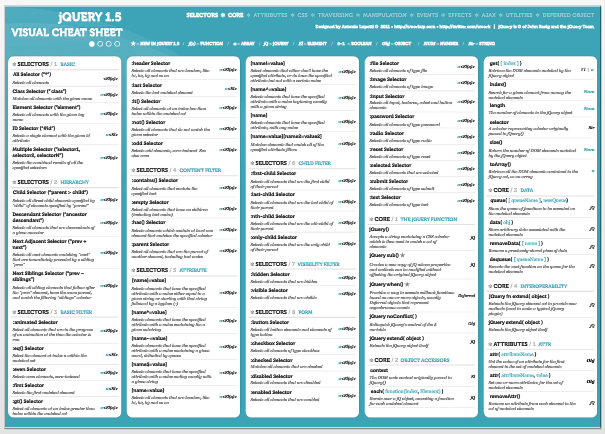
jQuery 1.5 Visual Cheat Sheet(Jquery 备忘单)

Scott 在他这篇博客中还给大家送一个Jquery 备忘单jQuery PDF “cheat sheet” ,适用于 jQuery 1.5 APIs.

image

可以从这里下载.

[转载]理解Android的AIDL原理之代理模式

mikel阅读(1122)

[转载]理解Android的AIDL原理之代理模式 – 宁 静 致 远 – 博客园.

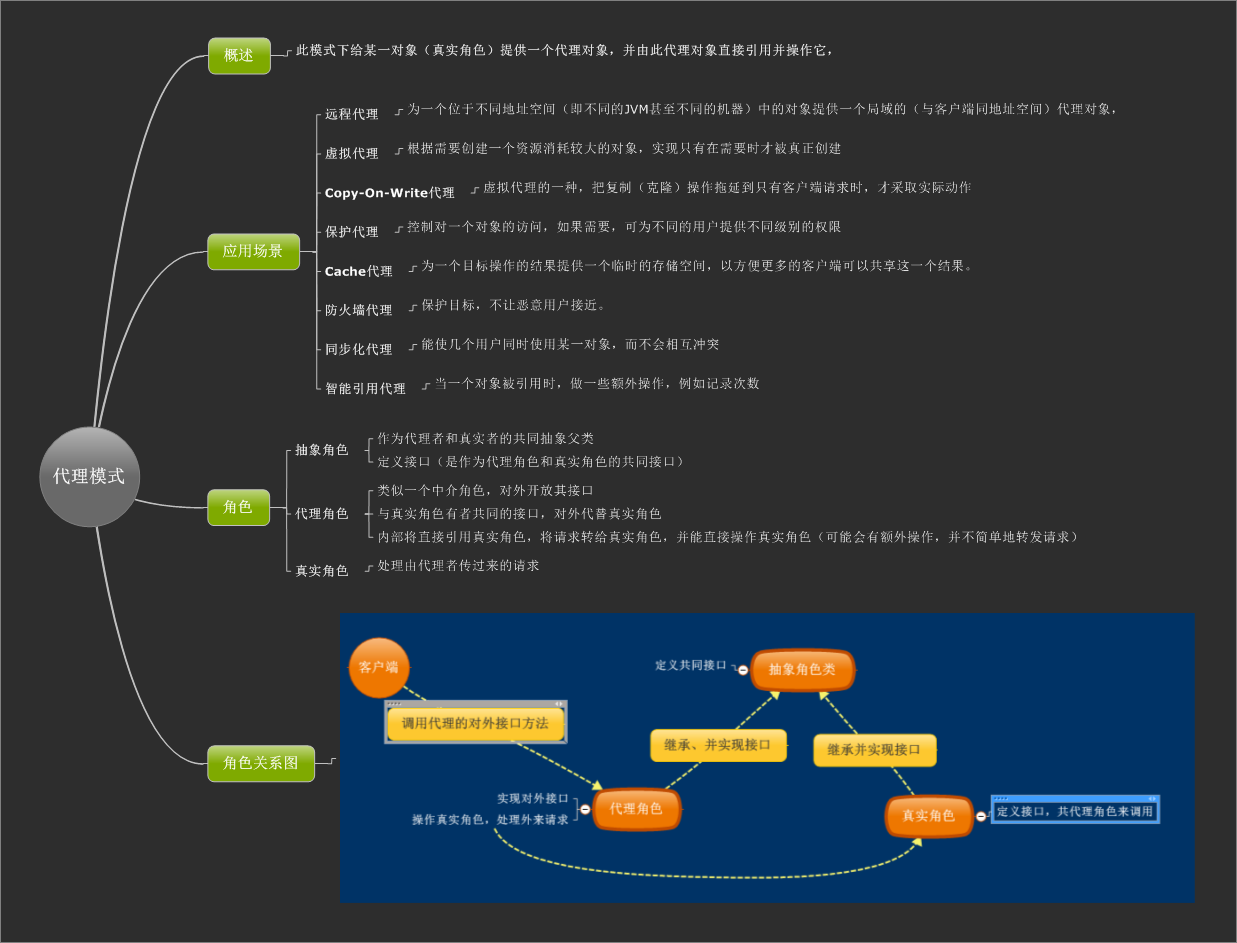
Android系统中的AIDL是以JAVA的RMI和代理模式为理论基础的,若要灵活掌握AIDL,有必要重新理顺这些基础知识的,这里我们先了解代理模式的相关基础,
有关代理模式的知识,可以用下面这个思维导图来表示:
这里以一个代码实例来说明实际运用:
1、抽象类Role代码
1 package com.magc.proxy; 2 3 /** 4 * @author magc 5 *代理角色和真实角色的共同抽象类 6 */ 7 public abstract class Role { 8 9 //作为代理角色和真实角色的共同接口,方便代理角色对外代替真实角色来提供服务 10 public abstract void service(String user_id); 11 12 }
2、真实角色类RealRole代码
1 package com.magc.proxy; 2 3 /** 4 * @author magc 5 * 真实角色类 6 * 对外是不可访问 7 * 8 */ 9 public class RealRole extends Role { 10 11 /* (non-Javadoc) 12 * @see com.magc.proxy.Role#service() 13 * 提供服务 14 */ 15 @Override 16 public void service(String user_id) { 17 System.out.println("真实角色为你服务……"); 18 } 19 //验证用户身份 20 public boolean CheckUser(String user_id) 21 { 22 return true; 23 } 24 25 }
3、代理类ProxyRole代码:
1 package com.magc.proxy; 2 3 /** 4 * @author magc 5 * 代理角色类 6 * 对客户端开发其接口 7 * 内部可以直接引用真实角色实例,将客户端的请求转给真实角色实例 8 * 对转发请求的前或者后面可以增加一些额外操作 9 */ 10 public class ProxyRole extends Role { 11 private RealRole realrole = null; 12 13 /* (non-Javadoc) 14 * @see com.magc.proxy.Role#service() 15 */ 16 @Override 17 public void service(String user_id) { 18 System.out.println("代理角色为你服务……"); 19 //需要时才去创建真实角色实例 20 realrole = new RealRole(); 21 //增加额外操作:验证身份 22 System.out.println("验证身份……"); 23 if(!realrole.CheckUser(user_id)) 24 return; 25 System.out.println("去找真实角色实例帮忙处理事务……"); 26 realrole.service("magc"); 27 28 System.out.println("谢谢光临……"); 29 } 30 31 }
4、测试类RoleTest类代码
1 package com.magc.proxy; 2 3 /** 4 * @author magc 5 * 代理模式测试类 6 * 作为客户端去请求调用代理类的接口。 7 * 客户端只能访问代理类,而不能访问真实角色类 8 */ 9 public class ProxyTest { 10 11 /** 12 * @param args 13 */ 14 public static void main(String[] args) { 15 16 ProxyRole proxy = new ProxyRole(); 17 proxy.service("magc"); 18 } 19 20 }
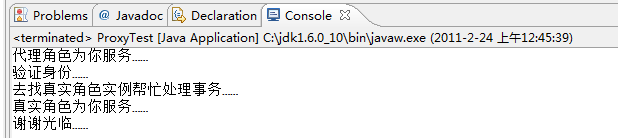
运行测试类,控制台输出结果为:
由于时间仓促,错误难免,希望能给大家有所启示,也算是在这里抛砖引玉了,呵呵

[转载]避免使用count(*)获得表的记录数,解决其延迟问题

mikel阅读(912)

[转载]避免使用count(*)获得表的记录数,解决其延迟问题 – 追索 – 博客园.

今天遇到这样一个细节问题,有个同事为了提高SQL执行效率使用sysindexes.rows来快速的计算表的行数

结果发现取出来的行数根本就不是实际表中的行数

就好比这样

为了获得表中的记录数,一般都使用下面的SQL语句:

SELECT COUNT(*) FROM dbo.orders

但这条语句会执行全表扫描才能获得行数。

下面的SQL语句不会执行全表扫描一样可以获得行数:

SELECT rows FROM sysindexes

WHERE id = OBJECT_ID(‘表名’) AND indid < 2

网上很多优化文章都推荐这种做法,无可厚非,这种计算 sysindexes 中的rows,确实比计算实际表中的行数快。

但是由于像刚才那样发生问题的情况不多所以很容易被人们所忽略其实sysindexes 是以延迟的方式更新,rows计数可能会不准确

下面就是我用两种方法获取同一个表的行数所返回的值

可以清楚的看到两组返回值并不一致

不细心的人由此可闹出不少笑话

接下来给出解决这种延迟问题的方法:

在查询分析器里面执行 DBCC UPDATEUSAGE(0, orders) with COUNT_ROWS

使用DBCC UPDATEUSAGE报告sysindexes中的页数和行数错误并进行更正

0:表示当前数据库,

orders:需要进行报告和更正的表

COUNT_ROWS:指定使用表或视图中的行数的当前计数更新 row count 列

DBCC UPDATEUSAGE应用有很多,本文没做深挖

感兴趣的朋友可查阅更多相关资料

执行完毕后提示

———————————————————————

DBCC UPDATEUSAGE: 已更新表 orders的 sysindexes 行(索引 ‘PK_PND_ORDERS’,分区 1):

行计数: 已从(7775)行更改为(7849)行。

DBCC 执行完毕。如果 DBCC 输出了错误信息,请与系统管理员联系。

———————————————————————

这时就及时更新了sysindexes使其和实际表中的行数达到一致。

好了,今天就到这里文章以实用为主,希望能对你有帮助

[转载]ASP.NET MVC---项目中用到的扩展

mikel阅读(1089)

[转载]ASP.NET MVC—项目中用到的扩展 – 迭戈 – 博客园.

摘要:本人用ASP.NET MVC开发网站已经有半年的时间了(半年的web开发经验,之前没有做过web开发,呵呵),项目中摸爬滚打,多少也积累了一些经验。写出来,一是自己的总结,二是各位大拿给提提意见。

1、关于页面中有多个Submit按钮的实现。

如果您的view要显示一些列表,那么对应的URL可能是这样:/Product/List,view的名字就是List,如果您对应的 Action名称也使用List,显然不是很明智,因为这个Action使用一个动词的形式更好,比如:GetList,那么您就需要用到

ActionNameAttribute

,对于的Action写成这样

[ActionName("Test")] public ActionResult Index()

页面中有多个Submit按钮,提交的时候如何确定执行哪个Action呢?我们可以和ActionNameAttribute一样继承ActionNameSelectorAttribute,通过这个选择器来实现页面多个Submit按钮的提交。

因为被点击的Submit标签(name和value值)会post到服务器(可用状态下),所以在view里面给每一个Submit的name属性设置一个值即可。对于的Action写法如下:

[AcceptVerbs(HttpVerbs.Post), MultiSubmitButtonSelector("SearchTest")] public ActionResult SearchTest()

MultiSubmitButtonSelector的实现和MVC已有的ActionNameAttribute实现类似,具体代码如下:

[AttributeUsage(AttributeTargets.Method, Inherited = true, AllowMultiple = false)] public class MultiSubmitButtonSelectorAttribute : ActionNameSelectorAttribute { public string SubmitButtonName { private set; get; } public MultiSubmitButtonSelectorAttribute(string submitButtonName) { SubmitButtonName = submitButtonName; } public override bool IsValidName(ControllerContext controllerContext, string actionName, System.Reflection.MethodInfo methodInfo) { if (string.IsNullOrEmpty(SubmitButtonName)) { return false; } return controllerContext.HttpContext.Request.Form[SubmitButtonName] != null; } }

即:遍历Controller中所有具有ActionNameSelectorAttribute特性的Action,用其标注的 SubmitButtonName对post进来的数据进行取值操作,如果有值,说明Submit对应的正是这个Action。如果遍历结束,依然找不到 需要执行的Action,那么会执行该Form要提交到的Action。

这样就解决了,一个Form里面有多个submit的情况,需要注意的是,当submit被点击之后不能将其变为不可用,否则无法将该submit提交到服务器端,也就找不到对应的Action了。

2、生成并导出Excel(CSV)

这样的方法,默认的框架里面并没有提供,我们要自己动手。我在项目里面使用的生成Excel(CSV)的算法请看这里。你可以这样定义一个Action:

public void ExportExcel() { //生成Excel代码 }

然后输出Excel文件,这样做并不是很好,不利于单元测试。

而MVC框架非常容易扩展,我们只需要继承ActionResult,实现里面的方法:public override void ExecuteResult(ControllerContext context),和其它的ActionResult一样即可。实例代码如下:

ExcelResult

1 public class ExcelResult<T> : ActionResult 2 { 3 public IEnumerable<T> SourceList { set; get; } 4 5 public DataTable SourceDataTable { set; get; } 6 7 public Dictionary<string, string> dic { set; get; } 8 9 public string FileName { set; get; } 10 11 public override void ExecuteResult(ControllerContext context) 12 { 13 //具体代码 14   } 15 }

我这里定义一个泛型类是为了处理不同类型的数据源。您还可以为T指定一个约束,比如:class。做完这些,还要为Controller添加相应的ExportExcel方法,这里我们就用到了扩展方法。具体代码如下:

ExportExcel方法

1 public static class ControllerExtensions 2 { 3 /// <summary> 4 /// 生成Excel Will 5 /// </summary> 6 /// <typeparam name="T">数据源类型</typeparam> 7 /// <param name="source">数据源</param> 8 /// <returns></returns> 9   public static ExcelResult<T> ExcelExport<T>(this Controller controller, object source) 10 { 11 return ExcelExport<T>(controller, source, null, null); 12 } 13 /// <summary> 14 /// 生成Excel Will 15 /// </summary> 16 /// <typeparam name="T">数据源类型</typeparam> 17 /// <param name="source">数据源</param> 18 /// <param name="dic">要对应的Excel列头信息</param> 19 /// <returns></returns> 20   public static ExcelResult<T> ExcelExport<T>(this Controller controller, object source, Dictionary<string, string> dic) 21 { 22 return ExcelExport<T>(controller, source, dic, null); 23 } 24 25 /// <summary> 26 /// 生成Excel Will 27 /// </summary> 28 /// <typeparam name="T">数据源类型</typeparam> 29 /// <param name="source">数据源</param> 30 /// <param name="dic">要对应的Excel列头信息</param> 31 /// <param name="fileName">Excel名称</param> 32 /// <returns></returns> 33   public static ExcelResult<T> ExcelExport<T>(this Controller controller, object source, Dictionary<string, string> dic, string fileName) 34 { 35 var list = source as IEnumerable<T>; 36 var dt = source as DataTable; 37 return new ExcelResult<T>() 38 { 39 SourceDataTable = dt, 40 SourceList = list, 41 dic = dic, 42 FileName = fileName 43 }; 44 } 45 }

很简单,不是吗?

3、自定义错误处理类–HandleErrorAttribute

MVC中有一个错误处理类:HandleErrorAttribute,但是功能十分有限。我在项目里面扩展了一下,多出来的功能有:

1、增加错误日志记录并发送邮件提醒

2、增加对于AJAX错误的处理

3、暂时这么多了

代码示例如下:

HandleErrorExtensionsAttribute

1 public class HandleErrorExtensionsAttribute : HandleErrorAttribute 2 { 3 public override void OnException(ExceptionContext filterContext) 4 { 5 LogError(filterContext); 6 7 if (filterContext.HttpContext.Request.IsAjaxRequest()) 8 HandleAjaxError(filterContext); 9 else 10 base.OnException(filterContext); 11 } 12 13 /// <summary> 14 /// 记录错误日志 15 /// </summary> 16 /// <param name="filterContext"></param> 17   private void LogError(ExceptionContext filterContext) 18 { 19 ILog log = LogHelper.GetInstance(); 20 21 string errorMsg = string.Format("Controller: {0}|Action: {1}|id: {2}|Message: {3}|StackTrace:{4}", 22 filterContext.RouteData.Values["controller"], filterContext.RouteData.Values["action"], 23 filterContext.RouteData.Values["id"], filterContext.Exception.Message, filterContext.Exception.StackTrace); 24 25 log.AddLog(errorMsg, DateTime.Now); 26 } 27 28 /// <summary> 29 /// 处理Ajax请求的错误 30 /// </summary> 31 /// 多数代码来自MVC框架,只是将ActionResult改成json 32 /// <param name="filterContext"></param> 33   private void HandleAjaxError(ExceptionContext filterContext) 34 { 35 if (filterContext == null) 36 { 37 throw new ArgumentNullException("filterContext"); 38 } 39 40 // If custom errors are disabled, we need to let the normal ASP.NET exception handler 41 // execute so that the user can see useful debugging information. 42   if (filterContext.ExceptionHandled || !filterContext.HttpContext.IsCustomErrorEnabled) 43 { 44 return; 45 } 46 47 Exception exception = filterContext.Exception; 48 49 // If this is not an HTTP 500 (for example, if somebody throws an HTTP 404 from an action method), 50 // ignore it. 51   if (new HttpException(null, exception).GetHttpCode() != 500) 52 { 53 return; 54 } 55 56 if (!ExceptionType.IsInstanceOfType(exception)) 57 { 58 return; 59 } 60 61 filterContext.Result = new JsonResult() { Data = string.Format("系统发送错误, {0}", filterContext.Exception.Message) }; 62 filterContext.ExceptionHandled = true; 63 filterContext.HttpContext.Response.Clear(); 64 filterContext.HttpContext.Response.StatusCode = 500; 65 66 // Certain versions of IIS will sometimes use their own error page when 67 // they detect a server error. Setting this property indicates that we 68 // want it to try to render ASP.NET MVC's error page instead. 69   filterContext.HttpContext.Response.TrySkipIisCustomErrors = true; 70 } 71 }

对于代码:filterContext.HttpContext.Request.IsAjaxRequest()是MVC提供的判断一个请求是不 是AJAX请求的方法,代码很简单,自己看一下就行了。之所以这样判断是因为现在的JavaScript类库在进行AJAX请求的时候都会在head里面 加入表示是AJAX请求的信息。

其余代码很清楚,就不多解释了。

一期的东西就写这么多暂时,MVC是一个很灵活,扩展性很好的框架,只要需要,你完全可以自定义很多东西。