[Lucene]《Lucene天书》 Lucene的文件系统

mikel阅读(899)

Lucene的文件系统分为内存和硬盘两个部分,文件逻辑组织方式暂且不提,本文将关注其物理结构,包括它在内存中如何存放,以及如何写入硬盘。

目录
一、相关类
   1.1 Directory
   1.2 IndexInput和IndexOutput
   1.3 RAMFile
二、索引概述
   2.1 IndexOutput
 2.2 RAMOutputStream和RAMFile
   2.3 内存文件是如何写入硬盘的

一、相关类

1.1 Directory
一个 Directory在Lucene系统中可以被称为“一份索引”,可以有许多份索引共同提供搜索数据源,而一个Directory就是对其每份索引的描 述。它可以存放在内存中,也可以存放于硬盘上。存放在内存中的时候,是使用它子类RAMDirectory的实例,存放在硬盘上的时候是使用 FSDirectory的实例。

图 1.1.1 Directory类图

1.2 IndexInput和IndexOutput
IndexInput负责读取,IndexOutput负责写入。其子类负责具体的工作。这里暂且不多讲。


图1.2.1 IndexOutput和IndexInput

1.3 RAMFile
RAMFile是Lucene文件系统内存文件的基本单位。一个Directory可以包含N个RAMFile(N >= 2)。

二、索引概述
这里不讨论索引的逻辑结构,而只单纯地看索引是如何在内存中存储,如何持久化到硬盘。


图 2.1 索引过程

图2.1体现整个过程。首先调用IndexWriter类的AddDocument方法,这 个是外部调用,走入内部,是由IndexWriter调用了DocumentWriter的AddDocument方法。然后 DocumentWriter完成调用自身的UpdateDocument,ProcessDocument,ProcessField方法,再转入 FieldWriter的WriteField方法,这个方法又调用了IndexOutput里WriteInt或者其它一些按类型写入的方法,最终由 RAMOutputStream调用自身的WriteByte写入内存。(IndexOutput里的方法实际存在于RAMOutputStream的实 例。)

2.1 IndexOutput
IndexOutput 主要定义了一些按类型写入的方法,最终都会走向虚方法WriteByte。这些方法在我写的解读Lucene中都有讲到。值得一提的是 WriteChars方法,这个方法看似很复杂,但是其完成的功能却很简单,其实是做了.Net Framework中的Encoding.UTF8.GetBytes方法的工作。看下代码2.1.1和2.1.2的相似之处就可以明白。(代码 2.1.1摘自Lucene IndexOutput源码,2.1.2摘自.Net Framework UTF8Encoding类源码。其自己实现是因为翻译自Java版本。)

代码 2.1.1


代码 2.1.2

2.2 RAMOutputStream和RAMFile
RAMOutputStream是IndexOutput的一个子类,其主要点在于三个元素。
1、BUFFER_SIZE 是其缓冲片段的长度;
2、RAMFile 内存文件实例;
3、它的一些方法。
它的方法最终都是完成把数据写入缓冲片段,再把缓冲片段存入RAMFile的实例。它们之间就是这个关系。
RAMOutputStream 需要写入数据,最终会写入一个byte数组,这个数组的长度就是BUFFER_SIZE,由RAMOutputStream调用RAMFile的 AddBuffer方法负责创建这个数组,同时把这个数组作为一个节点存入RAMFile的ArrayList。也就是说RAMFile代表的一个内存文 件,实际上是一个ArrayList数组。而ArrayList数组的每个索引又都由一个byte数组组成,这个byte数组的长度是 BUFFER_SIZE。RAMOutputStream的WriteByte方法负责把数据写入byte数组。(看到这个是不是觉得Lucene的文件 系统根本就不是什么天书嘛,也是很好理解的嘛,呵呵。)

2.3 内存文件如何写入硬盘的
Lucene 文件系统在硬盘的表现实例就是FSDirectory。这个类会负责创建其文件系统所需的描述性文件和数据文件。而具体写入硬盘的工作是由它的内嵌类 FSIndexOutput来完成的。这也就是我们的图1.2.1没有描绘到这个类的原因,这个类继承自BufferedIndexOutput。 BufferedIndexOutput大体上与RAMOutputStream差不多,区别在于其Flush方法与会调用到FSIndexOutput 的FlushBuffer方法,最终把RAMFile的数据写入硬盘文件。

时间原因,这里就不详细介绍了,感兴趣的朋友可以自己去实验一下。

______________________________________________________________________________________________
2009-2-18 by yurow
@ http://birdshover.cnblogs.com

[C#]How to create a simple SWF decompiler

mikel阅读(1374)

Swf Decompiler sample with C#

Goal of this article

This article's main goal is to show how to manage SWF encoded files with .NET, C#, or VB.NET. SWF is a binary format which represents compiled Flash animations.

Using the SwfDotNet library

The SwfDotNet library is a C# open source framework available at:

This library offers some good stuff to read and write SWF format files from version 1 to 7 for now. SwfDotNet.IO.dll is compatible with the .NET framework 1.1, 2.0 and +. This library respects MacromediaTM SWF format specifications. You can read and download the Macromedia official specifications here.

For our decompiler application, we used this framework like in these examples:

Include the SwfDotnNet library in your class:

Collapse
using SwfDotNet.IO;

Create a SwfReader object to get a Swf object:

Collapse
// Create a swf stream reader

SwfReader swfReader = new SwfReader("myfile.swf");
// Read the completed swf file

Swf swf = swfReader.ReadSwf();
// Read only headers of file to optimize read speed

//Swf swf = swfReader.ReadSwfHeader();

// Write swf file version

Console.WriteLine("Version: " + swf.Version);
// Write swf animation dimensions

Console.WriteLine("Size: " + swf.Header.Width +
"x" + swf.Header.Height);
// Write swf fps

Console.WriteLine("Fps: " + swf.Header.Fps);
// Write swf file size

Console.WriteLine("File size: " + swf.Header.FileSize);
// Write swf file frames count

Console.WriteLine("Frames count: " + swf.Header.Frames);
// Write swf file signature (compressed or not)

Console.WriteLine("Signature: " + swf.Header.Signature);
// Closing stream reader

swfReader.Close();

Write in a Swf object and save as an SWF file or stream:

Collapse
// Create a new swf animation

Swf swf = new Swf();
// Define background as blue

swf.Tags.Add(new SetBackgroundColorTag(255, 0, 0));
// Define a new frame

swf.Tags.Add(new ShowFrameTag());
// Define a swf writer

SwfWriter writer = new SwfWriter("myfile.swf");
// Write animation

writer.Write(swf);
// Close the stream

writer.Close();

List of available tag objects in the framework:

Collapse
// Include tags namespace

using SwfDotNet.IO.Tags;
...
// Tags are organized as followed:

// 1. To control the frames flow

// Create a new frame

ShowFrameTag resTag = new ShowFrameTag();
// End of frames sequence

EndTag resTag = new EndTag();
// Define a frame name

FrameLabelTag resTag = new FrameLabelTag();
// Place an object to the screen

PlaceObjectTag resTag = new PlaceObjectTag();
// Place an object to the screen

PlaceObject2Tag resTag = new PlaceObject2Tag();
// Remove an object of the screen

RemoveObjectTag resTag = new RemoveObjectTag();
// Remove an object of the screen

RemoveObject2Tag resTag = new RemoveObject2Tag();
// Define background color

SetBackgroundColorTag resTag = new SetBackgroundColorTag();
// Protect the animation

ProtectTag resTag = new ProtectTag();
// Define tag index of object

SetTabIndexTag resTag = new SetTabIndexTag();
// 2. To embed a picture in an animation

//Add bitmap or gif

DefineBitsTag resTag = new DefineBitsTag();
//Define bitmap

DefineBitsLossLessTag resTag = new DefineBitsLossLessTag();
//Define bitmap with transparency

DefineBitsLossLess2Tag resTag = new DefineBitsLossLess2Tag();
//Define a jpeg compression table

JpegTableTag resTag = new JpegTableTag();
// To include jpeg files

DefineBitsJpeg2Tag resTag = new DefineBitsJpeg2Tag();
//To include transparent jpeg files

DefineBitsJpeg3Tag resTag = new DefineBitsJpeg3Tag();
// 3. To define new button

// To create a simple button

DefineButtonTag resTag = new DefineButtonTag();
// To create a simple button

DefineButton2Tag resTag = new DefineButton2Tag();
// To create a simple button

DefineButtonCxFormTag resTag = new DefineButtonCxFormTag();
// To create a button with sound

DefineButtonSoundTag resTag = new DefineButtonSoundTag();
// 4. To create a new movie clip (container of tags sequence)

DefineSpriteTag resTag = new DefineSpriteTag();
// 5. To add text

// To create an edit text area

DefineEditTextTag resTag = new DefineEditTextTag();
// To use a font

DefineFontTag resTag = new DefineFontTag();
DefineFont2Tag resTag = new DefineFont2Tag();
DefineFontInfoTag resTag = new DefineFontInfoTag();
DefineFontInfo2Tag resTag = new DefineFontInfo2Tag();
// To add static text

DefineTextTag resTag = new DefineTextTag();
// To add static text

DefineText2Tag resTag = new DefineText2Tag();
// 6. Define shapes or morph shapes to draw

// To create morph shapes

DefineMorphShapeTag resTag = new DefineMorphShapeTag();
// To create glyph shapes

DefineShapeTag resTag = new DefineShapeTag();
// To create glyph shapes

DefineShape2Tag resTag = new DefineShape2Tag();
// To create glyph shapes

DefineShape3Tag resTag = new DefineShape3Tag();
// 7. Audio and video embedding

DefineSoundTag resTag = new DefineSoundTag();
SoundStreamBlockTag resTag = new SoundStreamBlockTag();
SoundStreamHeadTag resTag = new SoundStreamHeadTag();
SoundStreamHead2Tag resTag = new SoundStreamHead2Tag();
StartSoundTag resTag = new StartSoundTag();
DefineVideoStreamTag resTag = new DefineVideoStreamTag();
VideoFrameTag resTag = new VideoFrameTag();
// 8. Add action script and debugg

// Add action script code

DoActionTag resTag = new DoActionTag();
// Enable debugger

EnableDebuggerTag resTag = new EnableDebuggerTag();
// Enable debugger

EnableDebugger2Tag resTag = new EnableDebugger2Tag();
// Export assets

ExportAssetsTag resTag = new ExportAssetsTag();
// Import assets

ImportAssetsTag resTag = new ImportAssetsTag();
// Init action

InitActionTag resTag = new InitActionTag();
ScriptLimitTag resTag = new ScriptLimitTag();

Use the byte code decompiler to get the action script code of an Action tag:

Collapse
//include bytecode management namespace

using SwfDotNet.IO.ByteCode;
...
//Browse swf tags list

IEnumerator tagsEnu = swf.Tags.GetEnumerator();
while (tagsEnu.MoveNext())
{
BaseTag tag = (BaseTag)tagsEnu.Current;
if (tag.ActionRecCount != 0)
// The tag contains action script ?

{
IEnumerator byteCodeEnu = tag.GetEnumerator();
while (enum2.MoveNext())
{
//Init the action script decompiler

Decompiler dc = new Decompiler(swf.Version);
//Decompile the current actionscript action from a tag

ArrayList actions = dc.Decompile((byte[])tagsEnu.Current);
foreach (BaseAction obj in actions)
{
//Write action script byte code to the console

Console.WriteLine(obj.ToString());
}
}
}
}

We can directly extract media files from tags:

Collapse
//Browse swf tags list

IEnumerator tagsEnu = swf.Tags.GetEnumerator();
while (tagsEnu.MoveNext())
{
BaseTag tag = (BaseTag)tagsEnu.Current;
if (tag is DefineBitsJpeg2Tag) //Extract a jpeg:

{
//Extract to a file:

((DefineBitsJpeg2Tag)tag).DecompileToFile("extract_image.jpeg");
//Or in a stream:

Image img = ((DefineBitsJpeg2Tag)tag).DecompileToImage();
}
else if (tag is DefineSoundTag) //Extract a sound file:

{
DefineSoundTag soundTag = (DefineSoundTag)tag;
//Extract to a file

if (soundTag.SoundFormat == SoundCodec.MP3)
soundTag.DecompileToFile("extract_sound.mp3");
else
soundTag.DecompileToFile("extract_sound.wav");
}
}

Creating the SWF decompiler sample

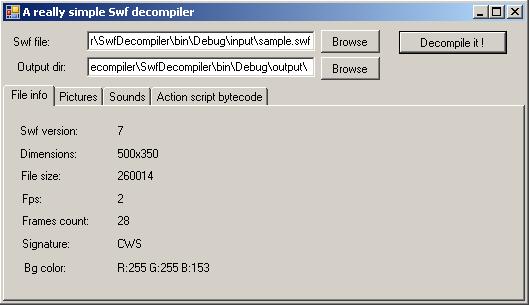
The goal of this sample is to create a very simple SWF decompiler. From a compiled FlashTM animation (SWF file), we want to load it, and extract in separate files, all the pictures and all the embedded MP3 files.

Attention: This sample decompiler is not a full SWF decompiler! This sample only decompiles embedded JPEG files without the JPEG table, and only non-streamed MP3 and WAV sounds. Only the action script byte code is extracted too.

You can see a file called SwfDecompiler.exe.log.xml in the project, this file is the log4net framework configuration file. For more information about log4net, you can read this article or go to the official web site.

The SwfDotNet library uses log4net for all the trace operations. When you read an SWF file, you can trace all the SWF tags read by the SwfReader object, and you can trace the different shapes contained by a DefineShape tag for example.

To do it, just change these lines in the SwfDecompiler.exe.log.xml file:

Collapse
<!-- To trace tags readed -->
<logger name="SwfDotNet.IO">
<level value="ALL" />  <!-- Turn it to ALL -->
</logger>
<!-- To trace shapes readed -->
<logger name="SwfDotNet.IO.Tags.Types">
<level value="ALL" />  <!-- Turn it to ALL -->
</logger>

If you change these values and execute the decompiler one more time, a file named "Log.txt" will appear in the same directory of the application, with some lines like this::

Collapse
[DEBUG] - **************** Start to decompile file ..\input\sample.swf
[INFO ] - SetBackgroundColor....OK (5)
[INFO ] - SoundStreamHead2....OK (6)
[INFO ] - DefineBitsJpeg2....OK (43816)      <== A DefineBitsJpeg2
tag has been readed
which contains
43816 octects of data
[INFO ] - Shape: StyleChangeRecord
[INFO ] - Shape: StraightedEdgeRecord
[INFO ] - Shape: StraightedEdgeRecord        <== A straighted edge
shape has been readed
[INFO ] - Shape: StraightedEdgeRecord
[INFO ] - Shape: StraightedEdgeRecord
[INFO ] - Shape: EndShapeRecord
[INFO ] - DefineShape....OK (61)
[INFO ] - PlaceObject2....OK (8)
[INFO ] - DefineSound....OK (8439)
[INFO ] - StartSound....OK (9)
[INFO ] - DefineSound....OK (293373)
[INFO ] - StartSound....OK (9)
[INFO ] - ShowFrame....OK (2)
[INFO ] - ShowFrame....OK (2)
.....

Conclusion

As you can see, thanks to the SwfDotNet library, you can easily analyse, manage, create, read, or write SWF binary files. This sample is a really "light" SWF decompiler but shows the way to do it, shows how to do a real one, and doesn't require to be a binary reading process expert.

Moreover, the SwfDotNet library is 100% free (GPL license) and not platform dependent: you can use it in a web project or in a WinForms application, and, for sure, with Mono.

History

  • 19/12/2006: First article version.

License

This article has no explicit license attached to it but may contain usage terms in the article text or the download files themselves. If in doubt please contact the author via the discussion board below.

A list of licenses authors might use can be found here

About the Author

Olivier Carpentier

Olivier Carpentier is a french C#.Net Architect, Microsoft Certified Professional.
Software Expert at SQLi, french consulting company
http://www.sqli.com

Occupation: Web Developer
Location: France France

[MVC]Asp.Net Mvc: Model Binding to Simple Types, C

mikel阅读(856)

环境:

Windows 2008, VS 2008 SP1, ASP.NET Mvc RC1

——————————————————————————

本文主要实验如何应用ASP.NET Mvc内建功能(DefaultModelBinder)实现简单类型、复杂类型、集合类型,以及字典类型的自动绑定。

1. 简单类型

这里,我们将下面这个Book类称为简单类型:

public class Book
    {
        
public int BookId { getset; }
        
public string BookName { getset; }
        
public string Author { getset; }
        
public DateTime PublishedDate { getset; }
    }

假设现在需要实现添加Book的功能,那么在BookController中,会定义如下的Action:

[AcceptVerbs(HttpVerbs.Post)]
        
public ActionResult Create(Book book) {
            
//TO DO
            
//Insert book into Database
            return RedirectToAction("Index");
        }

现在的问题便是,在View中如何命名TextBox来达到自动绑定,如下:

<div>
        
<%using (Html.BeginForm("Create""Book")) { %>
        
<div>
            Book Name: 
<%=Html.TextBox("BookName")%>
        
</div>
        
<div>
            Author: 
<%=Html.TextBox("Author")%>
        
</div>
        
<div>
            Published Date: 
<%=Html.TextBox("PublishedDate")%>
        
</div>
        
<div>
            
<input type="submit" id="submit" name="submit" value="submit" />
        
</div>
        
<%%>
    
</div>

注意TextBox的name必须是对应绑定类型的PropertyName(不区分大小写)。 这样,页面表单submit后,我们便可 以在BookController的“Create” Action中得到自动绑定的book对象。这里,ASP.NET Mvc还支持在TextBox的name中加上变量名称前缀的情形:

<div>
        
<%using (Html.BeginForm("Create""Book")) { %>
        
<div>
            Book Name: 
<%=Html.TextBox("book.BookName")%>
        
</div>
        
<div>
            Author: 
<%=Html.TextBox("book.Author")%>
        
</div>
        
<div>
            Published Date: 
<%=Html.TextBox("book.PublishedDate")%>
        
</div>
        
<div>
            
<input type="submit" id="submit" name="submit" value="submit" />
        
</div>
        
<%%>
    
</div>

需要注意的是:
1)前缀"book"必须与Action中接收的Book参数名一致
2)如果加了前缀,那么所有的都要加

2. 复杂类型

现在对Book类作些许改动,并引入Author类:

public class Book
    {
        
public int BookId { getset; }
        
public string BookName { getset; }
        
public Author Author { getset; }
        
public DateTime PublishedDate { getset; }
    }
    
public class Author {
        
public int AuthorId { getset; }
        
public string AuthorName { getset; }
        
public string Nation { getset; }
    }

这里,将改动后的Book类称为复杂类。这时,Book类多了一个对Author类的引用。现在,保持BookController中的"Create" Action不变,来看View中的TextBox改如何命名以实现Book类型的自动绑定:

<div>
        
<%using (Html.BeginForm("Create""Book")) { %>
        
<div>
            Book Name: 
<%=Html.TextBox("BookName")%>
        
</div>
        
<div>
            Published Date: 
<%=Html.TextBox("PublishedDate")%>
        
</div>
        
<div>
            Author
's Name: <%=Html.TextBox("Author.AuthorName")%>
        </div>
        
<div>
            Author
's Nation: <%=Html.TextBox("Author.Nation")%>
        </div>
        
<div>
            
<input type="submit" id="submit" name="submit" value="submit" />
        
</div>
        
<%%>
    
</div>

OK,测试通过,想必你也知道命名规则了,要绑定Book类型中的Author类型,必须加上"Author."的前缀。
如果你喜欢,你还可以在所有TextBox名称前面再加"book."的前缀。

3. 集合类型

为避免问题复杂化,我们用回原来的简单Book类型:

public class Book
    {
        
public int BookId { getset; }
        
public string BookName { getset; }
        
public string Author { getset; }
        
public DateTime PublishedDate { getset; }
    }

现在,把BookController的"Create" Action改为接收IList<Book>的参数:

[AcceptVerbs(HttpVerbs.Post)]
        
public ActionResult Create(IList<Book> books) {
            
//TO DO
            
//Insert book into Database
            return RedirectToAction("Index");
        }

然后,在View中运用以下命名规则,以自动绑定IList<book>类型,

<div>
        
<%using (Html.BeginForm("Create""Book")) { %>
        
<div>
            Book Name: 
<%=Html.TextBox("books[0].BookName")%>
        
</div>
        
<div>
            Published Date: 
<%=Html.TextBox("books[0].PublishedDate")%>
        
</div>
        
<div>
            Author
's Name: <%=Html.TextBox("books[0].Author")%>
        </div>
        
<div>
            Book Name: 
<%=Html.TextBox("books[1].BookName")%>
        
</div>
        
<div>
            Published Date: 
<%=Html.TextBox("books[1].PublishedDate")%>
        
</div>
        
<div>
            Author
's Name: <%=Html.TextBox("books[1].Author")%>
        </div>
        
<div>
            
<input type="submit" id="submit" name="submit" value="submit" />
        
</div>
        
<%%>
    
</div>

可以看到如下规则:Action的变量名"books"加上中括号和索引作为前缀,索引必须从0开始,并且必须连续。
通过此命名规则,可以绑定任意集合类型:IList<Book>, ICollection<Book>, IEnumerable<Book>, List<Book>, Book[]等。

4. 字典类型

仍以简单Book类型为例,现在将"Create" Action改为接收IDictionary<Book>类型,

[AcceptVerbs(HttpVerbs.Post)]
        
public ActionResult Create(IDictionary<string, Book> books) {
            
//TO DO
            
//Insert book into Database
            return RedirectToAction("Index");
        }

相应的,View中的命名如下:

<div>
        
<%using (Html.BeginForm("Create""Book")) { %>
        
<div>
            Book SN: 
<%=Html.TextBox("books[0].Key"%>
        
</div>
        
<div>
            Book Name: 
<%=Html.TextBox("books[0].Value.BookName")%>
        
</div>
        
<div>
            Published Date: 
<%=Html.TextBox("books[0].Value.PublishedDate")%>
        
</div>
        
<div>
            Author
's Name: <%=Html.TextBox("books[0].Value.Author")%>
        </div>
        
<div>
            Book SN: 
<%=Html.TextBox("books[1].Key"%>
        
</div>
        
<div>
            Book Name: 
<%=Html.TextBox("books[1].Value.BookName")%>
        
</div>
        
<div>
            Published Date: 
<%=Html.TextBox("books[1].Value.PublishedDate")%>
        
</div>
        
<div>
            Author
's Name: <%=Html.TextBox("books[1].Value.Author")%>
        </div>
        
<div>
            
<input type="submit" id="submit" name="submit" value="submit" />
        
</div>
        
<%%>
    
</div>

可以看出,对于IDictioinary<Book>类型,在命名规则上,相比于集合类型,多了"Key"和"Value”的字眼。另,此规则也适用于Action参数类型为Dictionary<Book>的情形。

总结:

由此看来,只要我们遵循一定的命名规则,就可以轻松实现各种类型的自动绑定了。
当然,ASP.NET MVC还支持自定义ModelBinder扩展,请看下回分解。:-)

参考文献:
Scott Hanselman:ASP.NET Wire Format for Model Binding to Arrays, Lists, Collections, Dictionaries

Copyright

作者: Tristan G
本文版权归作者和博客园共有,欢迎转载 🙂

[C#].NET深入学习笔记(3):垃圾回收与内存管理

mikel阅读(914)

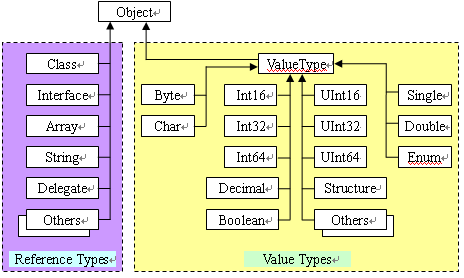
1..Net的类型和内存分配

     Net中的所有类型都是(直接或间接)从System.Object类型派生的。

    CTS中的类型被分成两大类——引用类型(reference type,又叫托管类型[managed type]),分配在内存堆上,值类型(value type)。值类型分配在堆栈上。如图


     值类型在栈里,先进后出,值类型变量的生命有先后顺序,这个确保了值类型变量在推出作用域以前会释放资源。比引用类型更简单和高效。堆栈是从高地址往低地址分配内存。

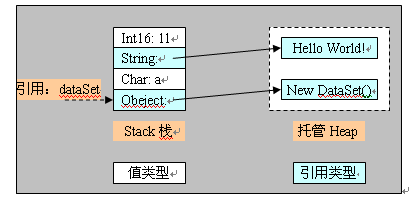
     引用类型分配在托管堆(Managed Heap)上,声明一个变量在栈上保存,当使用new创建对象时,会把对象的地址存储在这个变量里。托管堆相反,从低地址往高地址分配内存,如图


    2.GC垃圾收集器的工作原理

      上图中,当dataSet使用过期以后,我们不显示销毁对象,堆上的对象还继续存在,等待GC的 回收。

      在new对象时,要先搜索空闲链表,找到最适合内存块,分配,调整内存块链表,合并碎片。new操作几乎可以在O(1)的时间完成,把 堆顶指针加1。工作原理是: 当托管堆上剩余空间不足,或者Generator 0 的空间已满的时候GC运行,开始回收内存。垃圾回收的开始,GC对堆内存的压缩调整,对象集中到顶部。GC在扫描垃圾的时候会占用一定的CPU时间片的, 最初的GC算法真的是扫描整个堆,效率低。现在的GC把堆中的对象分成3代,最早进入堆的是第0代(generation 0), 其次是generation 1, generation2. 第一次GC只扫描第0代。如果回收的空间足够当前使用就不必扫描其它generation的对象。所以,GC创建对象的效率比C++高效,不需要扫描全部 堆空间。它通过扫描策略,再加上内存管理策略带来的性能提升,足以补偿GC所占用的CPU时间。

    3.什么是非托管资源

  常见 的非托管资源就是包装操作系统资源的对象,例如文件,窗口或网络连接,对于这类资源虽然垃圾回收器可以跟踪封装非托管资源的对象的生存期,但它知道如何清 理这些资源。好在.net Framework提供的Finalize()方法,它允许在垃圾回收器回收该类资源前,适当的清理非托管资源。这里列举几种常见的非托管资源:画笔、流 对象、组件对象等等资源 (Object,OdbcDataReader,OleDBDataReader,Pen,Regex,Socket,StreamWriter,ApplicationContext,Brush,

Component,ComponentDesigner,Container,Context,Cursor,FileStream,

Font,Icon,Image,Matrix,Timer,Tooltip)。(参考MSDN)

    4.如何有效释放非托管资源。

     GC无法管理非托管资源,那么如何释放非托管资源呢?.Net提供了两种方式:

(1)析构函数:垃圾收集器回收非托管对象的资源时,会调用对象的终结方法Finalize(),进行资源的清理工作,但是由于GC工作规则的限制,GC调用对象的Finalize方法,第一次不会释放资源,第二次调用之后才删除对象。

(2)继承IDisposable接口,实现Dispose()方法,IDisposable接口定义了一个模式(具有语言级的支持),为释放未托管的资源提供了确定的机制,并避免产生析构函数固有的与垃圾收集器相关的问题。

   为了更好的理解垃圾回收机制,我特地写了部分代码,里面添加了详细的注释。定义单个类FrankClassWithDispose(继承接口IDisposableFrankClassNoFinalize(没终结器)FrankClassWithDestructor(定义了析构函数)。

具体代码如下:


 1using System;
 2using System.Collections.Generic;
 3using System.Text;
 4using System.Data;
 5using System.Data.Odbc;
 6using System.Drawing;
 7//Coded By Frank Xu Lei 18/2/2009
 8//Study the .NET Memory Management
 9//Garbage Collector 垃圾收集器。可以根据策略在需要的时候回收托管资源,
10//但是GC不知道如何管理非托管资源。如网络连接、数据库连接、画笔、组件等
11//两个机制来解决非托管资源的释放问题。析构函数、IDispose接口
12//COM引用计数
13//C++手动管理,New Delete
14//VB自动管理
15namespace MemoryManagement
16{
17    //继承接口IDisposable,实现Dispose方法,可以释放FrankClassDispose的实例资源
18    public class FrankClassWithDispose : IDisposable
19    {
20        private OdbcConnection _odbcConnection = null;
21        
22        //构造函数
23        public FrankClassWithDispose()
24        {
25            if (_odbcConnection == null)
26                _odbcConnection = new OdbcConnection();
27            Console.WriteLine("FrankClassWithDispose has been created ");
28        }

29        //测试方法
30        public void DoSomething()
31        {
32
33            ////code here to do something
34            return ;
35        }

36        //实现Dispose,释放本类使用的资源
37        public void Dispose()
38        {
39            if (_odbcConnection != null)
40                _odbcConnection.Dispose();
41            Console.WriteLine("FrankClassWithDispose has been disposed");
42        }

43    }

44    //没有实现Finalize,等着GC回收FrankClassFinalize的实例资源,GC运行时候直接回收
45    public class FrankClassNoFinalize
46    {
47        private OdbcConnection _odbcConnection = null;
48        //构造函数
49        public FrankClassNoFinalize()
50        {
51            if (_odbcConnection == null)
52                _odbcConnection = new OdbcConnection();
53            Console.WriteLine("FrankClassNoFinalize  has been created");
54        }

55        //测试方法
56        public void DoSomething()
57        {
58
59            //GC.Collect();
60            ////code here to do something
61            return ;
62        }

63    }

64    //实现析构函数,编译为Finalize方法,调用对象的析构函数
65    //GC运行时,两次调用,第一次没释放资源,第二次才释放
66    //FrankClassDestructor的实例资源
67    //CLR使用独立的线程来执行对象的Finalize方法,频繁调用会使性能下降
68    public class FrankClassWithDestructor
69    {
70        private OdbcConnection _odbcConnection = null;
71        //构造函数
72        public FrankClassWithDestructor()
73        {
74            if (_odbcConnection == null)
75                _odbcConnection = new OdbcConnection();
76            Console.WriteLine("FrankClassWithDestructor  has been created");
77        }

78        //测试方法
79        public void DoSomething()
80        {
81            ////code here to do something
82
83            return ;
84        }

85        //析构函数,释放未托管资源
86        ~FrankClassWithDestructor()
87        {
88            if (_odbcConnection != null)
89                _odbcConnection.Dispose();
90            Console.WriteLine("FrankClassWithDestructor  has been disposed");
91        }

92    }

93}

94

其中使用了非托管的对象OdbcConnection的实例。建立的客户端进行了简单的测试。客户端代码如下:


 1using System;
 2using System.Collections.Generic;
 3using System.Text;
 4using System.Data;
 5using MemoryManagement;
 6//Coded By Frank Xu Lei 18/2/2009
 7//Study the .NET Memory Management
 8//Test The Unmanaged Objects Reclaimed.
 9//针对非托管代码的测试,比较
10//托管代码,GC可以更具策略自己回收,也可以实现IDisposable,调用Dispose()方法,主动释放。
11namespace MemoryManagementClient
12{
13    class Program
14    {
15        static void Main(string[] args)
16        {
17
18            /////////////////////////////////////////(1)////////////////////////////////////////////
19            //调用Dispose()方法,主动释放。资源,灵活
20            FrankClassWithDispose _frankClassWithDispose = null;
21            try
22            {
23                _frankClassWithDispose = new FrankClassWithDispose();
24                _frankClassWithDispose.DoSomething();
25                
26            }

27            finally
28            {
29                if (_frankClassWithDispose!=null)
30                _frankClassWithDispose.Dispose();
31                //Console.WriteLine("FrankClassWithDispose实例已经被释放");
32            }

33                
34            /////////////////////////////////////////(2)//////////////////////////////////////////////
35            //可以使用Using语句创建非托管对象,方法执行结束前,会调用
36            using (FrankClassWithDispose _frankClassWithDispose2 = new FrankClassWithDispose())
37            {
38                //_frankClassWithDispose2.DoSomething();
39            }

40
41            /////////////////////////////////////////(3)////////////////////////////////////////////
42            //垃圾收集器运行的时候,一次就释放资源
43            FrankClassNoFinalize _frankClassNoFinalize = new FrankClassNoFinalize();
44            _frankClassNoFinalize.DoSomething();
45             
46            //////////////////////////////////////////(4)//////////////////////////////////////////////
47            //垃圾收集器运行的时候,两次才能够释放资源
48            FrankClassWithDestructor _frankClassWithDestructor = new FrankClassWithDestructor();
49            _frankClassWithDestructor.DoSomething();
50            ///////////////////////////////////////////(5)/////////////////////////////////////////////
51            //不能使用Using语句来创建对象,因为其没实现IDispose接口
52            //using (FrankClassWithDestructor _frankClassWithDestructor2 = new FrankClassWithDestructor())
53            //{
54            //    _frankClassWithDestructor2.DoSomething();
55            //}
56
57            //////////////////////////////////////////////////////////////////////////////////////
58            //For Debug
59            Console.WriteLine("Press any key to continue");
60            Console.ReadLine();
61
62        
63        }

64    }

65}

66


值得一提的是:调用Dispose()方法,主动释放资源,灵活,可以使用Using语句创建非托管对象,方法执行结束前,会调用
Dispose()方法释放资源,
这两端代码的效果是一样的,可以查看编译后IL。


Code

Using 语句有同样的效果,来实现非托管对象资源的释放。这点在面试中也会经常遇到,Using关键字的用法有哪几种等等类似的问题。基本理想的答案都是除了引用 命名空间,和命名空间设置别名外,就是这个用法实现如try finally块一样作用的对非托管对象资源的回收。只是一种简便的写法。

    总结:看了本文以后,不知对你是否有所帮助,如果你理解了.net垃圾回收的机制和GC的工作原理,以及包含如何管理非托管资源,你就会成为一个内存管理 的高手。如果面试官问道这个问题,你就可以详细阐述你对这类问题的理解和看法。希望这篇文章能对你的工作和学习带来帮助~

DemoCodes/Files/frank_xl/MemoryManagement2008.zip

【作者】Frank Xu Lei

【地址】 http://www.cnblogs.com/frank_xl/archive/2009/02/19/1393566.html

[C#].net中上传视频并将各种视频文件转换成.flv格式

mikel阅读(964)

首先,我们部署一下文件夹.在工程的目录下新建几个文件夹如下图:

UpFiles文件夹是要保存你上传的文件,PlayFiles文件夹是用于你转换后保存的文件(用于网上播放)
ImgFile文件夹是保存截取视频文件的图片,然后那两个mencoder和ffmpeg文件夹是视频转换工具.此视频转换也
可叫做mencoder+ffmpeg视频转换.
首先,在配置文件中给这些文件夹进行路径的配置.如下

CODE:
<appSettings>
<!–工具文件夹–>
<add key="ffmpeg" value="ffmpeg/ffmpeg.exe"/>
<add key="mencoder" value="mencoder/mencoder.exe"/>
<add key="mplayer" value="mencoder/mplayer.exe"/>
<!–上传文件的路径–>
<add key="upfile" value="UpFiles"/>
<!–上专文件图片路径–>
<add key="imgfile" value="ImgFile"/>
<!–上传文件图片大小–>
<add key="CatchFlvImgSize" value="240×180"/>
<add key="widthSize" value="400"/>
<add key="heightSize" value="350"/>
<!–转换后文件路径–>
<add key="playfile" value="PlayFiles"/>
</appSettings>

在上传.ASPX页面中

CODE:
标题:<asp:TextBox ID="txtTitle" runat="server" Width="358px"></asp:TextBox>
<asp:RequiredFieldValidator ID="RequiredFieldValidator2" runat="server" ControlToValidate="txtTitle"
ErrorMessage="标题不为空"></asp:RequiredFieldValidator>
<br />
<asp:FileUpload ID="FileUpload1" runat="server" Width="339px" />
<asp:Button ID="btnUpload" runat="server" OnClick="btnUpload_Click" Text="上传视频" Width="70px" />
文件类型<span style="color:Red;">(.asf|.flv|.avi|.mpg|.3gp|.mov|.wmv|.rm|.rmvb)</span>
<asp:RegularExpressionValidator ID="imagePathValidator" runat="server" ErrorMessage="文件类型不正确"
ValidationGroup="vgValidation" Display="Dynamic" ValidationExpression="^[a-zA-Z]:(\\.+)(.asf|.flv|.avi|.mpg|.3gp|.mov|.wmv|.rm|.rmvb)$"
ControlToValidate="FileUpload1">
</asp:RegularExpressionValidator>
<asp:RequiredFieldValidator ID="RequiredFieldValidator1" runat="server" ControlToValidate="FileUpload1"
ErrorMessage="文件不为空"></asp:RequiredFieldValidator></div>
<div style=" height:0px; border-top:solid 1px red; font-size:0px;"></div>
<div>上传列表.</div>

程序工作的原理是:视频先上传上去,然后跟着就是开始转换.
所以.在CS 文件中有
这里为了方便我是用SQLDatasource数据控件做数据的操作.

CODE:
using System;
using System.Data;
using System.Configuration;
using System.Web;
using System.Web.Security;
using System.Web.UI;
using System.Web.UI.WebControls;
using System.Web.UI.WebControls.WebParts;
using System.Web.UI.HtmlControls;
public partial class _Default : System.Web.UI.Page
{
// 扩展名定义
string[] strArrFfmpeg = new string[] {"asf","avi","mpg","3gp","mov" };
string[] strArrMencoder = new string[] {"wmv","rm","rmvb" };
protected void Page_Load(object sender, EventArgs e)
{
}
//
protected void btnUpload_Click(object sender, EventArgs e)
{
string upFileName = "";
if (this.FileUpload1.HasFile)
{
string fileName = PublicMethod.GetFileName(this.FileUpload1.FileName);// GetFileName();
if ((string)Session["file"] == fileName)
{
return;
}
upFileName = Server.MapPath(PublicMethod.upFile + fileName);
this.FileUpload1.SaveAs(upFileName);
string saveName = DateTime.Now.ToString("yyyyMMddHHmmssffff") ;
string playFile = Server.MapPath(PublicMethod.playFile + saveName);
string imgFile = Server.MapPath(PublicMethod.imgFile + saveName);
//System.IO.File.Copy(Server.MapPath(PublicMethod.playFile + "00000002.jpg"), Server.MapPath(PublicMethod.imgFile+"aa.jpg"));
PublicMethod pm = new PublicMethod();
string m_strExtension = PublicMethod.GetExtension(this.FileUpload1.PostedFile.FileName).ToLower();
if (m_strExtension == "flv")
{//直接拷贝到播放文件夹下
System.IO.File.Copy(upFileName, playFile+".flv");
pm.CatchImg(upFileName, imgFile);
}
string Extension = CheckExtension(m_strExtension);
if (Extension == "ffmpeg")
{
  pm.ChangeFilePhy(upFileName, playFile, imgFile);
}
else if (Extension == "mencoder")
{
pm.MChangeFilePhy(upFileName, playFile, imgFile);
}
InsertData(this.txtTitle.Text, fileName,saveName);
Session["file"] = fileName;
}
}
//
private string CheckExtension(string extension)
{
string m_strReturn = "";
foreach (string var in this.strArrFfmpeg)
{
if (var == extension)
{
m_strReturn = "ffmpeg"; break;
}
}
if (m_strReturn == "")
{
foreach (string var in strArrMencoder)
{
if (var == extension)
{
m_strReturn = "mencoder"; break;
}
}
}
return m_strReturn;
}
#region 插入数据到数据库中
private void InsertData(string MediaName,string fileName,string saveName)
{
//string name=fileName.Substring(0, fileName.LastIndexOf('.'));
string imgName = saveName + ".jpg";//图片文件名;
string playName = saveName + ".flv";
string SQLstr = "insert into Media(FMediaName,FMediaUpPath,FMediaPlayPath,FMediaImgPath) values(@MName,@MUppath,@MPlaypath,@MImgpath)";
//string constr = ConfigurationManager.ConnectionStrings["SQLcon"].ToString();
SqlDataSource1.InsertCommand = sqlstr;
SqlDataSource1.InsertCommandType = SqlDataSourceCommandType.Text;// CommandType.Text;
SqlDataSource1.InsertParameters.Add("MName",MediaName);
SqlDataSource1.InsertParameters.Add("MUppath",PublicMethod.upFile+fileName);
SqlDataSource1.InsertParameters.Add("MPlaypath",PublicMethod.playFile+playName);
SqlDataSource1.InsertParameters.Add("MImgpath",PublicMethod.imgFile+imgName);
SqlDataSource1.Insert();
}
#endregion
}
PublicMethod类如下:
在这个类里面主要是做文件转换和保存,在转换文件的时候CPU的利用率可以达100%.
它的主要原理是另起一个进程在转换的时候你会发现你的进程里多了一个.
using System;
using System.Configuration;
/// <summary>
/// Summary description for PublicMethod
/// </summary>
public class PublicMethod:System.Web.UI.Page
{
public PublicMethod()
{
}
//文件路径
public static string ffmpegtool = ConfigurationManager.AppSettings["ffmpeg"];
public static string mencodertool = ConfigurationManager.AppSettings["mencoder"];
public static string mplayertool = ConfigurationManager.AppSettings["mplayer"];
public static string upFile = ConfigurationManager.AppSettings["upfile"] + "/";
public static string imgFile = ConfigurationManager.AppSettings["imgfile"] + "/";
public static string playFile = ConfigurationManager.AppSettings["playfile"] + "/";
//文件图片大小
public static string sizeOfImg = ConfigurationManager.AppSettings["CatchFlvImgSize"];
//文件大小
public static string widthOfFile = ConfigurationManager.AppSettings["widthSize"];
public static string heightOfFile = ConfigurationManager.AppSettings["heightSize"];
// // //获取文件的名字
public static string GetFileName(string fileName)
{
int i = fileName.LastIndexOf("\\") + 1;
string Name = fileName.Substring(i);
return Name;
}
//获取文件扩展名
public static string GetExtension(string fileName)
{
int i = fileName.LastIndexOf(".")+1;
string Name = fileName.Substring(i);
return Name;
}
//
#region //运行FFMpeg的视频解码,(这里是绝对路径)
/// <summary>
/// 转换文件并保存在指定文件夹下面(这里是绝对路径)
/// </summary>
/// <param name="fileName">上传视频文件的路径(原文件)</param>
/// <param name="playFile">转换后的文件的路径(网络播放文件)</param>
/// <param name="imgFile">从视频文件中抓取的图片路径</param>
/// <returns>成功:返回图片虚拟地址; 失败:返回空字符串</returns>
public string ChangeFilePhy(string fileName, string playFile, string imgFile)
{
//取得ffmpeg.exe的路径,路径配置在Web.Config中,如:<add key="ffmpeg" value="E:\51aspx\ffmpeg.exe" />
string ffmpeg = Server.MapPath(PublicMethod.ffmpegtool);
if ((!System.IO.File.Exists(ffmpeg)) || (!System.IO.File.Exists(fileName)))
{
return "";
}
//获得图片和(.flv)文件相对路径/最后存储到数据库的路径,如:/Web/User1/00001.jpg
string flv_file = System.IO.Path.ChangeExtension(playFile, ".flv");
//截图的尺寸大小,配置在Web.Config中,如:<add key="CatchFlvImgSize" value="240×180" />
string FlvImgSize = PublicMethod.sizeOfImg;
System.Diagnostics.ProcessStartInfo FilestartInfo = new System.Diagnostics.ProcessStartInfo(ffmpeg);
FilestartInfo.WindowStyle = System.Diagnostics.ProcessWindowStyle.Hidden;
FilestartInfo.Arguments = " -i " + fileName + " -ab 56 -ar 22050 -b 500 -r 15 -s " + widthOfFile + "x" + heightOfFile + " " + flv_file;
//ImgstartInfo.Arguments = " -i " + fileName + " -y -f image2 -t 0.05 -s " + FlvImgSize + " " + flv_img;
try
{
//转换
System.Diagnostics.Process.Start(FilestartInfo);
//截图
CatchImg(fileName, imgFile);
//System.Diagnostics.Process.Start(ImgstartInfo);
}
catch
{
return "";
}
//
return "";
}
//
public string CatchImg(string fileName,string imgFile)
{
//
string ffmpeg = Server.MapPath(PublicMethod.ffmpegtool);
//
string flv_img =imgFile+".jpg";
//
string FlvImgSize = PublicMethod.sizeOfImg;
//
System.Diagnostics.ProcessStartInfo ImgstartInfo = new System.Diagnostics.ProcessStartInfo(ffmpeg);
ImgstartInfo.WindowStyle = System.Diagnostics.ProcessWindowStyle.Hidden;
//
ImgstartInfo.Arguments = " -i " + fileName + " -y -f image2 -ss 2 -vframes 1 -s " + FlvImgSize + " " + flv_img;
try
{
System.Diagnostics.Process.Start(ImgstartInfo);
}
catch
{
return "";
}
//
if (System.IO.File.Exists(flv_img))
{
return flv_img;
}
return "";
}
#endregion
//
#region //运行FFMpeg的视频解码,(这里是(虚拟)相对路径)
/// <summary>
/// 转换文件并保存在指定文件夹下面(这里是相对路径)
/// </summary>
/// <param name="fileName">上传视频文件的路径(原文件)</param>
/// <param name="playFile">转换后的文件的路径(网络播放文件)</param>
/// <param name="imgFile">从视频文件中抓取的图片路径</param>
/// <returns>成功:返回图片虚拟地址; 失败:返回空字符串</returns>
public string ChangeFileVir(string fileName, string playFile, string imgFile)
{
//取得ffmpeg.exe的路径,路径配置在Web.Config中,如:<add key="ffmpeg" value="E:\51aspx\ffmpeg.exe" />
string ffmpeg = Server.MapPath(PublicMethod.ffmpegtool);
if ((!System.IO.File.Exists(ffmpeg)) || (!System.IO.File.Exists(fileName)))
{
return "";
}
//获得图片和(.flv)文件相对路径/最后存储到数据库的路径,如:/Web/User1/00001.jpg
string flv_img = System.IO.Path.ChangeExtension(Server.MapPath(imgFile), ".jpg");
string flv_file = System.IO.Path.ChangeExtension(Server.MapPath(playFile), ".flv");
//截图的尺寸大小,配置在Web.Config中,如:<add key="CatchFlvImgSize" value="240×180" />
string FlvImgSize = PublicMethod.sizeOfImg;
System.Diagnostics.ProcessStartInfo FilestartInfo = new System.Diagnostics.ProcessStartInfo(ffmpeg);
System.Diagnostics.ProcessStartInfo ImgstartInfo = new System.Diagnostics.ProcessStartInfo(ffmpeg);
FilestartInfo.WindowStyle = System.Diagnostics.ProcessWindowStyle.Hidden;
ImgstartInfo.WindowStyle = System.Diagnostics.ProcessWindowStyle.Hidden;
//此处组合成ffmpeg.exe文件需要的参数即可,此处命令在ffmpeg 0.4.9调试通过
//ffmpeg -i F:\01.wmv -ab 56 -ar 22050 -b 500 -r 15 -s 320×240 f:\test.flv
FilestartInfo.Arguments = " -i " + fileName + " -ab 56 -ar 22050 -b 500 -r 15 -s " + widthOfFile + "x" + heightOfFile + " " + flv_file;
ImgstartInfo.Arguments = " -i " + fileName + " -y -f image2 -t 0.001 -s " + FlvImgSize + " " + flv_img;
try
{
System.Diagnostics.Process.Start(FilestartInfo);
System.Diagnostics.Process.Start(ImgstartInfo);
}
catch
{
return "";
}
/**/
///注意:图片截取成功后,数据由内存缓存写到磁盘需要时间较长,大概在3,4秒甚至更长;
///这儿需要延时后再检测,我服务器延时8秒,即如果超过8秒图片仍不存在,认为截图失败;
///此处略去延时代码.如有那位知道如何捕捉ffmpeg.exe截图失败消息,请告知,先谢过!
if (System.IO.File.Exists(flv_img))
{
return flv_img;
}
return "";
}
#endregion
#region //运行mencoder的视频解码器转换(这里是(绝对路径))
public string MChangeFilePhy(string vFileName, string playFile, string imgFile)
{
string tool = Server.MapPath(PublicMethod.mencodertool);
//string mplaytool = Server.MapPath(PublicMethod.ffmpegtool);
if ((!System.IO.File.Exists(tool)) || (!System.IO.File.Exists(vFileName)))
{
return "";
}
string flv_file = System.IO.Path.ChangeExtension(playFile, ".flv");
//截图的尺寸大小,配置在Web.Config中,如:<add key="CatchFlvImgSize" value="240×180" />
string FlvImgSize = PublicMethod.sizeOfImg;
System.Diagnostics.ProcessStartInfo FilestartInfo = new System.Diagnostics.ProcessStartInfo(tool);
FilestartInfo.WindowStyle = System.Diagnostics.ProcessWindowStyle.Hidden;
FilestartInfo.Arguments = " " + vFileName + " -o " + flv_file + " -of lavf -lavfopts
i_certify_that_my_video_stream_does_not_use_b_frames -oac mp3lame -lameopts abr:br=56 -ovc lavc
-lavcopts vcodec=flv:vbitrate=200:mbd=2:mv0:trell:v4mv:cbp:last_pred=1:dia=-1:cmp=0:vb_strategy=1
-vf scale=" + widthOfFile + ":" +heightOfFile + " -ofps 12 -srate 22050";
try
{
System.Diagnostics.Process.Start(FilestartInfo);
CatchImg(flv_file, imgFile);
}
catch
{
return "";
}
//
return "";
}
#endregion
}

[Flex]Flex资源站推荐

mikel阅读(789)

一、国外站点
1.资源
Adobe Flex 2 Component Explorer : 官方的,展示了各种组件用法入门 必看。
CFlex :很好的一个Flex资源站点,包括教程 ,新闻,资源站点…… 只是页面有点杂乱,大家一般看右边那一栏就行了。
FlexBox :一个收集 了网上很多开源 组件的站点,是进阶学习 的好帮手。
FlexLib :也是一个开源Flex组件站点,不过与FlexBox不同的是,这个是原创,而FlexBox只是收集。
Flex Developer Center :Adobe Flex开发 者中心,经常会有一些好的教程出现。
Adobe Labs :这个不用我说了吧。
Flex.org:http://www.flex.org/ 官方的,基本上应有尽有。
2. Explorers
Flex 2 Style Explorer :用来设计程序 样式风格的工具,很好用,现在源代码 已经可以下载
Flex 2 Primitive Explorer :用来调节各种Primitive图形的组件,非官方的,源代码提供下载。
Flex 2 Filter Explorer :用来调节各种滤镜(filter),非官方的,源代码提供下载。
3. Blogs
MXNA :这个不用我说了吧,虽说这不是一个Blog,但是它聚合了所有优秀的Blog,所以把它放在Blog一栏,下面所有的Blog都在这个聚合中。
Alex Uhlmann:http://web logs.macromedia.com/auhlmann/
Christophe Coenraets:http://coenraets.org/ 特别推荐
Code Slinger:http://blogs.digitalprimates.net/codeSlinger/
Deitte:http://www.deitte.com/
Doug mccune:http://dougmccune.com/blog/ 特别推荐
Flex Doc Team:http://blogs.adobe.com/flexdoc/
Kuwamoto:http://kuwamoto.org/ 特别推荐
Macromedia Consulting:http://weblogs.macromedia.com/mc/
Matt Chotin:http://weblogs.macromedia.com/mchotin/ 特别推荐
Peter Ent:http://weblogs.macromedia.com/pent/ 特别推荐
Quietly Scheming:http://www.quietlyscheming.com/blog/ 特别推荐
ScaleNine Blog:http://www.scalenine.com/blog/index.php 特别推荐
Steven Webster:http://weblogs.macromedia.com/swebster/
EverythingFlex:http://blog.everythingflex.com/ 特别推荐
Alex’s Flex Closet:http://blogs.adobe.com/aharui/ 特别推荐
4. 邮件 列表
FlexCoders:http://tech.groups.yahoo.com/group/flexcoders/
Flex Components:http://www.adobe.com/go/flexcomponents 非高级开发者最好别加入
上面是两个比较有名的邮件列表,建议大家提问之前先搜索一下邮件存档,一般都能找到答案,找不到再提问。更多邮件列表请看这里:http://flex.org/community/
5.Cairngorm 相关
Cairngorm Documentation Group 这个里面收集了基本上所有关于Cairngorm的资料
二、国内站点
1.论坛
RIACHINA :前身是RIACN,国内最好的Flex论坛之一。我最初知道Flex从这里开始,对这个站挺有感情,饮水思源,把它排第一。
AnyFlex :国内最好的Flex论坛之一,成立的时间比较早,而且论坛FTP中有很多好的资料。
JavaUU : 后起之秀,主要收集一些java的开源技术 及热闹技术 资源,特别是FLEX的资源相当齐全;
RIADev :Google网上论坛,d.CAT前辈主持的,一般小问题都能解决。
FlexCoders.cn :刚起步的论坛,不过看域名觉得挺有前途,呵呵。
2.Blogs
Y.X.Shawn :对Flex研究很深入,自己写一些开源的组件。
d.CAT :高级开发者,台湾的,为数不多的华语高级开发者,他还做过一个类似Caringorm的架构。
Kenshin :很早就开始研究Flex了,自己开发过很多东西。

[Flex]Flash网页游戏辅助工具制作简析

mikel阅读(842)

转载:http://www.cnblogs.com/pvistely/archive/2009/02/18/1392842.html

《热血三国》好像是比较热,玩的人也挺多的,年前一个朋友希望能让我写一个这个游戏的外挂,也出于无聊,所以去玩了一下,谁知道一玩就有点喜欢这个游戏了,当然玩归玩,东西还是要做地,当然还不能算得上是外挂,最多算是一个辅助工具。

三国,是一个全FLASH制作的网页游戏,使用Flex做架构,使用AMF协议做数据通讯。

首先针对一款FLASH网页游戏大家需要了解他的AMF协议调用模式,就三国而言,服务器返回的消息全为AMF0格式,客户端向服务器提交的是AMF3的格式。

刚开始分析这款游戏的时候想着自己建一个AMF协议解析器,但由于做出来的功能局限性比较大时间仓促,因此从网上找到了FluorineFx开源组件,要做好一款功能强大的网页游戏工具我自己觉得应该做到功能脱机,要能在工具中独立完成各种功能调用,做全点就相当于为游戏的客户端。

但做之前最头痛的问题就是分析协议调用参数及返回参数结构,在做这个工具前我对Flash Flex是一无所知,对AS的编写还只是停留在Flash 5的程度上并且已是近十年未用了。。。

为了方便使用了以下几种工具

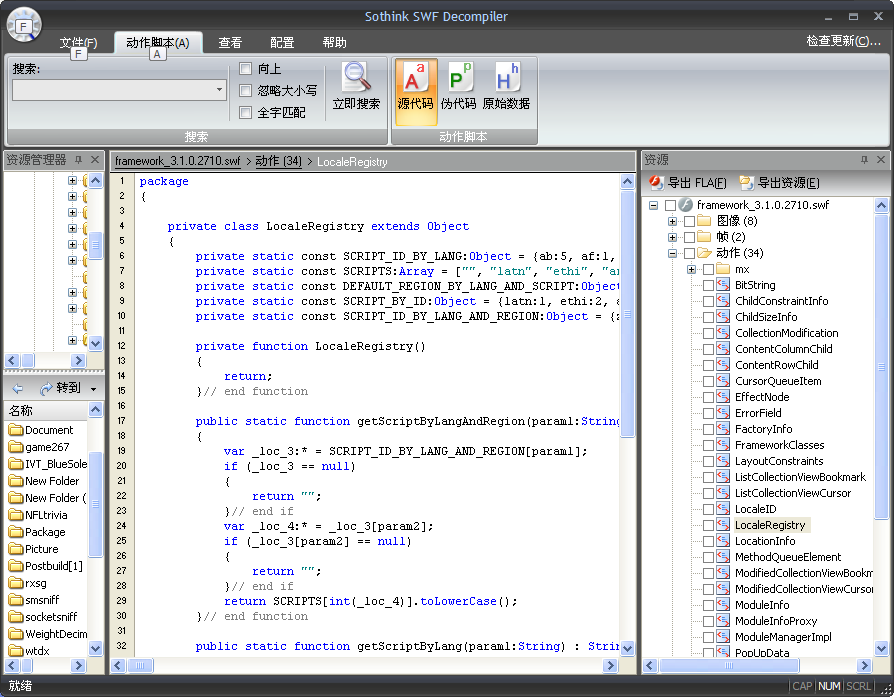
SWFDecompiler的SWF文件反编译工具

Notepad++文本编辑工具,主要用来整个目录查找指定文本(用WINDOWS的查找功能太让人失望了)

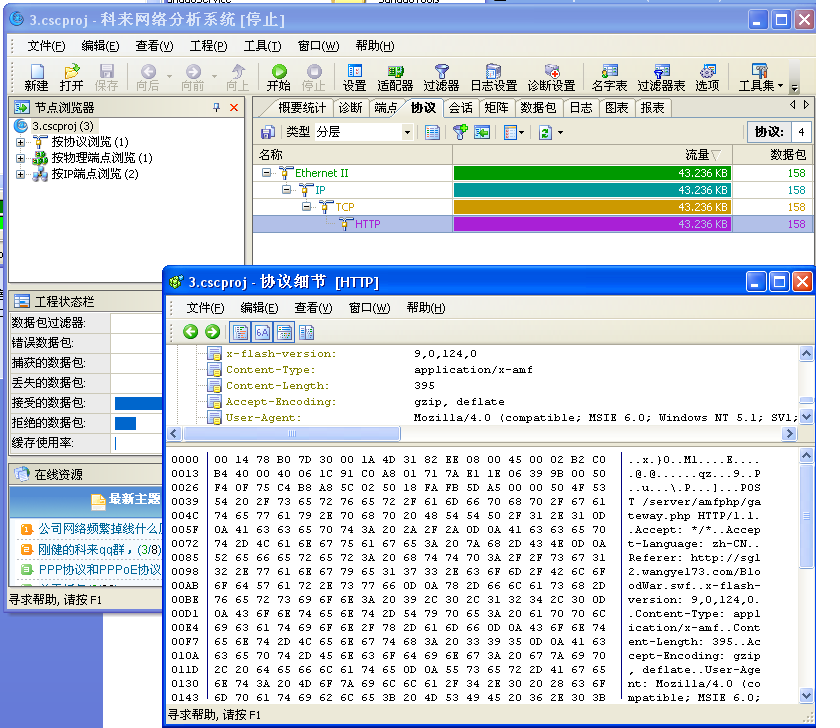
科来网络分析系统,用来获取网络通讯数据

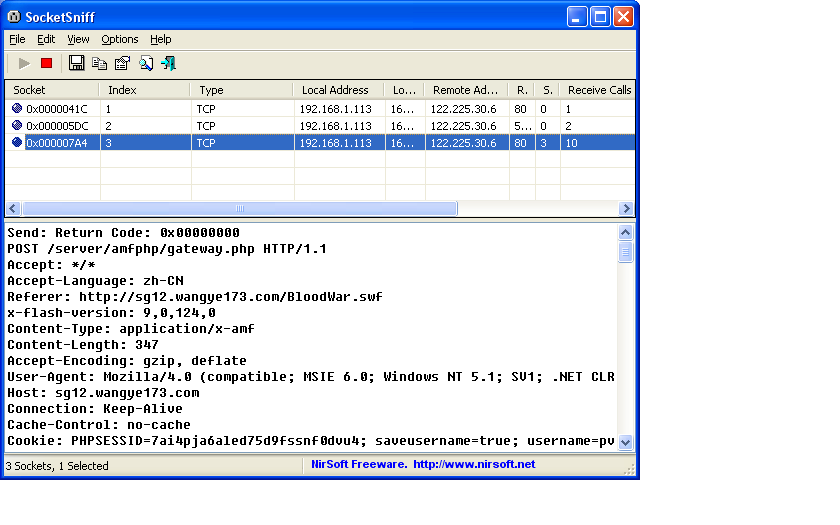
SocketSniff,相对科来系统更轻量级的网络监听工具,对于了解基本通讯流程更为方便

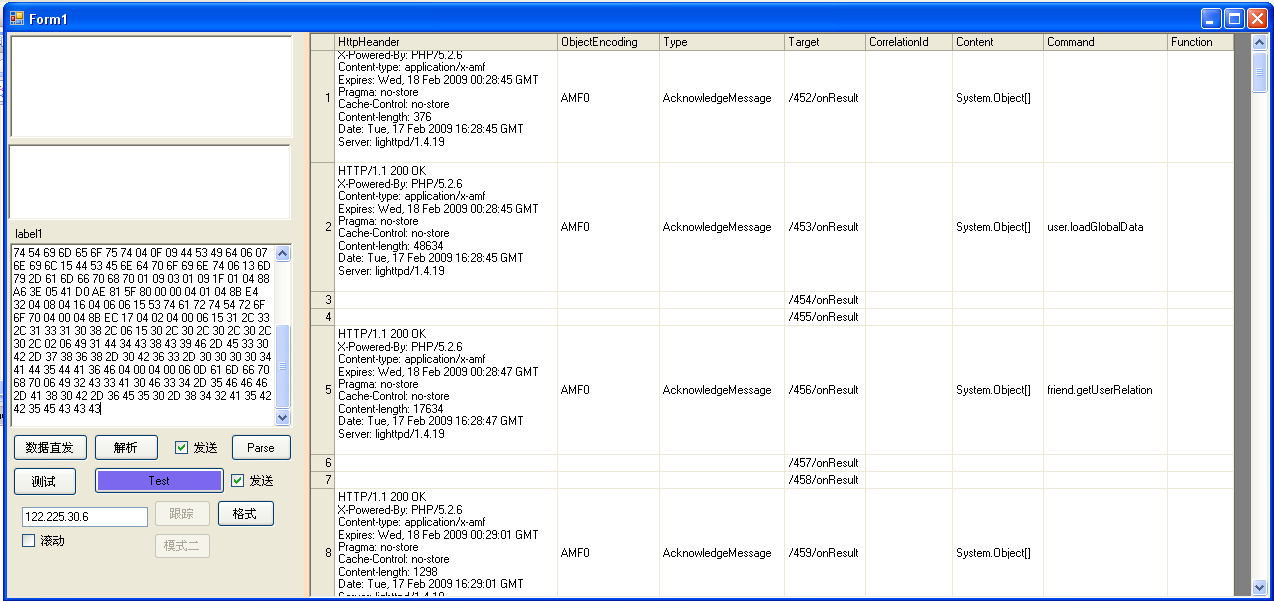
以上几种是通过网络能找到的实用工具,再加一自己做的一个AMF协议半自动分析器,主要功能是解析HEX DATA的AMF协议,及跟踪游戏AMF协议通讯过程,并简单解析体现,为更进一步分析调用过程提供参考。


一个AMF通讯过程的分析:

1.打开网页游戏,并在你需要获取命令的功能前停止操作

2.打开网络嗅探器,并执行嗅探,在此过程中最好能按IP、端口进行过滤

3.执行所需要的命令,并等待命令执行返回

4.停止网络嗅探

5.去除无关网络通讯数据,AMF协议下必定会有一个业务处理的gateway,像三国的地址为:/server/amfphp/gateway.php,并且HTTP头部的内容格式为application/x-amf,因此只需要过滤相关gateway的通讯对话就可以

6.获得通讯的HTTP数据体,并交分析工具进行协议解析

7.查看协议参数结构,并偿试重构协议复本

8.偿试将协议复本发送至服务器(请求协议)

9.调试服务器反馈数据,调试完成后即为游戏的实际AMF协议函数


在三国中,使用三种Flex消息:CommandMessage、RemotingMessage、AcknowledgeMessage

CommandMessage在游戏登录前向服务器发送请求,并返回session等安全信息

RemotingMessage为客户端向服务器提交的消息格式

AcknowledgeMessage服务器向客户端反馈的消息格式


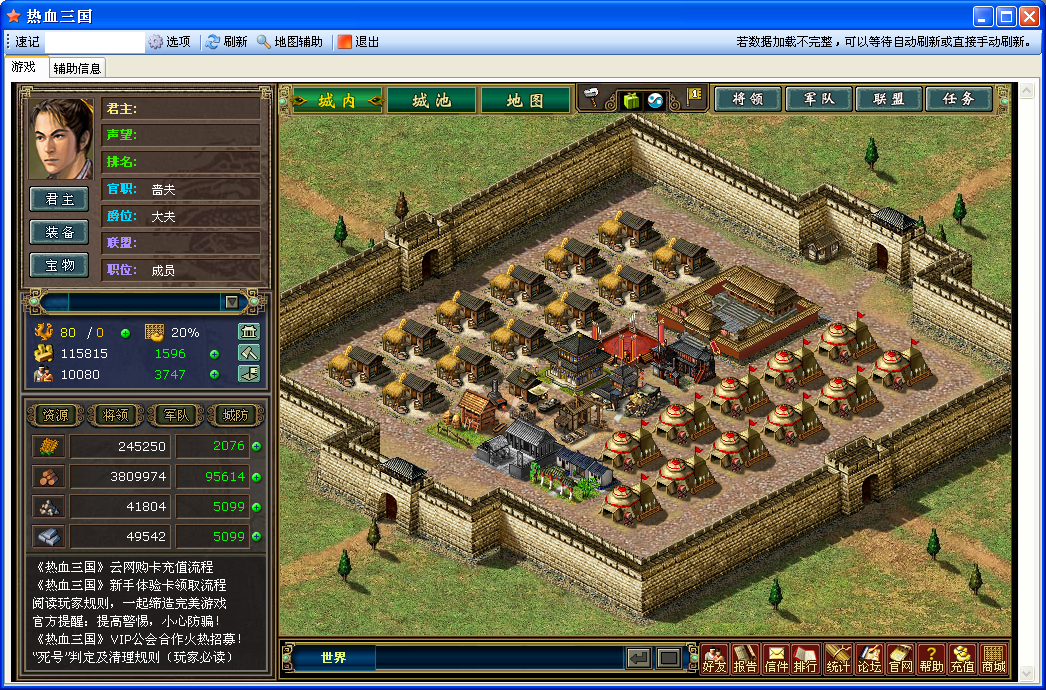
目前工具的游戏界面

登录后主界面(可分脱机跟非脱机登录,下面为非脱机登录,其实只不过显示了一个游戏界面而已,里面的处理都是按脱机模式处理)

游戏辅助信息

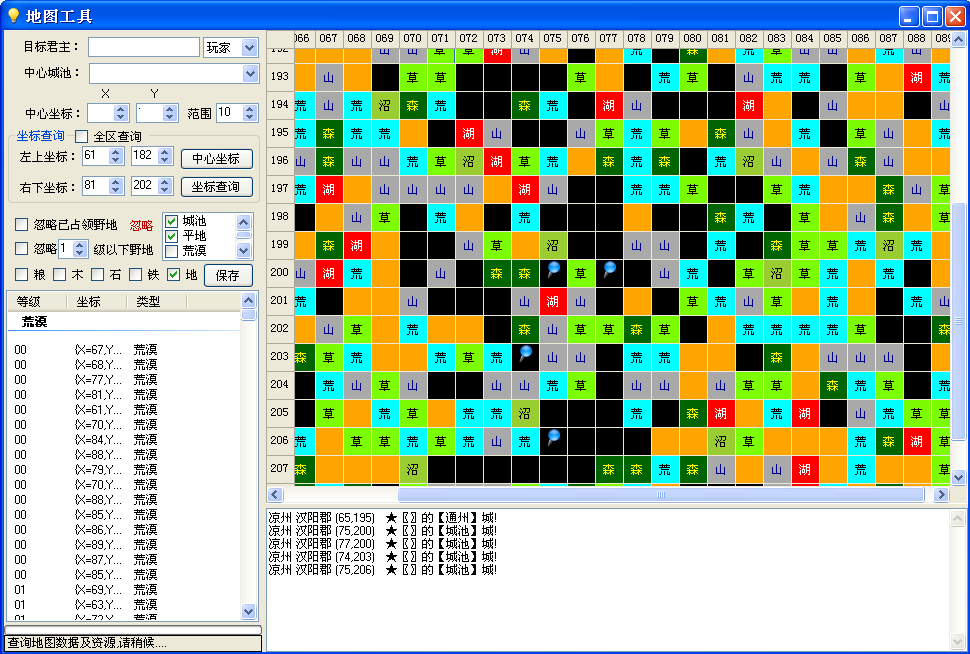
地图查询工具

[IIS]w3wp.exe占用内存大解决办法

mikel阅读(647)

在IIS6下,经常出现w3wp.exe的内存及CPU占用不能及时释放,从而导致服务器响应速度很慢。
解决CPU占用过多:
1、在IIS中对每个网站进行单独的应用程序池配置。即互相之间不影响。
2、设置应用程序池的CPU监视,不超过25%(服务器为4CPU),每分钟刷新,超过限制时关闭。
根据w3wp取得是哪一个应用程序池:
1、在任务管理器中增加显示pid字段。就可以看到占用内存或者cpu最高的进程pid
2、在命令提示符下运行iisapp -a。注意,第一次运行,会提示没有js支持,点击确定。然后再次运行就可以了。这样就可以看到pid对应的应用程序池。(iisapp实际上是存放在C:\windows\system32目录下的一个VBS脚本,全名为iisapp.vbs,如果你和我一样,也禁止了Vbs默认关联程序,那么就需要手动到该目录,先择打开方式,然后选“Microsoft (r) Windows Based Script Host”来执行,就可以得到PID与应用程序池的对应关系。)
3、到iis中察看该应用程序池对应的网站,就ok了,做出上面的内存或CPU方面的限制,或检查程序有无死循环之类的问题。
解决内存占用过多,可以做以下配置:
1、在IIS中对每个网站进行单独的应用程序池配置。即互相之间不影响。
2、设置应用程序池的回收时间,默认为1720小时,可以根据情况修改。再设置当内存占用超过多少(如500M),就自动回收内存。
我的设置如下:
首先是对CPU的限制:在启用cpu监视后,我设置该应用程序池最大的cpu使用率为50%。设置刷新cpu时间为1分钟,设置操作为“关闭”。最大工作进程数设置为1。这个意思是,IIS刷新检测该独立池的CPU使用情况时间为1分钟,如果超过设置的cpu限制50%,就会发出关闭池的指令,要求池在指定的时间内关闭。如果池成功在这个时间内关闭,IIS会重启动一个新池,此段时间很短,一般不会有什么感觉,池就重新开启了,对于访问网站的人基本是不会有感觉的。但如果池没有在指定时间内关闭,IIS就会强行关闭它一个刷新CPU时间。在这个停止的时间内,网站无法访问,提示“Service Unavaliable”。

关闭时间和启动时间间隔设置:设短一些比如10秒,这样当您的网站程序大量占用系统资源时IIS自动快速回收进程并且快速启动进程,您的网站暂时还可以将就着工作。

对内存的限制及进程回收时间的设置:我设置为内存占用超过800M就自动回收内存,虚拟内存没有做限制。进程回收时间我保持默认没有修改。各位可以根据自己的情况设置更短的时间。对应用程序池最大虚拟内存也可以在此进行设置,超过了设置的最大虚拟内存,该池会就被回收。

最后综合落伍wlmmc的一些经验,总结一些需要注意的问题:
1、 要限制一个站点的CPU使用,必须将该站点设置为独立应用程序池,共用应用程序池是无法限制单个站点的。IIS独立应用程序池,就需要独立的进程,非常消耗内存。独立池越多,就有越多的W3WP进程。对于每个站点均要独立应用程序池的服务器,在一般的普通P43.0 2G内存 的普通服务器上,建议不要超过50个站点,最好30以内,不然服务器压力非常大。在配置上,我一般把资源消耗较大的网站独立一个池,一般普通BBS或者生成HTML的系统大概5个站一个池。普通网站以及一些企业站点均共用一个池。
2、根据wlmmc的经验,在服务器硬件允许的情况下,一般不要限制站点内存使用,这样能够保证网站运行,不会出现用户掉线情况。需要限制某站的最大虚拟内存不要小于64M,不然可能出现一些未知的错误。
3、这些都不是根本解决办法,它的根本问题是网站程序有问题,要解决根本问题还要从程序查起。根据本文开头提到的方法查到具体的应用程序池,找到使用此应用程序池的网站,解决网站程序存在的问题,如死循环之类。
4、除了w3wp.exe, 在调用数据库进行大量查询操作的时候,也会大量占用CPU资源,这是难免的(数据库方面的语句及结构优化不在本文讨论范围之内)。个人认为,只要不是CPU长时间占用100%, 一般在75%左右都是正常的。

[C#]善用VS中的Code Snippet来提高开发效率

mikel阅读(948)

前言
谈谈VS中的模板中, 我介绍了如何创建项目/项模板,这种方式可以在创建项目时省却不少重复性的工作,从而提高开发效率。在创建好了项目和文件后,就得开始具体的编码了,这时 又有了新的重复性工作,就是需要经常编写一些类似或者说雷同的代码,我们需要一种方法将这些代码管理起来,减少重复输入。
一个常见的例子,在使用for语句结构时,可能会有这样的代码:

Code
int[] array = { 12345 };
for (int i = 0; i < array.Length; i++)
{
    Console.WriteLine(array[i]);
}

或者

Code
List<string> names = new List<string> { "Anders""Bill""Clark""David"};
for (int i = 0; i < names.Count; i++)
{
    
if (names[i].StartsWith("A"))
    {
        Console.WriteLine(names[i]);
    }
}

显然,这两个for循环的代码很相似:输入for,选择一个变量用作索引,该变量有个上限值,还有几个括号和分号。而且绝大多数的for循环都是 如此,那么该如何减少重复输入呢? 可以想到的一种方法是把一段for循环的代码保存在某个地方,比如一个文件内,在需要for的地方,拷贝进来,把变量名、初始值、上限修改一下就可以用 了。
VS的开发者想的很周全,提供了Code Snippet功能,从而实现了上面的想法。它保存了for循环代码的模板,然后给它一个快捷键for。现在在编辑器中(需要是C#文件),输入for,连续按两下Tab键,就会出现下面的代码:

不 仅有了for的基本代码,还定位到了变量的名字处,如果需要可以修改变量名,假设改为index,后面的两个i会自动改为index,然后按Tab,光标 会跳至下一个深色显示的地方,即length,这里可以修改index的上限,然后回车,光标会跳至for循环的代码体:

是不是很方便呢?还有很多其它Snippet,比如输入cw,按两下Tab就出来Console.WriteLine()。
很多时候,同样的功能在不同语言内的表现是不同的,所以Code Snippet(以下简称Snippet)是特定于语言的,也就是说C#的Snippet不能用于VB.NET。VS2008中的Snippet支持C#、VB.NET、XML。
Snippet的管理
首 先VS2008提供了很多内置的Snippet,另外我们也可以将自己编写的或者他人编写的导入VS中。通过菜单Tools -> Code Snippets Manager(或按Ctrl+K, Ctrl+B),打开Code Snippets Manager窗口:

可以看到上面的Language列表,现在选中的是C#。可以通过Import方式来导入新的Snippet。在使用NUnit时,由于测试代码的特点,会有很多重复输入,所以Scott Bellware提供了NUnit的Snippet,我把它放在自己的博客来了:BellwareNUnitSnippet。现在把包里的.snippet文件导入。

嗯,可以使用了。比如,输入tc,按两下Tab,出来的代码是这样的:

输入TestCase的名称,回车,这样就可以输入测试代码了。观察一下这个Snippet,它的变化之处只有一个,就是TestCase处。
接下来我们来分析一下Snippet文件的结构,这样才能编写自己的Snippet。
Snippet定义文件解析
下 面来看看Snippet是如何实现的。根据上面tc的例子,我们可以猜想要存放Snippet,至少需要模板代码、占位符、语言类型、快捷键这几个关键信 息,每个Snippet都是如此。事实上,VS把这些信息保存在XML文件中,这些信息都对应着某些节点,这个与上一篇里的模板清单文件类似。
存放Snippet的文件是XML文件,不过它的扩展名是.snippet。一个Snippet文件可以包含多个Snippet,就像上面的BellwareNUnit.snippet那样。它的基本结构如下:

XML Code
<?xml version="1.0" encoding="utf-8" ?>
<CodeSnippets xmlns="http://schemas.microsoft.com/VisualStudio/2005/CodeSnippet">
    
<CodeSnippet Format="1.0.0">
        
<Header>
            
<Title>Code Snippet for Debug.WriteLine method.</Title>
            
<Shortcut>dw</Shortcut>
            
<Author>Anders Cui</Author>
        
</Header>
        
<Snippet>
            
<Code Language="CSharp">
                
<![CDATA[
                Debug.WriteLine(“Text”);
                
]]>
            
</Code>
        
</Snippet>
    
</CodeSnippet>
    
<!– other snippets –>
</CodeSnippets>

现在新建一个XML文件,输入上面的代码,这里我们的Snippet是输入Debug.WriteLine代码。该文件的根节点为 CodeSnippets,可以包含多个<CodeSnippet>节点。注意它的命名空间,有了这个,在VS内编辑时就方便多了。
重点关注<CodeSnippet>节点,它即表示一条Snippet。它必须包含一个Format Attribute(老是看到Attribute和Property的讨论,故在此保留),用以表示Snippet版本。另外它必须包含两个子节点:<Header><Snippet>
对 于<Header>节点,最重要的是Title和Shortcut,即Snippet的名称和快捷键;另外还有SnippetTypes,它 可以包含若干个SnippetType节点,可有三种取值,Expansion、SurroundsWith、Refactoring。 Expansion允许代码插入在光标处;SurroundsWith允许代码围绕在选中代码两边(就像#region那样);Refactoring指 定了在C#重构过程中所使用的Snippet,在自定义Snippet中不能使用。如果该值不做设置,则Snippet可以放在任何地方。
要了解<Header>的更多信息,请参看这里
对于<Snippet>节点,它是实现代码模板的地方。它包含四个子节点。
1、 <Code>节点

  • Delimiter:分隔符,默认值为$,后面你会看到它的用法。
  • Kind:Snippet的类型,比如方法体、方法声明、类型声明等。
  • Language:所适用的语言类型,如C#、VB.NET、XML。

在我们上面的例子中,已经有了Code节点了,注意这里把代码包含在<![CDATA[]]>中,因为代码很可能会包含一些特殊字符。
在上面的tc Snippet中,按下Tab后,VS会选中TestCase,这样修改起来更为方便,对于上面的dw Snippet,我们自然希望VS选中”Text”部分,这需要下面的<Declarations>节点。
2、<Declarations>节点
该节点包含若干个<Literal>和<Object>节点。它们可以看作是占位符。<Literal>用于指定一些文本值,<Object>则用于声明模板中的对象。
详细信息请参看<Literal><Object>
这里需要把”Text”看作占位符,所以添加一个<Literal>节点:

XML Code
    <Snippet>
        
<Code Language="CSharp">
            
<![CDATA[
            Debug.WriteLine($text$);$end$
            
]]>
        
</Code>
        
<Declarations>
            
<Literal>
                
<ID>text</ID>
                
<ToolTip>Text to write</ToolTip>
                
<Default>"Text"</Default>
            
</Literal>
        
</Declarations>
    
</Snippet>

这里添加了一个占位符$text$,默认值为”Text”,行末的$end$是一个特殊的占位符,它表示当你按下回车后光标的位置
3. <Imports>节点
用于指定使用Snippet时应当向文件内添加的命名空间引用,不过只支持VB.NET。
4. <References>节点
用于指定使用Snippet时应当向添加的程序集引用,同样只支持VB.NET:(
好了,现在可以测试一下我们的Snippet了,将文件保存为.snippet文件,然后导入。

 
还不错吧?
Code Snippet 函数
前面说到,<Imports>和<References>节点只能用于VB.NET,而这里的Code Snippet函数则只能用于C#。
在<Literal>和<Object>节点中,都包含了子节点<Function>,这些函数是VS的一部分,有时会比较有用。共有三个函数:
1. GenerateSwitchCases(EnumerationLiteral),根据提供的枚举类型生成一个switch语句和一系列case语句,事实上,C#中已有这样的一个例子:

回车确认:

2. ClassName(),返回Snippet所在类的名称。
3. SimpleTypeName(TypeName),在Snippet所在的上下文中推断出TypeName参数的最简单形式。
下面以SimpleTypeName为例来看一下这些函数的用法:

XML Code
<Snippet>
    
<Code Language="CSharp">
    
<![CDATA[
    $NameOfDebug$.WriteLine($text$);$end$
    
]]>
    
</Code>
    
<Declarations>
        
<Literal>
            
<ID>text</ID>
            
<ToolTip>Text to write</ToolTip>
            
<Default>"Text"</Default>
        
</Literal>
        
<Literal Editable="false">
            
<ID>NameOfDebug</ID>
            
<Function>SimpleTypeName(global::System.Diagnostics.Debug)</Function>
        
</Literal>
    
</Declarations>
</Snippet>

这里比前面的Snippet添加了一个Literal,为什么需要这么做呢?我们知道System.Diagnostics命名空间默认情 况下是没有引用的,如果使用Debug类,还需要引用System.Diagnostics。这里的妙处在于VS会推断NameOfDebug的最简单形 式,如果没有引用System.Diagnostics,它会在Debug前面加上,否则就不会加上。
几条建议
首先,Snippet的定义都在XML中,因此也算得上是代码,所以在命名上与其它代码无异,都要选择更有意义或者相关性的名字。命名快捷键的一个做法是使用首字母的缩写,比如Assert.AreEqual(expected, actual);的快捷键为ae。
另外,记得填写ToolTip节点的内容,这些内容在使用Snippet时会看到。

其它工具

虽然Snippet可以简化代码输入,可是它本身的编写却并非很方便,使用一些可视化工具会更好,比如Snippet Editor,有兴趣可以试一下。
另外,这个世界还有很多人在编写Snippet,比如gotcodesnippets.com,所以在动手编写之前可以先搜索一下:)
小结
本文介绍了Code Snippet的使用和编写,它可以看作是代码片段的模板,在粒度上比项目/项模板更小,从而进一步提高了工作效率。
参考
《Professional Visual Studio® 2008 Extensibility》

作者:Anders Cui
出处:http://anderslly.cnblogs.com
本文版权归作者和博客园共有,欢迎转载,但未经作者同意必须保留此段声明,且在文章页面明显位置给出原文连接,否则保留追究法律责任的权利。

[MVC]在asp.net mvc上应用新ASP.NET图表控件

mikel阅读(845)

微软去年11月发布了一个很酷的新ASP.NET服务器控件,<asp:chart />,可以免费用在ASP.NET 3.5中,而且还可以用在ASP.NET mvc。可以看新ASP.NET图表控件<asp:chart runat="server"/>

相关资源的下载链接:

  • Download the free Microsoft Chart Controls
  • Download the VS 2008 Tool Support for the Chart Controls
  • Download the Microsoft Chart Controls Samples
  • Download the Microsoft Chart Controls Documentation

    这位台胞的两篇相当不错的文章

    Microsoft Chart Controls 心得(1)

    Microsoft Chart Controls 心得(2) – 如何透過圖表傳值

  • 园子里的相关文章:
    ASP.NET图表控件
    我今天才知道ASP.NET图表控件发布了,附一个在线文档

    在这里有一篇文章简短介绍了Combining ASP.NET MVC and ASP.NET Charting Controls

    编辑Web.Config
    将控件的命名空间加到 (path: "<system.web><pages><controls>") :

    <add tagPrefix="asp" namespace="System.Web.UI.DataVisualization.Charting" assembly="System.Web.DataVisualization, Version=3.5.0.0, Culture=neutral, PublicKeyToken=31bf3856ad364e35"/>
    
    添加一个 httpHandler ("<httpHandlers>"下面) :
     <add path="ChartImg.axd" verb="GET,HEAD" type="System.Web.UI.DataVisualization.Charting.ChartHttpHandler, System.Web.DataVisualization, Version=3.5.0.0, Culture=neutral, PublicKeyToken=31bf3856ad364e35" validate="false"/>
    将chart 控件添加到view
    <p>
    <%
    System.Web.UI.DataVisualization.Charting.Chart Chart2 = new System.Web.UI.DataVisualization.Charting.Chart();
    Chart2.Width = 412;
    Chart2.Height = 296;
    Chart2.RenderType = RenderType.ImageTag;
    Chart2.Palette = ChartColorPalette.BrightPastel;
    Title t = new Title("No Code Behind Page", Docking.Top, new System.Drawing.Font("Trebuchet MS", 14, System.Drawing.FontStyle.Bold), System.Drawing.Color.FromArgb(26, 59, 105));
    Chart2.Titles.Add(t);
    Chart2.ChartAreas.Add("Series 1");
    // create a couple of series
    Chart2.Series.Add("Series 1");
    Chart2.Series.Add("Series 2");
    // add points to series 1
    foreach (int value in (List<int>)ViewData["Chart"])
    {
    Chart2.Series["Series 1"].Points.AddY(value);
    }
    // add points to series 2
    foreach (int value in (List<int>)ViewData["Chart"])
    {
    Chart2.Series["Series 2"].Points.AddY(value + 1);
    }
    Chart2.BorderSkin.SkinStyle = BorderSkinStyle.Emboss;
    Chart2.BorderColor = System.Drawing.Color.FromArgb(26, 59, 105);
    Chart2.BorderlineDashStyle = ChartDashStyle.Solid;
    Chart2.BorderWidth = 2;
    Chart2.Legends.Add("Legend1");
    // Render chart control
    Chart2.Page = this;
    HtmlTextWriter writer = new HtmlTextWriter(Page.Response.Output);
    Chart2.RenderControl(writer);
    %>
    </p>
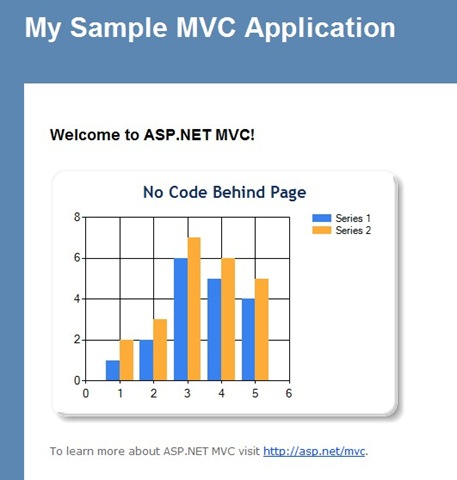
    效果如下:
    mschartmvc 
    本文代码基于asp.net mvc rc版本:MVCCharting
    作者: 自由、创新、研究、探索……
    出处:http://shanyou.cnblogs.com/
    版权:本文版权归作者和博客园共有
    转载:欢迎转载,为了保存作者的创作热情,请按要求【转载】,谢谢
    要求:未经作者同意,必须保留此段声明;必须在文章中给出原文连接;否则必究法律责任
    个人网站: http://www.openbeta.cn