wamp集成环境php多版本搭建(php5.5,php5.6,php7.0.6) - 飞飞哥哥 - 博客园

mikel阅读(908)

来源: wamp集成环境php多版本搭建(php5.5,php5.6,php7.0.6) – 飞飞哥哥 – 博客园

    首先需要搭建的版本可以在php官方(http://windows.php.net/download)下载对应的版本,X86对应的是32位操作系统,X64对应的是64位操作系统。
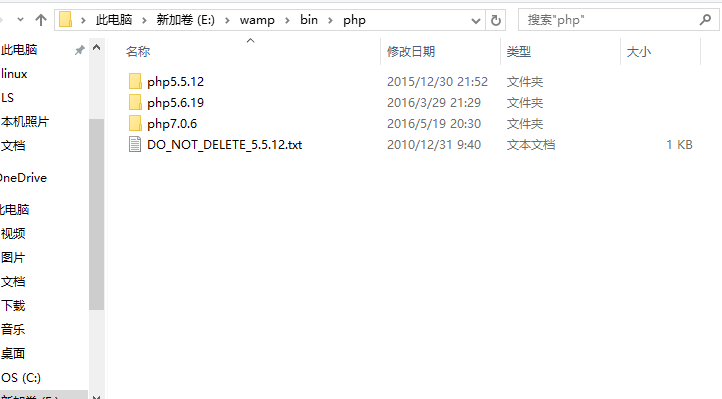
   1:下载之后解压,把解压的压缩包放在wamp安装目录bin目录下的php文件夹下,同时注意把文件夹名称改成符合wamp规范的名称,比如解压过后名称是php-5.6.19-Win32-VC11-x64要改成php5.6.19记住不要有横杆。
 2:然后打开wamp自带的php5.5.12版本文件夹,发现比普通官方文件多了两个文件phpForApache.ini以及 wampserver.conf,而wampserver.conf是直接可以拷贝过来的,同时phpForApache.ini打开发现就是php的配 置文件,然后我们就知道我们需要两步骤:
   1)拷贝wampserver.conf到新加入的版本中;
   2)复制一份新加入版本中的php.ini-development改名为phpForApache.ini。
3:打开新加入的phpForApache.ini,搜索extension_dir把路径改为自己的安装路径,比如:extension_dir = “E:/wamp/bin/php/php5.6.19/ext/”
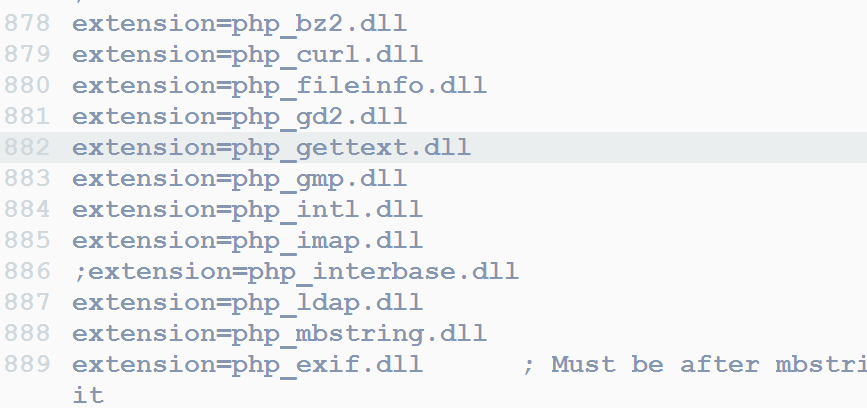
     然后把extension模块需要打开的自行打开(把前面分号去掉)。
     
4:搜索error_reporting报错级别设置,设置对应的报错级别,比如:error_reporting = E_ALL & ~E_NOTICE & ~E_DEPRECATED
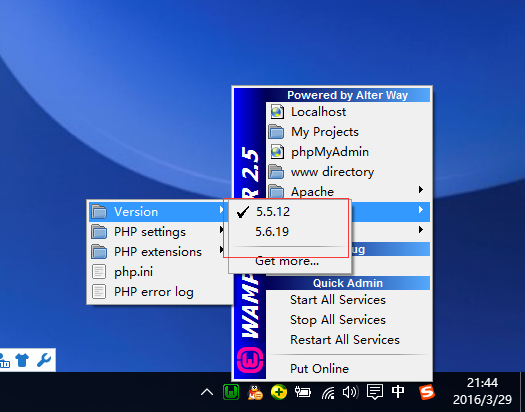
5:重启wamp发现就有新加入进来的5.6.19版本了。
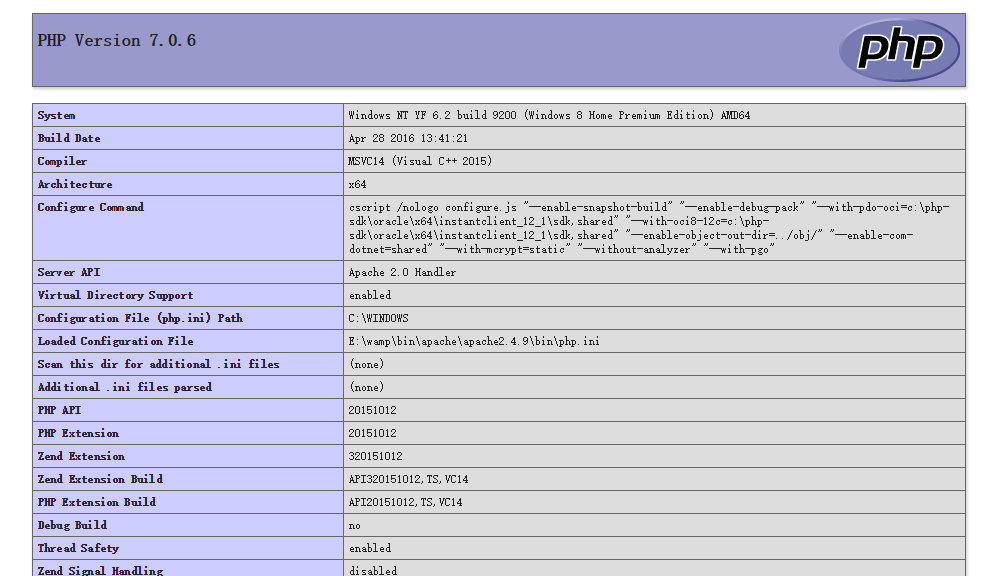
同时切换到5.6.19版本,打开phpinfo,发现已经是5.6.19版本了,到此多版本配置结束。
 
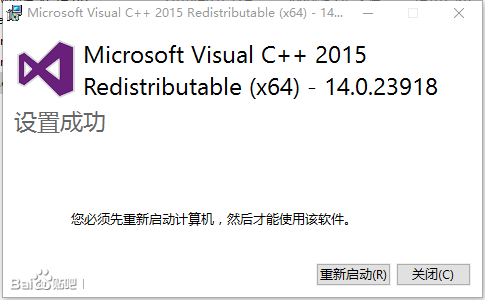
如果配置的是php7.0或者以上版本,首先,电脑需要有Visual Studio 2015 x64
安装Visual Studio 2015 x64地址: https://www.microsoft.com/en-us/download/details.aspx?id=51682
下载后直接下一步,然后重启计算机
剩下的同配置php5版本步骤一样;
然后打开wampserver.conf将
  1. $phpConf[‘apache’][‘2.4’][‘LoadModuleName’]=’php5_module’;
  2. $phpConf[‘apache’][‘2.4’][‘LoadModuleFile’]=’php5apache2_4.dll’;

修改为

  1. $phpConf[‘apache’][‘2.4’][‘LoadModuleName’]=’php7_module’;
  2. $phpConf[‘apache’][‘2.4’][‘LoadModuleFile’]=’php7apache2_4.dll’;
重启wamp,配置完成。

AR创意分享:儿童涂鸦遇上程序绘图 - ExperDot - 博客园

mikel阅读(1445)

来源: AR创意分享:儿童涂鸦遇上程序绘图 – ExperDot – 博客园

第一节 临摹

小明经常临摹同桌小美的画作。

美术课上,老师表扬了小美的新作。

图1.1 小美的作品《蒙娜·毛虫的微笑》

临,是照着原作画;摹,是用薄纸张蒙在原作上面画。

第二节 借画

小明随后借来了小美的画。

但他觉得这样摹着画甚是无趣。

图2.1 未完成的临摹

一般地,临摹耐心与纸张透明度成正比。

第三节 涂鸦

小明认为这只毛虫太孤单了。

然后,他的涂鸦怪兽就蹦了出来。

图3.1 《蒙娜·毛虫与她的怪兽》

涂鸦,随意地涂抹色彩与线条。

第四节 黑白

小美的哥哥和小明是好朋友,他叫大美。

大美有个AR程序,它可以计算图像的黑与白。

图4.1 黑白版《蒙娜·毛虫的微笑》


黑白阈值划分可以基于RGB颜色空间也可以基于HSV颜色空间。

复制代码
Public Class ImageProcessClass
    ''' <summary> 
    ''' 基于RGB根据指定阈值判断两个颜色是否相近
    ''' </summary> 
    Public Function CompareRGB(ByVal Color1 As Color, ByVal Color2 As Color, ByVal Distance As Single) As Boolean
        Dim r As Integer = Int(Color1.R) - Int(Color2.R)
        Dim g As Integer = Int(Color1.G) - Int(Color2.G)
        Dim b As Integer = Int(Color1.B) - Int(Color2.B)
        Dim absDis As Integer = Math.Sqrt(r * r + g * g + b * b)
        If absDis < Distance Then
            Return True
        Else
            Return False
        End If
    End Function
    ''' <summary> 
    ''' 基于HSB根据指定阈值判断两个颜色是否相近
    ''' </summary> 
    Public Function CompareHSB(ByVal Color1 As Color, ByVal Color2 As Color, ByVal Distance As Single) As Boolean
        'Dim h As Single = (Color1.GetHue - Color2.GetHue) / 360
        'Dim s As Single = Color1.GetSaturation - Color2.GetSaturation
        'Dim b As Single = Color1.GetBrightness - Color2.GetBrightness
        'Dim absDis As Single = Math.Sqrt(h * h + s * s + b * b)
        'If absDis < Distance Then
        '    Return True
        'Else
        '    Return False
        'End If
        Dim h1 As Single = Color1.GetHue / 360
        Dim s1 As Single = Color1.GetSaturation
        Dim b1 As Single = Color1.GetBrightness
        Dim h2 As Single = Color2.GetHue / 360
        Dim s2 As Single = Color2.GetSaturation
        Dim b2 As Single = Color2.GetBrightness
        Dim absDis As Single = (h1 * h2 + s1 * s2 + b1 * b2) / (Math.Sqrt(h1 * h1 + s1 * s1 + b1 * b1) * Math.Sqrt(h2 * h2 + s2 * s2 + b2 * b2))
        If absDis > Distance / 5 + 0.8 Then
            Return True
        Else
            Return False
        End If
    End Function
    ''' <summary> 
    ''' 返回指定颜色的中值
    ''' </summary> 
    Public Function gethHD(ByVal color1 As Color)
        Dim HD, r, g, b As Integer
        r = color1.R
        g = color1.G
        b = color1.B
        HD = (r + g + b) / 3
        Return HD
    End Function
    ''' <summary>
    ''' 返回指定位图的颜色数组
    ''' </summary>
    ''' <param name="gBitmap"></param>
    ''' <returns></returns>
    Public Function GetColorArr(ByRef gBitmap As Bitmap) As Color(,)
        Dim TempArr(gBitmap.Width - 1, gBitmap.Height - 1) As Color
        For i = 0 To gBitmap.Width - 1
            For j = 0 To gBitmap.Height - 1
                TempArr(i, j) = gBitmap.GetPixel(i, j)
            Next
        Next
        Return TempArr
    End Function
    ''' <summary>
    ''' 返回指定区域的屏幕图像
    ''' </summary>
    ''' <param name="gX"></param>
    ''' <param name="gY"></param>
    ''' <param name="gWidth"></param>
    ''' <param name="gHeight"></param>
    ''' <returns></returns>
    Public Function GetScreenImage(ByVal gX As Integer, ByVal gY As Integer, ByVal gWidth As Integer, ByVal gHeight As Integer) As Bitmap
        Dim ResultBitmap As New Bitmap(gWidth, gHeight)
        Using pg As Graphics = Graphics.FromImage(ResultBitmap)
            pg.CopyFromScreen(gX, gY, 0, 0, New Size(gWidth, gHeight))
        End Using
        Return ResultBitmap
    End Function
    ''' <summary>
    ''' 返回指定文字生成的位图
    ''' </summary>
    ''' <param name="gString"></param>
    ''' <param name="gFont"></param>
    ''' <param name="gWidth"></param>
    ''' <param name="gHeight"></param>
    ''' <returns></returns>
    Public Function GetTextImage(ByVal gString As String, ByVal gFont As Font, ByVal gWidth As Integer, ByVal gHeight As Integer) As Bitmap
        Dim ResultBitmap As New Bitmap(gWidth, gHeight)
        Using pg = Graphics.FromImage(ResultBitmap)
            pg.SmoothingMode = Drawing2D.SmoothingMode.AntiAlias '抗锯齿
            pg.DrawString(gString, gFont, Brushes.Black, 0, 0)
        End Using
        Return ResultBitmap
    End Function
    ''' <summary>
    ''' 返回指定图位图的二值化图像
    ''' </summary>
    ''' <param name="gBitmap"></param>
    ''' <param name="gSplitNum"></param>
    ''' <returns></returns>
    Public Function GetThresholdImage(ByVal gBitmap As Bitmap, ByVal gSplitNum As Single, Optional IsHSB As Boolean = False) As Bitmap
        Dim ResultBitmap As New Bitmap(gBitmap.Width, gBitmap.Height)
        Dim ColorArr(,) = GetColorArr(gBitmap)
        Dim TempHD As Integer
        Dim IsOverThreshold = Function(ByVal C1 As Color, ByVal gNum As Single)
                                  TempHD = gethHD(C1)
                                  Return (If(IsHSB, (C1.GetHue / 360 + C1.GetSaturation + C1.GetBrightness) / 3 < gNum,
                                  TempHD < gNum))
                              End Function
        For i = 0 To gBitmap.Width - 1
            For j = 0 To gBitmap.Height - 1
                ResultBitmap.SetPixel(i, j, If(IsOverThreshold(ColorArr(i, j), gSplitNum), Color.Black, Color.White))
            Next
        Next

        Return ResultBitmap
    End Function
    ''' <summary>
    ''' 返回指定位图的轮廓图像
    ''' </summary>
    ''' <param name="gBitmap"></param>
    ''' <param name="gDistance"></param>
    ''' <returns></returns>
    Public Function GetOutLineImage(ByVal gBitmap As Bitmap, ByVal gDistance As Single, Optional IsHSB As Boolean = False) As Bitmap
        Dim xArray2() As Short = {0, 1, 0, -1}
        Dim yArray2() As Short = {-1, 0, 1, 0}
        'Dim ResultBitmap As New Bitmap(gBitmap) '在原图的基础上绘图
        Dim ResultBitmap As New Bitmap(gBitmap.Width, gBitmap.Height)
        Dim Color1, Color2 As Color
        Dim CompareColor = Function(ByVal C1 As Color, ByVal C2 As Color, ByVal Distance As Single)
                               Return If(IsHSB,
                               CompareHSB(Color1, Color2, Distance),
                               CompareRGB(Color1, Color2, Distance))
                           End Function
        Dim CompareColorExtra = Function(ByVal C1 As Color, ByVal C2 As Color)
                                    Return If(IsHSB,
                                    Color1.GetBrightness - Color2.GetBrightness > 0,
                                    gethHD(Color1) - gethHD(Color2) > 0)
                                End Function
        Dim ColorArr(,) = GetColorArr(gBitmap)
        For i = 1 To gBitmap.Width - 2
            For j = 1 To gBitmap.Height - 2
                ResultBitmap.SetPixel(i, j, Color.White)
                Color1 = ColorArr(i, j)
                For p = 0 To 3
                    Color2 = ColorArr(i + xArray2(p), j + yArray2(p))
                    If Not CompareColor(Color1, Color2, gDistance) And CompareColorExtra(Color1, Color2) Then
                        ResultBitmap.SetPixel(i, j, Color.Black)
                        ' ResultBitmap.SetPixel(i, j, ColorArr(i, j))
                    End If
                Next
            Next
        Next
        Return ResultBitmap
    End Function
    ''' <summary>
    ''' 返回指定位图的空心图像
    ''' </summary>
    ''' <param name="gBitmap"></param>
    ''' <returns></returns>
    Public Function GetAroundImage(gBitmap As Bitmap)
        Dim ResultBitmap As New Bitmap(gBitmap.Width, gBitmap.Height)
        Dim ImageBolArr(,) As Integer = GetImageBol(gBitmap)
        For i = 0 To gBitmap.Width - 1
            For j = 0 To gBitmap.Height - 1
                If ImageBolArr(i, j) = 1 AndAlso CheckPointAround(ImageBolArr, i, j) = False Then
                    ResultBitmap.SetPixel(i, j, Color.Black)
                Else
                    ResultBitmap.SetPixel(i, j, Color.White)
                End If
            Next
        Next
        Return ResultBitmap
    End Function
    ''' <summary>
    ''' 返回指定位图的反相图像
    ''' </summary>
    ''' <param name="gBitmap"></param>
    ''' <returns></returns>
    Public Function GetInvertImage(gBitmap As Bitmap)
        Dim ResultBitmap As New Bitmap(gBitmap.Width, gBitmap.Height)
        Dim ImageBolArr(,) As Integer = GetImageBol(gBitmap)
        For i = 0 To gBitmap.Width - 1
            For j = 0 To gBitmap.Height - 1
                If ImageBolArr(i, j) = 1 Then
                    ResultBitmap.SetPixel(i, j, Color.White)
                Else
                    ResultBitmap.SetPixel(i, j, Color.Black)
                End If
            Next
        Next
        Return ResultBitmap
    End Function
    ''' <summary>
    ''' 返回指定位图的色块图像
    ''' </summary>
    ''' <param name="gBitmap"></param>
    ''' <returns></returns>
    Public Function GetLumpImage(gBitmap As Bitmap, Optional Range As Integer = 10)
        Dim ResultBitmap As New Bitmap(gBitmap.Width, gBitmap.Height)
        Dim ColorArr(,) = GetColorArr(gBitmap)
        Dim R, G, B As Integer
        For i = 0 To gBitmap.Width - 1
            For j = 0 To gBitmap.Height - 1
                R = Int(ColorArr(i, j).R / Range) * Range
                G = Int(ColorArr(i, j).G / Range) * Range
                B = Int(ColorArr(i, j).B / Range) * Range
                ResultBitmap.SetPixel(i, j, Color.FromArgb(R, G, B))
            Next
        Next
        Return ResultBitmap
    End Function
    ''' <summary>
    ''' 返回指定位图的二值化数据
    ''' </summary>
    ''' <param name="gBitmap"></param>
    ''' <returns></returns>
    Private Function GetImageBol(ByVal gBitmap As Bitmap) As Integer(,)
        Dim ResultArr(gBitmap.Width - 1, gBitmap.Height - 1) As Integer
        For i = 0 To gBitmap.Width - 1
            For j = 0 To gBitmap.Height - 1
                If Not gBitmap.GetPixel(i, j).Equals(Color.FromArgb(255, 255, 255)) Then
                    ResultArr(i, j) = 1
                Else
                    ResultArr(i, j) = 0
                End If
            Next
        Next
        Return ResultArr
    End Function
    ''' <summary>
    ''' 检查一个点是否被包围
    ''' </summary>
    ''' <param name="BolArr"></param>
    ''' <param name="x"></param>
    ''' <param name="y"></param>
    ''' <returns></returns>
    Private Function CheckPointAround(BolArr As Integer(,), ByVal x As Integer, ByVal y As Integer) As Boolean
        If Not (x > 0 And y > 0 And x < BolArr.GetUpperBound(0) And y < BolArr.GetUpperBound(1)) Then Return True
        If BolArr(x - 1, y) = 1 And BolArr(x + 1, y) = 1 And BolArr(x, y - 1) = 1 And BolArr(x, y + 1) = 1 Then
            Return True '当前点为实体内部
        Else
            Return False '当前点为实体边缘
        End If
    End Function
End Class
复制代码

复制代码
using Microsoft.VisualBasic;
using System;
using System.Collections;
using System.Collections.Generic;
using System.Data;
using System.Diagnostics;
public class ImageProcessClass
{
    /// <summary> 
    /// 基于RGB根据指定阈值判断两个颜色是否相近
    /// </summary> 
    public bool CompareRGB(Color Color1, Color Color2, float Distance)
    {
        int r = Conversion.Int(Color1.R) - Conversion.Int(Color2.R);
        int g = Conversion.Int(Color1.G) - Conversion.Int(Color2.G);
        int b = Conversion.Int(Color1.B) - Conversion.Int(Color2.B);
        int absDis = Math.Sqrt(r * r + g * g + b * b);
        if (absDis < Distance) {
            return true;
        } else {
            return false;
        }
    }
    /// <summary> 
    /// 基于HSB根据指定阈值判断两个颜色是否相近
    /// </summary> 
    public bool CompareHSB(Color Color1, Color Color2, float Distance)
    {
        //Dim h As Single = (Color1.GetHue - Color2.GetHue) / 360
        //Dim s As Single = Color1.GetSaturation - Color2.GetSaturation
        //Dim b As Single = Color1.GetBrightness - Color2.GetBrightness
        //Dim absDis As Single = Math.Sqrt(h * h + s * s + b * b)
        //If absDis < Distance Then
        //    Return True
        //Else
        //    Return False
        //End If
        float h1 = Color1.GetHue / 360;
        float s1 = Color1.GetSaturation;
        float b1 = Color1.GetBrightness;
        float h2 = Color2.GetHue / 360;
        float s2 = Color2.GetSaturation;
        float b2 = Color2.GetBrightness;
        float absDis = (h1 * h2 + s1 * s2 + b1 * b2) / (Math.Sqrt(h1 * h1 + s1 * s1 + b1 * b1) * Math.Sqrt(h2 * h2 + s2 * s2 + b2 * b2));
        if (absDis > Distance / 5 + 0.8) {
            return true;
        } else {
            return false;
        }
    }
    /// <summary> 
    /// 返回指定颜色的中值
    /// </summary> 
    public object gethHD(Color color1)
    {
        int HD = 0;
        int r = 0;
        int g = 0;
        int b = 0;
        r = color1.R;
        g = color1.G;
        b = color1.B;
        HD = (r + g + b) / 3;
        return HD;
    }
    /// <summary>
    /// 返回指定位图的颜色数组
    /// </summary>
    /// <param name="gBitmap"></param>
    /// <returns></returns>
    public Color[,] GetColorArr(ref Bitmap gBitmap)
    {
        Color[,] TempArr = new Color[gBitmap.Width, gBitmap.Height];
        for (i = 0; i <= gBitmap.Width - 1; i++) {
            for (j = 0; j <= gBitmap.Height - 1; j++) {
                TempArr(i, j) = gBitmap.GetPixel(i, j);
            }
        }
        return TempArr;
    }
    /// <summary>
    /// 返回指定区域的屏幕图像
    /// </summary>
    /// <param name="gX"></param>
    /// <param name="gY"></param>
    /// <param name="gWidth"></param>
    /// <param name="gHeight"></param>
    /// <returns></returns>
    public Bitmap GetScreenImage(int gX, int gY, int gWidth, int gHeight)
    {
        Bitmap ResultBitmap = new Bitmap(gWidth, gHeight);
        using (Graphics pg = Graphics.FromImage(ResultBitmap)) {
            pg.CopyFromScreen(gX, gY, 0, 0, new Size(gWidth, gHeight));
        }
        return ResultBitmap;
    }
    /// <summary>
    /// 返回指定文字生成的位图
    /// </summary>
    /// <param name="gString"></param>
    /// <param name="gFont"></param>
    /// <param name="gWidth"></param>
    /// <param name="gHeight"></param>
    /// <returns></returns>
    public Bitmap GetTextImage(string gString, Font gFont, int gWidth, int gHeight)
    {
        Bitmap ResultBitmap = new Bitmap(gWidth, gHeight);
        using (pg == Graphics.FromImage(ResultBitmap)) {
            pg.SmoothingMode = Drawing2D.SmoothingMode.AntiAlias;
            //抗锯齿
            pg.DrawString(gString, gFont, Brushes.Black, 0, 0);
        }
        return ResultBitmap;
    }
    /// <summary>
    /// 返回指定图位图的二值化图像
    /// </summary>
    /// <param name="gBitmap"></param>
    /// <param name="gSplitNum"></param>
    /// <returns></returns>
    public Bitmap GetThresholdImage(Bitmap gBitmap, float gSplitNum, bool IsHSB = false)
    {
        Bitmap ResultBitmap = new Bitmap(gBitmap.Width, gBitmap.Height);
        [,] ColorArr = GetColorArr(ref gBitmap);
        int TempHD = 0;
        dynamic IsOverThreshold = (Color C1, float gNum) =>
        {
            TempHD = gethHD(C1);
            return (IsHSB ? (C1.GetHue / 360 + C1.GetSaturation + C1.GetBrightness) / 3 < gNum : TempHD < gNum);
        };
        for (i = 0; i <= gBitmap.Width - 1; i++) {
            for (j = 0; j <= gBitmap.Height - 1; j++) {
                ResultBitmap.SetPixel(i, j, IsOverThreshold(ColorArr(i, j), gSplitNum) ? Color.Black : Color.White);
            }
        }

        return ResultBitmap;
    }
    /// <summary>
    /// 返回指定位图的轮廓图像
    /// </summary>
    /// <param name="gBitmap"></param>
    /// <param name="gDistance"></param>
    /// <returns></returns>
    public Bitmap GetOutLineImage(Bitmap gBitmap, float gDistance, bool IsHSB = false)
    {
        short[] xArray2 = {
            0,
            1,
            0,
            -1
        };
        short[] yArray2 = {
            -1,
            0,
            1,
            0
        };
        //Dim ResultBitmap As New Bitmap(gBitmap) '在原图的基础上绘图
        Bitmap ResultBitmap = new Bitmap(gBitmap.Width, gBitmap.Height);
        Color Color1 = default(Color);
        Color Color2 = default(Color);
        dynamic CompareColor = (Color C1, Color C2, float Distance) => { return IsHSB ? CompareHSB(Color1, Color2, Distance) : CompareRGB(Color1, Color2, Distance); };
        dynamic CompareColorExtra = (Color C1, Color C2) => { return IsHSB ? Color1.GetBrightness - Color2.GetBrightness > 0 : gethHD(Color1) - gethHD(Color2) > 0; };
        [,] ColorArr = GetColorArr(ref gBitmap);
        for (i = 1; i <= gBitmap.Width - 2; i++) {
            for (j = 1; j <= gBitmap.Height - 2; j++) {
                ResultBitmap.SetPixel(i, j, Color.White);
                Color1 = ColorArr(i, j);
                for (p = 0; p <= 3; p++) {
                    Color2 = ColorArr(i + xArray2[p], j + yArray2[p]);
                    if (!CompareColor(Color1, Color2, gDistance) & CompareColorExtra(Color1, Color2)) {
                        ResultBitmap.SetPixel(i, j, Color.Black);
                        // ResultBitmap.SetPixel(i, j, ColorArr(i, j))
                    }
                }
            }
        }
        return ResultBitmap;
    }
    /// <summary>
    /// 返回指定位图的空心图像
    /// </summary>
    /// <param name="gBitmap"></param>
    /// <returns></returns>
    public object GetAroundImage(Bitmap gBitmap)
    {
        Bitmap ResultBitmap = new Bitmap(gBitmap.Width, gBitmap.Height);
        int[,] ImageBolArr = GetImageBol(gBitmap);
        for (i = 0; i <= gBitmap.Width - 1; i++) {
            for (j = 0; j <= gBitmap.Height - 1; j++) {
                if (ImageBolArr[i, j] == 1 && CheckPointAround(ImageBolArr, i, j) == false) {
                    ResultBitmap.SetPixel(i, j, Color.Black);
                } else {
                    ResultBitmap.SetPixel(i, j, Color.White);
                }
            }
        }
        return ResultBitmap;
    }
    /// <summary>
    /// 返回指定位图的反相图像
    /// </summary>
    /// <param name="gBitmap"></param>
    /// <returns></returns>
    public object GetInvertImage(Bitmap gBitmap)
    {
        Bitmap ResultBitmap = new Bitmap(gBitmap.Width, gBitmap.Height);
        int[,] ImageBolArr = GetImageBol(gBitmap);
        for (i = 0; i <= gBitmap.Width - 1; i++) {
            for (j = 0; j <= gBitmap.Height - 1; j++) {
                if (ImageBolArr[i, j] == 1) {
                    ResultBitmap.SetPixel(i, j, Color.White);
                } else {
                    ResultBitmap.SetPixel(i, j, Color.Black);
                }
            }
        }
        return ResultBitmap;
    }
    /// <summary>
    /// 返回指定位图的色块图像
    /// </summary>
    /// <param name="gBitmap"></param>
    /// <returns></returns>
    public object GetLumpImage(Bitmap gBitmap, int Range = 10)
    {
        Bitmap ResultBitmap = new Bitmap(gBitmap.Width, gBitmap.Height);
        [,] ColorArr = GetColorArr(ref gBitmap);
        int R = 0;
        int G = 0;
        int B = 0;
        for (i = 0; i <= gBitmap.Width - 1; i++) {
            for (j = 0; j <= gBitmap.Height - 1; j++) {
                R = Conversion.Int(ColorArr(i, j).R / Range) * Range;
                G = Conversion.Int(ColorArr(i, j).G / Range) * Range;
                B = Conversion.Int(ColorArr(i, j).B / Range) * Range;
                ResultBitmap.SetPixel(i, j, Color.FromArgb(R, G, B));
            }
        }
        return ResultBitmap;
    }
    /// <summary>
    /// 返回指定位图的二值化数据
    /// </summary>
    /// <param name="gBitmap"></param>
    /// <returns></returns>
    private int[,] GetImageBol(Bitmap gBitmap)
    {
        int[,] ResultArr = new int[gBitmap.Width, gBitmap.Height];
        for (i = 0; i <= gBitmap.Width - 1; i++) {
            for (j = 0; j <= gBitmap.Height - 1; j++) {
                if (!gBitmap.GetPixel(i, j).Equals(Color.FromArgb(255, 255, 255))) {
                    ResultArr[i, j] = 1;
                } else {
                    ResultArr[i, j] = 0;
                }
            }
        }
        return ResultArr;
    }
    /// <summary>
    /// 检查一个点是否被包围
    /// </summary>
    /// <param name="BolArr"></param>
    /// <param name="x"></param>
    /// <param name="y"></param>
    /// <returns></returns>
    private bool CheckPointAround(int[,] BolArr, int x, int y)
    {
        if (!(x > 0 & y > 0 & x < BolArr.GetUpperBound(0) & y < BolArr.GetUpperBound(1)))
            return true;
        if (BolArr[x - 1, y] == 1 & BolArr[x + 1, y] == 1 & BolArr[x, y - 1] == 1 & BolArr[x, y + 1] == 1) {
            return true;
            //当前点为实体内部
        } else {
            return false;
            //当前点为实体边缘
        }
    }
}
复制代码

第五节 线条

AR程序还可以计算图像组成的线条。

参考线条序列,小明就不会不知道如何下笔了。

图5.1 程序实现自动线条

定义一个SequenceManager类,它用以识别线条、并管理PointSequence类。

复制代码
Public Class SequenceManagerClass
    ''' <summary>
    ''' 绘制序列的List
    ''' </summary>
    Public SequenceList As List(Of PointSequenceClass)
    Public Sub New(BolArr(,) As Integer)
        SequenceList = New List(Of PointSequenceClass)
        CalculateSequence(BolArr)
    End Sub
    Private Sub CreateNewSequence()
        SequenceList.Add(New PointSequenceClass)
    End Sub
    Private Sub AddPoint(aPoint As PointF)
        SequenceList.Last.PointList.Add(aPoint)
    End Sub
    Dim xArray() As Integer = {-1, 0, 1, 1, 1, 0, -1, -1}
    Dim yArray() As Integer = {-1, -1, -1, 0, 1, 1, 1, 0}
    Dim NewStart As Boolean
    Private Sub CheckMove(ByRef BolArr(,) As Integer, ByVal x As Integer, ByVal y As Integer, ByVal StepNum As Integer)
        Application.DoEvents()
        If StepNum > 200 Then Return
        Dim xBound As Integer = BolArr.GetUpperBound(0)
        Dim yBound As Integer = BolArr.GetUpperBound(1)
        Dim dx, dy As Integer
        Dim AroundValue As Integer = GetAroundValue(BolArr, x, y)
        If AroundValue > 2 AndAlso AroundValue < 8 Then
            Return
        End If
        For i = 0 To 7
            dx = x + xArray(i)
            dy = y + yArray(i)
            If Not (dx > 0 And dy > 0 And dx < xBound And dy < yBound) Then
                Return
            ElseIf BolArr(dx, dy) = 1 Then
                BolArr(dx, dy) = 0
                If NewStart = True Then
                    Me.CreateNewSequence()
                    Me.AddPoint(New PointF(dx, dy))
                    NewStart = False
                Else
                    Me.AddPoint(New PointF(dx, dy))
                End If
                CheckMove(BolArr, dx, dy, StepNum + 1)
                NewStart = True
            End If
        Next
    End Sub
    Private Sub CalculateSequence(BolArr(,) As Integer)
        Dim xCount As Integer = BolArr.GetUpperBound(0)
        Dim yCount As Integer = BolArr.GetUpperBound(1)
        Dim CP As New Point(xCount / 2, yCount / 2)
        Dim R As Integer = 0
        For R = 0 To If(xCount > yCount, xCount, yCount)
            For Theat = 0 To Math.PI * 2 Step 1 / R
                Dim dx As Integer = CP.X + R * Math.Cos(Theat)
                Dim dy As Integer = CP.Y + R * Math.Sin(Theat)
                If Not (dx > 0 And dy > 0 And dx < xCount And dy < yCount) Then Continue For
                If BolArr(dx, dy) = 1 Then
                    BolArr(dx, dy) = 0
                    Me.CreateNewSequence()
                    Me.AddPoint(New PointF(dx, dy))
                    CheckMove(BolArr, dx, dy, 0)
                    NewStart = True
                End If
            Next
        Next
    End Sub
    Private Function GetAroundValue(ByRef BolArr(,) As Integer, ByVal x As Integer, ByVal y As Integer) As Integer
        Dim dx, dy, ResultValue As Integer
        Dim xBound As Integer = BolArr.GetUpperBound(0)
        Dim yBound As Integer = BolArr.GetUpperBound(1)
        For i = 0 To 7
            dx = x + xArray(i)
            dy = y + yArray(i)
            If dx > 0 And dy > 0 And dx < xBound And dy < yBound Then
                If BolArr(dx, dy) = 1 Then
                    ResultValue += 1
                End If
            End If
        Next
        Return ResultValue
    End Function
End Class
Public Class PointSequenceClass
    Public PointList As New List(Of PointF)
End Class
复制代码

复制代码
using Microsoft.VisualBasic;
using System;
using System.Collections;
using System.Collections.Generic;
using System.Data;
using System.Diagnostics;
public class SequenceManagerClass
{
    /// <summary>
    /// 绘制序列的List
    /// </summary>
    public List<PointSequenceClass> SequenceList;
    public SequenceManagerClass(int[,] BolArr)
    {
        SequenceList = new List<PointSequenceClass>();
        CalculateSequence(BolArr);
    }
    private void CreateNewSequence()
    {
        SequenceList.Add(new PointSequenceClass());
    }
    private void AddPoint(PointF aPoint)
    {
        SequenceList.Last.PointList.Add(aPoint);
    }
    int[] xArray = {
        -1,
        0,
        1,
        1,
        1,
        0,
        -1,
        -1
    };
    int[] yArray = {
        -1,
        -1,
        -1,
        0,
        1,
        1,
        1,
        0
    };
    bool NewStart;
    private void CheckMove(ref int[,] BolArr, int x, int y, int StepNum)
    {
        Application.DoEvents();
        if (StepNum > 200)
            return;
        int xBound = BolArr.GetUpperBound(0);
        int yBound = BolArr.GetUpperBound(1);
        int dx = 0;
        int dy = 0;
        int AroundValue = GetAroundValue(ref BolArr, x, y);
        if (AroundValue > 2 && AroundValue < 8) {
            return;
        }
        for (i = 0; i <= 7; i++) {
            dx = x + xArray[i];
            dy = y + yArray[i];
            if (!(dx > 0 & dy > 0 & dx < xBound & dy < yBound)) {
                return;
            } else if (BolArr[dx, dy] == 1) {
                BolArr[dx, dy] = 0;
                if (NewStart == true) {
                    this.CreateNewSequence();
                    this.AddPoint(new PointF(dx, dy));
                    NewStart = false;
                } else {
                    this.AddPoint(new PointF(dx, dy));
                }
                CheckMove(ref BolArr, dx, dy, StepNum + 1);
                NewStart = true;
            }
        }
    }
    private void CalculateSequence(int[,] BolArr)
    {
        int xCount = BolArr.GetUpperBound(0);
        int yCount = BolArr.GetUpperBound(1);
        Point CP = new Point(xCount / 2, yCount / 2);
        int R = 0;
        for (R = 0; R <= xCount > yCount ? xCount : yCount; R++) {
            for (Theat = 0; Theat <= Math.PI * 2; Theat += 1 / R) {
                int dx = CP.X + R * Math.Cos(Theat);
                int dy = CP.Y + R * Math.Sin(Theat);
                if (!(dx > 0 & dy > 0 & dx < xCount & dy < yCount))
                    continue;
                if (BolArr[dx, dy] == 1) {
                    BolArr[dx, dy] = 0;
                    this.CreateNewSequence();
                    this.AddPoint(new PointF(dx, dy));
                    CheckMove(ref BolArr, dx, dy, 0);
                    NewStart = true;
                }
            }
        }
    }
    private int GetAroundValue(ref int[,] BolArr, int x, int y)
    {
        int dx = 0;
        int dy = 0;
        int ResultValue = 0;
        int xBound = BolArr.GetUpperBound(0);
        int yBound = BolArr.GetUpperBound(1);
        for (i = 0; i <= 7; i++) {
            dx = x + xArray[i];
            dy = y + yArray[i];
            if (dx > 0 & dy > 0 & dx < xBound & dy < yBound) {
                if (BolArr[dx, dy] == 1) {
                    ResultValue += 1;
                }
            }
        }
        return ResultValue;
    }
}
public class PointSequenceClass
{
    public List<PointF> PointList = new List<PointF>();
}
复制代码

第六节 投影

最后,AR程序将计算后的图像投影到屏幕上。

图像与现实影像真实镶嵌,小明就可以照着屏幕临摹。

图6.1 未经PS的AR演示

事实上,小明若使用沉浸式AR眼镜,他会得到更佳的体验。

附录

早期博客:程序实现自动绘图

早期博客:更优秀的绘图程序

开源链接:ExperDot.AutomaticDrawing

.NET MVC实现多图片上传并附带参数(ajaxfileupload) - 彩色铅笔 - 博客园

mikel阅读(1065)

来源: .NET MVC实现多图片上传并附带参数(ajaxfileupload) – 彩色铅笔 – 博客园

网站呢,都免不了要做图片上传。

还记得去年做微信的时候用WebAPI+ajaxfileupload.js做了一个能够附带参数上传的功能,博文地址:.NET WebAPI 实现图片上传(包括附带参数上传图片)

这段时间在做一个网站,用的MVC5.0,有一个上传多张图片的需求…刚开始用的flash插件,这不前两天Google发文说chrome浏览器即 将把HTML5作为默认设置了,flash只是对固定的几个大网站做默认了…啊哦,leader这不就顺带给咱找了点事做“把flash插件干掉,弄 一个HTML5的”…

呵呵~~

也不知道leader到底知不知道啥叫HTML5,谁叫人是leader呢。

那咱就做呗?!!!


经过一天的奋战,最终效果如下:


好吧,样式是自己写的,low了点…将就着看。

废话不多说,直接上代码:

1.先来看看MVC的action。博主的网站有文件服务器,走的内网共享,要是直接存本地相信大家都会…

这里博主只是简单限制了单个文件大小,咱们可以在config里面限制一下整个大小,或者限制一下单次提交图片个数什么的….

复制代码
 1         /// <summary>
 2         /// 图片上传  [FromBody]string type
 3         /// 单个图片最大支持200KB
 4         /// </summary>
 5         /// <returns></returns>
 6         [HttpPost]
 7         public JsonResult ImgUpload()
 8         {
 9             var result = new List<ImgUploadResult>();
10 
11             // 定义允许上传的文件扩展名 
12             const string fileTypes = "gif,jpg,jpeg,png,bmp";
13             // 最大文件大小(200KB)
14             const int maxSize = 205000;
15             // 获取附带POST参数值
16             var type = Request["type"];
17 
18             // 设置上传目录 
19             var imgPath = "";
20             switch (type)
21             {
22                 case "file":
23                     imgPath = ConfigurationManager.AppSettings["HouseImgPath"];
24                     break;
25                 case "video":
26                     imgPath = ConfigurationManager.AppSettings["HouseVideoPath"];
27                     break;
28                 case "information":
29                     imgPath = ConfigurationManager.AppSettings["InformationPath"];
30                     break;
31             }
32             // 存储文件服务器IP(内网)
33             string fileComputerIP = ConfigurationManager.AppSettings["FileComputerIP"];
34 
35 
36             for (var fileId = 0; fileId < Request.Files.Count; fileId++)
37             {
38                 var curFile = Request.Files[fileId];
39                 if (curFile.ContentLength < 1) {continue;}
40                 else if (curFile.ContentLength > maxSize)
41                 {
42                     return this.JsonFormatError("上传文件中有图片大小超出200KB!");
43                 }
44                 var fileExt = Path.GetExtension(curFile.FileName);
45                 if (String.IsNullOrEmpty(fileExt) || Array.IndexOf(fileTypes.Split(','), fileExt.Substring(1).ToLower()) == -1)
46                 {
47                     return this.JsonFormatError("上传文件中包含不支持文件格式!");
48                 }
49                 else
50                 {
51                     // 存储文件名
52                     string fullFileName = type + "_" + DateTime.Now.ToString("yyyyMMddhhmmssff") + CreateRandomCode(8) + fileExt;
53 
54                     // 存储路径(绝对路径)
55                     string virtualPath = string.Format(@"\\{0}\{1}\{2}", fileComputerIP, imgPath, fullFileName);
56 
57                     try
58                     {
59                         curFile.SaveAs(virtualPath);
60                         // 文件服务器端口号IP
61                         string fileComputerIPPort = ConfigurationManager.AppSettings["FileComputerIPNumber"];
62                         result.Add(new ImgUploadResult()
63                         {
64                             FullFileName = fullFileName,
65                             ImgUrl = string.Format(@"http://{0}/{1}/{2}", (fileComputerIP + ":" + fileComputerIPPort), imgPath, fullFileName)
66                         });
67                     }
68                     catch (Exception exception)
69                     {
70                         throw new Exception("上传失败!", exception);
71                     }
72                 }
73             }
74             return this.JsonFormatSuccess(result);
75         }
76 
77         /// <summary>
78         /// 生成指定长度的随机码。
79         /// </summary>
80         private string CreateRandomCode(int length)
81         {
82             string[] codes = new string[36] { "0", "1", "2", "3", "4", "5", "6", "7", "8", "9", "A", "B", "C", "D", "E", "F", "G", "H", "I", "J", "K", "L", "M", "N", "O", "P", "Q", "R", "S", "T", "U", "V", "W", "X", "Y", "Z" };
83             StringBuilder randomCode = new StringBuilder();
84             Random rand = new Random();
85             for (int i = 0; i < length; i++)
86             {
87                 randomCode.Append(codes[rand.Next(codes.Length)]);
88             }
89             return randomCode.ToString();
90         }
复制代码


2.再来看看前端代码,ajaxfileupload.js依然是用的我以前改过的一个版本,下载地址:支持附带参数提交的ajaxfileupload.js文件


3.自己写的一个imgupload的js包,没有做成JQuery扩展,简单的做了一个包,暴露了几个接口,方便调用。有兴趣的可以做成JQuery扩展

复制代码
  1 /// -------------------------
  2 /// 图片文件上传
  3 /// -------------------------
  4 
  5 var imgFileUpload = (function () {
  6 
  7     var $This = [];
  8     var ImgType = "";
  9     var URL = "";
 10 
 11     // 构造方法
 12     function imgFileUpload($this, imgType, url) {
 13         $This = $this;
 14         ImgType = imgType;
 15         URL = url;
 16 
 17         _bindUploadEvent();
 18     };
 19 
 20     // 注册上传控件事件
 21     function _bindUploadEvent() {
 22 
 23         $.each($This, function (i, item) {
 24             $(item).find("i.button").click(function () {
 25                 $(item).find("input").click();
 26             });
 27         });
 28     }
 29 
 30     // 上传文件控件change
 31     var fileUploadChange = function (fileControl) {
 32 
 33         var file = fileControl.files[0];
 34 
 35         var reader = new FileReader();
 36         reader.onload = function (evt) {
 37             var $par = $(fileControl).parent();
 38             // 执行上传
 39             _uploadImage($par);
 40         }
 41         reader.readAsDataURL(file);
 42     }
 43 
 44     // 上传文件
 45     function _uploadImage($box) {
 46         var files = $box.find("[type=file]");
 47 
 48         $(files).each(function (index, item) {
 49             if (item.files.length) {
 50                 $.ajaxFileUpload({
 51                     url: URL,
 52                     secureuri: false,
 53                     fileUpload: item,
 54                     dataType: 'json',
 55                     data: { "type": ImgType },
 56                     success: function (data, status) {
 57 
 58                         var str = $(data).text();
 59                         var result = JSON.parse(str);
 60                         if (result.Code == 0) {
 61                             var html = "";
 62                             $.each(result.Data, function (i, dat) {
 63                                 html += "<i class=\"list\"><img src=\"" + dat.ImgUrl + "\" sname=\"" + dat.FullFileName + "\" /><i onclick=\"imgFileUpload.deletedImg(this)\">删除</i></i>";
 64                             });
 65                             $box.find("div.imgShow").append(html);
 66                         } else {
 67                             alert(result.Message);
 68                         }
 69                     },
 70                     error: function (data, status, e) {
 71                         alert("上传失败!");
 72                     }
 73                 });
 74             }
 75         });
 76     }
 77 
 78     // 图片删除事件
 79     function imgDeleted($i) {
 80         $($i).parent().remove();
 81     }
 82 
 83     // 获取已上传图片名称组合串
 84     function getImgNameStr() {
 85         debugger
 86         var result = "";
 87 
 88         var $img = $("div.houseImgUpload i.list img");
 89         $.each($img, function (i, item) {
 90             if (i == $img.length - 1) {
 91                 result += $(item).attr("sname");
 92             } else {
 93                 result += $(item).attr("sname") + ",";
 94             }
 95         });
 96 
 97         return result;
 98     }
 99 
100 
101     return {
102         init: function ($this, imgType, url) {
103             imgFileUpload($this, imgType, url);
104         },
105         fileUploadChange: function ($controller) {
106             fileUploadChange($controller);
107         },
108         deletedImg: function ($i) {
109             imgDeleted($i);
110         },
111         getImgNameStr: function () {
112             return getImgNameStr();
113         }
114     };
115 
116 })();
复制代码

具体代码,应该都能看懂了… init是初始化方法,页面加载完成时调用一下:

1 $(document).ready(function () {
2         imgFileUpload.init([$(".houseImgUpload")], "file", "/Common/ImgUpload/");
3     });

其中$(“.houseImgUpload”)是整个上传控件的外部DIV:

复制代码
1 <div class="right houseImgUpload">
2    <i class="button">点击上传图片</i><i class="prompt">(单个文件大小不能超过200KB)</i>
3    <input class="file-input" type="file" name="file" multiple="true" accept="image/*" onchange="imgFileUpload.fileUploadChange(this);"/>
4    <div class="imgShow">
5    </div>
6 </div>
复制代码

OK,一看就明白,input[type=file]是隐藏的,点击button的时候触发input[type=file]的点击事件,详见第3点的21-30行。

—  得说一句: multiple=”true” 是开启多文件上传,这个并不能兼容所有浏览器。

最后还差一个css的样式

复制代码
 1 /*
 2     多文件上传 样式表
 3 */
 4 
 5 .houseImgUpload {
 6     width: 600px;
 7     float: left;
 8 }
 9 
10     .houseImgUpload i.button {
11         height: 30px;
12         width: 220px;
13         background-color: #ff4400;
14         color: #ffffff;
15         display: block;
16         line-height: 30px;
17         font-size: 14px;
18         text-align: center;
19         border-radius: 3px;
20         -moz-border-radius: 3px;
21         -ms-border-radius: 3px;
22         -webkit-border-radius: 3px;
23         cursor: pointer;
24         float: left;
25     }
26 
27     .houseImgUpload i.prompt {
28         height: 30px;
29         line-height: 30px;
30         float: left;
31     }
32 
33     .houseImgUpload input.file-input {
34         display: none;
35     }
36 
37     .houseImgUpload div.imgShow {
38         height: auto;
39         width: 100%;
40         margin-top: 32px;
41     }
42 
43         .houseImgUpload div.imgShow i.list {
44             float: left;
45             position: relative;
46             width: 100px;
47             height: 120px;
48             display: block;
49             margin-left: 10px;
50             margin-top: 10px;
51         }
52 
53             .houseImgUpload div.imgShow i.list img {
54                 width: 100px;
55                 height: 100px;
56             }
57 
58             .houseImgUpload div.imgShow i.list i {
59                 position: absolute;
60                 top: 102px;
61                 left: 30px;
62                 cursor: pointer;
63             }
复制代码


OK,以上就是这次一个多文件上传的小控件的全部代码了。

没有仔细的讲一些代码,是因为觉得都是些常规的代码,没有什么特别有含量的…所以,直接贴代码了。


整理成了一个包,放在csdn了,地址:

 MVC+ajaxfileupload实现多图片同时上传


原创文章,代码都是从自己项目里贴出来的。转载请注明出处哦,亲~~~

吉特仓库管理系统-- 后台管理开源啦,源码大放送 - 贺臣 - 博客园

mikel阅读(1757)

来源: 吉特仓库管理系统– 后台管理开源啦,源码大放送 – 贺臣 – 博客园

吉特仓储管理系统已经开发好些年了,已经不记得有多少个版本的迭代, 就针对前端UI以及项目结构等重大修改也经历了好几次。吉特仓储管理系统这个名称其实也就今年才开始使用,在此之前都已客户公司命名,基本也是针对客户定制服务。

说到底对这个项目还是有感情的,因为这个项目和很多客户建立了关系,也认识了好多朋友,一起经历了很多曾经认为一辈子也不可能经历的事情,当然 因为这个项目也给我个人带来了丰厚(相对个人来说)的金钱回报,最近想了想准备开源仓储系统后台管理的源码,供有需要的朋友和同学共同学习探讨。


吉特仓储管理系统使用mit授权协议,代码托管在github 上

下载地址

https://github.com/hechenqingyuan/gitwms


QQ交流群: 88718955       142050808

个人QQ:  821865130


一. 吉特仓储系统展示


二. 吉特仓库系统代码展示

复制代码
/*******************************************************************************
 * Copyright (C) Git Corporation. All rights reserved.
 *
 * Author: 情缘
 * Create Date: 2013-11-30 9:22:22
 *
 * Description: Git.Framework
 * http://www.cnblogs.com/qingyuan/
 * Revision History:
 * Date         Author               Description
 * 2013-11-30 9:22:22       情缘
*********************************************************************************/

using Git.Framework.DataTypes;
using Git.Framework.Log;
using Git.Framework.ORM;
using System;
using System.Collections.Generic;
using System.Data;
using System.Linq;
using System.Text;

namespace Git.Storage.Provider
{
    public abstract partial class Bill<T, V> : DataFactory
        where T : BaseEntity
        where V : BaseEntity
    {
        /// <summary>
        /// 定义日志类
        /// </summary>
        protected Log log = Log.Instance(typeof(T));

        /// <summary>
        /// 创建单据
        /// </summary>
        /// <param name="entity"></param>
        /// <param name="list"></param>
        /// <returns></returns>
        public abstract string Create(T entity, List<V> list);

        /// <summary>
        /// 取消单据
        /// </summary>
        /// <param name="entity"></param>
        /// <returns></returns>
        public abstract string Cancel(T entity);

        /// <summary>
        /// 删除单据
        /// </summary>
        /// <param name="entity"></param>
        /// <returns></returns>
        public abstract string Delete(T entity);

        /// <summary>
        /// 审核单据
        /// </summary>
        /// <param name="entity"></param>
        /// <returns></returns>
        public abstract string Audite(T entity);

        /// <summary>
        /// 打印单据
        /// </summary>
        /// <param name="entity"></param>
        /// <returns></returns>
        public abstract string Print(T entity);

        /// <summary>
        /// 查询单据
        /// </summary>
        /// <param name="entity"></param>
        /// <returns></returns>
        public abstract T GetOrder(T entity);

        /// <summary>
        /// 获得单据详细信息
        /// </summary>
        /// <param name="entity"></param>
        /// <returns></returns>
        public abstract List<V> GetOrderDetail(V entity);

        /// <summary>
        /// 查询单据分页
        /// </summary>
        /// <param name="entity"></param>
        /// <param name="pageInfo"></param>
        /// <returns></returns>
        public abstract List<T> GetList(T entity, ref PageInfo pageInfo);

        /// <summary>
        /// 查询单据详细数据分页
        /// </summary>
        /// <param name="entity"></param>
        /// <param name="pageInfo"></param>
        /// <returns></returns>
        public abstract List<V> GetDetailList(V entity, ref PageInfo pageInfo);

        /// <summary>
        /// 编辑单据信息
        /// </summary>
        /// <param name="entity"></param>
        /// <returns></returns>
        public abstract string EditOrder(T entity);

        /// <summary>
        /// 编辑单据详细信息
        /// </summary>
        /// <param name="entity"></param>
        /// <returns></returns>
        public abstract string EditDetail(V entity);

        /// <summary>
        /// 编辑入库单
        /// </summary>
        /// <param name="entity"></param>
        /// <param name="list"></param>
        /// <returns></returns>
        public abstract string EditOrder(T entity, List<V> list);

        /// <summary>
        /// 获得订单数量
        /// </summary>
        /// <param name="entity"></param>
        /// <returns></returns>
        public abstract int GetCount(T entity);

        /// <summary>
        /// 获得打印单据的数据源
        /// </summary>
        /// <param name="argOrderNum"></param>
        /// <returns></returns>
        public abstract DataSet GetPrint(string argOrderNum);
    }
}
复制代码


三. 程序说明

该程序大部分使用于生产制造厂,其中结合了制造厂的采购,销售,生产等. 开源部分是仓库系统后台管理系统, 在给客户实施的过程中利用到了很多硬件设备, 设计到Wince系统,Android系统等PDA设备,各种打印机,条码打印机,感应设备等,而且这些可能在整个项目中占据主导,而后台管理系统只是辅 助作用的。


该程序使用的.NET MVC开发,大量使用到了JQuery,以及Bootstrap。 数据库使用了SQL Server.


更多的代码使用可以参考:

http://www.cnblogs.com/qingyuan/category/239086.html

以上是个人自主开发的ORM框架,大量运用到该项目中


四. 技术支持

技术支持:  hechen@gitwms.com

QQ:    821865130

QQ群:  142050808            88718955


如果该项目对你有用,麻烦给文章点个赞 。不多说了,后续讲解期待下文

React Native 十三:植入原生应用 - 彭呈祥 的技术专栏 - 博客频道 - CSDN.NET

mikel阅读(1542)

saberstart.1QXO3Q1s3pfN3Qbu1/fN5pb/ahIN+mIOcgSR+mIMbo4MbhnSala.saberend

来源: React Native 十三:植入原生应用 – 彭呈祥 的技术专栏 – 博客频道 – CSDN.NET

由于React并没有假设你其余部分的技术栈—它通常只作为MVC模型中的V存在—它也很容易嵌入到一个并非由React Native开发的应用中。
一、需求
1.一个已有的、基于gradle构建的Android应用;
2.Node.js;
二、准备你的App
1.使用Android Studio创建一个项目,在你的App里的build.gradle文件中,添加React Native依赖:
  1. compile ‘com.facebook.react:react-native:0.20.+’

2.在你的AndroidManifest.xml里,增加Internet访问权限;

这个仅仅在调试模式从服务器加载JavaScript代码的时候用到,你可以在构建发行包的时候把这条去掉;
  1. <uses-permission android:name=”android.permission.INTERNET” />

三、添加原生代码

MainActivity.java文件
  1. package com.example.pengcx.reactnativetest;
  2. import android.support.v7.app.AppCompatActivity;
  3. import android.os.Bundle;
  4. import android.view.KeyEvent;
  5. import com.facebook.react.LifecycleState;
  6. import com.facebook.react.ReactInstanceManager;
  7. import com.facebook.react.ReactRootView;
  8. import com.facebook.react.modules.core.DefaultHardwareBackBtnHandler;
  9. import com.facebook.react.shell.MainReactPackage;
  10. public class MainActivity extends AppCompatActivity implements DefaultHardwareBackBtnHandler {
  11.     private ReactRootView mReactRootView;
  12.     private ReactInstanceManager mReactInstanceManager;
  13.     @Override
  14.     protected void onCreate(Bundle savedInstanceState) {
  15.         super.onCreate(savedInstanceState);
  16.         //创建一个ReactRootView,把它设置成Activity的主视图
  17.         mReactRootView = new ReactRootView(this);
  18.         mReactInstanceManager = ReactInstanceManager.builder()
  19.                 .setApplication(getApplication())
  20.                 .setBundleAssetName(“index.android.bundle”)
  21.                 .setJSMainModuleName(“index.android”)
  22.                 .addPackage(new MainReactPackage())
  23.                 .setUseDeveloperSupport(BuildConfig.Debug)
  24.                 .setInitialLifecycleState(LifecycleState.RESUMED)
  25.                 .build();
  26.         mReactRootView.startReactApplication(mReactInstanceManager, “MyAwesomeApp”null);
  27.         setContentView(mReactRootView);
  28.     }
  29.     @Override
  30.     public void invokeDefaultOnBackPressed() {
  31.         super.onBackPressed();
  32.     }
  33.     // 传递一些Activity的生命周期事件到ReactInstanceManager,这是的JavaScript代码可以控制当前用户按下返回按钮的时 候作何处理(譬如控制导航切换等等)。如果JavaScript端不处理相应的事件,你的invokeDefaultOnBackPressed方法会被 调用。默认情况,这会直接结束你的Activity。
  34.     @Override
  35.     protected void onPause() {
  36.         super.onPause();
  37.         if (mReactInstanceManager != null) {
  38.             mReactInstanceManager.onPause();
  39.         }
  40.     }
  41.     @Override
  42.     protected void onResume() {
  43.         super.onResume();
  44.         if (mReactInstanceManager != null) {
  45.             mReactInstanceManager.onResume(thisthis);
  46.         }
  47.     }
  48.     @Override
  49.     public void onBackPressed() {
  50.         if (mReactInstanceManager != null) {
  51.             mReactInstanceManager.onBackPressed();
  52.         } else {
  53.             super.onBackPressed();
  54.         }
  55.     }
  56.     //我们需要改动一下开发者菜单。默认情况下,任何开发者菜单都可以通过摇晃或者设备类触发,不过这对模拟器不是很有用。所以我们让它在按下Menu键的时候可以显示
  57.     @Override
  58.     public boolean onKeyUp(int keyCode, KeyEvent event) {
  59.         if (keyCode == KeyEvent.KEYCODE_MENU && mReactInstanceManager != null) {
  60.             mReactInstanceManager.showDevOptionsDialog();
  61.             return true;
  62.         }
  63.         return super.onKeyUp(keyCode, event);
  64.     }
  65. }

到此为止,你的Activity已经可以启动运行一些JavaScrip代码。

四、把JS代码添加到你的应用
在你的工程根目录,运行以下代码:
  1. pengcx@pengcx-Ubuntu:~/AndroidStudioProjects/ReactNativeTest$ npm init
  2. This utility will walk you through creating a package.json file.
  3. It only covers the most common items, and tries to guess sensible defaults.
  4. See `npm help json` for definitive documentation on these fields
  5. and exactly what they do.
  6. Use `npm install <pkg> –save` afterwards to install a package and
  7. save it as a dependency in the package.json file.
  8. Press ^C at any time to quit.
  9. name: (ReactNativeTest) node_modules
  10. Sorry, node_modules is a blacklisted name.
  11. name: (ReactNativeTest) react_native
  12. version: (1.0.0)
  13. description: reactnative.cn
  14. entry point: (index.js)
  15. test command: make test
  16. git repository:
  17. keywords:
  18. author:
  19. license: (ISC)
  20. About to write to /home/pengcx/AndroidStudioProjects/ReactNativeTest/package.json:
  21. {
  22.   “name”: “react_native”,
  23.   “version”: “1.0.0”,
  24.   “description”: “reactnative.cn”,
  25.   “main”: “index.js”,
  26.   “scripts”: {
  27.     “test”: “make test”
  28.   },
  29.   “author”: “”,
  30.   “license”: “ISC”
  31. }
  32. Is this ok? (yes) yes
  33. pengcx@pengcx-Ubuntu:~/AndroidStudioProjects/ReactNativeTest$ npm install –save react-native
  34. npm WARN package.json react_native@1.0.0 No repository field.
  35. npm WARN package.json react_native@1.0.0 No README data
  36. npm WARN peerDependencies The peer dependency react@^0.14.5 included from react-native will no
  37. npm WARN peerDependencies longer be automatically installed to fulfill the peerDependency
  38. npm WARN peerDependencies in npm 3+. Your application will need to depend on it explicitly.
  39. > bufferutil@1.2.1 install /home/pengcx/AndroidStudioProjects/ReactNativeTest/node_modules/react-native/node_modules/ws/node_modules/bufferutil
  40. > node-gyp rebuild
  41. make: 进入目录’/home/pengcx/AndroidStudioProjects/ReactNativeTest/node_modules /react-native/node_modules/ws/node_modules/bufferutil/build’
  42.   CXX(target) Release/obj.target/bufferutil/src/bufferutil.o
  43.   SOLINK_MODULE(target) Release/obj.target/bufferutil.node
  44.   COPY Release/bufferutil.node
  45. make: 离开目录“/home/pengcx/AndroidStudioProjects/ReactNativeTest/node_modules /react-native/node_modules/ws/node_modules/bufferutil/build”
  46. npm WARN optional dep failed, continuing fsevents@1.0.12
  47. > utf-8-validate@1.2.1 install /home/pengcx/AndroidStudioProjects/ReactNativeTest/node_modules/react-native/node_modules/ws/node_modules/utf-8-validate
  48. > node-gyp rebuild
  49. make: 进入目录’/home/pengcx/AndroidStudioProjects/ReactNativeTest/node_modules /react-native/node_modules/ws/node_modules/utf-8-validate/build’
  50.   CXX(target) Release/obj.target/validation/src/validation.o
  51.   SOLINK_MODULE(target) Release/obj.target/validation.node
  52.   COPY Release/validation.node
  53. make: 离开目录“/home/pengcx/AndroidStudioProjects/ReactNativeTest/node_modules /react-native/node_modules/ws/node_modules/utf-8-validate/build”
  54. > spawn-sync@1.0.15 postinstall /home/pengcx/AndroidStudioProjects/ReactNativeTest/node_modules/react-native/node_modules/yeoman-generator/node_modules/cross-spawn/node_modules/spawn-sync
  55. > node postinstall
  56. react@0.14.8 node_modules/react
  57. ├── fbjs@0.6.1 (whatwg-fetch@0.9.0, ua-parser-js@0.7.10, loose-envify@1.1.0, promise@7.1.1, core-js@1.2.6)
  58. └── envify@3.4.0 (through@2.3.8, jstransform@10.1.0)
  59. react-native@0.25.1 node_modules/react-native
  60. ├── regenerator-runtime@0.9.5
  61. ├── react-clone-referenced-element@1.0.1
  62. ├── absolute-path@0.0.0
  63. ├── progress@1.1.8
  64. ├── stacktrace-parser@0.1.3
  65. ├── base64-js@0.0.8
  66. ├── graceful-fs@4.1.4
  67. ├── event-target-shim@1.1.1
  68. ├── wordwrap@1.0.0
  69. ├── react-timer-mixin@0.13.3
  70. ├── immutable@3.7.6
  71. ├── semver@5.1.0
  72. ├── image-size@0.3.5
  73. ├── opn@3.0.3 (object-assign@4.1.0)
  74. ├── bser@1.0.2 (node-int64@0.4.0)
  75. ├── json-stable-stringify@1.0.1 (jsonify@0.0.0)
  76. ├── Debug@2.2.0 (ms@0.7.1)
  77. ├── temp@0.8.3 (os-tmpdir@1.0.1, rimraf@2.2.8)
  78. ├── chalk@1.1.3 (escape-string-regexp@1.0.5, supports-color@2.0.0, ansi-styles@2.2.1, strip-ansi@3.0.1, has-ansi@2.0.0)
  79. ├── source-map@0.4.4 (amdefine@1.0.0)
  80. ├── mkdirp@0.5.1 (minimist@0.0.8)
  81. ├── rebound@0.0.13
  82. ├── optimist@0.6.1 (wordwrap@0.0.3, minimist@0.0.10)
  83. ├── worker-farm@1.3.1 (xtend@4.0.1, errno@0.1.4)
  84. ├── promise@7.1.1 (asap@2.0.3)
  85. ├── node-haste@2.9.6 (throat@2.0.2, denodeify@1.2.1)
  86. ├── sane@1.3.4 (fb-watchman@1.9.0, watch@0.10.0, minimist@1.2.0, exec-sh@0.2.0, minimatch@0.2.14, walker@1.0.7)
  87. ├── yargs@3.32.0 (y18n@3.2.1, camelcase@2.1.1, decamelize@1.2.0, window-size@0.1.4, cliui@3.2.0, string-width@1.0.1, os-locale@1.4.0)
  88. ├── node-fetch@1.5.2 (is-stream@1.1.0, encoding@0.1.12)
  89. ├── art@0.10.1
  90. ├── json5@0.4.0
  91. ├── uglify-js@2.6.2 (async@0.2.10, uglify-to-browserify@1.0.2, source-map@0.5.6, yargs@3.10.0)
  92. ├── connect@2.30.2 (cookie@0.1.3, utils-merge@1.0.0, cookie-signature@1.0.6, pause@0.1.0, on-headers@1.0.1, fresh@0.3.0, parseurl@1.3.1, response-time@2.3.1, vhost@3.0.2, basic-auth-connect@1.0.0, bytes@2.1.0, cookie-parser@1.3.5, content-type@1.0.2, depd@1.0.1, qs@4.0.0, method-override@2.3.5, connect-timeout@1.6.2, serve-favicon@2.3.0, http-errors@1.3.1, morgan@1.6.1, express-session@1.11.3, type-is@1.6.12, finalhandler@0.4.0, multiparty@3.3.2, serve-static@1.10.2, csurf@1.8.3, errorhandler@1.4.3, compression@1.5.2, body-parser@1.13.3, serve-index@1.7.3)
  93. ├── jstransform@11.0.3 (object-assign@2.1.1, base62@1.1.1, esprima-fb@15001.1.0-dev-harmony-fb, commoner@0.10.4)
  94. ├── module-deps@3.9.1 (browser-resolve@1.11.1, through2@1.1.1, inherits@2.0.1, defined@1.0.0, xtend@4.0.1, duplexer2@0.0.2, parents@1.0.1, concat-stream@1.4.10, readable-stream@1.1.14, subarg@1.0.0, JSONStream@1.1.1, stream-combiner2@1.0.2, resolve@1.1.7, detective@4.3.1)
  95. ├── babel-plugin-external-helpers@6.8.0 (babel-runtime@6.6.1)
  96. ├── babel-register@6.8.0 (path-exists@1.0.0, home-or-tmp@1.0.0, source-map-support@0.2.10, babel-runtime@6.6.1)
  97. ├── babel-polyfill@6.8.0 (babel-regenerator-runtime@6.5.0, babel-runtime@6.6.1)
  98. ├── babel-types@6.8.1 (to-fast-properties@1.0.2, esutils@2.0.2, babel-traverse@6.8.0, babel-runtime@6.6.1)
  99. ├── babel-core@6.8.0 (slash@1.0.0, path-exists@1.0.0, shebang-regex@1.0.0, babel-template@6.8.0, path-is-absolute@1.0.0, babel-messages@6.8.0, babel-helpers@6.8.0, private@0.1.6, convert-source-map@1.2.0, babel-code-frame@6.8.0, source-map@0.5.6, minimatch@2.0.10, babel-generator@6.8.0, babel-traverse@6.8.0, babel-runtime@6.6.1)
  100. ├── babylon@6.8.0 (babel-runtime@6.6.1)
  101. ├── lodash@3.10.1
  102. ├── joi@6.10.1 (topo@1.1.0, isemail@1.2.0, hoek@2.16.3, moment@2.13.0)
  103. ├── fbjs@0.7.2 (ua-parser-js@0.7.10, loose-envify@1.1.0, isomorphic-fetch@2.2.1, core-js@1.2.6)
  104. ├── babel-preset-react-native@1.7.0 (babel-plugin-transform-es2015-template-literals@6.8.0, babel-plugin-transform-flow-strip-types@6.8.0, babel-plugin-transform-es2015-for-of@6.8.0, babel-plugin-check-es2015-constants@6.8.0, babel-plugin-transform-es2015-destructuring@6.8.0, babel-plugin-transform-class-properties@6.8.0, babel-plugin-transform-es2015-arrow-functions@6.8.0, babel-plugin-syntax-jsx@6.8.0, babel-plugin-syntax-flow@6.8.0, babel-plugin-transform-es2015-spread@6.8.0, babel-plugin-syntax-class-properties@6.8.0, babel-plugin-syntax-async-functions@6.8.0, babel-plugin-transform-react-display-name@6.8.0, babel-plugin-transform-es2015-shorthand-properties@6.8.0, babel-plugin-transform-object-assign@6.8.0, babel-plugin-transform-es2015-function-name@6.8.0, babel-plugin-transform-object-rest-spread@6.8.0, babel-plugin-transform-es2015-modules-commonjs@6.8.0, babel-plugin-transform-es2015-computed-properties@6.8.0, babel-plugin-transform-react-jsx@6.8.0, babel-plugin-transform-es2015-block-scoping@6.8.0, babel-plugin-transform-es2015-parameters@6.8.0, babel-plugin-transform-es2015-classes@6.8.0, babel-plugin-syntax-trailing-function-commas@6.8.0, babel-plugin-transform-regenerator@6.8.0, babel-plugin-react-transform@2.0.2)
  105. ├── react-transform-hmr@1.0.4 (global@4.3.0, react-proxy@1.1.8)
  106. ├── yeoman-environment@1.6.1 (escape-string-regexp@1.0.5, log-symbols@1.0.2, text-table@0.2.0, untildify@2.1.0, diff@2.2.2, globby@4.0.0, mem-fs@1.1.3, inquirer@1.0.2, grouped-queue@0.3.2, lodash@4.12.0)
  107. ├── core-js@2.4.0
  108. ├── fbjs-scripts@0.4.0 (object-assign@4.1.0, through2@2.0.1, gulp-util@3.0.7, core-js@1.2.6, babel@5.8.38)
  109. ├── ws@0.8.1 (options@0.0.6, ultron@1.0.2, bufferutil@1.2.1, utf-8-validate@1.2.1)
  110. └── yeoman-generator@0.20.3 (detect-conflict@1.0.0, read-chunk@1.0.1, path-exists@1.0.0, yeoman-welcome@1.0.1, path-is-absolute@1.0.0, async@1.5.2, mime@1.3.4, text-table@0.2.0, user-home@2.0.0, xdg-basedir@2.0.0, class-extend@0.1.2, dargs@4.1.0, istextorbinary@1.0.2, nopt@3.0.6, diff@2.2.2, run-async@0.1.0, shelljs@0.5.3, yeoman-assert@2.2.1, cli-table@0.3.1, through2@2.0.1, glob@5.0.15, findup-sync@0.2.1, rimraf@2.5.2, mem-fs-editor@2.2.0, underscore.string@3.3.4, sinon@1.17.4, dateformat@1.0.12, pretty-bytes@2.0.1, github-username@2.1.0, html-wiring@1.2.0, download@4.4.3, inquirer@0.8.5, gruntfile-editor@1.2.0, cross-spawn@2.2.3)
  111. pengcx@pengcx-Ubuntu:~/AndroidStudioProjects/ReactNativeTest$ curl -o .flowconfig https://raw.githubusercontent.com/facebook/react-native/master/.flowconfig
  112.   % Total    % Received % Xferd  Average Speed   Time    Time     Time  Current
  113.                                  Dload  Upload   Total   Spent    Left  Speed
  114. 100  2654  100  2654    0     0   1522      0  0:00:01  0:00:01 –:–:–  1521

上面的代码会创建一个node模块,然后react-native作为npm依赖添加。现在打开新创建的package.json文件然后在scripts字段添加如下内容:

  1. “start”: “node node_modules/react-native/local-cli/cli.js start”

复制并粘贴下面这段代码到你的工程根目录下面的index.android.js—这是一个简单的React Native应用:

android.android.js文件
  1. ‘use strict’;
  2. var React = require(‘react’);
  3. var ReactNative = require(‘react-native’);
  4. var {
  5.   Text,
  6.   View,
  7.   StyleSheet,
  8.   AppRegistry
  9. } = ReactNative;
  10. class MyAwesomeApp extends React.Component {
  11.   render() {
  12.     return (
  13.       <View style={styles.container}>
  14.         <Text style={styles.hello}>Hello, World</Text>
  15.       </View>
  16.     )
  17.   }
  18. }
  19. var styles = StyleSheet.create({
  20.   container: {
  21.     flex: 1,
  22.     justifyContent: ‘center’,
  23.   },
  24.   hello: {
  25.     fontSize: 20,
  26.     textAlign: ‘center’,
  27.     margin: 10,
  28.   },
  29. });
  30. AppRegistry.registerComponent(‘MyAwesomeApp’, () => MyAwesomeApp);

五、运行你的应用

为了运行你的应用,首先要启动开发服务器。只需要在你的工程目录运行这段代码:
  1. pengcx@pengcx-Ubuntu:~/AndroidStudioProjects/ReactNativeTest$ npm start
  2.  ┌────────────────────────────────────────────────────────────────────────────┐
  3.  │  Running packager on port 8081.                                                                                                                       │
  4.  │                                                                                                                                                                           │
  5.  │  Keep this packager running while developing on any JS projects. Feel                                                                │
  6.  │  free to close this tab and run your own packager instance if you                                                                      │
  7.  │  prefer.                                                                                                                                                               │
  8.  │                                                                                                                                                                           │
  9.  │  https://github.com/facebook/react-native                                                                                                        │
  10.  │                                                                                                                                                                           │
  11.  └────────────────────────────────────────────────────────────────────────────┘
  12. Looking for JS files in
  13.    /home/pengcx/AndroidStudioProjects/ReactNativeTest
  14. [02:17:41] <START> Building Dependency Graph
  15. [02:17:57] <START> Crawling File System
  16. [Hot Module Replacement] Server listening on /hot
  17. React packager ready.

六、应用程序运行如下:

现在来构建和运行你的Android应用(譬如./gradlew installDebug)。一旦启动了React Native制作的Activity,它应该会从开发服务器加载代码并显示:
提示1:在完成上面的操作步骤之后,启动程序获取JS代码的时候,程序会崩溃,报错如下:
05-12 02:52:21.440 3992-4020/com.example.pengcx.reactnativetest E/libEGL: cache file failed CRC check
05-12 02:52:21.502 3992-4019/com.example.pengcx.reactnativetest E/AndroidRuntime: FATAL EXCEPTION: AsyncTask #1
Process: com.example.pengcx.reactnativetest, PID: 3992
java.lang.RuntimeException: An error occured while executing doInBackground()
at android.os.AsyncTask$3.done(AsyncTask.java:300)
at java.util.concurrent.FutureTask.finishCompletion(FutureTask.java:355)
at java.util.concurrent.FutureTask.setException(FutureTask.java:222)
at java.util.concurrent.FutureTask.run(FutureTask.java:242)
at android.os.AsyncTask$SerialExecutor$1.run(AsyncTask.java:231)
at java.util.concurrent.ThreadPoolExecutor.runWorker(ThreadPoolExecutor.java:1112)
at java.util.concurrent.ThreadPoolExecutor$Worker.run(ThreadPoolExecutor.java:587)
at java.lang.Thread.run(Thread.java:818)
Caused by: java.lang.IllegalAccessError: Method ‘void android.support.v4.net.ConnectivityManagerCompat.<init>()’ is inaccessible to class ‘com.facebook.react.modules.netinfo.NetInfoModule’ (declaration of ‘com.facebook.react.modules.netinfo.NetInfoModule’ appears in /data/app/com.example.pengcx.reactnativetest-1/base.apk)
at com.facebook.react.modules.netinfo.NetInfoModule.<init>(NetInfoModule.java:55)
at com.facebook.react.shell.MainReactPackage.createNativeModules(MainReactPackage.java:67)
at com.facebook.react.ReactInstanceManagerImpl.processPackage(ReactInstanceManagerImpl.java:793)
at com.facebook.react.ReactInstanceManagerImpl.createReactContext(ReactInstanceManagerImpl.java:730)
at com.facebook.react.ReactInstanceManagerImpl.access$600(ReactInstanceManagerImpl.java:91)
at com.facebook.react.ReactInstanceManagerImpl$ReactContextInitAsyncTask.doInBackground(ReactInstanceManagerImpl.java:184)
at com.facebook.react.ReactInstanceManagerImpl$ReactContextInitAsyncTask.doInBackground(ReactInstanceManagerImpl.java:169)
at android.os.AsyncTask$2.call(AsyncTask.java:288)
at java.util.concurrent.FutureTask.run(FutureTask.java:237)
处理:该问题应该是引用的react的版本问题,而且目前Maven库中没有最新版本的React Native版本,引用项目根目录下的最新版本:
修改app下的build.gradle文件
compile ‘com.android.support:appcompat-v7:23.0.1’
compile ‘com.facebook.react:react-native:+’
修改项目根目录下的build.gradle文件
allprojects {
    repositories {
        mavenLocal()
        jcenter()
        maven {
            // All of React Native (JS, Obj-C sources, Android binaries) is installed from npm
            url “$projectDir/node_modules/react-native/android”
        }
    }
}

稀缺时间花在正确的事上!99%创业者不知道怎么做_IT新闻_博客园

mikel阅读(1099)

来源: 稀缺时间花在正确的事上!99%创业者不知道怎么做_IT新闻_博客园

  作者:Nicholas C. Zakas,编译:Emily

每一个创业团队也许都经历过这样的挣扎:

A 重要,耗时X月

B 重要,耗时Y月

C 重要,耗时Z月

……

在资源有限、竞对环伺的情况下,ABCD 到底该怎么排序呢?

Nicholas C. Zakas 现任职于 BOX,他曾是雅虎首页前端主管,编写过包括《Maintainable Java》在内的多本技术书籍。 作为顶级工程师,深度参与产品设计开发,Nicholas 多次看到工程师花大量时间在一些他看来非常小的细节上。这些细节的重要性与其所占据的优先级并不匹配,本不应被分配如此大的注意力。

事实上,在产品设计过程中,做与不做的分歧是普遍存在的。分歧不是坏事,反复讨论和分歧的解决有利于产品后续开发顺利进行。但分歧出现后,最终该以什么标准拍板,做与不做的评判标准似乎并不明晰。

Nicholas 思考了产品负责人会遭遇的初始问题,他的答案是人尽皆知的两个指标 —— 投入的成本和产出的价值。但他将二者作了详细拆分:

获得的价值是什么?

对不同人的标准可能不一样,对于产品负责人来说,它界定的对象是产品所有可能功能,评估的要点是一项功能对用户、产品或公司整体是否提供了有意义的点。在一个健康的组织里,产品负责人会根据市场情况、自身优势来综合判断价值。

价值意味着这些:

1. 竞争优势

产品负责人应该创造出用户有需求的东西,这意味着着他们不会选择用其他的方式(比如竞争对手们在做的)来满足自己的需求。

2. 销售量

这项工作能让你所在的企业获得更多的用户,或者拿到更大的订单量。

3. 用户满意度

触到用户的痛点,不管是通过解决 Bug 还是通过增加新功能。这是确保现存用户留存,同时赢得良好的声誉的关键。

4. 战略

你想做的东西能否会让公司在一个更大的战略层面取得一个领先地位,比如,公司可能想进入新的领域或者进军新的地区。

当然,判断价值可能还有其他的参考标准,但上述标准将是主要的驱动因素。如果你无法从任何一个点来定义它的价值,那就不要做无用功了。

付出的成本是什么?

付出对不同的人意味着不同的东西,但从根本上说,它意味着完成一项任务所需要的工作量。它的衡量指标有:

1. 需要的人力

一个 2 人耗的任务毫无疑问比一个 1 人耗的任务工作量更大。当然,工作量的增加可能并不意味着人数也要随之倍增,可以通过一些尝试让需要多人协同的工作更有效地开展,从而减少人力投入。

2. 需要的时间

当给出了合适的人力之后,它需要花费多少时间来做这事?当没有足够的人力时,它需要多久?如果事情进展并不顺利的话,它又需要花费多久?掌握工作的每一个条块需要花费多久非常关键。

3. 复杂性与风险

工作的难度不完全由时间来衡量。越复杂的工作,产生或留下 BUG 的可能性越高。一个变动的复杂度越高,带给系统的风险就越大,谨慎程度也应随之升级。

计算一项任务的工作量时,可能还应该考虑其他因素,但基本上以上是主要的参考点。

多年以来,Nicholas 一直用下图这个坐标系来考量工作中的一些抉择。纵轴是该项工作所提供的价值量,它延长的方向代表价值的提升。横轴代表工作所需要耗费的工作量,轴线往右工作量越大。

最有趣的地方在于,分析一项工作分别投射在价值线和努力度上的位置。

上图有四个象限,他们因投入产出比不同分为四类:

1. 唾手可得

这指的是只需要付出一点努力就能完成的低价值度工作。落到这个象限的事务类型通常会人带来这样的感觉,“不妨一做”,它需要付出的工作量等同于得到的价值,所以这是值得做的。

2. 妙手生花

这指的是只需花费少量努力就能得到极大价值的事情。它可能不会经常出现,但当做了这件事后反馈回的结果天壤之别。Nicholas 有过的经验是,当他在雅虎时,作为工程师他曾同某些 Ajax 请求的性能问题作斗争。“当时我们发现由于一个错误配置 Ajax 响应没有被压缩。这个例子中,只需要花费几分钟时间我就能解决这个问题,它对性能带来的改变则是巨大的,甚至是天翻地覆。”

3. 苦心孤诣

这指的是需要花费很多努力从而得到较大价值的事务类型。比如重新设计一个应用或者升级一些底层架构等。把时间花在这些事情上可能不是最有趣的,但它是有价值的。

4. 差劲透顶

就像它的名字所暗示的,这指的是低价值但需要耗费较多精力去完成它。它付出的工作量远超该工作量所获得的价值,这意味着你在浪费时间(同等工作量情况下,如果有更高价值回报的事务,你可能更应该去做那些)。

有 75% 的事情值得做

落到具体执行时,问题就出现了。在产品开发中,很有可能,工程师和产品负责人分别有自己认定的坐标轴。工程师可能会知道这项工作需要花费的时间,产品经理可能知道它能提供的价值。如何确定某项工作会落在这张图的哪个部分呢?

让产品负责人和工程师给自己的那部分进行赋值,分数的区间分别在1~10。你有 75% 的机会得到结论,这个工作是可以接受的以及是值得做的。

而从创业者角度来看,分清自己做的事处于哪一象限至关重要。

工作量上,它们的排序如下:

唾手可得≈妙手生花<苦心孤诣≈差劲透顶

价值量上,它们的排序如下:

差劲透顶≈唾手可得<苦心孤诣≈妙手生花

确保你在做正确的事

创业者行事往往讲究快速行动,但比起行动更重要的是方向。

多想你的 To do list 里的事在价值象限中居于什么地位。大部分时候,你可能是在“唾手可得”和“苦心孤诣”这个区域工作,当然这些也是值得做的事务范畴。如果发现自己正在做“妙笔生花”这个区域的事情,你应该为自己鼓掌。但如果陷入了“差劲”这个区间,想办法跟相关的人聊一聊,看有没有办法挪动它的象限。

如果发现自己做的事处于“差劲”这个象限,可能要做以下这些事。

首先,减少投入工作量看是否会有类似的产出。(这样你就步入了唾手可得这个象限),这可能意味着以最小投入实现了价值。

第二类是,挖掘工作的更多价值,(这样你就步入了可接受的范畴)。每条路径都是可以接受的,不能接受的是继续在无效区域做同样的事。当然,最后的选项是不要做这件事。有些时候,它也是正确的选择,这样你就离开了上面的这种价值图了。

总之,不要随意花时间在性价比低的事情上,还有大把高价值的事务呢。

如何解决Access操作或事件已被禁用模式阻止_百度经验

mikel阅读(1242)

来源: 如何解决Access操作或事件已被禁用模式阻止_百度经验

操作或事件已被禁用模式阻止。本来是Access安全设置的一部分,可以防止一些危险性的宏自动运行损坏数据,但是如果是自己在设计或是修改Access数据库的时候,这个就比较烦人了,一次次的提示,每次都需要打开。那么如何彻底不让他提示


  • 如图。每次执行Delete,update等语句的时候就会提示。

    只有打开选项—–>启用宏才可以真正执行需要执行的操作。

    如何解决Access操作或事件已被禁用模式阻止
    如何解决Access操作或事件已被禁用模式阻止
  • 可以在左上角的Office图标,点击—>access设置—信任中心–信任中心设置—宏设置—-禁用所有宏。好了,注意:一定要重新打开关闭Access才能起作用。

    如何解决Access操作或事件已被禁用模式阻止
    如何解决Access操作或事件已被禁用模式阻止
    如何解决Access操作或事件已被禁用模式阻止
  • 3

    当要进行数据保护的时候,可以设置开启宏。

    OK。可以使用SQL语句进行 增删修改了。


java - Solving a "communications link failure" with JDBC and MySQL - Stack Overflow

mikel阅读(1271)

来源: java – Solving a “communications link failure” with JDBC and MySQL – Stack Overflow

I have had the same problem in two of my programs. My error was this:

com.mysql.jdbc.exceptions.jdbc4.CommunicationsException: Communications link failure

The last packet sent successfully to the server was 0 milliseconds ago. The driver has not received any packets from the server.

I spend some days to solve this problem. I have tested many approaches that have been mentioned in different web sites, but non of them worked. Finally I changed my code and found out what was the problem. I’ll try to tell you about different approaches and sum them up here.

While I was seeking the internet to find the solution for this error, I figured out that there are many solutions that worked for at least one person, but others say that it doesn’t work for them! why there are many approaches to this error? It seems this error can occur generally when there is a problem in connecting to the server. Maybe the problem is because of the wrong query string or too many connections to the database.

So I suggest you to try all the solutions one by one and don’t give up!

Here are the solutions that I found on the internet and for each of them, there is at least on person who his problem has been solved with that solution.

point: For the solutions that you need to change the MySQL settings, you can refer to the following files:

  • Linux: /etc/mySQL/my.cnf or /etc/my.cnf (depending on the Linux distribution and MySQL package used)
  • Windows: C:**ProgramData**\MySQL\MySQL Server 5.6\my.ini (Notice it’s ProgramData, not Program Files)

Here are the solutions:

  • changing “bind-address” attribute

Uncomment “bind-address” attribute or change it to one of the following IPs:

bind-address=”127.0.0.1″

or

bind-address=”0.0.0.0″

  • commenting out “skip-networking”

If there is a “skip-networking” line in your MySQL config file, make it comment by adding “#” sign at the beginning of that line.

  • change “wait_timeout” and “interactive_timeout”

Add these lines to the MySQL config file:

wait_timeout = number

interactive_timeout = number

connect_timeout = number

  • Make sure Java isn’t translating ‘localhost’ to [:::1] instead of [127.0.0.1]

Since MySQL recognizes 127.0.0.1 (IPv4) but not :::1 (IPv6)

This could be avoided by using one of two approaches:

Option #1: In the connection string use 127.0.0.1 instead of localhost to avoid localhost being translated to :::1

Option #2: Run java with the option -Djava.net.preferIPv4Stack=true to force java to use IPv4 instead of IPv6. On Linux, this could also be achieved by running (or placing it inside /etc/profile:

export _JAVA_OPTIONS="-Djava.net.preferIPv4Stack=true"
  • check Operating System proxy settings, firewalls and anti-virus programs

Make sure the Firewall, or Anti-virus software isn’t blocking MySQL service.

Stop iptables temporarily on linux:

# Redhat enterprise and CentOS
systemctl stop iptables.service
# Other linux distros
service iptables stop

Stop anti-virus software on Windows.

  • change connection string

Check your query string. your connection string should be some thing like this:

dbName = "my_database";
dbUserName = "root";
dbPassword = "";
String connectionString = "jdbc:mysql://localhost/" + dbName + "?user=" + dbUserName + "&password=" + dbPassword + "&useUnicode=true&characterEncoding=UTF-8";

Make sure you don’t have spaces in your string. All the connection string should be continues without any space characters.

Try to replace “localhost” with the loopback address 127.0.0.1. Also try to add port number to your connection string, like:

String connectionString = "jdbc:mysql://localhost:3306/my_database?user=root&password=Pass&useUnicode=true&characterEncoding=UTF-8";

Usually default port for MySQL is 3306.

Don’t forget to change username and password to the username and password of your MySQL server.

  • update your JDK driver library file
  • test different JDK and JREs (like JDK 6 and 7)
  • don’t change max_allowed_packet

max_allowed_packet” is a variable in MySQL config file that indicates the maximum packet size, not the maximum number of packets. So it will not help to solve this error.

  • change tomcat security

change TOMCAT6_SECURITY=yes to TOMCAT6_SECURITY=no

  • use validationQuery property

use validationQuery=”select now()” to make sure each query has responses

  • AutoReconnect

Add this code to your connection string:

&autoReconnect=true&failOverReadOnly=false&maxReconnects=10

Although non of these solutions worked for me, I suggest you to try them. Because there are some people who solved their problem with following these steps.

But what solved my problem?

My problem was that I had many SELECTs on database. Each time I was creating a connection and then closing it. Although I was closing the connection every time, but the system faced with many connections and gave me that error. What I did was that I defined my connection variable as a public (or private) variable for whole class and initialized it in the constructor. Then every time I just used that connection. It solved my problem and also increased my speed dramatically.

Conclusion

There is no simple and unique way to solve this problem. I suggest you to think about your own situation and choose above solutions. If you take this error at the beginning of the program and you are not able to connect to the database at all, you might have problem in your connection string. But If you take this error after several successful interaction to the database, the problem might be with number of connections and you may think about changing “wait_timeout” and other MySQL settings or rewrite your code how that reduce number of connections.

mysql 数据库问题com.mysql.jdbc.exceptions.jdbc4.CommunicationsException - zmzsoftware的专栏 - 博客频道 - CSDN.NET

mikel阅读(956)

来源: mysql 数据库问题com.mysql.jdbc.exceptions.jdbc4.CommunicationsException – zmzsoftware的专栏 – 博客频道 – CSDN.NET

MySQL第二天早上第一次连接超时报错,解决方法com.mySQL.jdbc.exceptions.jdbc4.CommunicationsException: Communications link failure

com.mysql.jdbc.exceptions.jdbc4.CommunicationsException: Communications link failure Last packet sent to the server was 0 ms ago

最近碰到一个mysql5数据库的问题。就是一个标准的servlet/tomcat网络应用,后台使用mysql数据库。问题是待机一晚上后,第二天早上第一次登录总是失败。察看日志发现如下错误:

“com.mysql.jdbc.exceptions.jdbc4.CommunicationsException: Communications link failure

Last packet sent to the server was 0 ms ago.”

经过一番调研,发现很多人都碰到过类似问题,但网上令人满意的回答并不多。mysql网站上的提问也很多,但并没有正确答案;百度知道上倒是有一个近似正确的回答。现将本人的解决办法总结一下:

上述问题是由mysql5数据库的配置引起的。mysql5将其连接的等待时间(wait_timeout)缺省为8小时。在其客户程序中可以这样来查看其值:

mysql﹥

mysql﹥ show global variables like ‘wait_timeout’;

+—————+———+

| Variable_name | Value |

+—————+———+

| wait_timeout | 28800 |

+—————+———+

1 row in set (0.00 sec)

28800 seconds,也就是8小时。

如果在wait_timeout秒期间内,数据库连接(java.sql.Connection)一直处于等待状态,mysql5就将该连接关闭。这时, 你的Java应用的连接池仍然合法地持有该连接的引用。当用该连接来进行数据库操作时,就碰到上述错误。这解释了为什么我的程序第二天不能登录 的问题。

你可能会想到在tomcat的数据源配置中有没有办法解决?的确,在jdbc连接url的配置中,你可以附上“autoReconnect=true”,但这仅对mysql5以前的版本起作用。增加“validation query”似乎也无济于事。

本人觉得最简单的办法,就是对症下药:既然问题是由mysql5的全局变量wait_timeout的缺省值太小引起的,我们将其改大就好了。

查看mysql5的手册,发现对wait_timeout的最大值分别是24天/365天(windows/linux)。以windows为 例,假设我们要将其设为21天,我们只要修改mysql5的配置文件“my.ini”(mysql5 installation dir),增加一行:wait_timeout=1814400

需要重新启动mysql5。

linux系统配置文件:/etc/my.cnf

测试显示问题解决了。

wdcp安装说明|wdcp管理系统,linux服务器管理系统/虚拟主机管理系统/管理面板--Linux解决方案,技术支持与培训,服务器架构,性能优化,负载均衡,集群分流

mikel阅读(1077)

wdcp安装说明,wdcp管理系统,linux服务器管理系统/虚拟主机管理系统/管理面板–Linux解决方案,技术支持与培训,服务器架构,性能优化,负载均衡,集群分流

来源: wdcp安装说明|wdcp管理系统,linux服务器管理系统/虚拟主机管理系统/管理面板–Linux解决方案,技术支持与培训,服务器架构,性能优化,负载均衡,集群分流

wdcp支持两种安装方式
1 源码编译 此安装比较麻烦和耗时,一般是20分钟至一个小时不等,具体视机器配置情况而定
2 RPM包安装 简单快速,下载快的话,几分钟就可以完成

源码安装
(ssh登录服务器,执行如下操作即可,需root用户身份安装)
wget http://dl.wdlinux.cn:5180/lanmp_laster.tar.gz
tar zxvf lanmp_laster.tar.gz
sh install.sh
4个可选安装,如下图

1,2,3 是安装独立的环境,不可自由切换nginx,apache,nginx+apache应用环境
4 是安装所有,即可在wdcp的后台里自由切换nginx,apache,nginx+apache的应用环境

卸载
(注意备份数据,否则后果自负)

sh install.sh uninstall
就可以

RPM包安装

wget http://down.wdlinux.cn/in/lanmp_wdcp_ins.sh
sh lanmp_wdcp_ins.sh
就可以
RPM包安装支持系统:CentOS 5.X/wdlinux_base 5.X/wdOS 1.0,CentOS 6.X ,32位,64位均支持

卸载
 
(切记备份好数据)
sh lanmp_wdcp_ins.sh uninstall
就可以

安装完后
,默认的后台管理地址如下
http://ip:8080
用户名:admin 默认密码:wdlinux.cn
mySQL默认的管理用户名:root 默认密码:wdlinux.cn

相关说明

所有软件安装目录/www/wdlinux
站点配置文件
/www/wdlinux/nginx/conf/vhost
/www/wdlinux/apache/conf/vhost
数据库配置文件/www/wdlinux/etc/my.cnf
数据库数据文件目录 /www/wdlinux/mySQL/var

可能问题

1 登录时提示超时,检查下系统时间是否为当前时间
2 重装后重新打开IE,否则会有session错误提示的问题