[C#]《你不常用的c#之五》:Thread与ThreadPool的内存之战

mikel阅读(913)

《你不常用的c#之五》:Thread与ThreadPool的内存之战

Thread与ThreadPool使用的时候在内存里对象是如何分布的呢?
今天我们就从内存堆的角度分析下两者。
先上小白鼠代码:

static void Main(string[] args)         {             for (int i = 0; i < 30; i++)             {                 Thread t = new Thread(new ThreadStart(ThreadProc));                 t.Name = "Overred_" + i;                 t.Start();             }             Console.Read();         }         static void ThreadProc()         {             try             {                 for (int i = 0; i < 10; i++)                 {                      Console.WriteLine("{0}  Value:{1}",Thread.CurrentThread.Name,i);                 }                             }             catch (Exception ex)             {                 Console.WriteLine(ex.Message);             }         }
以上代码非常简单,就是循环启动30个线程去执行同一个方法ThreadProc(),然后打印出结果。 现在提出问题1:当Main里的30个线程都把ThreadProc()方法执行完毕后,这些Threads是自动消亡还是被GC回收,还是变成DeadThread? 好,拿出我们的看家工具windbg,来debug一把。 首先启动我们的程序,然后打开windbg,然后F6,Attach我们的exe 1,加载mscorwks(.net 2.0或者以上)
0:003> .loadby sos mscorwks 

2,查看该程序的线程情况

0:003> !Threads
*** ERROR: Symbol file could not be found.  Defaulted to export symbols for 
C:\Windows\Microsoft.NET\Framework\v2.0.50727\mscorwks.dll – 
PDB symbol for mscorwks.dll not loaded
ThreadCount: 32
UnstartedThread: 0
BackgroundThread: 1
PendingThread: 0
DeadThread: 30
Hosted Runtime: no
                                      PreEmptive   GC Alloc           Lock
       ID OSID ThreadOBJ    State     GC       Context       Domain   Count APT Exception
   0    1 25e4 00518858      a020 Enabled  013f878c:013f9fe8 00514818     1 MTA
   2    2 24b8 00526f20      b220 Enabled  00000000:00000000 00514818     0 MTA (Finalizer)
XXXX    3    0 00533028      9820 Enabled  00000000:00000000 00514818     0 Ukn
XXXX    4    0 00536858      9820 Enabled  00000000:00000000 00514818     0 Ukn
XXXX    5    0 005385c8      9820 Enabled  00000000:00000000 00514818     0 Ukn
XXXX    6    0 005393d0      9820 Enabled  00000000:00000000 00514818     0 Ukn
XXXX    7    0 00534fd8      9820 Enabled  00000000:00000000 00514818     0 Ukn
XXXX    8    0 0053a5c0      9820 Enabled  00000000:00000000 00514818     0 Ukn
XXXX    9    0 0053b3c8      9820 Enabled  00000000:00000000 00514818     0 Ukn
XXXX    a    0 0053bfc0      9820 Enabled  00000000:00000000 00514818     0 Ukn
XXXX    b    0 0053eba8      9820 Enabled  00000000:00000000 00514818     0 Ukn
XXXX    c    0 00543370      9820 Enabled  00000000:00000000 00514818     0 Ukn
XXXX    d    0 00543b38      9820 Enabled  00000000:00000000 00514818     0 Ukn
XXXX    e    0 00544700      9820 Enabled  00000000:00000000 00514818     0 Ukn
XXXX    f    0 00544ec8      9820 Enabled  00000000:00000000 00514818     0 Ukn
XXXX   10    0 00545690      9820 Enabled  00000000:00000000 00514818     0 Ukn
XXXX   11    0 00545ee0      9820 Enabled  00000000:00000000 00514818     0 Ukn
XXXX   12    0 005466c0      9820 Enabled  00000000:00000000 00514818     0 Ukn
XXXX   13    0 00546a88      9820 Enabled  00000000:00000000 00514818     0 Ukn
XXXX   14    0 00546e50      9820 Enabled  00000000:00000000 00514818     0 Ukn
XXXX   15    0 00547218      9820 Enabled  00000000:00000000 00514818     0 Ukn
XXXX   16    0 005475e0      9820 Enabled  00000000:00000000 00514818     0 Ukn
XXXX   17    0 005479a8      9820 Enabled  00000000:00000000 00514818     0 Ukn
XXXX   18    0 00547d70      9820 Enabled  00000000:00000000 00514818     0 Ukn
XXXX   19    0 00548138      9820 Enabled  00000000:00000000 00514818     0 Ukn
XXXX   1a    0 00548500      9820 Enabled  00000000:00000000 00514818     0 Ukn
XXXX   1b    0 005488c8      9820 Enabled  00000000:00000000 00514818     0 Ukn
XXXX   1c    0 00548c90      9820 Enabled  00000000:00000000 00514818     0 Ukn
XXXX   1d    0 00549058      9820 Enabled  00000000:00000000 00514818     0 Ukn
XXXX   1e    0 00549420      9820 Enabled  00000000:00000000 00514818     0 Ukn
XXXX   1f    0 005497e8      9820 Enabled  00000000:00000000 00514818     0 Ukn
XXXX   20    0 00549bb0      9820 Enabled  00000000:00000000 00514818     0 Ukn

看红色加粗部分,我们总共有32个线程,而DeadThread为30个(其他2个为程序自身所有,其中一个BackgroundThread), 先告诉你这30个死线程正式我们循环创建的线程,可以回答我提的第一个问题拉,没错,他们统统死拉,而且不会醒来,还占地方(不是永远占地方,待会我们用 GC手动让它们消亡)。

3,然后我们继续看看内存堆上它们这些坏家伙如何分布:

0:003> !DumpHeap -type System.Threading -stat
total 155 objects
Statistics:
      MT    Count    TotalSize Class Name
79108930        1           32 System.Threading.ContextCallback
790fe284        2          144 System.Threading.ThreadAbortException
79124b74       30          600 System.Threading.ThreadHelper
79104de8       31         1116 System.Threading.ExecutionContext
790fe704       31         1736 System.Threading.Thread
791249e8       60         1920 System.Threading.ThreadStart
Total 155 objects
 
红色部分,31个Thread,对应着31个Context,每个线程在windows底层都是一个内核对象和一个栈空间,内核对象存放一些线程的统计信息,比如计数器以及一个上下文,就是我上次执行到那里等。而栈空间则是用来存放线程参数等。
 

4,我们来具体看下这些Thread们的MethodTable

0:003> !DumpHeap -MT 790fe704 
 Address       MT     Size
013c1708 790fe704       56     
013c178c 790fe704       56     
013c235c 790fe704       56     
013c2474 790fe704       56     
013c258c 790fe704       56     
013c26a4 790fe704       56     
013c27bc 790fe704       56     
013c28d4 790fe704       56     
013c29ec 790fe704       56     
013c2b04 790fe704       56     
013c2c1c 790fe704       56     
013c2d34 790fe704       56     
013c2e54 790fe704       56     
013c2f74 790fe704       56     
013c3094 790fe704       56     
013c31b4 790fe704       56     
013c32d4 790fe704       56     
013c33f4 790fe704       56     
013c3514 790fe704       56     
013c3634 790fe704       56     
013c3754 790fe704       56     
013c3874 790fe704       56     
013c3994 790fe704       56     
013c3ab4 790fe704       56     
013c3bd4 790fe704       56     
013c3cf4 790fe704       56     
013c3e14 790fe704       56     
013c3f34 790fe704       56     
013f8084 790fe704       56     
013f81a4 790fe704       56     
013f82c4 790fe704       56     
total 31 objects
Statistics:
      MT    Count    TotalSize Class Name
790fe704       31         1736 System.Threading.Thread
Total 31 objects


5,随便拿一个线程的Address来看看到底是谁占着我们的Thread而不让我们的GC回收掉


0:003> !GCRoot 013c3bd4 Note: Roots found on stacks may be false positives. Run "!help gcroot" for more info. Scan Thread 0 OSTHread 25e4 Scan Thread 2 OSTHread 24b8 DOMAIN(00514818):HANDLE(WeakSh):241298:Root:013c3bd4(System.Threading.Thread)

结果另我们很失望,他自己就是根,并没被其他任何对象所引用,什么情况下会出现此情况呢?我们先来看看对象在内存中分布的几种方式,我们只需在windbg里执行如下命令则知:

0:003> !Help gcroot
——————————————————————————-
!GCRoot [-nostacks] 
<Object address>
!GCRoot looks for references (or roots) to an object. These can exist in four
places:
   1. On the stack
   2. Within a GC Handle
   3. In an object ready for finalization
   4. As a member of an object found in 1, 2 or 3 above.

First, all stacks will be searched for roots, then handle tables, and finally
the freachable queue of the finalizer. Some caution about the stack roots: 
!GCRoot doesn't attempt to determine if a stack root it encountered is valid 
or is old (discarded) data. You would have to use !CLRStack and !U to 
disassemble the frame that the local or argument value belongs to in order to 
determine if it is still in use.
Because people often want to restrict the search to gc handles and freachable
objects, there is a -nostacks option.
 
windbg已经很清楚的告诉我们,
一个对象可以
1,在栈上
2,在一个GCHandle里(可以执行!GCHandles命令查看)
3,在FinalizeQueue里
4,是一个对象的成员
难道对象就必定在以上的“四行”之中吗?答案是不一定,还有个Gchandleleaks,就是你在内存里看不到这个Handle,它已经leak。(这种也算在GCHandle里吧)。
回头我们接着说他自己没被其他任何对象所引用,自己就是个根,但是GC却不搭理它,为何?那就是他在GCHandle里,
 
0:003> !GCHandles
GC Handle Statistics:
Strong Handles: 14
Pinned Handles: 4
Async Pinned Handles: 0
Ref Count Handles: 0
Weak Long Handles: 0
Weak Short Handles: 31
Other Handles: 0
Statistics:
      MT    Count    TotalSize Class Name
790fd0f0        1           12 System.Object
790fcc48        1           24 System.Reflection.Assembly
790feba4        1           28 System.SharedStatics
790fe17c        1           72 System.ExecutionEngineException
790fe0e0        1           72 System.StackOverflowException
790fe044        1           72 System.OutOfMemoryException
790fed00        1          100 System.AppDomain
79100a18        4          144 System.Security.PermissionSet
790fe284        2          144 System.Threading.ThreadAbortException
790fe704       32         1792 System.Threading.Thread
7912d8f8        4         8736 System.Object[]
Total 49 objects
而且在FinalizeQueue里也有它的踪影:
 
0:003> !FinalizeQueue
SyncBlocks to be cleaned up: 0
MTA Interfaces to be released: 0
STA Interfaces to be released: 0
———————————-
generation 0 has 35 finalizable objects (00526658->005266e4)
generation 1 has 0 finalizable objects (00526658->00526658)
generation 2 has 0 finalizable objects (00526658->00526658)
Ready for finalization 0 objects (005266e4->005266e4)
Statistics:
      MT    Count    TotalSize Class Name
791037c0        1           20 Microsoft.Win32.SafeHandles.SafeFileMappingHandle
79103764        1           20 Microsoft.Win32.SafeHandles.SafeViewOfFileHandle
79101444        2           40 Microsoft.Win32.SafeHandles.SafeFileHandle
790fe704       31         1736 System.Threading.Thread
Total 35 objects
 
下面就来解释下什么才可以在FinalizeQueue里出现呢?答案就是有身份的人,很有身份的人,享受特殊待遇的哦!
啥身份,就是自身实现拉析构函数。
啥待遇,就是GC两次才有可能把他们部分清理掉!为啥部分,是我们不知道windows到底何时去把所有的清理掉(赖皮阿)
具体原理大家可以看.net框架去,我这里不多说。
 

说到此,也就找到我们当初30个彪形大汉为啥赖着不走的原因拉,是在0代的第一次GC时候,他们被放进FinalizeQueue,等着第二次GC他们部分才会从内存堆上消亡。
为证明我们的观点,我们可以修改程序为 :

static void Main(string[] args)         {             for (int i = 0; i < 30; i++)             {                 Thread t = new Thread(new ThreadStart(ThreadProc));                 t.Name = "Overred_" + i;                 t.Start();             }             GC.Collect();             GC.Collect();             Console.Read();         }

首先声明一点就是当我们调用一次GC.Collect();时,并不是执行一次垃圾收集,只是告诉系统我要强制进行垃圾收集,系统听到这个命令后乖不乖那就不一定拉。
当我们用Reflector查看mscorlib对Thread实现的使用也会发现他实现拉析构:

    ~Thread()     {         this.InternalFinalize();     }
 

来个虎头蛇尾吧,当我们把小白鼠程序使用ThreadPool修改为:

 static void Main(string[] args)
        {
            
for (int i = 0; i < 30; i++)
            {
                ThreadPool.QueueUserWorkItem(
new WaitCallback(ThreadProc));
            }
            Console.Read();
        }
        
static  void ThreadProc(object o)
        {
            
try
            {
                
for (int i = 0; i < 10; i++)
                {
                     Console.WriteLine(
" Value:{0}",i);
                }
               
            }
            
catch (Exception ex)
            {
                Console.WriteLine(ex.Message);
            }
        }
 
再用windbg查看线程时则为:

0:006> !Threads
*** ERROR: Symbol file could not be found.  Defaulted to export symbols 
for C:\Windows\Microsoft.NET\Framework\v2.0.50727\mscorwks.dll – 
PDB symbol for mscorwks.dll not loaded
ThreadCount: 4
UnstartedThread: 0
BackgroundThread: 3
PendingThread: 0
DeadThread: 0

而FinalizeQueue则为:

0:006> !FinalizeQueue
SyncBlocks to be cleaned up: 0
MTA Interfaces to be released: 0
STA Interfaces to be released: 0
———————————-
generation 0 has 7 finalizable objects (00266658->00266674)
generation 1 has 0 finalizable objects (00266658->00266658)
generation 2 has 0 finalizable objects (00266658->00266658)
Ready for finalization 0 objects (00266674->00266674)
Statistics:
      MT    Count    TotalSize Class Name
791037c0        1           20 Microsoft.Win32.SafeHandles.SafeFileMappingHandle
79103764        1           20 Microsoft.Win32.SafeHandles.SafeViewOfFileHandle
79101444        2           40 Microsoft.Win32.SafeHandles.SafeFileHandle
790fe704        3          168 System.Threading.Thread
Total 7 objects

为啥还有3个,呵呵,这你可以继续用反射工具查看ThreadPool的实现,在其核心代码ExecutionContext : ISerializable里使用拉一个Thread。
那现在又出现问题拉,既然ThreadPool这么好,那我们为啥还使用Thread呢?这个问题就是ThreadPool有个 GetMaxThreads,可以通过GetMaxThreads(out int workerThreads, out int completionPortThreads);方法获取到,如果线程池满拉,则会死锁更严重!
另:ThreadPool都为后台线程。
究竟使用那个,根据情况而定,理解拉内在的东西,一切表象就简单拉。
OK,到此吧。。。

希望本文能对你有所帮助,谢谢!

Taheta 标签: ,,

http://www.taheta.org/

[Tools]Windbg下载

mikel阅读(866)

下载地址:
http://www.microsoft.com/whdc/devtools/Debugging/installx86.mspx
Symbols path的设置
   打开windbg之后,按Ctrl+S,然后把这段(带下划线的部分)paste上:srv*c:\symcache*http://msdl.microsoft.com/download/symbols;c:\symcache;
   注意的是,那个c:\symcache是我常用的路径,你可以根据你的习惯,设置为d:\symbols等。

加载sos.dll
   
SOS是为了方便调试.NET程序的一个add-in,不知道哪个牛人写的……在.net framework 1.x下面,直接在windbg的命令行里面,执行.load clr10\sos.dll即可。
   在.net framework 2.0里面,我们可以到%windir%\microsoft.net\framework\v2.0.50727下面,把sos.dll,复制到 windbg安装目录下面。我一般是这样:在windbg目录下面,创建一个目录叫做clr20,然后copy sos.dll %programfiles%\Debugg~1\clr20。搞好后,加载命令是一样的:.load clr20\sos.dll即可。

[C#]使用Action、Func和Lambda表达式 在.NET在,我们经常使用委托,委托的作用

mikel阅读(1006)

使用ActionFuncLambda表达式

.NET,我们经常使用委托,委托的作用不必多说,在.NET 2.0之前,我们在使用委托之前,得自定义一个委托类型,再使用这个自定义的委托类型定义一个委托字段或变量。.NET 2.0给我们带来了ActionFunc两个泛型委托,.NET3.0给我们带来了Lambda,这一切使得委托的定义和使用变得简单起来。下面的例子中的委托都使用了Lambda表达式。

.Action系列的泛型委托

Action系列的委托定义的是没有返回值(返回值为void)的委托。它有多个版本包括没有输入参数,1个输入参数,2个输入参数,3个输入参数,4个输入参数共5个版本这几个版本的原型如下:

1.       没有输入参数返回值为void的委托.

Action委托 封装一个方法,该方法不采用参数并且不返回值。

可以使用此委托以参数形式传递一个执行某操作的方法,而不用显式声明一个自定义的委托来封装此方法。该封装的方法必须与此委托定义的方法签名相对应。这意味着该方法不得具有参数和返回值。例:

using System;

using System.Windows.Forms;

public class Name

{

   private string instanceName;

   public Action ShowName;

   public Show()

{

   If(ShowName != null)

    ShowName();

}

   public Name(string name)

   {

      this.instanceName = name;

   }

   public void DisplayToConsole()

   {

      Console.WriteLine(this.instanceName);

   }

   public void DisplayToWindow()

   {

      MessageBox.Show(this.instanceName);

   }

}

public class ActionStudy

{

   public static void Main()

   {

      Name testName = new Name("Koani");

      testName.ShowName  = () => testName.DisplayToWindow();

      testName.Show();

   }

}

2.       1个输入参数返回值为void的委托

Action<T>泛型委托封装一个方法,该方法只采用一个参数并且不返回值。

可以使用此委托以参数形式传递方法,而不用显式声明自定义的委托。该方法必须与此

委托定义的方法签名相对应。也就是说,封装的方法必须具有一个通过值传递给它的参数,并且不能返回值。例:

using System;

using System.Windows.Forms;


public class ActionStudy

{

   public static void Main()

   {

      Action<string> messageTarget;

      if (Environment.GetCommandLineArgs().Length > 1)

         messageTarget = s => MessageBox.Show(s);

      else

         messageTarget = s => Console.WriteLine(s);


      messageTarget("Hello, World!");

   }

}

下面的示例演示如何使用 Action(T) 委托来打印 List(T) 对象的内容。在此示例中,使用 Print 方法将列表的内容显示到控制台上。此外,C# 示例还演示如何使用匿名方法将内容显示到控制台上。

using System;

using System.Collections.Generic;


class Program

{

    static void Main()

    {

        Action<string> PrintInConsole = s => Console.WriteLine(s);

        Action<string> PrintInDialog = s=>MessageBox.Show(s);

        List<String> names = new List<String>();

        names.Add("Bruce");

        names.Add("Alfred");

        names.Add("Tim");

        names.Add("Richard");

        names.ForEach(PrintInConsole);

        names.ForEach(PrintInDialog);      

    }

}

3.       2个输入参数返回值为void的委托

Action<T1,T2> 封装一个方法,该方法具有两个参数并且不返回值。

可以使用 Action(T1, T2) 委托以参数形式传递方法,而不用显式声明自定义的委托。该

方法必须与此委托定义的方法签名相对应。也就是说,封装的方法必须具有两个均通过值传递给它的参数,并且不能返回值。

using System;

using System.IO;


public class ActinStudy

{

   public static void Main()

  {

      string message1 = "The first line of a message.";

      string message2 = "The second line of a message.";

      Action<string, string>  concat;


      if (Environment.GetCommandLineArgs().Length > 1)

         concat = (s1, s2) =>

{

StreamWriter writer = null; 

      try

      {

         writer = new StreamWriter(Environment.GetCommandLineArgs()[1], false);

         writer.WriteLine("{0}"n{1}", s1, s2);

      }

      catch

      {

         Console.WriteLine("File write operation failed…");

      }

      finally

      {

         if (writer != null) writer.Close();

      }

};

      else

         concat = (s1, s2) => Console.WriteLine("{0}"n{1}", s1, s2);


      concat(message1, message2);

   }

4.       3个输入参数返回值为void的委托

Action<T1,T2,T3>委托,封装一个方法,该方法采用三个参数并且不返回值。

可以使用 Action(T1, T2, T3) 委托以参数形式传递方法,而不用显式声明自定义的委托。

该方法必须与此委托定义的方法签名相对应。也就是说,封装的方法必须具有三个均通过值传递给它的参数,并且不能返回值。

5.       4个输入参数返回值为void的委托

Action<T1,T2,T3,T4>委托, 封装一个方法,该方法具有四个参数并且不返回值。

可以使用 Action(T1, T2, T3, T4) 委托以参数形式传递方法,而不用显式声明自定义的委托。封装的方法必须与此委托定义的方法签名相对应。也就是说,封装的方法必须具有四个均通过值传递给它的参数,并且不能返回值。

.Func系统的泛型委托

Func系列的委托定义的是返回值的委托。它有多个版本包括没有输入参数,1个输入参数,2个输入参数,3个输入参数,4个输入参数共5个版本这几个版本的原型如下:

1.       没有输入参数有返回值(返回值不为void)的委托

Func<TResult>封装一个不具有参数但却返回 TResult 参数指定的类型值的方法。
可以使用此委托构造一个能以参数形式传递的方法,而不用显式声明自定义的委托。该

方法必须与此委托定义的方法签名相对应。这意味着封装的方法不得具有参数,但必须返回值。

2.       具有一个输入参数有返回值(返回值不为void)的委托

   Func<T,TResult>封装一个具有一个参数并返回 TResult 参数指定的类型值的方法。

可以使用此委托构造一个能以参数形式传递的方法,而不用显式声明自定义的委托。该方法必须与此委托定义的方法签名相对应。也就是说,封装的方法必须具有一个通过值传递给它的参数,并且必须返回值。

3.       具有二个输入参数有返回值(返回值不为void)的委托

  Func<T1,T2,TResult>封装一个具有一个参数并返回 TResult 参数指定的类型值的方法。

可以使用此委托构造一个能以参数形式传递的方法,而不用显式声明自定义的委托。该方法必须与此委托定义的方法签名相对应。也就是说,封装的方法必须具有两个均通过值传递给它的参数,并且必须返回值

4.       具有三个输入参数有返回值(返回值不为void)的委托

   Func<T1,T2,T3,TResut>封装一个具有三个参数并返回 TResult 参数指定的类型值的方法。

可以使用此委托构造一个能以参数形式传递的方法,而不用显式声明自定义的委托。该方法必须与此委托定义的方法签名相对应。也就是说,封装的方法必须具有三个均通过值传递给它的参数,并且必须返回值。

5.       具有四个输入参数有返回值(返回值不为void)的委托

 Func<T1,T2,T3,TResult>封装一个具有四个参数并返回 TResult 参数指定的类型值的方法。

可以使用此委托构造一个能以参数形式传递的方法,而不用显式声明自定义的委托。该方法必须与此委托定义的方法签名相对应。也就是说,封装的方法必须具有四个均通过值传递给它的参数,并且必须返回值。

[MVC]如何使ASP.NET MVC Controller易测试呢?

mikel阅读(860)

昨天那篇文章如何进行ASP.NET MVC 的测试,虽然通过自己写一个Fake的HttpContext,但是同时也暴露出之所以难于测试,是因为设计的代码不易测试,根据Jeffrey Zhao(老赵)的建议(我没完全看懂如何去做),我又重新试了一下,我把对httpcontext的操作全部放到一个ModelBinder里,因为那里可以处理httpcontext,而测试的时候是不执行ModelBinder

下面是实验的代码

Product类

image

ProductBinder

image

HomeController

image

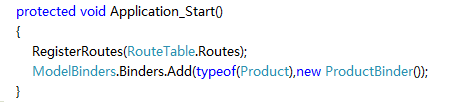
记得在global.asax里注册

image

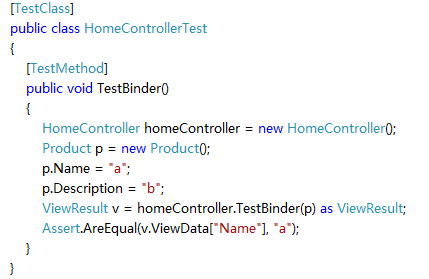
测试代码

image

很明显,测试是通过的,因为此时Action没有用到任何httpcontext的内容,处理的只是传进去的Product对象。

现在我的问题如下:

1. 很明显About的Action是通不过测试的,这里我只是使用了一个session值,难道我也需要新建一个ModerBinder,和一个类吗?这样 凡是出现调用httpcontext都的新建一个Binder那Binder是不是太多了,ModelBinder是不是主要处理Form?

2. 如果不用ModelBinder怎么样即可以使用session又易测呢?

3. 虽然Action好测了,但ProductBinder如何测?

注:本文没有技术含量,为何放在首页?因为我没有搜索到相关的内容,而园子里很多人肯定有更好的方案,但是他们的时间可能很紧,我想他们能在评论里给点好的思路,文章+评论=一篇好文, 我这里就是想抛砖引玉,把他们的经验为大家引出来。

[C#]独立主机上实现二级别域名解释(泛解释) (asp.net)

mikel阅读(758)

1\那就是把 *.iloveyou.io解释到服务器默认网站

2\在项目Global的事件protected void Application_BeginRequest(Object sender, EventArgs e)中通过

   string _path = Request.Url.AbsoluteUri;

   读取当前路径,然后做处理就是了!

   把

   _path="http://liangsan.iloveyou.io/ "

   的路径变为

  newurl="love/?toName=liangsan"

然后通过

    HttpContext.Current.RewritePath(newurl);

 就搞定了!就这么简单!

[MVC]如何进行ASP.NET MVC 的测试

mikel阅读(804)

如何进行ASP.NET MVC 的测试

本文参考了http://stephenwalther.com/blog/的内容。

今天需要对ASP.NET MVC的Controller进行测试,我们都知道当我们在测试工程里new一个controller时,这个controller里的httpcontext是空的,也就是session,cookie, form等都是空。

方法一:Mock controller的HttpContext, 暂时失败

那么我们如何对controller进行测试呢,我首先想到的是mock一个httpcontext,这里我用的是Rhino Mocks

public static class MvcMockHelpers

    {

        public static HttpContextBase FakeHttpContext(this MockRepository mocks)

        {

            HttpContextBase context = mocks.PartialMock<HttpContextBase>();

            HttpRequestBase request = mocks.PartialMock<HttpRequestBase>();

            HttpResponseBase response = mocks.PartialMock<HttpResponseBase>();

            HttpSessionStateBase session = mocks.PartialMock<HttpSessionStateBase>();

            HttpServerUtilityBase server = mocks.PartialMock<HttpServerUtilityBase>();


            SetupResult.For(context.Request).Return(request);

            SetupResult.For(context.Response).Return(response);               

            SetupResult.For(context.Session).Return(session);

            SetupResult.For(context.Server).Return(server);


            mocks.Replay(context);

            return context;

        }


        public static HttpContextBase FakeHttpContext(this MockRepository mocks, string url)

        {

            HttpContextBase context = FakeHttpContext(mocks);

            context.Request.SetupRequestUrl(url);

            return context;

        }


        public static void SetFakeControllerContext(this MockRepository mocks, Controller controller)

        {

            var httpContext = mocks.FakeHttpContext();

            ControllerContext context = new ControllerContext(new RequestContext(httpContext, new RouteData()), controller);

            controller.ControllerContext = context;

        }

下面我们建立一个ASP.NET MVC工程

using System;

using System.Collections.Generic;

using System.Linq;

using System.Web;

using System.Web.Mvc;

using System.Web.Mvc.Ajax;


namespace MVCTest.Controllers

{

    [HandleError]

    public class HomeController : Controller

    {

        public ActionResult TestSession()

        {

            Session["name"] = "Jack Wang";

            ViewData["Title"] = "Home Page";

            ViewData["Message"] = "Welcome to ASP.NET MVC!";

            if (Session["CurrentCulture"] != null)

            {

                ViewData["CurrentCulture"] = Session["CurrentCulture"];

            }

            return View();

        }


        public ActionResult TestForm()

        {

            ViewData["Name"] = Request.Form["Name"];

            ViewData["Age"] = Request.Form["Age"];

            ViewData["count"] = Request.Form.Count;

            return View();

        }


        public ActionResult TestLogin()

        {

            if (User.Identity.IsAuthenticated)

            {

                ViewData["userName"] = User.Identity.Name;

                return View("Admin");

            }

            else

            {

                return RedirectToAction("Index");

            }

        }


        public ActionResult Admin()

        {

            if (User.IsInRole("Admin"))

            {

                return View("Admin");

            }

            else

            {

                return RedirectToAction("Index");

            }

        }


        public ViewResult Details()

        {

            ViewData["PageSize"] = Request.QueryString["PageSize"];

            ViewData["CurrentPage"] = Request.QueryString["CurrentPage"];

            ViewData["count"] = Request.QueryString.Count;


            return View();

        }

        public ViewResult TestCookie()

        {

            ViewData["key"] = Request.Cookies["key"].Value;

            return View();

        }

    }

}


测试代码


using System;

using System.Collections.Generic;

using System.Linq;

using System.Text;

using System.Web.Mvc;

using Microsoft.VisualStudio.TestTools.UnitTesting;

using MVCTest;

using MVCTest.Controllers;

using MvcFakes;

using System.Web.SessionState;

using System.Web;

using System.Collections.Specialized;

using Rhino.Mocks;

namespace MVCTest.Tests.Controllers

{

    /// <summary>

    /// Summary description for HomeControllerTestByMock

    /// </summary>

    [TestClass]

    public class HomeControllerTestByMock

    {

        public HomeControllerTestByMock()

        {

            //

            // TODO: Add constructor logic here

            //

        }

        private MockRepository mocks;

        [TestInitialize]

        public void Setup()

        {

            mocks = new MockRepository();

        }

        [TestMethod]

        public void TestSession()

        {

            // Arrange


            HomeController controller = new HomeController();

            mocks.SetFakeControllerContext(controller);

            controller.Session.Add("name", "Jack Wang");

            SetupResult.For(controller.Session["CurrentCulture"]).Return("zh-CN");


            mocks.ReplayAll();

            // Act

            ViewResult result = controller.TestSession() as ViewResult;


            // Assert

            ViewDataDictionary viewData = result.ViewData;

            Assert.AreEqual("Home Page", viewData["Title"]);

            Assert.AreEqual("Welcome to ASP.NET MVC!", viewData["Message"]);

            Assert.AreEqual(controller.Session["name"], "Jack Wang");

            Assert.AreEqual("zh-CN", viewData["CurrentCulture"]);

        }


    }

}

运行,测试

image

从错误信息可以看到是因为代码里Session["name"] = "Jack Wang"出错

本人排查很久,只知道mock的controllercontext的Session里没有这个Key,但现在还没有找到如何解决,哪位高人能帮吗解决?


二,自己写个模拟的Fake类,测试通过


既然这种方法不行,我们只能换一种方法,还好controller的ControllerContext可以赋值,这样我们就通过继承ControllerContext来Fake

using System;

using System.Collections;

using System.Collections.Generic;

using System.Collections.Specialized;

using System.Linq;

using System.Text;

using System.Web;

using System.Web.SessionState;


namespace MvcFakes

{

    public class FakeHttpSessionState : HttpSessionStateBase

    {

        private readonly SessionStateItemCollection _sessionItems;


        public FakeHttpSessionState(SessionStateItemCollection sessionItems)

        {

            _sessionItems = sessionItems;

        }


        public override void Add(string name, object value)

        {

            _sessionItems[name] = value;

        }


        public override int Count

        {

            get

            {

                return _sessionItems.Count;

            }

        }


        public override IEnumerator GetEnumerator()

        {

            return _sessionItems.GetEnumerator();

        }


        public override NameObjectCollectionBase.KeysCollection Keys

        {

            get

            {

                return _sessionItems.Keys;

            }

        }


        public override object this[string name]

        {

            get

            {

                return _sessionItems[name];

            }

            set

            {

                _sessionItems[name] = value;

            }

        }


        public override object this[int index]

        {

            get

            {

                return _sessionItems[index];

            }

            set

            {

                _sessionItems[index] = value;

            }

        }


        public override void Remove(string name)

        {

            _sessionItems.Remove(name);

        }

    }

}


using System;

using System.Collections.Specialized;

using System.Web;


namespace MvcFakes

{


    public class FakeHttpRequest : HttpRequestBase

    {

        private readonly NameValueCollection _formParams;

        private readonly NameValueCollection _queryStringParams;

        private readonly HttpCookieCollection _cookies;


        public FakeHttpRequest(NameValueCollection formParams, NameValueCollection queryStringParams, HttpCookieCollection cookies)

        {

            _formParams = formParams;

            _queryStringParams = queryStringParams;

            _cookies = cookies;

        }


        public override NameValueCollection Form

        {

            get

            {

                return _formParams;

            }

        }


        public override NameValueCollection QueryString

        {

            get

            {

                return _queryStringParams;

            }

        }


        public override HttpCookieCollection Cookies

        {

            get

            {

                return _cookies;

            }

        }


    }

}


using System;

using System.Security.Principal;


namespace MvcFakes

{


    public class FakeIdentity : IIdentity

    {

        private readonly string _name;


        public FakeIdentity(string userName)

        {

            _name = userName;


        }


        public string AuthenticationType

        {

            get { throw new System.NotImplementedException(); }

        }


        public bool IsAuthenticated

        {

            get { return !String.IsNullOrEmpty(_name); }

        }


        public string Name

        {

            get { return _name; }

        }


    }


}


using System;

using System.Linq;

using System.Security.Principal;


namespace MvcFakes

{


    public class FakePrincipal : IPrincipal

    {

        private readonly IIdentity _identity;

        private readonly string[] _roles;


        public FakePrincipal(IIdentity identity, string[] roles)

        {

            _identity = identity;

            _roles = roles;

        }


        public IIdentity Identity

        {

            get { return _identity; }

        }


        public bool IsInRole(string role)

        {

            if (_roles == null)

                return false;

            return _roles.Contains(role);

        }

    }

}


using System;

using System.Collections.Specialized;

using System.Security.Principal;

using System.Web;

using System.Web.SessionState;


namespace MvcFakes

{

    public class FakeHttpContext : HttpContextBase

    {

        private readonly FakePrincipal _principal;

        private readonly NameValueCollection _formParams;

        private readonly NameValueCollection _queryStringParams;

        private readonly HttpCookieCollection _cookies;

        private readonly SessionStateItemCollection _sessionItems;


        public FakeHttpContext(FakePrincipal principal, NameValueCollection formParams, NameValueCollection queryStringParams, HttpCookieCollection cookies, SessionStateItemCollection sessionItems )

        {

            _principal = principal;

            _formParams = formParams;

            _queryStringParams = queryStringParams;

            _cookies = cookies;

            _sessionItems = sessionItems;

        }


        public override HttpRequestBase Request

        {

            get

            {

                return new FakeHttpRequest(_formParams, _queryStringParams, _cookies);

            }

        }


        public override IPrincipal User

        {

            get

            {

                return _principal;

            }

            set

            {

                throw new System.NotImplementedException();

            }

        }


        public override HttpSessionStateBase Session

        {

            get

            {

                return new FakeHttpSessionState(_sessionItems);

            }

        }


    }

}


using System;

using System.Collections.Specialized;

using System.Web;

using System.Web.Mvc;

using System.Web.Routing;

using System.Web.SessionState;


namespace MvcFakes

{


    public class FakeControllerContext : ControllerContext

    {

        public FakeControllerContext(ControllerBase controller)

            : this(controller, null, null, null, null, null, null)

        {

        }


        public FakeControllerContext(ControllerBase controller, HttpCookieCollection cookies)

            : this(controller, null, null, null, null, cookies, null)

        {

        }


        public FakeControllerContext(ControllerBase controller, SessionStateItemCollection sessionItems)

            : this(controller, null, null, null, null, null, sessionItems)

        {

        }


        public FakeControllerContext(ControllerBase controller, NameValueCollection formParams)

            : this(controller, null, null, formParams, null, null, null)

        {

        }


        public FakeControllerContext(ControllerBase controller, NameValueCollection formParams, NameValueCollection queryStringParams)

            : this(controller, null, null, formParams, queryStringParams, null, null)

        {

        }


        public FakeControllerContext(ControllerBase controller, string userName)

            : this(controller, userName, null, null, null, null, null)

        {

        }


        public FakeControllerContext(ControllerBase controller, string userName, string[] roles)

            : this(controller, userName, roles, null, null, null, null)

        {

        }


        public FakeControllerContext

            (

                ControllerBase controller,

                string userName,

                string[] roles,

                NameValueCollection formParams,

                NameValueCollection queryStringParams,

                HttpCookieCollection cookies,

                SessionStateItemCollection sessionItems

            )

            : base(new FakeHttpContext(new FakePrincipal(new FakeIdentity(userName), roles), formParams, queryStringParams, cookies, sessionItems),

            new RouteData(), controller)

        { }

    }

}


下面是测试类

using System;

using System.Collections.Generic;

using System.Linq;

using System.Text;

using System.Web.Mvc;

using Microsoft.VisualStudio.TestTools.UnitTesting;

using MVCTest;

using MVCTest.Controllers;

using MvcFakes;

using System.Web.SessionState;

using System.Web;

using System.Collections.Specialized;

namespace MVCTest.Tests.Controllers

{

    /// <summary>

    /// Summary description for HomeControllerTest

    /// </summary>

    [TestClass]

    public class HomeControllerTest

    {

        [TestMethod]

        public void TestSession()

        {

            // Arrange

            HomeController controller = new HomeController();

            var sessionItems = new SessionStateItemCollection();

            sessionItems["CurrentCulture"] = "zh-CN";

            controller.ControllerContext = new FakeControllerContext(controller, sessionItems);

            // Act

            ViewResult result = controller.TestSession() as ViewResult;


            // Assert

            ViewDataDictionary viewData = result.ViewData;

            Assert.AreEqual("Home Page", viewData["Title"]);

            Assert.AreEqual("Welcome to ASP.NET MVC!", viewData["Message"]);

            Assert.AreEqual(sessionItems["name"], "Jack Wang");

            Assert.AreEqual("zh-CN", viewData["CurrentCulture"]);

        }

        [TestMethod]

        public void TestFakeFormParams()

        {


            var controller = new HomeController();


            var formParams = new NameValueCollection { { "Name", "Jack" }, { "Age", "28" } };

            controller.ControllerContext = new FakeControllerContext(controller, formParams);


            var result = controller.TestForm() as ViewResult;

            Assert.AreEqual("Jack", result.ViewData["Name"]);

            Assert.AreEqual("28", result.ViewData["Age"]);

            Assert.AreEqual(formParams.Count, result.ViewData["count"]);

        }


        [TestMethod]

        public void TestFakeQueryStringParams()

        {

            var controller = new HomeController();


            var queryStringParams = new NameValueCollection { { "PageSize", "10" }, { "CurrentPage", "5" } };

            controller.ControllerContext = new FakeControllerContext(controller, null, queryStringParams);


            var result = controller.Details() as ViewResult;

            Assert.AreEqual("10", result.ViewData["PageSize"]);

            Assert.AreEqual("5", result.ViewData["CurrentPage"]);

            Assert.AreEqual(queryStringParams.Count, result.ViewData["count"]);

        }


        [TestMethod]

        public void TestFakeUser()

        {

            var controller = new HomeController();


            controller.ControllerContext = new FakeControllerContext(controller, "Jack Wang");

            var result = controller.TestLogin() as ActionResult;

            Assert.IsInstanceOfType(result, typeof(ViewResult));

            ViewDataDictionary viewData = ((ViewResult)result).ViewData;

            Assert.AreEqual("Jack Wang", viewData["userName"]);


            controller.ControllerContext = new FakeControllerContext(controller);

            result = controller.TestLogin() as ActionResult;

            Assert.IsInstanceOfType(result, typeof(RedirectToRouteResult));

        }


        [TestMethod]

        public void TestFakeUserRoles()

        {


            var controller = new HomeController();


            controller.ControllerContext = new FakeControllerContext(controller, "Jack Wang", new string[] { "Admin" });

            var result = controller.Admin() as ActionResult;

            Assert.IsInstanceOfType(result, typeof(ViewResult));


            controller.ControllerContext = new FakeControllerContext(controller);

            result = controller.Admin() as ActionResult;

            Assert.IsInstanceOfType(result, typeof(RedirectToRouteResult));

        }


        [TestMethod]

        public void TestCookies()

        {


            var controller = new HomeController();


            var cookies = new HttpCookieCollection();

            cookies.Add(new HttpCookie("key", "a"));

            controller.ControllerContext = new FakeControllerContext(controller, cookies);

            var result = controller.TestCookie() as ViewResult;


            Assert.AreEqual("a", result.ViewData["key"]);

        }

    }

}

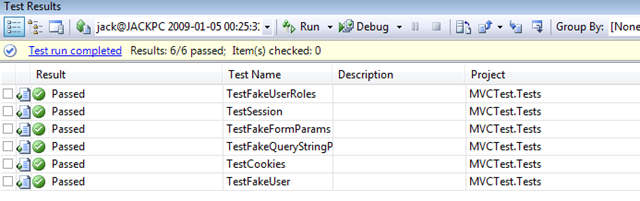
测试完全通过

image 


总结: 个人感觉ASP.NET MVC的测试是很不友好的,和ruby on rails相比,在测试这一块还有很大的距离,希望正式版里这一块能够加强


王德水 写于2008-01-05 00:30分


本文源码下载

[Javascript]javascript中setTimeout 和setInterval的区别

mikel阅读(686)

window对象有两个主要的定时方法,分别是setTimeout 和 setInteval 他们的语法基本上相同,但是完成的功能取有区别。
  setTimeout方法是定时程序,也就是在什么时间以后干什么。干完了就拉倒。
  setInterval方法则是表示间隔一定时间反复执行某操作。

  如果用setTimeout实现setInerval的功能,就需要在执行的程序中再定时调用自己才行(setTimeout( ) 預設只是執行一次, 但我們可以使用一個循環方式, 使到一個setTimeout( ) 再啟動自己一次, 就會使到第二個 setTimeout( ) 執行, 第二個又啟動第三個, 這樣循環下去, 這 setTimeout( ) 就會不斷執行)。如果要清除计数器需要根据使用的方法不同,调用不同的清除方法:

  1. var timeID = null;   
  2.   
  3. //timeout方法   
  4. timeID=setTimeout('northsnow()',1000);   
  5. clearTimeout(timeID);     
  6.   
  7. //interval方法   
  8. timeID=setInterval('northsnow()',1000);   
  9. clearInteval(timeID);  

 eg:

  1. <script type="text/JavaScript">   
  2. var count = 0;   
  3. var timeID = null;   
  4. function counter() {   
  5.     count++;       
  6.     $("#count").html(count + '%');   
  7.     timeID = setTimeout("counter()"1000);//注意:执行的函数需要加引号,否则会报错的
  8.     if (count > 10) {   
  9.         clearTimeout(timeID);   //注意:clearTimeout(timeID)必须位于setTimeout()之后,不能是之前,原因很容易呦!   
  10.     }   
  11. }   
  12. $(function() {   
  13.     counter();   
  14. });   
  15. </script>  


  1. <script type="text/JavaScript">   
  2. var count = 0;   
  3. var timeID = null;   
  4. function counter() {   
  5.     count++;       
  6.     $("#count").html(count + '%');   
  7.     if (count > 10) {   
  8.         clearInterval(timeID);   
  9.     }       
  10. }   
  11. $(function() {       
  12.     timeID = setInterval('counter()', 1000);  //注意:执行的函数需要加引号,否则会报错的 
  13.        
  14. });   
  15. </script>  

    好了,基本原理明白了,剩下的就是自己灵活运用了,可以开发一些定时器或延时器之类的东东^_^.

[Javascript]关闭浏览器的事件

mikel阅读(874)

在做图片刷新功能的时候,会出现IE图片缓存的问题,试了N多方法都没有效果,最后只有使用每刷新一次修改图片文件名加随机数的方法才勉强解决。但是这样 的方法是下次打开浏览器读取图片的时候,上次产生的随机数是动态的,这时候只有让用户关闭浏览器的时候捕捉关闭事件然后将图片更名为一个统一的名字。由于 浏览器是无状态的,在这时候捕捉浏览器关闭会出现两种情况:1.真正的关闭浏览器 2.刷新浏览器。如何判断区分这两种动作呢。
一. JavaScript代码处理方法:
      function window.onbeforeunload()  
      {        
        //用户点击浏览器右上角关闭按钮
        if(event.clientX>document.body.clientWidth&&event.clientY<0||event.altKey)  
        {   
                document.getElementById("btnCompelete").click();
//              window.event.returnValue="确定要退出本页吗?";  
        }
        //用户点击任务栏,右键关闭
        else if(event.clientY > document.body.clientHeight || event.altKey)
        {
            document.getElementById("btnCompelete").click();
//            window.event.returnValue="确定要退出本页吗?";  
        }
         else//其他情况为刷新   
         {   
              alert("你在刷新");
         }  
      } 
其中 event.clientX   鼠标光标X坐标     document.body.clientWidth窗体工作区宽度     event.clientY鼠标光标Y坐标     event.altKey   是否按下alt键
二. 事件捕捉方法:
<body scroll="no" onbeforeunload="return CloseEvent();" onunload="UnLoadEvent()" >
</body>

<script language="JavaScript" type="text/JavaScript">
 
  
    var DispClose = true;
    function CloseEvent()
    {
        if (DispClose)
        {
            return "是否离开当前页面?";
        }
    }
   
    function UnLoadEvent()
    {
        DispClose = false;
        //在这里处理关闭页面前的动作
    }
在页面卸载之前引发onbeforeunload事件,如果用户选择“是”即确定卸载页面将引发onunload事件,否则返回页面不做任何操作。

[C#]static变量与asp.net

mikel阅读(980)

 在C#中,static变量表示该变量属于类,而不是类的实例。可以说是该类的所有实例共享一个static变量。
ASP.NET的页面就是一个类,我们访问一个页面。就会在服务器上实例化一个该类的实例,来响应我们的请求。
“所有实例共享一个static变量” 这就意味着,所有的客户端访问到的ASP.NET页面中static变量都是同一个变量。

由于我们每次访问ASP.NET页面都是一个全新的对象,而不是我们上一次访问的对象。所以上次页面访问时我们对页面中变量的改动都没有保留。遇到 这个问题的时候,很多初学者的直觉就是将这个变量申明为static,自己在测试的时候发现还真的保留住了页面的状态。窃喜之余没有发现这又有引入了另外 一个错误。因为你要的只是页面能保留住状态,而这个状态是针对一个客户端的(session的效果)。而得到的结果是只要一个客户端改变了该值所有的其他 客户端都受到了影响(如同Applicatin的效果)。这种情况下,需要的极有可能就是个ViewState或者是Session。

Application与static变量
Application是通过一个集合保存所有的对象。

强类型:
Application中保存的是object,对对象的保存和使用需要作cast动作。对于值类型更需要Box&UnBox。对性能的影响较大。
而static变量是强类型的对象。

线程同步:
Application将所有的对象放到一个集合,这样对访问集合中的任何对象都会锁定这个集合。
假如有Application["A"]、Application["B"]、Application["C"],有线程访问Application["A"]其他线程不能访问Application["B"] and Application["C"]。
而static变量,可以根据他们的作用分别放在不同的class当中。这样可以并行访问不同的static变量,而不存在线程安全问题。

友情提示:
1. 对static变量,做lock时。可以通过lock(typeof(classname))来锁定该变量所在的类的类型,达到线程同步的目的。
2. 由于Aplication,static member是全局变量,而我们是在多线程服务器环境写程序,对他们的使用需要注意线程安全的问题

[MVC]ASP.Net MVC Framework - Create your own IRout

mikel阅读(848)

In my previous post I wrote about how we can create our own IControllerFactory for the ASP.NET MVC Framework; in this post I will show you how we can create our own IRouteHandler.
The RouteHandler in this post will replace the IControllerFactory with my own Controller Factory, and also set a default ControllerFactory and a ViewFactory specified in the web.config. This is something the current preview bits of the MVC Framework can’t.
It’s quite easy to create our own RouteHandler, we only need to implement the IRouteHandler interface and implement the GetHttpHandler method 😉
public class N2MVCRouteHandler : IRouteHandler
{
   public IHttpHandler GetHttpHandler(RequestContext requestContext)
   {
       N2MVCHandler handler = new N2MVCHandler();
       handler.RequestContext = requestContext;
       return handler;
    }
}

The GetHttpHandler returns an IHttpHandler. I have created my own IHttpHandler (N2MVCHandler). The N2MVCHandler inherits the MvcHandler shipped with the ASP.NET MVC Framework. The reason why I inherit the MvcHandler is because I don’t want to rewrite stuff that isn’t necessarily. In my IHttpHandler I override the ProcessRequest method and added my own code to create a Controller for the current request.

public class N2MVCHandler : MvcHandler
{
    protected override void ProcessRequest(IHttpContext httpContext)
    {
       if (this.RequestContext == null)
          throw new InvalidOperationException("No RequestContext");

       string controllerName = this.GetRequiredString(this.RequestContext.RouteData, "controller");

       IController controller = this.CreateController(controllerName);
       ControllerContext controllerContext = new ControllerContext(base.RequestContext, controller);

       controller.Execute(controllerContext);
    }

    private IController CreateController(string controllerName)
    {
       N2MVCConfigurationHandler config = ConfigurationManager.GetSection("Nsquared2/N2MVCSection") as N2MVCConfigurationHandler;

       IN2ControllerFactory controllerFactory = N2ControllerFactoryBuilder.GetControllerFactory(config.ControllerFactory);

       IController controller = controllerFactory.CreateController(base.RequestContext, controllerName);

       return controller;
    }
}

In the ProcessRequest method I also create a Controller for the current request by calling the CreateController method. The CreateController method in the N2MvcHandler instantiates a ControllerFactroy which is specified in the web.config file. When the factory is instantiated I make a call to its CreateController method to create an instance of the Controller.

In this example I have replace the IControllerFactory with my own interface, the reason is that I want to pass the name of the Controller and not the Type. The MvcHandler shipped with the MVC Framework will in the ProcessRequest method try to locate the Controller within the references assemblies and create the Type of the Controller and pass it to the IController.CreateController method. But I think it’s up to the ControllerFactory to look up the Controller. Here is my IControllerFactory interface:

public interface IN2ControllerFactory
{
    IController CreateController(RequestContext context, string controllerName);
}

Note: You can still create your own ControllerFactory, but you need to implement my interface instead of IControllerFactory, and you don’t need to make a call to the ControllerBuilder.Current.SetDefaultControllerFactory method in the Application_Start event in Global.asax to specify which ControllerFactory you want to use, instead you can do it in web.config. You will see how to do it later in this post.

I decided to use Spring.Net in this post also to create my Controller within the ControllerFactory.

public class N2ControllerFactory : IN2ControllerFactory
{
    public IController CreateController(RequestContext context, string controllerName)
    {
        IResource input = new FileSystemResource(context.HttpContext.Request.MapPath("objects.xml"));
        IObjectFactory factory = new XmlObjectFactory(input);

        IController controller = (IController)factory.GetObject(controllerName, typeof(IController));

        if (typeof(Controller).IsAssignableFrom(controller.GetType()))
        {
          N2MVCConfigurationHandler config = ConfigurationManager.GetSection("Nsquared2/N2MVCSection") as N2MVCConfigurationHandler;
          ((Controller)controller).ViewFactory = N2ViewFactoryBuilder.GetViewFactory(config.ViewFactory);
        }
        return controller;
    }
}
It's the ControllerFactory's responsibility to create and fill the Controller with all it information it needs. In this case the ViewFactory.

The IViewFactory is used to create a factory which has the responsibility to create a View. Because a Controller don’t need to implement the Controller base class I will in my code use a "code policy". I will check if the created Controller inherits the Controller class, if so I will create a IViewFactory and inject it to the Controller. The IController interface don’t have the ViewFactory property, it’s something we will get from the Controller base class. 

If we take a look again at the CreateContoller method in the IHttpHandler (N2MVCHandler), we can see how I get the ControllerFactory from the web.config

private IController CreateController(string controllerName)
{
    N2MVCConfigurationHandler config = ConfigurationManager.GetSection("Nsquared2/N2MVCSection") as N2MVCConfigurationHandler;

    IN2ControllerFactory controllerFactory = N2ControllerFactoryBuilder.GetControllerFactory(config.ControllerFactory);

    IController controller = controllerFactory.CreateController(base.RequestContext, controllerName);

    return controller;
}

I use some other helper classes in my code to create an instance of the Controller- and ViewFactory specified in the web.config, the code of the helper methods is not relevant for this post. When the public CTP of the MVC Framework is released, you can drop me an e-mail and I can send you my source code.

Here is the config section in the web.config where a conrollerFactory is specified and also a viewFactory. So we can now easy specify our ControllerFactory and ViewFactory in web.config.

<Nsquared2>
    <N2MVCSection
        controllerFactory="MvcApplication.Models.N2ControllerFactory, MvcApplication, Version=1.0.0.0, Culture=neutral, PublicKeyToken=null"
        viewFactory="MvcApplication.Models.N2ViewFactory, MvcApplication, Version=1.0.0.0, Culture=neutral, PublicKeyToken=null"/>
</Nsquared2>

By using the Route objects’ RouteHandler, we can easy change the RouteHandler the MVC Framework should use.

RouteTable.Routes.Add(new Route
{
    Url = "[controller]/[action]/[id]",
    Defaults = new { action = "Index", id = (string)null },
    RouteHandler = typeof(N2MVCRouteHandler)
});

In this post you have seen how we can create our own IRouteHandler, and also replace the ControllerFactory with our own.