[C#]提高软件开发效率三板斧之二----利用CMP模式

mikel阅读(907)

提高软件开发效率三板斧之二

利用CMP模式

上一章给大家总体介绍了一些提高软件开发效率的技术和技巧,在这里将给大家演示一个软件体系结构的应用,我们引用《ASP.NET电子商务高级编程》的一句话来解释“体系结构”这个词,因为演示的这个架构正是这本书中提到的。

“我们通常将体系结构看作一系列服务的集合,用来执行其他代码,这些服务应当提供有效的功能和特性来完成一些特定目标。”建立体系结构时必须牢记几个目标

1.      尽量创建可重用的代码

2.       加强设计模式和最佳实践

3.       提供通用功能

4.       提供开发基础

了解了设计体系结构的目标后,还应该明确体系结构应该提供的服务,在深入讨论之前建议大家先研究一下IbuySpy,Nile,Pet Shop等站点的体系结构,这些站点都非常好,也很正确。但这个架构要构建一个易于维护,升级,增强功能的架构。先列举一下需要架构提供的服务列表。

1.      数据服务

这里用到的时托管容器式持久性模型(CMP),它是一种设计模式,这种模式下业务对象不考虑数据从何处来,以及如何存放。业务对象可以是纯粹的业务对象,它们维护业务数据并根据业务规则判断这些数据是否正确,并且和数据库访问层没有丝毫关系。关于CMP的更多详细的信息,可以去买一本清华出版的《ASP.NET电子商务高级编程》以及相关网站资料,这里给出两个相关链接。

2.       监测服务

这里提供一套标准的服务来完成软件的监测任务。这里的监测是指记录,跟踪,错误处理,还有其它与跟踪系统正在做什么以及谁正在使用系统等相关的任务。这些服务包括跟踪变量,记录不同来源的错误和其它信息,以及使用自定义异常等

3.       安全服务

设计安全服务是为了提供足够的安全,不过这里用到的安全服务非常简单,仅仅实现了身份验证的功能,其实安全在开发过程中是一项不容忽视且相当艰巨的任务,包括防止脚本注入,数据库注入,实现数字签名,混淆代码以防止代码斜路以及web服务中的一些安全实现等。最近我买了一本《ASP.NET安全性高级编程》,那本书对在asp.net开发过程中如何实现安全性这个问题有很完整的阐述,建议大家可以买一本看看。

4.       配置服务

配置服务是用来控制应用程序所需要的配置选项的。这里的配置服务也是比较简单的,不过可以以后根据需求改进设计并加强体系结构中的这个部分。

因为篇幅有限,不可能对架构中的每个项目的每个类都逐一分析讨论,这里给出一个简单的类的功能列表,以方便你理解和使用这个架构,当然还有好多更吸引人和有用的技巧在里面,建议你下载源代码后慢慢研究一下,就这个架构我零零碎碎的看了3个多月才开始真正的使用它并把它用到实际开发中去,源代码可以去wrox网站去下载,也可以在本篇文章提供的地址去下载,前面说了,这个架构有足够的扩展性,你完全可以根据你的需要来写一个针对accessoracleSQLPersistenceContainer类,或者在实现安全服务的

1.       CMPServices项目

CMPServices项目

功能

CMPConfigurationHandler.cs

它负责从web.config文件的自定义配置部分加载元数据配置信息

ContainerMappingSet.cs

元数据配置的顶层是XML根结点,包含一个容器映射的列表,这个容器映射的集合保存在ContainerMappingSet类的一个实例中。它具有基于XML结点进行自身初始化的功能,以及用于调试的手动装载功能

ContainerMapping.cs

实现容器映射,对单个对象关系映射的抽象。它允许一个容器(如SQL持久性容器或XML容器等)获得对象实例的足够信息,该对象实例可用于执行对象关系映射,它可以让对象实例保持对底层数据源的持久性。一个容器映射最多包含4个命令映射(限于CRUD标准的4个命令)。

CommandMapping.cs

命令映射是CRUD动作的表现,可以被底层数据源执行,对于SQL容器,定义了4CommandMapping,分别实现Insert,Update,Select,Delete方法的支持.它还包含一个参数列表,并使属性总是显示命令的名称(可以映射到某个存储过程)和提供者提示,并允许在同一个容器和数据源中从不同的数据库得到不同的命令。

CommandParameter.cs

它包含的信息可以将类示例的公共属性和字段映射到数据源上使用的特定命令参数,它包括下列属性:类属性,参数名称,数据类型,大小,参数方向。

PersistableObject.cs

这是一个基类,它提供一系列让对象参与托管容器式持久性的基本功能,任何希望它的实例参与托管容器式持久性的类都必须继承这个类,它提供单条需要保持的数据。如果需要从数据库或者其它数据源获得多条数据查询结果,可以利用这个类。

PersistableObjectSet.cs

这个类继承自PersistableObject类如果不能提前返回数据集的大小,就需要用这个类来维护一个内部数据集,这个内部数据集相当于容器执行命令后的返回数据的存储处。容器可以事先知道它处理的是PersistableObject类还是PersistableObjectSet类可以动态决定命令执行后将返回的数据结果保存在哪里。

StdPersistenceContainer.cs

StdPersistenceContainer类是一个基类,它定义了所有容器必须提供的核心功能。这里采用类而不是接口,所以可以实现一些默认的功能,并且可以在整个架构中利用它的多态性使问题简化。

SqlPersistenceContainer.cs

SqlPersistenceContainer是持久性容器的一个实现,是专门为SQLServer设计的,可以针对SQLServer数据库的select,insert,update,delete操作方法。该类的其它内部容器映射来分析对象的关系映射,在对象实例和数据源之间交换数据。

2.       ConfigurationServices项目

ConfigurationServices项目

功能

SiteProfile.cs

在这里主要提供了一些程序运行的所有对象可以用到的静态属性,比如加载元数据,CMP数据引擎的数据库类型集合,指明默认数据源的连接字符串等。这些静态成员在应用程序启动时被加载起来,也就是在Global.asax文件里实现的,下面我会讲的。


3.       MonitorServices项目

MonitorServices项目

功能

GWTrace.cs

GWTrace.类负责提供标准的跟踪功能。该类统一了跟踪信息的存放位置。它知道web.config文件里的一个跟踪级别开关,但跟踪不同等级详细信息时会进行识别。合理应用该类的方法可以大大方便你在开发中对代码运行的跟踪。

MonitorUtilities.cs

该类提供了一些工具类方法,在监测系统中对其它方法非常有用,例如包含了返回机器名,应用程序名称,进程信息的方法它还提供了一个SafeFormat方法,它提供了一个安全,不引起错误的办法把对象参数转换成标准格式的字符串。

4.       MonitorServicesLogging项目

MonitorServicesLogging项目

功能

DbErrorEntry.cs

该类是一个PersistableObject类,在存储一条错误信息记录到数据库时,它用作与数据库的接口。它只是写入数据库或者读出的错误记录信息的一个简单的占位符号。

DbErrorEntrySet.cs

该类时一个PersistableObjectSet类,包含了在一定数据范围内返回一列错误所需的参数信息。为了管理而检查一个特定时间段的错误记录的时候,该类非常有用

DbErrorLog.cs

该类负责在数据库中维护错误记录信息,这些错误记录包含错误来源,运行时返回的进程等详细信息,以及实际的异常内容

FileErrorLog.cs

该类只是简单的把错误信息记录到一个文件,虽然该类可以单独使用,但开发者不应该单独调用它,而应该调用ErrorLog类。ErrorLog类会把错误先记录到数据库,只把文本文件作为一种数据库出问题时的备份

ErrorLog.cs

该类用于筛选错误记录,它首先尝试把错误记录送到数据库中。如果失败,他会把错误信息写入文件;如果成功,他会在文件中留下信息指出错误记录已经成功保存在数据库,并附带一个合适的错误ID

GWException.cs

这是一个自定义异常类,当实例化改类时,类实例可获得的错误信息就会发送给ErrorLog类,以将其持久保存到数据库或相应的文本文件中,这样就保证了开发者在任何时候实例化改类或其子类对应的异常时,错误信息都能够以可靠的形式保存下来。它还有个方法将基于一个数字键在内部资源文件ErrorMessages.resx中检索异常信息。这个数字键由GWExceptionMessages的枚举项提供

GWExceptionMessages.cs

改类时包含了证书值的枚举项,在加载错误信息字符串时,这些证书值在资源文件内被用做键。

架构已经有了,现在想办法把这个架构利用到实际的开发中,这里演示一个简单的留言板程序,其中也实现了对数据库的添加,删除,修改,选择等基本功能。其实一个大的项目也无非是由这样小的独立的功能模块构建起来的,这里只是抛砖引玉。闲话不说,我们来一步一步进行。

1.       构建项目

新建立一个web项目,这里是wawabook.然后把CMPServicesConfigurationServicesMonitorServicesMonitorServicesLogging4个文件夹拷贝到项目根目录下,并在解决方案里添加已有项目,把那这个项目添加进去。另外还有SharedAssemblyInfo.csGadgetsWarehouse.snk也拷贝到根目录下,一个是版权信息,一个是程序集的强名键。不用改动直接复制过来就可以。完成后解决方案管理器大致如下图。注意一下各个项目之间的依赖性,因为各个项目之间有交叉引用,关于各个项目之间的关系可以在源代码中看出来。

2.       建立数据库和相关表,存储过程

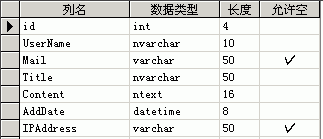
按实际的需求在SQLServer里建立数据库,表以及相应的存储过程。这里的数据库名叫wawabook,表名叫GuestBook,在创建表时最好把字段的描述信息写上,这时很有用的,方便以后查看和理解,完成后如下图。

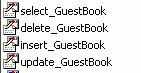
分别建立对GuestBook表的Insert,Select,Update,Delete的存储过程如图
这里只给出insert_GuestBook的存储过程源码供参考,其它存储过程可以在本文附带的数据库源码中查看


Create PROCEDURE [insert_GuestBook]

(
@UserName     [nvarchar](10),

 
@Mail    [varchar](50),

 
@Title    [nvarchar](50),

 
@Content        [ntext],

 
@AddDate       [datetime],

 
@IPAddress     [varchar](50))


AS Insert INTO [wawabook].[dbo].[GuestBook] 

 ( 
[UserName],

 
[Mail],

 
[Title],

 
[Content],

 
[AddDate],

 
[IPAddress]


VALUES 

@UserName,

 
@Mail,

 
@Title,

 
@Content,

 
@AddDate,

 
@IPAddress)

GO

另外把SystemErrors表,GW_Insert_ERRORLOG_SP存储过程复制到你新建的数据库里,因为程序出错的时候会用到这个表和存储过程来记录错误日志。 你可以自己写一个GW_GET_ERRORLOG_SP存储过程来在出错误的时候查看错误日志以分析错误的原因所在。

3.       配置web.config

这里要配置几个地方,数据库连接字符串,跟踪级别开关,元数据等,这里只说一下额外需要特殊配置的地方,具体的web.config配置根据你的程序需要而定,比如说安全小节,身份验证小节,http小节等。

1)因为元数据在web.config文件保存,而web.config是个固定格式的文件,这就要指定这个自定义节点。

    <configSections>

         
<section name="GWConfig" type="GW.CMPServices.CMPConfigurationHandler, GW.CMPServices" />

</configSections>

2)为了让跟踪项目能够合理的工作,需要定义项目跟踪级别,下面的小节定义了项目的跟踪级别,具体可以根据你项目实际需求来设置。要了解TraceSwitch更多的消息请查阅MSDN文档

  <system.diagnostics>

         
<switches>

              
<add name="GWTrace" value="4" />

         
</switches>

</system.diagnostics>

需要注意的是上面两个小节都在system.web节点上面

       3)刚才定义了GwCfonfig自定义节点,这里用来放置CMP元数据,因为架构里的错误处理功能需要把错误信息保存到数据库里,所以错误处理所需要的元数据是必须的。另外这里给出了GuestBook容器的insert的元数据。你可以看一下元数据的结构,理解一下。因为很简单,相信你能很快写出相应的update,select,delete的元数据,记着,这些元数据和你刚刚写的存储过程是对应的。

<GWConfig>

         
<ContainerMappingSet>

              
<ContainerMapping>

                   
<ContainerMappingId>ERROR_LOG</ContainerMappingId>

                   
<ContainedClass>DbErrorEntry</ContainedClass>

                   
<Insert>

                       
<CommandName>GW_Insert_ERRORLOG_SP</CommandName>

                       
<Parameter>

                            
<ClassMember>ErrorMessage</ClassMember>

                            
<ParameterName>@ErrorMessage</ParameterName>

                            
<DbTypeHint>Varchar</DbTypeHint>

                            
<ParamDirection>Input</ParamDirection>

                            
<Size>4000</Size>

                       
</Parameter>

                       
<Parameter>

                            
<ClassMember>ExtendedInfo</ClassMember>

                            
<ParameterName>@ExtendedInfo</ParameterName>

                            
<DbTypeHint>Varchar</DbTypeHint>

                            
<ParamDirection>Input</ParamDirection>

                            
<Size>4000</Size>

                       
</Parameter>

                       
<Parameter>

                            
<ClassMember>ServerName</ClassMember>

                            
<ParameterName>@ServerName</ParameterName>

                            
<DbTypeHint>Varchar</DbTypeHint>

                            
<ParamDirection>Input</ParamDirection>

                            
<Size>50</Size>

                       
</Parameter>

                       
<Parameter>

                            
<ClassMember>ErrorId</ClassMember>

                            
<ParameterName>@ErrorId</ParameterName>

                            
<DbTypeHint>Int</DbTypeHint>

                            
<ParamDirection>Output</ParamDirection>

                            
<Size>4</Size>

                       
</Parameter>

                   
</Insert>

                   
<Select>

                       
<CommandName>GW_GET_ERRORLOG_SP</CommandName>

                       
<Parameter>

                            
<ClassMember>StartDate</ClassMember>

                            
<ParameterName>@StartDate</ParameterName>

                            
<DbTypeHint>Date</DbTypeHint>

                            
<ParamDirection>Input</ParamDirection>

                            
<Size>8</Size>

                       
</Parameter>

                       
<Parameter>

                            
<ClassMember>EndDate</ClassMember>

                            
<ParameterName>@EndDate</ParameterName>

                            
<DbTypeHint>Date</DbTypeHint>

                            
<ParamDirection>Input</ParamDirection>

                            
<Size>8</Size>

                       
</Parameter>

                   
</Select>

              
</ContainerMapping>

              
<ContainerMapping>

                   
<ContainerMappingId>GuestBook</ContainerMappingId>

                   
<ContainedClass>GuestBookSet</ContainedClass>

                   
<Insert>

                       
<CommandName>insert_GuestBook</CommandName>

                       
<Parameter>

                            
<ClassMember>UserName</ClassMember>

                            
<ParameterName>@UserName</ParameterName>

                            
<DbTypeHint>NVarChar</DbTypeHint>

                            
<ParamDirection>Input</ParamDirection>

                            
<Size>10</Size>

                       
</Parameter>

                       
<Parameter>

                            
<ClassMember>Mail</ClassMember>

                            
<ParameterName>@Mail</ParameterName>

                            
<DbTypeHint>Varchar</DbTypeHint>

                            
<ParamDirection>Input</ParamDirection>

                            
<Size>50</Size>

                       
</Parameter>

                       
<Parameter>

                            
<ClassMember>Title</ClassMember>

                            
<ParameterName>@Title</ParameterName>

                            
<DbTypeHint>NVarChar</DbTypeHint>

                            
<ParamDirection>Input</ParamDirection>

                            
<Size>50</Size>

                       
</Parameter>

                       
<Parameter>

                            
<ClassMember>Content</ClassMember>

                            
<ParameterName>@Content</ParameterName>

                            
<DbTypeHint>NText</DbTypeHint>

                            
<ParamDirection>Input</ParamDirection>

                            
<Size>10000</Size>

                       
</Parameter>

                       
<Parameter>

                            
<ClassMember>AddDate</ClassMember>

                            
<ParameterName>@AddDate</ParameterName>

                            
<DbTypeHint>Date</DbTypeHint>

                            
<ParamDirection>Input</ParamDirection>

                            
<Size>50</Size>

                       
</Parameter>

                       
<Parameter>

                            
<ClassMember>IPAddress</ClassMember>

                            
<ParameterName>@IPAddress</ParameterName>

                            
<DbTypeHint>Varchar</DbTypeHint>

                            
<ParamDirection>Input</ParamDirection>

                            
<Size>50</Size>

                       
</Parameter>

                   
</Insert>

              
</ContainerMapping>

         
</ContainerMappingSet>

     
</GWConfig>

4)其它固定配置

这里包括文本类型错误日志保存的目录和数据库链接字符串,这些东西一般保存在appSeettings小节里,值得注意的是为了安全考虑数据库链接字符串可以加密后再保存。Windows提供了一些API来增强安全性,.NET框架也提供了若干个加密相关的类,关于数据库连接字符串的加密可以参考一下PetShop3DataProtector类和ConnectionInfo类,这两个类都在Utility项目下。

<appSettings>

         
<add key="ErrorViewUrlPrefix" value="/GWSetup/ErrorLog/" />

         
<add key="ErrorLogBaseDir" value="E:\me\web.net\GWSetup\Errors\" />

         
<add key="DefaultDataSource" value="user id=sa; password=sa; database=wawabook; server=(local);" />

</appSettings>

当应用程序出错的时候错误处理程序会先试图在数据库做错误日志记录,如果记录成功,会在一个文本文件里做一个标志,这个文本文件的存放位置由ErrorViewUrlPrefix小节配置,如果在往数据库写错误日志也出错的话会以文本的形式记录错误日志,这个文本文件的存放位置由ErrorLogBaseDir小节来配置。

4.       修改Global.asax.cs里面的一些地方

这里要解决的问题是要在应用程序启动的时把CMP元数据加载起来,还有一些全局的变量也要在这里加载,比如说元数据映射的SQL数据类型。我们主要看一下Application_Start方法。

protected void Application_Start(Object sender, EventArgs e)

         
{

              System.Configuration.ConfigurationSettings.GetConfig(
"GWConfig");


              SiteProfile.DefaultDataSource 
= System.Configuration.ConfigurationSettings.AppSettings["DefaultDataSource"];


              SiteProfile.DbTypeHints[
"Varchar"= System.Data.SqlDbType.VarChar;

              SiteProfile.DbTypeHints[
"Int"= System.Data.SqlDbType.Int;

              SiteProfile.DbTypeHints[
"Date"= System.Data.SqlDbType.DateTime;

              SiteProfile.DbTypeHints[
"Text"= System.Data.SqlDbType.Text;

              SiteProfile.DbTypeHints[
"Bit"= System.Data.SqlDbType.Bit;

              SiteProfile.DbTypeHints[
"Money"= System.Data.SqlDbType.Money;

              SiteProfile.DbTypeHints[
"NVarChar"= System.Data.SqlDbType.NVarChar;

              SiteProfile.DbTypeHints[
"NText"= System.Data.SqlDbType.NText;

     }


如果你的程序里需要加载其它的sql类型,你可以对这个方法做适当的修改。

5.       建立BLL层和数据实体类

为了简单,我把业务逻辑层和数据库实体层放在了一个项目里。建立GuestBookBLL项目,并在里面添加两个类GuestBookGuestBookSet.GuestBookSet类时数据实体类,必须继承自PersistableObject类或者PersistableObjectSet.类,因为这里要用到一些大数据集,所以继承自PersistableObjectSet.

using System;

using System.Data;

using System.Xml;


using GW.CMPServices;


namespace GuestBookBLL

{

     
/// <summary>

     
/// GuestBookSet 的摘要说明。

     
/// </summary>


public class GuestBookSet:PersistableObjectSet

     
{

         
private int _id ;

         
private string _UserName;

         
private string _Mail;

         
private string _Title;

         
private string _Content;

         
private DateTime _AddDate;

         
private string _IPAddress;

         
public GuestBookSet()

         
{

              
//

              
// TODO: 在此处添加构造函数逻辑

              
//

         }


public int id

         
{

              
get 

              
{

                   
return this._id;

              }


set 

              
{

                   
this._id = value;

              }


         }


public string UserName

         
{

              
get 

              
{

                   
return this._UserName;

              }


set 

              
{

                   
this._UserName = value;

              }


         }


public string Mail

         
{

              
get 

              
{

                   
return this._Mail;

              }


set 

              
{

                   
this._Mail = value;

              }


         }


public string Title

         
{

              
get 

              
{

                   
return this._Title;

              }


set 

              
{

                   
this._Title = value;

              }


         }


public string Content

         
{

              
get 

              
{

                  
return this._Content;

              }


set 

              
{

                   
this._Content = value;

              }


         }


public DateTime AddDate

         
{

              
get 

              
{

                   
return this._AddDate;

              }


set 

              
{

                   
this._AddDate = value;

              }


         }


public string IPAddress

         
{

              
get 

              
{

                   
return this._IPAddress;

              }


set 

              
{

                   
this._IPAddress = value;

              }


         }


     }


}


可以看出这个类和刚才我们建立的数据库是对应的。需要注意的是你在定义类的属性时要和数据库的类型相对应,比如说数据库的字段时VarChar类型,对应的C#类型就是string类型,如果字段类型是DateTime类型,对应的C#类型是System.DateTime结构类型。关于更多的类型对应关系在MSDN里可以查到。

有了数据库实体类,我们就可以写业务逻辑了,业务逻辑我们在GuestBook类里实现,这里先看一下怎样利用架构来向数据库里写入数据,也就是填写留言功能。

public static void insert_GuestBook( string UserName,string Mail,string Title,string Content,DateTime AddDate,string IPAddress )

         
{

              GWTrace.EnteringMethod( MethodBase.GetCurrentMethod() );

              SqlPersistenceContainer spc 
= new SqlPersistenceContainer(CMPConfigurationHandler.ContainerMaps["GuestBook"]);

              GuestBookSet gbs 
= new GuestBookSet();

              gbs.UserName
=UserName;

              gbs.Mail
=Mail;

              gbs.Title
=Title;

              gbs.Content
=Content;

              gbs.AddDate
=AddDate;

              gbs.IPAddress
=IPAddress;

              spc.Insert( gbs );

         }


可以看到,先实例化一个SqlPersistenceContainer容器类,然后实例化一个GuestBookSet类,并设置这个类相应的属性,最后运行sql容器类的Insert()方法就可以完成数据插入功能了,因为SqlPersistenceContainer类已经继承了跟踪机制,所以直接在调用这个方法的时候如果.aspx页面启用了Trace就可以看到每个参数详细的赋值过程,为你跟踪应用程序提供了非常有价值的信息,如果出错你会看到程序停止在哪一步,或者能看到是由于哪个参数导致了程序运行错误。这个方法里还用到了GWTrace.EnteringMethod方法,这个方法是跟踪本方法的运行情况的,如果你想跟踪某个方法的运行情况就可以直接用那个方法,前提是你引入了以下名字控件

using GW.CMPServices;

using GW.MonitorServices;

using System.Reflection;

using System.Diagnostics;

using GW.MonitorServices.Logging;

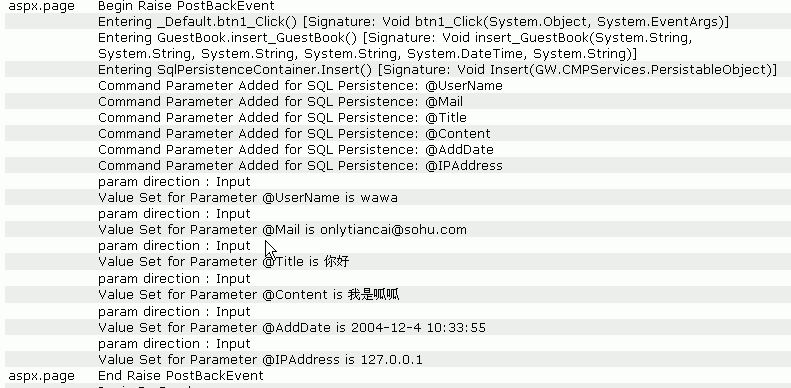
我们来看一下前台页面在调用这个方法是trace里显示的信息。

看到了吗,是不是和我说的一样,根据这里显示的信息你可以知道到底是哪里出了错误,比如说是存储过程还是页面传入的非法参数。

我们再看一下Select方法的实现,先看存储过程。

Create PROCEDURE [select_GuestBook]

         (
@id          [int])

          
AS 

if @id=-1 

         
select * from [wawabook].[dbo].[GuestBook] 

else

         
select * from [wawabook].[dbo].[GuestBook] Where ( [id]     = @id       )

GO

再来看元数据

<Select>

     
<CommandName>select_GuestBook</CommandName>

     
<Parameter>

         
<ClassMember>id</ClassMember>

         
<ParameterName>@id</ParameterName>

         
<DbTypeHint>Int</DbTypeHint>

         
<ParamDirection>Input</ParamDirection>

         
<Size>4</Size>

     
</Parameter>

</Select>

再来看业务逻辑层对应代码

        public static DataSet select_GuestBook(int id)

         
{

              GWTrace.EnteringMethod( MethodBase.GetCurrentMethod() );

              SqlPersistenceContainer spc 
= new SqlPersistenceContainer(CMPConfigurationHandler.ContainerMaps["GuestBook"]);

              GuestBookSet gbs 
= new GuestBookSet();

              gbs.id
=id;

              spc.Select( gbs );

              
return gbs.ResultSet;

     }

最后看一下页面的编码类中相应的代码

private void bind_dgrd1()

     
{

         
//获取所有记录用来作为DataGrid的数据源

         dgrd1.DataSource
=GuestBook.select_GuestBook(1);

         dgrd1.DataBind();

     }


private void dgrd1_SelectedIndexChanged(object sender, System.EventArgs e)

     
{

         
//当选择DataGrid上的一列是选择这列数据绑定到Label的Text属性上

         
int id=(int)dgrd1.DataKeys[dgrd1.SelectedIndex];

         System.Text.StringBuilder sb
=new System.Text.StringBuilder();

         DataRow dr
=GuestBook.select_GuestBook(id).Tables[0].Rows[0];

         sb.AppendFormat(
"Title:{0}<br>Content:{1}",dr["Title"].ToString(),dr["Content"].ToString());

         lbl1.Text
=sb.ToString();

}


流程已经很明显了,你每添加一条业务规则,都要建立数据表,写存储过程,配置元数据,写业务逻辑代码,在aspx.cs调用逻辑层代码。你可以试着把留言的修改和删除功能也做出来,也就是试着使用SqlPersistenceContainer类的Update方法和Delete方法,记住操作流程了吗?先实例一个SqlPersistenceContainer类,接着实例化一个业务实体类,设置业务实体类属性,最后执行SqlPersistenceContainer类的某个方法,错误处理已经继承了,可以方便你查看出错的地方,另外你还可以抛出自定义异常GWException来自动记录应用程序正式运行后所发生的错误日志。

       最后建议大家再下载架构源代码后仔细研究一下,这个 架构在你开发的整个周期都在起作用,无论是前期的调试测试还是后期的编码部署和运行,利用好它会给你带来很多的好处,我这里没有引入实现安全的项目,因为 那几个类非常简单,也不具有相当的通用性,你可以利用现有的架构来构建一个适合你自己的安全的类库,另外你也可以继续扩展你的架构中可以重复利用的功能, 比如说建立一个tools类库,把上传文件,发送邮件,过滤危险字符等通用功能集成到里面,以便其它人员随时调用,而不是再从新写一个,一般服务性的类多做一些静态方法以便不用实例化就可以调用。其实你可能已经发现了,存储过程,CMP元数据和数据实体类以及业务逻辑类大多都是和数据库的某个表相对应的,我们每次都需要一边看着数据库的字段一边来构建自己的代码,如果字段非常的多,将会是一个非常繁琐的工作,下次我会和大家一起DIY一个代码生成器,帮助你生成一部分相关代码,免除你一些重复工作。

asp.net电子商务高级编程》源码下载如下

http://support.apress.com/books.asp?bID=1861008031&s=0&Go=Select+Book
[C#]浅谈.Net版(C#)的CMP模式 - 一个上线商城的系统架构

mikel阅读(904)

商城上线快2、3个月了,一直都懒得写点东西,在加上杂七杂八的事情也比较忙,所以都没有把这个系统当时做的整个架构思绪整理清,昨天才从深圳完了两天回来,怎感觉是要做的事来着.刚开始接触CMP模式的时候也是看了它几天,到谷歌百度里面一搜,我们博客园里面就有蛙蛙池塘提高软件开发效率三板斧之二利用CMP模式一文里有它的详细介绍,在这里我自己也对这个用CMP模式拿来真正上项目时候的问题来做个总结.

  • 项目名称:惠海IT商城
  • 网        址:http://http://www.huihaimall.com/
  • 开发环境:WinXP SP3、IIS5.0、Dreamweaver、VS 2005、SQL-Server 2000
  • 项目描述:项目实现了商品的浏览筛选(主要是公司做的IT产品)、会员商品收藏、订购(订单)、发邮件推荐给朋友、会员积分、收货地址薄、DIY自主装机等,业务逻辑全部在本项目中用.NET(CMP)实现,而展示就不一定都是用.net的aspx页面来做,如DIY装机就是用Flex生成flash来实现的,但是它们都是同步的(同登陆同注销,包括会员产品收藏等).还有一个最重要的就是后台管理也是用Flex调用.net来实现的,由于要提供Flex调用的接口,所有还提供了几个WebService的页面(关与身份验证请见:在WebService中使用Session或Cookie—实现WebService身份验证(客户端是Flex) ),另外在用JQuery发送Ajax请求的时候页面传输数据时候还有用到Json数据(Flex好象有几个地方也用到了).
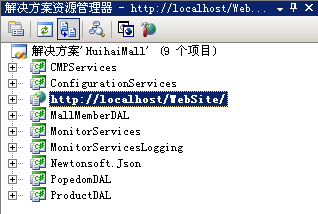
  • 项目解决方案截图如下:

    下面,我对上图所示以我的了解进行简要的介绍:
  1. CMPServices 它里面主要是一些CMP配置和服务的基类,他们对应的名称和功能内如下所:
    名称 功能描述  
    CMPConfigurationHandler 继承自IConfigurationSectionHandler,用来读取在Web.Config文件内的自定义CMP配置.
    CommandMapping 命令映射类,用于某一个业务的容器,一般为对应Insert、Delete、Update、Select里某一个存储过程名为CommandName,里面可能包含多个CommandParameter.  
    CommandParameter 存 储过程参数类,里面有ParameterName、Size、DbTypeHint等属性,还有一个ClassMember的属性,表示对应实体模型的属 性,一般ParameterName为@Name而ClassMember值就为Name(预先配置好的),因为一般存储过程的参数名就对应数据库实体模 型的列字段.  
    ContainerMapping 容 器映射类,一般为一个业务实体,比如用户,它里面就有Insert、Delete、Update、Select这4个CommandMapping,而且 它有个key在CMP里面的映射ID叫ContainerMappingId和ContainedClass对应为实体对象模型名.  
    ContainerMappingSet 多个ContainerMapping容器映射集合类,里面的Hashtable可根据ContainerMappingId映射ID的key来匹配ContainerMapping.  
    PersistableObject 持久对象基类,实体类继承它能实现对数据的保存(一般为Insert、Delete、Update命令操作).  
    PersistableObjectSet 继承自PersistableObject,实现数据持久化保存结果(一般为Select命令操作).  
    SQLPersistenceContainer 业务的容器基类,构造函数需ContainerMapping,包含Insert、Delete、Update、Select四个虚方法.  
    StdPersistenceContainer 业务的容器,构造函数ContainerMapping调用父类构造函数,根据ContainerMapping对Insert、Delete、Update、Select四个方法进行具体的实现.  

  2. ConfigurationServices 里面就一个类SiteProfile,它里面主要是一些静态成员,如有DefaultDataSource是数据源连接字符串,还有一个 Hashtable的DbTypeHints,作用是用来配置一些存储过程的参数对应的ADO.Net里面的SQL数据类型.
  3. http://localhost/WebSite/ 这层就不用说了,就是我们的网页表示层.
  4. MallMemberDAL 这个是商城里面的一个模块,为商城会员业务逻辑层分开为一个项目,里面主要为会员的一些操作,是为CMP的具体应用了,类的命名如下图所示:

    上图是对会员收货地址和优惠卷的实例,其中Item结尾的继承自PersistableObject的实体类,Manager为所有操作方法的集合类(以 静态方式提供),Set继承自PersistableObjectSet为数据集合的容器类,其实最初CMP里实体的命名不是这样的,好象是加 Entity后缀,这个就看你怎么决定了,但是整个项目一定要统一.
  5. MonitorServices 为CMP的监控服务项目,主要是跟踪当前执行的方法、异常信息等,这里就不祥说了.
  6. MonitorServicesLogging 监控服务日志项目,用来处理异常错误信息,可以保存到数据库内,如果保存到数据库失败则写到本地日志文件里,不过我在项目里面并没有用到它的,一刚开始因 为还没有整个摸透它,好象还要在Web.Config文件内设置GWTrace的跟踪等级,刚开始做的时候老是报错,但是没有把错误写到日志里面,而是 CMP老是抛出那同一个错误,感觉很是麻烦搞的满头包就没去理它了,直到后来发布网站上线的时候也把这个错误日志的功能忘记加了.
  7. Newtonsoft.Json 它是一个完全开源可以免费使用的数据格式,应用领域.Net、JavaScript、Flex至少我知道有这么多,它能一个.Net实体对象通过它的格式 化字符串传输到另一端又能转换成原对象,比如我能在使用了Json的JavaScript里面使用实体名.属性设置或获取值再在.Net里能轻易得到,同 理Flex里面也有Json的对象格式,它使得我们能使用字符串轻易的传输实体对象,在本项目里面就有使用Flex通过Json数据与.Net通 讯,JavaScript使用Ajax来Post传递Json数据.虽然它还存在一些的Bug,不过基本上所有的软件都会存在一些Bug的,在本项目应用 中,好象Json就有一个数据类型转换的Bug,不过还好,Json是开源的,直接在它的源代码上修改解决了这个Bug. 
  8. 最后还有2个模块:PopedomDAL和ProductDAL分别是权限和产品模块,实质是和MallMemberDAL差不多,也就不多说了.
  • 下面来说一下Web.Config文件的相关配置
  • 在configuration下的configSections的第一个子节点,配置CMP读取的自定义节点
    <section name="GWConfig" type="Huihai.Mall.CMPServices.CMPConfigurationHandler, Huihai.Mall.CMPServices" />
  • 再在configSections下增加CMP跟踪监视等级及数据库连接字符串,默认本地日志文件路径等配置(以下为我项目里面的一些CMP配置,最下面的为商城的一些配置)
    <system.diagnostics>
    <switches>
    <add name="GWTrace" value="4" />
    </switches>
    </system.diagnostics>
    <appSettings>
    <add key="ErrorViewUrlPrefix" value="/Wawacrm/ErrorLog/" />
    <add key="ErrorLogBaseDir" value="E:\me\bak\oa\WAWACRM\Errors\" />
    <add key="DefaultDataSource" value="server=127.0.0.1;database=HH_System;uid=sa;pwd=123" />
    <add key="picurl" value="Upload/product/" />
    <add key="score" value="1" />
    <add key="isShowRunTime" value="true" />
    <!– 产品评论 –>
    <add key="CommentIsAudit" value="Y" />
    <!– 产品评论回复 –>
    <add key="ReCommentIsAudit" value="Y" />
    <!– 产品咨询 –>
    <add key="ConsultIsAudit" value="N" />
    <!– 商城咨询反馈 –>
    <add key="FeedbackIsAudit" value="Y" />
    <!– 后台管理员的使用的邮箱名后缀 –>
    <add key="EmailPostfix" value="@coreoa.cn" />
    </appSettings>
  • 接 下来最重要的也是最复杂的就是GWConfig自定义CMP元数据配置的节点了, 它里面主要是配置每一个存储过程,对应容易实体类,及该业务实体的Insert、Update、Delete、Select四个方法的参数的详细描述,已 上面MallMemberDAL项目的Address和Coupon为例,它的配置为如下:
    <GWConfig>
    <ContainerMappingSet>
    <ContainerMapping>
    <ContainerMappingId>Address</ContainerMappingId>
    <ContainedClass>AddressItem</ContainedClass>
    <Insert>
    <CommandName>MO_Address_Insert</CommandName>
    <Parameter>
    <ClassMember>Member_inner_code</ClassMember>
    <ParameterName>@member_inner_code</ParameterName>
    <DbTypeHint>Int</DbTypeHint>
    <ParamDirection>Input</ParamDirection>
    <Size>4</Size>
    </Parameter>
    <Parameter>
    <ClassMember>Province</ClassMember>
    <ParameterName>@province</ParameterName>
    <DbTypeHint>Varchar</DbTypeHint>
    <ParamDirection>Input</ParamDirection>
    <Size>20</Size>
    </Parameter>
    <Parameter>
    <ClassMember>City</ClassMember>
    <ParameterName>@city</ParameterName>
    <DbTypeHint>Varchar</DbTypeHint>
    <ParamDirection>Input</ParamDirection>
    <Size>20</Size>
    </Parameter>
    <Parameter>
    <ClassMember>County</ClassMember>
    <ParameterName>@county</ParameterName>
    <DbTypeHint>Varchar</DbTypeHint>
    <ParamDirection>Input</ParamDirection>
    <Size>20</Size>
    </Parameter>
    <Parameter>
    <ClassMember>Zip</ClassMember>
    <ParameterName>@zip</ParameterName>
    <DbTypeHint>Varchar</DbTypeHint>
    <ParamDirection>Input</ParamDirection>
    <Size>6</Size>
    </Parameter>
    <Parameter>
    <ClassMember>Address</ClassMember>
    <ParameterName>@address</ParameterName>
    <DbTypeHint>Varchar</DbTypeHint>
    <ParamDirection>Input</ParamDirection>
    <Size>100</Size>
    </Parameter>
    <Parameter>
    <ClassMember>Name</ClassMember>
    <ParameterName>@name</ParameterName>
    <DbTypeHint>Varchar</DbTypeHint>
    <ParamDirection>Input</ParamDirection>
    <Size>50</Size>
    </Parameter>
    <Parameter>
    <ClassMember>Mobile</ClassMember>
    <ParameterName>@mobile</ParameterName>
    <DbTypeHint>Varchar</DbTypeHint>
    <ParamDirection>Input</ParamDirection>
    <Size>15</Size>
    </Parameter>
    <Parameter>
    <ClassMember>Tel</ClassMember>
    <ParameterName>@tel</ParameterName>
    <DbTypeHint>Varchar</DbTypeHint>
    <ParamDirection>Input</ParamDirection>
    <Size>50</Size>
    </Parameter>
    <Parameter>
    <ClassMember>IsDefault</ClassMember>
    <ParameterName>@isDefault</ParameterName>
    <DbTypeHint>Char</DbTypeHint>
    <ParamDirection>Input</ParamDirection>
    <Size>1</Size>
    </Parameter>
    </Insert>
    </ContainerMapping>
    <ContainerMapping>
    <ContainerMappingId>Coupon</ContainerMappingId>
    <ContainedClass>CouponItem</ContainedClass>
    <Select>
    <CommandName>MO_Coupon_Select</CommandName>
    <Parameter>
    <ClassMember>Sn</ClassMember>
    <ParameterName>@sn</ParameterName>
    <DbTypeHint>Varchar</DbTypeHint>
    <ParamDirection>Input</ParamDirection>
    <Size>10</Size>
    </Parameter>
    <Parameter>
    <ClassMember>Password</ClassMember>
    <ParameterName>@password</ParameterName>
    <DbTypeHint>Varchar</DbTypeHint>
    <ParamDirection>Input</ParamDirection>
    <Size>10</Size>
    </Parameter>
    </Select>
    </ContainerMapping>
    </ContainerMappingSet>
    </GWConfig>
  • 以 上配置中,为简便示例Address只有配置Insert的方法,它调用名为MO_Address_Insert的存储过程,Insert节点下第一个子 节点CommandName即为存储过程名,而同级别的还有Parameter节点,每一个都代表存储过程的一个参数,下面有ClassMember、 ParamDirection等子节点即是对它的描述,其他Update、Delete、Select依此类推也可以按这种格式来配置;而Coupon只 有配置一个Select的节点(其他的也能按照上述增加配置,没有配置的方法将不能调用),Coupon是为ContainerMappingId容器业 务实体唯一Key,它对应名为CouponItem的业务实体模型类,而参数下面的ClassMember为实体下的成员名,一般就是实体类的属性,因为 它将根据这个名字反射获得实体的属性值.以上这么多配置但是却只实现了2个业务的方法,是不是有点太麻烦了?没得办法,最开始的CMP模式就是这样一个个 把存储过程配置好的!但是你的项目里面要用到的存储过程肯定不只与2个,姑且就不说CMP模式这样配置也只能用存储过程的,但是存储过程一多了就会很麻烦 了,每一个存储过程配置都要手写添家进去!要是存储过程上十来个参数又有增删改查的方法岂不要配置很多东西?的确要配置的东西不少,但是我们可以自己写的 小程序对CMP的配置执行操作,而不需要我们去打开Web.Config文件一个个去手改,下图为我自己写的一个对CMP的配置进行操作的截图:
  • 上 面主要是通过XPath表达试对Web.Config进行筛选读取CMP的配置节点并在GridView里面显示出来,并能直接对其进行修改等操作.如果 假如我们要增加一个的时候,我们可以点浏览用sysobjects把数据库里面所有的存储过程名字等信息读出来,选择要配置的那个存储过程后再用 sp_sproc_columns把它所有的参数信息读出来,如ParameterName、Size、ParamDirection等,注意 ClassMember(实体模型的属性名)读出来默认是ParameterName,因为在我的项目里面ParameterName名就跟实体的属性名 一样,你也可以改成其他的,但是你要根据你实体命名的约定好,因为它要用反射实体里找这个属性,如果找不到就不好了.
  • 是 不是用上面那个小工具爽多了?你不需要打开Web.Config手写一个配置,在数据库里面写一个存储过程就到这里配置一下直接在增加一个CMP的配置节 点到Web.Config文件内.,我这个商城的项目下来把所有业务的存储过程配置完Web.Config文件总大小有140KB,把 Web.Config文件撑得这么大对性能会不会有影响呢?我想应该不会有多大影响的,从CMP框架的运行来看,它只是在 Application_Start的时候读取一次配置文件到内存,以后就像读AppSettings一样直接在内存里面取,很方便 的.Application_Start运行的代码如下:
  • // 在应用程序启动时运行
    System.Configuration.ConfigurationManager.GetSection("GWConfig");
    SiteProfile.DefaultDataSource
    = System.Configuration.ConfigurationManager.AppSettings["DefaultDataSource"];
    SiteProfile.DbTypeHints[
    "Varchar"] = System.Data.SqlDbType.VarChar;
    SiteProfile.DbTypeHints[
    "Nvarchar"] = System.Data.SqlDbType.NVarChar;
    SiteProfile.DbTypeHints[
    "Int"] = System.Data.SqlDbType.Int;
    SiteProfile.DbTypeHints[
    "Date"] = System.Data.SqlDbType.DateTime;
    SiteProfile.DbTypeHints[
    "Text"] = System.Data.SqlDbType.Text;
    SiteProfile.DbTypeHints[
    "Bit"] = System.Data.SqlDbType.Bit;
    SiteProfile.DbTypeHints[
    "Money"] = System.Data.SqlDbType.Money;
    SiteProfile.DbTypeHints[
    "Datetime"] = System.Data.SqlDbType.DateTime;
    //后新添加2种对应类型
    SiteProfile.DbTypeHints["Char"] = System.Data.SqlDbType.Char;
    SiteProfile.DbTypeHints[
    "Numeric"] = System.Data.SqlDbType.Decimal;
    SiteProfile.DbTypeHints[
    "Smalldatetime"] = System.Data.SqlDbType.SmallDateTime;
    //监听配置文件的改变
    System.IO.FileSystemWatcher fsw = new System.IO.FileSystemWatcher(Server.MapPath("~/Upload/special"));
    fsw.Filter
    = "XMLFile.xml";
    fsw.NotifyFilter
    = System.IO.NotifyFilters.LastWrite;
    fsw.Changed
    += new System.IO.FileSystemEventHandler(ReadAdConfig);
    fsw.EnableRaisingEvents
    = true;
    ReadAdConfig(
    null, null);
  • 上 面代码主要是在程序启动的时候Web.Config的CMP配置的元数据读到CMP的一个静态类里面,初始化数据连接,设置存储过程参数对应的SQL数据 类型,后面监听和ReadAdConfig方法是我项目另外的东西,这里就不叉开话题说了. 配置搞清楚了,下面我们就来研究一下CMP这个架构到底是如何运行的呢? 还是以上面的那个例子为准,比如我要在Address里增加一个会员收货地址.我就在AddressManager里面提供一个 AddressInsert的静态方法供调用.
  • public static void AddressInsert(AddressItem item)
    {
    SqlPersistenceContainer spc
    = new SqlPersistenceContainer(CMPConfigurationHandler.ContainerMaps["Address"]);
    spc.Insert(item);
    }
  • 上面所示为CMP一个调用业务的过程,它实现的全过程大概为:
  • ①第一步: 在Application_Start把CMP的所有配置读取到CMPConfigurationHandler下面的ContainerMaps集合里面,它是一个Hashtable对象
  • ②第二步: 根据Address这个ContainerMappingId的key在CMPConfigurationHandler.ContainerMaps匹配到Address这个业务对象的ContainerMapping映射容器对象
  • ③第三步: 实例化SqlPersistenceContainer托管容器对象,ContainerMapping作为构造函数穿入,并使用: base(initCurrentMap)调用StdPersistenceContainer父类构造函数
  • ④第四步: 执行具体方法(这里为Insert操作),而参数为继承了PersistableObject类型的实体模型对象,为了更好的说明我也把Insert方法的代码给帖出来
  • /// <summary>
    ///
    /// </summary>
    /// <param name="insertObject"></param>
    public override void Insert(PersistableObject insertObject)
    {
    GWTrace.EnteringMethod(MethodBase.GetCurrentMethod());
    try
    {
    CommandMapping cmdMap
    = currentMap.InsertCommand;
    SqlCommand insertCommand
    = BuildCommandFromMapping(cmdMap);
    AssignValuesToParameters(cmdMap,
    ref insertCommand, insertObject);
    insertCommand.Connection.Open();
    insertCommand.ExecuteNonQuery();
    insertCommand.Connection.Close();
    AssignOutputValuesToInstance(cmdMap, insertCommand,
    ref insertObject);
    insertCommand.Dispose();
    }
    catch (Exception dbException)
    {
    string s = insertObject.ToXmlString();
    s
    +=currentMap.InsertCommand.CommandName;
    throw new Exception("Persistance (Insert) Failed for PersistableObject", dbException);
    }
    }
  • 由 于受空间限制没能把全部代码贴出来比较难看一点,大概原理是根据PersistableObject 对象(实际为保存在XML内的CMP的配置映射到的容器)和要执行的方法创建SqlCommand对象,设置它要执行的存储过程名称.再循环 Parameter创建并添加参数,再在PersistableObject 根据反射ClassMember获得实体里面的属性值设置Parameter参数值.然后在执行存储过程,并跟踪记录当前错误方法,处理异常信息,这样便 完成了CMP一个业务处理的全过程.
  • 是不是感觉这样调用有点'妙' 呢?你要修改那个业务对象你只需要指定对应的实体模型的属性值它就能作为参数Insert(Update或Delete)数据库表里面对应的列,如果存储 过程参数对应的实体属性值没有指定的话将传递的为默认值,如String类型的将为NULL.这里在反射的时候还要注意一个问题,就是列为时间类型的时 候,C#里面的DataTime为空的时候为初始值为0001-1-1 0:00:00,而当你使用反射的时候把这个时间更新到数据库会报错,提示什么数据溢出,因为SQL里时间类型是有一个时间段,所以在CMP调用 AssignValuesToParameters方法使用发射赋值的时候要加上一个判断,这样修改时间类型字段指定为空就没有问题了.
  • object o = PropertyInfo.GetValue(persistObject, null);
    if (o == null)
    o
    = DBNull.Value;
    if (o.GetType().Equals(typeof(System.DateTime)))
    {
    //时间默认值(即未给时间赋值),则为空
    if (o.ToString() == "0001-1-1 0:00:00")
    o
    = DBNull.Value;
    }
  • 而 Select查询操作略有一点不同, 因为它要返回结果解,这个时候就应该要用AddressSet类了,所有要实现查询操作的类都必须继承自PersistableObjectSet,因为 它能有返回DataSet数据集的实现,可以把它看成一个特殊的PersistableObject对象,因为它除开有Insert、Delete、 Update还有Select.AddressSet类其实也是一个实体类,但它跟AddressItem类不同的是它只管查询,而查询的存储过程往往没 有增、删、改的那么多的参数,因此它的里面只需要几个查询条件字段的属性.调用起来跟增、删、改的操作都差不多,也是根据反射它里面的属性值在赋个对应的 参数在执行,CMP默认返回的一个DataSet,我的觉得既然用到的实体,为什么不用它来代替DataSet呢?所以我在原来的基础上新加一个用反射把 DataSet转换成实体的数组,方便再次操作,代码如下:
  • /// <summary>
    /// 根据引用传来的Object实体对象使用反射给它的属性赋值
    /// </summary>
    /// <param name="obj">实体对象</param>
    /// <returns>是否给表里面的记录值填充实体里属性成功,如何找不到实体属性或记录集为空返回false</returns>
    public bool ResultSingleObject(ref Object obj)
    {
    //internalData是本类里返回的DataSet集合
    if (internalData.Tables.Count == 0)
    return false;
    DataTable tab
    = internalData.Tables[0];
    if (tab.Rows.Count == 0)
    return false;
    Type type
    = obj.GetType();
    foreach (DataColumn column in tab.Columns)
    {
    string columnName = column.ColumnName;
    object t = tab.Rows[0][columnName];
    PropertyInfo property
    = type.GetProperty(columnName);
    if (property == null)
    property
    = type.GetProperty(columnName.Substring(0, 1).ToUpper() + columnName.Substring(1, columnName.Length 1));
    if (property == null)
    property
    = type.GetProperty(columnName.ToUpper());
    if (property != null)
    {
    if (t.GetType().FullName != "System.DBNull")//如果数据库返回的值不等于NULL的情况下才给找到了实体的字段属性赋值
    property.SetValue(obj, t, null);
    }
    else
    throw new Exception("表的列名为" + columnName + "不能与实体名为" + type.Name + "的属性名一致,请修改过程的返回的列名称或实体属性名");//便与调试
    }
    return true;
    }
  • 通过如上代码for循环一下就能把DataSet转换成AddressItem数组或是List<AddressItem>泛型.
  • CMP模式差不多就这么多些吧,总结其中一些美中不足的地方:
  • Insert、 Delete、Update、Select这个四个方法还不能满足需求,增删改查这个四个方法是CMP的核心,但一个业务实体的操作只有这个4个方法往往 是不够的.因为这四个方法只能分别对应一个储存过程,而查询的存储过程一般一个难得搞定,比如用户表我除开根据用户ID去查询,还要根据用户名和密码,还 有可能要根据用户类型返回用户列表等等,实际的需求是复杂的.用CMP的话那我还需要另外单独配置2个业务实体来分别放根据用户名和密码和根据用户类型的 操作的存储过程,而它们里面的Select都只有一个且对应的实体也是同一个,是不是感觉有点浪费?感觉Insert、Delete、Update、 Select这个四个方法不够用,后来想到增加一个List的方法,基本上每一个表都有一个根据ID去查询记录的时候,Select就对应这个操作,而新 加的List就对应根据其他条件可能会返回多条记录的操作,这样就不需要当一个业务有2个查询操作的时候而再去新建一个了,但是新增一个List查询的方 法Web.Config内CMP配置文件也要加List节点的配置,而且CMP的基类里面也要增加一个List方法并要解析对应的List配置节点,由于 当时项目做得快差不多了,这人一懒呢就没有去完成了.-_-!!!
  • 连 续写了几个晚上终于快要完了,之所以我要写这些,是感觉自己最近好象都没做什么东西一样,白天在慢悠悠的上一天班,晚上就什么也不想动了,一坐到电脑前就 是看玩传奇世界或是看电视连续剧斗牛要不要、篮球火等啊,呵呵,等来得急看时间的时候已经凌晨过后了…第二天起来到公司上班,晚上又继续,我心是想我 不要每天就这样过去了,但是这样持续了好久一段时间…我有时候也自责自己到最后还是一事无成!既然来到了这行,就一定要做好这个职业的本职工作,IT 行业这个技术每天都在不断更新演变的领域你每天不去学习怎么能行呢?所以我不要再那么在'堕落'下去了,呵呵^_^,便决定写点东西,至少别自己做过的项 目都不记得去了.
  • 源代码就不要问了,放在公司的SVN服务器里面了,这里提供一个我原来的参考的CMP架构的源代码下载, 好象还是蛙蛙池塘2005年写的.
  • CMP模式参考源代码下载

[MVC]Improve scalability in ASP.NET MVC using Asyn

mikel阅读(1199)

ASP.NET applications run with a fixed-size thread pool. By default, they have 200 (or 250? I forget…) threads available to handle requests. You can make the thread pool bigger if you want, but it’s not usually helpful: more contention and overhead from thread switching will eventually actually reduce the server’s throughput. But what if most of your threads are actually sitting around doing nothing, because they’re actually waiting for some external I/O operation to complete, such as a database query or a call to an external web service? Surely things could be more efficient…

Well yes, actually. Ever since Windows NT 4 we’ve had a notion of I/O Completion Ports (IOCP) which are a mechanism for waiting for I/O to complete without causing thread contention in the meantime. .NET has a special thread pool reserved for threads waiting on IOCP, and you can take advantage of that in your ASP.NET MVC application.

image

The IHttpAsyncHandler, first introduced in ASP.NET 2.0, splits request processing into two. Instead of handling an entire request in one thread (expensive I/O and all), it first does some processing in the normal ASP.NET thread pool, as per any normal request, then when it’s time for I/O, it transfers control to the I/O thread, releasing the original ASP.NET thread to get on with other requests. When the I/O signals completion (via IOCP), ASP.NET claims another, possibly different thread from its worker pool to finish off the request. Thus, the ASP.NET thread pool doesn’t get ‘clogged up’ with threads that are actually just waiting for I/O.

Adding asynchronous processing to ASP.NET MVC

The MVC framework doesn’t (yet) come with any built-in support for asynchronous requests. But it’s a very extensible framework, so we can add support quite easily. First, we define AsyncController:

public class AsyncController : Controller
{
internal AsyncCallback Callback { get; set; }
internal IAsyncResult Result { get; set; }
internal Action<IAsyncResult> OnCompletion { get; set; }
 
protected void RegisterAsyncTask(Func<AsyncCallback, IAsyncResult> beginInvoke, Action<IAsyncResult> endInvoke)
{
OnCompletion = endInvoke;
Result = beginInvoke(Callback);
}
}

It’s just like a normal Controller, except it manages some internal state to do with asynchronous processing, and has the RegisterAsyncTask() method that lets you manage transitions across the gap between the two halves of IHttpAsyncHandler processing. Note: it doesn’t implement IHttpAsyncHandler itself; that’s the job of the IRouteHandler we have to set up. Unfortunately I had to reproduce most of the code from the framework’s MvcHandler, because I couldn’t just override any individual method and still get at the controller:

public class AsyncMvcRouteHandler : IRouteHandler
{
public IHttpHandler GetHttpHandler(RequestContext requestContext)
{
return new AsyncMvcHandler(requestContext);
}
 
class AsyncMvcHandler : IHttpAsyncHandler, IRequiresSessionState
{
RequestContext requestContext;
AsyncController asyncController;
HttpContext httpContext;
 
public AsyncMvcHandler(RequestContext context)
{
requestContext = context;
}
 
// IHttpHandler members
public bool IsReusable { get { return false; } }
public void ProcessRequest(HttpContext httpContext) { throw new NotImplementedException(); }
 
// IHttpAsyncHandler members
public IAsyncResult BeginProcessRequest(HttpContext context, AsyncCallback cb, object extraData)
{
// Get the controller type
string controllerName = requestContext.RouteData.GetRequiredString("controller");
 
// Obtain an instance of the controller
IControllerFactory factory = ControllerBuilder.Current.GetControllerFactory();
IController controller = factory.CreateController(requestContext, controllerName);
if (controller == null)
throw new InvalidOperationException("Can't locate the controller " + controllerName);
try
{
asyncController = controller as AsyncController;
if (asyncController == null)
throw new InvalidOperationException("Controller isn't an AsyncController.");
 
// Set up asynchronous processing
httpContext = HttpContext.Current; // Save this for later
asyncController.Callback = cb;
(asyncController as IController).Execute(new ControllerContext(requestContext, controller));
return asyncController.Result;
}
finally
{
factory.DisposeController(controller);
}
}
 
public void EndProcessRequest(IAsyncResult result)
{
CallContext.HostContext = httpContext; // So that RenderView() works
asyncController.OnCompletion(result);
}
}
}

It handles requests by supplying an AsyncMvcHandler, which implements IHttpAsyncHandler. Note that during the first half of the processing, i.e. during BeginProcessRequest(), it makes a record of the current HttpContext object. We have to restore that later, during EndProcessRequest(), because we’ll be in a new thread context by then and HttpContext will be null (and that breaks various ASP.NET facilities including WebForms view rendering).

Using AsyncController

It’s now very easy to handle a request asynchronously. Define a route using AsyncMvcRouteHandler, instead of MvcRouteHandler:

routes.Add(new Route("Default.aspx", new AsyncMvcRouteHandler())
{
Defaults = new RouteValueDictionary(new { controller = "Home", action = "Index", id = "" }),
});

Then set up an AsyncController. In this example, we’re calling an external web service using the WebRequest class and its BeginGetResponse() method. That uses an IOCP, so won’t consume an ASP.NET worker thread while it waits:

public class HomeController : AsyncController
{
public void Index()
{
WebRequest req = WebRequest.Create("http://www.example.com");
req.Method = "GET";
 
RegisterAsyncTask(cb => req.BeginGetResponse(cb, null), delegate(IAsyncResult result) {
WebResponse response = req.EndGetResponse(result);
// Do something with the response here if you want
RenderView("Index");
});
}
}

And that’s it. The web request gets set up and started in the first half of the async processing model, then the thread gets released to serve other requests. When the web request signals completion, ASP.NET takes a different thread from its pool, and gets it to run the code inside the anonymous delegate, inheriting the request context from the first thread so it can send output to the visitor.

Just remember that you should only use async requests when you’re waiting for some operation on an IOCP. Don’t use it if you just going to call one of your own delegates asynchronously (e.g. using QueueUserWorkItem()) because that will come out of the ASP.NET worker thread pool and you’ll get exactly zero benefit (but more overhead).

[MVC]ASP.NET MVC Preview 2 - 流程分析 (2)

mikel阅读(778)

这次探险历程将从 MvcHandler 开始。

public class MvcHandler : IHttpHandler, IRequiresSessionState
{
  protected virtual void ProcessRequest(HttpContext httpContext)
  {
    HttpContextBase base2 = new HttpContextWrapper2(httpContext);
    this.ProcessRequest(base2);
  }
  protected internal virtual void ProcessRequest(HttpContextBase httpContext)
  {
    string requiredString = this.RequestContext.RouteData.GetRequiredString("controller");
    IControllerFactory controllerFactory = this.ControllerBuilder.GetControllerFactory();
    IController controller = controllerFactory.CreateController(this.RequestContext, requiredString);
    if (controller == null)
    {
      throw new InvalidOperationException(string.Format(CultureInfo.CurrentUICulture,
        MvcResources.ControllerBuilder_FactoryReturnedNull,
        new object[] { controllerFactory.GetType(), requiredString }));
    }
    
    try
    {
      ControllerContext controllerContext = new ControllerContext(this.RequestContext, controller);
      controller.Execute(controllerContext);
    }
    finally
    {
      controllerFactory.DisposeController(controller);
    }
  }
}

首 先从 RouteData 中提取 Controller 的名字(这个名字是我们在 Global.asax.cs RegisterRoutes 中注册 Route 时提供的),然后获取 ControllerFactory,只不过这里面专门提供了一个 ControllerBuilder。

internal ControllerBuilder ControllerBuilder
{
  get
  {
    if (this._controllerBuilder == null)
    {
      this._controllerBuilder = ControllerBuilder.Current;
    }
    return this._controllerBuilder;
  }
  set
  {
    this._controllerBuilder = value;
  }
}

除非我们自定义 MvcHandler,否则就直接去看看这个 ControllerBuilder.Current 吧。

public class ControllerBuilder
{
  // Fields
  private Func<IControllerFactory> _factoryThunk;
  private static ControllerBuilder _instance = new ControllerBuilder();
  // Methods
  public ControllerBuilder()
  {
    this.SetControllerFactory(new DefaultControllerFactory());
  }
  public IControllerFactory GetControllerFactory()
  {
    return this._factoryThunk();
  }
  public void SetControllerFactory(Type controllerFactoryType)
  {
    // ….
    this._factoryThunk = delegate
    {
      IControllerFactory factory;
      
      try
      {
        factory = (IControllerFactory)Activator.CreateInstance(controllerFactoryType);
      }
      catch (Exception exception)
      {
        // …
      }
      return factory;
    };
  }
  public void SetControllerFactory(IControllerFactory controllerFactory)
  {
    // …
    this._factoryThunk = () => controllerFactory;
  }
  // Properties
  public static ControllerBuilder Current
  {
    get { return _instance; }
  }
}

嗯,有点意思。剔除掉无关紧要的代码,这个 ControllerBuilder 告诉我们如下事实。
(1) 通常情况下,返回一个默认的 DefaultControllerFactory 实例。
(2) 我们可以在 Application_Start 中通过 ControllerBuilder.Current.SetControllerFactory 方法来注册一个我们自定义的工厂。
(3) 核心代码: factory = (IControllerFactory)Activator.CreateInstance(controllerFactoryType);
好 了,回到前面的流程。MvcHandler.ProcessRequest 是通过 DefaultControllerFactory.CreateController(RequestContext, requiredString) 来返回 IController 实例。那么我们就看看这个 DefaultControllerFactory.CreateController 又有什么玄机。

public class DefaultControllerFactory : IControllerFactory
{
  protected internal virtual IController CreateController(RequestContext requestContext, string controllerName)
  {
    //…
    this.RequestContext = requestContext;
    Type controllerType = this.GetControllerType(controllerName);
    return this.GetControllerInstance(controllerType);
  }
  protected internal virtual Type GetControllerType(string controllerName)
  {
    Type type2;
    
    // …
    if (!this.ControllerTypeCache.Initialized)
    {
      // … 自己打开 Reflector 看吧 …
    }
    if (!this.ControllerTypeCache.TryGetControllerType(controllerName, out type2))
    {
      return null;
    }
    
    // …
    return type2;
  }
  protected internal virtual IController GetControllerInstance(Type controllerType)
  {
    IController controller;
    //…
    try
    {
      controller = Activator.CreateInstance(controllerType) as IController;
    }
    catch (Exception exception)
    {
      // …
    }
    return controller;
  }
}

这 个实在没啥好说的,通过反射来创建 Controller 实例。唯一有点看头的就是 GetControllerType 里面做了些缓存处理,以此来避免频繁使用反射造成的性能问题。回到 MvcHandler.ProcessRequest(),在得到控制器实例后,MvcHandler 开始了调用 Controller.Execute() 来进一步触发后续操作,同时对其上下文进一步封装,除了前面创建的 RequestContext,还加上了当前这个 Controller 对象的引用。

public class Controller : IController
{
  protected internal virtual void Execute(ControllerContext controllerContext)
  {
    //…
    string requiredString = this.RouteData.GetRequiredString("action");
    if (!this.InvokeAction(requiredString))
    {
      this.HandleUnknownAction(requiredString);
    }
  }
}

获取 Action 的名字,然后开始执行 InvokeAction。

protected internal bool InvokeAction(string actionName)
{
  return this.InvokeAction(actionName, new RouteValueDictionary());
}
protected internal virtual bool InvokeAction(string actionName, RouteValueDictionary values)
{
  // …
  MemberInfo[] infoArray = base.GetType().GetMember(actionName, MemberTypes.Method, …);
  MethodInfo methodInfo = null;
  
  foreach (MemberInfo info2 in infoArray)
  {
    MethodInfo info3 = (MethodInfo)info2;
    if ((!info3.IsDefined(typeof(NonActionAttribute), true) && !info3.IsSpecialName) &&
      info3.DeclaringType.IsSubclassOf(typeof(Controller)))
    {
      if (methodInfo != null)
      {
        throw new InvalidOperationException(string.Format(CultureInfo.CurrentUICulture,
          MvcResources.Controller_MoreThanOneAction,
          new object[] { actionName, base.GetType() }));
      }
      methodInfo = info3;
    }
  }
  
  if (methodInfo != null)
  {
    this.InvokeActionMethod(methodInfo, values);
    return true;
  }
  return false;
}

这 段代码还是很有趣的。首先,它通过反射获取所有同名 Action 方法信息;其次,它过滤掉所有有 NonActionAttribute 和 IsSpecialName 标记的方法;第三,当同名有效 Action 被重载时它会抛出异常 —— 提示 "Controller_MoreThanOneAction"。
也就是说下面的写法是可以的。

public class HomeController : Controller
{
  public void About()
  {
    About(123);
  }
  [NonAction]
  public void About(int x)
  {
    Response.Write("x…");
  }
}

可一旦去掉那个 "[NonAction]",你将看到如下的异常信息。

More than one action named 'About' was found on controller 'Rainsoft.Web.Controllers.HomeController'.

继续 InvokeActionMethod,这个方法看上去很复杂,其实最核心的代码就最后一行,前面都是相关参数的分解。

protected internal virtual void InvokeActionMethod(MethodInfo methodInfo, RouteValueDictionary values)
{
  // …
  this.InvokeActionMethodFilters(methodInfo, delegate
  {
    methodInfo.Invoke(this, parameterValues);
  });
}

这行代码将 Action 的调用作为一个委托,连同反射信息传递给 InvokeActionMethodFilters。

private void InvokeActionMethodFilters(MethodInfo methodInfo, Action continuation)
{
  List<ActionFilterAttribute> filters = new List<ActionFilterAttribute>
  {
    new ControllerActionFilter(this)
  };
  Stack<MemberInfo> memberChain = new Stack<MemberInfo>();
  for (Type type = base.GetType(); type != null; type = type.BaseType)
  {
    memberChain.Push(type);
  }
  List<ActionFilterAttribute> collection = SortActionFilters(memberChain);
  filters.AddRange(collection);
  List<ActionFilterAttribute> list3 = PrepareMethodActionFilters(methodInfo);
  filters.AddRange(list3);
  
  FilterContext context = new FilterContext(this.ControllerContext, methodInfo);
  new ActionFilterExecutor(filters, context, continuation).Execute();
}

这 个方法首先将默认的过滤器 ControllerActionFilter 加到列表,然后提取所有继承层次上基类的过滤器特性。最后将这些过滤器集合、过滤上下文,连同前一个方法传递进来的 Action 执行委托(continuation) 再次转交给了一个 ActionFilterExecutor 对象实例,并调用其 Execute 方法。

internal sealed class ActionFilterExecutor
{
  // Fields
  private FilterContext _context;
  private Action _continuation;
  private List<ActionFilterAttribute> _filters;
  // Methods
  public ActionFilterExecutor(List<ActionFilterAttribute> filters, FilterContext context, Action continuation)
  {
    this._filters = filters;
    this._context = context;
    this._continuation = continuation;
  }
  public void Execute()
  {
    IEnumerator<ActionFilterAttribute> enumerator = this._filters.GetEnumerator();
    this.ExecuteRecursive(enumerator);
  }
  private FilterExecutedContext ExecuteRecursive(IEnumerator<ActionFilterAttribute> enumerator)
  {
01:    if (enumerator.MoveNext())
02:    {
03:      ActionFilterAttribute current = enumerator.Current;
04:      FilterExecutingContext filterContext = new FilterExecutingContext(this._context);
05:      current.OnActionExecuting(filterContext);
06:
07:      if (filterContext.Cancel)
08:      {
09:        return new FilterExecutedContext(this._context, null);
10:      }
11:
12:      bool flag = false;
13:      FilterExecutedContext context2 = null;
14:      try
15:      {
16:        context2 = this.ExecuteRecursive(enumerator);
17:      }
18:      catch (Exception exception)
19:      {
20:        flag = true;
21:        context2 = new FilterExecutedContext(this._context, exception);
22:        current.OnActionExecuted(context2);
23:        if (!context2.ExceptionHandled)
24:        {
25:          throw;
26:        }
27:      }
28:
29:      if (!flag)
30:      {
31:        current.OnActionExecuted(context2);
32:      }
33:      return context2;
34:    }
35:
36:    this._continuation();
37:    return new FilterExecutedContext(this._context, null);
  }
}

ExecuteRecursive 看上去不大容易理解。不过对于习惯使用递归的人来说,也不是什么难事。
(1) 通过迭代器 MoveNext() 方法提取一个过滤器对象,执行其 OnActionExecuting 方法。
(2) 如果该方法设置了 filterContext.Cancel = true,则放弃后续执行代码。这种机制为我们提供了更好的控制(Preview 1 通过 Context.OnPreAction 的返回值来做同样的控制,现已废弃),比如写一个 CacheFilterAttribute,在缓存未过期时直接输出静态内容,并终止后续执行。(我会在后面章节,提供一个可用的缓存过滤器代码)
(3) 进入第 16 行递归调用,这样一来,就可以一层一层调用所有的 ActionFilterAttribute.OnActionExecuting 方法,直到 MoveNext() == false。
(4) 在最后一次递归调用时,由于 enumerator.MoveNext() == false,故 36 行的 _continuation() 方法得以被执行。还记得这个方法吗?就是前面给传递过来的 Action 方法委托,这意味着我们写的 Action 方法总算是执行了。这个方法是我们这一章流程分析的终点。
(5) 在 Action 委托执行完成后,递归调用自 29 行恢复,逐级往上回溯,直到最初那个方法堆栈。这样所有 ActionFilterAttribute.OnActionExecuted 也被执行完成。
好了,到此为止,我们基本完成了 "核心" 部分的流程分析过程。虽然简单了些,但对于我们理解 ASP.NET MVC 执行机制和原理还是很有必要的。下一章的分析,就得从那个 Action Delegate 开始了。
—————–
附: 流程分析图

uploads/200803/11_193520_mvc2.png

查看大图

[C#]VS2008中查看.NET源码的设置方法

mikel阅读(1012)

    在Visual Studio 2008中可以通过调试进入.NET Framework的源代码,从这个意义上说,.NET Framework是开放部分源代码了,但现在只支持调试模式下进入源代码。而其,这个功能在Visual Studio 2008 Express版本中不能支持。注意,所有的源代码都是从指定的远程服务器上按需下载的,而不是VS2008安装后就自带的。
    要想使用这个功能,需要额外的配置一下,因为默认配置中VS2008是不开启这个功能的,那么如何配置呢?在Scott的Blog中有专门的说明,但是他的源代码服务器URL给错了。收听了一下他们的采访视频,确定了正确配置的方式,如下:
    在VS2008中,菜单Tools->Options后,
   (1)如果你在VB Profile环境下运行,需要将左下角的Show All Settings勾选上(否则将不会出现Debugging选项),然后选择Debugging->General。
   (2)如果你不是在VB Profile下,则直接选择Debugging->General。
   (3)如图:去掉“Enable Just My Code”的勾选。代表不仅仅只是调试我们自己开发的代码(言外之意也要调试.NET Framework的源代码)
   (4)如图:打开“Enable Source Server Support”勾选。代表开启源代码服务器的支持(言外之意在需要的时候去源码服务器获取.NET Framwork的源代码)

111111111111111.gif

   (5)选择“Debugging->Symbols”页,然后设置符号下载URL和缓存位置。设置为:http://referencesource.microsoft.com/symbols 
   (6)设置符号的本地缓存位置。如:C:\temp\symbols。注意确保你的Windows账户能读写这个位置。
   (7)打开“Search the above locations only when symbols are loaded manually”选项。表明只有当symbols被手动加载得情况下才使用。在这种模式下,第一次进入需要进入.NET Framework中的某一个dll时,需要手动执行Load Symbols操作(注:每个dll只有一次,之后它就被缓存到(6)所设置的本地缓存中了)。如果嫌麻烦,这里也提供了一个简单的方法,即勾选“Load symbols using the updated setting when this dialog is closed”,表明当这个设置窗口关闭的时候,立即下载所有的symbols(这将需要几分钟~几十分钟,根据网速决定),这样就不用以后再手动Load symbols操作了。

111111111111111.gif

    通过以上的设置后,在调试程序的时候就可以进入框架的源代码了。通过例子看一下,创建这个工程,并设置个断点。运行程序到断点停止时,到调用堆栈窗口 (CTRL+ALT+C)右键单击一个dll(如:System.Windows.Forms.dll),然后选择“Load Symbols”,这样会给System.Windows.Forms程序集加载符号。注意:如果在配置过程中采用了当时一次性下载了所有的 symbols的话,这里的Load Symbols可以省略不做。

111111111111111.gif

    现在可以查看代码了。你可以Step In(F11)上面的的代码行,在第一次进入代码的时候,我们会显示EULA,点击ACCEPT,然后这个源代码就会下载下来,可以调试.net框架源代码了。

111111111111111.gif 
 

通过这种方式查看的源代码并非全部,这次发布的版本中包含的命名空间有:

◆System
◆System.CodeDom
◆System.Collections
◆System.ComponentModel
◆System.Data
◆System.Diagnostics
◆System.Drawing
◆System.Globalization
◆System.IO
◆System.Net
◆System.Reflection
◆System.Runtime
◆System.Security
◆System.Text
◆System.Threading
◆System.Web
◆System.Web.Extensions
◆System.Windows
◆System.Windows.Forms
◆System.Xml

[MVC]ASP.NET MVC Preview 2 - 流程分析 (1)

mikel阅读(771)

MVC 通过在 web.config 中添加相应的 Module 来参与 ASP.NET 执行流程。

<httpModules>
  <add name="UrlRoutingModule" type="System.Web.Routing.UrlRoutingModule, System.Web.Routing …" />
</httpModules>

那么,这个 UrlRoutingModule 自然就是我们分析过程的入口。

public class UrlRoutingModule : IHttpModule
{
  protected virtual void Init(HttpApplication application)
  {
    application.PostResolveRequestCache += new EventHandler(this.OnApplicationPostResolveRequestCache);
    application.PostMapRequestHandler += new EventHandler(this.OnApplicationPostMapRequestHandler);
  }  
}

订阅了两个 HttpApplication 事件~~~~ 嗯,PostResolveRequestCache 要比 PostMapRequestHandler 更早执行,先从它开始吧。

private void OnApplicationPostResolveRequestCache(object sender, EventArgs e)
{
  HttpContextBase context = new HttpContextWrapper2(((HttpApplication) sender).Context);
  this.PostResolveRequestCache(context);
}
public virtual void PostResolveRequestCache(HttpContextBase context)
{
  RouteData routeData = this.RouteCollection.GetRouteData(context);
  if (routeData != null)
  {
    IRouteHandler routeHandler = routeData.RouteHandler;
    if (routeHandler == null)
    {
      throw new InvalidOperationException(…);
    }
    RequestContext requestContext = new RequestContext(context, routeData);
    IHttpHandler httpHandler = routeHandler.GetHttpHandler(requestContext);
    if (httpHandler == null)
    {
      throw new InvalidOperationException(…);
    }
    context.Items[_requestDataKey] = new RequestData { originalPath = context.Request.Path, HttpHandler = httpHandler };
    context.RewritePath("~/UrlRouting.axd");
  }
}

首先从 RouteCollection 中获取一个 RouteData 对象,RouteCollection 何许人也?

public RouteCollection RouteCollection
{
  get
  {
    if (this._routeCollection == null)
    {
      this._routeCollection = RouteTable.Routes;
    }
    return this._routeCollection;
  }
  set
  {
    this._routeCollection = value;
  }
}

说白了,所谓 RouteCollection 就是我们在 Global.asax.cs 中添加的 Route 集合。

public static void RegisterRoutes(RouteCollection routes)
{
  // Note: Change the URL to "{controller}.mvc/{action}/{id}" to enable
  // automatic support on IIS6 and IIS7 classic mode
  routes.Add(new Route("{controller}/{action}/{id}", new MvcRouteHandler())
  {
    Defaults = new RouteValueDictionary(new { action = "Index", id = "" }),
  });
  routes.Add(new Route("Default.aspx", new MvcRouteHandler())
  {
    Defaults = new RouteValueDictionary(new { controller = "Home", action = "Index", id = "" }),
  });
}

回 到上文,在获取 RoteCollection 之后,通过调用 GetRouteData(context) 返回一个 RouteData 对象(详细代码可阅读 Route.GetRouteData 方法,它通过分析当前上下文的相关请求参数,返回所需的结果对象),该对象内部包含了我们注册 Route 时的相关设置,当然就有下面所需要的 —— MvcRouteHandler。
接下来,该方法将 routeData 和上下文一起打包成 RequestContext,这应该是给后面相关处理准备的上下文环境。通过调用 MvcRouteHandler.GetHttpHandler() 方法,我们终于看到了曙光,也就是进行后续流程的关键 —— MvcHandler (有关 MvcHandler 的细节,后续章节再说)。

public class MvcRouteHandler : IRouteHandler
{
  protected virtual IHttpHandler GetHttpHandler(RequestContext requestContext)
  {
    return new MvcHandler(requestContext);
  }
}

到了这一步,MVC 框架已经准备好了相应的执行场景,接下来就是修改默认的执行流程了。当然,辛苦得来的 "环境" 要选择一个合适的 "人",存储到一个合适的 "地方"。

context.Items[_requestDataKey] = new RequestData { originalPath = context.Request.Path, HttpHandler = httpHandler };

而 后的某个时间,OnApplicationPostMapRequestHandler 被执行。在 PostMapRequestHandler 中,它提取了前面预先 "埋" 下的 "坏蛋",并修改了 HttpContext.Handler,使得 MvcHandler 能继续未完的 "事业"。至于跳转之类的,就无需我再多说。

private void OnApplicationPostMapRequestHandler(object sender, EventArgs e)
{
  HttpContextBase context = new HttpContextWrapper2(((HttpApplication) sender).Context);
  this.PostMapRequestHandler(context);
}
public virtual void PostMapRequestHandler(HttpContextBase context)
{
  RequestData data = (RequestData) context.Items[_requestDataKey];
  if (data != null)
  {
    context.RewritePath(data.OriginalPath);
    context.Handler = data.HttpHandler;
  }
}

待续……
—————————-
附上流程分析图

uploads/200803/11_155627_mvc1.png

查看大图

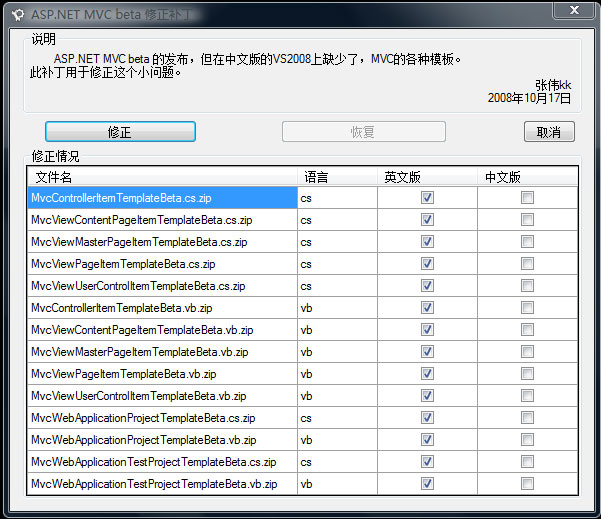
[MVC]ASP.NET MVC beta 模板(Templates) 中文修正补丁 完整版

mikel阅读(678)

ASP.NET MVC beta 模板(Templates) 中文修正补丁 完整版


2008年10月15日 发布的 ASP.NET MVC beta ,安装后,在VS2008中模板(Template)没有正确显示。

此补丁解决此问题。方便一起学习ASP.NET MVC 的朋友~

需要安装新版本,或者 需要卸载 ASP.NET MVC beta 请先使用恢复功能!~


2008年12月28日 补充:

非常抱歉,做了一件事却没有认真去做好。之前上传了一份补丁,却只修正了C#的部分模板。

这次重新发布了此补丁,可以修正C# VB 及Test 的模板~ 希望能给大家带来方便~!

下载:ASP.NET MVC beta 模板(Templates) 中文修正补丁 完整版

[MVC]ASP.NET MVC Preview 3 流程分析 - 4.Router

mikel阅读(814)

我们先了解一下 System.Web.Routing 中的几个类型。

  • UrlRoutingModule : IHttpModule : 入口点。订阅 HttpApplication 相关事件,修改 HttpContext.Handler (IHttpHandler),使得 MvcHandler 得以执行。
  • Route : RouteBase : 路径转向规则,包括路径匹配表达式(Url)、参数默认值(Defaults)、请求处理程序(RouteHandler) 等。
  • RouteCollection : Collection<RouteBase> : 存储所有的 Route 规则的集合,提供依据上下文获取动态路由数据的方法。
  • RouteTable : 持有全局 RouteCollection 实例引用的一个辅助类。
  • RouteData : 依据当前上下文进行解析的动态请求路由信息,包括从请求参数或路由规则中提取的 Controller Name、Action Name、Action Method Parameter 等。
  • IRouteHandler : Route 中请求处理程序的包装接口。

要使用 Routing,除了在配置文件中添加 UrlRoutingModule 外,我们还得在 Global.asax.cs 中注册相应的路由规则(Route)。

public class GlobalApplication : System.Web.HttpApplication
{
  public static void RegisterRoutes(RouteCollection routes)
  {
    routes.IgnoreRoute("{resource}.axd/{*pathInfo}");
    routes.MapRoute(
      "Test",
      "Home/Test/{x}/{y}",
      new { controller = "Home", action = "Test", x = 100, y = 200 }
    );
    routes.MapRoute(
      "Default", // Route name
      "{controller}/{action}/{id}", // URL with parameters
      new { controller = "Home", action = "Index", id = "" } // Parameter defaults
    );
  }
  protected void Application_Start()
  {
    RegisterRoutes(RouteTable.Routes);
  }
}

System.Web.Mvc 额外提供了几个扩展方法来简化我们注册 Route 规则。

public static class RouteCollectionExtensions
{
  public static void IgnoreRoute(this RouteCollection routes, string url)
  {
    routes.IgnoreRoute(url, null);
  }
  public static void IgnoreRoute(this RouteCollection routes, string url, object constraints)
  {
    // … 省略部分代码 …
    Route route = new Route(url, new StopRoutingHandler())
    {
      Constraints = new RouteValueDictionary(constraints)
    };
    routes.Add(route);
  }
  public static void MapRoute(this RouteCollection routes, string name, string url)
  {
    routes.MapRoute(name, url, null, null);
  }
  public static void MapRoute(this RouteCollection routes, string name, string url, object defaults)
  {
    routes.MapRoute(name, url, defaults, null);
  }
  public static void MapRoute(this RouteCollection routes, string name, string url, object defaults, object constraints)
  {
    // … 省略部分代码 …
    Route route = new Route(url, new MvcRouteHandler())
    {
      Defaults = new RouteValueDictionary(defaults),
      Constraints = new RouteValueDictionary(constraints)
    };
    if (string.IsNullOrEmpty(name))
    {
      routes.Add(route);
    }
    else
    {
      routes.Add(name, route);
    }
  }
}

有一点需要注意,System.Web.Routing 通过循环查找的方式来匹配路由规则,因为我们要按以下顺序注册路由规则。
(1) 忽略规则 (IgnoreRoute)。
(2) 具体匹配规则。
(3) 通用匹配规则。
RouteTable.Routes 实际上指向一个应用程序域中唯一的 RouteCollection 实例。

public class RouteTable
{
  // Fields
  private static RouteCollection _instance = new RouteCollection();
  // Properties
  public static RouteCollection Routes
  {
    get { return _instance; }
  }
}

RouteCollection 除了保存所有路由规则 (Route) 外,还有几个重要的方法。

public class RouteCollection : Collection<RouteBase>
{
  // Methods
  public void Add(string name, RouteBase item);
  public RouteData GetRouteData(HttpContextBase httpContext);
  public VirtualPathData GetVirtualPath(RequestContext requestContext, RouteValueDictionary values);
  public VirtualPathData GetVirtualPath(RequestContext requestContext, string name, RouteValueDictionary values);
  // Properties
  public RouteBase this[string name] { get; }
  public bool RouteExistingFiles { get; set; }
}

GetRouteData() 通过当前请求上下文,找出最合适的路由规则(Route),并生成当前执行环境所需的动态路由数据(RouteData)。

public class RouteCollection : Collection<RouteBase>
{
  public RouteData GetRouteData(HttpContextBase httpContext)
  {
    // … 省略部分代码 …
    using (this.GetReadLock())
    {
      foreach (RouteBase base2 in this)
      {
        RouteData routeData = base2.GetRouteData(httpContext);
        if (routeData != null)
        {
          return routeData;
        }
      }
    }
    return null;
  }
}

循环调用搜索规则的 GetRouteData 方法来获取动态路由数据,这就是上面我们提到要注意路由规则注册顺序的原因。

public class Route : RouteBase
{
  public override RouteData GetRouteData(HttpContextBase httpContext)
  {
    string virtualPath = httpContext.Request.AppRelativeCurrentExecutionFilePath.Substring(2) +
      httpContext.Request.PathInfo;
    RouteValueDictionary values = this._parsedRoute.Match(virtualPath, this.Defaults);
    if (values == null)
    {
      return null;
    }
    RouteData data = new RouteData(this, this.RouteHandler);
    if (!this.ProcessConstraints(httpContext, values, RouteDirection.IncomingRequest))
    {
      return null;
    }
    foreach (KeyValuePair<string, object> pair in values)
    {
      data.Values.Add(pair.Key, pair.Value);
    }
    if (this.DataTokens != null)
    {
      foreach (KeyValuePair<string, object> pair2 in this.DataTokens)
      {
        data.DataTokens[pair2.Key] = pair2.Value;
      }
    
      return data;
    }
  }
}

Route.GetRouteData() 首先调用 ParsedRoute.Match() 来检查路径是否匹配,接下来使用 ProcessConstraints() 检查相应的约束规则,如果这些检查都得以通过,则生成最终的动态路由数据。RouteCollection.GetRouteData() 在获取该结果后终止循环。
IRouteHandler 的作用是返回一个特定 IHttpHandler,比如 MvcHandler,当然也可以是 "System.Web.UI.Page : IHttpHandler"。

public interface IRouteHandler
{
  IHttpHandler GetHttpHandler(RequestContext requestContext);
}
public class MvcRouteHandler : IRouteHandler
{
  protected virtual IHttpHandler GetHttpHandler(RequestContext requestContext)
  {
    return new MvcHandler(requestContext);
  }
  IHttpHandler IRouteHandler.GetHttpHandler(RequestContext requestContext)
  {
    return this.GetHttpHandler(requestContext);
  }
}

UrlRoutingModule 的执行顺序,可参考《ASP.NET MVC Preview 2 – 流程分析 (1)》
Route 的相关语法规则,可参考《ASP.NET MVC Preview 3 Release 》(ScottGu 中文版)。

[MVC]ASP.NET MVC Preview 3 流程分析 - 3.View

mikel阅读(925)

P3 改用一堆继承自 ActionResult 的对象来完成视图显示,这是该版本的最大变化。
1. ViewResult
当 我们在 Action Method 中调用 View 生成 ViewResult 的时候,应该注意两个细节,那就是生成默认的 ViewData 字典和 WebFormViewEngine 视图显示引擎。上一节的分析中我们已经知道 ActionFilter.OnActionExecuting 在 Action Method 之前执行,那么我们完全可以定义一个自己的视图引擎,比如用 NVelocity 来代替 WebForm。(可参考《ASP.NET MVC Preview 2 – 流程分析 (3) 》《ASP.NET MVC Preview 2 – NVelocityViewEngine 》)

public abstract class Controller : IActionFilter, IController, IDisposable
{
  public ViewDataDictionary ViewData
  {
    get
    {
      if (_viewData == null)
      {
        _viewData = new ViewDataDictionary();
      }
      return _viewData;
    }
  }
  public IViewEngine ViewEngine
  {
    get
    {
      if (_viewEngine == null)
      {
        _viewEngine = new WebFormViewEngine();
      }
      return _viewEngine;
    }
    set
    {
      // … 省略部分代码 …
      _viewEngine = value;
    }
  }
  protected internal virtual ViewResult View(string viewName, string masterName, object model)
  {
    if (model != null)
    {
      ViewData.Model = model;
    }
    return new ViewResult()
    {
      ViewName = viewName,
      MasterName = masterName,
      ViewData = ViewData,
      ViewEngine = ViewEngine,
      TempData = TempData
    };
  }
}

在 Controller.InvokeAction() 的最后会间接通过 InvokeActionResult() 来调用 ViewResult.ExecuteResult,从而实现对视图引擎的触发 (可参考上一章)。

public class ViewResult : ActionResult
{
  public override void ExecuteResult(ControllerContext context)
  {
    // … 省略部分代码 …
    string viewName = (!String.IsNullOrEmpty(ViewName)) ?
      ViewName : context.RouteData.GetRequiredString("action");
    ViewContext viewContext = new ViewContext(context, viewName, MasterName, ViewData, TempData);
    ViewEngine.RenderView(viewContext);
  }
}

创建视图上下文,并调用 WebFormViewEngine.RenderView()。

public class WebFormViewEngine : IViewEngine
{
  protected virtual void RenderView(ViewContext viewContext)
  {
    // … 省略部分代码 …
    string viewPath = ViewLocator.GetViewLocation(viewContext, viewContext.ViewName);
    // … 省略部分代码 …
    object viewInstance = BuildManager.CreateInstanceFromVirtualPath(viewPath, typeof(object));
    // … 省略部分代码 …
    ViewPage viewPage = viewInstance as ViewPage;
    if (viewPage != null)
    {
      if (!String.IsNullOrEmpty(viewContext.MasterName))
      {
        string masterLocation = ViewLocator.GetMasterLocation(viewContext, viewContext.MasterName);
        
        // … 省略部分代码 …
        // We don't set the page's MasterPageFile directly since it will get
        // overwritten by a statically-defined value. In ViewPage we wait until
        // the PreInit phase until we set the new value.
        viewPage.MasterLocation = masterLocation;
      }
      viewPage.ViewData = viewContext.ViewData;
      viewPage.RenderView(viewContext);
    }
    else
    {
      ViewUserControl viewUserControl = viewInstance as ViewUserControl;
      if (viewUserControl != null)
      {
        // … 省略部分代码 …
        viewUserControl.ViewData = viewContext.ViewData;
        viewUserControl.RenderView(viewContext);
      }
      else
      {
        // … 省略部分代码 …
      }
    }
  }
}

这部分的变化并不大,有关细节可参考 《ASP.NET MVC Preview 2 – 流程分析 (3)》,这里就不在啰嗦了。
2. RedirectResult / RedirectToRouteResult
其实很简单,重建 RouteValueDictionary,然后在 RedirectToRouteResult.ExecuteResult() 中使用 HttpContext.Response.Redirect() 进行跳转。

public abstract class Controller : IActionFilter, IController, IDisposable
{
  protected internal virtual RedirectToRouteResult RedirectToAction(actionName, controllerName, values)
  {
    // … 省略部分代码 …
    RouteValueDictionary newDict = (values != null) ?
      new RouteValueDictionary(values) : new RouteValueDictionary();
    newDict["action"] = actionName;
    if (!String.IsNullOrEmpty(controllerName))
    {
      newDict["controller"] = controllerName;
    }
    return new RedirectToRouteResult(newDict);
  }
  protected internal virtual RedirectToRouteResult RedirectToRoute(routeName, values)
  {
    RouteValueDictionary newDict = (values != null) ?
      new RouteValueDictionary(values) : new RouteValueDictionary();
    return new RedirectToRouteResult(routeName, newDict);
  }
}
public class RedirectToRouteResult : ActionResult
{
  public RedirectToRouteResult(string routeName, RouteValueDictionary values)
  {
    RouteName = routeName ?? String.Empty;
    Values = values ?? new RouteValueDictionary();
  }
  public override void ExecuteResult(ControllerContext context)
  {
    // … 省略部分代码 …
    VirtualPathData vpd = Routes.GetVirtualPath(context, RouteName, Values);
    // … 省略部分代码 …
    string target = vpd.VirtualPath;
    context.HttpContext.Response.Redirect(target);
  }
}

尽管这种跳转会导致 Controller 实例被重新生成,但我们依然可以使用 TempData 传递相关的数据给下一个 Action。(有关 TempData 传递数据的原理,可阅读《ASP.NET MVC Preview 2 – RedirectToAction》)
下面是一个跳转的演示

public class HomeController : Controller
{
  public ActionResult Index()
  {
    TempData["s"] = "Haha…";
    //return RedirectToRoute(new { controller = "Test", action = "Test" });
    return RedirectToAction("About");
  }
  public ActionResult About()
  {
    ViewData["Title"] = TempData["s"].ToString();
    return View();
  }
}
public class TestController : Controller
{
  public ActionResult Test()
  {
    return Content(TempData["s"].ToString());
  }
}

在使用 Controller.RedirectToRoute 时有个参数叫 routeName,其实它就是 Global.asax.cs 中调用 MapRoute 时的定义。

routes.MapRoute(
  "Default",  // Route name
  "{controller}/{action}/{id}",  // URL with parameters
  new { controller = "Home", action = "Index", id = "" } // Parameter defaults
);

3. JsonResult
有了这个,写 Ajax 操作就简单多了。

public class HomeController : Controller
{
  protected internal virtual JsonResult Json(object data, string contentType, Encoding contentEncoding)
  {
    return new JsonResult
    {
      Data = data,
      ContentType = contentType,
      ContentEncoding = contentEncoding
    };
  }
}
public class JsonResult : ActionResult
{
  public override void ExecuteResult(ControllerContext context)
  {
    // … 省略部分代码 …
    HttpResponseBase response = context.HttpContext.Response;
    if (!String.IsNullOrEmpty(ContentType))
    {
      response.ContentType = ContentType;
    }
    else
    {
      response.ContentType = "application/json";
    }
    if (ContentEncoding != null)
    {
      response.ContentEncoding = ContentEncoding;
    }
    if (Data != null)
    {
      JavaScriptSerializer serializer = new JavaScriptSerializer();
      response.Write(serializer.Serialize(Data));
    }
  }
}

写个例子看看。

public class HomeController : Controller
{
  public ActionResult Index()
  {
    return Json(new { Name = "Rose", Sex = "Male", Age = 31 });
  }
}

看看返回的 Http 结果。

HTTP/1.1 200 OK
Server: ASP.NET Development Server/9.0.0.0
Date: Sat, 14 Jun 2008 11:24:46 GMT
X-AspNet-Version: 2.0.50727
Cache-Control: private
Content-Type: application/json; charset=utf-8
Content-Length: 37
Connection: Close
{"Name":"Rose","Sex":"Male","Age":31}

4. ContentResult
这个纯粹就是代码缩写了,将 "Response.Write(…)" 简写成 "Content(…)"。 [lol]

public class ContentResult : ActionResult
{
  public override void ExecuteResult(ControllerContext context)
  {
    // … 省略部分代码 …
    HttpResponseBase response = context.HttpContext.Response;
    if (!String.IsNullOrEmpty(ContentType))
    {
      response.ContentType = ContentType;
    }
    if (ContentEncoding != null)
    {
      response.ContentEncoding = ContentEncoding;
    }
    if (Content != null)
    {
      response.Write(Content);
    }
  }
}

5. EmptyResult
这个最好,没啥可说,没啥可做。

public class EmptyResult : ActionResult
{
  public override void ExecuteResult(ControllerContext context)
  {
  }
}

唯一要关注的是,ControllerActionInvoker.InvokeActionMethod 会将 Action return null 转为为 EmptyResult。

public class ControllerActionInvoker
{
  protected virtual ActionResult InvokeActionMethod(methodInfo, parameters)
  {
    // … 省略部分代码 …
    object returnValue = methodInfo.Invoke(controller, parametersArray);
    if (returnValue == null)
    {
      return new EmptyResult();
    }
    
    // … 省略部分代码 …
  }
}

[MVC]ASP.NET MVC Preview 3 流程分析 - 2.Controller

mikel阅读(935)

接着上一章留下的线索,我们开始分析 Controller 的执行过程。
1. Controller.Execute

public abstract class Controller : IActionFilter, IController, IDisposable
{
  protected internal virtual void Execute(ControllerContext controllerContext)
  {
    // … 省略部分代码 …
    ControllerContext = controllerContext;
    TempData = new TempDataDictionary(controllerContext.HttpContext);
    string actionName = RouteData.GetRequiredString("action");
    ControllerActionInvoker invoker = ActionInvoker ?? new ControllerActionInvoker(controllerContext);
    
    if (!invoker.InvokeAction(actionName, new Dictionary<string, object>()))
    {
      HandleUnknownAction(actionName);
    }
  }
}

熟 悉的面孔 —— TempData。和 ViewData 的目标不同,TempData 主要用于 Controller 内部的数据传递。从 Router 字典中取出 Action 的名字,并创建一个专门的 Invoker 来完成整个执行工作,包括过滤器(ActionFilterAttribute)、Action Method,以及视图显示(IViewDataContainer)。MVC 给了我们一个选择,我们可以继承并创建一个自定义的 Invoker 去改变一些内在的规则 (在 Controller.ctor 中对 ActionInvoker 赋值)。
2. ControllerActionInvoker.InvokeAction
如 果你看书很仔细的话,难道你对上面 Execute 方法里面的 "invoker.InvokeAction(actionName, new Dictionary<string, object>())" 语句不感到奇怪吗?一个没有任何引用的空 Dictionary,这似乎不合乎情理。传递参数?返回某些值?注意看下面的分析。

public class ControllerActionInvoker
{
  public virtual bool InvokeAction(string actionName, IDictionary<string, object> values)
  {
    // … 省略部分代码 …
    MethodInfo methodInfo = FindActionMethod(actionName, values);
    if (methodInfo != null)
    {
      IDictionary<string, object> parameters = GetParameterValues(methodInfo, values);
      IList<IActionFilter> filters = GetAllActionFilters(methodInfo);
      ActionExecutedContext postContext = InvokeActionMethodWithFilters(methodInfo, parameters, filters);
      InvokeActionResultWithFilters(postContext.Result, filters);
      // notify controller of completion
      return true;
    }
    // notify controller that no method matched
    return false;
  }

FindActionMethod 方法利用反射返回 Action 方法的信息,注意 NonActionAttribute、Controller_ActionCannotBeGeneric。很显然这个作者有非常好的编码习惯,代码注 释非常清晰有用,值得学习。可以有和 Action 签名相同的重载方法,但必须加上 NonActionAttribute 特性。同时 Action 不能是泛型方法。

protected virtual MethodInfo FindActionMethod(string actionName, IDictionary<string, object> values)
{
  // … 省略部分代码 …
  // We have to loop through all the methods to make sure there isn't
  // a conflict. If we stop the loop the first time we find a match
  // we might miss some error cases.
  MemberInfo[] memberInfos = ControllerContext.Controller.GetType().GetMember(
    actionName, MemberTypes.Method,
    BindingFlags.IgnoreCase | BindingFlags.InvokeMethod | BindingFlags.Instance | BindingFlags.Public);
  MethodInfo foundMatch = null;
  foreach (MethodInfo methodInfo in memberInfos)
  {
    // (1) Action methods must not have the non-action attribute in their inheritance chain,
    // and (2) special methods like constructors, property accessors, and event accessors cannot
    // be action methods, and (3) methods originally defined on Object (like ToString()) or
    // Controller (like Dispose()) cannot be action methods.
    if (!methodInfo.IsDefined(typeof(NonActionAttribute), true) &&
      !methodInfo.IsSpecialName &&
      !methodInfo.GetBaseDefinition().DeclaringType.IsAssignableFrom(typeof(Controller)))
    {
      if (foundMatch != null)
      {
        throw new InvalidOperationException(String.Format(
          CultureInfo.CurrentUICulture, MvcResources.Controller_MoreThanOneAction,
          actionName, ControllerContext.Controller.GetType()));
      }
      
      foundMatch = methodInfo;
    }
  }
  if (foundMatch != null)
  {
    if (foundMatch.ContainsGenericParameters)
    {
      throw new InvalidOperationException(String.Format(
        CultureInfo.CurrentUICulture, MvcResources.Controller_ActionCannotBeGeneric,
        foundMatch.Name));
    }
  }
  return foundMatch;
}

GetParameterValues 方法的作用是从环境上下文中获取 Action 方法执行所需的参数 (Argument)。比如 Action 的方法签名是 "public ActionResult Test(int x, int y)",那么 GetParameterValues 则必须返回一个类似 "{{x, 123}, {y, 456 }}" 这样的参数字典,在反射调用 Test 时,传递过去。

protected virtual IDictionary<string, object> GetParameterValues(methodInfo, values)
{
  // … 省略部分代码 …
  var parameterDict = new Dictionary<string, object>(StringComparer.OrdinalIgnoreCase);
  foreach (ParameterInfo parameterInfo in methodInfo.GetParameters())
  {
    if (parameterInfo.IsOut || parameterInfo.ParameterType.IsByRef)
    {
      throw new InvalidOperationException(String.Format(CultureInfo.CurrentUICulture,
        MvcResources.Controller_ReferenceParametersNotSupported,
        parameterInfo.Name,
        'methodInfo.Name));
    }
    parameterDict[parameterInfo.Name] = GetParameterValue(parameterInfo, values);
  }
  return parameterDict;
}

循环提取所有的 ParameterInfo,不过这里有了另外一个限制,那就是方法参数不能使用 ref / out 关键字。GetParameterValue 方法应该是获取具体参数值,一路传递过来的那个空字典被丢了进去。

protected virtual object GetParameterValue(parameterInfo, values)
{
  // … 省略部分代码 …
  Type parameterType = parameterInfo.ParameterType;
  string parameterName = parameterInfo.Name;
  string actionName = parameterInfo.Member.Name;
  bool valueRequired = !TypeHelpers.TypeAllowsNullValue(parameterType);
  // Try to get a value for the parameter. We use this order of precedence:
  // 1. Explicitly-provided extra parameters in the call to InvokeAction()
  // 2. Values from the RouteData (could be from the typed-in URL or from the route's default values)
  // 3. Request values (query string, form post data, cookie)
  object parameterValue = null;
  if (!(values != null && values.TryGetValue(parameterName, out parameterValue)))
  {
    if (!(ControllerContext.RouteData != null &&
      ControllerContext.RouteData.Values.TryGetValue(parameterName, out parameterValue)))
    {
      if (ControllerContext.HttpContext != null && ControllerContext.HttpContext.Request != null)
      {
        parameterValue = ControllerContext.HttpContext.Request[parameterName];
      }
    }
  }
  
  // … 省略部分代码 …
  try
  {
    return ConvertParameterType(parameterValue, parameterType, parameterName, actionName);
  }
  catch (Exception ex)
  {
    // … 省略部分代码 …
  }
  return null;
}

再次夸一下作者,那几行注释说明了一切。对于 Action 方法参数的获取,有三种优先级不同的方式:
1. 从调用 InvokeAction 传递进来的参数字典中提取。(就是那个莫名其妙的字典,这意味着自定义 Invoker 有机会对请求参数做出调整)
2. 从 RouteData 中查找,这有两种可能:第一是 URL 请求中已有的参数;其次就是 routes.MapRoute 定义的缺省值。
3. 如果上述两个方法都没有找到参数值,那只好从 Request 中提取了。(某些时候,MapRoute 的定义并不完整,尤其是 {Controller}/{Action} 这种通用规则)
在准备好 Action 的相关数据后,InvokeAction 调用 GetAllActionFilters 获取所有的过滤器。

protected virtual IList<IActionFilter> GetAllActionFilters(MethodInfo methodInfo)
{
  // … 省略部分代码 …
  // use a stack since we're building the member chain backward
  Stack<MemberInfo> memberChain = new Stack<MemberInfo>();
  // first, push the most derived action method, then its base method, and so forth
  memberChain.Push(methodInfo);
  
  MethodInfo baseMethod = methodInfo.GetBaseDefinition();
  Type curType = methodInfo.DeclaringType.BaseType;
  while (true)
  {
    MemberInfo[] memberInfos = curType.GetMember(methodInfo.Name, MemberTypes.Method,
      BindingFlags.IgnoreCase | BindingFlags.InvokeMethod | BindingFlags.Instance | BindingFlags.Public);
    MethodInfo foundMatch = null;
    foreach (MethodInfo possibleMatch in memberInfos)
    {
      if (possibleMatch.GetBaseDefinition() == baseMethod)
      {
        foundMatch = possibleMatch;
        break;
      }
    }
    if (foundMatch == null)
    {
      // we've passed the declaring type of the base method
      break;
    }
    if (foundMatch.DeclaringType == curType)
    {
      // only push if there's no jump in the inheritance chain
      memberChain.Push(foundMatch);
    }
    curType = curType.BaseType;
  }
  // second, push the current controller type, then its base type, and so forth
  curType = ControllerContext.Controller.GetType();
  while (curType != null)
  {
    memberChain.Push(curType);
    curType = curType.BaseType;
  }
  // now build the actual filter list up from the beginning. add the current controller
  // if it implements IActionFilter, then process the memberInfo stack.
  List<IActionFilter> filterList = new List<IActionFilter>();
  IActionFilter controllerFilter = ControllerContext.Controller as IActionFilter;
  if (controllerFilter != null)
  {
    filterList.Add(controllerFilter);
  }
  foreach (MemberInfo memberInfo in memberChain)
  {
    filterList.AddRange(GetActionFiltersForMember(memberInfo));
  }
  return filterList;
}

这个方法看上去有点复杂。
1. 创建一个后进先出的栈。
2. 将 Action 压进去。
3. 循环向上查找所有级别的 Base Type,并将 Base Action Method 压到栈里。
4. 接下来将当前 Controller Type 以及其所有 Base Type 先后压到栈里。
5. 创建一个列表用于存储实际的 IActionFilter 集合。
6. 将当前 Controller 添加到列表,别忘了默认情况下控制器本身也实现了 IActionFilter。
7. 使用循环依次从栈中弹出 Base Type、Base Action Method 以及 Current Action Method,并调用 GetActionFiltersForMember 获取其所有 ActionFilterAttribute 定义。
8. 返回一个过滤器列表。(由于是后进先出的栈,因此列表内部顺序是:Current Controller、Base Type Filter、Base Action Method Filter、Current Action Method Filter)
注意 ActionFilterAttribute 是可以应用的 Class 上的,也就是说对所有的 Action 方法都有效。现在你该理解上面获取基类型的原因了吧。

[AttributeUsage(AttributeTargets.Class | AttributeTargets.Method, …)]
public abstract class ActionFilterAttribute : Attribute, IActionFilter { … }

当然,我们还是要看看 GetActionFiltersForMember。

protected virtual IList<IActionFilter> GetActionFiltersForMember(MemberInfo memberInfo)
{
  // … 省略部分代码 …
  List<IActionFilter> unorderedFilters = new List<IActionFilter>();
  SortedList<int, IActionFilter> orderedFilters = new SortedList<int, IActionFilter>();
  ActionFilterAttribute[] attrs = (ActionFilterAttribute[])memberInfo.GetCustomAttributes(
    typeof(ActionFilterAttribute), false /* inherit */);
  foreach (ActionFilterAttribute filter in attrs)
  {
    // filters are allowed to have the same order only if the order is -1. in that case,
    // they are processed before explicitly ordered filters but in no particular order in
    // relation to one another.
    if (filter.Order >= 0)
    {
      if (orderedFilters.ContainsKey(filter.Order))
      {
        MethodBase methodInfo = memberInfo as MethodBase;
        // … 省略抛出异常代码 …
      }
      orderedFilters.Add(filter.Order, filter);
    }
    else
    {
      unorderedFilters.Add(filter);
    }
  }
  // now append the ordered list to the unordered list to create the final list
  unorderedFilters.AddRange(orderedFilters.Values);
  return unorderedFilters;
}

这 个方法很简单,用反射查找 ActinFilterAttribute。唯一需要注意的是 order 这个排序属性,返回的列表是按此属性排序过的。ActionFilterAttribute.Order 默认等于 -1,也就说不修改这个排序属性的话,会按照其定义顺序返回。另外还有一个需要注意的地方,如果 ActionFilterAttribute.Order > 0,那么多个 Filter.Order 不能相同,否则会抛出类似下面这样的异常。

The action method 'Test' on controller 'Learn.MVC.Controllers.HomeController' has two filter attributes with filter order 1. If a filter specifies an order of 0 or greater, no other filter on that action method may specify that same order.

回到正题,InvokeAction 获得全部 Filter 后,InvokeActionMethodWithFilters 被调用。

protected virtual ActionExecutedContext InvokeActionMethodWithFilters(methodInfo, parameters, filters)
{
  // … 省略部分代码 …
  ActionExecutingContext preContext = new ActionExecutingContext(ControllerContext,
    methodInfo, parameters);
  
  Func<ActionExecutedContext> continuation = () =>
    new ActionExecutedContext(ControllerContext, methodInfo, null /* exception */)
    {
      Result = InvokeActionMethod(methodInfo, parameters)
    };
  // need to reverse the filter list because the continuations are built up backward
  Func<ActionExecutedContext> thunk = filters.Reverse().Aggregate(continuation,
    (next, filter) => () => InvokeActionMethodFilter(filter, preContext, next));
  
  return thunk();
}

将 Action Method 用委托进行包装,反转过滤器列表进行集合累计调用。Aggregate + InvokeActionMethodFilter 通过递归调用完成 Filter OnActionExecuting -> Current Action Execute -> Filter OnActionExecuted 这样一个执行过程。下面是调用结果示例。

CurrentController.OnActionExecuting
BaseClassFilter.OnActionExecuting
CurrentClassFilter.OnActionExecuting
BaseActionFilter.OnActionExecuting
CurrentActionFilter.OnActionExecuting
InvokeActionMethod -> Action
CurrentActionFilter.OnActionExecuted
BaseActionFilter.OnActionExecuted
CurrentClassFilter.OnActionExecuted
BaseClassFilter.OnActionExecuted
CurrentController.OnActionExecuted

InvokeAction 紧接着会通过调用 InvokeActionResultWithFilters 完成对 Filter.OnResultExecuting 和 OnResultExecuted 的调用,这是 P2 所没有的。
InvokeActionResultWithFilters 和 InvokeActionMethodWithFilters 过程差不多,都是递归调用。需要特别注意的是 InvokeActionResult 代替了 InvokeActionMethod。(注意:尽管 BaseController 本身也是一个 ActionFilterAttribute,但并不会被调用)

protected virtual ResultExecutedContext InvokeActionResultWithFilters(ActionResult actionResult, IList<IActionFilter> filters)
{
  // … 省略部分代码 …
  ResultExecutingContext preContext = new ResultExecutingContext(ControllerContext, actionResult);
  Func<ResultExecutedContext> continuation = delegate
  {
    InvokeActionResult(actionResult);
    return new ResultExecutedContext(ControllerContext, preContext.Result, null /* exception */);
  };
  // need to reverse the filter list because the continuations are built up backward
  Func<ResultExecutedContext> thunk = filters.Reverse().Aggregate(continuation,
    (next, filter) => () => InvokeActionResultFilter(filter, preContext, next));
  return thunk();
}

执行结果顺序演示:

CurrentController.OnResultExecuting
BaseClassFilter.OnResultExecuting
CurrentClassFilter.OnResultExecuting
BaseActionFilter.OnResultExecuting
CurrentActionFilter.OnResultExecuting
InvokeActionResult -> ActionResult.ExecuteResult() -> IViewEngine.RenderView()
CurrentActionFilter.OnResultExecuted
BaseActionFilter.OnResultExecuted
CurrentClassFilter.OnResultExecuted
BaseClassFilter.OnResultExecuted
CurrentController.OnResultExecuted

我们看看 InvokeActionResult 做了些什么。

protected virtual void InvokeActionResult(ActionResult actionResult)
{
  // … 省略部分代码 …
  actionResult.ExecuteResult(ControllerContext);
}

调 用 ActionResult.ExecuteResult 方法?有什么作用呢?如果你已经看过 P3 的帮助文件的话,你应该知道 Action Method 可以通过 Controller.View()、Controller.Json()、Controller.RedirectToRouteResult() 方法返回如下几种 ActionResult。

public class ViewResult : ActionResult {}
public class JsonResult : ActionResult {}
public class RedirectToRouteResult : ActionResult {}

先不管后面两种,看看 ViewResult.ExecuteResult() 会做什么?

public class ViewResult : ActionResult
{
  public override void ExecuteResult(ControllerContext context)
  {
    // … 省略部分代码 …
    string viewName = (!String.IsNullOrEmpty(ViewName)) ?
      ViewName : context.RouteData.GetRequiredString("action");
    ViewContext viewContext = new ViewContext(context, viewName, MasterName, ViewData, TempData);
    ViewEngine.RenderView(viewContext);
  }

HoHo~~~~ 终于看到了视图显示的曙光了,不过这属于下一篇的内容。
———————–
ControllerActionInvoker.InvokeAction()、Controller.Execute() 执行至此结束。
执行流程图

uploads/200806/13_000050_small.png

查看大图