[转载]SQLServer基本函数

mikel阅读(755)

[转载]SQLServer基本函数.

1.字符串函数
长度与分析用

datalength(Char_expr) 返回字符串包含字符数,但不包含后面的空格

substring(expression,start,length) 不多说了,取子串

right(char_expr,int_expr) 返回字符串右边int_expr个字符

字符操作类

upper(char_expr) 转为大写

lower(char_expr) 转为小写

space(int_expr) 生成int_expr个空格

replicate(char_expr,int_expr)复制字符串int_expr次

reverse(char_expr) 反转字符串

stuff(char_expr1,start,length,char_expr2) 将字符串char_expr1中的从

start开始的length个字符用char_expr2代替

ltrim(char_expr) rtrim(char_expr) 取掉空格
ascii(char) char(ascii) 两函数对应,取ascii码,根据ascii吗取字符
字符串查找

charindex(char_expr,expression) 返回char_expr的起始位置

patindex(“%pattern%”,expression) 返回指定模式的起始位置,否则为0
2.数学函数

abs(numeric_expr) 求绝对值

ceiling(numeric_expr) 取大于等于指定值的最小整数

exp(float_expr) 取指数

floor(numeric_expr) 小于等于指定值得最大整数

pi() 3.1415926………

power(numeric_expr,power) 返回power次方

rand([int_expr]) 随机数产生器

round(numeric_expr,int_expr) 安int_expr规定的精度四舍五入

sign(int_expr) 根据正数,0,负数,,返回+1,0,-1

sqrt(float_expr) 平方根
3.日期函数

getdate() 返回日期

datename(datepart,date_expr) 返回名称如 June

datepart(datepart,date_expr) 取日期一部份

datediff(datepart,date_expr1.dateexpr2) 日期差

dateadd(datepart,number,date_expr) 返回日期加上 number

上述函数中datepart的

写法 取值和意义

yy 1753-9999 年份

qq 1-4 刻

mm 1-12 月

dy 1-366 日

dd 1-31 日

wk 1-54 周

dw 1-7 周几

hh 0-23 小时

mi 0-59 分钟

ss 0-59 秒

ms 0-999 毫秒
日期转换

convert()

4.系统函数

suser_name() 用户登录名

user_name() 用户在数据库中的名字

user 用户在数据库中的名字

show_role() 对当前用户起作用的规则
db_name() 数据库名

object_name(obj_id) 数据库对象名

col_name(obj_id,col_id) 列名

col_length(objname,colname) 列长度

valid_name(char_expr) 是否是有效标识符

[转载]如何正确使用SqlConnection

mikel阅读(1141)

[转载]如何正确使用SqlConnection – LoveJenny – 博客园.

以前曾见过有人这样写代码:

public class Service1 : IService1
    {
        private SqlConnection conn = new SqlConnection();
        public void Method1()
        {
            //do something with conn;
        }
        public void Method2()
        {
            //do something with conn;
        }
        public void Method3()
        {
            //do something with conn;
        }
        public void Method4()
        {
            //do something with conn;
        }
    }

在服务类中,新建一个全局的conn对象,然后使用conn对象来操作数据库。

当然,还有一些不同的版本,比如:

private SqlConnection conn = new SqlConnection();
private static SqlConnection sconn = new SqlConnection();
private SqlConnection Conn
{
    get { return new SqlConnection(); }
}

如果有人问你哪种方式比较好,你会怎么回答?

首先验证下在多线程环境下使用一个Connection的方式:

创建控制台程序:

Main代码如下:

public static void Main()
{
    string connectionString = @"Data Source=.\SQLEXPRESS;
                                AttachDbFilename=""E:\DB\NORTHWND.mdf"";
                                Integrated Security=True;
                                Connect Timeout=30;User Instance=True";
    string connectionStringNoPooling = connectionString + " ;Pooling='false' ";
    SqlConnection conn = new SqlConnection(connectionString);
    new Thread(() => { ExecuteCommand(conn); }) { Name = "t1" }.Start();
    new Thread(() => { ExecuteCommand(conn); }) { Name = "t2" }.Start();
}
public static void ExecuteCommand(SqlConnection conn)
{
    Console.WriteLine("Thread:{0},{1}", Thread.CurrentThread.Name, DateTime.Now);

    conn.Open();

    SqlCommand command = new SqlCommand("select * from customers", conn);
    command.ExecuteNonQuery();
    command.Dispose();
    Thread.Sleep(5000); //模拟耗时的查询
    conn.Close();
    Console.WriteLine("Thread:{0} 执行完毕,{1}", Thread.CurrentThread.Name, DateTime.Now);
}

代码很简单,模拟两个线程同时执行ExecuteCommand.方法。结果如下:

image

可以知道在多线程环境下使用一个Connection来执行SQL语句是不安全的,

修改Main函数如下:将一个Connection,改为多个Connection

public static void Main()
{
    string connectionString = @"Data Source=.\SQLEXPRESS;
                                AttachDbFilename=""E:\DB\NORTHWND.mdf"";
                                Integrated Security=True;
                                Connect Timeout=30;User Instance=True";
    string connectionStringNoPooling = connectionString + " ;Pooling='false' ";
    //SqlConnection conn = new SqlConnection(connectionString);
    //new Thread(() => { ExecuteCommand(conn); }) { Name = "t1" }.Start();
    //new Thread(() => { ExecuteCommand(conn); }) { Name = "t2" }.Start();
    SqlConnection conn1 = new SqlConnection(connectionString);
    SqlConnection conn2 = new SqlConnection(connectionString);
    new Thread(() => { ExecuteCommand(conn1); }) { Name = "t1" }.Start();
    new Thread(() => { ExecuteCommand(conn2); }) { Name = "t2" }.Start();
    Console.ReadLine();
}

运行结果如下:

image

既然多个Connection比一个Connection要好,

为什么还是有人使用上面的那种写法来创建Connection呢?

我认为他们可能会认为创建多个Connection比较耗时,而且多个Connection会占用内存,影响性能等等。。

在这一点上可以使用测试数据来说明:

测试数据来自:Connection-Pooling vs. Reusing one connection

Run # NCP CP OC
1 4073 374 237
2 4032 341 298
3 3985 353 242
4 4085 348 269
5 3964 369 256
6 4203 330 207
7 4055 341 359
8 4071 357 286
9 3968 363 356
10 4023 349 359
AVG 4046 353 287

Run #:1代表1000次查询,2代表2000次查询

NCP :Not Connection Pool ,未启用数据库连接池

CP :Connection Pool,启用数据库连接池

OC :One Connection,一个连接对象

从图表可以发现启用了连接池的方式并不比重用一个连接慢多少。

但是从稳定性,程序的健壮性来说,CP的方式明显的好于OC。

所以下次实现服务,或者是查询的时候完全可以使用

public SqlConnection Connection
{
    get
    {
        return new SqlConnection(@"...");
    }
}

而不要

private SQLConnection conn = new SQLConnection(connectionString);

[原创]ASP.NET MVC中使用jQuery EasyUI TreeGrid教程

mikel阅读(1751)

1. 程序要求:
JQuery EasyUI 插件:http://www.jeasyui.com/download/index.php
2. 具体内容:
引用部分代码:

	<link href="../themes/default/easyui.css" rel="stylesheet" type="text/css" />
 	<link href="../themes/icon.css" rel="stylesheet" type="text/css" />
 	<link href="demo.css" rel="stylesheet" type="text/css" />
         <script type="text/javascript" src="../jquery-1.6.min.js"></script><script type="text/javascript" src="../jquery.easyui.min.js"></script>

前台页面部分:

	<table id="grid" toolbar="#toolbar" class="easyui-treegrid" style="width:700px;height:300px" url="/Area/List" idField="Identifier" treeField="Area_Name" fitColumns="true" pagination="true">
		<thead>
			<tr>
				<th field="Area_Name" rowspan="2" width="150" editor="text">地区</th>
			</tr>
		</thead>
	</table>

ASP.NET MVC 的控制器代码:

public JsonResult List(string page, string rows)
{
            List<Area> areas = new BusinessLogic().Select<area />();
            List<Object> result = new List<Object>();
            foreach (Area a in areas)
            {
                if (a._parentId.Equals(0))
                {
                    result.Add(new { Identifier = a.Identifier, Area_Name = a.Area_Name });
                }
                else
                {
                    result.Add(new { Identifier = a.Identifier, Area_Name = a.Area_Name, _parentId = a._parentId });
                }
            }
            Dictionary<string , object> json = new Dictionary</string><string , object>();
            json.Add("total",areas.Count);
            json.Add("rows",result);

            return Json(json);
}

注意控制器Action返回的是Json格式的数据格式如下:
{“total”:3,”rows”:[{“Identifier”:1,”Area_Name”:”唐山市”},{“Identifier”:11,”Area_Name”:”路北区”,”_parentId”:1},{“Identifier”:2,”Area_Name”:”河北省”}]}
如果直接利用ASP.NET MVC的Json转换函数得到的Json数据没有total值,不会显示出树形结构,因为TreeGrid需要total的数值,Json(areas)得到的结果如下:
[{“Identifier”:1,”Area_Name”:”唐山市”},{“Identifier”:11,”Area_Name”:”路北区”,”_parentId”:1},{“Identifier”:2,”Area_Name”:”河北省”}]

就是因为这个数据格式的问题,纠结了半天没有搞定,后来对照treegrid的例子将数据格式统一了才显示出来
注意:一定要在treegrid的html标签中声明url属性的值,否则在$(function(){})中不会显示数据,可能是因为treegrid初始化规定只能在加载页面解析

[转载]Add ComboTree field to a form - jQuery EasyUI

mikel阅读(1292)

[转载]Add ComboTree field to a form – jQuery EasyUI.

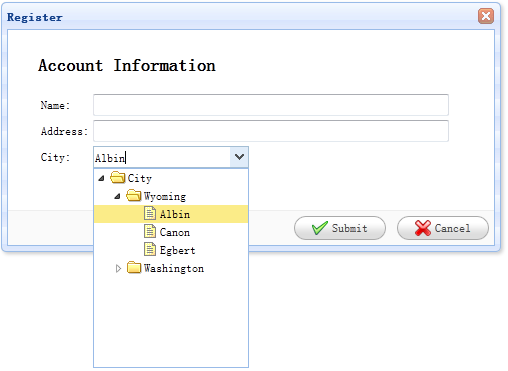
ComboTree is a ComboBox with a drop-down tree. It can be used as a form field that can be posted to remote server.

In this tutorial we will create a register form that has name,address,city fields. The city field is a combotree field in which user can drop down a tree panel and select a specified city.

Create Form

  1. <div id=“dlg” class=“easyui-dialog” style=“width:500px;height:250px;padding:10px 30px;”
  2. title=“Register” buttons=“#dlg-buttons”>
  3. <h2>Account Information</h2>
  4. <form id=“ff” method=“post”>
  5. <table>
  6. <tr>
  7. <td>Name:</td>
  8. <td><input type=“text” name=“name” style=“width:350px;”/></td>
  9. </tr>
  10. <tr>
  11. <td>Address:</td>
  12. <td><input type=“text” name=“address” style=“width:350px;”/></td>
  13. </tr>
  14. <tr>
  15. <td>City:</td>
  16. <td><select class=“easyui-combotree” url=“data/city_data.json” name=“city” style=“width:156px;”/></td>
  17. </tr>
  18. </table>
  19. </form>
  20. </div>
  21. <div id=“dlg-buttons”>
  22. <a href=“#” class=“easyui-linkbutton” iconCls=“icon-ok” onclick=“savereg()”>Submit</a>
  23. <a href=“#” class=“easyui-linkbutton” iconCls=“icon-cancel” onclick=JavaScript:$(‘#dlg’).dialog(‘close’)”>Cancel</a>
  24. </div>

See the code above, we set a url attribute for the combotree field named ‘city’, with which the field can retrieve tree data from remote server. Notice that the field has a class named ‘easyui-combotree’, so we don’t need to write any js code, the combotree field will be rendered automatically.

Download the EasyUI example:

[转载]为网站创建一个Android应用程序 利用手机推广

mikel阅读(830)

[转载]为网站创建一个Android应用程序 利用手机推广

看到一些很专业的网站有自己的Android App,但是苦于自己的小网站或者是博客没有足够的人力物力财力,只有羡慕嫉妒恨呢?但是,今天要介绍的AppYet就是一款轻松快捷的为你的任何网站或 者是博客创建一个Android 应用程序的应用,只需要简单几步,就可以为你创建一个专业、美观的Android 应用程序,而这一切,都是免费的。

什么是AppYet

AppYet是一个在线应用程序,通过抓取你的网站和博客的RSS提要,讲其变成一个Android应用程序。对于完全不懂任何编码知识的人如你我来说,它是如此的快捷和方便,只需要轻点几下,你的应用程序就会发送到你的邮箱中 。

使用AppYet创建自己的Andr​​oid应用

1.进入AppYet.com,点击右上角的创建应用程序,系统会提示你进行注册,记得邮箱要填写真实的,因为要用来接收创建好的Andr​​oid应用。

2.按照提示填写好内容,重点是RSS源。

3.下一个页面,在这里您可以确认您的应用程序的设置。您可以更改自己的应用程序图标。

4.如果有多个网站或者博客,可以在保存之后选择继续添加新的feed。

5.最后点击提交(submit),等几秒钟之后,生成好的应用程序会发送到你的邮箱。

使用AppYet创建的Andr​​oid应用效果

之后,生成的apk文件如何安装就不啰嗦了吧,在手机上的效果是这样的:

或者是列表方式展示,效果如下:

需要注意的是,第一次使用的时候,可能会需要等待一两分钟用来下载文章内容。

几点注意的事项

1.据说AppYet免费版会在您的应用程序中嵌入广告(尽管我没有看到),这些广告的展示和收入权利都输入AppYet,而不是你。如果你不想广告出现,可以购买49美元的高级服务。

2.如你所见,可以设置的功能不多,AppYet并没有提供任何接口供设置和调试。

3.如果你是一个很谨慎的人,那么在使用AppYet的时候要三思,毕竟,AppYet在后台干了些什么,你一无所知。

原文链接:http://wangyueblog.com/2011/10/27/easily-create-an-android-app-for-any-website/

[转载]谷歌地图API即将收费

mikel阅读(938)

[转载]谷歌地图API即将收费.

Google地理开发博客宣布谷歌地图API(Google Maps API)将不再免费提供,当用户调用谷歌地图API超过一定限制,将会按照超出的次数来收取费用,费用是每一千次调用4-10美元左右。

对开发商的影响

Google建议使用Google Maps API的开发商,需要评估一下调用谷歌地图的用法,确认他们的服务是否受到影响。如果调用次数超过限制,则需要:

1、降低调用Google Maps API的次数,将其限制在每天二万五千次以下。

2、根据超出的调用次数支付一定费用。

3、购买Google Maps API的高级许可证。

谷歌地图API即将收费

谷歌地图调用限制

免费的谷歌地图API用户依旧可以在限制范围内继续免费使用,具体的调用限制是:

1、每天地图API调用次数少于25000次。

2、每天彩色地图(Styled Maps)API的调用次数少于2500次。

收费标准

Google在地图API的FAQ中列出了如下的收费标准:

服务 每天免费 超出后千次调用收费(美元)
JS Maps API v3 25,000 $4
JS Maps API v3 styled maps 2,500 $4 / $8
Static Maps API 25,000 $4
Static Maps API styled maps 2,500 $4 / $8
Street View Image API 25,000 $4
JS Maps API v2 25,000 $10

对于企业用户来说,购买Google Maps API Premier应该是较为合算的选择,对于个人用户来说,可以登录Google APIs Console来监控API的调用次数以及目前的访问次数,如果调用次数过高则需要采取一定措施。

免费模式的商业化

对中国的消费者来说,付费习惯尚未养成。而对于资金实力不强的中小开发者来说,选择免费模式是发展的首选,然而,免费模式如果长期运营,无疑有个尴尬现 实:服务提供商为大众贡献了优质的服务,投入了不少运营成本,却无法从中获得有意义的收入,来支撑服务的长期运营。因此,将原先的“免费”服务通过各种方 式来进行收费,就成为服务长期运营的手段。

世界上没有免费的午餐,免费模式是个美丽的陷阱。很多打着“免费”旗号的大公司,在投入大量 资金,通过“免费”的模式拥有了足够多的用户,并取得了市场的垄断权之后,用户面临的可能是一个非常危险的状况,反垄断的重要性对于任何行业、任何企业都 一样,哪怕是打着“不作恶”旗号的Google。

[转载]treegrid - Documentation - jQuery EasyUI

mikel阅读(1068)

[转载]treegrid – Documentation – jQuery EasyUI.

TreeGrid

$(‘#material’).treegrid({
nowrap: false,
rownumbers: true,
animate:true,
collapsible:true,
loadMsg:’数据加载中请稍后……’,
url:'<c:url value=”/jxc/sysinfo/loadMaterialTree.jsps”/>’,
idField:’matCode’,
treeField:’matCode’,
frozenColumns:[[
{title:’料号’,field:’matCode’,width:180}
]],
columns:[[
{field:’matType’,title:’产品类型’,width:120},
{field:’matShow’,title:’产品名称’,width:120},
{field:’matStandard’,title:’产品规格’,width:120},
{field:’matProperties’,title:’产品属性’,width:120}
]],
onBeforeLoad:function(row,param){

// 此处就是异步加载地所在
if (row){
$(this).treegrid(‘options’).url = ‘<c:url value=”/jxc/sysinfo/loadMaterialTree.jsps”/>?matParentId=’+row.matId;
} else {
$(this).treegrid(‘options’).url = ‘<c:url value=”/jxc/sysinfo/loadMaterialTree.jsps?matName=”/>’;
}
},
onClickRow:function(){
/**
** 如果是新建或者修改,以及删除,则清除查询form表单数据
**/
$(‘#materialSearch’).form(‘clear’);
}
});

<table id=”material”></table>

以及树的异步添加、删除、刷新等

Extend from $.fn.datagrid.defaults. Override defaults with $.fn.treegrid.defaults.

Dependencies

  • datagrid

Usage

  1. <table id=“tt”></table>
  1. $(‘#tt’).treegrid({
  2. url:‘treegrid_data.json’,
  3. treeField:‘name’,
  4. columns:[[
  5. {title:‘Task Name’,field:‘name’,width:180},
  6. {field:‘persons’,title:‘Persons’,width:60,align:‘right’},
  7. {field:‘begin’,title:‘Begin Date’,width:80},
  8. {field:‘end’,title:‘End Date’,width:80}
  9. ]]
  10. });

Properties

The properties extend from datagrid, below is the added properties for treegrid.

Name Type Description Default
treeField string Defines the tree node field. null
animate boolean Defines if to show animation effect when node expand or collapse. false

Events

The events extend from datagrid, below is the added events for treegrid.

Name Parameters Description
onClickRow row Fires when user click a node.
onDblClickRow row Fires when user dblclick a node.
onBeforeLoad row, param Fires before a request is made to load data, return false to cancel this load action.
onLoadSuccess row, data Fires when data loaded successfully.
onLoadError arguments Fires when data loaded fail, the arguments parameter is same as the ‘error’ function of JQuery.ajax.
onBeforeExpand row Fires before node is expanded, return false to cancel this expand action.
onExpand row Fires when node is expanded.
onBeforeCollapse row Fires before node is collapsed, return false to cancel this collapse action.
onCollapse row Fires when node is collapsed.
onContextMenu e, row Fires when node is right clicked.
onBeforeEdit row Fires when user start editing a node.
onAfterEdit row,changes Fires when user finish editing.
onCancelEdit row Fires when user cancel editing a node.

Methods

Name Parameter Description
options none Return the options of treegrid.
resize options Set treegrid size, the options contains two properties:
width: the new width of treegrid.
height: the new height of treegrid.
fixRowHeight id fix the specified row height.
loadData data Load the treegrid data.
reload id Reload treegrid data.
reloadFooter footer Reload footer data.
getData none Get the loaded data.
getFooterRows none Get the footer data.
getRoot none Get the root node, return node object
getRoots none Get the root nodes, return node array.
getParent id Get the parent node.
getChildren id Get the children nodes.
getSelected none Get the selected node and return it, if no node selected return null.
getSelections none Get all selected nodes.
getLevel id Get the specified node level.
find id Find the specifed node and return the node data.
select id Select a node.
unselect id Unselect a node.
selectAll none Select all nodes.
unselectAll none Unselect all nodes.
collapse id Collapse a node.
expand id Expand a node.
collapseAll id Collapse all nodes.
expandAll id Expand all nodes.
expandTo id Expand from root to specified node.
toggle id Toggles expanded/collapsed state of the node.
append param Append nodes to a parent node. The ‘param’ parameter contains following properties:
parent: DOM object, the parent node to append to, if not assigned, append as root nodes.
data: array, the nodes data.
remove id Remove a node and it’s children nodes.
refresh id Refresh the specified node.
beginEdit id Begin editing a node.
endEdit id End editing a node.
cancelEdit id Cancel editing a node.
getEditors id Get the specified row editors. Each editor has the following properties:
actions: the actions that the editor can do.
target: the target editor JQuery object.
field: the field name.
type: the editor type.
getEditor options Get the specified editor, the options contains two properties:
id: the row node id.
field: the field name.

[转载]Create a Basic TreeGrid - jQuery EasyUI

mikel阅读(1025)

[转载]Create a Basic TreeGrid – jQuery EasyUI.

The TreeGrid component extend from DataGrid but allowing a parent/child relationship between rows. Many properties extended from DataGrid can be used in TreeGrid. To use the TreeGrid, users must define the ‘treeField’ property that indicate which field to display as tree node.

This tutorial will show you how to set up the folder browser using the TreeGrid component.

Build the TreeGrid

  1. <table id=“test” title=“Folder Browser” class=“easyui-treegrid” style=“width:400px;height:300px”
  2. url=“data/treegrid_data.json”
  3. rownumbers=“true”
  4. idField=“id” treeField=“name”>
  5. <thead>
  6. <tr>
  7. <th field=“name” width=“160”>Name</th>
  8. <th field=“size” width=“60” align=“right”>Size</th>
  9. <th field=“date” width=“100”>Modified Date</th>
  10. </tr>
  11. </thead>
  12. </table>

Download the EasyUI example:


[转载]jquery easyui datagrid 分页 详解

mikel阅读(1183)

[转载]jquery easyui datagrid 分页 详解.

由于项目原因,用了JQuery easyui 感觉界面不错,皮肤样式少点,可是官网最近打不开了,资料比较少,给的demo没有想要的效果,今天在用datagrid 做分页显示的时候,折腾了半天,网上的资料也比较少,后自己动手,终于解决,废话不说,开始:

datagrid分页 有一个附加的分页控件,只需后台获取分页控件自动提交的两个参数rows每页显示的记录数和page;//当前第几页

然后读取相应页数的记录,和总记录数total一块返回即可 界面如下:

1、下边是datagrid的显示对话框,我直接用table把列头显示出来,感觉比用js写要易于阅读

01 <table id="list_data" cellspacing="0" cellpadding="0">
02 <thead>
03 <tr>
04 <th field="fldAppDept" width="100">部门</th>
05 <th field="fldAppNode" width="100">网站</th>
06 <th field="fldAppName" width="100">名称</th>
07 <th field="fldAppMgr" width="100">管理员</th>
08 <th field="fldAppNote" width="100">注释</th>
09 <th field="fldAppType" width="100">类型</th>
10 <th field="fldTelphone" width="100">电话</th>
11 <th field="fldAppImg" width="100">职务</th>
12 <th field="fldAppMonitor" width="100">启用监测</th>
13 <th field="fldAppLevel" width="100">要重级别</th>
14 </tr>
15 </thead>
16 </table>

2、js代码,用于构建datagrid

注意 要想显示分页控件,pagination属性必须为true

01 //datagrid初始化
02 $('#list_data').datagrid({
03 title:'应用系统列表',
04 iconCls:'icon-edit',//图标
05 width: 700,
06 height: 'auto',
07 nowrap: false,
08 striped: true,
09 border: true,
10 collapsible:false,//是否可折叠的
11 fit: true,//自动大小
12 url:'listApp.action',
13 //sortName: 'code',
14 //sortOrder: 'desc',
15 remoteSort:false,
16 idField:'fldId',
17 singleSelect:false,//是否单选
18 pagination:true,//分页控件
19 rownumbers:true,//行号
20 frozenColumns:[[
21 {field:'ck',checkbox:true}
22 ]],
23 toolbar: [{
24 text: '添加',
25 iconCls: 'icon-add',
26 handler: function() {
27 openDialog("add_dialog","add");
28 }
29 }, '-', {
30 text: '修改',
31 iconCls: 'icon-edit',
32 handler: function() {
33 openDialog("add_dialog","edit");
34 }
35 }, '-',{
36 text: '删除',
37 iconCls: 'icon-remove',
38 handler: function(){
39 delAppInfo();
40 }
41 }],
42 });
43 //设置分页控件
44 var p = $('#list_data').datagrid('getPager');
45 $(p).pagination({
46 pageSize: 10,//每页显示的记录条数,默认为10
47 pageList: [5,10,15],//可以设置每页记录条数的列表
48 beforePageText: '第',//页数文本框前显示的汉字
49 afterPageText: '页    共 {pages} 页',
50 displayMsg: '当前显示 {from} - {to} 条记录   共 {total} 条记录',
51 /*onBeforeRefresh:function(){
52 $(this).pagination('loading');
53 alert('before refresh');
54 $(this).pagination('loaded');
55 }*/
56 });

3、后台我是通过struts2处理的数据 返回json串

private JSONObject result;//返回的json
private String rows;//每页显示的记录数
private String page;//当前第几页
private AppServiceInter appService;
public JSONObject getResult() {
return result;
}
public void setResult(JSONObject result) {
this.result = result;
}
public void setAppService(AppServiceInter appService) {
this.appService = appService;
}
public String getRows() {
return rows;
}
public void setRows(String rows) {
this.rows = rows;
}
public String getPage() {
return page;
}
public void setPage(String page) {
this.page = page;
}
/**
* 查询应用系统
* @return
*/
public String listApp() {
System.out.println("---------------");
//当前页
int intPage = Integer.parseInt((page == null || page == "0") ? "1":page);
//每页显示条数
int number = Integer.parseInt((rows == null || rows == "0") ? "10":rows);
//每页的开始记录  第一页为1  第二页为number +1
int start = (intPage-1)*number;
List<TblApp> list = appService.findByPageApp(start,number);//每页的数据,放入list
Map<String, Object> jsonMap = new HashMap<String, Object>();//定义map
jsonMap.put("total", appService.getCountApp());//total键 存放总记录数,必须的
jsonMap.put("rows", list);//rows键 存放每页记录 list
result = JSONObject.fromObject(jsonMap);//格式化result   一定要是JSONObject
//result = JSONArray.fromObject(jsonMap);
return SUCCESS;
}

4、附上struts.xml配置文件

<package name="app" extends="json-default">
<action name="listApp" class="appAction" method="listApp">
<result type="json">
<param name="root">result</param>
</result>
</action>
</package>

特写出这些,方便自己或他人以后参考 ,如果有什么问题大家可以留言……


[转载]Build CRUD DataGrid with jQuery EasyUI - jQuery EasyUI

mikel阅读(1268)

[转载]Build CRUD DataGrid with jQuery EasyUI – jQuery EasyUI.

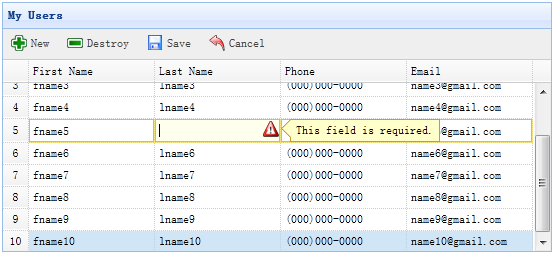
In the previous tutorial we create a crud application that using dialog component to create or edit user information. This tutorial will show you how to create a crud datagrid. We will use the editable datagrid plugin to make these crud actions work.

Step 1: Define DataGrid in HTML tag

  1. <table id=“dg” title=“My Users” style=“width:550px;height:250px”
  2. toolbar=“#toolbar”
  3. rownumbers=“true” fitColumns=“true” singleSelect=“true”>
  4. <thead>
  5. <tr>
  6. <th field=“firstname” width=“50” editor=“{type:’validatebox’,options:{required:true}}”>First Name</th>
  7. <th field=“lastname” width=“50” editor=“{type:’validatebox’,options:{required:true}}”>Last Name</th>
  8. <th field=“phone” width=“50” editor=“text”>Phone</th>
  9. <th field=“email” width=“50” editor=“{type:’validatebox’,options:{validType:’email’}}”>Email</th>
  10. </tr>
  11. </thead>
  12. </table>
  13. <div id=“toolbar”>
  14. <a href=“#” class=“easyui-linkbutton” iconCls=“icon-add” plain=“true” onclick=JavaScript:$(‘#dg’).edatagrid(‘addRow’)”>New</a>
  15. <a href=“#” class=“easyui-linkbutton” iconCls=“icon-remove” plain=“true” onclick=JavaScript:$(‘#dg’).edatagrid(‘destroyRow’)”>Destroy</a>
  16. <a href=“#” class=“easyui-linkbutton” iconCls=“icon-save” plain=“true” onclick=“javascript:$(‘#dg’).edatagrid(‘saveRow’)”>Save</a>
  17. <a href=“#” class=“easyui-linkbutton” iconCls=“icon-undo” plain=“true” onclick=“javascript:$(‘#dg’).edatagrid(‘cancelRow’)”>Cancel</a>
  18. </div>

Step 2: Make an editable DataGrid

  1. $(‘#dg’).edatagrid({
  2. url: ‘get_users.php’,
  3. saveUrl: ‘save_user.php’,
  4. updateUrl: ‘update_user.php’,
  5. destroyUrl: ‘destroy_user.php’
  6. });

We should provide the ‘url’,’saveUrl’,’updateUrl’ and ‘destroyUrl’ properties for editable datagrid:

  • url: to retrieve user data from server.
  • saveUrl: to save a new user data.
  • updateUrl: to update an exists user data.
  • destroyUrl: to destroy an exists user data.

Step 3: Write server processing code

Save a new user(save_user.php):

  1. $firstname = $_REQUEST[‘firstname’];
  2. $lastname = $_REQUEST[‘lastname’];
  3. $phone = $_REQUEST[‘phone’];
  4. $email = $_REQUEST[’email’];
  5. include ‘conn.php’;
  6. $SQL = “insert into users(firstname,lastname,phone,email) values(‘$firstname’,’$lastname’,’$phone’,’$email’)”;
  7. @mySQL_query($SQL);
  8. echo json_encode(array(
  9. ‘id’ => mysql_insert_id(),
  10. ‘firstname’ => $firstname,
  11. ‘lastname’ => $lastname,
  12. ‘phone’ => $phone,
  13. ’email’ => $email
  14. ));

Update an exists user(update_user.php):

  1. $id = intval($_REQUEST[‘id’]);
  2. $firstname = $_REQUEST[‘firstname’];
  3. $lastname = $_REQUEST[‘lastname’];
  4. $phone = $_REQUEST[‘phone’];
  5. $email = $_REQUEST[’email’];
  6. include ‘conn.php’;
  7. $sql = “update users set firstname=’$firstname’,lastname=’$lastname’,phone=’$phone’,email=’$email’ where id=$id”;
  8. @mysql_query($sql);
  9. echo json_encode(array(
  10. ‘id’ => $id,
  11. ‘firstname’ => $firstname,
  12. ‘lastname’ => $lastname,
  13. ‘phone’ => $phone,
  14. ’email’ => $email
  15. ));

Destroy an exists user(destroy_user.php):

  1. $id = intval($_REQUEST[‘id’]);
  2. include ‘conn.php’;
  3. $sql = “delete from users where id=$id”;
  4. @mysql_query($sql);
  5. echo json_encode(array(‘success’=>true));

Download the EasyUI example: