[转载]提供一个网页抓取hao123手机号码归属地的例子

mikel阅读(1053)

[转载]提供一个网页抓取hao123手机号码归属地的例子 – 苏飞—Perky Su – 博客园.

有段时间不写博客了,最近工作压力比较大,大家在忙什么,新近安装了Win7的操作系统,感觉很不错,还体验了一把IE9,里面的开发人员工具很好用

说到这个大家可以用火狐的谷歌的都行,在这个例子中我主要使用IE9自带的分析一下hao123的手机号码归属地查询的问题。

我们先来看看下面的图片吧

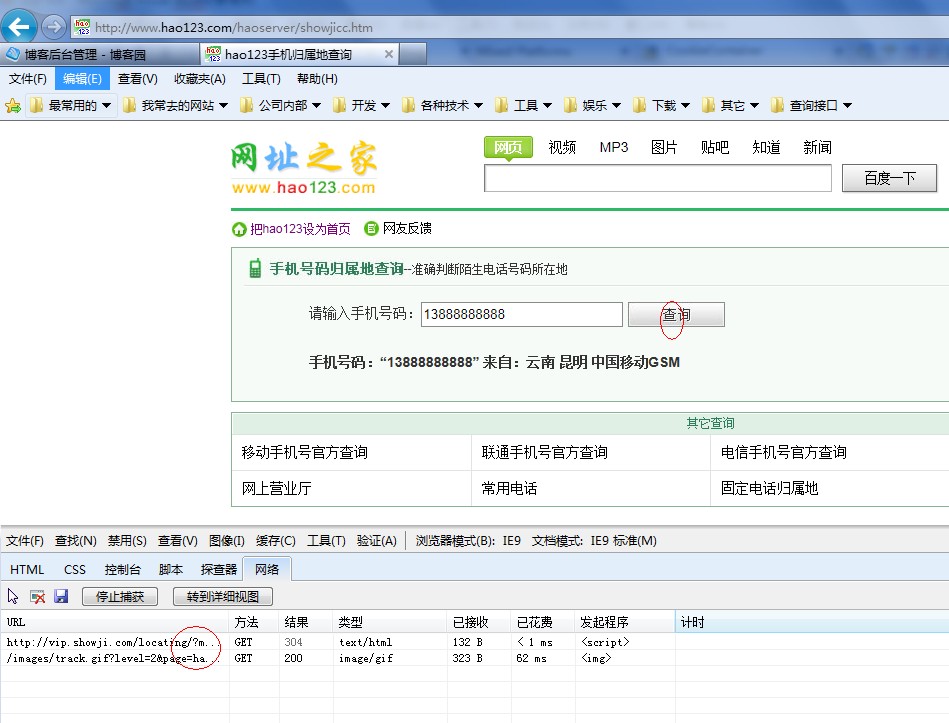
在hao123的这个界面里我们只要输入一个手机号不管是移动,联通,电信的都可以,单击查询就可以直接查询到归属地,和号码类型,网上这样的

网站很多,我就以这个为例子吧,那我们怎么样把这些信息放到我们自己的网站上呢?

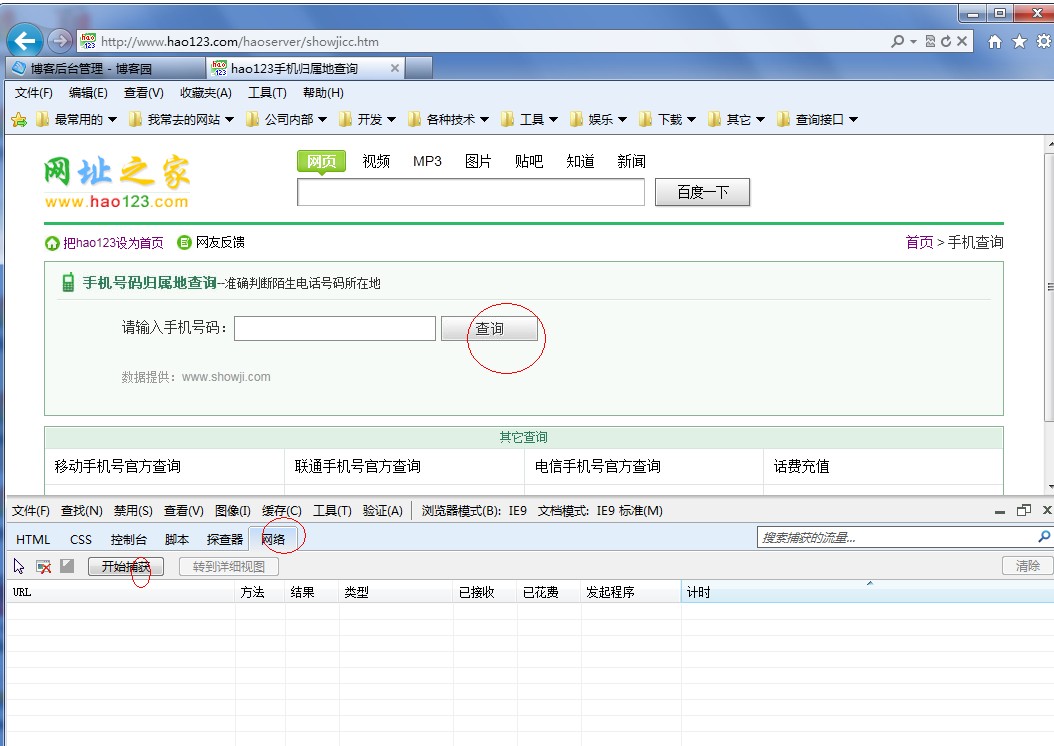
我们先来分析一下,其实很方便,我们在IE9下打开这个界面然后在工具—开发人员工具,或是直接安f12也是一样的效果,我们安界面定位到如下图

我们先单击网络然后单击开始捕获,这个时候我们再单击一下查询按钮看看会出现什么情况

是不是出现两个整个,第一个很明显是加载我们所输入号归属地信息,第一个是加载一个图片,对我们没有任何用处,这里不管它,现在我们

来单击一下第一个方法看看捕获到了什么

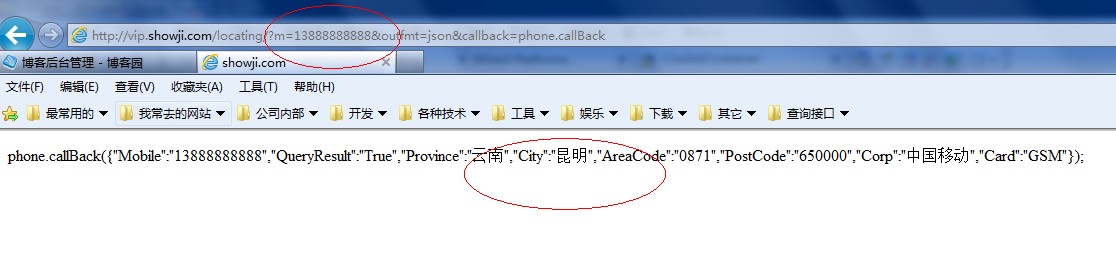
URL http://vip.showji.com/locating/?m=13888888888&outfmt=json&callback=phone.callBack 很明显这是一个GEt请求,只要请求这个地址就能得到下面的结果

phone.callBack({“Mobile”:”13888888888″,”QueryResult”:”True”,”Province”:” 云南”,”City”:”昆明”,”AreaCode”:”0871″,”PostCode”:”650000″,”Corp”:”中国移 动”,”Card”:”GSM”});

用手机号,省,市,还有邮编,号码类型等信息。这样看的话是不是我们直接把这个地区复制到地址栏里就行了,那咱们一起来看看效果吧

果然没错就是我们想要的东西,大家别急,其它还可以更简单,我们来看一下这个URL

http://vip.showji.com/locating/?m=13888888888&outfmt=json&callback=phone.callBack

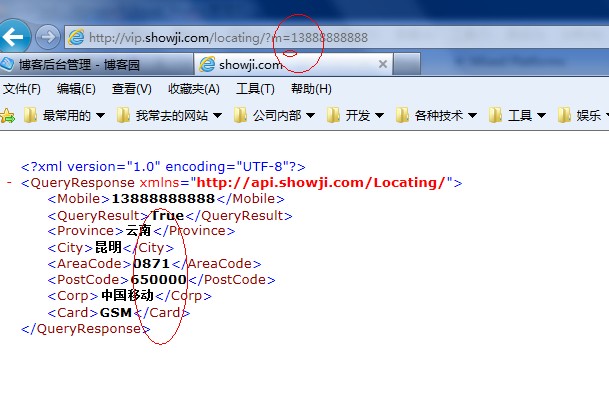
如果现在我把这个RUles号码后面的删除只保留http://vip.showji.com/locating/?m=13888888888这些会出现什么情况呢?

直接放到地址栏里试试效果

呵呵,很神奇吧,居然得到的是一个Xml文件

这就像是我们在调用WebServces一样简单了,我们只要写一个程序请求这个地址就可以得到我们想要的效果了。

随便新建一个项目,一起来看一下

我就不一步一步的分析了大家直接看我的代码

using System;
using System.Collections.Generic;
using System.ComponentModel;
using System.Data;
using System.Drawing;
using System.Linq;
using System.Text;
using System.Windows.Forms;
using System.Net;
using System.IO;
using System.Security.Cryptography.X509Certificates;
using System.Net.Security;
using System.Security.Cryptography;
using System.Xml;

namespace ccbText
{
public partial class Form2 : Form
{

public Form2()
{
InitializeComponent();
}

private void Form2_Load(object sender, EventArgs e)
{
}
这个方法在这里没有用到,大家可以做为参考
///
/// 传入URL返回网页的html代码
///
///
<span> </span>URL         ///
public string GetUrltoHtml(string Url)
{
StringBuilder content = new StringBuilder();

try
{
// 与指定URL创建HTTP请求
HttpWebRequest request = (HttpWebRequest)WebRequest.Create(Url);
request.KeepAlive = false;
// 获取对应HTTP请求的响应
HttpWebResponse response = (HttpWebResponse)request.GetResponse();
// 获取响应流
Stream responseStream = response.GetResponseStream();
// 对接响应流(以"GBK"字符集)
StreamReader sReader = new StreamReader(responseStream, Encoding.GetEncoding("utf-8"));
// 开始读取数据
Char[] sReaderBuffer = new Char[256];
int count = sReader.Read(sReaderBuffer, 0, 256);
while (count &gt; 0)
{
String tempStr = new String(sReaderBuffer, 0, count);
content.Append(tempStr);
count = sReader.Read(sReaderBuffer, 0, 256);
}
// 读取结束
sReader.Close();
}
catch (Exception)
{
content = new StringBuilder("Runtime Error");
}

return content.ToString();

}

///
/// 好123查询,符合下列规则也可使用
/// 返回xml
/// 需要顺序的节点:
/// QueryResult(查询结果状态True,False)
/// Province(所属省份)
/// City(所属地区)
/// Corp(服务商)
/// Card(卡类型 GSM)
/// AreaCode(区号)
/// PostCode(邮编)
///
///
<span> </span> ///
///
public static string[] GetInfoByxml(string url, string mobileNum)
{
try
{
XmlDocument xml = new XmlDocument();
// xml.LoadXml("

<!--?xml version='1.0' encoding='utf-8' ?-->15890636739True
河南郑州0371
450000中国移动GSM");
xml.Load(string.Format(url, mobileNum));
XmlNamespaceManager xmlNm = new XmlNamespaceManager(xml.NameTable);
xmlNm.AddNamespace("content", "http://api.showji.com/Locating/");
XmlNodeList nodes = xml.SelectNodes("//content:QueryResult|//content:Mobile|//content:Province|//content:City|//content:Corp|//content:Card|//content:AreaCode|//content:PostCode", xmlNm);
if (nodes.Count == 8)
{
if ("True".Equals(nodes[1].InnerText))
{

return new string[] { nodes[0].InnerText, nodes[2].InnerText + nodes[3].InnerText, nodes[6].InnerText + nodes[7].InnerText, nodes[4].InnerText, nodes[5].InnerText };
}
}
return new string[] { "FALSE" };
}
catch
{
return new string[] { "FALSE" };
}
}

//调用方法查询数据
private void button1_Click(object sender, EventArgs e)
{
foreach (string item in GetInfoByxml(" http://vip.showji.com/locating/?m={0}", txtMobile.Text.Trim()))
{
richTextBox1.Text += "__" + item;
}
}
}
}

运行一下看看效果吧

我是用Winfrom做的测试,大家如果想用Asp。Net也是一样的,把我的方法复制到你的Web页面的Cs代码下就OK了。

好了我们的分析到这里就算是结束了,

在这里我再给大空补充一个关于调用带有证书的网站的调用 方法

因为带证书的都是在要验证证书文件的,我们在这里直接让他在本地回调验证,这样的话就要吧重写方法了,下在看一下回调的方法吧

//回调验证证书问题
public bool CheckValidationResult(object sender, X509Certificate certificate, X509Chain chain, SslPolicyErrors errors)
{   // 总是接受
return true;
}

其它很简单只要在 我们上面的方法GetUrltoHtml()中加入几行代码就行了,修改后的方法

///
/// 传入URL返回网页的html代码
///
///
<span> </span>URL         ///
public string GetUrltoHtml(string Url)
{
StringBuilder content = new StringBuilder();
try
{
// 与指定URL创建HTTP请求
ServicePointManager.ServerCertificateValidationCallback = new System.Net.Security.RemoteCertificateValidationCallback(CheckValidationResult);//验证

HttpWebRequest request = (HttpWebRequest)WebRequest.Create(Url);
request.KeepAlive = false;
request.UserAgent = "Mozilla/4.0 (compatible; MSIE 7.0; Windows NT 6.1; Trident/5.0; SLCC2; .NET CLR 2.0.50727; .NET CLR 3.5.30729; .NET CLR 3.0.30729; Media Center PC 6.0; InfoPath.2; MS-RTC LM 8; .NET4.0C; .NET4.0E)";
request.Method = "GET";
request.Accept = "*/*";

//创建证书文件
X509Certificate objx509 = new X509Certificate(Application.StartupPath + "\\123.cer");

//添加到请求里
request.ClientCertificates.Add(objx509);

HttpWebResponse response = (HttpWebResponse)request.GetResponse();
// 获取对应HTTP请求的响应
// 获取响应流
Stream responseStream = response.GetResponseStream();
// 对接响应流(以"GBK"字符集)
StreamReader sReader = new StreamReader(responseStream, Encoding.GetEncoding("GBK"));
// 开始读取数据
Char[] sReaderBuffer = new Char[256];
int count = sReader.Read(sReaderBuffer, 0, 256);
while (count &gt; 0)
{
String tempStr = new String(sReaderBuffer, 0, count);
content.Append(tempStr);
count = sReader.Read(sReaderBuffer, 0, 256);
}
// 读取结束
sReader.Close();
}
catch (Exception)
{
content = new StringBuilder("Runtime Error");
}

return content.ToString();

}

欢迎大家转载,如有转载请注明文章来自:   http://sufei.cnblogs.com/

签名:做一番一生引以为豪的事业;在有生之年报答帮过我的人;并有能力帮助需要帮助的人;

QQ:361983679 Email:sufei.1013@163.com MSN:sufei.1013@163.com

[转载]详解ASP.NET MVC的请求生命周期

mikel阅读(796)

[转载]详解ASP.NET MVC的请求生命周期 – twfx7758的日志 – 网易博客.

本文的目的旨在详细描述ASP.NET MVC请求从开始到结束的每一个过程。我希望能理解在浏览器输入URL并敲击回车来请求一个ASP.NET MVC网站的页面之后发生的任何事情。
为什么需要关心这些?有两个原因。首先是因为ASP.NET MVC是一个扩展性非常强的框架。例如,我们可以插入不同的ViewEngine来控制网站内容呈现的方式。我们还可以定义控制器生成和分配到某个请求的 方式。因为我想发掘任何ASP.NET MVC页面请求的扩展点,所以我要来探究请求过程中的一些步骤。
其次,如果你对测试驱动开发佷感兴趣,当为控制器写单元测试时,我们就必须理解控制器的依赖项。在写测试的时候,我们需要使用诸如Typemock Isolator或Rhino Mocks的Mock框架来模拟某些对象。如果不了解页面请求生命周期就不能进行有效的模拟。
生命周期步骤概览
当我们对ASP.NET MVC网站发出一个请求的时候,会发生5个主要步骤:
步骤1:创建RouteTable
当ASP.NET应用程序第一次启动的时候才会发生第一步。RouteTable把URL映射到Handler。
步骤2:UrlRoutingModule拦截请求
第二步在我们发起请求的时候发生。UrlRoutingModule拦截了每一个请求并且创建和执行合适的Handler。
步骤3:执行MvcHandler
MvcHandler创建了控制器,并且把控制器传入ControllerContext,然后执行控制器。
步骤4:执行控制器
控制器检测要执行的控制器方法,构建参数列表并且执行方法。
步骤5:调用RenderView方法
大多数情况下,控制器方法调用RenderView()来把内容呈现回浏览器。Controller.RenderView()方法把这个工作委托给某个ViewEngine来做。
现在让我们来详细研究每一个步骤:
步骤1:创建RouteTable
当我们请求普通ASP.NET应用程序页面的时候,对于每一个页面请求都会在磁盘上有这样一个页面。例如,如果我们请求一个叫做SomePage.aspx的页面,在WEB服务器上就会有一个叫做SomePage.aspx的页面。如果没有的话,会得到一个错误。
从技术角度说,ASP.NET页面代表一个类,并且不是普通类。ASP.NET页面是一个Handler。换句话说,ASP.NET页面实现了 IhttpHandler接口并且有一个ProcessRequest()方法用于在请求页面的时候接受请求。ProcessRequest()方法负责 生成内容并把它发回浏览器。
因此,普通ASP.NET应用程序的工作方式佷简单明了。我们请求页面,页面请求对应磁盘上的某个页面,这个页面执行ProcessRequest()方法并把内容发回浏览器。
ASP.NET MVC应用程序不是以这种方式工作的。当我们请求一个ASP.NET MVC应用程序的页面时,在磁盘上不存在对应请求的页面。而是,请求被路由转到一个叫做控制器的类上。控制器负责生成内容并把它发回浏览器。
当我们写普通ASP.NET应用程序的时候,会创建很多页面。在URL和页面之间总是一一对应进行映射。每一个页面请求对应相应的页面。
相反,当我们创建ASP.NET MVC应用程序的时候,创建的是一批控制器。使用控制器的优势是可以在URL和页面之间可以有多对一的映射。例如,所有如下的URL都可以映射到相同的控制器上。
http://MySite/Products/1
http://MySite/Products/2
http://MySite/Products/3
这些URL映射到一个控制器上,通过从URL中提取产品ID来显示正确的产品。这种控制器方式比传统的ASP.NET方式更灵活。控制器方式可以产品更显而易见的URL。
那么,某个页面请求是怎么路由到某个控制器上的呢?ASP.NET MVC应用程序有一个叫做路由表(Route Table)的东西。路由表映射某个URL到某个控制器上。
一个应用程序有一个并且只会有一个路由表。路由表在Global.asax文件中创建。清单1包含了在使用Visual Studio新建ASP.NET MVC Web应用程序时默认的Global.asax文件。
清单 1 – Global.asax
using System;
using System.Collections.Generic;
using System.Linq;
using System.Web;
using System.Web.Mvc;
using System.Web.Routing;
namespace TestMVCArch
{
public class GlobalApplication : System.Web.HttpApplication
{
public static void RegisterRoutes(RouteCollection routes)
{
// Note: Change the URL to “{controller}.mvc/{action}/{id}” to enable
// automatic support on IIS6 and IIS7 classic mode
routes.Add(new Route(“{controller}/{action}/{id}”, new MvcRouteHandler())
{
Defaults = new RouteValueDictionary(new { action = “Index”, id = “” }),
});
routes.Add(new Route(“Default.aspx”, new MvcRouteHandler())
{
Defaults = new RouteValueDictionary(new { controller = “Home”, action = “Index”, id = “” }),
});
}
protected void Application_Start(object sender, EventArgs e)
{
RegisterRoutes(RouteTable.Routes);
}
}
}
应用程序的路由表由RouteTable.Routes的静态属性表示。这个属性表示了路由对象的集合。在清单1列出的Global.asax文件中,我 们在应用程序首次启动时为路由表增加两个路由对象(Application_Start()方法在第一次请求网站页面的时候被调用一次)。
路由对象负责把URL映射到Handler。在清单1中,我们创建了两个路由对象。这2个对象都把URL映射到MvcRouteHandler。第一个路 由映射任何符合{controller}/{action}/{id}模式的URL到MvcRouteHandler。第二个路由映射某个URL Default.aspx到MvcRouteHandler。
顺便说一下,这种新的路由构架可以脱离ASP.NET MVC独立使用。Global.asax文件映射URL到MvcRouteHandler。然而,我们可以选择把URL路由到不同类型的Handler 上。这里说的路由构架包含在一个叫做System.Web.Routing.dll的独立程序集中。我们可以脱离MVC使用路由。
步骤2:UrlRoutingModule拦截请求
当我们对ASP.NET MVC应用程序发起请求的时候,请求会被UrlRoutingModule HTTP Module拦截。HTTP Module是特殊类型的类,它参与每一次页面请求。例如,传统ASP.NET包含了FormsAuthenticationModule HTTP Module用来使用表单验证实现页面访问安全性。
UrlRoutingModule拦截请求后做的第一件事情就是包装当前的HttpContext为HttpContextWrapper2对象。 HttpContextWrapper2类和派生自HttpContextBase的普通HttpContext类不同。创建的HttpContext的 包装可以使使用诸如Typemock Isolator或Rhino Mocks的Mock对象框进行模拟变得更简单。

接着,Module把包装后的HttpContext传给在之前步骤中创建的RouteTable。HttpContext包含了URL、表单参数、查询 字符串参数以及和当前请求关联的cookie。如果在当前请求和路由表中的路由对象之间能找到匹配,就会返回路由对象。
如果UrlRoutingModule成功获取了RouteData对象,Module然后就会创建表示当前HttpContext和 RouteData的RouteContext对象。Module然后实例化基于RouteTable的新HttpHandler,并且把 RouteContext传给Handler的构造函数。
对于ASP.NET MVC应用程序,从RouteTable返回的Handler总是MvcHandler(MvcRouteHandler返回MvcHandler)。只 要UrlRoutingModule匹配当前请求到路由表中的路由,就会实例化带有当前RouteContext的MvcHandler。
Module进行的最后一步就是把MvcHandler设置为当前的HTPP Handler。ASP.NET应用程序自动调用当前HTTP Handler的ProcessRequest()方法然后转入下一步。
步骤3:执行MvcHandler
在之前的步骤中,表示某个RouteContext的MvcHandler被设置作为当前的HTTP Handler。ASP.NET应用程总是会发起一系列的事件,包括Star、BeginRequest、 PostResolveRequestCache、 PostMapRequestHandler、PreRequestHandlerExecute和EndRequest事件(非常多的应用程序事件—— 对于完整列表,请查阅Visual Studio 2008文档中的HttpApplication类)。
之前内容中描述的所有东西都在PostResolveRequestCache和PostMapRequestHandler中发生。当前HTTP Handler的ProcessRequest()方法在PreRequestHandlerExecute事件之后被调用。
当之前内容中创建的MvcHandler对象的ProcessRequest()被调用的时候,会创建一个新的控制器。控制器由 ControllerFactory创建。由于我们可以创建自己的ControllerFactory,所以这又是一个可扩展点。默认的 ControllerFactory名字相当合适,叫做DefaultControllerFactory。
RequestContext以及控制器的名字被传入ControllerFactory.CreateController()方法来获得一个控制器。 然后,从RequestContext和控制器构造ControllerContext对象。最后,调用控制器类的Execute()方法。在调用 Execute()方法的时候会给方法传入ControllerContext。
步骤4:执行控制器
Execute()方法首先创建TempData对象(在Ruby On Rails中叫做Flash对象)。TempData可以用于保存下次请求必须的临时数据(TempData和会话状态差不多,不长期占用内存)。
接着,Execute()方法构建请求的参数列表。这些参数从请求参数中提取,将会被作为方法的参数。参数会被传入执行的控制器方法。
Execute()通过对控制器类进行反射来找到控制器的方法。控制器类是我们写的。Execute()方法找到了我们控制器类中的方法后就执行它。Execute()方法不会执行被装饰NonAction特性的方法。
至此,就进入了自己应用程序的代码。
步骤5:调用RenderView方法
通常,我们的控制器方法最后会调用RenderView()或RedirectToAction()方法。RenderView()方法负责把视图(页面)呈现给浏览器。
当我们调用控制器RenderView()方法的时候,调用会委托给当前ViewEngine的RenderView()方法。 ViewEngine是另外一个扩展点。默认的ViewEngine是WebFormViewEngine。然而,我们可以使用诸如Nhaml的其它 ViewEngine。
WebForm的ViewEngine.RenderView()方法创建了一个叫做ViewLocator的类来寻找视图。然后,它使用 BuildManager来创建ViewPage类的实例。然后,如果页面有ViewData就会设置ViewData。最后,ViewPage 的RenderView()方法被调用。
ViewPage类从System.Web.UI.Page基类(和用于传统ASP.NET的页面一样)派生。RenderView()方法做的最后一个 工作就是调用页面类的ProcessRequest()。调用视图的ProcessRequest()生成内容的方式和普通ASP.NET页面生成内容的 方式一致。
可扩展点
ASP.NET MVC生命周期在设计的时候包含了很多可扩展点。我们可以自定义通过插入自定义类或覆盖既有类来自定义框架的行为。下面是这些扩展点的概要:
路由对象:当我们创建路由表的时候,调用RouteCollection.Add()方法来增加新的路由对象。Add()方法接受了RouteBase对象。我们可以通过派生RouteBase基类来实现自己的路由对象。
MvcRouteHandler :当创建MVC应用程序的时候,我们把URL映射到MvcRouteHandler对象上。然而,我们可以把URL映射到实现IRouteHandler 接口的任何类上。路由类的构造函数接受任何实现IRouteHandler接口的对象。
MvcRouteHandler.GetHttpHandler() : MvcRouteHandler 类的GetHttpHandler()方法是virtual方法。默认情况下,MvcRouteHandler返回MvcHandler。如果愿意的话, 我们可以覆盖GetHttpHandler()方法来返回不同的Handler。
ControllerFactory :我们可以通过System.Web.MVC.ControllerBuilder.Current.SetControllerFactory()方法 指定一个自定义类来创建自定义的控制器工厂。控制器工厂负责为某个控制器名和RequestContext返回控制器。
控制器:我们可以通过实现Icontroller接口来实现自定义控制器。这个接口只有一个Execute(ControllerContext controllerContext)方法。
ViewEngine:我们可以为控制器指定自定义的ViewEngine。通过为公共的 Controller.ViewEngine属性指定ViewEngine来把ViewEngine指定给控制器。ViewEngine必须实现 IviewEngine接口,接口只有一个方法:RenderView(ViewContext viewContext)。
ViewLocator :ViewLocator把视图名映射到实际视图文件上。我们可以通过WebFormViewEngine.ViewLocator的属性来执行自定义的ViewLocator。

[转载]Android平台下实现一个进程管理器

mikel阅读(875)

[转载]Android平台下实现一个进程管理器 – 疯狂の小石子 – 博客园.

在本人的博客文章《枚举Android系统的进程、任务和服务的息》http://www.cnblogs.com/crazypebble/archive/2011/03/29/1999151.html中, 实现了一个简单的监控Android平台下的系统进程,任务,服务信息的小工具。在本文中,我将对这个小工具中的系统进程信息部分,进一步的完善。从用户 的角度出发,将系统的任务信息Task和服务信息Service全部显示出来的意义不是很大,因此本文将不会对任务和服务两部分内容对任何更新。
介绍之前,先给大家看看程序执行后的界面,首先了解大致的功能,然后理解起来,会更加得心应手。
1、  获取系统进程列表,并加载进程名、CPU占用情况、内存使用情况


2、  点击某一个进程之后,让用户选择操作:“查看详情”和“结束进程”


3、  显示进程的详细信息:包括了进程的安装包路径、版权信息、用户权限、拥有的服务、和拥有的活动,等


4、  程序退出的方式


5、  任务列表 和 服务列表


在对界面和主要功能有一个大致了解之后,我们就开始编写我们的代码了。
一、界面布局
本文对整个功能界面采用了选项卡式的布局,布局文件如下:

<!--?xml version="1.0" encoding="utf-8"?-->

每一个选项卡的内容都是一个列表ListView,分别用于显示系统的进程、任务和服务列表,布局文件我们就此略过了。

在进程的详情中,我们使用不同背景色的TextView作为一个数据部分的标题,这样给人视觉上一个比较清晰的层次感,代码如下:

整个详情信息是一个ScrollView,在第一行中嵌入了一个Button,其他行的数据显示都比较简单,大家看看我的控件ID就差不多知道这个控件的意思了。

<!--?xml version="1.0" encoding="utf-8"?-->

<button></button>

二、获取进程的图标、进程名、Application名字、和CPU内存信息

我在程序中使用了一个类BasicProgramUtil来存放进程列表中显示的摘要信息,包括了进程图标、进程名、Application名、CPU和内存信息。

/**
* 应用程序包的简要信息
*/
package crazypebble.sysassist.procmgr;

import android.graphics.drawable.Drawable;

public class BasicProgramUtil{

/*
* 定义应用程序的简要信息部分
*/
private Drawable icon; // 程序图标
private String programName; // 程序名称
private String processName;

private String cpuMemString;

public BasicProgramUtil() {
icon = null;
programName = "";
processName = "";
cpuMemString = "";
}

public Drawable getIcon() {
return icon;
}

public void setIcon(Drawable icon) {
this.icon = icon;
}

public String getProgramName() {
return programName;
}

public void setProgramName(String programName) {
this.programName = programName;
}

public String getCpuMemString() {
return cpuMemString;
}

public void setCpuMemString(String cpuMemString) {
this.cpuMemString = cpuMemString;
}

public String getProcessName() {
return processName;
}

public void setProcessName(String processName) {
this.processName = processName;
}
}

1、进程图标

每一个进程,都属于一个应用程序,每个应用程序都有一个图标信息。我们通过 ApplicationInfo.loadIcon(PackageManager)方法返回一个Drawable对象实例,可以获取到一个应用程序的图 标,这里我们直接作为进程的图标进行显示。

2、进程名和Application名字


首先要弄清进程名和Application名字的区别。在Android平台 下,一个进程的进程名实际上以“.”作为分隔符的,类似包名的字符串,这个字符串并不能被普通用户所理解。而Application名字,就是我们刚开始 新建工程时,填入Application部分的内容,是可以被用户接受的应用程序的名字。


由于Application Name更容易被用户接受和读懂,因此我们将Application Name作为进程信息的主显部分。

通过ActivityManager.getRunningAppProcesses()方法可以得到当前正在运行的所有进程列表,该方法返回一个 List<RunningAppProcessInfo>,在RunningAppProcessInfo对象中存放有进程名信息;再通过进 程名获取到ApplicationInfo,通过方法 ApplicationInfo.loadLabel(PackageManager).toString()就返回了应用程序的名字。

3、CPU和内存信息

获取每个进程的CPU和内存信息,可能就没有API函数给我们使用了。我们需要通过执行adb shell指令,进入shell命令模式,执行命令”top –n 1”来获取所有进程运行状态的列表。

Android平台下的很多系统信息可能是无法通过API函数获取到的,这时通过执行shell命令,并解析输出结果。相关链接:《Android的CPU、硬盘、内存、网络设置、系统信息、硬件信息》(http://www.cnblogs.com/crazypebble/archive/2011/04/07/2007916.html

先来看看top –n 1(这个地方不是字母L,是数字1,请各位小心)命令执行的结果吧。


第一行:CPU的总的使用情况

第二行:总内存的使用情况

从第三行开始,就是每个进程所占用内存和CPU的情况

PID:进程ID,CPU%:CPU占用比例,#THR:进程的线程数,VSS:虚拟内存,RSS:物理内存,PCY:浮云,我也不知道什么意思,UID:用户ID,Name:进程名

了解了上面这些信息之后,想必大家也知道怎么获取这个进程的CPU和内存信息了。要是大家有兴趣,还是好好看看《Android的CPU、硬盘、内存、网络设置、系统信息、硬件信息》,相信这个文章对大家有有用的。

好了,这一部分的功能就做好了,接下来编码了,这里放出主要的代码,其他的代码,希望同学们自己去完善了。

/**
* PackageUtils 用于某进程的ApplicationInfo对象,目的为了获取图标和应用程序名称
*/
package crazypebble.sysassist.procmgr;

import java.util.List;

import android.content.Context;
import android.content.pm.ApplicationInfo;
import android.content.pm.PackageManager;

public class PackageUtil {
// ApplicationInfo 类,保存了普通应用程序的信息,主要是指Manifest.xml中application标签中的信息
private List allAppList;

public PackageUtil(Context context) {
// 通过包管理器,检索所有的应用程序(包括卸载)与数据目录
PackageManager pm = context.getApplicationContext().getPackageManager();
allAppList = pm.getInstalledApplications(PackageManager.GET_UNINSTALLED_PACKAGES);
pm.getInstalledPackages(0);
}

/**
* 通过一个程序名返回该程序的一个ApplicationInfo对象
* @param name 程序名
* @return ApplicationInfo
*/
public ApplicationInfo getApplicationInfo(String appName) {
if (appName == null) {
return null;
}

for (ApplicationInfo appinfo : allAppList) {
if (appName.equals(appinfo.processName)) {
return appinfo;
}
}
return null;
}
}

/**
* 获取某进程的CPU和内存使用情况
*/
package crazypebble.sysassist.procmgr;

import java.io.IOException;
import java.util.ArrayList;
import java.util.Iterator;
import java.util.List;

import android.util.Log;
import crazypebble.sysassist.common.CMDExecute;

public class ProcessMemoryUtil {

private static final int INDEX_FIRST = -1;
private static final int INDEX_PID = INDEX_FIRST + 1;
private static final int INDEX_CPU = INDEX_FIRST + 2;
private static final int INDEX_STAT = INDEX_FIRST + 3;
private static final int INDEX_THR = INDEX_FIRST + 4;
private static final int INDEX_VSS = INDEX_FIRST + 5;
private static final int INDEX_RSS = INDEX_FIRST + 6;
private static final int INDEX_PCY = INDEX_FIRST + 7;
private static final int INDEX_UID = INDEX_FIRST + 8;
private static final int INDEX_NAME = INDEX_FIRST + 9;
private static final int Length_ProcStat = 9;

private List PMUList = null;

public ProcessMemoryUtil() {

}

private String getProcessRunningInfo() {
Log.i("fetch_process_info", "start. . . . ");
String result = null;
CMDExecute cmdexe = new CMDExecute();
try {
String[] args = {"/system/bin/top", "-n", "1"};
result = cmdexe.run(args, "/system/bin/");
} catch (IOException ex) {
Log.i("fetch_process_info", "ex=" + ex.toString());
}
return result;
}

private int parseProcessRunningInfo(String infoString) {
String tempString = "";
boolean bIsProcInfo = false;

String[] rows = null;
String[] columns = null;
rows = infoString.split("[\n]+"); // 使用正则表达式分割字符串

for (int i = 0; i &lt; rows.length; i++) {
tempString = rows[i];
if (tempString.indexOf("PID") == -1) {
if (bIsProcInfo == true) {
tempString = tempString.trim();
columns = tempString.split("[ ]+");
if (columns.length == Length_ProcStat) {
PMUList.add(columns);
}
}
} else {
bIsProcInfo = true;
}
}

return PMUList.size();
}

// 初始化所有进程的CPU和内存列表,用于检索每个进程的信息
public void initPMUtil() {
PMUList = new ArrayList();
String resultString = getProcessRunningInfo();
parseProcessRunningInfo(resultString);
}

// 根据进程名获取CPU和内存信息
public String getMemInfoByName(String procName) {
String result = "";

String tempString = "";
for (Iterator iterator = PMUList.iterator(); iterator.hasNext();) {
String[] item = (String[]) iterator.next();
tempString = item[INDEX_NAME];
if (tempString != null &amp;&amp; tempString.equals(procName)) {
result = "CPU:" + item[INDEX_CPU]
+ " Mem:" + item[INDEX_RSS];
break;
}
}
return result;
}

// 根据进程ID获取CPU和内存信息
public String getMemInfoByPid(int pid) {
String result = "";

String tempPidString = "";
int tempPid = 0;
int count = PMUList.size();
for (int i = 0; i &lt; count; i++) { String[] item = PMUList.get(i); tempPidString = item[INDEX_PID]; if (tempPidString == null) { continue; } tempPid = Integer.parseInt(tempPidString); if (tempPid == pid) { result = "CPU:" + item[INDEX_CPU] + " Mem:" + item[INDEX_RSS]; break; } } return result; } } 
 /* * 为进程获取基本的信息 */ public BasicProgramUtil buildProgramUtilSimpleInfo(int procId, String procNameString) { BasicProgramUtil programUtil = new BasicProgramUtil(); programUtil.setProcessName(procNameString); // 根据进程名,获取应用程序的ApplicationInfo对象 ApplicationInfo tempAppInfo = packageUtil.getApplicationInfo(procNameString); if (tempAppInfo != null) { // 为进程加载图标和程序名称 programUtil.setIcon(tempAppInfo.loadIcon(packageManager)); programUtil.setProgramName(tempAppInfo.loadLabel(packageManager).toString()); } else { // 如果获取失败,则使用默认的图标和程序名 programUtil.setIcon(getApplicationContext().getResources().getDrawable(R.drawable.unknown)); programUtil.setProgramName(procNameString); Log.v(ProcMgrActivity.TAG_SYSTEMASSIST, procNameString); } String str = processMemoryUtil.getMemInfoByPid(procId); Log.v(TAG_SYSTEMASSIST, "Time --- &gt; " + Calendar.getInstance().getTimeInMillis());
programUtil.setCpuMemString(str);
return programUtil;
}

三、获取进程的详细信息

我将进程的详细信息封装在一个类DetailProgramUtil中,主要 包括了进程ID,进程名,版权信息、程序的安装目录和数据目录,安装时间和更新时间、应用程序的权限、应用程序包含的活动Activity、应用程序包含 的服务Service、和安装包的大小信息。


/**
* 应用程序包的详细信息
*/
package crazypebble.sysassist.procmgr;

import java.io.Serializable;
import java.text.DecimalFormat;

import android.content.pm.ActivityInfo;
import android.content.pm.ServiceInfo;
import android.text.format.DateFormat;

public class DetailProgramUtil implements Serializable{

private static final long serialVersionUID = 1L;
/*
* 定义应用程序的扩展信息部分
*/
private int pid;
private String processName; // 程序运行的进程名

private String companyName; // 公司名称
private int versionCode; // 版本代号
private String versionName; // 版本名称

private String dataDir; // 程序的数据目录
private String sourceDir; // 程序包的源目录

private String firstInstallTime; // 第一次安装的时间
private String lastUpdateTime; // 最近的更新时间

private String userPermissions; // 应用程序的权限
private String activities; // 应用程序包含的Activities
private String services; // 应用程序包含的服务

// android.content.pm.PackageState类的包信息
// 此处只是安装包的信息
private String codeSize;
private long dataSize;
private long cacheSize;
private long externalDataSize;
private long externalCacheSize;
private long externalMediaSize;
private long externalObbSize;

public DetailProgramUtil() {
pid = 0;
processName = "";
companyName = "";
versionCode = 0;
versionName = "";
dataDir = "";
sourceDir = "";
firstInstallTime = "";
lastUpdateTime = "";
userPermissions = "";
activities = "";
services = "";

initPackageSize();
}

private void initPackageSize() {
codeSize = "0.00";
dataSize = 0;
cacheSize = 0;
externalCacheSize = 0;
externalDataSize = 0;
externalMediaSize = 0;
externalObbSize = 0;
}

public int getPid() {
return pid;
}

public void setPid(int pid) {
this.pid = pid;
}

public int getVersionCode() {
return versionCode;
}

public void setVersionCode(int versionCode) {
this.versionCode = versionCode;
}

public String getVersionName() {
return versionName;
}

public void setVersionName(String versionName) {
this.versionName = versionName;
}

public String getCompanyName() {
return companyName;
}

public void setCompanyName(String companyString) {
this.companyName = companyString;
}

public String getFirstInstallTime() {
if (firstInstallTime == null || firstInstallTime.length() &lt;= 0) {
firstInstallTime = "null";
}
return firstInstallTime;
}

public void setFirstInstallTime(long firstInstallTime) {
this.firstInstallTime = DateFormat.format(
"yyyy-MM-dd", firstInstallTime).toString();
}

public String getLastUpdateTime() {
if (lastUpdateTime == null || lastUpdateTime.length() &lt;= 0) {
lastUpdateTime = "null";
}
return lastUpdateTime;
}

public void setLastUpdateTime(long lastUpdateTime) {
this.lastUpdateTime = DateFormat.format(
"yyyy-MM-dd", lastUpdateTime).toString();
}

public String getActivities() {
if (activities == null || activities.length() &lt;= 0) {
activities = "null";
}
return activities;
}

public void setActivities(ActivityInfo[] activities) {
this.activities = Array2String(activities);
}

public String getUserPermissions() {
if (userPermissions == null || userPermissions.length() &lt;= 0) {
userPermissions = "null";
}
return userPermissions;
}

public void setUserPermissions(String[] userPermissions) {
this.userPermissions = Array2String(userPermissions);
}

public String getServices() {
if (services == null || services.length() &lt;= 0) {
services = "null";
}
return services;
}

public void setServices(ServiceInfo[] services) {
this.services = Array2String(services);
}

public String getProcessName() {
if (processName == null || processName.length() &lt;= 0) {
processName = "null";
}
return processName;
}

public void setProcessName(String processName) {
this.processName = processName;
}

public String getDataDir() {
if (dataDir == null || dataDir.length() &lt;= 0) {
dataDir = "null";
}
return dataDir;
}

public void setDataDir(String dataDir) {
this.dataDir = dataDir;
}

public String getSourceDir() {
if (sourceDir == null || sourceDir.length() &lt;= 0) { sourceDir = "null"; } return sourceDir; } public void setSourceDir(String sourceDir) { this.sourceDir = sourceDir; } /* * 三个重载方法,参数不同,调用不同的方法,用于将object数组转化成要求的字符串 */ // 用户权限信息 public String Array2String(String[] array) { String resultString = ""; if (array != null &amp;&amp; array.length &gt; 0) {
resultString = "";
for (int i = 0; i &lt; array.length; i++) {
resultString += array[i];
if (i &lt; (array.length - 1)) { resultString += "\n"; } } } return resultString; } // 服务信息 public String Array2String(ServiceInfo[] array) { String resultString = ""; if (array != null &amp;&amp; array.length &gt; 0) {
resultString = "";
for (int i = 0; i &lt; array.length; i++) {
if (array[i].name == null) {
continue;
}
resultString += array[i].name.toString();
if (i &lt; (array.length - 1)) { resultString += "\n"; } } } return resultString; } // 活动信息 public String Array2String(ActivityInfo[] array) { String resultString = ""; if (array != null &amp;&amp; array.length &gt; 0) {
resultString = "";
for (int i = 0; i &lt; array.length; i++) {
if (array[i].name == null) {
continue;
}
resultString += array[i].name.toString();
if (i &lt; (array.length - 1)) {
resultString += "\n";
}
}
}
return resultString;
}

public String getCodeSize() {
return codeSize;
}

public void setCodeSize(long codeSize) {
DecimalFormat df = new DecimalFormat("###.00");
this.codeSize = df.format((double)(codeSize/1024.0));
}

public long getDataSize() {
return dataSize;
}

public void setDataSize(long dataSize) {
this.dataSize = dataSize;
}

public long getCacheSize() {
return cacheSize;
}

public void setCacheSize(long cacheSize) {
this.cacheSize = cacheSize;
}

public long getExternalDataSize() {
return externalDataSize;
}

public void setExternalDataSize(long externalDataSize) {
this.externalDataSize = externalDataSize;
}

public long getExternalCacheSize() {
return externalCacheSize;
}

public void setExternalCacheSize(long externalCacheSize) {
this.externalCacheSize = externalCacheSize;
}

public long getExternalMediaSize() {
return externalMediaSize;
}

public void setExternalMediaSize(long externalMediaSize) {
this.externalMediaSize = externalMediaSize;
}

public long getExternalObbSize() {
return externalObbSize;
}

public void setExternalObbSize(long externalObbSize) {
this.externalObbSize = externalObbSize;
}

public String getPackageSize() {
String resultString = "";
resultString = "Code Size: " + codeSize + "KB\n"
+ "Data Size: " + dataSize + "KB\n"
+ "Cache Size: " + cacheSize + "KB\n"
+ "External Data Size: " + externalDataSize + "KB\n"
+ "External Cache Size: " + externalCacheSize + "KB\n"
+ "External Media Size: " + externalMediaSize + "KB\n"
+ "External Obb Size: " + externalObbSize + "KB";
return resultString;
}
}

目录信息:通过进程的ApplicationInfo对象获取,获取进程ApplicationInfo的方法在类PackageUtil.java中。

版权信息、权限、活动、服务信息:通过PackageInfo对象获取,获取进程PackageInfo的方法:PackageManager.getPackageInfo(packageName, flags)。这个方法需要一定flags信息,我在代码中已经用注释写明了所需要的flags,请各位还是查阅一下SDK的开发文档,里面会有更详细的解释。

方法buildProgramUtilComplexInfo用于为需要查看详情的进程生成一个DetailProgramUtil对象,通过Bundle.putSerializable(key, (Serializable)DetaiProgramUtil),将这个对象传递给另一个活动进行显示。所以在上面DetailProgramUtil.java文件的一开始,该类实现了Serializable的接口。


/*
* 为进程获取安装包的详情
*/
public DetailProgramUtil buildProgramUtilComplexInfo(String procNameString) {

DetailProgramUtil complexProgramUtil = new DetailProgramUtil();
// 根据进程名,获取应用程序的ApplicationInfo对象
ApplicationInfo tempAppInfo = packageUtil.getApplicationInfo(procNameString);
if (tempAppInfo == null) {
return null;
}

PackageInfo tempPkgInfo = null;
try {
tempPkgInfo = packageManager.getPackageInfo(
tempAppInfo.packageName,
PackageManager.GET_UNINSTALLED_PACKAGES | PackageManager.GET_ACTIVITIES
| PackageManager.GET_SERVICES | PackageManager.GET_PERMISSIONS);
} catch (NameNotFoundException e) {
e.printStackTrace();
}
if (tempPkgInfo == null) {
return null;
}

complexProgramUtil.setProcessName(procNameString);
complexProgramUtil.setCompanyName(getString(R.string.no_use));
complexProgramUtil.setVersionName(tempPkgInfo.versionName);
complexProgramUtil.setVersionCode(tempPkgInfo.versionCode);
complexProgramUtil.setDataDir(tempAppInfo.dataDir);
complexProgramUtil.setSourceDir(tempAppInfo.sourceDir);

// 以下注释部分的信息暂时获取不到
// complexProgramUtil.setFirstInstallTime(tempPkgInfo.firstInstallTime);
// complexProgramUtil.setLastUpdateTime(tempPkgInfo.lastUpdateTime);

// complexProgramUtil.setCodeSize(packageStats.codeSize);
// complexProgramUtil.setDataSize(packageStats.dataSize);
// complexProgramUtil.setCacheSize(packageStats.cacheSize);
// complexProgramUtil.setExternalDataSize(0);
// complexProgramUtil.setExternalCacheSize(0);
// complexProgramUtil.setExternalMediaSize(0);
// complexProgramUtil.setExternalObbSize(0);

// 获取以下三个信息,需要为PackageManager进行授权(packageManager.getPackageInfo()方法)
complexProgramUtil.setUserPermissions(tempPkgInfo.requestedPermissions);
complexProgramUtil.setServices(tempPkgInfo.services);
complexProgramUtil.setActivities(tempPkgInfo.activities);

return complexProgramUtil;
}

四、实现进程列表的刷新

进程列表的刷新是一个比较费时的操作,我们将其放在一个独立的线程中执行,并且在刷新过程进行时使用一个ProgressDialog进度对话框覆盖住主视图,等待刷新完成后再返回到主视图。

这一部分使用到了Handler类和线程的相关知识,各位可以参考文章《在Android中使用Handler和Thread线程执行后台操作》。这些不做过多解释,直接上代码,相信大家都能够懂的。


private void updateProcessList() {
// 新建一个进度对话框,在更新列表时,覆盖在父视图之上
pd = new ProgressDialog(ProcMgrActivity.this);
pd.setProgressStyle(ProgressDialog.STYLE_SPINNER);
pd.setTitle(getString(R.string.progress_tips_title));
pd.setMessage(getString(R.string.progress_tips_content));

// 启动新线程,执行更新列表操作
handler = new RefreshHandler();
RefreshThread thread = new RefreshThread();
thread.start();

// 显示进度对话框
pd.show();
}

private class RefreshHandler extends Handler {
@Override
public void handleMessage(Message msg) {
// TODO : Update your UI
getListView().setAdapter(procListAdapter);
// 取消进度框
pd.dismiss();
}
}

class RefreshThread extends Thread {
@Override
public void run() {
// TODO : Do your Stuff here.
procListAdapter = buildProcListAdapter();
Message msg = handler.obtainMessage();
handler.sendMessage(msg);
}
}

五、结束其他进程和退出本程序

这一部分的内容,也已经在我的博客中写了一篇文章《Android下结束进程的方法》,我们在这个任务管理器中使用到的“退出”按钮的实现,强制结束其他进程的方法,都是来自这篇文章。为了方便那些不想点击链接的同学们,我们还是再贴一下代码吧。

退出本程序,主要是通过方法returnToHome方法,该方法将直接退出到主屏幕,请清除当前的活动:


private void returnToHome() {
Intent home = new Intent(Intent.ACTION_MAIN);
home.setFlags(Intent.FLAG_ACTIVITY_CLEAR_TOP);
home.addCategory(Intent.CATEGORY_HOME);
startActivity(home);
}

结束其他进程,主要是通过ActivityManager.killBackgroundProcesses(PackageName)方法来实现,还是强烈建议各位看看SDK的开发文档,或者上面的那篇文章。

六、任务列表和服务列表

任务列表和服务列表的信息获取,已经在之前的一篇博客中讲到了,这些再不厌其烦的介绍一下方法,至于原理部分,请各位去看看开发文档吧。

1、任务列表

任务列表功能所显示的全部信息都来自一个类RunningTaskInfo。

ActivityManager activityManager = (ActivityManager) getSystemService(ACTIVITY_SERVICE);

taskList = activityManager.getRunningTasks(maxTaskNum);

2、服务列表

服务列表功能所显示的全部信息都来自一个类RunningServiceInfo。

ActivityManager activityManager = (ActivityManager) getSystemService(ACTIVITY_SERVICE);

serviceList = activityManager.getRunningServices(maxServiceNum);

好了,这个任务管理到这里就告一段落了。这个程序算是本人自学习Android开发以来的处女作,完全是自己动手开发的一个小工具,写下总结,以留作纪 念,也希望可以与更多的同道中人交流技术。如果在文章中,有错误之处,还希望各位可以批评指正,本人一定悉心接受,轻点砸砖~。

===============================优雅的分割线===============================

【声明】本文系本人原创,转载请注明文章出处:http://www.cnblogs.com/crazypebble/archive/2011/04/09/2010196.html

[转载]Android应用开发框架结构

mikel阅读(822)

[转载]Android应用开发框架结构 – bitfairyland – 博客园.

1.Android的应用开发与传统的Win32应用开发的区别
1)Android是一种松散的逻辑对象体
(Win32应用)
Android应用)
P1-P2-P3B2;P1-P2-P3-B3;P1-P2-P3-B2-B3;B1-V1;B1-V2…等等组新的应用集合,应用之间的逻辑讲究的是复用,是一个松散的集合,Android讲究的是这种的概念。
2)Android是事务先于实体而存在的,传统的Win32是一个实体逻辑通过消息组成事务,就存在实体可以做什么通过win平台消息告诉对方做什么。而Android的平台是告诉平台我想做什么,平台才去找对应的Activity,而并不一定能找到对应的逻辑体。
2.Android的应用开发主要包括四个部分
  • Activity
  • Intent
  • Service
  • Content Provier
1)Activity
Activity构成Android应用的基本单元,就是一个逻辑单元,也就是一个对象,或者说是一个类,处理一部分工作逻辑。主要完成2部分工作,接收平台传过来的消息或发生到平台消息消息,然后画图,得到给用户提供的交换界面,也就是形成所谓的手机窗体。
An Activity is an application component that provides a screen with which users can interact in order to do something, such as dial the phone, take a photo, send an email, or view a map. Each activity is given a window in which to draw its user interface. The window typically fills the screen, but may be smaller than the screen and float on top of other windows.(官方文档的定义)
2)Intent
Intent是Android应用平台的消息体,负责携带命令和数据传给新的Activity。
intent receiver是在AndroidManifest.xml注册的过滤器,启到广播给其它Activity的作用。
Three of the core components of an application — activities, services, and broadcast receivers — are activated through messages, called intents. Intent messaging is a facility for late run-time binding between components in the same or different applications. The intent itself, an Intent object, is a passive data structure holding an abstract description of an operation to be performed — or, often in the case of broadcasts, a description of something that has happened and is being announced. There are separate mechanisms for delivering intents to each type of component:(官方文档的定义)
3)Service
Service是跑在Android平台的服务,提供类似于系统提醒消息的等

A Service is an application component that can perform long-running operations in the background and does not provide a user interface. Another application component can start a service and it will continue to run in the background even if the user switches to another application. Additionally, a component can bind to a service to interact with it and even perform interprocess communication (IPC). For example, a service might handle network transactions, play music, perform file I/O, or interact with a content provider, all from the background.

A service can essentially take two forms:

Started
A service is “started” when an application component (such as an activity) starts it by calling startService(). Once started, a service can run in the background indefinitely, even if the component that started it is destroyed. Usually, a started service performs a single operation and does not return a result to the caller. For example, it might download or upload a file over the network. When the operation is done, the service should stop itself.
Bound
A service is “bound” when an application component binds to it by calling bindService(). A bound service offers a client-server interface that allows components to interact with the service, send requests, get results, and even do so across processes with interprocess communication (IPC). A bound service runs only as long as another application component is bound to it. Multiple components can bind to the service at once, but when all of them unbind, the service is destroyed.
(官方文档的定义)
4)Content Provider
Content Provider是Android平台提供的一个数据共享的中间层
Content providers store and retrieve data and make it accessible to all applications. They’re the only way to share data across applications; there’s no common storage area that all Android packages can access(官方文档定义)

[转载]C#操作Sqlite快速入门及相关工具收集

mikel阅读(1045)

[转载]C#操作Sqlite快速入门及相关工具收集 – 大气象学习园地 – 博客园.

SQLite不需要安装即可使用。Access还需要安装Office组件。
SQLite是不是那个System.Data.SQLite.DLL临时创建了数据库引擎?

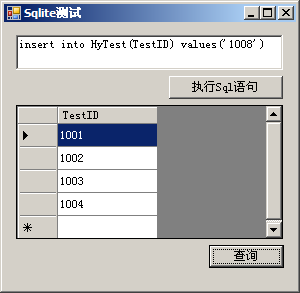
1.新建一个WinForm项目,引用System.Data.SQLite.DLL.界面如下

1.1  SQLiteConnection.CreateFile(“D:/Data.db3”);
这样就可以创建一个数据库文件,名称随意。
封装成一个函数

//创建一个数据库文件,保存在当前目录下HyData文件夹下
//CreateDB("HyData.db3");
private void CreateDB(string dbName)
{
string databaseFileName = System.Environment.CurrentDirectory + @"/HyData/" + dbName;

SQLiteConnection.CreateFile(databaseFileName);
}

1.2  数据库连接字符串

string connStr = @"Data Source=" + System.Environment.CurrentDirectory + @"\HyData\HyData.db3;Initial Catalog=sqlite;Integrated Security=True;Max Pool Size=10";

这里新建了一个HyData目录存放数据库。

1.3  执行Sql语句

//执行Sql语句
//创建一个表:  ExecuteSql("create table HyTest(TestID TEXT)");
//插入些数据:  ExecuteSql("insert into HyTest(TestID) values('1001')");
private void ExecuteSql(string sqlStr)
{
using (DbConnection conn = new SQLiteConnection(connStr))
{
conn.Open();
DbCommand comm = conn.CreateCommand();
comm.CommandText = sqlStr;
comm.CommandType = CommandType.Text;
comm.ExecuteNonQuery();
}
}

执行查询语句

//执行查询
//ExecQuery("select * from HyTest");
private void ExecQuery(string sqlStr)
{
using (DbConnection conn = new SQLiteConnection(connStr))
{
conn.Open();
DbCommand comm = conn.CreateCommand();
comm.CommandText = sqlStr;
comm.CommandType = CommandType.Text;

using (IDataReader reader = comm.ExecuteReader())
{
while (reader.Read())
{
MessageBox.Show(reader[0].ToString());
}
}
}
}

//执行查询返回DataSet
private DataSet ExecDataSet(string sqlStr)
{
using (SQLiteConnection conn = new SQLiteConnection(connStr))
{
conn.Open();
SQLiteCommand cmd = conn.CreateCommand();
cmd.CommandText = sqlStr;
cmd.CommandType = CommandType.Text;

SQLiteDataAdapter da = new SQLiteDataAdapter(cmd);
DataSet ds = new DataSet();
da.Fill(ds);

return ds;
}
}

本文示例项目源码:HySqlite.rar http://revit.5d6d.com/thread-799-1-1.html

2.Sqlite相关工具

2.1 Sqlite数据库可以到www.sqlite.org下载,非常小
或sqlite-shell-win32-x86-3070600.zip
http://revit.5d6d.com/thread-800-1-1.html

2.2 C#操作Sqlite的官方示例代码,一时忘了url
或http://revit.5d6d.com/thread-801-1-1.html包括
SQLite-1.0.66.0-source.zip
SQLite-1.0.66.0-binaries.zip
Debug.rar

2.3 Sqlite两个界面工具

SQLiteExpertSetup.exe
http://revit.5d6d.com/thread-802-1-1.html这个比较好用,破解版
SQLite Database Browser.exe
http://revit.5d6d.com/thread-803-1-1.html这个据说用在手机上

[转载]InstallShield 部署安装包整理(1)

mikel阅读(1145)

[转载]InstallShield 部署安装包整理(1) – zhaodyun – 博客园.

InStallShield界面简单认识

.安装助手(InstallShield Assistant

1>Application Information:设置安装包的一些信息,如公司名称,安装包版本号,公司网址

2>Installatin Architecture:设置安装包的主体结构,一般用来设置安装包中有多少个安装项目

3>Application Files:指定安装路径与所需要的安装文件夹

4>Application Redistributables:用于添加第三方组件

5>Application Shortcuts:创建程序启动的快捷方式,

6>Application Registry:添加对注册表的操作

7>Installation Interview:一些简单的对话框选择操作

8>Installation Localization:安装包界面语言的选择

9>Build Installation:选择安装包的格式并编译安装包

通过安装助手都可以制作一般的安装项目。

.安装设计师(Installation Designer)

1>Installation Information

Setup Languages:设置安装包的语言种类,可以设置多种语言,在运行安装包时会出现安装语言选择界面;

2>General Information

Project Properties:工程属性;

Add or Remove Programs

Disable Change Button:隐藏该安装包在添加删除程序列表中的更改按钮;

3>Organization

Feature:特征,每个Feature可包含子Feature及若干个Component,每个Feature都会出现在Feature选择界面中,一旦Feature被选择安装其包含的Component就    会被安装到系统中去;

Component:组件,每个Component可设置需要安装的文件、写入的注册表信息、创建的快捷方式等等;通常在这里指定是否卸 载、是否注册、安装策略(如果遇          到旧版本是全部覆盖还是部分覆盖,是先版本后时间覆盖还是只按版本高低覆盖等);

Setup Type:安装类型,一般默认有Minimal(压缩)、Typical(典型)、Custom(自定义),每种安装类型包含若干个Feature;

Setup Design:设置Features、Components(组件)及Files(安装文件)等等。

4>Application Data

Files and Folders:管理安装文件夹及文件,基本上每次打包都要使用;

Redistributables:可分发组件包,可以增加自己想程序运行前需要的组件(Setup Prerequisite安装先决条件),用.Net Framework也有ODBC,ODBC就是在这里添     加的

Objects:选择需要安装的系统运行库。

5>Server Configuration

Internet Information Service:配置IIS网站及虚拟目录

Component Services

SQL Scripts:这是引入要部署的SQL脚本,可以支持Microsoft SQL Server, MySQL, and Oracle数据库;这个可以看帮助文档!

Shortcuts:创建快捷方式;

Registry:向注册表中添加键值;

XML File Changes:添加或更改XML文件。

6>Behavior and Logic

InstallScript:编写安装程序的脚本,这是制作复杂的基于InstallScript的安装包的最常使用的部分;

Support Files/Billboards:添加安装过程中需要的文件及安装背景(图片);

7>User Interface

Dialogs:这里可以对安装界面的对话框进行皮肤,自定义设置;

8>Media

Path Variables:编辑安装路径变量;

Releases:制作安装媒体。

9>Additional Tools

Dependency Scanners:搜索工具;

Direct Editor:命令编辑器,在这里可以查看或编辑安装程序的各类信息。

通过上面的基本描述,要制作一个安装包,通过最常用的是

Installation Information

Organization->Component

Organization->Setup Type

Application Data->Files and Folders

System Configuration->Shortcuts

Behavior and Logic->InstallScript

Media->Releases等部分。

这里可以对简单安装包进一步进行设置!

InstallShield部署MySql数据库初探

1>首先在InstallShield designer->Server Configuration->SQL Scripts

2>其次保证目标机器上有mysql odbcmysql 的脚本在is里是调用这个完成,帮助文档添加mysql odbc的方法:

To add the MySQL Connector ODBC 3.51 setup prerequisite to your system so that you can add it to your projects:

Open Windows Explorer and browse for the setup prerequisite template folder. The default location is:

C:\Program Files\Macrovision\IS2008\SetupPrerequisites\Templates

Copy the MySQL Connector ODBC 3.51.prq file that is in the Templates folder, and paste it in the setup prerequisite folder. The default location is:

C:\Program Files\Macrovision\IS2008\SetupPrerequisites

Visit http://dev.mysql.com/downloads/connector/odbc/3.51.html and download the MSI installer for the MySQL Connector/ODBC 3.51 driver for Windows.

Save the file in the following location:

InstallShield Program Files Folder\Objects\MySQL\Redist

The next time that you launch InstallShield, the MySQL Connector ODBC setup prerequisite is available in the Redistributables view.

If you want to change the location on your machine where you store the installer for the MySQL Connector/ODBC 3.51 driver, you can do so by opening the MySQL Connector ODBC 3.51.prq file in the Setup Prerequisite Editor. To open the Setup Prerequisite Editor, click Prerequisite Editor on the Tools menu. For more information, see Specifying Files for a Prerequisite.

注意:这个地方InstallShield在复制文件时的文件名和我们下载的不一样,所以注意复制完文件后更改odbc安装程序的名称,我这里用的InstallShield 2008

3>SQL Scripts里添加一个新链接

1)设置基本信息:

上面Catalog Name:为默认连接数据库的数据库名称,

下面的复选框Create Catalog if AbSent的意思如果你连接的数据库不存在,则创建数据库(好多教程里建议不让选这个,我有点不明白)。

Default Targe Server Name:默认连接的服务器名

Connect using:连接设置,和我们平常连接数据差不多,一个是本地验证,一个是用户名密码验证。

Comments:译过来就是注释了,呵呵!

2)设置需求:

Requirments(这里选择数据库类型,注意一定要托下面的横向滚动条才可以看到复选框,靠,这里忽悠了哥半天,小组用的是mysql,这里选这个)

3Advanced:这里没搞清什么用!

4)右击添加sql脚本

蛋疼的问题开始出现,这里添加从mysql导出的脚本后脚本中中文显示为乱码,而且这里mysql貌似一个sql脚本文件只能包含一条可执行的sql语句。就算脚本能执行,但Insert into 语句插入的数据中中文数据依然在数据库中是乱码。乱码问题整了我一天。起先以为是mysql 数据库配置问题,查看了下字符集是UTF8没错,数据库没问题,结果这里都无解了(如果哪位同学把这个整出来,请一定要告诉我)。

这里用InStallShield部署实现的功能只有能实现创建数据库,创建表格!但执行插入数据这里数据库就是乱码(解决不了)唉!

接着整理!

推荐学习InstallShield打包的几个链接:

1.论坛www.appinstall.cn

2.入门www.cnblogs.com/Cindy_weiwei

3.提高www.cnblogs.com/installshield

[转载]ASP.NET网页代码模型分析

mikel阅读(824)

[转载]ASP.NET网页代码模型分析 – 无风听海 – 博客园.

1. ASP.NET网页有两部分组成

可视元素,包括标记、服务器控件和静态文本

页的编程逻辑,包括事件处理程序和其他代码。

2. ASP.NET 提供两个用于管理可视元素和代码的模型,即单文件页模型和代码隐藏页模型。

两个模型功能相同,两种模型中可以使用相同的控件和代码

3. 单文件页模型

在单文件页模型中,页的标记及其编程代码位于同一个物理 .aspx 文件中。 编程代码位于 script 块中,该块包含 runat=”server” 特性,此特性将其标记为 ASP.NET 应执行的代码。

代码文件如下 SinglePage.aspx

<%@ Page Language=C# %>

<script runat=“server”>

void Button1_Click(Object sender, EventArgs e)

{

Label1.Text = “Clicked at “ + DateTime.Now.ToString();

}

</script>

<html>

<head>

<title>Single-File Page Model</title>

</head>

<body>

<form runat=“server”>

<div>

<asp:Label id=“Label1”

runat=“server” Text=“Label”>

</asp:Label>

<br />

<asp:Button id=“Button1”

runat=“server”

onclick=“Button1_Click”

Text=“Button”>

</asp:Button>

</div>

</form>

</body>

</html>

4. 代码隐藏页模型

通过代码隐藏页模型,可以在一个文件(.aspx 文件)中保留标记,并在另一个文件中保留编程代码,但并不是所有的语言都支持该模型,只有支持分部类才可以。

代码文件 Sample.aspx

<%@ Page Language=C# CodeFile=“Sample.aspx.cs”

Inherits=“_Default” AutoEventWireup=“true” %>

<html>

<head runat=“server” >

<title>Code-Behind Page Model</title>

</head>

<body>

<form id=“form1” runat=“server”>

<div>

<asp:Label id=“Label1”

runat=“server” Text=“Label” >

</asp:Label>

<br />

<asp:Button id=“Button1”

runat=“server”

onclick=“Button1_Click”

Text=“Button” >

</asp:Button>

</div>

</form>

</body>

</html>

代码文件Sample.cs

sing System;

using System.Web;

using System.Web.UI;

using System.Web.UI.WebControls;

public partial class _Default:System.Web.UI.Page

{

protected void Button1_Click(object sender, EventArgs e)

{

Label1.Text = “Clicked at “ + DateTime.Now.ToString();

}

}

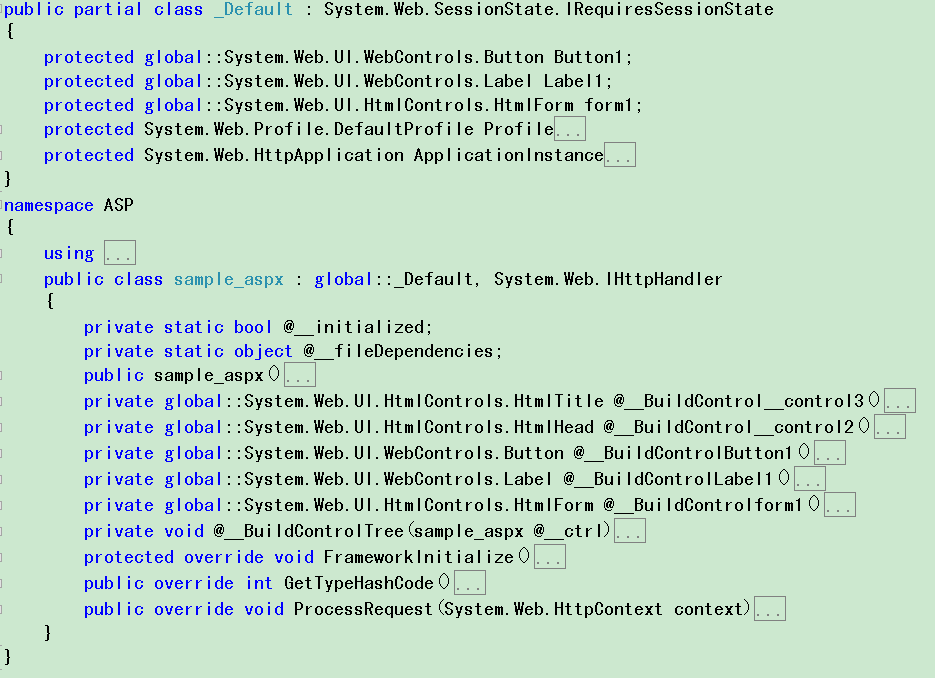
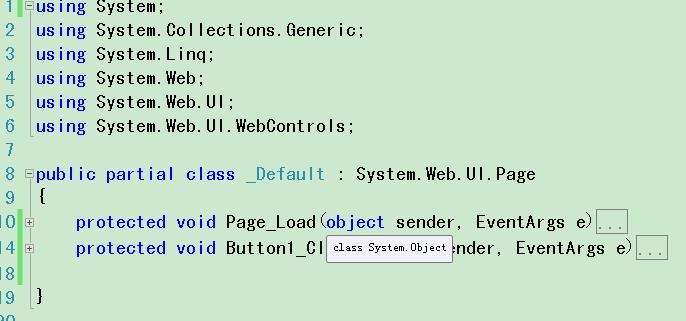
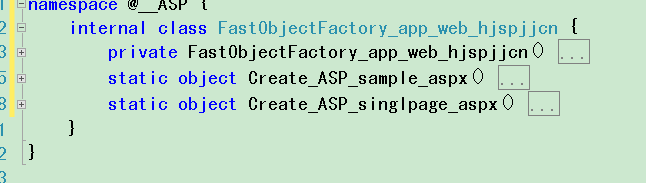
5. 两种模型编译后各个文件产生的类

sample.aspx生成的类

Sample.cs产生的类

Single.aspx产生的文件

生成的工厂类

由以上可以看到两种模型最终产生的类是相同的,代码隐藏页模型巧妙的运用了面向对象的继承特性实现了代码分离!

[转载]iPhone中调用WCF RESTFUL Service

mikel阅读(1071)

[转载]iPhone中调用WCF RESTFUL Service – 用自己的语言写个Hello World – 博客园.

在前面的一篇文章:跨平台iPhone中调用WCF服务中 讲述的如何在iPhone中调用WCF服务。我现在开发是调用webservice的,方式和那篇文章一样。需要定义soap,然后异步去调用服务端的方 法,等服务端执行完成,然后在iPhone客户端接受返回的XML,最后解析返回的XML。这种方式用起来非常的不方便,每一次调用即需要写自定义的 soap,又要解析XML。这篇文章我将讲述一下如何调用restful方式的WCF服务。

REST(Representational State Transfer)是一种轻量级的Web Service架构风格,其实现和操作明显比SOAP和XML-RPC更为简洁,可以完全通过HTTP协议实现,还可以利用缓存Cache来提高响应速 度,性能、效率和易用性上都优于SOAP协议。使用WCF创建restful分格的服务是非常方便的。这篇文章,我通过一个demo来展示如何在 iPhone中调用wcf restful service。

创建一个wcf restful service。

1、创建一个数据交换实体类

///
/// User实体类
///
[DataContract]
public class User
{
///
/// 用户名
///
[DataMember(Order = 0)]
public string Name { get; set; }

///
/// 生日
///
[DataMember(Order = 1)]
public string DayOfbirth { get; set; }
}

2、服务契约:定义了三个方法,分别用来获取用户的XML格式、json格式以及创建用户。

[ServiceContract]
public interface IService1
{
///
/// 创建用户
///
///
/// 获取用户信息,json格式
///
///
<span> </span>用户名 [OperationContract]
[WebGet(
UriTemplate = "User/{name}",
ResponseFormat = WebMessageFormat.Json)]
User GetUser(string name);

///
/// 获取用户信息,XML格式
///
///
<span> </span>用户名 ///
///
[OperationContract]
[WebGet(
UriTemplate = "UserXML/{name}",
ResponseFormat = WebMessageFormat.Xml)]
User GetUserXML(string name);

///
/// 创建用户信息
///
///
<span> </span>用户名 ///
生日 ///
[OperationContract]
[WebInvoke(UriTemplate = "User/{name}/{dayOfbirth}",
Method = "POST",
ResponseFormat = WebMessageFormat.Json)]
User CreateUser(string name, string dayOfbirth);

}

3、服务实现:这里简单处理。

public class Service1 : IService1
{
public User GetUser(string name)
{
return new User { Name = name, DayOfbirth = new DateTime(1986, 10, 23).ToString() };
}

public User GetUserXML(string name)
{
return new User { Name = name, DayOfbirth = new DateTime(1986, 10, 23).ToString() };
}
public User CreateUser(string name, string dayOfbirth)
{
return new User { Name = name, DayOfbirth = dayOfbirth };
}
}

4、对于vs2008创建的wcf服务,需要在.svc文件中加入下面代码:

Factory="System.ServiceModel.Activation.WebServiceHostFactory"

6、在iis发布服务。

iPhone客户端调用:

这里使用ASIHTTPRequest,它是一个直接在CFNetwork上做的开源项目,提供了一个比官方更方便更强大的HTTP网络传输的封装,非常的好用。

在xcode中拖一个简单的界面,如下图,分别调用服务端的三个方法:

定义下面三个方法与三个button的点击事件对应:

- (IBAction)fetchXML:(id)sender;
- (IBAction)fetchJson:(id)sender;
- (IBAction)createJson:(id)sender;

三个点击事件的具体实现:下面的代码为了简单起见,直接将xml和json输入。比较好的做法是:在iPhone也定义一个User类,将json或者XML转换为User实体对象。

- (IBAction)fetchXML:(id)sender
{
NSURL *url = [NSURL URLWithString:@"http://10.5.23.117:21924/Service1.svc/UserXML/zhuqilin"];
ASIHTTPRequest *request = [ASIHTTPRequest requestWithURL:url];
[request startSynchronous];
NSError *error = [request error];
if (!error) {
NSString *response = [request responseString];
UIAlertView *alertView = [[UIAlertView alloc] initWithTitle:@"xml格式"
message:response
delegate:nil
cancelButtonTitle:@"OK"
otherButtonTitles:nil];
[alertView show];
[alertView release];
}

}
- (IBAction)fetchJson:(id)sender
{
NSURL *url = [NSURL URLWithString:@"http://10.5.23.117:21924/Service1.svc/User/zhuqilin"];
ASIHTTPRequest *request = [ASIHTTPRequest requestWithURL:url];
[request startSynchronous];
NSError *error = [request error];
if (!error) {
NSString *response = [request responseString];
UIAlertView *alertView = [[UIAlertView alloc] initWithTitle:@"JSON格式"
message:response
delegate:nil
cancelButtonTitle:@"OK"
otherButtonTitles:nil];
[alertView show];
[alertView release];
}
}
- (IBAction)createJson:(id)sender
{
NSURL *url = [NSURL URLWithString:@"http://10.5.23.117:21924/Service1.svc/User/zhuqilin/1986-09-20"];
ASIHTTPRequest *request = [ASIHTTPRequest requestWithURL:url];
[request setRequestMethod:@"POST"];
[request startSynchronous];
NSError *error = [request error];
if (!error) {
NSString *response = [request responseString];
UIAlertView *alertView = [[UIAlertView alloc] initWithTitle:@"创建用户"
message:response
delegate:nil
cancelButtonTitle:@"OK"
otherButtonTitles:nil];
[alertView show];
[alertView release];
}
}

输出结果:

1、获取json格式的数据

2、获取xml格式的数据

3、创建一个用户实体:

总结:本文通过一个简单的例子说明了如何在iPhone中调用wcf restful服务。你会感觉到这个方式,比去定义soap去调用要好很多,如果你有更方便的方式,请一定要告诉我哈。

本文代码:http://files.cnblogs.com/zhuqil/sourcecode.rar

作者:朱祁林
出处:http://zhuqil.cnblogs.com
本文版权归作者和博客园共有,欢迎转载,但未经作者同意必须保留此段声明,且在文章页面明显位置给出原文连接,否则保留追究法律责任的权利。

[转载]使用 Glimpse 调试 ASP.NET MVC 应用

mikel阅读(1056)

[转载]使用 Glimpse 调试 ASP.NET MVC 应用 – 冠军 – 博客园.

Glimpse 类似于客户端调试器 FireBug,它使用 JavaScript 实现,但是还连接到 ASP.NET 服务器端。
Glimpse 不仅包括更好的路由调试器,还对使用不多,但是非常有用的 Trace.Write() 提供了更好的支持。
像在实战系列一样,你现在就可以跟着我开始,不超过 5 分钟就可以完成。
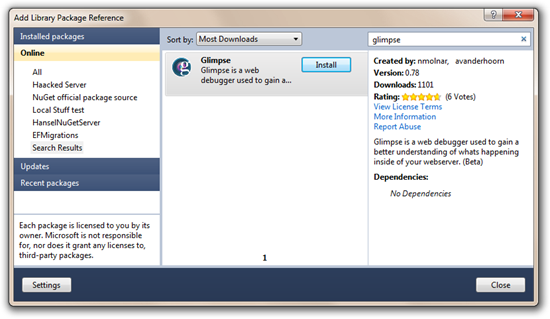
使用 NuGet ,为一个新的 ASP.NET MVC 程序,或者 WinForm 程序安装 Glimpse 支持。
在运行程序之前,在程序中加入一些 Trace.Write 和 Trace.TraceError。
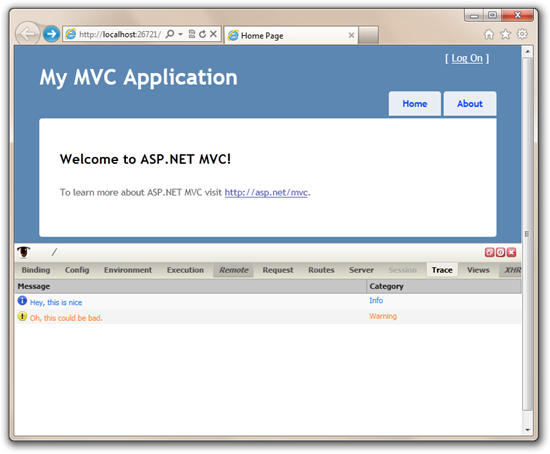
1 public ActionResult Index() 2 { 3 ViewBag.Message = "Welcome to ASP.NET MVC!"; 4 Trace.Write("Hey, this is nice"); 5 Trace.TraceWarning("Oh, this could be bad."); 6 return View(); 7 } 8 9 public ActionResult About() 10 { 11 Trace.TraceError("Oh, no! That's bad"); 12 return View(); 13 }
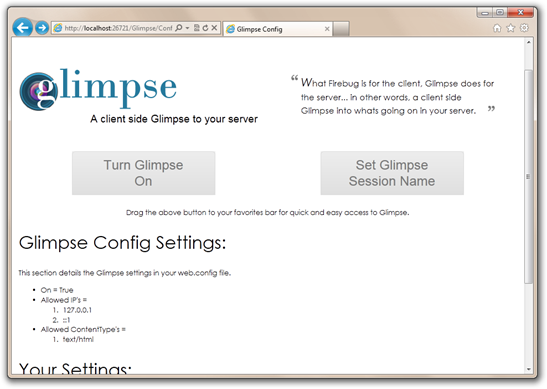
现在,运行程序,可以通过书签打开 Glimpse,但是,我喜欢通过访问 http://localhost:portname/Glimpse/Config,然后点击大个的 Turn Glimpse On 按钮来启用,有一天,我也会将它加入到书签中。
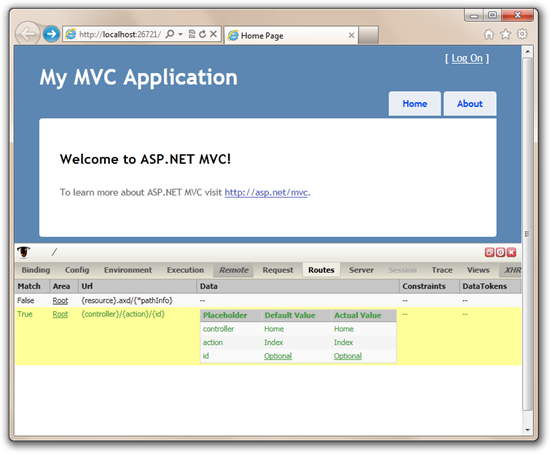
接着,在访问站点的时候,注意到 Glimpse 的控制面板出现在页面的底部,它不是浏览器的插件,全部是使用 JavaScript 实现的。
在 Trace 选项卡中可以看到 Trace 的输出,不比 Trace.axd 更棒吗?如果切换到 Router 选项卡,我还可以看到当前请求使用的路由。
Glimpse, 我会将它加入到我的收藏中每天使用它,我建议你也这样做。
我仅仅了解一些表面的使用,你可以到 Glimpse 的站点深入探索:http://www.getglimpse.com.

[转载]Mongodb从配置到应用

mikel阅读(1059)

[转载]Mongodb从配置到应用 – 每一点知识的积累都是对生命的充实!!! – 博客园.

早就想写一篇Mongodb的文章了,苦于木有时间呀,今天抽空将我所学习到的Mongodb知识整合一下,分享出来,部分Mongodb知识来源于网络.此处不给出链接,如果有侵犯,请及时联系我…

一,Mongodb简介

Mongo(http://www.mongodb.org/)是一个高性能,开源(代震军大牛正在研究Mongodb的源码,大家可以去看看http://www.cnblogs.com/daizhj/),模式自由(schema-free)的文档型数据库,它在许多场景下可用于替代传统的关系型数据库或键/值(key-value)存储方式。Mongo使用C++开发,

具有以下特性:

  1. 面向集合的存储:适合存储对象及JSON形式的数据。
  2. 动态查询:Mongo支持丰富的查询表达式。查询指令使用JSON形式的标记,可轻易查询文档中内嵌的对象及数组。
  3. 完整的索引支持:包括文档内嵌对象及数组。Mongo的查询优化器会分析查询表达式,并生成一个高效的查询计划。
  4. 查询监视:Mongo包含一个监视工具用于分析数据库操作的性能。
  5. 复制及自动故障转移:Mongo数据库支持服务器之间的数据复制,支持主-从模式及服务器之间的相互复制。复制的主要目标是提供冗余及自动故障转移。
  6. 高效的传统存储方式:支持二进制数据及大型对象(如照片或图片)。
  7. 自动分片以支持云级别的伸缩性(处于早期alpha阶段):自动分片功能支持水平的数据库集群,可动态添加额外的机器。
  8. 模式自由(schema-free),意味着对于存储在mongodb数据库中的文件,我们不需要知道它的任何结构定义。如果需要的话,你完全可以把不同结构的文件存储在同一个数据库里。
  9. 支持Python,PHP,Ruby,Java,C,C#JavaScript,Perl及C++语言的驱动程序,社区中也提供了对Erlang及.NET等平台的驱动程序。

使用场合:

  1. 网站数据:Mongo非常适合实时的插入,更新与查询,并具备网站实时数据存储所需的复制及高度伸缩性。
  2. 缓存:由于性能很高,Mongo也适合作为信息基础设施的缓存层。在系统重启之后,由Mongo搭建的持久化缓存层可以避免下层的数据源 过载。
  3. 大尺寸,低价值的数据:使用传统的关系型数据库存储一些数据时可能会比较昂贵,在此之前,很多时候程序员往往会选择传统的文件进行存储。
  4. 高伸缩性的场景:Mongo非常适合由数十或数百台服务器组成的数据库。Mongo的路线图中已经包含对MapReduce引擎的内置支持。
  5. 用于对象及JSON数据的存储:Mongo的BSON数据格式非常适合文档化格式的存储及查询。

所谓“面向集合”(Collenction- Orented),意思是数据被分组存储在数据集中,被称为一个集合(Collenction)。每个集合在数据库中都有一个唯一的标识名,并且可以包含 无限数目的文档。集合的概念类似关系型数据库(RDBMS)里的表(table),不同的是它不需要定义任何模式(schema)。

二,Ubuntu 下配置Mongodb

Ubuntu知识扫盲:

chown -R : 对目前目录下的所有档案与子目录进行相同的权限变更(即以递回的方式逐个变更)

nohup命令:如果你正在运行一个进程,而且你觉得在退出帐户时该进程还不会结束,那么可以使用nohup命令。该命令可以在你退出帐户/关闭终端之后继续运行相应的进程。nohup就是不挂起的意思( n ohang up)。

Mongodb目前最新版本是1.8.1
首先启动终端 :
输入 wget http://fastdl.mongodb.org/linux/mongodb-linux-i686-1.8.1.tgz
下载mongodb-linux-i686-1.8.1.tgz安装包
解压 tar -zxvf mongodb-linux-i686-1.8.1.tgz

默认情况下Mongodb会在/data/db/ 这个文件夹存放数据

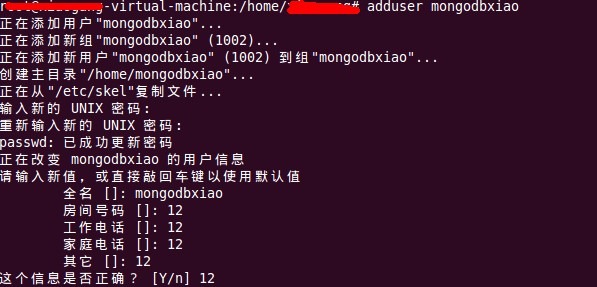
在当前目录下输入如下命令,创建用户 :
//添加一个mongodb用户
adduser mongodbxiao
//设置密码
passwd mongodb
3

继续输入

sudo mkdir -p /data/db/
//把”/data/db/”的属主改成mongodb用户
$ sudo chown mongodbxiao /data/db/
$ chown -R mongodb:mongodbxiao /data
当然 可以 通过–dbpath 命令 指定MongoDB将数据存储到另外的目录中去。

在运行下面的语句之前需要安装一下mongo shell 否则会收到提示:程序“mongo”尚未安装。
apt-get install mongodb-clients

运行数据库
$  ./mongodb-linux-i686-1.8.1/bin/mongod
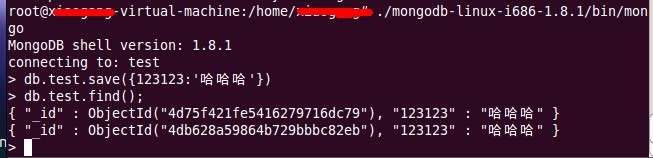
$ ./mongodb-linux-i686-1.8.1/bin/mongo
> db.test.save({123123:’哈哈哈’})
> db.test.find();

创建数据库并添加一条记录,最后查询结果:
2

到此证明我们在Ubuntu下配置Mongodb成功..

ps:使用Ubuntu过程中经常会遇到这个错误:

1

只需要输入强制解锁,命令即可解决。

sudo rm /var/cache/apt/archives/lock

sudo rm /var/lib/dpkg/lock

三,Mongodb客户端管理工具

Try MongoDB

不用安装就可以试用MongoDB,和tryredis一样,是一个基于web的shell模拟工具,可以让你在不用安装MongoDB的情况下试用MongoDB的各种功能.

Mongo3 – MongoDB 集群管理工具

MongoVUE

一个windows下的客户端管理工具,我推荐这个,非常不错.有点类似于mySQL管理工具..

5

四,Mongodb C#版驱动

第一款:mongodb-csharp 项目地址:http://github.com/samus/mongodb-csharp

简单介绍:该驱动是比较全的驱动,更新随度非常快,有人已经应用到项目中去,并且表现非常好。目前他们的团队正在致力于连接管理这部分功能的扩展例如:自动重连,连接池等等。

第二款:mongodb-net 项目地址:http://code.google.com/p/mongodb-net/

简单介绍:该开发还在进行中,有些功能还没有实现。

第三款:MongoDB.Emitter 项目地址:http://bitbucket.org/gwbasic/mongodb.emitter/

简单介绍:提供了强类型支持

第四款:CSMongo 项目地址:http://somewebguy.wordpress.com/2010/02/21/building-a-mongo-driver-part-1/

简单介绍:实现了部分功能,并且没有可下载的代码。但是你可以看他的博客以了解这种驱动的思想。

第五款:simple- mongodb 项目地址:http://code.google.com/p/simple-mongodb/

简单介绍:没有提供源代码,以JSon为核心。

最后一个是对第一款某些地方的增强,地址http://deserialized.com/convert-csharp-classes-to- and-from-mongodb-documents-automatically-using-net-reflection

第六款:NoRM 项目地址:http://github.com/atheken/NoRM

介绍:增强了第一种,支持强类型。

五,Mongodb 与SQL 语句对照

此处用mysql中的sql语句做例子,C# 驱动用的是samus,也就是上文中介绍的第一种.

引入项目MongoDB.dll

//创建Mongo连接

var mongo = new Mongo("mongodb://localhost");

mongo.Connect();

//获取一个数据库,如果没有会自动创建一个

var db = mongo.GetDatabase("movieReviews");

//创建一个列表,并为这个列表创建文档

var movies = db.GetCollection("movies");

连接没问题之后,现在让我们用mysql 与mongodb的一些语句做下对比:

MongoDB Mysql
查询全部 movies.find(new Document()) SELECT * FROM movies
条件查询 movies.Find(new Document { { “title”, “Hello Esr” } }); SELECT * FROM movies WHERE title= ‘foobar’
查询数量 movies.Find(new Document { { “title”, “测试2” } }).Documents.Count(); SELECT COUNT(*) FROM movies WHERE `title` = ‘foobar’
数量范围查询 1, movies.Find(new Document().Add(“$where”, new Code(“this.num > 50”)));

2, movies.Find(new Document().Add(“num”,  new Document().Add(“$gt”,50)));
($gt : > ; $gte : >= ; $lt : < ; $lte : <= ; $ne : !=)

3,movies.Find(“this.num > 50”);

4,movies.Find(new Document().Add(“$where”,new Code(“function(x){ return this.num > 50};”)));

select * from movies where num > 50
分页查询 movies.Find(new Document()).Skip(10).Limit(20); SELECT * FROM movies  limit 10,20
查询排序语句 movies.Find(new Document()).Sort(new Document() { { “num”, -1 } }); SELECT * FROM movies ORDER BY num DESC
查询指定字段 movies.Find(new Document().Add(“num”, new Document().Add(“$gt”, 50)), 10, 0, new Document() { { “title”, 1 } }); select title from movies where num > 50
插入语句 movies.Insert(new Document() { { “title”, “测试” }, { “resuleData”, DateTime.Now } }); INSERT INOT movies (`title`, `reauleDate`) values (‘foobar’,25)
删除语句 movies.Remove(new Document() { { “title”, “Hello Esr” } }); DELETE * FROM movies
更新语句 movies.Update(new Document() { { “title”, “测试2” } }
, new Document() { { “title”, “测试11111” } });
UPDATE movies SET `title` = ‘测试1111’ WHERE `title` = ‘测试1111’
Linq查询 (from item in db.GetCollection(“movies”).Linq()
where ((string)item[“title”]).StartsWith(“Esr”)
select item);
select * from movies where title like ‘%Esr’

这里只举出了几个比较典型的例子,可以这么说,只要mysql可以完成的sql语句,在mongodb里面都可以实现.