[模板]Template merging with NVelocity and ASP.NET

mikel阅读(743)

Introduction

If you ever tried to implement a newsletter system or a service for communicating with website users you have probably faced the requisite to send multiple email messages with a common template and some differences, like a personalized greeting in the message header, or an unsubscribe link with a personalized querystring.

Maybe the first way to accomplish this is by writing the static parts of the message in plain text files – for example emailheader.txt, emailfooter.txt – and reassemble them in the code, merging the varying parts, like recipient's name, surname, personalized querystring link, and so on.

But what about having a template engine which, given a template – be it a file on the filesystem, an assembly embedded resource or an in-memory object – and the information we want to merge in the template, did this all for us?

"NVelocity[^] is a .Net-based template engine. It permits anyone to use the simple yet powerful template language to reference objects defined in .Net code.

The purpose of this project is to port the Jakarta Velocity[^] project to Microsoft .Net (written in C#)."

Going back to the newsletter example, using NVelocity the the developer just needs to:

  • create a template for email messages specifying the parts that will have to be merged using a simple language called VTL (Velocity Template Language)
  • supply the information to be merged.

NVelocity will do the rest.

Background

In order to write NVelocity templates a basic knowledge of the language it uses would be helpful. Anyway in email templates it's rarely necessary to write loops, methods or branch conditions, instead more often the need is to replace single variables with values provided programmatically.

In this article I'm going to show a simple way of writing templates, but if you think that you need something more complex my advice is to read the VTL Refence Guide[^].

The notation for variables, as taken from the VTL Reference guide, is the following:

Notation (variable name):

$ [ ! ][ { ][ a..z, A..Z ][ a..z, A..Z, 0..9, , _ ][ } ]

Examples:

  • Normal notation: $mud-Slinger_9
  • Silent notation: $!mud-Slinger_9
  • Formal notation: ${mud-Slinger_9}

About the article

In this article I am going to show how I implemented a wrapper for NVelocity functionalities, which simplifies merging templates coming from filesystem, assembly resources or in-memory objects, and will build a simple web project for demonstration.
The source code zip file contains the wrapper project, while the sample project zip file contains a web project which shows how to use it to merge templates in ASP.NET.

As a note, keep in mind that the wrapper can be used in any other project type, from console applications to WindowsForms and WebServices as well. I have chosen to build the demo in ASP.NET because it is a good compromise between nice user interface and ease of creation.

Using the code

The main access point is the class NVelocityEngineFactory, which exposes three static methods. Each of these methods return an object that implements the INVelocityEngine interface, which can respectively be used to retrieve templates from embedded resources, filesystem or memory. The bool parameter required by each of the methods is used to specify wether the result of the merge has to be cached or not.

The three correspondent engine types are NVelocityAssemblyEngine, NVelocityFileEngine and NVelocityMemoryEngine.

All of the inherit from the NVelocityEngineBase base class, which defines a common constructor and a static protected method.

Since implementing the INVelocityEngine interface, the three engine classes expose one public method with one overload called Process, which take two or three parameters and return a string or void.

In the first case the two input parameters are the IDictionary object containing the values to be merged in the template and the template itself, while the return value is the merged template put in a string object.

In the second case the additional parameter is a TextWriter object, which after the processing will contain the merged template.

The template

To use the three types of engines we need to create a template to be merged. Using VTL syntax, we write a simple template which can be used to render a message containing a simple personalized greeting, along with the date when the merging has been done.

To test all of the three engines the demo project contains a template file placed on the filesystem, a template file embedded in the assembly as a resource, and an in-memory template (a string) created at runtime.

To write a template file we just need to open a text editor and save the file with the .vm extension.

Collapse
Hi $name $surname, this output has been generated from a $templateType template on $date.

This is a very simple template, but it's not difficult to imagine in its place an entire html email with nice formatting and some images.

Using the wrapper along with the templates

Now all we need to do is:

  • Create new instances of the template engines supplying the information about the template.
    In order to process a file template the directory of the template is needed while processing an embedded resource template will require the assembly name. Finally, to process an in-memory object no specific parameter is needed, the template will be supplied when the Process method of the engine is called.
  • Add some contents to an object implementing IDictionary interface and pass it to the engine Process method.

File template

Supposing we have placed the template file in a subdirectory called Templates in the root folder of our web project and named it SimpleTemplate.vm:

Collapse
string templateDir = HttpContext.Current.Server.MapPath("Templates");
string templateName = "SimpleTemplate.vm";
INVelocityEngine fileEngine =
NVelocityEngineFactory.CreateNVelocityFileEngine(templateDir, true);
IDictionary context = new Hashtable();
context.Add("name", TextBox1.Text);
context.Add("surname", TextBox2.Text);
context.Add("templateType", "file");
context.Add("date", DateTime.Now.ToString("D"));
LabelMergedFile.Text = fileEngine.Process(context, templateName);

The LabelMergedFile Text attribute will contain the text of the template and, in place of the variables, the values suppied in the code.

Embedded resource template

Supposing we have placed the template file in a subdirectory called EmbeddedResources in the root folder of our web project, named it SimpleTemplate.vm and marked it as an embedded resource (under VisualStudio this can be accomplished by right clicking the file, choosing Properties, and then setting the "Build Action" property to "Embedded Resource"):

Collapse
string assemblyName = Assembly.GetExecutingAssembly().GetName().Name;
INVelocityEngine embeddedEngine =
NVelocityEngineFactory.CreateNVelocityAssemblyEngine(assemblyName, true);
IDictionary context = new Hashtable();
context.Add("name", TextBox1.Text);
context.Add("surname", TextBox2.Text);
context.Add("templateType", "embedded");
context.Add("date", DateTime.Now.ToString("D"));
LabelMergedEmbedded.Text =
embeddedEngine.Process(context, "EmbeddedResources.SimpleTemplate.vm"); 

Note that when calling the Process method you need to specify the path of the resource, like in file system paths but with dots in place of slashes.

In-memory template

Differently from the previous cases, now the template must reside in memory, so we create a string object that contains the template:

Collapse
string template = "Hi $name $surname, this output has been generated from a $templateType template on $date.";
INVelocityEngine memoryEngine =
NVelocityEngineFactory.CreateNVelocityMemoryEngine(true);
IDictionary context = new Hashtable();
context.Add("name", TextBox1.Text);
context.Add("surname", TextBox2.Text);
context.Add("templateType", "memory");
context.Add("date", DateTime.Now.ToString("D"));
LabelMergedMemory.Text = memoryEngine.Process(context, template);

Note that the keys of the objects you place in the IDictionary object must correspond to the variable's names specified in the template if you want NVelocity to merge them. In case you forget to supply a key whose corresponding variable is contained in the template NVelocity just forgets about it and will give in output $variablename.

Points of Interest

I wrote this brief tutorial because me myself have been looking for something like this while I was implementing a newsletter service, and after getting crazy at trying to merge the templates by hand.

NVelocity can do much more than this anyway, and if you want to find a place where NVelocity is truly "milked" you should take a look at CastleProject[^], where they use it as a view engine in their MonoRail[^] project.

The sad thing about NVelocity is that the project is almost dead; the latest release, 0.4.2, is dated October 27, 2003.

The positive thing is that CastleProject developers have made a fork of the project, fixed some bugs and killed a tedious assembly dependence on an old Log4Net distribution, which NVelocity used as internal logger engine.

Actually this NVelocity fork has reached version 0.5, which is the one I have included in the sample project, and whose source can be found in CastleProject's SVN repository.

Revision History

  • 09 Feb 2006: Added support for embedded and in-memory templates
  • 17 Jan 2006: Initial release

License

This article has no explicit license attached to it but may contain usage terms in the article text or the download files themselves. If in doubt please contact the author via the discussion board below.

A list of licenses authors might use can be found here

About the Author

Simone Busoli

Member
Occupation: Software Developer
Location: Italy Italy

[MVC]最简单的 MVC 模式实例

mikel阅读(1036)

有许多朋友质疑这种MVC模式不正确。如果按照经典的MVC模式定义,这种实现确实是不正确的。

经典的MVC模式中,控制器仅仅是根据请求来决定调用哪一个视图,然后视图再调用模型来获取结果并显示。而我下面实现这种MVC模式,控制器要根据请求来决定调用哪一个模型,并传递参数给模型,然后获取结果。最后将结果传递给视图,视图只负责显示结果。

两种实现的比较如下:

  经典MVC模式 异化的MVC模式
控制器 仅负责决定调用哪一个视图 需要负责调用模型,并将从模型获取的结果传递给视图
视图 需要决定调用哪一个模型,获取结果后显示 仅仅是显示传入的数据
模型 根据调用返回结果,不与控制器和视图发生关系 根据调用返回结果,不与控制器和视图发生关系
优点 分离表现层和业务层,控制器非常简单 分离表现层和业务层,视图非常简单,更容易和模版引擎结合
缺点 视图依赖于模型,容易将业务逻辑混入视图 控制器更复杂,容易将业务逻辑混入控制器

上面的表格简单比较了经典MVC模式和异化后的MVC模式之间的差别和优劣。

事实是,现在流行的PHP开发框架,都采用了异化后的MVC模式。因为异化后的MVC模式更容易和模版引擎结合,而且再配合Template View、Front Controller、Dispatcher等模式,能够进一步提高应用程序的结构化程度。

对于简单的应用程序,模型提供数据库CRUD操作,而控制器完成一部分业务逻辑操作。如果没有使用模版引擎,那么在控制器中使用include()就可以载入模版文件(视图)来显示结果。

对于复杂的应用程序,模型封装业务逻辑,而数据库操作则由数据源层负责。此时控制器只是调用模型获得结果,然后传递给视图。即便使用模版引擎,控制器也可以通过控制器基类的方法来处理。这样不但简单、代码量少,而且可以很方便的使用不同的模版引擎。

======================================

这个实例虽然简单,但是充分体现了 MVC 模式对分离“表现层”和“业务逻辑层”带来的帮助。

首先呢,还是有一个调度器,负责根据 HTTP 请求决定要调用的控制器:

PHP代码
  1. <?php    
  2. require ('controller/' . preg_replace('/[^a-z0-9_]+/i'''$_GET['controller']));    
  3. ?>  

一个控制器:

PHP代码
  1. <?php    
  2. // 从 Model 获取数据    
  3. require ('model/m1.php');    
  4. $m = new m1();    
  5. $data = $m->getData();    
  6.      
  7. // 构造视图,显示输出    
  8. require ('view/v1.php');    
  9. $v = new v1();    
  10. $v->assign($data);    
  11. $v->display();    
  12. ?>  

一个 Model:

PHP代码
  1. <?php    
  2. class m1    
  3. {    
  4.     function getData() {    
  5.         return 'hello';    
  6.     }    
  7. }    
  8. ?>   
 

一个 View:

PHP代码
  1. <?php    
  2. class v1    
  3. {    
  4.     var $data;    
  5.      
  6.     function assign($data) {    
  7.         $this->data = $data;    
  8.     }    
  9.      
  10.     function display() {    
  11.         echo $this->data;    
  12.     }    
  13. }    
  14. ?>

[Web]2009年值得关注的5个威客类网站

mikel阅读(755)

2008是不平凡的一年, 无论是百年盛世的奥运,还是百年难遇的金融危机, 都让身在其中的我们感到有些应接不暇。 网络世界也同样有许多新鲜事物的涌现。
威客(witkey)理论自从诞生以来,两年多来在众多威客模式网站的探索和实践下,初步形成了自己的理论体系并涌现出大批创新应用。2008年,这些网站又有哪些创新? 本文将挑选出较为典型的案例进行介绍和分析。
一、任务中国(www.taskcn.com)的“三大保障”出炉
从悬赏免费到建立国际化英文网站,再到设计“招标任务“流程,任务中国(taskcn.com)是威客模式领域中具有创新精神的网站之一。在 2008年为了将客户的在线外包风险降至最低, 率先提出了“三大保障”概念。内容如下:一、风险保障,任务结果不满意就退款。二、售后服务,所获作品有问题享受先行赔付。三、控制时间成本,找到能力强 且信誉好的工作者。3年来任务中国把交易方式提升了几个台阶,制定了很多行业规则。这一次也不例外。
二、猪八戒威客网(www.zhubajie.com)的“预付20%赏金”即可发布任务
猪八戒威客网是目前威客模式领域最为出名的网站之一,这与猪八戒网出现的几次重大的营销事件有直接关系,用威客模式进行市场营销为猪八戒网赢得了 巨大的关注和经济效益。这一次为鼓励任务发布者发布高金额,高复杂度的任务,猪八戒允许2000元以上的任务先预付20%就可以发布,威客们可以选择有兴 趣的任务报名,等待客户支付余下的80%赏金,就可以正式开始工作了。
三、标志客网(www.logoke.com)的“垂直门户”模式
标志客网是一个刚刚成立的专门针对标志设计方面的威客网。就在各大主要威客网向着更大更全的方向发展的时候,标志客却在向纵深发展。在任何商业领 域,市场的细分都是一种趋势,看来威客网也不例外。值得主意的是该网站提出的标志超市概念,试图为没有中标的作品找到了一条出路。就目前来看垂直门户不失 为一种新的探索, 值得大家继续关注。
四、淘智网(www.tallzhi.com)的“知识出售”模式
威客模式一个重要发展方向知识出售式威客即C类威客,在淘智网出现后开始逐步得到人们的注意。淘智网为每一个用户开立一个虚拟店铺,在店铺里出售 的不是各种实物商品,而是个人的知识,智慧,能力和经验。目前淘智网已拥有近十万名各领域的专业威客,包括退休老工人。大学教授和博士,企业经营管理人员 等。淘智网对C类威客进行了有益的尝试,让威客真正体会到知识就是财富。国际文传电讯,计算机世界对淘智网的商业模式进行了详细报道。
五、职客网(www.facejob.cn)的“悬赏找工作”模式
职客网(facejob.cn)建立于2006年,是中国科学院研究生院管理学院的一批学生在我国著名网络经济学家吕本富教授的指导下,把威客理 念应用在求职领域的一次创新。它围绕“求职个性化”的主题,通过求职者的职位发布,职客的揭榜,双方互相选择后,职客利用自己的信息和人脉关系把求职者推 荐到合适的工作岗位。2007年职客网得到了中央电视台,人民日报,工人日报的关注。职客并成为2007年中国最热的词之一。

[MVC]ASP.NET MVC 2 Preview 1 发布

mikel阅读(703)

ASP.NET MVC是既ASP.NET WebForms之后,微软推出的Front Controller式的Web开发模型,它弥补了前者对HTML控制能力不足,单元测试较为困难等缺点。更重要的是,ASP.NET MVC基于MS-PL发布,是一个真正的开源框架——且没有任何平台限制,也就是说,您可以在mono下使用或开发ASP.NET MVC的相关项目。

其实微软在今年3月的MIX大会上发布ASP.NET MVC RTM的时候,就已经公布了部分ASP.NET MVC 2的计划,并且在官方代码源中包含的MvcFutures项目中实现了V2的部分功能雏形。在沉寂了4个多月之后,现在微软终于发布了ASP.NET MVC 2的Preview 1版本,并在论坛中向社区征求反馈意见和建议。令人放心的是,ASP.NET MVC 2 Preview 1能够与ASP.NET MVC 1.0 RTM共存,不会影响后者的正常使用。

Scott Guthrie一如既往地在第一时间内撰写博文,详细而又简单地介绍了Preview 1中的新特性。ASP.NET MVC 2的“主题”是“提高生产力”,Preview 1的主要功能有:

  • 区域(Area):Area提供了将Controller和View分组的功能,这个特 性可以构建一个大型应用程序中相互独立的部分。每个Area可以独立放在不同的ASP.NET MVC项目中,并且由主应用程序共同引用。这个特性可用于应对大型应用程序所带来的复杂性,也使多个团队能够更方便地同时开发同一个应用程序。
  • 数据标记验证(Data Annotation Validation):ASP.NET MVC 2提供了内置的数据标记验证功能。这个功能利用了.NET 3.5 SP1中加入的自定义属性(Required,StringLength,Range,RegularExpression等),并且已经运用在 ASP.NET Dynamic Data框架与.NET RIA Services中。利用这一功能,开发人员可以为Model或ViewModel添加验证规则,ASP.NET MVC框架则会自动进行数据绑定或UI验证。
  • 强类型UI辅助方法:ASP.NET MVC V2包含了新的HTML UI辅助方法,它利用了强类型的Lambda表达式来操作View模板的Model对象。这样在编写视图代码时便可以充分获得IDE的智能提示。更重要的是,它为视图带来更好的编译期检验能力。
  • 模板化辅助方法(Templated Helper):这一功能可以根据数据类型自动选择相关的模板。例如,在视图中生成一个System.DateTime输入功能时,将会运用一个日期选择器模板。这与ASP.NET Dynamic Data框架中的Field Template有些接近,不过Preview 1中的模板化辅助方法是专为ASP.NET MVC框架而设计的。

此外,微软还公布了ASP.NET MVC 2的路线图。除了Preview 1中已经公开的内容之外,Preview 2中会包括以下功能:

  • 客户端验证:在Preview 1中模板化辅助方法及数据标记验证功能的基础上,构建一个客户端验证功能。
  • 强类型输入(input)辅助方法:使用强类型的表达式构建出针对Model的输入元素。这些辅助方法还会利用数据标记验证功能来减少错误(如拼写错误)。
  • 强类型链接(link)辅助方法:在IDE智能提示的辅助下,使用强类型的表达式来生成面向特定Controller和Action的链接。
  • 异步Action:提供开发不阻塞线程的Action的方法,这可以显著提升站点的伸缩性,尤其是在需要访问外部资源的情况下。
  • 区域(Area)功能增强:可以在同一个项目中更好地组织应用程序,而不必分拆成多个项目。
  • 其他改进:继续修复ASP.NET MVC 1.0及ASP.NET MVC 2 Preview 1中已知的问题,并根据用户反馈进行API增强,以及一些细微的新功能。

除了Scott Guthrie之外,Scott Hanselman以及ASP.NET MVC团队的Phil Haack也在博客中介绍了ASP.NET MVC 2 Preview 1的情况,MSDNChannel 9还为“模板化辅助方法”这一重要功能提供了进一步的讲解和演示。更多消息请参考ASP.NET MVC 2 Preview 1的Release Notes,您还可以下载源代码对其进行深入了解。

[C#]C#生转换网页为pdf

mikel阅读(867)

最近工作中遇到一个将htm转换为pdf的任务,这是一个有很有用的功能块,然而很遗憾,网上没有现成可行(包括开源/免费、易用和可维护性的考虑)方案。既然没有现成的解决方案就自己着手解决吧。
从 htm生成pdf大概可以分两步实现,第一步,解析htm,就是将htm源文件中那一对文本转换为浏览器最终呈现给我们那种图文并茂的结果。这是一个不可 完成的任务,因为目前为止业界的软件巨头也没有谁把htm解析做得很好的。对比ie、firefox等浏览器的显示结果便可想而知。既然业界难题,我也就 不去钻牛角尖做技术攻关了,先跳过这步,考虑下一步的事情。
第二步,绘制pdf,这个简单,网上有很多资料,有兴趣的朋友可以研究pdf的文件格 式,安装二进制组装pdf。我有兴趣,然而没有时间,我觉得软件从业者时刻都应该关注最有价值的事情。软件从业者要提高效率的第一法门便是重用,网上有一 个叫itextsharp的东西是用来绘制pdf的,可以免费使用而且开源。
下载itextsharp,试着用itextsharp绘制htm看看效果,如您所料,绘制出的是htm的源代码。因为第一步的事情我们还没有解决,下面来解决第一步的事情。
记得很久以前见过一个.net写的网页snap工具,大概思路是利用webbrowser的DrawToBitmap方法将ie的显示结果输出到Sytem.Drawing.Bitmap对象。大概代码如下:

//WebBrowser wb=null;
 System.Drawing.Bitmap bmp = new System.Drawing.Bitmap(w, h);
 wb.DrawToBitmap(bmp, 
new System.Drawing.Rectangle(0,0, w, h));

ok,htm可以解析了,现在重组刚才的代码,思路如下:
使用webbrowser将htm解析并转换为图片,使用itextsharp将刚才的图片绘制成pdf。
有用是给公司开发的功能,暂时不便公开源码,提供我编译后的工具供下载使用,您也可以根据上面的思路定制:
使用方法,
1.将单个url转换为pdf:PageToPDF.exe "http://www.g.cn/" "google.jpg"
2.将多个url转换为pdf:pagetopdf.exe task.txt "C:\pdfdir\"
 task.txt是任务里表,里面提供多行url,每个url以#文件名为后缀,如:http://www.baidu.com/#b表示将http://www.baidu.com/转换为pdf文件名为b(扩展名系统自己会追加)
ASP.NET环境下使用
将pagetopdf上传至网站中,设定好目录权限,示例代码:


public static bool CreatePPDF(string url,string path)
        {
            
try
            {
                
if (string.IsNullOrEmpty(url) || string.IsNullOrEmpty(path))
                    
return false;
                Process p 
= new Process();
                
string str = System.Web.HttpContext.Current.Server.MapPath("~/afafafasf/PageToPDF.exe ");
                
if (!System.IO.File.Exists(str))
                    
return false;
                p.StartInfo.FileName 
= str;
                p.StartInfo.Arguments 
= " \"" + url + "\" " + path;
                p.StartInfo.UseShellExecute 
= false;
                p.StartInfo.RedirectStandardInput 
= true;
                p.StartInfo.RedirectStandardOutput 
= true;
                p.StartInfo.RedirectStandardError 
= true;
                p.StartInfo.CreateNoWindow 
= true;
                p.Start();
                System.Threading.Thread.Sleep(
500);
                
return true;
            }
            
catch(Exception ex)
            {
                Sys.Log.error(
"Pdf create err.",ex);
            }
            
return false;
        }

特性
在使用任务形式工作时,系统会启动多个进程,即任务管理器中会有多个pagetopdf.exe的进程,这是系统调度程序自己启动的,为了加个任务处理速度。进程数由调度程序自己控制,最多不会超过十个。

[性能]网站页面静态化方案

mikel阅读(798)

      在 大型网站中,访问者看到的页面基本上是静态页面。为什么都要把页面静态化呢?把页面静态化,好处有很多。例如:访问速度快,更有利于搜索引擎收录等。目前 主流的静态化主要有两种:一种是通过程序将动态页面抓取并保存为静态页面,这样的页面的实际存在于服务器的硬盘中,另外一种是通过WEB服务器的 URL Rewrite的方式,他的原理是通过web服务器内部模块按一定规则将外部的URL请求转化为内部的文件地址,一句话来说就是把外部请求的静态地址转化 为实际的动态页面地址,而静态页面实际是不存在的。这两种方法都达到了实现URL静态化的效果,但是也各有各自的特点。

将动态页面转化为实际存在的静态页面这种方法,由于静态页面的存在,少了动态解析过程,所以提高了页面的访问速度和稳定性,使得优化效果非常明显。所以这种方法被广泛采用。但是它的局限性同样存在。对于大型网站而言,这种方法将带来不可忽视的问题。

一、由于生成的文件数量较多,存储需要考虑文件、文件夹的数量问题和磁盘空间容量的问题;

二、页面维护的复杂性和大工作量,及带来的页面维护及时性问题,需要一整套站点更新制度。

URL Rewrite方式特点同样鲜明,由于是服务器内部解析的地址,所以内容是实时更新的,也不存在文件管理和硬件问题,维护比较方便。在服务器级URL Rewrite重写技术并不影响页面的执行速度。但是URL Rewrite的门槛比较高,国内虚拟主机大多不支持,而且虚拟主机是目录级的URL Rewrite,通过遍历目录读物URL转发规则的方式将大大降低页面的执行速度。

除了抓取动态页面和URL Rewrite的方法外,在这里我们再看一下另外的一种方法。此方法的核心思想就是:把页面划分成子数据块,每个数据块可能是一个inc文件,也可能多个数据块包含在一个inc文件中。具体的数据块划分根据页面的业务结构来处理。比如:网站头尾等公共数据块可以独立成一个文件。这种方法需要考虑以下几个方面:

1、用什么方式生成页面及里面的数据块

2、页面的更新机制;

3、大量的页面文件的维护工作;

4、页面数据块的及时性。

这种方式的话,通常可以在后台增加一个服务程序,专门生成某个频道或栏目的页面。这样虽然可行,按照频道分的话,逻辑结构也清晰。


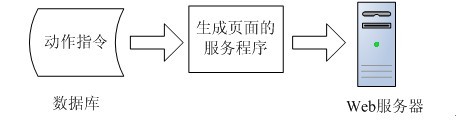
【单服务模式】

这样会带来一些问题。例如:当频道修改后,相应的服务程序都要重新翻一遍。如果频道栏目很多,对应的服务程序也会很多,导致程序的维护工作量大。前台开发人员不仅要去做页面,也要考虑后台的服务程序结构,给他们增加了不必要的开发难度,降低了开发效率。


【多服务模式】

而在多服务模式下,会出现多台服务去争抢指令数据的情况。动作指令的状态必须在多个服务之间同步。服务升级了,也要一个一个去更新,出现错误了也要一个一个去排查。。。。。。

那 么有没有一种方法能把生成页面的功能独立抽象成一个平台,同时提供一个程序接口,前台开发人员只需要按照这个接口,开发业务组件即可。现在前台开发人员只 需要把写好的业务组件,部署到指定的地方即可。剩下的事情交给这个平台去做,这样就简化了系统发布,维护工作,减轻了前台开发人员的工作量,提高了他们的 开发效率。


【平台集中处理模式】

       动作指令是指页面更新的动作,当页面数据有变化时,会根据业务规则从某个地方发出一个动作。它的来源大致可以分为三种:前台页面触发,后台内容管理系统触发,后台自动定时触发。

静态数据生成系统与业务组件的接口设计。通过反射的方式调用业务组件,接口的参数在指令结构的基础上扩展即可。比如增加一些错误描述,数据库链接对象等。

数据分发是一个独立的数据传输系统,它负责根据预先设定好的配置,把生成的页面数据传输到指定的web服务器上。

为了使系统在随着网站访问量的上升的同时做到水平扩展,加快指令的处理速度。所以需要把系统部署到多台服务器上,这样以来各个子系统就要统一通信协调。可以用MQ消息作为子系统之间的通信手段。子系统的部署模式变为Master-Slave的形式。Master主机上的系统负责读指令,然后把指令发送到MQ。各个Slave主机系统负责接收MQ消息指令,调用业务组件并更新某条指令的状态,这样就把处理业务逻辑的压力平均的分配到了各台slave主机。

    对于一个大型网站来说,生成的页面数据会非常多,管理这些页面文件又是一个问题。例如有的页面被删除了,而已经生成的页面数据还会存在各个web服务器上。这时就需要通过后台系统记录这些页面文件的部署位置,以便今后统一管理。同时业务组件的量也可能会比较多,特别是存在多版本的情况下,所以也需要把业务组件的配置情况记录到数据库中,便于统一管理。

[Lucene]Lucene.Net实现GroupBy的效果(2.3.1版)

mikel阅读(766)

本文简单介绍Lucene.Net实现GroupBy效果的方法,与《Lucene.Net 按类别统计搜索结果数 》一文类似。注意,这种使用方法很影响效率,特别是命中结果多的情况下。这段代码修正自2.3.1版本,其它版本可能会与此有差别。

改造方法仍然是修改IndexSearcher,这里不再修改类库,而是通过自己的代码来实现。


    /// <summary>
    
/// 增加了GroupBy功能的IndexSearcher
    
/// </summary>
    public class IndexSearcherExtension : IndexSearcher
    {
        
/// <summary>
        
/// 这里只用这一个构造函数,其它的就不再列出。
        
/// </summary>
        
/// <param name="path"></param>
        public IndexSearcherExtension(string path) : base(path) { }
        
/// <summary>
        
/// 增加GroupBy字段
        
/// </summary>
        private string fieldName;
        
/// <summary>
        
/// 给TopDocCollectorExtension类的Collect方法使用。
        
/// </summary>
        public string FieldName {
            
get { return fieldName; }
        }
        
/// <summary>
        
/// 在调用Search方法前一定要调用该方法。
        
/// </summary>
        
/// <param name="fieldName"></param>
        public void GroupBy(string fieldName) {
            
this.fieldName = fieldName;
        }
        
/// <summary>
        
/// 重写Seach方法,使其能调用构造好的方法。
        
/// </summary>
        
/// <param name="weight"></param>
        
/// <param name="filter"></param>
        
/// <param name="nDocs"></param>
        
/// <returns></returns>
        public override TopDocs Search(Weight weight, Filter filter, int nDocs)
        {
            
if (nDocs <= 0)
                
// null might be returned from hq.top() below.
                throw new System.ArgumentException("nDocs must be > 0");
            TopDocCollectorExtension collector 
= new TopDocCollectorExtension(nDocs, this);
            Search(weight, filter, collector);
            
return collector.TopDocs();
        }
    }


    /// <summary>
    
/// 实现与 HitQueue类完全一致,只因为这里无法使用类库提供的构造函数
    
/// </summary>
    public class HitQueueExtension : PriorityQueue
    {
        
internal HitQueueExtension(int size)
        {
            Initialize(size);
        }
        
        
public override bool LessThan(System.Object a, System.Object b)
        {
            ScoreDoc hitA 
= (ScoreDoc) a;
            ScoreDoc hitB 
= (ScoreDoc) b;
            
if (hitA.score == hitB.score)
                
return hitA.doc > hitB.doc;
            
else
                
return hitA.score < hitB.score;
        }
    }


    /// <summary>
    
/// 增加新的TopDocCollector类,无法直接继承TopDocCollector
    
/// </summary>
    public class TopDocCollectorExtension : HitCollector
    {
        
private ScoreDoc reusableSD;
        
internal int totalHits;
        
internal PriorityQueue hq;
        
/// <summary>Construct to collect a given number of hits.</summary>
        
/// <param name="numHits">the maximum number of hits to collect
        
/// </param>
        public TopDocCollectorExtension(int numHits)
            : 
this(numHits, new HitQueueExtension(numHits))
        {
        }
        
/// <summary>
        
/// 注入IndexSearcherExtension对象
        
/// </summary>
        private IndexSearcherExtension searcher;
        
/// <summary>
        
/// 构造函数注入对象
        
/// </summary>
        
/// <param name="numHits"></param>
        
/// <param name="searcher"></param>
        public TopDocCollectorExtension(int numHits, IndexSearcherExtension searcher)
            : 
this(numHits)
        {
            
this.searcher = searcher;
        }
        
internal TopDocCollectorExtension(int numHits, PriorityQueue hq)
        {
            
this.hq = hq;
        }
        
/// <summary>
        
/// 临时数据,用于排重
        
/// </summary>
        private Dictionary<intint> dict = new Dictionary<intint>();
        
// javadoc inherited
        public override void Collect(int doc, float score)
        {
            
if (score > 0.0f)
            {
                
//排重算法
                if (!string.IsNullOrEmpty(searcher.FieldName))
                {
                    IndexReader reader 
= searcher.GetIndexReader();
                    Document docment 
= reader.Document(doc);
                    
string value = docment.Get(searcher.FieldName).Trim();
                    
string value1 = string.Empty;
                    
string value2 = string.Empty;
                    
int len = value.Length;
                    
int len1 = (int)Math.Ceiling(len / 2.0f);
                    
int len2 = len  len1;
                    
int hash1 = value.Substring(0, len1).GetHashCode();
                    
int hash2 = value.Substring(len1, len2).GetHashCode();
                    
if (!(dict.ContainsKey(hash1) && dict.ContainsValue(hash2)))
                        dict.Add(hash1, hash2);
                    
else
                        
return;
                }
                totalHits
++;
                
if (reusableSD == null)
                {
                    reusableSD 
= new ScoreDoc(doc, score);
                }
                
else if (score >= reusableSD.score)
                {
                    
// reusableSD holds the last "rejected" entry, so, if
                    
// this new score is not better than that, there's no
                    
// need to try inserting it
                    reusableSD.doc = doc;
                    reusableSD.score 
= score;
                }
                
else
                {
                    
return;
                }
                reusableSD 
= (ScoreDoc)hq.InsertWithOverflow(reusableSD);
            }
        }
        
/// <summary>The total number of documents that matched this query. </summary>
        public virtual int GetTotalHits()
        {
            
return totalHits;
        }
        
/// <summary>The top-scoring hits. </summary>
        public virtual TopDocs TopDocs()
        {
            ScoreDoc[] scoreDocs 
= new ScoreDoc[hq.Size()];
            
for (int i = hq.Size()  1; i >= 0; i)
                
// put docs in array
                scoreDocs[i] = (ScoreDoc)hq.Pop();
            
float maxScore = (totalHits == 0? System.Single.NegativeInfinity : scoreDocs[0].score;
            
return new TopDocs(totalHits, scoreDocs, maxScore);
        }
    }
OK生产者完成了,下面看看消费者怎么搞。
        static void Main(string[] args)
        {
            IndexWriter writer 
= new IndexWriter("e:\\index"new StandardAnalyzer(), true);
            Document doc 
= new Document();
            doc.Add(
new Field("field""query value!", Field.Store.YES, Field.Index.TOKENIZED));
            writer.AddDocument(doc);
            writer.AddDocument(doc);
            writer.AddDocument(doc);
            writer.Close();
            IndexSearcherExtension searcher 
= new IndexSearcherExtension("e:\\index");
            searcher.GroupBy(
"field");
            Query q 
= new QueryParser("field"new StandardAnalyzer())
                .Parse(
"query");
            Hits docs 
= searcher.Search(q);
            
for (int i = 0; i < docs.Length(); i++)
            {
                Console.WriteLine(docs.Doc(i).Get(
"field"));
            }
            searcher.Close();
            Console.ReadKey();
        }

添加了三个相同的文档,结果只查询到一个结果,从而达到了目的。这段修改比较简单,应该还可以设计出更加高效的算法。

[CSS]vertical-align表单元素垂直对齐

mikel阅读(961)

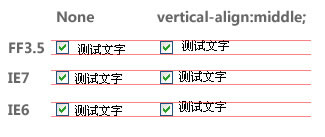
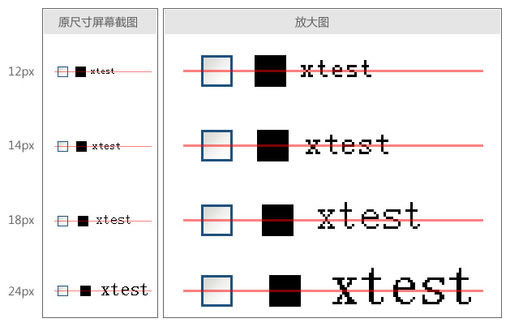
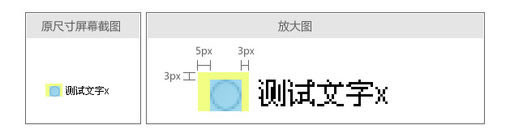
最近的项目涉及到很多表单的制作,特别是复选框(checkbox)和单选框(radio)。但是在前端开发过程中发现,单(复)选框和它们后面的 提示文字在不进行任何设置的情况下,是无法对齐的,而且在Firefox和IE中相差甚大。即使设置了vertical-align:middle,也依 然不能完美对齐。如下图所示:

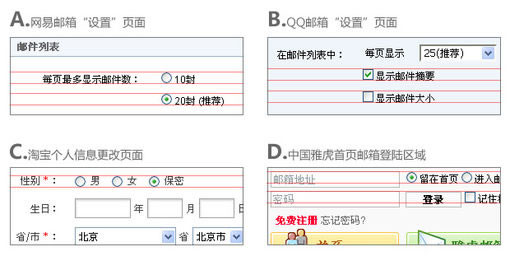
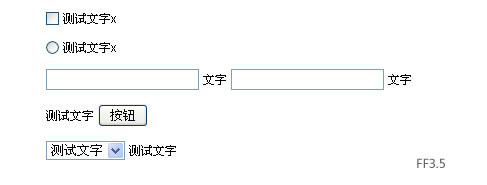
于是上网查看了一些网站,发现这个问题是普遍存在的,如下图(FF3.5):

在很多网站涉及到表单的页面中,都存在这种表单元素与提示文字无法对齐的问题。于是打算研究一下这个问题。首先,搜索到了wheatlee前辈的文章《大家都对vertical-align的各说各话》。wheatlee在他的文章中关于垂直居中提到了这样几个关键点:

1、vertical-align:middle的时候,是该元素的中心对齐周围元素的中心。

2、这里“中心”的定义是:图片当然就是height的一半的位置,而文字应该是基于baseline往上移动0.5ex,亦即小写字母“x”的正 中心。但是很多浏览器往往把ex这个单位定义为0.5em,以至于其实不一定是x的正中心(baseline等名词如果不懂,请先阅读wheatlee的 文章)

按照这个思路,对照我遇到的问题,首先想到的是先验证一下浏览器对于“复选框”和图片是不是使用同样的规则来渲染(是不是把复选框当成一个正方形图片来对待)。于是写出下面的代码:

<style>
body{font-size:12px;}
</style>
<input style="vertical-align:middle;" name="test" type="checkbox">
<img style="vertical-align:middle;"  src="testpic.gif" />
测试文字

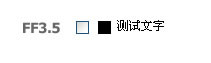
代码中的testpic.gif是一个尺寸与复选框完全一样的黑色图片。FF3.5下显示如下:

事实证明,FF3.5对于复选框和图片的垂直对齐方式是采用同样的规则进行渲染的,即将复选框当作一个正方形的图片(IE不是)。按照 wheatlee“middle的时候,是该元素的中心对齐周围元素的中心”的观点,如果我在复选框后面输入英文字符,那么复选框的中心将与英文中小写字 母x的中心对齐。经测试,FF3.5下面基本上是这样的(在一些字号的时候会有一定的误差,比如,如果字体高度是偶数,那么这个中心点有时在一般偏上 1px,有时在一半偏下1px)。如图:

但是这对于中文来说,并不是一个好的结果。因为中文是方块字,并且相同字号的情况下,高度会比小写的x高出很多。所以,按照浏览器内置的方式,只用 vertical-align:middle是无论如何也无法对齐中文的(无论是只写中文,中文在前,英文在前,FF3.5都是按照小写x中心那种方法来 对齐的)。但是回头再看看wheatlee的文章,他说这个小写x中心对齐的渲染方式,是对于“文字”来说的。那么,如果不是文字呢…?如果复选框后面跟 的是一个行内元素,如label,而文字是写在它内部的,会是什么样呢?浏览器会不会将这个内联元素整体看作一个“块”,然后依照类似图片的规则进行渲染 呢?如果那样,我们就达到目的了。

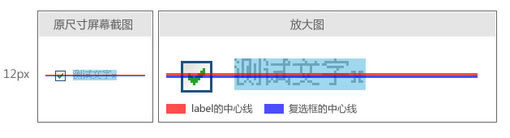
但是经过测试,很遗憾,事实并不是这样,加上label后跟没加没有任何区别。FF3.5/IE6/IE7均是如此。在FF3.5中用firebug看一下,证明浏览器并没有按照label的高度值来去对齐中心点。如图:

如果按照之前的设想,红蓝两线应该是重合的。但现在的情况是,它们相差了1px。并且这1px是没有规律的,随着字号的放大,并不恒定,貌似轻易也无法提炼出对应关系来。于是想到,再试一下将label也加上vertical-align:middle。结果如图:

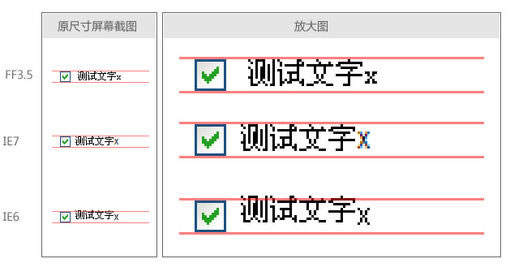
在FF3.5和IE7下面已经很接近于我们希望的状态了,只差1px。IE6下… 无语了。

经过以上折腾,我得出了跟wheatlee相同的结论,就是,各种浏览器之间对这个问题的处理貌似没有任何规律。并且,似乎每一种浏览器对于 vertical-align:middle的渲染都不是完全遵从W3C所说的“Align the vertical midpoint of the box with the baseline of the parent box plus half the x-height of the parent.”

但是经过仔细总结和分析,发现好像最终对齐的结果跟label的高度和当前字体中小写x的中心点都有关系,两者同时影响着渲染结果(虽然不明白为什 么会这样)。那么,既然现在的情况以及非常接近于希望的状态了,是否可以通过设置字体的方式来改变小写x的中心点的位置,进而对垂直对齐的结果进行“微 调”呢?

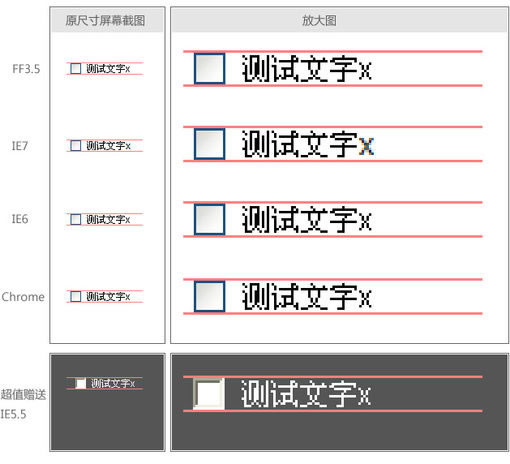
最终,在不断的测试中发现,如果将font-family中的第一个字体设置为Tahoma,则可以完美的实现对齐(Verdana等字体也可以)。而且在FF3.5/IE6/IE7/IE8和Chrome中均显示正常。最终代码如下:

运行代码框

[Ctrl+A 全部选择 提示:你可先修改部分代码,再按运行]

最终效果:

至此,多选框(checkbox)和提示文字对齐的问题已经解决,那么其他表单元素呢?试验了一下单选框(radio),发现,还是有问题。提示文 字依然是偏上。用firebug看了一下,发现radio元素默认有5px的左边距和3px的上、右边距,却没有下边距。如图:

于是,尝试去掉radio的外边距,刷新后显示正常。(其实多选框checkbox也是有外边距的,只是它的外边距四个方向都有,并且相等,所以对 于垂直对齐没有影响。)下图是一些常用表单元素的最终显示效果以及最终代码,大家可以用不同浏览器看一下实际的效果(注:由于演示使用的12px的中文实 际只有11px高,而 IE下文本框等元素的高度是22px,一个是奇数,一个是偶数,所以这些部分在IE中是无论如何也对不齐的,差1px。如果手动控制文本框高度为奇数,或 者将文字设置成为偶数的高度,则显示正常):

运行代码框

[Ctrl+A 全部选择 提示:你可先修改部分代码,再按运行]

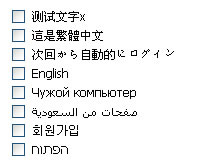
而且我发现,不但解决了中文的问题,如果提示信息换成其他语言,基本上也能够对齐,至少不会像开始那样偏移太多。下面是截图、代码和一些例子:

运行代码框

[Ctrl+A 全部选择 提示:你可先修改部分代码,再按运行]

至此,我的研究过程告于段落。

但是,还是想不通各浏览器为什么最后会显示出这样的效果,其中的原理是什么。牛人们有空可以解释一下吗?

原文: http://www.hplus.org.cn/blog/2009/07/143

经典论坛交流
http://bbs.blueidea.com/thread-2941023-1-1.html

本文链接:http://www.blueidea.com/tech/web/2009/6910.asp

[Flex]Flex实现数据分页查询

mikel阅读(1161)

这段时间空闲的时候都在用Flex结合自己开发的框架做一些应用,在这里介绍一下Flex如果进行数据分页查询,顺便介绍一下Flex结合框架进行应用开发。

首先看下需要的应用效果


实际功能包括对Customer进行条件和分页查询,客户相关国家数据查询。

l        服务端功能处理

u     根据逻辑定义相关数据操作实体类

    [Table("Customers")]

    interface ICustomer

    {

        [ID]

        string CustomerID { get; set; }

        [Column]

        string CompanyName { get; set; }

        [Column]

        string ContactName { get; set; }

        [Column]

        string ContactTitle { get; set; }

        [Column]

        string Address { get; set; }

        [Column]

        string City { get; set; }

        [Column]

        string Region { get; set; }

        [Column]

        string PostalCode { get; set; }

        [Column]

        string Country { get; set; }

        [Column]

        string Phone { get; set; }

        [Column]

        string Fax { get; set; }

    }

    [Table("Customers",DISTINCT=true)]

    interface ICountry

    {

        [Column("Country")]

        string Name { get; set; }

}

u     定义逻辑方法

    [Service]

    public class CustomerService

    {

        public IList<Customer> List(string matchCompanyName,string country, [Output]DataPage datapage)

        {

            Expression exp = new Expression();

            if (!string.IsNullOrEmpty(matchCompanyName))

                exp &= Customer.contactName.Match(matchCompanyName);

            if (!string.IsNullOrEmpty(country))

                exp &= Customer.country == country;

            datapage.RecordCount = exp.Count<Customer>();

            return exp.List<Customer>(new Region(datapage.PageIndex,datapage.PageSize));

        }

        public IList<Country> ListCountry()

        {

            Expression exp = new Expression();

            return exp.List<Country>();

        }

}


l        Flex功能处理

u     定义AS逻辑代理方法

    import Core.Utility;

    /**

    * Action Script调用方法生成工具1.0  生成时间:2009-7-27 21:39:39

    */

    public dynamic class CustomerService_List

    {

       public var Callback:Function;

       public var matchCompanyName:Object;

       public var country:Object;

       public var PageIndex:Object;

       public var PageSize:Object;

       public var RecordCount:Object;

       public var PageCount:Object;

       public var orderField:Object;

       public function Execute(method:String="get"):void

       {

           this._TimeSlice = new Date();

           Utility.CallMethod("CustomerService_List",this,Callback,method);

       }

    }


    import Core.Utility;

    /**

    * Action Script调用方法生成工具1.0  生成时间:2009-7-27 21:39:43

    */

    public dynamic class CustomerService_ListCountry

    {

       public var Callback:Function;

       public function Execute(method:String="get"):void

       {

           this._TimeSlice = new Date();

           Utility.CallMethod("CustomerService_ListCountry",this,Callback,method);

       }

    }

u     在界面定义逻辑操作对象

    <mx:Script>

       <![CDATA[

           [Bindable]

           private var Customers:Object = new ArrayCollection();

           [Bindable]

           private var Countrys:Object = new ArrayCollection();

           private var getCustomer = new CustomerService_List();

           private var getCountry = new CustomerService_ListCountry();

       ]]>

    </mx:Script>

u     设置国家Combox数据源绑定

<mx:ComboBox id="txtCountry"  dataProvider="{Countrys}" 

labelField="Name" editable="true" width="135"

color="#000000"></mx:ComboBox>

u     设置客户查询数据源绑定

    <mx:DataGrid dataProvider="{Customers}" width="100%" height="100%">

       <mx:columns>

           <mx:DataGridColumn headerText="CustomerID" dataField="CustomerID"/>

           <mx:DataGridColumn headerText="CompanyName" dataField="CompanyName"/>

           <mx:DataGridColumn headerText="ContactName" dataField="ContactName"/>

           <mx:DataGridColumn headerText="ContactTitle" dataField="ContactTitle"/>

           <mx:DataGridColumn headerText="Address" dataField="Address"/>

           <mx:DataGridColumn headerText="City" dataField="City"/>

           <mx:DataGridColumn headerText="Region" dataField="Region"/>

           <mx:DataGridColumn headerText="PostalCode" dataField="PostalCode"/>

           <mx:DataGridColumn headerText="Country" dataField="Country"/>

           <mx:DataGridColumn headerText="Phone" dataField="Phone"/>

           <mx:DataGridColumn headerText="Fax" dataField="Fax"/>

       </mx:columns>

    </mx:DataGrid>

u     在界面初始化事件中定义相关方法加调处理

    <mx:initialize>

       <![CDATA[

           getCountry.Callback= function(result:XML,err:Boolean){

                Countrys= result.Data.Country;

           };


           getCustomer.Callback = function(result:XML,err:Boolean){

              Customers = result.Data.Customer;

              if(getCustomer.FristSearch)

              {

                  dp.Open(getCustomer.PageSize ,result.Properties.datapage.RecordCount)

              }

           };

           getCustomer.PageSize=10;

           getCustomer.FristSearch = true;

           getCountry.Execute();

           getCustomer.Execute();

       ]]>

    </mx:initialize>

u     查询按钮相关功能处理

       <mx:Button label="Search" icon="@Embed(source='Search.png')">

           <mx:click>

              <![CDATA[

                  getCustomer.FristSearch = true;

                  getCustomer.matchCompanyName = txtCompanyName.text;

                  getCustomer.country = txtCountry.text;

                  getCustomer.PageIndex =0;

                  getCustomer.Execute();

              ]]>

           </mx:click>

    </mx:Button>


其实Flex做应用开发效率还是挺高的,特别当你熟了MXML后基于不用在UI设计器和MXML间切换所带来的麻烦。由于Flex直接支持CSS文件来描述,所以在开发过程基本不用管样式,到最后把设计人员搞好的CSS直接引用到Application里即可。顺便推荐一个Flex的样式主题站http://www.scalenine.com/gallery/ 提供一些免费的主题.

下载Dome完全代码