[缓存]memcached系列3:memcached的分布式,hash方式

mikel阅读(735)

  memchached的hash方式由Client API决定,余数hash方法是最早版本的memcached Client API中使用的,是比较简单也是比较容易理解的方式,当不考虑动态的添加服务器进程的时候,使用它是比较理想的,hash分布后的比较平均,容易达到多个 进程(服务器)负载均衡的效果。
     Consistent Hashing+虚拟结点的Hashing方法,可以实现比较好的负载均衡和动态的添加服务器时影响cach的命中率问题。值得大家去回味一下其中的算法。

memcached的分布式是什么意思?

这里多次使用了“分布式”这个词,但并未做详细解释。 现在开始简单地介绍一下其原理,各个客户端的实现基本相同。

下面假设memcached服务器有node1~node3三台, 应用程序要保存键名为“tokyo”“kanagawa”“chiba”“saitama”“gunma” 的数据。

memcached-0004-01.png

图1 分布式简介:准备

首先向memcached中添加“tokyo”。将“tokyo”传给客户端程序库后, 客户端实现的算法就会根据“键”来决定保存数据的memcached服务器。 服务器选定后,即命令它保存“tokyo”及其值。

memcached-0004-02.png

图2 分布式简介:添加时

同样,“kanagawa”“chiba”“saitama”“gunma”都是先选择服务器再保存。

接下来获取保存的数据。获取时也要将要获取的键“tokyo”传递给函数库。 函数库通过与数据保存时相同的算法,根据“键”选择服务器。 使用的算法相同,就能选中与保存时相同的服务器,然后发送get命令。 只要数据没有因为某些原因被删除,就能获得保存的值。

memcached-0004-03.png

图3 分布式简介:获取时

这样,将不同的键保存到不同的服务器上,就实现了memcached的分布式。 memcached服务器增多后,键就会分散,即使一台memcached服务器发生故障 无法连接,也不会影响其他的缓存,系统依然能继续运行。

接下来介绍第1次 中提到的Perl客户端函数库Cache::Memcached实现的分布式方法。

Cache::Memcached的分布式方法

Perl的memcached客户端函数库Cache::Memcached是 memcached的作者Brad Fitzpatrick的作品,可以说是原装的函数库了。

该函数库实现了分布式功能,是memcached标准的分布式方法。

根据余数计算分散

Cache::Memcached的分布式方法简单来说,就是“根据服务器台数的余数进行分散”。 求得键的整数哈希值,再除以服务器台数,根据其余数来选择服务器。
下面将Cache
::Memcached简化成以下的Perl脚本来进行说明。
use strict;
use warnings;
use String::CRC32;
my @nodes = ('node1','node2','node3');
my @keys = ('tokyo', 'kanagawa', 'chiba', 'saitama', 'gunma');
foreach my $key (@keys) {
    
my $crc = crc32($key);             # CRC値
    my $mod = $crc % ( $#nodes + 1 );
    my $server = $nodes$mod ];       # 根据余数选择服务器
    printf "%s => %s"n", $key, $server;
}

Cache::Memcached在求哈希值时使用了CRC。

首先求得字符串的CRC值,根据该值除以服务器节点数目得到的余数决定服务器。 上面的代码执行后输入以下结果:

tokyo       => node2
kanagawa => node3
chiba       => node2
saitama   => node1
gunma     => node1

根据该结果,“tokyo”分散到node2,“kanagawa”分散到node3等。 多说一句,当选择的服务器无法连接时,Cache::Memcached会将连接次数 添加到键之后,再次计算哈希值并尝试连接。这个动作称为rehash。 不希望rehash时可以在生成Cache::Memcached对象时指定“rehash => 0”选项。

根据余数计算分散的缺点

余数计算的方法简单,数据的分散性也相当优秀,但也有其缺点。 那就是当添加或移除服务器时,缓存重组的代价相当巨大。 添加服务器后,余数就会产生巨变,这样就无法获取与保存时相同的服务器, 从而影响缓存的命中率。用Perl写段代码来验证其代价。

use strict;
use warnings;
use String::CRC32;
my @nodes = @ARGV;
my @keys = ('a'..'z');
my %nodes;
foreach my $key ( @keys ) {
    
my $hash = crc32($key);
    
my $mod = $hash % ( $#nodes + 1 );
    my $server = $nodes$mod ];
    
push @{ $nodes$server } }, $key;
}
foreach my $node ( sort keys %nodes ) {
    
printf "%s: %s"n", $node,  join ",", @{ $nodes{$node} };
}

这段Perl脚本演示了将“a”到“z”的键保存到memcached并访问的情况。 将其保存为mod.pl并执行。

首先,当服务器只有三台时:

$ mod.pl node1 node2 nod3
node1: a,c,d,e,h,j,n,u,w,x
node2: g,i,k,l,p,r,s,y
node3: b,f,m,o,q,t,v,z

结果如上,node1保存a、c、d、e……,node2保存g、i、k……, 每台服务器都保存了8个到10个数据。

接下来增加一台memcached服务器。

$ mod.pl node1 node2 node3 node4
node1: d,f,m,o,t,v
node2: b,i,k,p,r,y
node3: e,g,l,n,u,w
node4: a,c,h,j,q,s,x,z

添加了node4。可见,只有d、i、k、p、r、y命中了。像这样,添加节点后 键分散到的服务器会发生巨大变化。26个键中只有六个在访问原来的服务器, 其他的全都移到了其他服务器。命中率降低到23%。在Web应用程序中使用memcached时, 在添加memcached服务器的瞬间缓存效率会大幅度下降,负载会集中到数据库服务器上, 有可能会发生无法提供正常服务的情况。

mixi的Web应用程序运用中也有这个问题,导致无法添加memcached服务器。 但由于使用了新的分布式方法,现在可以轻而易举地添加memcached服务器了。 这种分布式方法称为 Consistent Hashing。

Consistent Hashing

关于Consistent Hashing的思想,mixi株式会社的开发blog等许多地方都介绍过, 这里只简单地说明一下。

Consistent Hashing的简单说明

Consistent Hashing如下所示:首先求出memcached服务器(节点)的哈希值, 并将其配置到0~232的圆(continuum)上。 然后用同样的方法求出存储数据的键的哈希值,并映射到圆上。 然后从数据映射到的位置开始顺时针查找,将数据保存到找到的第一个服务器上。 如果超过232仍然找不到服务器,就会保存到第一台memcached服务器上。

memcached-0004-04.png

图4 Consistent Hashing:基本原理

从上图的状态中添加一台memcached服务器。余数分布式算法由于保存键的服务器会发生巨大变化 而影响缓存的命中率,但Consistent Hashing中,只有在continuum上增加服务器的地点逆时针方向的 第一台服务器上的键会受到影响。

memcached-0004-05.png

图5 Consistent Hashing:添加服务器

因此,Consistent Hashing最大限度地抑制了键的重新分布。 而且,有的Consistent Hashing的实现方法还采用了虚拟节点的思想。 使用一般的hash函数的话,服务器的映射地点的分布非常不均匀。 因此,使用虚拟节点的思想,为每个物理节点(服务器) 在continuum上分配100~200个点。这样就能抑制分布不均匀, 最大限度地减小服务器增减时的缓存重新分布。

通过下文中介绍的使用Consistent Hashing算法的memcached客户端函数库进行测试的结果是, 由服务器台数(n)和增加的服务器台数(m)计算增加服务器后的命中率计算公式如下:

(1 – n/(n+m)) * 100

支持Consistent Hashing的函数库

本连载中多次介绍的Cache::Memcached虽然不支持Consistent Hashing, 但已有几个客户端函数库支持了这种新的分布式算法。 第一个支持Consistent Hashing和虚拟节点的memcached客户端函数库是 名为libketama的PHP库,由last.fm开发。

至于Perl客户端,连载的第1次 中介绍过的Cache::Memcached::Fast和Cache::Memcached::libmemcached支持 Consistent Hashing。

两者的接口都与Cache::Memcached几乎相同,如果正在使用Cache::Memcached, 那么就可以方便地替换过来。Cache::Memcached::Fast重新实现了libketama, 使用Consistent Hashing创建对象时可以指定ketama_points选项。

my $memcached = Cache::Memcached::Fast->new({
    servers => ["192.168.0.1:11211","192.168.0.2:11211"],
    ketama_points => 150
});

另外,Cache::Memcached::libmemcached 是一个使用了Brain Aker开发的C函数库libmemcached的Perl模块。 libmemcached本身支持几种分布式算法,也支持Consistent Hashing, 其Perl绑定也支持Consistent Hashing。


转载声明:

原作者charlee

原始链接http://tech.idv2.com/2008/07/24/memcached-004/以及本声明。

[缓存] memcached系列2:memcached实例

mikel阅读(684)

  在上一篇文章,我们讲了,为什么要使用memched做为缓存服务器(没看的同学请点这里)。 下面让我们以memcached-1.2.1-win32版本的服务组件(安装后是以一个windows服务做daemon)和 C#API(Enyim.Caching)为基础,做一个"Hello world"级的程序,让我们真正感受到memcached就在我们身边。后一的文章,我们还讲memcached的核心部分(根据key来hash存取 数据,缓存数据在server端的内存存储结构)和一些好的案例。

  下面的实例实现的功能很简单,根据key来存取一个object对象(要支持Serializable才行哦),因为服务器端数据都是byte型的数据组实现存在。


服务的启动:

1, 将memcached-1.2.1-win32.zip解决到指定的地方,如c:\memcached

2, 命令行输入 'c:\memcached\memcached.exe -d install'
3, 命令行输入 'c:\memcached\memcached.exe -d start' ,该命令启动 Memcached,默认监听端口为 11211
  可以通过 memcached.exe -h 可以查看其帮助


第一步:配置config文件

<?xml version="1.0" encoding="utf-8" ?>
<configuration>
    
<configSections>
        
<sectionGroup name="enyim.com">
            
<section name="memcached" type="Enyim.Caching.Configuration.MemcachedClientSection, Enyim.Caching" />
        
</sectionGroup>
        
<section name="memcached" type="Enyim.Caching.Configuration.MemcachedClientSection, Enyim.Caching" />
    
</configSections>
    
<enyim.com>
        
<memcached>
            
<servers>
                
<!– put your own server(s) here–>
                
<add address="127.0.0.1" port="11211" />
                
            
</servers>
            
<socketPool minPoolSize="10" maxPoolSize="100" connectionTimeout="00:00:10" deadTimeout="00:02:00" />
        
</memcached>
    
</enyim.com>
    
<memcached keyTransformer="Enyim.Caching.TigerHashTransformer, Enyim.Caching">
        
<servers>
            
<add address="127.0.0.1" port="11211" />
            
        
</servers>
        
<socketPool minPoolSize="2" maxPoolSize="100" connectionTimeout="00:00:10" deadTimeout="00:02:00" />
    
</memcached>
</configuration>

这里的port:11211是, memcached-1.2.1-win32在安装时默认使用的port.当然你可以用memcached.exe -p 端口号来自行设置。


第二步, 新建TestMemcachedApp的console project

引用Enyim.Caching.dll或者在solution中加入这个project(可以下载的代码中找到)。

基础代码如下:

//create a instance of MemcachedClient
MemcachedClient mc = new MemcachedClient();
// store a string in the cache
mc.Store(StoreMode.Set, "MyKey""Hello World");
// retrieve the item from the cache
Console.WriteLine(mc.Get("MyKey"));


完整代码如下, 

using System;
using System.Collections.Generic;
using System.Text;
using Enyim.Caching;
using Enyim.Caching.Memcached;
using System.Net;
using Enyim.Caching.Configuration;
namespace DemoApp
{
    
class Program
    {
        
static void Main(string[] args)
        {
            
// create a MemcachedClient
            
// in your application you can cache the client in a static variable or just recreate it every time
            MemcachedClient mc = new MemcachedClient();
            
            
// store a string in the cache
            mc.Store(StoreMode.Set, "MyKey""Hello World");
            
// retrieve the item from the cache
            Console.WriteLine(mc.Get("MyKey"));
            
// store some other items
            mc.Store(StoreMode.Set, "D1"1234L);
            mc.Store(StoreMode.Set, 
"D2", DateTime.Now);
            mc.Store(StoreMode.Set, 
"D3"true);
            mc.Store(StoreMode.Set, 
"D4"new Product());
            mc.Store(StoreMode.Set, 
"D5"new byte[] { 12345678910 });            
            Console.WriteLine(
"D1: {0}", mc.Get("D1"));
            Console.WriteLine(
"D2: {0}", mc.Get("D2"));
            Console.WriteLine(
"D3: {0}", mc.Get("D3"));
            Console.WriteLine(
"D4: {0}", mc.Get("D4"));
            
byte[] tmp = mc.Get<byte[]>("D5");
            
// delete them from the cache
            mc.Remove("D1");
            mc.Remove(
"D2");
            mc.Remove(
"D3");
            mc.Remove(
"D4");
            
// add an item which is valid for 10 mins
            mc.Store(StoreMode.Set, "D4"new Product(), new TimeSpan(0100));
            Console.ReadLine();
        }
        
// objects must be serializable to be able to store them in the cache
        [Serializable]
        
class Product
        {
            
public double Price = 1.24;
            
public string Name = "Mineral Water";
            
public override string ToString()
            {
                
return String.Format("Product {{{0}: {1}}}"this.Name, this.Price);
            }
        }
    }
}


Server和Client API及实例代码下载(在Enyim Memcached 1.2.0.2版本上的修改) 


下载memcached服务安装地址:http://www.danga.com/memcached/

Client API下载地址:http://www.danga.com/memcached/apis.bml

[缓存]memcached系列之1:memcached基础知识简介

mikel阅读(706)

     通常的网页缓存方式有动态缓存和静态缓存等几种,在ASP.NET中已经可以实现对页面局部进行缓存,而使用memcached的缓存比 ASP.NET的局部缓存更加灵活,可以缓存任意的对象,不管是否在页面上输出。而memcached最大的优点是可以分布式的部署,这对于大规模应用来 说也是必不可少的要求。

LiveJournal.com使用了memcached在前端进行缓存,取得了良好的效果,而像wikipedia,sourceforge等也采用了或即将采用memcached作为缓存工具。memcached可以大规模网站应用发挥巨大的作用。


Memcached是什么?
    Memcached是高性能的,分布式的内存对象缓存系统,用于在动态应用中减少数据库负载,提升访问速度。

Memcached由Danga Interactive开发,用于提升LiveJournal.com访问速度的。LJ每秒动态页面访问量几千次,用户700万。Memcached将数据库负载大幅度降低,更好的分配资源,更快速访问。


如何使用memcached-Server端?
在服务端运行:
# ./memcached -d -m 2048 -l 10.0.0.40 -p 11211

这将会启动一个占用2G内存的进程,并打开11211端口用于接收请求。由于32位系统只能处理4G内存的寻址,所以在大于4G内存使用PAE的32位服务器上可以运行2-3个进程,并在不同端口进行监听。


如何使用memcached-Client端?
在应用端包含一个用于描述Client的Class后,就可以直接使用,非常简单。
PHP Example:
$options["servers"] = array("192.168.1.41:11211", "192.168.1.42:11212");
$options["Debug"] = false;
$memc = new MemCachedClient($options);
$myarr = array("one","two", 3);
$memc->set("key_one", $myarr);
$val = $memc->get("key_one");
print $val[0].""n"; // prints 'one‘
print $val[1].""n"; // prints 'two‘

print $val[2].""n"; // prints 3


为什么不使用数据库做这些?

暂且不考虑使用什么样的数据库(MS-SQL, oracle, Postgres, MySQL-InnoDB, etc..), 实现事务(ACID,Atomicity, Consistency, Isolation, and Durability )需要大量开销,特别当使用到硬盘的时候,这就意味着查询可能会阻塞。当使用不包含事务的数据库(例如Mysql-MyISAM),上面的开销不存在,但 读线程又可能会被写线程阻塞。

Memcached从不阻塞,速度非常快。


为什么不使用共享内存?
最初的缓存做法是在线程内对对象进行缓存,但这样进程间就无法共享缓存,命中率非常低,导致缓存效率极低。后来出现了共享内存的缓存,多个进程或者线程共享同一块缓存,但毕竟还是只能局限在一台机器上,多台机器做相同的缓存同样是一种资源的浪费,而且命中率也比较低。
Memcached Server和Clients共同工作,实现跨服务器分布式的全局的缓存。并且可以与Web Server共同工作,Web Server对CPU要求高,对内存要求低,Memcached Server对CPU要求低,对内存要求高,所以可以搭配使用。

Mysql 4.x的缓存怎么样?


Mysql查询缓存不是很理想,因为以下几点:
当指定的表发生更新后,查询缓存会被清空。在一个大负载的系统上这样的事情发生的非常频繁,导致查询缓存效率非常低,有的情况下甚至还不如不开,因为它对cache的管理还是会有开销。
在32位机器上,Mysql对内存的操作还是被限制在4G以内,但memcached可以分布开,内存规模理论上不受限制。
Mysql上的是查询缓存,而不是对象缓存,如果在查询后还需要大量其它操作,查询缓存就帮不上忙了。

如果要缓存的数据不大,并且查询的不是非常频繁,这样的情况下可以用Mysql 查询缓存,不然的话memcached更好。


数据库同步怎么样?
这里的数据库同步是指的类似Mysql Master-Slave模式的靠日志同步实现数据库同步的机制。
你可以分布读操作,但无法分布写操作,但写操作的同步需要消耗大量的资源,而且这个开销是随着slave服务器的增长而不断增长的。
下一步是要对数据库进行水平切分,从而让不同的数据分布到不同的数据库服务器组上,从而实现分布的读写,这需要在应用中实现根据不同的数据连接不同的数据库。
当这一模式工作后(我们也推荐这样做),更多的数据库导致更多的让人头疼的硬件错误。

Memcached可以有效的降低对数据库的访问,让数据库用主要的精力来做不频繁的写操作,而这是数据库自己控制的,很少会自己阻塞 自己。


Memcached快吗?

非常快,它使用libevent,可以应付任意数量打开的连接(使用epoll,而非poll),使用非阻塞网络IO,分布式散列对象到不同的服务器,查询复杂度是O(1)。


原文地址:http://www.danga.com/memcached/

翻译:http://www.example.net.cn/archives/2006/01/eoamemcachedoea.html

[缓存].NET中使用Memcached的相关资源整理

mikel阅读(602)

Memcached官方站点:http://www.danga.com/memcached/

Memcached Win32 1.2.6下载:http://code.jellycan.com/memcached/

安装帮助:Windows下的.NET+ Memcached安装

Memcached .NET客户端:

1).NET memcached client library

  下载地址:https://sourceforge.net/projects/memcacheddotnet

  相关文章:分布式缓存系统Memcached简介与实践

2)enyim.com Memcached Client

  下载地址:http://www.codeplex.com/EnyimMemcached/

  相关文章:memcached系列2:memcached实例  

3)Memcached Providers

  下载地址:http://www.codeplex.com/memcachedproviders

  相关文章:.NET平台上的Memcached客户端介绍

4) BeIT Memcached

  下载地址:http://code.google.com/p/beitmemcached/

  相关文章:分布式缓存BeIT Memcached简介

相关链接: 

a) Memcached for Windows
b) Which .NET Memcached client do you use, EnyimMemcached vs. BeITMemcached?
c) 博客园知识库Memcached相关文章

[Web]75个最佳Web设计资源

mikel阅读(732)


强烈推荐:75个最佳Web设计资源下载

2009-07-25 15:57 by 牛牛博客, 2259 visits, 网摘, 编辑

75个最佳Web设计资源

分类: 生活点滴 | 标签: | 日期:2009-02-02

Web 设计资源大全,包括字体,CSS 资源,Logo 设计资源,图标,设计启发,教程,Photoshop 素材下载,以及 WordPress 资源。每个类别又包含数十套该类别下的具体资源,可能是有关 Web 设计的终极资源了。
web_resources


字体
Typography Resources
60 套公司用设计字体 [Smashing Magazine]
20 套免费手写字体与资源 [Fuel Your Creativity]
50 套专业Web设计与印刷用字体 [Noupe]
15 套漂亮的高质量免费字体 [Smashing Magazine]
21 套来自 DeviantArt 的艺术字体 [Designflavr]
设计专业人士使用的7套最佳字体 [Just Creative Design]
45 套符合现代设计趋势的免费漂亮字体 [Six Revisions]

CSS
CSS Resources
50 个强大的 CSS 实用工具 [Smashing Magazine]
30 套 CSS 小炒资料 [All Web Design Resources]
CSS 编辑器评测 [Smashing Magazine]
CSS 高手的 10 个原则 [NETTUTS]
2008 最佳 CSS 设计中文) [Web Designer Wall]
40 个 CSS 生成器 [All Web Design Resources]
重置你的CSS [Six Revisions]
实现干净代码的12条定律中文) [Smashing Magazine]

Logo 设计
Logo Design Resources
81 个最佳 Logo 设计资源 [Logo Design Love]
最佳Logo设计资源 [Just Creative Design]
105 个Logo设计资源 [Elite By Design]
35 个令人目眩的黑白 Logo [Siah Design]
50 套能够带来启发的 Logo [Fuel Your Creativity]
2008 年 33 个不俗的 Logo 重设计 [Smashing Apps]
30 个精彩的矢量 Logo 设计 [VECTORTUTS]
10 个成功的 Logo 设计 [Logo Design Love]

图标

2008年50套最漂亮的图标 [Noupe]
40 套漂亮的免费图标 [Six Revisions]
22 套全新高品质免费图标 [Elite By Design]
40 套超漂亮的图标 [Noupe]

设计启发

50 个漂亮的博客设计 [Smashing Magazine]
40 个有创意的按钮 [PSDTUTS]
60 个非常 Cool 非常有创意的 404 页面 [Hongkiat]
30 个漂亮的 Web 设计例子 [Six Revisions]
2008年40个具有启发性的 Web 设计 [CrazyLeaf Design Blog]
50 个漂亮的导航菜单 [Vandelay Website Design]
Web 设计中的57个矢量字符 [CSSLeak]
50 个漂亮的,有创意的展示类站点设计 [Smashing Magazine]
40 个漂亮的暗色系 CSS 设计 [Toxel]
40 个漂亮的手画 Web 设计 [CSSBuilt]
79 个精彩的专辑封面 [Inspiredology]
40 套有创意的名片设计 [Toxel]
纹理与图样设计展示 [Smashing Magazine]
54 幅令人灵魂出窍的数字画 [PSDTUTS]
50 个出色的博客页脚设计 [Hongkiat]
24 个漂亮的,有创意的网站 Header 设计 [Toxel]
富有灵感的 PDF 杂志设计 [Smashing Magazine]

教程

41 个最好的 Photoshop 效果教程 [Hongkiat]
30 个漂亮的 Photoshop 文字效果教程 [Six Revisions]
70 个 Photoshop 美容教程 [Smashing Magazine]
50 个很棒的 Photoshop 教程 [PSDTUTS]
30 个 Fireworks 教程 [Arbent]
Adobe Fireworks 教程与下载 [Smashing Magazine]
40 个 Wacom 数字画板教程 [DesignM.ag]
50 个出色的 AJAX 教程 [Smashing Magazine]
50 个富有创意的 Photoshop 文字效果教程 [PSDTUTS]
23 个不可思议的 Photoshop 教程 [Elite By Design]
Adobe Illustrator 教程 [Smashing Magazine]

Photoshop 资源下载

Photoshop Custom Shapes 集 [Smashing Magazine]
20 个 Photoshop 印刷作品与画笔资源 [PSDTUTS]
75 个超高分辨率 Photoshop 画笔 [Elite By Design]
50 个不可或缺的 Photoshop 画笔 [Smashing Magazine]
200 套 Photoshop 画笔 [You the Designer]
50 套免费的 Photoshop Pattern [Emma Alvarez]
55 套免费的画笔与矢量图 [Web Resources Depot]
40 套 Photoshop 万圣节主题画笔 [PSDFan]

WordPress

100 出色的 WordPress 免费主题 [Smashing Magazine]
30 个最实用的 WordPress 技巧 [Hongkiat]
45 套免费的 WordPress 网格布局主题 [WPZOOM]
45 套必须要看到 WordPress 主题 [Noupe]
20 套 WordPress 公司网站主题 [Blogsessive]
24 套高质量免费 WordPress 主题 [Toxel]
21 套令人耳目一新的免费Wordpress主题 [Smashing Apps]
50 套漂亮的免费 WordPress 主题 [Six Revisions]
10 个寻找免费 WordPress 主题的地方 [UPrinting]
50 个最好的 WordPress 主题 [CrazyLeaf Design Blog]
10 个 WordPress 实用 RSS 技巧 [Smashing Magazine]
45 个出色的免费 WordPress 主题 [DzineBlog]

原文:http://www.toxel.com/design/2008/12/19/top-75-best-design-resources-of-2008/
译文:http://www.yeeyan.com/articles/view/57288/22841
来自“零下72度”博客

[缓存]分布式缓存系统Memcached简介与实践

mikel阅读(735)

缘起: 在数据驱动的web开发中,经常要重复从数据库中取出相同的数据,这种重复极大的增加了数据库负载。缓存是解决这个问题的好办法。但是ASP.NET中的虽然已经可以实现对页面局部进行缓存,但还是不够灵活。此时Memcached或许是你想要的。
Memcached是什么?
Memcached是由Danga Interactive开发的,高性能的,分布式的内存对象缓存系统,用于在动态应用中减少数据库负载,提升访问速度。
Memcached能缓存什么?
通过在内存里维护一个统一的巨大的hash表,Memcached能够用来存储各种格式的数据,包括图像、视频、文件以及数据库检索的结果等。
Memcached快么?

非 常快。Memcached使用了libevent(如果可以的话,在linux下使用epoll)来均衡任何数量的打开链接,使用非阻塞的网络I/O,对 内部对象实现引用计数(因此,针对多样的客户端,对象可以处在多样的状态), 使用自己的页块分配器和哈希表, 因此虚拟内存不会产生碎片并且虚拟内存分配的时间复杂度可以保证为O(1).。
Danga Interactive为提升Danga Interactive的速度研发了Memcached。目前,LiveJournal.com每天已经在向一百万用户提供多达两千万次的页面访问。而这 些,是由一个由web服务器和数据库服务器组成的集群完成的。Memcached几乎完全放弃了任何数据都从数据库读取的方式,同时,它还缩短了用户查看 页面的速度、更好的资源分配方式,以及Memcache失效时对数据库的访问速度。
Memcached的特点
Memcached的缓存是一种分布式的,可以让不同主机上的多个用户同时访问, 因此解决了共享内存只能单机应用的局限,更不会出现使用数据库做类似事情的时候,磁盘开销和阻塞的发生。
Memcached的使用
Memcached服务器端的安装 (此处将其作为系统服务安装)
  下载文件:memcached 1.2.1 for Win32 binaries (Dec 23, 2006)
   1 解压缩文件到c:\memcached
   2 命令行输入 'c:\memcached\memcached.exe -d install' 
   3 命令行输入 'c:\memcached\memcached.exe -d start' ,该命令启动 Memcached ,默认监听端口为 11211
  通过 memcached.exe -h 可以查看其帮助
二   .NET memcached client library
   下载文件:https://sourceforge.net/projects/memcacheddotnet/

   里面有.net1.1  和 .net2.0的两种版本  还有一个不错的例子。

三  应用

  1 将Commons.dll,ICSharpCode.SharpZipLib.dll,log4net.dll,Memcached.ClientLibrary.dll 等放到bin目录
  2 引用
Memcached.ClientLibrary.dll
  3 代码

 1 namespace Memcached.MemcachedBench
 2 {
 3     using System;
 4     using System.Collections;
 5 
 6     using Memcached.ClientLibrary;
 7 
 8     public class MemcachedBench 
 9     {
10         [STAThread]
11         public static void Main(String[] args) 
12         {
13             string[] serverlist = { "10.0.0.131:11211""10.0.0.132:11211" };
14 
15             //初始化池
16             SockIOPool pool = SockIOPool.GetInstance();
17             pool.SetServers(serverlist);
18 
19             pool.InitConnections = 3;
20             pool.MinConnections = 3;
21             pool.MaxConnections = 5;
22 
23             pool.SocketConnectTimeout = 1000;
24             pool.SocketTimeout = 3000;
25 
26             pool.MaintenanceSleep = 30;
27             pool.Failover = true;
28 
29             pool.Nagle = false;
30             pool.Initialize();
31 
32             // 获得客户端实例
33             MemcachedClient mc = new MemcachedClient();
34             mc.EnableCompression = false;
35 
36             Console.WriteLine("————测  试———–");
37             mc.Set("test""my value");  //存储数据到缓存服务器,这里将字符串"my value"缓存,key 是"test"
38 
39             if (mc.KeyExists("test"))   //测试缓存存在key为test的项目
40             {
41                 Console.WriteLine("test is Exists");
42                 Console.WriteLine(mc.Get("test").ToString());  //在缓存中获取key为test的项目
43             }
44             else
45             {
46                 Console.WriteLine("test not Exists");
47             }
48 
49             Console.ReadLine();
50 
51             mc.Delete("test");  //移除缓存中key为test的项目
52 
53             if (mc.KeyExists("test"))
54             {
55                 Console.WriteLine("test is Exists");
56                 Console.WriteLine(mc.Get("test").ToString());
57             }
58             else
59             {
60                 Console.WriteLine("test not Exists");
61             }
62             Console.ReadLine();
63             
64             SockIOPool.GetInstance().Shutdown();  //关闭池, 关闭sockets
65         }
66     }
67 }

  4 运行结果


   后记: 是个不错的东西 ,使用起来也很方便,php ,ruby 的项目中用这个的很多,但是.net项目中用的较少(恕俺孤陋寡闻) 。希望有兴趣的朋友们 多多交流 。

[MVC]Custom ViewEngine for the ASP.NET MVC

mikel阅读(852)

Have you ever seen a presentation of ScottGu about the ASP.NET MVC framework? There is one particular slide that keeps coming back, stating that every step in the ASP.NET MVC life cycle is pluggable. Let's find out if replacing one of these components is actually easy by creating a custom ViewEngine and corresponding view.

 ASP.NET MVC life cycle

Some background

After a route has been determined by the route handler, a Controller is fired up. This Controller sets ViewData, which is afterwards passed into the ViewEngine. In short, the ViewEngine processes the view and provides the view with ViewData from the Controller. Here's the base class:

public abstract class ViewEngineBase {
     public abstract void RenderView(ViewContext viewContext);
}

By default, the ASP.NET MVC framework has a ViewEngine named WebFormsViewEngine. As the name implies, this WebFormsViewEngine is used to render a view which is created using ASP.NET web forms.

The MvcContrib project contains some other ViewEngine implementations like NVelocity, Brail, NHaml, XSLT, …

What we are going to build…

Rendered viewIn this blog post, we'll build a custom ViewEngine which will render a page like you see on the right from a view with the following syntax:

<!DOCTYPE html PUBLIC "-//W3C//DTD XHTML 1.0 Transitional//EN" "http://www.w3.org/TR/xhtml1/DTD/xhtml1-transitional.dtd">
<html xmlns=""http://www.w3.org/1999/xhtml"">http://www.w3.org/1999/xhtml" >
<head>
    <title>Custom ViewEngine Demo</title>
</head>
<body>
    <h1>{$ViewData.Title}</h1>
    <p>{$ViewData.Message}</p>
    <p>The following fruit is part of a string array: {$ViewData.FruitStrings[1]}</p>
    <p>The following fruit is part of an object array: {$ViewData.FruitObjects[1].Name}</p>
    <p>Here's an undefined variable: {$UNDEFINED}</p>
</body>
</html>

What do we need?

First of all, download the current ASP.NET MVC framework from CodePlex. After creating a new ASP.NET MVC web site, tweak some stuff:

  • Remove /Views/*.*
  • Remove /Content/*.* (unless you want to keep the default CSS files)
  • Add a folder /Code

In order to create a ViewEngine, we will have to do the following:

  • Create a default IControllerFactory which sets the ViewEngine we will create on each Controller
  • Edit Global.asax.cs and register the default controller factory
  • Create a ViewLocator (this one will map a controller + action to a specific file name that contains the view to be rendered)
  • Create a ViewEngine (the actual purpose of this blog post)

Let's do some coding!

1. Creating and registering the IControllerFactory implementation

Of course, ASP.NET MVC has a default factory which creates a Controller instance for each incoming request. This factory takes care of dependency injection, including Controller initialization and the assignment of a ViewEngine. Since this is a good point of entry to plug our own ViewEngine in, we'll create an inherited version of the DefaultControllerFactory:

public class SimpleControllerFactory : DefaultControllerFactory
{
    protected override IController CreateController(RequestContext requestContext, string controllerName)
    {
        Controller controller = (Controller)base.CreateController(requestContext, controllerName);
        controller.ViewEngine = new SimpleViewEngine(); // <– will be implemented later in this post
        return controller;
    }
}

In order to make this SimpleControllerFactory the default factory, edit the Global.asax.cs file and add the following line of code in the Application_Start event:

ControllerBuilder.Current.SetControllerFactory(typeof(SimpleControllerFactory));

2. Create a ViewLocator

In order for the ViewEngine we'll build to find the correct view for each controller + action combination, we'll have to implement a ViewLocator too:

public class SimpleViewEngine : IViewEngine
{
    // …
    // Private member: IViewLocator _viewLocator = null;
    // Public property: IViewLocator ViewLocator
    // …

    #region IViewEngine Members

    public void RenderView(ViewContext viewContext)
    {
        string viewLocation = ViewLocator.GetViewLocation(viewContext, viewContext.ViewName);
        if (string.IsNullOrEmpty(viewLocation))
        {
            throw new InvalidOperationException(string.Format("View {0} could not be found.", viewContext.ViewName));
        }

        string viewPath = viewContext.HttpContext.Request.MapPath(viewLocation);
        string viewTemplate = File.ReadAllText(viewPath);

        IRenderer renderer = new PrintRenderer();
        viewTemplate = renderer.Render(viewTemplate, viewContext);

        viewContext.HttpContext.Response.Write(viewTemplate);
    }

    #endregion
}

Note that we first locate the view using the ViewLocator, map it to a real path on the server and then render contents directly to the HTTP response. The PrintRenderer class maps {$….} strings in the view to a real variable from ViewData. If you want to see the implementation, please check the download of this example.

Conclusion

Conclusions Replacing the default ViewEngine with a custom made version is actually quite easy! The most difficult part in creating your own ViewEngine implementation will probably be the parsing of your view. Fortunately, there are some examples around which may be a good source of inspiration (see MvcContrib).
If someone wants to use the code snippets I posted to create their own PHP Smarty, please let me know! Smarty is actually quite handy, and might also be useful in ASP.NET MVC.

And yes, it has been a lot of reading, but I did not forget. Download the example code from this blog post: CustomViewEngine.zip (213.17 kb)

[MVC]ASP.NET MVC : 实现我们自己的视图引擎

mikel阅读(805)

ASP.NET MVC的一个开源项目MvcContrib中,为我们提供了几个视图引擎,例如NVelocity, Brail, NHaml, XSLT。那么如果我们想在ASP.NET MVC中实现我们自己的一个视图引擎,我们应该要怎么做呢?

我们知道呈现视图是在Controller中通过传递视图名和数据到RenderView()方法来实现的。好,我们就从这里下手。我们查看一下ASP.NET MVC的源代码,看看RenderView()这个方法是如何实现的:

protected virtual void RenderView(string viewName, string masterName, object viewData) {
ViewContext viewContext = new ViewContext(ControllerContext, viewName, masterName, viewData, TempData);
ViewEngine.RenderView(viewContext);
}//这是P2的源码,P3略有不同,原理差不多

从上面的代码我们可以看到,Controller中的RenderView()方法主要是将ControllerContext, viewName, masterName, viewData, TempData这一堆东西封装成ViewContext,然后把ViewContext传递给 ViewEngine.RenderView(viewContext)。嗯,没错,我们这里要实现的就是ViewEngine的 RenderView()方法。

ASP.NET MVC为我们提供了一个默认的视图引擎,这个视图引擎叫做:WebFormsViewEngine. 从名字就可以看出,这个视图引擎是使用ASP.NET web forms来呈现的。在这里,我们要实现的视图引擎所使用的模板用HTML文件吧,简单的模板示例代码如下:

<!DOCTYPE html PUBLIC "-//W3C//DTD XHTML 1.0 Transitional//EN" "http://www.w3.org/TR/xhtml1/DTD/xhtml1-transitional.dtd">
<html xmlns=""http://www.w3.org/1999/xhtml"">http://www.w3.org/1999/xhtml" >
<head>
<title>自定义视图引擎示例</title>
</head>
<body>
<h1>{$ViewData.Title}</h1>
<p>{$ViewData.Message}</p>
<p>The following fruit is part of a string array: {$ViewData.FruitStrings[1]}</p>
<p>The following fruit is part of an object array: {$ViewData.FruitObjects[1].Name}</p>
<p>Here's an undefined variable: {$UNDEFINED}</p>
</body>
</html>


下面马上开始我们的实现。首先,毫无疑问的,我们要创建一个ViewEngine,就命名为 SimpleViewEngine 吧,注意哦,ViewEngine要实现IViewEngine接口:

public class SimpleViewEngine : IViewEngine
{
#region Private members
IViewLocator _viewLocator = null;
#endregion
#region IViewEngine Members : RenderView()
public void RenderView(ViewContext viewContext)
{
string viewLocation = ViewLocator.GetViewLocation(viewContext, viewContext.ViewName);
if (string.IsNullOrEmpty(viewLocation))
{
throw new InvalidOperationException(string.Format("View {0} could not be found.", viewContext.ViewName));
}
string viewPath = viewContext.HttpContext.Request.MapPath(viewLocation);
string viewTemplate = File.ReadAllText(viewPath);
//以下为模板解析
IRenderer renderer = new PrintRenderer();
viewTemplate = renderer.Render(viewTemplate, viewContext);
viewContext.HttpContext.Response.Write(viewTemplate);
}
#endregion
#region Public properties : ViewLocator
public IViewLocator ViewLocator
{
get
{
if (this._viewLocator == null)
{
this._viewLocator = new SimpleViewLocator();
}
return this._viewLocator;
}
set
{
this._viewLocator = value;
}
}
#endregion
}


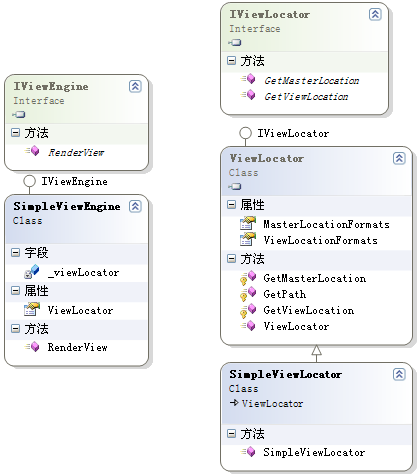
在这里实现了IViewEngine接口提供的RenderView()方法,这里要提供一个ViewLocator的属性。 ViewLocator的主要就是根据控制器中传来的视图名,进行视图的定位。在RenderView()方法中首先获取视图的路径,然后把视图模板读进 来,最后进行模板的解析然后输出。

我们再来看一下ViewLocator是如何实现的。他是IViewLocator类型的,也就是说SimpleViewLocator实现了IViewLocator接口。SimpleViewLocator的实现代码如下:

public class SimpleViewLocator : ViewLocator
{
public SimpleViewLocator()
{
base.ViewLocationFormats = new string[] { "~/Views/{1}/{0}.htm",
"~/Views/{1}/{0}.html",
"~/Views/Shared/{0}.htm",
"~/Views/Shared/{0}.html"
};
base.MasterLocationFormats = new string[] { "" };
}
} 


我们的SimpleViewLocator 是继承自ASP.NET MVC的ViewLocator类,而ViewLocator则是实现了IViewLocator接口的。由于ViewLocator已经为了完成了全部的工作,这里我们只需修改下他的ViewLocationFormats 来使用我们自己的模板文件就可以了。

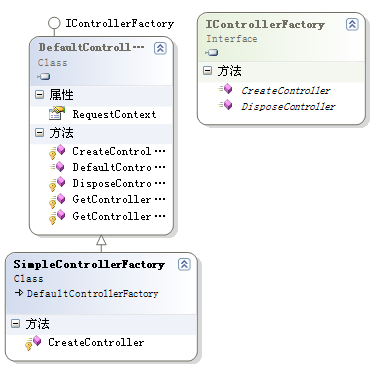
我们再来看一下类图,那就更加清楚了:

image

注:关于模板解析的部分代码这里就不说了,不在讨论范围内,可以自己下载代码来看

现在我们基本完成了我们的视图引擎,那么如何让ASP.NET MVC不要使用默认的web forms视图引擎,而使用我们自定义的视图引擎呢?

在ASP.NET MVC中,所有的请求都是通过一个工厂类来创建Controller实例的,这个工厂类必须实现 IControllerFactory 接口。默认的实现该接口的工厂类是DefaultControllerFactory。这个工厂类就是我们修改默认的视图引擎为我们的视图引擎的入口点。 为了方便,我们创建一个继承自DefaultControllerFactory的SimpleControllerFactory :

public class SimpleControllerFactory : DefaultControllerFactory
{
protected override IController CreateController(RequestContext requestContext, string controllerName)
{
Controller controller = (Controller)base.CreateController(requestContext, controllerName);
controller.ViewEngine = new SimpleViewEngine();//修改默认的视图引擎为我们刚才创建的视图引擎
return controller;
}
} 

这里只要修改controller.ViewEngine为我们自定义的ViewEngine就可以了.最终的类图大概如下:

image

要使我们创建的控制器工厂类SimpleControllerFactory 成为默认的控制器工厂类,我们必须在Global.asax.cs中的Application_Start 事件中添加如下代码:

ControllerBuilder.Current.SetControllerFactory(typeof(SimpleControllerFactory));

到这里,我们已经完成了我们自己的视图引擎。

在ASP.NET MVC中实现自定义的视图引擎是很简单的,难点在于模板的解析,具体大家可以研究MvcContrib中的四个视图引擎的代码。最近要对模板引擎进行研究,大家有什么其他优秀的、成熟的、开源的模板引擎,麻烦给小弟推荐一下,先谢了。

Enjoy!

版权声明:本文首发于博客园,作者为QLeelulu
本文版权归作者和博客园共有,欢迎转载,但未经作者同意必须保留此段声明,且在文章页面明显位置给出原文连接,否则视为侵权。

参考文章:
ASP.NET MVC Preview生命周期分析
Creating a custom ViewEngine for the ASP.NET MVC framework(下面给出的源代码就是这篇文章给出的源代码)


本文源码下载: ASP.NET MVC 自定义视图引擎源代码下载

作者:QLeelulu
出处:http://QLeelulu.cnblogs.com/
本文版权归作者和博客园共有,欢迎转载,但未经作者同意必须保留此段声明,且在文章页面明显位置给出原文连接,否则保留追究法律责任的权利

[UI]Web 设计与开发者必须知道的 15 个站点

mikel阅读(568)

公司博客整整一个月没有更新了,最近一段时间,全公司都忙于两件事,为海尔集团做定制,为一个合作伙伴做 OEM,终于有了眉目。工作期间,常用到一些工具与帮助站点,今天读到一篇文章,介绍了15个对 Web 设计与开发师极端有用的站点,里面有不少也是我们一直在使用的,也许对很多人都有用,翻译出来以饷同仁。 ColorCombos

配色是 Web 设计的首要大事,Color Combos 帮你预备了数千种配色方案,可以根据色调浏览选取。
LIpsum

Lorem Ipsum Text 是一中自造的,字典中不存在的单词,是在演示页面结构的时候,需要加文字的地方使用 Lorem Ipsum Text 填充可以避免用户因关注文字的意思而分神。Lipsum.com 可以帮你生成制定数目的 Lorem Ipsum 单词。
What the font?

有时候你对某个 Logo 感兴趣,想知道是拿什么字体做的,可以将 Logo 图片上传到这个网站,结果之准确会让你难以置信。
ConvertIcon

Favicon 越来越受欢迎,尤其随着 Firefox 的流行,Firefox 会将你站点的 Favicon 标志显示在标签上,也会显示于书签,Favicon 支持多种图形格式,比如 png,但 IE 并不支持 png,该站点可以帮助你将 png 等图片格式的 Favicon 转换成 IE 支持的 ico 格式。
BgPatterns

现代 Web 设计的趋势之一包括使用背景图案,BgPatterns.com 可以帮你设计背景图案,他们有大量可选的图案,可以按不同方式接合,还可以设置透明度。
HTML Encoder

如果你要在网站中显示 Web 代码,那将是非常烦人的事,你必须将诸如 < 一类的符号用编码表示,这个网站可以帮你做这些事情,只需将你的代码复制进去,他们会帮你生成可以直接使用的代码。还有 HTML Decoder 帮你做相反的事。
Xenocode Browsers

该网站非常有用,可以直接在站点中预览你的网站在 IE6, IE7, IE8, Firefox 2, Firefox 3, Google Chrome 以及 Opera 中的样子。唯一的不足是,不支持 Mac 和 Linux 环境下的浏览器。
Test Everything

这个网站包含了超过 100 中工具帮你测试几乎所有东西,如跨浏览器兼容,查 PR 值,甚至帮你验证代码。
Sprite Generator

CSS Sprites 在显著降低 HTTP 请求方面功不可没,但 CSS sprite 可不是个简单的技术,Sprite generator 可以帮你做这些繁复的工作,将你的图片打包成 zip 上传上去,他们会把你的图片组合成 sprite,还帮你生成 CSS 代码。
Buttonator

这个网站可以帮你设计漂亮的按钮。
Load Impact

这个压力测试站点可以帮你测试你的站点的抗压能力,如果你的某篇文章曾经上过 Digg 或 StumbleUpon 等网站的首页,你就会知道抗压测试多么重要。
IconFinder

这个网站收藏了大量来自网络的免费图标。
TypeTester

该站点可以帮你测试不同字体的显示效果。
CSS Tidy

这个站点可以帮你检查 CSS 代码,并修正其中的错误,比如,它可以发现你的 CSS 代码中最常见到重复设置问题。
Contact Forms Generators

自定义表单可以帮助你实现同访问者的互动,无需编程,就能快速生成访客反馈表单,甚至帮你生成邮件发送 PHP, ASP, Perl 代码。
本文来源:15 sites web developers and designers should know

中文翻译来源:COMSHARP CMS 官方网站

[C#] 浅谈线程池(中):独立线程池的作用及IO线程池

mikel阅读(662)


注1:如果没有加以说明,我们这里谈论的对象默认为XP及以上版本的Window操作系统。

注2:timeslice又被称为quantum,不同操作系统中定义的这个值并不相同。在Windows客户 端操作系统(XP,Vista)中时间片默认为2个clock interval,在服务器操作系统(2003,2008)中默认为12个clock interval(在主流系统上,1个clock interval大约10到15毫秒)。服务器操作系统使用较长的时间片,是因为一般服务器上运行的程序比客户端要少很多,且更注重性能和吞吐量,而客户 端系统更注重响应能力——而且,如果您真需要的话,时间片的长度也是可以调整的。

注3:不过,如果程序中多次复用单个NativeOverlapped对象的话,这个方法的性能会略微好于 QueueUserWorkItem,据说WCF中便使用了这种方式——微软内部总有那么些技巧是我们不知如何使用的,例如老赵记得之前查看 ASP.NET AJAX源代码的时候,在MSDN中不小心发现一个接口描述大意是“预留方法,请不要在外部使用”。对此,我们又能有什么办法呢?